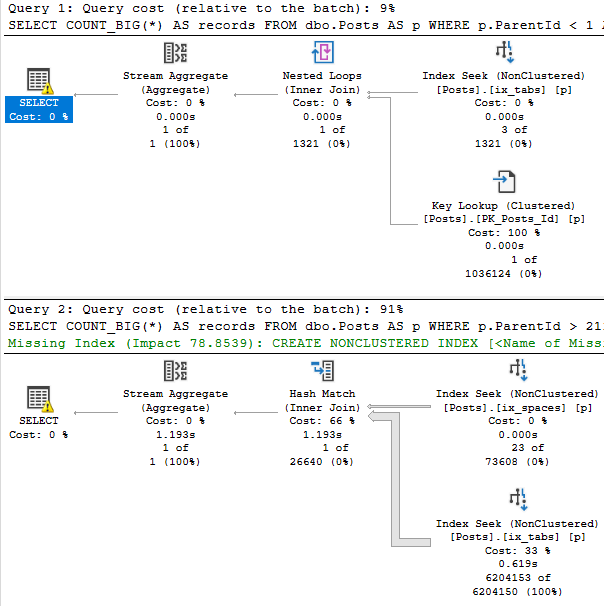
If you recall yesterday’s post, we added a couple two column indexes to the Posts table.
Each one helped a slightly different query, but either index would likely be “good enough”.
This post will focus on another common scenario I see, where people added many single column indexes over the years.
In this scenario, performance is much more variable.
Singletonary
Here are our indexes:
CREATE INDEX ix_spaces
ON dbo.Posts(ParentId);

CREATE INDEX ix_tabs
ON dbo.Posts(Score);
Taking the same queries from yesterday:
SELECT COUNT_BIG(*) AS records
FROM   dbo.Posts AS p
WHERE  p.ParentId < 1
AND    p.Score > 19000
AND 1 = (SELECT 1);

SELECT COUNT_BIG(*) AS records
FROM   dbo.Posts AS p
WHERE  p.ParentId > 21100000
AND    p.Score < 1
AND 1 = (SELECT 1);
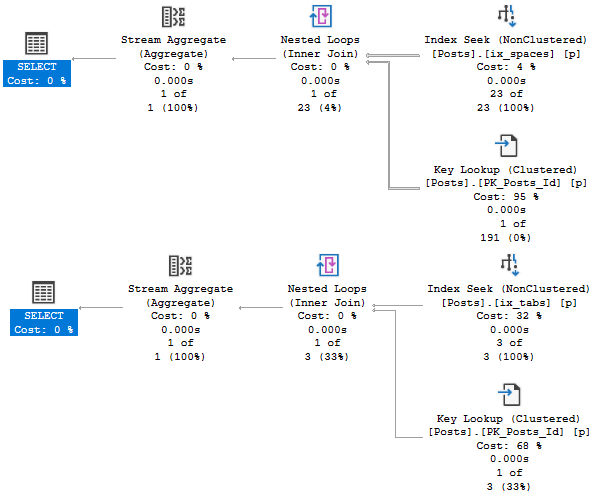
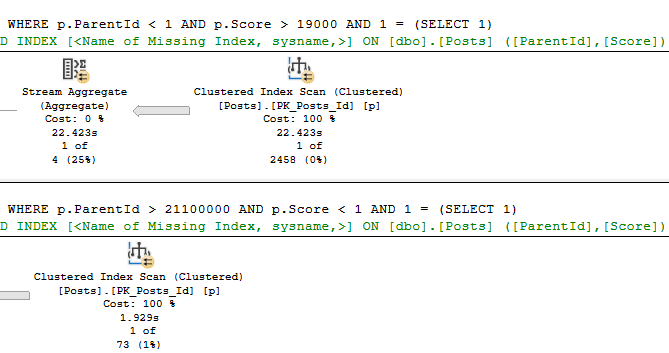
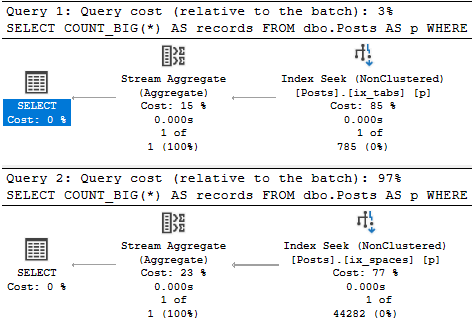
This is what the new plans look like:
Curious
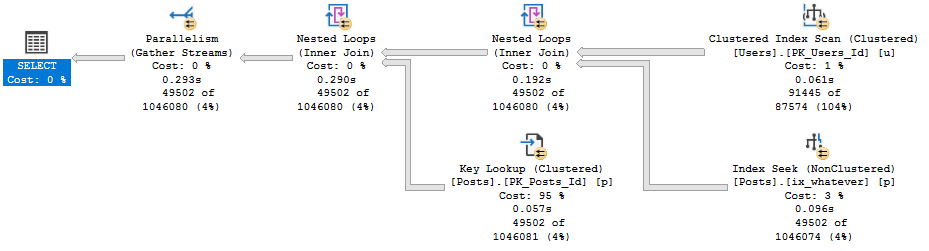
The first thing you may notice is that the top plan performs a rather traditional key lookup, and the bottom plan performs a slightly more exotic index intersection.
Both concepts are similar. Since clustered index key columns are present in nonclustered indexes, they can be used to either join a nonclustered index to the clustered index on a table, or to join two nonclustered indexes together.
It’s a nice trick, and this post definitely isn’t to say that either is bad. Index intersection just happens to be worse here.
Wait, But…
You may have noticed that both queries get pretty bad estimates. You might even be thinking about leaving me a comment to update stats.
The thing is that I created these indexes, which means they get stats built with a full scan, and it’s a demo database where nothing changes.
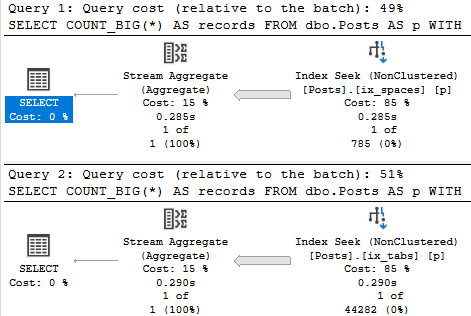
We just get unfortunate histograms, in this case. If I create very specific filtered statistics, both plans perform a key lookup.
CREATE STATISTICS s_orta ON dbo.Posts(ParentId) WHERE ParentId > 21100000 WITH FULLSCAN;
CREATE STATISTICS s_omewhat ON dbo.Posts(Score) WHERE Score < 1 WITH FULLSCAN;
CREATE STATISTICS s_emi ON dbo.Posts(ParentId) WHERE ParentId < 1 WITH FULLSCAN;
CREATE STATISTICS s_lightly ON dbo.Posts(Score) WHERE Score > 19000 WITH FULLSCAN;
This is necessary with the legacy cardinality estimator, too. Rain, sleet, shine.
Bad estimates happen.
When your tables are large enough, those 200 (plus one for NULLs, I know, I know) steps often can’t do the data justice.
Filtered stats and indexes can help with that.
Something I try to teach people is that SQL Server can use whatever statistics or methods it wants for cardinality estimation, even if they’re not directly related to the indexes that it uses to access data.
With filtered statistics, things go fine for both plans:
Sunshine
When Could This Cause Trouble?
Obviously, plans like this are quite sensitive to parameter sniffing. Imagine a scenario where a “bad” plan got cached.
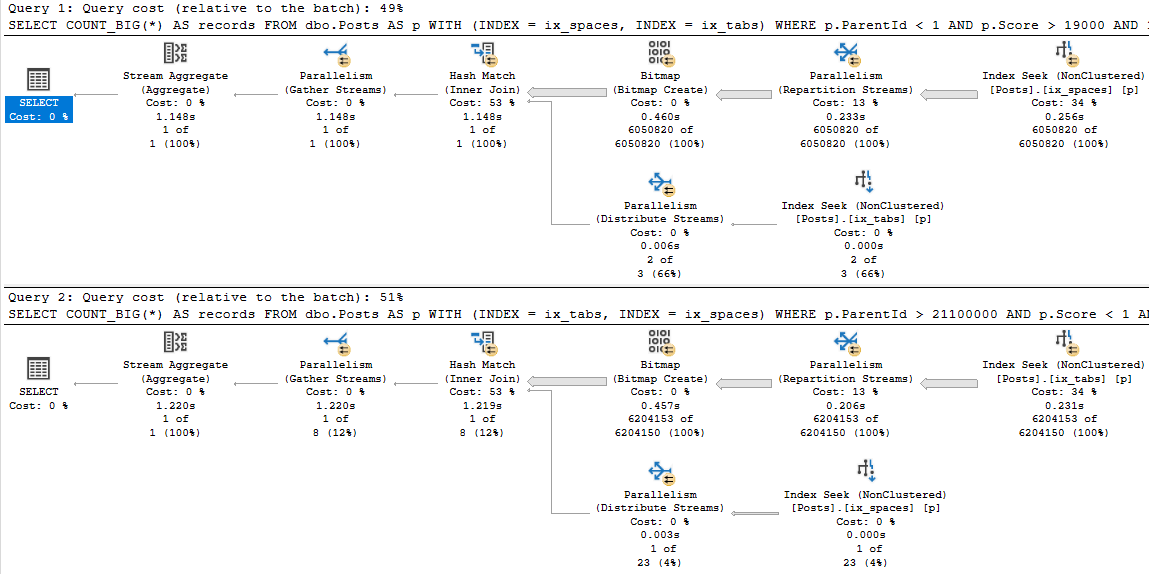
Multihint
Having one instance of this query running doesn’t cause much of a CPU uptick, but if user concurrency is high then you’d notice it pretty quickly.
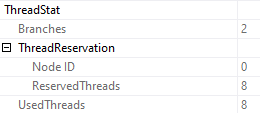
Parallel plans, by definition, use a lot more CPU, and more worker threads. These both reserve and use 8 threads.
Stretch
Those two plans aren’t even the worst possible case from a duration perspective. Check out these:
5-4-3-2-1
Doubledown
When talking index design, single column indexes are rarely a good idea.
Sometimes I’ll see entire tables with an index on every column, and just that column.
That can lead to some very confusing query plans, and some very poor performance.
Thanks for reading!
Going Further
If this is the kind of SQL Server stuff you love learning about, you’ll love my training. Blog readers get 25% off the Everything Bundle — over 100 hours of performance tuning content. Need hands-on help? I offer consulting engagements from targeted investigations to ongoing retainers. Want a quick sanity check before committing to a full engagement? Schedule a call — no commitment required.
When I’m working with clients, people who don’t spend a lot of time working with indexes have a lot of questions about indexes.
The general rule about leading column selectivity is an easy enough guideline to follow, but what happens if you’re not looking for equality predicates?
What if you’re looking for ranges, and those ranges might sometimes be selective, and other times not?
LET’S FIND OUT!
Chicken and Broccoli
Let’s take these queries against the Posts table. The number next to each indicates the number of rows that match the predicate.
SELECT COUNT_BIG(*) AS records /*6050820*/
FROM   dbo.Posts AS p
WHERE  p.ParentId < 1
AND 1 = (SELECT 1);

SELECT COUNT_BIG(*) AS records /*3*/
FROM   dbo.Posts AS p
WHERE  p.Score > 19000
AND 1 = (SELECT 1);

SELECT COUNT_BIG(*) AS records /*23*/
FROM   dbo.Posts AS p
WHERE  p.ParentId > 21100000
AND 1 = (SELECT 1);

SELECT COUNT_BIG(*) AS records /*6204153*/
FROM   dbo.Posts AS p
WHERE  p.Score < 1
AND 1 = (SELECT 1);
In other words, sometimes they’re selective, and sometimes they’re not.
If we run these without any indexes, SQL Server will ask for single column indexes on ParentId and Score.
But our queries don’t look like that. They look like this (sometimes):
SELECT COUNT_BIG(*) AS records
FROM   dbo.Posts AS p
WHERE  p.ParentId < 1
AND    p.Score > 19000
AND 1 = (SELECT 1);

SELECT COUNT_BIG(*) AS records
FROM   dbo.Posts AS p
WHERE  p.ParentId > 21100000
AND    p.Score < 1
AND 1 = (SELECT 1);
When we run that, SQL Server asks for… the… same index.
Huhhhhh
Missing index request column order is pretty basic.
Instead, we’re gonna add these:
CREATE INDEX ix_spaces
ON dbo.Posts(ParentId, Score);

CREATE INDEX ix_tabs
ON dbo.Posts(Score, ParentId);
Steak and Eggs
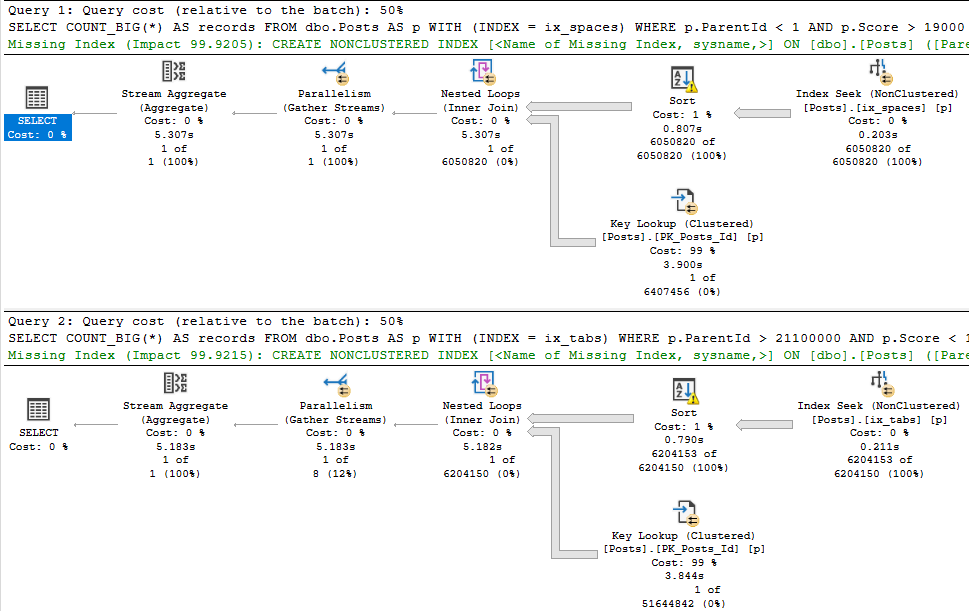
When we run those two queries again, each will use a different index.
If we force those queries to use the opposite index, we can see why SQL Server made the right choice:
SELECT COUNT_BIG(*) AS records
FROM   dbo.Posts AS p WITH (INDEX = ix_spaces)
WHERE  p.ParentId < 1
AND    p.Score > 19000
AND 1 = (SELECT 1);

SELECT COUNT_BIG(*) AS records
FROM   dbo.Posts AS p WITH (INDEX = ix_tabs)
WHERE  p.ParentId > 21100000
AND    p.Score < 1
AND 1 = (SELECT 1);
Having two indexes like that may not always be the best idea.
To make matters worse, you probably have things going on that make answers less obvious, like actually selecting columns instead of just getting a count.
This is where it pays to look at your indexes over time to see how they’re used, or knowing which query is most important.
There isn’t that much of a difference in time or resources here, after all.
Thanks for reading!
Going Further
If this is the kind of SQL Server stuff you love learning about, you’ll love my training. Blog readers get 25% off the Everything Bundle — over 100 hours of performance tuning content. Need hands-on help? I offer consulting engagements from targeted investigations to ongoing retainers. Want a quick sanity check before committing to a full engagement? Schedule a call — no commitment required.
In yesterday’s post, we looked at four different ways to get the highest value per use with no helpful indexes.
Today, we’re going to look at how those same four plans change with an index.
This is what we’ll use:
CREATE INDEX ix_whatever
    ON dbo.Posts(OwnerUserId, Score DESC);
Query #1
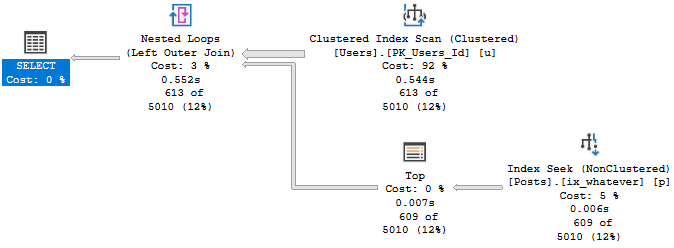
This is our MAX query! It does really well with the index.
SELECT u.Id,
       u.DisplayName,
	   u.Reputation,
	   ca.Score
FROM dbo.Users AS u
CROSS APPLY
(
    SELECT MAX(Score) AS Score
	FROM dbo.Posts AS p
	WHERE p.OwnerUserId = u.Id

) AS ca
WHERE u.Reputation >= 100000
ORDER BY u.Id;
It’s down to just half a second.
Phoney
Query #2
This is our TOP 1 query with an ORDER BY.
SELECT u.Id,
       u.DisplayName,
	   u.Reputation,
	   ca.Score
FROM dbo.Users AS u
CROSS APPLY
(
    SELECT TOP (1) p.Score
	FROM dbo.Posts AS p
	WHERE p.OwnerUserId = u.Id
	ORDER BY p.Score DESC

) AS ca
WHERE u.Reputation >= 100000
ORDER BY u.Id;
Aliveness
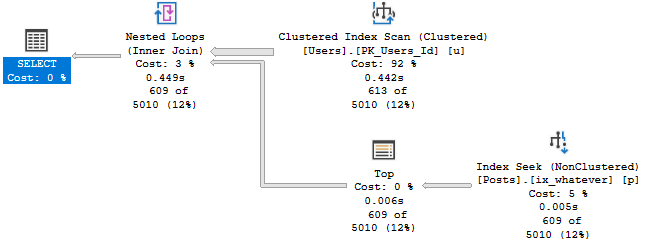
This finished about 100ms faster than MAX in this run, but it gets the same plan.
Who knows, maybe Windows Update ran during the first query.
Query #3
This is our first attempt at row number, and… it’s not so hot.
SELECT u.Id,
       u.DisplayName,
	   u.Reputation,
	   ca.Score
FROM dbo.Users AS u
CROSS APPLY
(
    SELECT p.Score,
	       ROW_NUMBER() OVER (ORDER BY p.Score DESC) AS n
	FROM dbo.Posts AS p
	WHERE p.OwnerUserId = u.Id
) AS ca
WHERE u.Reputation >= 100000
AND ca.n = 1
ORDER BY u.Id;
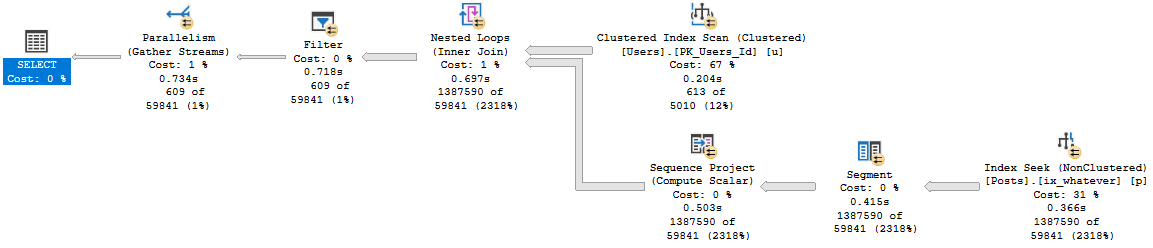
While the other plans were able to finish quickly without going parallel, this one does go parallel, and is still about 200ms slower.
Bad Bed
Query #4
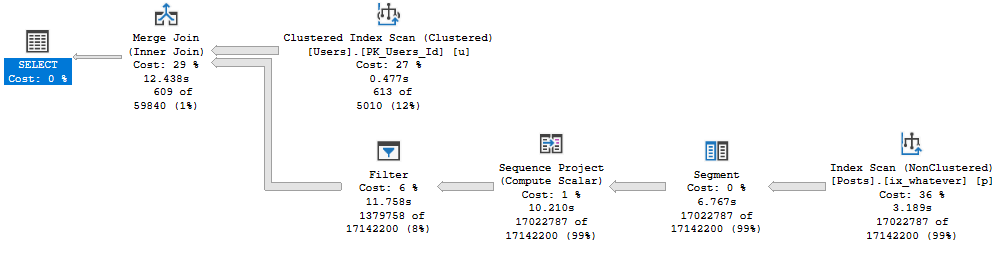
Is our complicated cross apply. The plan is simple, but drags on for almost 13 seconds now.
SELECT u.Id,
       u.DisplayName,
	   u.Reputation,
	   ca.Score
FROM dbo.Users AS u
CROSS APPLY
(
    SELECT *
	FROM
	(
        SELECT p.OwnerUserId,
	           p.Score,
	           ROW_NUMBER() OVER (PARTITION BY p.OwnerUserId
			                      ORDER BY p.Score DESC) AS n
	    FROM dbo.Posts AS p
	) AS p
	WHERE p.OwnerUserId = u.Id
	AND p.n = 1
) AS ca
WHERE u.Reputation >= 100000
ORDER BY u.Id;
Wrong One
Slip On
In this round, row number had a tougher time than other ways to express the logic.
It just goes to show you, not every query is created equal in the eyes of the optimizer.
Now, initially I was going to do a post with the index columns reversed to (Score DESC, OwnerUserId), but it was all bad.
Instead, I’m going to do future me a favor and look at how things change in SQL Server 2019.
Thanks for reading!
Going Further
If this is the kind of SQL Server stuff you love learning about, you’ll love my training. Blog readers get 25% off the Everything Bundle — over 100 hours of performance tuning content. Need hands-on help? I offer consulting engagements from targeted investigations to ongoing retainers. Want a quick sanity check before committing to a full engagement? Schedule a call — no commitment required.
SELECT u.Id,
       u.DisplayName,
	   u.Reputation,
	   ca.Score
FROM dbo.Users AS u
CROSS APPLY
(
    SELECT MAX(Score) AS Score
	FROM dbo.Posts AS p
	WHERE p.OwnerUserId = u.Id

) AS ca
WHERE u.Reputation >= 100000
ORDER BY u.Id;
The query plan is simple enough, and it runs for ~17 seconds.
Big hitter
Query #2
This uses TOP 1.
SELECT u.Id,
       u.DisplayName,
	   u.Reputation,
	   ca.Score
FROM dbo.Users AS u
CROSS APPLY
(
    SELECT TOP (1) p.Score
	FROM dbo.Posts AS p
	WHERE p.OwnerUserId = u.Id
	ORDER BY p.Score DESC

) AS ca
WHERE u.Reputation >= 100000
ORDER BY u.Id;
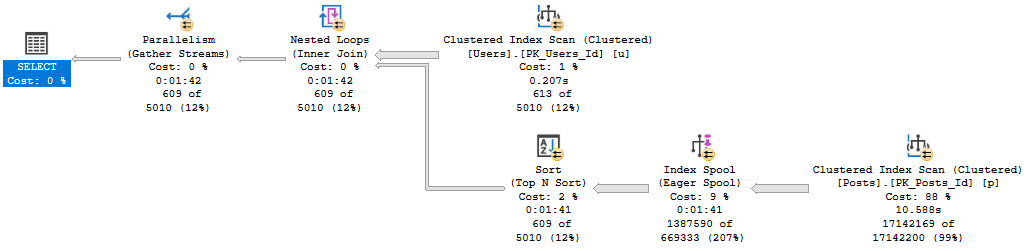
The plan for this is also simple, but runs for 1:42, and has one of those index spool things in it.
Unlucky
Query #3
This query uses row number rather than top 1, but has almost the same plan and time as above.
SELECT u.Id,
       u.DisplayName,
	   u.Reputation,
	   ca.Score
FROM dbo.Users AS u
CROSS APPLY
(
    SELECT p.Score,
	       ROW_NUMBER() OVER (ORDER BY p.Score DESC) AS n
	FROM dbo.Posts AS p
	WHERE p.OwnerUserId = u.Id
) AS ca
WHERE u.Reputation >= 100000
AND ca.n = 1
ORDER BY u.Id;
Why send me silly notes?
Query #4
Also uses row number, but the syntax is a bit more complicated.
The row number happens in a derived table inside the cross apply, with the correlation and filtering done outside.
SELECT u.Id,
       u.DisplayName,
	   u.Reputation,
	   ca.Score
FROM dbo.Users AS u
CROSS APPLY
(
    SELECT *
	FROM
	(
        SELECT p.OwnerUserId,
	           p.Score,
	           ROW_NUMBER() OVER (PARTITION BY p.OwnerUserId
			                      ORDER BY p.Score DESC) AS n
	    FROM dbo.Posts AS p
	) AS p
	WHERE p.OwnerUserId = u.Id
	AND p.n = 1
) AS ca
WHERE u.Reputation >= 100000
ORDER BY u.Id;
This is as close to competitive with Query #1 as we get, at only 36 seconds.
That’s a lot of writing.
Wrap Up
If you don’t have helpful indexes, the MAX pattern looks to be the best.
Granted, there may be differences depending on how selective data in the table you’re aggregating is.
But the bottom line is that in that plan, SQL Server doesn’t have to Sort any data, and is able to take advantage of a couple aggregations (partial and full).
In the next couple posts, we’ll look at different ways to index for queries like this.
Thanks for reading!
Going Further
If this is the kind of SQL Server stuff you love learning about, you’ll love my training. Blog readers get 25% off the Everything Bundle — over 100 hours of performance tuning content. Need hands-on help? I offer consulting engagements from targeted investigations to ongoing retainers. Want a quick sanity check before committing to a full engagement? Schedule a call — no commitment required.
In this video, I delve into a peculiar performance issue that arose from a stored procedure and a missing index request. The scenario began when a user passed an unusual negative value to the stored procedure, causing significant performance degradation. To mitigate the problem, developers implemented a catch to convert any negative values to zero, ensuring the execution plan remained stable. However, this fix led to further complications as another query against the same table exhibited poor performance due to a missing index request. The video explores how adding an index suggested by SQL Server’s missing index feature improved one query but significantly slowed down another, highlighting the importance of carefully testing database changes in development environments before deployment.
Full Transcript
Hello, Erik Darling here with Erik Darling Data. And I wanted to talk about sort of a funny situation that I was recently asked to remedy. And that funny situation, well, the funny situation started with a stored procedure, sort of was escalated by a missing index request. And all came tumbling down on top of that stored procedure. So the stored procedure, it didn’t look like this because it was not, it was not, it was not an issue with Stack Overflow. I’m going to level with you. To be very honest, Stack Overflow has never asked me to fix a performance problem. I just keep having to find these random performance problems in the, when I do demos in the database. It’s the damnedest thing, isn’t it? Anyway. In real life, it was a slightly different scenario, but it was a stored procedure. And at some point, at some point, some user, we should call them a loser probably, had passed in a bad piece of data to the stored procedure. In fact, it was someone had passed a negative value into the stored procedure once. And that caused everything to fly off the rails.
Everything went really, really, really badly with this stored procedure. So the developers in charge of it put this catch in to fix things. Where if someone passed in a negative value for their stored procedure, they would, they would revert the value to zero to a positive number so that they did not get their big, golly gosh, awful plan. So this is what the stored procedure looks like. And, you know, there’s a pretty simple select top one query after that. Not a big deal. And in fact, if we go and we look, we can see that ever since we converted this database from access to SQL Server 2000, we have had this index in place, the single key column index in place. And with that index in place, this stored procedure runs relatively quickly. And by relatively quickly, I mean, instantly. If we look at the execution plan, this thing finishes in 87 milliseconds.
There’s a missing index request. But if I have a query that’s ending, that’s finishing in 87 milliseconds, I’m not like jumping up and down and saying, hey, we really, really need to add this missing index request for reasons. Right. Like I can run this a million times every time I run this. It’s quick. And I’m not running this for like a small value. I’m running this for John Skeet and John Skeet’s got all the values. John Skeet has a lot of the most posts in the posts table. So you can, this is not like just like some wimpy value that we’re searching for. Every time we run this, it is reliably under the 90 millisecond mark.
Right. So that’s a very fast stored procedure. At least I think it’s fast. You might, you might not. You, you might be a much better query tuner than I am and have a much faster, have a much different view of what’s a fast stored procedure. Now where things got kind of weird is, and this is even with this like funny catch in place, everyone would, normally you’d see this and chop someone’s head off for declaring a variable inside a stored procedure and then feeding it into a where clause. But, but, but everything’s okay here. Where things got bad was, there was this other query. And this other query was also against the post table, but it had a different where clause.
Now what I’m going to do is I’m going to run this store, I’m going to, not store procedure, this piece of code. And this piece of code is sort of going to look at, look, is going to look a lot like what the other query was doing. And this one takes about two seconds to finish, to get a top one. And it happened because we didn’t have another useful index for this, for this query to use. So we scanned the whole clustered index and the whole thing. Well, I mean, I guess that’s closer to about two and a half seconds there. 2.381 by 120 milliseconds.
We’re under. Now there’s a missing index request for this. I’m going to show you the missing index. Missing index details. Now if we zoom in here, zoom in and look at, look at what SQL Server thinks a helpful index is. It’s, I mean, it’s, it’s on the post table, obviously, because that’s where we’re selecting data from. And it’s on parent ID and then creation date and then last activity date. And we’re including post type ID.
Now, what you might notice at this point is that there’s some overlap between this missing index request and the query we have that’s fast. So A, they’re both on the post table. And B, the where clause for our query inside the store procedure also has parent ID and post type ID in the where clause on top of owner user ID. Right now, we have a single column index on owner user ID. When we seek to that and do a key lookup for everything else, we’re cool. We’re in great shape.
But we have this missing index request. And this missing index request was, was super, was everywhere. It was endemic. It was, I mean, it’s a big missing index request. I’m probably using all sorts of wrong words here. Let me turn off execution plans. And let’s run SP Blitz index and look at the post table. So over on the post table, the second thing we’re going to have down here is missing index requests.
Now, this one up top is the one that’s on the table for that query that we ran. And over in this window, I have run, I have run that query, as they say in the south, a whole mess of times. So this is printed out this phrase every time this, this has been running for doing a lot of stuff. But we have this missing index request. And this missing index request was showing, well, I mean, quite a bit of use, 14, almost 1,500 uses.
It would bring the query cost to zero. Impact is 100%. And the average query cost is absolutely astronomical. It is 3,474.1810 query box on that thing. So when we look at the estimated benefit of adding, I can hear my kids screaming in the background maybe.
If we look at the estimated benefit of adding this, it’s 515 million query box that we would have created or saved by adding this index to our workload. All right. You’ve talked me into its SQL Server. You have shown me that if I add this index, it would have been used 1,500 times by this very expensive query. Now, if I run that very expensive query, oh, wait, I did that. Two and a half seconds. Cool. We got that.
We have a benchmark there, right? This is two and a half seconds to do this. All right. Two and a half. Cool. Now, this is the index that someone came along and added. Someone charged a lot of money to add this index on parent ID, creation date and last activity date, and include post type ID.
Because that’s what SQL Server asked for. SP Blitz Index didn’t make this up. It didn’t conjure this out of nowhere. It showed us what SQL Server’s own DMVs have told us.
What they don’t tell us, though, is what if this index goes and screws up some other query? So let’s create this index. And this will take a moment. This will take a moment here. Create this index. This great index on parent ID and creation date and last activity date, including post type ID. Get that whole post table in there.
That took 12 seconds. But let’s look. Because now I want to make sure that this helped this query. And by God, it does. This thing finishes instantly. Now, if we turn query plans back on and look at this query, holy smokes, that is zeros.
Look it. Zeros. All zeros. We didn’t spend anything doing this. What an amazing index. What a fantastic index. That’s the best index that’s ever been created. Except now, this query slows down. This query is not as fast as it used to be.
This query has taken some extra time. This query now takes 14 seconds to run. Remember, this one was running reliably in under 90 milliseconds. And now, it just took 14 seconds to run. If we go look at the execution plan, we can see that was the entire time this thing ran.
We spent a second here. And we spent 9 seconds here. So that’s 10 seconds. Then we spent 4 seconds doing a nutty loops join. And then we spent, well, we spent to spend any time doing this sort. But, whew.
I mean, that’s bad enough. Imagine if you were tuning queries and indexes and you added that index. It was like, yeah, this is going to make everything much better. And then it made a vital query go much slower. Well, this happened for a pretty funny reason.
And a pretty funny reason is that when we declare a local variable for, what do you call it up there? Where is it going? For a parent ID.
We get a very, very bad guess in here for what’s equal, how many rows this equals several thinks are going to happen. Things are going to evaluate to true for any given predicate on parent ID. In fact, if we go look at the query plan, we go look at this seek, we can see that the estimated number of rows is 1.87.
But the actual number of rows is 6, 0, 0, 0, 2, 2, 3. 6, 0, 0, 0, 2, 2, 3. Yeah, that’s a seven finger number.
That’s a big number. We were off by a lot there. We made a pretty big mistake. If we look at the key lookup, this thing will have executed once for every row that came out of there. And that’s no good either. So we had kind of a funny, perfect storm of things go wrong here.
And if there’s a lesson, it’s that, you know, while SQL Server’s missing index requests are a lot better than nothing, they’re a good sign that we need to do some work. They are like a crying baby.
On your tables and DMBs. Whereas SQL Server says, hey, we could be doing something better over here. We have to be very careful how those indexes change other queries in the workload. And this is why, you know, we must, as responsible data peoples, tell people to test things carefully in a development environment before just releasing these changes into prod. Because you can introduce all sorts of funny regressions here where you might make one query much better.
But you can make another query much worse. Now, granted, this is not the best thing to do here. This is not a good practice. I’m not condoning doing this. But this is what made sort of the perfect storm of weird stuff happen. We’re adding that other index made this query much, much worse.
Anyway, that’s it for me. Thanks for watching. I hope you learned something. I hope you were shocked and horrified by what I showed you. And I will see you in some other video. Goodbye.
Going Further
If this is the kind of SQL Server stuff you love learning about, you’ll love my training. Blog readers get 25% off the Everything Bundle — over 100 hours of performance tuning content. Need hands-on help? I offer consulting engagements from targeted investigations to ongoing retainers. Want a quick sanity check before committing to a full engagement? Schedule a call — no commitment required.
You can pretend it’s in a stored procedure, and that the date filter is a parameter if you want.
SELECT u.DisplayName, p.Score
FROM dbo.Users AS u
JOIN dbo.Posts AS p
ON p.OwnerUserId = u.Id
WHERE u.CreationDate >= '20131201';
A long time ago, when we migrated Stack Overflow from Access to SQL Server 2000, we created indexes.
This one has worked alright.
CREATE INDEX ix_whatever
    ON dbo.Posts(OwnerUserId);
But Now We’re On 2019
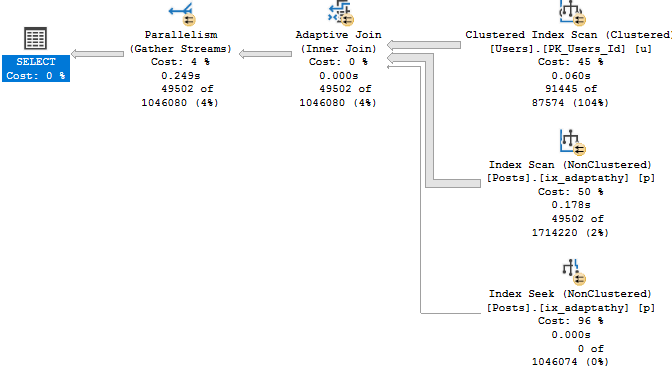
And we’ve, like, read a lot about Adaptive Joins, and we think this’ll be cool to see in action.
Unfortunately, our query doesn’t seem to qualify.
Shame shame shame
Now, there’s an Extended Event that… Used to work.
These days it just stares blankly at me. But since I’ve worked with this before, I know the problem.
It’s that Key Lookup — I’ll explain more in a minute.
Index Upgrade
First, let’s get rid of the Lookup so we can see the Adaptive Join happen.
CREATE INDEX ix_adaptathy
    ON dbo.Posts(OwnerUserId, Score);
New new new
As We Proceed
Let’s think about what Adaptive Joins need:
An index on the column(s) you’re joining
This gives us a realistic choice between using a Nested Loops join to do efficient Seeks, or an easy scan for a Hash Join.
That index has to cover the query
Without a covering index, there’s too much for the optimizer to think about.
It’s not just making a choice between a Nested Loops or Hash Join, it’s also factoring in the cost of a Lookup.
This used to trigger the XE on eajsrUnMatchedOuter, meaning the outer table didn’t have an index that matched the query.
Why Revisit This?
When SQL Server 2019 comes out, people are gonna have really high hopes for their workloads automagickally getting faster.
While there are lots of things that it’ll likely help, it’s going to take a lot of work on your part to make sure your queries and indexes allow for the automagick to kick in.
Thanks for reading!
Going Further
If this is the kind of SQL Server stuff you love learning about, you’ll love my training. Blog readers get 25% off the Everything Bundle — over 100 hours of performance tuning content. Need hands-on help? I offer consulting engagements from targeted investigations to ongoing retainers. Want a quick sanity check before committing to a full engagement? Schedule a call — no commitment required.
In this video, I delve into the intricacies of parameter sniffing in SQL Server and address a question posed by Bradley Jamrozik on Twitter regarding optimizing for large values to ensure always getting powerful execution plans. I explain why simply opting for a big value might not be the best approach due to resource constraints, particularly focusing on concurrency limits such as worker threads and memory grants. By examining these limitations through practical examples on my laptop’s hardware setup, I illustrate how different execution plans can impact the number of concurrent queries that SQL Server can handle efficiently.
Full Transcript
Howdy folks, Erik Darling here with Erik Darling Data. You should be used to that by now. If you’re not, I’m sorry. You just have trouble accepting change in your life. Change and then stability, I guess. Anyway, I’m recording this video because I got asked a, not good, but a great question not too long ago on Twitter by Bradley Jamrozik, or Rozeker, Rozeker. I don’t know how to pronounce that, Bradley. I apologize. You can correct me somewhere. I hear that correcting people on the internet is sometimes, sometimes happens. It’s a bit of a national pastime at this point. Anyway, the question was, when you’re dealing with a parameter sniffing situation, in a situation where SQL Server comes up with two or even more different execution plans based on which parameter it was compiled with the first time around, why not always just optimize for a big, why not just optimize for a big, crazy value so that you always get a big, powerful plan, probably parallel, probably ask for a decent chunk of memory, all that other stuff. Well, there are, I think, for me, some pretty fair reasons not to always do that. And those fair reasons come down to, of course, resources.
Now, if I look at the hardware that I have in my laptop, I have a processor in there with four cores that are hyper-threaded, unfortunately. I apologize to everyone out there who hates hyper-threading. And I also have 64 gigs of memory in my laptop, of which about 50 is dedicated to SQL Server. When I run these two queries, I can see how many worker threads I have available for SQL Server, which is 576. And I can see how much memory I have available to give out to queries. If I go down here and I zoom in a little bit, I can see that my total and my available memory are about the same. And this is how much memory in gigs I can give out to queries for memory grants.
Memory grants is, of course, memory that queries ask for outside of the usual. I have to run stuff to do other things like sort or hash or, you know, do some columnstore stuff that, excuse me, that consumes additional memory. And these are limits. When you start up SQL Server, depending on how many cores you have assigned to your server, and depending on how much memory you have in your server and your max server memory, SQL Server sets limits for how much it’ll allow itself to give out for different things.
Whenever a query runs, it has to take a little piece from those things. The more pieces that these queries are asking for, the fewer queries in total you can have running. For example, with a serial query, with 576 worker threads, I can run 576 copies of that query. If I have a query that goes parallel and it reserves more worker threads, well, whatever DOP is, is going to tell SQL Server how many parallel threads it can use in a branch.
And if I have multiple concurrent branches, SQL Server, just for example, on my laptop, I have max DOP set to 4. So if I have two concurrent branches, that’s 8 threads. And if I have three concurrent branches, that’s 12 threads. So the more parallel queries, the more parallel branches in those queries, the more threads they can just reserve and run with.
Ditto memory. If a query comes along and asks for a large memory grant, and SQL Server is able to grant the entire thing, well, if I have a query that asks for one gig of memory, and currently I can run just about 37 of them, or let’s just say 36 to be safe.
If I have a query that asks for 10 gigs of memory, I can run far fewer of them concurrently. So if we go over to this tab, and we look at a store procedure where I’ve recompiled before executing for two different parameters, 9 and 0, I get two different execution plans.
This top plan is a serial plan, and if I look at how much memory it asks for, it’s about 17 megs. 1, 7, 1, 1, 2. And if I look at how many threads it asks for, an F4 over here, it’s just one, because it’s a serial query.
This will come in handy in a minute. If I look at the second query, look at the select operator, this thing has asked for, let’s see, 7794944. That’s a seven-digit number.
So since it’s 779, I’m going to say that’s 7.8 gigs of memory, as opposed to 17 for the serial query. If you remember what’s on that other tab, about 37, I can’t run as many of these at once as I can of the other one at once. Far fewer, in fact.
If I look at how many threads this thing asks for, if I… Sorry, we’re going to have a dance party for a moment. Oh, alright.
You know, I’m always worried about playing music while a video, while I’m recording a video. But you know what? It’s alright with me. Anyway, if we look at how many threads this query reserved, we can see that we had one branch that was available to execute concurrently.
And we reserved four threads. So that’s not a ton. Granted, there are queries where you can have a lot more than this going on.
But for this query, in four threads, we can run far fewer of these copies concurrently than we can of the single-threaded version. So for me, when I think about why not just optimize for a big value, right? Why not just have every query run as forcefully as possible?
It’s a concurrency thing. And I know that when a lot of people think about concurrency, they think of locking and blocking and deadlocks and other things that kind of hold other queries up. But concurrency goes beyond that.
Concurrency also goes into, you know, from a resource perspective, right? So like not a logical resource like a lock, but a physical resource like how many threads you have or how much memory you have to give out to queries. These are hard limits.
The more queries you have that take up more of those resources, the fewer of those queries you can run. On a larger server, like on a big, big server, that might shut up windows. That might make less of a difference.
On a smaller server, say that’s maybe already a little bit underpowered for your workload, you might end up with a pretty bad situation. If you run out of worker threads, you hit a weight called thread pool. If you run out of memory to give out to queries, you hit a weight called resource semaphore.
So when asked why not just go with the big plan, well, it’s because of that. Because you have hard limits inside of your SQL Server for how much you can give out to queries. Of course, if you don’t care about concurrency, then the problem is solved for you.
Anyway, my name’s Erik Darling with Erik Darling Data. And thank you for watching. Bye.
Video Summary
In this video, I delve into the intricacies of parameter sniffing in SQL Server and address a question posed by Bradley Jamrozik on Twitter regarding optimizing for large values to ensure always getting powerful execution plans. I explain why simply opting for a big value might not be the best approach due to resource constraints, particularly focusing on concurrency limits such as worker threads and memory grants. By examining these limitations through practical examples on my laptop’s hardware setup, I illustrate how different execution plans can impact the number of concurrent queries that SQL Server can handle efficiently.
Full Transcript
Howdy folks, Erik Darling here with Erik Darling Data. You should be used to that by now. If you’re not, I’m sorry. You just have trouble accepting change in your life. Change and then stability, I guess. Anyway, I’m recording this video because I got asked a, not good, but a great question not too long ago on Twitter by Bradley Jamrozik, or Rozeker, Rozeker. I don’t know how to pronounce that, Bradley. I apologize. You can correct me somewhere. I hear that correcting people on the internet is sometimes, sometimes happens. It’s a bit of a national pastime at this point. Anyway, the question was, when you’re dealing with a parameter sniffing situation, in a situation where SQL Server comes up with two or even more different execution plans based on which parameter it was compiled with the first time around, why not always just optimize for a big, why not just optimize for a big, crazy value so that you always get a big, powerful plan, probably parallel, probably ask for a decent chunk of memory, all that other stuff. Well, there are, I think, for me, some pretty fair reasons not to always do that. And those fair reasons come down to, of course, resources.
Now, if I look at the hardware that I have in my laptop, I have a processor in there with four cores that are hyper-threaded, unfortunately. I apologize to everyone out there who hates hyper-threading. And I also have 64 gigs of memory in my laptop, of which about 50 is dedicated to SQL Server. When I run these two queries, I can see how many worker threads I have available for SQL Server, which is 576. And I can see how much memory I have available to give out to queries. If I go down here and I zoom in a little bit, I can see that my total and my available memory are about the same. And this is how much memory in gigs I can give out to queries for memory grants.
Memory grants is, of course, memory that queries ask for outside of the usual. I have to run stuff to do other things like sort or hash or, you know, do some columnstore stuff that, excuse me, that consumes additional memory. And these are limits. When you start up SQL Server, depending on how many cores you have assigned to your server, and depending on how much memory you have in your server and your max server memory, SQL Server sets limits for how much it’ll allow itself to give out for different things.
Whenever a query runs, it has to take a little piece from those things. The more pieces that these queries are asking for, the fewer queries in total you can have running. For example, with a serial query, with 576 worker threads, I can run 576 copies of that query. If I have a query that goes parallel and it reserves more worker threads, well, whatever DOP is, is going to tell SQL Server how many parallel threads it can use in a branch.
And if I have multiple concurrent branches, SQL Server, just for example, on my laptop, I have max DOP set to 4. So if I have two concurrent branches, that’s 8 threads. And if I have three concurrent branches, that’s 12 threads. So the more parallel queries, the more parallel branches in those queries, the more threads they can just reserve and run with.
Ditto memory. If a query comes along and asks for a large memory grant, and SQL Server is able to grant the entire thing, well, if I have a query that asks for one gig of memory, and currently I can run just about 37 of them, or let’s just say 36 to be safe.
If I have a query that asks for 10 gigs of memory, I can run far fewer of them concurrently. So if we go over to this tab, and we look at a store procedure where I’ve recompiled before executing for two different parameters, 9 and 0, I get two different execution plans.
This top plan is a serial plan, and if I look at how much memory it asks for, it’s about 17 megs. 1, 7, 1, 1, 2. And if I look at how many threads it asks for, an F4 over here, it’s just one, because it’s a serial query.
This will come in handy in a minute. If I look at the second query, look at the select operator, this thing has asked for, let’s see, 7794944. That’s a seven-digit number.
So since it’s 779, I’m going to say that’s 7.8 gigs of memory, as opposed to 17 for the serial query. If you remember what’s on that other tab, about 37, I can’t run as many of these at once as I can of the other one at once. Far fewer, in fact.
If I look at how many threads this thing asks for, if I… Sorry, we’re going to have a dance party for a moment. Oh, alright.
You know, I’m always worried about playing music while a video, while I’m recording a video. But you know what? It’s alright with me. Anyway, if we look at how many threads this query reserved, we can see that we had one branch that was available to execute concurrently.
And we reserved four threads. So that’s not a ton. Granted, there are queries where you can have a lot more than this going on.
But for this query, in four threads, we can run far fewer of these copies concurrently than we can of the single-threaded version. So for me, when I think about why not just optimize for a big value, right? Why not just have every query run as forcefully as possible?
It’s a concurrency thing. And I know that when a lot of people think about concurrency, they think of locking and blocking and deadlocks and other things that kind of hold other queries up. But concurrency goes beyond that.
Concurrency also goes into, you know, from a resource perspective, right? So like not a logical resource like a lock, but a physical resource like how many threads you have or how much memory you have to give out to queries. These are hard limits.
The more queries you have that take up more of those resources, the fewer of those queries you can run. On a larger server, like on a big, big server, that might shut up windows. That might make less of a difference.
On a smaller server, say that’s maybe already a little bit underpowered for your workload, you might end up with a pretty bad situation. If you run out of worker threads, you hit a weight called thread pool. If you run out of memory to give out to queries, you hit a weight called resource semaphore.
So when asked why not just go with the big plan, well, it’s because of that. Because you have hard limits inside of your SQL Server for how much you can give out to queries. Of course, if you don’t care about concurrency, then the problem is solved for you.
Anyway, my name’s Erik Darling with Erik Darling Data. And thank you for watching. Bye.
Going Further
If this is the kind of SQL Server stuff you love learning about, you’ll love my training. Blog readers get 25% off the Everything Bundle — over 100 hours of performance tuning content. Need hands-on help? I offer consulting engagements from targeted investigations to ongoing retainers. Want a quick sanity check before committing to a full engagement? Schedule a call — no commitment required.
In query plans where an Eager Index Spool is directly after a data access operator, a missing index should be generated in the query plan, and/or missing index DMVs that describes the definition of the index needed to make the spool unnecessary.
I would not expect this to happen when a Lazy Index Spool occurs above a subtree.
I’d appreciate it if you’d consider voting for it. It’s something that I was able to implement pretty easily in sp_BlitzCache.
In query plans where an Eager Index Spool is directly after a data access operator, wait stats should be generated while the Spool is built. In a parallel plan, EXECSYNC waits are generated, but in a serial plan, you don’t see anything. Problem scenarios will become more common when FROID is released and adopted.
I would not expect this to happen when a Lazy Index Spool occurs above a subtree.
Thanks for reading!
And voting as many times as possible ?
Going Further
If this is the kind of SQL Server stuff you love learning about, you’ll love my training. Blog readers get 25% off the Everything Bundle — over 100 hours of performance tuning content. Need hands-on help? I offer consulting engagements from targeted investigations to ongoing retainers. Want a quick sanity check before committing to a full engagement? Schedule a call — no commitment required.
This is a short post, since we’re on the subject of index spools this week, to show you that the columns that go into the spool will impact spool size and build time.
I know, that sounds obvious, but once in a while I care about “completeness”.
We’re going to look at two queries that build eager index spools, along with the time the spool takes to build and how many writes we do.
Query 1
On the side of the query where a spool gets built (inside the apply), we’re only selecting one column.
SELECT      TOP ( 10 )
            u.DisplayName,
			u.Reputation,
			ca.*
FROM        dbo.Users AS u
CROSS APPLY
(
    SELECT   TOP ( 1 )
			   p.Score
    FROM     dbo.Posts AS p
    WHERE    p.OwnerUserId = u.Id
    AND      p.PostTypeId = 1
    ORDER BY p.Score DESC
) AS ca
ORDER BY    u.Reputation DESC;
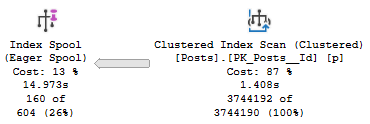
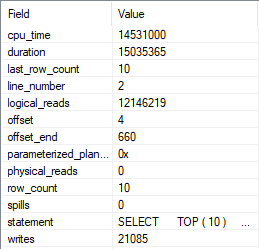
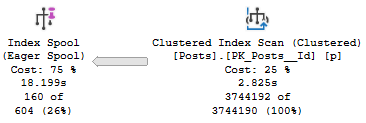
In the query plan, we spend 1.4 seconds reading from the Posts table, and 13.5 seconds building the index spool.
Work it
We also do 21,085 writes while building it.
Insert comma
Query 2
Now we’re going to select every column in the Posts table, except Body.
If I select Body, SQL Server outsmarts me and doesn’t use a spool. Apparently even spools have morals.
SELECT      TOP ( 10 )
              u.DisplayName,
			  u.Reputation,
			ca.*
FROM        dbo.Users AS u
CROSS APPLY
(
    SELECT   TOP ( 1 )
               p.Id, p.AcceptedAnswerId, p.AnswerCount, p.ClosedDate,
               p.CommentCount, p.CommunityOwnedDate, p.CreationDate,
               p.FavoriteCount, p.LastActivityDate, p.LastEditDate,
               p.LastEditorDisplayName, p.LastEditorUserId, p.OwnerUserId,
               p.ParentId, p.PostTypeId, p.Score, p.Tags, p.Title, p.ViewCount
    FROM     dbo.Posts AS p
    WHERE    p.OwnerUserId = u.Id
    AND      p.PostTypeId = 1
    ORDER BY p.Score DESC
) AS ca
ORDER BY    u.Reputation DESC;
GO
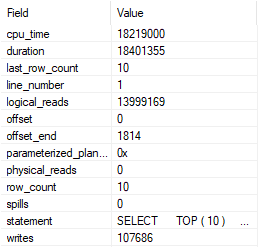
In the query plan, we spend 2.8 seconds reading from the Posts table, and 15.3 seconds building the index spool.
Longer
We also do more writes, at 107,686.
And more!
This Is Not A Complaint
I just wanted to write this down, because I haven’t seen it written down anywhere else.
Thanks for reading!
Going Further
If this is the kind of SQL Server stuff you love learning about, you’ll love my training. Blog readers get 25% off the Everything Bundle — over 100 hours of performance tuning content. Need hands-on help? I offer consulting engagements from targeted investigations to ongoing retainers. Want a quick sanity check before committing to a full engagement? Schedule a call — no commitment required.
I’m going to use a funny example to show you something weird that I see often in EF queries.
I’m not going to use EF to do it, because I have no idea how to. Please use your vast imagination.
In this case, I’m going to figure out if a user is trusted, and only if they are will I show them certain information.
Here goes!
Trust Bust
The first part of the query establishes if the user is trusted or not.
I think this is silly because no one should ever trust users.
DECLARE @UserId INT = 22656, --2788872
        @PostId INT = 11227809,
		@IsTrusted BIT = 0,
		@SQL NVARCHAR(MAX) = N'';

SELECT @IsTrusted = CASE WHEN u.Reputation >= 10000
                         THEN 1
						 ELSE 0
				    END
FROM   dbo.Users AS u
WHERE  u.Id = @UserId;
The second part will query and join a few tables, but one of the joins (to the Votes table) will only run if a user is trusted.
SET @SQL = @SQL + N'
SELECT p.Title, p.Score,
       c.Text, c.Score,
	   v.*
FROM dbo.Posts AS p
LEFT JOIN dbo.Comments AS c
    ON p.Id = c.PostId
LEFT JOIN dbo.Votes AS v
    ON p.Id = v.PostId
    AND 1 = @iIsTrusted
WHERE p.Id = @iPostId
AND   p.PostTypeId = 1;
';

EXEC sys.sp_executesql @SQL,
                       N'@iIsTrusted BIT, @iPostId INT',
					   @iIsTrusted = @IsTrusted,
					   @iPostId = @PostId;
See where 1 = @iIsTrusted? That determines if the join runs at all.
Needless to say, adding an entire join in to the query might slow things down if we’re not prepared.
First I’m going to run it for user 2788872, who isn’t trusted.
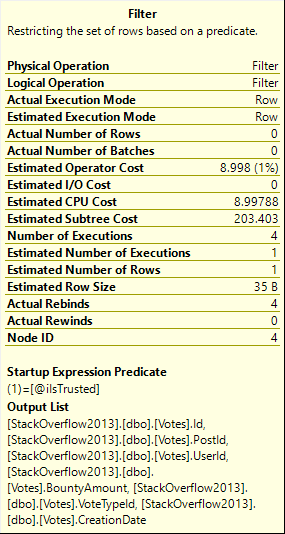
This query finishes rather quickly (2 seconds), and has an interesting operator in it.
Henanigans, S.Pump the brakes
The filter has a startup expression in it, which means it’s sort of a gatekeeper, here. If the parameter is 0, we don’t touch Votes.
If it’s 1… Boy, do we touch Votes. This is another case of where cached plans can lie to us.
Rep Up
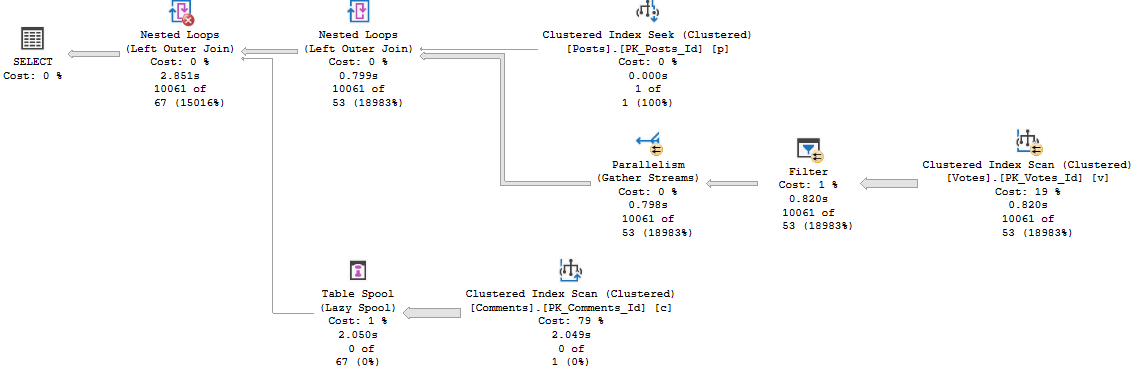
If we run this for user 22656 (Jon Skeet) afterwards, we will definitely need to touch the Votes table.
I grabbed the Live Query Plan to show you just how little progress it makes over 5 minutes.
Dirge
The cached plan will look identical. And looking at the plan, it’ll be hard to believe there’s any way it could run >5 minutes.
CONFESS
If we clear the cache and run this for 22656 first, the plan runs relatively quickly, and looks a little different.
Bag of Ice
Running it for an untrusted user has a similar runtime. It’s not great, but it’s the better of the two.
Fixing It?
It’s difficult to control EF queries with much granularity.
You could branch the application code to run two different queries based on if a user is trusted.
In a perfect world, you’d never even consider that join at all, and avoid having to worry about it.
On the plus side (at least in this case), the good plan for trusted users runs in the same time as the good plan for untrusted users, even though they’re different.
If you’re feeling extra confident, you can try adding an OPTIMIZE FOR hint to your code, or implementing a plan guide.
Thanks for reading!
Going Further
If this is the kind of SQL Server stuff you love learning about, you’ll love my training. Blog readers get 25% off the Everything Bundle — over 100 hours of performance tuning content. Need hands-on help? I offer consulting engagements from targeted investigations to ongoing retainers. Want a quick sanity check before committing to a full engagement? Schedule a call — no commitment required.