A lot has been written about “kitchen sink” queries. A couple of my favorites are by Aaron Bertrand and Gail Shaw.
Both articles have similar start and end points. But I’m going to start at an even worse point.
Catch All Parameters
This is the worst possible idea.
    CREATE OR ALTER PROCEDURE dbo.AwesomeSearchProcedure (@SearchString NVARCHAR(MAX))
    AS
    SET NOCOUNT, XACT_ABORT ON;
    SET STATISTICS TIME, IO OFF;
    BEGIN

    DECLARE @AltString NVARCHAR(MAX) = N'%'

    SELECT TOP (1000) p.OwnerUserId, p.Title, p.CreationDate, p.LastActivityDate, p.Body
    FROM dbo.Posts AS p
    WHERE p.OwnerUserId LIKE ISNULL(N'%' + @SearchString + N'%', @AltString)
    OR    p.Title LIKE ISNULL(N'%' + @SearchString + N'%', @AltString)
    OR    p.CreationDate LIKE ISNULL(N'%' + @SearchString + N'%', @AltString)
    OR    p.LastActivityDate LIKE ISNULL(N'%' + @SearchString + N'%', @AltString)
    OR    p.Body LIKE ISNULL(N'%' + @SearchString + N'%', @AltString);

    END;
    GO
It doesn’t get any better if you do this, either.
    SELECT TOP (1000) p.OwnerUserId, p.Title, p.CreationDate, p.LastActivityDate, p.Body
    FROM dbo.Posts AS p
    WHERE (p.OwnerUserId LIKE N'%' + @SearchString + N'%' OR @SearchString IS NULL)
    OR    (p.Title LIKE N'%' + @SearchString + N'%' OR @SearchString IS NULL)
    OR    (p.CreationDate LIKE N'%' + @SearchString + N'%' OR @SearchString IS NULL)
    OR    (p.LastActivityDate LIKE N'%' + @SearchString + N'%' OR @SearchString IS NULL)
    OR    (p.Body LIKE N'%' + @SearchString + N'%' OR @SearchString IS NULL);
Sample Run
In both cases, just searching for a single value results in a query that runs for >2 minutes.
    EXEC dbo.AwesomeSearchProcedure @SearchString = N'35004';
    GO
The problem is that we’re just searching for an OwnerUserId, but SQL Server doesn’t know that.
The query plan looks like this:
Badness
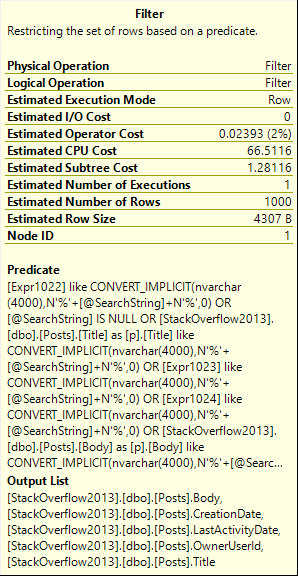
See that Filter? That’s where we do all of our search work. We scan the whole Posts table, and push every row across the pipe to the Filter.
Messy
Irritable
This pattern might work on a small amount of data, but like most things that are efficient in small doses this will quickly fall apart when your database reaches a mature size.
My example is pretty simple, too, just hitting one table. In real life, you monsters are going this across joins, throwing in row numbers, distincts, and ordering by the first 10 columns.
It only gets worse as it gets more complicated.
Thanks for reading!
Going Further
If this is the kind of SQL Server stuff you love learning about, you’ll love my training. Blog readers get 25% off the Everything Bundle — over 100 hours of performance tuning content. Need hands-on help? I offer consulting engagements from targeted investigations to ongoing retainers. Want a quick sanity check before committing to a full engagement? Schedule a call — no commitment required.
I know you don’t have bad queries. You’re smart people. But some people do!
Let’s also say that bad query is taking part in a modification.
UPDATE u2
SET u2.Reputation *= 2
FROM Users AS u
JOIN dbo.Users AS u2
ON CHARINDEX(u.DisplayName, u2.DisplayName) > 0
WHERE u2.Reputation >= 100000
AND u.Id <> u2.Id;
This query will run for so long that we’ll get sick of waiting for it. It’s really holding up writing this blog post.
Let’s try something a little different.
SELECT u.Id, u.DisplayName
INTO #Users
FROM dbo.Users AS u
WHERE u.Reputation >= 100000;

UPDATE u2
SET u2.Reputation *= 2
FROM #Users AS u
JOIN dbo.Users AS u2
ON CHARINDEX(u.DisplayName, u2.DisplayName) > 0
AND u.Id <> u2.Id;
This time, the query finishes in 43 seconds.
Plans and Events
The query plan looks like this:
You’re not cool.
Extended events can tell us when locks were taken and released to perform the update.
Ducked out
An exclusive lock was held on the table for over 35 seconds, so all but ~7 seconds of the plan has locks on the table we’re updating.
In real life, that’d probably mean a lot of blocking.
Alt Rock
Another way to handle this is to remove the long-running query from the update, and take advantage of the Primary Key/Clustered Index on the table.
First, isolate the rows we care about:
SELECT u2.Id, u2.Reputation * 2 AS DoubleRep
INTO #Updater
FROM #Users AS u
JOIN dbo.Users AS u2
ON CHARINDEX(u.DisplayName, u2.DisplayName) > 0
AND u.Id <> u2.Id;
Then do the update:
UPDATE u2
SET u2.Reputation = u.DoubleRep
FROM #Updater AS u
JOIN dbo.Users AS u2
ON u.Id = u2.Id;
This query only runs a few hundred milliseconds, so the locks taken are shorter.
Keep in mind, though, that the first insert query is still horrible.
It runs for ~40ish seconds, but at least we don’t lock any objects that other queries might care about.
Thanks for reading!
Going Further
If this is the kind of SQL Server stuff you love learning about, you’ll love my training. Blog readers get 25% off the Everything Bundle — over 100 hours of performance tuning content. Need hands-on help? I offer consulting engagements from targeted investigations to ongoing retainers. Want a quick sanity check before committing to a full engagement? Schedule a call — no commitment required.
I recently came across a bad locking problem. It was one of those things that happened “suddenly” and “for no reason”.
When I looked at the stored procedure, the code was something like this:
CREATE PROCEDURE dbo.bad_news(@PostTypeId INT)
AS
BEGIN

DECLARE @PTID INT
SELECT @PTID = CASE WHEN @PostTypeId < 1
                         OR @PostTypeId > 8
				    THEN 4
			   END
UPDATE p
SET p.Score += 1
FROM dbo.Posts AS p
WHERE p.PostTypeId = @PTID;

END
I mean, it would look like that if we were using Stack Overflow.
We weren’t, but I’ll leave the rest to your imagination.
Outside The Proc
We have this index:
CREATE INDEX ix_spanky ON dbo.Posts(PostTypeId);
Let’s run this code, and look at what happens.
BEGIN TRAN
UPDATE p
SET p.Score += 1
FROM dbo.Posts AS p
WHERE p.PostTypeId = 3;
ROLLBACK
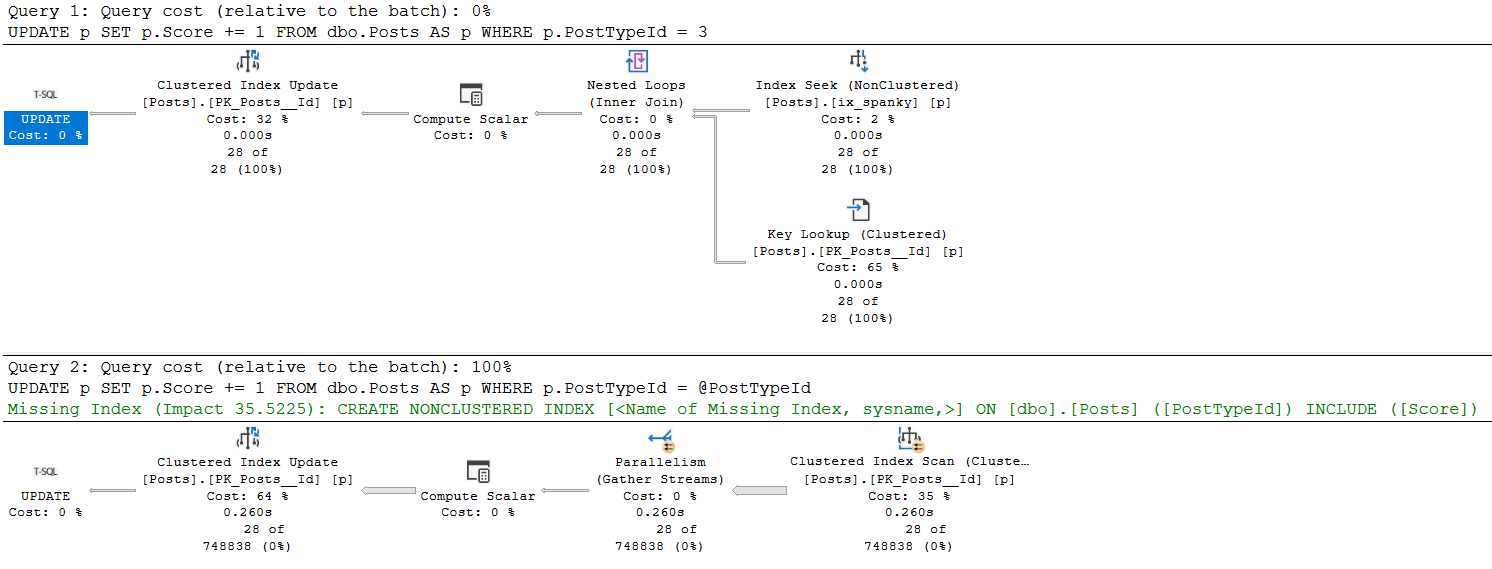
We not only have exclusive locks on pages, but on the entire table now.
Overestimaters Anonymous
The execution plans for these two queries are much different.
umop
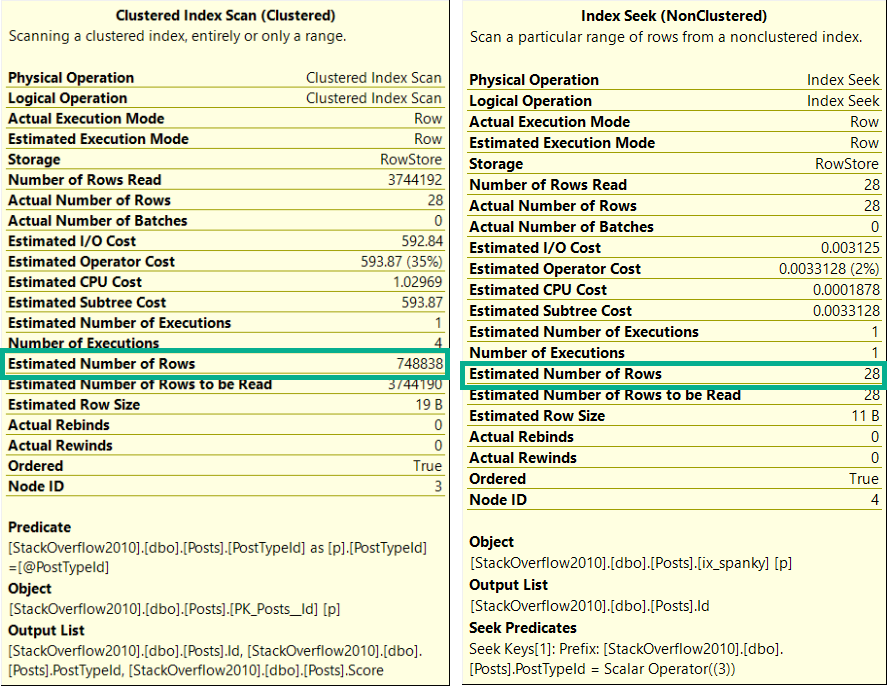
Likewise, the estimates are much different.
upside
Oh So Loco
This is a fairly well-documented outcome of using a “declared variable”, or the optimize for unknown hint.
The optimizer makes a usually-generally-bad guess at the number of rows it’ll have to deal with.
In this case, the stored procedure had been modified to account for bad values passed in from the application.
The outcome was severe blocking because modification queries were taking far more intrusive locks than necessary.
So, you know, don’t do that.
Thanks for reading!
Going Further
If this is the kind of SQL Server stuff you love learning about, you’ll love my training. Blog readers get 25% off the Everything Bundle — over 100 hours of performance tuning content. Need hands-on help? I offer consulting engagements from targeted investigations to ongoing retainers. Want a quick sanity check before committing to a full engagement? Schedule a call — no commitment required.
There’s a wonderful explanation from Paul White about spill levels here. At the risk of offending the copyright godses, I’m going to quote it here.
Consider the task of sorting 4000MB of data, when we only have 500MB of memory available. Obviously, we cannot sort the whole set in memory at once, but we can break the task down:
We first read 500MB of data, sort that set in memory, then write the result to disk. Performing this a total of 8 times consumes the entire 4000MB input, resulting in 8 sets of sorted data 500MB in size. The second step is to perform an 8-way merge of the sorted data sets. Note that a merge is required, not a simple concatenation of the sets since the data is only guaranteed to be sorted as required within a particular 500MB set at the intermediate stage.
Alright, interesting! That’d make me think that the number of pages involved in the spill would increase the spill level. In real life, I saw spill level 11 once. I wish I had that plan saved.
Rowed To Nowhere
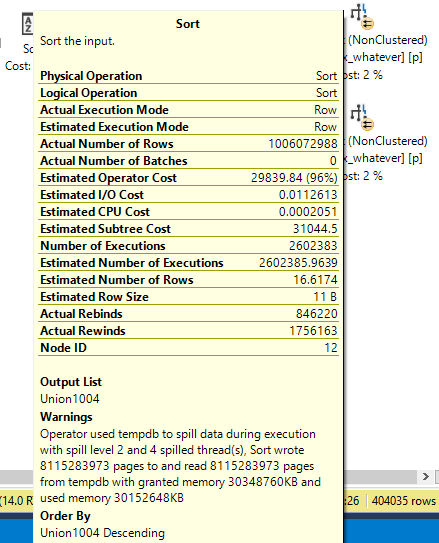
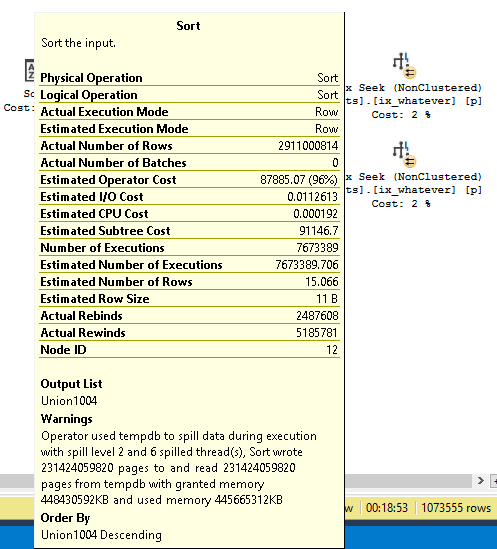
Here’s a pretty big spill. But it’s only at level two.
Insert commas.
That’s 8,115,283,973 rows.
Here’s a much larger spill that’s still only at level two.
Insert more commas.
That’s um… hang on.
231,424,059,820 rows. It’s crazy that we can add 223,308,775,847 rows to a spill and not need more passes than before.
But hey, okay. That’s cool. I get it.
Waaaaaiiiiitttt
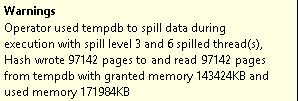
I found level three! With uh 97,142 pages. That’s weird. I don’t get it.
But whatever, it probably can’t get much weirder than
…
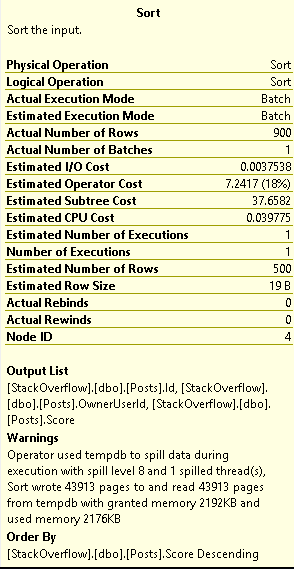
SPILL LEVEL 8 FOR 43,913 PAGES 1-800-COME-ON-YO!
This Is Gonna Take More Digging
I’m gonna have my eye on weird spill levels from now on, and I’ll try to follow up as I figure stuff out.
Thanks for reading!
Going Further
If this is the kind of SQL Server stuff you love learning about, you’ll love my training. Blog readers get 25% off the Everything Bundle — over 100 hours of performance tuning content. Need hands-on help? I offer consulting engagements from targeted investigations to ongoing retainers. Want a quick sanity check before committing to a full engagement? Schedule a call — no commitment required.
While working with a client who has a nasty blocking problem involving triggers, we were talking about using Snapshot Isolation to help fix the issue.
The thing is, there’s more than just stored procedures causing problems. Some of the issue is with triggers.
The prospect of having to modify a bunch of objects was a rightfully frightful one.
Funboy & Funboy & Funboy
In my database, I have Snapshot Isolation enabled.
I have a table with a trigger on it. The trigger doesn’t do anything except show me what my session’s isolation level is
CREATE TABLE dbo.t ( id INT NULL, dimdate DATETIME NULL );
CREATE TRIGGER dbo.dim_trigger
ON dbo.t
AFTER INSERT
AS
    BEGIN
        SET NOCOUNT ON;

        DECLARE @UserOptions TABLE ( SetOption VARCHAR(100), Value VARCHAR(100));
        DECLARE @IsolationLevel VARCHAR(100);

        INSERT @UserOptions
        EXEC ( 'DBCC USEROPTIONS WITH NO_INFOMSGS' );

        SELECT @IsolationLevel = 'Trigger:' + Value
        FROM   @UserOptions
        WHERE  SetOption = 'isolation level';

        PRINT @IsolationLevel;

    END;
I also have a stored procedure that checks the isolation level, and inserts into my table so that the trigger fires off.
CREATE OR ALTER PROCEDURE dbo.insert_t
AS
    BEGIN
        SET NOCOUNT ON;

        SET TRANSACTION ISOLATION LEVEL SNAPSHOT;

        DECLARE @UserOptions TABLE ( SetOption VARCHAR(100), Value VARCHAR(100));
        DECLARE @IsolationLevel VARCHAR(100);

        INSERT @UserOptions
        EXEC ( 'DBCC USEROPTIONS WITH NO_INFOMSGS' );

        SELECT @IsolationLevel = 'Procedure:' + Value
        FROM   @UserOptions
        WHERE  SetOption = 'isolation level';

        PRINT @IsolationLevel;

        INSERT dbo.t ( id, dimdate )
        VALUES ( 0, GETDATE());

    END;
On Notice
I’m only setting the isolation level in the stored procedure here.
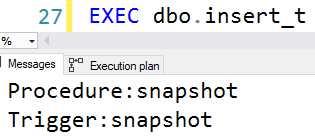
When I run it, both will return the same isolation level no matter what you set it to.
Consistency
Thanks to Scott Ivey, whose code I borrowed for this.
And thank you for reading!
Going Further
If this is the kind of SQL Server stuff you love learning about, you’ll love my training. Blog readers get 25% off the Everything Bundle — over 100 hours of performance tuning content. Need hands-on help? I offer consulting engagements from targeted investigations to ongoing retainers. Want a quick sanity check before committing to a full engagement? Schedule a call — no commitment required.
Most scripts (even ones I’ve worked on!) that look at the plan cache, have had the ability to sort it by different metrics: CPU, reads, writes, duration, etc.
A lot of people are very interested in long running queries — and I am too!
Heck, they’re how I make money. Blogging pays like crap.
But there’s a slight problem with only looking at query duration.
Fake Locks
Let’s say I have a stored procedure that looks like this:
CREATE OR ALTER PROCEDURE dbo.dblock (@id INT)
AS
BEGIN
    BEGIN TRAN
        UPDATE u
        SET u.Reputation = 2147483647
        FROM dbo.Users AS u
        WHERE u.Id = @id

        WAITFOR DELAY '00:00:07.000'
    ROLLBACK
END;
GO
It’s there to simulate a long running modification query. You know, the kind of thing that’ll lead to blocking.
The kind of blocking that can make other queries feel like they take a long time.
Street Team
Here’s another stored procedure:
CREATE OR ALTER PROCEDURE dbo.the_lox (@id INT)
AS
BEGIN
    SELECT u.Id
    FROM dbo.Users AS u
    WHERE u.Id = @id
END;
GO
This will finish instantly. The Id column of the Users table is the Primary Key, as well as the Clustered Index.
There is literally nothing to tune here.
But it may look like it, sometimes…
D’evils
If I run these in different windows, the lox will be blocked by dblock.
--One Window
EXEC dbo.dblock @id = 22656;
GO

--Other window
EXEC dbo.the_lox @id = 22656;
GO
If you were wondering why I had a 7 second wait, it’s because it generally takes me two seconds to flip windows and run a query.
When the situation resolves, this is what the metrics look like:
SELECT OBJECT_NAME(deps.object_id) AS stored_procedure_name,
       ( deps.last_worker_time / 1000. ) AS cpu_time,
       ( deps.last_elapsed_time / 1000. ) AS run_time
FROM   sys.dm_exec_procedure_stats AS deps
WHERE  deps.object_id = OBJECT_ID('dbo.the_lox');
GO
Everything You Got
The query barely used any CPU, but it ran for 5 seconds.
If you order your plan cache by elapsed time, you might see blameless queries up at the top.
There are a lot of reasons why they could end up there, and blocking is one of them.
Unfortunately, there’s currently nothing to tell you why. If you’re just getting started with query tuning, this could look befuddling.
Are Averages Better?
Sometimes it helps to look at what runs for a long time on average — you can figure that out by looking at the number of executions.
That can make better sense of things, but not if a query has only run once, or if it gets blocked a lot.
It may make more sense to factor in metrics that represent physical work, like CPU, reads, or writes, rather than just relying purely on wall clock time.
Thanks for reading!
Going Further
If this is the kind of SQL Server stuff you love learning about, you’ll love my training. Blog readers get 25% off the Everything Bundle — over 100 hours of performance tuning content. Need hands-on help? I offer consulting engagements from targeted investigations to ongoing retainers. Want a quick sanity check before committing to a full engagement? Schedule a call — no commitment required.
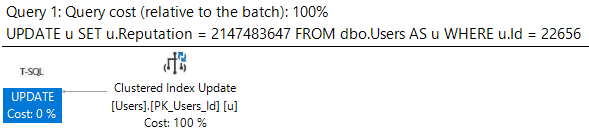
Let’s say we’ve got a simple update query. When we run it, it finishes instantly, and the query plan has no surprises.
BEGIN TRAN
UPDATE u
SET u.Reputation = 2147483647
FROM dbo.Users AS u
WHERE u.Id = 22656;

ROLLBACK
One to the two
Then one day DevOps comes along and says that every time Reputation gets updated in the Users table, we have to check a bunch of conditions and then do a bunch of stuff based on the value.
One of those checks is to see if anyone has the ?INT MAX? and then insert a row into Badges.
Because I’m lazy (Agile?), I’m going to stick a waitfor in the trigger to simulate all the other checks and actions.
CREATE OR ALTER TRIGGER dbo.one_time
ON dbo.Users
AFTER UPDATE
AS
BEGIN

    IF EXISTS ( SELECT 1/0
                FROM Inserted
                WHERE Inserted.Reputation = 2147483647 )

    INSERT dbo.Badges ( Name, UserId, Date )
    SELECT N'INT MAX OMG', Id, GETDATE()
    FROM Inserted

    WAITFOR DELAY '00:00:10.000'

END;
GO
Less Simpler Times
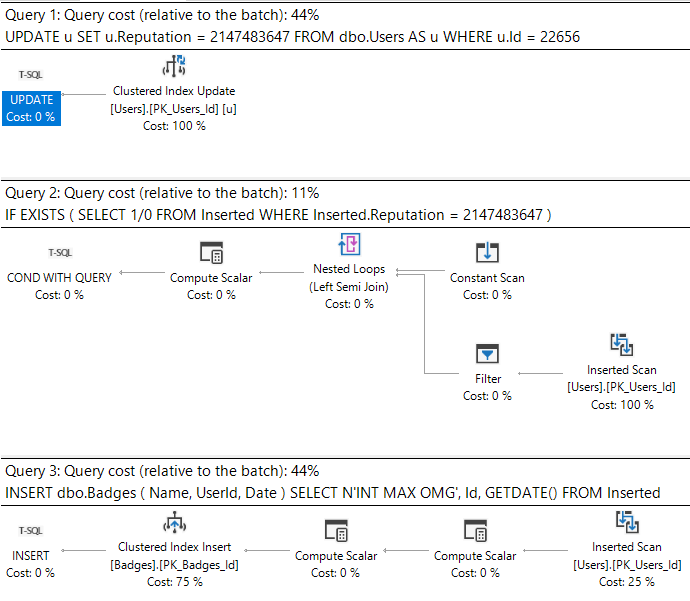
Now when we run our update, the plan looks like this.
Ass-mar
What’s important here is that we can see the work associated with the triggers.
What sucks is when we look at the plan cache.
Back To Easy
I’m gonna stick that update in a stored procedure to make life a little easier when we go looking for it.
CREATE PROCEDURE dbo.update_reputation
AS
BEGIN
    BEGIN TRAN
    UPDATE u
    SET u.Reputation = 2147483647
    FROM dbo.Users AS u
    WHERE u.Id = 22656;

    ROLLBACK
END;
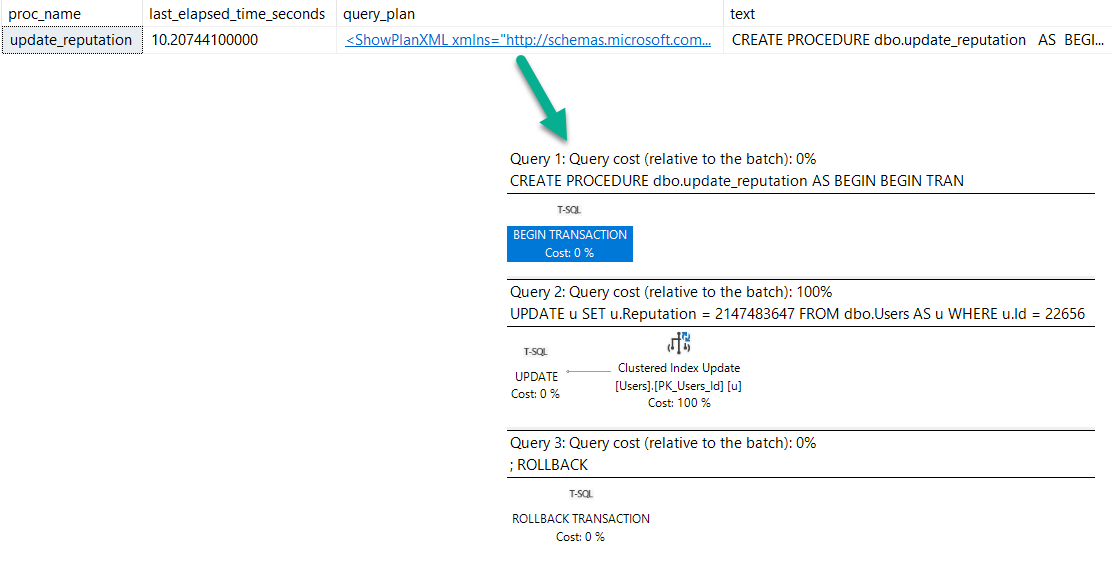
After running the procedure, here’s what we get back from the plan cache.
    SELECT OBJECT_NAME(deps.object_id) AS proc_name,
           deps.last_elapsed_time / 1000. / 1000. AS last_elapsed_time_seconds,
           deqp.query_plan,
           dest.text
    FROM sys.dm_exec_procedure_stats AS deps
    CROSS APPLY sys.dm_exec_query_plan(deps.plan_handle) AS deqp
    CROSS APPLY sys.dm_exec_sql_text(deps.plan_handle) AS dest
    WHERE deps.object_id = OBJECT_ID('dbo.update_reputation');
Investigative Reports
We have a procedure reporting that it ran for 10 seconds (which it did, sort of…).
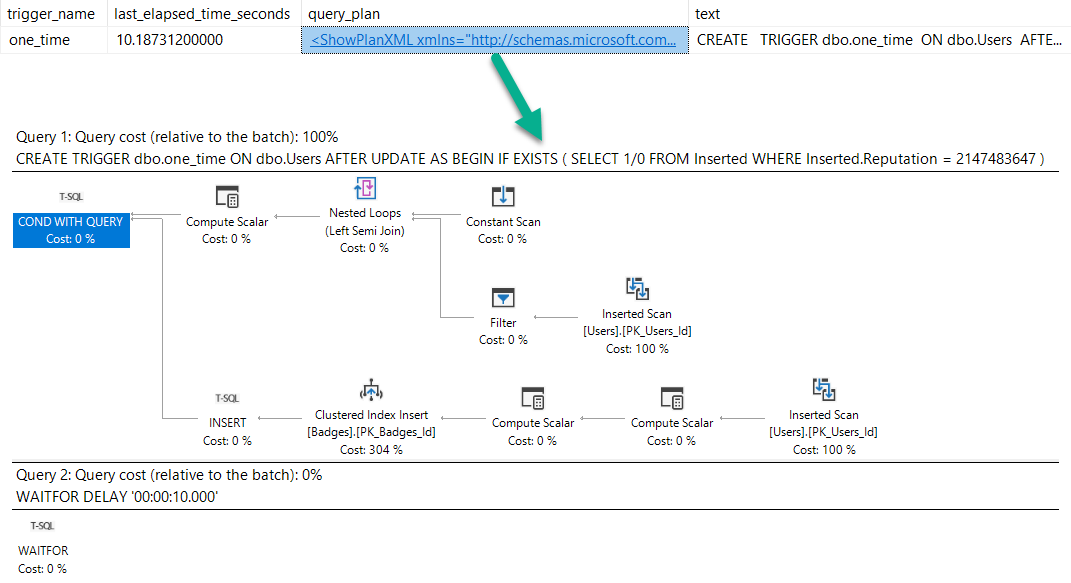
But no mention of the trigger. Hm.
Of course, we can get this information from trigger stats, but we’d have to know to go looking:
    SELECT OBJECT_NAME(object_id) AS trigger_name,
           dets.last_elapsed_time / 1000. / 1000. AS last_elapsed_time_seconds,
           deqp.query_plan,
           dest.text
    FROM sys.dm_exec_trigger_stats AS dets
    CROSS APPLY sys.dm_exec_query_plan(dets.plan_handle) AS deqp
    CROSS APPLY sys.dm_exec_sql_text(dets.plan_handle) AS dest
    WHERE OBJECT_ID = OBJECT_ID('dbo.one_time');
Get busy
Lying Liars
When seemingly simple modification queries take a long time, things may not be as simple as they appear.
Blocking, and triggers might be at play. Unfortunately, there’s not a great way of linking any of that together right now.
Thanks for reading!
Going Further
If this is the kind of SQL Server stuff you love learning about, you’ll love my training. Blog readers get 25% off the Everything Bundle — over 100 hours of performance tuning content. Need hands-on help? I offer consulting engagements from targeted investigations to ongoing retainers. Want a quick sanity check before committing to a full engagement? Schedule a call — no commitment required.
This isn’t quite about the same thing, just about some behavior that I thought was interesting, and how it changes between cardinality estimator versions.
Bad Robot
If you’ve been query tuning for a while, you probably know about SARGability, and that wrapping columns in functions is generally a bad idea.
But just like there are slightly different rules for CAST and CONVERT with dates, the repercussions of the function also vary.
The examples I’m going to look at are for YEAR() and MONTH().
If you want a TL;DR, here you go.
Reality Bites
If you wanna keep going, follow me!
USING
The takeaway here isn’t that doing either of these is okay. You should fully avoid wrapping columns in functions in general.
One of the main problems with issuing queries with non-SARGable predicates is that the people who most often do it are the people who rely on missing index requests to direct tuning efforts, and non-SARGable queries can prevent those requests from surfacing, or ask for an even more sub-optimal index than usual.
If you have a copy of the StackOverflow2013 database, you can replicate the results pretty easily on SQL Server 2017.
They may be slightly different depending on how the histogram is generated, but the overarching theme is the same.
Yarly
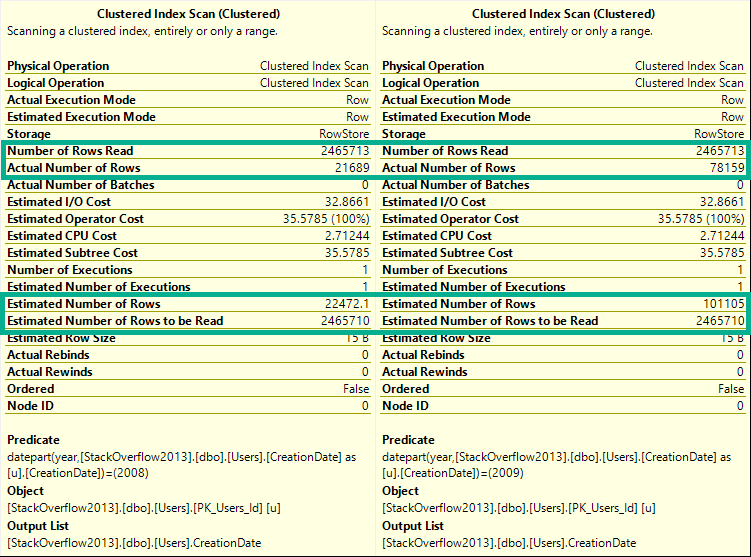
If you run these queries, and look at the estimated and actual rows in the Clustered Index scan tooltip, you’ll see they change for every query.
DECLARE @blob_eater DATETIME;

    SELECT @blob_eater = u.CreationDate
    FROM dbo.Users AS u
    WHERE YEAR(u.CreationDate) = 2008;

    SELECT @blob_eater = u.CreationDate
    FROM dbo.Users AS u
    WHERE YEAR(u.CreationDate) = 2009;

    SELECT @blob_eater = u.CreationDate
    FROM dbo.Users AS u
    WHERE YEAR(u.CreationDate) = 2010;

    SELECT @blob_eater = u.CreationDate
    FROM dbo.Users AS u
    WHERE YEAR(u.CreationDate) = 2011;

    SELECT @blob_eater = u.CreationDate
    FROM dbo.Users AS u
    WHERE YEAR(u.CreationDate) = 2012;

    SELECT @blob_eater = u.CreationDate
    FROM dbo.Users AS u
    WHERE YEAR(u.CreationDate) = 2013;
    GO
Here’s a sample from the 2008 and 2009 queries.
Wild For The Night
ED: I took a break from writing this and “went to brunch”.
Any logical inconsistencies will work themselves out eventually.
Cash Your Checks And Come Up
Alright, let’s try that again with by month.
If you hit yourself in the head with a hammer and forgot the TL;DR, here’s what happens:
DECLARE @blob_eater DATETIME;

    SELECT @blob_eater = u.CreationDate
    FROM dbo.Users AS u
    WHERE MONTH(u.CreationDate) = 1;

    SELECT @blob_eater = u.CreationDate
    FROM dbo.Users AS u
    WHERE MONTH(u.CreationDate) = 2;

    SELECT @blob_eater = u.CreationDate
    FROM dbo.Users AS u
    WHERE MONTH(u.CreationDate) = 3;

    SELECT @blob_eater = u.CreationDate
    FROM dbo.Users AS u
    WHERE MONTH(u.CreationDate) = 4;

    SELECT @blob_eater = u.CreationDate
    FROM dbo.Users AS u
    WHERE MONTH(u.CreationDate) = 5;

    SELECT @blob_eater = u.CreationDate
    FROM dbo.Users AS u
    WHERE MONTH(u.CreationDate) = 6;

    SELECT @blob_eater = u.CreationDate
    FROM dbo.Users AS u
    WHERE MONTH(u.CreationDate) = 7;

    SELECT @blob_eater = u.CreationDate
    FROM dbo.Users AS u
    WHERE MONTH(u.CreationDate) = 8;

    SELECT @blob_eater = u.CreationDate
    FROM dbo.Users AS u
    WHERE MONTH(u.CreationDate) = 9;

    SELECT @blob_eater = u.CreationDate
    FROM dbo.Users AS u
    WHERE MONTH(u.CreationDate) = 10;

    SELECT @blob_eater = u.CreationDate
    FROM dbo.Users AS u
    WHERE MONTH(u.CreationDate) = 11;

    SELECT @blob_eater = u.CreationDate
    FROM dbo.Users AS u
    WHERE MONTH(u.CreationDate) = 12;
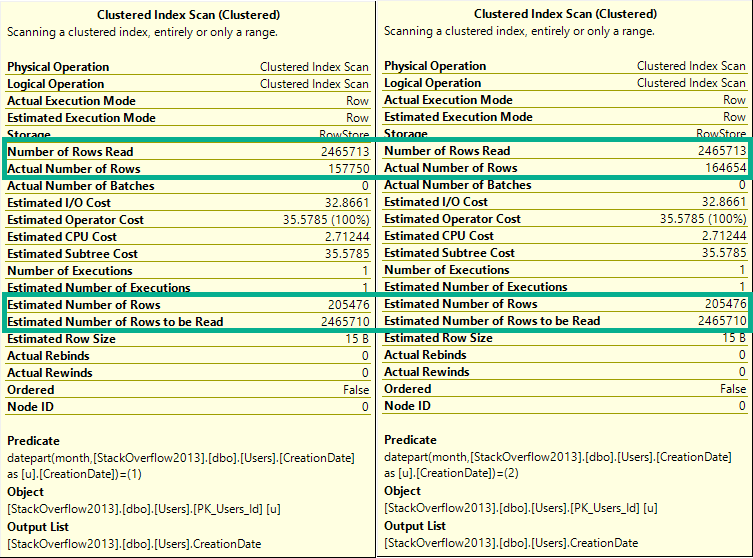
If you run these, they’ll all have the same guess on the clustered index scan.
To keep things simple, let’s look at the first couple:
BADLY
The difference here is that now every single row estimate will be 205,476.
Lesson learned: The optimizer can make a decent statistical guess at the year portion of a date, but not the month portion.
In a way, you can think of this like a LIKE query.
The optimizer can make a decent guess at ‘YEAR%’, but not at ‘%MONTH%’.
Actual Facts To Snack On And Chew
The same thing happens for both new and old cardinality estimators.
DECLARE @blob_eater DATETIME;

    SELECT @blob_eater = u.CreationDate
    FROM dbo.Users AS u
    WHERE YEAR(u.CreationDate) = 2008
    OPTION(USE HINT('FORCE_DEFAULT_CARDINALITY_ESTIMATION'));

    SELECT @blob_eater = u.CreationDate
    FROM dbo.Users AS u
    WHERE YEAR(u.CreationDate) = 2008
    OPTION(USE HINT('FORCE_LEGACY_CARDINALITY_ESTIMATION'));
    GO

DECLARE @blob_eater DATETIME;

    SELECT @blob_eater = u.CreationDate
    FROM dbo.Users AS u
    WHERE MONTH(u.CreationDate) = 12
    OPTION(USE HINT('FORCE_DEFAULT_CARDINALITY_ESTIMATION'));


    SELECT @blob_eater = u.CreationDate
    FROM dbo.Users AS u
    WHERE MONTH(u.CreationDate) = 12
    OPTION(USE HINT('FORCE_LEGACY_CARDINALITY_ESTIMATION'));
    GO
Wouldn’t Get Far
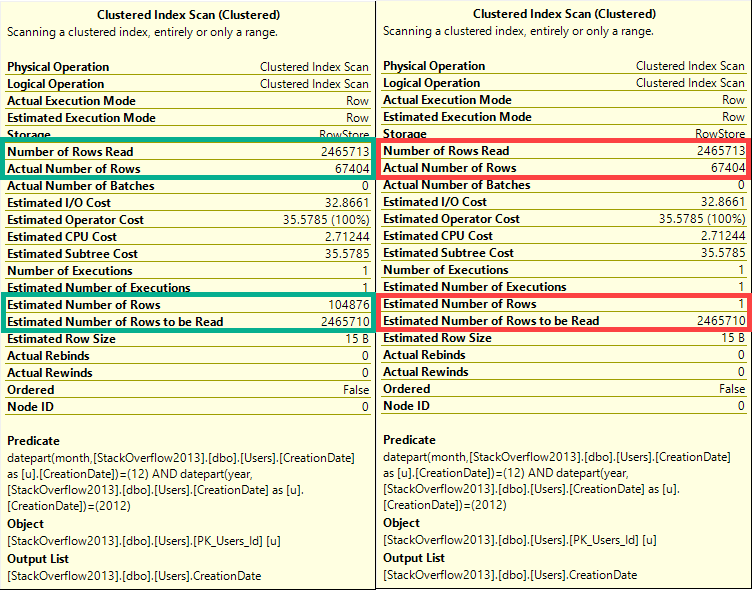
But if we combine predicates, something really different happens between Linda Cardellini estimators.
DECLARE @blob_eater DATETIME;

    SELECT @blob_eater = u.CreationDate
    FROM dbo.Users AS u
    WHERE MONTH(u.CreationDate) = 12
    AND YEAR(u.CreationDate) = 2012
    OPTION(USE HINT('FORCE_DEFAULT_CARDINALITY_ESTIMATION'));


    SELECT @blob_eater = u.CreationDate
    FROM dbo.Users AS u
    WHERE MONTH(u.CreationDate) = 12
    AND YEAR(u.CreationDate) = 2012
    OPTION(USE HINT('FORCE_LEGACY_CARDINALITY_ESTIMATION'));
    GO
WRONG
In this case, the old CE (on the right), makes a very bad guess of 1 row.
The new CE (on the left) makes a slightly better, but still not great guess.
Ended
Neither of these is a good way to query date or time data.
You can see in every tooltip that, behind the scenes, the queries used the DATEPART function, which means that also doesn’t help.
The point of this post is that someone may use a function to query the year portion of a date and assume that SQL Server does a good job on any other portion, which isn’t the case.
None of these queries are SARGable, and at no point is a missing index request raised on the CreationDate column, even though if you add one it gets used and reduces reads.
Thanks for reading!
Going Further
If this is the kind of SQL Server stuff you love learning about, you’ll love my training. Blog readers get 25% off the Everything Bundle — over 100 hours of performance tuning content. Need hands-on help? I offer consulting engagements from targeted investigations to ongoing retainers. Want a quick sanity check before committing to a full engagement? Schedule a call — no commitment required.
In this video, I share an exciting new feature in SQL Server 2019 CTP 2.4 that makes tracking down missing index requests much easier. Typically, identifying the query responsible for a missing index has been a bit of a challenge, involving either sifting through plan cache entries or running complex DMV queries. However, with these recent updates, you can now directly access the query hash, plan hash, and last SQL handle associated with missing index requests in the `sys.dm_db_missing_index_group_stats` DMV. This allows for seamless joining to `sys.dm_exec_query_stats` and `sys.dm_exec_query_plan`, providing a straightforward way to retrieve the exact query that requested the missing index. While it’s worth noting that if the execution plan is no longer cached, this information won’t be available, I find this feature incredibly useful and believe it will greatly enhance troubleshooting and optimization efforts in SQL Server environments.
Full Transcript
Howdy folks, Erik Darling here with Erik Darling Data, being mildly distracted by a pen that I got. It has my company name on it. Eh, I know that I’m doing incredibly well as a limited liability corporation when I’ve started receiving personalized office supplies. Very good feeling. But today I’m here to talk about something really cool that I just noticed in SQL Server, 2019, CTP 2.4, which just dropped today like a few hours ago or a couple hours ago or some, some amounts of time ago that I can’t really recall because my brain doesn’t work anymore. But really neat and quick video just to show you what it is. Now, usually when you run a query and you know, whether you get the actual plan or whether you go into the plan cache or whether you, you know, go off and run crazy DMV queries, when you have missing indexes, it’s always been kind of tough to tie what query asked for that and that missing index and the missing index request over in the DMVs. For instance, I have this query here, which is asking for a nonclustered index on the post table that includes owner user ID. And I guess I suppose that’s an okay index request. It’s not the, maybe not the greatest missing index request in the world because, you know, owner user ID is, in the join and we might, might, might, might want to index the columns that we join on. But that’s not the point here. The point here is this. Now, rather than either having to by chance come across this plan in the plan cache or run a DMV query and say, huh, I wonder, I wonder what query query was I was asking for that. Well, now we can get that.
So, uh, in, uh, in the, uh, in the system, DM, DB missing index group stats query, uh, there are a couple new columns and I’m going to, I’ve already run this and I’m not going to run it again cause that would be ridiculous, but we have some new columns where, holy crow, that zoomed in big. Uh, but we get the query hash query plan hash and last SQL handle of, uh, the query that asked for the missing index. So now, when we, uh, query this DMV, we can join it off to sys.dm exec query stats and we can cross apply sys.dm exec query plan handle to find the query plan of the query that asked for the missing index. And I think that’s really, really spiffy. The only thing is, let’s see, let’s run this and let’s, let’s rerun this and let’s see, let’s see if this changes. Yeah. Now, now we get nothing back. So if, if you’re, if you’re, if the execution plan isn’t in the plan cache anymore, uh, it’s not going to tell us about that missing index.
Which is neither good nor bad, but it’s just a thing. Bummer, huh? Anyway, uh, that’s about all I had for this one. For now, I might come back to this as time allows. But anyway, uh, thank you for watching. Uh, I hope that you are excited, uh, or at least as, as, like, like the neighborhood of excited as I am about, uh, this new SQL Server version. And I hope that someday you too start getting personalized office supplies is a sign of your business’s ultimate success.
Anyway, uh, thanks for watching or whatever. I don’t know, listening, maybe just staring blankly at a screen pretending to work. It could be anything really. Anyway, thanks. See you next time. Goodbye. Button.
Video Summary
In this video, I share an exciting new feature in SQL Server 2019 CTP 2.4 that makes tracking down missing index requests much easier. Typically, identifying the query responsible for a missing index has been a bit of a challenge, involving either sifting through plan cache entries or running complex DMV queries. However, with these recent updates, you can now directly access the query hash, plan hash, and last SQL handle associated with missing index requests in the `sys.dm_db_missing_index_group_stats` DMV. This allows for seamless joining to `sys.dm_exec_query_stats` and `sys.dm_exec_query_plan`, providing a straightforward way to retrieve the exact query that requested the missing index. While it’s worth noting that if the execution plan is no longer cached, this information won’t be available, I find this feature incredibly useful and believe it will greatly enhance troubleshooting and optimization efforts in SQL Server environments.
Full Transcript
Howdy folks, Erik Darling here with Erik Darling Data, being mildly distracted by a pen that I got. It has my company name on it. Eh, I know that I’m doing incredibly well as a limited liability corporation when I’ve started receiving personalized office supplies. Very good feeling. But today I’m here to talk about something really cool that I just noticed in SQL Server, 2019, CTP 2.4, which just dropped today like a few hours ago or a couple hours ago or some, some amounts of time ago that I can’t really recall because my brain doesn’t work anymore. But really neat and quick video just to show you what it is. Now, usually when you run a query and you know, whether you get the actual plan or whether you go into the plan cache or whether you, you know, go off and run crazy DMV queries, when you have missing indexes, it’s always been kind of tough to tie what query asked for that and that missing index and the missing index request over in the DMVs. For instance, I have this query here, which is asking for a nonclustered index on the post table that includes owner user ID. And I guess I suppose that’s an okay index request. It’s not the, maybe not the greatest missing index request in the world because, you know, owner user ID is, in the join and we might, might, might, might want to index the columns that we join on. But that’s not the point here. The point here is this. Now, rather than either having to by chance come across this plan in the plan cache or run a DMV query and say, huh, I wonder, I wonder what query query was I was asking for that. Well, now we can get that.
So, uh, in, uh, in the, uh, in the system, DM, DB missing index group stats query, uh, there are a couple new columns and I’m going to, I’ve already run this and I’m not going to run it again cause that would be ridiculous, but we have some new columns where, holy crow, that zoomed in big. Uh, but we get the query hash query plan hash and last SQL handle of, uh, the query that asked for the missing index. So now, when we, uh, query this DMV, we can join it off to sys.dm exec query stats and we can cross apply sys.dm exec query plan handle to find the query plan of the query that asked for the missing index. And I think that’s really, really spiffy. The only thing is, let’s see, let’s run this and let’s, let’s rerun this and let’s see, let’s see if this changes. Yeah. Now, now we get nothing back. So if, if you’re, if you’re, if the execution plan isn’t in the plan cache anymore, uh, it’s not going to tell us about that missing index.
Which is neither good nor bad, but it’s just a thing. Bummer, huh? Anyway, uh, that’s about all I had for this one. For now, I might come back to this as time allows. But anyway, uh, thank you for watching. Uh, I hope that you are excited, uh, or at least as, as, like, like the neighborhood of excited as I am about, uh, this new SQL Server version. And I hope that someday you too start getting personalized office supplies is a sign of your business’s ultimate success.
Anyway, uh, thanks for watching or whatever. I don’t know, listening, maybe just staring blankly at a screen pretending to work. It could be anything really. Anyway, thanks. See you next time. Goodbye. Button.
Going Further
If this is the kind of SQL Server stuff you love learning about, you’ll love my training. Blog readers get 25% off the Everything Bundle — over 100 hours of performance tuning content. Need hands-on help? I offer consulting engagements from targeted investigations to ongoing retainers. Want a quick sanity check before committing to a full engagement? Schedule a call — no commitment required.
sql_variant can have a maximum length of 8016 bytes. This includes both the base type information and the base type value. The maximum length of the actual base type value is 8,000 bytes.
Since the optimizer needs to plan for your lazinessindecisivenesslack of respect for human life inexperience, you can end up getting some rather enormous memory grants, regardless of the type of data you store in variant columns.
Ol’ Dirty Demo
Here’s a table with a limited set of columns from the Users table.
CREATE TABLE dbo.UserVariant
(
    Id SQL_VARIANT,
    CreationDate SQL_VARIANT,
    DisplayName SQL_VARIANT,
    Orderer INT IDENTITY
);

INSERT dbo.UserVariant WITH(TABLOCKX)
( Id, CreationDate, DisplayName )
SELECT u.Id, u.CreationDate, u.DisplayName
FROM dbo.Users AS u
In all, about 2.4 million rows end up in there. In the real table, the Id column is an integer, the CreationDate column is a DATETIME, and the DisplayName column is an NVARCHAR 40.
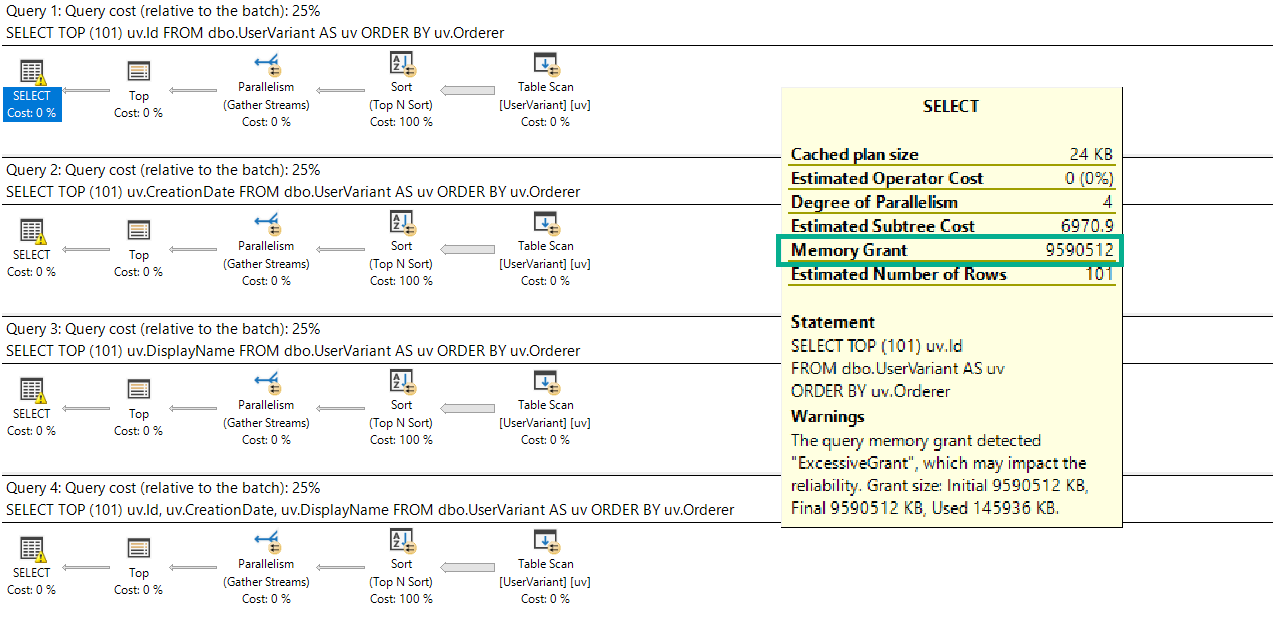
Sadly, no matter which column we select, the memory grant is the same:
SELECT TOP (101) uv.Id
FROM dbo.UserVariant AS uv
ORDER BY uv.Orderer;

SELECT TOP (101) uv.CreationDate
FROM dbo.UserVariant AS uv
ORDER BY uv.Orderer;

SELECT TOP (101) uv.DisplayName
FROM dbo.UserVariant AS uv
ORDER BY uv.Orderer;

SELECT TOP (101) uv.Id, uv.CreationDate, uv.DisplayName
FROM dbo.UserVariant AS uv
ORDER BY uv.Orderer;
It’s also the maximum memory grant my laptop will allow: about 9.6GB.
Large Marge
Get’em!
As if there aren’t enough reasons to avoid sql_variant, here’s another one.
Thanks for reading.
Going Further
If this is the kind of SQL Server stuff you love learning about, you’ll love my training. Blog readers get 25% off the Everything Bundle — over 100 hours of performance tuning content. Need hands-on help? I offer consulting engagements from targeted investigations to ongoing retainers. Want a quick sanity check before committing to a full engagement? Schedule a call — no commitment required.