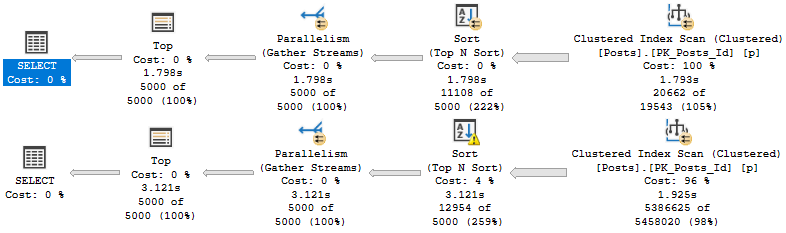
This is an okay trick to keep in mind when you need to use order by on a large table.
Of course, we care about order by for many very good reasons, especially when we don’t have an index to support the ordering.
Sorting data requires memory, and Sort operators particularly may ask for quite a bit of memory.
Why? Because you need to sort all the columns you’re selecting by the column you’re ordering by.
Sorts aren’t just for the column(s) in your order by — if you SELECT *, you need order to all the columns in the * by all the columns in the order by.
I know I basically repeated myself. That’s for emphasis. It’s something professional writers do.
Dig it.
Butheywhatabout
Let’s say, just for kicks, that we have a table in our database. And maybe it has a column called something like “Id” in it.
Pushing this tale further into glory, let’s also assume that this legendary “Id” column is the primary key and clustered index.
That means we have the entire table sorted by this one column. Cool.
Tighten those wood screws, because we’re about to go cat 5 here. Ready?
There’s a date or date time column in the table — let’s say it defines when the row was first inserted into the table.
It could be a creation date, or an order date. Doesn’t matter.
What does matter? That the “Id” and the “*Date” column increment at the same time, which means that they’re in the same order.
It may suit your queries better to order by the clustered index key column rather than another column in the table which may not be in a helpful index in a helpful order for you query.
Too Sort
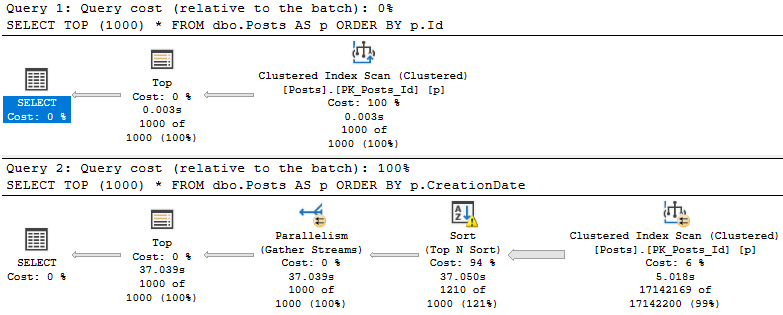
Take these two queries:
SELECT TOP (1000) *
FROM dbo.Posts AS p
ORDER BY p.Id;

SELECT TOP (1000) *
FROM dbo.Posts AS p
ORDER BY p.CreationDate;
I know, they’re terribly unrealistic. No one would ever. Not even close. Fine.
smh
Though both queries present the same data in the same order, the query that orders by the CreationDate column takes uh.
Considerably longer.
For reasons that should be apparent.
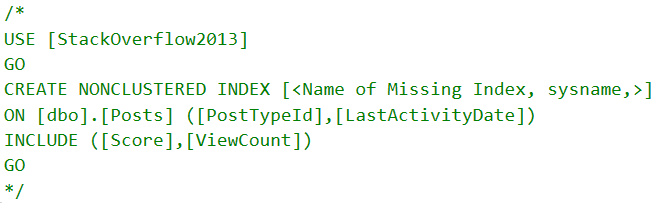
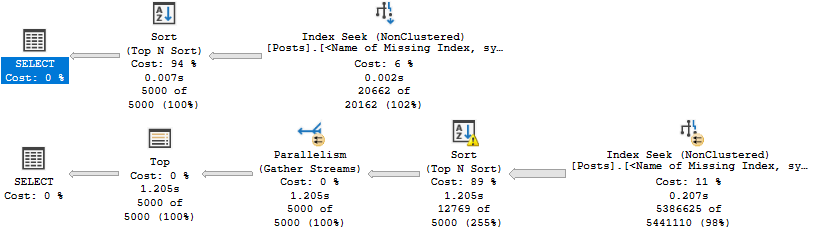
Of course, we could add an index to help. Just add all the indexes. What could go wrong?
If you have the type of application that lets users, say, dynamically filter and order by whatever columns they want, you’ve got a whole lot of index to create.
Better get started.
Thanks for reading!
Going Further
If this is the kind of SQL Server stuff you love learning about: these days I have AI do the annoying stuff for me. My new video course teaches you to work the same way, and I teach whole teams in a one-day workshop. Someone still has to know enough SQL Server to keep the robots in check, and that’s what my training is for.
In this video, I dive into a fascinating case study where using `NOT EXISTS` instead of a `LEFT JOIN` led to significant performance issues for a client query. I walk through the process of reproducing and optimizing the problematic SQL queries using the Stack Overflow database as an example. The key takeaway is how row goals can mislead the optimizer, leading to inefficient execution plans. I also highlight why a seemingly selective index request was actually counterproductive due to the use of `COALESCE` on a non-nullable column, demonstrating that `ISNULL` would have been a better choice in this scenario. By sharing these insights, I hope to help you avoid similar pitfalls and optimize your queries more effectively.
Full Transcript
Yep. So, good morning. Good afternoon and good evening. Thank you, thank you, thank you. You’re far too kind. Erik Darling here with Erik Darling Data. Still, I have managed to not fire myself for almost an entire year. The one thing that made me come really close is that I just I just deleted 60 gigs of unusable video recordings. And I know that’s probably hard for you to believe because you may have seen my other videos and thought to yourself, is there anything that he won’t publish? And here we are. Yes. The answer is yes. There was nearly 60 gigs of unusable video footage. So there’s that. But I wanted to record this because I thought it was kind of an interesting process where I had to record this. I had a client and say, we need you to help us with this one query. And normally, that’s not the kind of thing that people want me to do. I’m not like a tune this one query kind of guy. They’re like, we have a lot of problems and we need a lot of things tuned. And that’s kind of more my deal. But these nice people had one big problem. And they said, we need kind of embarrassing. Is that, they read a post on my site. And they tried something. And it actually detuned the query. The query got slower. When they tried the thing that I said they should do. So that was personally a little bit embarrassing. Now, the thing that they tried that didn’t go well was using not exists instead of a left join with the is not know the figure out where rows didn’t already exist in a table. This was data that was part of an ETL process where data was being moved from a staging table into a real table. We don’t need to do an insert or anything to mimic the problem. I just need to run two queries that are written kind of similar. And I was able to reproduce a lot of the behavior and simplified queries using the Stack Overflow database. When we look at these two query plans, you can see that even though they have the same logic and the same, the same, they return the same results over here, same results, right? Same results up and down, 10 rows, 10 rows, everything the same, good. Even though they do that, they get two very different query plans.
So you can see the top query plan. So you can see the top query plan is just god awful for this scenario. And I’ll talk a little bit about why. So what’s happened here is with the top 10 in the not exists over here. SQL Server has identified an optimization opportunity to use a row goal in the query. And what that row goal does is it significantly cheapens some operations. The optimizer wagers that some things will be very, very cheap to do. It’ll be very, very easy to find a few, like a very small number of roads very quickly.
Now, this is not only a good demo for when a row goal is quite counterproductive, but it’s also a very good demo to show you that operator costs and execution plan costing can be very, very, very wrong. If we look at this execution plan up top and we zoom in a little bit, we can see the costs that the optimizer has assigned to certain things. If we look over here, 34%. And if we look over here, 61%. So we have 95% of the query cost up here. And that’s a pretty good chunk.
But when we look at the times that these things ran for, 179 milliseconds. Now, in row mode execution plans, these operator times are cumulative going from right to left. So the sort ran for 406 milliseconds minus 179 milliseconds, whatever that is. But you can see that these are very high cost operations in the plan. So the second one is, if we look at the execution plan, we spend almost no time in them. If we go look at where we did spend time, we have an operator that cost 4% and an operator that costs 6%.
But this is where we spent 45 seconds of execution time that is hanging out in here. Now, this is a, I mean, I don’t want to say common anti-pattern, but it is sort of a known anti-pattern where if you have, you have an anti-semi join up over here, oops, that’s the wrong button. Let’s do control instead. If you have an anti-semi join up over here. And SQL Server has chosen, SQL Server has a top operator in here. And then you have a scan underneath that top.
What I think Paul White once called a useless top and Andy Malin once giggled about. But if you have a nested loops join and a useless top and a clustered index scan under the useless top, you most likely are facing this particular anti-pattern. What’s going on is that the SQL Server has chosen the loop join. So it’s chosen to take some rows from over here and for each row that comes out of there, loop down over here and then execute this.
Because it thinks that it won’t have to do that too much in order to figure out what exists or doesn’t exist in that other table. It thinks that it can do that relatively quickly, easily, and cheaply just by, you know, scanning in and grabbing some rows. But it ends up, that ends up not being the case. That ends up being a pretty significant burden.
That does not happen in the bottom query. In the bottom query, we just do one big scan and one big scan and one big join. And then we filter out rows that we’re not interested in after the join. Now, this particular pattern is the one that I talked about in my blog post that I thought was a generally bad one for these queries.
But in this case, this actually turns out a lot better. It turns out a lot better than that Rogel plan, which this one only runs for about two and a half seconds, which is pretty good, right? Pretty good. Now, if you want to learn a whole lot more about Rogels, if you want to get into the article where Paul White identifies a useless top, that’s in the third part. But it’s a four-part series. It’s an exhaustive, not exhausting, four-part series.
I mean, you might be exhausted when you’re done with it, but that’s your problem. Deal with it, I guess. But if you want to learn more about that, there’s a four-part series over on sqlperformance.com.
I’ll let you figure out how to get to these four things. But there it is for you if you ever need it. Now, we could avoid those problems with one hint or another with our original query.
So we could either tell SQL Server to use a hash join or to disable optimizer Rogels using a newer hint in SQL Server. I forget which version, but I think 2016 maybe. But if we do either one of those things, we tell SQL Server what kind of join to use or we tell SQL Server to not use a rule goal with this plan, we get queries that run relatively quickly, right?
About two and a half seconds, which is just about what that left join with the filter ran in. So not a whole lot of difference there. But there is something, there is some, like, further stuff we could do to get this query to maybe be faster. Now, the first thing I want to figure out is what’s up with that missing index request.
So the missing index request that SQL Server is asking for in both of these plans is terrible. And I’m going to start creating this index because it takes a little bit and then talk a little bit about why that’s happening. Now, in our queries, so long story short is that this coalesce up here.
I don’t need all that space, do I? It’s a bit daft looking. There we go. Just the one’s nice. But see, this coalesce was left over from some defensive mechanism when there was a left join and everything else, where someone was worried that they were going to rule out rows that they should keep in.
So they had the column wrapped in a coalesce. The same thing would have happened with isno, but we’ll get into that in a little bit more detail later. But the missing index request that came up was on vote type ID that include user ID and creation date.
And that is a really goofy index specifically for this query. If we look at the way that data, or if we look at how much data those predicates would rule out, like filtering them in the where clause, that select query that is just for the creation date column, it goes out a lot more data.
In other words, this is a short way of saying that. That filters down to about a million and a half rows, whereas the equality predicate for vote type ID in 123 only gets, I mean, only down to 44 and a half million rows.
That is not terribly selective on its own. But with the creation date predicate in there as well, it is much more selectiver. But yeah, so if we create this index, which I’ve changed this index, so this was not a very helpful index.
But if we have an index on vote type ID and then creation date, you are more than welcome to experiment creating them with the key column in the opposite order. The same thing happens.
I just think that some of the information in the query plan when vote type ID is first is a little more interesting. So let’s go and look and see if that index helped. I’ll just start running this, which is the exact same query as before.
There’s no hints or anything. There’s nothing weird going on. And the short story is that no, it’s not going to help. And it’s not going to help for what I think is a fairly interesting reason.
I’m going to get the estimated plan. Right? We’re going to see the exact same pattern here. And we think that we might be safe because now we have a top and then an index seek. So a top with a seek is much more efficient than a top and a scan.
Because that top with the scan is going to read through until it finds a row. And we might have to do that full scan a whole lot of times. A top with a seek is much cheaper.
However, it’s not free and it’s not perfect, but it’s a lot cheaper. The problem that we’re running into is behind the seek, well, we have at least seek predicates for vote type ID 123. So we’re able to seek to the 44.5 million rows that we care about.
But then we have this big honking thing up here. This is internally what SQL Server does with Coalesce. It turns it into a case expression internally.
And it will do this the more columns and values and variables you throw in, the more it will stack that case expression up. But this is what the optimizer does internally. And this is where we run into trouble.
So even with a much better index, this query is still not out of the woods. And that’s because there’s something weird about Coalesce. And this is something that I blogged about a long time ago over on Brent’s site.
But it’s something that came up in reality with a client. Now, if we look at the creation date column on the votes table, it is defined as not nullable. Right?
We have, we cannot have a null value in there. It was left over, again, like I said, it was a defense mechanism from some developer who was right about nulls and ruling out rows when this was a left join query. So it was still in there from that.
And what’s funny is that if you look inside the plan XML, I’m not going to go digging into plan XML, but you’ll see this case expression in there. It Coalesce does not pick up on the fact that the creation date column isn’t nullable. It does not allow any nulls.
Coalesce will not do that for you. Isnull will. Isnull is a little bit less weird. And if we were to go look in the query plan XML, then we would see this. And just by changing the query to use isnull rather than coalesce.
And I’m not saying this is a good practice, but by changing that part of the query, we get a much, much faster execution plan. And I want to point out here that because isnull is not evaluated, because isnull has some special magic power that looked at the creation date column and said, you’re not nullable, we don’t need isnull anyway.
All right? Because of that, we have full seek predicates here. We don’t have a residual predicate on creation date. We only have it on user ID, user ID, user ID.
So we can see the dates in here. All right? So for each one of those seeks to invoke type ID of one, two, or three, we have an additional seek for the creation dates that we care about. But of course, knowing full well that that column isn’t nullable and that we don’t have to have any sort of null defense mechanisms, we can just write the query without that function on the column, and we can get an improved query.
So this is down to about one and a half seconds from about two and a half seconds. Maybe not the biggest one in the world. In real life, there was a lot more going on.
The reduction in time was a lot greater, but this is just a fairly good demo to show you that with a few small changes, you can have a pretty big impact on things. So what did we learn?
I don’t know. I don’t really. I have no idea. I just thought it was interesting. The row goals can kind of give the optimizer a false sense of confidence. When we had that row goal query up at the top, there was no missing index request.
SQL Server said, I’m fine, I’m fine, I’m fine. The costs were all screwy. And the query ran forever. Wasn’t good.
We had a missing index request when we ran the query a little bit differently, but it was not really an ideal index request because we had that creation date column wrapped in a function. And so SQL Server looked at it and said, I can’t really seek to you anyway.
I’m going to demote you to be an included column. And that really wouldn’t have been terribly helpful for our query because even though, as an included column, we couldn’t really seek efficiently to those 1.4 million rows.
It was a very selective predicate. We also learned that coalesce does not short circuit for non-nullable columns. So if you have a column that can’t be null and you have it in your query and you say, and you wrap it in coalesce, the coalesce will hang out.
Isnull will look at that column and say, you’re not nullable. This won’t make a difference anyway. And it will short circuit.
It won’t help you if the column isn’t nullable. And you really shouldn’t be off writing queries, wrapping columns and functions like that because you set a bad example for other people. There are a million better ways to write a query that don’t involve wrapping columns and functions.
I know that’s kind of an ivory tower way to put it. And I’ve never been ashamed to polish my own ivory. But it’s just, you know, if you can avoid it, you should.
Anyway, I guess that was the point there. One should avoid these things. They should be avoided.
Anyway, I am exhausted after that. It’s the longest 17 minutes of my life. I’m going to go drink coffee and pray for food, beg for food. Something.
I don’t know. Anyway, thank you. Thank you for watching. I hope you enjoyed yourself. I hope you learned something. And gosh darn it, I will see you in the next video. Goodbye.
Going Further
If this is the kind of SQL Server stuff you love learning about: these days I have AI do the annoying stuff for me. My new video course teaches you to work the same way, and I teach whole teams in a one-day workshop. Someone still has to know enough SQL Server to keep the robots in check, and that’s what my training is for.
Sometimes I think it’s interesting how adding a seemingly useless or harmless thing to a query can change the query plan.
Here’s a quick example using an Order By on an indexed column.
Top 1
I understand that without an ORDER BY, any TOP query will be non-deterministic. In this case, that’s okay. I only want to know if any Id exists in the Votes table for votes types that aren’t 5 or 8. Order doesn’t matter to me.
SELECT TOP (1) u.Id
FROM dbo.Users AS u
WHERE EXISTS
(
    SELECT 1 / 0
    FROM dbo.Votes AS v
    WHERE v.UserId = u.Id
    AND   v.VoteTypeId NOT IN ( 5, 8 )
);
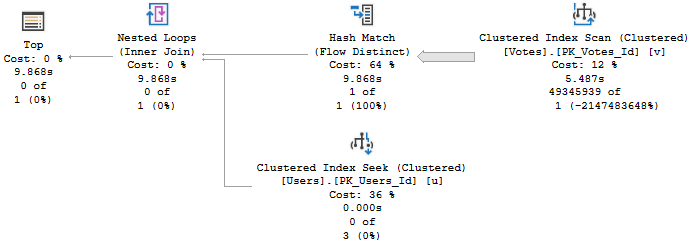
The trouble is that this query runs for about 10 seconds to find nothing.
You don’t stop
Yes, there are many other ways to express this query — you might even use a COUNT, which would bypass the problem — but hey, some people love TOPs.
Hors d’Oeuvres By
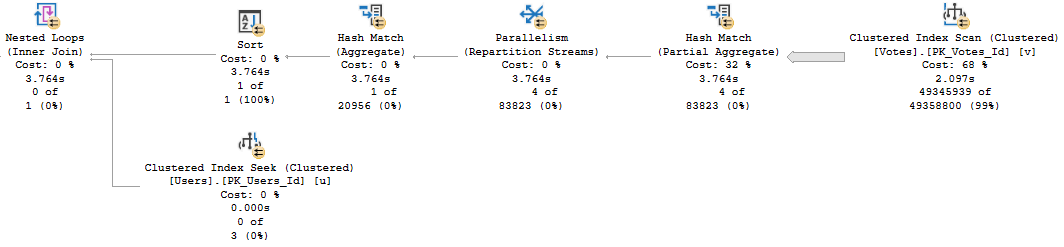
Adding an order by here has a rather significant impact on the query plan, even though the column I’m asking to be ordered is the PK/CX of the Users table, meaning it’s already in order.
SELECT TOP (1) u.Id
FROM dbo.Users AS u
WHERE EXISTS
(
    SELECT 1 / 0
    FROM dbo.Votes AS v
    WHERE v.UserId = u.Id
    AND   v.VoteTypeId NOT IN ( 5, 8 )
)
ORDER BY u.Id;
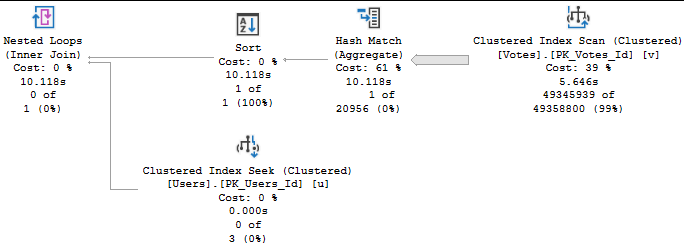
The query plan now looks like this:
You won’t stop
Who’s That Sort?
Why did that happen? Let’s take a look!
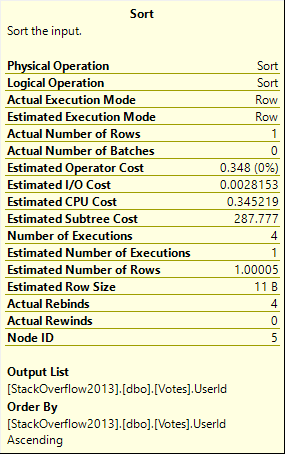
Notice that the Sort isn’t taking place for the Users table, but rather the Votes table.
Udderly
We’re putting the UserId column in order now. This is to help us with the Nested Loops operator, which has slightly different properties now.
Fetch HAPPENED
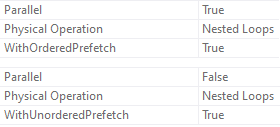
Notice how one Nested Loops join used an Ordered Prefetch, and the other uses an Unordered Prefetch?
That’s a side effect of the ORDER BY.
And, yeah, the plan with the Order By is “faster” because it went parallel. That won’t always be the case, and when it’s not, any efficiency is lost.
Das Bumer
Something To Keep In Mind
Asking for ordered data can change a lot of things about a query. More superficial things, like indexes used, joins and aggregates chosen, parallelism or serial(ism?). It can also change less obvious things, like memory grants, the type of prefetch used, etc.
Sometimes you don’t have a choice in the matter — you need data in a specific order at some point in the query for correctness — but quite often presentation layer ordering is best left out of your queries. Unless of course you have indexes that store data in the order you want, so there’s no extra work incurred.
Thanks for reading!
Going Further
If this is the kind of SQL Server stuff you love learning about: these days I have AI do the annoying stuff for me. My new video course teaches you to work the same way, and I teach whole teams in a one-day workshop. Someone still has to know enough SQL Server to keep the robots in check, and that’s what my training is for.
If you have selective predicates earlier in the index that filter a lot of rows, the SARGability of trailing predicates matters less.
	CREATE INDEX shorty ON dbo.a_table(selective_column, non_selective_column);

	SELECT COUNT(*) AS records
	FROM dbo.a_table AS a
	WHERE selective_column = 1
	AND ISNULL(non_selective_column, 'whatever') = 'whatever';
Am I saying you should do this? Am I saying that it’s a good example to set?
No. I’m just saying you can get away with it in this situation.
Longer Answer
The less selective other predicates are, the less you can get away with it.
Take these two queries:
	SELECT COUNT(*) AS records
	FROM dbo.Users AS u
	WHERE u.Id = 8
	AND ISNULL(u.Location, N'') = N'';

    SELECT COUNT(*) AS records
    FROM dbo.Users AS u
    WHERE u.Id BETWEEN 8 AND 9693617
	AND ISNULL(u.Location, N'') = N'';
The first one has an equality predicate on the Id, the primary key of the table. It’s going to touch one row, and then evaluate the residual predicate on Location.
The second query has a very non-selective range predicate on Id — still a selective column, just not a selective predicate anymore — so, we do a lot more work (relatively).
If we have this index, and we look at how four logically equivalent queries perform:
CREATE UNIQUE INDEX fast_lane ON dbo.Users(Id, Location);
SELECT COUNT(*) AS records
FROM   dbo.Users AS u
WHERE  u.Id = 8
AND    ISNULL(u.Location, N'') = N'';

SELECT COUNT(*) AS records
FROM   dbo.Users AS u
WHERE  u.Id BETWEEN 8 AND 9693617
AND    ISNULL(u.Location, N'') = N'';

SELECT COUNT(*) AS records
FROM   dbo.Users AS u
WHERE  u.Id = 8
AND   (   u.Location = N''
      OR   u.Location IS NULL );

SELECT COUNT(*) AS records
FROM   dbo.Users AS u
WHERE  u.Id BETWEEN 8 AND 9693617
AND   (   u.Location = N''
      OR   u.Location IS NULL );
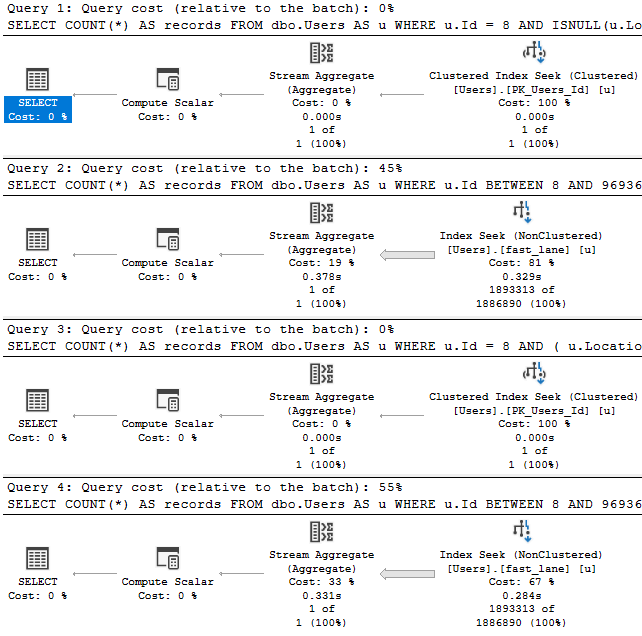
The query plans tell us enough:
Toasty
It really doesn’t matter if we obey the laws of SARGability here.
Expect Depression
There have been many times when explaining SARGability to people that they went back and cleaned up code like this to find it didn’t make much of a difference to performance. That’s because SARGability depends on indexes that can support seekable predicates. Without those indexes, it makes no practical difference how you write these queries.
Again, I’m not condoning writing Fast Food Queries when you can avoid it. Like I said earlier, it sets a bad example.
Once this kind of code creeps into your development culture, it’s hard to keep it contained.
There’s no reason to not avoid it, but sometimes it hurts more than others. For instance, if Location were the first column in the index, we’d have a very different performance profile across all of these queries, and other rewrites might start to make more sense.
Thanks for reading!
Going Further
If this is the kind of SQL Server stuff you love learning about: these days I have AI do the annoying stuff for me. My new video course teaches you to work the same way, and I teach whole teams in a one-day workshop. Someone still has to know enough SQL Server to keep the robots in check, and that’s what my training is for.
I see people using OUTPUT to audit modifications from time to time, often because “triggers are bad” or “triggers are slow”.
Well, sometimes, sure. But using OUTPUT can be a downer, too.
Let’s look at how.
A Process Emerges
Say we’ve got a table that we’re using to track user high scores for their questions.
CREATE TABLE dbo.HighQuestionScores
(
    Id INT PRIMARY KEY CLUSTERED,
    DisplayName NVARCHAR(40) NOT NULL,
    Score BIGINT NOT NULL
);
To test the process, let’s put a single user in the table:
INSERT dbo.HighQuestionScores WITH (TABLOCK)
        (Id, DisplayName, Score)
SELECT u.Id, u.DisplayName, p.Score
FROM dbo.Users AS u
JOIN
(
    SELECT p.OwnerUserId,
	       MAX(p.Score) AS Score
    FROM dbo.Posts AS p
    WHERE p.PostTypeId = 1
    GROUP BY p.OwnerUserId
) AS p ON p.OwnerUserId = u.Id
WHERE u.Id = 22656;
To exacerbate the problem, I’m not going to create any helpful indexes here. This is a good virtual reality simulator, because I’ve seen your indexes.
Yes you. Down in front.
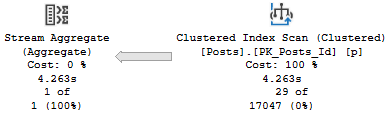
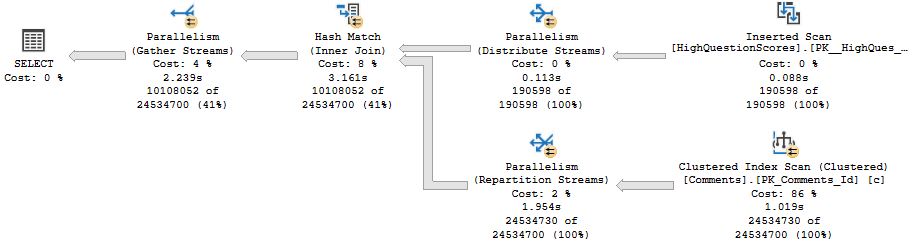
The relevant part of the query plan is the scan of the Posts table:
Practice
It’s parallel, and takes 1.8 seconds.
Aw, dit
Now let’s add in an OUTPUT clause.
I’m going to skip over inserting the output into any structure, because I want you to understand that the target doesn’t matter.
INSERT dbo.HighQuestionScores WITH (TABLOCK)
        (Id, DisplayName, Score)
OUTPUT Inserted.Id,
       Inserted.DisplayName,
       Inserted.Score
SELECT u.Id, u.DisplayName, p.Score
FROM dbo.Users AS u
JOIN
(
    SELECT p.OwnerUserId, MAX(p.Score) AS Score
    FROM dbo.Posts AS p
    WHERE p.PostTypeId = 1
    GROUP BY p.OwnerUserId
) AS p ON p.OwnerUserId = u.Id
WHERE u.Id = 22656;
The relevant part of the plan now looks like this:
Golf Coach
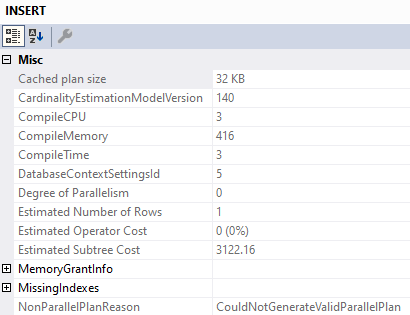
We’ve lost parallelism, and inspecting the properties of the Insert operator tells us why:
Less Successful
We’ve got a Non Parallel Plan Reason. Why aren’t there any spaces? I don’t know.
Why can’t that go parallel? I also don’t know.
What About Triggers?
If we create a minimal trigger on the table, we can see if it has the same overhead.
CREATE OR ALTER TRIGGER dbo.hqs_insert ON dbo.HighQuestionScores
AFTER INSERT
AS
BEGIN
SET NOCOUNT ON;

    SELECT Inserted.Id,
           Inserted.DisplayName,
           Inserted.Score
    FROM Inserted;

END
Let’s go back to the original insert, without the output! We care about two things:
Is the parallel portion of the insert plan still there?
Is there any limitation on parallelism with the Inserted (and by extension, Deleted) virtual tables?
The answers are mostly positive, too. The insert plan can still use parallelism.
I’m not gonna post the same picture here, you can scroll back fondly.
Though the select from the Inserted table within the trigger doesn’t go parallel, it doesn’t appear to limit parallelism for the entire plan. It does appear that reads from the Inserted table can’t use parallelism (sort of like the table variable in a MSTVF).
Let’s modify the trigger slightly:
CREATE OR ALTER TRIGGER dbo.hqs_insert ON dbo.HighQuestionScores
AFTER INSERT
AS
BEGIN
SET NOCOUNT ON;

    DECLARE @Id INT
	DECLARE @DisplayName NVARCHAR(40)
	DECLARE @Score BIGINT

    SELECT @Id = Inserted.Id,
           @DisplayName = Inserted.DisplayName,
           @Score = Inserted.Score
    FROM Inserted
	JOIN dbo.Comments AS c
	    ON c.UserId = Inserted.Id;

END
And for variety, let’s insert a lot more data into our table:
TRUNCATE TABLE dbo.HighQuestionScores;

INSERT dbo.HighQuestionScores WITH (TABLOCK)
        (Id, DisplayName, Score)
SELECT u.Id, u.DisplayName, p.Score
FROM dbo.Users AS u
JOIN
(
    SELECT p.OwnerUserId, MAX(p.Score) AS Score
    FROM dbo.Posts AS p
    WHERE p.PostTypeId = 1
    GROUP BY p.OwnerUserId
) AS p ON p.OwnerUserId = u.Id
WHERE u.Id < 500000;
Here’s the query plan:
Wrecking Ball
The read from Inserted is serial, but the remainder of the plan fully embraces parallelism like a long lost donut.
Togetherness
Given a well-tuned workload, you may not notice any particular overhead from using OUTPUT to audit certain actions.
Of course, if you’re using them alongside large inserts, and those large inserts happen to run for longer than you’d like, it might be time to see how long they take sans the OUTPUT clause. It’s entirely possible that using a trigger instead would cause fewer performance issues.
Thanks for reading!
Going Further
If this is the kind of SQL Server stuff you love learning about: these days I have AI do the annoying stuff for me. My new video course teaches you to work the same way, and I teach whole teams in a one-day workshop. Someone still has to know enough SQL Server to keep the robots in check, and that’s what my training is for.
I had a client recently with, wait for it, a performance problem. Or rather, two problems.
The OLTP part was working fine, but there was a reporting element that was dog slow, and would cause all sorts of problems on the server.
When we got into things, I noticed something rather funny: All of their reporting queries had very high estimated costs, and all the plans were totally serial.
The problem came down to two functions that were used in the OLTP portion, which were reused in the reporting portion.
Uh Ohs
I know what you’re thinking: 2019 would have fixed it.
Buuuuuuuuuuut.
No.
As magnificent and glorious as FROID is, there are a couple limitations that are pretty big gotchas:
The UDF does not invoke any intrinsic function that is either time-dependent (such as GETDATE()) or has side effects3 (such as NEWSEQUENTIALID()).
And
1SELECT with variable accumulation/aggregation (for example, SELECT @val += col1 FROM table1) is not supported for inlining.
Which is what both were doing. One was doing some date math based on GETDATE, the other was assembling a string based on some logic, and not the kind of thing that STRING_AGG would have helped with, unfortunately.
They could both be rewritten with a little bit of work, and once we did that and fixed up the queries using them, things looked a lot different.
Freeee
For these plans, it wasn’t just that they were forced to run on one CPU that was harming performance. In some cases, these functions were in WHERE clauses. They were being used to filter data from tables with many millions of rows.
Yes, there was a WHERE clause that looked like AND dbo.function(somecol) LIKE ‘%thing%’, which was… Brave?
Getting rid of those bottlenecks relieved quite a lot of pain.
If you want to find stuff like this on your own, here’s what you can do:
Looking at the execution plan, hit get the properties of the select operator and look for a “NonParallelPlanReason”
Run sp_BlitzCache and look for “Forced Serialization” warnings
Inspect Filter operators in your query plans (I’m almost always suspicious of these things)
Review code for scalar valued function calls
Thanks for reading!
Going Further
If this is the kind of SQL Server stuff you love learning about: these days I have AI do the annoying stuff for me. My new video course teaches you to work the same way, and I teach whole teams in a one-day workshop. Someone still has to know enough SQL Server to keep the robots in check, and that’s what my training is for.
Our job now is to figure out how to even things out. To do that, we’re gonna need to mess with out index a little bit.
Right now, we have this one:
CREATE INDEX whatever
    ON dbo.Posts(PostTypeId, LastActivityDate)
	    INCLUDE(Score, ViewCount);
Which is fine when we need to Sort a small amount of data.
SELECT TOP (5000)
       p.LastActivityDate,
       p.PostTypeId,
       p.Score,
       p.ViewCount
FROM dbo.Posts AS p
WHERE p.PostTypeId = 4
AND   p.LastActivityDate >= '20120101'
ORDER BY p.Score DESC;
There’s only about 25k rows with a PostTypeId of 4. That’s easy to deal with.
The problem is here:
SELECT TOP (5000)
       p.LastActivityDate,
       p.PostTypeId,
       p.Score,
       p.ViewCount
FROM dbo.Posts AS p
WHERE p.PostTypeId = 1
AND   p.LastActivityDate >= '20110101'
ORDER BY p.Score DESC;
Theres 6,000,223 rows with a PostTypeId of 1 — that’s a question.
Don’t get me started on PostTypeId 2 — that’s an answer — which has 11,091,349 rows.
Change Management
What a lot of people try first is an index that leads with Score. Even though it’s not in the WHERE clause to help us find data, the index putting Score in order first seems like a tempting fix to our problem.
CREATE INDEX whatever
    ON dbo.Posts(Score DESC, PostTypeId, LastActivityDate)
	    INCLUDE(ViewCount)
The result is pretty successful. Both plans are likely fast enough, and we could stop here, but we’d miss a key point about B-Tree indexes.
It’s not so bad.
What’s a bit deceptive about the speed is the amount of reads we do to locate our data.
Scan-Some
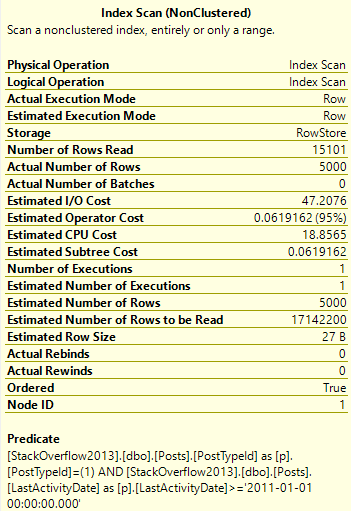
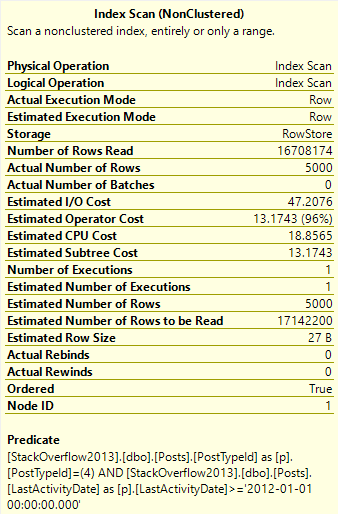
We only need to read 15k rows to find the top 5000 Questions — remember that these are very common.
We need to read many more rows to find the top 5000… Er… Whatever a 4 means.
Imaginary Readers
Nearly the entire index is read to locate these Post Types.
Meet In The Middle
The point we’d miss if we stopped tuning there is that when we add key columns to a B-Tree index, the index is first ordered by the leading key column. If it’s not unique, then the second column is ordered within each range of values.
Pale Coogi Wave
Putting this together, let’s change our index a little bit:
CREATE INDEX whatever
    ON dbo.Posts(PostTypeId, Score DESC, LastActivityDate)
	    INCLUDE(ViewCount) WITH (DROP_EXISTING = ON);
With the understanding that seeking to a single PostTypeId column will bring us to an ordered Sort column for that range of values.
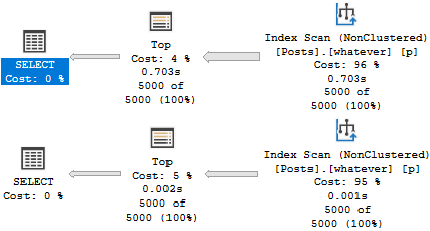
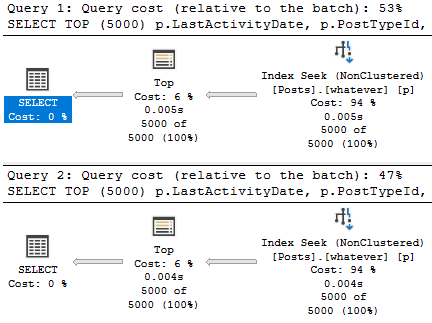
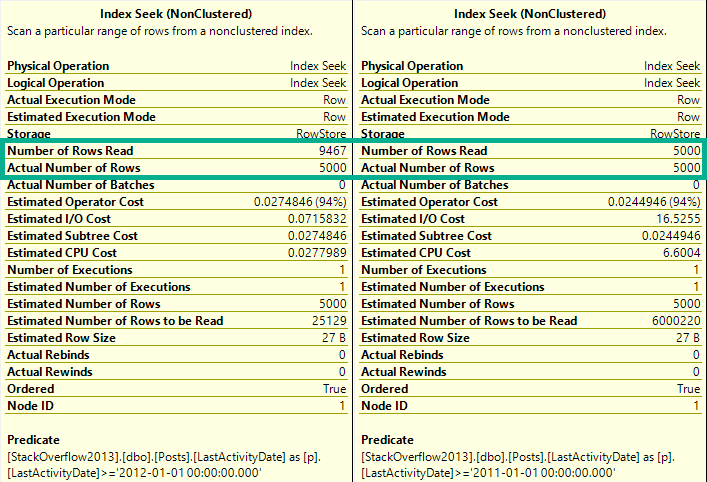
Now our plans look like this:
???
Which allows us to both avoid the Sort and keep reads to a minimum.
reed les
Interior Design
When designing indexes, it’s important to keep the goal of queries in mind. Often, predicates should be the primary consideration.
Other times, we need to take ordering and grouping into account. For example, if we’re using window functions, performance might be unacceptable without indexing the partition by and order by elements, and we may need to move other columns to parts of the index that may not initially seem ideal.
Thanks for reading!
Going Further
If this is the kind of SQL Server stuff you love learning about: these days I have AI do the annoying stuff for me. My new video course teaches you to work the same way, and I teach whole teams in a one-day workshop. Someone still has to know enough SQL Server to keep the robots in check, and that’s what my training is for.
I asked you to design one index to make two queries fast.
If we look at the plans with no supporting indexes, we’ll see why they need some tuning.
Get a job
In both queries, the optimizer will ask for a “missing index”. That’s in quotes because, gosh darnit, I wouldn’t miss this index.
Green Screen
Nauseaseated
If we add it, results are mixed, like cheap scotch.
Keep Walking
Sure, there’s some improvement, but both aren’t fast. The second query does a lot of work to sort data.
We have an inkling that if we stopped doing that, our query may get quicker.
Let’s stop and think here: What are we ordering by?
Of course, it’s the thing in the order by: Score DESC.
Where Do We Go Now?
It looks like that missing index request was wrong. Score shouldn’t have been an included column.
Columns in the include list are only ordered by columns in the key of the index.
If we wanna fix that Sort, we need to make it a key column.
But where?
Get to work.
Going Further
If this is the kind of SQL Server stuff you love learning about: these days I have AI do the annoying stuff for me. My new video course teaches you to work the same way, and I teach whole teams in a one-day workshop. Someone still has to know enough SQL Server to keep the robots in check, and that’s what my training is for.
SELECT TOP (5000)
       p.LastActivityDate,
       p.PostTypeId,
       p.Score,
       p.ViewCount
FROM dbo.Posts AS p
WHERE p.PostTypeId = 4
AND   p.LastActivityDate >= '20120101'
ORDER BY p.Score DESC;


SELECT TOP (5000)
       p.LastActivityDate,
       p.PostTypeId,
       p.Score,
       p.ViewCount
FROM dbo.Posts AS p
WHERE p.PostTypeId = 1
AND   p.LastActivityDate >= '20110101'
ORDER BY p.Score DESC;
Get to work.
Going Further
If this is the kind of SQL Server stuff you love learning about: these days I have AI do the annoying stuff for me. My new video course teaches you to work the same way, and I teach whole teams in a one-day workshop. Someone still has to know enough SQL Server to keep the robots in check, and that’s what my training is for.
People often trash cursors even when they’re used for perfectly fine reasons.
I understand that this reaction may be because they’ve seen cursors misused in the past. Sometimes because they heard someone popular say it.
In either case, everything has a time and place, and there are many times when cursors aren’t the performance sucks people chalk them up to be.
Reasonable Uses
Places where cursors don’t freak me out:
Maintenance scripts (backup, checkdb, etc.)
Building dynamic strings
Batching modifications
Passing per-thing parameters to a stored procedure
It might shock you to find cursors in well-respected pieces of code, like sp_WhoIsActive. But if you crack open the procedure and search for “cursor”, you’ll find six of them that do different things. Do you still hate cursors?
What if I showed you Paul White his-very-self suggesting people use them?
Should you start out most code by writing a cursor? Absolutely not.
Should you convert every cursor to a while loop? Ehhhhh.
Should you understand when you should or shouldn’t use a cursor? Absolutely.
Some people have had pretty good careers talking about knee-jerk reactions, and I think seeing a cursor declared illicits many knee jerk reactions.
Read the code. Understand the requirements.
I tune queries all day long. The number of times someone has said THIS CURSOR IS A REAL BIG PROBLEM and been right is pretty small.
Often, there was a tweak to the cursor options, or a tweak to the query the cursor was calling (or the indexes available to it) that made things run in a more immediate fashion. I want to tune queries, not wrestle with logic that no one understands. Old code is full of that.
The number of times I’ve seen someone tell me they made something faster with totally broken logic and incorrect results is pretty high.
Thanks for reading!
Going Further
If this is the kind of SQL Server stuff you love learning about: these days I have AI do the annoying stuff for me. My new video course teaches you to work the same way, and I teach whole teams in a one-day workshop. Someone still has to know enough SQL Server to keep the robots in check, and that’s what my training is for.