If this is the kind of SQL Server stuff you love learning about: these days I have AI do the annoying stuff for me. My new video course teaches you to work the same way, and I teach whole teams in a one-day workshop. Someone still has to know enough SQL Server to keep the robots in check, and that’s what my training is for.
If this is the kind of SQL Server stuff you love learning about: these days I have AI do the annoying stuff for me. My new video course teaches you to work the same way, and I teach whole teams in a one-day workshop. Someone still has to know enough SQL Server to keep the robots in check, and that’s what my training is for.
In this video, I delve into a unique scenario involving eager index pools in SQL Server and how they can occur even when an appropriate index seems to be in place. Specifically, I explore why these index pools might form despite having indexes that should theoretically work well for the query at hand. Using a real-world example where a `cross apply` is used to fetch data from another table, I illustrate how SQL Server’s decision-making process can lead to suboptimal performance due to the order of columns in an index and the lack of efficient seek predicates. By walking through this case study, I highlight the importance of carefully considering index design when optimizing queries, especially those involving complex joins and correlated subqueries.
Full Transcript
Howdy folks, Erik Darling here with Erik Darling Data, and I wanted to record a quick video about eager index pools and a reason why they may occur even though you’ve created an index that is perhaps nearby what your query is asking for. Now, I’ve vlogged before about why eager index pools might pop up if you’ve got no useful index or even if you have a very index that the optimizer ignores. But this is kind of a weird third case. And I’ve seen things like this happen maybe when someone listens to C1 of SQL Server’s missing index requests and the order of the columns in the key of the index which are just in which are only supplied to the missing index request by the ordinal position in the table might not be the most efficient, effective, happy index request. So, in this case, I have a query that is selecting data from the users table and then cross applying that cross applying to the badges table. And we want to get the top end per group. This is what we’re doing in here. This little chunk of query. So we’re selecting the top one badge name from badges correlated on user ID ordered by date descending. And this is an OK query, but it’s not just in the top one.
But it’s not really a great index because we lead our index with name, then user ID, then date descending. If we look at the badges table, you know, we might see, oh, well, you know, I don’t know, maybe SQL Server gave us a stem missing index request and now we didn’t make our query any better. So, what you might see here is because we have to correlate on user ID in order by date descending, but name is the first column in the index, we’re kind of buried, these two columns are kind of buried behind it. We don’t have an equality predicate on name. We had, if we, our where clause was also like, and badge name equals happy camper, then we might, then we could seek to here and then seek to here and then we would have this in order, but we don’t.
So we can easily display this, but it’s not helpful as a first column in the index. Now, why this is kind of funny is because we have this index and SQL Server uses the index that we created on this index over here called squirrel in order to feed into this index. So it’s basically taking this index and rearranging the columns in it.
If we zoom in a little bit and we look at what it’s doing, it creates that index keyed on user ID and then it has name and date in the included columns. Eager index pool structures are effectively clustered indexes, but you can think of them the same way as like a nonclustered index where the seek predicates are key columns and the output list are includes. It’s just like if you created a clustered index on user ID, name and date would technically be includes and that index.
So SQL Server does this down here because we have a nested loops join here. SQL Server is estimating that we would have to loop 13,659 times and SQL Server does not want to take 13,569 rows from here and then scan the entire badges table that many times. So it scans this index on the badges table once.
We have one number of execution, one scan. And just like in other times when we create an eager index pool, even though the plan says it’s parallel, all the rows end up on a single thread, which is no bueno as far as I’m concerned. These eager index pools always build serially.
So we build that index, which allows SQL Server to seek into this index 13,659 times, do a quick top one sort and then return data out. So the reason why I write a lot of queries that show stuff like this using cross supply is because cross supply most often optimizes as a nested loops join. Because it optimizes as a nested loops join, we kind of get the effect in our query plan where SQL Server is going to do something repetitive down here.
And SQL Server uses spools to sort of mitigate the effect of repetitive behavior. So eager index spools, table spools, stuff like that. All those things come into play on the inner side of nested loops.
And it’s just a lot easier to get SQL to say, I’m going to use a nested loops join when I use cross supply. It’s simply a demo writing effect. It’s not because cross supply is bad.
It’s not because nested loops join is bad, even though it kind of is. I’m kidding. Nested loops join is fine. Fine. All you nice OLT people out there with your nested loops joins. It’s just to kind of show you that a lot of times on the inner side of nested loops, in other words, on this side of nested loops, a lot of awkward things can happen.
In this case, SQL Server took an index that we thought might be okay, or rather, maybe we got a missing index request that said name, user ID, date. And we were like, ah, we’ll just create this index blindly, and all our queries will be faster. And then this query got slower because we forgot a semicolon.
So eager index spools may also happen just because you made a bad index or because you made an inopportune index for a specific query. In this case, it would make total sense if we just reorganized this index a little bit. If we took name from here, and we stuck it over here, and then we said, oh, I don’t know, what’s that thing with, I don’t have SQL prompt over here, so you’ll have to excuse the crappy typing.
Drop existing equals on. And we reorganized this index a little wee little bit. And you see that that took four seconds, which is a lot faster than the 18 seconds that it took for SQL Server to create that index pool.
If we reorganized our index a little bit, we can avoid minimizing SQL prompt. We can avoid the index pool altogether and have a much faster query. Anyway, just a quick example of how SQL Server may rearrange a nonclustered index.
It doesn’t always have to just get everything from a clustered index to feed into an eager index pool. So thank you for watching. Thank you for bearing with me as I messed up several things in there and had some incomplete thoughts and blabbered a little bit like I’m doing right now.
So I’m going to cut this short and get ready to record another video. Thank you for watching, and I will see you in the next one, assuming that you can still tolerate me after this. Goodbye.
Going Further
If this is the kind of SQL Server stuff you love learning about: these days I have AI do the annoying stuff for me. My new video course teaches you to work the same way, and I teach whole teams in a one-day workshop. Someone still has to know enough SQL Server to keep the robots in check, and that’s what my training is for.
In this video, I dive into a common mistake that many developers make when working with dates in SQL Server: treating dates as if they were strings or other data types. I share my experience from years of client work where I’ve seen this issue repeatedly and emphasize the importance of keeping dates as dates to avoid performance pitfalls. To illustrate the point, I demonstrate how converting a date column to a string can severely impact query performance by forcing full table scans instead of allowing efficient index seeks. The video also highlights why using functions like `CONVERT` or casting dates to other types is not only unnecessary but can lead to suboptimal execution plans and wasted resources.
Full Transcript
Oh boy! Erik Darling here with Erik Darling Data. And I realize, well, I realize several things. Sometimes I realize several things a day. It’s a bad habit that I’ve gotten myself into. Too many realizations is overwhelming. But my YouTube channel has been a little bit quiet lately. I have been very busy with client work, which is, you know, the blessing and the curse of consulting. When you’re not that busy, you have lots of time to record videos and blog and work on training and presentations. But you’re not getting paid. When you’re working with clients and getting paid, you don’t have a lot of time to do other things. So, one must balance. And one must balance frugally. Or else one… I don’t know. Actually, I don’t know because I haven’t unbalanced that badly yet. But there are a few videos that I’ve been meaning to record and I’m going to hopefully get through all of them today because I have nothing else to do. Another realization, this is the first time in a year. I’ve been recorded history that I’ve been recorded history that I’ve appeared on camera wearing anything other than a black t-shirt. I am currently wearing an adidas sweatshirt. There you go. It’s about as good as it gets for seeing my downstairs mistakes. And that has absolutely nothing to do with anything. So, that’s fun. Anyway, I wanted to record this video because in all my vast, vast history of client work, I have seen people do this so many damn times that I cannot even begin to count. And I guess if I were to make one point up front in this video, it’s that dates are not strings. Dates are not floats. Dates are not integers. Dates are not… I don’t know. What’s another data type? Let’s just… Binary. Let’s just say dates are dates. Dates is dates. Stop messing with them. Stop casting them to other things.
And converting them to other things. And writing scalar valued functions to change the way they look so you can compare them to other dates and make those other dates look the same via various cast converts and functions. It is a waste of time and resources. So, to prove this to you a little bit and to hopefully show you why you shouldn’t do this because it is a terrible idea. I have created a super helpful index on the votes table which is the largest table in the stack overflow 2013 database. So, the first thing that I want to show you is that when I run this query, these both return the same thing. If I convert…
get date to a string and do some fuzzy date math on it, I will get 2019-12-19 which is coincidentally yesterday. Ha ha ha ha ha ha ha! If I run convert date and then do the same thing, I will get 2019-12-19. The thing is, with SQL Server, when it comes to dates and date times and even date time too, the optimizer has some tricks up its sleeves.
It can do these things called get range through convert and get range through mismatched types which apply specifically to searching for the date portion of date time values. Well, not totally specifically, but that’s mostly where you see it. So, when I run those two selects with the converts in there, I do get the same thing back, but this is a string and this is a date.
You understand the difference? This date… I mean this string represents the date, but it’s not a date to SQL Server anymore. It is a string now. This is a date just without the time portion that get date returns. To prove to you why one is indeed worse than the other, let’s run this first query where I’m going to select account from votes and I’m going to say where we convert the creation date column to a VARCAR10 and then compare that to where we convert this to other stuff, whatever.
It’s all the same. If I run this query and we wait, wait, wait, wait, wait, wait, wait, wait, we get zero rows back. And we look at the execution plan. Well, this took about five seconds to run. We had to scan the entire index. And when we scan that index, we applied this whole convert predicate thing.
We used our helpful nonclustered index. We did, but we had to read every single row in the table. We zoom in a little bit here. The number of rows are read is all just about 53 million. We do a big aggregation. We gather streams and we do another aggregation.
And finally we return zero rows and SQL Server complains to us about there being type conversions and implicit conversions and all sorts of other nonsense. So this is not an ideal situation. If we change this query a little bit to say convert creation date to a date and see where that equals casting get date as a date. And just about the same way, when we run this, it finishes instantly with a result of zero.
We’re able to seek into the index here and we’re able to rule out all those rows immediately. We can immediately figure out when we seek to this and to this. So it’s not a perfect seek. It’s an okay seek. It’s what I think Paul White called the dynamic seek.
But if we look at this, we can see that SQL Server did indeed seek and rule out rows immediately. We see that we didn’t read much of anything from this query. To show you just how bad this query is, let’s equalize things a little bit.
I call parallelism SQL servers great equalizer. This plan runs serially. If you recall running this plan, this plan ran in parallel. This plan was only even only took five seconds because SQL Server chose to engage parallelism and use multiple cores to process it.
Right. So five seconds going parallel. How long will this thing take if we force it to be competitive with our other query? If we say, hey, you know what? Our fast query ran at max.1 and finished instantly.
How long are you going to take if you run at max.1? How long SQL Server? How long? Just how long will this go on? 13 seconds.
You can look at the execution plan and we see nearly the same thing where the scan of this nonclustered index takes all 13 seconds. And we spend that whole 13 seconds applying this ridiculous string predicate converting an otherwise perfectly fine date time column to a string back to another string, comparing it to another string. It is absolutely ridiculous.
And I see this constantly when working with people. So the next time you’re working with dates, remember, they’re dates. They’re not strings, not floats, not ins, not money, not whatever else.
Leave them is to stop messing with them. Stop mangling with them. Let’s cut it out. It’s the year 2019.
I can prove that by by selecting get date. And we have had the date data type in SQL Server databases now for I don’t know how long. So there’s not that there ever was a great need to, but there is even less of a need to convert date times to strings to just get the date portion of them.
So anyway, I’m still to this very day, Erik Darling with Erik Darling data. Thanks for watching and I will see you and hopefully the next video. Goodbye.
Going Further
If this is the kind of SQL Server stuff you love learning about: these days I have AI do the annoying stuff for me. My new video course teaches you to work the same way, and I teach whole teams in a one-day workshop. Someone still has to know enough SQL Server to keep the robots in check, and that’s what my training is for.
While helping a client out with a performance problem recently, I ran into something kind of funny when creating a computed column.
They were experiencing performance problems because of a join involving a substring.
Weird, right? Like, if I tried to show you this in a presentation, you’d chase me out of the room.
But since they were nice enough to hire me, I went about fixing the problem.
Computer Magic
The “obvious” — and I apologize if this isn’t obvious to you, dear reader — was to add a computed column to work around the issue.
Adding a computed column gives you the expression that you’re generating on the fly and trying to join on. Because manipulating column data while you’re joining or filtering on it is generally a bad idea. Sometimes you can get away with it.
But here’s something that messed me up, a uh… seasoned database professional.
The query was doing something like this (not exactly, but it’s good enough to get us moving):
SELECT COUNT(*) AS records
FROM dbo.Users AS u
WHERE SUBSTRING(u.DisplayName, 1, LEN(u.DisplayName) - 4)
 = SUBSTRING(u.DisplayName, 1, LEN(u.DisplayName) - 4);
Matching strings from the beginning to the end minus four characters.
I wanted to look smart, so I did this:
ALTER TABLE dbo.Users
    ADD DisplayNameComputed
	    AS SUBSTRING(DisplayName, 1, LEN(DisplayName) - 4);
I didn’t want to persist it right away — that can lock the table and take longer — and because I knew I was going to index it.
The problem is that when I tried to index it:
CREATE INDEX dummy
    ON dbo.Users(DisplayNameComputed);
I got this error:
Msg 537, Level 16, State 3, Line 21
Invalid length parameter passed to the LEFT or SUBSTRING function.
And when I tried to select data from the table, the same error.
In the real query, there was a predicate that avoided columns with too few characters, but it was impossible to apply that filter to the index.
There’s also other restrictions on filtered index where clauses, like you can’t like LIKE ‘____%’, or LEN(col) > 4, etc.
Case Of Mace
Having done a lot of string splitting in my life, I should have been more defensive in my initial computed column definition.
What I ended up using was this:
ALTER TABLE dbo.Users
    ADD DisplayNameComputed
	    AS SUBSTRING(DisplayName, 1, LEN(DisplayName)
		- CASE WHEN LEN(DisplayName) < 4 THEN LEN(DisplayName) ELSE 4 END);
A bit more verbose, but it allowed me to create my computed column, select from the table, and create my index.
AND THEY ALL LIVED HAPPILY EVER AFTER
Just kidding, there was still a lot of work to do.
Thanks for reading!
Going Further
If this is the kind of SQL Server stuff you love learning about: these days I have AI do the annoying stuff for me. My new video course teaches you to work the same way, and I teach whole teams in a one-day workshop. Someone still has to know enough SQL Server to keep the robots in check, and that’s what my training is for.
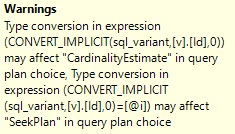
If you compare the things that non-SARGable queries cause issues with alongside the things that bad implicit conversions cause issues with, it’s an identical list.
Increased CPU
Inefficient use of indexes
Poor cardinality estimation
Maybe a bad memory grant based on that
Some “row by row” event
Though we often bucket the problems separately, they’re really the same thing.
That’s because, under the covers, something similar happens.
Four letters
If you replace “CONVERT_IMPLICIT” with any other function, like ISNULL, COALESCE, DATEADD, DATEDIFF, etc. you may see the same performance degradation.
Probably not the most thought provoking thing you’ve ever heard, but if you understand why one is bad and not the other, this may help you.
Thanks for reading!
Going Further
If this is the kind of SQL Server stuff you love learning about: these days I have AI do the annoying stuff for me. My new video course teaches you to work the same way, and I teach whole teams in a one-day workshop. Someone still has to know enough SQL Server to keep the robots in check, and that’s what my training is for.
Unless your column is unique, and defined as unique, and people are searching for equality predicates on it — and I don’t mean column = column — I mean column = value, it might not be a great first column in your index. Many unique columns I see are identity columns that don’t necessarily define a relationship or usable search values. They’re cool for keeping the clustered index sane, but no one’s looking at the values in them.
The problem with the advice that you should “always put the most selective column first” is that not many columns are uniformly selective. For some ranges, they may be selective, for other ranges, they may not be.
Let’s look at some examples.
Usery
Let’s look at some tables in the Stack Overflow data dump. I realize this isn’t a perfect data set, but it has a lot of things in common with data sets I see out in the world.
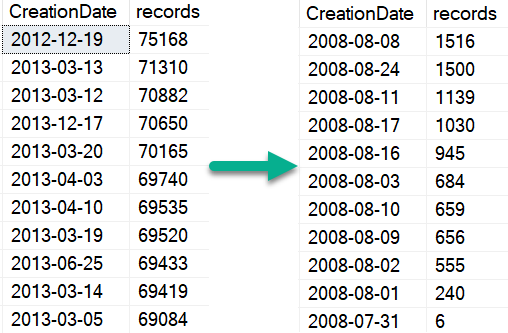
The site has gotten more popular over time, so year over year dates become less selective
The site has definite groups of “power users” and “one and done” users
Certain site activities are more common than others: votes cast, types of posts made
Certain user attributes, like badges, are more common than others
All of these patterns are generally observable in real world data, too. Growth is a near constant, and with growth is going to come lumpy patterns.
Not like the others
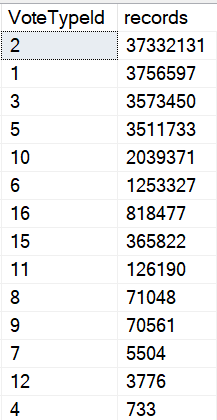
Looking at significant number differences here, the top vote type (an upvote) has 37 million entries. The next most popular one has 3.7 million.
Are either of those selective? No.
But when you get down to the bottom, you reach some selectivity.
The dates the vote were cast become less selective over time, too.
Tinder
Within User Reputations, things become skewed towards the bottom end.
Though the site gets more users overall, Reputation is still largely skewed towards power users.
Coconut colored
What Does This Mean For You?
Don’t assume that just because you search for something with an equality that it’s the most selective predicate.
Don’t assume that any search will always be selective (unless the column is unique).
Don’t assume that the most selective predicate should always be the first column in an index; there are other query operations that should be considered as well
I can’t count the number of times that someone has told me something like “this query is fast, except when someone searches for X”, or “this query is fast, except when they ask for a year of data”, and the solution has been creating alternate indexes with key columns in a different order, or flipping current index key columns around.
Thanks for reading!
Going Further
If this is the kind of SQL Server stuff you love learning about: these days I have AI do the annoying stuff for me. My new video course teaches you to work the same way, and I teach whole teams in a one-day workshop. Someone still has to know enough SQL Server to keep the robots in check, and that’s what my training is for.
It’s been a while since SQL Server has had a real RECOMPILE problem. And if you put it up against the performance problems that you can hit with parameter sniffing, I’d have a hard time telling someone strapped for time and knowledge that it’s the worst idea for them.
Obviously, you can run into problems if you (“you” includes Entity Framework, AKA the Database Demolisher) author the kind of queries that take a very long time to compile. But as I list them out, I’m kinda shrugging.
Here are some problems you can hit with recompile. Not necessarily caused by recompile, but by not re-using plans.
Long compile times: Admittedly pretty rare, and plan guides or forced plans are likely a better option.
No plan history in the cache (only the most recent plan): Sucks if you’re looking at the plan cache. Sucks less if you have a monitoring tool or Query Store.
CPU spikes for high-frequency execution queries: Maybe time for caching some stuff, or getting away from the kind of code that executes like this (scalar functions, cursors, etc.)
But for everything in the middle: a little RECOMPILE probably won’t hurt that bad.
Thinking of the problems it can solve:
Parameter sniffing
Parameter embedding (lack of)
Local variable estimates
Catch all queries
Those are very real problems that I see on client systems pretty frequently. And yeah, sometimes there’s a good tuning option for these, like changing or adding an index, moving parts of the query around, sticking part of the query in a temp table, etc.
But all that assumes that those options are immediately available. For third party vendors who have somehow developed software that uses SQL Server for decades without running into a single best practice even by accident, it’s often harder to get those changes through.
There’s More Than One Way To Recompile
Sure, you might be able to sneak a recompile hint somewhere in the mix even if it’d make the vendor upset. You can always yoink it out later.
But you have alternatives, too.
DBCC FREEPROCCACHE: No, not the whole cache. You can single out troublesome queries to remove specific plans.
Plan Guides: An often overlooked detail of plan guides is that you can attach hints to them, including recompile.
Using a plan guide doesn’t interfere with that precious vendor IP that makes SQL Server unresponsive every 15 minutes. Or whatever. I’m not mad.
And yeah, there’s advances in SQL Server 2017 and 2019 that start to address some issues here, but they’re still imperfect.
I like’em, but you know. They’re not quite there yet.
Thanks for reading!
Going Further
If this is the kind of SQL Server stuff you love learning about: these days I have AI do the annoying stuff for me. My new video course teaches you to work the same way, and I teach whole teams in a one-day workshop. Someone still has to know enough SQL Server to keep the robots in check, and that’s what my training is for.
Let’s say you have a parallel query running at DOP 4. The final logic of the query is some aggregate: COUNT, SUM, MIN, MAX, whatever.
Sure, the optimizer could gather all the streams, and then calculate one of those for all four of them, but why do that?
We have a Partial Aggregate operator that allows an aggregate per thread to be locally aggregated, then a final global aggregate can be more quickly calculated from the four locally aggregated values.
There are a couple odd things about Partial Aggregates though:
They ask for a fixed amount of memory, which is usually quite small
When they run out of memory, they don’t spill, they just stop aggregating
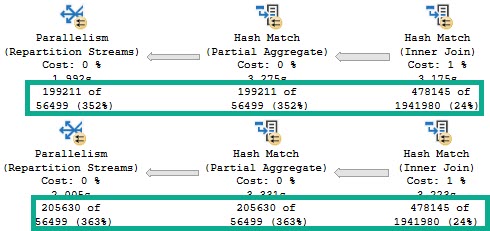
Which is why for identical executions of identical queries, you may see different numbers of rows come out of them.
Everyone I know is sick to death of you.
We start with the same number of rows coming out of the Hash Join, which is expected.
We ran the same query.
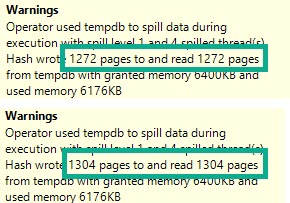
However, the Partial Aggregate emits different numbers of rows.
It doesn’t matter much, because the global aggregate later in the plan will still be able to figure things out, albeit slightly less efficiently.
Appolonia
If we look at the spills in the Hash Match Aggregates from both of the above plans, the warnings are slightly different.
Ayyyyy
Hardly anything to worry about here, of course. But definitely something to be aware of.
No, SQL Server isn’t leaking memory, or full of bugs. It’s just sensitive.
Thanks for reading!
Going Further
If this is the kind of SQL Server stuff you love learning about: these days I have AI do the annoying stuff for me. My new video course teaches you to work the same way, and I teach whole teams in a one-day workshop. Someone still has to know enough SQL Server to keep the robots in check, and that’s what my training is for.
I’m excited about this feature. I’m not being negative, here. I just want you, dear reader, to have reasonable expectations about it.
This isn’t a post about it making a query slower, but I do have some demos of that happening. I want to show you an example of it not kicking in when it probably should. I’m going to use an Extended Events session that I first read about on Dmitry Pilugin’s blog here. It’ll look something like this.
CREATE EVENT SESSION heristix
    ON SERVER
    ADD EVENT sqlserver.batch_mode_heuristics
        ( ACTION( sqlserver.sql_text ))
    ADD TARGET package0.event_file
        ( SET filename = N'c:\temp\heristix' )
    WITH
        ( MAX_MEMORY = 4096KB,
          EVENT_RETENTION_MODE = ALLOW_SINGLE_EVENT_LOSS,
          MAX_DISPATCH_LATENCY = 1 SECONDS,
          MAX_EVENT_SIZE = 0KB,
          MEMORY_PARTITION_MODE = NONE,
          TRACK_CAUSALITY = OFF,
          STARTUP_STATE = ON );
GO
The Setup
Let’s start with some familiar indexes and a familiar query from other posts the last couple weeks.
CREATE INDEX something ON dbo.Posts(PostTypeId, Id, CreationDate);
CREATE INDEX stuffy ON dbo.Comments(PostId, Score, CreationDate);
SELECT COUNT(*)
FROM   dbo.Posts AS p
JOIN   dbo.Comments AS c
    ON  p.Id = c.PostId
WHERE DATEDIFF(YEAR, p.CreationDate, c.CreationDate) > 1
AND p.PostTypeId = 1
AND c.Score > 0;
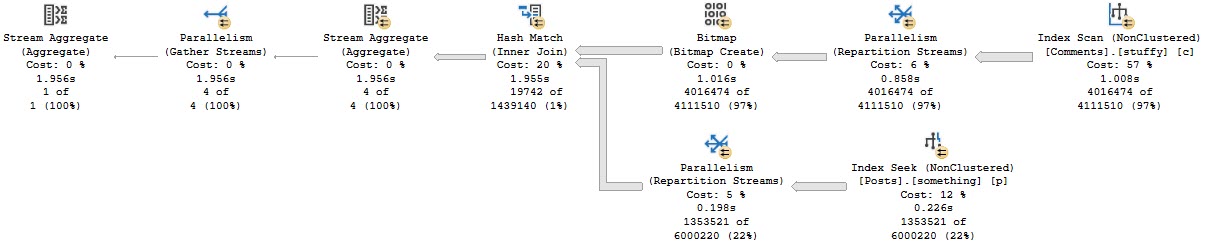
The query plan is unimportant. It just doesn’t use any Batch Mode, and takes right about 2 seconds.
Blech Mode
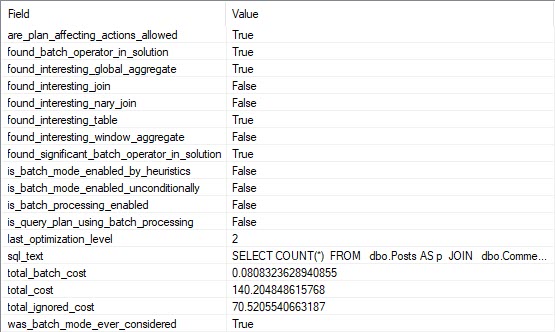
If we look at the entry for this query in our XE session, we can see that the optimizer considered the heck out of Batch Mode, but decided against it.
All The Heck
Curiouser
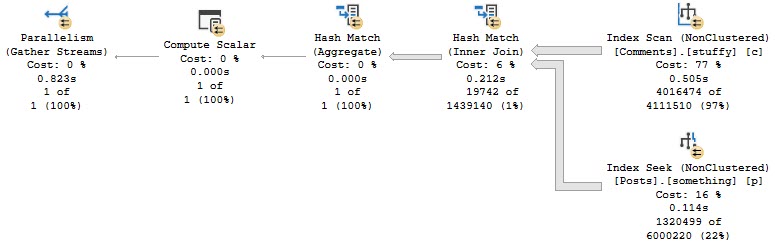
If we add a hash join hint to the query, it finishes in about 800ms.
SELECT COUNT(*)
FROM   dbo.Posts AS p
JOIN   dbo.Comments AS c
    ON  p.Id = c.PostId
WHERE DATEDIFF(YEAR, p.CreationDate, c.CreationDate) > 1
AND p.PostTypeId = 1
AND c.Score > 0
OPTION(HASH JOIN);
Every Time
All the operators in this plan except Gather Streams are run in Batch Mode. Clearly it was helpful.
See Ghosts
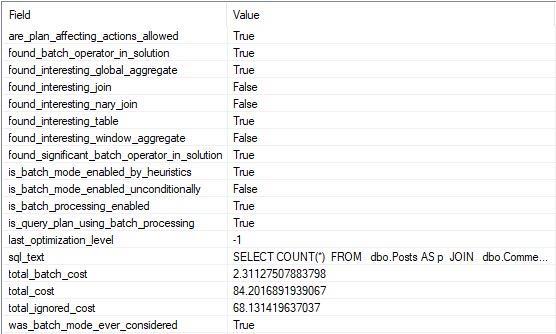
And according to the XE session, we can see that decision in writing. Yay.
Alt Roq
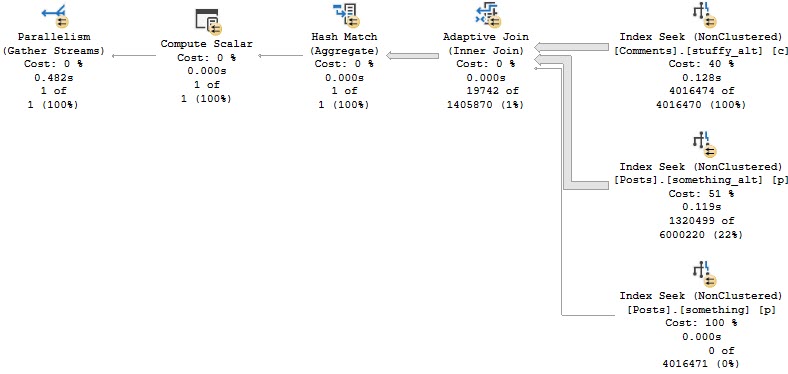
If we modify our indexes slightly, we can get an Adaptive Join plan.
CREATE INDEX something_alt ON dbo.Posts(PostTypeId, CreationDate, Id);
CREATE INDEX stuffy_alt ON dbo.Comments(Score, CreationDate, PostId);
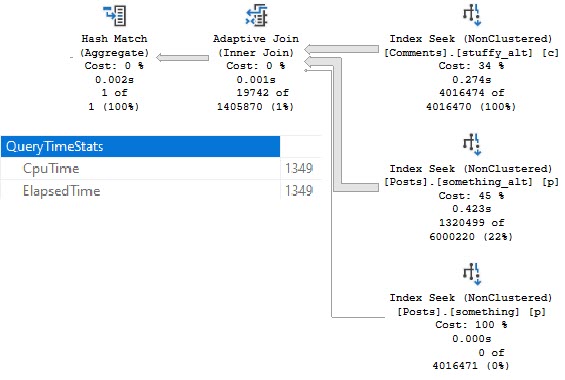
And, yes, this is about twice as fast now (compared to the last Batch Mode query), mostly because of the better indexing.
Montage
Is There A Moral So Far?
Yes, don’t count on Batch Mode to kick in for every query where it would be helpful.
If you want queries to consistently use Batch Mode, you’ll need to do something like this.
SELECT COUNT(*)
FROM   dbo.Posts AS p
JOIN   dbo.Comments AS c
    ON  p.Id = c.PostId
LEFT JOIN dbo.t ON 1 = 0
WHERE DATEDIFF(YEAR, p.CreationDate, c.CreationDate) > 1
AND p.PostTypeId = 1
AND c.Score > 0;
But you have to be careful there too.
Mad Mad Mad Mad
You might lose your nice parallel plan and end up with a slower query.
Huh.
Thanks for reading!
Going Further
If this is the kind of SQL Server stuff you love learning about: these days I have AI do the annoying stuff for me. My new video course teaches you to work the same way, and I teach whole teams in a one-day workshop. Someone still has to know enough SQL Server to keep the robots in check, and that’s what my training is for.