There are lots of different ways that parameter sniffing can manifest in both the operators chosen, the order of operators chosen, and the resources acquired by a query when a plan is compiled. At least in my day-to-day consulting, one of the most common reasons for plans being disagreeable is around insufficient indexes.
One way to fix the issue is to fix the index. We’ll talk about a way to do it without touching the indexes tomorrow.
Let’s say we have this index to start with. Maybe it was good for another query, and no one ever thought twice about it. After all, you rebuild your indexes every night, what other attention could they possible need?
CREATE INDEX v
    ON dbo.Votes(VoteTypeId, CreationDate);
If we had a query with a where clause on those two columns, it’d be be able to find data pretty efficiently.
But how much data will it find? How many of each VoteTypeId are there? What range of dates are we looking for?
Well, that depends on our parameters.
Cookie Cookie
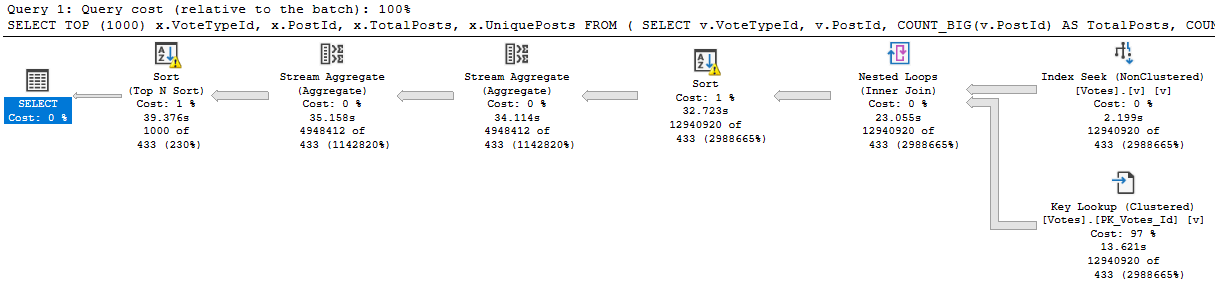
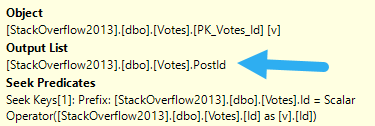
Here’s our stored procedure. There’s one column in it that isn’t in our index. What a bummer.
CREATE OR ALTER PROCEDURE dbo.VoteCount (@VoteTypeId INT, @YearsBack INT)
AS
BEGIN

SELECT TOP (1000)
    x.VoteTypeId,
    x.PostId,
    x.TotalPosts,
    x.UniquePosts
FROM
    (
        SELECT v.VoteTypeId,
               v.PostId,
               COUNT_BIG(v.PostId) AS TotalPosts,
               COUNT_BIG(DISTINCT v.PostId) AS UniquePosts
        FROM dbo.Votes AS v
        WHERE v.CreationDate >= DATEADD(YEAR, (-1 * @YearsBack), '2014-01-01')
        AND   v.VoteTypeId = @VoteTypeId
        GROUP BY v.VoteTypeId,
                 v.PostId
    ) AS x
ORDER BY x.TotalPosts DESC;

END;
That doesn’t matter for a small amount of data, whether it’s encountered because of the parameters used, or the size of the data the procedure is developed and tested against. Testing against unrealistic data is a recipe for disaster, of course.
Cookie Cookie
What can be tricky is that if the sniffing is occurring with the lookup plan, the optimizer won’t think enough of it to request a covering index, either in plan or in the index DMVs. It’s something you’ll have to figure out on your own.
i said me toooh yeah that
So we need to add that to the index, but where? That’s an interesting question, and we’ll answer it in tomorrow’s post.
Thanks for reading!
Going Further
If this is the kind of SQL Server stuff you love learning about, you’ll love my training. Blog readers get 25% off the Everything Bundle — over 100 hours of performance tuning content. Need hands-on help? I offer consulting engagements from targeted investigations to ongoing retainers. Want a quick sanity check before committing to a full engagement? Schedule a call — no commitment required.
Aside from the obvious perils of SQL Injection, parameterizing queries can be helpful in other ways.
Not to downplay SQL Injection at all, it’s just that fixing code is only one part of the equation. Vendor applications often need to do some pretty administrative things, and require elevated permissions.
Just last week I was looking at an application that had a stored procedure which took a parameter that was the name of an executable. There were no checks on the name. You could put in quite not-figuratively anything you wanted, and xp_cmdshell would run it.
All the parameterization in the world won’t help that.
Well, you get what you get.
Of Parameters And Plans
This can happen in three common ways:
You have an interface that accepts user-entered values
You have an ORM where you haven’t explicitly defined parameter types and precisions
You have dynamic SQL where values are concatenated into strings
Since I spend all my time in the database, I’m going to show you the third one. I wouldn’t normally format a query like this, but I’m trying to keep it web-friendly.
DECLARE @StartDate DATETIME = '20130101';
WHILE @StartDate < '20140101'
BEGIN
DECLARE @NoParams4u NVARCHAR(MAX) =
N'
SELECT SUM(c.Score) AS TotalScore
FROM dbo.Comments AS c
WHERE c.CreationDate
    BETWEEN CONVERT(DATETIME, ''' + RTRIM(@StartDate) + ''')
    AND CONVERT(DATETIME, ''' + RTRIM(DATEADD(DAY, 11, @StartDate)) + ''')
AND 1 = (SELECT 1);
';

EXEC sys.sp_executesql @NoParams4u;
RAISERROR('%s', 0, 1, @NoParams4u);

SET @StartDate = DATEADD(DAY, 11, @StartDate);

END
GO
To make things interesting, I’ve created a non-covering index on the Comments table:
CREATE INDEX c ON dbo.Comments(CreationDate);
I’ve also had to use an oddly specific number of day increment in order to get some good plan variety because of that index. If you ever wonder why some blog posts take three hours to write, the most likely cause is finding the right number.
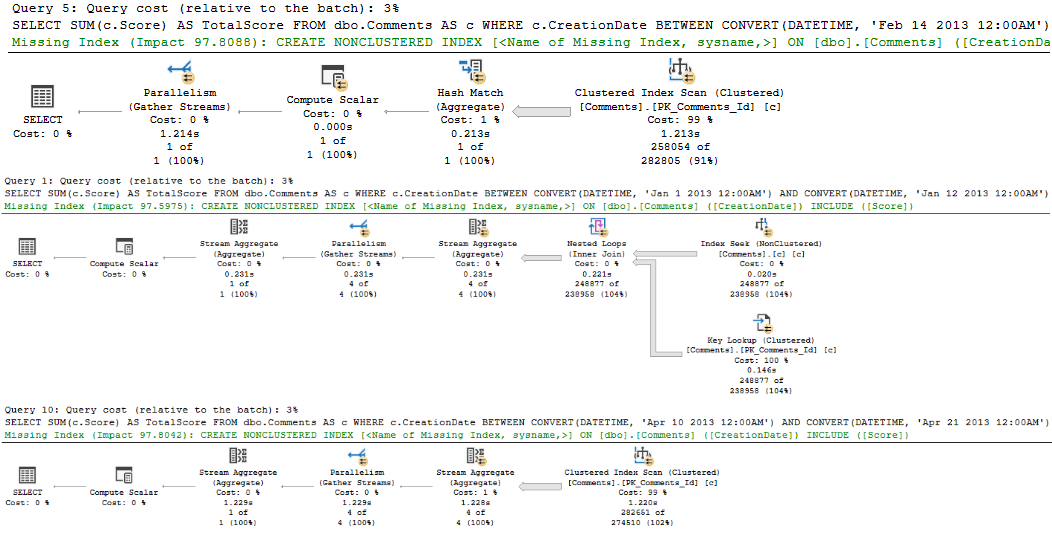
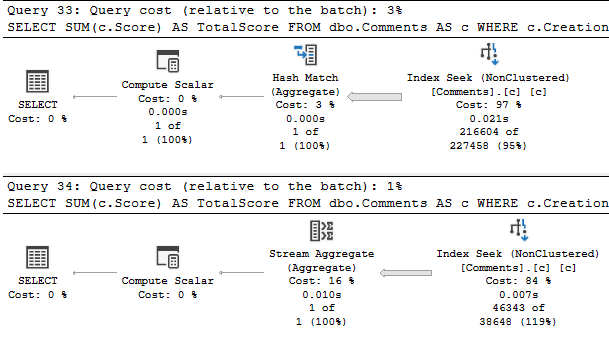
If I run that loop, I get back 34 results. Each query gets an individually compiled query plan, though there are only three “different” plans used.
eyeful
Notice that each plan has different literal date values passed in to it, and different estimates. If we created a covering index, we’d get plan stability across executions, but then we’d still have to compile it when these literal values get passed in. I did it like this to reinforce my point.
We can validate that by looking in the plan cache and surrounding DMVs, using sp_BlitzCache.
Planimal Activist
If you have code like this, one good way to find culprits is by running it like this:
EXEC sp_BlitzCache @SortOrder = 'query hash';
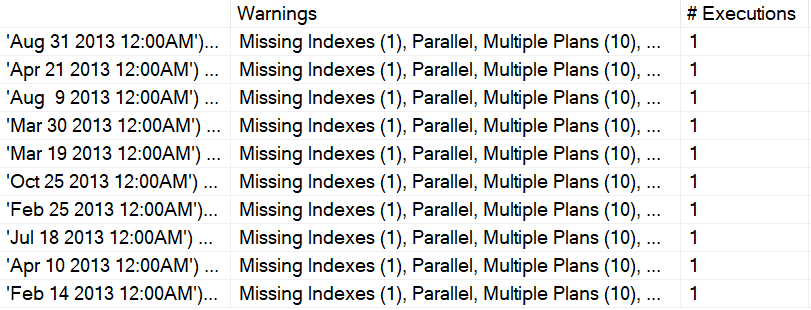
A zoomed-in snapshot of the part of the results that prove my point looks about like this:
aye yi yi
This is just the top 10 results. You can see a warning about multiple plans, and that each query has a single execution.
I mentioned before that if we add a covering index, we’ll get plan stability. That’s true, but specific to this demo on SQL Server 2019, there’s an alternate plan available for executions that qualify for Batch Mode On Rowstore (BMOR):
i’m in it
In prior versions of SQL Server in row mode only plans, we could only have a stream aggregate. But even getting the same plan most of the time, we still need to compile it every time. SQL Server still thinks each of these queries is “new” and needs to get a plan compiled.
Fixing It
There are two options for fixing this. If you need to do it quickly, at scale, the database level option FORCED PARAMETERIZATION can take care of most of these problems. Just make sure you read up on the limitations. To fix it for just a couple problem queries, you need to fix the dynamic SQL.
DECLARE @NoParams4u NVARCHAR(MAX) =
N'
SELECT SUM(c.Score) AS TotalScore
FROM dbo.Comments AS c
WHERE c.CreationDate BETWEEN @StartDate AND DATEADD(DAY, 11, @StartDate)
AND 1 = (SELECT 1);
';

EXEC sys.sp_executesql @NoParams4u, N'@StartDate DATETIME', @StartDate;
I’m not concatenating values into the string anymore, and I’m passing the @StartDate value in when I execute the dynamic SQL.
One point I want to make is that it’s generally safe to do date math on the parameter. I’m not doing date math on the column, which would generally be a bad idea.
But anyway, now our plan gets used 34 times.
damn family
In this case, plan reuse works out well. Every query is looking at a sufficiently narrow range of data to have it not matter, and the longest running execution is around 31ms.
But what about when that doesn’t work out? When can parameterization backfire? We’ll find out tomorrow!
Thanks for reading!
Going Further
If this is the kind of SQL Server stuff you love learning about, you’ll love my training. Blog readers get 25% off the Everything Bundle — over 100 hours of performance tuning content. Need hands-on help? I offer consulting engagements from targeted investigations to ongoing retainers. Want a quick sanity check before committing to a full engagement? Schedule a call — no commitment required.
There are many good reasons to parameterize a query, but there are also trade-offs. There’s no such thing as a free parameter, as they say.
In this post, we’re going to discuss what is and isn’t a parameter, and some of the pros and cons.
What’s important to keep in mind is that good indexing can help avoid many of the cons, but not all. Bad indexing, of course, causes endless problems.
There are many good reasons to parameterize your queries, too. Avoiding SQL injection is a very good reason.
But then!
What’s Not A Parameter
It can be confusing to people who are getting started with SQL Server, because parameters and variables look exactly the same.
They both start with @, and feel pretty interchangeable. They behave the same in many ways, too, except when it comes to cardinality estimation.
To generalize a bit, though, something is a parameter if it belongs to an object. An object can be an instance of:
A stored procedure
A function
Dynamic SQL
Things that aren’t parameters are things that come into existence when you DECLARE them. Of course, you can pass things you declare to one of the objects above as parameters. For example, there’s a very big difference between these two blocks of code:
DECLARE @VoteTypeId INT = 7;

SELECT *
FROM dbo.Votes AS v
WHERE v.VoteTypeId = @VoteTypeId;

DECLARE @sql NVARCHAR(MAX) = N'
SELECT *
FROM dbo.Votes AS v
WHERE v.VoteTypeId = @VoteTypeId;
'
EXEC sp_executesql @sql, N'@VoteTypeId INT', @VoteTypeId;
But it’s not obvious until you look at the query plans, where the guess for the declared variable is god awful.
Then again, if you read the post I linked to up there, you already knew that. Nice how that works.
If you’re too lazy to click, I’m too lazy to repeat myself.
thanks
What’s the point? Variables, things you declare, are treated differently from parameters, things that belong to a stored procedure, function, or dynamic SQL.
Parameter Problems
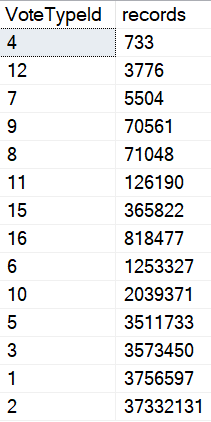
The problem with parameterization is one of familiarity. It not only breeds contempt, but… sometimes data just grows apart.
Really far apart.
SELECT
    v.VoteTypeId,
    COUNT_BIG(*) AS records
FROM dbo.Votes AS v
GROUP BY v.VoteTypeId
ORDER BY records;
pattern forming
Natural Selection
When you parameterize queries, you give SQL Server permission to remember, and more importantly, to re-use.
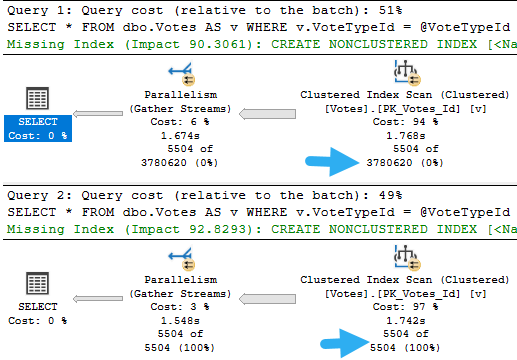
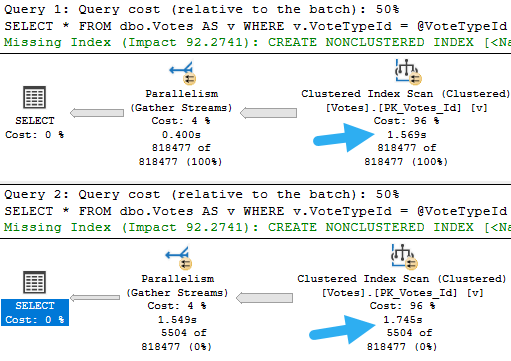
What it re-uses is the execution plan, and what it remembers are cardinality estimates. If we do something like this, we don’t get two different execution plans, or even two different sets of guesses, even though the values that we’re feeding to each query have quite different distributions in our data.
The result is two query plans that look quite alike, but behave quite differently.
wist
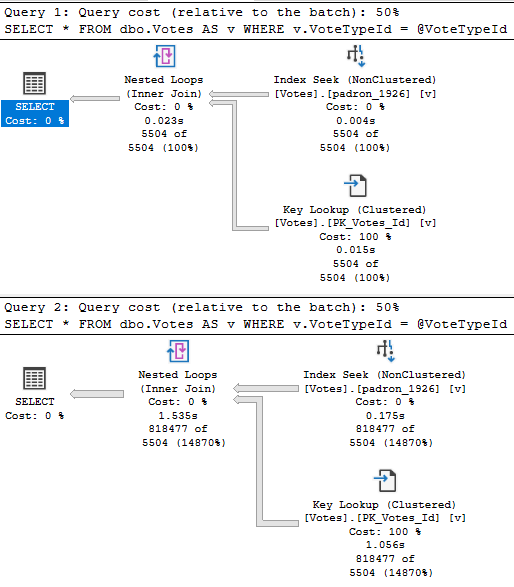
One takes 23 milliseconds. The other takes 1.5 seconds. Would anyone complain about this in real life?
Probably not, but it helps to illustrate the issue.
Leading Miss
Where this can get confusing is when you’re trying to diagnose a performance problem.
If you look in the plan cache, or in query store, you’ll see the plan that gets cached for the very first parameter. It’ll look simple and innocent, sure. But the problem is with a totally different parameter that isn’t logged anywhere.
You might also face a different problem, where the query recompiles because you restarted the server, updated stats, rebuilt indexes, or enough rows in the table changed to trigger an automatic stats update. If any of those things happen, the optimizer will wanna come up with a new plan based on whatever value goes in first.
If the roles get reversed, the plan will change, but they’ll both take the same amount of time now.
DECLARE @VoteTypeId INT;

SET @VoteTypeId = 16

DECLARE @sql NVARCHAR(MAX) = N'
SELECT *
FROM dbo.Votes AS v
WHERE v.VoteTypeId = @VoteTypeId;
';
EXEC sp_executesql @sql, N'@VoteTypeId INT', @VoteTypeId;

SET @VoteTypeId = 7;

SET @sql = N'
SELECT *
FROM dbo.Votes AS v
WHERE v.VoteTypeId = @VoteTypeId;
';
EXEC sp_executesql @sql, N'@VoteTypeId INT', @VoteTypeId;
totin’
Deal With It ?
In the next few posts, we’ll talk about what happens when you don’t parameterize queries, and different ways to deal with parameter sniffing.
A recompile hint can help, it might not always be appropriate depending on execution frequency and plan complexity
Optimize for unknown hints will give you the bad variable guess we saw at the very beginning of this post
We’re going to need more clever and current ways to fix the issue. If you’re stuck on those things recompiling or unknown-ing, you’re stuck not only on bad ideas, but outdated bad ideas.
Like duck l’orange and Canadian whiskey.
Thanks for reading!
Going Further
If this is the kind of SQL Server stuff you love learning about, you’ll love my training. Blog readers get 25% off the Everything Bundle — over 100 hours of performance tuning content. Need hands-on help? I offer consulting engagements from targeted investigations to ongoing retainers. Want a quick sanity check before committing to a full engagement? Schedule a call — no commitment required.
I’m going to show you something bizarre. I’m going to show it to you because I care for your well-being and long term mental health.
Someday you’ll run into this and be thoroughly baffled, and I want to be here for you. Waiting, watching, lubricating.
I have a stored procedure. It’s a wonderful stored procedure.
But something funny happens when a parameter gets sniffed.
Wrote A Little Song About It
It’s not the usual parameter sniffing thing, where you get different plans and blah blah blah. That’s dull.
This is even more infuriating. Here’s the part where care about, where we read data to insert into the #temp table.
something new
This is the “small” version of the plan. It only moves about 8200 rows.
Now here’s the “big” version of the plan.
practice makes
We move way more rows out of the seek (9.8 million), but doesn’t it seem weird that a seek would take 5.6 seconds?
I think so.
Pay special attention here, because both queries aggregate the result down to one row, and the insert to the #temp table is instant both times.
Wanna Hear It?
Let’s do what most good parameter sniffing problem solvers do, and re-run the procedure after recompiling for the “big” value.
escapism
It’s the exact same darn plan.
Normally, when you’re dealing with parameter sniffing, and you recompile a procedure, you get a different plan for different values.
Not here though. Yes, it’s faster, but it’s the same operators. Seek, Compute, Stream, Stream, Compute, Insert 1 row.
Important to note here is that the two stream aggregates take around the same about of time as before too.
The real speed up was in the Seek.
How do you make a Seek faster?
YOU NEEK UP ON IT.
Three Days Later
I just woke up from beating myself with a hammer. Sorry about what I wrote before. That wasn’t funny.
But okay, really, what happened? Why is one Seek 4 seconds faster than another seek?
Locking.
All queries do it, and we can prove that’s what’s going on here by adding a locking hint to our select query.
Now, I understand why NOLOCK would set your DBA in-crowd friends off, and how TABLOCK would be an affront to all sense and reason for a select.
So how about a PAGLOCK hint? That’s somewhere in the middle.
what we got here
The Seek that took 5.6 seconds is down to 2.2 seconds.
And all this time people told you hints were bad and evil, eh?
YTHO?
It’s pretty simple, once you talk it out.
All queries take locks (even NOLOCK/READ UNCOMMITTED queries).
Lock escalation doesn’t usually happen with them though, because locks don’t accumulate with read queries the way they do with modification queries. They grab on real quick and then let go (except when…).
For the “small” plan, we start taking row locks, and keep taking row locks. The optimizer has informed the storage engine that ain’t much ado about whatnot here, because the estimate (which is correct) is only for 8,190 rows.
That estimate is preserved for the “big” plan that has to go and get a lot more rows. Taking all those additional row locks really slows things down.
No Accumulation, No Escalation.
We stay on taking 9.8 million row locks instead of escalating up to page or object locks.
When we request page locks from the get-go, we incur less overhead.
For the record:
PAGLOCK: 2.4 seconds
TABLOCK: 2.4 seconds
NOLOCK: 2.4 seconds
Nothing seems to go quite as fast as when we start with the “big” parameter, but there’s another reason for that.
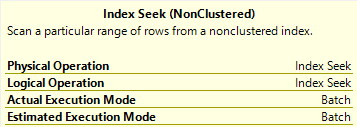
When we use the “big” parameter, we get batch mode on the Seek.
A FULL SECOND
Welcome to 2019, pal.
Thanks for reading!
Going Further
If this is the kind of SQL Server stuff you love learning about, you’ll love my training. Blog readers get 25% off the Everything Bundle — over 100 hours of performance tuning content. Need hands-on help? I offer consulting engagements from targeted investigations to ongoing retainers. Want a quick sanity check before committing to a full engagement? Schedule a call — no commitment required.
In this video, I dive into the fascinating world of forcing query plans using Query Store and uncover an interesting gotcha along the way. Starting off with a bit of humor about changing my company name to “Grimes’ baby name,” which promises to make paperwork more exciting, I clear out Query Store and set up an index on a users table for demonstration purposes. The video then explores how forcing query plans works when using literal values in queries versus parameterized queries. By running two different queries with the same logic but different literal values, I highlight the differences in execution plans and explain why SQL Server treats them as separate queries despite their similarity. This leads to an important lesson: if you want to force a specific plan ID for a query ID using Query Store, you must use parameterized queries to avoid the limitations imposed by literal values. The video concludes with practical advice on when and how to leverage parameterized code for better SQL Server performance management.
Full Transcript
Erik Darling here with, for now, Erik Darling data. But I’ve got paperwork in to change my company name to Grimes’ baby name. So that’s going to be fun. That should make paperwork interesting, right? So I’m going to record a hopefully hit video here. I’ve got everything going for me. I have pretty good equipment. I’ve got an interesting topic. And now all I need is for you to watch it, I guess. Actually, is it interesting? I don’t know. It might be interesting. It depends on what your kink is, I guess. So what we’re going to talk about is forcing query plans in Query Store and an interesting gotcha that I ran into. So first thing I want to do is clear out Query Store. Right there. Bada bing, bada boom.
I’ve already got this index created on the users table and a column called reputation because I want to get two different query plans based on how we query the users table. Now, both of the queries that I’m going to run at first are going to use literal values in the where clause. So this is going to be the literal value one and this is going to be the literal value two. And if I run this first query, we will get back an execution plan. I promise an actual execution plan, an actual factual execution plan.
Maybe we’ll start calling them literal execution plans because they are literally what happened. And we’ll call estimated plans figurative plans because that’s just what the optimizer figured it would do. I think that makes sense, right? So right over here we have our literal execution plan where we start by scanning the clustered index on the post table, doing some hashy bitmap stuff and then down here joining off to the users table.
But the clustered index on the users table, not the nonclustered index that we created. This will all change. This will all get freaky, deaky, wikiwile, wikiwile when we run this query. That’s going to look for reputation equals two. For reputation equals two, we start with an index seek into our nonclustered index on the users table. We do a key lookup back to the clustered index to get that display name column because the display name column is not in our nonclustered index.
And then we do some hashy bitmap stuff over here and then down the bottom, well then on the inner side of the join rather, we join to the clustered index on the post table. That song remains the same, but the stuff with the users table was much different. Now in all different DMVs, all different parts of SQL Server, queries get identified in different ways.
In query store, you have a query ID and a plan ID, but in lots of the more traditional DMVs, we have like query hash, query plan hash, SQL handle, plan handle, all sorts of different hashes, different like binary values that SQL Server uses to represent execution plans. Now what’s funny to me is that if we go and look in the sys.query store query table, rolls right off the tongue, thanks whoever designed that. If we run this query and we look at what SQL Server thinks of our execution plan or other of our queries rather, we will get one query hash for both of those queries, but we will have two query IDs for it.
So SQL Server treated this at the query level like it’s one query, but query store treated it like two different queries, and I’ll show you what I mean. If we run this to get some more details on these queries, and yes we do need to join one, two, three, four different views together to get this information out, we will see that we have across the board, query ID one has plan ID one, one execution and use 3.5 seconds of CPU time on average. So that’s for reputation equals one, we can see that over here.
Query ID two down the bottom is also plan ID two, with one execution and 1.4 seconds of CPU time, and of course that is where reputation equals two. Now, if you found some super duper mega awesome script on the internet, and you wanted to make let’s say query ID one use plan ID two, because that uses less CPU, and you’re like, wow, I could totally make this query better by just having it use this different execution plan. Well, you can’t really do that. So there’s a store procedure for query store, called whatever.
So let’s say that we want to make query ID one use plan ID two, because it uses less CPU. So we’ll plug query ID one into here and plan ID two into here. And when we run this, we will get an error because the plan ID two is not associated with query ID one. Even though, if we look back into the DMVs, well, they’re nearly the same query aside from that thing.
They can’t. Query store says we can’t share an execution plan between you two. Now, this isn’t something that’s true of plan guides. Granted, plan guides have many, many, many other things that are strange and wrong with them.
But we would be able to do this. Now, the optimizer would check to make sure we weren’t doing anything completely asinine. Like if we had a query that was like select count from post and we wanted and we said, hey, use this plan guide where you select count from votes. The optimizer would be like, you’re up to no good. Not going to go through with that.
But here, even though like logically and semantically, like really every other way possible, these two queries should be able to share the same plan because they get different query IDs. Because of those literal values, they can’t. So how you can fix this or how you can get around this is if you use parameterized queries. All right. So what we’re going to do is you know, you can use a stored procedure.
I’m going to use SP execute SQL because it’s a little bit quicker, not faster like performance wise, just quicker to like have on screen and show you. But I’m going to run this and we’re going to run it for reputation equals one first. And I have a recompile hint in here because I want to get two different execution plans.
I want new execution plans here. So I’m going to run this for reputation equals one. And note that this is parameterized. This is not the crappy, hacky kind of dynamic SQL that gets people fired because hackers destroy their database.
This is the good safe kind of dynamic SQL that handsome tattooed consultants use all day long. So we’re going to that’s I believe that one comes before two. So that should be reputation equals one.
And we can look over at the query plan and see that, yes, indeed, we got that that plan that we wanted. Now, I’m going to run this for reputation equals two. And we’re going to get the key lookup plan, which is intentional. I want that to happen.
There’s a reason that recompile hint is in there. So now we see that we got that same key lookup plan again. So that’s good. That’s exactly what we wanted. Now, when I go in, I go back to sys.queryStoreQuery for some reason, and I go and I look for other query hashes that have more than one distinct plan associated with them. And I run this, we still only have that one result in there.
That’s from that’s the one from before query hash that ends in 8044 with two query IDs associated with it. But now when we look in the query, when we do we run our 70,000 join query to get four columns back. Now we have two more lines in here.
And these two lines here, they start a little bit different. These ones have little parameters at the beginning of them. All right, let’s see that reputation thing there. And if we make this column a little bit wider, we can see that there’s a difference.
So this top one is where reputation equals one literal. This one is where reputation equals two literal. But in these, this is parameterized.
So we just see that reputation parameter in there. So now, when we have one query ID across of both of them, but two different plan IDs. So this means that we could, we could tell query ID five to always use execution plan four.
So let’s go try to do that. Remember, query ID five, you want to use four because we found this awesome script on the internet and it said, hey, you know what you should do? You should force plans where you have a better one.
And you were like, okay, I’m going to do that because I don’t feel like doing actual work. So we’re going to say query ID five, use plan ID four. And we plug that in here and we plug that in here.
Oh man, I’m exhausted. Whew. Let’s start doing cardio or something. Just kidding. Just kidding.
Just kidding. So we’re going to run this and this now, now we will be allowed to associate that other plan ID with that other query ID. So if you are the type of person who gets cranky about SQL Server performance and you are the type of person who gets cranky about, I don’t know, stuff like regressions or I don’t know, things going wrong with queries. You know, you should make some attempt to use parameterized code if you are, if you wanted to use a query store to force execution plans.
Otherwise SQL Server will do what it does. Like when it compiles a lot of, when it like sees literal values and queries and keeps compiling new plans for them. Query store does the same thing.
It’s just like, I don’t know you. And it gives them new query IDs and then, and then you can’t force query plans across query IDs. And then you actually have to go tune queries.
And that sucks. It’s always, life is always a lot better when you can just hit a button. Isn’t it?
It is for me anyway. Alright. Thanks for watchin’. I don’t know. It’s always in a rescue kit. And it’s still dying if the weather is good for you.
Going Further
If this is the kind of SQL Server stuff you love learning about, you’ll love my training. Blog readers get 25% off the Everything Bundle — over 100 hours of performance tuning content. Need hands-on help? I offer consulting engagements from targeted investigations to ongoing retainers. Want a quick sanity check before committing to a full engagement? Schedule a call — no commitment required.
If you have stored procedures that do things like this:
IF @OwnerUserId IS NOT NULL
   SET @Filter = @Filter + N' AND p.OwnerUserId = ' + RTRIM(@OwnerUserId) + @nl;
IF @CreationDate IS NOT NULL
   SET @Filter = @Filter + N' AND p.CreationDate >= ''' + RTRIM(@CreationDate) + '''' + @nl;
IF @LastActivityDate IS NOT NULL
   SET @Filter = @Filter + N' AND p.LastActivityDate < ''' + RTRIM(@LastActivityDate) + '''' + @nl;
IF @Title IS NOT NULL
   SET @Filter = @Filter + N' AND p.Title LIKE ''' + N'%' + @Title + N'%''' + @nl;
IF @Body IS NOT NULL
   SET @Filter = @Filter + N' AND p.Body LIKE ''' + N'%' + @Body + N'%'';';
IF @Filter IS NOT NULL
   SET @SQLString += @Filter;

PRINT @SQLString
EXEC (@SQLString);
Or even application code that builds unparameterized strings, you’ve probably already had someone steal all your company data.
Way to go.
But Seriously
I was asked recently if the forced parameterization setting could prevent SQL injection attacks.
Let’s see what happens! I’m using code from my example here.
EXEC dbo.AwesomeSearchProcedure @OwnerUserId = 35004,
                                @Title = NULL,
                                @CreationDate = NULL,
                                @LastActivityDate = NULL,
                                @Body = N''' UNION ALL SELECT t.object_id, t.name, NULL, NULL, SCHEMA_NAME(t.schema_id) FROM sys.tables AS t; --';
If we look at the printed output from the procedure, we can see all of the literal values.
SELECT TOP (1000) p.OwnerUserId, p.Title, p.CreationDate, p.LastActivityDate, p.Body
FROM dbo.Posts AS p
WHERE 1 = 1
AND p.OwnerUserId = 35004
AND p.Body LIKE '%' UNION ALL SELECT t.object_id, t.name, NULL, NULL, SCHEMA_NAME(t.schema_id) FROM sys.tables AS t; --%';
But if we look at the query plan, we can see partial parameterization (formatted a little bit for readability)
dang
where @0 = @1 and p . OwnerUserId = @2
and p . Body like '%' union all select t . object_id , t . name , null , null , SCHEMA_NAME ( t . schema_id ) from sys . tables as t
Slightly More Interesting
If we change the LIKE predicate on Body to an equality…
IF @Body IS NOT NULL
   SET @Filter = @Filter + N' AND p.Body = ''' + @Body + ';';
The parameterization will change a little bit, but still not fix the SQL injection attempts.
Instead of the ‘%’ literal value after the like, we get @3 — meaning this is the third literal that got parameterized.
dang
where @0 = @1 and p . OwnerUserId = @2
and p . Body = @3 union all select t . object_id , t . name , null , null , SCHEMA_NAME ( t . schema_id ) from sys . tables as t
But the injecty part of the string is still there, and we get the full list of tables in the database back.
Double Down
If you’d like to learn how to fix tough problems like this, and make your queries stay fast, check out my advanced SQL Server training.
Thanks for reading!
Going Further
If this is the kind of SQL Server stuff you love learning about, you’ll love my training. Blog readers get 25% off the Everything Bundle — over 100 hours of performance tuning content. Need hands-on help? I offer consulting engagements from targeted investigations to ongoing retainers. Want a quick sanity check before committing to a full engagement? Schedule a call — no commitment required.
I use it often in my demo queries because I try to make the base query to show some behavior as simple as possible. That doesn’t always work out, but, whatever. I’m just a bouncer, after all.
The problem with very simple queries is that they may not trigger the parts of the optimizer that display the behavior I’m after. This is the result of them only reaching trivial optimization. For example, trivial plans will not go parallel.
If there’s one downside to making the query as simple as possible and using 1 = (SELECT 1), is that people get very distracted by it. Sometimes I think it would be less distracting to make the query complicated and make a joke about it instead.
The Trouble With Trivial
I already mentioned that trivial plans will never go parallel. That’s because they never reach that stage of optimization.
They also don’t reach the “index matching” portion of query optimization, which may trigger missing index requests, with all their fault and frailty.
	/*Nothing for you*/
	SELECT *
	FROM dbo.Users AS u
	WHERE u.Reputation = 2;

	/*Missing index requests*/
	SELECT *
	FROM dbo.Users AS u
	WHERE u.Reputation = 2
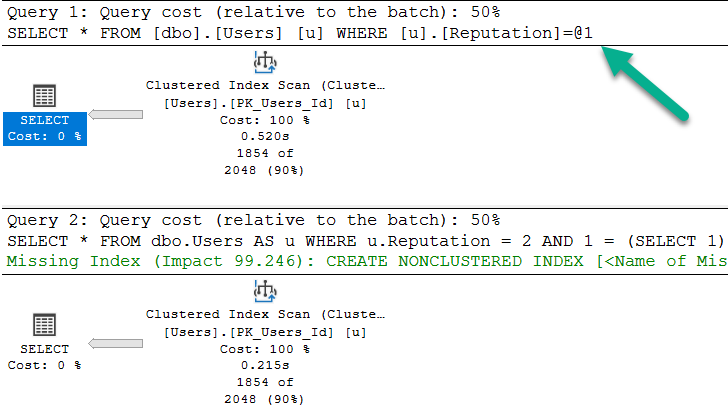
	AND 1 = (SELECT 1);
>greentext
Note that the bottom query gets a missing index request, and is not simple parameterized. The only reason the first query takes ~2x as long as the second query is because the cache was cold. In subsequent runs, they’re equal enough.
What Gets Fully Optimized?
Generally, things that introduce cost based decisions, and/or inflate the cost of a query > Cost Threshold for Parallelism.
Joins
Subqueries
Aggregations
Ordering without a supporting index
As a quick example, these two queries are fairly similar, but…
	/*Unique column*/
	SELECT TOP 1000 u.Id --Not this!
	FROM dbo.Users AS u
	GROUP BY u.Id;

	/*Non-unique column*/
	SELECT TOP 1000 u.Reputation --But this will!
	FROM dbo.Users AS u
	GROUP BY u.Reputation;
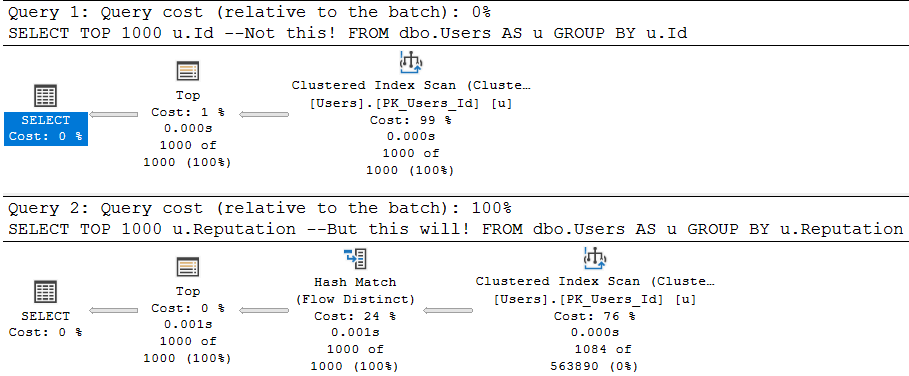
One attempts to aggregate a unique column (the pk of the Users table), and the other aggregates a non-unique column.
The optimizer is smart about this:
Flowy
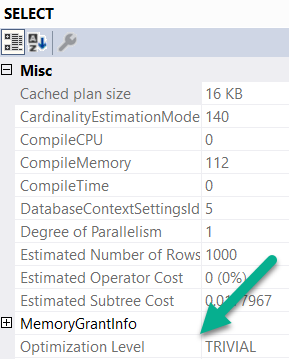
The first query is trivially optimized. If you want to see this, hit F4 when you’re looking at a query plan. Highlight the root operator (select, insert, update, delete — whatever), and look at the optimization level.
wouldacouldashoulda
Since aggregations have no effect on unique columns, the optimizer throws the group by away. Keep in mind, the optimizer has to know a column is unique for that to happen. It has to be guaranteed by a uniqueness constraint of some kind: primary key, unique index, unique constraint.
The second query introduces a choice, though! What’s the cheapest way to aggregate the Reputation column? Hash Match Aggregate? Stream Aggregate? Sort Distinct? The optimizer had to make a choice, so the optimization level is full.
What About Indexes?
Another component of trivial plan choice is when the choice of index is completely obvious. I typically see it when there’s either a) only a clustered index or b) when there’s a covering nonclustered index.
If there’s a non-covering nonclustered index, the choice of a key lookup vs. clustered index scan introduces that cost based decision, so trivial plans go out the window.
Here’s an example:
	CREATE INDEX ix_creationdate
	    ON dbo.Users(CreationDate);

	SELECT u.CreationDate, u.Id
	FROM dbo.Users AS u
	WHERE u.CreationDate >= '20131229';

	SELECT u.Reputation, u.Id
	FROM dbo.Users AS u
	WHERE u.Reputation = 2;

	SELECT u.Reputation, u.Id
	FROM dbo.Users AS u WITH(INDEX = ix_creationdate)
	WHERE u.Reputation = 2;
With an index only on CreationDate, the first query gets a trivial plan. There’s no cost based decision, and the index we created covers the query fully.
For the next two queries, the optimization level is full. The optimizer had a choice, illustrated by the third query. Thankfully it isn’t one that gets chosen unless we force the issue with a hint. It’s a very bad choice, but it exists.
When It’s Wack
Let’s say you create a constraint, because u loev ur datea.
	ALTER TABLE dbo.Users
        ADD CONSTRAINT cx_rep CHECK
			( Reputation >= 1 AND Reputation <= 2000000 );
When we run this query, our newly created and trusted constraint should let it bail out without doing any work.
	SELECT u.DisplayName, u.Age, u.Reputation
    FROM dbo.Users AS u
    WHERE u.Reputation = 0;
But two things happen:
my name is bogus
The plan is trivial, and it’s auto-parameterized.
The auto-parameterization means a plan is chosen where the literal value 0 is replaced with a parameter by SQL Server. This is normally “okay”, because it promotes plan reuse. However, in this case, the auto-parameterized plan has to be safe for any value we pass in. Sure, it was 0 this time, but next time it could be one within the range of valid reputations.
Since we don’t have an index on Reputation, we have to read the entire table. If we had an index on Reputation, it would still result in a lot of extra reads, but I’m using the clustered index here for ~dramatic effect~
Table 'Users'. Scan count 1, logical reads 44440
Of course, adding the 1 = (SELECT 1) thing to the end introduces full optimization, and prevents this.
The query plan without it is just a constant scan, and it does 0 reads.
Rounding Down
So there you have it. When you see me (or anyone else) use 1 = (SELECT 1), this is why. Sometimes when you write demos, a trivial plan or auto-parameterization can mess things up. The easiest way to get around it is to add that to the end of a query.
Thanks for reading!
Going Further
If this is the kind of SQL Server stuff you love learning about, you’ll love my training. Blog readers get 25% off the Everything Bundle — over 100 hours of performance tuning content. Need hands-on help? I offer consulting engagements from targeted investigations to ongoing retainers. Want a quick sanity check before committing to a full engagement? Schedule a call — no commitment required.
While I’m not smart enough to figure out a SQL injection method without altering the stored procedure, that doesn’t mean it can’t happen.
It might be more difficult, but not impossible. Here’s our prize:
CREATE OR ALTER PROCEDURE dbo.top_sniffer (@top INT, @vtid INT)
AS
BEGIN

DECLARE @sql NVARCHAR(MAX) = N'';

SET @sql = @sql + N'
    SELECT   TOP (' + RTRIM(@top) + ')
             v.Id,
             v.PostId,
             v.UserId,
             v.BountyAmount,
             v.VoteTypeId,
             v.CreationDate
    FROM     dbo.Votes AS v
    WHERE    v.VoteTypeId = @i_vtid
    ORDER BY v.CreationDate DESC;
    '

    PRINT @sql;
    EXEC sys.sp_executesql @sql, N'@i_vtid INT', @i_vtid = @vtid

END;
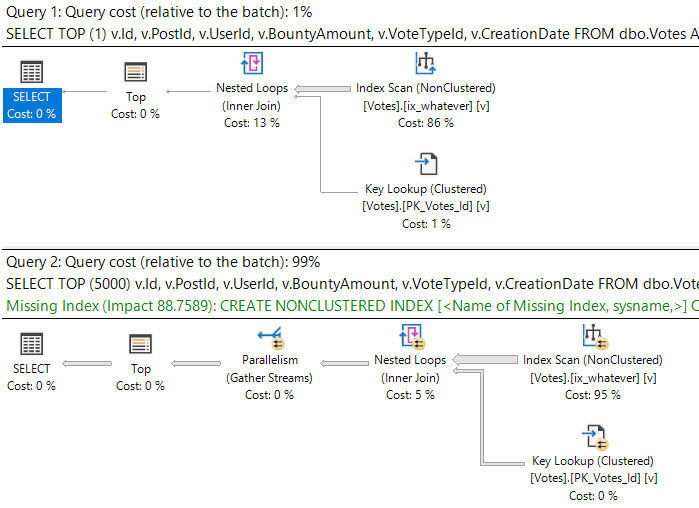
If we fully parameterize this, we’ll end up with the same problem we had before with plan reuse.
Every different top will get a new plan. The upside is that plans with the same top may get reused, so it’s got a little something over recompile there.
If lots of people look for lots of different TOPs (which you could cut down on by limiting the values your app will take, like via a dropdown), you can end up with a lot of plans kicking around.
Would I Do This?
Likely not, because of the potential risk, and the potential impact on the plan cache, but I thought it was interesting enough to follow up on.
Thanks for reading!
Going Further
If this is the kind of SQL Server stuff you love learning about, you’ll love my training. Blog readers get 25% off the Everything Bundle — over 100 hours of performance tuning content. Need hands-on help? I offer consulting engagements from targeted investigations to ongoing retainers. Want a quick sanity check before committing to a full engagement? Schedule a call — no commitment required.