When I was checking out early builds of SQL Server 2019, I noticed a new DMV called dm_db_missing_index_group_stats_query, that I thought was pretty cool.
It helped you tie missing index requests to the queries that requested them. Previously, that took a whole lot of heroic effort, or luck.
With this new DMV, it’s possible to combine queries that look for missing indexes with queries that look for tuning opportunities in the plan cache or in Query Store.
It seems to tie back to dm_db_missing_index_groups, on the index_group_handle column in this DMV joined to the group handle column in the new DMV.
If you’re wondering why I’m not giving you any code samples here, it’s because I’m going to get some stuff built into sp_BlitzIndex to take advantage of it, now that it’s documented.
Special thanks to William Assaf (b|t) for helping to get this done.
Thanks for reading!
Going Further
If this is the kind of SQL Server stuff you love learning about, you’ll love my training. Blog readers get 25% off the Everything Bundle — over 100 hours of performance tuning content. Need hands-on help? I offer consulting engagements from targeted investigations to ongoing retainers. Want a quick sanity check before committing to a full engagement? Schedule a call — no commitment required.
I talk to a lot of people about performance tuning. It seems like once someone is close enough to a database for long enough, they’ll have some impression of parameter sniffing. Usually a bad one.
You start to hear some funny stuff over and over again:
We should always recompile
We should always use local variables
We should always recompile and use local variables
Often, even if it means writing unsafe dynamic SQL, people will be afraid to parameterize things.
Between Friends
To some degree, I get it. You’re afraid of incurring some new performance problem.
You’ve had the same mediocre performance for years, and you don’t wanna make something worse.
The thing is, you could be making things a lot better most of the time.
Fewer compiles and recompiles, fewer single-use plans, fewer queries with multiple plans
Avoiding the local variable nonsense is, more often than not, going to get you better performance
A Letter To You
I’m going to tell you something that you’re not going to like, here.
Most of the time when I see a parameter sniffing problem, I see a lot of other problems.
Shabbily written queries, obvious missing indexes, and a whole list of other things.
It’s not that you have a parameter sniffing problem, you have a general negligence problem.
After all, the bad kind of parameter sniffing means that you’ve got variations of a query plan that don’t perform well on variations of parameters.
Once you start taking care of the basics, you’ll find a whole lot less of the problems that keep you up at night.
If that’s the kind of thing you need help with, drop me a line.
Thanks for reading!
Going Further
If this is the kind of SQL Server stuff you love learning about, you’ll love my training. Blog readers get 25% off the Everything Bundle — over 100 hours of performance tuning content. Need hands-on help? I offer consulting engagements from targeted investigations to ongoing retainers. Want a quick sanity check before committing to a full engagement? Schedule a call — no commitment required.
Most queries will have a where clause. I’ve seen plenty that don’t. Some of’em have surprised the people who developed them far more than they surprised me.
But let’s start there, because it’s a pretty important factor in how you design your indexes. There are all sorts of things that indexes can help, but the first thing we want indexes to do in general is help us locate data.
Why? Because the easier we can locate data, the easier we can eliminate rows early on in the query plan. I’m not saying we always need to have an index seek, but we generally want to filter out rows we don’t care about when we’re touching the table they’re in.
Burdens
When we carry excess rows throughout the query plan, all sorts of things get impacted and can become less efficient. This goes hand in hand with cardinality estimation.
At the most severe, rows can’t be filtered when we touch tables, or even join them together, and we have to filter them out later.
Equality predicates preserve ordering of other key columns in the index, which may or may not become important depending on what your query needs to accomplish.
Post Where
After the where clause, there are some rather uncontroversial things that indexes can help with:
When you’re trying to figure out a good index for one query, you usually want to start with the where clause.
Not always, but it makes sense in most cases because it’s where you can find gains in efficiency.
If your index doesn’t support your where clause, you’re gonna see an index scan and freak out and go in search of your local seppuku parlor.
After that, look to other parts of your query that could help you eliminate rows. Joins are an obvious choice, and typically make good candidates for index key columns.
At this point, your query might be in good enough shape, and you can leave other things alone.
If so, great! You can make the check out to cache. I mean cash.
Thanks for reading!
Going Further
If this is the kind of SQL Server stuff you love learning about, you’ll love my training. Blog readers get 25% off the Everything Bundle — over 100 hours of performance tuning content. Need hands-on help? I offer consulting engagements from targeted investigations to ongoing retainers. Want a quick sanity check before committing to a full engagement? Schedule a call — no commitment required.
Part of reviewing any server necessarily includes reviewing indexes. When you’re working through things that matter, like unused indexes, duplicative indexes, heaps, etc. it’s pretty clear cut what you should do to fix them.
Missing indexes are a different animal though. You have three general metrics to consider with them:
Uses: the number of times a query could have used the index
Impact: how much the optimizer thinks it can reduce the cost of the query by
Query cost: How much the optimizer estimates the query will cost to run
Of those metrics, impact and query cost are entirely theoretical. I’ve written quite a bit about query costing and how it can be misleading. If you really wanna get into it, you can watch the whole series here.
In short: you might have very expensive queries that finish very quickly, and you might have very low cost queries that finish very slowly.
Especially in cases of parameter sniffing, a query plan with a very low cost might get compiled and generate a missing index request. What happens if every other execution of that query re-uses the cheaply-costed plan and runs for a very long time?
You might have a missing index request that looks insignificant.
Likewise, impact is how much the optimizer thinks it can reduce the cost of the current plan by. Often, you’ll create a new index and get a totally different plan. That plan may be more or less expensive that the previous plan. It’s all a duck hunt.
The most reliable of those three metrics is uses. I’m not saying it’s perfect, but there’s a bit less Urkeling there.
When you’re looking at missing index requests, don’t discount those with lots of uses for low cost queries. Often, they’re more important than they look.
Thanks for reading!
Going Further
If this is the kind of SQL Server stuff you love learning about, you’ll love my training. Blog readers get 25% off the Everything Bundle — over 100 hours of performance tuning content. Need hands-on help? I offer consulting engagements from targeted investigations to ongoing retainers. Want a quick sanity check before committing to a full engagement? Schedule a call — no commitment required.
In this video, I share my experiences and insights on residual predicates in SQL Server queries, particularly focusing on how they can affect performance when using indexes and temporary tables. I start by recounting a series of 15 frustrating takes where I was interrupted while recording, leading to an impromptu discussion over a Monte Carlo cocktail—2.5 ounces of bourbon, about an ounce of Benedictine, and a dash of bitters—which surprisingly made me more talkative than motivated for writing. The video delves into the nuances of residual predicates by examining an index on the `post` table in the Stack Overflow database, specifically how the order of key columns impacts seek operations and overall query performance. I explore various strategies to optimize queries, including using outer applies twice and leveraging temporary tables, all while emphasizing the importance of understanding index dependencies for effective query tuning.
Full Transcript
This is the, I want to say, 15th take where I’ve started recording and been interrupted rudely, brusquely, or is it brusquely, brusquely, probably brusquely. It’s like a rude broccoli, brusquely. But I’m recording a video today. I was going to just write a blog post, but I was not so rudely interrupted by this lovely drink called the Monte Carlo, which is 2.5 ounces of bourbon, about an ounce of Benedictine, and just about whatever kind of bitters you have sitting around the house. You could do Angostura, cherry, just about anything you might have. And it’s, it’s a very nice cocktail. It’s stiff. It’s a stiff one. And, uh, it, it, it killed my motivation to write, but it did make me a bit talkative. So we’re going to chat today. We’re going to have a little chit chat. A sitting chit chat. It’s probably the best idea. About, uh, residual predicates, uh, and different ways that you can fix them, uh, or make them faster, I guess. Figure out if they’re a problem. It’s probably a good thing. All right. We could figure out if there’s an issue with this residual predicate. Figure it out. So we’ve got this index. Because where would we be without an index? Be nowhere without an index. We’ve got this index on the on the post table. The stack overflow database on the post type ID. Oh, I highlighted too much. Post type ID is score and owner user ID columns. And we have this index because it is fantastic for this query right here. Because this query has a where clause on post type ID and score and a join clause on owner user ID. Now in the grand scheme of things, this is a fairly good indexing strategy.
Because we are, we have our, our key columns up front that help us with the where clause. It helps the where clause find data. But we still have our join, our join clause column in the key of the index. So that’s a pretty good starting place. Like if you need to design an index, you’re like, I need to, I need to help this query. I need to, where this query has to find data, has to join, has to do all sorts of stuff. And that’s a pretty good way to design an index. Help it find all the data that it needs and then help it join whatever data it needs. So that’s a pretty good, pretty good strategy there. And the thing is, when we, we put that data into a temp table, right? Let’s, let’s actually run that and do it. Because I want to show you just how fantastically fast this query runs because of this professional grade index.
It finishes, my friends, in 12 milliseconds. 12 milliseconds. Fantastic. Who’s the best query tuner?
Who’s the best query tuner? The problem is, or the problem becomes, that when we need to, uh, use that temp table to derive some additional information from our database. We want, we have some figuring out to do. Uh, we have a query that just does not run as fast as we would like it to.
So we’ll hit F5 here and we’ll wait patiently for around about seven seconds for this thing to churn its wheels and do whatever it is it needs to do to, to send us data back. Okay. 6.6 seconds. Fine. I said about seven. I didn’t say exactly seven.
I don’t get on my case buster. There is our 6.6 seconds of time. And what happens in the query plan really isn’t all that important. It’s just, it’s not that important.
I mean, we, we can see that we have another semi-disaster as a repartition stream. Oh, I’m sorry. That’s over here. We have this repartition streams over here.
I don’t like. But this query takes about seven seconds. And if we look at the index seek over here, something kind of interesting shows up. We were able to seek to the post type ID that we care about.
Right? One and two. That’s good. That’s fine. We come over here. We join to that owner user ID column.
And that’s, that’s probably fine too. I’m not going to complain too much about that. But I am going to complain about the fact that this takes seven seconds. And that’s about, I don’t know, depending on how good of a query tuner you are, somewhere between four and six seconds too slow.
Now, normally, something that I enjoy getting to do in my, my life and my query tuning work with people is taking a sub query like that, a scalar sub query in the select clause and replacing it with an outer apply. Now we have to use outer apply here. If we use cross apply, we will restrict results.
One thing that this scalar sub query does, despite the fact that it has a where clause with an and in it. So it’s extra, extra where clausey. But one thing that would, might happen is we might not have a result from that sub query show up, but that wouldn’t restrict rows.
This would, this would restrict rows if we used cross apply. But if we use outer apply, something terrible will happen. My, my normal query tuning trickery will not work.
Now, if you’ve read my blog, you may be familiar with how much I hate eager index pools. Now you can’t see how terrible it is here. But if we go look at a query plan that I have saved off professionally, saved off for you, we can see that we have a query that will spend eight seconds scanning the post table and then a minute and 20 seconds building an index for us.
If you want to know more about that, you can read all my other posts about eager index pools. But what’s extra funny about this particular eager index pool, really about every eager index pool, is that even if we got it to go in parallel, it would not run faster. It actually runs a few seconds slower.
Look at that, a minute and 31 seconds. And that is because, of course, the eager index pool is a dirty, filthy liar. And all, I think, I want to say, I’m going to say off the cuff, that’s 46 million rows. And they all end up on one single, solitary thread.
So getting this query to go parallel does not provide any benefit for us whatsoever. Lovely, isn’t that? Lovely.
Lovely. Now, we could try doing all sorts of stuff with top one to get rid of the max, but unfortunately, if we do that, both of those plans are going to end up doing the same gosh darn thing with these eager index pools. Have mercy.
Have mercy on all of us. Hmm. So, this is where I started feeling personally aggrieved because I felt, in my professional query tuning opinion, that there is no way that my lovely outer apply trick should be slower, should result in an index pool. All right.
So, what I did was, rather than go with the max, I wanted to do the top one thing, but I also wanted to try separating things out a little bit, doing things a little bit different, differently. And, so, I’m going to run this select from my temp table with just the results of post type ID 1. Remember, up here, we’re looking for post type ID 1 or 2.
That’s a question or an answer right there. And if we run this, this is remarkably fast. Despite having a very lazy spool over here, it is remarkably fast.
This is not our problem. We can kind of get a feel for this because if we look at the index seek over here, right, we don’t even have to really get the properties. We can just get the tool tip.
But you can see that we read 472,310 rows. Right? It’s not too bad. I mean, maybe a lot of rows, kind of.
But this is a very fast query. Very fast. 233 milliseconds. Nearly broke the sound barrier. Definitely broke a track record.
You show me someone with a 233 second mile. Oh. Love to meet that person. That person is a spaceship. Space jokes.
Hate myself. But if we try that again with the post type ID equals two portion of the query, this will be incredibly slow. And it’s so slow, in fact, that I refuse to run this query and make you watch it run.
Because even though it has the exact same query plan shape, the time is not what it once was. This takes a full two minutes and one second, which is actually somehow a little bit worse than that eager index spool plan. Somehow, we found a way to be worse than an eager index spool.
Now, if we look at the index seek over here, we read quite a few more rows. I don’t know what this number is. It is a three, three, nine, seven, five, four, five, four, nine, oh.
That is a ten digit number of rows that we end up reading. That we end up seeking to. Because you know how seeks are always so much faster.
I kind of wish we had just scanned this thing. Because the seek is not working out for us here. So, despite all we’ve done to set up our query and our indexes to provide a nice seek, we do not get a very timely seek, do we? This is two minutes of seeking.
Now, what’s kind of interesting is we seek to this post type ID. And then we have this residual predicate on owner user ID. This is where the problem really is.
Just as we can seek to post type ID equals two, that doesn’t really buy us a whole lot. There are a lot of post type ID, post type IDs of two in the post table. There are many of them.
There are lots of answers in the post table. And the fact that we can seek to every single one of them is great. But then we can’t just immediately seek to the owner user ID that we care about. Because we have that score column in the middle, remember?
Because we’re using that index over here, that east index. And our index, of course, because it looks like this, we can seek to here. But then we have this sort of thing right here in between what we need to seek to next.
We have this score column sitting between us. And this goes back to a lot of stuff that I’ve said and talked about and written about with indexes, where when you create these rowstore indexes, the order of key columns matters quite a bit because we introduce dependencies going from right to left, right?
So we can seek to post type ID and we can seek to score. But even if we seek to post type ID, we can’t seek to owner user ID after that. We have to go through score somehow to get to owner user ID.
So we kind of get a bit stuck, don’t we? We’re stuck not being able to get through score. And of course, having score second actually works out pretty well for us generally because when we seek to this post type ID, we have score in order for the order by here.
So having score in the index there is actually a good idea. I mean, not only for this part of the query, but that first query that populated the temp table, that was a good idea there too.
That helped that query finish very quickly. So one thing we could do if we were feeling particularly ambitious is we could use outer apply twice. In the first outer apply, we can get the top one score for what we know is fast, right?
Post type ID one is fast. This finishes in 233 milliseconds. God bless.
And we can use the score that we pull out of here as an additional predicate in the second apply. And what this does is it helps us bridge that gap between post type ID and owner user ID. We’re going to use score as another predicate.
So we’re going to be able to use the full extent of our key columns. If we run the query like this, this will also finish very quickly. In fact, we 290 milliseconds is still breaking some records.
So that is absolutely lovely. But keep in mind, we have the optimizers telling us we could have we could do better. We can create an index and do do better.
But that’s okay. It’s okay. You’re allowed to be wrong, optimizer. That’s why I’m here. So whenever I explain that to people, though, they get very confused, right? Because if you look at the query plan, right, you have this one seek up here that does the residual predicate thing.
It is on your owner user ID and it’s fast. It doesn’t matter because it does a very small number of reads, 473, 2,310 reads. And then when we come and look at the index seek down here, it looks a little funny, doesn’t it?
So in this one we look for that post type ID equals 2 first and then we have another seek predicate now. Where score is greater than expression 1,0003. And that’s just lovely.
We have another seek predicate and that other seek predicate helps us have another thing to help us find our data faster. That expression, that expression 1, 0, 0, 3 is what comes from here, right? So getting the score from this part is our, is expression 1, 0, 0, 3.
And one way to kind of make it a little bit easier to visualize what’s going on in your head is to take the result of that first apply operation, right? Where we get post type ID equals 1. And dump that into a temp table, right?
And that happens very quickly. And 57, this goes parallel and takes 57 milliseconds now. Whew. I’m going to have to fan myself.
I’m going to have to spritz, give myself a spritz, take a cold shower. But now, well this 2 isn’t slow. My comment is a liar. But now if we select from that second temp table and we outer apply the portion to get post type beta equals 2, what we’re going to do is take the score that’s in our temp table and use that as a predicate.
So before we took the one from the first outer apply and use it as a predicate in the second outer apply. But a slightly easier way to visualize that is to do something like this. And if we run this query, this will also be lightning fast.
This is 58 milliseconds. That further breaks our track record. Because now we’re down to like a hundred and something milliseconds between the insert into the temp table and that. So that’s actually maybe the better strategy.
Maybe. I don’t know. I might be crazy. Maybe we should take this first outer apply and put it into our initial temp table select and then get the second one after that. And we would only use one temp table instead of two, which would be wonderful and lovely.
But who knows? Who knows? Now, the whole reason why this works is because of the order of the key columns in our index. Again, post type ID and then score sort of set this thing that we can’t get past.
Right? Because the ordering of the index depends on the ordering of our key columns. So it’s ordered by post type ID.
And then within duplicates of post type ID, we have score in order. And then within the duplicates of score, we have owner user ID in order. So it’s that dependency going from left to right or right to left in the in the rowstore indexes that really kind of beat this query up because we couldn’t seek to post type ID and then seek to owner user ID. We couldn’t just like hop, skip and jump over score to get there.
Could we? Now, we could. We could. We could. Try shuffling the key, the order of the key columns, right? We could go post type ID owner user ID then score, but.
We can’t always change indexes. It’s not always easy. That index might be there for a bunch of other queries too. If we change this index, it’s going to mess up a whole bunch of other queries potentially, isn’t it? It’s going to mess a whole bunch of downstream stuff up.
Maybe other queries doing things. We don’t know. We don’t know what might happen. We don’t know. We could add another index, but then we have two indexes that have nearly the same data in them. And that’s.
It’s depressing, isn’t it? Why would we ever want that? Duplicative indexes. Another thing that we could do is. Get our max score a slightly different way by using something like row number.
So we could get row number from posts for that and then do our filtering after we get the row number. But. Ah.
Boy oh boy. In row mode. This sucks. In row mode. This is just as slow as the first query we ran. It took seven seconds. It’s not breaking any. Well, I actually guess that.
I suppose that actually is breaking track record still, isn’t it? No one has a seven second mile. But yeah, this takes this takes actually this one takes much closer to 300 milliseconds closer to seven seconds than the original query, which took 6.6 seconds. But.
If we. Get some batch mode involved. Now I have this table called T. I mean fine. I’m not the most creative person in the world.
I have this table called T in my database. And this table called T is not for Texas. It is for table. And this T table has a clustered columnstore index on it. And if we do a stupid looking left join to that table.
Ah, I messed that all up. Apologize. It’s the first mistake I’ve made all day. We do this stupid join to our T table. Something interesting will happen.
Get you out of here. But this finishes. Now in about 2.2 seconds. Because we have a bunch of stuff that’s going to happen in batch mode now.
We see this window aggregate operator. Fantastic. Fantastic. We’re going to have a sort that happens. Oh, second mistake I made today.
This sort that happens in batch mode. We have this window aggregate that happens in batch mode. And because the sort is a child operator of a window aggregate. All this this can parallelize rather nicely.
A rather nice parallelization. But batch mode sorts when they’re not the child operator of a window aggregate. All the rows end up on one thread which can sometimes be worse.
I mean this they’re still getting the batch mode efficiencies of the sort. But that whole one thread thing is a little little wonky. But anyway.
That’s another way you could potentially fix the query. It’s just by getting a row number and doing some batch modeing. Which is perfectly acceptable. But let’s make sure we clean up after ourselves.
So thank you for watching. I hope you enjoyed this video. I hope you enjoy the remainder of whatever day this is. And well, maybe in the future I’ll drink some more Monte Carlos and get talkative and record some more videos.
I do miss you. Where have you been? Huh.
Around I guess. Cheers. Thank you. I was going to say something profound. I forget what it is now though. That always happens to me.
It’s right on the tip of my tongue. Well, anyway.
Going Further
If this is the kind of SQL Server stuff you love learning about, you’ll love my training. Blog readers get 25% off the Everything Bundle — over 100 hours of performance tuning content. I’m also available for consulting if you just don’t have time for that and need to solve performance problems quickly.
USE StackOverflow;

EXEC dbo.DropIndexes;

/*
CREATE INDEX east
    ON dbo.Posts
        (PostTypeId, Score, OwnerUserId)
WITH ( MAXDOP = 8,
       SORT_IN_TEMPDB = ON,
       DATA_COMPRESSION = ROW );
*/

DROP TABLE IF EXISTS #t;
GO

SELECT
    u.Id,
    u.Reputation,
    u.DisplayName,
    p.Id AS PostId,
    p.Title
INTO #t
FROM dbo.Users AS u
JOIN dbo.Posts AS p
    ON p.OwnerUserId = u.Id
WHERE u.Reputation >= 1000
AND   p.PostTypeId = 1
AND   p.Score >= 1000
ORDER BY u.Reputation DESC;


/*
CREATE INDEX east
    ON dbo.Posts(PostTypeId, Score, OwnerUserId);
*/
SELECT
    t.Id,
    t.Reputation,
    (
        SELECT
            MAX(p.Score)
        FROM dbo.Posts AS p
        WHERE p.OwnerUserId = t.Id
        AND   p.PostTypeId IN (1, 2)
    ) AS TopPostScore,
    t.PostId,
    t.Title
FROM #t AS t
ORDER BY t.Reputation DESC;


/*
Usually I love replacing select
list subqueries with APPLY

Just show the saved plan here
*/
SELECT
    t.Id,
    t.Reputation,
    pq.Score,
    t.PostId,
    t.Title
FROM #t AS t
OUTER APPLY --We have to use outer apply to not restrict results!
(
    SELECT
        MAX(p.Score) AS Score
    FROM dbo.Posts AS p
    WHERE p.OwnerUserId = t.Id
    AND   p.PostTypeId IN (1, 2)
) AS pq
ORDER BY t.Reputation DESC;


/*
TOP (1) also spools
*/
SELECT
    t.Id,
    t.Reputation,
    (
        SELECT TOP (1)
            p.Score
        FROM dbo.Posts AS p
        WHERE p.PostTypeId IN (1, 2)
        AND   p.OwnerUserId = t.Id
        ORDER BY p.Score DESC
    ) AS TopPostScore,
    t.PostId,
    t.Title
FROM #t AS t
ORDER BY t.Reputation DESC;

SELECT
    t.Id,
    t.Reputation,
    pq.Score,
    t.PostId,
    t.Title
FROM #t AS t
OUTER APPLY
(
    SELECT TOP (1)
        p.Score
    FROM dbo.Posts AS p
    WHERE p.PostTypeId IN (1, 2)
    AND   p.OwnerUserId = t.Id
    ORDER BY p.Score DESC
) AS pq
ORDER BY t.Reputation DESC;


/*
CREATE INDEX east
    ON dbo.Posts(PostTypeId, Score, OwnerUserId);
*/
SELECT
    t.Id,
    t.Reputation,
    pq.Score,
    t.PostId,
    t.Title
FROM #t AS t
OUTER APPLY --This one is fast
(
    SELECT TOP (1)
        p.Score
    FROM dbo.Posts AS p
    WHERE p.PostTypeId = 1
    AND   p.OwnerUserId = t.Id
    ORDER BY p.Score DESC
) AS pq
ORDER BY t.Reputation DESC;

SELECT
    t.Id,
    t.Reputation,
    pa.Score,
    t.PostId,
    t.Title
FROM #t AS t
OUTER APPLY --This two is slow...
(
    SELECT TOP (1)
        p.Score
    FROM dbo.Posts AS p
    WHERE p.PostTypeId = 2
    AND   p.OwnerUserId = t.Id
    ORDER BY p.Score DESC
) AS pa
ORDER BY t.Reputation DESC;


/*
Use the Score!
*/
SELECT
    t.Id,
    t.Reputation,
    ISNULL(pa.Score, pq.Score) AS TopPostScore,
    t.PostId,
    t.Title
FROM #t AS t
OUTER APPLY --This one is fast
(
    SELECT TOP (1)
        p.Score --Let's get the top score here
    FROM dbo.Posts AS p
    WHERE p.PostTypeId = 1
    AND   p.OwnerUserId = t.Id
    ORDER BY p.Score DESC
) AS pq
OUTER APPLY --This two is slow...
(
    SELECT TOP (1)
        p.Score
    FROM dbo.Posts AS p
    WHERE p.PostTypeId = 2
    AND   p.OwnerUserId = t.Id
    AND   pq.Score < p.Score --Then use it as a filter down here
    ORDER BY p.Score DESC
) AS pa
ORDER BY t.Reputation DESC;


SELECT
    t.Id,
    t.Reputation,
    ISNULL(pq.Score, 0) AS Score,
    t.PostId,
    t.Title
INTO #t2
FROM #t AS t
OUTER APPLY --This one is fast
(
    SELECT TOP (1)
        p.Score --Let's get the top score here
    FROM dbo.Posts AS p
    WHERE p.PostTypeId = 1
    AND   p.OwnerUserId = t.Id
    ORDER BY p.Score DESC
) AS pq;


SELECT
    t.Id,
    t.Reputation,
    ISNULL(pa.Score, t.Score) AS TopPostScore,
    t.PostId,
    t.Title
FROM #t2 AS t
OUTER APPLY
(
    SELECT TOP (1)
        p.Score
    FROM dbo.Posts AS p
    WHERE p.PostTypeId = 2
    AND   p.OwnerUserId = t.Id
    AND   t.Score < p.Score --Then use it as a filter down here
    ORDER BY p.Score DESC
) AS pa
ORDER BY t.Reputation DESC;


/*
What happened?
 * Index key column order
   * (PostTypeId, Score, OwnerUserId)

Other things we could try:
 * Shuffling index key order, or creating a new index
   * (PostTypeId, OwnerUserId, Score)

 * Rewriting the query to use ROW_NUMBER() instead
  * Have to be really careful here, probably use Batch Mode

*/

/*
CREATE TABLE dbo.t
(
id int NOT NULL,
INDEX c CLUSTERED COLUMNSTORE
);
*/

SELECT
    t.Id,
    t.Reputation,
    pa.Score,
    t.PostId,
    t.Title
FROM #t AS t
LEFT JOIN dbo.t AS tt ON 1 = 0
OUTER APPLY
(
    SELECT
        rn.*
    FROM
    (
        SELECT
            p.*,
            ROW_NUMBER()
                OVER
                (
                    PARTITION BY
                        p.OwnerUserId
                    ORDER BY
                        p.Score DESC
                ) AS n
        FROM dbo.Posts AS p
        WHERE p.PostTypeId IN (1, 2)
    ) AS rn
    WHERE rn.OwnerUserId = t.Id
    AND   rn.n = 1
) AS pa
ORDER BY t.Reputation DESC;


DROP TABLE #t, #t2;
Filtered indexes are really interesting things. Just slap a where clause on your index definition, and you can do all sorts of helpful stuff:
Isolate hot data
Make soft delete queries faster
Get a histogram specific to the span of data you care about
Among other things, of course. There are some annoying things about them though.
They only work with specific ANSI options
If you don’t include the filter definition columns in the index, it might not get used
They only work when queries use literals, not parameters or variables
Majorly
Part of the optimizer’s process consists of expression matching, where things like computed columns, filtered indexes, and indexed views are considered for use in your query.
I mean, if you have any of them. If you don’t, it probably just stares inwardly for a few nanoseconds, wondering why you don’t care about it.
Something that this part of the process is terrible at is any sort of “advanced” expression matching. It has to be exact, or you get whacked.
Here’s an example:
DROP TABLE IF EXISTS dbo.is_deleted;

CREATE TABLE dbo.is_deleted
(
    id int PRIMARY KEY,
    dt datetime NOT NULL,
    thing1 varchar(50) NOT NULL,
    thing2 varchar(50) NOT NULL,
    is_deleted bit NOT NULL
);

INSERT dbo.is_deleted WITH(TABLOCK)
(
    id,
    dt,
    thing1,
    thing2,
    is_deleted
)
SELECT
    x.n,
    DATEADD(MINUTE, x.n, GETDATE()),
    SUBSTRING(x.text, 0, 50),
    SUBSTRING(x.text, 0, 50),
    x.n % 2
FROM (
SELECT
    ROW_NUMBER() OVER
    (
        ORDER BY 1/0
    ) AS n,
    m.*
FROM sys.messages AS m
) AS x;

CREATE INDEX isd
ON dbo.is_deleted
    (dt)
INCLUDE
    (is_deleted)
WHERE
    (is_deleted = 0);
Overly
If you run that setup script, you’ll get yourself a table that’s ripe for a filtered index on the is_deleted column.
But it doesn’t work with every type of query pattern. Some people are super fancy and want to find NOTs!
SELECT
    COUNT_BIG(*) AS records
FROM dbo.is_deleted AS id
WHERE id.dt >= GETDATE() + 200
AND   (NOT 1 = id.is_deleted)
AND   1 = (SELECT 1);
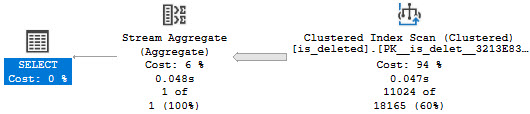
I have the 1 = (SELECT 1) in there for reasons. But we still get no satisfaction.
hurtin
If we try to force the matter, we’ll get an error!
SELECT
    COUNT_BIG(*) AS records
FROM dbo.is_deleted AS id WITH(INDEX = isd)
WHERE id.dt >= GETDATE() + 200
AND   (NOT 1 = id.is_deleted)
AND   1 = (SELECT 1);
The optimizer says non.
Msg 8622, Level 16, State 1, Line 84
Query processor could not produce a query plan because of the hints defined in this query.
Resubmit the query without specifying any hints and without using SET FORCEPLAN.
It has no problem with this one, though.
SELECT
    COUNT_BIG(*) AS records
FROM dbo.is_deleted AS id
WHERE id.dt >= GETDATE() + 200
AND   (0 = id.is_deleted)
AND   1 = (SELECT 1);
Underly
It would be nice if there were some more work put into filtered indexes to make them generally more useful.
In much the same way that a general set of contradictions can be detected, simple things like this could be too.
Computed columns have a similar issue, where if the definition is col1 + col2, a query looking at col2 + col1 won’t pick it up.
It’s a darn shame that such potentially powerful tools don’t get much love.
Thanks for reading!
Going Further
If this is the kind of SQL Server stuff you love learning about, you’ll love my training. Blog readers get 25% off the Everything Bundle — over 100 hours of performance tuning content. Need hands-on help? I offer consulting engagements from targeted investigations to ongoing retainers. Want a quick sanity check before committing to a full engagement? Schedule a call — no commitment required.
This is one of the most frustrating things I’ve seen from the optimizer in quite a while.
Here are a couple tables, with a foreign key between them:
CREATE TABLE dbo.ct(id int PRIMARY KEY, dt datetime);

CREATE TABLE dbo.ct_fk(id int PRIMARY KEY, dt datetime);

ALTER TABLE dbo.ct ADD CONSTRAINT
    ct_c_fk FOREIGN KEY (id) REFERENCES dbo.ct_fk(id);
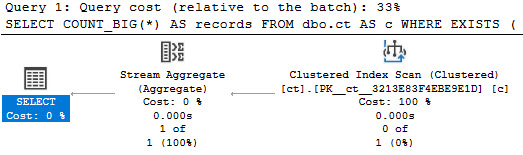
When we use the EXISTS clause, join elimination occurs normally:
SELECT COUNT_BIG(*) AS [?]
FROM dbo.ct AS c
WHERE EXISTS
(
    SELECT 1/0
    FROM dbo.ct_fk AS cf
    WHERE cf.id = c.id
);
all the chickens
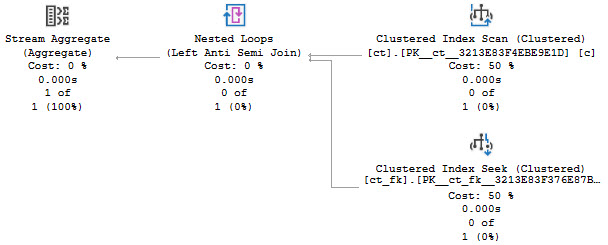
But when we use NOT EXISTS, it… doesn’t.
SELECT COUNT_BIG(*) AS [?]
FROM dbo.ct AS c
WHERE NOT EXISTS
(
    SELECT 1/0
    FROM dbo.ct_fk AS cf
    WHERE cf.id = c.id
);
?
Thanks for reading!
Going Further
If this is the kind of SQL Server stuff you love learning about, you’ll love my training. Blog readers get 25% off the Everything Bundle — over 100 hours of performance tuning content. Need hands-on help? I offer consulting engagements from targeted investigations to ongoing retainers. Want a quick sanity check before committing to a full engagement? Schedule a call — no commitment required.
SQL Server comes with some great features for tuning queries:
Computed Columns
Filtered Indexes
Indexed Views
But there’s an interoperability issue when you try to use things together. You can’t create a filtered index with the filter definition on a computed column, nor can you create a filtered index on an indexed view.
If you find yourself backed into a corner, you may need to consider using an indexed view without any aggregation (which is the normal use-case).
Empty Tables
If we try to do something like this, we’ll get an error.
DROP TABLE IF EXISTS dbo.indexed_view;
GO

CREATE TABLE dbo.indexed_view
(
    id int PRIMARY KEY,
    notfizzbuzz AS (id * 2)
);
GO

CREATE INDEX n
    ON dbo.indexed_view (notfizzbuzz)
WHERE notfizzbuzz = 0;
GO
Yes, I’m putting the error message here for SEO bucks.
Msg 10609, Level 16, State 1, Line 19
Filtered index 'nfb' cannot be created on table 'dbo.indexed_view' because the column 'notfizzbuzz' in the filter expression is a computed column.
Rewrite the filter expression so that it does not include this column.
An Indexed View Doesn’t Help
If we run this to create an indexed view on top of our base table, we still can’t create a filtered index, but there’s a different error message.
CREATE OR ALTER VIEW dbo.computed_column
WITH SCHEMABINDING
AS
SELECT
    iv.id,
    iv.notfizzbuzz
FROM dbo.indexed_view AS iv;
GO

CREATE UNIQUE CLUSTERED INDEX c
    ON dbo.computed_column(id);

CREATE INDEX nfb
    ON dbo.computed_column(notfizzbuzz)
WHERE notfizzbuzz = 0;
Msg 10610, Level 16, State 1, Line 37
Filtered index 'nfb' cannot be created on object 'dbo.computed_column' because it is not a user table.
Filtered indexes are only supported on tables.
If you are trying to create a filtered index on a view, consider creating an indexed view with the filter expression incorporated in the view definition.
But what a thoughtful error message it is! Thanks, whomever wrote that.
Still Needs Help
We can create this indexed view just fine.
CREATE OR ALTER VIEW dbo.computed_column
WITH SCHEMABINDING
AS
SELECT
    iv.id,
    iv.notfizzbuzz
FROM dbo.indexed_view AS iv
WHERE iv.notfizzbuzz = 0;
GO

CREATE UNIQUE CLUSTERED INDEX c
    ON dbo.computed_column(id);
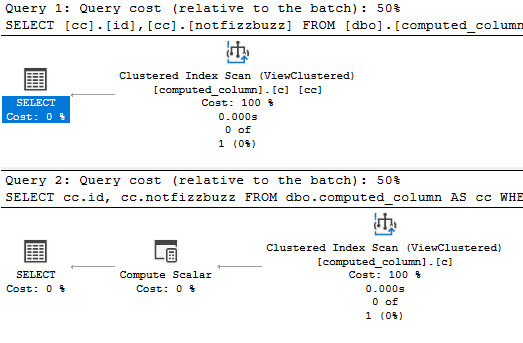
But if we try to select from it, the view is expanded.
SELECT
    cc.id,
    cc.notfizzbuzz
FROM dbo.computed_column AS cc
WHERE cc.notfizzbuzz = 0;
If we run the query like this, and look at the end of the output, we’ll see a message at the bottom that our query is safe for auto (simple) parameterization. This may still happen even if the plan doesn’t remain trivial (more detail at the link above!)
DBCC FREEPROCCACHE;
GO
DBCC TRACEON(8607, 3604);
GO
SELECT
    cc.id,
    cc.notfizzbuzz
FROM dbo.computed_column AS cc
WHERE cc.notfizzbuzz = 0;
DBCC TRACEOFF(8607, 3604);
GO

********************
** Query marked as Cachable
** Query marked as Safe for Auto-Param
********************
Making It Work
The two ways we can run this query to get the indexed view to be used are like so:
SELECT
    cc.id,
    cc.notfizzbuzz
FROM dbo.computed_column AS cc WITH(NOEXPAND)
WHERE cc.notfizzbuzz = 0;


SELECT
    cc.id,
    cc.notfizzbuzz
FROM dbo.computed_column AS cc
WHERE cc.notfizzbuzz = 0
AND   1 = (SELECT 1);
thanks i guess
A Closer Look
If we put those two queries through the ringer, we’ll still see auto (simple) parameterization from the first query:
DBCC FREEPROCCACHE;
GO
DBCC TRACEON(8607, 3604);
GO
SELECT
    cc.id,
    cc.notfizzbuzz
FROM dbo.computed_column AS cc WITH(NOEXPAND)
WHERE cc.notfizzbuzz = 0;
GO
DBCC TRACEOFF(8607, 3604);
GO

********************
** Query marked as Cachable
** Query marked as Safe for Auto-Param
********************

DBCC FREEPROCCACHE;
GO
DBCC TRACEON(8607, 3604);
GO
SELECT
    cc.id,
    cc.notfizzbuzz
FROM dbo.computed_column AS cc
WHERE cc.notfizzbuzz = 0
AND   1 = (SELECT 1);
GO
DBCC TRACEOFF(8607, 3604);
GO

********************
** Query marked as Cachable
********************
It’s goofy, but it’s worth noting. Anyway, if I had to pick one of these methods to get the plan I want, it would be the NOEXPAND version.
Using that hint is the only thing that will allow for statistics to get generated on indexed views.
In case you’re wondering, marking the computed column as PERSISTED doesn’t change the outcome for any of these issues.
Thanks for reading!
Going Further
If this is the kind of SQL Server stuff you love learning about, you’ll love my training. Blog readers get 25% off the Everything Bundle — over 100 hours of performance tuning content. Need hands-on help? I offer consulting engagements from targeted investigations to ongoing retainers. Want a quick sanity check before committing to a full engagement? Schedule a call — no commitment required.
Implementing soft deletes for an app that’s been around for a while can be tough. In the same way as implementing Partitioning can be tough to add in later to get data management value from (rebuilding clustered indexes on the scheme, making sure all nonclustered indexes are aligned, and all future indexes are too, and making sure you have sufficient partitions at the beginning and end for data movement).
Boy, I really stressed those parentheses out.
If you do either one from the outset, it’s far less painful to manage. The structural stuff is there for you from the beginning, and you can test different strategies early on before data change become difficult to manage.
Queries
The first and most obvious thing is that all your queries now need to only find data that isn’t deleted.
Almost universally, it’s easier to put views on top of tables that have the appropriate bit search for deleted or not deleted rows than to expect people to remember it.
CREATE VIEW dbo.Users_Active
AS
SELECT
    u.*
FROM dbo.Users AS u
WHERE u.is_deleted = 0;

CREATE VIEW dbo.Users_Inactive
AS
SELECT
    u.*
FROM dbo.Users AS u
WHERE u.is_deleted = 1;
It’s not that views have any magical performance properties; they’re just queries after all, but it gives you an explicit data source.
Indexes
Depending on how your other queries search for data, you may need to start accounting for the is_deleted flag in your indexes. This could make a really big difference if the optimizer stops choosing your narrower nonclustered indexes because it hates key lookups.
Typically, other predicates will give you a selective-enough result set that a residual predicate on a bit field won’t make much difference. If you’ve already got a seek to the portion of data you’re interested in and most of it will be not-deleted, who cares?
And let’s be honest, in most implementations deleted rows will be the minority of data, and searches for it will be far less common. Usually it’s just there for an occasional audit.
In adjacent cases where instead of deleted you need to designate things as currently active, and you may have many inactive rows compared to active rows, filtered indexes can be your best friend.
Coming back to the views, I don’t think that making them indexed is necessary by default, but it might be if you’re using forced parameterization and filtered indexes.
CREATE TABLE dbo.Users(id int, is_deleted bit);
GO

CREATE INDEX u ON dbo.Users (id) WHERE is_deleted = 0;
GO

SELECT
    u.id, u.is_deleted
FROM dbo.Users AS u
WHERE u.is_deleted = 0;
Under simple parameterization, this can be fine. Under forced parameterization, things can get weird.
tutor the tutors
Tables and Tables
In some cases, it might be easier to create tables specifically for deleted rows so you don’t have unnecessary data in your main tables. You can implement this easily enough with after triggers. Just make sure they’re designed to handle multiple rows.
If you want something out of the box, you might mess with:
Temporal tables
Change Data Capture
Change Tracking
However, none of those help you deal with who deleted rows. For that, you’ll need an Audit.
Thanks for reading!
Going Further
If this is the kind of SQL Server stuff you love learning about, you’ll love my training. Blog readers get 25% off the Everything Bundle — over 100 hours of performance tuning content. Need hands-on help? I offer consulting engagements from targeted investigations to ongoing retainers. Want a quick sanity check before committing to a full engagement? Schedule a call — no commitment required.
We’ve got a set of missing index requests for a single table, and we’ve got the queries asking for them.
Going back to our queries and our index requests, all the queries have two things in common:
They filter on OwnerUserId
They order by Score
There are of course other elements in the where clause to attend to, but our job is to come up with one index that helps all of our queries.
Query Real Hard
To recap, these are our queries.
SELECT TOP (10)
    p.*
FROM dbo.Posts AS p
WHERE p.OwnerUserId = 22656
ORDER BY p.Score DESC;
GO 10

SELECT TOP (10)
    p.*
FROM dbo.Posts AS p
WHERE p.OwnerUserId = 22656
AND   p.CreationDate >= '20130101'
ORDER BY p.Score DESC;

SELECT TOP (10)
    p.*
FROM dbo.Posts AS p
WHERE p.OwnerUserId = 22656
AND   p.PostTypeId = 1
ORDER BY p.Score DESC;

SELECT TOP (10)
    p.*
FROM dbo.Posts AS p
WHERE p.OwnerUserId = 22656
AND   p.LastActivityDate >= '20130101'
ORDER BY p.Score DESC;

SELECT TOP (10)
    p.*
FROM dbo.Posts AS p
WHERE p.OwnerUserId = 22656
AND   p.Score > 0
ORDER BY p.Score DESC;
Index Real Dumb
Which means that all of our missing index requests are going to be on maybe a couple key columns, and then include every other column in the Posts table.
This is a bad idea, so we’re going to dismiss the includes and focus on keys.
CREATE INDEX [OwnerUserId_LastActivityDate_Includes]
    ON [StackOverflow2013].[dbo].[Posts] ([OwnerUserId], [LastActivityDate]);

CREATE INDEX [OwnerUserId_Score_Includes]
    ON [StackOverflow2013].[dbo].[Posts] ([OwnerUserId], [Score]);

CREATE INDEX [OwnerUserId_PostTypeId_Includes]
    ON [StackOverflow2013].[dbo].[Posts] ([OwnerUserId], [PostTypeId]);

CREATE INDEX [OwnerUserId_CreationDate_Includes]
    ON [StackOverflow2013].[dbo].[Posts] ([OwnerUserId], [CreationDate]);

CREATE INDEX [OwnerUserId_Includes]
    ON [StackOverflow2013].[dbo].[Posts] ([OwnerUserId]);
Now that we’ve got a more sane bunch of requests to focus on, let’s do something thinking.
I hate thinking, so we won’t do a lot of it.
Indexes put data in order, and equality predicates preserve ordering of secondary index columns. That makes putting the key on (OwnerUserId, Score) a no-brainer. One could make an entire career out of avoiding sorting in the database.
But now we have three other columns to think about: LastActivityDate, PostTypeId, and CreationDate.
We could spend a whole lot of time trying to figure out the best order here, considering things like: equality predicates vs inequality predicates, and selectivity, etc.
But what good would it do?
Dirty Secret
No matter what order we might put index key columns in after Score, it won’t matter. Most of our queries don’t search on OwnerUserId and then Score. Only one of them does, and it doesn’t search on anything else.
That means that most of the time, we’d be seeking to OwnerUserId, and then performing residual predicates against other columns we’re searching on.
On top of that, we’d have whatever overhead there is of keeping things in order when we modify data in the key of the index. Not that included columns are free-of-charge to modify, but you get my point. There’s no order preserved in them.
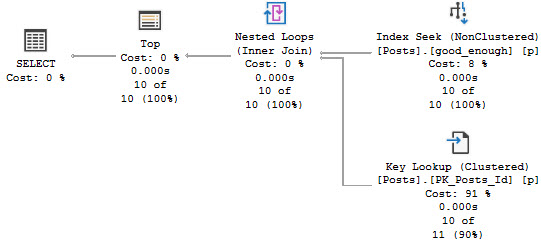
In reality, a good-enough-index for the good-enough-optimizer to come up with a good-enough-plan looks like this:
CREATE INDEX good_enough
    ON dbo.Posts
        (OwnerUserId, Score)
    INCLUDE
        (PostTypeId, CreationDate, LastActivityDate);
Planama
The index above does two things:
It helps us search on a selective predicate on OwnerUserId
It keeps Score in order after the quality so the order by is free
It has all the other potential filtering elements so we can apply predicates locally
It teaches us that include column order doesn’t matter
All of the query plans will look roughly like this, regardless of the where clause:
you can do it
What Difference Does It Make?
Alright, so we’ve got one good-enough index for a bunch of different queries. By adding the index, we got all of them to go from taking ~600ms to taking 0ms.
What else did we do?
We made them faster without going parallel
They no longer need memory to sort data
And we did it without creating a gigantic covering index.
Of course, the optimizer still thinks we need indexes…
of what?
But do we really need them?
No.
77% of nothing is nothing.
Thanks for reading!
Going Further
If this is the kind of SQL Server stuff you love learning about, you’ll love my training. Blog readers get 25% off the Everything Bundle — over 100 hours of performance tuning content. Need hands-on help? I offer consulting engagements from targeted investigations to ongoing retainers. Want a quick sanity check before committing to a full engagement? Schedule a call — no commitment required.