How Too Many Indexes Can Hurt SQL Server’s Transaction Log

Watch It


Video Summary

In this video, I delve into the often-overlooked impact of over-indexing on SQL Server’s transaction log. Drawing from my experience and recent blog post videos, I explore how excessive indexing can lead to issues beyond just the buffer pool and locking, specifically focusing on its effects on the transaction log. Through a detailed demonstration using the Stack Overflow database, I illustrate how different lock granularities and additional indexes influence the number of locks taken and logged in the transaction log. This is crucial for understanding the full extent of logging overhead introduced by over-indexing, especially in high-throughput transactional environments where every byte counts.

Full Transcript

Hey, hey, hey, hey, hey, uh, I mean, who knows how much longer databases are going to be a thing anyway? Uh, I wanted to talk, so I’ve done some, um, I don’t know, blog post videos, one of, one of, at least one of those things about how, uh, over-indexing, uh, can cause issues with the buffer pool, with, uh, locking, I mean, goes to say it with, with blocking as well. And, uh, I wanted to go another step in that sort of same direction and look at how, uh, over-indexing can impact the transaction log, which isn’t something that I normally care about all that much because, uh, I don’t know, I, I haven’t taken a transaction log back up since 2014 or so, so I’m not really sweating it, but, uh, for people with, uh, you know, the, the kind of workloads that depend on throughput of transactions, uh, it’s the kind of thing that you might care about, something, something that you might be interested in.

So, I put together, uh, this demo here to, uh, show you, uh, I don’t know, this, a few different things. One is how, uh, lock granularity can, uh, can impact the number of locks taken, which kind of goes without saying, but I wanted to, uh, show it, show, show you how it gets, um, how that gets, uh, uh, translated into the transaction log and also how additional indexes thrown into the mix can also, uh, impact that. So, what I’m gonna do is make sure that all my, any, any unnecessary indexes are currently dropped.

I’m gonna run a checkpoint. My database is in simple recovery, and this will be the same whether you’re in simple or full recovery. There’s a big, big, big, big, big, big, big, big misconception that if you have your database in simple recovery model, that somehow less is logged. While that’s true for some bulk operations, like, uh, minimally logged inserts, some, uh, some index rebuilds, it’s not true for regular user transactions.

Regular user stuff still has to get fully logged in order to be rolled back or forward. The only difference is that SQL Server manages the transaction log for you when things get flushed out. So, taking transaction log backups doesn’t, I mean, you can’t even do it, but it wouldn’t make a difference here.

It wouldn’t, uh, wouldn’t have any impact. But the stuff that happens still has to get fully logged in there. So, stop being goofy about that.

So, this is gonna run a checkpoint to make sure there’s nothing, uh, currently in the transaction log. Uh, open a transaction, um, update. Uh, this table that I have in my copy of the Stack Overflow database called Total Score by User.

Uh, and then after the update runs, which is gonna hit exactly 10,000 rows, uh, I’m going to look at the transaction log. We’re gonna take a full view of all the stuff that happened in there, and then we’re just gonna get a summary of the locking information that went in the transaction log. So, I’m gonna show you a few different things with lock granularity, and then a few, a couple different, uh, well, I guess what happens when we, when we start adding indexes, how those also get logged.

So, let’s run this, and then that runs pretty quickly, and we can see, ooh, goodness me, excuse me. Don’t know where that came from. I apologize.

I, that was, that was rather gross. Um, so, what we’ll see is for every row that ends up in here, all right, we can see all these different things happening. Well, we can see all these different locks ending taken.

Uh, we get a, uh, three locks, uh, for each row doodaddy thing, and, uh, that’s fun, right? That’s interesting. And then if we switch this to be a page lock end, what happens?

Uh, that goes down to two, and we get sort of a, a more round number of locks. And if we switch this over to be a table lock, uh, we still get 10,000 records. So, notice that there were 10,000 records, whether we took a row, page, or, uh, or, uh, object lock, right?

Every single one gave 10,000 records here, but the number of locks that get, that shows up here will change with each one, right? Because we took, well, like, a lot more, uh, individual locks for row or page level versus the object level, right? Cool.

Perfect. So, uh, to keep things a little bit more simple, I’m going to leave the tab lock hint in place here. And then I’m going to add a couple indexes to the table, all right? I’m going to add these.

Do, do, do. All right. Those are on there. And now I’m going to rerun this. And it took a little bit longer. And we have a little bit more information in here.

So now we’re going to see, um, each of our indexes ended up in here, right? And we can see the number of locks that got taken on each of them. We can see the primary key was also logged in here.

And we can see the, uh, number of locks and the number of records. Now, if I switch this to be row lock or something, right? We would see more in there because you would be taking more individual locks. Now this runs and this goes, and now we have slightly higher numbers in here.

So that’s fun, I guess. Anyway, uh, a lot of people don’t realize, um, how much, uh, locking stuff gets stuck in the transaction log. And beyond that, a lot of people also don’t realize that all the changes to indexes that, uh, also get logged in there.

Each individual index is, you know, I know I’ve said this before, a separate structure on disk and memory. You have to back it up, check it for corruption, all that stuff. Like everything you have to, like every different index is something that you have to, uh, account for.

So, if you have very, very busy tables with, uh, with like, you know, modifications to data. I mean, I know no one deletes data. I’ve, I’ve seen your tables.

No one has ever deleted data from them. Everything is inserted in and then maybe updated at some other point. But if you have very busy tables, very busy transactional tables, uh, the more indexes you have on them, the more you are logging as data goes into those tables and gets modified. Now, uh, this is, uh, something that, you know, um, also, uh, tends to harm people who design very wide tables, who don’t do a good job of normalizing tables.

Because, uh, you have tables within tables and all of those tables that people want to, uh, all those, uh, different, like groups of columns that people tend to want to, um, to pull data from in sort of their own little chunks. Uh, you know, the, you’ll have lots of wacky missing index requests. You’ll end up with, um, you know, lots and lots more indexes because there are lots of different, lots more different ways, lots of different columns to filter the table, to, you know, select from the table.

So it just kind of, uh, exacerbates the issue. Anyway, I think that was it. I, I ran out of things to say.

So I’m going to, I’m going to turn this thing off. Thank you for watching.

Going Further


If this is the kind of SQL Server stuff you love learning about, you’ll love my training. Blog readers get 25% off the Everything Bundle — over 100 hours of performance tuning content. Need hands-on help? I offer consulting engagements from targeted investigations to ongoing retainers. Want a quick sanity check before committing to a full engagement? Schedule a call — no commitment required.
Interpreting Key Lookups In SQL Server Query Plans Can Be Tricky

This Looks Bonkers!


SQL Server Query Plan
I’d cut mines off.

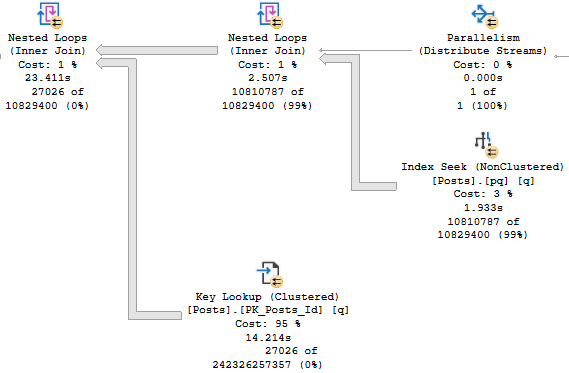
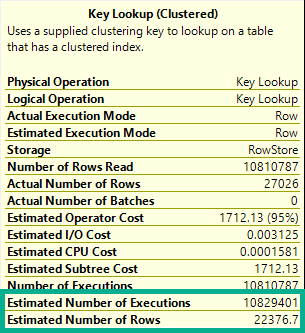
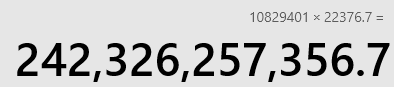
If you’ve ever read Kim Tripp’s wonderful post on tipping points, you’re probably staring at this Key Lookup and wondering why SQL Server would ever even consider it here. That’s like a 12 digit number. Twelve. That’s like a foreign phone number. That’s like what I spent on cheese plates last year.

I kid, I kid. Though I would not be opposed to that lifestyle.

The thing is, what that number represents is a little different from what we might first expect.

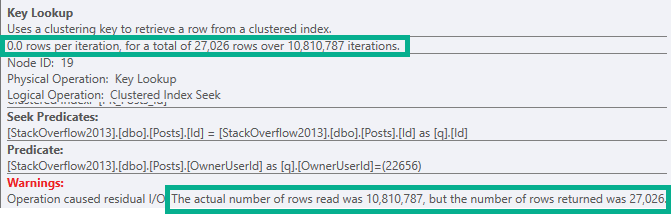
That number comes from multiplying these two numbers:

SQL Server Query Plan Tool Tip
Medley
2020 02 19 18 41 49
Pass the brie

But Really


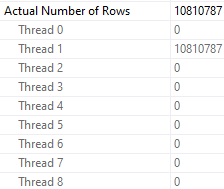
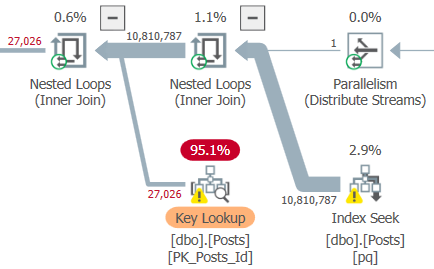
That’s how many rows we read. Which isn’t great, obviously. Look how long that thing runs for.

And it gets worse when we examine how rows were distributed on threads.

2020 02 19 18 49 55
[deep breaths]
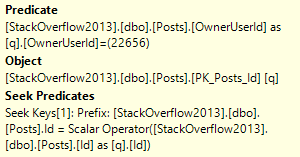
We produced far fewer rows than that in all, because the Lookup is evaluating a predicate, which only produces ~27k rows.

So for each of the ~11 million rows that comes out of the index seek of our nonclustered index, we:

  • “Join” it to the clustered index based on the clustered index key column
  • Evaluate if the OwnerUserId for that row is 22656
SQL Server Query Plan Tool Tip
“ONLY”

The 27,062 number is how many rows are produced after the filter is applied. That’s a bit more obvious when using Plan Explorer.

SQL Server Query Plan
I can’t go a day without my scotch.
SQL Server Query Plan Tool Tip
Do Be Real, Please

This lookup doesn’t produce any rows or columns, that’s why there are 0.0 rows per iteration.

It’s purely to filter data out, and it does that. Slowly.

Look, I’m not defending the choice, I’m just using it to teach you something.

How Can You Fix It?


In this case, it would probably be worth adding the OwnerUserId column to the nonclustered index we already have on Posts that’s being used in this query, assuming that it wouldn’t be disruptive to other queries. If that’s not possible, then a new index that satisfies the entire where clause would be a good solution.

If neither of those is palatable, then you might try some exotic rewrites to isolate those rows, correlate on a different column, or “persuade” the optimize to stop pursuing nested loops joins.

Thanks for reading!

Going Further


If this is the kind of SQL Server stuff you love learning about, you’ll love my training. Blog readers get 25% off the Everything Bundle — over 100 hours of performance tuning content. Need hands-on help? I offer consulting engagements from targeted investigations to ongoing retainers. Want a quick sanity check before committing to a full engagement? Schedule a call — no commitment required.
Why Index Tuning Is An Iterative Process In SQL Server

Here And There


For many people, index tuning means occasionally adding an index when there’s a report about a slow query. Those indexes might come from a query plan, or from the missing index DMVs, where SQL Server stores every complaint the optimizer files when it thinks an index might make a query better.

Sure, there are some people who think index tuning means rebuilding indexes or running DTA and checking all the boxes, but I ban those IP addresses.

Of course, there’s a whole lot more to index tuning. Adding indexes is fine to a point, but you really should spring clean those suckers once in a while, too.

Look for overlapping indexes, unused indexes, and check for any Heaps that may have snuck in there. sp_BlitzIndex is a pretty cool tool for that.

But even for adding indexes, sometimes it takes more than one pass, especially if you’re taking advice from query plans and DMVs.

How The What


Let’s say you’re looking at a server for the first time, or you’re not quite comfortable with designing your own indexes. No judgment, there.

You see a query plan for some piece of code that’s running slowly, and it has a missing index request.

SQL Server Query Plan
Sugar Sugar Sugar

There’s only one missing index request — there’s not a bunch of hidden ones like in some plans — and it looks moderately helpful so you decide to try it.

SQL Server Missing Index Request
Treefiddy

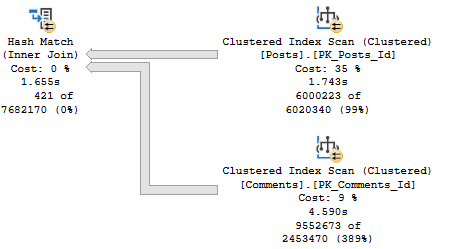
The thing is that as far as “stuff I want to go faster” in the plan, the clustered index scan on Posts is about 3x faster than the clustered index scan on Comments.

SQL Server Query Plan
Deal with it

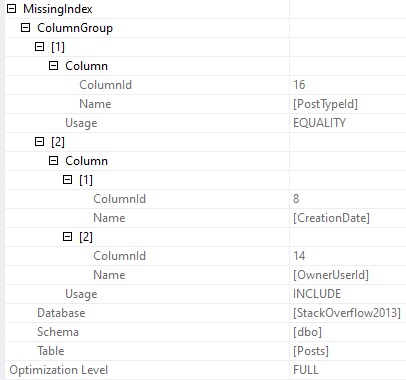
And the index that’s being asked for is only going to help us find PostTypeId = 1. It’s not going to help with the rest of or join or filtering very much.

CREATE NONCLUSTERED INDEX [<Name of Missing Index, sysname,>]
ON [dbo].[Posts] ([PostTypeId])
INCLUDE ([CreationDate],[OwnerUserId])
SQL Server Query
Una Posta

We still need to filter on CreationDate, and join on OwnerUserId later. Sometimes this index will be “good enough” and other times it “won’t”.

If PostTypeId were really selective, or if this query were searching for a particularly selective PostTypeId, then it’d probably be okay-ish.

But we’re not, so we may settle on this index instead.

CREATE NONCLUSTERED INDEX p
ON [dbo].[Posts] ([PostTypeId], [CreationDate], [OwnerUserId]);

With that in place, we only get marginal improvement in the timing of the plan. It’s about 1.5 seconds faster.

Probably not what we’d wanna report to end users.

SQL Server Query Plan
Hella

But we have new green text! This time it’s for the Comments table, which is where our pain point lies time-wise.

CREATE NONCLUSTERED INDEX [<Name of Missing Index, sysname,>]
ON [dbo].[Comments] ([PostId],[CreationDate])

We add that, and reduce our query runtime to less than half of what it was originally.

SQL Server Query Plan
Babewood

Is 2.6 seconds good? Or great? All depends on expectations.

Could we keep going and experimenting? Sure.

It all depends what we’re allowed to change, what our skill level is (mine is quite low, ho ho ho), and what our priorities are (these are also quite low).

This Is Just One Query


And since we had the luxury of having it in front of us, running it, adding an index, running it again to test the index, etc., we were able to spot the second index request that ended up helping even more than the first one.

If you don’t have that luxury, or if you just poke around the missing index DMVs every 3-6 months, you could miss stuff like this. Sure, that first request would be there, and it might look tempting enough for you to add, but the second one wouldn’t appear until after that. That’s the one that really helped.

Whenever you’re tuning indexes, or releasing code that’s going to use existing data in new ways, you’d be doing yourself a big favor to check in on this stuff at least weekly.

You might be an index tuning wiz and not need to — if you are, I’d be amazed if you made it this far into my blog post, though — or you may catch “obvious” new indexes during development.

But I’m going to tell you something about end users: they’re devious, mischievous, and they’re out to make you look bad.

As soon as they start using those new features of yours, they’re going to abuse them. They’re going to do all sorts of horrible things that you never would have dreamed of. And I’ll bet some different indexes would help you keep your good name.

Or at least your job.

Thanks for reading!

As a postscript to this: I don’t want you to think that missing index requests are the end-all be-all of indexing wisdom. There are lots of limitations, and suggested column order isn’t perfect. But if you’re just getting started, they’re a great way to start to understand indexing, and see the problems they do and don’t solve. And look, the only way to make them better would be to spend longer during compilation thinking about things. That’s not how the optimizer should be spending its time. We’re lucky to get these for free, and you should view them as a learning tool.

Going Further


If this is the kind of SQL Server stuff you love learning about, you’ll love my training. Blog readers get 25% off the Everything Bundle — over 100 hours of performance tuning content. Need hands-on help? I offer consulting engagements from targeted investigations to ongoing retainers. Want a quick sanity check before committing to a full engagement? Schedule a call — no commitment required.
Why Filtered Indexes Are Broken In SQL Server

Fix Your Indexes, Pal


Video Summary

In this video, I explore the nuances of filtered indexes in SQL Server and why they might not always be used as expected. I set up a simple query to count posts based on certain conditions and created two indexes tailored to these conditions. However, when running the query, I noticed that SQL Server did not use one of the indexes designed specifically for filtering out null values from the community owned date column. This led me to investigate further and discovered that including the community owned date in the index definition was necessary for the filter to work as intended. The video delves into why this happens and provides a solution, which could be particularly useful for those working with filtered indexes to exclude nulls or other specific values. I also share a link to a related issue on Connect and mention Aaron Bertrand’s reference to Ladybug, hoping it might help others facing similar challenges.

Full Transcript

You know what would be fun if me writing demos were entertaining at all? I’ve seen Chrissy Lemair’s live streams of her coding things and me writing demos would not be entertaining at all to anybody. So I’m going to leave that. Leave that idea. Let that idea die. What I want to talk about in this video is where filtered indexes are broken. I don’t mean broken like they don’t filter data or something. I just mean filter like you might not see them used. So we have a simple query here. And I call it a simple query because I usually I try to write queries to be as simple as possible to get the point of the demo across. So we have a count in here. And this count is against the post table. And we’re counting where the parent ID in the post table equals the ID from out here and the score is greater than zero. And from the outer count, we are filtering on where community owned date is null. So fairly simple stuff. It’s a count with an account, sort of a join inside. And to satisfy this query, to make sure that this query is satisfied.

I have created two indexes. One index that satisfies, I think, fairly well the inner query where we need to hit, we need to see where parent ID is equal to q.id and score is greater than zero. And this other index on ID where community owned date is null to make sure that we can filter down to this. Now I should have already created these. It’s been a weird day. So yes, I did. Good job. What I’m going to do is turn on execution plans because without them we would not have much of anything to look at. And I’m going to run this query. And we are going to sit and wait. Why are we going to wait so long? I don’t know. I don’t know. Apparently we had a lot of stuff to count. And when I go look at the execution plan, we are going to see something kind of funny. SQL Server used this index down here to great effect, wonderful effect. Yes, wonderful effect. 1.7 seconds spent in that index. And up here though, we see that we did not use our filtered index. We read all 17 million rows of the post table. And because of that, we spent, I don’t know, 10 seconds there. And I don’t know, we just didn’t have a good time generally running this query.

Now what I want to do is tag this index back in. I want to say, SQL Server, please use this index regardless of what you think your best judgment is. And I’m going to run this query again. And I don’t know. It’s not going to necessarily do any better. Doing better is actually not the point. The point is to figure out why SQL Server didn’t use that index to begin with. We have a question of SQL Server. Why? I asked you, I’ve created this index especially for you and you didn’t use it and I feel neglected and alone. I don’t think you take our relationship seriously. When we go look at the execution plan for this one, which took just about twice as long. Ooh la la. Some funny things happened. What is new in this plan? Well, we still hit the goat. The goat was fine.

But now we see that we hit this index and we did fairly well here, but 13 seconds in a key lookup. Bugger, what happened? What did we key lookup? Well, sadly, we evaluated our predicate. Community owned date is null over here. Even though that index is filtered on where community owned date is null. We don’t have any of those null values in there. SQL Server didn’t believe us. I mean, I hate when people say literally, but literally this index filters out anything where community owned date is null. What predicate is there to evaluate?

What could possibly be happening in there? Well, what we need to do in order to get this to be functional is include community owned date in the definition of the index. So we will, and this is maybe something that should be, would be obvious to some people, but we, we got away up with score not being in the index. It was just where score equals zero. And SQL Server had no problem with that.

But in order to get this to work, we need to include community owned date in the index definition. Why? I don’t know. It’s been called a bug. It’s been called an oversight. It’s been called a mistake. But I’ve been called all those same thing. So I don’t, I don’t really, I don’t really know what to think there. But now when I run this query, we will get our, I mean, it’s going to use our index because I’m telling SQL Server to use our index. And we’ll finish a few seconds faster than our previous time. But more importantly, we use our index and there is no, no key lookup malarkey or shenanigans.

So with creation date included in the index definition, we no longer have to do that. Now, this is, this seems to only happen with is null, is null filters. So if you are the type of person who creates filtered indexes to, to screen nulls out or, or whatever, then you may find this to be useful information. There is a link to fix this thing. And I think this thing has been hanging about since connect with a thing.

Aaron Bertrand recently referenced something called ladybug, which I am not, I’m not nearly old enough to recall. So best of luck there, Aaron. But there’s a shortened bit.ly link that goes to this link. So bit.ly forward slash uppercase B, uppercase F broken filters. These links are case sensitive. So if you do care enough to go and vote on things, you will have to type that in the, the, the long way, but I will put links to them in the video description so that you can exert minimal effort in your life.

It’s like with everything else. Anyway, that does it for me today. I am, I am done recording stuff. It is about 4 p.m. Eastern. And I am going to go drink now. I’m going to go enjoy my day. I’ve done enough for you. Anyway, thanks for watching. Hope you learned something. See you tomorrow. Maybe. I hope not. Goodbye.

Going Further


If this is the kind of SQL Server stuff you love learning about, you’ll love my training. Blog readers get 25% off the Everything Bundle — over 100 hours of performance tuning content. Need hands-on help? I offer consulting engagements from targeted investigations to ongoing retainers. Want a quick sanity check before committing to a full engagement? Schedule a call — no commitment required.
Tuning Performance Problems With Aggregates In SQL Server, Part 3

3/3


Going Further


If this is the kind of SQL Server stuff you love learning about, you’ll love my training. Blog readers get 25% off the Everything Bundle — over 100 hours of performance tuning content. Need hands-on help? I offer consulting engagements from targeted investigations to ongoing retainers. Want a quick sanity check before committing to a full engagement? Schedule a call — no commitment required.
Tuning Performance Problems With Aggregates In SQL Server, Part 2

2/3


Video Summary

In this video, I delve into a fascinating SQL Server query optimization scenario where we encountered an “eager index spool” in the execution plan—a notorious performance bottleneck. To tackle it, I explored alternative ways to structure our query and improved statistics on key columns to refine aggregate estimates. By doing so, we managed to reduce the query’s runtime from several minutes down to just seven seconds, showcasing the power of better data estimation and query reordering. This video is part of a series focusing on optimizing complex queries with aggregates, and I hope you find it helpful as you navigate your own SQL challenges!

Full Transcript

I ain’t got nobody. Just kidding. Just avoiding going out and doing things. Sometimes David Lee Roth karaoke is the best way to do that. Just kidding. It’s recording SQL Server videos on Saturday. Ah, so in the last video we talked about aggregates with bad guesses and I want to show you another aggregate with a bad guess. This one coming to you live and direct from a client inspired event where they had this big crazy query and at the heart of this query was this two counts where we had to filter on stuff. Um, but I, my, my idea, my big idea was we are going to do one count and filter on that rather than two separate counts and filter on those because that’s, we could, we could do that. We could, we could use math to our advantage. Who would use math in a database? Insanity. Certainly not the optimizer. Just kidding. The optimizer is lovely.

Uh, so the, the, the, the query that we were working on was much, much bigger, but this was sort of at the heart of it. And, uh, so let’s say we have, we had an index on the comments table on the post ID column. Um, and I wanted to do my count in here like this. And when I wrote this rewrote this query, um, what happened was, uh, not good. Uh, I ended up with a query plan that looked a bit like this. Yeah. You can see what’s going on here. You can see where my least favorite thing to ever see in a query plan popped up. That is the old eager index spool. Yeah. I hate this thing. I hate this thing for so many reasons.

And you can see why I hate it here. We spent nearly three minutes building this index. Uh, and the reason why it takes so long is because it’s, it says that it’s happening in parallel. But if we go into the properties and we look over here, we can see that, oh boy, all just about 53 million rows from the votes table end up on a single thread to build that index. And this will happen each and every time. We don’t have a missing index request either here and the XML and the missing index DMVs. We guts nothing.

So even though there isn’t physically a lot of distance between here and here, time wise, there is a very large amount of distance between here and here. Uh, the query in full runs for about two minutes and 56 seconds. So we can figure out pretty well that, guess what? We spent most of the time building that stupid spool. So let’s figure out what happened, how we can fix it, what went wrong, what was going on.

Now, the thing is, um, I was confounded by this. And often when I am confounded by things, my first reaction is to do something stupid. So I did what I normally do, which is something stupid. And I just flipped the order that we were union all-ing things from. So I went from up here where comments was on top and votes was on the bottom to votes on top and comments on the bottom.

And when I did that and ran the query, it was a little bit faster. And, um, it w it was faster because the execution plan changed and we no longer had the index spool. And the query was overall faster, but I was still, I was still annoyed with a few things in the query. Uh, so when we look at the plan, we’ll start to sort of see why. All right. We can, we can, we can see some more rather large percentages in here, where perhaps maybe, uh, we don’t need, there shouldn’t be larger percentages in here.

Uh, we’ll start with this one where, uh, the optimizer thought that it could squish our results down by a significant amount, right? From 5.6 million, uh, to, or rather from 17 million to, uh, 141,000, right? The 17 million that came out of here. So it, it, it, it, it’s guess was we could get down to this number, but we can only get down to this number.

So we, we stopped early. Uh, and then of course with along with that bad guess, we get a bad guess here and a bad guess is over here. Uh, some bad guess is over here. Now you’re probably wondering why we have such bad guesses here. And I’m going to show you. So, uh, in a normal batch, uh, sorry, in a normal role mode plan where we had a hash join, we may, in a parallel role mode plan where we have a hash join, we may see a bitmap get created. In batch mode plans, we don’t see that anymore.

But what we will see is in the properties of the hash match operator, we will see bitmap creator true. And we can see that it created optimized bitmap 1085. Very special bitmap. Just kidding. It’s just optimized bitmap 1085. There’s really nothing all that special about it at all.

And if we look down here where we, where, where that bitmaps hopefully get applied, we can see in the, the clustered index scan of votes that, uh, optimized bitmap 1085 was pushed over here. And if we look at the scan of comments that optimized bitmap 1085 was in fact pushed down here. So this bitmap, we, we made some guesses based on this bitmap. And those guesses turned out to be very, very, very, very, very, very wrong.

Mm-hmm. Yes. I mean, we were still, we still did a lot better than, uh, what was it? 30, uh, three minutes, but still not fast enough. Eric, you’re a query tuner. You need to make things faster.

So again, um, let’s just try to improve the estimate here. Let’s not even, let’s not create another index. Um, let’s just, we need to make a better guess. We need to make a better guess on the post table, on the parent ID column, because that’s what we were trying to squish here. Parent ID.

If we make, we have better statistics on what’s going on in parent ID, then we can make better choices elsewhere in the plan. So let’s create those with a sample of 25%. Again, this isn’t, this isn’t even pushing the bound. 25% is like nothing. It’s not a whole lot. It finishes in about four seconds.

It’s something that, you know, even people with the most demanding maintenance windows can get away with. And now when we rerun that query with those statistics in place, things will improve a little bit more. At least they, they, they do without Camtasia running. So we’ll find out what happens with Camtasia running.

So seven seconds. So we cut the time about in half again. And we can see that we started making quite reasonable guesses in many places. I mean, not like, like fully reasonable guesses, but you know, much better guesses, I think.

Like not like thousands of times wrong guesses. And I don’t know, things, things look better to me here. Don’t they look better to you? They look much better to me. I like it.

So just by improving the estimate over on the post table on that parent ID column, we were able to make better guesses about like what, what rows are going to come out of things. Oh, we got optimized bitmap 1077 that time.

A wonderful vintage of that bitmap. Wonderful vintage. Yeah. You know, we were able to improve some guesses. We were able to get faster queries and I think better query plans.

And sure. Like, you know, just like in the other video, we could go the next step and we could add, we could add indexes to tune this further. But I think getting a query down from several minutes to seven seconds is a pretty good start. So we’re going to pause there and actually we’re going to, we’re going to stop there completely.

And we are going to go record another video. Oh, but I wanted to, wanted to say with those statistics in place, we even get a good plan with things in the original order. So we, we still get the plan there. We didn’t even have to change the order anymore.

So lucky for us, isn’t that, isn’t that lucky for us? We can write this in any order we want now and things, things don’t get wacky. Ah, that’s amazing. Anyway.

Uh, thanks for watching and I will see you in the third and final installment of the Angry Aggregates. All right. Goodbye. All right.

Bye.

Going Further


If this is the kind of SQL Server stuff you love learning about, you’ll love my training. Blog readers get 25% off the Everything Bundle — over 100 hours of performance tuning content. Need hands-on help? I offer consulting engagements from targeted investigations to ongoing retainers. Want a quick sanity check before committing to a full engagement? Schedule a call — no commitment required.
Tuning Performance Problems With Aggregates In SQL Server, Part 1

1/3


Going Further


If this is the kind of SQL Server stuff you love learning about, you’ll love my training. Blog readers get 25% off the Everything Bundle — over 100 hours of performance tuning content. Need hands-on help? I offer consulting engagements from targeted investigations to ongoing retainers. Want a quick sanity check before committing to a full engagement? Schedule a call — no commitment required.
Help! My SQL Server Query Got Slower Without A NOLOCK Hint!

(NOSERIOUSLY)


Going Further


If this is the kind of SQL Server stuff you love learning about, you’ll love my training. Blog readers get 25% off the Everything Bundle — over 100 hours of performance tuning content. Need hands-on help? I offer consulting engagements from targeted investigations to ongoing retainers. Want a quick sanity check before committing to a full engagement? Schedule a call — no commitment required.
SQL Server Table Columns That Share Ordering

Somebody Set Up Us The Column


This is an okay trick to keep in mind when you need to use order by on a large table.

Of course, we care about order by for many very good reasons, especially when we don’t have an index to support the ordering.

Sorting data requires memory, and Sort operators particularly may ask for quite a bit of memory.

Why? Because you need to sort all the columns you’re selecting by the column you’re ordering by.

Sorts aren’t just for the column(s) in your order by — if you SELECT *, you need order to all the columns in the * by all the columns in the order by.

I know I basically repeated myself. That’s for emphasis. It’s something professional writers do.

Dig it.

Butheywhatabout


Let’s say, just for kicks, that we have a table in our database. And maybe it has a column called something like “Id” in it.

Pushing this tale further into glory, let’s also assume that this legendary “Id” column is the primary key and clustered index.

That means we have the entire table sorted by this one column. Cool.

Tighten those wood screws, because we’re about to go cat 5 here. Ready?

There’s a date or date time column in the table — let’s say it defines when the row was first inserted into the table.

It could be a creation date, or an order date. Doesn’t matter.

What does matter? That the “Id” and the “*Date” column increment at the same time, which means that they’re in the same order.

It may suit your queries better to order by the clustered index key column rather than another column in the table which may not be in a helpful index in a helpful order for you query.

Too Sort


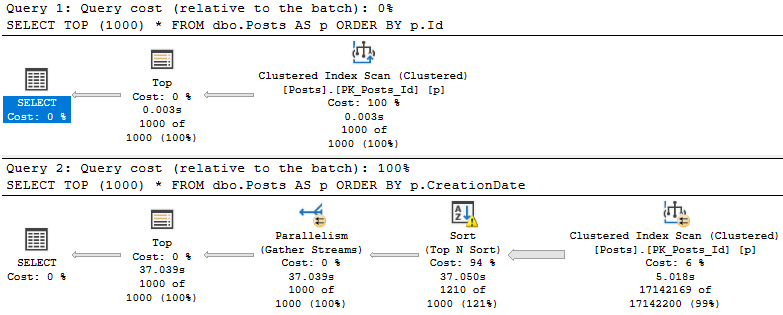
Take these two queries:

SELECT TOP (1000) *
FROM dbo.Posts AS p 
ORDER BY p.Id;

SELECT TOP (1000) *
FROM dbo.Posts AS p 
ORDER BY p.CreationDate;

I know, they’re terribly unrealistic. No one would ever. Not even close. Fine.

SQL Server Query Plan
smh

Though both queries present the same data in the same order, the query that orders by the CreationDate column takes uh.

Considerably longer.

For reasons that should be apparent.

Of course, we could add an index to help. Just add all the indexes. What could go wrong?

If you have the type of application that lets users, say, dynamically filter and order by whatever columns they want, you’ve got a whole lot of index to create.

Better get started.

Thanks for reading!

Going Further


If this is the kind of SQL Server stuff you love learning about, you’ll love my training. Blog readers get 25% off the Everything Bundle — over 100 hours of performance tuning content. Need hands-on help? I offer consulting engagements from targeted investigations to ongoing retainers. Want a quick sanity check before committing to a full engagement? Schedule a call — no commitment required.
Indexed View Maintenance Is Only As Bad As Your Indexes In SQL Server

Wah Wah Wah


Yes, indexed view maintenance can be quite rough. I don’t mean like, rebuilding them. I will never talk about that.

I mean that, in some cases locks are serializable, and that if you don’t mind your indexes you may find run-of-the-mill modifications taking quite a long time.

Let’s go look!

Mill Town


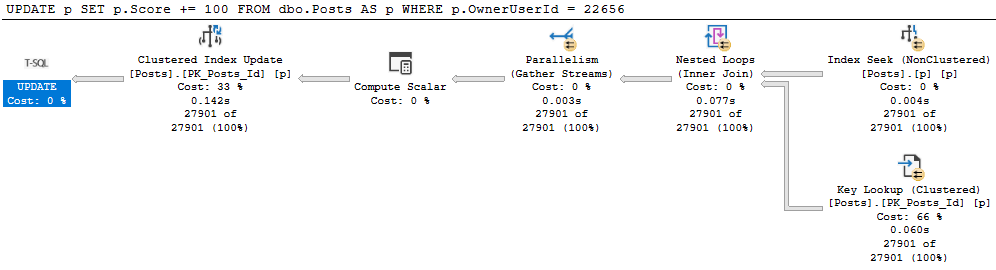
Let’s get update a small chunk of the Posts table.

BEGIN TRAN
UPDATE p
SET p.Score += 100
FROM dbo.Posts AS p
WHERE p.OwnerUserId = 22656;
ROLLBACK

Let’s all digress from the main point of this post for a moment!

It’s generally useful to give modifications an easy path to find data they need to update. For example:

SQL Server Query Plan
Uh no

This update takes 1.6 seconds because we have no useful index on OwnerUserId. But we get a daft missing index request, because it wants to include Score, which would mean we’d need to then update that index as well as read from it. Locking leads to NOLOCK hints. I tend to want to introduce as little of it as possible.

With an index on just OwnerUserId, our situation improves dramatically.

SQL Server Query Plan
100000X IMPROVEMENT

Allow Me To Reintroduce Myself


Let’s see what happens to our update with an indexed view in place.

CREATE OR ALTER VIEW dbo.PostScoresVotes
WITH SCHEMABINDING
AS 
SELECT   p.Id, 
         SUM(p.Score * 1.0) AS ScoreSum, 
		 COUNT_BIG(v.Id) AS VoteCount,
		 COUNT_BIG(*) AS OkayThen 
FROM     dbo.Posts AS p
JOIN     dbo.Votes AS v
    ON p.Id = v.PostId
WHERE p.PostTypeId = 2
AND   p.CommunityOwnedDate IS NULL
GROUP BY p.Id;
GO

CREATE UNIQUE CLUSTERED INDEX c_Id 
    ON dbo.PostScoresVotes(Id);

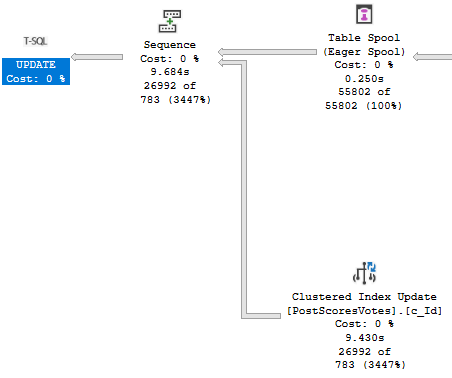
Our update query now takes about 10 seconds…

SQL Server Query Plan
Oof dawg

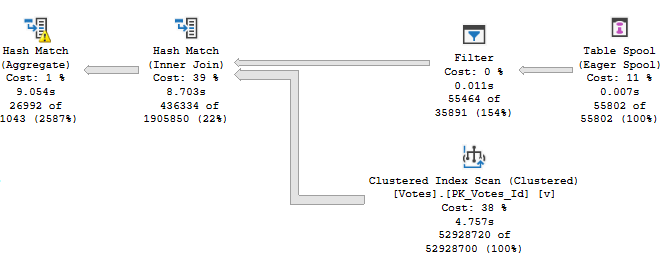
With the majority of the time being spent assembling the indexed view for maintenance.

SQL Server Query Plan
Yikes dawg

The Problem Of Course


Is that our indexes are bad. We’ve got no helpful index between Posts and Votes to help with the assembly.

Our first clue may have been when creating the indexed view took a long time, but hey.

Let’s fix it.

CREATE INDEX v ON dbo.Votes(PostId);

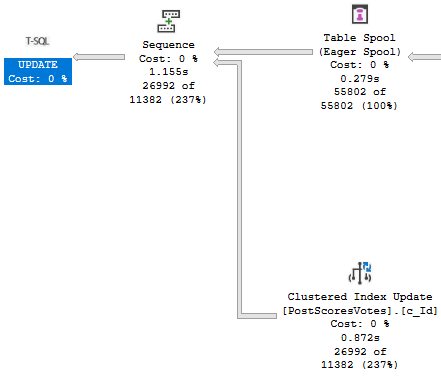
Now our update finishes in about a second!

SQL Server Query Plan
Cleant Up

Thanks for reading!

Going Further


If this is the kind of SQL Server stuff you love learning about, you’ll love my training. Blog readers get 25% off the Everything Bundle — over 100 hours of performance tuning content. Need hands-on help? I offer consulting engagements from targeted investigations to ongoing retainers. Want a quick sanity check before committing to a full engagement? Schedule a call — no commitment required.