A SQL Server Query Gets Tuned

You know, work


Video Summary

In this video, I dive into a fascinating case study where using `NOT EXISTS` instead of a `LEFT JOIN` led to significant performance issues for a client query. I walk through the process of reproducing and optimizing the problematic SQL queries using the Stack Overflow database as an example. The key takeaway is how row goals can mislead the optimizer, leading to inefficient execution plans. I also highlight why a seemingly selective index request was actually counterproductive due to the use of `COALESCE` on a non-nullable column, demonstrating that `ISNULL` would have been a better choice in this scenario. By sharing these insights, I hope to help you avoid similar pitfalls and optimize your queries more effectively.

Full Transcript

Yep. So, good morning. Good afternoon and good evening. Thank you, thank you, thank you. You’re far too kind. Erik Darling here with Erik Darling Data. Still, I have managed to not fire myself for almost an entire year. The one thing that made me come really close is that I just I just deleted 60 gigs of unusable video recordings. And I know that’s probably hard for you to believe because you may have seen my other videos and thought to yourself, is there anything that he won’t publish? And here we are. Yes. The answer is yes. There was nearly 60 gigs of unusable video footage. So there’s that. But I wanted to record this because I thought it was kind of an interesting process where I had to record this. I had a client and say, we need you to help us with this one query. And normally, that’s not the kind of thing that people want me to do. I’m not like a tune this one query kind of guy. They’re like, we have a lot of problems and we need a lot of things tuned. And that’s kind of more my deal. But these nice people had one big problem. And they said, we need kind of embarrassing. Is that, they read a post on my site. And they tried something. And it actually detuned the query. The query got slower. When they tried the thing that I said they should do. So that was personally a little bit embarrassing. Now, the thing that they tried that didn’t go well was using not exists instead of a left join with the is not know the figure out where rows didn’t already exist in a table. This was data that was part of an ETL process where data was being moved from a staging table into a real table. We don’t need to do an insert or anything to mimic the problem. I just need to run two queries that are written kind of similar. And I was able to reproduce a lot of the behavior and simplified queries using the Stack Overflow database. When we look at these two query plans, you can see that even though they have the same logic and the same, the same, they return the same results over here, same results, right? Same results up and down, 10 rows, 10 rows, everything the same, good. Even though they do that, they get two very different query plans.

So you can see the top query plan. So you can see the top query plan is just god awful for this scenario. And I’ll talk a little bit about why. So what’s happened here is with the top 10 in the not exists over here. SQL Server has identified an optimization opportunity to use a row goal in the query. And what that row goal does is it significantly cheapens some operations. The optimizer wagers that some things will be very, very cheap to do. It’ll be very, very easy to find a few, like a very small number of roads very quickly.

Now, this is not only a good demo for when a row goal is quite counterproductive, but it’s also a very good demo to show you that operator costs and execution plan costing can be very, very, very wrong. If we look at this execution plan up top and we zoom in a little bit, we can see the costs that the optimizer has assigned to certain things. If we look over here, 34%. And if we look over here, 61%. So we have 95% of the query cost up here. And that’s a pretty good chunk.

But when we look at the times that these things ran for, 179 milliseconds. Now, in row mode execution plans, these operator times are cumulative going from right to left. So the sort ran for 406 milliseconds minus 179 milliseconds, whatever that is. But you can see that these are very high cost operations in the plan. So the second one is, if we look at the execution plan, we spend almost no time in them. If we go look at where we did spend time, we have an operator that cost 4% and an operator that costs 6%.

But this is where we spent 45 seconds of execution time that is hanging out in here. Now, this is a, I mean, I don’t want to say common anti-pattern, but it is sort of a known anti-pattern where if you have, you have an anti-semi join up over here, oops, that’s the wrong button. Let’s do control instead. If you have an anti-semi join up over here. And SQL Server has chosen, SQL Server has a top operator in here. And then you have a scan underneath that top.

What I think Paul White once called a useless top and Andy Malin once giggled about. But if you have a nested loops join and a useless top and a clustered index scan under the useless top, you most likely are facing this particular anti-pattern. What’s going on is that the SQL Server has chosen the loop join. So it’s chosen to take some rows from over here and for each row that comes out of there, loop down over here and then execute this.

Because it thinks that it won’t have to do that too much in order to figure out what exists or doesn’t exist in that other table. It thinks that it can do that relatively quickly, easily, and cheaply just by, you know, scanning in and grabbing some rows. But it ends up, that ends up not being the case. That ends up being a pretty significant burden.

That does not happen in the bottom query. In the bottom query, we just do one big scan and one big scan and one big join. And then we filter out rows that we’re not interested in after the join. Now, this particular pattern is the one that I talked about in my blog post that I thought was a generally bad one for these queries.

But in this case, this actually turns out a lot better. It turns out a lot better than that Rogel plan, which this one only runs for about two and a half seconds, which is pretty good, right? Pretty good. Now, if you want to learn a whole lot more about Rogels, if you want to get into the article where Paul White identifies a useless top, that’s in the third part. But it’s a four-part series. It’s an exhaustive, not exhausting, four-part series.

I mean, you might be exhausted when you’re done with it, but that’s your problem. Deal with it, I guess. But if you want to learn more about that, there’s a four-part series over on sqlperformance.com.

I’ll let you figure out how to get to these four things. But there it is for you if you ever need it. Now, we could avoid those problems with one hint or another with our original query.

So we could either tell SQL Server to use a hash join or to disable optimizer Rogels using a newer hint in SQL Server. I forget which version, but I think 2016 maybe. But if we do either one of those things, we tell SQL Server what kind of join to use or we tell SQL Server to not use a rule goal with this plan, we get queries that run relatively quickly, right?

About two and a half seconds, which is just about what that left join with the filter ran in. So not a whole lot of difference there. But there is something, there is some, like, further stuff we could do to get this query to maybe be faster. Now, the first thing I want to figure out is what’s up with that missing index request.

So the missing index request that SQL Server is asking for in both of these plans is terrible. And I’m going to start creating this index because it takes a little bit and then talk a little bit about why that’s happening. Now, in our queries, so long story short is that this coalesce up here.

I don’t need all that space, do I? It’s a bit daft looking. There we go. Just the one’s nice. But see, this coalesce was left over from some defensive mechanism when there was a left join and everything else, where someone was worried that they were going to rule out rows that they should keep in.

So they had the column wrapped in a coalesce. The same thing would have happened with isno, but we’ll get into that in a little bit more detail later. But the missing index request that came up was on vote type ID that include user ID and creation date.

And that is a really goofy index specifically for this query. If we look at the way that data, or if we look at how much data those predicates would rule out, like filtering them in the where clause, that select query that is just for the creation date column, it goes out a lot more data.

In other words, this is a short way of saying that. That filters down to about a million and a half rows, whereas the equality predicate for vote type ID in 123 only gets, I mean, only down to 44 and a half million rows.

That is not terribly selective on its own. But with the creation date predicate in there as well, it is much more selectiver. But yeah, so if we create this index, which I’ve changed this index, so this was not a very helpful index.

But if we have an index on vote type ID and then creation date, you are more than welcome to experiment creating them with the key column in the opposite order. The same thing happens.

I just think that some of the information in the query plan when vote type ID is first is a little more interesting. So let’s go and look and see if that index helped. I’ll just start running this, which is the exact same query as before.

There’s no hints or anything. There’s nothing weird going on. And the short story is that no, it’s not going to help. And it’s not going to help for what I think is a fairly interesting reason.

I’m going to get the estimated plan. Right? We’re going to see the exact same pattern here. And we think that we might be safe because now we have a top and then an index seek. So a top with a seek is much more efficient than a top and a scan.

Because that top with the scan is going to read through until it finds a row. And we might have to do that full scan a whole lot of times. A top with a seek is much cheaper.

However, it’s not free and it’s not perfect, but it’s a lot cheaper. The problem that we’re running into is behind the seek, well, we have at least seek predicates for vote type ID 123. So we’re able to seek to the 44.5 million rows that we care about.

But then we have this big honking thing up here. This is internally what SQL Server does with Coalesce. It turns it into a case expression internally.

And it will do this the more columns and values and variables you throw in, the more it will stack that case expression up. But this is what the optimizer does internally. And this is where we run into trouble.

So even with a much better index, this query is still not out of the woods. And that’s because there’s something weird about Coalesce. And this is something that I blogged about a long time ago over on Brent’s site.

But it’s something that came up in reality with a client. Now, if we look at the creation date column on the votes table, it is defined as not nullable. Right?

We have, we cannot have a null value in there. It was left over, again, like I said, it was a defense mechanism from some developer who was right about nulls and ruling out rows when this was a left join query. So it was still in there from that.

And what’s funny is that if you look inside the plan XML, I’m not going to go digging into plan XML, but you’ll see this case expression in there. It Coalesce does not pick up on the fact that the creation date column isn’t nullable. It does not allow any nulls.

Coalesce will not do that for you. Isnull will. Isnull is a little bit less weird. And if we were to go look in the query plan XML, then we would see this. And just by changing the query to use isnull rather than coalesce.

And I’m not saying this is a good practice, but by changing that part of the query, we get a much, much faster execution plan. And I want to point out here that because isnull is not evaluated, because isnull has some special magic power that looked at the creation date column and said, you’re not nullable, we don’t need isnull anyway.

All right? Because of that, we have full seek predicates here. We don’t have a residual predicate on creation date. We only have it on user ID, user ID, user ID.

So we can see the dates in here. All right? So for each one of those seeks to invoke type ID of one, two, or three, we have an additional seek for the creation dates that we care about. But of course, knowing full well that that column isn’t nullable and that we don’t have to have any sort of null defense mechanisms, we can just write the query without that function on the column, and we can get an improved query.

So this is down to about one and a half seconds from about two and a half seconds. Maybe not the biggest one in the world. In real life, there was a lot more going on.

The reduction in time was a lot greater, but this is just a fairly good demo to show you that with a few small changes, you can have a pretty big impact on things. So what did we learn?

I don’t know. I don’t really. I have no idea. I just thought it was interesting. The row goals can kind of give the optimizer a false sense of confidence. When we had that row goal query up at the top, there was no missing index request.

SQL Server said, I’m fine, I’m fine, I’m fine. The costs were all screwy. And the query ran forever. Wasn’t good.

We had a missing index request when we ran the query a little bit differently, but it was not really an ideal index request because we had that creation date column wrapped in a function. And so SQL Server looked at it and said, I can’t really seek to you anyway.

I’m going to demote you to be an included column. And that really wouldn’t have been terribly helpful for our query because even though, as an included column, we couldn’t really seek efficiently to those 1.4 million rows.

It was a very selective predicate. We also learned that coalesce does not short circuit for non-nullable columns. So if you have a column that can’t be null and you have it in your query and you say, and you wrap it in coalesce, the coalesce will hang out.

Isnull will look at that column and say, you’re not nullable. This won’t make a difference anyway. And it will short circuit.

It won’t help you if the column isn’t nullable. And you really shouldn’t be off writing queries, wrapping columns and functions like that because you set a bad example for other people. There are a million better ways to write a query that don’t involve wrapping columns and functions.

I know that’s kind of an ivory tower way to put it. And I’ve never been ashamed to polish my own ivory. But it’s just, you know, if you can avoid it, you should.

Anyway, I guess that was the point there. One should avoid these things. They should be avoided.

Anyway, I am exhausted after that. It’s the longest 17 minutes of my life. I’m going to go drink coffee and pray for food, beg for food. Something.

I don’t know. Anyway, thank you. Thank you for watching. I hope you enjoyed yourself. I hope you learned something. And gosh darn it, I will see you in the next video. Goodbye.

Going Further


If this is the kind of SQL Server stuff you love learning about, you’ll love my training. Blog readers get 25% off the Everything Bundle — over 100 hours of performance tuning content. Need hands-on help? I offer consulting engagements from targeted investigations to ongoing retainers. Want a quick sanity check before committing to a full engagement? Schedule a call — no commitment required.
When Do Non-SARGable Predicates Not Cause Performance Problems In SQL Server?

Short Answer


If you have selective predicates earlier in the index that filter a lot of rows, the SARGability of trailing predicates matters less.

	CREATE INDEX shorty ON dbo.a_table(selective_column, non_selective_column);

	SELECT COUNT(*) AS records
	FROM dbo.a_table AS a
	WHERE selective_column = 1
	AND ISNULL(non_selective_column, 'whatever') = 'whatever';

Am I saying you should do this? Am I saying that it’s a good example to set?

No. I’m just saying you can get away with it in this situation.

Longer Answer


The less selective other predicates are, the less you can get away with it.

Take these two queries:

	SELECT COUNT(*) AS records
	FROM dbo.Users AS u
	WHERE u.Id = 8
	AND ISNULL(u.Location, N'') = N'';

    SELECT COUNT(*) AS records
    FROM dbo.Users AS u
    WHERE u.Id BETWEEN 8 AND 9693617
	AND ISNULL(u.Location, N'') = N'';

The first one has an equality predicate on the Id, the primary key of the table. It’s going to touch one row, and then evaluate the residual predicate on Location.

The second query has a very non-selective range predicate on Id — still a selective column, just not a selective predicate anymore — so, we do a lot more work (relatively).

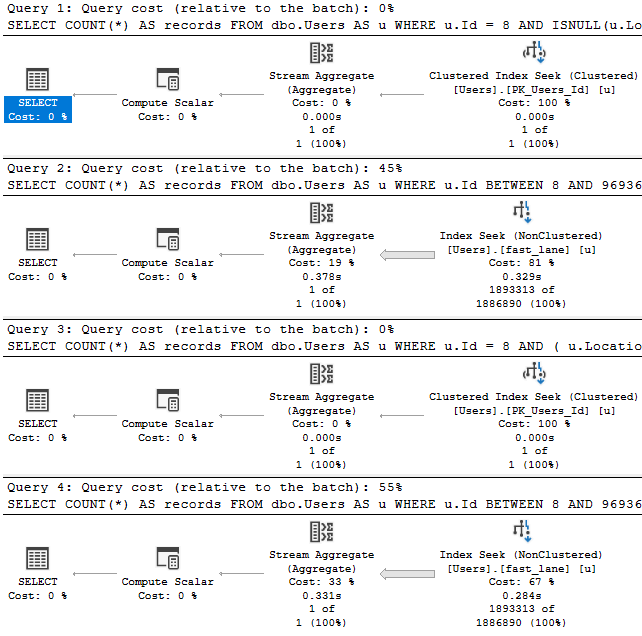
If we have this index, and we look at how four logically equivalent queries perform:

CREATE UNIQUE INDEX fast_lane ON dbo.Users(Id, Location);
SELECT COUNT(*) AS records
FROM   dbo.Users AS u
WHERE  u.Id = 8
AND    ISNULL(u.Location, N'') = N'';

SELECT COUNT(*) AS records
FROM   dbo.Users AS u
WHERE  u.Id BETWEEN 8 AND 9693617
AND    ISNULL(u.Location, N'') = N'';

SELECT COUNT(*) AS records
FROM   dbo.Users AS u
WHERE  u.Id = 8
AND   (   u.Location = N''
      OR   u.Location IS NULL );

SELECT COUNT(*) AS records
FROM   dbo.Users AS u
WHERE  u.Id BETWEEN 8 AND 9693617
AND   (   u.Location = N''
      OR   u.Location IS NULL );

The query plans tell us enough:

SQL Server Query Plan
Toasty

It really doesn’t matter if we obey the laws of SARGability here.

Expect Depression


There have been many times when explaining SARGability to people that they went back and cleaned up code like this to find it didn’t make much of a difference to performance. That’s because SARGability depends on indexes that can support seekable predicates. Without those indexes, it makes no practical difference how you write these queries.

Again, I’m not condoning writing Fast Food Queries when you can avoid it. Like I said earlier, it sets a bad example.

Once this kind of code creeps into your development culture, it’s hard to keep it contained.

There’s no reason to not avoid it, but sometimes it hurts more than others. For instance, if Location were the first column in the index, we’d have a very different performance profile across all of these queries, and other rewrites might start to make more sense.

Thanks for reading!

Going Further


If this is the kind of SQL Server stuff you love learning about, you’ll love my training. Blog readers get 25% off the Everything Bundle — over 100 hours of performance tuning content. Need hands-on help? I offer consulting engagements from targeted investigations to ongoing retainers. Want a quick sanity check before committing to a full engagement? Schedule a call — no commitment required.
Let’s Design A SQL Server Index Together Part 3

Previously


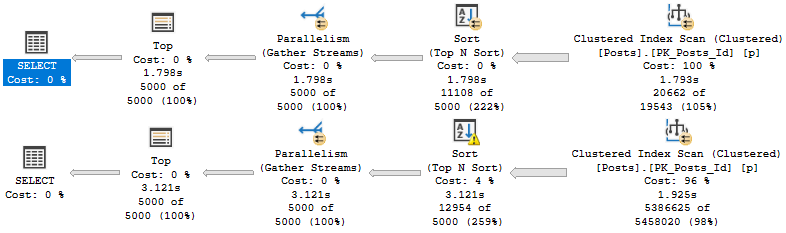
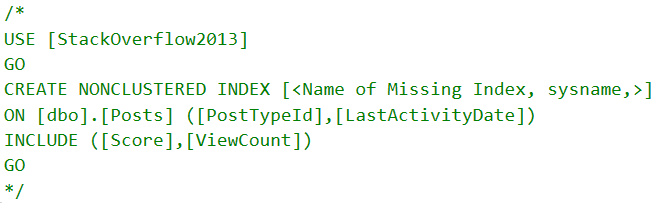
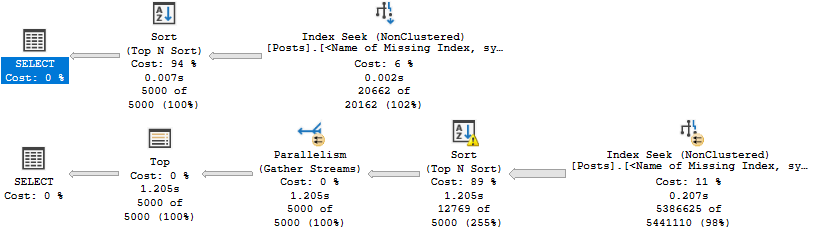
We had a couple queries we wanted to make fast, but SQL Server’s missing index request had mixed results.

Our job now is to figure out how to even things out. To do that, we’re gonna need to mess with out index a little bit.

Right now, we have this one:

CREATE INDEX whatever 
    ON dbo.Posts(PostTypeId, LastActivityDate) 
	    INCLUDE(Score, ViewCount);

Which is fine when we need to Sort a small amount of data.

SELECT TOP (5000)
       p.LastActivityDate,
       p.PostTypeId,
       p.Score,
       p.ViewCount
FROM dbo.Posts AS p
WHERE p.PostTypeId = 4
AND   p.LastActivityDate >= '20120101'
ORDER BY p.Score DESC;

There’s only about 25k rows with a PostTypeId of 4. That’s easy to deal with.

The problem is here:

SELECT TOP (5000)
       p.LastActivityDate,
       p.PostTypeId,
       p.Score,
       p.ViewCount
FROM dbo.Posts AS p
WHERE p.PostTypeId = 1
AND   p.LastActivityDate >= '20110101'
ORDER BY p.Score DESC;

Theres 6,000,223 rows with a PostTypeId of 1 — that’s a question.

Don’t get me started on PostTypeId 2 — that’s an answer — which has 11,091,349 rows.

Change Management


What a lot of people try first is an index that leads with Score. Even though it’s not in the WHERE clause to help us find data, the index putting Score in order first seems like a tempting fix to our problem.

CREATE INDEX whatever 
    ON dbo.Posts(Score DESC, PostTypeId, LastActivityDate) 
	    INCLUDE(ViewCount)

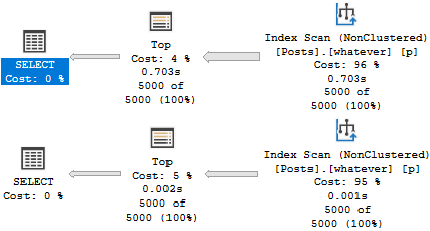
The result is pretty successful. Both plans are likely fast enough, and we could stop here, but we’d miss a key point about B-Tree indexes.

SQL Server Query Plan
It’s not so bad.

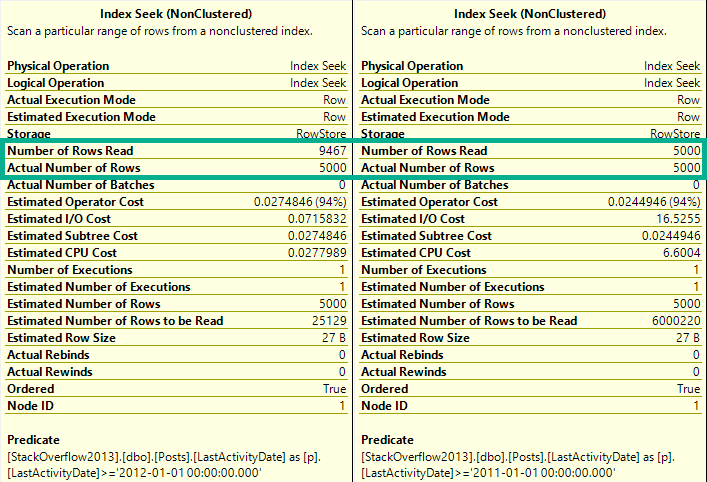
What’s a bit deceptive about the speed is the amount of reads we do to locate our data.

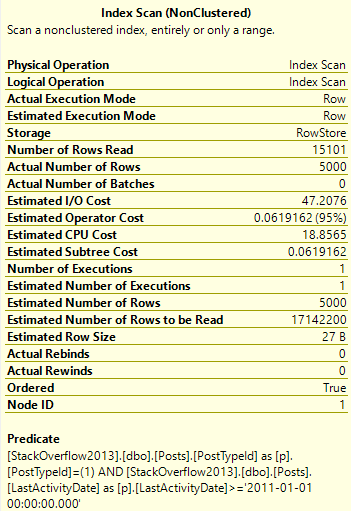
SQL Server Query Plan Tool Tip
Scan-Some

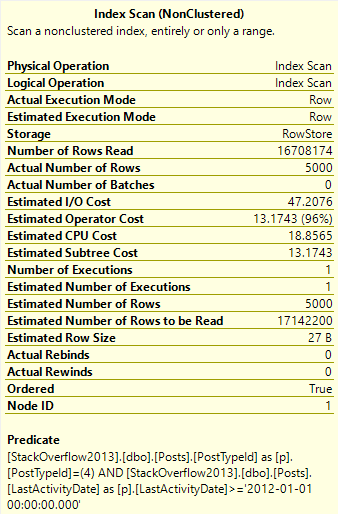
We only need to read 15k rows to find the top 5000 Questions — remember that these are very common.

We need to read many more rows to find the top 5000… Er… Whatever a 4 means.

SQL Server Query Plan Tool Tip
Imaginary Readers

Nearly the entire index is read to locate these Post Types.

Meet In The Middle


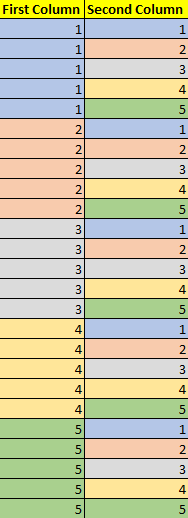
The point we’d miss if we stopped tuning there is that when we add key columns to a B-Tree index, the index is first ordered by the leading key column. If it’s not unique, then the second column is ordered within each range of values.

SQL Server Index Visualization
Pale Coogi Wave

Putting this together, let’s change our index a little bit:

CREATE INDEX whatever 
    ON dbo.Posts(PostTypeId, Score DESC, LastActivityDate) 
	    INCLUDE(ViewCount) WITH (DROP_EXISTING = ON);

With the understanding that seeking to a single PostTypeId column will bring us to an ordered Sort column for that range of values.

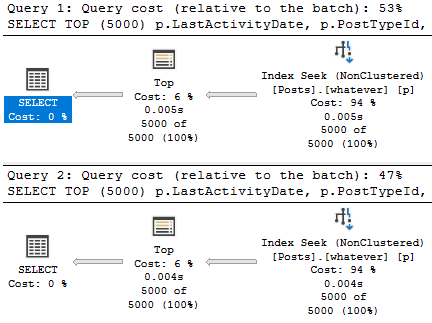
Now our plans look like this:

SQL Server Query Plan
???

Which allows us to both avoid the Sort and keep reads to a minimum.

SQL Server Query Plan Tool Tips
reed les

Interior Design


When designing indexes, it’s important to keep the goal of queries in mind. Often, predicates should be the primary consideration.

Other times, we need to take ordering and grouping into account. For example, if we’re using window functions, performance might be unacceptable without indexing the partition by and order by elements, and we may need to move other columns to parts of the index that may not initially seem ideal.

Thanks for reading!

Going Further


If this is the kind of SQL Server stuff you love learning about, you’ll love my training. Blog readers get 25% off the Everything Bundle — over 100 hours of performance tuning content. Need hands-on help? I offer consulting engagements from targeted investigations to ongoing retainers. Want a quick sanity check before committing to a full engagement? Schedule a call — no commitment required.
Let’s Design A SQL Server Index Together Part 2

Once Upon A Time


I asked you to design one index to make two queries fast.

If we look at the plans with no supporting indexes, we’ll see why they need some tuning.

SQL Server Query Plan
Get a job

In both queries, the optimizer will ask for a “missing index”. That’s in quotes because, gosh darnit, I wouldn’t miss this index.

SQL Server Missing Index Request
Green Screen

Nauseaseated


If we add it, results are mixed, like cheap scotch.

SQL Server Query Plan
Keep Walking

Sure, there’s some improvement, but both aren’t fast. The second query does a lot of work to sort data.

We have an inkling that if we stopped doing that, our query may get quicker.

Let’s stop and think here: What are we ordering by?

Of course, it’s the thing in the order by: Score DESC.

Where Do We Go Now?


It looks like that missing index request was wrong. Score shouldn’t have been an included column.

Columns in the include list are only ordered by columns in the key of the index.

If we wanna fix that Sort, we need to make it a key column.

But where?

Get to work.

Going Further


If this is the kind of SQL Server stuff you love learning about, you’ll love my training. Blog readers get 25% off the Everything Bundle — over 100 hours of performance tuning content. Need hands-on help? I offer consulting engagements from targeted investigations to ongoing retainers. Want a quick sanity check before committing to a full engagement? Schedule a call — no commitment required.
Let’s Design A SQL Server Index Together Part 1

Just One Index


I want both of these queries to be fast.

SELECT TOP (5000)
       p.LastActivityDate,
       p.PostTypeId,
       p.Score,
       p.ViewCount
FROM dbo.Posts AS p
WHERE p.PostTypeId = 4
AND   p.LastActivityDate >= '20120101'
ORDER BY p.Score DESC;


SELECT TOP (5000)
       p.LastActivityDate,
       p.PostTypeId,
       p.Score,
       p.ViewCount
FROM dbo.Posts AS p
WHERE p.PostTypeId = 1
AND   p.LastActivityDate >= '20110101'
ORDER BY p.Score DESC;

Get to work.

Going Further


If this is the kind of SQL Server stuff you love learning about, you’ll love my training. Blog readers get 25% off the Everything Bundle — over 100 hours of performance tuning content. Need hands-on help? I offer consulting engagements from targeted investigations to ongoing retainers. Want a quick sanity check before committing to a full engagement? Schedule a call — no commitment required.
Using Column Store Indexes To Improve Unpredictable User Search Queries

And Cough


Going Further


If this is the kind of SQL Server stuff you love learning about, you’ll love my training. Blog readers get 25% off the Everything Bundle — over 100 hours of performance tuning content. Need hands-on help? I offer consulting engagements from targeted investigations to ongoing retainers. Want a quick sanity check before committing to a full engagement? Schedule a call — no commitment required.
Eager Index Spools From Nonclustered Indexes In SQL Server

Dangarang


Video Summary

In this video, I delve into a unique scenario involving eager index pools in SQL Server and how they can occur even when an appropriate index seems to be in place. Specifically, I explore why these index pools might form despite having indexes that should theoretically work well for the query at hand. Using a real-world example where a `cross apply` is used to fetch data from another table, I illustrate how SQL Server’s decision-making process can lead to suboptimal performance due to the order of columns in an index and the lack of efficient seek predicates. By walking through this case study, I highlight the importance of carefully considering index design when optimizing queries, especially those involving complex joins and correlated subqueries.

Full Transcript

Howdy folks, Erik Darling here with Erik Darling Data, and I wanted to record a quick video about eager index pools and a reason why they may occur even though you’ve created an index that is perhaps nearby what your query is asking for. Now, I’ve vlogged before about why eager index pools might pop up if you’ve got no useful index or even if you have a very index that the optimizer ignores. But this is kind of a weird third case. And I’ve seen things like this happen maybe when someone listens to C1 of SQL Server’s missing index requests and the order of the columns in the key of the index which are just in which are only supplied to the missing index request by the ordinal position in the table might not be the most efficient, effective, happy index request. So, in this case, I have a query that is selecting data from the users table and then cross applying that cross applying to the badges table. And we want to get the top end per group. This is what we’re doing in here. This little chunk of query. So we’re selecting the top one badge name from badges correlated on user ID ordered by date descending. And this is an OK query, but it’s not just in the top one.

But it’s not really a great index because we lead our index with name, then user ID, then date descending. If we look at the badges table, you know, we might see, oh, well, you know, I don’t know, maybe SQL Server gave us a stem missing index request and now we didn’t make our query any better. So, what you might see here is because we have to correlate on user ID in order by date descending, but name is the first column in the index, we’re kind of buried, these two columns are kind of buried behind it. We don’t have an equality predicate on name. We had, if we, our where clause was also like, and badge name equals happy camper, then we might, then we could seek to here and then seek to here and then we would have this in order, but we don’t.

So we can easily display this, but it’s not helpful as a first column in the index. Now, why this is kind of funny is because we have this index and SQL Server uses the index that we created on this index over here called squirrel in order to feed into this index. So it’s basically taking this index and rearranging the columns in it.

If we zoom in a little bit and we look at what it’s doing, it creates that index keyed on user ID and then it has name and date in the included columns. Eager index pool structures are effectively clustered indexes, but you can think of them the same way as like a nonclustered index where the seek predicates are key columns and the output list are includes. It’s just like if you created a clustered index on user ID, name and date would technically be includes and that index.

So SQL Server does this down here because we have a nested loops join here. SQL Server is estimating that we would have to loop 13,659 times and SQL Server does not want to take 13,569 rows from here and then scan the entire badges table that many times. So it scans this index on the badges table once.

We have one number of execution, one scan. And just like in other times when we create an eager index pool, even though the plan says it’s parallel, all the rows end up on a single thread, which is no bueno as far as I’m concerned. These eager index pools always build serially.

So we build that index, which allows SQL Server to seek into this index 13,659 times, do a quick top one sort and then return data out. So the reason why I write a lot of queries that show stuff like this using cross supply is because cross supply most often optimizes as a nested loops join. Because it optimizes as a nested loops join, we kind of get the effect in our query plan where SQL Server is going to do something repetitive down here.

And SQL Server uses spools to sort of mitigate the effect of repetitive behavior. So eager index spools, table spools, stuff like that. All those things come into play on the inner side of nested loops.

And it’s just a lot easier to get SQL to say, I’m going to use a nested loops join when I use cross supply. It’s simply a demo writing effect. It’s not because cross supply is bad.

It’s not because nested loops join is bad, even though it kind of is. I’m kidding. Nested loops join is fine. Fine. All you nice OLT people out there with your nested loops joins. It’s just to kind of show you that a lot of times on the inner side of nested loops, in other words, on this side of nested loops, a lot of awkward things can happen.

In this case, SQL Server took an index that we thought might be okay, or rather, maybe we got a missing index request that said name, user ID, date. And we were like, ah, we’ll just create this index blindly, and all our queries will be faster. And then this query got slower because we forgot a semicolon.

So eager index spools may also happen just because you made a bad index or because you made an inopportune index for a specific query. In this case, it would make total sense if we just reorganized this index a little bit. If we took name from here, and we stuck it over here, and then we said, oh, I don’t know, what’s that thing with, I don’t have SQL prompt over here, so you’ll have to excuse the crappy typing.

Drop existing equals on. And we reorganized this index a little wee little bit. And you see that that took four seconds, which is a lot faster than the 18 seconds that it took for SQL Server to create that index pool.

If we reorganized our index a little bit, we can avoid minimizing SQL prompt. We can avoid the index pool altogether and have a much faster query. Anyway, just a quick example of how SQL Server may rearrange a nonclustered index.

It doesn’t always have to just get everything from a clustered index to feed into an eager index pool. So thank you for watching. Thank you for bearing with me as I messed up several things in there and had some incomplete thoughts and blabbered a little bit like I’m doing right now.

So I’m going to cut this short and get ready to record another video. Thank you for watching, and I will see you in the next one, assuming that you can still tolerate me after this. Goodbye.

Going Further


If this is the kind of SQL Server stuff you love learning about, you’ll love my training. Blog readers get 25% off the Everything Bundle — over 100 hours of performance tuning content. Need hands-on help? I offer consulting engagements from targeted investigations to ongoing retainers. Want a quick sanity check before committing to a full engagement? Schedule a call — no commitment required.
Dates Aren’t Strings

Seriously.


Video Summary

In this video, I dive into a common mistake that many developers make when working with dates in SQL Server: treating dates as if they were strings or other data types. I share my experience from years of client work where I’ve seen this issue repeatedly and emphasize the importance of keeping dates as dates to avoid performance pitfalls. To illustrate the point, I demonstrate how converting a date column to a string can severely impact query performance by forcing full table scans instead of allowing efficient index seeks. The video also highlights why using functions like `CONVERT` or casting dates to other types is not only unnecessary but can lead to suboptimal execution plans and wasted resources.

Full Transcript

Oh boy! Erik Darling here with Erik Darling Data. And I realize, well, I realize several things. Sometimes I realize several things a day. It’s a bad habit that I’ve gotten myself into. Too many realizations is overwhelming. But my YouTube channel has been a little bit quiet lately. I have been very busy with client work, which is, you know, the blessing and the curse of consulting. When you’re not that busy, you have lots of time to record videos and blog and work on training and presentations. But you’re not getting paid. When you’re working with clients and getting paid, you don’t have a lot of time to do other things. So, one must balance. And one must balance frugally. Or else one… I don’t know. Actually, I don’t know because I haven’t unbalanced that badly yet. But there are a few videos that I’ve been meaning to record and I’m going to hopefully get through all of them today because I have nothing else to do. Another realization, this is the first time in a year. I’ve been recorded history that I’ve been recorded history that I’ve appeared on camera wearing anything other than a black t-shirt. I am currently wearing an adidas sweatshirt. There you go. It’s about as good as it gets for seeing my downstairs mistakes. And that has absolutely nothing to do with anything. So, that’s fun. Anyway, I wanted to record this video because in all my vast, vast history of client work, I have seen people do this so many damn times that I cannot even begin to count. And I guess if I were to make one point up front in this video, it’s that dates are not strings. Dates are not floats. Dates are not integers. Dates are not… I don’t know. What’s another data type? Let’s just… Binary. Let’s just say dates are dates. Dates is dates. Stop messing with them. Stop casting them to other things.

And converting them to other things. And writing scalar valued functions to change the way they look so you can compare them to other dates and make those other dates look the same via various cast converts and functions. It is a waste of time and resources. So, to prove this to you a little bit and to hopefully show you why you shouldn’t do this because it is a terrible idea. I have created a super helpful index on the votes table which is the largest table in the stack overflow 2013 database. So, the first thing that I want to show you is that when I run this query, these both return the same thing. If I convert…

get date to a string and do some fuzzy date math on it, I will get 2019-12-19 which is coincidentally yesterday. Ha ha ha ha ha ha ha! If I run convert date and then do the same thing, I will get 2019-12-19. The thing is, with SQL Server, when it comes to dates and date times and even date time too, the optimizer has some tricks up its sleeves.

It can do these things called get range through convert and get range through mismatched types which apply specifically to searching for the date portion of date time values. Well, not totally specifically, but that’s mostly where you see it. So, when I run those two selects with the converts in there, I do get the same thing back, but this is a string and this is a date.

You understand the difference? This date… I mean this string represents the date, but it’s not a date to SQL Server anymore. It is a string now. This is a date just without the time portion that get date returns. To prove to you why one is indeed worse than the other, let’s run this first query where I’m going to select account from votes and I’m going to say where we convert the creation date column to a VARCAR10 and then compare that to where we convert this to other stuff, whatever.

It’s all the same. If I run this query and we wait, wait, wait, wait, wait, wait, wait, wait, we get zero rows back. And we look at the execution plan. Well, this took about five seconds to run. We had to scan the entire index. And when we scan that index, we applied this whole convert predicate thing.

We used our helpful nonclustered index. We did, but we had to read every single row in the table. We zoom in a little bit here. The number of rows are read is all just about 53 million. We do a big aggregation. We gather streams and we do another aggregation.

And finally we return zero rows and SQL Server complains to us about there being type conversions and implicit conversions and all sorts of other nonsense. So this is not an ideal situation. If we change this query a little bit to say convert creation date to a date and see where that equals casting get date as a date. And just about the same way, when we run this, it finishes instantly with a result of zero.

We’re able to seek into the index here and we’re able to rule out all those rows immediately. We can immediately figure out when we seek to this and to this. So it’s not a perfect seek. It’s an okay seek. It’s what I think Paul White called the dynamic seek.

But if we look at this, we can see that SQL Server did indeed seek and rule out rows immediately. We see that we didn’t read much of anything from this query. To show you just how bad this query is, let’s equalize things a little bit.

I call parallelism SQL servers great equalizer. This plan runs serially. If you recall running this plan, this plan ran in parallel. This plan was only even only took five seconds because SQL Server chose to engage parallelism and use multiple cores to process it.

Right. So five seconds going parallel. How long will this thing take if we force it to be competitive with our other query? If we say, hey, you know what? Our fast query ran at max.1 and finished instantly.

How long are you going to take if you run at max.1? How long SQL Server? How long? Just how long will this go on? 13 seconds.

You can look at the execution plan and we see nearly the same thing where the scan of this nonclustered index takes all 13 seconds. And we spend that whole 13 seconds applying this ridiculous string predicate converting an otherwise perfectly fine date time column to a string back to another string, comparing it to another string. It is absolutely ridiculous.

And I see this constantly when working with people. So the next time you’re working with dates, remember, they’re dates. They’re not strings, not floats, not ins, not money, not whatever else.

Leave them is to stop messing with them. Stop mangling with them. Let’s cut it out. It’s the year 2019.

I can prove that by by selecting get date. And we have had the date data type in SQL Server databases now for I don’t know how long. So there’s not that there ever was a great need to, but there is even less of a need to convert date times to strings to just get the date portion of them.

So anyway, I’m still to this very day, Erik Darling with Erik Darling data. Thanks for watching and I will see you and hopefully the next video. Goodbye.

Going Further


If this is the kind of SQL Server stuff you love learning about, you’ll love my training. Blog readers get 25% off the Everything Bundle — over 100 hours of performance tuning content. Need hands-on help? I offer consulting engagements from targeted investigations to ongoing retainers. Want a quick sanity check before committing to a full engagement? Schedule a call — no commitment required.
Computed Column Follies In SQL Server

Darnit


While helping a client out with a performance problem recently, I ran into something kind of funny when creating a computed column.

They were experiencing performance problems because of a join involving a substring.

Weird, right? Like, if I tried to show you this in a presentation, you’d chase me out of the room.

But since they were nice enough to hire me, I went about fixing the problem.

Computer Magic


The “obvious” — and I apologize if this isn’t obvious to you, dear reader — was to add a computed column to work around the issue.

Adding a computed column gives you the expression that you’re generating on the fly and trying to join on. Because manipulating column data while you’re joining or filtering on it is generally a bad idea. Sometimes you can get away with it.

But here’s something that messed me up, a uh… seasoned database professional.

The query was doing something like this (not exactly, but it’s good enough to get us moving):

SELECT COUNT(*) AS records
FROM dbo.Users AS u
WHERE SUBSTRING(u.DisplayName, 1, LEN(u.DisplayName) - 4)
 = SUBSTRING(u.DisplayName, 1, LEN(u.DisplayName) - 4);

Matching strings from the beginning to the end minus four characters.

I wanted to look smart, so I did this:

ALTER TABLE dbo.Users 
    ADD DisplayNameComputed
	    AS SUBSTRING(DisplayName, 1, LEN(DisplayName) - 4);

I didn’t want to persist it right away — that can lock the table and take longer — and because I knew I was going to index it.

The problem is that when I tried to index it:

CREATE INDEX dummy 
    ON dbo.Users(DisplayNameComputed);

I got this error:

Msg 537, Level 16, State 3, Line 21
Invalid length parameter passed to the LEFT or SUBSTRING function.

And when I tried to select data from the table, the same error.

In the real query, there was a predicate that avoided columns with too few characters, but it was impossible to apply that filter to the index.

There’s also other restrictions on filtered index where clauses, like you can’t like LIKE ‘____%’, or LEN(col) > 4, etc.

Case Of Mace


Having done a lot of string splitting in my life, I should have been more defensive in my initial computed column definition.

What I ended up using was this:

ALTER TABLE dbo.Users 
    ADD DisplayNameComputed
	    AS SUBSTRING(DisplayName, 1, LEN(DisplayName) 
		- CASE WHEN LEN(DisplayName) < 4 THEN LEN(DisplayName) ELSE 4 END);

A bit more verbose, but it allowed me to create my computed column, select from the table, and create my index.

AND THEY ALL LIVED HAPPILY EVER AFTER

Just kidding, there was still a lot of work to do.

Thanks for reading!

Going Further


If this is the kind of SQL Server stuff you love learning about, you’ll love my training. Blog readers get 25% off the Everything Bundle — over 100 hours of performance tuning content. Need hands-on help? I offer consulting engagements from targeted investigations to ongoing retainers. Want a quick sanity check before committing to a full engagement? Schedule a call — no commitment required.
Implicit Conversion Is A SARGability Problem, That’s Why It’s A Performance Problem In SQL Server

Concerns


If you compare the things that non-SARGable queries cause issues with alongside the things that bad implicit conversions cause issues with, it’s an identical list.

  • Increased CPU
  • Inefficient use of indexes
  • Poor cardinality estimation
  • Maybe a bad memory grant based on that
  • Some “row by row” event

Though we often bucket the problems separately, they’re really the same thing.

That’s because, under the covers, something similar happens.

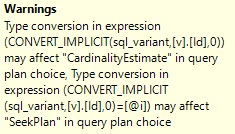
SQL Server Query Plan
Four letters

If you replace “CONVERT_IMPLICIT” with any other function, like ISNULL, COALESCE, DATEADD, DATEDIFF, etc. you may see the same performance degradation.

Probably not the most thought provoking thing you’ve ever heard, but if you understand why one is bad and not the other, this may help you.

Thanks for reading!

Going Further


If this is the kind of SQL Server stuff you love learning about, you’ll love my training. Blog readers get 25% off the Everything Bundle — over 100 hours of performance tuning content. Need hands-on help? I offer consulting engagements from targeted investigations to ongoing retainers. Want a quick sanity check before committing to a full engagement? Schedule a call — no commitment required.