I had a client recently with, wait for it, a performance problem. Or rather, two problems.
The OLTP part was working fine, but there was a reporting element that was dog slow, and would cause all sorts of problems on the server.
When we got into things, I noticed something rather funny: All of their reporting queries had very high estimated costs, and all the plans were totally serial.
The problem came down to two functions that were used in the OLTP portion, which were reused in the reporting portion.
Uh Ohs
I know what you’re thinking: 2019 would have fixed it.
Buuuuuuuuuuut.
No.
As magnificent and glorious as FROID is, there are a couple limitations that are pretty big gotchas:
The UDF does not invoke any intrinsic function that is either time-dependent (such as GETDATE()) or has side effects3 (such as NEWSEQUENTIALID()).
And
1SELECT with variable accumulation/aggregation (for example, SELECT @val += col1 FROM table1) is not supported for inlining.
Which is what both were doing. One was doing some date math based on GETDATE, the other was assembling a string based on some logic, and not the kind of thing that STRING_AGG would have helped with, unfortunately.
They could both be rewritten with a little bit of work, and once we did that and fixed up the queries using them, things looked a lot different.
Freeee
For these plans, it wasn’t just that they were forced to run on one CPU that was harming performance. In some cases, these functions were in WHERE clauses. They were being used to filter data from tables with many millions of rows.
Yes, there was a WHERE clause that looked like AND dbo.function(somecol) LIKE ‘%thing%’, which was… Brave?
Getting rid of those bottlenecks relieved quite a lot of pain.
If you want to find stuff like this on your own, here’s what you can do:
Looking at the execution plan, hit get the properties of the select operator and look for a “NonParallelPlanReason”
Run sp_BlitzCache and look for “Forced Serialization” warnings
Inspect Filter operators in your query plans (I’m almost always suspicious of these things)
Review code for scalar valued function calls
Thanks for reading!
Going Further
If this is the kind of SQL Server stuff you love learning about, you’ll love my training. Blog readers get 25% off the Everything Bundle — over 100 hours of performance tuning content. Need hands-on help? I offer consulting engagements from targeted investigations to ongoing retainers. Want a quick sanity check before committing to a full engagement? Schedule a call — no commitment required.
In yesterday’s post, we looked at MSTVFs. Today, we’re going to look at inlined functions.
And I know, that sounds weird. But it’s because we’re going to circle back to scalar valued functions, and how they’re inlined in SQL Server 2019 as well.
There’s stuff in here you’ll have to look out for when you move to SQL Server 2019.
Side By Side
The first thing we need is the function itself, which is just an inlined version of the others.
CREATE OR ALTER FUNCTION dbo.CommentsAreHorribleInline(@Id INT)
RETURNS TABLE
WITH SCHEMABINDING
AS
RETURN
SELECT (SELECT SUM(Score) FROM dbo.Posts AS p WHERE p.OwnerUserId <= @Id)
	   -
	   (SELECT COUNT_BIG(*) FROM dbo.Comments AS c WHERE c.UserId <= @Id) AS Tally
GO
Where these differ from both kinds of functions, is that you can’t find them ANYWHERE on their own.
They don’t appear in any DMVs, or in the plan cache as isolated code. Since they’re inlined, it’s just a part of whatever query references it.
Let’s start simple, though:
SELECT * FROM dbo.CommentsAreHorribleInline(22656);

SELECT * FROM dbo.CommentsAreHorribleInline(138);
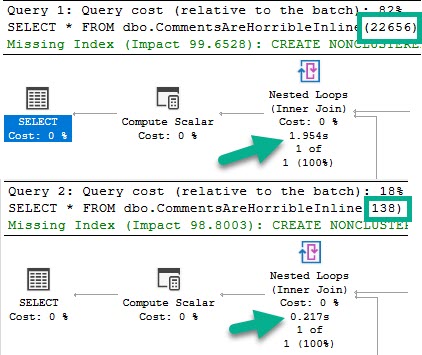
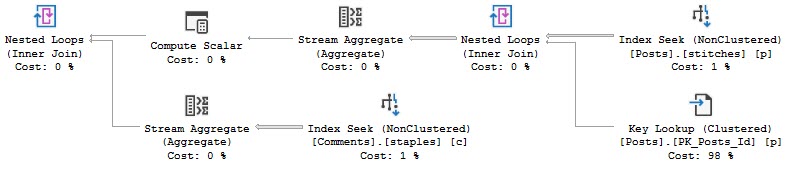
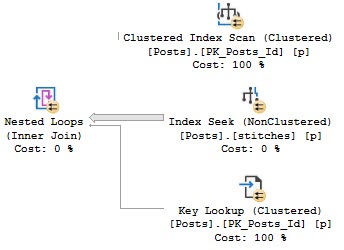
Like in the other posts, the chief difference between these two plans is the index access choice.
The 22656 plan scans the clustered index, and the 138 plan does a nonclustered index seek with a key lookup.
Check the other posts in the series for pictures of that if you’re interested.
Tops and Bottoms
As in the other examples, the clustered index scan is considerably slower than the nonclustered index seek plan.
But that’s not where things are interesting. Where they’re interesting is when we call the function in a “larger” query.
SELECT TOP (5) u.DisplayName,
       (SELECT * FROM dbo.CommentsAreHorribleInline(u.Id))
FROM dbo.Users AS u
GO
Spool And Spool Alike
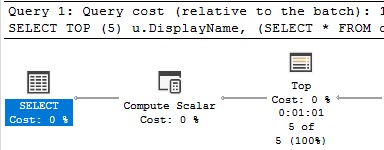
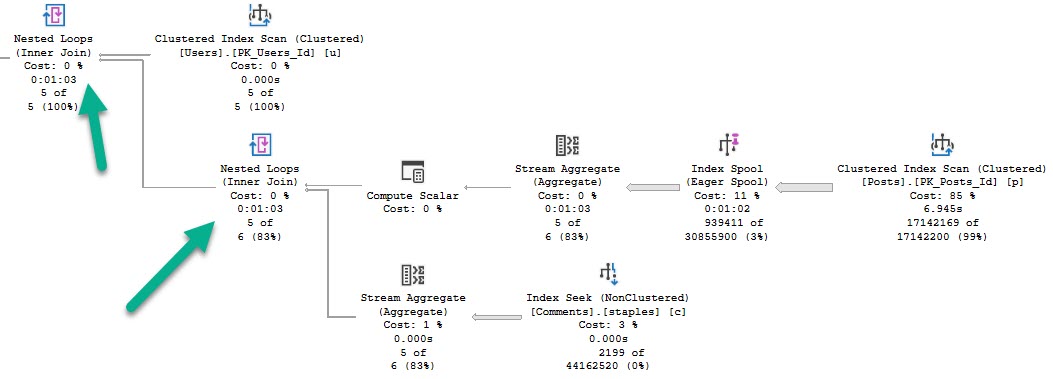
This query runs for a full minute.
Adios
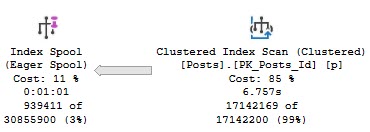
We see why early on — an eager index spool.
You again.
This appears to happen because the optimizer is drunk as hell doesn’t like the idea of scanning the clustered index, or recycling the seek + lookup 5 times.
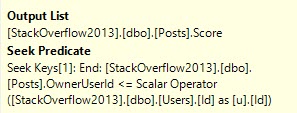
The index reflects what a two column clustered index keyed on OwnerUserId would look like.
Think about it like if you selected OwnerUserId and Score into a #temp table and put a clustered index on the table with the key on OwnerUserId.
Damaja
Remember that part of the reason for this plan change is that we’re no longer just subtracting one aggregate from another like when we call the function on its own, there’s the additional “join” to the Users table. Correlated subqueries are just that — joins.
Solitaire
Futurist
I’d love to have more to say about how this changes in SQL Server 2019, but an identical pattern occurs, similar to what I blogged about earlier in the summer.
I caught some private flack about how the TOP (1) pattern in that post could easily be replace with an aggregate like MIN.
While that’s totally true, there’s no similar replacement for this pattern. We could expand the index to cover the Score column to get rid of the spool, which goes back to another post I wrote about 2019 optimizer features, where you’ll need wider (covering) indexes for them to be used.
Thanks for reading!
Going Further
If this is the kind of SQL Server stuff you love learning about, you’ll love my training. Blog readers get 25% off the Everything Bundle — over 100 hours of performance tuning content. Need hands-on help? I offer consulting engagements from targeted investigations to ongoing retainers. Want a quick sanity check before committing to a full engagement? Schedule a call — no commitment required.
But to make matters worse, we’re going to combine them with a problem no one is pretending to solve: bad parameter sniffing.
After all, that’s what can go wrong when you cache a plan, right?
Our Dummy
This is our function. It’s set up to do something that should happen on Stack sites: users should be penalized for leaving comments.
Okay, so this isn’t exactly how it would work. But stick with me, because it makes a better demo.
CREATE OR ALTER FUNCTION dbo.CommentsAreHorribleScalar(@Id INT)
RETURNS BIGINT
WITH SCHEMABINDING, RETURNS NULL ON NULL INPUT
AS
BEGIN
DECLARE @Tally BIGINT
SELECT @Tally =
	   (SELECT SUM(Score) FROM dbo.Posts AS p WHERE p.OwnerUserId = @Id)
	   -
	   (SELECT COUNT_BIG(*) FROM dbo.Comments AS c WHERE c.UserId = @Id)
RETURN @Tally
END
GO
Really, we’re just getting a sum of all the scores in the Posts table for a user, then subtracting the count of comments they’ve left.
Because comments are horrible.
Anyway.
Individually
If we run these two queries, the plan will get reused.
We can free the cache, run them in the other order, and the same will happen in reverse.
Of course, each one gets a different plan.
22656138
Tangentially, these functions will end up dm_exec_function_stats, which was introduced in 2016, and can also be identified by name in the plan cache.
SELECT *
FROM sys.dm_exec_function_stats AS defs;

EXEC sp_BlitzCache @StoredProcName = 'CommentsAreHorribleScalar';
Sniffing
If we cache a plan for 22656 or 138, and then run a query like this:
SELECT TOP (100) u.DisplayName,
       dbo.CommentsAreHorribleScalar(u.Id)
FROM dbo.Users AS u;
The query will reuse whatever the cached plan is.
Again, using BlitzCache to track the plan down:
Favorite shoe
In this case, the query is simple enough that the plan difference doesn’t change performance very much.
Let’s change our function a little bit to see a better example.
Appalled
Here it is:
CREATE OR ALTER FUNCTION dbo.CommentsAreHorribleScalar(@Id INT)
RETURNS BIGINT
WITH SCHEMABINDING, RETURNS NULL ON NULL INPUT
AS
BEGIN

DECLARE @Tally BIGINT

SELECT @Tally =
	   (SELECT SUM(Score) FROM dbo.Posts AS p WHERE p.OwnerUserId <= @Id)
	   -
	   (SELECT COUNT_BIG(*) FROM dbo.Comments AS c WHERE c.UserId <= @Id)

RETURN @Tally

END
GO
The plans are way different now:
Bananas
22656 scans the clustered index, and 138 seeks into the nonclustered index with a key lookup.
For the record, the bad plan is the clustered index scan, and the fast plan is the nonclustered index seek.
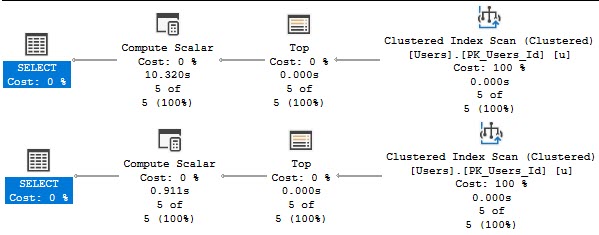
Running a smaller query (because the top hundred made me impatient), the difference is obvious.
SELECT TOP (5) u.DisplayName,
       dbo.CommentsAreHorribleScalar(u.Id)
FROM dbo.Users AS u;
Compute hahahahahahahalar
The version of the query that gets the bad function plan has a 10 second compute scalar, and the version of the query that gets the good function plan finishes in 900ms.
Functions Can Get Different Plans
Depending on how you call them, and how much data they might have to touch, this can be a big deal or no deal.
Because I know I’ll get some semi-related questions:
The body of scalar functions have no restrictions on parallelism, only the calling statements are forced to run serially
Functions run “once per row”, with the number of rows being dependent on where in the plan the compute scalar appears
Thanks for reading!
Going Further
If this is the kind of SQL Server stuff you love learning about, you’ll love my training. Blog readers get 25% off the Everything Bundle — over 100 hours of performance tuning content. Need hands-on help? I offer consulting engagements from targeted investigations to ongoing retainers. Want a quick sanity check before committing to a full engagement? Schedule a call — no commitment required.
In dramatic fashion, I’m revisiting something from this post about stats updates.
It’s a quick post, because uh… Well. Pick a reason.
Get In Gear
Follow along as I repeat all the steps in the linked post to:
Load > 2 billion rows into a table
Create a stats object on every column
Load enough new data to trigger a stats refresh
Query the table to trigger the stats refresh
Except this time, I’m adding a mAxDoP 1 hint to it:
SELECT COUNT(*)
FROM dbo.Vetos
WHERE UserId = 138
AND   PostId = 138
AND   BountyAmount = 138
AND   VoteTypeId = 138
AND   CreationDate = 138
OPTION(MAXDOP 1);
Here’s Where Things Get Interesting
Bothsies
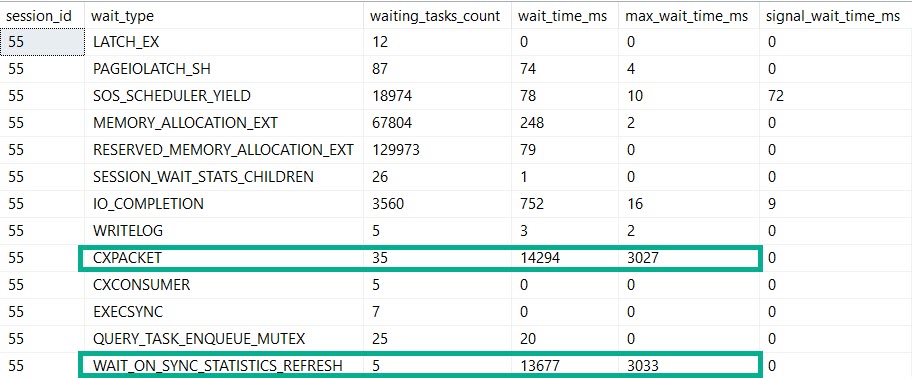
Our MaXdOp 1 query registers nearly the same amount of time on stats updates and parallelism.
If this is madness…
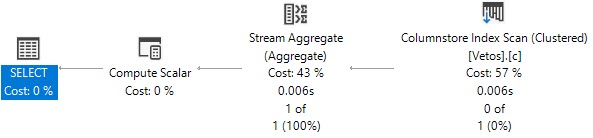
But our plan is indeed serial. Because we told it to be.
By setting maxDOP to 1.
Not Alone
So, if you’re out there in the world wondering why this crazy kinda thing goes down, here’s one explanation.
Are there others? Probably.
But you’ll have to find out by setting MAXdop to 1 on your own.
Thanks for reading!
Going Further
If this is the kind of SQL Server stuff you love learning about, you’ll love my training. Blog readers get 25% off the Everything Bundle — over 100 hours of performance tuning content. Need hands-on help? I offer consulting engagements from targeted investigations to ongoing retainers. Want a quick sanity check before committing to a full engagement? Schedule a call — no commitment required.
In this video, I tested my SneakyTops demo in SQL Server 2019 Community Technology Preview 3.1 to see if it was still susceptible to the same issues as before. As you’ll see, I had a bit of an accident with a bottle of water during the recording, but that’s all part of the fun! The main focus was on parameter sniffing and how SQL Server’s optimizer handles top expressions with dynamic parameters. Even though I updated the parameter value to 1000 and tried recompiling the query, SQL Server still guessed 100 rows—just as it did in previous versions. This test didn’t reveal any improvements in SQL Server 2019 regarding this particular issue, which is a bit disappointing but not entirely surprising given the complexity of parameter sniffing scenarios.
Full Transcript
Yeah. So I finished recording the last video on SneakyTops. And what I realized is that I should test my SneakyTops demo in SQL Server 2019 to see if it was still susceptible to SneakyTops. So here we go. On SQL Server 2019, this is CTP 3.1. You can see down there in the corner, maybe, probably. I don’t know. If you stare hard enough, if you squint, I’ll zoom in, I guess. I suppose I’m a nice person. Oh, there we go. Wow. So that, I don’t know really how that worked out, but I’m never zooming again in this thing. So I don’t know what you saw on the screen. Could have been anything, but we’re gonna, we’re gonna leave that as is. You may have seen my Twitter mentions. You may have seen another SSMS window. I don’t care. Anyway. Point is here, I almost knocked over a bottle of water, that no matter what we do, so this expression up here, right, let’s say, right now it’s at 100, right? So if we run this query, this will run for, I don’t know, two and a half seconds. And we get back 100 rows. And if we look at what SQL Server guessed was going to come out of there, it is still 100. Okay, so we have 100 row guess. But if we update, that setting to be 1000, that setting to be 1000, and we run this again, SQL Server’s guess is going to remain at 100, right there. And even if we tag in recompile, and run this, well, SQL Server is still going to guess 100. So, this is not Freud’s fault. So what I wanted to test was the Freud inlining of functions, and see SQL Server would take this and say, hey, we can inline this function. Maybe we can guess at the outcome of it with a recompile hands or without or really just anything. Is there any change here? And there isn’t. So don’t look forward to SQL Server 2019 fixing that problem.
Again, this isn’t like the fault of Freud. This is kind of a weird thing to be doing anyway. And I didn’t, I don’t expect the optimizer to cover every single bizarre scenario that I might encounter. But I did want to, for the sake of completeness with my sneaky top, I did want to see if SQL Server 2019 helped. And it doesn’t look like the guess for a top with an expression is different here. So, and that’s fine. I again, I don’t expect that to, you know, get improved, or change even. I don’t see what the point is. Anyway, thanks for watching. I’m going to open my door and get some air conditioning now. Goodbye. Bye.
Video Summary
In this video, I tested my SneakyTops demo in SQL Server 2019 Community Technology Preview 3.1 to see if it was still susceptible to the same issues as before. As you’ll see, I had a bit of an accident with a bottle of water during the recording, but that’s all part of the fun! The main focus was on parameter sniffing and how SQL Server’s optimizer handles top expressions with dynamic parameters. Even though I updated the parameter value to 1000 and tried recompiling the query, SQL Server still guessed 100 rows—just as it did in previous versions. This test didn’t reveal any improvements in SQL Server 2019 regarding this particular issue, which is a bit disappointing but not entirely surprising given the complexity of parameter sniffing scenarios.
Full Transcript
Yeah. So I finished recording the last video on SneakyTops. And what I realized is that I should test my SneakyTops demo in SQL Server 2019 to see if it was still susceptible to SneakyTops. So here we go. On SQL Server 2019, this is CTP 3.1. You can see down there in the corner, maybe, probably. I don’t know. If you stare hard enough, if you squint, I’ll zoom in, I guess. I suppose I’m a nice person. Oh, there we go. Wow. So that, I don’t know really how that worked out, but I’m never zooming again in this thing. So I don’t know what you saw on the screen. Could have been anything, but we’re gonna, we’re gonna leave that as is. You may have seen my Twitter mentions. You may have seen another SSMS window. I don’t care. Anyway. Point is here, I almost knocked over a bottle of water, that no matter what we do, so this expression up here, right, let’s say, right now it’s at 100, right? So if we run this query, this will run for, I don’t know, two and a half seconds. And we get back 100 rows. And if we look at what SQL Server guessed was going to come out of there, it is still 100. Okay, so we have 100 row guess. But if we update, that setting to be 1000, that setting to be 1000, and we run this again, SQL Server’s guess is going to remain at 100, right there. And even if we tag in recompile, and run this, well, SQL Server is still going to guess 100. So, this is not Freud’s fault. So what I wanted to test was the Freud inlining of functions, and see SQL Server would take this and say, hey, we can inline this function. Maybe we can guess at the outcome of it with a recompile hands or without or really just anything. Is there any change here? And there isn’t. So don’t look forward to SQL Server 2019 fixing that problem.
Again, this isn’t like the fault of Freud. This is kind of a weird thing to be doing anyway. And I didn’t, I don’t expect the optimizer to cover every single bizarre scenario that I might encounter. But I did want to, for the sake of completeness with my sneaky top, I did want to see if SQL Server 2019 helped. And it doesn’t look like the guess for a top with an expression is different here. So, and that’s fine. I again, I don’t expect that to, you know, get improved, or change even. I don’t see what the point is. Anyway, thanks for watching. I’m going to open my door and get some air conditioning now. Goodbye. Bye.
Going Further
If this is the kind of SQL Server stuff you love learning about, you’ll love my training. Blog readers get 25% off the Everything Bundle — over 100 hours of performance tuning content. Need hands-on help? I offer consulting engagements from targeted investigations to ongoing retainers. Want a quick sanity check before committing to a full engagement? Schedule a call — no commitment required.
In this video, I delve into a clever but sneaky use of user functions within SQL queries that can lead to unexpected behavior and potential security issues. Specifically, I explore how a seemingly innocuous function call can disrupt query parallelism and how different workarounds like using variables or dynamic SQL might seem like solutions but come with their own set of challenges, such as plan caching and performance variability. I also touch on the security implications of these techniques, particularly when it comes to dynamically constructing queries based on user inputs, and offer some practical advice on mitigating risks while still achieving desired functionality.
Full Transcript
Hello, Erik Darling here with Erik Darling Data in the midst of a heat crisis. It’s terrible. I was recently advised that what I thought was fluid in my ears was actually just pressure escaping my sinuses via my most, apparently, the narrowest ear canals that have ever been designed by God or man and put inside someone’s head. So anyway, I wanted to talk about a very sneaky place that I saw a function today. And it was just so stupendously clever of a place to see a function end up. And it looked exactly, the query, I mean, didn’t look like this because it’s not Stack Overflow, but it looked close enough to this to, you know, to give you a good idea of what happened. Where there was a user function, which took a, I mean, it didn’t just take a, this thing, there was like a whole thing that like, you know, figured out what the user was and other stuff and whatever. This is just simpler for me to write. I’m not that smart. So anyway, what happens is if we run this and we just look at what happens when we run this function, we get back to number 100. So the purpose of this function inside this expression right here was to return whatever a particular user setting was for how many rows they wanted to get back at once. So you could run this query, and I bet you thought that would throw an error, but it doesn’t. We can run this query, and we can get back our 100 rows, and we have, you know, whatever, we have an execution plan. And when we dug a little bit deeper into what was going on, the function looked something a little bit like this, where you would go look at a table called user settings or something, and you would return some values and, you know, kind of like stuff that a regular function does. And there was a table that backed it up with a row in it that looked like that. Okay, pretty simple. Not bad.
So, but, you know, when we run it, you know, we go do this, and we run our query with our function in it. This, even though we’re only setting a value for the top expression up here, we still hit the same exact problem that functions cause just about anywhere else in the known SQL universe where they prevent our query from running in parallel. We cannot generate a valid parallel plan with that function even up in the top here. So, that’s kind of a downer, right? So, one way around that, potentially, is to set top equal to a variable, and when we do that, we will get back a slightly faster version of our query that went parallel, right? So, we see a parallel plan down here, and all the pain of, I mean, all the forced serialization associated with that scalar value function happen up here where we declare the variable, and not down here where we mess with anything.
So, that’s an okay solution, and I think I’ve blogged about this before. I might even have another video on it. I’m not sure at this point. I’ve written a lot and videoed a lot. I lose track, and my brain is full of mush and wet newspapers and hairballs, so, and apparently, a lot of pressure that just escapes and feels like there’s fluid in my head, so that’s nice, too. So, yeah, one way around it is to potentially, I mean, like, I messed that up. The problem, we just showed a potential workaround.
The problem with that workaround, there we go, is that no matter what number we declare up here, because this is a declared variable, it has the same-ish local variable effect with being in a top expression, is when you put it in, like, a where clause or something, where SQL Server just has a, like, a solid, a steady guess for what it’s going to use for a number, it doesn’t actually change that. So, we could put 10,000 up there. I’m going to free the proc cache, so we know that we’re not reusing that plan at all, right?
So, we can just be pretty sure that the plan that SQL Server is coming up with is a new one. I can’t use recompile here, and I’ll show you why in a second. So, if we free the proc cache, and I select 10,000 rows, and I look at how many SQL Server is estimating up here, it’ll be 100 rows right there. So, that’s not very good, and it doesn’t matter if I put in 1,000, 5,000, 50,000, if I go and run that and return some rows.
SQL Server’s guess is always going to be 100 right here. So, that’s not ideal, because if you are selecting way more than 100 rows in your top, SQL Server might choose different plans based on different row goals, right?
So, that’s not great. So, your options are, of course, a recompile hint. If we stick a recompile hint in there, then SQL Server will all of a sudden magically understand that we wanted 1,000 rows, and not just 100 rows. So, there’s that, which is okay.
But with anything, when I’m saying recompile, I’m not worried about burning down the house with CPU. I’m more worried about the forensic aspect of things. So, like, you know, you have this query in there with recompile, and it might be a very important query, and now all of a sudden you’ve got no history of it in your plan cache, right?
So, like, every time this runs, SQL Server’s going to not cache a plan, say, we don’t need to bother with this. And if we wanted to troubleshoot performance with this query, we wouldn’t have a really good way to do it, right? We would have, like, no history of this query at all in there. So, one thing, well, a couple things you can do that can help.
Well, one of them is dynamic SQL. And this is safer or more safe or even more safer or more safer or more safer. But this is ultimately sniffable.
When we use totally safe dynamic SQL, it gets treated like a stored procedure in that this variable gets sniffed, or this parameter gets sniffed because we’re passing it in as a parameter down here. So, if we put 100 in the first time and we use 1,000 the second time, SQL Server will reuse the plan for 100 unless something happened where it needed to come up with a new plan.
Anyway, this is less safe but also less sniffable. Cool. All right. So, you can use a variable like this. And you can use, like, rtrim or you can say convert top barcar whatever 11, 52, 78, 25 hike. Whatever you want to do in here to make this a concatenatable from an integer to a concatenatable string value in here.
And you can execute that. And this will have a lower chance of reusing a plan. I’m not going to say it’s 100% never going to reuse a plan, but it’s a lower chance. A lower chance.
But this kind of comes back to, well, not the same problem as recompile where you would have no plans in the cache, but sort of the opposite problem of recompile where you could, depending on how popular this query is, you could have a bunch of plans in the cache. You could have a whole mess of stuff that’s coming in with all these top however many row queries. And, you know, again, you know, whenever we talk about dynamic SQL like this, you know, everyone has to talk about SQL injection and, you know, the potential security risk and how that can be a pretty big downfall with this stuff.
And I agree it is. You know, I will say that, you know, the chance is, the chance of someone coming in and, like, you know, dropping tables or doing anything crazy is lessened a bit because this is an integer value up here. Right?
So, I mean, to my mind, it’s, like, hard to figure out a way to pass in something as an integer that would be validated here that could then be transformed down here in a way that would, you know, execute an extra command. Right?
Like, it’s hard for me to figure that out. I’m sure someone out there is smart enough to do it. It’s just not me. But one thing you can do, even with totally safe dynamic SQL, is something like this. Now, you can explore a little bit of user function stuff with these functions up here and these built-in functions. And, granted, you can restrict access to these via the appropriate permissions.
But that’s hard. And a lot of times, the app login needs elevated permissions to do weird stuff, create tables, create databases. Oftentimes, applications, like, at minimum, kind of want DB owner.
And so that makes it a little bit harder to, like, you know, revoke or deny sort of basic privileges. But one thing I want to point out here is that if I run these queries, right? So if I run select suzer sid, I get OXO1 back. And I can convert that to an integer, which is 1.
And then if I run suzer name with 1, I get back SA. So SA is always 1. SA always has this OXO1. And so what I can do that’s kind of sneaky, even with totally safe dynamic SQL, is say I want my top to be 1000 plus converting suzer sid to an int. And when I run this, instead of getting 1,000 rows back, I get back, oops, there we go, 1,001 rows, which isn’t, again, a performance issue, but it is one way that someone perhaps a bit on the clever side could mess up or could get some extra information without doing anything too crazy.
They could figure out which, well, I mean, at least which login was coming. I mean, if they were logged in as SA, if they get one back, if they get back a number higher than one, then, you know, they maybe do something else to figure that out.
Anyway, that’s with the safe version of dynamic SQL. Even with that, you can play some tricks. So it would be up to, like, you know, someone on the front end to validate, you know, that there’s nothing weird coming in for, like, wherever someone enters in 1,000. Like, use a drop-down menu with static numbers in it or validate your inputs.
Again, everyone should validate their inputs. Anyway, that’s all I wanted to talk about. We’re a little over 10 minutes, which is longer than I wanted, but I messed up a time or two. Sorry about that.
I blame it on the pressure leaking out of my skull. Anyway, thanks for watching, and I will see you in another video, perhaps. Goodbye. Goodbye.
Video Summary
In this video, I delve into a clever but sneaky use of user functions within SQL queries that can lead to unexpected behavior and potential security issues. Specifically, I explore how a seemingly innocuous function call can disrupt query parallelism and how different workarounds like using variables or dynamic SQL might seem like solutions but come with their own set of challenges, such as plan caching and performance variability. I also touch on the security implications of these techniques, particularly when it comes to dynamically constructing queries based on user inputs, and offer some practical advice on mitigating risks while still achieving desired functionality.
Full Transcript
Hello, Erik Darling here with Erik Darling Data in the midst of a heat crisis. It’s terrible. I was recently advised that what I thought was fluid in my ears was actually just pressure escaping my sinuses via my most, apparently, the narrowest ear canals that have ever been designed by God or man and put inside someone’s head. So anyway, I wanted to talk about a very sneaky place that I saw a function today. And it was just so stupendously clever of a place to see a function end up. And it looked exactly, the query, I mean, didn’t look like this because it’s not Stack Overflow, but it looked close enough to this to, you know, to give you a good idea of what happened. Where there was a user function, which took a, I mean, it didn’t just take a, this thing, there was like a whole thing that like, you know, figured out what the user was and other stuff and whatever. This is just simpler for me to write. I’m not that smart. So anyway, what happens is if we run this and we just look at what happens when we run this function, we get back to number 100. So the purpose of this function inside this expression right here was to return whatever a particular user setting was for how many rows they wanted to get back at once. So you could run this query, and I bet you thought that would throw an error, but it doesn’t. We can run this query, and we can get back our 100 rows, and we have, you know, whatever, we have an execution plan. And when we dug a little bit deeper into what was going on, the function looked something a little bit like this, where you would go look at a table called user settings or something, and you would return some values and, you know, kind of like stuff that a regular function does. And there was a table that backed it up with a row in it that looked like that. Okay, pretty simple. Not bad.
So, but, you know, when we run it, you know, we go do this, and we run our query with our function in it. This, even though we’re only setting a value for the top expression up here, we still hit the same exact problem that functions cause just about anywhere else in the known SQL universe where they prevent our query from running in parallel. We cannot generate a valid parallel plan with that function even up in the top here. So, that’s kind of a downer, right? So, one way around that, potentially, is to set top equal to a variable, and when we do that, we will get back a slightly faster version of our query that went parallel, right? So, we see a parallel plan down here, and all the pain of, I mean, all the forced serialization associated with that scalar value function happen up here where we declare the variable, and not down here where we mess with anything.
So, that’s an okay solution, and I think I’ve blogged about this before. I might even have another video on it. I’m not sure at this point. I’ve written a lot and videoed a lot. I lose track, and my brain is full of mush and wet newspapers and hairballs, so, and apparently, a lot of pressure that just escapes and feels like there’s fluid in my head, so that’s nice, too. So, yeah, one way around it is to potentially, I mean, like, I messed that up. The problem, we just showed a potential workaround.
The problem with that workaround, there we go, is that no matter what number we declare up here, because this is a declared variable, it has the same-ish local variable effect with being in a top expression, is when you put it in, like, a where clause or something, where SQL Server just has a, like, a solid, a steady guess for what it’s going to use for a number, it doesn’t actually change that. So, we could put 10,000 up there. I’m going to free the proc cache, so we know that we’re not reusing that plan at all, right?
So, we can just be pretty sure that the plan that SQL Server is coming up with is a new one. I can’t use recompile here, and I’ll show you why in a second. So, if we free the proc cache, and I select 10,000 rows, and I look at how many SQL Server is estimating up here, it’ll be 100 rows right there.
So, that’s not very good, and it doesn’t matter if I put in 1,000, 5,000, 50,000, if I go and run that and return some rows. SQL Server’s guess is always going to be 100 right here. So, that’s not ideal, because if you are selecting way more than 100 rows in your top, SQL Server might choose different plans based on different row goals, right?
So, that’s not great. So, your options are, of course, a recompile hint. If we stick a recompile hint in there, then SQL Server will all of a sudden magically understand that we wanted 1,000 rows, and not just 100 rows. So, there’s that, which is okay.
But with anything, when I’m saying recompile, I’m not worried about burning down the house with CPU. I’m more worried about the forensic aspect of things. So, like, you know, you have this query in there with recompile, and it might be a very important query, and now all of a sudden you’ve got no history of it in your plan cache, right?
So, like, every time this runs, SQL Server’s going to not cache a plan, say, we don’t need to bother with this. And if we wanted to troubleshoot performance with this query, we wouldn’t have a really good way to do it, right? We would have, like, no history of this query at all in there.
So, one thing, well, a couple things you can do that can help. Well, one of them is dynamic SQL. And this is safer or more safe or even more safer or more safer or more safer.
But this is ultimately sniffable. When we use totally safe dynamic SQL, it gets treated like a stored procedure in that this variable gets sniffed, or this parameter gets sniffed because we’re passing it in as a parameter down here.
So, if we put 100 in the first time and we use 1,000 the second time, SQL Server will reuse the plan for 100 unless something happened where it needed to come up with a new plan. Anyway, this is less safe but also less sniffable.
Cool. All right. So, you can use a variable like this. And you can use, like, rtrim or you can say convert top barcar whatever 11, 52, 78, 25 hike. Whatever you want to do in here to make this a concatenatable from an integer to a concatenatable string value in here.
And you can execute that. And this will have a lower chance of reusing a plan. I’m not going to say it’s 100% never going to reuse a plan, but it’s a lower chance.
A lower chance. But this kind of comes back to, well, not the same problem as recompile where you would have no plans in the cache, but sort of the opposite problem of recompile where you could, depending on how popular this query is, you could have a bunch of plans in the cache.
You could have a whole mess of stuff that’s coming in with all these top however many row queries. And, you know, again, you know, whenever we talk about dynamic SQL like this, you know, everyone has to talk about SQL injection and, you know, the potential security risk and how that can be a pretty big downfall with this stuff.
And I agree it is. You know, I will say that, you know, the chance is, the chance of someone coming in and, like, you know, dropping tables or doing anything crazy is lessened a bit because this is an integer value up here.
Right? So, I mean, to my mind, it’s, like, hard to figure out a way to pass in something as an integer that would be validated here that could then be transformed down here in a way that would, you know, execute an extra command.
Right? Like, it’s hard for me to figure that out. I’m sure someone out there is smart enough to do it.
It’s just not me. But one thing you can do, even with totally safe dynamic SQL, is something like this. Now, you can explore a little bit of user function stuff with these functions up here and these built-in functions.
And, granted, you can restrict access to these via the appropriate permissions. But that’s hard. And a lot of times, the app login needs elevated permissions to do weird stuff, create tables, create databases.
Oftentimes, applications, like, at minimum, kind of want DB owner. And so that makes it a little bit harder to, like, you know, revoke or deny sort of basic privileges. But one thing I want to point out here is that if I run these queries, right?
So if I run select suzer sid, I get OXO1 back. And I can convert that to an integer, which is 1. And then if I run suzer name with 1, I get back SA.
So SA is always 1. SA always has this OXO1. And so what I can do that’s kind of sneaky, even with totally safe dynamic SQL, is say I want my top to be 1000 plus converting suzer sid to an int.
And when I run this, instead of getting 1,000 rows back, I get back, oops, there we go, 1,001 rows, which isn’t, again, a performance issue, but it is one way that someone perhaps a bit on the clever side could mess up or could get some extra information without doing anything too crazy.
They could figure out which, well, I mean, at least which login was coming. I mean, if they were logged in as SA, if they get one back, if they get back a number higher than one, then, you know, they maybe do something else to figure that out.
Anyway, that’s with the safe version of dynamic SQL. Even with that, you can play some tricks. So it would be up to, like, you know, someone on the front end to validate, you know, that there’s nothing weird coming in for, like, wherever someone enters in 1,000.
Like, use a drop-down menu with static numbers in it or validate your inputs. Again, everyone should validate their inputs. Anyway, that’s all I wanted to talk about.
We’re a little over 10 minutes, which is longer than I wanted, but I messed up a time or two. Sorry about that. I blame it on the pressure leaking out of my skull. Anyway, thanks for watching, and I will see you in another video, perhaps.
Goodbye. Goodbye.
Going Further
If this is the kind of SQL Server stuff you love learning about, you’ll love my training. Blog readers get 25% off the Everything Bundle — over 100 hours of performance tuning content. Need hands-on help? I offer consulting engagements from targeted investigations to ongoing retainers. Want a quick sanity check before committing to a full engagement? Schedule a call — no commitment required.
This isn’t quite about the same thing, just about some behavior that I thought was interesting, and how it changes between cardinality estimator versions.
Bad Robot
If you’ve been query tuning for a while, you probably know about SARGability, and that wrapping columns in functions is generally a bad idea.
But just like there are slightly different rules for CAST and CONVERT with dates, the repercussions of the function also vary.
The examples I’m going to look at are for YEAR() and MONTH().
If you want a TL;DR, here you go.
Reality Bites
If you wanna keep going, follow me!
USING
The takeaway here isn’t that doing either of these is okay. You should fully avoid wrapping columns in functions in general.
One of the main problems with issuing queries with non-SARGable predicates is that the people who most often do it are the people who rely on missing index requests to direct tuning efforts, and non-SARGable queries can prevent those requests from surfacing, or ask for an even more sub-optimal index than usual.
If you have a copy of the StackOverflow2013 database, you can replicate the results pretty easily on SQL Server 2017.
They may be slightly different depending on how the histogram is generated, but the overarching theme is the same.
Yarly
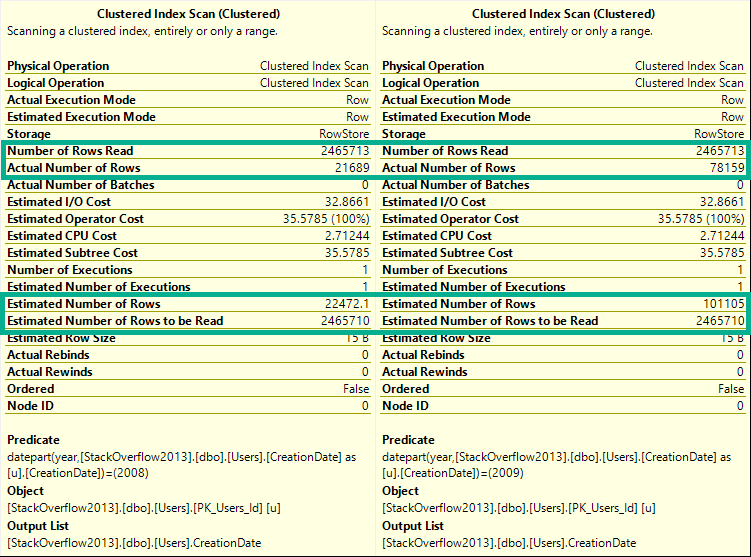
If you run these queries, and look at the estimated and actual rows in the Clustered Index scan tooltip, you’ll see they change for every query.
DECLARE @blob_eater DATETIME;

    SELECT @blob_eater = u.CreationDate
    FROM dbo.Users AS u
    WHERE YEAR(u.CreationDate) = 2008;

    SELECT @blob_eater = u.CreationDate
    FROM dbo.Users AS u
    WHERE YEAR(u.CreationDate) = 2009;

    SELECT @blob_eater = u.CreationDate
    FROM dbo.Users AS u
    WHERE YEAR(u.CreationDate) = 2010;

    SELECT @blob_eater = u.CreationDate
    FROM dbo.Users AS u
    WHERE YEAR(u.CreationDate) = 2011;

    SELECT @blob_eater = u.CreationDate
    FROM dbo.Users AS u
    WHERE YEAR(u.CreationDate) = 2012;

    SELECT @blob_eater = u.CreationDate
    FROM dbo.Users AS u
    WHERE YEAR(u.CreationDate) = 2013;
    GO
Here’s a sample from the 2008 and 2009 queries.
Wild For The Night
ED: I took a break from writing this and “went to brunch”.
Any logical inconsistencies will work themselves out eventually.
Cash Your Checks And Come Up
Alright, let’s try that again with by month.
If you hit yourself in the head with a hammer and forgot the TL;DR, here’s what happens:
DECLARE @blob_eater DATETIME;

    SELECT @blob_eater = u.CreationDate
    FROM dbo.Users AS u
    WHERE MONTH(u.CreationDate) = 1;

    SELECT @blob_eater = u.CreationDate
    FROM dbo.Users AS u
    WHERE MONTH(u.CreationDate) = 2;

    SELECT @blob_eater = u.CreationDate
    FROM dbo.Users AS u
    WHERE MONTH(u.CreationDate) = 3;

    SELECT @blob_eater = u.CreationDate
    FROM dbo.Users AS u
    WHERE MONTH(u.CreationDate) = 4;

    SELECT @blob_eater = u.CreationDate
    FROM dbo.Users AS u
    WHERE MONTH(u.CreationDate) = 5;

    SELECT @blob_eater = u.CreationDate
    FROM dbo.Users AS u
    WHERE MONTH(u.CreationDate) = 6;

    SELECT @blob_eater = u.CreationDate
    FROM dbo.Users AS u
    WHERE MONTH(u.CreationDate) = 7;

    SELECT @blob_eater = u.CreationDate
    FROM dbo.Users AS u
    WHERE MONTH(u.CreationDate) = 8;

    SELECT @blob_eater = u.CreationDate
    FROM dbo.Users AS u
    WHERE MONTH(u.CreationDate) = 9;

    SELECT @blob_eater = u.CreationDate
    FROM dbo.Users AS u
    WHERE MONTH(u.CreationDate) = 10;

    SELECT @blob_eater = u.CreationDate
    FROM dbo.Users AS u
    WHERE MONTH(u.CreationDate) = 11;

    SELECT @blob_eater = u.CreationDate
    FROM dbo.Users AS u
    WHERE MONTH(u.CreationDate) = 12;
If you run these, they’ll all have the same guess on the clustered index scan.
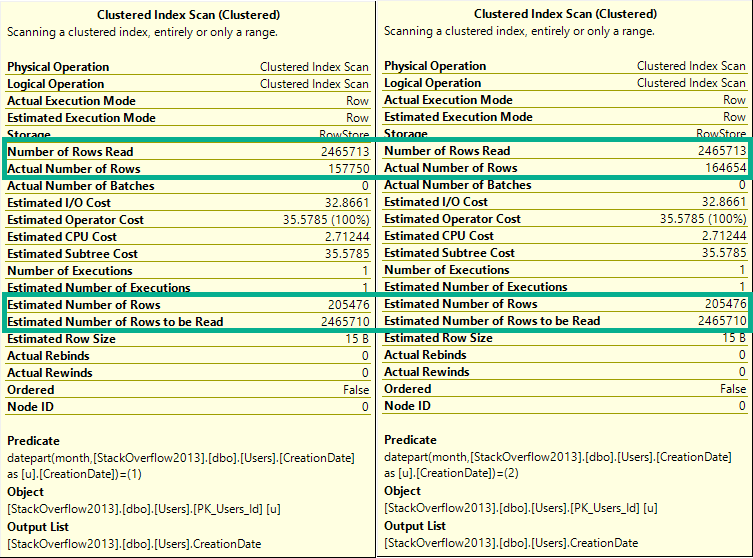
To keep things simple, let’s look at the first couple:
BADLY
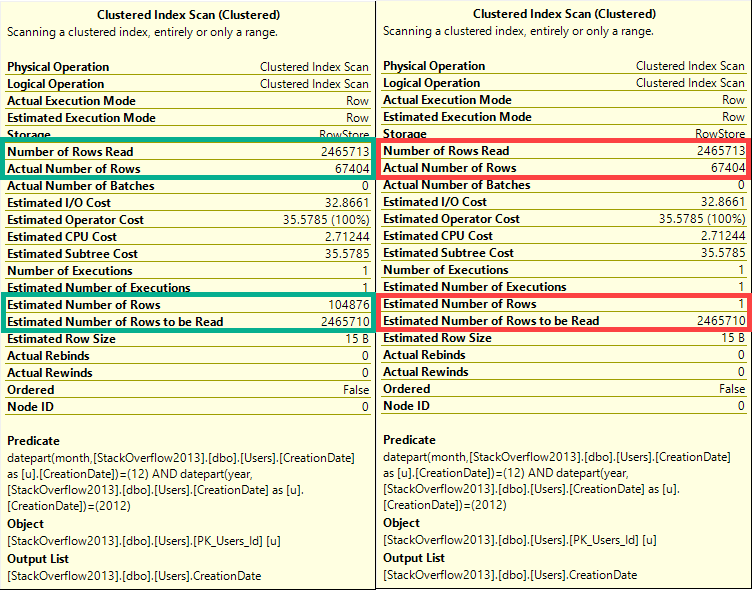
The difference here is that now every single row estimate will be 205,476.
Lesson learned: The optimizer can make a decent statistical guess at the year portion of a date, but not the month portion.
In a way, you can think of this like a LIKE query.
The optimizer can make a decent guess at ‘YEAR%’, but not at ‘%MONTH%’.
Actual Facts To Snack On And Chew
The same thing happens for both new and old cardinality estimators.
DECLARE @blob_eater DATETIME;

    SELECT @blob_eater = u.CreationDate
    FROM dbo.Users AS u
    WHERE YEAR(u.CreationDate) = 2008
    OPTION(USE HINT('FORCE_DEFAULT_CARDINALITY_ESTIMATION'));

    SELECT @blob_eater = u.CreationDate
    FROM dbo.Users AS u
    WHERE YEAR(u.CreationDate) = 2008
    OPTION(USE HINT('FORCE_LEGACY_CARDINALITY_ESTIMATION'));
    GO

DECLARE @blob_eater DATETIME;

    SELECT @blob_eater = u.CreationDate
    FROM dbo.Users AS u
    WHERE MONTH(u.CreationDate) = 12
    OPTION(USE HINT('FORCE_DEFAULT_CARDINALITY_ESTIMATION'));


    SELECT @blob_eater = u.CreationDate
    FROM dbo.Users AS u
    WHERE MONTH(u.CreationDate) = 12
    OPTION(USE HINT('FORCE_LEGACY_CARDINALITY_ESTIMATION'));
    GO
Wouldn’t Get Far
But if we combine predicates, something really different happens between Linda Cardellini estimators.
DECLARE @blob_eater DATETIME;

    SELECT @blob_eater = u.CreationDate
    FROM dbo.Users AS u
    WHERE MONTH(u.CreationDate) = 12
    AND YEAR(u.CreationDate) = 2012
    OPTION(USE HINT('FORCE_DEFAULT_CARDINALITY_ESTIMATION'));


    SELECT @blob_eater = u.CreationDate
    FROM dbo.Users AS u
    WHERE MONTH(u.CreationDate) = 12
    AND YEAR(u.CreationDate) = 2012
    OPTION(USE HINT('FORCE_LEGACY_CARDINALITY_ESTIMATION'));
    GO
WRONG
In this case, the old CE (on the right), makes a very bad guess of 1 row.
The new CE (on the left) makes a slightly better, but still not great guess.
Ended
Neither of these is a good way to query date or time data.
You can see in every tooltip that, behind the scenes, the queries used the DATEPART function, which means that also doesn’t help.
The point of this post is that someone may use a function to query the year portion of a date and assume that SQL Server does a good job on any other portion, which isn’t the case.
None of these queries are SARGable, and at no point is a missing index request raised on the CreationDate column, even though if you add one it gets used and reduces reads.
Thanks for reading!
Going Further
If this is the kind of SQL Server stuff you love learning about, you’ll love my training. Blog readers get 25% off the Everything Bundle — over 100 hours of performance tuning content. Need hands-on help? I offer consulting engagements from targeted investigations to ongoing retainers. Want a quick sanity check before committing to a full engagement? Schedule a call — no commitment required.
For this post I’m using the legacy cardinality estimator on SQL Server 2016 SP1.
The Problem
Scalar user defined functions are evil but sometimes necessary. The following scenario will sound a bit contrived but it’s based on a real world problem. Suppose that end users can filter the amount of data returned by a query by inputting values into a UDF that does some kind of translation. Below is a sample schema:
CREATE TABLE dbo.Example (
ID BIGINT NOT NULL,
NOT_ID VARCHAR(100) NOT NULL,
PRIMARY KEY (ID));

INSERT INTO dbo.Example WITH (TABLOCK)
(ID, NOT_ID)
SELECT TOP (1000000)
  ROW_NUMBER() OVER (ORDER BY (SELECT NULL))
, REPLICATE('Example', 14)
FROM master..spt_values t1
CROSS JOIN master..spt_values t2;

GO

CREATE FUNCTION dbo.MY_FAVORITE_UDF (@ID BIGINT)
RETURNS BIGINT AS
BEGIN
	RETURN @ID;
END;
Consider the following part of a much bigger query:
SELECT ID, NOT_ID
FROM dbo.Example
WHERE ID >= dbo.MY_FAVORITE_UDF(100000)
AND ID <= dbo.MY_FAVORITE_UDF(900000);
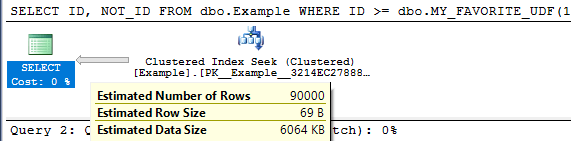
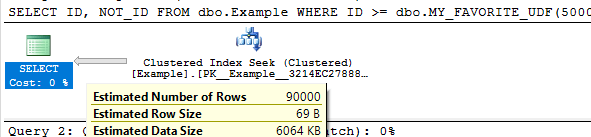
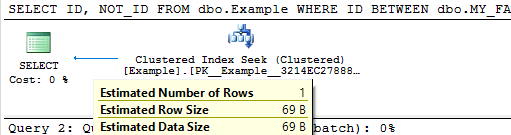
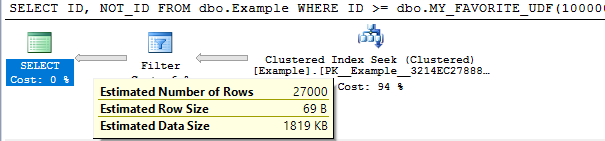
For this demo it’s not important that the UDF do anything so I must made it return the input. To keep things simple I’m not going to follow best practices around writing the query to avoid executing the UDFs for each row in the table. With the legacy cardinality estimator we get a cardinality estimate of 30% of the rows in the base table for each unknown equality condition. This means that a BETWEEN against two UDFs will give a cardinality estimate of 9%. The important point is that the cardinality estimate will not change as the inputs for the UDFs change, except for the trivial case in which the inputs are the same. This can easily be seen by varying the inputs and looking at the estimated execution plans:
SELECT ID, NOT_ID
FROM dbo.Example
WHERE ID >= dbo.MY_FAVORITE_UDF(100000)
AND ID <= dbo.MY_FAVORITE_UDF(900000);
Query plan:
SELECT ID, NOT_ID
FROM dbo.Example
WHERE ID >= dbo.MY_FAVORITE_UDF(500000)
AND ID <= dbo.MY_FAVORITE_UDF(499999);
Query plan:
SELECT ID, NOT_ID
FROM dbo.Example
WHERE ID BETWEEN dbo.MY_FAVORITE_UDF(1)
AND dbo.MY_FAVORITE_UDF(1);
Query plan:
The cardinality estimate (CE) of just that simple query doesn’t really matter. But it could matter very much if that query was part of a larger query with other joins. The 9% estimate may not serve us well depending on the rest of the query and what end users tend to input. We might know that the end users tend to pick large or small ranges. Even if we don’t know anything about the end users, certain queries may do better with larger or smaller cardinality estimates.
Decreasing the Cardinality Estimate
Let’s suppose that we do some testing and find that a cardinality estimate of lower than 9% is the best choice for typical end user inputs. There are a few techniques available to decrease the cardinality estimate by a fixed percentage.
Method 1
First option is to use TOP PERCENT along with an OPTIMIZE FOR hint. I’m not really a fan of TOP PERCENT. The implementation always spools unless it gets optimized out with TOP (100) percent. It would be nice if it didn’t spool. Anyway, perhaps getting a different cardinality estimate is worth the spool. Below is one method to get a cardinality estimate of 3% of the base table:
DECLARE @top_percent FLOAT = 100;

SELECT TOP (@top_percent) PERCENT ID, NOT_ID
FROM dbo.Example
WHERE ID >= dbo.MY_FAVORITE_UDF(100000)
AND ID <= dbo.MY_FAVORITE_UDF(900000)
OPTION (OPTIMIZE FOR (@top_percent = 33.33333333));
Query plan:
The percent value is a float so we can go almost anywhere between 0 – 9% for the final estimate. However, if we have to use scalar UDFs in this fashion there’s a chance that we’re doing it to write platform agnostic code. The TOP trick here isn’t likely to work in other platforms.
Method 2
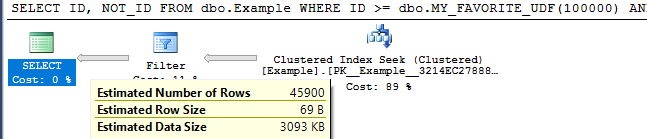
Suppose we add another inequality against a UDF that’s guaranteed not to change the results. 0.3^3 = 0.027 so we would expect an estimate of 2.7%. That is indeed what happens:
SELECT ID, NOT_ID
FROM dbo.Example
WHERE ID >= dbo.MY_FAVORITE_UDF(100000)
AND ID <= dbo.MY_FAVORITE_UDF(900000) -- redundant filter to change CE
AND ID > dbo.MY_FAVORITE_UDF(100000) - 1;
Query plan:
We can also mix things up with OR logic to make more adjustments. The query below has a fixed CE of 4.59%:
SELECT ID, NOT_ID
FROM dbo.Example
WHERE ID >= dbo.MY_FAVORITE_UDF(100000)
AND ID <= dbo.MY_FAVORITE_UDF(900000) -- redundant filter to change CE
AND (ID > dbo.MY_FAVORITE_UDF(100000) - 1
OR ID > dbo.MY_FAVORITE_UDF(100000) - 2);
Query plan:
It should be possible to mix and match to get something close to the CE that you want. I need to reiterate that as the code is written this will lead to additional UDF executions per row. You can also use techniques with fixed CE that don’t involve UDFs if you’re confident that Microsoft won’t change the guesses for them (which for the legacy cardinality estimator is probably a pretty safe assumption at this point).
Increasing the Cardinality Estimate
In some cases we will want a cardinality estimate above 9%.
Method 1
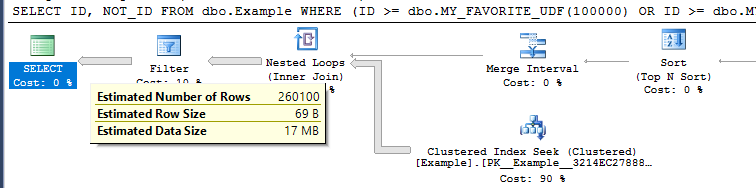
The TOP PERCENT trick won’t work here since TOP on its own can’t increase a cardinality estimate. We can use OR logic with UDFs to raise the estimate. Consider this filter condition:
ID >= dbo.MY_FAVORITE_UDF(100000)
OR ID >= dbo.MY_FAVORITE_UDF(900000) - 1
The first inequality gives an estimate of 30% and the second inequality gives an estimate of (100% – 30%) * 30% = 21%. In total we would get an estimate of 51%. If we apply that twice we should get an overall estimate of 0.51 * 0.51 = 26.01% . This is indeed what happens:
SELECT ID, NOT_ID
FROM dbo.Example
WHERE (ID >= dbo.MY_FAVORITE_UDF(1)
OR ID >= dbo.MY_FAVORITE_UDF(1) - 1)
AND (ID <= dbo.MY_FAVORITE_UDF(2)
OR ID <= dbo.MY_FAVORITE_UDF(2) + 1);
Query plan:
By adding more UDFs to the OR clauses we can increase the cardinality estimate further.
Method 2
For another way to do it we can take advantage of the fact that an inequality filter against a UDF has the same cardinality as the negated condition. That means that this:
SELECT ID, NOT_ID
FROM dbo.Example

EXCEPT

SELECT ID, NOT_ID
FROM dbo.Example
WHERE -- negate original expression
ID < dbo.MY_FAVORITE_UDF(100000) OR ID > dbo.MY_FAVORITE_UDF(900000);
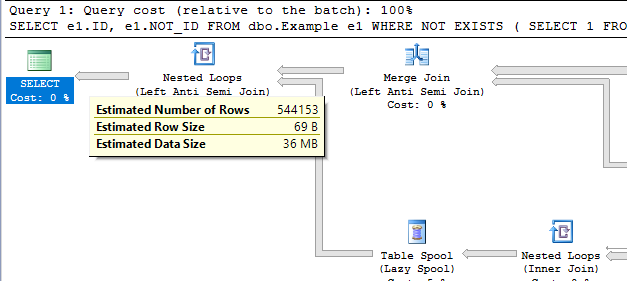
Will return the same results as the original query but have a much higher cardinality estimate. Writing it in a better way, we see a cardinality estimate of ~54.4%:
SELECT e1.ID, e1.NOT_ID
FROM dbo.Example e1
WHERE NOT EXISTS (
	SELECT 1
	FROM dbo.Example e2
	WHERE e1.ID = e2.ID
	-- negate original expression
	AND e2.ID < dbo.MY_FAVORITE_UDF(100000) OR e2.ID > dbo.MY_FAVORITE_UDF(900000)
);
Query plan:
This can be adjusted up and down by adding additional UDFs. It comes with the cost of an additional join so it’s hard to think of an advantage of doing it this way.
Method 3
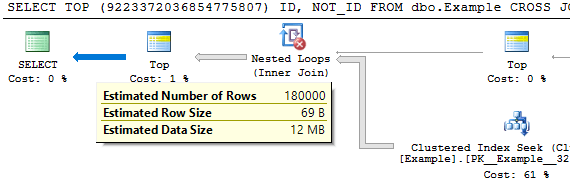
For a third option we can use the MANY() table-valued function developed by Adam Machanic. This function can be used to increase the cardinality estimate of a point in a plan by a whole number. If we want a cardinality estimate of 18% from the UDF it’s as easy as the following:
SELECT TOP (9223372036854775807) ID, NOT_ID
FROM dbo.Example
CROSS JOIN dbo.Many(2)
WHERE ID BETWEEN dbo.MY_FAVORITE_UDF(100000)
AND dbo.MY_FAVORITE_UDF(900000);
Query plan:
I added the superfluous TOP to prevent the MANY() reference from getting moved around in the plan. This method has the disadvantage that it may not be platform-agnostic.
Hopefully you never find yourself in a situation where you need to use tricks like this. Thanks for reading!
Going Further
If this is the kind of SQL Server stuff you love learning about, you’ll love my training. Blog readers get 25% off the Everything Bundle — over 100 hours of performance tuning content. Need hands-on help? I offer consulting engagements from targeted investigations to ongoing retainers. Want a quick sanity check before committing to a full engagement? Schedule a call — no commitment required.