Scalar UDFs answered a very good question: How do I ruin query performance so that two generations of consultants can make a living off of SQL Server?
In the videos below, which are part of my paid training, I’m going to show you how T-SQL Scalar UDFs ruin query performance, and one way of fixing them. If you’ve got lots of these little devils hanging around your codebase, you’ll wanna pay close attention, here to see how:
T-SQL Scalar UDFs force queries to run single threaded
T-SQL Scalar UDFs run once per row that they process
T-SQL Scalar UDFs hide all the work they actually do in query plans and other metrics
There’s a ton more available in the full paid training courses, so hit the link below to get 75% off the whole thing.
Thanks for reading!
Going Further
If this is the kind of SQL Server stuff you love learning about: these days I have AI do the annoying stuff for me. My new video course teaches you to work the same way, and I teach whole teams in a one-day workshop. Someone still has to know enough SQL Server to keep the robots in check, and that’s what my training is for.
While helping someone tame a bunch of rather unfortunate scalar valued functions, we eventually hit a point where they were able to do some of the rewrites themselves. During testing, they ran into a situation where performance got worse when they made the switch over, and it wasn’t because an Eager Index Spool popped up.
I was able to come up with a demo that shows a reasonable enough performance difference in a couple queries using the same technique as I gave them to fix things.
So uh, here goes that.
Muppet
The query they were tuning had a couple OUTER APPLYs already written into it, and so they added the function on as another.
SELECT
    u.DisplayName,
    b.Name,
    nbi.AvgPostsPerDay
FROM dbo.Users AS u
OUTER APPLY
(
    SELECT
        CreationDate =
            MIN(p.CreationDate)
    FROM dbo.Posts AS p
    JOIN dbo.Votes AS v
        ON  v.PostId = p.Id
        AND v.VoteTypeId = 1
    WHERE p.OwnerUserId = u.Id
) AS p
OUTER APPLY
(
    SELECT TOP (1)
        b.Name
    FROM dbo.Badges AS b
    WHERE b.UserId = u.Id
    ORDER BY b.Date DESC
) AS b
OUTER APPLY dbo.no_bueno_inline(u.Id, p.CreationDate) AS nbi
WHERE u.Reputation >= 100000
ORDER BY u.Reputation DESC;
Since they didn’t want to lose rows to the function, they couldn’t use CROSS APPLY. Good enough.
Moutarde
But what they really wanted was to move the function up into the select list, like this:
SELECT
    u.DisplayName,
    b.Name,
    AvgPostsPerDay =
    (
        SELECT
            nbi.AvgPostsPerDay
        FROM dbo.no_bueno_inline
        (
            u.Id,
            p.CreationDate
        ) AS nbi
    )
FROM dbo.Users AS u
OUTER APPLY
(
    SELECT
        CreationDate =
            MIN(p.CreationDate)
    FROM dbo.Posts AS p
    JOIN dbo.Votes AS v
        ON  v.PostId = p.Id
        AND v.VoteTypeId = 1
    WHERE p.OwnerUserId = u.Id
) AS p
OUTER APPLY
(
    SELECT TOP (1)
        b.Name
    FROM dbo.Badges AS b
    WHERE b.UserId = u.Id
    ORDER BY b.Date DESC
) AS b
WHERE u.Reputation >= 100000
ORDER BY u.Reputation DESC;
That way you don’t lose any rows like you could with CROSS APPLY, and the optimizer is more likely to holler at the function later on in the query plan, since the values from it are only being projected — that’s fancy for selected.
Mapperoo
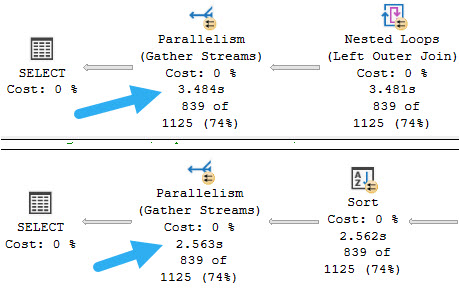
The full query plan is a bit much to untangle quickly in this post, but the timing difference is noticeable enough for my purposes:
tootin
So if you ever end up rewriting a scalar valued function as an inline table valued function, make sure you test calling it in the same way. Moving query syntax around may produce logically equivalent results, but won’t always produce equivalent performance.
Thanks for reading!
Going Further
If this is the kind of SQL Server stuff you love learning about: these days I have AI do the annoying stuff for me. My new video course teaches you to work the same way, and I teach whole teams in a one-day workshop. Someone still has to know enough SQL Server to keep the robots in check, and that’s what my training is for.
I see people do things like this fairly often with UDFs. I don’t know why. It’s almost like they read a list of best practices and decided the opposite was better.
This is a quite simplified function, but it’s enough to show the bug behavior.
While writing this, I learned that you can’t create a recursive (self-referencing) scalar UDF with the schemabinding option. I don’t know why that is either.
Please note that this behavior has been reported to Microsoft and will be fixed in a future update, though I’m not sure which one.
Swallowing Flies
Let’s take this thing. Let’s take this thing and throw it directly in the trash where it belongs.
CREATE OR ALTER FUNCTION dbo.how_high
(
    @i int,
    @h int
)
RETURNS int
WITH
    RETURNS NULL ON NULL INPUT
AS
BEGIN

    SELECT
       @i += 1;

    IF @i < @h
    BEGIN
        SET
            @i = dbo.how_high(@i, @h);
    END;

    RETURN @i;

END;
GO
Seriously. You’re asking for a bad time. Don’t do things like this.
Unless you want to pay me to fix them later.
Froided
In SQL Server 2019, under compatibility level 150, this is what the behavior looks like currently:
/*
Works
*/
SELECT
    dbo.how_high(0, 36) AS how_high;
GO

/*
Fails
*/
SELECT
    dbo.how_high(0, 37) AS how_high;
GO
The first execution returns 36 as the final result, and the second query fails with this message:
Msg 217, Level 16, State 1, Line 40
Maximum stored procedure, function, trigger, or view nesting level exceeded (limit 32).
A bit odd that it took 37 loops to exceed the nesting limit of 32.
This is the bug.
Olded
With UDF inlining disabled, a more obvious number of loops is necessary to encounter the error.
/*
Works
*/
SELECT
    dbo.how_high(0, 32) AS how_high
OPTION (USE HINT('DISABLE_TSQL_SCALAR_UDF_INLINING'));
GO

/*
Fails
*/
SELECT
    dbo.how_high(0, 33) AS how_high
OPTION (USE HINT('DISABLE_TSQL_SCALAR_UDF_INLINING'));
GO
The first run returns 32, and the second run errors out with the same error message as above.
Does It Matter?
It’s a bit hard to imagine someone relying on that behavior, but I found it interesting enough to ask some of the nice folks at Microsoft about, and they confirmed that it shouldn’t happen. Again, it’ll get fixed, but I’m not sure when.
Thanks for reading!
Going Further
If this is the kind of SQL Server stuff you love learning about: these days I have AI do the annoying stuff for me. My new video course teaches you to work the same way, and I teach whole teams in a one-day workshop. Someone still has to know enough SQL Server to keep the robots in check, and that’s what my training is for.
Let’s say at some point, you just didn’t know any better, and you wrote a scalar function to make some common thing you needed to do all “modular” and “portable” and stuff.
Good on you, not repeating yourself. Apparently I repeat myself for a living.
Anyway, you know what stinks? When you hit divide by zero errors. It’d be cool if math fixed that for us.
Does anyone know how I can get in touch with math?
Uncle Function
Since you’re a top programmer, you know about this sort of stuff. So you write a bang-up function to solve the problem.
Maybe it looks something like this.
CREATE OR ALTER FUNCTION dbo.safety_dance(@n1 INT, @n2 INT)
RETURNS INT
WITH SCHEMABINDING,
     RETURNS NULL ON NULL INPUT
AS
BEGIN
RETURN
(
    SELECT @n1 / NULLIF(@n2, 0)
);
END
GO
You may even be able to call it in queries about like this.
SELECT TOP (5)
    u.DisplayName,
    fudge = dbo.safety_dance(SUM(u.UpVotes), COUNT(*))
FROM dbo.Users AS u
GROUP BY u.DisplayName
ORDER BY fudge DESC;
The problem is that it makes this query take a long time.
you compute that scalar, sql server
At 23 seconds, this is probably unacceptable. And this is on SQL Server 2019, too. The function inlining thing doesn’t quite help us, here.
One feature restriction is this, so we uh… Yeah.
The UDF does not contain aggregate functions being passed as parameters to a scalar UDF
But we’re probably good query tuners, and we know we can write inline functions.
Ankle Fraction
This is a simple enough function. Let’s get to it.
CREATE OR ALTER FUNCTION dbo.safety_dance_inline(@n1 INT, @n2 INT)
RETURNS TABLE
WITH SCHEMABINDING
AS
RETURN
(
    SELECT @n1 / NULLIF(@n2, 0) AS safety
);
Will it be faster?
SELECT TOP (5)
    u.DisplayName,
    fudge = (SELECT * FROM dbo.safety_dance_inline(SUM(u.UpVotes), COUNT(*)))
FROM dbo.Users AS u
GROUP BY u.DisplayName
ORDER BY fudge DESC;
Well, yes. Mostly because it throws an error.
Msg 4101, Level 15, State 1, Line 35
Aggregates on the right side of an APPLY cannot reference columns from the left side.
Well that’s weird. Who even knows what that means? There’s no apply, here.
What’s your problem, SQL Server?
Fixing It
To get around this restriction, we need to also rewrite the query. We can either use a CTE, or a derived table.
--A CTE
WITH counts AS
(
    SELECT
        u.DisplayName,
        SUM(Upvotes) AS Upvotes,
        COUNT(*) AS records
    FROM dbo.Users AS u
    GROUP BY u.DisplayName
)
SELECT TOP(5)
    c.DisplayName,
    fudge = (SELECT * FROM dbo.safety_dance_inline(c.Upvotes, c.records) AS s)
FROM counts AS c
ORDER BY fudge DESC;

--A derived table
SELECT TOP(5)
    c.DisplayName,
    fudge = (SELECT * FROM dbo.safety_dance_inline(c.Upvotes, c.records) AS s)
FROM
(
    SELECT
        u.DisplayName,
        SUM(Upvotes) AS Upvotes,
        COUNT(*) AS records
    FROM dbo.Users AS u
    GROUP BY u.DisplayName
) AS c
ORDER BY fudge DESC;
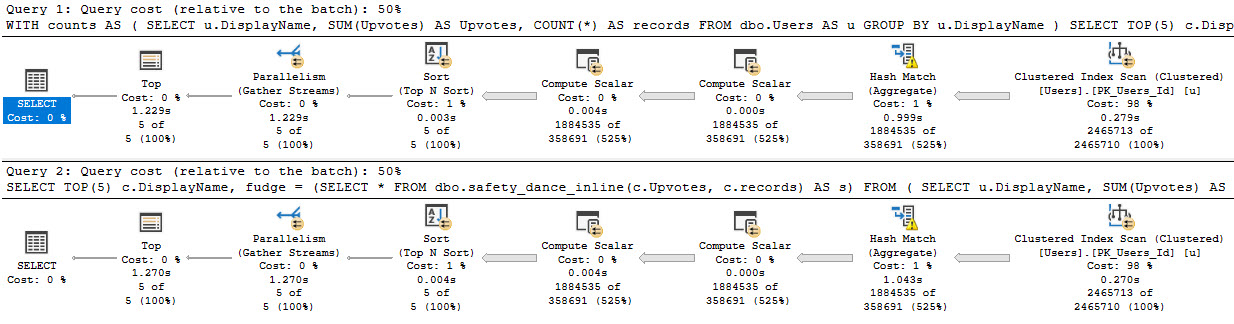
Is it faster? Heck yeah it is.
you’re just so parallel, baby
Thanks for reading!
Going Further
If this is the kind of SQL Server stuff you love learning about: these days I have AI do the annoying stuff for me. My new video course teaches you to work the same way, and I teach whole teams in a one-day workshop. Someone still has to know enough SQL Server to keep the robots in check, and that’s what my training is for.
Yesterday we looked at where table variables can have a surprising! impact on performance. We’ll talk more about them later, because that’s not the only way they can stink. Not by a long shot. Even with 1 row in them.
Anyway, look, today’s post is sort of like yesterday’s post, except I’ve had two more drinks.
What people seem to miss about scalar valued functions is that there’s no distinction between ones that touch data and ones that don’t. That might be some confusion with CLR UDFs, which cause parallelism issues when they access data.
Beans and Beans
What I want to show you in this post is that it doesn’t matter if your scalar functions touch data or not, they’ll still have similar performance implications to the queries that call them.
Now look, this might not always matter. You could just use a UDF to assign a value to a variable, or you could call it in the context of a query that doesn’t do much work anyway. That’s probably fine.
But if you’re reading this and you have a query that’s running slow and calling a UDF, it just might be why.
If the UDF queries table data and is inefficient
If the UDF forces the outer query to run serially
They can be especially difficult on reporting type queries. On top of forcing them to run serially, the functions also run once per row, unlike inline-able constructs.
Granted, this once-per-row thing is worse for UDFs that touch data, because they’re more likely to encounter the slings and arrows of relational data. The reads could be blocked, or the query in the function body could be inefficient for a dozen reasons. Or whatever.
I’m Not Touching You
Here’s a function that doesn’t touch anything at all.
CREATE OR ALTER FUNCTION dbo.little_function (@UserId INT)
RETURNS BIGINT
WITH SCHEMABINDING,
     RETURNS NULL ON NULL INPUT
AS
BEGIN
DECLARE @d DATETIME = GETDATE();
RETURN
(
    (
      SELECT @UserId
    )
)
END
GO
I have the declared variable in there set to GETDATE() to disable UDF inlining in SQL Server 2019.
Yes, I know there’s a function definition to do the same thing, but I want you to see just how fragile a feature it is right now. Again, I love where it’s going, but it can’t solve every single UDF problem.
Anyway, back to the story! Let’s call that function that doesn’t do anything in our query.
SELECT TOP (1000)
    c.Id,
    dbo.little_function(c.UserId)
FROM dbo.Comments AS c
ORDER BY c.Score DESC;
The query plan looks like so, with the warning in properties about not being able to generate a valid parallel plan.
what’s so great about you?
In this plan, we see the same slowdown as the insert to the table variable. There’s no significant overhead from the function, it’s just slower in this case because the query is forced to run serially by the function.
This is because of the presence of a scalar UDF, which can’t be inlined in 2019. The serial plan represents, again, a significant slowdown over the parallel plan.
Bu-bu-bu-but wait it gets worse
Let’s look at a worse function.
CREATE OR ALTER FUNCTION dbo.big_function (@UserId INT)
RETURNS BIGINT
WITH SCHEMABINDING,
     RETURNS NULL ON NULL INPUT
AS
BEGIN
DECLARE @d DATETIME = GETDATE();
RETURN
(
    (
      SELECT SUM(p.Score)
      FROM dbo.Posts AS p
      WHERE p.OwnerUserId = @UserId
    ) -
    (
      SELECT SUM(c.Score)
      FROM dbo.Comments AS c
      WHERE c.UserId = @UserId
    )
)
END
GO
Not worse because it’s a different kind of function, just worse because it goes out and touches tables that don’t have any helpful indexes.
Getting to the point, if there were helpful indexes on the tables referenced in the function, performance wouldn’t behave as terribly. I’m intentionally leaving it without indexes to show you a couple funny things though.
Because this will run a very long time with a top 1000, I’m gonna shorten it to a top 1.
SELECT TOP (1)
    c.Id,
    dbo.big_function(c.UserId)
FROM dbo.Comments AS c
ORDER BY c.Score DESC;
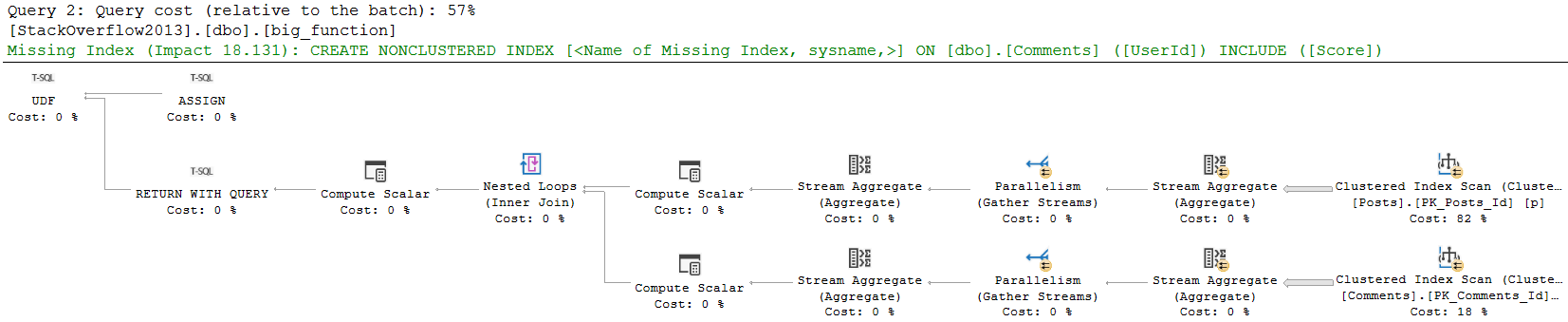
Notice that in this plan, the compute scalar takes up a more significant portion of query execution time. We don’t see what the compute scalar does, or what the function itself does in the actual query plan.
got yourself a function
The compute scalar operator is what’s responsible for the scalar UDF being executed. In this case, it’s just once. If I had a top that asked for more than one row, It would be responsible for more executions.
We don’t see the function’s query plan in the actual query, because it could generate a different query plan on each execution. Would you really want to see 1000 different query plans?
Anyway, it’s quite easy to observe with operator times where time is spent here. Most people read query plans from right to left, and that’s not wrong.
In that same spirit, we can add operator times up going from right to left. Each operator not only account for its own time, but for the time of all operators that come before it.
The clustered index scan takes 7.5 seconds, the Sort takes 3.3 seconds, and the compute scalar takes 24.9 seconds. Wee.
Step Inside
If you get an actual plan for this query, you won’t see what the function does. If you get an estimated plan, you can get a picture of what the function is up to.
monster things
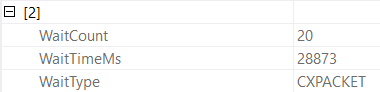
This is what I meant by the function body being allowed to go parallel. This may lead to additional confusion when the calling query accrues parallel query waits but shows no parallel operators, and has a warning that a parallel plan couldn’t be generated.
hi my name is
It’s Not As Funny As It Sounds
If you look at a query plan’s properties and see a non-parallel plan reason, table variable modifications and scalar UDFs will be the most typical cause. They may not always be the cause of your query’s performance issues, and there are certainly many other local factors to consider.
It’s all a bit like a game of Clue. You might find the same body in the same room with the same bashed in head, but different people and blunt instruments may have caused the final trauma.
Morbid a bit, sure, but if query tuning were always a paint by numbers, no one would stay interested.
Anyway.
In the next posts? we’ll look at when SQL Server tells you it needs an index, and when it doesn’t.
Thanks for reading!
Going Further
If this is the kind of SQL Server stuff you love learning about: these days I have AI do the annoying stuff for me. My new video course teaches you to work the same way, and I teach whole teams in a one-day workshop. Someone still has to know enough SQL Server to keep the robots in check, and that’s what my training is for.
Yesterday we created an index, and things went pretty well. Good for us. By next week we’ll have six pack abs.
Today we’re going to look at things that I see happen pretty often in queries that mess with effciency.
If one were to sit and think carefully about the way B-Tree indexes are implemented, where key columns define order, one may see these problems coming a mile away.
Then again, one might expect a full formed datababby system to be able to figure some of these things out and use indexes appropriately anyway.
General Anti-Patterns
I’ve posted this on here a number of times, but here it goes again.
Things that keep SQL Server from being able to seek:
Function(Column) = …
Column + Column = …
Column + Value = …
Value + Column = …
Column = @Value or @Value IS NULL
Column LIKE ‘%…’
Some implicit conversions (data type mismatches)
Seeks aren’t always necessary, or even desirable, and likewise scans aren’t always bad or undesirable. But if we’re going to give our queries the best chance of running well, our job is most often to give the optimizer every opportunity to make the right decisions. Being the optimizer is hard enough without us grabbing it by the nose and poking it in the eyes.
To fix code, or make code that looks like that tolerable to The Cool DBA Kids™, there are some options like:
Computed columns
Dynamic SQL
Rewrites
Different options work well in different scenarios, of course. And since we’re here, I might as well foreshadow a future post: These patterns are most harmful when applied to the leading key column of an index. When they’re residual predicates that follow seek predicates, they generally make less of a difference. But we’re not quite there yet.
The general idea, though, is that as soon as we write queries in a way that obscure column data, or introduce uncertainty about what we’re searching for, the optimizer has a more difficult time of things.
Do It Again
Let’s compare a couple different ways of writing yesterday’s query. One good, one bad (in that order).
SELECT p.CreationDate,
       COUNT_BIG(*) AS records
FROM dbo.Posts AS p
WHERE p.CreationDate >= '20131225'
GROUP BY p.CreationDate;

SELECT p.CreationDate,
       COUNT_BIG(*) AS records
FROM dbo.Posts AS p
WHERE YEAR(p.CreationDate) = 2013
AND   MONTH(p.CreationDate) = 12
AND   DAY(p.CreationDate) >= 25
GROUP BY p.CreationDate;
The mistake people often make here is that they think these presentation layer functions have some relational meaning. They don’t.
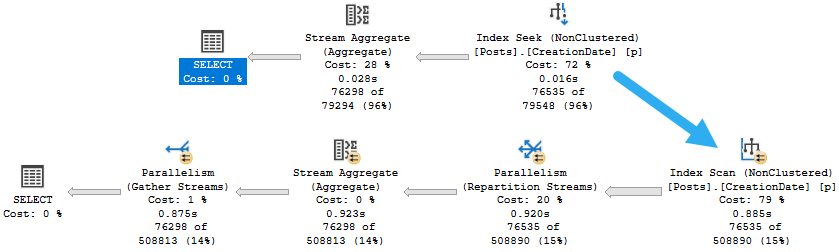
They’re presentation layer functions. Let’s see those execution plans. Maybe then you’ll believe me.
horse and carriage
Things are not so hot when we pile a Mess Of Functions™ into the where clause, are they?
I mean, our CPUs are hot, but that’s generally not what we’re after.
The Use Of Indexes
We could still use our index. Many people will talk about functions preventing the use of indexes, but more precisely we just can’t seek into them.
But you know what can prevent the use of nonclustered indexes? Long select lists.
Next time, we’ll look at that.
Thanks for reading!
Going Further
If this is the kind of SQL Server stuff you love learning about: these days I have AI do the annoying stuff for me. My new video course teaches you to work the same way, and I teach whole teams in a one-day workshop. Someone still has to know enough SQL Server to keep the robots in check, and that’s what my training is for.
There’s a lot of terrible advice out there about how to do this. It’s terrible because it involves the kinds of functions that really hurt performance: the scalar and multi-statement variety.
Worse, they’re usually full of while loops that build strings. These kinds of scalar functions aren’t currently eligible for inlining in 2019 either, so don’t think you’re going to get helped there, because they build strings.
SELECT with variable accumulation/aggregation (for example, SELECT @val += col1 FROM table1) is not supported for inlining.
Ain’t Perfect
I don’t think my solutions are perfect. Heck, doing this with T-SQL at all is a bad idea. You should be using CLR for this, but CLR has had so little support or betterment over the years, I don’t blame you for not embracing it. My dear friend Josh has taken the liberty of doing this part for you.
It would be nice if SQL Server had the kind of native support for writing in other languages that free databases do (especially since SQL Server supports Python, R, and Java now). But you know, we really needed uh… Well, just pick any dead-end feature that’s been added since 2005 or so.
My solutions use a numbers table. You’re free to try replacing that aspect of them with an inlined version like Jeff Moden uses in his string splitter, but I found the numbers table approach faster. Granted, it’s also less portable, but that’s a trade-off I’m willing to make.
What I don’t like about either solution is that I have to re-assemble the string using XML PATH. If you’ve got another way to do that, I’m all ears. I know 2017 has STRING_AGG, but that didn’t turn out much better, and it wouldn’t be usable in other supported versions.
Both scripts are hosted on my GitHub repo. I don’t want to set the example of using a blog post as version control.
SELECT u.DisplayName, gl.*
FROM dbo.Users AS u
    CROSS APPLY dbo.get_letters(u.DisplayName) AS gl
WHERE u.Reputation = 11;
Complaint Department
If you’ve got ideas, bugs, or anything else, please let me know on GitHub. I realize that both scripts have holes in them, but you may find them good enough to get you where you’re going.
Thanks for reading!
Going Further
If this is the kind of SQL Server stuff you love learning about: these days I have AI do the annoying stuff for me. My new video course teaches you to work the same way, and I teach whole teams in a one-day workshop. Someone still has to know enough SQL Server to keep the robots in check, and that’s what my training is for.
In this video, I dive into the world of multi-statement table-valued functions and why they can be a performance nightmare in SQL Server. I share my experience of rewriting these functions to inline table-valued functions using startup expression predicates, demonstrating how to handle complex logic within them without compromising performance. I walk you through the process step-by-step, showing that even if your function has conditional blocks like `IF` statements, there are ways to refactor it into a more efficient form. By leveraging Common Table Expressions (CTEs) and careful predicate handling, we can achieve significant improvements in execution plans and overall query performance. So, whether you’re dealing with simple or complex logic within these functions, this video will equip you with the knowledge to tackle them head-on!
Full Transcript
I’m so ready. So ready to leave. I just have two videos left. After this one, there’s one video, but I have succumbed to my weaknesses, and it is champagne time at Shea Darling. And so, because it is champagne time, we should get this before it’s too much champagne time. So I wanted to talk about rewriting multi-statement table-valued functions, because they are generally bad for performance, even if the query that populates them is fairly simple. You just have like the goofy overhead of the table variable. On versions prior to SQL Server 2017, there was like almost no hope for these things. 2017 got something called interleaved execution, which gave you table cardinality for the, for like, cardinality estimates coming out of the function. Prior to that it was 100 rows for 2014 and one row for that. It was like a bad time. It was a bad time across the board.
The thing is when I talk to a lot of people, they’re like, I can’t rewrite this. It’s too complicated. There are if blocks. I’m like, yes, you can. Don’t be ridiculous. We can do this together. Hold your hand. Run through the, run, run through the field. Pick some flowers. I don’t know. It’ll be fun. Be romantic. So this is our multi-statement table-valued function. We have, it takes some stuff in here, user ID and a post type ID, and we declare a table variable with some columns in it. They’re all very, very useful, necessary columns. And then based on which post type ID we pass in, we will execute a block depending on, on that. And this is where people are often like, well, there’s just no way to do this. There’s no way to rewrite this.
I’m like, I’m very silly. Now, no, you, if, if you were to rewrite this, you couldn’t just do this, right? You couldn’t say this return table as, and then if blah, blah, do this, blah, blah, do this, blah, blah, do this. That will not work. There are red squiggles everywhere. We can see from the red squiggles that this will not work. This will not compile. If I try to create this, we’ll get, we’ll get some funk thrown at us. Incorrect syntax near the keyword if. Sorry to hear that. But what you can do inside of an inline table-valued function that does not require an if branch is take advantage of startup expression predicates.
And what I mean by that is we can stack some CTE. Now, this is a good use for CTE. I mean, granted, we could have used derived tables here or something too, but whatever. So what we’ll do is we’ll still pass in a user ID and a post type ID.
And what we’ll do is we’ll have a CTE called questions, and that’ll take care of the post type ID equals one stuff up here. And we’ll add a filter inside of here and say you only fire off if post type ID equals one. And we’ll do the same thing for answers and say you only fire off if post type ID equals two.
And we’ll do the same thing for other where if post type ID is greater than two, then we’ll fire this off. And then we’ll have a third CTE that is a union all of those three, right? So we have questions, answers. I don’t know why I put that in the kind of funny order, but questions, answers, and other.
And then we’ll just select the top one from that order by score descending. And this will work just fine, and it will work just wonderfully. And something that I think is nice about this is that even if we don’t need data from one of them, they won’t fire.
So the execution plan will be complicated. But if we look at it kind of closely, we’ll see that we only fired off and hit the post table the once. The rest of the time we got constant scans from the other two accesses there.
Now, oh rather, sorry, we have to quote this one out. That’s what I was doing wrong. Ha ha ha. If we quote this out, ooh la la, and we zoom out a little bit, we can see that we only touched the post table once.
We did not touch it three times because of the startup expression predicates. The three other times we got, or the two other times, rather, we got these constant scan operators. What I messed up before is that, you know, I ran the cross-apply part.
So even with this quoted out, that did happen. But if I flip things around and I bring this in and I bring this out and I get rid of you, and actually I should probably get rid of you too. There we go.
And we run this, the same thing will happen where SQL Server will look at what was going on and say, oh, I don’t need that first one. I’m only going to use that second one this time. And then if I need both, of course, then we’ll run both and we’ll get stuff from both, I guess. Lucky us.
All right. We got all that good stuff there. Yep. So we hit things twice because we had the two applies run. But anyway, that’s not really the point. The point is that there are ways to write more complicated multi-statement table-valued functions as inline table-valued functions.
It does take, you know, some practice. It does take some getting used to. But you can do it.
And you can often get much better performance from them in general. So that’s that. I don’t know. If you don’t like it, you don’t have to. Just do whatever you want.
It’s your life. Anyway, I’ll drink to that. I will see you over in the next video. We will talk about where filtered indexes are still broken.
See you there. Thanks for watching.
Going Further
If this is the kind of SQL Server stuff you love learning about: these days I have AI do the annoying stuff for me. My new video course teaches you to work the same way, and I teach whole teams in a one-day workshop. Someone still has to know enough SQL Server to keep the robots in check, and that’s what my training is for.
I’ve posted quite a bit about how cached plans can be misleading.
I’m gonna switch that up and talk about how an actual plan can be misleading, too.
In plans that include calling a muti-statement table valued function, no operator logs the time spent in the function.
Here’s an example:
SELECT TOP (100)
     p.Id AS [Post Link],
     vs.up,
     vs.down
FROM dbo.VoteStats() AS vs --The function
JOIN dbo.Posts AS p
    ON vs.postid = p.Id
WHERE vs.down > vs.up_multiplier
AND   p.CommunityOwnedDate IS NULL
AND   p.ClosedDate IS NULL
ORDER BY vs.up DESC
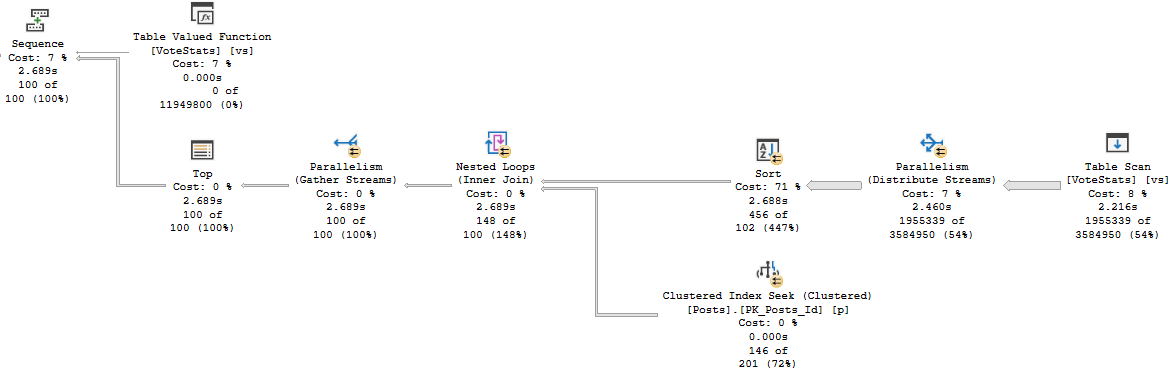
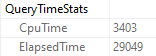
When I run the query, it drags on for 30-ish seconds, but the plan says that it only ran for about 2.7 seconds.
As we proceed
But there it is in Query Time Stats! 29 seconds. What gives?
Hi there!
Estimations
If we look at the estimated plan for the function, we can see quite a thick arrow pointing to the table variable we populate for our results.
Meatballs
That process is all part of the query, but it doesn’t show up in any of the operators. It really should.
More specifically, I think it should show up right here.
Thanks for reading!
Going Further
If this is the kind of SQL Server stuff you love learning about: these days I have AI do the annoying stuff for me. My new video course teaches you to work the same way, and I teach whole teams in a one-day workshop. Someone still has to know enough SQL Server to keep the robots in check, and that’s what my training is for.
In this video, I delve into scalar valued functions and their impact on query plans, particularly focusing on how they can mislead us when analyzing execution plans. I demonstrate using SQL Server 2017 to show a scenario where a scalar valued function causes significant CPU usage despite having a low cost in the overall plan. By leveraging SPBlitzCache, we explore the detailed behavior of these functions and uncover surprising insights about their execution, such as how they can run multiple times per row returned by the query. This video is part of my ongoing series on hidden issues in the plan cache that can trip up even experienced SQL Server professionals.
Full Transcript
Hello, Erik Darling here to continue or start really this is to be the first this is the first one where there’s like actual stuff going on in my series about things that lie to you in the plan cache. And we’re gonna start with everyone’s favorite bad actor, the scalar valued function. Now, I know what you can… Apparently someone is opening a crypt outside. So, I know that you’re gonna be sitting there saying to yourself, this is fixed in SQL Server 2019. No need to worry about this anymore, but that’s not true.
There are some interesting and surprising limitations and gutches around how SQL, like what kind of, what kind of function SQL Server can inline, the extent to which they can be inlined, and some other things. This particular function is the kind that cannot be inlined. There are, I don’t know, of course, other ways that you can do this sort of thing. There’s a built-in function that can do string aggregations, but it’s a little incomplete for some people.
There are some, you know, interesting side use cases where you can’t use the built-in string ag function. So, anyway, what I’m gonna show you here is let’s turn on… Actually, I don’t have to turn on query plans. I’m smart. So, I built all of these stored procedures to have set statistics XML on inside them.
So, I don’t have to turn on query plans anymore. I don’t have to remind myself to do that and then turn them off and then blah, blah, blah, blah, blah. Anyway, let’s have fun. So, I’m going to run this query. And this should take around about 10 seconds to run, which is almost the perfect amount of time for any demo query. When they take longer than that, I have to talk and fill up a lot of dead space. And that’s where things get dangerous.
That’s when I say things that I shouldn’t. That’s when I probably break NDAs and stuff. So, let’s look at the query plan. Now, it’s gonna be a little bit more obvious what happened here with… Because this is SQL Server 2017 and I’m using SSMS 18 point, whatever latest is. Just insert latest number here.
It might not even be 18. It might be 25 by the time you watch this. Who knows? But the point is, with the query operator times here, it’s a lot easier to see exactly where SQL Server spent time. And it’s gonna be pretty easy to see from here where things have gotten…
Where things could be misleading as far as the plan cache goes. So, we spend 0.000… 0.002 seconds scanning the cluster and index of the users table. However, SQL Server assigns 99% of the cost there.
Ditto this top operator, which costs 1%. And we don’t really spend any more time there. But, then we get over to this compute scalar… And… this doesn’t go so well.
This runs for 13.5 seconds and costs 0% of anything. So, lucky us. Lucky us to have this information, to have these details. So, let’s close that out. And let’s take a look at what that looks like in the plan cache.
Now, I use SPBlitzCache for all this stuff. If you want to use it, you can go to firstresponderkit.org. That’s firstresponderkit.org.
I still contribute to this thing. I love it. I believe heavily in it. And, as I was… as I was… starting to put this presentation together, I realized that a lot of the stuff in here was kind of like an ode to SPBlitzCache. And, you know, the work that people have done on it over the years.
So, it’s a really cool, handy tool to have. And, let’s run this and look directly at the stored procedure that we just ran. Now, a lot of people don’t realize that you can pass in a stored procedure name and get results for one specific stored procedure in the cache.
But, I think it’s pretty spiffy. But, what we’ll have here is we’ll have a couple warnings. One for forced serialization.
That forced serialization warning is because we call the scalar valued function. And, we’ll also have that low cost, high CPU warning. Now, if we go over here and we see this cost of 0.76 whatever whatever, that’s a very low cost query. It’s a bit suspicious that a query with that low of a cost will run… will use 50 seconds of CPU time and run for 13 seconds total.
Crazy, right? Crazy. Now, if we look at the query plan for this and we look at what happened over here, it would be fairly difficult to tell exactly why this took 13 seconds.
A lot of people would say, Damn, this clustered index scan 99%. How dare you exist? How dare you scan that clustered index?
But, reads aren’t the problem. Using a ton of CPU is. Now, we can, if we hit the properties of this compute scalar, we can look here and we can see the call to the function, right?
We can see this, the call to the function here. And this might give us some, some clue as to what was happening, perhaps. But, it would still be quite misleading if you were just, just getting started looking at execution plans.
You would focus on this clustered index scan. You would freak out for all sorts of reasons. And you would probably not know to hit F4 or to get the properties of an operator in order to, see, get more details about it.
So, now that we know what happened with, or now that we know that we called a scalar valued function, we can use SPBlitzCache to focus in on the scalar valued function. We can see exactly what it did.
Now, something interesting here. This cost 40 query bucks, right? If we remember the cost of this store procedure, it was like 0.03 or 7 or something. It was very, very low.
The cost of the function was not baked into the cost of the query that called it. Right? Because it’s black box, black boxing of things. Now, we can see, well, this is kind of a lot of warnings over here.
None of them really pertinent to what we care about. But you can see that SPBlitzCache did indeed go crazy and look at stuff. But I want to show you something kind of interesting.
The query plan for the scalar valued function went parallel. That’s why a lot of CPU got used for the calling query. The calling query itself is forced to run serially, but the body of the scalar valued function can go parallel.
So that’s why it chewed up a ton of CPU. And there’s also the fact that for the 100 rows that we executed, remember there’s a top 100 in here. For the 100 rows that we executed that function for, the function executed once per row.
Now, this, it’s a pretty convenient shortcut to say that scalar valued functions run once per row returned by the query. That’s highly dependent on where the compute scalar is positioned in the query plan. If you have a top 100 query and the scalar valued function doesn’t execute until like the very, to the very leftmost portion of the plan, then yeah, it might only execute for 100 rows.
But if that compute scalar is somewhere else in the query plan, if it’s like deeper into the plan, where like maybe you have more rows coming out of a table and like you, you use, you, you call the function earlier in the query, then it could end up running a lot more times.
In this case, it just happens to run a hundred times because of the top, top 100. And the fact that it, you know, the only, it’s at the very beginning, beginning end of the query plan. It’s at the finale of the query plan.
So we can see that it used a lot of CPU for the, well, I mean, in total, we’ll use it about 500 milliseconds on average for the 100 calls. So you can see that it did chew up. That was, did chew up a lot of CPU and time. And that’s where we spent most of our, our awful stuff, time things doing whatever.
It’s early in the morning. It’s 934. I haven’t been up this early in weeks, school vacation and everything. I’ve been sleeping in baby. Oh, it’s back to the grind.
Anyway, I’m going to call, I’m going to call it a day on this video. And I’m going to record the next video, which in case you, your eyes have not wandered, will be about table variables, which still aren’t fixed, still aren’t fully fixed in SQL Server 2019.
Anyway, thank you for watching. I hope you learned some stuff. Hope you enjoy yourselves and I will see you over in the next video.
Going Further
If this is the kind of SQL Server stuff you love learning about: these days I have AI do the annoying stuff for me. My new video course teaches you to work the same way, and I teach whole teams in a one-day workshop. Someone still has to know enough SQL Server to keep the robots in check, and that’s what my training is for.