This post is about a slightly different set of things that I want you to be aware of.
Not So Fast
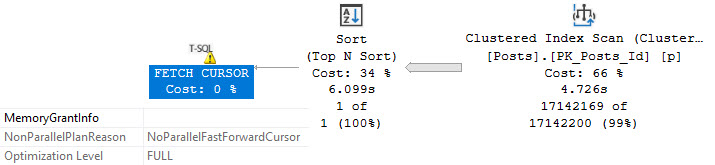
First, FAST_FORWARD cursors force your queries to run serially, and plan quality may suffer if a dynamic cursor is chosen.
Take this query for example:
SELECT TOP (1)
    p.OwnerUserId
FROM dbo.Posts AS p
ORDER BY p.Score DESC;
By itself in the wilderness it gets a parallel plan and runs for under 1 second.
thanks, parallel
But in the grips of a fast forward cursor, we’re not so lucky.
DECLARE @i int;
DECLARE c CURSOR
    LOCAL
    FAST_FORWARD

FOR
SELECT TOP (1)
    p.OwnerUserId
FROM dbo.Posts AS p
ORDER BY p.Score DESC;

OPEN c;
    FETCH NEXT
    FROM c INTO @i;

WHILE @@FETCH_STATUS = 0
BEGIN
    PRINT @i;
    BREAK;
END;
CLOSE c;
DEALLOCATE c;
n4u
Other Problems
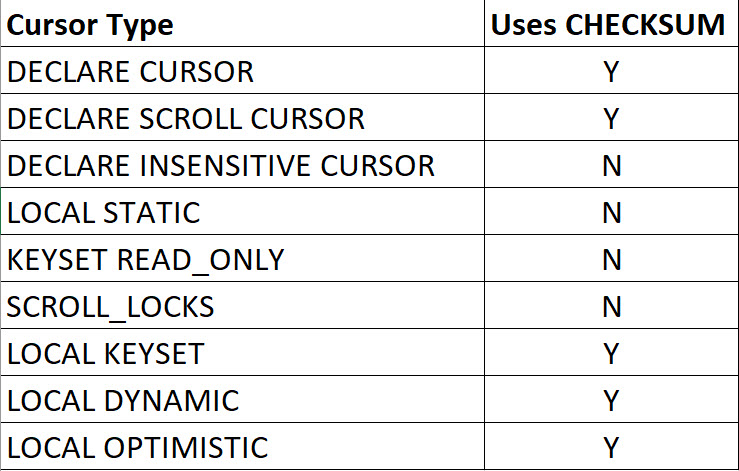
Sometimes, the default cursor, along with several other cursor types, will lead to a CHECKSUM being generated.
This can happen when you:
Declare a cursor that will do writes
Declare a cursor for a select but don’t define it as read only
Here’s a breakdown of how that works if you don’t have a rowversion column in the table(s) that your cursor is touching
options, please
Son Of A Check
What can happen to performance if you use one of these types of cursors that does require a checksum?
Well, remember the query up there that took about a second with no cursor?
charlie
You could put together a query that resembles what happens here by doing something like this:
SELECT TOP (1)
    p.OwnerUserId,
    unfair =
        CHECKSUM(*)
FROM dbo.Posts AS p
ORDER BY p.Score DESC;
But as all non-Australians agree, this is unfair because when the cursor does it in the query above, it’s the storage engine computing the checksum and the row data is all there locally. When the optimizer does it, it has to go through extra steps.
But Why?
When you don’t tell SQL Server that your cursor query is read only, it will generate row version checksums to compare on subsequent to assess if rows changed. If your cursor query contains multiple table references, each table will receive a row checksum that doesn’t have a rowversion column already in it.
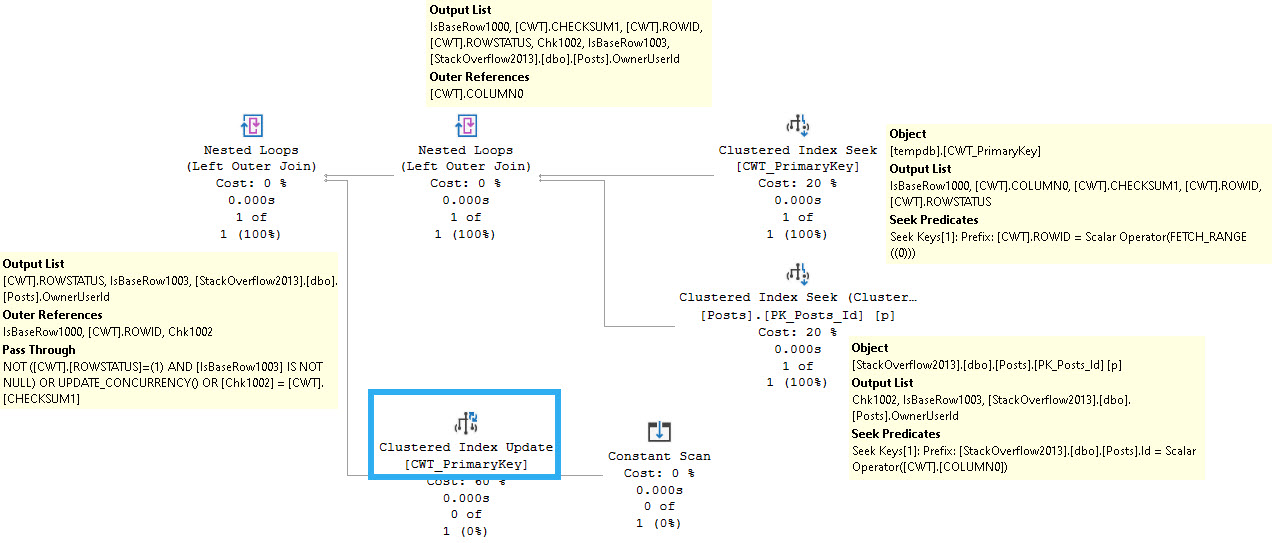
For example, this is what the next fetch looks like after the poorly-performing query:
complicated game
You can see the cursor snapshot table joining back to the Posts table, along with an update of the cursor snapshot table.
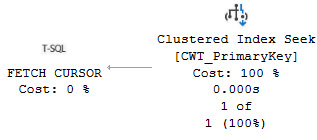
The fetch query from the cursor query that performs well looks only like this:
simple times
Thanks for reading!
Going Further
If this is the kind of SQL Server stuff you love learning about, you’ll love my training. Blog readers get 25% off the Everything Bundle — over 100 hours of performance tuning content. Need hands-on help? I offer consulting engagements from targeted investigations to ongoing retainers. Want a quick sanity check before committing to a full engagement? Schedule a call — no commitment required.
The optimizer has a lot of choices. As of SQL Server 2019, there are 420 of them.
You can see how many are available in your version of SQL Server by doing this:
SELECT
    total_transformations
        = COUNT_BIG(*)
FROM sys.dm_exec_query_transformation_stats;
Then you can change the query to actually select columns and view all the available rules.
Pretty neat.
Ten Hut
One thing the optimizer can do is order data to make things more efficient, like we saw with Lookups.
That choice, like nearly every optimizer choice (barring ones based on product or feature limitations), is based on costing. Those costs could be right, wrong, lucky, unlucky, or anything in between.
One of those options is to use an operator that requires sorted input, or sorts input on its own.
Why do we care about this? Because Sorts ask for memory, and memory can be a contentious subject with SQL Server. Not only because Sorts often ask for size-of-data memory grants
Here are some common examples!
Distinctly Yours
If you ask for a set of data to be distinct, or if you group by every column you’re returning, you may see a query plan that looks like this:
this is it
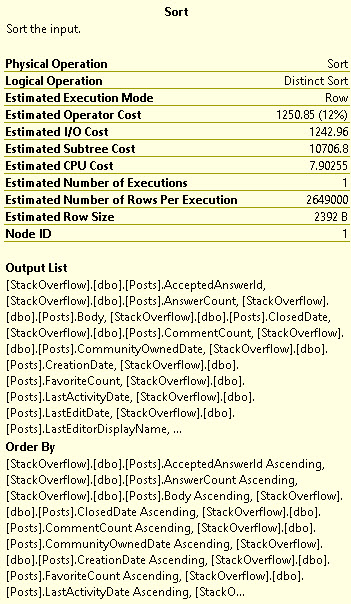
The details of the operator will show you some potentially scary and hairy details, particularly if you’re asking for a large number of columns to be made distinct:
ouchies
All of the column that you have in your select list (Output) will end up in the Order By portion of the Sort. That could add up to quite a large memory grant.
Ex-stream-ly Necessary
If the Almighty Optimizer thinks that a Stream Aggregate will be the least-expensive way to aggregate your data, you may see a plan like this:
windy
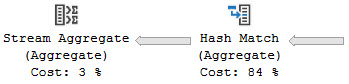
Of course, not all Stream Aggregates will have a Sort in front of them. Global Aggregates will often use them.
you’re great
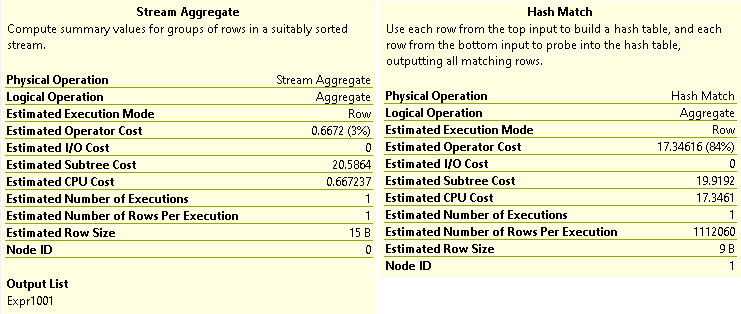
Rows from the Hash Aggregate flow into the Stream Aggregate, but order doesn’t matter here.
double saturday
What is the Hash Match hashing? Apparently nothing! Good job, hash match.
Nasty Loops
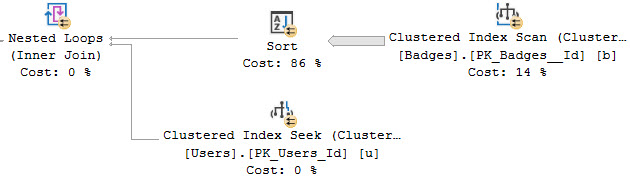
Just like with Lookups (which also use Nested Loops), SQL Server may choose to Sort one input into the Nested Loops Join.
beef smells
Orderly data is apparently very important to all sorts of things. If you see a lot of this in your query plans, you may want to start thinking about adding indexes to put data in required order.
And Acquisitions
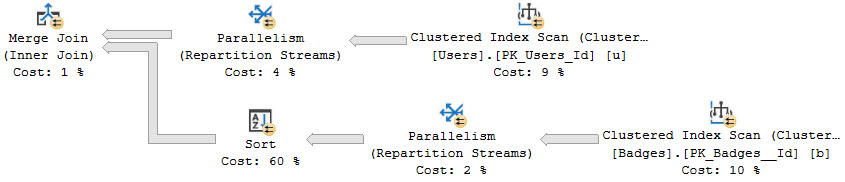
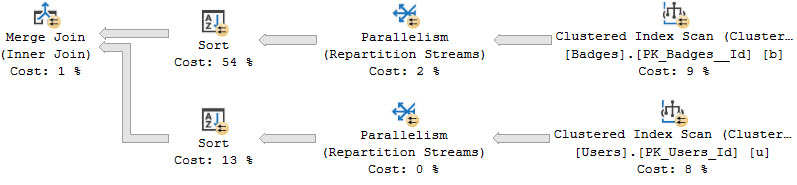
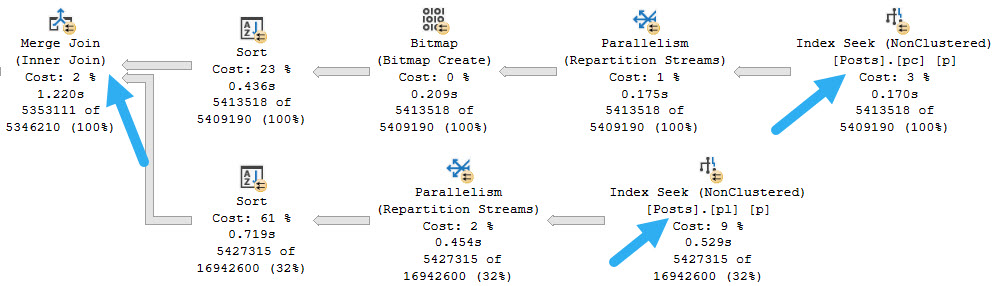
Likewise, Merge joins may also show a Sort on one or both inputs to put data in the correct join order:
cutting
Maybe not great:
bartender
That Tree
Sometimes these Sorts are harmless, and sometimes they’re not. There are many situational things about the queries, indexes, available resources, and query plan appropriateness that will lead you to treating things differently.
Parameter sniffing, cardinality estimate accuracy, query concurrency, and physical memory are all potential reasons for these choices going great or going grog.
Of course, parallel merge joins are always a mistake.
Thanks for reading!
Going Further
If this is the kind of SQL Server stuff you love learning about, you’ll love my training. Blog readers get 25% off the Everything Bundle — over 100 hours of performance tuning content. Need hands-on help? I offer consulting engagements from targeted investigations to ongoing retainers. Want a quick sanity check before committing to a full engagement? Schedule a call — no commitment required.
The first time I heard the term “common subexpression spool” my brain went numb for a week.
It’s not a particularly mellifluous phrase, but it is helpful to understand what it is.
One easy way to think about it is a temporary cache for the result of a query, like a temp table inside your execution plan:
SELECT
    *
INTO #a_temporary_table
FROM dbo.a_really_complicated_query AS a
WHERE a.thing = 'stuff';
If you were to do this, and then use that temp table to feed other queries later on, you’d be doing nearly the same thing.
Let’s look at some common-ish examples of when you might see one.
Modifications
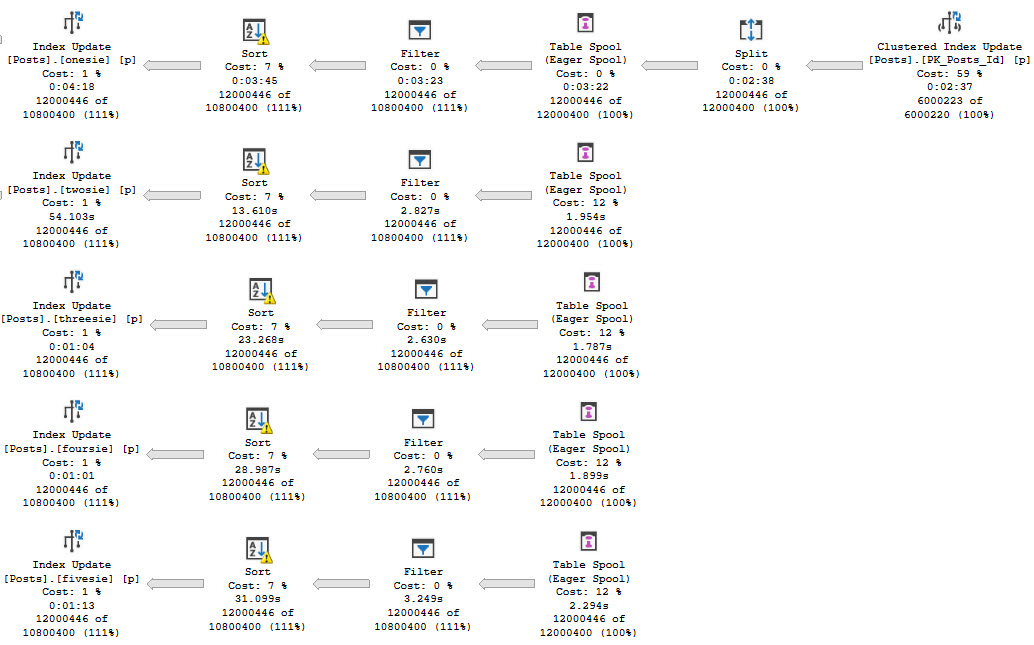
This is the most common one, and you’ll see it in “wide” modification query plans. Or as they’re sometimes called “per index” plans.
This screenshot is highly abridged to focus in on the part I care about.
pretty though
There’s a clustered index update, a Split operator, and then an Eager Table Spool. There’s also four more Eager Table Spools underneath it, but none of them have child (preceding) operators. Each one of those Spools is really the same Spool being read from over again.
Cascades
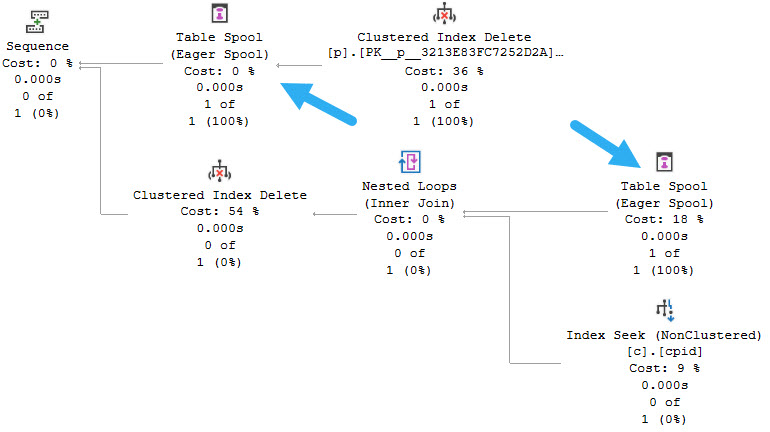
If you have foreign keys that enforce cascading actions, you’re likely to see a query plan that looks like this:
coach
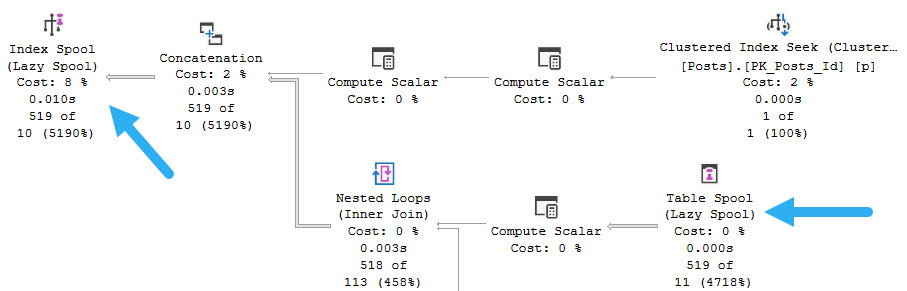
The clustered index delete feeds into an Eager Table Spool, and that Spool is read from in the child portion of the plan to track rows to be deleted from the child table.
Though this time the Spool is Lazy rather than Eager, there’s something else interesting. They’re Stack Spools!
defenses
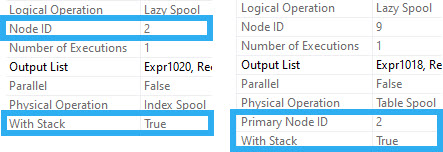
The Lazy Index Spool has a Node ID of 2, and With Stack set to True.
The Lazy Table Spool is linked to the Lazy Index Spool by its Primary Node ID.
The actual Node ID of the Lazy Table Spool is 9. It also has the With Stack property set to True.
The description of a Stack Spool from the linked post above:
Unlike ordinary common subexpression spools which eagerly load all rows into the worktable before returning any rows, a stack spool is a lazy spool which means that it begins returning rows immediately. The primary spool (the topmost operator in the plan) is fairly mundane. Like any other lazy spool, it reads each input row, inserts the row into the spool, and returns the row to the client. The secondary spool (below the nested loops join) is where all the interesting action is. Each time the nested loops join requests a row from the secondary spool, the spool reads the last row from the spool, returns it, and then deletes it to ensure that it is not returned more than once. Note that the term stack spool comes from this last in first out behavior. The primary spool pushes rows onto the stack and the secondary spool pops rows off of the stack.
Dones
There are other places where you might see this happen, like in row mode execution plans with multiple DISTINCT aggregates.
You might also see them for queries that use CUBE in them, like so:
SELECT
    b.UserId,
    b.Name,
    COUNT_BIG(*) AS records
FROM dbo.Badges AS b
WHERE b.Date >= '20131201'
GROUP BY
    b.UserId,
    b.Name
    WITH CUBE;
These Spools are often necessary to not get incorrect results or corrupt your database. You’d probably not enjoy that very much at all.
Thanks for reading!
Going Further
If this is the kind of SQL Server stuff you love learning about, you’ll love my training. Blog readers get 25% off the Everything Bundle — over 100 hours of performance tuning content. Need hands-on help? I offer consulting engagements from targeted investigations to ongoing retainers. Want a quick sanity check before committing to a full engagement? Schedule a call — no commitment required.
One sort of interesting point about prefetching is that it’s sensitive to parameter sniffing. Perhaps someday we’ll get Adaptive Prefetching.
Until then, let’s marvel at at this underappreciated feature.
Neckline
The difference between getting ordered and unordered prefetch typically comes down to the data needing to be ordered for one reason or another.
It might be an order by, or some other operator that expects or preserves ordered input.
The easiest way to see that is just to use order by, like so:
/*Unordered prefetch*/
SELECT TOP (1000)
    p.*
FROM dbo.Posts AS p
WHERE p.CreationDate < '20100801';
GO

/*Ordered prefetch*/
SELECT TOP (1000)
    p.*
FROM dbo.Posts AS p
WHERE p.CreationDate < '20100801'
ORDER BY p.CreationDate;
GO
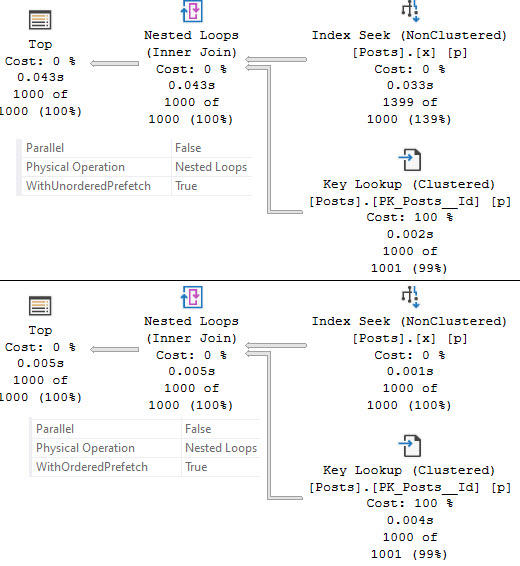
Here’s what we get from the nested loops properties:
meating
You may notice that the top query that uses unordered prefetch read 1399 rows from the seek, and takes 43ms vs the ordered prefetch query’s 1000 rows and 5ms runtime.
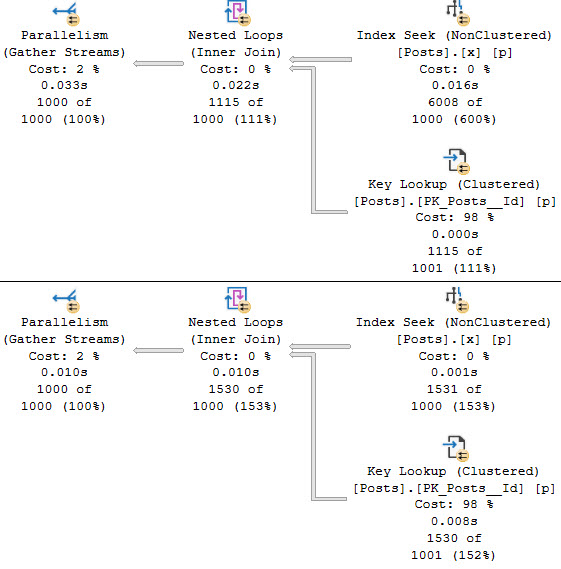
That tends to happen with a cold cache (DBCC DROPCLEANBUFFERS;) , and it exacerbated in parallel plans:
worsened
In this case, both queries read additional rows from the index seek.
Shopkeep
But what about all that parameter sniffing stuff? Check this out.
CREATE OR ALTER PROCEDURE dbo.Dated
(
    @date datetime
)
AS
SET NOCOUNT, XACT_ABORT ON;
BEGIN

    DBCC DROPCLEANBUFFERS;

    SELECT TOP (1000)
    	p.*
    FROM dbo.Posts AS p WITH(INDEX = x)
    WHERE p.CreationDate < @date
    ORDER BY p.Score DESC
    OPTION(MAXDOP 1);

END;
I have an index and MAXDOP hint in there so we do an equal comparison across executions.
EXEC dbo.Dated
    @date = '20080731';
GO

EXEC dbo.Dated
    @date = '20190801';
GO
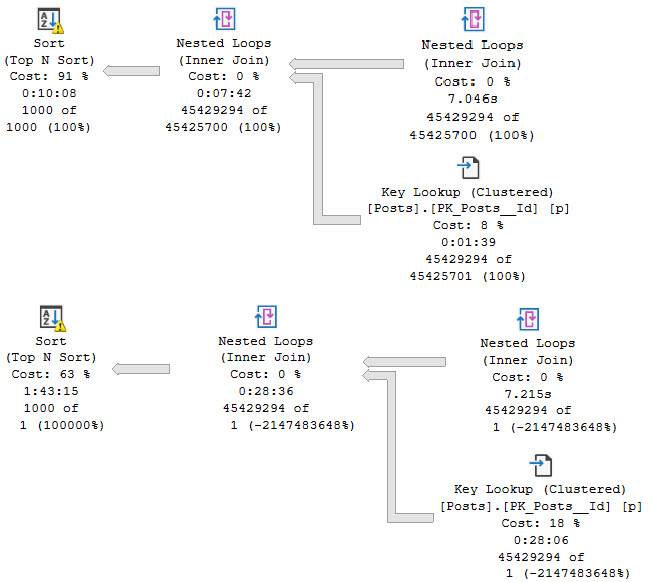
If we run the “small” version first, we won’t get the benefit of readaheads. This query runs for a very long time — nearly 2 hours — but most of the problem there is the spill at the end. If we run the “big” version first, we get unordered prefetch, and the time is significantly improved.
editorial
Thanks, parameter sniffing.
Thanks for reading!
Going Further
If this is the kind of SQL Server stuff you love learning about, you’ll love my training. Blog readers get 25% off the Everything Bundle — over 100 hours of performance tuning content. Need hands-on help? I offer consulting engagements from targeted investigations to ongoing retainers. Want a quick sanity check before committing to a full engagement? Schedule a call — no commitment required.
Most people see a lookup and think “add a covering index”, regardless of any further details. Then there they go, adding an index with 40 included columns to solve something that isn’t a problem.
You’ve got a bright future in government, kiddo.
In today’s post, we’re going to look at a few different things that might be going on with a lookup on the inside.
But first, we need to talk about how they’re possible.
Storage Wars
When you have a table with a clustered index, the key columns of it will be stored in all of your nonclustered indexes.
Where they get stored depends on if you define the nonclustered index as unique or not.
So you can play along at home:
DROP TABLE IF EXISTS #tabs, #spaces;

CREATE TABLE #tabs
(
    id int NOT NULL PRIMARY KEY,
    next_id int NOT NULL,
    INDEX t (next_id)
);

CREATE TABLE #spaces
(
    id int NOT NULL PRIMARY KEY,
    next_id int NOT NULL,
    INDEX s UNIQUE (next_id)
);

INSERT
    #tabs (id, next_id)
VALUES (1, 2);

INSERT
    #spaces (id, next_id)
VALUES (1, 2);
Here are two tables. Both definitions are identical, with the exception of the nonclustered index on #spaces. It is unique.
Like you.
You’re so special.
Findings
These queries are special, too.
SELECT
    t.*
FROM #tabs AS t WITH(INDEX = t)
WHERE t.id = 1
AND   t.next_id = 2;

SELECT
    s.*
FROM #spaces AS s WITH(INDEX = s)
WHERE s.id = 1
AND   s.next_id = 2;
The query plans for these queries have a slight difference, too.
trust us
The non-unique index supports two seek predicates. The unique index has one seek plus a residual predicate.
No lookup is necessary here, because in both cases the clustered index key columns are in the nonclustered index. But this is also how lookups are made possible.
We can locate matching rows between clustered and nonclustered indexes.
Unfortunately, we’re all out of columns in this table, so we’re gonna have to abandon our faithful friends to the wilds of tempdb.
Garbaggio
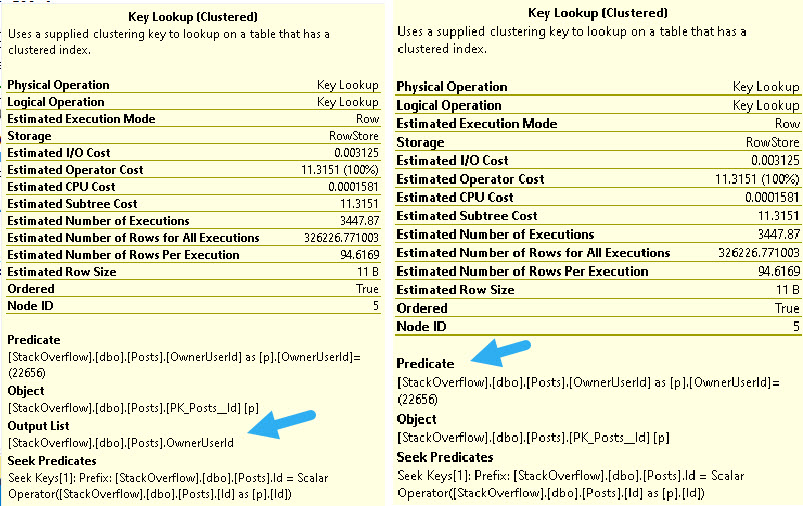
I’m sure I’ve talked about this point before, but lookups can be used to both to output columns and to evaluate predicates in the where clause. Output columns can be from any part of the query that asks for columns that aren’t in our nonclustered index.
got’em
The Seek predicate you see at the bottom of both of these tool tips is the relationship between the two indexes, which will be the clustered index key columns.
Big More
We’re going to start and end with this index:
CREATE INDEX x
ON dbo.Posts(CreationDate);
It’s just that good. Not only did it provide us with the screenshots up above, but it will also drive all the rest of the queries we’re going to look at.
Stupendous.
The clustered index on the Posts table is called Id. Since we have a non-unique index, that column will be stored and ordered in the key of the index.
The things we’re going to look at occurring in the context of lookups are:
Explicit Sorts
Implicit Sorts
Ordered Prefetch
Unordered Prefetch
You’ll have to wait until tomorrow for the prefetch stuff.
Banned In The USA
Let’s start with this query!
SELECT
    AverageWhiteBand =
        AVG(p.Score)
FROM dbo.Posts AS p
WHERE p.CreationDate >= '20190323';
Since we have an inequality predicate on CreationDate, the order of the Id column is no longer preserved on output.
bucky
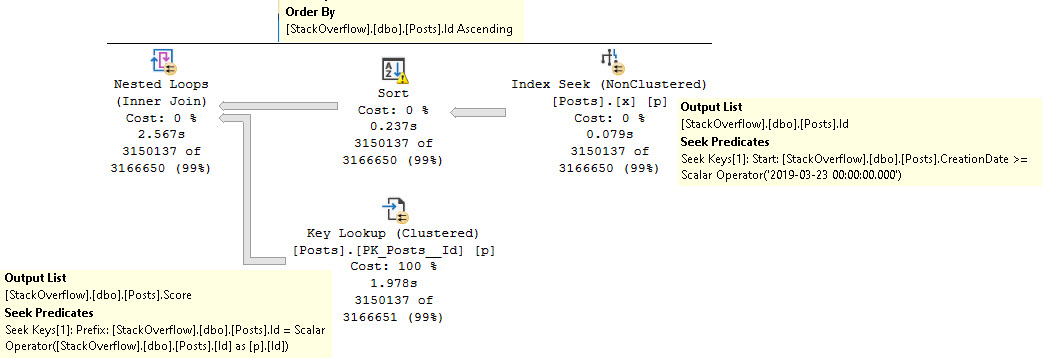
The query plan, from right to left:
Seeks into our magnificent index
Sorts the output Id column
Seeks back into the clustered index to get the Score column
The sort is there to put the Id column in a friendlier order for the join back to the clustered index.
Implicit Lyrics
If we change the where clause slightly, we’ll get a slightly different execution plan, with a hidden sort.
SELECT
    AverageWhiteBand =
        AVG(p.Score)
FROM dbo.Posts AS p
WHERE p.CreationDate >= '20190923'
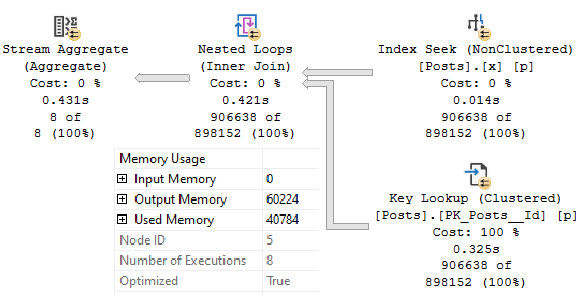
In the properties of the nested loops join, we’ll see that it has consumed a memory grant, and that the Optimized property is set to True.
long gone
Much more common memory grants are for Sorts and Hashes. The details are available on Craig Freedman’s blog:
Notice that the nested loops join includes an extra keyword: OPTIMIZED. This keyword indicates that the nested loops join may try to reorder the input rows to improve I/O performance. This behavior is similar to the explicit sorts that we saw in my two previous posts, but unlike a full sort it is more of a best effort. That is, the results from an optimized nested loops join may not be (and in fact are highly unlikely to be) fully sorted.
SQL Server only uses an optimized nested loops join when the optimizer concludes based on its cardinality and cost estimates that a sort is most likely not required, but where there is still a possibility that a sort could be helpful in the event that the cardinality or cost estimates are incorrect. In other words, an optimized nested loops join may be thought of as a “safety net” for those cases where SQL Server chooses a nested loops join but would have done better to have chosen an alternative plan such as a full scan or a nested loops join with an explicit sort. For the above query which only joins a few rows, the optimization is unlikely to have any impact at all.
The reason I’m fully quoting it here rather than just linking is because when I went to go find this post, I realized that I have four bookmarks to Craig’s blog, and only one of them works currently. Microsoft’s constant moving and removing of content is a really frustrating, to say the least.
Looky Looky
Lookups have a lot of different aspects to them that make them interesting. This post has some additional interesting points to me because of the memory grant aspect. I spend a lot of time tinkering with query performance issues related to how SQL Server uses and balances memory.
In tomorrow’s post, we’ll take a high-level look at prefetching. I don’t want to get too technical on the 20th day of the 4th month of the calendar year.
It may not be the best time to require thinking.
Thanks for reading!
Going Further
If this is the kind of SQL Server stuff you love learning about, you’ll love my training. Blog readers get 25% off the Everything Bundle — over 100 hours of performance tuning content. Need hands-on help? I offer consulting engagements from targeted investigations to ongoing retainers. Want a quick sanity check before committing to a full engagement? Schedule a call — no commitment required.
I’ve been seeing this issue on newer versions of SQL Server, from 2016 to 2019, particularly where some form of Auditing is running. What happens next is either the plan cache totally clearing out, and/or queries taking a long time to compile.
I’m still digging in more on the “why” here, but I have a decent amount of confidence in what I’ve found so far. This has occurred on several servers at different client sites, and doesn’t appear to be isolated.
Anyway, using this query to hit the RING_BUFFER_SECURITY_CACHE was helpful in figuring out when things were happening.
You can see a limited historical view of cache sizes and the number of entries in those caches.
SELECT
    event_time =
        DATEADD
        (
            MILLISECOND,
            x.xml_record.value('(//Record/@time)[1]', 'BIGINT') - osi.ms_ticks,
            GETDATE()
        ),
    tokenandperm_userstore_gb =
        x.xml_record.value('(//Record/TokenAndPermUserStore/@pages_kb)[1]', 'BIGINT') / 1024. / 1024.,
    acr_cachestores_gb =
        x.xml_record.value('(//Record/ACRCacheStores/@pages_kb)[1]', 'BIGINT') / 1024. / 1024.,
    xml_record
FROM
(
    SELECT TOP (5000)
    	timestamp,
        xml_record =
    	    CONVERT
            (
                xml,
                record
            )
    FROM sys.dm_os_ring_buffers AS dorb
    WHERE dorb.ring_buffer_type = 'RING_BUFFER_SECURITY_CACHE'
    ORDER BY timestamp DESC
) AS x
CROSS JOIN sys.dm_os_sys_info osi
ORDER BY x.timestamp DESC
OPTION(RECOMPILE);
Memory Clerks
Likewise, this much shorter query can be used to see how large your security cache currently is.
The ring buffers are written to at intervals, and may not be up to date.
SELECT
    TokenAndPermUserStore =
        CONVERT(DECIMAL(38, 2), (pages_kb / 1024. / 1024.))
FROM sys.dm_os_memory_clerks
WHERE type = 'USERSTORE_TOKENPERM'
AND   name = 'TokenAndPermUserStore'
This is a more current view of things, and can be used to trend cache sizes. It will only work on SQL Server 2012 and up.
If you’re on a version of SQL Server prior to that, that’s your problem.
“Tipping Points”
While I don’t have any precise guidance on when the size or entries will cause an issue, it seems that the cache needs to hit several GB or more.
If it regularly does that and you experience performance issues when it does, then you might try running this to clear out the security cache:
DBCC FREESYSTEMCACHE('TokenAndPermUserStore');
I’ve tried using Trace Flags 4610 and 4618, and found 4610 made things worse, and 4618 made things exactly the same. Keep in mind that these are startup trace flags, and enabling them on the fly (even globally) may not have any immediate effect.
Because I’ve found a job to fix things more reliable, I’ve published one on GitHub. You can stick it in an agent job. You can run it on whatever schedule you want, at whatever cache size threshold you want, and it will log its activity to a table.
Reproductive
My friend Josh (b|t) hooked me up with a way to repro a growing security cache, if you want to test things out.
IF NOT EXISTS
(
    SELECT
        1/0
    FROM sys.database_principals AS dp
    WHERE dp.type = 'A'
    AND   dp.name = 'your_terrible_app'
)
BEGIN
    CREATE APPLICATION ROLE your_terrible_app
        WITH DEFAULT_SCHEMA = [dbo],
        PASSWORD = N'y0ur_t3rr1bl3_4pp';
END

DECLARE
    @counter INT = 0;

DECLARE
    @holder table
    (
        id INT PRIMARY KEY IDENTITY,
        cache_size DECIMAL(10,2),
        run_date DATETIME
     );

WHILE
    @counter <= 20000
    BEGIN
    SET NOCOUNT ON;

        DECLARE @cronut VARBINARY(8000);
        DECLARE @bl0b_eater SQL_VARIANT;

        EXEC sys.sp_setapprole
            @rolename = 'your_terrible_app',
            @password = 'y0ur_t3rr1bl3_4pp',
            @fCreateCookie = true,
            @cookie = @cronut OUTPUT;

        SELECT
            @bl0b_eater = USER_NAME();

        EXEC sys.sp_unsetapprole
            @cronut;

        SELECT
            @bl0b_eater = USER_NAME();

        IF @counter % 1000 = 0
        BEGIN
            INSERT
                @holder(cache_size, run_date)
            SELECT
                cache_size =
                    CONVERT
                    (
                        decimal(38, 2),
                        (domc.pages_kb / 1024. / 1024.)
                    ),
                run_date =
                    GETDATE()
            FROM sys.dm_os_memory_clerks AS domc
            WHERE domc.type = 'USERSTORE_TOKENPERM'
            AND   domc.name = 'TokenAndPermUserStore';
            RAISERROR('%i', 0, 1, @counter) WITH NOWAIT;
        END;

        SELECT
            @counter += 1;
    END;

    DBCC FREESYSTEMCACHE('TokenAndPermUserStore');

    SELECT
        h.*
    FROM @holder AS h
    ORDER BY h.id;

    DBCC TRACESTATUS;

    DBCC TRACEON(4610, -1);
    DBCC TRACEOFF(4610, -1);

    DBCC TRACEON(4618, -1);
    DBCC TRACEOFF(4618, -1);

    DBCC TRACEON(4610, 4618, -1);
    DBCC TRACEOFF(4610, 4618, -1);
Thanks for reading!
Going Further
If this is the kind of SQL Server stuff you love learning about, you’ll love my training. Blog readers get 25% off the Everything Bundle — over 100 hours of performance tuning content. Need hands-on help? I offer consulting engagements from targeted investigations to ongoing retainers. Want a quick sanity check before committing to a full engagement? Schedule a call — no commitment required.
CREATE INDEX po ON dbo.Posts
    (OwnerUserId);

CREATE INDEX ps ON dbo.Posts
    (Score);
Let’s jump right in!
Big Run
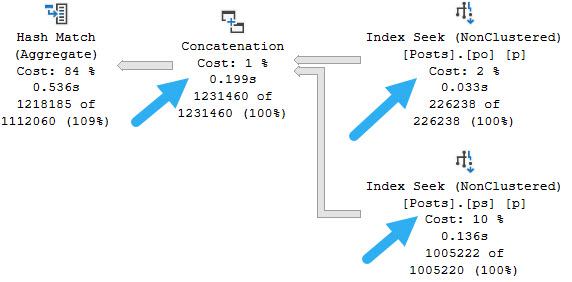
The main difference between when you’re likely to get index union vs index intersection is if your predicates use AND or OR. Index intersection is typically from AND predicates, and index union is typically from OR predicates. So let’s write some OR predicates, shall we?
SELECT
    COUNT_BIG(*) AS records
FROM dbo.Posts AS p
WHERE p.OwnerUserId = 0
OR    p.Score > 10;
First, using one equality and one inequality predicate:
concaturday
Since we lose the ordering on the inequality predicate, this is our plan. Note he hash match aggregate after the concatenation, too.
No arrow for that, though.
More Wedding
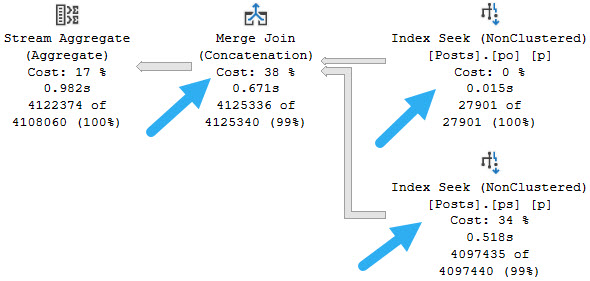
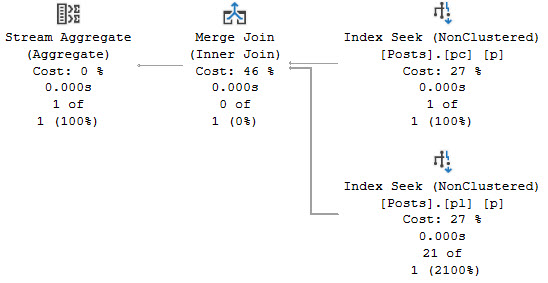
If we use two equality predicates, we’ll get more orderly operations, like merge join concatenation and a stream aggregate.
delancey
What a nice plan.
Wafting
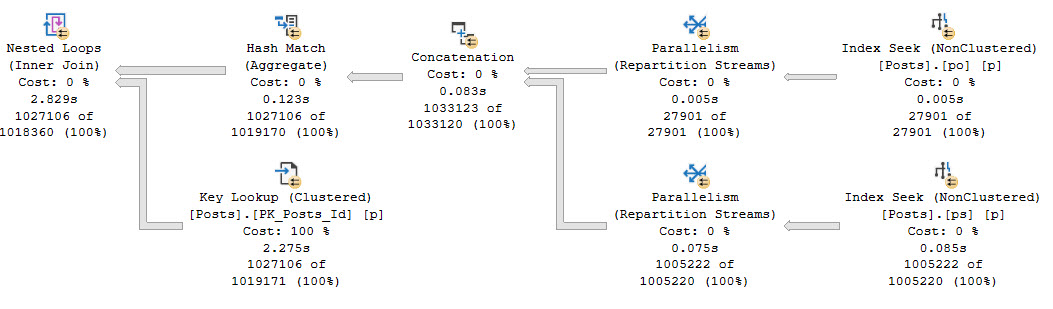
If we add in a column that’s not in either index, we’ll see a similar lookup plan as yesterday’s query.
SELECT
    p.PostTypeId,
    COUNT_BIG(*) AS records
FROM dbo.Posts AS p
WHERE p.OwnerUserId = 22656
OR    p.Score > 10
GROUP BY p.PostTypeId;
Woah baby look at all that sweet parallelism.
boing boing boing
Big Time
Both index intersection and index union are underappreciated query plan shapes, and represent some pretty cool optimizer strategies to make your queries not stink.
Of course, there are cases where it might make more sense to have one index that covers all necessary key columns, but it’s not always possible to have every index we’d like.
Tomorrow we’ll look at lookups, and some of the finer details of them.
Thanks for reading!
Going Further
If this is the kind of SQL Server stuff you love learning about, you’ll love my training. Blog readers get 25% off the Everything Bundle — over 100 hours of performance tuning content. Need hands-on help? I offer consulting engagements from targeted investigations to ongoing retainers. Want a quick sanity check before committing to a full engagement? Schedule a call — no commitment required.
The optimizer has a few different strategies for using multiple indexes on the same table:
Lookups (Key or Bookmark)
Index Intersection (Join)
Index Union (Concatenation)
Lookups are between a nonclustered index and either the clustered index or heap, and index intersection and union are between two nonclustered indexes.
Some plans may even have both! How exciting. How very exciting.
Today we’re going to look at index intersection.
Intervals
First, we need a couple useful-ish indexes.
CREATE INDEX pc ON dbo.Posts
    (CreationDate);

CREATE INDEX pl ON dbo.Posts
    (LastActivityDate);
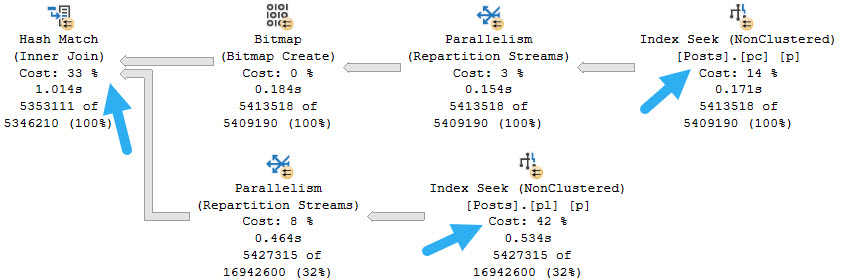
Next, we’ll need a query with AND predicates on both of those columns:
SELECT
    COUNT_BIG(*) AS records
FROM dbo.Posts AS p
WHERE p.CreationDate >= '20130101'
AND   p.LastActivityDate <= '20180101';
The query plan looks like this:
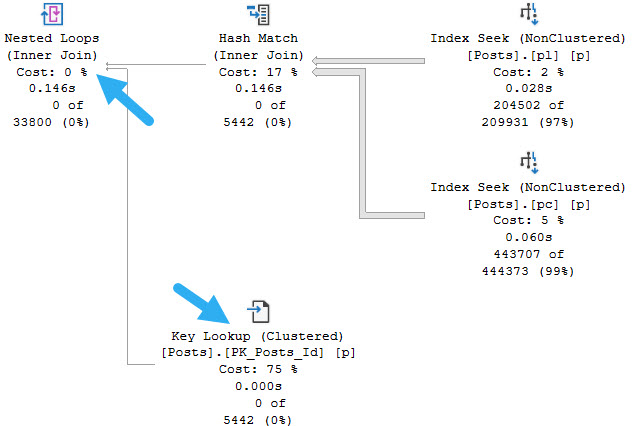
harsh join
Notice! Both of our nonclustered indexes get used, and without a lookup are joined together.
Because the predicates are of the inequality variety, the join columns are not ordered after each seek. That makes a hash join the most likely join type.
Other Joins
You are unlikely to see a merge join here, because it would require sorting both inputs. You can force one to see for yourself:
SELECT
    COUNT_BIG(*) AS records
FROM dbo.Posts AS p
WHERE p.CreationDate >= '20130101'
AND   p.LastActivityDate <= '20180101'
OPTION(MERGE JOIN);
murders and executions
If you attempt to hint a loop join without hinting to use the nonclustered indexes, you will just get one scan of the clustered index.
If you attempt a loop join hint with both indexes hinted, you will get a query processor error.
Serves you right.
Equality Predicates
If you have equality predicates, you may see a merge join naturally.
SELECT
    COUNT_BIG(*) AS records
FROM dbo.Posts AS p WITH(INDEX (pc, pl))
WHERE p.CreationDate = '2010-08-05 10:04:10.137'
AND   p.LastActivityDate = '2008-12-25 02:01:25.533';
Look at that sweet double index hint, eh?
no arrows here
Since equality predicates preserve ordering, we don’t need to sort anything here.
You’re welcome.
Plus Lookups
If we request a column that is not present in either index, we’ll get a likely more familiar query plan element.
SELECT
    p.PostTypeId,
    COUNT_BIG(*) AS records
FROM dbo.Posts AS p
WHERE p.CreationDate >= '20131201'
AND   p.LastActivityDate <= '20090101'
GROUP BY p.PostTypeId;
Hooray.
arrows are back
We’re able to use a lookup to retrieve the PostTypeId column from the clustered index. Pretty neat.
If this is the kind of SQL Server stuff you love learning about, you’ll love my training. Blog readers get 25% off the Everything Bundle — over 100 hours of performance tuning content. Need hands-on help? I offer consulting engagements from targeted investigations to ongoing retainers. Want a quick sanity check before committing to a full engagement? Schedule a call — no commitment required.
The longer you work with data, the more weird stuff you see. I remember the first time I saw a join on a LIKE I immediately felt revolted.
But not every query has an available equality join predicate. For various reasons, like poor normalization choices, or just the requirements of the query, you may run into things like I’m about to show you.
If there’s a headline point to this post, it’s that joins that don’t have an equality predicate in them only have one join choice: Nested Loops. You cannot have a Hash or Merge join with this type of query. Even with the best possible indexes, some of these query patterns just never seem to pan out performance-wise.
There Are Pains
First up, some patterns are less awful than others, and can do just fine with a useful index. Sounds like most other queries, right?
SELECT
    COUNT_BIG(*) AS records
FROM dbo.Users AS u
JOIN dbo.Posts AS p
    ON p.LastActivityDate BETWEEN u.CreationDate
                              AND u.LastAccessDate
WHERE u.Id = 22656;
Say we want to count all the posts that were active during Jon Skeet’s active period. This is a simplified version of some interval-type queries.
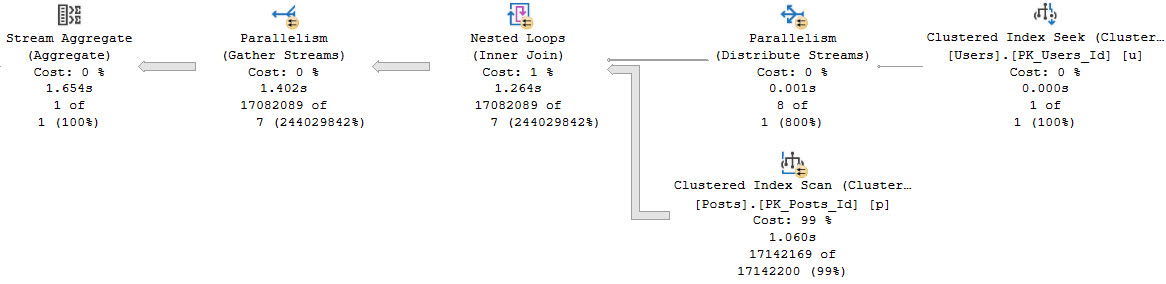
Even without an index, this does okay because we’re only passing a single row through the Nested Loops Join.
fussy
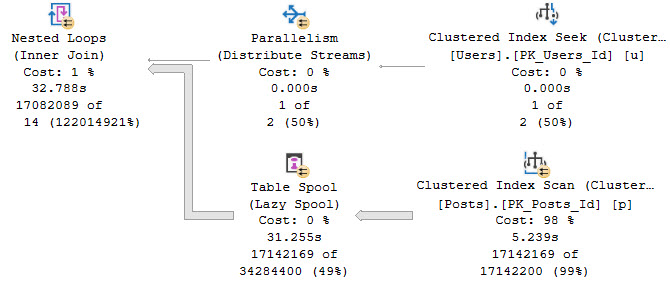
If our query needs are different, and we threaten more rows going across the Nested Loops Join, things deteriorate quickly.
SELECT
    COUNT_BIG(*) AS records
FROM dbo.Users AS u
JOIN dbo.Posts AS p
    ON p.LastActivityDate BETWEEN u.CreationDate
                              AND u.LastAccessDate
WHERE u.Id BETWEEN 22656 AND 22657;
The funny thing here is that there is still only one row actually going through. We’re just threatening additional rows.
SELECT
    u.*
FROM dbo.Users AS u
WHERE u.Id BETWEEN 22656 AND 22666;
How about those identity values, kids?
specify
Here’s what happens, though:
suspect device
There Are Indexes
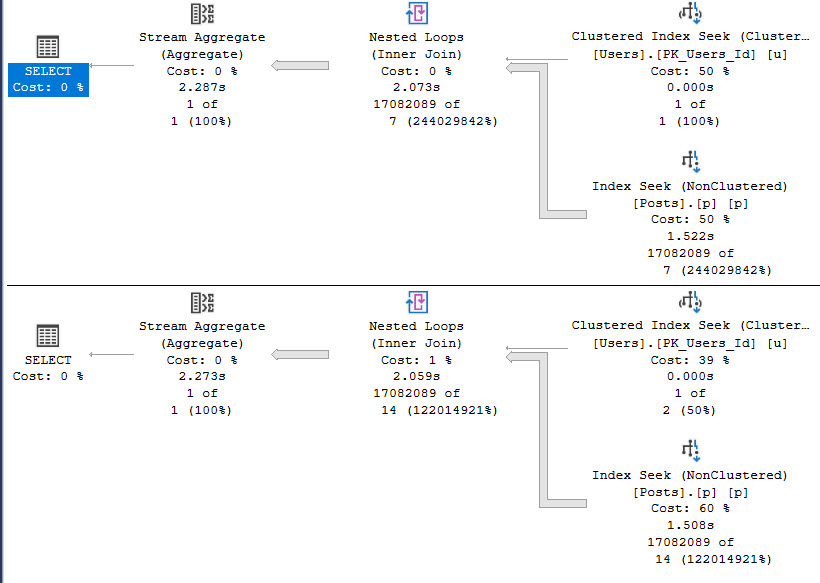
Indexing only LastActivityDate “fixes” the multi-row query, but…
CREATE INDEX p ON dbo.Posts(LastActivityDate);
regressed
Parallelism being deemed unnecessary slows the access of the Posts table down, which is something we’ve seen before in other entries in this series. That costs us roughly 500 milliseconds in the first query, but saves us about 30 seconds in the second query. I’d probably take that trade.
And Then There Are Pains
Where things get more painful is with correlations like this.
SELECT
    COUNT_BIG(*) AS records
FROM dbo.Users AS u
JOIN dbo.Posts AS p
    ON u.DisplayName LIKE '%' + p.LastEditorDisplayName + '%'
WHERE  p.PostTypeId = 1;
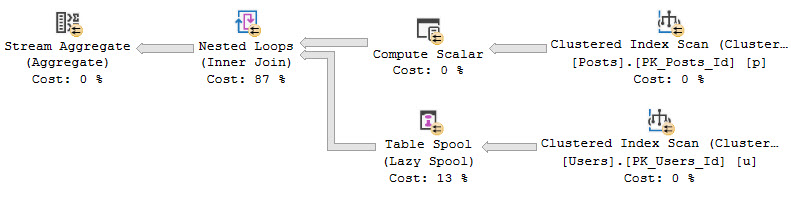
This query runs basically forever. I gave up on it after several minutes, so you’re only getting the estimated plan.
ehhh
The query plan asks for an index on the Users table! Surely this will solve all our problems.
CREATE INDEX ud ON dbo.Users(DisplayName);
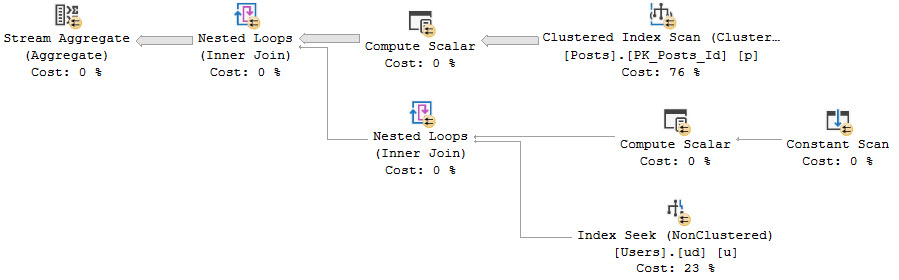
This query, likewise, doesn’t seem too keen on finishing. But we get a new index request along with it.
helipad
This never finishes either. By “never” I mean “I’d like to write about more things so I’m not sitting around waiting for this.”
Sorry.
And Then There Are More Indexes
An index on PostTypeId that includes LastEditorDisplayName. I’m going to flex a little on SQL Server and create this index instead:
CREATE INDEX pl ON dbo.Posts(LastEditorDisplayName)
WHERE PostTypeId = 1
Unfortunately, all this does is change which index is used. It doesn’t improve the performance of the query at all.
But this series is about query plan patterns, so let’s talk about some of those.
Amoral
Like I mentioned at the start of the post, the optimizer only has a single join strategy for queries with no equality predicates on the join condition. This can lead to very bad performance in a number of cases.
In cases where a single row is being passed across, and the query plan shows a single seek or scan on the inner side of the Nested Loops Join, performance will likely be… acceptable.
When you see Spools or Constant Scans on the inner side of the Nested Loops Join, this could be cause for concern. For some details on that, have a look at these links:
After all, even the LIKE predicate is tolerable with appropriate indexes and a single row from the outer side.
SELECT
    COUNT_BIG(*) AS records
FROM dbo.Users AS u
JOIN dbo.Posts AS p
    ON u.DisplayName LIKE '%' + p.LastEditorDisplayName + '%'
WHERE u.Id = 22656
AND   p.PostTypeId = 1;
wild
Thanks for reading!
Going Further
If this is the kind of SQL Server stuff you love learning about, you’ll love my training. Blog readers get 25% off the Everything Bundle — over 100 hours of performance tuning content. Need hands-on help? I offer consulting engagements from targeted investigations to ongoing retainers. Want a quick sanity check before committing to a full engagement? Schedule a call — no commitment required.
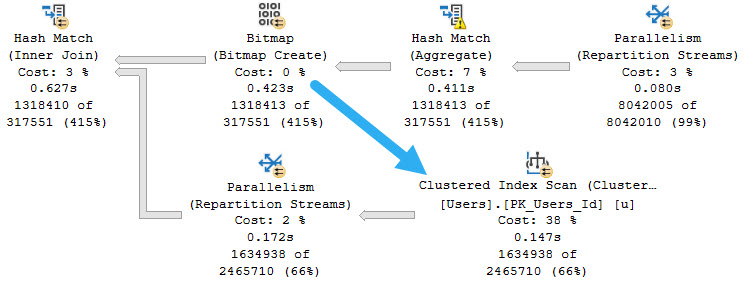
Bitmaps can be really useful in parallel hash and merge join plans. They can be used like sargable, but not seekable, predicates.
Where they get created and where they get used is a bit different,
triple x
10/10
When bitmaps do their job, you can tell. For example, here’s an example of an effective bitmap:
impressionable
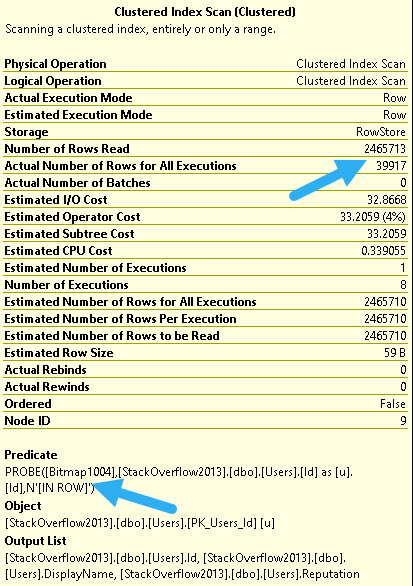
At the index scan, we filter out all but around ~40k rows from the Users table.
That’s uh… Eh you can find a percentage calculator.
0/10
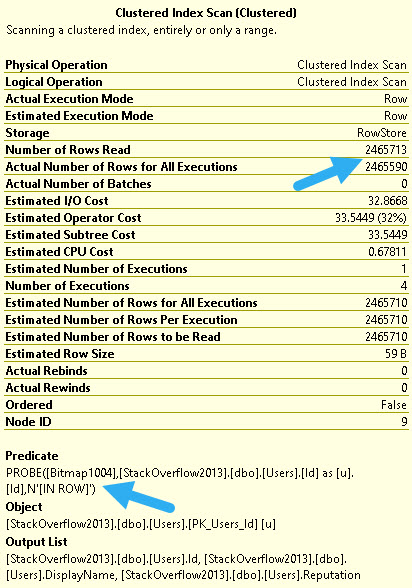
When they don’t, you can also tell. This bitmap hardly eliminates any rows at all.
down down down
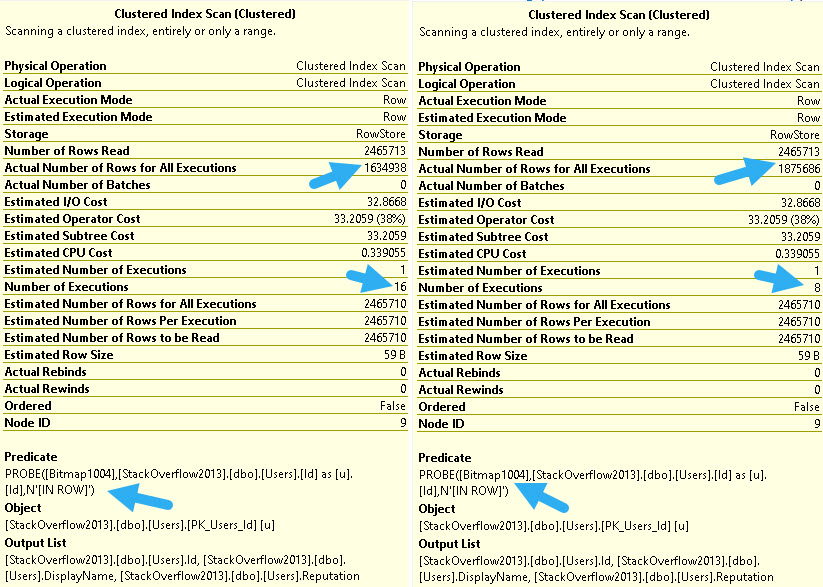
But wait! This query runs at DOP 4. You can tell by looking at the number of executions.
Who runs queries at DOP 4?
Fools.
40/40
At higher DOPs, that useless bitmap becomes much more effective.
OBSERVE IF YOU WILL
At DOP 8, we filter out about 600k rows, and at DOP 16 we filter out about 830k rows.
99/1
Like many operators in query plans, Bitmaps aren’t parallel “aware”, meaning there will be one Bitmap per thread.
At times, if you find a Bitmap underperforming at a lower DOP, you may find some benefit from increasing it.
Of course, you may also find general relief from more threads working on other operators as well. Sometimes more CPU really is the answer to queries that process a whole bunch of rows.
Thanks for reading!
Going Further
If this is the kind of SQL Server stuff you love learning about, you’ll love my training. Blog readers get 25% off the Everything Bundle — over 100 hours of performance tuning content. Need hands-on help? I offer consulting engagements from targeted investigations to ongoing retainers. Want a quick sanity check before committing to a full engagement? Schedule a call — no commitment required.