sp_QuickieStore Passing Lists

Checking It Twice


Thanks for watching!

Video Summary

In this video, I delve into the implementation of passing lists of IDs to my new store procedure, SP_to_the_underscore_quickie_store. I explain how you can include or ignore specific query plans and query IDs by passing in strings of IDs up to 4000 characters long. While I opted for a more manual approach using XML and dynamic SQL rather than table value parameters, this method allows for greater flexibility and reusability across different scenarios where you might want to include or exclude certain queries based on their IDs.

Full Transcript

Erik Darling back once again with another hopefully spectacular video about my new store procedure, SP to the underscore to the quickie store. And in this one I want to talk a little bit about how I implemented passing in lists of things to the store procedure. Now, I do not give you the ability to pass in the list of things to the store procedure. I do not give you the ability to pass in a list of databases because I often look at, look, querying one query store, one database worth of query store sucks enough. I only give you, pass in 10 databases and sit there for an hour. We pull data back. It sucks. It’s not the way I want you to spend your time. You can do better than that. At least I think you can anyway. There’s no universal queries. I guess the universal queries should be the plain cache, but we all know how unreliable that is. At least it’s not a good way to pass in. At least it’s pretty fast to query. Get some stuff back pretty quick from it for what it’s worth. But what I wanted you to be able to do is pass in a list of plan or query IDs to include or ignore. Now, you’ll notice that all of these parameters are in VARCAR 4000. I figured that was a reasonable limit on the length of a string for you to pass in things to include or ignore. If you truly need to include or ignore, a string of a string of IDs longer than that, let me know. It wouldn’t be too much of a big deal to make those maxes. I guess. Someone will ask. Great. Anyway, so you have these four things that you can use to include or ignore query plans here.

If we scroll down a little bit to where I actually process this stuff, the thing that I use to… Why is this being weird? There we go. There it is. For some reason, SMS doesn’t always keep good track of where things are and should be. A lot of weird skipping around in there. But what I use to split the strings… Now, of course, in the real world, you have many better options for how you get a list of strings into a stored procedure or whatever.

If it were easier, I would have used a table value parameter. I think table value parameters are great. I know that they have some of the downsides of table variables, but I’m still pretty keen on them as opposed to what people usually do, which is pass in the list of strings and then use a string splitter function in the middle of a where clause to split the list out and performance sucks and everyone’s sad. So in order to partially avoid that, what I do is I use a… See, I think I couldn’t even create a helper function to do it. I have to do everything in place here.

So I use this piece of code. I’m going to be honest with you. I did not come up with it. I sort of forget where it came from. I know that I used it in SP human events to pass out list of weight stats. It may have been in one of the blitz procs at some point that I was working on. I don’t know. If you know where this thing came from, let me know and I’ll happily give credit somewhere in the liner notes. I just forget.

But this uses XML and some cross-applying of nodes in order to split a list of IDs out. Now, I am using Dynamic SQL for this because I want to be able to reuse this piece of code regardless of what people choose to include or ignore. Remember, there are four different possibilities for things that people might want to include or ignore.

There’s plan IDs to include, query IDs to include, plan IDs to ignore, query IDs to ignore. I want a reusable piece of code for all that. I don’t want to have to, you know, I don’t want to have a separate piece of whatever nonsense this is doing extra work. Right. So what I’m going to do is when I need to, when people have something that they want to include or ignore, I’m going to use that piece of Dynamic SQL to do it each time.

Right. So you can actually include plan IDs and query IDs and ignore plan IDs and query IDs all at the same time. And I’m going to show you how that works. So if include plan IDs isn’t null. So the main table that I use to drive a lot of the queries here is query store runtime stats.

That has the plan ID, that has a plan ID column. It does not have a query ID column in it. So for plan IDs, it’s actually really easy. All I have to do is split the string that I pass in of include plan IDs.

And then I can tack on my where clause. I’m going to stick that into a temp table. And then I can tack on to my where clause that I just want to use this. Right. I just want to include plan IDs that are in this table.

The same thing with ignore plan IDs. If I want to ignore plan IDs, I just pass the list of plan IDs to ignore. And then we insert into ignore plan IDs. And I say, hey, if you want to ignore plan IDs, you want to find things that don’t exist in that table.

For query IDs, it gets a little bit more complicated. Because with query IDs, they’re not in the query store runtime stats table. So I have to figure out a way to get plan IDs associated with query IDs.

And that’s where things are a little bit weird. So if I have include query IDs, what I do is I still do the exact same thing, where I split that list and put the query IDs into a temp table.

But then I have to do this sort of separate query, where I go and get plan IDs from sys.query store plan that are included in that list. So I go and search that table out to find valid plan IDs for the query IDs that you care about.

And then I do almost the exact same thing, where I tack onto the where clause. So I actually reuse include plan IDs here. So I don’t have a separate, like, weird temp table structure.

I just reuse the include plan IDs or the ignore plan ID temp tables in here. So if there are query IDs that I want to ignore, then I get their matching plan IDs. I put those into the include plan IDs table, and we use that to drive the where clause.

And then if there are query IDs that I want to ignore, I do the same thing. I find those and stick those into a temp table via the plan ID. And I just find where, say, where exists blah, blah, blah, find these.

And then I go and tack that onto the where clause down here. And that’s all well and good. Cool and great.

So that, I think that’s it as far as explaining things to you. But here’s what it looks like when you actually run and look for some query IDs. So we’re going to run this, and we’re going to say, go back to the beginning of the year and look for these query IDs.

And I’m going to have debug turned on, even though that’s jumping ahead a little bit. We’re going to talk more about the debugging stuff in the next video. But what I wanted to show you here was sort of a little bit of what happens, where the include plan IDs table gets populated based on the query IDs that get passed in.

And then up here, we can see the query IDs that I had listed to include show up here. We can see some of those query IDs had multiple execution plans. That’s fun, interesting, exciting stuff.

Looking at the query text, you might figure out why. Maybe they’re very close by, slightly different in some ways. I don’t know. We’ll have to do some more digging to figure that part out. But this is how you can use SP Quickie Store to pass in a list of IDs.

And then, you know, if like, let’s say, you know, you get very interested in one of these things, you can just take this copy. You can just copy and paste this out.

And you could, you know, just rerun this to say include plan IDs. And you could put that list in there. And you could run this.

And you would get just those plan IDs back, right? So that’s how you can do that. And that’s the entire reason why you are able to pass list sim is because I was reviewing output and I was writing documentation.

And I looked at the plan IDs and I said, ah, crap. It would be really nice if I could just copy and paste that into something and run it and get everything back. Because the original implementation was that you could look for a single query ID or a single plan ID.

And I felt that that felt a bit, that felt a bit flat as I was writing the documentation. There was no pizzazz, that there was no zing with that. And I didn’t like it.

Everything must have pizzazz and zing with me. In case you couldn’t tell. I live in a world of pizzazz and zing. Wonderful. Anyway.

That’s how I implemented passing in strings to sp underscore quickie store. I hope you enjoyed yourselves and liked it and all that usual stuff. I will see you in the next video, which is going to be about, in case the obvious foreshadowing earlier did not cool you off, going to be about how I implemented debugging in this thing.

Because there are some, I think, I think some neat things about it that if you are the type of person who writes store procedures that either do this sort of server analysis or even, you know, for your own store procedures that you want to, you know, test things in, might be useful.

So, yeah. And we’re going to talk about debugging stuff for both dynamic SQL and table contents and stuff like that. So that’s what we’ll do in the next video. For now, I’m going to go, I don’t know.

I don’t know. I’m just going to wait patiently for this thing to render and upload to YouTube and then more stuff. I don’t know.

Goodbye.

Going Further


If this is the kind of SQL Server stuff you love learning about, you’ll love my training. Blog readers get 25% off the Everything Bundle — over 100 hours of performance tuning content. Need hands-on help? I offer consulting engagements from targeted investigations to ongoing retainers. Want a quick sanity check before committing to a full engagement? Schedule a call — no commitment required.
sp_QuickieStore Performance Trouble Shooting

Four Hours


Thanks for watching!

Video Summary

In this video, I delve into setting up performance troubleshooting mechanisms within a stored procedure named `SP_quickie_store`. I introduce a bit parameter called `troubleshoot_performance` that defaults to zero to avoid unnecessary overhead. The setup includes logging queries and their execution times in a simple table with computed columns for timing details. By using dynamic SQL, the process can be easily extended if more logging is needed without altering existing code. Additionally, I demonstrate capturing query plans specifically from parts of the stored procedure where performance issues might arise, using `STATISTICS XML` to focus on relevant queries rather than overwhelming data. This approach provides a practical solution for diagnosing and improving SQL Server performance, especially when dealing with complex or frequently executed procedures.

Full Transcript

Erik Darling here with Erik Darling Data. Having a grand old time. There is some sort of thunderstorm going on outside. So hopefully if you get sick of listening to me you can just tune out and listen to the lovely white noise machine storm that is currently brewing on the East Coast. In this video we want to look at how I set up some performance troubleshooting things, what to call them, captures, trap, I don’t know, whatever, in SP underscore, underscore, underscore, quickie store. So the first thing that you might notice is a parameter that you can pass into SP quickie store called troubleshoot performance and that it is a bit which defaults to zero because you don’t want it turned on by default I don’t think. Now, one of the first things that I do is declare a couple parameters here. Oh wait actually there’s something else that I do up here that I think I might have just skipped past a little bit. Is I have a logging table for things that I want to log as queries run to capture information about them. It’s a pretty simple table. It’s an identity. The current table which we saw in the last video is where I used to figure out where I am in the world. Start time and end time is what I do.

Start time and end time and then a computed column that tells me the number of milliseconds between start time and end time and I do format that number to stick some commas in it just in case things get on the long side and we want to figure out the exact scale and whatnot of things. And then the next thing I do is I declare a couple variables to hold dynamic SQL and it’s not terribly dynamic SQL and this section really is only here to shorten the number of, shorten the code a little bit. You know, like the, I have, if you go down to where the code actually lives, I have right down here and insert that puts data into a, into that temp table, the troubleshoot performance temp table and that passes in the current table thing and then I have an update that updates the end time where the current table equals a current table. And so this is what allows me to figure out how long a statement ran for. But that’s not all that I do. If we scroll down a little bit further, what I do and all of these blocks and I just go back a little bit. So the reason that I have this part set up in dynamic SQL is because I, in just in case I want to add more columns to the table and more stuff that I want to log, I only have to, I have to make minimal changes to do that. I don’t have to find every time I would do that insert and change it.

I can just change the one insert and the one update and then I can go get, you know, I can plop that in there and it executes the new SQL and all the places that I care about. So the next play, next thing that it does is if troubleshoot performance is set to one, then I will fire off that dynamic SQL block with the current table that I’m working on, which again, that gets set right here to tell me which block of code I’m in. And then I set statistics XML on. So this is a command that I can use to capture query plans that I care about.

Like, so if I care, like, you know, like from troubleshooting performance, you know, I don’t want to just set statistics XML on for the whole procedure because it’s going to capture a bunch of nonsense. It’s going to capture a bazillion things. I don’t need that. The only things that I care about, the statements that I know that might hit issues, are ones that go and touch the query store views because those are the ones that are subject to the awful design and indexing and implementation of query storage views.

Sorry, it’s just the truth. They suck. That’s why I wrote this because every time I had to, every time I was working with a client, I’d be like, how do I do that in query store again? It would just be like this process. It’s not something that you shouldn’t have to deal with stuff like this. This stuff shouldn’t be harder than it already is.

Like, it’s hard enough dealing with SQL Server performance, a million different things that go wrong. Finding out what went wrong shouldn’t be as hard as it is. So, this will set statistics XML on, and then after the code runs, right, we see the SP execute C will define, see if the query store exists.

Then if troubleshoot, again, troubleshoot performance one being set to on, the first thing I do is turn query plans off. Now, the reason I do this in here is because I don’t care about the query plan for inserting into the temp table. All I care about is the query plan for inserting into the query store exists thing, right?

And then, so this is troubleshoot performance set to one, then I set statistics XML back off, and then I run the update to update the current time and place and all the other good, fun things that are in there. Now, I can’t remember if I had recreated this since I added that, but what I’ll show you what it looks like real quick.

So, if you hit troubleshoot performance, then you will get back. This doesn’t perform terribly on my computer because my computer doesn’t have a lot of query store data in it, but other people are going to have a tougher time.

So, first thing you get back is this set of things that will show you the query plans for the queries that executed in the parts of the store procedure that we might care about performance in. There are kind of a lot of them, and it’s a little annoying that since we’re executing dynamic SQL to do an insert, for a lot of these things, what you’re going to see is this insert query from a parameter scan, and I can’t really do a lot about that.

You know, like we see this is the query that ran, that we pulled data from, but then like the insert that we did to pull the results of it, that is a separate execution plan. So, it’s a little annoying.

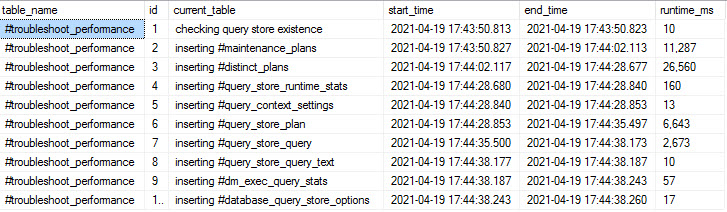
It is a little sort of, you know, a little bit more data than I’d want to return from the query plans, but there’s not a lot I can do about that. Then once you get past the end of the query plans, something that is a little bit more helpful that will at least help you figure out which plans you should focus on is the results of that table that show how long each one of the steps ran for.

Now, of course, my query store is not in terrible shape, so, you know, things turn out okay here for me. If I can just make this a little bit bigger so you can see what’s going on here. I have all of the steps that my procedure hit when it ran.

Again, this might look different for you if you use different parameters, search for different things, exclude different things. But this is what it looks like. We see the start time and end time.

We see how long each one took. Then we can kind of say, okay, well, you know, this is the sixth one down. It, you know, took 20 milliseconds. Oh, boy, you better call the police. And then we can, you know, kind of get a feel for where in this we should start looking. One, two, three, four, five, six.

You know, it’s not going to be exact because we’re going to have to deal with the separate insert plans, but we can at least start to figure out where things might have taken 20 milliseconds and start focusing on that. So, anyway, that was kind of a neat thing that I thought, neat extra for this.

I do anticipate people having weird problems with query store performance searching some of this stuff, you know, especially if your query store is very active or very large, then you’re most likely going to hit some oddities trying to query it.

It’s been my experience dealing with query store data, even using the GUI. Like, this isn’t supposed to be a replacement for the GUI. This is an alternative to the GUI because even when I use the GUI to access some of the reports, whether it’s regressed queries, like, you know, top resource consumers, stuff like that, it’s very, very, very slow sometimes.

So, anyway, that’s my story there. That’s how I implemented performance troubleshooting into this. And, you know, if you run into performance issues, you get the query plans back, you know, maybe you see something that I messed up, something I could do better, you know, feel free to let me know on GitHub.

That’s where I do all my, you know, troubleshooting, stuff like that. So, feel free to let me know there. Be happy to take any feedback from the general public. Otherwise, it’s just me kind of feeling lonely working on this stuff.

Anyway, that’s my video about implementing performance troubleshooting. In the next one, we will look at how I implemented passing lists of strings into the stored procedure in a safe way. So, that’s what we’ll cover next.

And the final video in this series will be how I implemented debugging. So, crazy, fun, sexy times for you and me ahead. Choo-choo.

Yeah. That carpet’s on fire. All right. I’m going to go now. Thank you for watching. I hope you enjoyed yourselves and learned things. And I will see you over in the next video.

Going Further


If this is the kind of SQL Server stuff you love learning about, you’ll love my training. Blog readers get 25% off the Everything Bundle — over 100 hours of performance tuning content. Need hands-on help? I offer consulting engagements from targeted investigations to ongoing retainers. Want a quick sanity check before committing to a full engagement? Schedule a call — no commitment required.
sp_QuickieStore Error Handling

Red Text


Thanks for watching!

Video Summary

In this video, I share how I implemented error handling in the SP_QuickieStore stored procedure, which is part of a series aimed at keeping things light and fun while on vacation. I dive into using `BEGIN TRY` blocks to handle errors gracefully, explaining my approach with a live demo that includes dynamic SQL for checking query store existence. I also highlight the importance of the `CURRENT_TABLE` variable, which helps in pinpointing exactly where issues occur within the procedure. The video concludes by showcasing how error messages are raised and displayed, even when dealing with dynamic SQL blocks that exceed the 2,000 character limit for `RAISERROR`. Stay tuned for the next installment, where I explore performance troubleshooting techniques using query store data, which promises to be both interesting and practical.

Full Transcript

Erik Darling here with Erik Darling Data and have another lazy bones video while I am on vacation slash location with BeerGut Magazine to talk about how I implemented error handling in SP underscore QuickieStore. This will be the second video in the series that I am going to hopefully have five of because I don’t feel like writing anything. I don’t want anything that anyone will actually comment on. So, what will end up happening? Just kidding. No one ever comments. So, no error handling would be complete or even good without a good old fashioned begin try. So this is where our story begins. It’s begin try. And I’ve done a couple few things along the way to make things a little bit easier on me. One of the things that I did was I have a little declared variable here. Declared variable here. Declared variable. Called current table. And I use this to store what action I’m currently doing in the store procedure. It makes things a little bit easier. So, if someone decides to debug this, they hit an issue, then it makes it a little bit easier for them to find an issue. And I’ll show you kind of exactly what I mean by that. I’ll do a live demo. This whole thing. And then, what I use current table for is, is stuff like this. So, whenever I start a dynamic SQL block, then I like to figure out, okay, what am I doing? I’m checking for query store existence. And then the dynamic SQL that I generate is down here.

Right? So, I know what I’m doing. And I know what the SQL is doing. I know what the intent of the SQL is. Then I can figure out if that’s, like, if this is, like, what’s going on when I hit the error handling part of things. So, let’s go all the way down to the end of the procedure. And let’s look at what happens here. Now, of course, no begin try would be complete without end try. And no end try would be complete without a begin and end catch. Of course, SQL Server would throw an error if we didn’t do anything useful.

So, I did. I tried to do something useful. Hmm. I know. First time for everything. So, what happens in the begin catch block? Well, when I was first doing this, and I admit I am not the world’s foremost practitioner in error handling. I’ve tried and had some successes and failures with it in the past.

But what I initially started doing was, oh, well, I’m going to capture, you know, the error message, error line, proc thing. You know, I read around with Erlen. Every time I have to do error handling, I go read the Erlen Summerskog articles, articles, plural, about error handling and end up, like, re-remembering learning something new every single time.

So, what I do in the catch block is, like what was just talking about, how I use that current table thing to locate where in the procedure I am. One of the first things I do is I throw an error and I use raise error and I use a string token to insert whatever text comes from that current table variable first, right? The next thing I do is I raise the offending query in raise error.

Now, I realize that there are times when this is going to get cut off, right? Like, raise error has like a 2,000 or something character limit. I think at least a couple of few of the dynamic SQL blocks in there are longer than that.

So, I realize that some of them are going to cut off. The majority of them will fit in here. If you need to see the whole thing, well, then you need to, you know, use the debug parameter, and we’ll talk about that in a later video. But then the next thing I found, something that kind of surprised me a little bit, or I don’t know if it’s, I don’t know if this is, this is how ridiculous it is.

I don’t even know if this is the first time that it surprised me. But capturing all like the error number, error line, error severity, all those like functions that get built in to help you figure out where errors are happening, didn’t throw errors reliably when dynamic SQL was involved, right?

And that really messed me up. I was like, wait a minute, how am I going to figure this out? And it turns out throw does that. The only thing you need to know about throw is that whatever happens before a throw needs to be semicoloned at the beginning.

So, let’s go way up here. And since this is guaranteed to happen really, really early on in the procedure, let’s just go and make this part fail, right? Because, you know, why not, right?

And let’s go run spquickiestore and see what happens. And this is what it looks like when the query fails for some reason, right? We get the error message up here. We see that the error, we got an error while checking for query store existence.

And that’s exactly where I removed the Y from this view so that we couldn’t find it. And then we see the offending query, right? Which is this thing, reset transaction isolation or read uncommitted.

And then we try to look for a thing that doesn’t exist here. So, that breaks completely. And then the throw, which I do at the very end, will tell us that we have an invalid object name, right?

And we can see the sysstut query store options is obviously not a thing. And we cannot query that. And so, that is how the error handling works in here.

And, you know, I just don’t have a whole lot more to say about it than that. And damn it, I’m on vacation. So, I’m going to wrap this one up.

And in the next one, we’re going to talk about something that I think is pretty neat. I don’t know how many people are actually going to use it, but I thought it was kind of a cool thing. I think I’m going to use it in other store procedures, I think. But it’s how I implemented some performance troubleshooting stuff in this proc because I always run into issues trying to get fast data from query stores.

In the next video, we’ll talk about that. Thank you for watching. Good and bye.

Bye.

Going Further


If this is the kind of SQL Server stuff you love learning about, you’ll love my training. Blog readers get 25% off the Everything Bundle — over 100 hours of performance tuning content. Need hands-on help? I offer consulting engagements from targeted investigations to ongoing retainers. Want a quick sanity check before committing to a full engagement? Schedule a call — no commitment required.
sp_QuickieStore: Safe Dynamic SQL

Headboard


Thanks for watching!

Video Summary

In this video, I take a deep dive into implementing safe dynamic SQL within my new stored procedure, SP_QuickieStore. This procedure is designed to quickly extract useful data from QueryStore about your worst-performing queries, providing insights that can help optimize performance and improve overall database efficiency. I meticulously review the implementation of dynamic SQL, focusing on best practices such as using `QUOTENAME` for object names to avoid potential issues with special characters or schema resolution across databases. Additionally, I discuss how to safely pass parameters into dynamic SQL blocks while ensuring that no user input is directly concatenated into the query string, which could introduce security risks. The video also covers some of the tricky checks and conditions necessary when working with QueryStore metadata, such as verifying the state of query store features in a database.

Full Transcript

Erik Darling here with Erik Darling Data. I’ll be out on location next week for BeerGut Magazine doing a series of interviews with some of the world’s most famous beer guts. Actually, I’m just going to be on vacation. So, because I’m on vacation, or will be on vacation, I am doing a bunch of low effort code review videos of my new store procedure, SP underscore QuickieStore, designed to hopefully quickly get data out, useful data out of QueryStore about your worst performing queries, I guess. That’s the elevator pitch. I don’t know. Hopefully, hopefully that elevator doesn’t smell too much like farts. Anyway, the first thing according to my list is even though I have misspelled implementing I’m going to talk about implementing safe dynamic SQL in this store procedure. And despite the fact that SSMS has this red rectangle in the search bar, I promise I do actually have things marked review 01 that we’re going to look at. Now, I went through and I marked a whole bunch of stuff with these things because this is a long store procedure. Turns out it takes a lot of code to effectively figure things out in QueryStore.

And so, I didn’t want to spend a long time scrolling. I’ve already got some weird hand tingles from all the mouse wheel scrolling I’ve had to do while working on this thing. So, you know, maybe someday I’ll get a purple heart from Microsoft. Anyway, let’s scroll down to where we start with some dynamic SQL stuff. And you’ll see some things. You’ll see some things that we’re not reviewing yet that we will review in the future. But what I set up is a few different things. Now, obviously to hold dynamic SQL, and I don’t know how long a string is going to be ahead of time. So, I’ve had to make some things max. I have tried to be kind when I know that a string is not going to be max and I don’t have to concatenate that string into a string that is a max and hopefully not deal with any weird length conversion issues where SQL Server is like, Oh, you’re only in nvarkar 4. We don’t need the other 3000 lines of text. So, try to do some nice things there. Anyway, what I do ahead of time, or at least most of the time when I’m thinking is when I know that some of my dynamic SQL is going to be working with objects is I like to set up variables to hold quoted versions of those object names.

All right. So, like I don’t want to have to think about using quote name every single time I reference this thing. I just want to set up, set that up ahead of time and then reuse it. All right. So, I have a couple of those and I have my nvarkar max SQL, which is going to hold a lot of the SQL statements that I use. And I have my where clause, which I’m going to use to dynamically set up a where clause to hopefully find the right data and yada, yada, yada. Where I set some of those dynamic SQL bits, even some other bits that I think are important to use are down here. Now, you’ll see that one, like, even though database ID is under review 01, it’s not technically used in dynamic SQL, but I think it’s, it’s almost always a good idea to avoid any confusion or potential, like, incorrect data to get a database ID to go along with things.

That way, you know, like, let’s say you’re running this on a weird server where there’s a lot of like backups and restores of databases and you might, I don’t know, go to the wrong thing, look at the wrong place. Something we’ll cover in a future video about debugging is it will return parameter values for all these things. So, you can at least make sure that you’re getting to the right database. So, but even, so even though the database ID thing isn’t exactly used in dynamic SQL, I think it is important to have some, some things resolved for other reasons.

But then down here, you can see database name quoted gets turned to quote name there and procedure name quoted gets a little bit more complicated. Because, I use this in a funny way with object name, which requires the string to be passed in there to be set up in a specific way to be able to find objects across databases. Now, remember, this sort of procedure is mostly going to be run from master.

And if I want to resolve an object name or an object ID in a different database, I need to tell SQL Server exactly where that’s going to be. I need to tell SQL Server which database, schema, and object name to go after. All right.

And so, that can rather quickly get out of hand. So, I have to quote the database name. And something that’s always bugged me about building dynamic SQL is when I want to put together object names, whether it’s, you know, database, schema, object, or, you know, schema object, is I always have to put my own damn dots in. I wish that there was something I could do that would just add the dots in for me.

I’m sick, sick of damn dots. If I had a dollar for every time I typed tick dot tick, I don’t know. I don’t know.

I would probably not have to go write for Bear Gut Magazine, moonlight for Bear Gut Magazine to make side money. But, so I have to get the database name and then I have to go get the procedure schema. If I don’t have that, then I substitute that with DBO.

And then I have to get the procedure name in there. So, that’s the kind of stuff that I do there. Moving on down a little bit, here are the parameters that I pass into dynamic SQL. Now, there are two ways to give things to dynamic SQL to look at.

There is stuff like object names, which you can use quote name to, like, pretty safely quote out. And then there’s the passing parameters in. I don’t want to pass any parameters directly into my dynamic SQL if I can avoid it.

Over in SP human events, or, sorry, SP underscore human events, I do have to do some of that stuff where I pass strings directly in. Because the way that extended events get set up, they don’t allow for parameterization of things. So, I have to take some extra steps to clean strings and make sure things are sanitary there.

But, here, I don’t really have to worry about that too much. I’m just passing in things that can easily just be parameterized, right? So, I’m not going to concatenate any values directly into my string from user input.

All of my user input is going to be passed and parameterized to those code blocks. All right. So, let’s move on down a little bit to the next section where dynamic SQL starts getting used.

And here, you can see a wonderful example of how I use the already quoted database name to get to the database that I care about to see if query store options contain valid settings or contain any settings at all. This is actually kind of a tricky check to write. Initially, I was looking just at sys.databases to see if query store was turned on.

But, it turns out you can have terribly unreliable metadata in sys.databases. I ran into situations where – so, I’ve been testing this thing out with clients and, you know, all that other good stuff for a while now. And, I ran into situations where sys.databases said query store was turned on.

But, the query store settings said, no, we’re not turned on. And, I ran into situations where sys.databases is like query store isn’t turned on here. But, I looked at the query store settings.

And, lo and behold, query store was enabled at the database level. So, there’s all sorts of things that can get weird there. So, what I have to make sure of if I’m going to tell people that query store is really turned on is that it’s got an actual state of zero, right? Sorry, the thing that I have to look for if query store is not turned on is having a query store state of zero.

And, I saw this once in SQL Server 2016 in RDS. I don’t know if this is a normal thing, but I’ve realized that I had to check against this too. The other thing that I check for is to see if there are absolutely no rows in here, right?

Because, this only handles if we find something, right? I need to figure out if absolutely no rows exist in that table, then we’re also going to return a zero here, right? And, then if we go down a little bit further, we’ll see some of how the SP execute SQL stuff works with parameterization.

So, we pass in our SQL. We pass in the parameters that SQL Server expects, which in this case is query store exists up here. In other cases, this could, you know, be replaced with, you know, whatever where clause values you want to stick in.

And, then we tell SQL, we tell the dynamic SQL block that we expect this thing to get passed as an output parameter, right? And, then if query store exists equals zero, then we will throw this error message. Fun stuff.

Now, there is a good, another thing that I want to actually look at. I think I’ve neglected to note. No, not in the selection, dummy.

In the review stuff. But, you can use a parameterized set of parameters with dynamic SQL. So, in this case, if you remember, way up here, way up here, I have a parameter, a declared variable called parameters.

And, then I have these parameters that I define in this block here. And, then if we go down way further to here, you can see that I actually use parameterized set of parameters to pass parameters into my dynamic SQL. So, that when I built up my where clause and done other stuff, then, like all the stuff in here where I tell SQL Server, where I want to find, where I don’t want to find.

It’s a little bit easier to read. Right up somewhere. About, oh, God, where is it?

There we go. In here where my where clause is going to be, you know, stuff like, you know, looking for start dates and end dates and execution counts and things like that. But, anyway, that is how I implemented, hopefully, 100% safe dynamic SQL in SP Quickie Store.

I hope you enjoyed watching this. Maybe you found it somewhat informative. I’m going to get this rendering and start recording the next video, which will be about how I implemented error handling.

So, fun stuff. I will see you, I guess, in the next video then. That makes sense, right?

More videos for everybody. Free! Goodbye.

Going Further


If this is the kind of SQL Server stuff you love learning about, you’ll love my training. Blog readers get 25% off the Everything Bundle — over 100 hours of performance tuning content. Need hands-on help? I offer consulting engagements from targeted investigations to ongoing retainers. Want a quick sanity check before committing to a full engagement? Schedule a call — no commitment required.
Introducing sp_QuickieStore: What To Do If You Hit A Problem

No One’s Perfect


I’ve been working on scripts like this for long enough to know that I don’t know everything that might happen out there in your kooky-krazy environments.

The beauty of open source is that it’s really easy to let me know, or jump in and get to fixing things on your own.

To help you figure out where things are getting messy, I’ve added a few parameters to make troubleshooting easier.

Help


The first place to look for information or details is the help parameter.

EXEC dbo.sp_QuickieStore
    @help = 1;

You’ll get information about parameters, results, shortcomings, and licensing.

Of course, if you’re hitting an error whether it’s red text or logical, you probably need a bit more than this.

Debug


If you want to see the queries that the dynamic SQL builds and executes, you can use the debug mode.

EXEC dbo.sp_QuickieStore
    @database_name = 'StackOverflow2013',
    @debug = 1;

What debug mode returns:

  • Dynamic SQL statements, and statement length in the Messages tab
  • Supplied parameter values to the procedure
  • Declared parameter values
  • All temp table contents with table name identifiers
  • Replacement selects for empty tables with table name identifiers

This should help you figure out what’s going wrong and when. If you find something, open an issue on GitHub to tell me about it.

Performance


If you find this procedure is regularly running slowly for you, you can use run this to return query plans and see where the trouble’s at.

EXEC dbo.sp_QuickieStore
    @database_name = 'StackOverflow2013',
    @troubleshoot_performance = 1;

This will SET STATISTICS XML ON; for queries that touch Query Store views, where we typically will have performance issues, along with a table of queries and runtimes.

2021 04 19 13 46 39
slow moving target

Once data is in temp tables, things are fast because they’re small. Before that, you’re at the whim and fancy of the elements.

If you come across something that you think I can fix (and isn’t just poor Query Store schema design/indexing), open an issue on GitHub to tell me about it.

Wrapper’s Delight


This week we covered all the major aspects and features of sp_QuickieStore. I’ll do some video code reviews to close out the series for now.

Thanks for reading!

Going Further


If this is the kind of SQL Server stuff you love learning about, you’ll love my training. Blog readers get 25% off the Everything Bundle — over 100 hours of performance tuning content. Need hands-on help? I offer consulting engagements from targeted investigations to ongoing retainers. Want a quick sanity check before committing to a full engagement? Schedule a call — no commitment required.
Introducing sp_QuickieStore: Formatting Is Everything

Random Assortment


Sometimes it’s hard to get people to understand the scale of a number without some commas.

I don’t know why that is, but that’s why I added the option to format numbers.

You can do that by running the procedure like so:

EXEC dbo.sp_QuickieStore
    @database_name = 'StackOverflow',
    @expert_mode = 1,
    @format_output = 1;

Overview


What you get back should look something like this.

This isn’t the most elegant screenshot in the world, I just want to give you an idea of what you should see.

2021 04 19 10 37 04
mr sailor

Essentially, if it’s a number, it will get commas inserted into the proper places.

Yep


I know that this is a somewhat Americanized version of things, and that the FORMAT function supports other language stuff.

If that’s something you care about and you’d like to contribute, head over here. Code contributions are always welcome.

Tomorrow, we’ll look at options you have to get help, and troubleshoot code and performance issues.

Thanks for reading!

Going Further


If this is the kind of SQL Server stuff you love learning about, you’ll love my training. Blog readers get 25% off the Everything Bundle — over 100 hours of performance tuning content. Need hands-on help? I offer consulting engagements from targeted investigations to ongoing retainers. Want a quick sanity check before committing to a full engagement? Schedule a call — no commitment required.
Introducing sp_QuickieStore: What You Can Filter

Safe Words


What good is writing all this dynamic SQL and whatnot if you’re just going to firehose data at people?

None. None at all.

You’re going to want to answer questions about what happened and when, and you’re not going to want to struggle with it.

So what can you do?

Answer Me


First, you can control how many queries you’re going to get back in your result set:

EXEC dbo.sp_QuickieStore
    @database_name = 'StackOverflow2013',
    @top = 10;

You can also filter on start and end times. These filters are applied to the last_execution_time column in avg_duration in query_store_runtime_stats.

EXEC dbo.sp_QuickieStore
    @database_name = 'StackOverflow2013',
    @start_date = '20210101',
    @end_date = '20211231';

If you want to target queries that execute a lot, or that run for over a certain amount of time, you can use filter like this.

These filters will be applied to count_executions and avg_duration respectively, also in query_store_runtime_stats.

EXEC dbo.sp_QuickieStore
    @database_name = 'StackOverflow2013',
    @execution_count = 20;

EXEC dbo.sp_QuickieStore
    @database_name = 'StackOverflow2013',
    @duration_ms = 1000;

Targeting a specific stored procedure can be done like this. If you don’t specify a schema, I’ll assume you’re looking in dbo.

EXEC dbo.sp_QuickieStore
    @database_name = 'StackOverflow2013',
    @procedure_schema = 'some_schema',
    @procedure_name = 'some_procedure';

To include or ignore a single or list of query or plan IDs, you can use these parameters. Spaces and other whitespace should be handled alright.

EXEC dbo.sp_QuickieStore
    @database_name = 'StackOverflow2013',
    @include_plan_ids = '1,2,3,4,5';

EXEC dbo.sp_QuickieStore
    @database_name = 'StackOverflow2013',
    @include_query_ids = '1,2,3,4,5';

EXEC dbo.sp_QuickieStore
    @database_name = 'StackOverflow2013',
    @ignore_plan_ids = '1,2,3,4,5';

EXEC dbo.sp_QuickieStore
    @database_name = 'StackOverflow2013',
    @ignore_query_ids = '1,2,3,4,5';

Finally, if you want to search for query text, you can do this. I’ve found this search to be a bit unreliable, unless you’re generous with wildcards. If you don’t add them at the beginning and end, I’ll do that for you.

EXEC dbo.sp_QuickieStore
    @database_name = 'StackOverflow2013',
    @query_text_search = 'some text here';

Over And Out


I think that covers most of the important filtering you’d want to do in Query Store. Of course, if you think anything else would be useful, you can request it here.

Tomorrow, we’ll look at some formatting options available.

Thanks for reading.

Going Further


If this is the kind of SQL Server stuff you love learning about, you’ll love my training. Blog readers get 25% off the Everything Bundle — over 100 hours of performance tuning content. Need hands-on help? I offer consulting engagements from targeted investigations to ongoing retainers. Want a quick sanity check before committing to a full engagement? Schedule a call — no commitment required.
Introducing sp_QuickieStore: What The Results Show You

Dos Equis


There are two ways to run sp_QuickieStore for your chosen database that alter the total results you get back. It’s controlled by a parameter called @expert_mode.

To get more concise results:

EXEC dbo.sp_QuickieStore
    @database_name = 'StackOverflow2013',
    @expert_mode = 0;

To get a whole lot more:

EXEC dbo.sp_QuickieStore
    @database_name = 'StackOverflow2013',
    @expert_mode = 1;

Concision


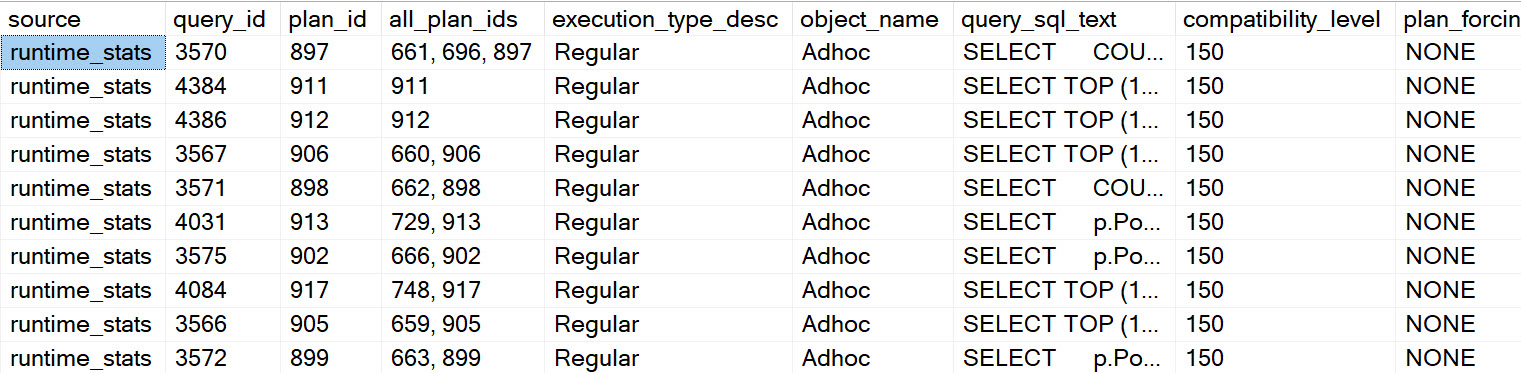
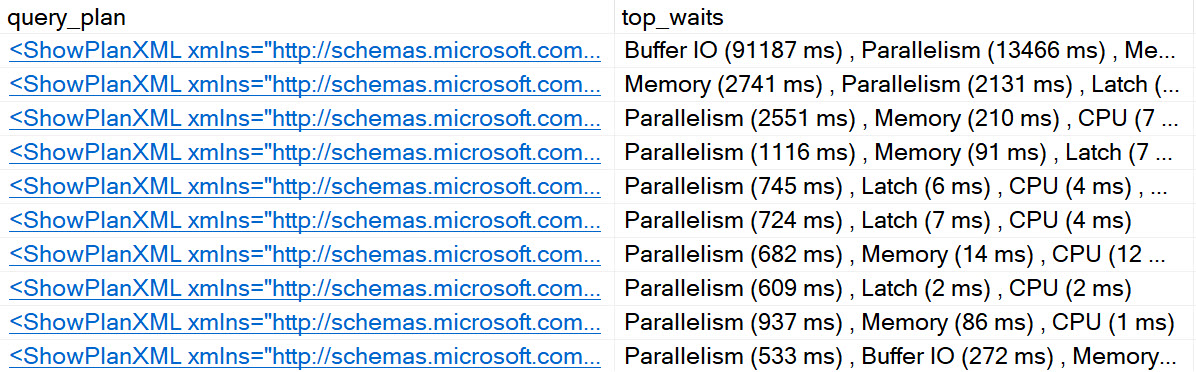
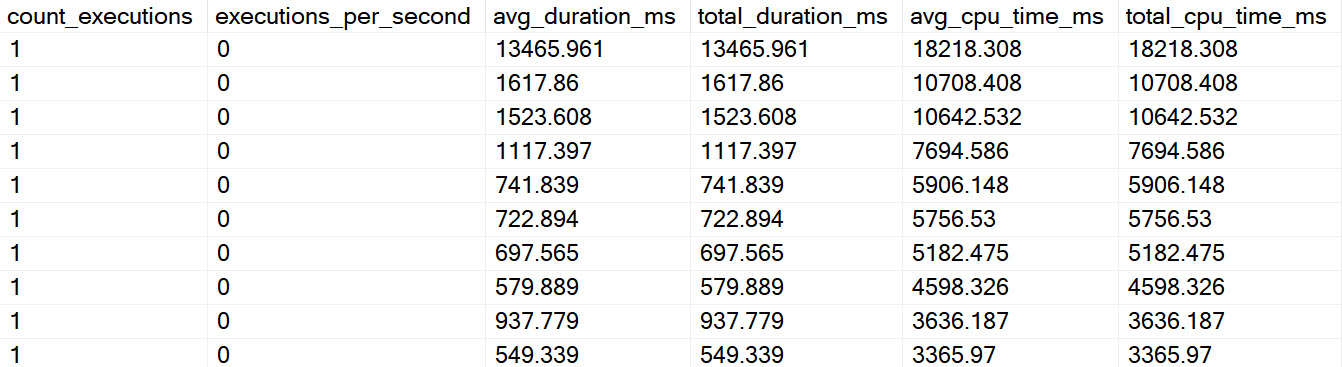
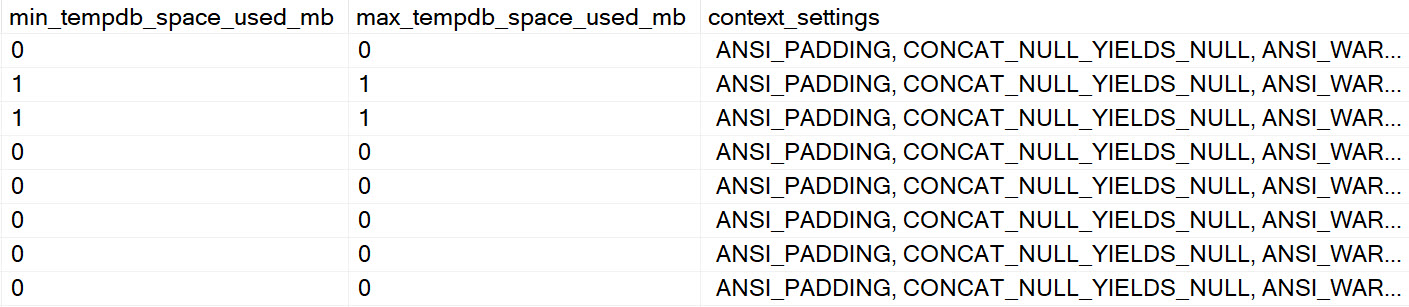
Under the more concise mode, you get one set of results back that combines metrics from query_store_runtime_stats, along with query text, query plan, and context settings. Some previews below. There’s a lot more in the actual results, but the screen caps would get very repetitive.

sp_QuickieStore Results
big time
sp_QuickieStore Results
selected markets
sp_QuickieStore Results
coming your way
sp_QuickieStore Results
contextual healing

Expertise


Under the more verbose output option, you get additional result sets back. Don’t worry, it’s not a bunch of extra columns tacked onto the end so you end up in an infinite side scroll. They show up underneath so you can, like, actually be aware that they show up. Again, these screen caps don’t show absolutely everything, they’re just here to get you comfortable with what you see.

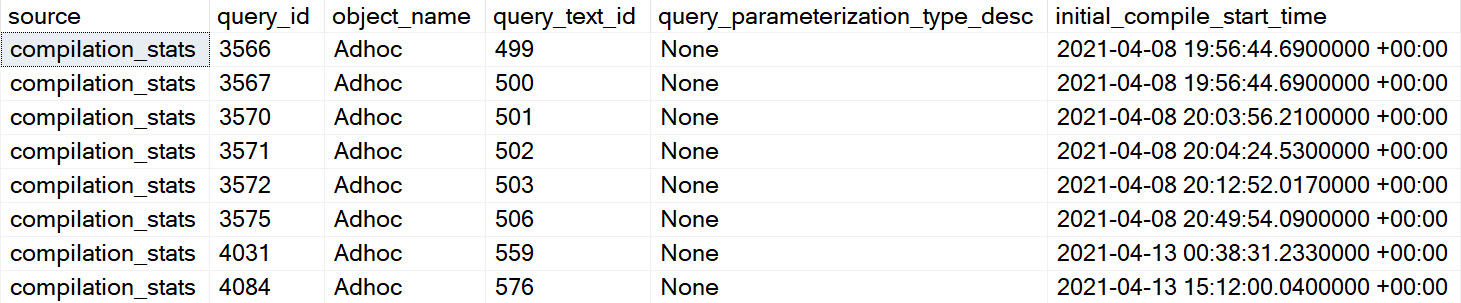
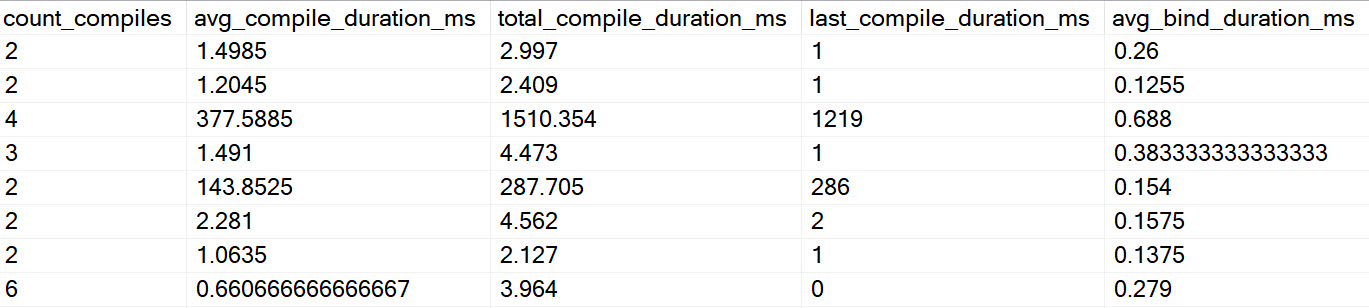
Compilation:

These are metrics about query compilation, so you can figure out if your long-compiling queries are causing you problems.

sp_QuickieStore Results
parabore
sp_QuickieStore Results
sparkly

It Came From The Cache:

One thing that’s really annoying about Query Store is that it provides less information about queries than the plan cache. More specifically about thread and memory usage.

You get zero thread information back from query store, and very limited information about memory, specifically only what the query used. Not what the full grant was or anything else.

To remedy this, I query dm_exec_query_stats to try to locate additional details about returned queries. I can’t promise anything will be here, because most plan caches are about as stable as the South Pacific.

sp_QuickieStore Results
memory
sp_QuickieStore Results
threadly weapon

Waits By Query And Total:

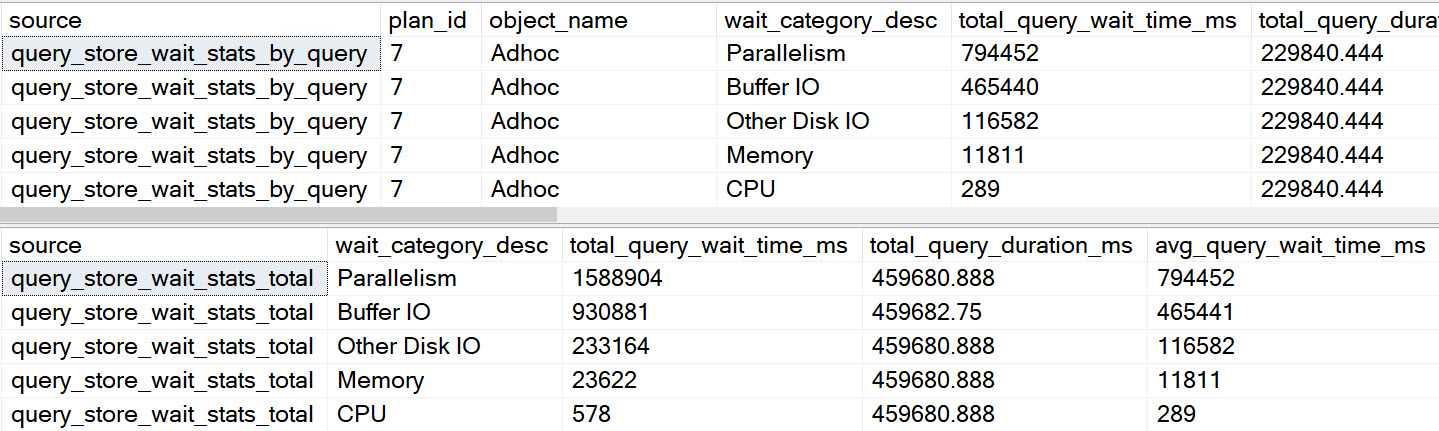
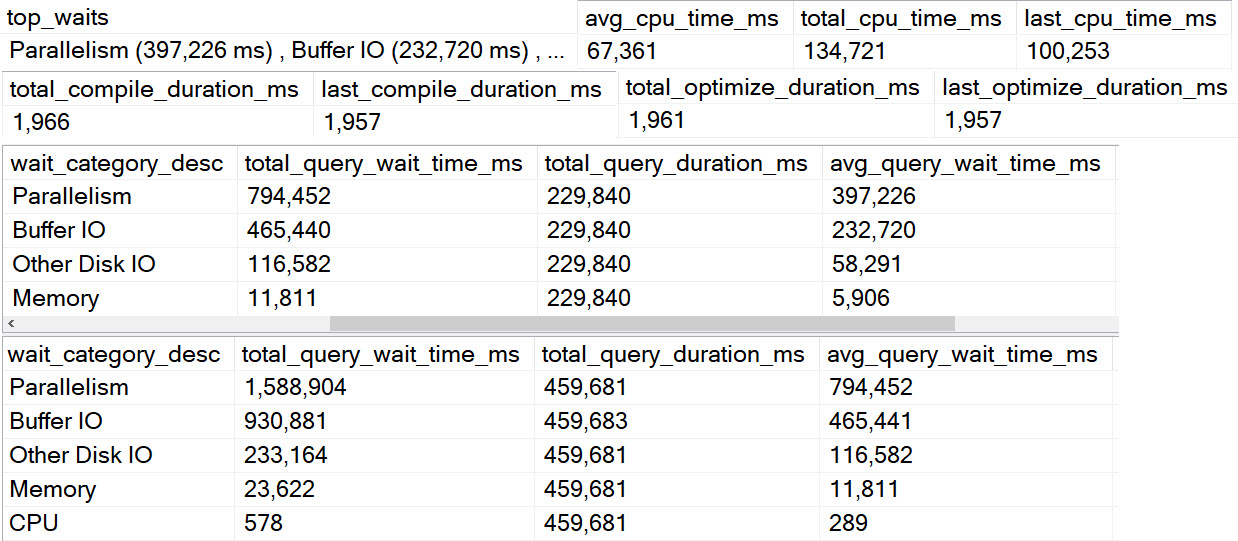
In 2017+, when the option is enabled, I’ll pull back wait stats for the queries that show up in the results. The top waits show up in the normal result set, but in this mode there are two separate results that show wait stats per-query and also in total for the window of time that was examined.

sp_QuickieStore Results
wowsers

Options:

The last additional result here shows what your current Query Store settings are. You may be surprised!

sp_QuickieStore Results
slippers

Separated


This set of information should be enough to get you started on figuring out which queries to go after. It’s pretty complete, especially if you use set expert mode to 1.

In the next post, we’ll look at some of the filters you can use.

Thanks for reading!

Going Further


If this is the kind of SQL Server stuff you love learning about, you’ll love my training. Blog readers get 25% off the Everything Bundle — over 100 hours of performance tuning content. Need hands-on help? I offer consulting engagements from targeted investigations to ongoing retainers. Want a quick sanity check before committing to a full engagement? Schedule a call — no commitment required.

Introducing sp_QuickieStore: Find Your Worst Queries In SQL Server’s Query Store

Querying Query Store Sucks


If you’ve ever tried to write a query to find stuff in Query Store and quickly gotten frustrated, you’re not alone.

Whomever designed that schema hates you. It’s probably the same person who designed Extended Events.

I know, there’s a GUI. The stuff you can find in there is definitely useful, but I often find myself wishing it did a little bit more. Asking for additional features often feels like porridge-begging, and even if something new did get added eventually, it wouldn’t help you in the moment.

With all that in mind, I wrote sp_QuickieStore to try to take some of that pain away. As of this post, it’s V1. There will likely be changes and fixes and all that good stuff, but right now it’s good enough for an introduction.

You can get it here.

What You Can Do


Out of the box, you get a lot of choices about what you want to get and how you want to get it.

You can choose:

  • Which metric you want to focus on:
    • CPU, duration, reads, writes, memory, tempdb, executions
  • How many queries you want to get back
  • The start and end dates of your search
  • Minimum number of executions
  • Minimum duration
  • A specific stored procedure
  • Plan IDs to include or ignore
  • Query IDs to include or ignore
  • Query text to search for
  • Additional query details
    • Compilation metrics, wait stats (2017+), plan cache data, query store options
  • If you want your numbers formatted

Where You Can Do It


sp_QuickieStore is compatible with SQL Server 2016 SP2+, 2017 CU3+, any version of 2019, and probably Azure SQL DB. I designed it to work there, but long term who knows what changes will occur that make support not possible. No promises.

It’ll take advantage of new columns added to SQL Server 2017 and 2019, and the wait stats tracking added in SQL Server 2017.

Testing on my end is done on case-sensitive instances from 2016 up. If you find bugs, please report them on GitHub. I do not offer private email support.

GitHub is also where you can go to ask for features, with the usual caveats that open source is not free development or consulting.

Thanks for understanding, and all that.

Getting Started


sp_QuickieStore has a bunch of documentation built in to the procedure, and there are a number of example calls in the repo.

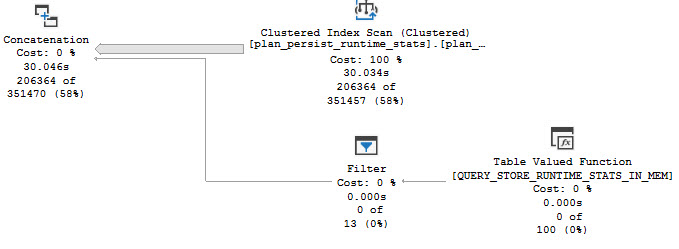
Now, I know. It’s called sp_QuickieStore, so you expect it to be fast. I’ve done what I can to make things as efficient as possible, but gosh darn it all, sometimes Query Store is just gonna be Query Store.

SQL Server Query Plan
enema

It would be nice if the maintainer of a database that promises high performance maybe put some useful indexes on their views to analyze performance so the queries that touch those views to analyze performance run quickly.

I know, I know. Take off your Crazy Pants, Erik.

Anyway, I’ll have some more posts coming this week to fill in details.

Thanks for reading!

Going Further


If this is the kind of SQL Server stuff you love learning about, you’ll love my training. Blog readers get 25% off the Everything Bundle — over 100 hours of performance tuning content. Need hands-on help? I offer consulting engagements from targeted investigations to ongoing retainers. Want a quick sanity check before committing to a full engagement? Schedule a call — no commitment required.

Common Query Plan Patterns: Cursor Weirdness

Why Are You Here?


Within the realm of cursor-y oddness, there are a couple things to be extra-aware of.

Yes, I know that Aaron Bertrand has written about cursors. Thank you, Aaron.

This post is about a slightly different set of things that I want you to be aware of.

Not So Fast


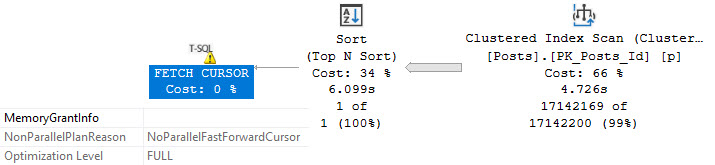
First, FAST_FORWARD cursors force your queries to run serially, and plan quality may suffer if a dynamic cursor is chosen.

Take this query for example:

SELECT TOP (1)
    p.OwnerUserId
FROM dbo.Posts AS p
ORDER BY p.Score DESC;

By itself in the wilderness it gets a parallel plan and runs for under 1 second.

SQL Server Query Plan
thanks, parallel

But in the grips of a fast forward cursor, we’re not so lucky.

DECLARE @i int;
DECLARE c CURSOR 
    LOCAL 
    FAST_FORWARD

FOR
SELECT TOP (1)
    p.OwnerUserId
FROM dbo.Posts AS p
ORDER BY p.Score DESC;
 
OPEN c;
    FETCH NEXT 
    FROM c INTO @i;

WHILE @@FETCH_STATUS = 0
BEGIN   
    PRINT @i;
    BREAK;
END;
CLOSE c;
DEALLOCATE c;
SQL Server Query Plan
n4u

Other Problems


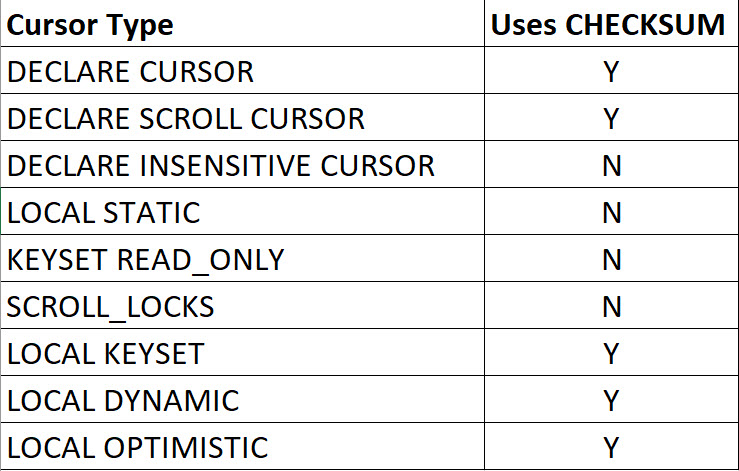
Sometimes, the default cursor, along with several other cursor types, will lead to a CHECKSUM being generated.

This can happen when you:

  • Declare a cursor that will do writes
  • Declare a cursor for a select but don’t define it as read only

Here’s a breakdown of how that works if you don’t have a rowversion column in the table(s) that your cursor is touching

2021 04 14 12 02 31
options, please

Son Of A Check


What can happen to performance if you use one of these types of cursors that does require a checksum?

Well, remember the query up there that took about a second with no cursor?

SQL Server Query Plan
charlie

You could put together a query that resembles what happens here by doing something like this:

SELECT TOP (1)
    p.OwnerUserId, 
    unfair = 
        CHECKSUM(*)
FROM dbo.Posts AS p
ORDER BY p.Score DESC;

But as all non-Australians agree, this is unfair because when the cursor does it in the query above, it’s the storage engine computing the checksum and the row data is all there locally. When the optimizer does it, it has to go through extra steps.

But Why?


When you don’t tell SQL Server that your cursor query is read only, it will generate row version checksums to compare on subsequent to assess if rows changed. If your cursor query contains multiple table references, each table will receive a row checksum that doesn’t have a rowversion column already in it.

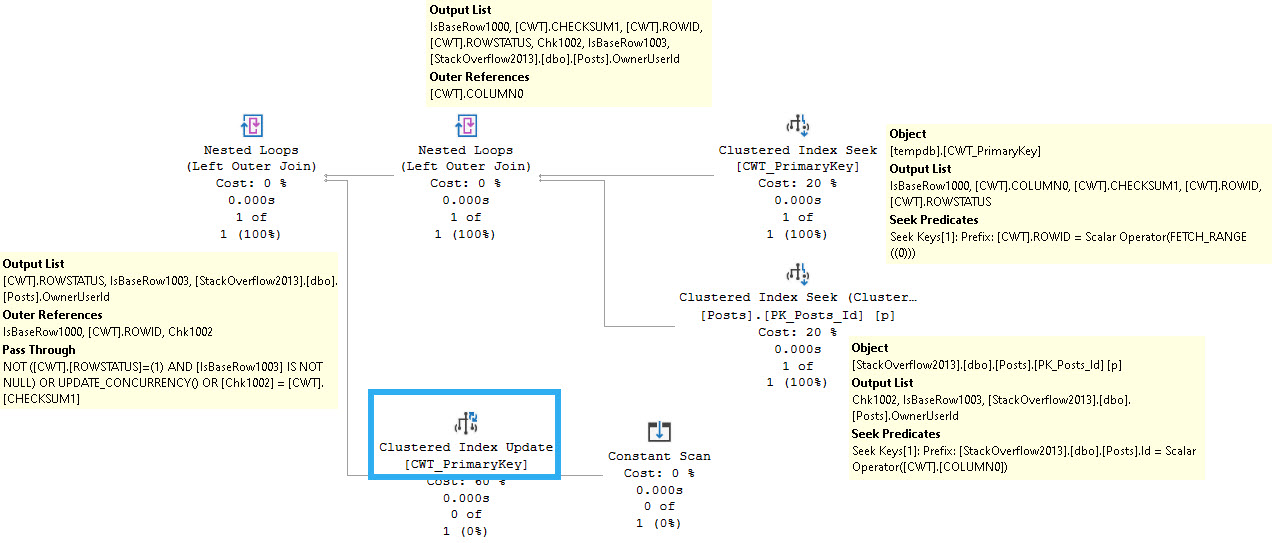
For example, this is what the next fetch looks like after the poorly-performing query:

SQL Server Query Plan
complicated game

You can see the cursor snapshot table joining back to the Posts table, along with an update of the cursor snapshot table.

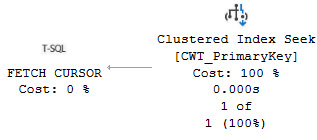
The fetch query from the cursor query that performs well looks only like this:

SQL Server Query Plan
simple times

Thanks for reading!

Going Further


If this is the kind of SQL Server stuff you love learning about, you’ll love my training. Blog readers get 25% off the Everything Bundle — over 100 hours of performance tuning content. Need hands-on help? I offer consulting engagements from targeted investigations to ongoing retainers. Want a quick sanity check before committing to a full engagement? Schedule a call — no commitment required.