When you have queries that need to process a lot of data, and probably do some aggregations over that lot-of-data, batch mode is usually the thing you want.
Originally introduced to accompany column store indexes, it works by allowing CPUs to apply instructions to up to 900 rows at a time.
It’s a great thing to have in your corner when you’re tuning queries that do a lot of work, especially if you find yourself dealing with pesky parallel exchanges.
Oh, Yeah
One way to get that to happen is to use a temp table with a column store index on it.
SELECT
    v.UserId,
    SUM(v.BountyAmount) AS SumBounty
FROM dbo.Comments AS c
JOIN dbo.Votes AS v
    ON  v.PostId = c.PostId
    AND v.UserId = c.UserId
GROUP BY v.UserId
ORDER BY SumBounty DESC;

CREATE TABLE #t(id INT, INDEX c CLUSTERED COLUMNSTORE);

SELECT
    v.UserId,
    SUM(v.BountyAmount) AS SumBounty
FROM dbo.Comments AS c
JOIN dbo.Votes AS v
    ON  v.PostId = c.PostId
    AND v.UserId = c.UserId
LEFT JOIN #t AS t
    ON 1 = 0
GROUP BY v.UserId
ORDER BY SumBounty DESC;
If you end up using this enough, you may just wanna create a real table to use, anyway.
Remarkable!
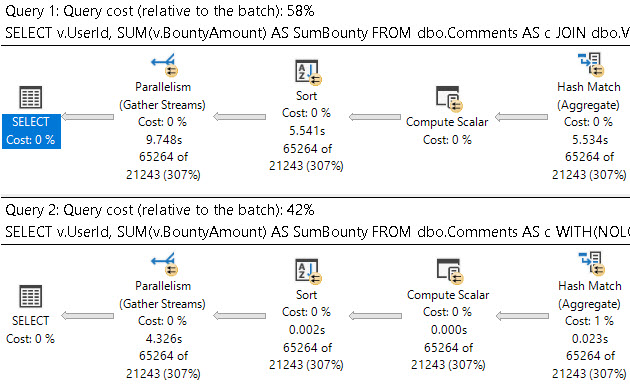
If we look at the end (or beginning, depending on how you read your query plans) just to see the final times, there’s a pretty solid difference.
you can’t make me
The first query takes around 10 seconds, and the second query takes around 4 seconds. That’s a pretty handsome improvement without touching anything else.
Thanks for reading!
Going Further
If this is the kind of SQL Server stuff you love learning about, you’ll love my training. Blog readers get 25% off the Everything Bundle — over 100 hours of performance tuning content. Need hands-on help? I offer consulting engagements from targeted investigations to ongoing retainers. Want a quick sanity check before committing to a full engagement? Schedule a call — no commitment required.
You have too many indexes on too many tables already, and the thought of adding more fills you with a dread that has a first, middle, last, and even a confirmation name.
This is another place where temp tables can save your bacon, because as soon as the query is done they basically disappear.
Forever. Goodbye.
Off to buy a pack of smokes.
That Yesterday
In yesterday’s post, we looked at how a temp table can help you materialize an expression that would otherwise be awkward to join on.
If we take that same query, we can see how using the temp table simplifies indexing.
SELECT
    p.OwnerUserId,
    SUM(p.Score) AS TotalScore,
    COUNT_BIG(*) AS records,
    CASE WHEN p.PostTypeId = 1
         THEN p.OwnerUserId
         WHEN p.PostTypeId = 2
         THEN p.LastEditorUserId
    END AS JoinKey
INTO #Posts
FROM dbo.Posts AS p
WHERE p.PostTypeId IN (1, 2)
AND   p.Score > 100
GROUP BY CASE
             WHEN p.PostTypeId = 1
             THEN p.OwnerUserId
             WHEN p.PostTypeId = 2
             THEN p.LastEditorUserId
         END,
         p.OwnerUserId;

CREATE CLUSTERED INDEX c ON #Posts(JoinKey);

SELECT *
FROM #Posts AS p
WHERE EXISTS
(
    SELECT 1/0
    FROM dbo.Users AS u
    WHERE p.JoinKey = u.Id
);
Rather than have to worry about how to handle a bunch of columns across the where and join and select, we can just stick a clustered index on the one column we care about doing anything relational with to get the final result.
Thanks for reading!
Going Further
If this is the kind of SQL Server stuff you love learning about, you’ll love my training. Blog readers get 25% off the Everything Bundle — over 100 hours of performance tuning content. Need hands-on help? I offer consulting engagements from targeted investigations to ongoing retainers. Want a quick sanity check before committing to a full engagement? Schedule a call — no commitment required.
A lot of the time when I see queries that are written with all sorts of gymnastics in the join or where clause and I ask some questions about it, people usually start complaining about the design of the table.
That’s fine, but when I ask about changing the design, everyone gets quiet. Normalizing tables, especially for Applications Of A Certain Age™ can be a tremendously painful project. This is why it’s worth it to get things right the first time. Simple!
Rather than make someone re-design their schema in front of me, often times a temp table is a good workaround.
Egg Splat
Let’s say we have a query that looks like this. Before you laugh, and you have every right to laugh, keep in mind that I see queries like this all the time.
They don’t have to be this weird to qualify. You can try this if you have functions like ISNULL, SUBSTRING, REPLACE, or whatever in joins and where clauses, too.
SELECT
    p.OwnerUserId,
    SUM(p.Score) AS TotalScore,
    COUNT_BIG(*) AS records
FROM dbo.Users AS u
JOIN dbo.Posts AS p
    ON u.Id = CASE
                   WHEN p.PostTypeId = 1
                   THEN p.OwnerUserId
                   WHEN p.PostTypeId = 2
                   THEN p.LastEditorUserId
              END
WHERE p.PostTypeId IN (1, 2)
AND   p.Score > 100
GROUP BY p.OwnerUserId;
There’s not a great way to index for this, and sure, we could rewrite it as a UNION ALL, but then we’d have two queries to index for.
Sometimes getting people to add indexes is hard, too.
People are weird. All day weird.
Steak Splat
You can replace it with a query like this, which also allows you to index a single column in a temp table to do your correlation.
SELECT
    p.OwnerUserId,
    SUM(p.Score) AS TotalScore,
    COUNT_BIG(*) AS records,
    CASE WHEN p.PostTypeId = 1
         THEN p.OwnerUserId
         WHEN p.PostTypeId = 2
         THEN p.LastEditorUserId
    END AS JoinKey
INTO #Posts
FROM dbo.Posts AS p
WHERE p.PostTypeId IN (1, 2)
AND   p.Score > 100
GROUP BY CASE
             WHEN p.PostTypeId = 1
             THEN p.OwnerUserId
             WHEN p.PostTypeId = 2
             THEN p.LastEditorUserId
         END,
         p.OwnerUserId;

SELECT *
FROM #Posts AS p
WHERE EXISTS
(
    SELECT 1/0
    FROM dbo.Users AS u
    WHERE p.JoinKey = u.Id
);
Remember that temp tables are like a second chance to get schema right. Don’t waste those precious chances.
Thanks for reading!
Going Further
If this is the kind of SQL Server stuff you love learning about, you’ll love my training. Blog readers get 25% off the Everything Bundle — over 100 hours of performance tuning content. Need hands-on help? I offer consulting engagements from targeted investigations to ongoing retainers. Want a quick sanity check before committing to a full engagement? Schedule a call — no commitment required.
If you have a workload that uses #temp tables to stage intermediate results, and you probably do because you’re smart, it might be worth taking advantage of being able to insert into the #temp table in parallel.
If your code is already using the SELECT ... INTO #some_table pattern, you’re probably already getting parallel inserts. But if you’re following the INSERT ... SELECT ... pattern, you’re probably not, and, well, that could be holding you back.
Pile On
Of course, there are some limitations. If your temp table has indexes, primary keys, or an identity column, you won’t get the parallel insert no matter how hard you try.
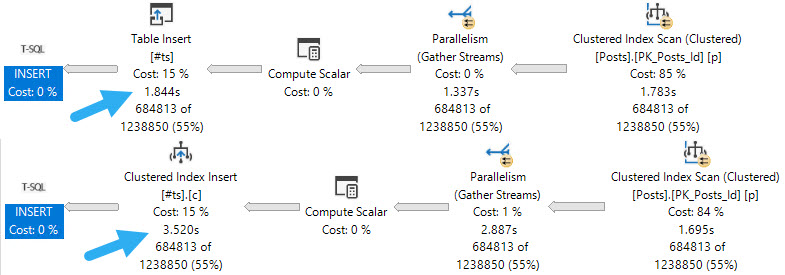
The first thing to note is that inserting into an indexed temp table, parallel or not, does slow things down. If your goal is the fastest possible insert, you may want to create the index later.
No Talent
When it comes to parallel inserts, you do need the TABLOCK, or TABLOCKX hint to get it, e.g. INSERT #tp WITH(TABLOCK) which is sort of annoying.
But you know. It’s the little things we do that often end up making the biggest differences. Another little thing we may need to tinker with is DOP.
little pigs
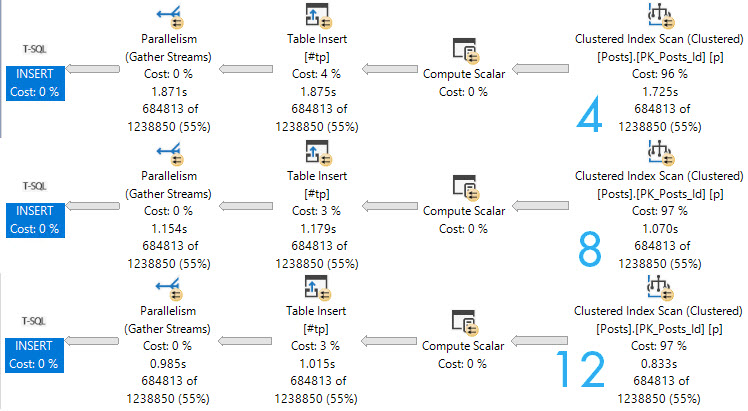
Here are the query plans for 3 fully parallel inserts into an empty, index-less temp #table. Note the execution times dropping as DOP increases. At DOP 4, the insert really isn’t any faster than the serial insert.
If you start experimenting with this trick, and don’t see noticeable improvements at your current DOP, you may need to bump it up to see throughput increases.
Though the speed ups above at higher DOPs are largely efficiency boosters while reading from the Posts table, the speed does stay consistent through the insert.
If we crank one of the queries that gets a serial insert up to DOP 12, we lose some speed when we hit the table.
oops
Next time you’re tuning a query and want to drop some data into a temp table, you should experiment with this technique.
Thanks for reading!
Going Further
If this is the kind of SQL Server stuff you love learning about, you’ll love my training. Blog readers get 25% off the Everything Bundle — over 100 hours of performance tuning content. Need hands-on help? I offer consulting engagements from targeted investigations to ongoing retainers. Want a quick sanity check before committing to a full engagement? Schedule a call — no commitment required.
Temporary objects are a necessity for just about every workload I’ve ever seen. One cannot trust the optimizer with overly large and complex queries.
At some point, you’ve gotta break things up, down, or sideways, in order to stabilize a result set for better cardinality estimation on one (or both) sides of the query.
But there are some tricks and oddities around how and where you can use temporary objects in dynamic SQL.
It’s important to consider scope, and object type, when dealing with both at once.
Since they’re my least favorite, let’s start with table variables.
Well, It Beats String Splitting
Under normal circumstances, you can’t pass table variables into dynamic SQL, nor can you declare a table variable outside of dynamic SQL and use it inside.
Trying to do either one of these things will result in an error!
DECLARE @crap TABLE(id INT);
DECLARE @sql NVARCHAR(MAX) = N'SELECT COUNT(*) AS records FROM @crap;'
EXEC sp_executesql @sql;
GO
DECLARE @crap TABLE(id INT);
DECLARE @sql NVARCHAR(MAX) = N'SELECT COUNT(*) AS records FROM @crap;'
EXEC sp_executesql @sql, N'@crap TABLE (id INT)', @crap;
GO
A big, stupid, milk-brained error. But you can do it with a User Defined Type:
CREATE TYPE crap AS TABLE(id INT);
GO

DECLARE @crap AS crap;
DECLARE @sql NVARCHAR(MAX) = N'SELECT COUNT(*) AS records FROM @crap;'
EXEC sp_executesql @sql, N'@crap crap READONLY', @crap;
GO
In the same way that you can pass Table Valued Parameters into stored procedures, you can pass them into dynamic SQL, too. That’s pretty handy for various reasons.
But passing one out, no dice.
DECLARE @crap AS crap;
DECLARE @sql NVARCHAR(MAX) = N'DECLARE @crap AS crap;'
EXEC sp_executesql @sql, N'@crap crap OUTPUT', @crap = @crap OUTPUT;
GO
But of course, it might be even easier to use a temp table, so here we go.
I Don’t See Nothing Wrong
Of course, with temp tables, there is no problem using them with inner dynamic SQL
CREATE TABLE #gold(id INT);
DECLARE @sql NVARCHAR(MAX) = N'SELECT COUNT(*) AS records FROM #gold;'
EXEC sp_executesql @sql;
DROP TABLE #gold;
GO
But we don’t find nearly as much joy doing things in reverse.
DECLARE @sql NVARCHAR(MAX) = N'CREATE TABLE #gold(id INT);'
EXEC sp_executesql @sql;
SELECT COUNT(*) AS records FROM #gold;
DROP TABLE #gold;
GO
That’s why, rather than create a UDT, which gives you another dependency with not a lot of upside, people will just dump the contents of a TVP into a temp table, and use that inside dynamic SQL.
It’s a touch less clunky. Plus, with everything we know about table variables, it might not be such a great idea using them.
If this is the kind of SQL Server stuff you love learning about, you’ll love my training. Blog readers get 25% off the Everything Bundle — over 100 hours of performance tuning content. Need hands-on help? I offer consulting engagements from targeted investigations to ongoing retainers. Want a quick sanity check before committing to a full engagement? Schedule a call — no commitment required.
So you’re that odd soul who has been listening to rumors about table variables. Perhaps things about them only being in memory, or that they’re okay to use if you only put less than some arbitrary number of rows in them.
Those things are both wrong. But of course, my favorite rumor is the one about arbitrary numbers of rows being safe.
Ouch! What a terrible performance
Let’s do everything in our power to help SQL Server make a good guess.
We’ll create a couple indexes:
CREATE INDEX free_food ON dbo.Posts(OwnerUserId);
CREATE INDEX sea_food ON dbo.Comments(UserId);
Those stats’ll be so fresh you could make tartare with them.
We’ll create our table variable with a primary key on it, which will also be the clustered index.
DECLARE @t TABLE( id INT PRIMARY KEY );
INSERT @t ( id )
VALUES(22656);
And finally, we’ll run the select query with a recompile hint. Recompile fixes everything, yeah?
SELECT AVG(p.Score * 1.) AS lmao
FROM   @t AS t
JOIN   dbo.Posts AS p
    ON p.OwnerUserId = t.id
JOIN   dbo.Comments AS c
    ON c.UserId = t.id
OPTION(RECOMPILE);
GO
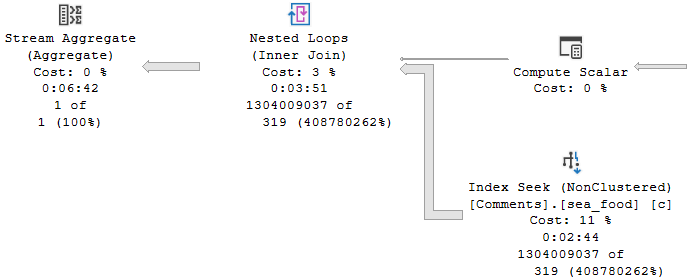
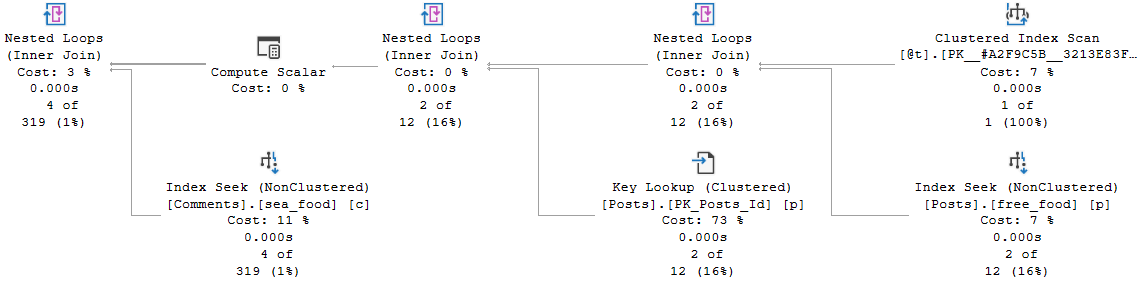
How does the query do for time? Things start off okay, but keep the cardinality estimate in mind.
Get the hook
But quickly go downhill.
Your granny lied!
Fish are dumb, dumb, dumb
The whole problem here is that, even with just one row in the table variable, an index on the one column in the table variable, and a recompile hint on the query that selects from the table variable, the optimizer has no idea what the contents of that single row are.
That number remains a mystery, and the guess made ends up being wrong by probably more than one order of magnitude. Maybe even an order of manure.
Table variables don’t gather any statistical information about what’s in the column, and so has no frame of reference to make a better cardinality estimate on the joins.
If we insert a value that gets far fewer hits in both the Posts and Comments tables (12550), the estimate doesn’t really hurt. But note that the guesses across all operators are exactly the same.
You don’t swing it like you used to, man
C’est la vie mon ami
You have a database. Data is likely skewed in that database, and there are already lots of ways that you can get bad guesses. Parameter sniffing, out of date stats, poorly written queries, and more.
Databases are hard.
The point is that if you use table variables outside of carefully tested circumstances, you’re just risking another bad guess.
All of this is tested on SQL Server 2019, with table variable deferred compilation enabled. All that allows for is the number of rows guessed to be accurate. It makes no attempt to get the contents of those rows correct.
So next time you’re sitting down to choose between a temp table and a table variable, think long and hard about what you’re going to be doing with it. If cardinality esimation might be important, you’re probably going to want a temp table instead.
Thanks for reading!
Going Further
If this is the kind of SQL Server stuff you love learning about, you’ll love my training. Blog readers get 25% off the Everything Bundle — over 100 hours of performance tuning content. Need hands-on help? I offer consulting engagements from targeted investigations to ongoing retainers. Want a quick sanity check before committing to a full engagement? Schedule a call — no commitment required.
The important thing to understand about parallelism is it’s great when appropriate. Striking a balance between what should go parallel, the CPU usage it’s allowed, and what should stay serial can be tough.
It can be especially difficult when parameter sniffing comes into play. Here are a couple scenarios:
For a small amount of data, a serial query plan runs quickly and uses relatively few resources
For a large amount of data, a query re-uses the serial plan and runs for >20 seconds
For a small amount of data, a re-used parallel plan overloads the server due to many concurrent sessions
For a large amount of data, the re-used parallel plan finishes in 2-3 seconds
What do you do? Which plan do you favor? It’s an interesting scenario. Getting a single query to run faster by going parallel may seem ideal, but you need extra CPU, and potentially many more worker threads to accomplish that.
In isolation, you may think you’ve straightened things out, but under concurrency you run out of worker threads.
There are ways to address this sort of parameter sniffing, which we’ll get to at some point down the line.
Wrecking Crew
One way to artificially slow down a query is to use some construct that will inhibit parallelism when it would be appropriate.
There are some exotic reasons why a query might not go parallel, but quite commonly scalar valued functions and inserts to table variables are the root cause of otherwise parallel-friendly queries staying single-threaded and running for long times.
While yes, some scalar valued functions can be inlined in SQL Server 2019, not all can. The list of ineligible constructs has grown quite a bit, and will likely continue to. It’s a feature I love, but it’s not a feature that will fix everything.
Databases are hard.
XML Fetish
You don’t need to go searching through miles of XML to see it happening, either.
All you have to do is what I’ve been telling you all along: Look at those operator properties. Either hit F4, or right click and choose the properties of a select operator.
nonparallelplanreasonokaybutwhycanyoupleasetellme
Where I see these performance surprises! pop up is often when either:
Developers develop on a far smaller amount of data than production contains
Vendors have clients with high variance in database size and use
In both cases, small implementations likely mask the underlying performance issues, and they only pop up when run against bigger data. The whole “why doesn’t the same code run fast everywhere” question.
Well, not all features are created equally.
Simple Example
This is where table variables catch people off-guard. Even the “I swear I don’t put a lot of rows in them” crowd may not realize that the process to get down to very few rows is impacted by these @features.
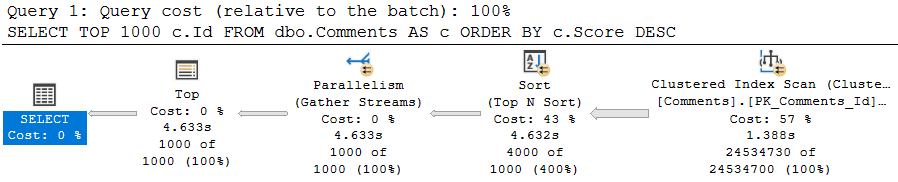
SELECT TOP (1000) c.Id
FROM dbo.Comments AS c
ORDER BY c.Score DESC;
This query, on its own, is free to go parallel — and it does! It takes about 4.5 seconds to do so. It’s intentionally simple.
don’t @ me
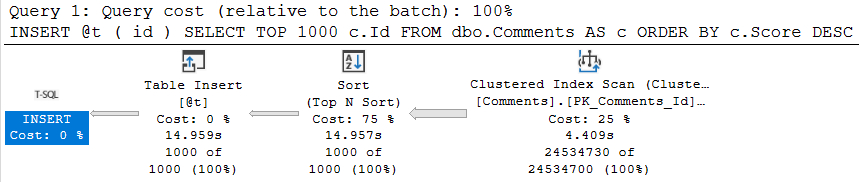
Once we try to involve a @table variable insert, parallelism goes away, time increases 3 fold, and the non-parallel plan reason is present in the plan XML.
DECLARE @t TABLE(id INT);

INSERT @t ( id )
SELECT TOP 1000 c.Id
FROM dbo.Comments AS c
ORDER BY c.Score DESC;
well.
Truesy
This can be quite a disappointing ramification for people who love to hold themselves up as responsible table variable users. The same will occur if you need to update or delete from a @table variable. Though less common, and perhaps less in need of parallelism, I’m including it here for completeness.
This is part of why multi-statement table valued functions, which return @table variables, can make performance worse.
To be clear, this same limitation does not exist for #temp tables.
Anyway, this post went a little longer than I thought it would, so we’ll look at scalar functions in tomorrow’s post to keep things contained.
Thanks for reading!
Going Further
If this is the kind of SQL Server stuff you love learning about, you’ll love my training. Blog readers get 25% off the Everything Bundle — over 100 hours of performance tuning content. Need hands-on help? I offer consulting engagements from targeted investigations to ongoing retainers. Want a quick sanity check before committing to a full engagement? Schedule a call — no commitment required.
Rather than just give you that one row estimate, it’ll wait until you’ve loaded data in, and then it will use table cardinality for things like joins to the table variable. Just be careful when you use them in stored procedures.
That can be a lot more helpful than what you currently get, but the guesses aren’t quite as helpful when you start using a where clause, because there still aren’t column-level statistics. You get the unknown guess for those.
How Can You Test It Out Before SQL Server 2019?
You can use #temp tables.
That’s right, regular old #temp tables.
They’ll give you nearly the same results as Table Variable Deferred Compilation in most cases, and you don’t need trace flags, hints, or or SQL Server 2019.
Heck, you might even fall in love with’em and live happily ever after.
The Fine Print
I know, some of you are out there getting all antsy-in-the-pantsy about all the SQL Jeopardy differences between temp tables and table variables.
I also realize that this may seem overly snarky, but hear me out:
Sure, there are some valid reasons to use table variables at times. But to most people, the choice about which one to use is either a coin flip or a copy/paste of what they saw someone else do in other parts of the code.
In other words, there’s not a lot of thought, and probably no adequate testing behind the choice. Sort of like me with tattoos.
Engine enhancements like this that benefit people who can’t change the code (or who refuse to change the code) are pretty good indicators of just how irresponsible developers have been with certain ✌features✌. I say this because I see it week after week after week. The numbers in Azure had to have been profound enough to get this worked on, finally.
I can’t imagine how many Microsoft support tickets have been RCA’d as someone jamming many-many rows in a table variable, with the only reasonable solution being to use a temp table instead.
I wish I could say that people learned the differences a lot faster when they experienced some pain, but time keeps proving that’s not the case. And really, it’s hardly ever the software developers who feel it with these choices: it’s the end users.
Thanks for reading!
Going Further
If this is the kind of SQL Server stuff you love learning about, you’ll love my training. Blog readers get 25% off the Everything Bundle — over 100 hours of performance tuning content. Need hands-on help? I offer consulting engagements from targeted investigations to ongoing retainers. Want a quick sanity check before committing to a full engagement? Schedule a call — no commitment required.
In this video, I explore the often-maligned table variables in SQL Server and delve into their pros and cons. I start by comparing table variables to temporary tables through a series of stored procedures that insert data into both types of objects and measure execution times. The results show that for high-frequency, low-row operations, table variables can outperform temp tables due to reduced overhead. However, when dealing with indexes and needing column-level statistics for better query optimization, temp tables shine, as demonstrated by a scenario where the temp table’s plan was significantly more accurate and efficient than the table variable’s. I conclude by highlighting that while table variables have their uses, especially in scenarios requiring frequent execution on small datasets, they should be used judiciously considering the potential performance implications of incorrect query plans.
Full Transcript
I was going to write a song about table variables, and then I realized that I have no songwriting abilities whatsoever. That rhyming with variables is unpleasant. Not something that I would wish on anyone in this difficult time. So, I need to turn off query plans according to this. I don’t know what drunk wrote this thing, but whatever. So, table variables have, I think, a deservedly bad reputation for the most part. You can get terrible estimates from them, and even with recompile hints or trace flags, you still don’t get column level statistically information about the distribution of values in your table variables. You’ll get table cardinal. You’ll know how many rows are in the table, but you won’t know the breakdown of the values in those rows.
And also, when you modify a table variable, modifications are all forced to run serially, unless you’re sneaky about it. I have a couple blog posts about those things here. Hopefully, those bit.ly links will be easy enough for you to remember. They are case sensitive, though, so if you’re going to get your little fingers to work, remember to capitalize the correct letters on those. I’ll leave those there and count to a number beyond your imagination as quickly as I can, so that you can memorize them for later. So, first, I want to show you where table variables can be better than temp tables. Like, they have a bad reputation, but sometimes they can be good, too. So, I’m going to create two stored procedures here, and I promise I’m not farting that’s a motorcycle or something.
But I have these two stored procedures here. This first one is called temp table test, where we’re going to insert some stuff into a temp table, the pound sign, and then I have the exact same thing, except we’re going to use a table variable, the at sign table. So, I’m going to go and I’m going to create these two stored procedures. I’m pretty sure I already have them created, but what the hell. Let’s make double short. And then what I’m going to do, and this is why I have query plans turned off, if we’re being honest about things, I’m going to run a test where, for 50,000 iterations, I’m going to, as quickly as possible, execute the temp table stored procedure, and then execute the table variable stored procedure.
I’m going to see which one finishes more quickly. And while I do that, oh, I went up too far. Ha ha! My mouse wheel has been a little wonky lately, but I have both of those. Okay, good. And, well, I run that. I want to bring up that with SQL Server 2019, you do get better table cardinality estimates for table variables, but you still don’t get column level statistical information from table variables. And I’m pretty sure I have a post about that coming up. But this is SQL Server 2017. Not RTM. It’s just, SSMS doesn’t report CU levels for some reason. Microsoft made this big stink of, oh, we’re not a servicing model. We’re not going to do more service packs.
But SSMS is still like RTM, despite the fact that I am on CU 19, SQL Server 2017. Not weird or confusing at all. But we can see, now with these results returned, that the store procedure in the loop that inserted into the temp table, rather, took 17 and a half seconds. And the store procedure that did the same thing with the table variable took five seconds. Now, there is overhead with temp tables. And that overhead is unfortunately where the performance comes from. I know generating the statistics, all that other good stuff, that has overhead when you do it. And when you do it a lot, well, you have to do it a lot. That adds up.
So, if you are, if, and this is a thing that I learned from Michael, Mr. Michael J. Swart, that if you have very, very high frequency execution code, table variables can be a lot better to use than temp tables. Now, this also assumes that plan shape does not matter, that there are no performance issues that could come from, you know, say, joining that temporary object off somewhere else, putting a lot of rows in it and going to do something. You know, it’s just, there’s a lot of circumstances where, you know, like the overhead, the overhead might be worth it.
But, but if you just have very high frequency execution code operating on a small number of rows, and there is no, like, a query optimization impact to the bad guesses that come from table variables, then it might not be the worst thing in the world to use them in those scenarios. I mean, they are there for a reason. Microsoft didn’t devote developer time to them for no reason. I mean, maybe, maybe, maybe, maybe, maybe it could have been like a, a code portability thing between other competitive database platforms and SQL Server, but who knows at the time?
I have heard nothing about the Oracle checklist from people at Microsoft, so whatever. Now, let’s look, let’s look at when table variables are less good. All right, when they’re not quite as hot.
So the first thing I’m going to do, actually I should put a little, put a little space in there, happy little space. No mistakes, just happy little spaces. So I’m going to create a couple indexes on the post table and the comments table on the owner user ID and ID.
And the first thing I’m going to do, the first thing I want to show you rather, is, well, after these indexes create, the first thing I’m going to show you, is that if we create a temp table, when we insert values into that temp table. Now, this is where the column level statistics can matter a lot for temp tables and table variables.
The first thing I’m going to, the first value I’m going to put in there is John Skeet’s ID. John Skeet is legendary. John Skeet has many questions, well, not many questions, but he has many answers, many comments.
He is quite prolific in the Stack Overflow data. And the other set of values in there that I’m going to put in is people who barely use the site, people with a reputation of one, ordered by how recently they created their account.
So people who are not avid site users, if they have any answers, I’d be surprised. They might have like one question. Some people sign up, ask a question and leave.
Some people sign up, then do nothing. They’re just like, oh, I have an account. I was going to answer the data to do something else. I was wrong. You know, there’s like lots of stuff. So the first thing I’m going to do is now that those indexes are done is I’m going to stick those values into a temp table, pound sign T temp table, and then I’m going to get a count from those.
All right, so I’m going to do that. I’m going to turn execution plans back on. And I’m going to prove to you that this is a reasonably fast executing piece of code. The insert takes 232 milliseconds.
There are perhaps things we could do to make that better. I hadn’t really thought about it too much. And then the join down here is a reasonably fast join at 0.016 milliseconds. Now, if we were to repeat this experiment with a table variable, it would take a long time.
All right, so if I do the same thing here, I’m going to run that. But I’m not going to wait to show you the results. I’m going to show you a saved copy of the plan.
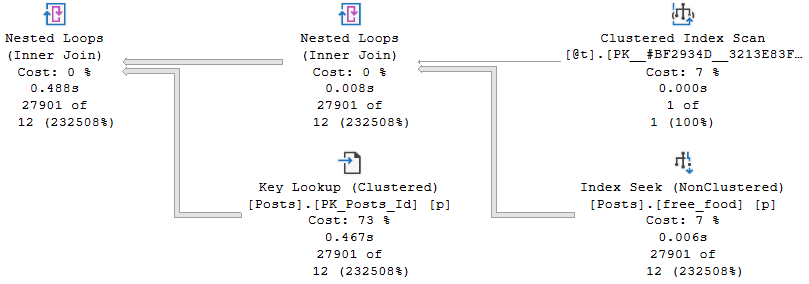
Not because this is slow. This part is fine. The insert is fine. What’s not fine is the query that we run next, which runs for, your eyes are not lying to you, five minutes and four seconds. And we have our table variable guess here.
We have our index seat guess here, which is not so good. We guess 24 O’s and we get 2700, 901. And then we go into this nested loops join, expecting 24 O’s, getting 27901.
And then we spend four and a half minutes in a nested loop join, going and getting values out of the comments table. When we are expecting 638 and we got 1304009037. I’m not going to bother trying to figure out what that number is.
It is a big number. And this takes a very long time. This was not a happy time for this query running. And the reason that we got such a better guess from the temp table was because we got column level statistics about what values were in there.
We were able to use those statistics to come up with a better joined execution plan. And we were able to use those to not end up running in nested loops hell for five minutes. Crazy that, isn’t it?
Crazy. Absolutely insane. Crazy. So, if you’re going to use table variables, high frequency execution is one of the primary things that I would look for in a workload that might benefit from table variables. But also you need to look at how you’re going to use table variables afterwards.
If I took those two store procedures that I showed you earlier and I said, hey, we’re going to see what happens when we run this in a loop. Well, this one getting to 50,000 executions at five minutes per execution, that’s not happening. I’m not sitting here for that long.
I don’t love you that much. There are limits to my love and patience. The temp table one would finish rather quickly, even for 50,000 executions. So there are things to consider with how we’re using the table variable down the line.
And if column level statistical information might help those activities further on down the line. So, there we have it. For the most part, if we care about performance and statistical information, then we would probably want to err on the side of temp tables.
If we care about speed of execution, the frequency of execution, then we might want to use table variables. This changes a little bit, like I said, in SQL Server 2019. But I have another post about that where I address that specifically.
Anyway, that is all I have to say here. I’m going to stop talking. I’m going to hit the stop button. I’m going to eat some cashews and probably record another video once I get done feeling gross about cashew things.
Quarantine is not fun. Goodbye.
Going Further
If this is the kind of SQL Server stuff you love learning about, you’ll love my training. Blog readers get 25% off the Everything Bundle — over 100 hours of performance tuning content. Need hands-on help? I offer consulting engagements from targeted investigations to ongoing retainers. Want a quick sanity check before committing to a full engagement? Schedule a call — no commitment required.
In this video, I dive into the world of table variables in SQL Server 2019, exploring how they’ve been improved but still come with their own set of challenges. Specifically, I highlight the issue of cardinality estimation for table variables, which can lead to suboptimal query plans due to a lack of column-level statistics. By comparing table variables with temporary tables, I demonstrate that while SQL Server 2019 has made significant strides in improving these estimates, there are still scenarios where you might face performance issues. The video showcases how using temporary tables instead can provide more accurate cardinality estimates, but also points out the downsides of this approach, such as increased execution time and complexity.
Full Transcript
Erik Darling here to start a line of hand lotion reviews. No kidding. Though that would be more topical. And if you don’t see the pun that just occurred there, topical reviews of hand lotion, I think you should stop watching. You should get a new hobby. You should go collect rocks or something. Go investigate slime. I’m kidding. I’m sure it’s fine. Not everyone is doing it. You should go check it out. Now that isn’t the puns. Cool. So this video is not about hand lotion though. If this counts as sponsorship, then whatever. This video is about table variables, sort of generally, but more specifically table variables in SQL Server 2019. Now, in SQL Server 2019, Microsoft has made attempts to fix a lot of common problems that people will have. hit with query performance. And one of those issues is with table variable cardinality estimation.
In versions prior to SQL Server 2019, unless you applied a recompile hint or some goofy trace flag, you would get a one row estimate from a table variable. Now that changes a little bit with multi-statement table valued functions which are turn table variables. We’re not going to get into all that detail here. Just know that they are different. Now in SQL Server 2019, what happens is we pause after we insert data into a table variable. Now there’s a little bit of a branch here. So if it’s a stored procedure, you will pause. You will look at the number of rows that were inserted into the table variable and then SQL Server will cache that guess. So if you’re thinking to yourself, it sounds like table variables just became a new source of parameter sniffing. Well, golly and gosh, you are correct. In ad hoc queries, you will pause for each execution and SQL Server will look at the number of rows that went in and then we will, of course, just guess the number of rows that went into the table. Now an important thing that’s missing from all versions of SQL Server and across all table variables is that we have no column level information about the data that got put into our table variable.
We do not have a statistics histogram. We have nothing of the sort. We do not have any information that you would find in a normal statistics object that would tell you about the data distribution, distinctness, rows, average rows, range rows, all that good stuff. We don’t get that no matter what.
All we get is table cardinality. So while that is an improvement, there are times when that guess can go horrifically. Well, when that table cardinality guess just isn’t what makes a big difference. Sometimes it is, other times it isn’t. So I have this query. But I’m not going to run this query over here.
I’m going to run this query over here because we’re going to run this. And then we’re going to talk about what happens with table variables versus 10 tables. So I’m going to kick that off running. And the first thing that I want to note is that estimated plans do not help us here. If you look at this estimated plan, we can see that we insert 1001 rows estimated here. There we go. 1001. Hooray, hooray, hooray, hooray. But in this plan down below, we still get the one row guess sad face. We are not helped by the old estimated plan. No, we’re not. So let’s move on a little bit. Now, what I need to point out here is that table variables behind the scenes use a temporary object, a pound signed temp, pound, not signed, pound signed, pound sand temporary object. And if I run this query, it’ll thankfully run pretty quickly. And if you look over at the messages tab, we will see our mysterious pound signed object that gets created. Now, I wish that there were a way that I could pre-detect that pound signed object so that I could show you that there are no statistics involved with that thing. But I can’t.
What I can show you is that statistics exist for temporary tables, the pound sign actual temporary tables. I call them temporary tables plus because they’re temporary tables plus statistics. All right, or table variables plus statistics. That’s a good, it’s a good one. Good way to talk about things, right? So let’s look at what happens when we run this code. If we hit F5 here, and we use these super duper fancy new DMV or this this single singular super duper fancy new DMV as of SQL Server 2016, brand new, we will get some information back statistically about what data went into that temp table. We will have that. And yes, this can be cached. And yes, this can cause an issue. And I yes, I do have a video about that. And yes, I will link to it in the details. So you can go watch that later. But anyway, that’s the point there. So when SQL Server makes guesses about things, it can use this wonderful batch of his of information to look at what rows are in here.
And it can use that you can use that information to make a guess about what it’s going to have to do uh in the in the rest of the query. So if we turn on the query plan and we we rerun this, we have a lot of fun. We look at the execution plan. SQL Server can use information from over here to make guesses about what’s going to happen down here and how to choose that execution plan. Now, what I want to point out really quickly is that this query that I’m running here now, it doesn’t matter. I can leave off that DVCC free proc cache thing. I can run that this returns very, very quickly over here. This same query using a table variable is still executing over here after nearly three minutes.
So we we we have a we I think we have a plan quality issue on our hands here. I’m not really sure what else to tell you. Now, I know what you’re thinking, Eric, there’s no recompile hint here. But gosh darn it, this is SQL Server 2019. We don’t need a recompile hint. We get the same information without it because this is us running it over here and we get the table variable deferred compilation. Now, what’s sort of interesting is if we go a little bit deeper into things, right, if we look a little bit beyond the histogram, beyond, beyond, beyond, beyond, beyond, beyond. And we use this query that hits a table variable and we try to get cardinality estimation information from it. What we’ll get over in the messages tab is a whole bunch of stuff that I don’t understand at all. I start reading through it and I get I get cranky. But one thing that shows up in here that I think is very interesting is this line right here. CST call black box. That doesn’t sound like something that’s going to reveal a lot of information to us, does it? So let’s let’s search in here and let’s search in here. Let’s see. Yep, there it is. There’s I mean the first iteration of it. This actually shows up a bunch of times in here.
But we can see that when SQL Server tried to make a guess, it was guessing from a black box. It’s a no, no, no. You got me. Screwed there. Can’t nothing we can do about that. But if we as mature, experienced data professionals use a pound sign temporary table instead, and we on this query, we will get I mean first thing I want to point out in the execution plan is that we get a dead to rights accurate cardinality estimate over here. I think I forgot to show you that up here. If we come forward here. I don’t know. Maybe we will. Maybe we won’t. I don’t know what’s going to happen now.
Yeah, we get well, that’s weird. I don’t know. I forget. I forget what my point was there. But if we go look at the information over here. Yeah, two, no, one, one, yeah, rather than 12. Yeah, because it was good. Oh, yeah, because it gets 12 up there. I’m all I apologize. I’m exhausted today.
Come back over here. It gets 12 rows would come out of this 12. 12. Ha ha ha. Eric screwed up. No, Eric is exhausted. Eric hasn’t slept in like three nights. So deal with it. This video is free. I don’t want to hear about it. So yeah, we we made a guess of 12 rows up here. And we make an accurate guess down here of 27901 rows. There we go. Bingo, bingo.
We are set. We are sweet. We are golden. But we are still executing over here. That’s less than ideal. But anyway, what we have over here is, of course, where SQL Server makes its cardinality estimation. Over the messages tab over here and look, we will get accurate cardinality guesses down here. SQL Server will not use a black box to try and guess what was happening. And in case you didn’t notice, we just finished over here after five minutes and 51 seconds.
So we can see that over here, we we did pretty well. Yeah, we inserted 1000 rows very quickly. And if we head on down here and look, you can see that we we got our accurate table cardinality of 1001 rows. But we didn’t get that column level cardinality that would help us make better guesses on down the line. So if we scroll down a little bit here. Oh, actually, no, let’s blow this up a little because I care about your experience as an end user somewhat.
If we look over here, we got our 1001 row guess, which was great. And then down here, we things sort of fell apart. We got 35,000 rows back when we guessed 378. And then if we go, oh, go away tooltip. I don’t need you. If we go down here, where we guessed 10,099 rows, we got 1304009472. Now keep in mind that is from a key lookup. So that is a total number of rows that have and that have exited there. So you know, you know, keep in mind that there’s that going on.
The key lookups are kind of tricky. I’ll put a blog post together about that. But anyway, we can see over here that we maintained that guess that was not so hot there. And that we took five and a half minutes to run there. So sadness increases exponentially. Anyway, point is, the temp tables versus table variables thing can still matter even in SQL Server 2019. The lack of column level statistics can really still harm cardinality estimation. You may find in many cases that just getting table cardinality is good enough to solve many of your query problems. But oftentimes you will still need that true to life cardinality estimation that comes from column level statistics, which you don’t get even if you apply a recompile hint here. So I don’t know, whatever. I’m Erik Darling and I endorse hand washing and hand lotioning and staying indoors. Those are those are the three things that I endorse currently. I also endorse temp tables for the most part over table variables. Right, 99% of the time.
97. 96 and a half. I don’t know.
Going Further
If this is the kind of SQL Server stuff you love learning about, you’ll love my training. Blog readers get 25% off the Everything Bundle — over 100 hours of performance tuning content. Need hands-on help? I offer consulting engagements from targeted investigations to ongoing retainers. Want a quick sanity check before committing to a full engagement? Schedule a call — no commitment required.