A client question that I get quite a bit is around why queries in production get a bad query plan that queries in dev, QA, or staging don’t get is typically answered by looking at statistics.
Primarily, it’s because of the cardinality estimates that queries get around ascending keys. It usually gets called the ascending key problem, but the gist is that:
You have a pretty big table
You’re using the legacy cardinality estimator
A whole bunch of rows get inserted, but not enough to trigger an auto stats update
You’re not using compatibility level >= 130 or trace flag 2371
Queries that look for values off an available histogram get a one row estimate using the legacy Cardinality Estimator or a 30% estimate using the default Cardinality Estimator
Which is a recipe for potentially bad query plans.
Reproductive Script
Here’s the full repro script. If you’re using a different Stack Overflow database, you’ll need to adjust the numbers.
USE StackOverflow2013;

/*Figure out the 20% mark for stats updates using legacy compat levels*/
SELECT
    c = COUNT_BIG(*),
    c20 = CEILING(COUNT_BIG(*) * .20)
FROM dbo.Users AS u;

/*Stick that number of rows into a new table*/
SELECT TOP (493143)
    u.*
INTO dbo.Users_Holder
FROM dbo.Users AS u
ORDER BY u.Id DESC;


/*Delete that number of rows from Users*/
WITH
    del AS
(
SELECT TOP (493143)
    u.*
FROM dbo.Users AS u
ORDER BY u.Id DESC
)
DELETE
FROM del;

/*I'm using this as a shortcut to turn off auto stats updates*/
UPDATE STATISTICS dbo.Users WITH NORECOMPUTE;

/*Put the rows back into the Users Table*/
SET IDENTITY_INSERT dbo.Users ON;

INSERT
    dbo.Users
(
    Id,
    AboutMe,
    Age,
    CreationDate,
    DisplayName,
    DownVotes,
    EmailHash,
    LastAccessDate,
    Location,
    Reputation,
    UpVotes,
    Views,
    WebsiteUrl,
    AccountId
)
SELECT
    uh.Id,
    uh.AboutMe,
    uh.Age,
    uh.CreationDate,
    uh.DisplayName,
    uh.DownVotes,
    uh.EmailHash,
    uh.LastAccessDate,
    uh.Location,
    uh.Reputation,
    uh.UpVotes,
    uh.Views,
    uh.WebsiteUrl,
    uh.AccountId
FROM dbo.Users_Holder AS uh;

SET IDENTITY_INSERT dbo.Users OFF;

/*Figure out the minimum Id we put into the holder table*/
SELECT
    m = MIN(uh.Id)
FROM dbo.Users_Holder AS uh;

/*Compare estimates*/
SELECT
    c = COUNT_BIG(*)
FROM dbo.Users AS u
WHERE u.Id > 2623772
OPTION(USE HINT('FORCE_LEGACY_CARDINALITY_ESTIMATION'));


SELECT
    c = COUNT_BIG(*)
FROM dbo.Users AS u
WHERE u.Id > 2623772
OPTION(USE HINT('FORCE_DEFAULT_CARDINALITY_ESTIMATION'));

/*Cleanup*/
UPDATE STATISTICS dbo.Users;

TRUNCATE TABLE dbo.Users_Holder;
Query Plans
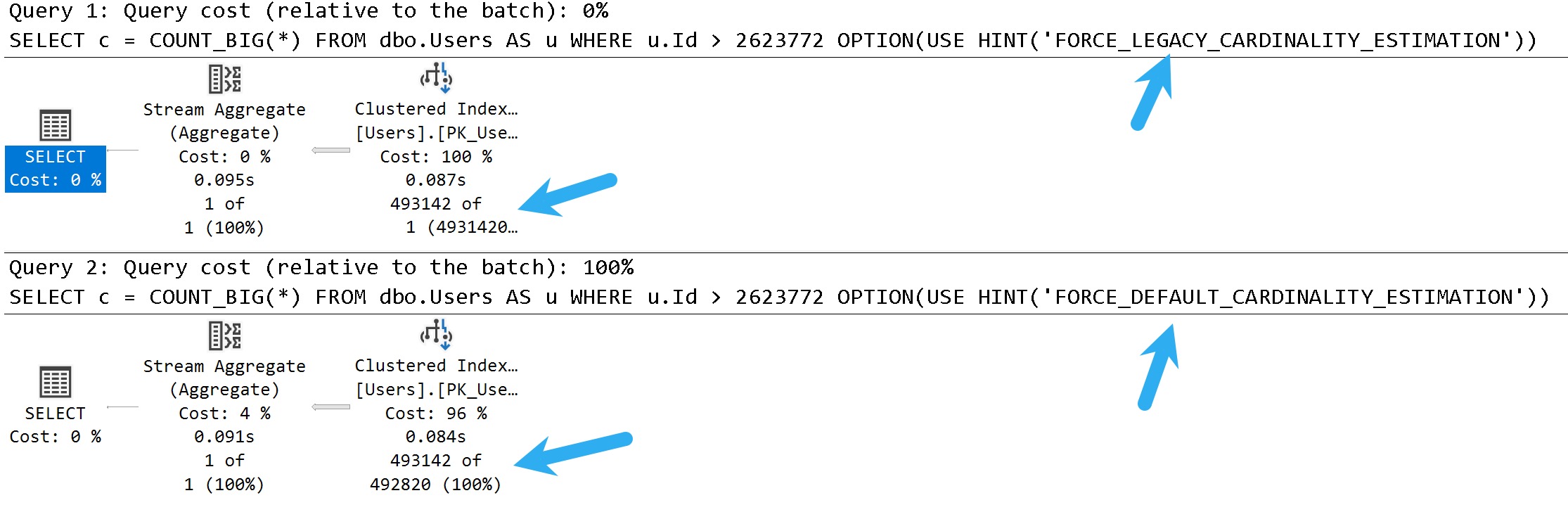
Here are the plans for the stars of our show:
king push
In these query plans, you can see the legacy cardinality estimator gets a one row estimate, and the default cardinality estimator gets a 30% estimate.
There isn’t necessarily a one-is-better-than-the-other answer here, either. There are times when both can cause poor plan choices.
You can think of this scenario as being fairly similar to parameter sniffing, where one plan choice does not fit all executions well.
Checkout
There are a lot of ways that you can go about addressing this.
In some cases, you might be better off using trace flag 2371 to trigger more frequent auto stats updates on larger tables where the ~20% modification counter doesn’t get hit quickly enough. In others, you may want to force one estimator over the other depending on which gets you a better plan for most cases.
Another option is to add hints to the query in question to use the default cardinality estimator (FORCE_DEFAULT_CARDINALITY_ESTIMATION), or to generate quick stats for the index/statistics being used (ENABLE_HIST_AMENDMENT_FOR_ASC_KEYS). Documentation for both of those hints is available here. Along these lines, trace flags 2389, 2390, or 4139 may be useful as well.
Of course, you could also try to address any underlying query or index issues that may additionally contribute to poor plan choices, or just plan differences. A common problem in them is a seek + lookup plan for the one row estimate that doesn’t actually make sense when the actual number of rows and lookup executions are encountered at runtime.
Thanks for reading!
Going Further
If this is the kind of SQL Server stuff you love learning about, you’ll love my training. Blog readers get 25% off the Everything Bundle — over 100 hours of performance tuning content. Need hands-on help? I offer consulting engagements from targeted investigations to ongoing retainers. Want a quick sanity check before committing to a full engagement? Schedule a call — no commitment required.
There are metrics that I care and don’t care about when I’m looking for queries to tune.
Metrics I don’t care about:
Logical Reads
Costs
If a query does “a lot” of reads or has a high “cost”, I generally don’t care as long as they run quickly. Doing consistent physical reads is a slightly different story, but would probably fall more under server tuning or fixing memory grants.
Metrics I do care about:
CPU (taking parallelism into consideration)
Duration (compared to CPU)
Memory Grants (particularly when they’re not being fully utilized)
Writes (especially if it’s just a select)
Executions (mostly to track down scalar UDFs)
CPU and Duration
These two metrics get lumped together because they need to be compared in order to figure out what’s going on. First, you need to figure out what the minimum runtime of a query is that you want to tune.
In general, as query execution time gets faster, getting it to be much faster gets more difficult.
Bringing a query from 1 second to 100 milliseconds might be a small matter
Bringing that same query from 100 milliseconds to 1 millisecond might take more time than it’s worth
I say that because unless someone is querying SQL Server directly, smaller durations tend to be less detectable to end users. By the time they hit a button, send the request, receive the data, and have the application render it etc. they’re probably not aware of a 99 millisecond difference.
Of course, not everything is end-user centric. Other internal operations, especially any loop processing, might benefit greatly from reductions on the smaller side of things.
If duration and CPU are acceptable, leave it alone
If either is unacceptable, tune the darn thing
If CPU is much higher than duration, you have a parallel plan, and tuning is optional
If duration is much higher than CPU, you have blocking or another contention issue, and the query you’re looking at probably isn’t the problem
If duration and CPU are roughly equivalent, you either have a functional serial plan or a really crappy parallel plan
I give these the highest priority because reducing these is what makes queries faster, and reduces the surface area (execution time) of a query where something crappy might happen, like blocking, or deadlocks, or other resource contention.
Memory Grants
Using these as a tuning metric can have a lot of positive effects, depending on what kind of shape the system is in.
Consider a few scenarios:
PAGEIOLATCH_XX waits are high because large memory grants steal significant buffer pool space
RESOURCE_SEMAPHORE waits are high because queries suck up available memory space and prevent other queries from using it
Queries are getting too low of a memory grant and spilling significantly, which can slow them down and cause tempdb contention under high concurrency
Fixing memory grant issues can take many forms:
Getting better cardinality estimates for better overall grant estimates
Indexing to influence operator choices away from memory consumers
Using more appropriate string lengths to reduce memory grants
Fixing parallel skew issues that leaves some threads with inadequate memory
Rewriting the query to not ask for ordered data
Rewriting the query to ask for ordered data in smaller chunks
Rewriting the query to convert strings to better fitting byte lengths
That’s just some stuff I end up doing off the top of my head. There are probably more, but blog posts are only useful up to a certain length.
Like all other strings.
Writes and Selects
Modification queries are going to do writes. This seems intuitive and not at all shocking. If you have queries that are doing particularly large modifications, you could certainly look into tuning those, but it would be a standard exercise in query or index tuning.
Except that your index tuning adventure would most likely lead you to dropping unused and overlapping indexes to reduce the number of objects that you need to write to than to add an index.
But who knows. Boring anyway. I hear indexes tune themselves in the cloud.
When select queries do a large number of writes, then we’re talking about a much more interesting scenario.
Spills
Spools
Stats updates
Of course, stats updates are likely a pretty small write, but the read portion can certainly halt plan compilation for a good but on big tables.
Spills and Spools are going to be the real target here. If it’s a spill, you may find yourself tracking back to the memory grant section up above.
Spools, though! What interesting little creatures. I wrote a longer post about them here:
It has a bit of a link roundup of other posts on my site and others that talk about them, too.
But since we’re living in this now, let’s try to be present. Here’s the short story on spools that we might try to fix:
The Spools we typically care about are Table or Index
They can be eager or lazy
They’ll show up on the inner side of Nested Loops
SQL Server uses them as a temporary cache for data
They are a good indicator that something is amok with your query or indexes
For eager index spools, the story is pretty simple around creating a better index for SQL Server to use.
For lazy table spools, you have more options:
Give SQL Server unique data to work with
Get the optimizer to not choose nested loops
Use the NO_PERFORMANCE_SPOOL hint to test the query without spools
Of course, there are times where you’re better off with a spool than without. So don’t walk away feeling disheartened if that’s the case.
Executions
These are on the opposite end of the spectrum from most of the queries I go after. If a query runs enough, and fast enough, to truly rack up a high number of executions, there’s probably not a ton of tuning you could do.
Sure, sometimes there’s an index you could add or a better predicate you could write, but I’d consider it more beneficial to get the query to not run so much.
That might result in:
Rewriting functions as inline table valued functions
Handing the queries off to app developers for caching
To learn how I rewrite functions, check out this video
I know, you can’t rewrite every single function like this, but it’s a wonderful thing to do when you can.
Anything Other Than
Again, metrics I don’t ever look at are logical reads or costs.
Doing reads doesn’t necessarily mean that queries are slow, or that there’s anything you can fix
Costs are a meme metric that should be removed from query plans in favor of operator times
Well, okay, maybe not completely removed, but they shouldn’t be front and center anymore.
There are many other more reliable metrics to consider that are also far more interesting.
Thanks for reading!
Video Summary
In this video, I discuss the challenges and performance implications of using scalar UDFs in SQL Server queries, particularly focusing on a function called “no bueno.” I walk through how to rewrite this function as an inline table-valued function (TVF) to improve performance. By leveraging `GETDATE()` and Common Table Expressions (CTEs), we can avoid the limitations that prevent scalar UDFs from being inlined, leading to more efficient query execution plans. The video also delves into why functions should generally be avoided in WHERE clauses due to their tendency to hinder parallelism and increase execution time. With a bit of humor and personal anecdotes about moving offices to escape stalkers, I aim to make the topic both engaging and informative for viewers who are new or experienced with SQL Server.
Full Transcript
Erik Darling here with Erik Darling Data. And I believe this is take 297 of this video. So I’m sorry if these jokes sound a little bit rehearsed. I’m very tired. Kidding. I’m fine. Everything’s good. This is my first take. This is the first time I’m doing this. Don’t worry about me. I would never make that. I would never do anything bad. Now, I apologize if I look a little bit weird. I have this ring light up over here because my office is for some reason exceptionally dark. I don’t know. I don’t know. I don’t know. So sorry if I look weirder than usual, but I’m used to it. This is actually probably the last video that I record in this office because I have many, many stalkers. I have decided to move my office to a different location. And I can’t disclose the location of this office because, again, I have too many stalkers. I was actually voted by the nice folks at Beer Gut Magazine, the consultant most likely to get murdered by a stalker. So I’m trying to avoid that. I’m going to move my office. Well, it probably shows some internal shots of it in a blog post coming up. But for now, all you need to know is that I am disappearing from this room. I don’t know what the new room is going to, I don’t know what the setup is going to look like yet. But it’s going to lead to grand things like me actually having the will to do live streaming and live classes and stuff again because this office is so small that it drained my will to do those things. So there we have it. Anyway, let’s talk about what this function does. And this function is called no bueno because scalar UDFs are in general no bueno. Now it’s going to take a couple things, a user ID and a start date. And we’re going to sue and it’s going to return a thing, right? This returns an integer. Wowee. And you know what’s funny is like you have an integer, but like on the flip side, all you have is a big int. There’s no like big integer. I think that doesn’t work. So I don’t really understand. I don’t really understand that. But there we go. I don’t know. Blame the summer intern again. But inside the function, we’re going to supercharge it, right? We’re going to give it the schema binding and returns null on null input attributes, right? So make this function go as fast as we can with those. And then inside the function, we’re going to declare a few parameters. I guess that’s four, which is one more than a few. But what do I know? I’m a high school dropout. I don’t know what numbers are called anyway.
So the first thing this function is going to do after declaring those variables is we’re going to see if start date is null. And if it’s null, then we’re just going to subtract a year from get date. And of course, this get date function is what’s going to lead to us needing to rewrite the function because this get date being in here, well, guess what? That’s a limitation of Senor Freud. If we have an intrinsic function like get date in our scalar UDF, function can’t get in line.
Okay, then. I find that especially curious. Actually, there’s two things I find curious on this page. One is that if the get date thing, and two is the CTE thing. You want to know why I find these things curious is because both of these things break scalar UDF inline.
But when we rewrite this function, I mean, spoiler alert, major spoiler alert here. When we rewrite this function as an inline table valued function, we are going to use both get date and a CTE. So it doesn’t make a whole lot of sense why I can’t get done.
So you’ll sort of figure out if you write an inline table valued function, a scalar UDF is like, oh, I’m bad. Hands off. Hands off. Too much going on there. Oops, I clicked on the wrong window. Pretend that didn’t happen. Not re-recording this thing for the 297th time.
And then, okay, so check out that null thing. This is what screws us up. But then we’re going to get the creation date and last access date for whatever user we’re passed in. And then if we greater than or equal to whatever start date we pass in from the function, then we’re also going to get a count of their posts.
So good job us there. And then we are going to, you, set this average post per day return variable, return thing, as the total posts divided by the days between the creation date and last access date. And of course, we’re going to use the wonderful, fabulous, talented null if function to make sure that we don’t hit any divide by zero errors.
Very important defensive T-SQL there, right? T-SQL pro tip. Nerd. So anyway, let’s look at… I assume if you’re watching this channel, you’ve heard me make fun of functions many times before.
But in case we have any newcomers, let’s talk about why we need to get rid of functions a little bit. So first thing is that when you look at the query plan for a query that calls a scalar UDF, one thing that you’re going to see if you are not on…
Well, I guess one thing that you’re going to see if you are not on SQL Server 2019 and you are not getting your functions inlined is this non-parallel plan reason. This cannot generate valid parallel plan.
And of course, if we look at the plan cache, we’re going to see something else interesting. We are going to see this function, right? We see we have our top 10 query and we have this create function thing.
And if we scroll over a little bit, we’re going to see that that query executed once, but that function executed 10 times. So the more rows that have to get passed through that function, the more times that function is going to run, right?
So like if that query is… Like in this case, if we return the top 1,000, that function would have to execute 1,000 times. If we were filtering on that function, like if we were saying select top 10 from users who have more than 20 average posts per day, we would have to pass the entire users table.
Well, that’s 2.4 million rows. We have to pass 2.4 million rows through that function in order to generate a resultant filter on it. That would just be ugly. That would be horrible.
And I don’t want to make you sit through a video where I do that, so I’m not going to do that. Bottom line, don’t put functions in your where clause. Actually, yeah, just don’t put functions in your where clause. That’s it. But of course, the real performance hit from this function doesn’t really come from what the function itself does.
The function itself is pretty fast when it runs on its own. There’s a bike gang outside. This might be more of my stalkers coming to get me. But thanks, bike gang. Bike sounds like farts.
Doesn’t sound like a tough bike at all. But anyway, where functions really start to hurt queries is when they prevent a larger query that could and should go parallel from going parallel using multiple chords.
They force that query to run single-threaded, so that query just runs for a longer time, just having one thread have to deal with a whole bunch of rows. You can see now this thing, even though it still returns 10 rows, and we found a bunch of really low-impact people, zero rows per day.
This thing all runs for 11 and a half seconds. And of course, our scalar UDF forces the query to run serially. And if we went and looked at the plan cache again, we’d probably see 20 executions of that function now because we did another top 10.
But that’s about all the times that I want to go look at the plan cache right now. So we’re not going to do that again. I don’t need to prove that to you twice. You can figure it out on your own. You’re a smart person.
You’re capable. Everyone loves you. So let’s rewrite this function using two constructs that force inlining to not work. Let’s use the getDate function, and let’s use CTE.
So now, you don’t necessarily need to do this. And I totally cop to the fact that, you know, you could probably rewrite this using fewer CTE or, like, you know, move things around a little bit.
But when I’m rewriting a function, I like to rewrite things in exactly the order that the scalar UDF does them in so that when I’m reviewing the logic, if I, like, run something and I see, oh, that’s different results, then I can compare apples to apples, like, the steps that I’m taking, and I can figure out where the problem is, right?
So the first thing, the first CTE is going to do what the last, the first procedural bit of logic and the other function did, which is set start date to a year ago if start date is null, right?
So that’s the first thing we’re going to do. Then down here in the user dates CTE, we’re going to do exactly what we did before. We’re going to get the creation date and the last access date for the user ID, right? And we’re going to have to cross join that start date CTE, which is fine because it’s only ever going to return one row, and then filter on that S.startDate column.
The next thing we’re going to do is go get the total posts, right? So we’re going to go select count from posts in here, and we’re going to go get all the posts for that user.
And then we’re just going, the final thing that we’re going to do, we’re all done with the CTE, is we’re going to get the average posts per day, which is the total posts from the table above. And we’re going to null if, to have some divide by zero protection.
We’re going to take the creation date and the last access date from above, and then we’re going to select from users. And again, we’re going to cross join here, but again, the cross join is okay because total posts is only ever going to be one row, and the result is only ever going to be one row.
So we’re all right there, right? So let’s create this function. Create or alter, I suppose. And now let’s double check our work. So one thing that’s very important to do whenever you’re rewriting code like this is make sure that it’s logically equivalent.
So let’s take the top 100 people from the post table, and let’s just spot check to make sure that we’re returning the same rows or the same average posts per day for all of these.
And just a quick spot check there looks pretty good. So I assume that I nailed the logic on that. It wasn’t an overly complex query, so we’re good there. And now let’s look at the results and make sure that we return the correct results from both of these, right?
So we’re going to run these. And one thing that you might notice is that the inline table-valued function version, right? Now, one thing that’s very important is that how we call the inline table-valued function is a little bit different than how we call the scalar UDF.
Since it’s returning a table, we have to put it into sort of a subquery-looking thing like this, where we see the average post per day is equal to open paren, select from the inline table-valued function, passing in those same two columns, close paren, and all that good stuff.
And then one thing that we’re going to notice here is that the inline table-valued function plan sure runs a lot faster, right? That finishes in 3.1 seconds. And, of course, the scalar UDF plan still, well, actually, that was 12.5 seconds that time.
I don’t know where we got that extra second from after the last execution, but, wow, that’s scary stuff, isn’t it? But, you know, I think the main difference if we were going to look at these two queries, I mean, aside from the fact that the plan shapes might be a tiny bit different, or maybe a lot bit different, is that this query up here was allowed to go parallel.
We can see all sorts of parallel operators in this plan where they didn’t exist in this plan. And that is, of course, one of the things that sets this query that has to sort of process a lot of rows to get down to that top 10.
It sets it free so that it can go and be fast and all that other stuff. So, anyway, that’s it for me. I’m going to go get some food now because I am starving.
It’s 2 in the afternoon. I haven’t eaten all day. I know it’s hard to believe. I think I just wake up and snort caviar, and I wish someday. Someday I’m going to wake up and snort caviar.
I learned somewhat recently that the best way to eat caviar is off the little space between your thumb and finger. The skin contact is supposed to do something. So, I don’t know.
I don’t know that I have refined enough a palette to taste the difference, but I’m willing to do what the cool kids tell me to do so that I fit in, which doesn’t explain why I’m doing SQL Server stuff at all.
I got some thinking to do. Boy. Anyway, thanks for watching. I hope you learned something.
I hope you enjoyed yourself. I’m going to be doing some more stuff like this and be talking about getting around some of those limitations that we looked at in Freud, different ways you can rewrite functions to sort of get around those.
And, I don’t know. Goodbye. Thanks. Again. Bye.
Going Further
If this is the kind of SQL Server stuff you love learning about, you’ll love my training. Blog readers get 25% off the Everything Bundle — over 100 hours of performance tuning content. Need hands-on help? I offer consulting engagements from targeted investigations to ongoing retainers. Want a quick sanity check before committing to a full engagement? Schedule a call — no commitment required.
I used to get so excited about looking in the plan cache, and writing all sorts wacky XML queries to parse plans and dig for goodies.
Then I started to ask some tough questions about it, like:
How many plans are in here?
What’s the oldest one?
How many duplicate plans are there?
Where’s the parameter sniffing details?
Why is optimize for adhoc workloads the worst setting that everyone said is a best practice for eons?
As I wrote queries to look at a lot of these things, stuff got… weird. And disappointing.
What’s In There?
The plan cache has limits for how many plans it’ll keep, and how big of a cache it’ll keep. Even if there’s a lot of plans, there’s no guarantee that they’re older than a few hours.
You may even find that simple parameterization makes things confusing, and that things get cleared out at inopportune times.
One situation I’ve run into well-more than once is the plan cache getting cleared out due to query memory pressure, and then any chance of figuring out which queries were responsible disappears along with it.
Memory is important, someone once said.
On top of that, a lot of SQL Server consumers have way too much faith in bunk metrics, like query and operator costs. Sure, there are plenty of corroborating views to get resource usage metrics, but if all you’ve got is a query plan, all you’ve got is a bunch of nonsense costs to tweedle yourself with.
Sniff Sniff Pass
Another big miss with the plan cache is that it is almost no help whatsoever with parameter sniffing.
Sure, you can sort of figure out based on wide variances in various metrics if a plan sometimes does way more work or runs way longer than other times, but… You still just see the one plan, and its compile values. You don’t see what the plan was, or could be.
Or should be, but that’s a story for another day.
This is where Query Store is awesome, of course! You can see regressions and all that jazz.
But in the plan cache, boy howdy, you get a whole lotta nothing. No Rosie at all.
And this is why I hate the plan cache.
Thanks for reading!
Going Further
If this is the kind of SQL Server stuff you love learning about, you’ll love my training. Blog readers get 25% off the Everything Bundle — over 100 hours of performance tuning content. Need hands-on help? I offer consulting engagements from targeted investigations to ongoing retainers. Want a quick sanity check before committing to a full engagement? Schedule a call — no commitment required.
The more I used third party monitoring tools, the more annoyed I get. So much is missing from the details, configurability, and user experience.
I often find myself insisting on also having Query Store enabled. As much as I’d love other improvements, I think it’s also important to have a centralized experience for SQL Server users to track down tricky issues.
There are so many views and metrics out there, it would be nice to have a one stop shop to see important things.
Among those important things are blocking and deadlocks.
Deadlockness
Deadlocks are perhaps the more obvious choice, since they’re already logged to the system health extended event session.
Rather than leave folks with a bazillion scripts and stored procedures to track them down, Query Store should add a view to pull data from there.
If Microsoft is embarrassed by how slow it is to grab all that session data, and they should be, perhaps that’s a reasonable first step to having Query Store live up to its potential.
Most folks out there have no idea where to look for that stuff, and a lot of scripts that purport to get you detail are either wildly outdated, or are a small detail away from turning no results and leaving them frustrated as hell.
I know because I talk to them.
Blockhead
Blocking, by default, is not logged anywhere at all in SQL Server.
If you wanna get that, you have to be ready for it, and turn on the Blocked Process Report:
sp_configure
    'show advanced options',
    1;
GO
RECONFIGURE;
GO
sp_configure
    'blocked process threshold',
    10;
GO
RECONFIGURE;
GO
Of course, from there you have to… do more to get the data.
Awful lot of prep work to catch blocking in a database with a pessimistic isolation level on by default, eh?
Left Out
If you want to take this to the next level, it could also grab CPU from the ring buffer, file stats, and a whole lot more. Basically everything other than PLE.
Never look at PLE.
Thanks for reading!
Going Further
If this is the kind of SQL Server stuff you love learning about, you’ll love my training. Blog readers get 25% off the Everything Bundle — over 100 hours of performance tuning content. Need hands-on help? I offer consulting engagements from targeted investigations to ongoing retainers. Want a quick sanity check before committing to a full engagement? Schedule a call — no commitment required.
I think it was sometime in the last century that I mentioned I often recommend folks turn on Forced Parameterization in order to deal with poorly formed application queries that send literal rather than parameterized values to SQL Server.
And then just like a magickal that, I recommended it to someone who also has a lot of problems with Local Variables in their stored procedures.
They were curious about if Forced Parameterization would fix that, and the answer is no.
But here’s proofs. We love the proofs.
Especially when they’re over 40.
A Poorly Written Stored Procedure
Here’s this thing. Don’t do this thing. Even the index is pretty dumb, because it’s on a single column.
CREATE INDEX
    i
ON dbo.Users
    (Reputation)
WITH
    (SORT_IN_TEMPDB= ON, DATA_COMPRESSION = PAGE);
GO

CREATE PROCEDURE
    dbo.humpback
(
    @Reputation int
)
AS
BEGIN
SET NOCOUNT, XACT_ABORT ON;

    /*i mean don't really do this c'mon*/
    DECLARE
        @ReputationCopy int = ISNULL(@Reputation, 0);

    SELECT
        u.DisplayName,
        u.Reputation,
        u.CreationDate,
        u.LastAccessDate
    FROM dbo.Users AS u
    WHERE u.Reputation = @ReputationCopy;

END;
ALTER DATABASE StackOverflow2013 SET PARAMETERIZATION FORCED;
GO
EXEC dbo.humpback
    @Reputation = 11;
GO

ALTER DATABASE StackOverflow2013 SET PARAMETERIZATION SIMPLE;
GO

EXEC dbo.humpback
    @Reputation = 11;
GO
For now, you’ll have to do a little more work to fix local variable problems.
Thanks for reading!
Going Further
If this is the kind of SQL Server stuff you love learning about, you’ll love my training. Blog readers get 25% off the Everything Bundle — over 100 hours of performance tuning content. Need hands-on help? I offer consulting engagements from targeted investigations to ongoing retainers. Want a quick sanity check before committing to a full engagement? Schedule a call — no commitment required.
This is a list of things I see in data warehouses that make me physically ill:
Unique constraints of any kind: Primary Keys, Indexes, etc. Make things unique during your staging process. Don’t make your indexes do that work.
Foreign Keys: Referential integrity should be guaranteed from your data source. If it can’t be, there’s no sense in making it happen in your data warehouse. Foreign Keys in SQL Server suck anyway, and slow the hell out of large data loads.
Clustered row store indexes: At this point in time, when you need a clustered index, it ought to be a clustered column store index.
Tables with “lots” of nonclustered row store indexes: They’ll only slow down your load times a whole bunch. Replace them with nonclustered column store indexes.
Standard Edition: The CPU limit of 24 cores is probably fine, but the buffer pool cap of 128GB and strict limitations on column store/batch mode are horrendous.
I know what you’re thinking looking at this list: I can drop and re-create things like unique constraints, foreign keys, and nonclustered indexes. You sure can, but you’re wasting a ton of time.
Data warehouses have a completely different set of needs from transaction systems. The sooner you stop treating data warehouses like AdventureWorks, the better.
That’s all.
Thanks for reading!
Going Further
If this is the kind of SQL Server stuff you love learning about, you’ll love my training. Blog readers get 25% off the Everything Bundle — over 100 hours of performance tuning content. Need hands-on help? I offer consulting engagements from targeted investigations to ongoing retainers. Want a quick sanity check before committing to a full engagement? Schedule a call — no commitment required.
Normally people handle errors to… handle errors. But I came across someone doing something sort of interesting recently.
Before we talk about that, let’s talk about the more normal way of capturing errors from T-SQL:
CREATE OR ALTER PROCEDURE
    dbo.error_muffler
(
    @i int
)
AS
BEGIN
SET NOCOUNT, XACT_ABORT ON;

    BEGIN TRY

        SELECT
            x = 1/@i;

    END TRY

    BEGIN CATCH
        /*Do some logging or something?*/
        THROW;
    END CATCH;

END;
So if we execute our procedure like this, it’ll throw a divide by zero error:
EXEC dbo.error_muffler
    @i = 0;
Msg 8134, Level 16, State 1, Procedure dbo.error_muffler, Line 12 [Batch Start Line 33]
Divide by zero error encountered.
Well, good. That’s reasonable.
Empty Iterator
What I recently saw someone doing was using an empty catch block to suppress errors:
CREATE OR ALTER PROCEDURE
    dbo.error_muffler
(
    @i int
)
AS
BEGIN
SET NOCOUNT, XACT_ABORT ON;

    BEGIN TRY

        SELECT
            x = 1/@i;

    END TRY

    BEGIN CATCH
        /*Nothing here now*/
    END CATCH;

END;
GO
So if you execute the above procedure, all it returns is an empty result with no error message.
Kinda weird.
Like not having finger or toenails.
Trigger Happy
Of course (of course!) this doesn’t work for triggers by default, because XACT_ABORT is on by default..
CREATE TABLE
    dbo.catch_errors
(
    id int NOT NULL
);
GO

CREATE OR ALTER TRIGGER
    dbo.bury_errors
ON
    dbo.catch_errors
AFTER INSERT
AS
BEGIN
    BEGIN TRY
        UPDATE c
            SET c.id = NULL
        FROM dbo.catch_errors AS c;
    END TRY
    BEGIN CATCH

    END CATCH;
END;
GO
If we try to insert a row here, we’ll get a really weird error message, unswallowed.
INSERT
    dbo.catch_errors
(
    id
)
VALUES
(
    1
);
Womp:
Msg 3616, Level 16, State 1, Line 29
An error was raised during trigger execution. The batch has been aborted and the user transaction, if any, has been rolled back.
If we were to SET XACT_ABORT OFF; in the trigger definition, it would work as expected.
Thanks for reading!
Going Further
If this is the kind of SQL Server stuff you love learning about, you’ll love my training. Blog readers get 25% off the Everything Bundle — over 100 hours of performance tuning content. Need hands-on help? I offer consulting engagements from targeted investigations to ongoing retainers. Want a quick sanity check before committing to a full engagement? Schedule a call — no commitment required.
This is advice that I have to give less frequently these days, but is absolutely critical when I do.
With SQL Server 2016, suggestions that I’d normally make to folks became the default behavior
1117 and 1118 for tempdb performance and contention
2371 for stats update threshold improvements on large tables
By far the most common trace flag that I still have to get turned on is 8048. Please read the post at the link before telling me that it’s not necessary.
There are a lot of trace flags that I usually have people turn off, too. Most common at the 12XX trace flags that stick deadlock information in the error log.
There are far better ways to get at that information these days, like using the system health extended event session.
Lessen Earned
There are query-level trace flags that make sense sometimes, too as part of query tuning and experimentation.
Some of these have been replaced by written hints, too:
8649 can be replaced by OPTION(USE HINT('ENABLE_PARALLEL_PLAN_PREFERENCE'));
8690 can be replaced by OPTION(NO_PERFORMANCE_SPOOL);
Others are quite interesting to get more details about the optimization process. They almost all require 3604 to be used as well, to output messages the to console.
2315: Memory allocations taken during compilation
2363: (2014+) Statistics Info
2372: Shows memory utilization during the different optimization stages
2373: Shows memory utilization while applying optimization rules and deriving properties
7352: Show final query tree (post-optimization rewrites)
8605: Initial query tree
8606: Additional LogOp trees
8607: Optimizer output tree
8608: Input tree copied into memo
8609: Operation counts
8612: Extra LogOp info
8615: Final memo
8619: Applied transformation rules
8620: Add memo arguments to trace flag 8619
8621: Rule with resulting tree
8670: Disables Search2 phase of optimization
8671: Disables logic that prunes memo and prevents optimizer from stopping due to “Good Enough Plan found”
8675: Optimization phases and timing
8757: Disable trivial plan generation
9204: Interesting statistics loaded (< 2014)
9292: Interesting statistics (< 2014)
If this all seems daunting, it’s because it is. And in most cases, it should be. But like… Why not make trace flags safeguards?
Diagnostic
Microsoft creates trace flags to change default product behavior, often to solve a problem.
If you read through a cumulative update patch notes, you might find some documentation (no seriously, stop laughing) that says you need to apply the CU and enable a trace flag to see a problem get resolved.
It would be nice if SQL Server were a bit more proactive and capable of self-healing. If the issue at hand is detected, why not enable the trace flag automatically? There’s no need for it to act like a sinking ship.
I get that it’s not feasible all the time, and that some of them truly are only effective at startup (but that seems like something that could be done, too).
When you run many online transactions on a database in Microsoft SQL Server 2019, you notice severe spinlock contention. The severe contention is generally observed on new generation and high-end systems. The following conditions apply to severe spinlock contention:
Requires modern hardware, such as Intel Skylake processors
Requires a server that has many CPUs
Requires a high number of concurrent users
Symptoms may include unexpected high CPU usage
Okay, some of this stuff can be (or is interrogated at startup as part of Hekaton checks). Maybe some is subjective, like what constitutes a high number of concurrent users, or CPU.
But there’s more!
Note In SQL Server 2019 Cumulative Update 16, we fixed spinlock contention on SPL_HOBT_HASH and SPL_COMPPLAN_SKELETON.
Okay, and…
Note Trace flag 8101 has to be turned on to enable the fix.
That seems far less subjective, and a good opportunity to self-heal a little bit. Flip the switch, SQL Server.
Thanks for reading!
Going Further
If this is the kind of SQL Server stuff you love learning about, you’ll love my training. Blog readers get 25% off the Everything Bundle — over 100 hours of performance tuning content. Need hands-on help? I offer consulting engagements from targeted investigations to ongoing retainers. Want a quick sanity check before committing to a full engagement? Schedule a call — no commitment required.
Third party monitoring tools are in rough shape these days. That’s all I’m gonna say about the situation. I get enough letters from lawyers on account of my BTS fanfic sites.
With that out of the way, let’s talk about something you can do to get a handle on which queries are having problems: Enable Query Store.
You can do that using this command:
ALTER DATABASE
    [YourDatabase]
SET QUERY_STORE
(
    OPERATION_MODE = READ_WRITE,
    MAX_STORAGE_SIZE_MB = 1024,
    QUERY_CAPTURE_MODE = AUTO
);
The reason I use this command specifically us because it will override some bad defaults that have been corrected over various service packs and cumulative updates.
You know what I hate doing? Stopping to look at which service packs and cumulative updates fixed certain Query Store defaults.
The important things that this script does is:
Turn on Query Store
Give it a decent amount of space to store data in
Not capture every single tiny little query that runs
What a nice setup.
Okay, Now What?
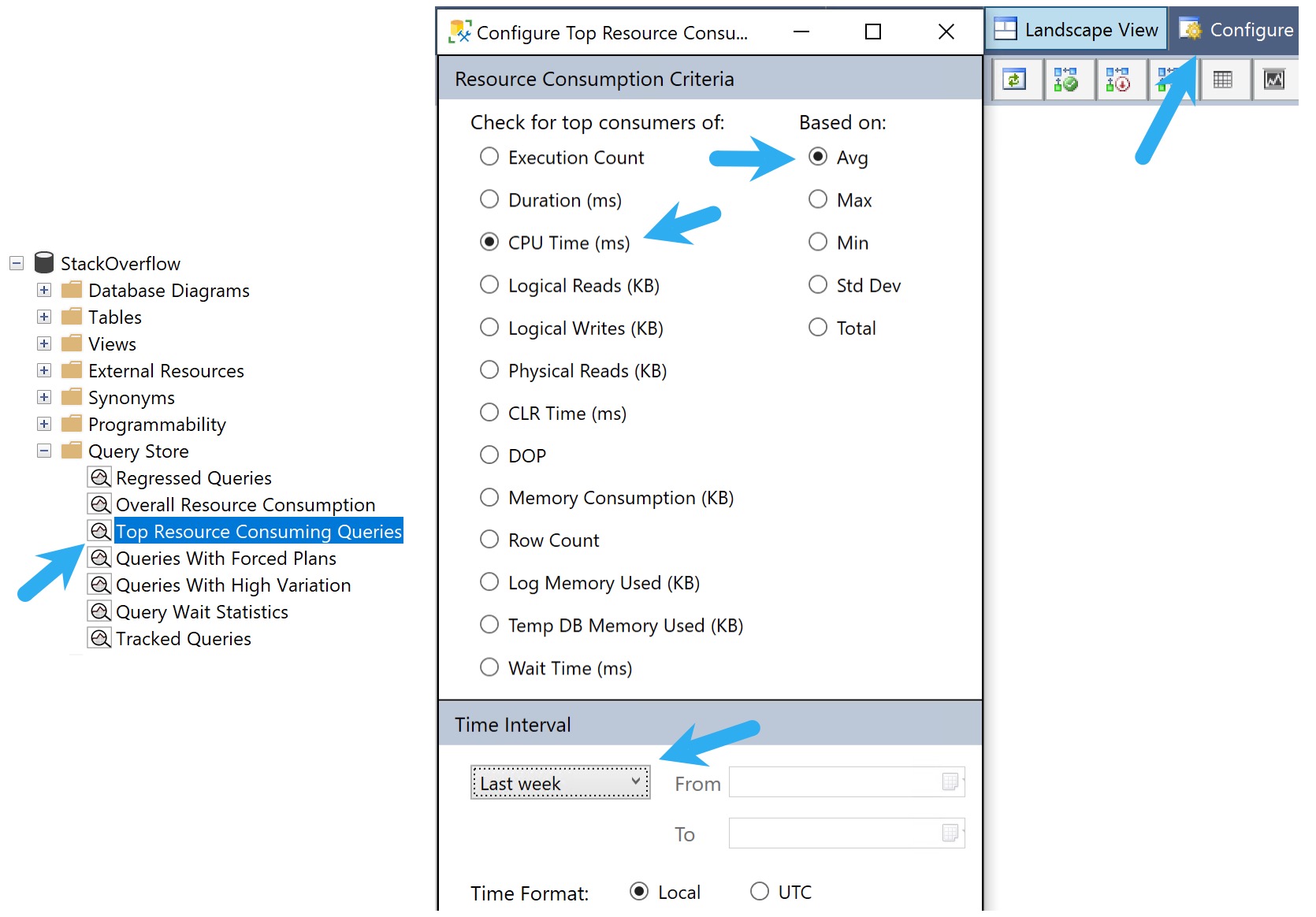
Once Query Store is enabled, assuming the goal is to track down and solve performance problems, the easiest way to start digging in is the GUI.
I usually go into Top Resource Consuming Queries, then look at what used the most average CPU over the last week.
cherry
This view won’t tell you everything of course, but it’s a good starting place.
Okay, But I Need More
The GUI itself right now doesn’t allow for much beyond showing you the top whatever by whatever for whenever. If you want to search through Query Store data for specific plan or query IDs, procedure names, or query text, you’ll need to use my free script sp_QuickieStore.
To get you started, here are a bunch of example commands:
--Get help!
EXEC dbo.sp_QuickieStore
    @help = 1;


--Find top 10 sorted by memory
EXEC dbo.sp_QuickieStore
    @database_name = 'StackOverflow2013',
    @sort_order = 'memory',
    @top = 10;


--Search for specific query_ids
EXEC dbo.sp_QuickieStore
    @database_name = 'StackOverflow2013',
    @top = 10,
    @include_query_ids = '13977, 13978';


--Search for specific plan_ids
EXEC dbo.sp_QuickieStore
    @database_name = 'StackOverflow2013',
    @sort_order = 'memory',
    @top = 10,
    @start_date = '20210320',
    @include_plan_ids = '1896, 1897';


--Ignore for specific query_ids
EXEC dbo.sp_QuickieStore
    @database_name = 'StackOverflow2013',
    @top = 10,
    @ignore_query_ids = '13977, 13978';


--Ignore for specific plan_ids
EXEC dbo.sp_QuickieStore
    @database_name = 'StackOverflow2013',
    @sort_order = 'memory',
    @top = 10,
    @start_date = '20210320',
    @ignore_plan_ids = '1896, 1897';


--Search for queries within a date range
EXEC dbo.sp_QuickieStore
    @database_name = 'StackOverflow2013',
    @sort_order = 'memory',
    @top = 10,
    @start_date = '20210320',
    @end_date = '20210321';


--Search for queries with a minimum execution count
EXEC dbo.sp_QuickieStore
    @database_name = 'StackOverflow2013',
    @top = 10,
    @execution_count = 10;


--Search for queries over a specific duration
EXEC dbo.sp_QuickieStore
    @database_name = 'StackOverflow2013',
    @top = 10,
    @duration_ms = 10000;


--Search for a specific stored procedure
EXEC dbo.sp_QuickieStore
    @database_name = 'StackOverflow2013',
    @procedure_name = 'top_percent_sniffer';


--Search for specific query tex
EXEC dbo.sp_QuickieStore
    @database_name = 'StackOverflow2013',
    @query_text_search = 'WITH Comment'


--Use expert mode to return additional columns
EXEC dbo.sp_QuickieStore
    @database_name = 'StackOverflow2013',
    @sort_order = 'memory',
    @top = 10,
    @expert_mode = 1;


--Use format output to add commas to larger numbers
EXEC dbo.sp_QuickieStore
    @database_name = 'StackOverflow2013',
    @sort_order = 'memory',
    @top = 10,
    @format_output = 1;


--Use wait filter to search for queries responsible for high waits
EXEC dbo.sp_QuickieStore
    @database_name = 'StackOverflow2013',
    @wait_filter = 'memory',
    @sort_order = 'memory';


--Troubleshoot performance
EXEC dbo.sp_QuickieStore
    @database_name = 'StackOverflow2013',
    @troubleshoot_performance = 1;


--Debug dynamic SQL and temp table contents
EXEC dbo.sp_QuickieStore
    @database_name = 'StackOverflow2013',
    @debug = 1;
Thanks for reading!
Going Further
If this is the kind of SQL Server stuff you love learning about, you’ll love my training. Blog readers get 25% off the Everything Bundle — over 100 hours of performance tuning content. Need hands-on help? I offer consulting engagements from targeted investigations to ongoing retainers. Want a quick sanity check before committing to a full engagement? Schedule a call — no commitment required.
I need to start this post off by saying something that may not be obvious to you: Not all parameter sniffing is bad.
Sure, every time you hear someone say “parameter sniffing” they want to teach you about something bad, but there’s a lot more to it than that.
Parameter sniffing is normally great. You heard me. Most of the time, you don’t want SQL Server generating new query plans all the time.
And yet I see people go to extreme measures to avoid parameter sniffing from ever happening, like:
Local variables
Recompiling
What you care about is parameter sensitivity. That’s when SQL Server comes up with totally different execution plans for the same query depending on which parameter value it gets compiled with. In those cases, there’s usually a chance that later executions with different parameter values don’t perform very well using the original query plan.
The thing is, sometimes you need to introduce potentially bad parameter sensitivity in order to fix other problems on a server.
What’s Your Problem?
The problem we’re trying to solve here is application queries being sent in with literal values, instead of parametrized values.
The result is a plan cache that looks like this:
unethical
Of course, if you can fix the application, you should do that too. But fixing all the queries in an application can take a long time, if you even have access to make those changes, or a software vendor who will listen.
The great use case for this setting is, of course, that it happens all at once, unless you’re doing weird things.
You can turn it on for a specific database by running this command:
ALTER DATABASE
   [YourDatabase]
SET PARAMETERIZATION FORCED;
Good or Bad?
The argument for doing this is to drastically reduce CPU from queries constantly compiling query plans, and to reduce issues around constantly caching and evicting plans, and creating an unstable plan cache.
Of course, after you turn it on, you now open your queries up to parameter sensitivity issues. The good news is that you can fix those, too.
99% of parameter sniffing problems I see come down to indexing issues.
Non-covering indexes that give the optimizer a choice between Seek + Lookup and Clustered Index Scan
Lots of single key column indexes that don’t make sense to use across different searches
Suboptimal indexes suggested by various tooling that got implemented without any critical oversight
And of course, if you’ve got Query Store enabled, you can pretty easily force a plan.
Speaking of which, I still have to talk a lot of folks into turning that on, too. Let’s talk about that tomorrow.
Thanks for reading!
Going Further
If this is the kind of SQL Server stuff you love learning about, you’ll love my training. Blog readers get 25% off the Everything Bundle — over 100 hours of performance tuning content. Need hands-on help? I offer consulting engagements from targeted investigations to ongoing retainers. Want a quick sanity check before committing to a full engagement? Schedule a call — no commitment required.