SQL Server IF Branches And Query Performance Part 2: Trying To Fix Parameters Doesn’t Work

Jerked


Everyone thinks they’ve outsmarted the optimizer. All the time.

Like it’s a bumbling video game security guard that walks in the same circle and can’t see you if you just hold real still.

In reality, the optimizer is more like a dutiful parent playing along with your childish ruses.

One thing I see developers do quite a bit is try to “fix” a parameter in an IF branch.

Maybe it’s to protect against bad search values, but more often it’s to nix NULLs.

I know that the stored procedure I’m showing only has one branch in it where a query is executed, and the series is supposed to be about if branching with multiple queries.

I’m only doing that to simplify the point of this post, which is that “fixing” supplied values does not correct performance and cardinality estimation issues with queries in IF branches.

Sometimes that’s easier to demonstrate without additional noise.

The Thing


Here’s close to what I normally see someone trying:

CREATE OR ALTER PROCEDURE
    dbo.counter_if
(
    @PostTypeId int = NULL,
    @CreationDate datetime = NULL
)
AS
SET NOCOUNT, XACT_ABORT ON;
BEGIN

    IF @CreationDate IS NULL
    BEGIN
        SET @CreationDate = '20080101';
    END;
    
    IF @PostTypeId IS NOT NULL
    BEGIN
    
        SELECT
            c = COUNT_BIG(*)
        FROM dbo.Posts AS p
        JOIN dbo.Users AS u
            ON p.OwnerUserId = u.Id
        WHERE p.PostTypeId = @PostTypeId
        AND   p.CreationDate >= @CreationDate;
    
    END;

END;
GO

The problem here is that by the time we hit the point where @CreationDate gets set to another value, we’ve already got a query plan.

You might get a search for the value you assign there, but the plan gets optimized for NULL.

Puddings


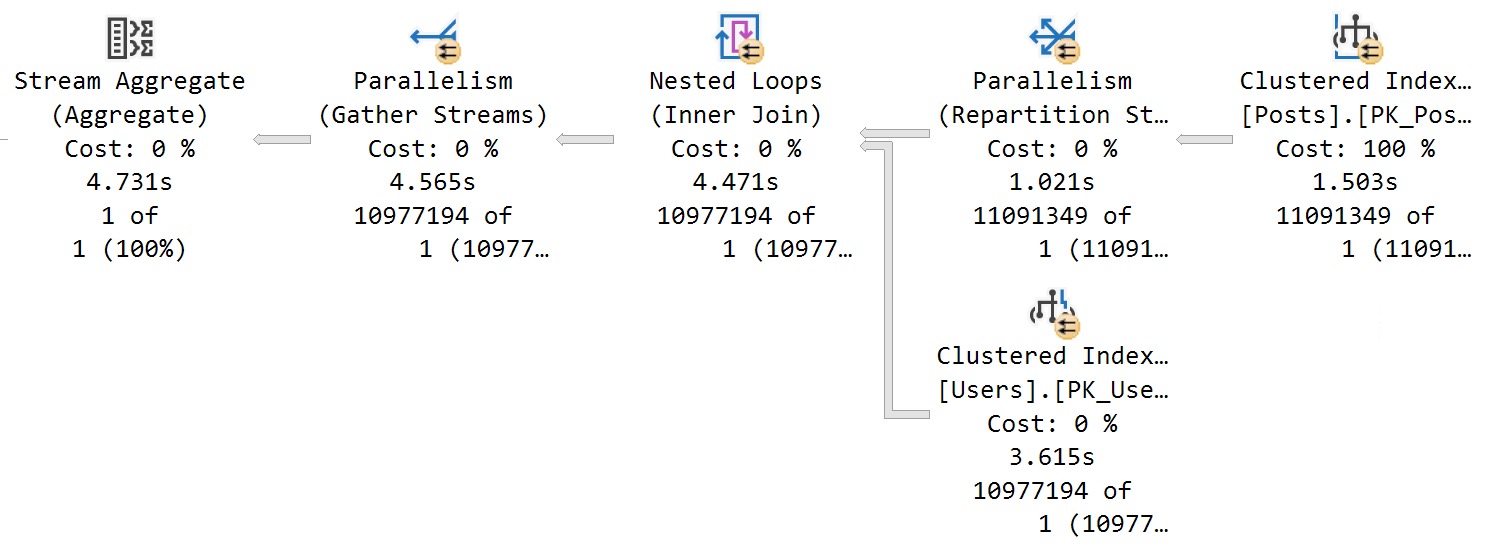
If you execute the procedure like so, and get the query plan for it, here’s what happens:

EXEC dbo.counter_if
    @PostTypeId = 2;
SQL Server Query Plan
humbled

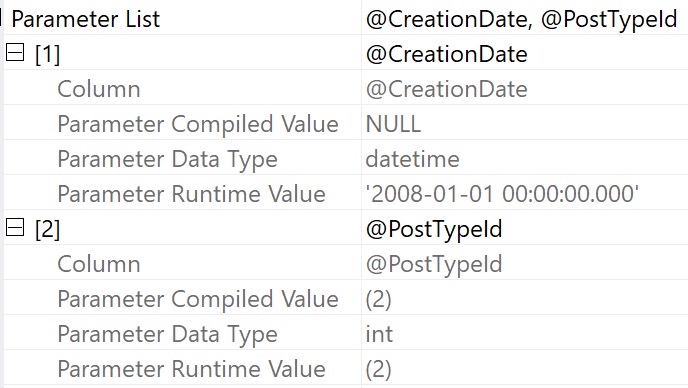
We get a real bad cardinality estimate there, and I’ll show you that it’s because of the NULL we passed in, even though we set it to 2008-1-01-01 later.
SQL Server Query Plan Parameters
video

Digging into the operator properties of the select, here’s what the execution plan shows us about the parameters:

  • @PostTypeId is compiled and executed with 2 for both
  • @CreationDate is compiled with NULL, but executed with 2008-01-01 00:00:00.000

Different World


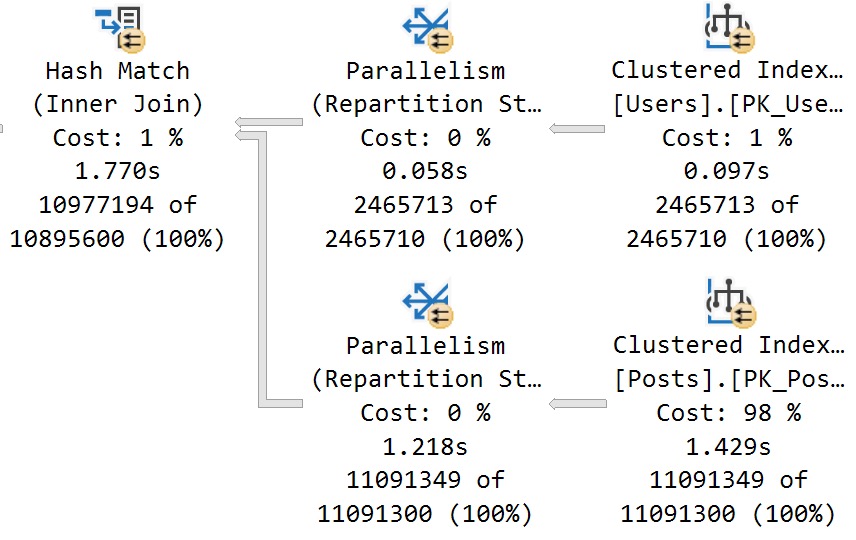
If we clear out the procedure cache — and I’m allowed to do that because I am a doctor (in Minecraft) — and re-run the procedure with 2008-01-01, we get accurate cardinality estimation.

EXEC dbo.counter_if
    @PostTypeId = 2, 
    @CreationDate = '20080101';
SQL Server Query Plan
morphin’

We no longer get a one row estimate. Look at us. Look at how smart we are.

I’m starting to understand why so many people hate NULLs.

But Is It Null?


For brevity, I’m going to list out a bunch of similar patterns that also end up poorly:

SELECT
    c = COUNT_BIG(*)
FROM dbo.Posts AS p
JOIN dbo.Users AS u
    ON p.OwnerUserId = u.Id
WHERE p.PostTypeId = @PostTypeId
AND   p.CreationDate >= ISNULL(@CreationDate, '20080101')
AND   p.CreationDate >= COALESCE(@CreationDate, '20080101')
AND   (p.CreationDate >= @CreationDate OR @CreationDate IS NULL)
AND   p.CreationDate >= CASE WHEN @CreationDate IS NULL THEN p.CreationDate ELSE @CreationDate END

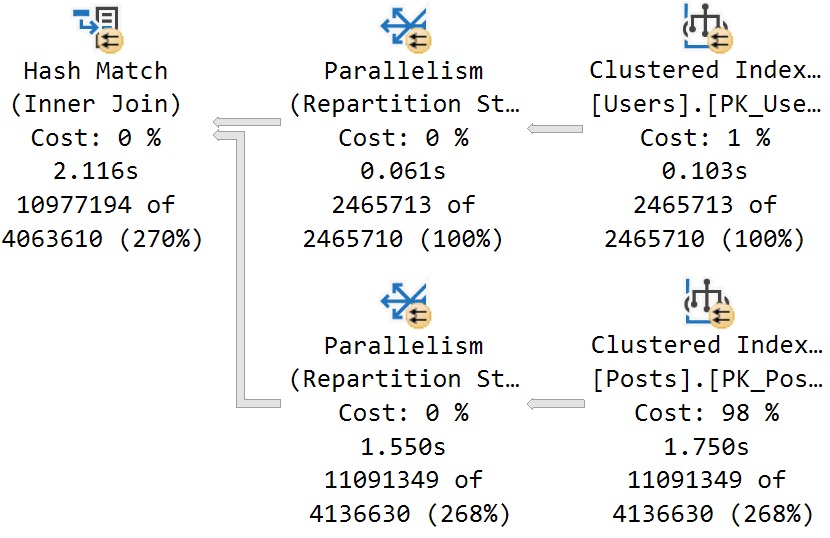
None of these patterns or similar permutations yield desirable results in most cases.

You may find an edge case where they’re acceptable, but most folks I end up talking to aren’t calling me because what they’ve done is working out well.

More or less, they all results in this estimate/plan:
SQL Server Query Plan
skewpie

See? You’re still not clever, and I still got your nose. Go play outside, slugger.

S Dot


Hopefully by now you can see why this technique doesn’t necessarily give you good results.

In tomorrow’s post, we’ll look at another anti-pattern I see a lot with local variables.

If you’re looking for working solutions, you’re gonna have to hang on until the end of the week.

That’s just how culminations work. They Culm and then they Inate.

Duh.

Thanks for reading!

Going Further


If this is the kind of SQL Server stuff you love learning about, you’ll love my training. Blog readers get 25% off the Everything Bundle — over 100 hours of performance tuning content. Need hands-on help? I offer consulting engagements from targeted investigations to ongoing retainers. Want a quick sanity check before committing to a full engagement? Schedule a call — no commitment required.
SQL Server IF Branches And Query Performance Part 1: The Problem

Manifesto


This is a problem I deal with quite a bit when helping people track down performance problems and, you know, solve them.

The basic scenario is something like this:

CREATE PROCEDURE
    dbo.iffy_kid
(
    @p1 int,
    @p2 int,
    @decider varchar(10)
)
AS
SET NOCOUNT, XACT_ABORT ON;

IF @decider = 'this_table'
BEGIN

    SELECT
        this.*
    FROM dbo.this_table AS this
    WHERE this.this_column = @p1;

END;

IF @decider = 'that_table'
BEGIN

    SELECT
        that.*
    FROM dbo.that_table AS that
    WHERE that.that_column = @p2;

END;

ELSE
BEGIN

    /*Do something else*/

END;

You have some parameter that decides which logical execution path that a query will take, and different queries that run based on that path.

What this does not control is query optimization paths, or cardinality estimation paths, at least not written in this manner.

First Blood


When this stored procedure is executed for the first time, or when some recompilation event happens, both queries will get a query plan generated and cached.

For simplicity, let’s say that when a query plan is cached, it it’s compiled and executed with

  • @p1 = 100
  • @p2 = NULL
  • @decider = ‘this_table’

SQL Server’s query optimizer will generate a query plan for the entire stored procedure based on cardinality estimation for:

  • @p1 = 100 as a predicate on this_table
  • @p2 = NULL as a predicate on that_table

On future executions, if the runtime execution parameters change to:

  • @p1 = NULL
  • @p2 = 200
  • @decider = ‘that_table’

The query plan with cardinality estimation for @p2 = NULL will be reused.

You’ve essentially multiplied any parameter sensitivity issue by:

  • The number of separate IF branched queries
  • The number of parameters fed into the stored procedure

Exploration


Over the rest of the week, I’m going to cover this topic from a few different angles to show you what works and what doesn’t work for fixing the problem.

Clients that I work with are often very surprised by the gotchas, intricacies, and weird details that crop up when writing queries like this.

Thanks for reading!

Going Further


If this is the kind of SQL Server stuff you love learning about, you’ll love my training. Blog readers get 25% off the Everything Bundle — over 100 hours of performance tuning content. Need hands-on help? I offer consulting engagements from targeted investigations to ongoing retainers. Want a quick sanity check before committing to a full engagement? Schedule a call — no commitment required.

A Week In Other Databases: IO in PostgreSQL: Past, Present, Future

Cool Cool Cool


A while back, the CMU Database group started hosting a series of database talks that gave the folks behind new and interesting databases a chance to talk about what they’re working on, why they built it, how they’re different from what’s around, and more.

I really enjoyed a bunch of them, and I think you might too, so this week I’m posting my favorite ones.

Thanks for reading!

Going Further


If this is the kind of SQL Server stuff you love learning about, you’ll love my training. Blog readers get 25% off the Everything Bundle — over 100 hours of performance tuning content. Need hands-on help? I offer consulting engagements from targeted investigations to ongoing retainers. Want a quick sanity check before committing to a full engagement? Schedule a call — no commitment required.

A Week In Other Databases: CockroachDB

Cool Cool Cool


A while back, the CMU Database group started hosting a series of database talks that gave the folks behind new and interesting databases a chance to talk about what they’re working on, why they built it, how they’re different from what’s around, and more.

I really enjoyed a bunch of them, and I think you might too, so this week I’m posting my favorite ones.

Thanks for reading!

Going Further


If this is the kind of SQL Server stuff you love learning about, you’ll love my training. Blog readers get 25% off the Everything Bundle — over 100 hours of performance tuning content. Need hands-on help? I offer consulting engagements from targeted investigations to ongoing retainers. Want a quick sanity check before committing to a full engagement? Schedule a call — no commitment required.

A Week In Other Databases: Snowflake

Cool Cool Cool


A while back, the CMU Database group started hosting a series of database talks that gave the folks behind new and interesting databases a chance to talk about what they’re working on, why they built it, how they’re different from what’s around, and more.

I really enjoyed a bunch of them, and I think you might too, so this week I’m posting my favorite ones.

Thanks for reading!

Going Further


If this is the kind of SQL Server stuff you love learning about, you’ll love my training. Blog readers get 25% off the Everything Bundle — over 100 hours of performance tuning content. Need hands-on help? I offer consulting engagements from targeted investigations to ongoing retainers. Want a quick sanity check before committing to a full engagement? Schedule a call — no commitment required.

A Week In Other Databases: MongoDB

Cool Cool Cool


A while back, the CMU Database group started hosting a series of database talks that gave the folks behind new and interesting databases a chance to talk about what they’re working on, why they built it, how they’re different from what’s around, and more.

I really enjoyed a bunch of them, and I think you might too, so this week I’m posting my favorite ones.

Thanks for reading!

Going Further


If this is the kind of SQL Server stuff you love learning about, you’ll love my training. Blog readers get 25% off the Everything Bundle — over 100 hours of performance tuning content. Need hands-on help? I offer consulting engagements from targeted investigations to ongoing retainers. Want a quick sanity check before committing to a full engagement? Schedule a call — no commitment required.

A Week In Other Databases: Jepsen.io

Cool Cool Cool


A while back, the CMU Database group started hosting a series of database talks that gave the folks behind new and interesting databases a chance to talk about what they’re working on, why they built it, how they’re different from what’s around, and more.

I really enjoyed a bunch of them, and I think you might too, so this week I’m posting my favorite ones.

Thanks for reading!

Going Further


If this is the kind of SQL Server stuff you love learning about, you’ll love my training. Blog readers get 25% off the Everything Bundle — over 100 hours of performance tuning content. Need hands-on help? I offer consulting engagements from targeted investigations to ongoing retainers. Want a quick sanity check before committing to a full engagement? Schedule a call — no commitment required.

The Building Blocks for Self-Driving PostgreSQL

Grand Bonne


I know what you’re thinking: Who cares about that free database?

Well, it’s not necessarily the Postgres part that you might care about, but more the fact that a third party is developing software to do what major vendors aren’t doing.

This sort of thing might come to SQL Server someday, and it probably should. The self-tuning features in Azure are ass.

Thanks for reading.

Going Further


If this is the kind of SQL Server stuff you love learning about, you’ll love my training. Blog readers get 25% off the Everything Bundle — over 100 hours of performance tuning content. Need hands-on help? I offer consulting engagements from targeted investigations to ongoing retainers. Want a quick sanity check before committing to a full engagement? Schedule a call — no commitment required.

Indexed Views In SQL Server: No Filtered Indexes Or Filtered Statistics

Half Baked


In my quest to love indexed views more, I’m always trying new things with them to solve problems.

Occasionally, I am pleasantly surprised by what can be accomplished with them. Occasionally.

Today was not an occasion. Let’s take an unfortunate look.

CREATE TABLE
    dbo.IndexedViewMe
(
    id int PRIMARY KEY CLUSTERED
);
GO 

CREATE VIEW 
    dbo.TheIndexedView
WITH SCHEMABINDING
AS
SELECT
    ivm.id
FROM dbo.IndexedViewMe AS ivm;
GO 

CREATE UNIQUE CLUSTERED INDEX
    uqi
ON dbo.TheIndexedView
    (id);

INSERT 
    dbo.IndexedViewMe
(
    id
)
SELECT
    x.c
FROM 
(
    SELECT 1 
      UNION ALL 
    SELECT 2
) AS x(c);

This gives us a tiny little table and indexed view. If we try to do either of these things, it doesn’t go well:

CREATE INDEX 
    i
ON dbo.TheIndexedView
    (id)
WHERE 
    id = 2;

Msg 10610, Level 16, State 1, Line 40

Filtered index ‘i’ cannot be created on object ‘dbo.TheIndexedView’ because it is not a user table. Filtered indexes are only supported on tables.

If you are trying to create a filtered index on a view, consider creating an indexed view with the filter expression incorporated in the view definition.

CREATE STATISTICS 
    s
ON dbo.TheIndexedView
    (id)
WHERE 
    id = 2;

Msg 10623, Level 16, State 1, Line 47

Filtered statistics ‘s’ cannot be created on object ‘dbo.TheIndexedView’ because it is not a user table. Filtered statistics are only supported on user tables.

Sort of a bummer, that. And it strikes me that it’s an odd limitation — especially for the statistics — but what can you do?

Indexed views haven’t changed aside from bug fixes in forever and a day. I doubt there’ll be any real investment in enhancing them anytime soon.

Thanks for reading!

Going Further


If this is the kind of SQL Server stuff you love learning about, you’ll love my training. Blog readers get 25% off the Everything Bundle — over 100 hours of performance tuning content. Need hands-on help? I offer consulting engagements from targeted investigations to ongoing retainers. Want a quick sanity check before committing to a full engagement? Schedule a call — no commitment required.

Using Views To Reduce Memory Grants In SQL Server

We All Have It


You know those tables, right? The ones where developers went and got lazy or didn’t know any better and decided every string column was going to be gigantic.

They may have read, of course, that SQL Server’s super-smart variable length data types only consume necessary space.

It’s free real estate.

Except it isn’t, especially not when it comes to query memory grants.

The bigger a string column’s defined byte length is, the bigger the optimizer’s memory grant for it will be.

Memory Grant Primer


In case you need some background, the short story version is:

  • All queries ask for some memory for general execution needs
  • Sorts, Hashes, and Optimized Nested Loops ask for additional memory grants
  • Memory grants are decided based on things like number of rows, width of rows, and concurrently executing operators
  • Memory grants are divided by DOP, not multiplied by DOP
  • By default, any query can ask for up to 25% of max server memory for a memory grant
  • Approximately 75% of max server memory is available for memory grants at one

Needless to say, memory grants are very sensitive to misestimates by the optimizer. Going over can be especially painful, because that memory will most often get pulled from the buffer pool, and queries will end up going to disk more.

Underestimates often mean spills to disk, of course. Those are usually less painful, but can of course be a problem when they’re large enough. In particular, hash spills are worth paying extra attention to.

Memory grant feedback does supply some relief under modern query execution models. That’s a nice way of saying probably not what you have going on.

Query Noogies


Getting back to the point: It’s a real pain in the captain’s quarters to modify columns on big tables, even if it’s reducing the size.

SQL Server’s storage engine has to check page values to make sure you’re not gonna lose any data fidelity in the process. That’ a nice way of saying you’re not gonna truncate any strings.

But if you do something cute like run a MAX(LEN(StringCol) and see what you’re up against, you can use a view on top of your table to assuage SQL Server’s concerns about such things.

After all, functions are temporary. Data types are forever (usually).

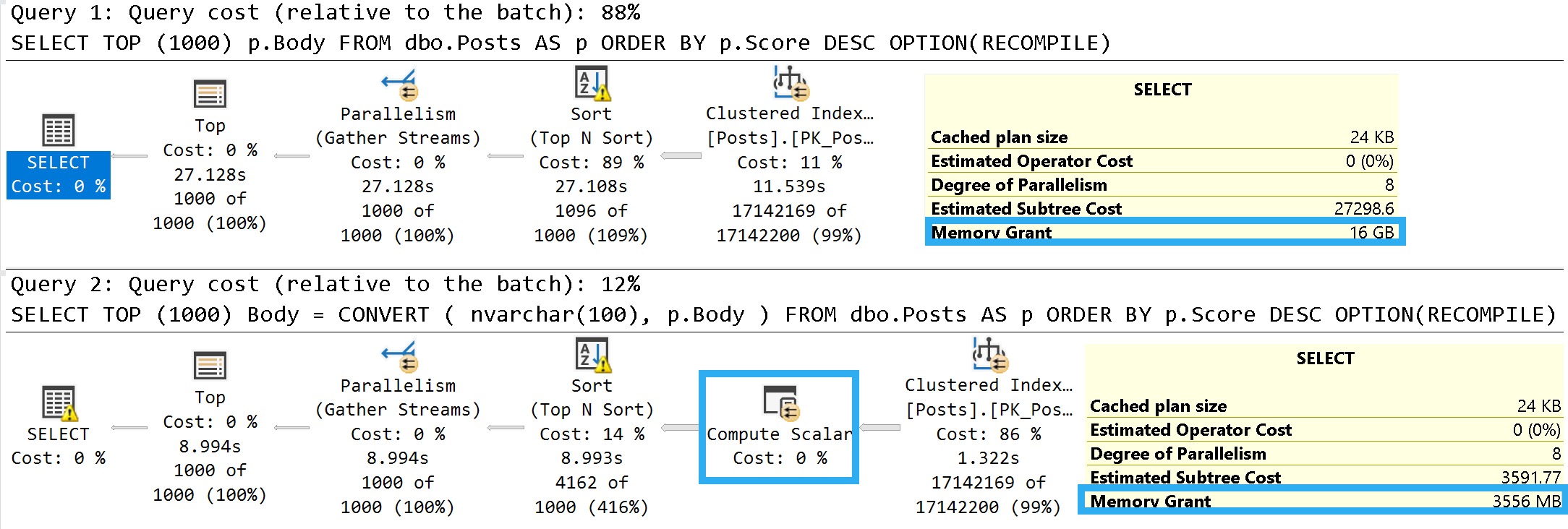
An easy way to illustrate what I mean is to look at the details of these two queries:

SELECT TOP (1000)
    p.Body
FROM dbo.Posts AS p
ORDER BY p.Score DESC
OPTION(RECOMPILE);

SELECT TOP (1000)
    Body = 
        CONVERT
        (
            nvarchar(100), 
            p.Body
        )
FROM dbo.Posts AS p
ORDER BY p.Score DESC
OPTION(RECOMPILE);

Some of this working is dependent on the query plan, so let’s look at those.

Pink Belly Plans


You can ignore the execution times here. The Body column is not a good representation of an oversized column.

It’s defined as nvarchar(max), but (if I’m remembering my Stack lore correctly) is internally limited to 30k characters. Many questions and answers are longer than 100 characters anyway, but on to the plans!

SQL Server Query Plan
janitor

In the plan where the Body column isn’t converted to a smaller string length, the optimizer asks for a 16GB memory grant, and in the second plan the grant is reduced to ~3.5GB.

This is dependent on the compute scalar occurring prior to the Top N Sort operator, of course. This is where the convert function is applied to the Body column, and why the grant is reduced

If you were to build a view on top of the Posts table with this conversion, you could point queries to the view instead. That would get you the memory grant reduction without the pain of altering the column, or moving the data into a new table with the correct definition.

Thanks for reading!

Going Further


If this is the kind of SQL Server stuff you love learning about, you’ll love my training. Blog readers get 25% off the Everything Bundle — over 100 hours of performance tuning content. Need hands-on help? I offer consulting engagements from targeted investigations to ongoing retainers. Want a quick sanity check before committing to a full engagement? Schedule a call — no commitment required.