In this class, I’ll teach you about my strategy for tuning horrible queries, and show you practical examples for dealing with a variety of performance issues. It’s a full day of learning with no fluff.
I’ll be covering topics that you’ll face day to day, like dealing with parameter sniffing, functions, temporary objects, complex queries, and more. You’ll learn how to get to the bottom of query performance issues like a pro by getting the right information and learning how to interpret it.
If this is the kind of SQL Server stuff you love learning about, you’ll love my training. Blog readers get 25% off the Everything Bundle — over 100 hours of performance tuning content. Need hands-on help? I offer consulting engagements from targeted investigations to ongoing retainers. Want a quick sanity check before committing to a full engagement? Schedule a call — no commitment required.
I see this kind of pattern a lot in paging queries where people are doing everything in their power to avoid writing dynamic SQL for some reason.
It’s almost as if an entire internet worth of SQL Server knowledge and advice doesn’t exist when they’re writing these queries.
Quite something. Quite something indeed.
First, let’s get what doesn’t work out of the way.
DECLARE @order_by INT = 3

SELECT p.Id
FROM dbo.Posts AS p
WHERE p.OwnerUserId = 22656
ORDER BY CASE WHEN @order_by = 1 THEN p.Score
              WHEN @order_by = 2 THEN p.CreationDate
              WHEN @order_by = 3 THEN p.Id
              ELSE NULL
         END;
GO
You can’t write this as a single case expression with mismatched data types.
It’ll work for the first two options, but not the third. We’ll get this error, even with a recompile hint:
Msg 8115, Level 16, State 2, Line 46
Arithmetic overflow error converting expression to data type datetime.
What Works But Still Stinks
Is when you break the options out into separate case expressions, like so:
DECLARE @order_by INT = 1

SELECT p.Id
FROM dbo.Posts AS p
WHERE p.OwnerUserId = 22656
ORDER BY CASE WHEN @order_by = 1 THEN p.Score ELSE NULL END,
         CASE WHEN @order_by = 2 THEN p.CreationDate ELSE NULL END,
         CASE WHEN @order_by = 3 THEN p.Id ELSE NULL END;
GO
This will work no matter which option we choose, but something rather disappointing happens when we choose option three.
Here’s the query plan. Before you read below, take a second to try to guess what it is.
Sorta Kinda
What Stinks Even Though It Works
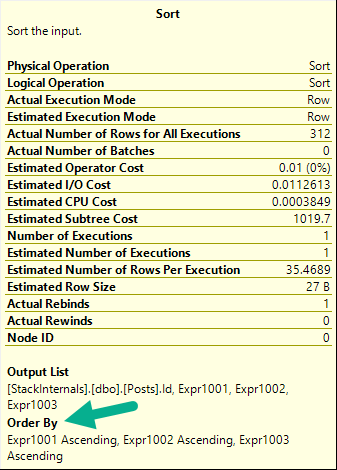
My issue with this plan is that we end up with a sort operator, even though we’re ordering by Id, which is the primary key and clustered index key, and we use that very same index. We technically have the data in order, but the index scan has False for the Ordered attribute, and the Sort operator shows a series of expressions.
stunk
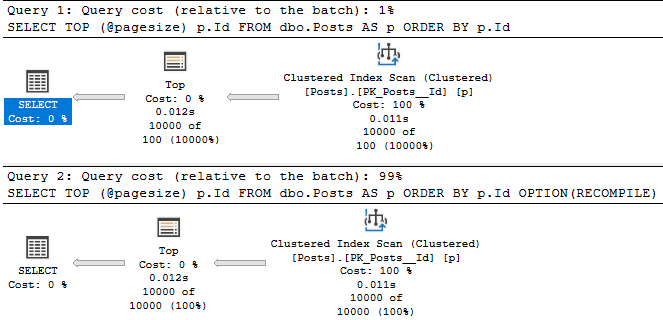
The Sort of course goes away if we add a recompile hint, and the Scan now has True for the Ordered attribute.
DECLARE @order_by INT = 3

SELECT p.Id
FROM dbo.Posts AS p
WHERE p.OwnerUserId = 22656
ORDER BY CASE WHEN @order_by = 1 THEN p.Score ELSE NULL END,
         CASE WHEN @order_by = 2 THEN p.CreationDate ELSE NULL END,
         CASE WHEN @order_by = 3 THEN p.Id ELSE NULL END
OPTION(RECOMPILE);
GO
no worse
You Shouldn’t Do This
Unless you’re fine with recompile hints, which I don’t blame you if you are.
SQL Server seems to get a whole lot more right when you use one, anyway.
My point though, is that adding uncertainty like this to your queries is more often than not harmful in the long term. Though this post is about local variables, the same thing would happen with parameters, for example:
DECLARE @order_by INT = 3
DECLARE @sql NVARCHAR(MAX) = N'
SELECT p.Id
FROM dbo.Posts AS p
WHERE p.OwnerUserId = 22656
ORDER BY CASE WHEN @order_by = 1 THEN p.Score ELSE NULL END,
         CASE WHEN @order_by = 2 THEN p.CreationDate ELSE NULL END,
         CASE WHEN @order_by = 3 THEN p.Id ELSE NULL END;
';

EXEC sys.sp_executesql @sql, N'@order_by INT', 1;
EXEC sys.sp_executesql @sql, N'@order_by INT', 3;
GO
The way to address it would be something like this:
DECLARE @order_by INT = 3
DECLARE @sql NVARCHAR(MAX) = N'
SELECT p.Id
FROM dbo.Posts AS p
WHERE p.OwnerUserId = 22656
ORDER BY ';

SET @sql +=
CASE WHEN @order_by = 1 THEN N'p.Score'
     WHEN @order_by = 2 THEN N'p.CreationDate'
     WHEN @order_by = 3 THEN N'p.Id'
     ELSE N''
END;

EXEC sys.sp_executesql @sql
GO
Thanks for reading!
Going Further
If this is the kind of SQL Server stuff you love learning about, you’ll love my training. Blog readers get 25% off the Everything Bundle — over 100 hours of performance tuning content. Need hands-on help? I offer consulting engagements from targeted investigations to ongoing retainers. Want a quick sanity check before committing to a full engagement? Schedule a call — no commitment required.
In case you missed it for some reason, check out this post of mine about local variables. Though it’s hard to imagine how you missed it, since it’s the single most important blog post ever written, even outside of SQL Server. It might even be more important than SQL Server. Time will tell.
While live streaming recently about paging queries, I thought that it might make an interesting post to see what happens when you use variables in places other than the where clause.
After several seconds of thinking about it, I decided that TOP would be a good enough place to muck around.
Unvariables
Let’s say you’ve got these two queries.
DECLARE @pagesize INT = 10000;
SELECT TOP (@pagesize) p.Id
FROM dbo.Posts AS p
ORDER BY p.Id;
GO

DECLARE @pagesize INT = 10000;
SELECT TOP (@pagesize) p.Id
FROM dbo.Posts AS p
ORDER BY p.Id
OPTION(RECOMPILE);
GO
Without a RECOMPILE hint, you get a 100 row estimate for the local variable in a TOP.
You can manipulate what the optimizer thinks it’ll get with optimizer for hints:
DECLARE @pagesize INT = 10000;
SELECT TOP (@pagesize) p.Id
FROM dbo.Posts AS p
ORDER BY p.Id
OPTION(OPTIMIZE FOR(@pagesize = 1));
GO
the chump is here
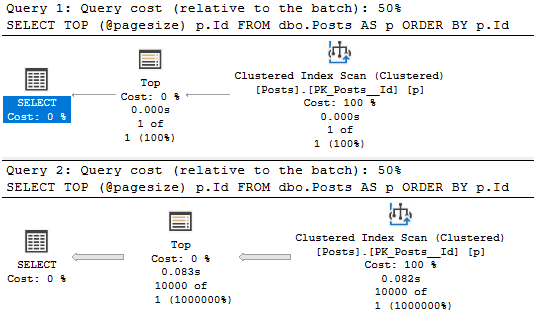
And of course, when used as actual parameters, can be sniffed.
DECLARE @pagesize INT = 10000;
DECLARE @sql NVARCHAR(1000) =
N'
  SELECT TOP (@pagesize) p.Id
  FROM dbo.Posts AS p
  ORDER BY p.Id;
'

EXEC sys.sp_executesql @sql, N'@pagesize INT', 1;
EXEC sys.sp_executesql @sql, N'@pagesize INT', 10000;
GO
boogers
Got More?
In tomorrow’s post, I’ll look at how local variables can be weird in ORDER BY. If you’ve got other ideas, feel free to leave them here.
There’s not much more to say about WHERE or JOIN, I’m looking for more creative applications ?
Thanks for reading!
Going Further
If this is the kind of SQL Server stuff you love learning about, you’ll love my training. Blog readers get 25% off the Everything Bundle — over 100 hours of performance tuning content. Need hands-on help? I offer consulting engagements from targeted investigations to ongoing retainers. Want a quick sanity check before committing to a full engagement? Schedule a call — no commitment required.
In this class, I’ll teach you about my strategy for tuning horrible queries, and show you practical examples for dealing with a variety of performance issues. It’s a full day of learning with no fluff.
I’ll be covering topics that you’ll face day to day, like dealing with parameter sniffing, functions, temporary objects, complex queries, and more. You’ll learn how to get to the bottom of query performance issues like a pro by getting the right information and learning how to interpret it.
If this is the kind of SQL Server stuff you love learning about, you’ll love my training. Blog readers get 25% off the Everything Bundle — over 100 hours of performance tuning content. Need hands-on help? I offer consulting engagements from targeted investigations to ongoing retainers. Want a quick sanity check before committing to a full engagement? Schedule a call — no commitment required.
At this point in your life, you’ve probably seen, and perhaps even struggled with how to fix a key lookup that was causing you some grief.
This post isn’t going to go terribly deep into anything, but I do want to make a few things about them more clear, because I don’t usually see them mentioned anywhere.
Lookups are joins between two indexes on the same table
Lookups can only be done via nested loops joins
Lookups can’t be moved around in the execution plan
I don’t want you to think that every lookup is bad and needs to be fixed, but I do want you to understand some of the limitations around optimizing them.
The Join
When you see a lookup in an execution plan, it’s natural to focus on just what the lookup is doing.
But there’s something else lurking in here, too.
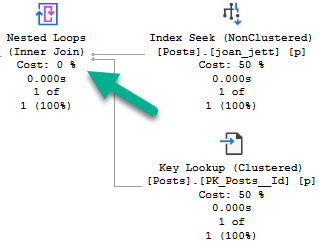
but you say he’s just a join
That nested loops join is what’s bringing the data from a nonclustered index to the data in a clustered index (or heap, but but whatever).
For every row that comes out of the index seek on the nonclustered index, we go back to the clustered index to find whatever data is missing from it in the clustered index. It could be columns in the select list, where clause, or both.
Much like index union or index intersection, but much more common. For a table with a clustered index, the join condition will be on the clustered index key column(s), because in SQL Server, nonclustered indexes inherit clustered index key columns. For heaps, it’ll be on the row identifier (RID).
You can most often see that by looking at the tool tip for the Lookup, under Seek Predicates.
The Loop
At this point, SQL Server’s optimizer can’t use merge or hash joins to implement a lookup.
It can only use nested loops joins.
That’s a pretty big part of why they can be so tricky in plans with parameter sniffing issues. At some point, the number of loops you can end up doing is far more work than just scanning as clustered index all in one shot.
There’s also no “adaptive join” component to them, where SQL Server can bail on a loop join after so many executions and use a scan instead. Maybe someday, but for now this isn’t anything that intelligent query processing touches.
They can look especially off in Star Join plans sometimes, where it’s difficult to figure out why the optimizer went with the lookup for many more rows than what people often call the “tipping point” between lookups and clustered index scans.
The Glue
Another pesky issue with lookups is that the optimizer doesn’t currently support moving the join between the two indexes around at all.
You can get this behavior on your own by rewriting the lookup as a self join (which is all a lookup really is anyway — a self join that the optimizer chose for you).
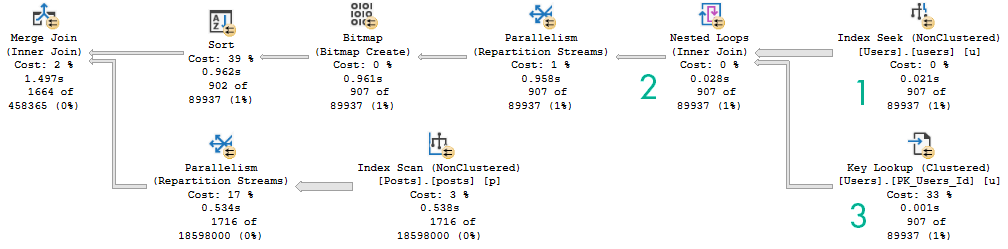
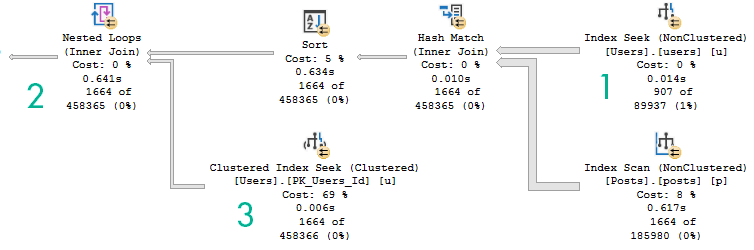
For instance, here are two query plans. The first one is where the optimizer chose a lookup plan. The second is one where I wrote the query to self join the Users table to itself.
A-B-C1-2-3
The thing to understand here is that when there’s a lookup in a query plan, it is inseparably coupled.
When you write queries as self joins, the optimizer has many more choices available to it as far as join order, join type, and all the other usual steps that it can take during optimization. A simplified example of doing that (not related to the query plans above), would look like this:
CREATE INDEX joan_jett
ON dbo.Posts
(
    PostTypeId, Score
);

                                 /* Not In The Index */
SELECT p.Id, p.PostTypeId, p.Score, p.CreationDate
FROM dbo.Posts AS p
WHERE p.PostTypeId = 7
AND   p.Score = 0
AND   p.OwnerUserId = -1;
       /* Not In The Index*/


                                    /* From p2 */
SELECT p.Id, p.PostTypeId, p.Score, p2.CreationDate
FROM dbo.Posts AS p
JOIN dbo.Posts AS p2 --Self join
    ON p2.Id = p.Id
WHERE p.PostTypeId = 7
AND   p.Score = 0
AND   p2.OwnerUserId = -1;
      /* From p2 */
The index is only on PostTypeId and Score, which means the CreationDate and OwnerUserId columns need to come from somewhere.
Probably more interesting is the second query. The Posts table is joined to itself on the Id column, which is the primary key and clustered index (for style points, I suppose), and the columns not present in the nonclustered index are selected from the “p2” alias of the Posts table.
AND BASICALLY
Sometimes I take these thing for granted, because I learned them a long time ago. Or at least what seems like a long time ago.
But they’re things I end up talking with clients about frequently, and sometimes even though they’re not optimizer oddities they’re good posts to write.
Hopefully they’re also good posts for reading, too.
Thanks for doing that.
Going Further
If this is the kind of SQL Server stuff you love learning about, you’ll love my training. Blog readers get 25% off the Everything Bundle — over 100 hours of performance tuning content. Need hands-on help? I offer consulting engagements from targeted investigations to ongoing retainers. Want a quick sanity check before committing to a full engagement? Schedule a call — no commitment required.
I’ve been re-working a lot of the demos in a presentation that I’m working on called Index Internals That Matter For Performance, because after a first walk through them, I had a lot of realizations about not only what I was presenting, but the way it was presented, and the order I was presenting it in.
This isn’t abnormal, and it’s hardly my finest moment in video history. But I wanted to stream it because a lot of people are out there who might be thinking about getting into blogging or presenting, and I wanted to show that it’s a process, not something you just walk out and nail like a half-court-no-look-over-the-shoulder-nothing-but-net-shot.
Anyway, I came across a weird thing, and had to make some changes to my helper script WhatsUpLocks to get some more information.
And not get blocked.
Read Committed is a trash isolation level. Don’t @ me.
The Not Weirdness
This is the simplest I could work things out to. I don’t have anything very practical to say about it right now.
Here’s an update:
BEGIN TRAN

UPDATE p
    SET p.Score += 1
FROM dbo.Posts AS p
WHERE p.Id = 999;

ROLLBACK
If we run it up to the rollback, it finishes pretty quickly. We are, after all, just updating a single row that we locate via the primary key.
My original idea for the demo was to show some of the odder things you can run into with blocking, so I wrote this query to return a bunch of rows, but get blocked at the very end.
SELECT TOP (100) p.Id, p.Body
FROM dbo.Posts AS p
WHERE p.Id > 900;
Which is exactly what happens. We get to Id 997 and crap out.
endless
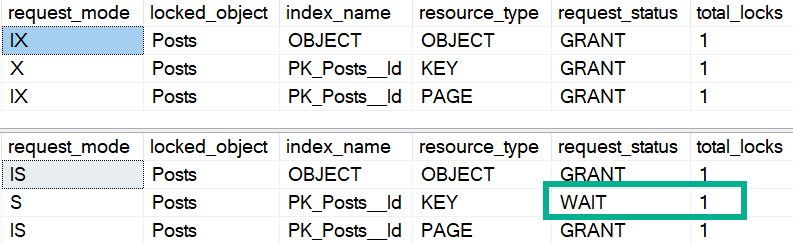
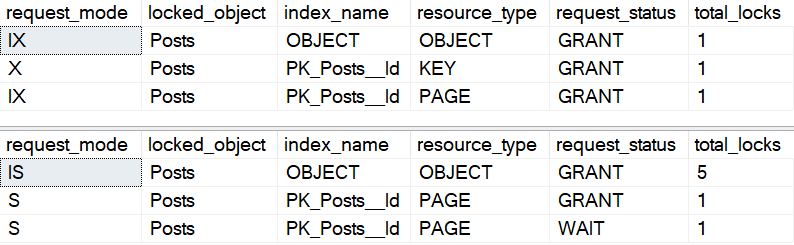
Now if we check on those sessions with WhatsUpLocks, we can see what happened.
SELECT *
FROM dbo.WhatsUpLocks(58) AS wul; --Writer SPID

SELECT *
FROM dbo.WhatsUpLocks(57) AS wul; --Reader SPID
i am stuck
Why is this not weird? Well, comparatively, we take a normal number of overall locks and get blocked in a fairly predictable spot. We get blocked waiting on one of the keys that we need to keep going.
The Weirdness
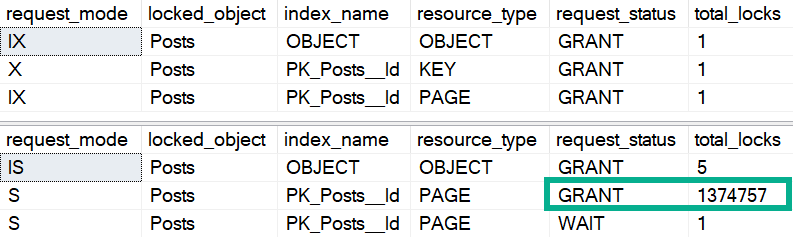
To backtrack a little bit, part of what I wanted to show was that using order by can sometimes result in “more” blocking. I don’t mean more locks; what I mean is that when we need to order by Score, but we don’t have Score indexed in a useful way, the query will get hung up without showing any rows whatsoever.
SELECT TOP (100) p.Id, p.Body
FROM dbo.Posts AS p
WHERE p.Id > 900
ORDER BY p.Score;
Originally this was a SELECT * query, but I want to show you that it’s specific to the Body column because it’s an NVARCHAR(MAX).
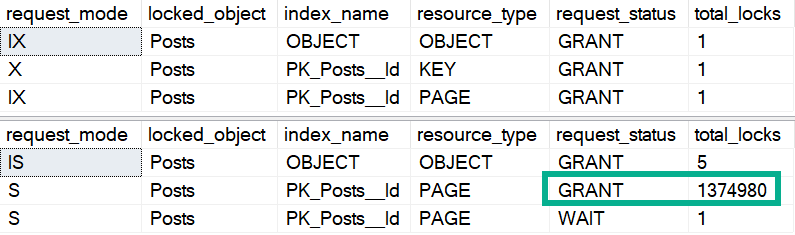
Here’s what comes back from looking at the locks now:
uwot
LOOK HOW MANY LOCKS WE TAKE ON PAGES. That’s bananas.
Watch my video on readers blocking writers for a little background on why this could be troublesome.
If I change my query to not have the Body column in the select list, the locks go back to normal.
SELECT TOP (100) p.Id, p.Score
FROM dbo.Posts AS p
WHERE p.Id > 900
ORDER BY p.Score;
nermal
Of course, sticking Body in the WHERE clause results in an uptick in shared locks taken:
SELECT TOP (100) p.Id, p.Score
FROM dbo.Posts AS p
WHERE p.Id > 900
AND p.Body LIKE N'_%'
ORDER BY p.Score;
that’s nice, dear
But Of Course…
This kind of thing is maybe not the most likely thing you’ll see happening IRL, because you probably have other indexes that queries can use to access data in different ways. For instance, if I have this index on the Posts table, the first query will still get blocked, but all of the other queries will finish instantly.
But hey, I’m sure you have more than enough indexes to fix everything.
Thanks for reading!
Going Further
If this is the kind of SQL Server stuff you love learning about, you’ll love my training. Blog readers get 25% off the Everything Bundle — over 100 hours of performance tuning content. Need hands-on help? I offer consulting engagements from targeted investigations to ongoing retainers. Want a quick sanity check before committing to a full engagement? Schedule a call — no commitment required.
Rather than just give you that one row estimate, it’ll wait until you’ve loaded data in, and then it will use table cardinality for things like joins to the table variable. Just be careful when you use them in stored procedures.
That can be a lot more helpful than what you currently get, but the guesses aren’t quite as helpful when you start using a where clause, because there still aren’t column-level statistics. You get the unknown guess for those.
How Can You Test It Out Before SQL Server 2019?
You can use #temp tables.
That’s right, regular old #temp tables.
They’ll give you nearly the same results as Table Variable Deferred Compilation in most cases, and you don’t need trace flags, hints, or or SQL Server 2019.
Heck, you might even fall in love with’em and live happily ever after.
The Fine Print
I know, some of you are out there getting all antsy-in-the-pantsy about all the SQL Jeopardy differences between temp tables and table variables.
I also realize that this may seem overly snarky, but hear me out:
Sure, there are some valid reasons to use table variables at times. But to most people, the choice about which one to use is either a coin flip or a copy/paste of what they saw someone else do in other parts of the code.
In other words, there’s not a lot of thought, and probably no adequate testing behind the choice. Sort of like me with tattoos.
Engine enhancements like this that benefit people who can’t change the code (or who refuse to change the code) are pretty good indicators of just how irresponsible developers have been with certain ✌features✌. I say this because I see it week after week after week. The numbers in Azure had to have been profound enough to get this worked on, finally.
I can’t imagine how many Microsoft support tickets have been RCA’d as someone jamming many-many rows in a table variable, with the only reasonable solution being to use a temp table instead.
I wish I could say that people learned the differences a lot faster when they experienced some pain, but time keeps proving that’s not the case. And really, it’s hardly ever the software developers who feel it with these choices: it’s the end users.
Thanks for reading!
Going Further
If this is the kind of SQL Server stuff you love learning about, you’ll love my training. Blog readers get 25% off the Everything Bundle — over 100 hours of performance tuning content. Need hands-on help? I offer consulting engagements from targeted investigations to ongoing retainers. Want a quick sanity check before committing to a full engagement? Schedule a call — no commitment required.
In this class, I’ll teach you about my strategy for tuning horrible queries, and show you practical examples for dealing with a variety of performance issues. It’s a full day of learning with no fluff.
I’ll be covering topics that you’ll face day to day, like dealing with parameter sniffing, functions, temporary objects, complex queries, and more. You’ll learn how to get to the bottom of query performance issues like a pro by getting the right information and learning how to interpret it.
If this is the kind of SQL Server stuff you love learning about, you’ll love my training. Blog readers get 25% off the Everything Bundle — over 100 hours of performance tuning content. Need hands-on help? I offer consulting engagements from targeted investigations to ongoing retainers. Want a quick sanity check before committing to a full engagement? Schedule a call — no commitment required.
This isn’t a technical post, but give it a read anyway.
With a lot of events going online, including yours truly (I’m teaching a live class today!), those events need to stay committed to making sure people who show up have a good experience. In my case, that means they’re entertained, and they learn something about performance tuning SQL Server.
Ambitious, I know.
But beyond that, I want people to be comfortable. After all, the things that you’re gonna be learning about SQL Server are uncomfortable enough.
You won’t believe the things it reports back to Microsoft about you. smh, as the kids say.
I’ve heard many times incorrectly over the years that CTEs somehow materialize data.
But a new one to me was that CTEs execute procedurally, and you could use that to influence plan shapes by always doing certain things first.
Unfortunately, that’s not true of them either, even when you use TOP.
Meaningful Life
Here’s the first example. Take some note of the order the CTEs are written and joined in, and the tables they touch.
Outside of the CTEs, there’s a join to a table not even in a CTE here.
WITH cte_1 AS
(
SELECT u.Id
FROM dbo.Users AS u
WHERE u.Reputation = 1
),
     cte_2 AS
(
SELECT p.OwnerUserId, p.Id
FROM dbo.Posts AS p
WHERE p.OwnerUserId = 22656
),   cte_3 AS
(
SELECT v.PostId
FROM dbo.Votes AS v --WITH(INDEX = three)
WHERE v.VoteTypeId = 4
)
SELECT COUNT(*)
FROM cte_1
JOIN cte_2
    ON cte_2.OwnerUserId = cte_1.Id
JOIN cte_3
    ON cte_3.PostId = cte_2.Id
JOIN dbo.Comments AS c
    ON c.UserId = cte_1.Id;
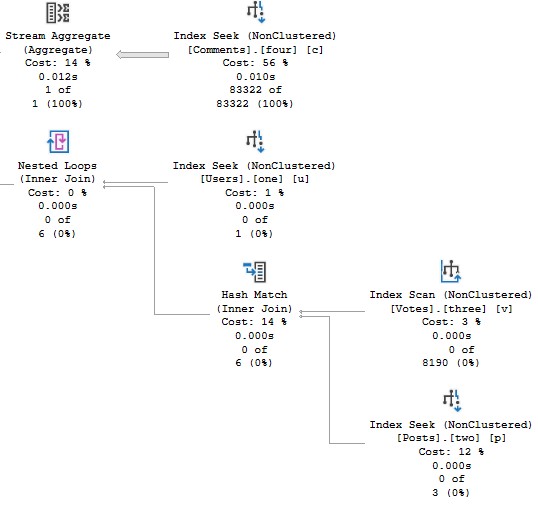
The plan for it looks like this:
OOW
Not even close to happening in the order we wrote things in.
Darn that optimizer.
Machanically Speaking
If we use a TOP in each CTE, that doesn’t help us either.
WITH cte_1 AS
(
SELECT TOP (2147483647) u.Id
FROM dbo.Users AS u
WHERE u.Reputation = 1
),
     cte_2 AS
(
SELECT TOP (2147483647) p.OwnerUserId, p.Id
FROM dbo.Posts AS p
WHERE p.OwnerUserId = 22656
),   cte_3 AS
(
SELECT TOP (2147483647) v.PostId
FROM dbo.Votes AS v
WHERE v.VoteTypeId = 4
)
SELECT COUNT(*)
FROM cte_1
JOIN cte_2
    ON cte_2.OwnerUserId = cte_1.Id
JOIN cte_3
    ON cte_3.PostId = cte_2.Id
JOIN dbo.Comments AS c
    ON c.UserId = cte_1.Id;
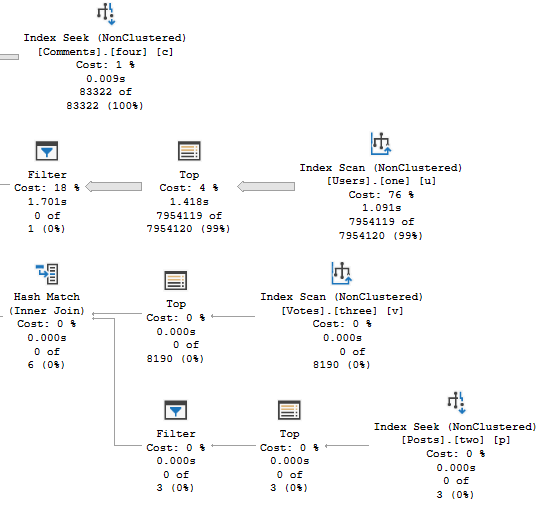
Tables get touched in the same order, but the plan takes an ugly turn:
bidtime
Dis-spells
CTEs have no magic powers. They don’t boss the optimizer around, they don’t materialize, and they don’t fence optimization.
If you’re gonna start stacking these things together, make sure you’re doing it for a good reason.
And if you tell me it’s to make code more readable, I know you’re messing with me.
Thanks for reading!
Going Further
If this is the kind of SQL Server stuff you love learning about, you’ll love my training. Blog readers get 25% off the Everything Bundle — over 100 hours of performance tuning content. Need hands-on help? I offer consulting engagements from targeted investigations to ongoing retainers. Want a quick sanity check before committing to a full engagement? Schedule a call — no commitment required.