In this class, I’ll teach you about my strategy for tuning horrible queries, and show you practical examples for dealing with a variety of performance issues. It’s a full day of learning with no fluff.
I’ll be covering topics that you’ll face day to day, like dealing with parameter sniffing, functions, temporary objects, complex queries, and more. You’ll learn how to get to the bottom of query performance issues like a pro by getting the right information and learning how to interpret it.
If this is the kind of SQL Server stuff you love learning about, you’ll love my training. Blog readers get 25% off the Everything Bundle — over 100 hours of performance tuning content. Need hands-on help? I offer consulting engagements from targeted investigations to ongoing retainers. Want a quick sanity check before committing to a full engagement? Schedule a call — no commitment required.
Right now, the optimizer’s costing algorithm’s cost lookups as being pretty expensive.
Why? Because it’s stuck in the 90s, and it thinks that random I/O means mechanical doo-dads hopping about on a spinning platter to fetch data.
And look, I get why changes like this would be really hard. Not only would it represent a change to how costs are estimated, which could throw off a whole lot of things, but you also open potentially more queries up to parameter sniffing issues.
Neither of those prospects are great, but I hear from reliable sources that Microsoft “hope[s] to make parameter sniffing less of a problem for customers” in the future.
In the meantime, what do I mean?
Kiss of Death
Scanning clustered indexes can be painful. Not always, of course, but often enough that it’s certainly something to ask questions about in OLTP-ish queries.
Let’s use the example query from yesterday’s blog post again, with a couple minor changes, and an index.
CREATE INDEX unusable
    ON dbo.Posts(OwnerUserId, Score DESC, CreationDate, LastActivityDate)
    INCLUDE(PostTypeId);
Let’s run this hyper-realistic query, with slightly different dates in the where clause.
SELECT TOP (5000)
    p.OwnerUserId,
    p.Score,
    ISNULL(p.Tags, N'N/A: Question') AS Tags,
    ISNULL(p.Title, N'N/A: Question') AS Title,
    p.CreationDate,
    p.LastActivityDate,
    p.Body
FROM dbo.Posts AS p
WHERE p.OwnerUserId IS NOT NULL
AND   p.CreationDate >= '20130927'
AND   p.LastActivityDate < '20140101'
ORDER BY p.Score DESC;


SELECT TOP (5000)
    p.OwnerUserId,
    p.Score,
    ISNULL(p.Tags, N'N/A: Question') AS Tags,
    ISNULL(p.Title, N'N/A: Question') AS Title,
    p.CreationDate,
    p.LastActivityDate,
    p.Body
FROM dbo.Posts AS p
WHERE p.OwnerUserId IS NOT NULL
AND p.CreationDate >= '20130928'
AND p.LastActivityDate < '20140101'
ORDER BY p.Score DESC;
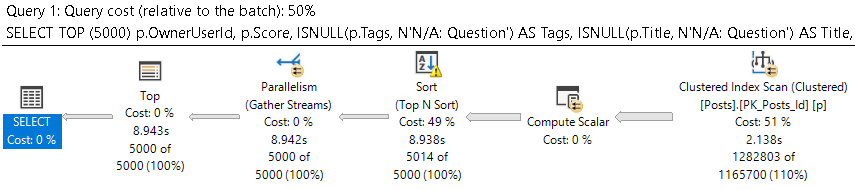
The query plan for the first query looks like this:
optimal, sub
We scan the clustered index, and the query as a whole takes around 9 seconds.
Well, okay.
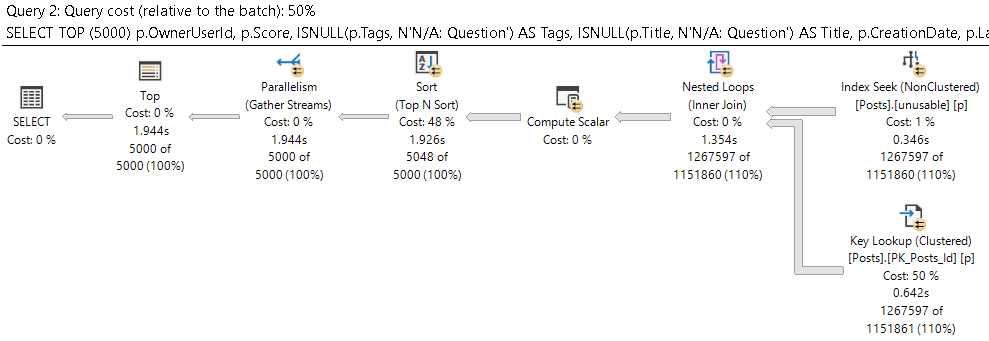
What about the other query plan?
mwah
That runs about 7 seconds faster. But why?
Come Clean
There’s one of those ✌tipping points✌ you may have heard about. One day. What a difference, huh?
Let’s back up to the first query.
SELECT TOP (5000)
    p.OwnerUserId,
    p.Score,
    ISNULL(p.Tags, N'N/A: Question') AS Tags,
    ISNULL(p.Title, N'N/A: Question') AS Title,
    p.CreationDate,
    p.LastActivityDate,
    p.Body
FROM dbo.Posts AS p
WHERE p.OwnerUserId IS NOT NULL
AND   p.CreationDate >= '20130927'
AND   p.LastActivityDate < '20140101'
ORDER BY p.Score DESC;

SELECT TOP (5000)
    p.OwnerUserId,
    p.Score,
    ISNULL(p.Tags, N'N/A: Question') AS Tags,
    ISNULL(p.Title, N'N/A: Question') AS Title,
    p.CreationDate,
    p.LastActivityDate,
    p.Body
FROM dbo.Posts AS p WITH(INDEX = unusable)
WHERE p.OwnerUserId IS NOT NULL
AND   p.CreationDate >= '20130927'
AND   p.LastActivityDate < '20140101'
ORDER BY p.Score DESC;
There’s no way one day should make this thing 7 seconds slower, so we’re going to hint one copy of it to the use nonclustered index.
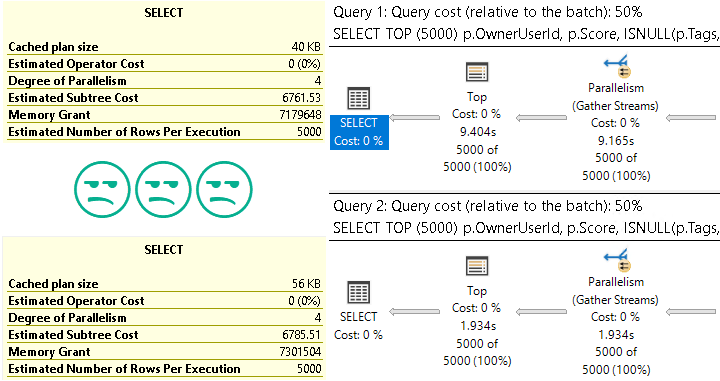
How do we do there?
i’m lyin’
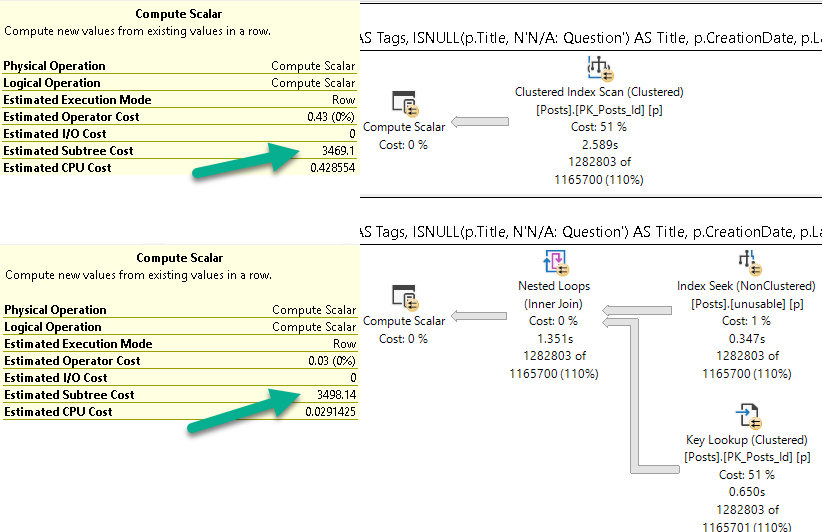
The much slower plan has a lower cost. The optimizer gave the seek + lookup a higher cost than the scan.
If we look at the subtree cost of the first operator, you’ll see what I mean.
pina colada
Zone Out
You may hear people talk about costs, either of query plans, or of operators, that indicate what took the most time. This is unfortunately not quite the case.
Note that there are no “actual cost” metrics that get calculated and added to the plan later. The estimates remain with no counterparts.
You can answer some common questions this way:
Why didn’t my index get chosen? The optimizer thought it’d be more work
How did it make that choice? Estimated costs of different potential plans
Why was the optimizer wrong? Because it’s biased against random I/O.
Thanks for reading!
Going Further
If this is the kind of SQL Server stuff you love learning about, you’ll love my training. Blog readers get 25% off the Everything Bundle — over 100 hours of performance tuning content. Need hands-on help? I offer consulting engagements from targeted investigations to ongoing retainers. Want a quick sanity check before committing to a full engagement? Schedule a call — no commitment required.
The problem with relying on any data point is that when it’s not there, it can look like there’s nothing to see.
Missing indexes requests are one of those data points. Even though there are many reasons why they might not be there, sometimes it’s not terribly clear why one might not surface.
That can be annoying if you’re trying to do a general round of tuning on a server, because you can miss some easy opportunities to make improvements.
Here’s an example of a query that, with no indexes in place, probably should generate a missing index request.
SELECT TOP (5000)
    p.OwnerUserId,
    p.Score,
    ISNULL(p.Tags, N'N/A: Question') AS Tags,
    ISNULL(p.Title, N'N/A: Question') AS Title,
    p.CreationDate,
    p.LastActivityDate,
    p.Body
FROM dbo.Posts AS p
WHERE 1 = 1
AND p.CreationDate >= '20131230'
AND p.CreationDate < '20140101'
ORDER BY p.Score DESC;
Big Ol’ Blank
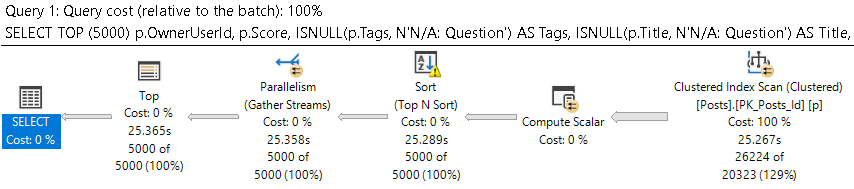
Here’s the query plan! It’s like uh. Why wouldn’t you want this to take less than 25 seconds?
clap your hands
The posts table is a little over 17 million rows. The optimizer expects around 20k rows to qualify, but doesn’t think an easier way to find those rows would be helpful.
At least not the way we’ve written the query.
Let’s make a small change
Five and Dime
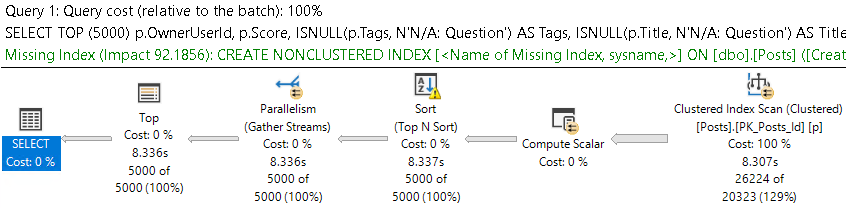
If we quote out the Body column, which is an NVARCHAR(MAX), we get our green text.
SELECT TOP (5000)
    p.OwnerUserId,
    p.Score,
    ISNULL(p.Tags, N'N/A: Question') AS Tags,
    ISNULL(p.Title, N'N/A: Question') AS Title,
    p.CreationDate,
    p.LastActivityDate--,
    --p.Body
FROM dbo.Posts AS p
WHERE 1 = 1
AND p.CreationDate >= '20131230'
AND p.CreationDate < '20140101'
ORDER BY p.Score DESC;
Who’d want that in an index?
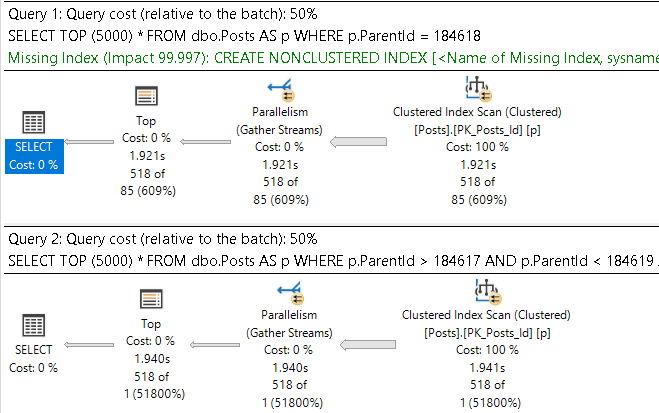
Which is interesting, because the optimizer isn’t always that smart. It’s much easier to tempt it into bad ideas with equality predicates.
Good and Hard
Check this out!
SELECT TOP (5000) *
FROM dbo.Posts AS p
WHERE p.ParentId = 184618;


SELECT TOP (5000) *
FROM dbo.Posts AS p
WHERE p.ParentId > 184617
AND   p.ParentId < 184619;
hot cars
The missing index for this is a mistake.
CREATE NONCLUSTERED INDEX [<Name of Missing Index, sysname,>]
ON [dbo].[Posts] ([ParentId])
INCLUDE ([AcceptedAnswerId],[AnswerCount],[Body],[ClosedDate],[CommentCount],[CommunityOwnedDate],[CreationDate],[FavoriteCount],[LastActivityDate],[LastEditDate],[LastEditorDisplayName],[LastEditorUserId],[OwnerUserId],[PostTypeId],[Score],[Tags],[Title],[ViewCount])
What Did We Learn?
How we write queries (and design tables) can change how the optimizer feels about our queries. If you’re the kind of person who relies on missing index requests to fix things, you could be missing pretty big parts of the picture.
Thanks for reading!
Going Further
If this is the kind of SQL Server stuff you love learning about, you’ll love my training. Blog readers get 25% off the Everything Bundle — over 100 hours of performance tuning content. Need hands-on help? I offer consulting engagements from targeted investigations to ongoing retainers. Want a quick sanity check before committing to a full engagement? Schedule a call — no commitment required.
In this class, I’ll teach you about my strategy for tuning horrible queries, and show you practical examples for dealing with a variety of performance issues. It’s a full day of learning with no fluff.
I’ll be covering topics that you’ll face day to day, like dealing with parameter sniffing, functions, temporary objects, complex queries, and more. You’ll learn how to get to the bottom of query performance issues like a pro by getting the right information and learning how to interpret it.
If this is the kind of SQL Server stuff you love learning about, you’ll love my training. Blog readers get 25% off the Everything Bundle — over 100 hours of performance tuning content. Need hands-on help? I offer consulting engagements from targeted investigations to ongoing retainers. Want a quick sanity check before committing to a full engagement? Schedule a call — no commitment required.
I was investigating a query slowdown recently, and came across something kind of odd with windowing functions and order by.
Let’s talk about these three queries:
SELECT u.DisplayName,
       ROW_NUMBER() OVER (ORDER BY u.UpVotes) AS UpVotesWhatever, --UpVotes first
       ROW_NUMBER() OVER (ORDER BY u.DownVotes) AS DownVotesWhatever --DownVotes second
FROM dbo.Users AS u
WHERE u.Reputation > 100000
ORDER BY UpVotes; --Order by UpVotes

SELECT u.DisplayName,
       ROW_NUMBER() OVER (ORDER BY u.UpVotes) AS UpVotesWhatever, --UpVotes first
       ROW_NUMBER() OVER (ORDER BY u.DownVotes) AS DownVotesWhatever --DownVotes second
FROM dbo.Users AS u
WHERE u.Reputation > 100000
ORDER BY u.DownVotes; --Order by DownVotes

SELECT u.DisplayName,
       ROW_NUMBER() OVER (ORDER BY u.DownVotes) AS DownVotesWhatever, --DownVotes first
       ROW_NUMBER() OVER (ORDER BY u.UpVotes) AS UpVotesWhatever --UpVotes second
FROM dbo.Users AS u
WHERE u.Reputation > 100000
ORDER BY UpVotes; --Order by UpVotes
Goings On
If we’re going to generate row numbers on these columns, we need to sort them.
I know and you know, we can add indexes to put column data in the order we want it in, and that’ll cut down on the amount of work Our Server™ has to do to execute this query. But we can’t just index everything, that’d be insane. I know because I’ve seen your servers, and I’ve seen you try to do that.
Plus, they just get fragmented anyway.
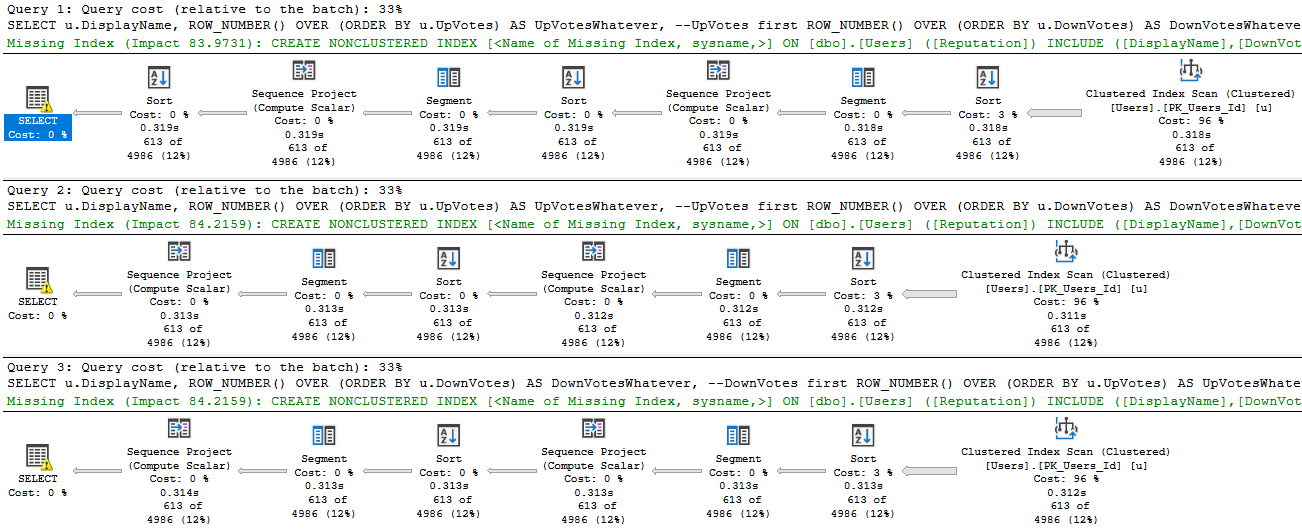
Here are the execution plans. This is a big picture, because I want you to spot the difference.
get big
Fascination Street
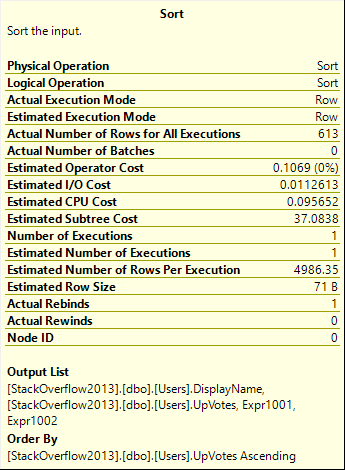
That first plan has an extra Sort operator in it. See it up there? Right next to the Select operator?
shame on you
That sort is ordering by UpVotes ascending, which is a shame because we’ve already done that once. That sort doesn’t occur in the second two plans, because the row number function has already sorted data by them. If the optimizer were a little smarter here, it could reorder the sequence it generates row numbers in to avoid that, but it doesn’t.
If we rewrite the query to do that on our own, the data ends up in the right order. In case you’re wondering, we get the same results referencing the row numbers in the order by instead of the underlying column:
SELECT u.DisplayName,
       ROW_NUMBER() OVER (ORDER BY u.UpVotes) AS UpVotesWhatever, --UpVotes first
       ROW_NUMBER() OVER (ORDER BY u.DownVotes) AS DownVotesWhatever --DownVotes second
FROM dbo.Users AS u
WHERE u.Reputation > 100000
ORDER BY UpVotesWhatever; --Order by UpVotesWhatever

SELECT u.DisplayName,
       ROW_NUMBER() OVER (ORDER BY u.UpVotes) AS UpVotesWhatever, --UpVotes first
       ROW_NUMBER() OVER (ORDER BY u.DownVotes) AS DownVotesWhatever --DownVotes second
FROM dbo.Users AS u
WHERE u.Reputation > 100000
ORDER BY DownVotesWhatever; --Order by DownVotesWhatever

SELECT u.DisplayName,
       ROW_NUMBER() OVER (ORDER BY u.DownVotes) AS DownVotesWhatever, --DownVotes first
       ROW_NUMBER() OVER (ORDER BY u.UpVotes) AS UpVotesWhatever --UpVotes second
FROM dbo.Users AS u
WHERE u.Reputation > 100000
ORDER BY UpVotesWhatever; --Order by UpVotesWhatever
Thanks for reading!
Going Further
If this is the kind of SQL Server stuff you love learning about, you’ll love my training. Blog readers get 25% off the Everything Bundle — over 100 hours of performance tuning content. Need hands-on help? I offer consulting engagements from targeted investigations to ongoing retainers. Want a quick sanity check before committing to a full engagement? Schedule a call — no commitment required.
WHAT DO YOU MEAN YOU’RE NOT ON SQL SERVER 2019 YET.
Oh. Right.
That.
Regressed
Look, whenever you make changes to the optimizer, you’re gonna hit some regressions.
And it’s not just upgrading versions, either. You can have regressions from rebuilding or restarting or recompiling or a long list of things.
Databases are terribly fragile places. You have to be nuts to work with them.
I’m not mad at 2019 or Batch Mode On Rowstore (BMOR) or anything.
But if I’m gonna get into it, I’m gonna document issues I run into so that hopefully they help you out, too.
One thing I ran into recently was where BMOR kicked in for a query and made it slow down.
Repro
Here’s my index:
CREATE INDEX mailbag ON dbo.Posts(PostTypeId, OwnerUserId) WITH(DATA_COMPRESSION = ROW);
And here’s my query:
SELECT u.Id, u.DisplayName, u.Reputation,
       (SELECT COUNT_BIG(*) FROM dbo.Posts AS pq WHERE pq.OwnerUserId = u.Id AND pq.PostTypeId = 1) AS q_count,
       (SELECT COUNT_BIG(*) FROM dbo.Posts AS pa WHERE pa.OwnerUserId = u.Id AND pa.PostTypeId = 2) AS a_count
FROM dbo.Users AS u
WHERE u.Reputation >= 25000
ORDER BY u.Id;
It’s simplified a bit from what I ran into, but it does the job.
Batchy
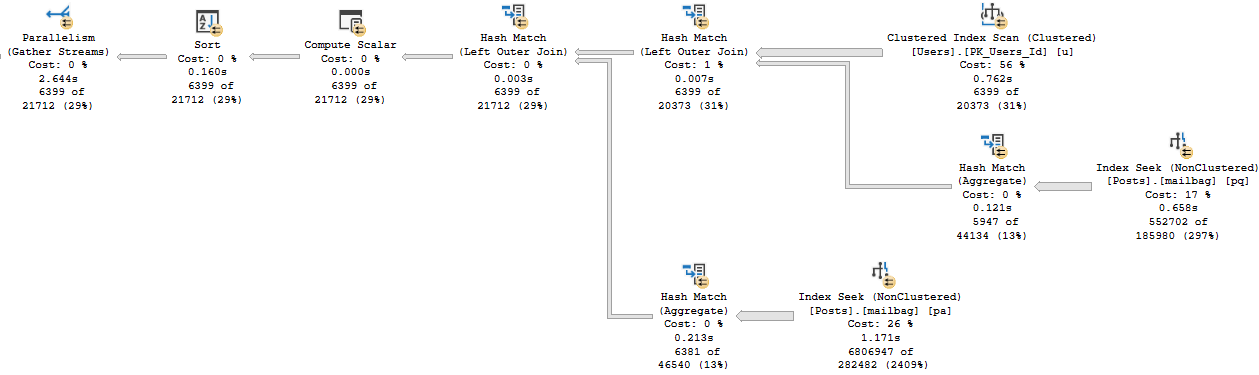
This is the batch mode query plan. It runs for about 2.6 seconds.
who would complain?
Rowy
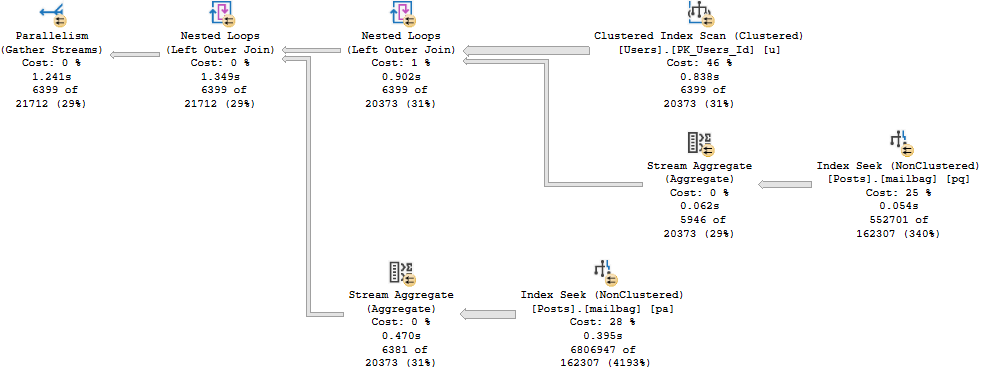
And here’s the row mode query plan. It runs for about 1.3 seconds.
oh that’s why.
What Happened?
Just when you think the future is always faster, life comes at you like this.
So why is the oldmode query more than 2x faster than the newhotmode query?
There are a reason, and it’s not very sexy.
Batch Like That
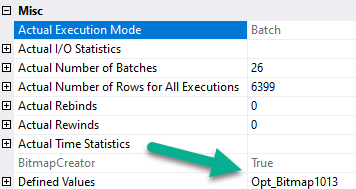
First, the hash joins produce Bitmaps.
bitted
You don’t see Bitmaps in Batch Mode plans as operators like you’re used to in Row Mode plans. You have to look at the properties (not the tool tip) of the Hash Join operator.
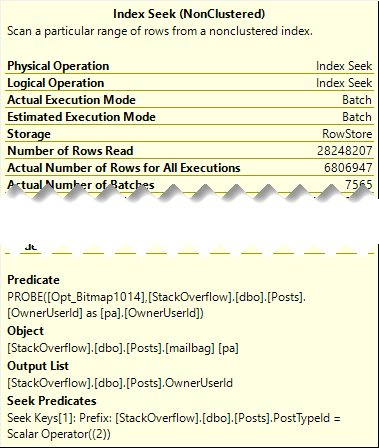
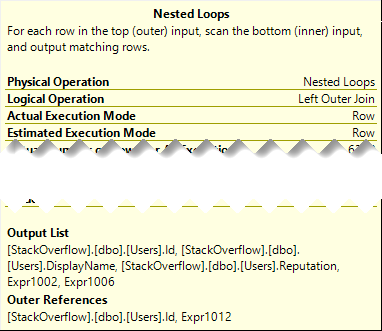
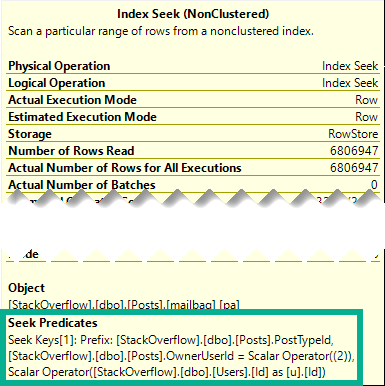
Even though both plans seek into the index on Posts, it’s only for the PostTypeId in the Batch Mode plan.
It would be boring to show you both, so I’m just going to use the details from the branch where we find PostTypeId = 2.
buck fifty
Remember this pattern: we seek to all the values where PostTypeId = 2, and then apply the Bitmap as a residual predicate.
Which means on the inner side of the join, both the PostTypeId and the OwnerUserId qualify as seek predicates:
oh yeah that
Reading Rainbow
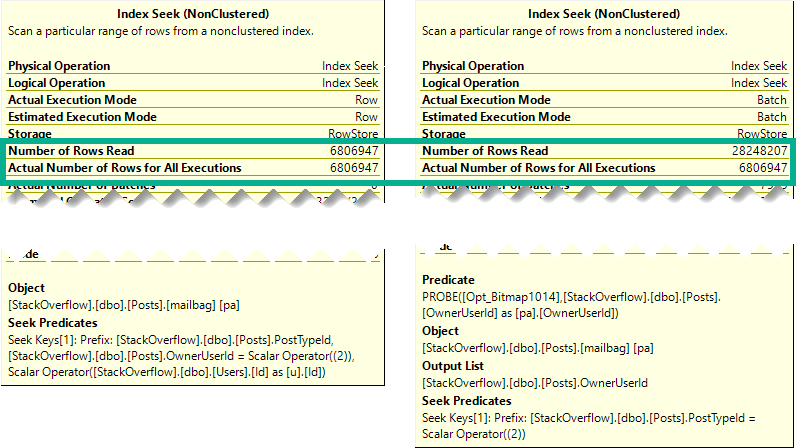
The better performance comes from doing fewer reads when indexes are accessed.
psychic tv
Though both produce the same number of rows, the Hash Join plan in Batch Mode reads 28 million rows, or about 21 million more rows than the Nested Loop Join plan in row mode. In this case, the double seek does far fewer reads, and even Batch Mode can’t cover that up.
Part of the problem is that the optimizer isn’t psychic.
Fixing It
There are two ways I found to get the Nested Loop Join plan back.
The boring one, using a compat level hint:
SELECT u.Id, u.DisplayName, u.Reputation,
       (SELECT COUNT_BIG(*) FROM dbo.Posts AS pq WHERE pq.OwnerUserId = u.Id AND pq.PostTypeId = 1) AS q_count,
       (SELECT COUNT_BIG(*) FROM dbo.Posts AS pa WHERE pa.OwnerUserId = u.Id AND pa.PostTypeId = 2) AS a_count
FROM dbo.Users AS u
WHERE u.Reputation >= 25000
ORDER BY u.Id
OPTION(USE HINT('QUERY_OPTIMIZER_COMPATIBILITY_LEVEL_140'));
And the more fun one, rewriting the correlated subqueries as outer apply:
SELECT u.Id, u.DisplayName, u.Reputation, q_count, a_count
FROM dbo.Users AS u
    OUTER APPLY(SELECT COUNT_BIG(*) AS q_count FROM dbo.Posts AS pq WHERE pq.OwnerUserId = u.Id AND pq.PostTypeId = 1) AS q_count
    OUTER APPLY(SELECT COUNT_BIG(*) AS a_count FROM dbo.Posts AS pa WHERE pa.OwnerUserId = u.Id AND pa.PostTypeId = 2) AS a_count
WHERE u.Reputation >= 25000
ORDER BY u.Id;
Thanks for reading!
Going Further
If this is the kind of SQL Server stuff you love learning about, you’ll love my training. Blog readers get 25% off the Everything Bundle — over 100 hours of performance tuning content. Need hands-on help? I offer consulting engagements from targeted investigations to ongoing retainers. Want a quick sanity check before committing to a full engagement? Schedule a call — no commitment required.
I’m often frustrated by things that are either not implemented well, or at all, in SQL Server. I don’t want to make a list here, because I don’t want to dissuade anyone from commenting, but here’s a picture of me reading it.
AND THEN
And yes, the grass may always be greener on other platforms. Oracle and Postgres have some pretty amazing things in them that I think could solve some pretty big problems, and fill some pretty big holes for developers.
Anyway, this post is about you, dear reader.
If you could design your ideal database to work with, what would you do differently than what SQL Server does?
Thanks for reading (and hopefully commenting)!
Going Further
If this is the kind of SQL Server stuff you love learning about, you’ll love my training. Blog readers get 25% off the Everything Bundle — over 100 hours of performance tuning content. Need hands-on help? I offer consulting engagements from targeted investigations to ongoing retainers. Want a quick sanity check before committing to a full engagement? Schedule a call — no commitment required.
I wish I had a dollar for every wrong thing I’ve heard about CTEs in my life. I’d buy a really nice cigar and light it with fire made by the gods themselves.
Or, you know, something like that.
One common thing is around some persistence of the queries contained inside of them in some form, whether in memory or in tempdb or something else.
I honestly don’t know where these things begin. They’re not even close to reality.
Getting It Right
Let’s take this query as an example:
SELECT u.Id,
       u.Reputation
FROM dbo.Users AS u
WHERE u.Reputation * 2 = 22;
If you’ve been tuning queries for longer than a day, you can probably spot the issue here.
Applying expressions to columns in the where clause (or joins) messes up some things. Unfortunately, you can also run into the exact same issues doing this:
WITH cte AS
(
SELECT u.Id,
       u.Reputation,
       (u.Reputation * 2) AS ReputationDoubler
FROM dbo.Users AS u
)
SELECT c.Id,
       c.Reputation
FROM cte AS c
WHERE c.ReputationDoubler = 22;
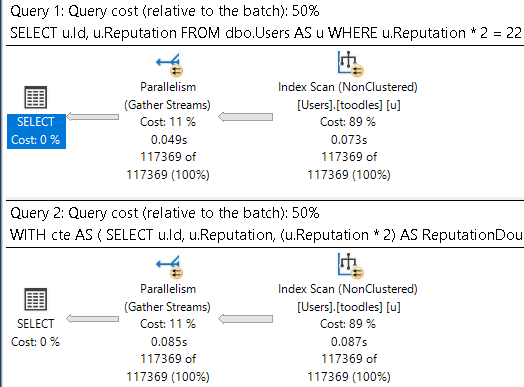
To be explicit: both of these queries have the same problem.
Erik D Is President
Starting with this index:
CREATE INDEX toodles ON dbo.Users(Reputation);
Both queries have the same execution plan characteristics:
come clean
I understand why you think a mature database product might be able to deal with this better:
Locate values in the index with a value of 11
Divide the literal value by 2 instead
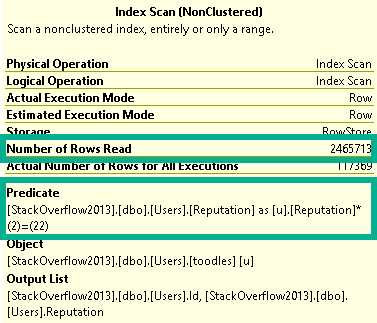
But SQL Server doesn’t have anything like that, and neither do CTEs. Both indexes get scanned in entirety to retrieve qualifying rows, with the unseekable expression applied as a residual predicate:
Day Planner
Gopherville
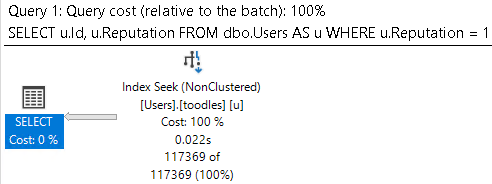
To be clear, and hopefully to persuade you to write clear predicates, this is the end result that we’re after:
SELECT u.Id,
       u.Reputation
FROM dbo.Users AS u
WHERE u.Reputation = 11;
roll for int
While this is of course intuitive when writing simple queries, the point of this post is to show that expressions in CTEs don’t offer any advantage.
This goes for any flavor of derivation, too. Whether it’s wrapping columns in built in or user defined functions, combining columns, combining columns with values, etc.
Thanks for reading!
Going Further
If this is the kind of SQL Server stuff you love learning about, you’ll love my training. Blog readers get 25% off the Everything Bundle — over 100 hours of performance tuning content. Need hands-on help? I offer consulting engagements from targeted investigations to ongoing retainers. Want a quick sanity check before committing to a full engagement? Schedule a call — no commitment required.
You’re an ISV, and your customers are complaining about application performance. You have competent developers, but they’re overwhelmed by long lists of new features and spend a lot of time putting out fires. Underneath it all is a SQL Server that everyone is scared of.
They probably don’t have the luxury of sitting and learning performance tuning theory, and figuring out how to apply it to the database they’re working in. That kind of training can be time-consuming, and if the right topics don’t get covered they might not learn the right things.
You need someone to show up with the knowledge in hand to assess your databases, indexes, and queries, and guide the team to better practices and better performance.
The Pain Is Plain
Week in and week out, I work with nice people in tough situations, and my advice helps them learn exactly what they’re doing wrong with SQL Server so they can solve their problems. That model works for most people who only need a little boost.
For those with a little more trouble and a little less expertise, one of my most popular packages is a week of query tuning. I jump right in and work on your queries on a development server, and hand over all the changes I make along with documentation and training.
But there’s another class of client out there, too. You need more dedicated help, training, and face time.
It’s nice to have all your performance issues analyzed with detailed advice on how to solve them, or have your worst queries magically tuned for you, but your developers still don’t have the confidence or skill set to do all that on their own.
Videos, Classes, and Conferences
These are all great ways to learn, but may not cover exactly what you’re going through.
Your developers have specific questions about their code, indexes, and other local factors that lead to them seeking out education.
You just don’t get the kind of ultra-personalized answers and training that you need in those settings. And there are some obvious drawbacks:
Videos: Time to sit, watch, and concentrate on them, then come back and fix things
Classes: Hours or days away from work, work stuff coming up during them, and they still need to come back and fix things
Conferences: I remember those, too. It’s like all the above, except with travel and a week long hangover that everyone calls “nerd flu” ?
If that’s all you need, check out mine. If you need something more, here’s what I have to offer.
Performance Leader As A Service
What I do is bring the best all of those things together in your workplace.
We review your environments, work with your databases, and fix your your problems together.
Developers learn by watching and doing right along with me, and nothing is hidden away. If performance problems come up during the work day, we look at them together.
Think of it like having that performance lead you always needed around, without all the mess of having to hire one full time.
What you get from our time together is more than just consulting or a remote DBA. You get coaching that gets results, and your developers get the skills and confidence to keep SQL Server performing well on their own.
If this is the kind of SQL Server stuff you love learning about, you’ll love my training. Blog readers get 25% off the Everything Bundle — over 100 hours of performance tuning content. Need hands-on help? I offer consulting engagements from targeted investigations to ongoing retainers. Want a quick sanity check before committing to a full engagement? Schedule a call — no commitment required.
There are some helper views and functions that I use in a few presentations, and I figured it was time to stick them on The GitHub so I don’t have to package them up and remember to keep changes in sync, etc.
Since it’s a view, all you have to do is select from it.
SELECT *
FROM dbo.WhatsUpIndexes AS wui;
I know, I’m terrible for writing SELECT *, but I really do want all the columns here.
If there were columns I didn’t want, I wouldn’t have put them in the view.
You know?
what you get
Because I’m kinda forgetful, I like having the view name in the results so I know what I’m looking at, and it’s obvious to people watching where results came from without looking at the T-SQL up on the screen. The rest of the info is pretty self-explanatory. It measures indexes by size and rows.
WhatsUpMemory
These two views are designed to complement each other a bit, because often what I’m showing with them is how big indexes are compared to what’s been read into memory. Sometimes it’s the whole index, sometimes it’s part of the index. But it’s nice to be able to see right next to each other.
As far as I know, there’s nothing out there that analyzes what’s in memory, and most of the time this isn’t something I’d want to run in production.
SELECT *
FROM dbo.WhatsUpMemory AS wum;
There are two reasons for that:
The sys.dm_os_buffer_descriptors view is really slow
It gets slower with more memory/stuff in memory
I don’t think there’s another memory view that gives me what I want back, so I’m sort of stuck with this one here.
the tombs
You can see how the two help each other, and you can also probably see why it’s easy to get the results confused. If it weren’t for the buffer cache pages column here, it might look just like index info. Heh.
WhatsUpLocks
This is an inline table valued function, and it takes one parameter for a SPID.
It can be NULL if you want, but usually I want to focus in on what one things is doing.
SELECT *
FROM dbo.WhatsUpLocks(@@SPID) AS wul;
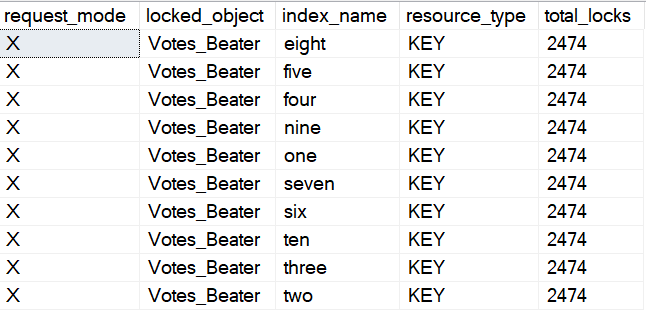
This doesn’t give you nearly as much other detail as sp_WhoIsActive, but it’s good for just looking at locks taken. Note that a lot of the time, you might need to use a transaction to preserve the locks so you can see the full extent of the damage. If you’re looking at another session while it takes locks, it’ll either have to run for a bit, or you’ll have to be really fast with F5.
bad boy’s street team
I use the Votes_Beater table to have a copy of the Votes table with a bunch of indexes on it that I don’t need to go and create live. They’re always there and ready for abusive demos. I like the Votes table because it’s big and narrow, with sensible data types for things (read: no MAX types).
It makes things a lot simpler.
Fine Print
I make no guarantees about which versions these’ll run on, and quite frankly I’m not interested in them being backwards compatible. They run on the versions that I do my demos on (2017 and 2019).
If they happen to work on older versions, great. If not, I’m fine with you making local changes, but won’t accept pull requests for it, and I’ll close issues about it immediately. It’s not like you can have dynamic SQL in these things, anyway.
For any questions about what they return, make sure you read the docs for the views they touch. It’s not hard to look at the queries, I promise ?
If this is the kind of SQL Server stuff you love learning about, you’ll love my training. Blog readers get 25% off the Everything Bundle — over 100 hours of performance tuning content. Need hands-on help? I offer consulting engagements from targeted investigations to ongoing retainers. Want a quick sanity check before committing to a full engagement? Schedule a call — no commitment required.