Why Are You Here?
In the fine tradition of a turkey being pardoned from becoming the centerpiece of a meal, I’m pardoning you from having to read a blog post about SQL Server.
Wherever you are, whoever you are, have a grand day!
Thanks for reading!
SQL Server Consulting, Education, and Training
In the fine tradition of a turkey being pardoned from becoming the centerpiece of a meal, I’m pardoning you from having to read a blog post about SQL Server.
Wherever you are, whoever you are, have a grand day!
Thanks for reading!
Unless you’re running a data warehouse, I can’t think of a good reason to leave this at the default (5) for most any workload.
Look at any SQL Server setup checklist not written by SharePoint admins, and you’ll see people tell you to change this setting to something higher than 5.
What you change it to is not what I’m here to talk about. I’m Team Start With 50, but you can be whatever team you want and we can still be friends.
I mean, unless you’re going to tell me I should look at the plan cache to figure that out, then we are mortal enemies because you are full of shabby ideas. The plan cache is full of lies and bad estimates, and totally unreliable in the long term.
You could probably make better guesses based on Query Store, but Cost Threshold For Parallelism is, unfortunately, not a database-level setting, and they’d still just be guesses. About estimates. So, you know… Cool your jets, hotshot.
But since MAXDOP is not only available, but also offers guidance for a correct setting to the installer, why not this one? It is, after all, an important counterpart.
If anything, it’d be nice to give folks who care about automation one less post-setup step to handle. To me, that’s a glaring omission.
Of course, maybe it’s time to get Cost Threshold For Parallelism some help. Cost is, after all, just a reference metric.
It can be good, it can be bad. High cost plans can run fast, low cost plans can run slow.
With all the intelligent stuff being built into the product, perhaps it’s time for it to consider things in addition to plan cost for whether a query is eligible for parallelism or not.
Imagine this scenario: You set Cost Threshold For Parallelism to 50, and a really important query that costs 20 query bucks comes along and runs slowly and single threaded every single time it executes. It never stands a chance at going parallel, unless you drop Cost Threshold For Parallelism way low for the whole server.
Your only option other than lowering Cost Threshold For Parallelism is using an unsupported trace flag (8649), or an unsupported USE hint (ENABLE_PARALLEL_PLAN_PREFERENCE).
It sure would be nice if there were a supported override that you could set, say a maximum CPU threshold for a serial plan. I don’t think you could change this in flight, but you could potentially have it act like memory grant feedback, and adjust between executions.
Thanks for reading!
If this is the kind of SQL Server stuff you love learning about, you’ll love my training. Blog readers get 25% off the Everything Bundle — over 100 hours of performance tuning content. Need hands-on help? I offer consulting engagements from targeted investigations to ongoing retainers. Want a quick sanity check before committing to a full engagement? Schedule a call — no commitment required.
When you create an index, there are a lot of options. Recently while working with nice people who pay me, I’ve gotten the same question a few times.
I like to hand off index change scripts to people to help them drop unused indexes, merge duplicative indexes, and add in helpful missing indexes. When I do, I always specify some options along with them to help the create process along, like MAXDOP, ONLINE, and SORT_IN_TEMPDB.
The thing is, those settings aren’t ones that kick in automatically next time you rebuild the index or something; you have to specify them each time.
Here are index creation options:
Here are stored index options:
Where you use these options is situational.
For example, only Enterprise Edition can create indexes online, or using a parallel plan. You can sort in tempdb for any of them, though. I might use different DOPs depending on the size of the server, and of course if I’m creating a column store index (for those, DOP 1 is sometimes a good idea).
For the stored options, I leave most of them alone. I always start Fill Factor off at 100, and with page compression turned on. Those are both things you can adjust or remove later if they turn out to not be ideal, but I love testing them out.
Data compression is especially useful on Standard Edition servers with a limited buffer pool (128GB) and large data sets, but can be just as useful on Enterprise Edition when that antichrist VM admin refuses to part with a single more GB of memory.
And hey, maybe in the future as more workloads move to 2019+, I’ll get to spend more time optimizing for sequential keys.
Maybe.
Thanks for reading!
If this is the kind of SQL Server stuff you love learning about, you’ll love my training. Blog readers get 25% off the Everything Bundle — over 100 hours of performance tuning content. Need hands-on help? I offer consulting engagements from targeted investigations to ongoing retainers. Want a quick sanity check before committing to a full engagement? Schedule a call — no commitment required.
I solve a lot of problems with #temp tables, indeed I do. And I hate people who are reflexively anti-#temp table.
If you’re into jokes (I’m definitely not into jokes; SQL is serious business), you could even call them #foolish.
Get it?
Ahem 🎤👈
However (!) I learned a lesson recently about how using them in certain ways can cause weird plan cache pollution.
When you’re hitting the issue, the optional_spid column in dm_exec_plan_attributes will be populated with a non-zero value. You can use this query to quickly check for that happening on your system:
SELECT
    pa.attribute,
    pa.value,
    decp.refcounts,
    decp.usecounts,
    decp.size_in_bytes,
    decp.memory_object_address,
    decp.cacheobjtype,
    decp.objtype,
    decp.plan_handle
FROM sys.dm_exec_cached_plans AS decp
CROSS APPLY sys.dm_exec_plan_attributes (decp.plan_handle)  AS pa
WHERE pa.attribute = N'optional_spid'
AND   pa.value > 0;
Let’s talk about those!
Check out this piece of code:
CREATE OR ALTER PROCEDURE
    dbo.no_spid
AS
BEGIN
    SET NOCOUNT ON;

    CREATE TABLE #t (id int);
    INSERT #t (id) VALUES (1);

    EXEC dbo.a_spid; --Hi

END;
GO


CREATE OR ALTER PROCEDURE
    dbo.a_spid
AS
BEGIN
    SET NOCOUNT ON;

    CREATE TABLE #t (id int);
    INSERT #t (id) VALUES (2);

END;
GO
In the first procedure, we create a #temp table, and insert a row, then execute another procedure, where we create a #temp table with the same name and insert a row.
The second #temp table doesn’t have to have the same definition here, only the same name. I’m just re-using the definition out of convenience.
Using the above query, we’ll see this:

And if we run sp_BlitzCache, we’ll indeed see multiple plans for a_spid, though no_spid seems to get plans associated with it because the plans are hashed to the same value. Heh. That plan cache… 🙄

Check out this code:
CREATE OR ALTER PROCEDURE
    dbo.internal
(
    @c bigint
)
AS
BEGIN
SET NOCOUNT ON;

    CREATE TABLE #t(id int);
    INSERT #t (id) VALUES (1);

    SELECT
        @c = COUNT_BIG(*)
    FROM #t AS t
    WHERE 1 = (SELECT 1);

    EXEC dbo.not_internal 0; --Hi

END;
GO

CREATE OR ALTER PROCEDURE
    dbo.not_internal
(
    @c bigint
)
AS
BEGIN

    INSERT #t (id) VALUES (2);

    SELECT
        @c = COUNT_BIG(*)
    FROM #t AS t
    WHERE 1 = (SELECT 1);

END;
GO
We’re creating a #temp table in one stored procedure, and then executing another stored procedure that references the same #temp table this time.
Just like above, if we execute the procedures across a couple different SSMS tabs, we’ll see this:

And from the plan cache:

Same thing as last time. Multiple plans for not_internal. In both cases, the outer stored procedure has an optional_spid of 0, but the inner procedure has the spid that executed it attached.
My fellow blogger Joe Obbish came up with this one, which is really interesting. It’s necessary to point out that this is Joe’s code, so no one asks me why the formatting is so ugly 😃
CREATE OR ALTER PROCEDURE no_optional_spid AS
BEGIN
    CREATE TABLE #obj_count (
    [DB_NAME] SYSNAME NOT NULL,
    OBJECT_COUNT BIGINT NOT NULL
    );

    DECLARE @db_name SYSNAME = 'Crap';

    DECLARE @sql NVARCHAR(4000) = N'SELECT @db_name, COUNT_BIG(*)
    FROM ' + QUOTENAME(@db_name) + '.sys.objects';

    INSERT INTO #obj_count
    EXEC sp_executesql @sql, N'@db_name SYSNAME', @db_name = @db_name;
END;
GO

CREATE OR ALTER PROCEDURE has_optional_spid AS
BEGIN
    CREATE TABLE #obj_count (
    [DB_NAME] SYSNAME NOT NULL,
    OBJECT_COUNT BIGINT NOT NULL
    );

    DECLARE @db_name SYSNAME = 'Crap';

    DECLARE @sql NVARCHAR(4000) = N'INSERT INTO #obj_count
    SELECT @db_name, COUNT_BIG(*)
    FROM ' + QUOTENAME(@db_name) + '.sys.objects';

    EXEC sp_executesql @sql, N'@db_name SYSNAME', @db_name = @db_name;

END;
GO
In this case, we have two procedures that create a #temp table with the same name, and insert into them with dynamic SQL. I have a feeling that this would also occur under other circumstances where you use the INSERT…EXEC paradigm, e.g. a stored procedure.
Same deal here, if we look at the same things, except that it’s more helpful to look at the execution_count column in sp_BlitzCache.

And…

Everything has 200 executions, except the internal parameter table scan that does the #temp table insert:
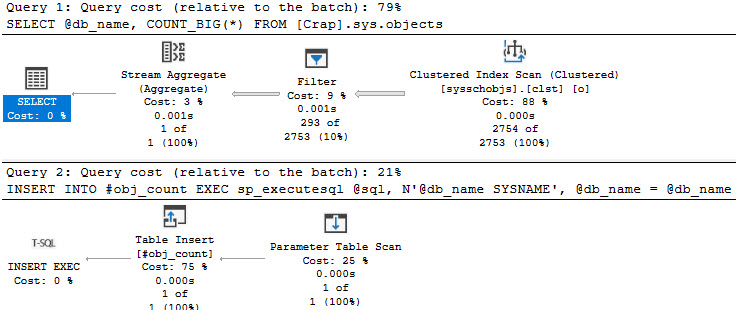
This post explores a few scenarios where the *optional_spid* cache pollution does happen. There are likely more, and I’m happy to add scenarios if any readers out there have them.
There are plenty of scenarios where this scenario doesn’t happen, too. I don’t want you to think it’s universal.
It really only happens when #temp tables have identical names, or you reference any #temp table across two or more execution scopes. In these examples, the execution scopes are stored procedures and dynamic SQL.
I tried a bunch of stuff that I thought would cause the problem, but didn’t.
So yeah. Love your #temp tables, too.
Thanks for reading!
If this is the kind of SQL Server stuff you love learning about, you’ll love my training. Blog readers get 25% off the Everything Bundle — over 100 hours of performance tuning content. Need hands-on help? I offer consulting engagements from targeted investigations to ongoing retainers. Want a quick sanity check before committing to a full engagement? Schedule a call — no commitment required.
EAV styled tables can be excellent for certain data design patterns, particularly ones with a variable number of entries.
Some examples of when I recommend it are when users are allowed to specify multiple things, like:
This is a lot better than adding N number of columns to a table, especially when either most people won’t use them, or it adds artificial restrictions.
For example, if you have a large table that was designed 10 years ago, you’re not gonna rush to add a 3rd phone number field to it for a single customer. Changing tables like that can be painful, depending on version and edition of SQL Server.
Where you need to be careful is how you design them. One particularly rough spot to end up in is with a table like this:
CREATE TABLE
    dbo.eav
(
    entity int,
    attribute int,
    int_value int,
    date_value date,
    short_string_value nvarchar(100),
    long_string_value nvarchar(max)
);
While it does make data type consistency easier, I have to wonder about the wisdom of making the values “good” for searching. Certainly, indexing this table would be aggravating if you were going to go that route.
A design that I generally like better looks like this:
CREATE TABLE
    dbo.eav
(
    entity int,
    attribute int,
    value sql_variant
);
While the sql_variant type is certainly not good for much, this is a proper time for it, particularly because this data should only be written to once, and only read from after. That means no searching the sql_variant column, and only allowing lookups via the entity and attribute.
Thanks for reading!
If this is the kind of SQL Server stuff you love learning about, you’ll love my training. Blog readers get 25% off the Everything Bundle — over 100 hours of performance tuning content. Need hands-on help? I offer consulting engagements from targeted investigations to ongoing retainers. Want a quick sanity check before committing to a full engagement? Schedule a call — no commitment required.
Most of these signs have to do with wait stats. One could venture out and say that if you have way less memory than data, you need more memory, but… If the server is sitting around bored, who cares?
If we’re going to spend money on memory, let’s make sure it’ll get used. When I’m talking to people with performance problems that memory would solve, here are some of the top reasons.
Okay, okay, storage can totally suck other places, too. I’ve seen some JBOD setups that would make you cry, and some of them weren’t in the cloud. Where you need to differentiate a little bit here is that memory isn’t going to help slow writes directly. If you add a bunch more memory and free up some network bandwidth for writes by focusing the reads more from the buffer pool, it might.
Look, just avoid disk as much as possible and you’ll be happy.
Good column store compression can often rely on adequate memory, but you also need to account for the much larger memory grants that batch mode queries ask for. As more and more workloads move towards SQL Server 2019 and beyond, query memory needs are going to go up because Batch Mode On Row Store will become more common.
This wait shows up when a bunch of queries are contending for memory grants, but SQL Server has given out all it can. If you run into these a lot, it’s a pretty good sign you need more memory. Especially if you’ve already tuned queries and indexes a bunch, or you’re dealing with a vendor app where they refuse to fix anything.
Other things that might help? The MAX_GRANT_PERCENT hint or Resource Governor
This is another “queue” wait, but it’s for query compilation rather than query execution. Having more memory can certainly help this quite a bit, but so can simplifying queries so that the amount of memory SQL Server has to throw at compiling them chills out a little. You can start by reconsidering those views nested 10 levels deep and the schema design that leads you to needing a 23 table join to construct one row.
These waits show up when data pages your query needs aren’t already there. The more you see these, the more latency you’re adding to your workload by constantly shuffling out to disk to get them. Of course, there’s other stuff you can do, like clean up unused and overlapping indexes, compress your indexes, etc. But not everyone is comfortable with or able to do that.
Thanks for reading!
If this is the kind of SQL Server stuff you love learning about, you’ll love my training. Blog readers get 25% off the Everything Bundle — over 100 hours of performance tuning content. Need hands-on help? I offer consulting engagements from targeted investigations to ongoing retainers. Want a quick sanity check before committing to a full engagement? Schedule a call — no commitment required.
There’s a lot of cool stuff in Enterprise Edition of SQL Server, which is probably why it costs $7000 a core.
When’s the last the price went up, though? Hm?
HA isn’t my thing, but a lot of people seem to be into it. I still prefer Failover Clusters most of the time, but for folks with a deeper interest in self-flagellation, Availability Groups are there for you. In Standard Edition, you don’t get the full fledged technology though. There are a lot of limitations, and most of the time those limitations are so stifling that people bail on them pretty early.
SQL Server Standard Edition hobbles batch mode pretty badly. DOP is limited to two, and there’s no SIMD support. It’s totally possible to have batch mode queries running slower than row mode queries, because the row mode queries can use much higher DOPs and spread the row workload out.
I’d almost rather use indexed views in Standard Edition for large aggregations, because there are no Edition-locked enhancements. You’ll probably wanna use the NOEXPAND hint either way.
Memory is just about the most important consideration for SQL Server hardware. It can truly make or break a workload. Sure, CPU can too, but without sufficient memory it’s unlikely that you’ll be able to push CPUs hard enough to find out.
With Enterprise Edition, you can pack a server with as much memory as you can download. I spend a lot of time trying to explain this to people, and when they finally listen, they’re amazed at the difference.
I don’t like this for much, but I absolutely adore it for capping memory grants lower. Kind of building on the same points as above, memory is shared between the buffer pool and query memory grants. By default, any query can come along and ask for 25% of max server memory, and SQL Server is willing to let up to three queries doing that run concurrently.
That means ~75% of your buffer pool or so can get eaten alive by query memory grants. And lemme tell you, the optimizer can be really bad at guessing memory grant needs. Really bad.
If you’re at the point where you need to think hard about some of the stuff I’ve already talked about, you’re probably at the point where your data is reasonably big. Creating new indexes can be tough if you need to do it on Standard Edition because a lot of stuff can end up blocked while it’s happening. That means index changes have to wait for maintenance windows, which makes it harder to solve big problems on the spot.
Thanks for reading!
If this is the kind of SQL Server stuff you love learning about, you’ll love my training. Blog readers get 25% off the Everything Bundle — over 100 hours of performance tuning content. Need hands-on help? I offer consulting engagements from targeted investigations to ongoing retainers. Want a quick sanity check before committing to a full engagement? Schedule a call — no commitment required.
I speak with a lot of DBAs and developers who have either heard nothing about column store and batch mode, or they’ve only heard the bare minimum and aren’t sure where it can help them.
Here’s a short list of reasons I usually talk through with people.
The bigger your tables get, the more likely you are to benefit, especially if the queries are unpredictable in nature. If you let people write their own, or design their own reports, nonclustered column store can be a good replacement for nonclustered row store indexes that were created specifically for reporting queries.
In row store indexes, index key column order matters quite a bit. That’s not so much the case with column store. That makes them an ideal data source for queries, since they can scan and select from column independently.
Picture the opposite of OLTP. Picture queries that collect large quantities of data and (usually) aggregate it down. Those are the ones that get along well with column store indexes and batch mode.
If most of your queries grab and pass around a couple thousand rows, you’re not likely to see a lot of benefit, here. You wanna target the ones with the big arrows in query plans.
If you have a bunch of waits on blocking or something, this isn’t going to be your solve.
When your main waits are CPU, it could indicate that queries are overall CPU-bound. Batch mode is useful here, because for those “big” queries, you’re passing millions of rows around and making SQL Server send each one to CPU registers. Under batch mode, you can send up to 900 at a time. Just not in Standard Edition.
When your main waits are on I/O — reading pages from disk specifically — column store can be useful because of the compression they offer. It’s easy to visualize reading more compact structures being faster, especially when you throw in segment and column elimination.
SQL Server 2019 (Enterprise Edition) introduced Batch Mode On Row Store, which let the optimizer heuristically select queries for Batch Mode execution. With that, you get some cool unlocks that you used to have to trick the optimizer into before 2019, like adaptive joins, memory grant feedback, etc.
While those things don’t solve every single performance issue, they can certainly help by letting SQL Server be a little more flexible with plan choices and attributes.
🤦♂️
Thanks for reading!
If this is the kind of SQL Server stuff you love learning about, you’ll love my training. Blog readers get 25% off the Everything Bundle — over 100 hours of performance tuning content. Need hands-on help? I offer consulting engagements from targeted investigations to ongoing retainers. Want a quick sanity check before committing to a full engagement? Schedule a call — no commitment required.
I’m going to start this post off sort of like Friday’s post:
Look, I really like EXISTS and NOT EXISTS. I do. They solve a lot of problems.
This post isn’t a criticism of them at all, nor do I want you to stop using them. I would encourage you to use them more, probably.
If you keep your head about you, you’ll do just fine.
The difference here is specific to NOT EXISTS, though, and it has to do with join reordering.
Or rather, the lack of join reordering.
Let’s get after it.
When we write our query like so, things are fine.
The Users and Badges tables are relatively small, and a parallel hash join query makes short work of the situation.
SELECT
    c = COUNT_BIG(*)
FROM dbo.Users AS u
WHERE u.Reputation > 1000
AND
(
    NOT EXISTS
        (
            SELECT
                1/0
            FROM dbo.Badges AS b
            WHERE b.UserId = u.Id
        )
    AND  NOT EXISTS
             (
                 SELECT
                     1/0
                 FROM dbo.Comments AS c
                 WHERE c.UserId = u.Id
             )
);
This query finishes in a shart under a second.
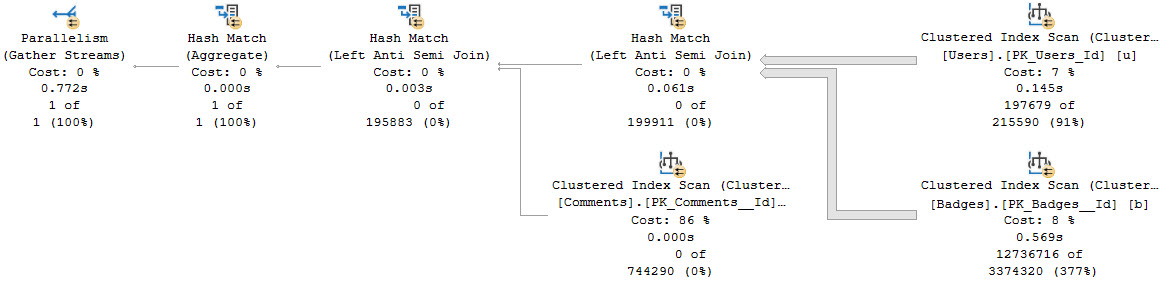
Notice that since no rows pass the first join, the Comments table is left unscathed.
BUT THEN™
If we write the query like this, the optimizer leaves things alone, and we get a much worse-performing query.
SELECT
    c = COUNT_BIG(*)
FROM dbo.Users AS u
WHERE u.Reputation > 1000
AND
(
    NOT EXISTS
        (
            SELECT
                1/0
            FROM dbo.Comments AS c
            WHERE c.UserId = u.Id
        )
    AND NOT EXISTS
            (
                SELECT
                    1/0
                FROM dbo.Badges AS b
                WHERE b.UserId = u.Id
            )
);
This one clocks in around 6 seconds, and complains of an excessive memory grant.
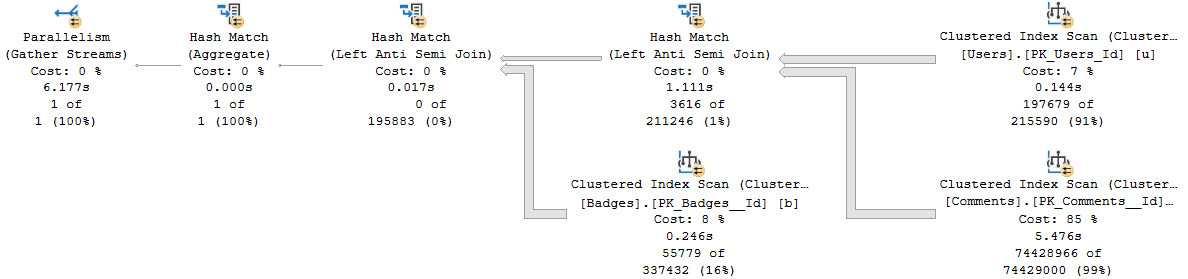
The big time suck here is spent hitting the Comments table, which is significantly larger than the Badges table.
The order that you write joins and where clause elements in generally doesn’t matter much, but in the case of NOT EXISTS, it can make a huge difference.
I realize that there are only two NOT EXISTS clauses in these examples, and that hardly makes for a compelling “always” statement. But I did a lot of experimenting with more tables involved, and it really doesn’t seem like the optimizer does any reordering of anti-semi joins.
Thanks for reading!
If this is the kind of SQL Server stuff you love learning about, you’ll love my training. Blog readers get 25% off the Everything Bundle — over 100 hours of performance tuning content. Need hands-on help? I offer consulting engagements from targeted investigations to ongoing retainers. Want a quick sanity check before committing to a full engagement? Schedule a call — no commitment required.
Look, I really like EXISTS and NOT EXISTS. I do. They solve a lot of problems.
This post isn’t a criticism of them at all, nor do I want you to stop using them. I would encourage you to use them more, probably.
But there’s some stuff you need to be aware of when you use them, whether it’s in control-flow logic, or in queries.
If you keep your head about you, you’ll do just fine.
The issue you can hit here is one of row goals. And a T-SQL implementation shortcoming.
If I run this query, it’ll chug along for about 10 seconds.
IF EXISTS
(
    SELECT
       1/0
    FROM dbo.Posts AS p
    JOIN dbo.Votes AS v
        ON  p.Id = v.PostId
    WHERE v.VoteTypeId = 1
    AND   v.CreationDate >= '2018-12-01'
    AND   p.PostTypeId = 1
)
BEGIN
    SELECT x = 1;
END;
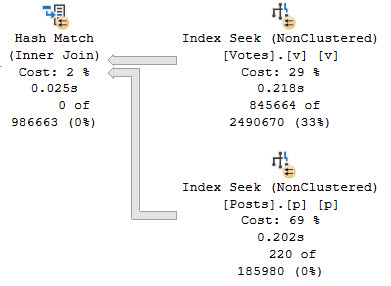
The part of the plan that we care about is a seek into the Votes table.
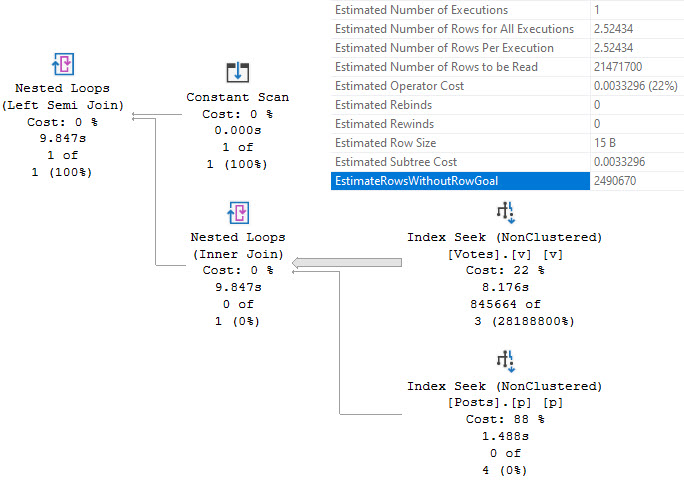
SQL SERVER’S COST BASED OPTIMIZER™ thinks that 2.52 (rounded to 3) rows will have to get read to find data we care about, but it ends up having to do way more work than that.
It’s worth a short topic detour here to point out that when you’re tuning a slow query, paying attention to operator costs can be a real bad time. The reason this query is slow is because the costing was wrong and it shows. Costed correctly, you would not get this plan. You would not spend the majority of the query execution time executes in the lowest-costed-non-zero operator.
Normally, you could explore query hints to figure out why this plan was chosen, but you can’t do that in the context of an IF branch. That sucks, because a Hash Join hinted query finished in about 400ms. We could solve a problem with that hint, or if we disabled row goals for the query.
In order to tune this, we need to toggle with the logic a little bit. Rather than put a query in the IF EXISTS, we’re going to set a variable based on the query, and use the IF logic on that, instead.
DECLARE
    @do_it bit;

SELECT
    @do_it =
    (
        SELECT
            CONVERT
            (
                bit,
                ISNULL
                (
                    MAX(1),
                	0
                )
            )
        FROM dbo.Posts AS p
        JOIN dbo.Votes AS v
            ON  p.Id = v.PostId
        WHERE v.VoteTypeId = 1
        AND   v.CreationDate >= '2018-12-01'
        AND   p.PostTypeId = 1
    )
OPTION(HASH JOIN);

IF @do_it = 1
BEGIN
    SELECT x = 1;
END;
This produces the fast plan that we’re after. You can’t use a CASE expression here and get a hash join though, for reasons explained in this post by Pablo Blanco.
But here it is. Beautiful hash join.
A common query pattern is to is EXISTS… OR EXISTS to sort out different things, but you can end up with a weird optimizer query rewrite (SplitSemiApplyUnionAll) that looks a lot like the LEFT JOIN… IS NULL pattern for finding rows that don’t exist. Which is generally a bad pattern, as discussed in the linked post.
Anyhoo.
SELECT
    c = COUNT_BIG(*)
FROM dbo.Users AS u
WHERE u.Reputation > 1000000
AND   EXISTS
      (
          SELECT
              1/0
          FROM dbo.Badges AS b
          WHERE b.UserId = u.Id
      )
OR    EXISTS
      (
          SELECT
              1/0
          FROM dbo.Comments AS c
          WHERE c.UserId = u.Id
      );
This is what I’m talking about, in the plan for this query.
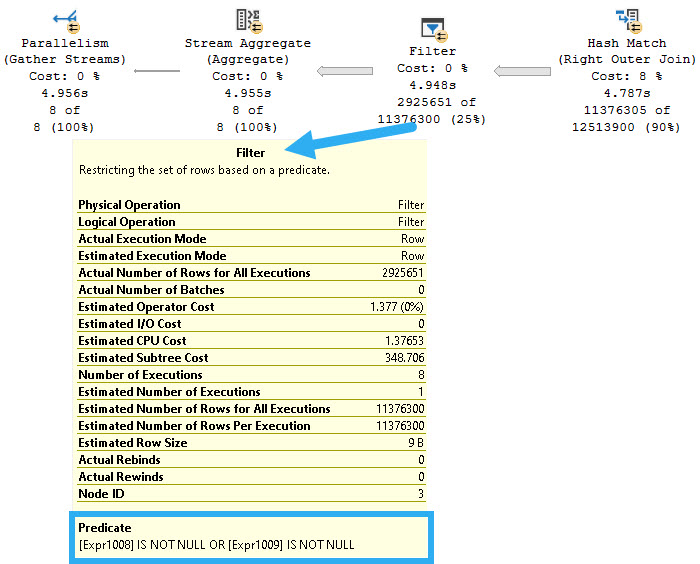
Rather than do two semi joins here for the EXISTS, we get two right outer joins. That means (like in the linked post above), all rows between tables are joined, and filters are applied much later on in the plan. You can see one of the right outer joins, along with the filters (on expressions!) in the nice picture up there.
The fix here, of course (of course!) is to write the query in a way that the optimizer can’t apply that foolishness to.
SELECT
    c = SUM(x.c)
FROM
(
    SELECT
        c = COUNT_BIG(*)
    FROM dbo.Users AS u
    WHERE u.Reputation > 1000000
    AND   EXISTS
          (
              SELECT
                  1/0
              FROM dbo.Badges AS b
              WHERE b.UserId = u.Id
          )

    UNION ALL

    SELECT
        c = COUNT_BIG(*)
    FROM dbo.Users AS u
    WHERE EXISTS
          (
              SELECT
                  1/0
              FROM dbo.Comments AS c
              WHERE c.UserId = u.Id
          )
) AS x;
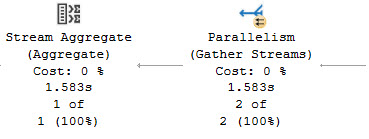
This query completes in around 1.5 seconds, compared to 4.9 seconds above.
It’s rough when you run into these problems, because solutions aren’t always obvious (obvious!), nor is the problem.
Most of the posts I write about query tuning arise from issues I solve for clients. While most performance problems come from predictable places, sometimes you have to deal with edge cases like this, where the optimizer mis-costs things.
Thanks for reading!
If this is the kind of SQL Server stuff you love learning about, you’ll love my training. Blog readers get 25% off the Everything Bundle — over 100 hours of performance tuning content. Need hands-on help? I offer consulting engagements from targeted investigations to ongoing retainers. Want a quick sanity check before committing to a full engagement? Schedule a call — no commitment required.