If your columns aren’t nullable, you’ll run into far fewer problems and ambiguities.
I’d like a new data type called ABYSS. Or maybe VOID.
The Problem: Wrong Data Type And NULL Checks
DECLARE @d date = '20170601';
DECLARE @sql nvarchar(MAX) = N'
SELECT
    COUNT_BIG(*) AS records
FROM dbo.Posts AS p
WHERE p.LastEditDate > @d
AND   p.LastEditDate IS NOT NULL;'

EXEC sp_executesql @sql,
                   N'@d date',
                   @d;
GO
If we pass in a parameter that has a date datatype, rather than date time, an odd thing will happen if we add in a redundant IS NOT NULL check.
yortsed
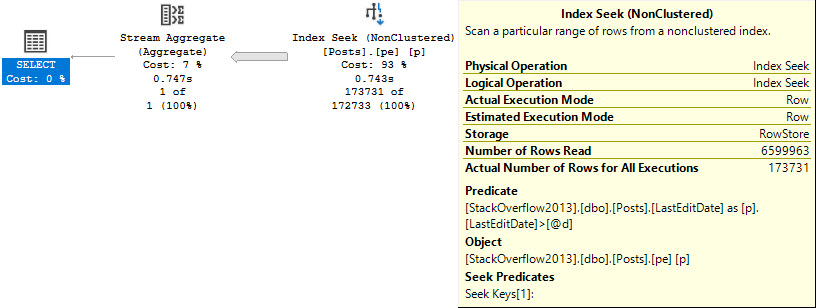
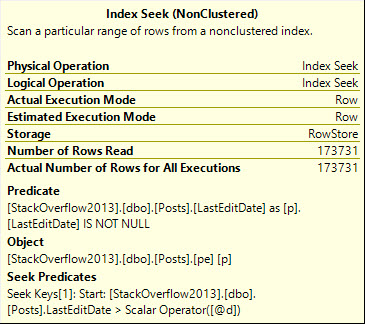
The seek predicate will only seek to the first non-NULL value, rather than immediately to the start of the range of dates we care about, which means we end up reading a lot more rows than necessary.
Note the query runtime of 743 milliseconds, and that we end up reading quite a few more rows than we return.
And here I was told Seeks are always efficient ?
Solution One: Stop Checking For NULLs
If we either stop checking for NULLs, we’ll get around the issue.
DECLARE @d date = '20170601';
DECLARE @sql nvarchar(MAX) = N'
SELECT
    COUNT_BIG(*) AS records
FROM dbo.Posts AS p
WHERE p.LastEditDate > @d;'

EXEC sp_executesql @sql,
                   N'@d date',
                   @d;
GO
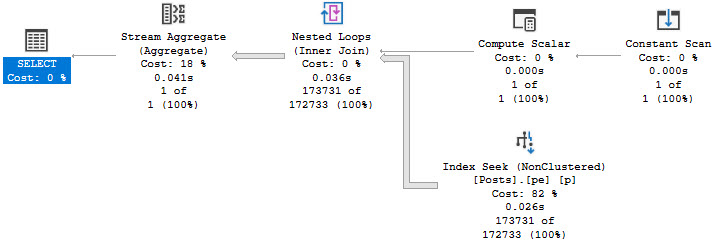
The plan for this query looks a bit different, but performance is no worse for the wear.
still using the wrong datatype
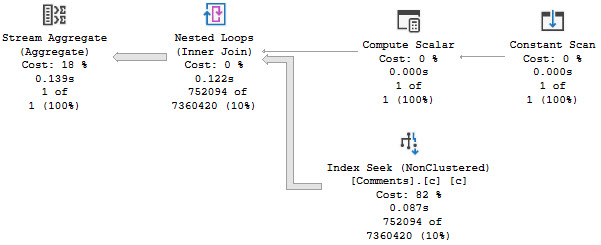
Note the 25 millisecond execution time. A clear improvement over the 743 milliseconds above. Though the query plan does look a bit odd.
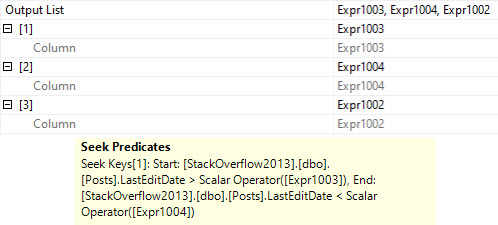
The compute scalar gins up a date range, which is checked in the seek:
HELLO COMPUTER
I wonder what Expr1002 is up to.
Solution Two: Just Use The Right Datatype To Begin With
In reality, this is what we should have done from the start, but the whole point of this here blog post is to show you what can happen when you Do The Wrong Thing™
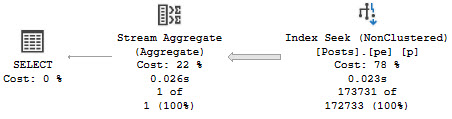
When we use the right datatype, we get a simple plan that executes quickly, regardless of the redundant NULL check.
DECLARE @d date = '20170601';
DECLARE @sql nvarchar(MAX) = N'
SELECT
   COUNT_BIG(*) AS records
FROM dbo.Posts AS p
WHERE p.LastEditDate > @d
AND   p.LastEditDate IS NOT NULL;'

EXEC sp_executesql @sql,
                   N'@d datetime',
                   @d;
no fuss, no muss
Here, the NULL check is a residual predicate rather than the Seek predicate, which results in a seek that really seeks instead of just meandering past some NULLs.
gerd jerb
Thanks for reading!
Going Further
If this is the kind of SQL Server stuff you love learning about, you’ll love my training. Blog readers get 25% off the Everything Bundle — over 100 hours of performance tuning content. Need hands-on help? I offer consulting engagements from targeted investigations to ongoing retainers. Want a quick sanity check before committing to a full engagement? Schedule a call — no commitment required.
And it turns out that this lesson is brutally true if you need to pass time zones around, too.
Wherely
To make things as easy as possible on our query, let’s create an index up front:
CREATE INDEX c ON dbo.Comments(CreationDate);
Now let’s pretend that we need to query the Comments table with some time zone consideration:
DECLARE @d datetime = '20131201';

SELECT
    COUNT_BIG(*) AS records
FROM dbo.Comments AS c
WHERE c.CreationDate AT TIME ZONE 'UTC+12' >= @d
OPTION(RECOMPILE);
GO
We’re going to wait a very long time. Assuming that a minute is a long time to you. It is to me, because every minute I spend waiting here is a minute I’m not doing something else I’d rather be doing.
un momento por favor
Whyly
We made a bad decision, and that bad decision was to to try to convert every column value to some new time zone, and then compare it to a value that we could have very easily computed once on the fly and compared to the column.
DECLARE @d datetime = '20131201';

SELECT
    COUNT_BIG(*) AS records
FROM dbo.Comments AS c
WHERE c.CreationDate >= DATEADD(HOUR, 1, @d) AT TIME ZONE 'UTC-11'
OPTION(RECOMPILE);
GO
When we make a good decision, the query runs in much shorter order.
ooh la la
One may even accuse us of cheating time itself when looking at how much more quickly this runs without the aid of parallelism.
And that’s really the message in all of these posts, isn’t it? It’s not about left side vs. right side of the comparison. It’s about what we decide to make an expression out of.
When it’s data — the stuff that we physically store — converting that turns into a circus.
When it’s a value — something that we express once via a parameter or variable or some line of code — it’s far less of a burden.
Thanks for reading!
Going Further
If this is the kind of SQL Server stuff you love learning about, you’ll love my training. Blog readers get 25% off the Everything Bundle — over 100 hours of performance tuning content. Need hands-on help? I offer consulting engagements from targeted investigations to ongoing retainers. Want a quick sanity check before committing to a full engagement? Schedule a call — no commitment required.
RESOURCE_SEMAPHORE_QUERY_COMPILE happens, in a nutshell, when SQL Server has allocated all the memory it’s willing to give out to compile query plans of a certain size and, throttles itself by making other queries wait to compile. For more details, head over here.
Now, this of course gets easier if you’re using Query Store. You can get heaps of information about query compilation from query_store_query. For everyone else, you’re left dipping into the plan cache to try to find queries with “high” compile memory. That can be hit or miss, of course.
But if it’s something you really find yourself needing to track down, here’s one way to do it:
WITH XMLNAMESPACES('http://schemas.microsoft.com/sqlserver/2004/07/showplan' AS p)
SELECT TOP (10)
    x.compile_time_ms,
    x.compile_cpu_ms,
    x.compile_memory_kb,
    x.max_compile_memory_kb,
    x.is_memory_exceeded,
    x.query_plan
FROM
(
    SELECT
        c.x.value('@CompileTime', 'BIGINT') AS compile_time_ms,
        c.x.value('@CompileCPU', 'BIGINT') AS compile_cpu_ms,
        c.x.value('@CompileMemory', 'BIGINT') AS compile_memory_kb,
        c.x.value('(//p:OptimizerHardwareDependentProperties/@MaxCompileMemory)[1]', 'BIGINT') AS max_compile_memory_kb,
        c.x.exist('//p:StmtSimple/@StatementOptmEarlyAbortReason[.="MemoryLimitExceeded"]') AS is_memory_exceeded,
        deqp.query_plan
    FROM sys.dm_exec_cached_plans AS decp
    CROSS APPLY sys.dm_exec_query_plan(decp.plan_handle) AS deqp
    CROSS APPLY deqp.query_plan.nodes('/p:ShowPlanXML/p:BatchSequence/p:Batch/p:Statements/p:StmtSimple/p:QueryPlan') AS c(x)
    WHERE c.x.exist('@CompileMemory[. > 5120]') = 1
) AS x
ORDER BY x.compile_memory_kb DESC;
This query is filtering for plans with compile memory over 5MB. I set the bar pretty low there, but feel free to raise it up.
If you want to look at gateway info, and you’re on SQL Server 2016 or newer, you can use this DMV:
SELECT *
FROM sys.dm_exec_query_optimizer_memory_gateways AS deqomg
WHERE deqomg.pool_id > 1;
Scoping It Out
It only makes sense to run that query if you’re hitting RESOURCE_SEMAPHORE_QUERY_COMPILE wait with some frequency.
If you are, you just may be lucky enough to find the culprit, if your plan cache has been around long enough.
Thanks for reading!
Going Further
If this is the kind of SQL Server stuff you love learning about, you’ll love my training. Blog readers get 25% off the Everything Bundle — over 100 hours of performance tuning content. Need hands-on help? I offer consulting engagements from targeted investigations to ongoing retainers. Want a quick sanity check before committing to a full engagement? Schedule a call — no commitment required.
We looked at a couple examples of when SQL Server might need to filter out rows later in the plan than we’d like, and why that can cause performance issues.
Now it’s time to look at a few more examples, because a lot of people find them surprising.
As much as I love surprising people, sometimes I’d much rather… not have to explain this stuff later.
Since all my showering and errands are out of the way, we should be able to get through this list uninterrupted.
Unless I get thirsty.
Max Datatypes
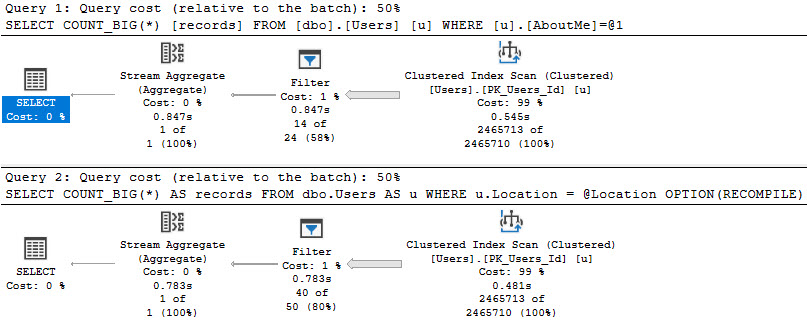
If we need to search a column that has a MAX datatype, or if we define a parameter as being a MAX datatype and search a more sanely typed column with it, both will result in a later filter operation than we may care for.
SELECT
    COUNT_BIG(*) AS records
FROM dbo.Users AS u
WHERE u.AboutMe = N'Hi';

DECLARE @Location nvarchar(MAX) = N'here';
SELECT
    COUNT_BIG(*) AS records
FROM dbo.Users AS u
WHERE u.Location = @Location
OPTION(RECOMPILE);
Even with a recompile hint!
opportunity knocked
Here we can see the value of properly defining string widths! If we don’t, we may end up reading entire indexes, and doing the work to weed out rows later.
Probably something that should be avoided.
Functions
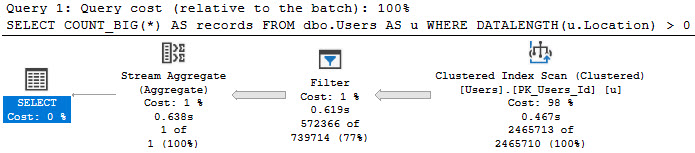
There are some built-in functions, like DATALENGTH, which can’t be pushed when used in a where clause.
Of course, if you’re going to do this regularly, you should be using a computed column to get around the issue, but whatever!
SELECT
    COUNT_BIG(*) AS records
FROM dbo.Users AS u
WHERE DATALENGTH(u.Location) > 0;
measuring up
And of course, everyone’s favorite love-to-hate, the scalar UDF.
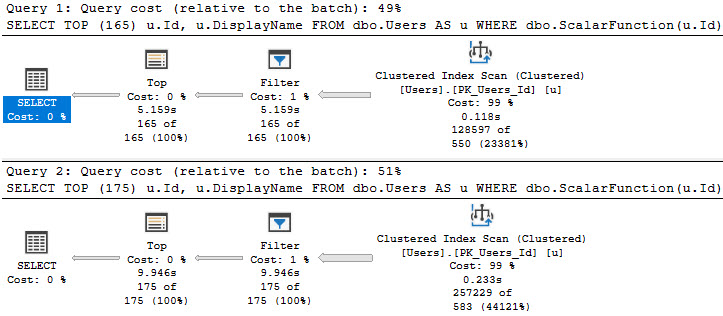
Funny thing about these, is that sometimes tiny bumps in the number of rows you’re after can make for big jumps in time.
SELECT TOP (165)
    u.Id,
    u.DisplayName
FROM dbo.Users AS u
WHERE dbo.ScalarFunction(u.Id) > 475
ORDER BY u.Id;

SELECT TOP (175)
    u.Id,
    u.DisplayName
FROM dbo.Users AS u
WHERE dbo.ScalarFunction(u.Id) > 475
ORDER BY u.Id;
10 more rows, 5 more seconds
Complexity
Sometimes people (and ORMs) will build up long parameter lists, and use them to build up a long list IN clause list, and even sometimes a long OR clause list.
To replicate that behavior, I’m using code I’m keeping on GitHub in order to keep this blog post a little shorter.
To illustrate where things can get weird, aside from the Filter, I’m going to run this with a few different numbers of parameters.
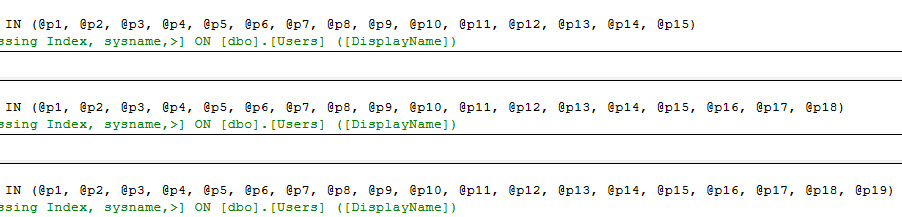
This will generate queries with different length IN clauses:
bigger than others
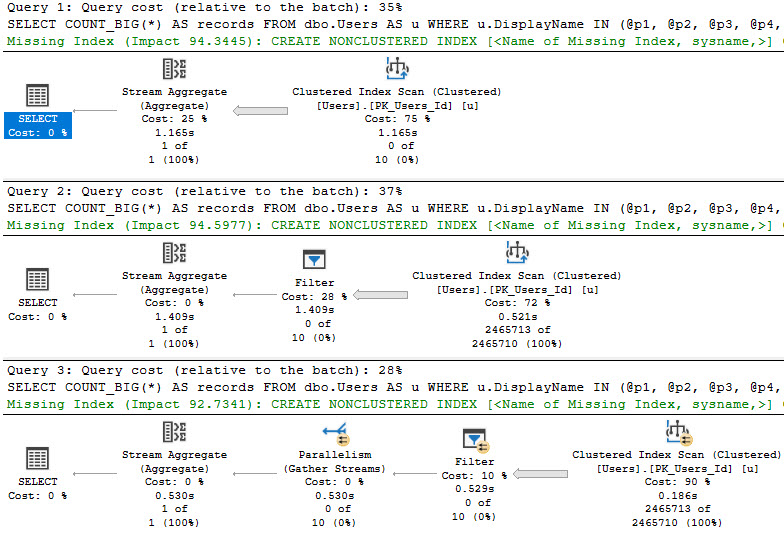
Which will result in slightly different query plans:
THREE!
We can see some tipping points here.
At 15 parameters, we get a scan with a stream aggregate
At 18 parameters, we get a scan with a filter
At 19 parameters, we get a parallel scan with a filter
Parallelism to the rescue, again, I suppose.
Thanks for reading!
Going Further
If this is the kind of SQL Server stuff you love learning about, you’ll love my training. Blog readers get 25% off the Everything Bundle — over 100 hours of performance tuning content. Need hands-on help? I offer consulting engagements from targeted investigations to ongoing retainers. Want a quick sanity check before committing to a full engagement? Schedule a call — no commitment required.
When we write queries that need to filter data, we tend to want to have that filtering happen as far over to the right in a query plan as possible. Ideally, data is filtered when we access the index.
Whether it’s a seek or a scan, or if it has a residual predicate, and if that’s all appropriate isn’t really the question.
In general, those outcomes are preferable to what happens when SQL Server is unable to do any of them for various reasons. The further over to the right in a query plan we can reduce the number of rows we need to contend with, the better.
There are some types of filters that contain something called a “startup expression”, which are usually helpful. This post is not about those.
Ain’t Nothin’ To Do
There are some cases when you have no choice but to rely on a Filter to remove rows, because we need to calculate some expression that we don’t currently store the answer to.
For example, having:
SELECT
    p.OwnerUserId,
    COUNT_BIG(*) AS records
FROM dbo.Posts AS p
JOIN  dbo.Comments AS c
    ON c.PostId = p.Id
JOIN dbo.Votes AS v
    ON v.PostId = p.Id
GROUP BY p.OwnerUserId
HAVING COUNT_BIG(*) > 2147483647;
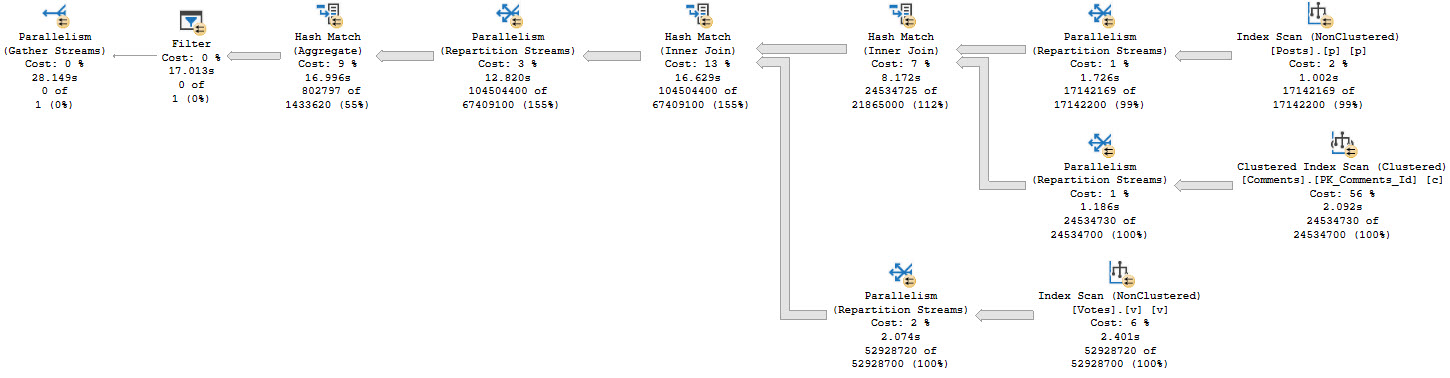
We don’t know which rows might qualify for the count filter up front, so we need to run the entire query before filtering things out:
this cold night
There’s a really big arrow going into that Filter, and then nothing!
SELECT
    COUNT_BIG(*) AS records
FROM dbo.Users AS u
LEFT JOIN dbo.Posts AS p
    ON p.OwnerUserId = u.Id
WHERE DATEDIFF(YEAR, p.CreationDate, p.LastActivityDate) > 5;
SELECT
    COUNT_BIG(*) AS records
FROM dbo.Users AS u
LEFT JOIN dbo.Posts AS p
    ON p.OwnerUserId = u.Id
WHERE p.Id IS NULL;
But what you get is disappointing!
not a gif
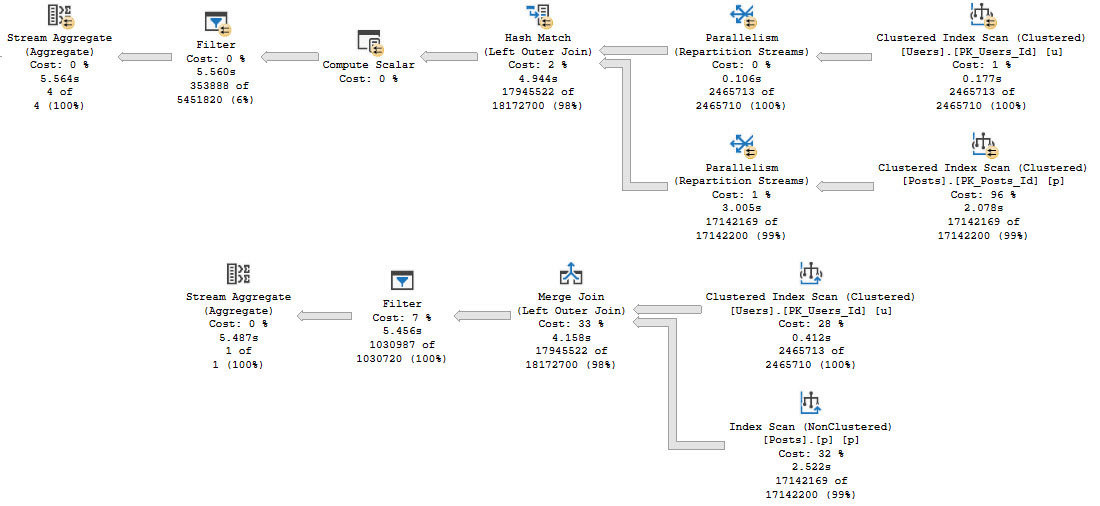
What we care about here is that, rather than filtering rows out when we touch indexes or join the tables, we have to fully join the tables together, and then eliminate rows afterwards.
This is generally considered “less efficient” than filtering rows earlier. Remember when I said that before? It’s still true.
Click the links above to see some solutions, so you don’t feel left hanging by your left joins.
The Message
If you see Filters in query plans, they might be for a good reason, like calculating things you don’t currently know the answer to.
They might also be for bad reasons, like you writing a query in a silly way.
There are other reasons they might show up too, that we’ll talk about tomorrow.
Why tomorrow? Why not today? Because if I keep writing then I won’t take a shower and run errands for another hour and my wife will be angry.
Thanks for reading!
Going Further
If this is the kind of SQL Server stuff you love learning about, you’ll love my training. Blog readers get 25% off the Everything Bundle — over 100 hours of performance tuning content. Need hands-on help? I offer consulting engagements from targeted investigations to ongoing retainers. Want a quick sanity check before committing to a full engagement? Schedule a call — no commitment required.
Look, I’m not saying there’s only one thing that the “Default” cardinality estimator does better than the “Legacy” cardinality estimator. All I’m saying is that this is one thing that I think it does better.
What’s that one thing? Ascending keys. In particular, when queries search for values that haven’t quite made it to the histogram yet because a stats update hasn’t occurred since they landed in the mix.
I know what you’re thinking, too! On older versions of SQL Server, I’ve got trace flag 2371, and on 2016+ that became the default behavior.
Sure it did — only if you’re using compat level 130 or better — which a lot of people aren’t because of all the other strings attached.
And that’s before you go and get 2389 and 2390 involved, too. Unless you’re on compatibility level 120 or higher! Then you need 4139.
Changes the fixed update statistics threshold to a linear update statistics threshold. For more information, see this AUTO_UPDATE_STATISTICS Option.
Note: Starting with SQL Server 2016 (13.x) and under the database compatibility level 130 or above, this behavior is controlled by the engine and trace flag 2371 has no effect.
Scope: global only
2389
Enable automatically generated quick statistics for ascending keys (histogram amendment). If trace flag 2389 is set, and a leading statistics column is marked as ascending, then the histogram used to estimate cardinality will be adjusted at query compile time.
Note: Please ensure that you thoroughly test this option, before rolling it into a production environment.
Note: This trace flag does not apply to CE version 120 or above. Use trace flag 4139 instead.
Scope: global or session or query (QUERYTRACEON)
2390
Enable automatically generated quick statistics for ascending or unknown keys (histogram amendment). If trace flag 2390 is set, and a leading statistics column is marked as ascending or unknown, then the histogram used to estimate cardinality will be adjusted at query compile time. For more information, see this Microsoft Support article.
Note: Please ensure that you thoroughly test this option, before rolling it into a production environment.
Note: This trace flag does not apply to CE version 120 or above. Use trace flag 4139 instead.
Scope: global or session or query (QUERYTRACEON)
4139
Enable automatically generated quick statistics (histogram amendment) regardless of key column status. If trace flag 4139 is set, regardless of the leading statistics column status (ascending, descending, or stationary), the histogram used to estimate cardinality will be adjusted at query compile time. For more information, see this Microsoft Support article.
Starting with SQL Server 2016 (13.x) SP1, to accomplish this at the query level, add the USE HINT ‘ENABLE_HIST_AMENDMENT_FOR_ASC_KEYS’ query hint instead of using this trace flag.
Note: Please ensure that you thoroughly test this option, before rolling it into a production environment.
Note: This trace flag does not apply to CE version 70. Use trace flags 2389 and 2390 instead.
Scope: global or session or query (QUERYTRACEON)
I uh. I guess. ?
Why Not Just Get Cardinality Estimation Right The First Time?
Great question! Hopefully someone knows the answer. In the meantime, let’s look at what I think this new-fangled cardinality estimator does better.
The first thing we need is an index with literally any sort of statistics.
CREATE INDEX v ON dbo.Votes_Beater(PostId);
Next is a query to help us figure out how many rows we can modify before an auto stats update will kick in, specifically for this index, though it’s left as an exercise to the reader to determine which one they’ve got in effect.
There are a lot of possible places this can kick in. Trace Flags, database settings, query hints, and more.
SELECT TOP (1)
    OBJECT_NAME(s.object_id) AS table_name,
    s.name AS stats_name,
    p.modification_counter,
    p.rows,
    CONVERT(bigint, SQRT(1000 * p.rows)) AS [new_auto_stats_threshold],
    ((p.rows * 20) / 100) + CASE WHEN p.rows > 499 THEN 500 ELSE 0 END AS [old_auto_stats_threshold]
FROM sys.stats AS s
CROSS APPLY sys.dm_db_stats_properties(s.object_id, s.stats_id) AS p
WHERE s.name = 'v'
ORDER BY p.modification_counter DESC;
Edge cases aside, those calculations should get you Mostly Accurate™ numbers.
We’re going to need those for what we do next.
Mods Mods Mods
This script will allow us to delete and re-insert a bunch of rows back into a table, without messing up identity values.
--Create a temp table to hold rows we're deleting
DROP TABLE IF EXISTS #Votes;
CREATE TABLE #Votes (Id int, PostId int, UserId int, BountyAmount int, VoteTypeId int, CreationDate datetime);

--Get the current high PostId, for sanity checking
SELECT MAX(vb.PostId) AS BeforeDeleteTopPostId FROM dbo.Votes_Beater AS vb;

--Delete only as many rows as we can to not trigger auto-stats
WITH v AS
(
    SELECT TOP (229562 - 1) vb.*
    FROM dbo.Votes_Beater AS vb
    ORDER BY vb.PostId DESC
)
DELETE v
--Output deleted rows into a temp table
OUTPUT Deleted.Id, Deleted.PostId, Deleted.UserId,
       Deleted.BountyAmount, Deleted.VoteTypeId, Deleted.CreationDate
INTO #Votes;

--Get the current max PostId, for safe keeping
SELECT MAX(vb.PostId) AS AfterDeleteTopPostId FROM dbo.Votes_Beater AS vb;

--Update stats here, so we don't trigger auto stats when we re-insert
UPDATE STATISTICS dbo.Votes_Beater;

--Put all the deleted rows back into the rable
SET IDENTITY_INSERT dbo.Votes_Beater ON;

INSERT dbo.Votes_Beater WITH(TABLOCK)
        (Id, PostId, UserId, BountyAmount, VoteTypeId, CreationDate)
SELECT v.Id, v.PostId, v.UserId, v.BountyAmount, v.VoteTypeId, v.CreationDate
FROM #Votes AS v;

SET IDENTITY_INSERT dbo.Votes_Beater OFF;

--Make sure this matches with the one before the delete
SELECT MAX(vb.PostId) AS AfterInsertTopPostId FROM dbo.Votes_Beater AS vb;
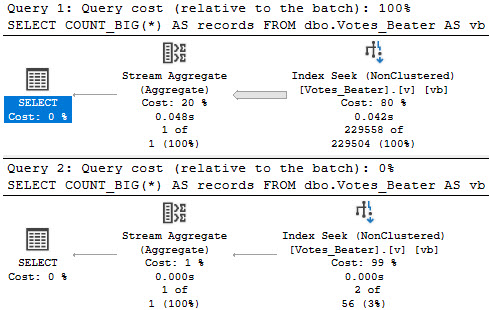
What we’re left with is a statistics object that’ll be just shy of auto-updating:
WE DID IT
Query Time
Let’s look at how the optimizer treats queries that touch values! That’ll be fun, eh?
--Inequality, default CE
SELECT
    COUNT_BIG(*) AS records
FROM dbo.Votes_Beater AS vb
WHERE vb.PostId > 20671101
OPTION(RECOMPILE);

--Inequality, legacy CE
SELECT
    COUNT_BIG(*) AS records
FROM dbo.Votes_Beater AS vb
WHERE vb.PostId > 20671101
OPTION(RECOMPILE, USE HINT('FORCE_LEGACY_CARDINALITY_ESTIMATION'));

--Equality, default CE
SELECT
    COUNT_BIG(*) AS records
FROM dbo.Votes_Beater AS vb
WHERE vb.PostId = 20671101
OPTION(RECOMPILE);

--Equality, legacy CE
SELECT
    COUNT_BIG(*) AS records
FROM dbo.Votes_Beater AS vb
WHERE vb.PostId = 20671101
OPTION(RECOMPILE, USE HINT('FORCE_LEGACY_CARDINALITY_ESTIMATION'));
For the record, > and >= produced the same guesses. Less than wouldn’t make sense here, since it’d hit mostly all values currently in the histogram.
hoodsy
Inside Intel
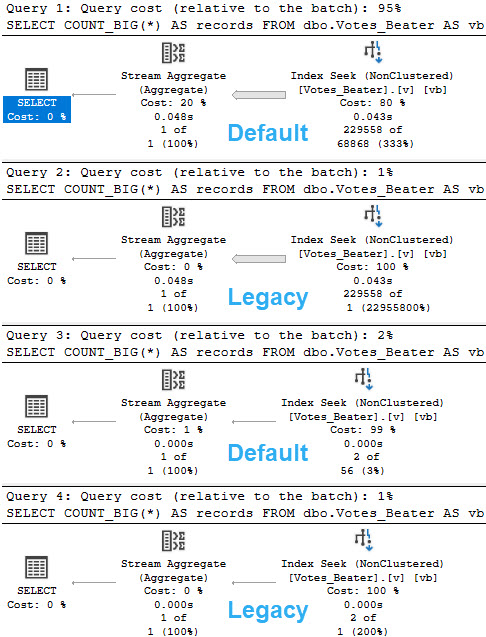
For the legacy CE, there’s not much of an estimate. You get a stock guess of 1 row, no matter what.
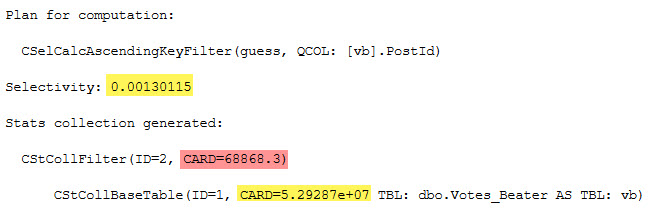
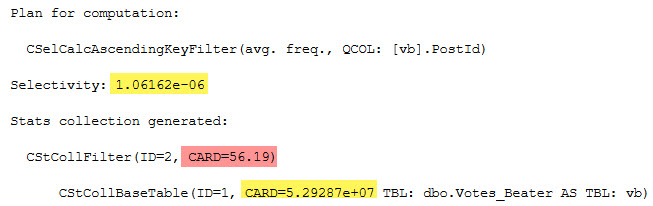
For the default CE, there’s a little more to it.
inequality
SELECT (0.00130115 * 5.29287e+07) AS inequality_computation;
equality
SELECT (1.06162e-06 * 5.29287e+07) AS equality_computation;
And of course, the CARD for both is the number of rows in the table:
SELECT CONVERT(bigint, 5.29287e+07) AS table_rows;
I’m not sure why the scientific notation is preferred, here.
A Little Strange
Adding in the USE HINT mentioned earlier in the post (USE HINT ('ENABLE_HIST_AMENDMENT_FOR_ASC_KEYS')) only seems to help with estimation for the inequality predicate. The guess for the equality predicate remains the same.
well okay
Thanks for reading!
Going Further
If this is the kind of SQL Server stuff you love learning about, you’ll love my training. Blog readers get 25% off the Everything Bundle — over 100 hours of performance tuning content. Need hands-on help? I offer consulting engagements from targeted investigations to ongoing retainers. Want a quick sanity check before committing to a full engagement? Schedule a call — no commitment required.
Let’s say at some point, you just didn’t know any better, and you wrote a scalar function to make some common thing you needed to do all “modular” and “portable” and stuff.
Good on you, not repeating yourself. Apparently I repeat myself for a living.
Anyway, you know what stinks? When you hit divide by zero errors. It’d be cool if math fixed that for us.
Does anyone know how I can get in touch with math?
Uncle Function
Since you’re a top programmer, you know about this sort of stuff. So you write a bang-up function to solve the problem.
Maybe it looks something like this.
CREATE OR ALTER FUNCTION dbo.safety_dance(@n1 INT, @n2 INT)
RETURNS INT
WITH SCHEMABINDING,
     RETURNS NULL ON NULL INPUT
AS
BEGIN
RETURN
(
    SELECT @n1 / NULLIF(@n2, 0)
);
END
GO
You may even be able to call it in queries about like this.
SELECT TOP (5)
    u.DisplayName,
    fudge = dbo.safety_dance(SUM(u.UpVotes), COUNT(*))
FROM dbo.Users AS u
GROUP BY u.DisplayName
ORDER BY fudge DESC;
The problem is that it makes this query take a long time.
you compute that scalar, sql server
At 23 seconds, this is probably unacceptable. And this is on SQL Server 2019, too. The function inlining thing doesn’t quite help us, here.
One feature restriction is this, so we uh… Yeah.
The UDF does not contain aggregate functions being passed as parameters to a scalar UDF
But we’re probably good query tuners, and we know we can write inline functions.
Ankle Fraction
This is a simple enough function. Let’s get to it.
CREATE OR ALTER FUNCTION dbo.safety_dance_inline(@n1 INT, @n2 INT)
RETURNS TABLE
WITH SCHEMABINDING
AS
RETURN
(
    SELECT @n1 / NULLIF(@n2, 0) AS safety
);
Will it be faster?
SELECT TOP (5)
    u.DisplayName,
    fudge = (SELECT * FROM dbo.safety_dance_inline(SUM(u.UpVotes), COUNT(*)))
FROM dbo.Users AS u
GROUP BY u.DisplayName
ORDER BY fudge DESC;
Well, yes. Mostly because it throws an error.
Msg 4101, Level 15, State 1, Line 35
Aggregates on the right side of an APPLY cannot reference columns from the left side.
Well that’s weird. Who even knows what that means? There’s no apply, here.
What’s your problem, SQL Server?
Fixing It
To get around this restriction, we need to also rewrite the query. We can either use a CTE, or a derived table.
--A CTE
WITH counts AS
(
    SELECT
        u.DisplayName,
        SUM(Upvotes) AS Upvotes,
        COUNT(*) AS records
    FROM dbo.Users AS u
    GROUP BY u.DisplayName
)
SELECT TOP(5)
    c.DisplayName,
    fudge = (SELECT * FROM dbo.safety_dance_inline(c.Upvotes, c.records) AS s)
FROM counts AS c
ORDER BY fudge DESC;

--A derived table
SELECT TOP(5)
    c.DisplayName,
    fudge = (SELECT * FROM dbo.safety_dance_inline(c.Upvotes, c.records) AS s)
FROM
(
    SELECT
        u.DisplayName,
        SUM(Upvotes) AS Upvotes,
        COUNT(*) AS records
    FROM dbo.Users AS u
    GROUP BY u.DisplayName
) AS c
ORDER BY fudge DESC;
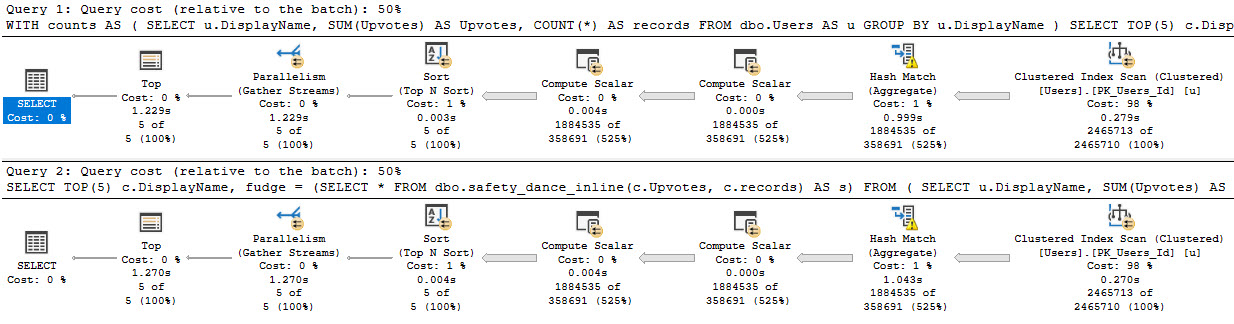
Is it faster? Heck yeah it is.
you’re just so parallel, baby
Thanks for reading!
Going Further
If this is the kind of SQL Server stuff you love learning about, you’ll love my training. Blog readers get 25% off the Everything Bundle — over 100 hours of performance tuning content. Need hands-on help? I offer consulting engagements from targeted investigations to ongoing retainers. Want a quick sanity check before committing to a full engagement? Schedule a call — no commitment required.
None of your stored procedures are a single statement. They’re long. Miles long. Ages long.
If you’re troubleshooting performance for one of those, you could end up really causing yourself some headaches if you turn on actual execution plans and fire away.
Not only is there some overhead to collecting all the information for those plans, but then SSMS has to get all artsy and draw them from the XML.
Good news, though. If you’ve got some idea about which statement(s) are causing you problems, you can use an often-overlooked SET command.
Blitzing
One place I use this technique a lot is with the Blitz procedures.
For example, if I run sp_BlitzLock without plans turned on, it’s done in about 7 seconds.
If I run it with plans turned on, it runs for a minute and 7 seconds.
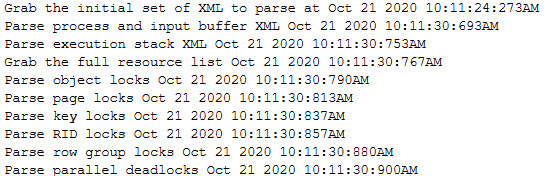
Now, a while back I had added a bit of feedback in there to help me understand which statements might be running the longest. You can check out the code I used over in the repo, but it produces some output like this:
Why is it always the XML?
If I’m not patient enough to, let’s say, wait a minute for this to run every time, I can just do something like this:
SET STATISTICS XML ON;

    /*Problem queries here*/

SET STATISTICS XML OFF;
That’ll return just the query plans you’re interested in.
Using a screenshot for a slightly different example that I happened to have handy:
click me, click me, yeah
You’ll get back the normal results, plus a clickable line that’ll open up the actual execution plan for a query right before your very eyes.
Thanks for reading!
Going Further
If this is the kind of SQL Server stuff you love learning about, you’ll love my training. Blog readers get 25% off the Everything Bundle — over 100 hours of performance tuning content. Need hands-on help? I offer consulting engagements from targeted investigations to ongoing retainers. Want a quick sanity check before committing to a full engagement? Schedule a call — no commitment required.
I checked back to SQL Server 2012 and 2014 on their respective latest service packs, and they both still capture deadlock graphs for exchange spills.
There have been some CUs since Sp3 for SQL Server 2014, but they don’t mention anything about this being backported in them.
Why Is This A Big Deal?
If you were digging into query performance issues, or if you were capturing deadlocks somehow, you used to be able to find queries with these problems pretty easily.
In the article that describes a fix for many deadlock reports, Microsoft offers up an alternative Extended Event session to capture queries that produce error 1205 (a deadlock), but I wasn’t able to get that to capture deadlocks that were resolved by exchange spills.
I don’t think they actually produce that error, which is also why they don’t produce a deadlock graph.
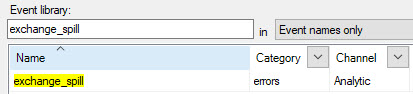
Why they did that when there is, quite not-figuratively, an event dedicated to capturing exchange spills, is beyond me.
i mean really
For me personally, it was a bit of a curveball for sp_BlitzLock. The XML that got produced for exchange spill deadlocks has different characteristics from the ones that produce errors.
There’s a lot of stuff that isn’t documented, too.
Change It Back?
I’m assuming there was some technical challenge to producing a single deadlock graph for exchange spills, which is why it got pulled instead of fixed.
Normally I’d think about opening a UserVoice item, but it doesn’t seem like it’d go anywhere.
There’s enough good ideas on there now that haven’t seen any traction or attention.
Anyway, if you’re on a newer version of SQL Server, take note of the change if you’re troubleshooting this sort of thing.
Thanks for reading!
Going Further
If this is the kind of SQL Server stuff you love learning about, you’ll love my training. Blog readers get 25% off the Everything Bundle — over 100 hours of performance tuning content. Need hands-on help? I offer consulting engagements from targeted investigations to ongoing retainers. Want a quick sanity check before committing to a full engagement? Schedule a call — no commitment required.
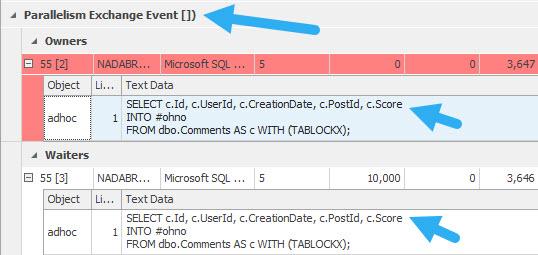
If you have a copy of the StackOverflow2013 database, this query should produce a parallel deadlock.
SELECT c.Id, c.UserId, c.CreationDate, c.PostId, c.Score
INTO #ohno
FROM dbo.Comments AS c WITH (TABLOCKX);
If you want an easy way to track down deadlocks, I can’t recommend sp_BlitzLock enough.
It doesn’t render the deadlock graph for you, but it does get you the deadlock XML, which you can save as an XDL file.
For viewing them, Sentry One’s Plan Explorer tool is way better than SSMS. It doesn’t just explore plans — it also explores deadlocks.
Graphed Out
The way it’ll look is something like this:
ow my face
You’ll see the exchange event, and you’ll also see the same query deadlocking itself.
This is an admittedly odd situation, but one I’ve had to troubleshoot a bunch of times.
You might see query error messages something like this:
Msg 1205, Level 13, State 18, Line 3
Transaction (Process ID 55) was deadlocked on lock | communication buffer resources with another process and has been chosen as the deadlock victim. Rerun the transaction.
Options For Fixing It
If you start running into these, it can be for a number of reasons, but the root cause is a parallel query. That doesn’t mean you should change MAXDOP to 1, though you should check your parallelism settings to make sure they’re not at the defaults.
You may want to try setting the query you’re having a problem with to DOP 1. Sure, performance might suffer, but at least it won’t error out.
If that’s not possible, you might need to look at other things in the query. For example, you might be missing a helpful index that would make the query fast without needing to go parallel.
Another issue you might spot in query plans is around order preserving operators. I wrote a whole bunch about that with an example here. You might see it around operators like Sorts, Merges, and Stream Aggregates when they’re surrounding parallel exchange operators. In those cases, you might need to hint HASH joins or aggregations.
Thanks for reading!
Going Further
If this is the kind of SQL Server stuff you love learning about, you’ll love my training. Blog readers get 25% off the Everything Bundle — over 100 hours of performance tuning content. Need hands-on help? I offer consulting engagements from targeted investigations to ongoing retainers. Want a quick sanity check before committing to a full engagement? Schedule a call — no commitment required.