I’ve always had trouble standing still on SQL Server versions, but most companies don’t. Hardly anyone I talk to is on SQL Server 2017, though these days SQL Server 2016 seems more common than SQL Server 2012, so at least there’s that. Mostly I’m happy to not see SQL Server 2014. God I hate SQL Server 2014.
Despite the lack of adoption, I’ve been moving all my training material to SQL Server 2019. Heck, in a few years, my old posts might come in handy for you.
But during that process, I kept running into the same problem: The demos generally still worked for the OLTP-ish queries, but for the report-ish queries Batch Mode On Rowstore (BMOR, from here) was kicking butt (most of the time anyway, we’re gonna look at some hi-jinks this week).
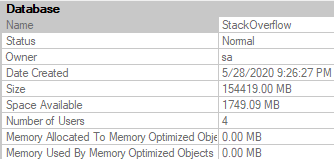
The problem, so far as I could tell, was that the Stack Overflow 2013 database just wasn’t enough database for SQL Server 2019 (at least with my hardware). My laptop is quad core (8 with HT) @2.9GHz, with 64GB of RAM, and max server memory set to 50GB. The SO2013 database is… just about 50GB.
While it’s fun to be able to create performance problems even with the whole database in memory, it doesn’t match what lot of people are dealing with in real life.
Dropping max server memory down is okay for the buffer pool, but SQL Server (it seems especially with column store/batch mode) is keen to use memoryabove that for other things like memory grants.
A lot of the interesting struggle I see on client servers between the buffer pool and query memory grants didn’t happen when I did that.
Using a VM with lower memory, while convenient, just didn’t seem as fun. Plus, part of the problem is that, while I make fun of other sample databases for being unrealistically tiny, at least they have relatively modern dates in some of them.
I was starting to feel really goofy having time stop on January 31st, 2013.
I suppose I could have updated all the CreationDate columns to modernize things, but who knows what that would have thrown off.
Plus, here’s a dirty little secret: all the date columns that start with “Last” that track stuff like when someone last logged in, or when a post was last active/edited, they don’t stop at 2013-12-31. They extend up to when the database was originally chopped down to size, in 2017 or so. I always found that a bit jarring, and I’d have to go and add time to them, too, to preserve the gaps.
It all starts to feel a bit like revisionist history.
The End Is Thigh
In the end, I settled on using the most recent version available here, but with a couple of the tables I don’t regularly use in demos cut out: PostHistory, and PostLinks. Once you drop those out, a 360GB database drops down to a much more manageable 150Gb or so.
The nice thing is that the general cadence of the data is the same in many ways and places, so it doesn’t take a lot to adjust demos to work here. Certain Post and Vote Types, User Ids, Reputations, etc. remain skewed, and outliers are easy to find. Plus, at 3:1 data to memory, it’s a lot harder to keep everything safely in the buffer pool.
This does present different challenges, like index create time to set up for things, database distribution, etc.
But if I can give you better demos, that seems worth it.
Plus, I hear everything is in the cloud now anyway.
Alluding To
In the process of taking old demos and seeing how they work with the new database, I discovered some interesting stuff that I want to highlight a little bit. So far as I can tell, they’re not terribly common (yet), but that’s what makes them interesting.
If you’re the kind of person who’s looking forward to SQL Server 2019’s performance features solving some problems for you auto-magick-ally, these may be things you need to watch out for, and depending on your workload they may end up being quite a bit more common than I perceive.
I’m going to be specifically focusing on how BMOR (and to some extent Adaptive Joins) can end up not solving performance issues, and how you may end up having to do some good ol’ fashion query tuning on your own.
In the next post, we’ll look at how one of my favorite demos continues to keep on giving.
Thanks for reading!
Going Further
If this is the kind of SQL Server stuff you love learning about, you’ll love my training. Blog readers get 25% off the Everything Bundle — over 100 hours of performance tuning content. Need hands-on help? I offer consulting engagements from targeted investigations to ongoing retainers. Want a quick sanity check before committing to a full engagement? Schedule a call — no commitment required.
In this video, I dive into the world of table variables in SQL Server 2019, exploring how they’ve been improved but still come with their own set of challenges. Specifically, I highlight the issue of cardinality estimation for table variables, which can lead to suboptimal query plans due to a lack of column-level statistics. By comparing table variables with temporary tables, I demonstrate that while SQL Server 2019 has made significant strides in improving these estimates, there are still scenarios where you might face performance issues. The video showcases how using temporary tables instead can provide more accurate cardinality estimates, but also points out the downsides of this approach, such as increased execution time and complexity.
Full Transcript
Erik Darling here to start a line of hand lotion reviews. No kidding. Though that would be more topical. And if you don’t see the pun that just occurred there, topical reviews of hand lotion, I think you should stop watching. You should get a new hobby. You should go collect rocks or something. Go investigate slime. I’m kidding. I’m sure it’s fine. Not everyone is doing it. You should go check it out. Now that isn’t the puns. Cool. So this video is not about hand lotion though. If this counts as sponsorship, then whatever. This video is about table variables, sort of generally, but more specifically table variables in SQL Server 2019. Now, in SQL Server 2019, Microsoft has made attempts to fix a lot of common problems that people will have. hit with query performance. And one of those issues is with table variable cardinality estimation.
In versions prior to SQL Server 2019, unless you applied a recompile hint or some goofy trace flag, you would get a one row estimate from a table variable. Now that changes a little bit with multi-statement table valued functions which are turn table variables. We’re not going to get into all that detail here. Just know that they are different. Now in SQL Server 2019, what happens is we pause after we insert data into a table variable. Now there’s a little bit of a branch here. So if it’s a stored procedure, you will pause. You will look at the number of rows that were inserted into the table variable and then SQL Server will cache that guess. So if you’re thinking to yourself, it sounds like table variables just became a new source of parameter sniffing. Well, golly and gosh, you are correct. In ad hoc queries, you will pause for each execution and SQL Server will look at the number of rows that went in and then we will, of course, just guess the number of rows that went into the table. Now an important thing that’s missing from all versions of SQL Server and across all table variables is that we have no column level information about the data that got put into our table variable.
We do not have a statistics histogram. We have nothing of the sort. We do not have any information that you would find in a normal statistics object that would tell you about the data distribution, distinctness, rows, average rows, range rows, all that good stuff. We don’t get that no matter what.
All we get is table cardinality. So while that is an improvement, there are times when that guess can go horrifically. Well, when that table cardinality guess just isn’t what makes a big difference. Sometimes it is, other times it isn’t. So I have this query. But I’m not going to run this query over here.
I’m going to run this query over here because we’re going to run this. And then we’re going to talk about what happens with table variables versus 10 tables. So I’m going to kick that off running. And the first thing that I want to note is that estimated plans do not help us here. If you look at this estimated plan, we can see that we insert 1001 rows estimated here. There we go. 1001. Hooray, hooray, hooray, hooray. But in this plan down below, we still get the one row guess sad face. We are not helped by the old estimated plan. No, we’re not. So let’s move on a little bit. Now, what I need to point out here is that table variables behind the scenes use a temporary object, a pound signed temp, pound, not signed, pound signed, pound sand temporary object. And if I run this query, it’ll thankfully run pretty quickly. And if you look over at the messages tab, we will see our mysterious pound signed object that gets created. Now, I wish that there were a way that I could pre-detect that pound signed object so that I could show you that there are no statistics involved with that thing. But I can’t.
What I can show you is that statistics exist for temporary tables, the pound sign actual temporary tables. I call them temporary tables plus because they’re temporary tables plus statistics. All right, or table variables plus statistics. That’s a good, it’s a good one. Good way to talk about things, right? So let’s look at what happens when we run this code. If we hit F5 here, and we use these super duper fancy new DMV or this this single singular super duper fancy new DMV as of SQL Server 2016, brand new, we will get some information back statistically about what data went into that temp table. We will have that. And yes, this can be cached. And yes, this can cause an issue. And I yes, I do have a video about that. And yes, I will link to it in the details. So you can go watch that later. But anyway, that’s the point there. So when SQL Server makes guesses about things, it can use this wonderful batch of his of information to look at what rows are in here.
And it can use that you can use that information to make a guess about what it’s going to have to do uh in the in the rest of the query. So if we turn on the query plan and we we rerun this, we have a lot of fun. We look at the execution plan. SQL Server can use information from over here to make guesses about what’s going to happen down here and how to choose that execution plan. Now, what I want to point out really quickly is that this query that I’m running here now, it doesn’t matter. I can leave off that DVCC free proc cache thing. I can run that this returns very, very quickly over here. This same query using a table variable is still executing over here after nearly three minutes.
So we we we have a we I think we have a plan quality issue on our hands here. I’m not really sure what else to tell you. Now, I know what you’re thinking, Eric, there’s no recompile hint here. But gosh darn it, this is SQL Server 2019. We don’t need a recompile hint. We get the same information without it because this is us running it over here and we get the table variable deferred compilation. Now, what’s sort of interesting is if we go a little bit deeper into things, right, if we look a little bit beyond the histogram, beyond, beyond, beyond, beyond, beyond, beyond. And we use this query that hits a table variable and we try to get cardinality estimation information from it. What we’ll get over in the messages tab is a whole bunch of stuff that I don’t understand at all. I start reading through it and I get I get cranky. But one thing that shows up in here that I think is very interesting is this line right here. CST call black box. That doesn’t sound like something that’s going to reveal a lot of information to us, does it? So let’s let’s search in here and let’s search in here. Let’s see. Yep, there it is. There’s I mean the first iteration of it. This actually shows up a bunch of times in here.
But we can see that when SQL Server tried to make a guess, it was guessing from a black box. It’s a no, no, no. You got me. Screwed there. Can’t nothing we can do about that. But if we as mature, experienced data professionals use a pound sign temporary table instead, and we on this query, we will get I mean first thing I want to point out in the execution plan is that we get a dead to rights accurate cardinality estimate over here. I think I forgot to show you that up here. If we come forward here. I don’t know. Maybe we will. Maybe we won’t. I don’t know what’s going to happen now.
Yeah, we get well, that’s weird. I don’t know. I forget. I forget what my point was there. But if we go look at the information over here. Yeah, two, no, one, one, yeah, rather than 12. Yeah, because it was good. Oh, yeah, because it gets 12 up there. I’m all I apologize. I’m exhausted today.
Come back over here. It gets 12 rows would come out of this 12. 12. Ha ha ha. Eric screwed up. No, Eric is exhausted. Eric hasn’t slept in like three nights. So deal with it. This video is free. I don’t want to hear about it. So yeah, we we made a guess of 12 rows up here. And we make an accurate guess down here of 27901 rows. There we go. Bingo, bingo.
We are set. We are sweet. We are golden. But we are still executing over here. That’s less than ideal. But anyway, what we have over here is, of course, where SQL Server makes its cardinality estimation. Over the messages tab over here and look, we will get accurate cardinality guesses down here. SQL Server will not use a black box to try and guess what was happening. And in case you didn’t notice, we just finished over here after five minutes and 51 seconds.
So we can see that over here, we we did pretty well. Yeah, we inserted 1000 rows very quickly. And if we head on down here and look, you can see that we we got our accurate table cardinality of 1001 rows. But we didn’t get that column level cardinality that would help us make better guesses on down the line. So if we scroll down a little bit here. Oh, actually, no, let’s blow this up a little because I care about your experience as an end user somewhat.
If we look over here, we got our 1001 row guess, which was great. And then down here, we things sort of fell apart. We got 35,000 rows back when we guessed 378. And then if we go, oh, go away tooltip. I don’t need you. If we go down here, where we guessed 10,099 rows, we got 1304009472. Now keep in mind that is from a key lookup. So that is a total number of rows that have and that have exited there. So you know, you know, keep in mind that there’s that going on.
The key lookups are kind of tricky. I’ll put a blog post together about that. But anyway, we can see over here that we maintained that guess that was not so hot there. And that we took five and a half minutes to run there. So sadness increases exponentially. Anyway, point is, the temp tables versus table variables thing can still matter even in SQL Server 2019. The lack of column level statistics can really still harm cardinality estimation. You may find in many cases that just getting table cardinality is good enough to solve many of your query problems. But oftentimes you will still need that true to life cardinality estimation that comes from column level statistics, which you don’t get even if you apply a recompile hint here. So I don’t know, whatever. I’m Erik Darling and I endorse hand washing and hand lotioning and staying indoors. Those are those are the three things that I endorse currently. I also endorse temp tables for the most part over table variables. Right, 99% of the time.
97. 96 and a half. I don’t know.
Going Further
If this is the kind of SQL Server stuff you love learning about, you’ll love my training. Blog readers get 25% off the Everything Bundle — over 100 hours of performance tuning content. Need hands-on help? I offer consulting engagements from targeted investigations to ongoing retainers. Want a quick sanity check before committing to a full engagement? Schedule a call — no commitment required.
It seems like every time I check out a server, the query plans are a nightmare. Users are freaking out, and management’s coffee is more Irish than Colombian.
Many times, the issue is that people are using presentation layer functions for relational processes. The where clause, joins, group by, and order by parts of a query.
These are things you should actively be targeting in existing code, and fighting to keep out of new code.
Nooptional
When you’re trying to get rid of them, remember your better options
Cleaning data on input, or via triggers: Better than wrapping everything in RTRIM/LTRIM
Using computed columns: Better than relying on runtime calculations like DATEADD/DATEDIFF
Breaking queries up: Use UNION ALL to query for either outcome (think ISNULL)
Using indexed views: If you need to calculate things in columns across tables
Creating reporting tables: Sometimes it’s easier to denormalize a bit to make writing and indexing easier
Using #temp tables: If you have data that you need to persist a calculation in and the query to generate it is complicated
Note the things I’m not suggesting here:
CTEs: Don’t materialize anything
@table variables: Cause more problems than they solve
Views: Don’t materialize unless indexed
Functions: Just no, thanks
More Work
Yes, finding and fixing this stuff is more work for you. But it’s a whole lot less work for the optimizer, and your server, when you’re done.
If that’s the kind of thing you need help with, drop me a line.
Thanks for reading!
Going Further
If this is the kind of SQL Server stuff you love learning about, you’ll love my training. Blog readers get 25% off the Everything Bundle — over 100 hours of performance tuning content. Need hands-on help? I offer consulting engagements from targeted investigations to ongoing retainers. Want a quick sanity check before committing to a full engagement? Schedule a call — no commitment required.
This time it’s an attempt to explain how SQL Server chooses which statistics to update.
It’s not glamorous, and it may even make you angry, but you know.
They can’t all be posts about…
*checks notes*
*stares into the camera*
*tears up notes*
*tears up*
*stares off camera until someone cuts to commercials*
And We’re Back
Let’s start with the query we’re going to use to examine our statistics.
    SELECT      t.name,
	            s.name,
				s.stats_id,
				sp.last_updated,
				sp.rows,
				sp.rows_sampled,
				sp.modification_counter
    FROM        sys.stats AS s
    JOIN        sys.tables AS t
        ON s.object_id = t.object_id
    CROSS APPLY sys.dm_db_stats_properties(s.object_id, s.stats_id) AS sp
    WHERE       t.name = 'UserStats';
Right now, the results aren’t too interesting, because we only have a statistics object attached to the Primary Key.
We’re not gonna touch that column. We’re gonna use another column.
This query will get system generated statistics created on the AccountId column.
    SELECT COUNT(*)
    FROM   dbo.UserStats AS u
    WHERE  u.AccountId > 1000
    AND    u.AccountId < 9999
	OPTION(RECOMPILE);
How nice of you to ask.
By itself, this isn’t very interesting. Let’s create an index, too.
CREATE INDEX ix_AccountId ON dbo.UserStats ( AccountId );
Take Me Out Tonight
The index created statistics, too. With the equivalent of a full scan! See that rows_sampled column?
I mean, why not, if you’re already scanning the whole table to get the data you need for the index, right?
Right.
I’m gonna use a couple updates to flip values around.
	UPDATE u
	SET u.AccountId = u.UpVotes + u.DownVotes
	FROM dbo.UserStats AS u
	WHERE 1 = 1;

	UPDATE u
	SET u.AccountId = u.UpVotes - u.DownVotes
	FROM dbo.UserStats AS u
	WHERE 1 = 1;
Don’t ask me why I swallowed a fly.
But the WHERE 1 = 1 is enough to get SQL Prompt to not warn me about running an update with no where clause.
Modifideded.
Both stats objects have been modified the same number of times.
Let’s run our COUNT query and see what happens!
Oh, dammit.
We can see that only the stats for the index were updated (and with the default sampling rate, not a full scan).
Now let’s create another stats object with FULLSCAN.
CREATE STATISTICS s_AccountId ON dbo.UserStats ( AccountId ) WITH FULLSCAN;
We’ll also go ahead and run an update again.
B-b-b-b-back
And then our COUNT query…
Ayeeeeeeee
SQL Server took two perfectly good fully sampled statistics and reduced them to the default sampling.
This doesn’t hurt our query, but it certainly is annoying to see.
A lot of the stuff people call “rocket science” about statistics options, like auto create and auto update stats, are there for a reason.
When you let SQL Server make choices, they’re not always the best ones.
Tracking this stuff down and understanding when and if it’s a problem is hard work, though. Don’t flip those switches lightly, my friends.
Thanks for reading!
Going Further
If this is the kind of SQL Server stuff you love learning about, you’ll love my training. Blog readers get 25% off the Everything Bundle — over 100 hours of performance tuning content. Need hands-on help? I offer consulting engagements from targeted investigations to ongoing retainers. Want a quick sanity check before committing to a full engagement? Schedule a call — no commitment required.
In dramatic fashion, I’m revisiting something from this post about stats updates.
It’s a quick post, because uh… Well. Pick a reason.
Get In Gear
Follow along as I repeat all the steps in the linked post to:
Load > 2 billion rows into a table
Create a stats object on every column
Load enough new data to trigger a stats refresh
Query the table to trigger the stats refresh
Except this time, I’m adding a mAxDoP 1 hint to it:
SELECT COUNT(*)
FROM dbo.Vetos
WHERE UserId = 138
AND   PostId = 138
AND   BountyAmount = 138
AND   VoteTypeId = 138
AND   CreationDate = 138
OPTION(MAXDOP 1);
Here’s Where Things Get Interesting
Bothsies
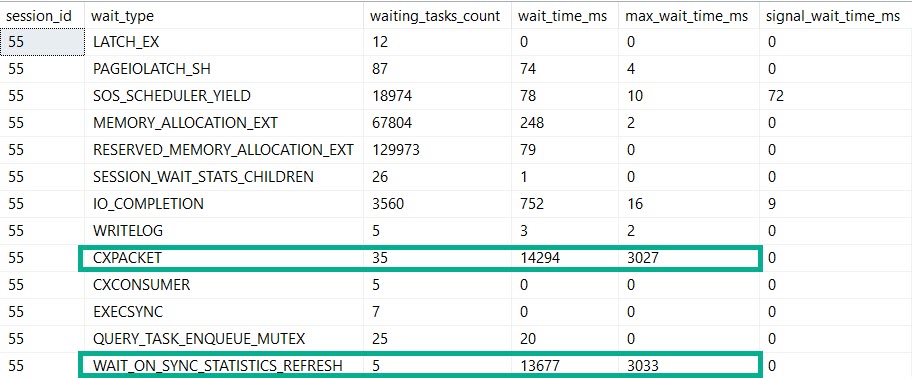
Our MaXdOp 1 query registers nearly the same amount of time on stats updates and parallelism.
If this is madness…
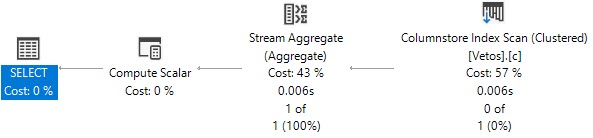
But our plan is indeed serial. Because we told it to be.
By setting maxDOP to 1.
Not Alone
So, if you’re out there in the world wondering why this crazy kinda thing goes down, here’s one explanation.
Are there others? Probably.
But you’ll have to find out by setting MAXdop to 1 on your own.
Thanks for reading!
Going Further
If this is the kind of SQL Server stuff you love learning about, you’ll love my training. Blog readers get 25% off the Everything Bundle — over 100 hours of performance tuning content. Need hands-on help? I offer consulting engagements from targeted investigations to ongoing retainers. Want a quick sanity check before committing to a full engagement? Schedule a call — no commitment required.