SQL Server Index Spools When You Have An Index

PAUL WHITE IS WRONG


Ha ha. Just kidding. He’s never wrong about anything.

But he did write about Eager Index Spools recently, and the post ended with the following statement:

Eager index spools are often a sign that a useful permanent index is missing from the database schema.

I’d like to show you a case where you may see an Eager Index Spool even when you have the index being spooled.

Funboy & Funboy & Funboy


Let’s say we’ve got a query that, for better or worse, was written like so:

SELECT SUM(records)
FROM dbo.Posts AS p 
CROSS APPLY 
(
    SELECT COUNT(p2.Id)
    FROM   dbo.Posts AS p2
    WHERE  p2.LastEditDate >= '20121231'
	AND    p.Id = p2.Id

    UNION ALL

    SELECT COUNT(p2.Id)
    FROM   dbo.Posts AS p2
    WHERE  p2.LastEditDate IS NULL
	AND    p.Id = p2.Id
) x (records);

Right now, we’ve got this index:

CREATE INDEX to_null_or_not_to_null ON dbo.Posts(LastEditDate);

Which means we’ve effectively got an index on (LastEditDate, Id), because of how clustered index key columns are inherited by nonclustered indexes.

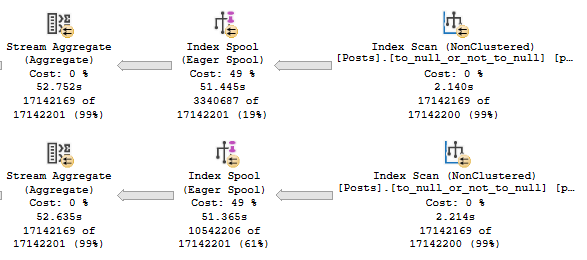
The APPLY section of the query plan looks like so:
SQL Server Query Plan
Spooled to death.

Each spool runs for nearly 53 seconds. The entire plan runs for 1:52.

There have been times when I’ve seen index spools created to effectively re-order existing indexes.

Perhaps that’s the case here? Let’s add this index.

CREATE /*UNIQUE*/ INDEX that_is_a_question ON dbo.Posts(Id, LastEditDate);

I’ve got UNIQUE in there in case you’re playing along at home. It makes no difference to the outcome.

I’d expect you to ask about that. I have high expectations of you, dear reader. I love you.

PLEASE DON’T LEAVE ME.

Get Out


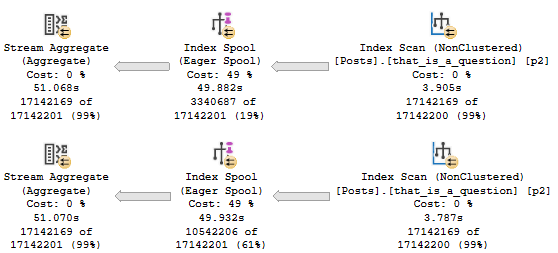
The new execution plan looks uh.
SQL Server Query Plan
I’m In It

That’s frustrating, isn’t it? Why would you do that?

When I asked Paul why the optimizer was wrong (I understand that many of you confuse Paul with the optimizer. To wit, they’ve never been seen together.), he said something along the lines of:

The issue is that you have a unique clustered index that prevents the index matching logic from finding the better nonclustered index.

Well okay yeah lemme just go drop that clustered index or something.

Workarounds


There are several workarounds, like using FORCESEEK inside the APPLY logic.

Of course, the better method is just to write the query so there’s no need for the optimizer to join a table to itself a couple times.

SELECT SUM(x.records)
FROM (    
	SELECT COUNT(p.records)
    FROM 
    (
        SELECT 1 AS records
        FROM   dbo.Posts AS p2
        WHERE  p2.LastEditDate >= '20121231'
    ) AS p
    
    UNION ALL
    
    SELECT COUNT(p.records)
    FROM 
    (
        SELECT 1 AS records
        FROM   dbo.Posts AS p2
        WHERE  p2.LastEditDate IS NULL
    ) AS p
) AS x (records);

Which’ll finish in about 1.5 seconds.

But hey, nifty demo.

Thanks for reading!

Going Further


If this is the kind of SQL Server stuff you love learning about, you’ll love my training. Blog readers get 25% off the Everything Bundle — over 100 hours of performance tuning content. Need hands-on help? I offer consulting engagements from targeted investigations to ongoing retainers. Want a quick sanity check before committing to a full engagement? Schedule a call — no commitment required.
Announcing My Precon For SQL Saturday Chicago 2020

Deep Dish SQL


If you’re in Chicago and heading to SQL Saturday 2020, I’d love to see you at my full day precon on Friday, March 20.

I’ll be delivering a ton of awesome material that’ll help make your performance tuning life a whole lot easier. This session is totally focused on how to tune SQL Server performance, and teaching you how to do pain-free analysis of queries, indexes, and execution plans.

All of the material comes from the most common and most complex performance issues I’ve seen during my years as a consultant and DBA. We’ll be pulling on the rubber gloves and digging deep into places that’ll make the optimizer uncomfortable.

For a limited time, use the coupon code “newyorkpizza” for $50 off!

Thanks for reading, and see you there!

Going Further


If this is the kind of SQL Server stuff you love learning about, you’ll love my training. Blog readers get 25% off the Everything Bundle — over 100 hours of performance tuning content. Need hands-on help? I offer consulting engagements from targeted investigations to ongoing retainers. Want a quick sanity check before committing to a full engagement? Schedule a call — no commitment required.
SQL Saturday Washington, DC: Two Weeks To Go!

HELLO GUAM!


If you’re planning on attending SQL Saturday Washington, DC, why not play hooky from work and spend the day with me learning about all the atrocities SQL Server is capable of?

I’m going to be delivering my Total Server Tuning material, which has been a hit at a whole bunch of events this past year.

Attendees has a choice to either follow along with me on their laptops, or just watch in horror as familiar events unfold before their very eyes.

If you want to follow along, grab a copy of the StackOverflow2013 database. It’s about a 10GB download, which turns into a ~60GB database.

Fair warning: if you’re gonna follow along, you’re gonna have a tough time on skimpy laptop hardware. My personal laptop is 64GB of RAM and some pretty fast cores. At least they were until Intel started patching things. Most demos are on SQL Server 2017, but I’m going to be showing you stuff from SQL Server 2019 as well.

For a limited time, use the coupon code “votesql” for $50 off.

Going Further


If this is the kind of SQL Server stuff you love learning about, you’ll love my training. Blog readers get 25% off the Everything Bundle — over 100 hours of performance tuning content. Need hands-on help? I offer consulting engagements from targeted investigations to ongoing retainers. Want a quick sanity check before committing to a full engagement? Schedule a call — no commitment required.
The Right Way To Compare Date Columns In Two Different SQL Server Tables

A Certain Ratio


I have a lot to say about this demo on SQL Server 2019, which I’ll get to in a future post.

For now, I’m going to concentrate on ways to make this situation suck a little less for you wherever you are.

Let’s talk.

Pinky Blue


Let’s get a couple indexes going:

CREATE INDEX something ON dbo.Posts(PostTypeId, Id, CreationDate);
CREATE INDEX stuffy ON dbo.Comments(Score, PostId, CreationDate);

And look at a maybe kinda sorta stupid query.

SELECT COUNT(*)
FROM   dbo.Posts AS p
JOIN   dbo.Comments AS c
    ON  p.Id = c.PostId
WHERE DATEDIFF(YEAR, p.CreationDate, c.CreationDate) > 1
AND p.PostTypeId = 1
AND c.Score > 0;

We wanna find questions where a comment was left a year after they were posted, and the comment was upvoted.

BIG DATA!

What We Know


From yesterday’s post, we know that even if we put our date columns first in the index, we wouldn’t have anything to seek to.

Unlike yesterday’s post, these columns are in two different tables. We can’t make a good computed column to calculate that.

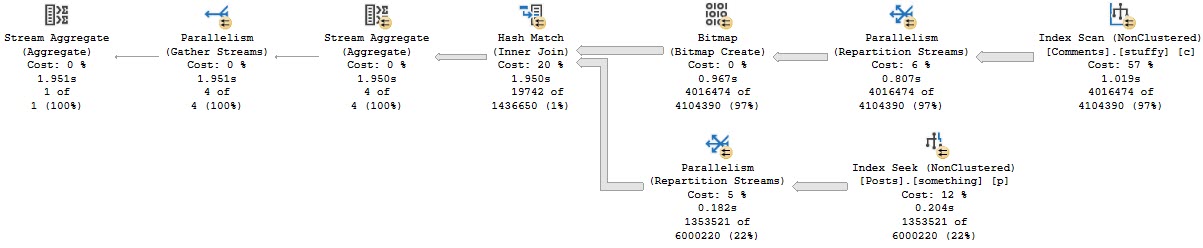
The indexes that I created help us focus on the SARGable parts of the where clause and the join conditions.

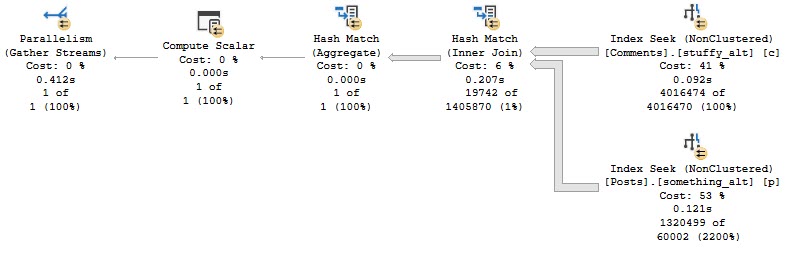
That query takes about 2 seconds.

SQL Server Query Plan
Hm.

Switch Hitter


You might be tempted to try something like this, but it won’t turn out much better unless you change your indexes.

SELECT DATEDIFF(YEAR, p.CreationDate, c.CreationDate) AS Diffo
INTO #t
FROM   dbo.Posts AS p
JOIN   dbo.Comments AS c
    ON  p.Id = c.PostId
WHERE p.CreationDate < DATEADD(YEAR, -1, c.CreationDate)
AND   c.CreationDate > DATEADD(YEAR,  1, p.CreationDate)
AND p.PostTypeId = 1
AND c.Score > 0

SELECT COUNT(*)
FROM #t AS t
WHERE t.Diffo > 1

DROP TABLE #t;

Moving CreationDate to the second column helps the first query quite a bit.

CREATE INDEX something_alt ON dbo.Posts(PostTypeId, CreationDate, Id);
CREATE INDEX stuffy_alt ON dbo.Comments(Score, CreationDate, PostId);
SQL Server Query Plan
Chock full of Jacques

Opternatives


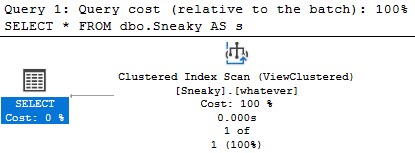
You could try an indexed view here, too.

CREATE VIEW dbo.Sneaky
WITH SCHEMABINDING
AS
SELECT COUNT_BIG(*) AS records
FROM   dbo.Posts AS p
JOIN   dbo.Comments AS c
    ON  p.Id = c.PostId
WHERE DATEDIFF(YEAR, p.CreationDate, c.CreationDate) > 1
AND p.PostTypeId = 1
AND c.Score > 0
GO 

CREATE UNIQUE CLUSTERED INDEX whatever ON Sneaky(records);
SQL Server Query Plan
Mexican Ham Radio

But, you know. That might be overkill.

Depending.

Thanks for reading!

Going Further


If this is the kind of SQL Server stuff you love learning about, you’ll love my training. Blog readers get 25% off the Everything Bundle — over 100 hours of performance tuning content. Need hands-on help? I offer consulting engagements from targeted investigations to ongoing retainers. Want a quick sanity check before committing to a full engagement? Schedule a call — no commitment required.
The Right Way To Compare Date Columns In SQL Server Queries

Tell It To The Judge


A common dilemma is when you have two date columns, and you need to judge the gap between them for something.

For instance, say you have a table of orders and you want to figure out how long on average it takes an ordered item to ship, or a shipped item to be delivered.

You’re not left with many good ways to write the query to take advantage of indexes.

Let’s have a look-see.

Iron Mask


We’re gonna skip the “aw shucks, this stinks without an index” part.

CREATE INDEX gloom ON dbo.Posts(CreationDate, LastActivityDate);

SELECT COUNT(*) AS records
FROM dbo.Posts AS p
WHERE DATEDIFF(YEAR, p.CreationDate, p.LastActivityDate) > 9;

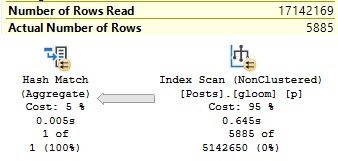
Because it still stinks with an index. Check it out.

SQL Server Query Plan
Why would you?

Though we have a predicate, and an index on both columns, we don’t have anything to seek to.

Why? Because our predicate isn’t on anything that the index is keeping track of.

Indexes don’t care how many years, months, days, hours, minutes, seconds, milliseconds, or microseconds difference there are between these two columns.

That’d be a really cool kind of index to have for sure, but insert a shrug that fills your screen the way dark matter fills the universe here.

All we got is workarounds.

Another For Instance


We can use a computed column:

ALTER TABLE dbo.Posts 
    ADD despair AS DATEDIFF(YEAR, CreationDate, LastActivityDate);

CREATE INDEX sadness ON dbo.Posts(despair);

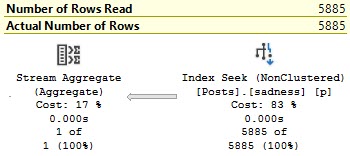
The result is something we can seek to.

SQL Server Query Plan
How could you?

Which is probably the type of plan that you’d prefer.

Thanks for reading!

Going Further


If this is the kind of SQL Server stuff you love learning about, you’ll love my training. Blog readers get 25% off the Everything Bundle — over 100 hours of performance tuning content. Need hands-on help? I offer consulting engagements from targeted investigations to ongoing retainers. Want a quick sanity check before committing to a full engagement? Schedule a call — no commitment required.
How To Do Date Math In Your Where Clause To Avoid SQL Server Performance Problems

Pattern Baldness


I see this pattern quite a bit in stored procedures, where the front end accepts an integer which gets passed to a query.

That integer is used to specify some time period — days, months, whatever — and the procedure then has to search some date column for the relevant values.

Here’s a simplified example using plain ol’ queries.

Still Alive


Here are my queries. The recompile hints are there to edify people who are hip to local variable problems.

DECLARE @months_back INT = 1;

SELECT COUNT(*) AS records
FROM dbo.Posts AS p
WHERE DATEADD(MONTH, @months_back * -1, p.CreationDate) <= '20100101' --Usually GETDATE() is here
OPTION(RECOMPILE);
GO 

DECLARE @months_back INT = 1;

SELECT COUNT(*) AS records
FROM dbo.Posts AS p
WHERE p.CreationDate <= DATEADD(MONTH, @months_back, '20100101') --Usually GETDATE() is here
OPTION(RECOMPILE);
GO

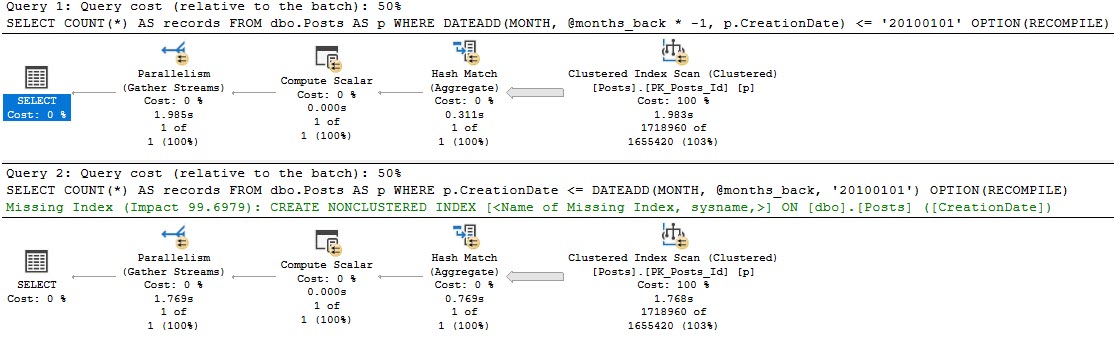
The problem with the first query is that the function is applied to the column, rather than to the variable.

If we look at the plans for these, the optimizer only thinks one of them is special enough for an index request.

SQL Server Query Plan
please respond

Sure, there’s also a ~200ms difference between the two, which is pretty repeatable.

But that’s not the point — where things change quite a bit more is when we have a useful index. Those two queries above are just using the clustered index, which is on a column unrelated to our where clause.

CREATE INDEX etadnoitaerc ON dbo.Posts(CreationDate);
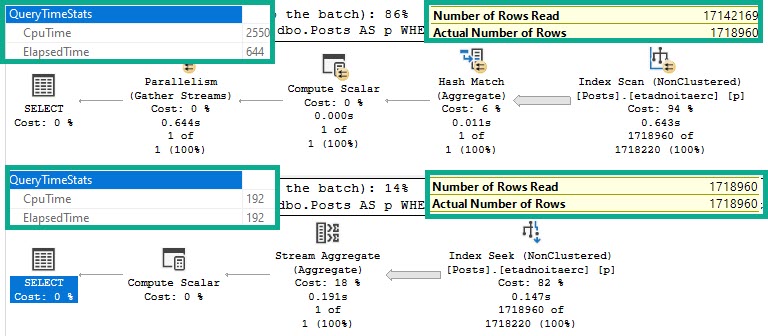
SQL Server Query Plan
Oops.

Side by side:

  • The bad query uses >10x more CPU
  • Still runs for >3x as long
  • Scans the entire index
  • Reads 10x more rows
  • Has to go parallel to remain competitive

At MAXDOP 1, it runs for just about 2.2 seconds on a single thread. Bad news.

Qual


This is one example of misplacing logic, and why it can be bad for performance.

All these demos were run on SQL Server 2019, which unfortunately didn’t save us any trouble.

In the next post, I’m going to look at another way I see people make their own doom.

Thanks for reading!

Going Further


If this is the kind of SQL Server stuff you love learning about, you’ll love my training. Blog readers get 25% off the Everything Bundle — over 100 hours of performance tuning content. Need hands-on help? I offer consulting engagements from targeted investigations to ongoing retainers. Want a quick sanity check before committing to a full engagement? Schedule a call — no commitment required.
A Quick Primer On Date Math In SQL Server

Come Up


I’m going to be writing a few posts about things I see people doing with date math, or as I’ve started calling it, “dath*”, that can really hurt performance.

To get you ready for those, I need to talk about how functions like DATEADD and DATEDIFF work. It seems like that’s missing knowledge in many places.

Make Myself A Winner


As of this writing, if I run this query, I get these results:

SELECT SYSDATETIME() AS sys_date;

sys_date
2019-11-08 17:22:10.6886473

It has a date part, and a time part. Right? Cool.

The first thing I need to show you is that with the DATEADD and DATEDIFF functions, some dates and numbers are interchangeable.

For instance:

SELECT DATEDIFF(DAY, 0, SYSDATETIME()) AS [what does zero mean?],
          DATEDIFF(DAY, '19000101', SYSDATETIME()) AS [it means 1900-01-01];

Running these will both return the same value for me: 43,775. In other words, 0 and 1900-01-01 are interchangeable.

If you’re playing along at home, stick negative numbers in there too.

It might be a different result from mine when you run it, but they’ll both be the same locally.

To prove this out a little more: If we add 43,775 days to 0 (1900-01-01), we get today’s date (2019-11-08).

SELECT DATEADD( DAY, 
                DATEDIFF(DAY, 0, SYSDATETIME()), 
			    0 ) 
			    AS [add 43775 days to 1900-01-01];

In this example, I’m saying that I want to add the results of the datediff function to the date 1900-01-01.

These functions are pretty powerful, because they can accept expressions, literals, variables, parameters, column values, and so on.

The important part about this one is that the time is zeroed out.

What’s The Point?


I’ll often see people need to “flatten” dates to certain intervals.

By flatten, I mean the start of a day, week, month, or year, and likewise for the end values to all those intervals.

I’ve seen some really bad implementations of this. Most notable was probably a scalar valued function that converted a datetime to a 10 character string to remove the time portion.

In every where clause.

For much better implementations, check out these posts:

Thanks for reading!

*I don’t really call it that don’t be ludicrous

Going Further


If this is the kind of SQL Server stuff you love learning about, you’ll love my training. Blog readers get 25% off the Everything Bundle — over 100 hours of performance tuning content. Need hands-on help? I offer consulting engagements from targeted investigations to ongoing retainers. Want a quick sanity check before committing to a full engagement? Schedule a call — no commitment required.
SQL Saturday Washington, DC: Three Weeks To Go!

HELLO GUAM!


If you’re planning on attending SQL Saturday Washington, DC, why not play hooky from work and spend the day with me learning about all the atrocities SQL Server is capable of?

I’m going to be delivering my Total Server Tuning material, which has been a hit at a whole bunch of events this past year.

In case you’ve never seen it, here’s the trailer I recorded for SQLBits earlier this year for it:

See you there!

For a limited time, use the coupon code “votesql” for $50 off.

Going Further


If this is the kind of SQL Server stuff you love learning about, you’ll love my training. Blog readers get 25% off the Everything Bundle — over 100 hours of performance tuning content. Need hands-on help? I offer consulting engagements from targeted investigations to ongoing retainers. Want a quick sanity check before committing to a full engagement? Schedule a call — no commitment required.

Can You Stop People From Creating SQL Server Indexes With Low Fill Factors?

Yeah nah


So like, presented without much comment, this server level trigger will, in my limited testing, “work”.

Just make sure you understand something: this doesn’t stop the index from being created, it only rolls creation back afterwards.

If someone creates a gigantic index on an equally gigantic table, you’re in for a hell of a ride. I’d probably only deploy this on local dev boxes, and only if I really needed to prove a point.

CREATE OR ALTER TRIGGER CheckFillFactor
ON ALL SERVER
FOR CREATE_INDEX, ALTER_INDEX
AS
DECLARE @FillFactor NVARCHAR(4000);
DECLARE @Percent INT;
SELECT @FillFactor = EVENTDATA().value('(/EVENT_INSTANCE/TSQLCommand/CommandText)[1]', 'NVARCHAR(4000)');
IF UPPER(@FillFactor) LIKE '%FILLFACTOR%'
    BEGIN
        SET @FillFactor = REPLACE(@FillFactor, ' ', '');
        PRINT @FillFactor;
        SELECT @FillFactor = SUBSTRING(@FillFactor, CHARINDEX(N'FILLFACTOR=', @FillFactor) + LEN(N'FILLFACTOR='), PATINDEX('%[^0-9]%', @FillFactor) + 2);
        
		IF TRY_CONVERT(INT, @FillFactor) IS NULL
		    BEGIN
			    SET @Percent = LEFT(@FillFactor, 2);
			END;
		ELSE
		    BEGIN
			    SET @Percent = @FillFactor;
			END;

		IF @Percent < 80
            BEGIN
                RAISERROR('WHY YOU DO THAT?', 0, 1) WITH NOWAIT;
                ROLLBACK;
            END;
    END;
GO


It’ll work for create or alter index commands, i.e.

--Fails, under 80
CREATE INDEX whatever ON dbo.Users (Reputation) WHERE Reputation > 100000 WITH (FILLFACTOR = 70);

--Works, over 80
CREATE INDEX whatever ON dbo.Users (Reputation) WHERE Reputation > 100000 WITH (FILLFACTOR = 90);

--Fails, under 80
ALTER INDEX whatever ON dbo.Users REBUILD WITH (FILLFACTOR = 70);

--Works, uses default
CREATE INDEX whatever ON dbo.Users (Reputation) WHERE Reputation > 100000;

Pink Blood


Is it perfect? Probably not, but I threw it together quickly as a POC.

For instance, my first stab broke when fill factor wasn’t specified in the command.

My second stab broke when I changed the spacing around the “=”.

Let me know in the comments if you can get around it or break it, other than by changing server settings — I can’t go that far here.

Thanks for reading!

Going Further


If this is the kind of SQL Server stuff you love learning about, you’ll love my training. Blog readers get 25% off the Everything Bundle — over 100 hours of performance tuning content. Need hands-on help? I offer consulting engagements from targeted investigations to ongoing retainers. Want a quick sanity check before committing to a full engagement? Schedule a call — no commitment required.
How TABLOCK Hints Can Hurt Column Store Insert Performance

Utility


There are a lot of good reasons to use tablock on your inserts, as long as you can handle the reduced concurrency of a table level lock.

You may get minimal logging here, here. And you may even get parallel inserts. You may even avoid weird compression side effects.

All very good reasons to vie for the affections of tablock hints!

You should do that.

You should try.

Because Sometimes


You may run into oddball scenarios where the results without tablock are better.

For example, I was experimenting with clustered column store temp tables for another post, and I came across this oddity.

Assume two identical inserts, but one has a tablock hint and one doesn’t.

DROP TABLE IF EXISTS #t_cci;
GO 

CREATE TABLE #t_cci (UserId INT, VoteTypeId INT, CreationDate DATETIME, INDEX c CLUSTERED COLUMNSTORE);

INSERT #t_cci WITH (TABLOCK) -- A tab of locks
    ( UserId, VoteTypeId, CreationDate )
SELECT v.UserId, v.VoteTypeId, MAX(v.CreationDate)
FROM dbo.Votes AS v
WHERE v.UserId IS NOT NULL
GROUP BY v.UserId, v.VoteTypeId;

DROP TABLE IF EXISTS #t_cci;
GO 

CREATE TABLE #t_cci (UserId INT, VoteTypeId INT, CreationDate DATETIME, INDEX c CLUSTERED COLUMNSTORE);

INSERT #t_cci -- A lack of tabs
    ( UserId, VoteTypeId, CreationDate )
SELECT v.UserId, v.VoteTypeId, MAX(v.CreationDate)
FROM dbo.Votes AS v
WHERE v.UserId IS NOT NULL
GROUP BY v.UserId, v.VoteTypeId;

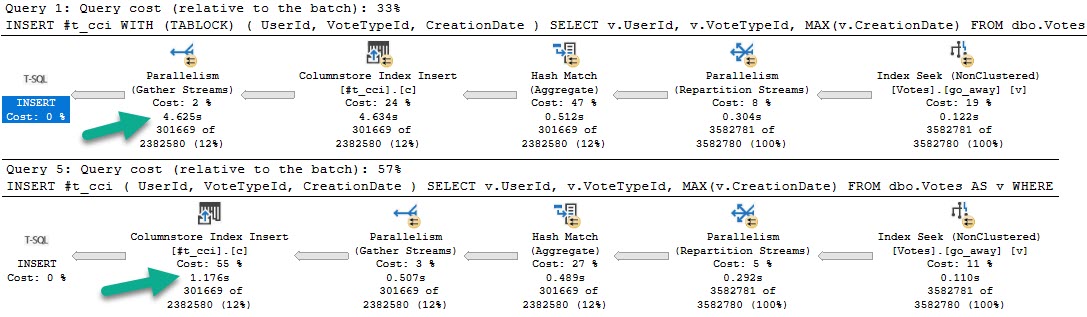
The plans for those queries, in that order, look like this:

SQL Server Query Plan
Grey Skies

The fully parallel query takes 4.6 seconds, and the serial insert query takes 1.7 seconds.

Even more strange, the insert with tablock leaves four open rowgroups, and the non-tablock query has one compressed rowgroup.

SQL Server Performance Metrics
It was not a dream.

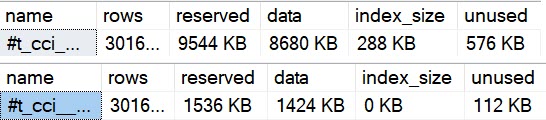
Adding to that, using sp_spaceused on the temp tables, we can see some important differences.

SQL Server Index Sizes
neener

The uncompressed temp table is much larger, has more unused space, and has… index size?!

Yep, because open row groups, or delta stores, are stored as b-trees.

the columnstore index might store some data temporarily into a clustered index called a deltastore

I believe this happens with the parallel insert, because each thread inserts ~75k rows, which is fewer than the minimum 102,400 needed to qualify for skipping the delta store and being compressed. A simple way to test this is to run the tablock query at MAXDOP 2.

SQL Server Query Plan
Hoowee

That ends up being a little faster than the serial insert, and also gets full compression.

Each thread is ~150k rows and gets compressed. Hooray.

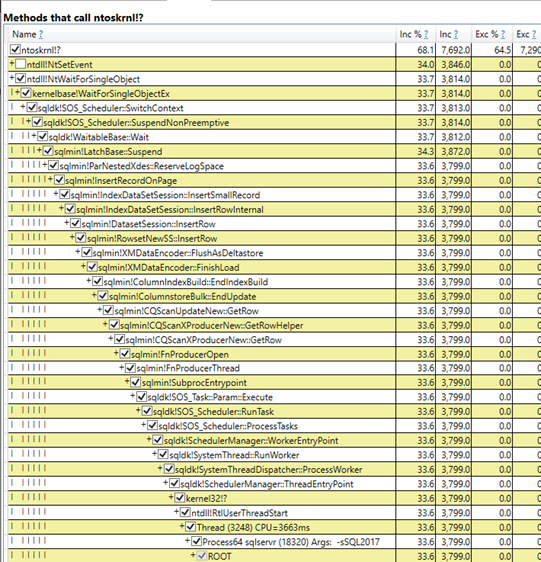
Looking at a PerfView diff of the good and bad samples, this path is only present in the slow run:

PerfView
Step by step

When inserting to the delta store, we need to acquire exclusive latches like just about any b-tree insert, and reserve log space to do so.

Morality Hilarity


To summarize the problem:

  • The TABLOCK hint gets us a fully parallel insert plan
  • There aren’t enough rows on each parallel thread to get row group compression
  • We need to insert into a clustered index behind the scenes that makes up the delta store
  • Which results in threads waiting on exclusive latches and reserving log space

Will you ever hit this? Maybe someday.

This will also happen with real tables (not just temp tables), so I suspect it’s a potentially common scenario for column store users.

You get all worked up getting these parallel inserts and then your compression sucks.

Thanks for reading!

Going Further


If this is the kind of SQL Server stuff you love learning about, you’ll love my training. Blog readers get 25% off the Everything Bundle — over 100 hours of performance tuning content. Need hands-on help? I offer consulting engagements from targeted investigations to ongoing retainers. Want a quick sanity check before committing to a full engagement? Schedule a call — no commitment required.