You’ve got a stored procedure that runs slowly, but the problem is that it’s… long. It’s really hard to tell which part is slow, sometimes.
With shorter procedures you can probably just collect actual execution plans and slam F5 like a tall glass of gin at 6am.
But you don’t wanna do that with the larger procedures, for a few practical reasons:
Lots of little queries run quickly, and we don’t care about those
Navigating through lots of plans in SSMS is tedious
There’s no differentiation when other procedures, etc. are invoked
You introduce a lot of overhead retrieving and rendering all those plans
The full query text might not be captured, which is a limitation in many places
Let’s save the day with sp_HumanEvents, my stored procedure that makes using Extended Events really easy.
Wanna Ride
There are a lot of issues you can run into with Extended Events. They’re rather unpleasant, and there’s almost zero guidance from Microsoft about usage.
Wouldn’t it be nice to just hit F5?
Once you have a window open with your procedure ready to run, take note of the session id that it’s using, and tailor this command for your situation:
The events we want to focus on are for executed queries
We only care about queries that run for more than one second
We’re going to focus in on the session id for the query window we’re tuning in
We want the session to stay running so we can watch and re-watch after we make changes
I know it looks a little funny that @session_id is a string, but that’s because there are some sampling capabilities if you want to look at a workload instead of a single procedure without overwhelming a server by collecting everything.
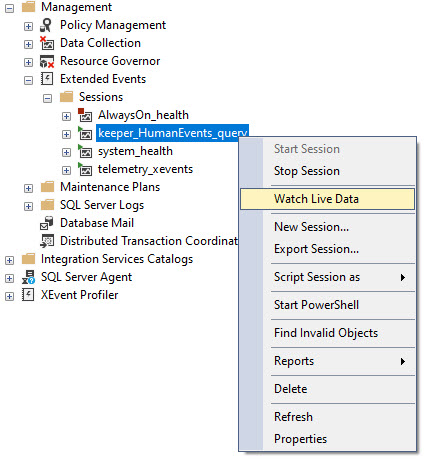
Once that’s done, you’ll have a new Extended Event session like this, and you’ll wanna watch live data from it:
big bux
Watch Out Now
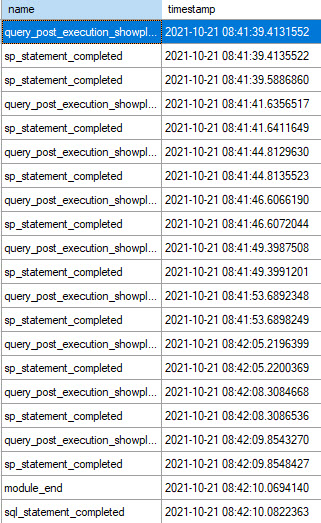
Once you’ve got that window open and you run your procedure, you’ll see any queries that meet the duration criteria, and you should see something that looks like this.
good for you
The procedure that I’m looking at in here is sp_BlitzCache, because it’s a good example of a procedure with a lot of queries in it, where only some of them (like the XML parsing) might get slowed down.
Some notes on the output:
The statement doesn’t get collected with the query plan (more on that in a second)
INSERT…EXEC shows up as two statements (lines 2 and 3 over there)
You only see these two columns at first, but you can go through and add in any other columns that you find useful from each specific session type.
Two Point Two
The output can be a little confusing at first. Generally the pattern is query plan, then statement associated with it.
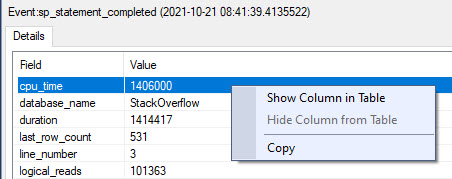
If you click on each event, you can choose different elements from it to show in the main result window.
like you
Here’s how I usually set things up to find what I wanna go after:
get it
I like to grab CPU, duration, information about requested, granted, and used memory, and the statement.
Not every element is available in every event. Where things are NULL, that’s where they’re not available. I wish there were a general extended event that captured everything I need in one go, but that doesn’t seem to exist.
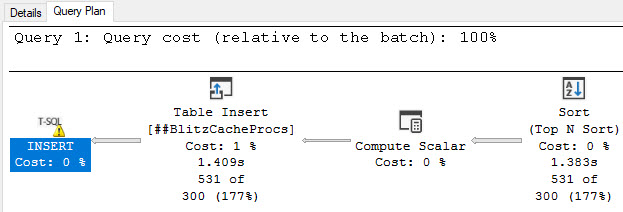
One last point on the output is that if you click on the query_post_execution_showplan lines, the query plan is available in the second result set:
one time
Crossover
Before you ask, the lightweight profiling events are useless. They’re so nerfed and collect so little helpful detail that you might as well be looking at a cached plan or Query Store plan.
Lightweight, baby 🙄
To that point, I don’t recommend running something like this across a whole workload. Though Extended Events are purported to have far less observer overhead than Profiler, I’ve seen even heavily-filtered sessions like this slow workloads down quite a bit.
Anyway, this is how I work when I’m trying to tune things for clients. Hopefully you find it useful as well.
Grab sp_HumanEvents and lemme know how it goes on GitHub.
Thanks for reading.
Going Further
If this is the kind of SQL Server stuff you love learning about, you’ll love my training. Blog readers get 25% off the Everything Bundle — over 100 hours of performance tuning content. Need hands-on help? I offer consulting engagements from targeted investigations to ongoing retainers. Want a quick sanity check before committing to a full engagement? Schedule a call — no commitment required.
Updated procedure to format queries to suit current formatting memes I enjoy
Organized the procedure a little bit better, putting all the declared variables and temp table creation at the beginning
Fixed some inevitable bugs that come with formatting and reorganizing really long stored procedures
Cleaned up error handling
Added a check for the signed query hash action; I found the procedure failed on some earlier builds of 2014 and 2012
So uh, go get those. Use’em. Have fun.
Do a SQL.
Thanks for reading!
Going Further
If this is the kind of SQL Server stuff you love learning about, you’ll love my training. Blog readers get 25% off the Everything Bundle — over 100 hours of performance tuning content. Need hands-on help? I offer consulting engagements from targeted investigations to ongoing retainers. Want a quick sanity check before committing to a full engagement? Schedule a call — no commitment required.
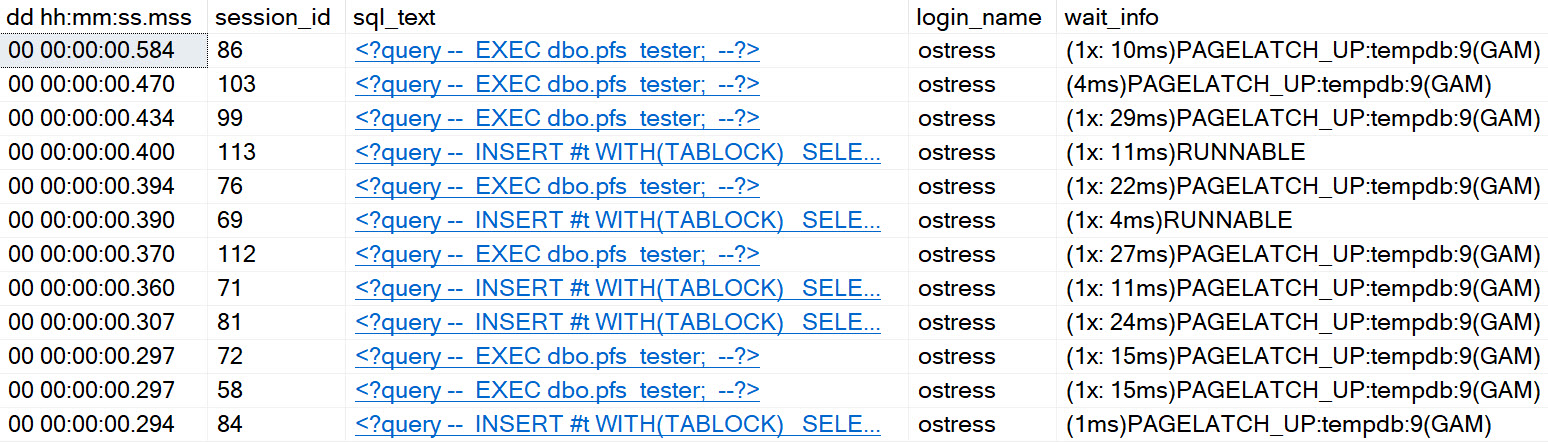
Even on SQL Server 2019, with in-memory tempdb metadata enabled, and an appropriate number of evenly sized data files, you can experience certain types of contention in tempdb.
It’s better. It’s definitely and totally better, but it’s still there. With that in mind, I wrote a stored procedure that you can stick in your favorite stress tool, to see how tempdb handles different numbers of concurrent sessions. You can download it here, on GitHub.
If you need a tool to run a bunch of concurrent sessions against SQL Server, my favorite two free ones are:
If you’re on < SQL Server 2016, you might need trace flags 1117 and 1118
You might have a bunch of other stuff hemming up tempdb, too
Check out this video for some other things that can cause problems too.
Thanks for reading!
Going Further
If this is the kind of SQL Server stuff you love learning about, you’ll love my training. Blog readers get 25% off the Everything Bundle — over 100 hours of performance tuning content. Need hands-on help? I offer consulting engagements from targeted investigations to ongoing retainers. Want a quick sanity check before committing to a full engagement? Schedule a call — no commitment required.
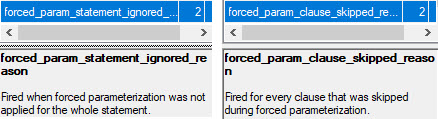
There are a couple Extended Events that I was really excited about adding to sp_HumanEvents, but try as I might they wouldn’t fire off anything. Ever.
Why was I excited? Because they would tell us why forced parameterization wasn’t used.
cool! great. wait, no.
The thing is, they only work if you know someone who isn’t Australian and they know how to change memory bits in WinDbg.
So like. Don’t bother with them for now.
Thanks for reading!
Going Further
If this is the kind of SQL Server stuff you love learning about, you’ll love my training. Blog readers get 25% off the Everything Bundle — over 100 hours of performance tuning content. Need hands-on help? I offer consulting engagements from targeted investigations to ongoing retainers. Want a quick sanity check before committing to a full engagement? Schedule a call — no commitment required.
If this is the kind of SQL Server stuff you love learning about, you’ll love my training. Blog readers get 25% off the Everything Bundle — over 100 hours of performance tuning content. Need hands-on help? I offer consulting engagements from targeted investigations to ongoing retainers. Want a quick sanity check before committing to a full engagement? Schedule a call — no commitment required.
There have been a ton of improvements and fixes here. I realize it’s bad form to generalize like this, but I went into overdrive making sure things were nice and tidy for GroupBy. There have been improvements to XML querying and processing, how data gets pulled in and correlated, and finally how it gets displayed.
If this is the kind of SQL Server stuff you love learning about, you’ll love my training. Blog readers get 25% off the Everything Bundle — over 100 hours of performance tuning content. Need hands-on help? I offer consulting engagements from targeted investigations to ongoing retainers. Want a quick sanity check before committing to a full engagement? Schedule a call — no commitment required.
There are a lot of words you can use to describe Extended Events. I’ll skip over my list to keep the blog family friendly.
In this post, we’re going to look at how two event can show the same query having a different plan handle.
I stumbled on this while working on sp_HumanEvents, when one of my precious sessions suddenly STOPPED RETURNING RESULTS.
Very helpful.
Let’s look at why.
A Plan Here, A Plan There
When the optimizer gets its hands on a query, it has some early choices, where it might choose to keep a plan at the trivial optimization level, and it may choose simple parameterization in order to make things more re-usable.
Apparently this causes some differences when it comes to hashing plans.
Here’s an example query:
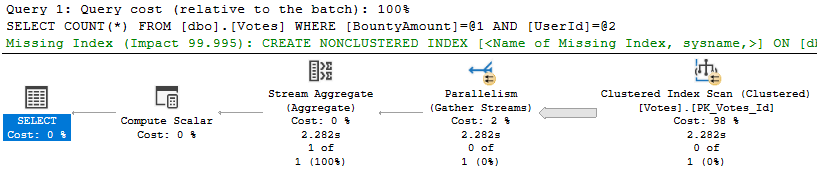
SELECT COUNT(*) FROM dbo.Votes WHERE BountyAmount = 500 AND UserId = 22565;
Looking at the execution plan for it, we know a couple things.
Goodbye to you.
It didn’t stay trivial because it went parallel, and the optimizer thought that simple parameterization was a good idea. Even though we passed in literals, they’re replaced by parameters in the execution plan text.
What’s the big deal?
Well, nothing, unless you want to correlate information about a single query from multiple Extended Events.
Check It Out
Let’s run sp_HumanEvents and get debug information — because the regular results won’t return anything for this query right now (I have fixed this issue, don’t worry).
I’m grabbing the debug here too so we can see what ends up in the temp tables along the way.
COOL YEAH
We can grab information about which queries caused waits, and the plan handle here is the same one that we saw in the post execution showplan event.
Yay?
In the Actual Results Plus from sp_HumanEvents, we can see the simple parameterized version of the query ended up in the plan cache.
Goodie Bagg
There are two lines here because we had waits on two different wait stats, but the point is more that we can see simple parameterization at work here, but not in the events that collected information about executed queries.
Frustration Point
The problem would have been more obvious if the parameterized text showed up in the post execution showplan event, and not the version with literal values. It would have been easier to figure out why the plan handles were different, anyway.
So what’s the solution? Now, sp_HumanEvents will only get the plan handle from the post execution showplan event, in case you want to go and do anything with it later.
Thanks for reading!
Going Further
If this is the kind of SQL Server stuff you love learning about, you’ll love my training. Blog readers get 25% off the Everything Bundle — over 100 hours of performance tuning content. Need hands-on help? I offer consulting engagements from targeted investigations to ongoing retainers. Want a quick sanity check before committing to a full engagement? Schedule a call — no commitment required.
In this video, I delve into the process of logging detailed information about SQL Server operations using extended events. Specifically, I walk through setting up sessions that log data to tables and explain how to run a “logging loop” for a few seconds to ensure everything is set up correctly. After setting up the necessary infrastructure, I demonstrate how to create views from the logged data, providing insights into various aspects of SQL Server execution such as recompiles, durations, and parameterization. These views offer valuable information that can help in performance tuning and troubleshooting, though some views might not contain much data due to the short duration of logging. Finally, I cover the cleanup process, detailing how to remove all traces of the extended events setup with a single command.
Full Transcript
Erik Darling back with MORE SP underscore human events goodness. Now in this video I would like to go over a little bit about how or what happens rather when you log stuff to tables now because some views get created as you can maybe see by this line of stuff and we have a new one that’s going to be new mode to clean up things which will hopefully not throw any errors now that I am live and looking at this. It worked in dev which is on my machine so theoretically it should work here too, but who knows. So in order to get the views to set up we do need to set up sessions that will log data to tables. So we do that again. I cover this in another video but to do that we just say which session we want to set up. want and we use this keep alive flag here and that will create all of the extended events necessary to log all that stuff off to tables and then we need to set up the or we need to run the logging loop now again in real life you would probably want to log this from a SQL Server agent job or something but it doesn’t really take much more than this command to to get things off and running so run that and now I am NOT a terribly religious man but I feel I don’t know I guess maybe superstitious and that I always let this run for about 20 seconds because that gives me a few iterations of the of the loop to make sure that I don’t hit any errors like on the second one or third one I got I don’t hit me like n plus one errors so I usually let this run for like 20 30 seconds to make sure that I get a good representation of the loops in there so we hit 30 seconds so I’ll go in and we’ll look at the output now so stuff you’ve already seen is where the tables get created that’s that’s fine and but now the magic that happens after we create tables is we will use SP execute SQL local to the database and we will create these views that look a whole heck of a lot like the code that you will that you would see up in the regular the regular store procedure execution where we would just present this data off to you and there are about 13 of these so I’m not going to spend a whole lot of time sitting there and staring at them explaining to you what each query does you can see pretty you can I try to give the each view a fairly descriptive name so whenever you see one of these things you or whenever you see the view names you should theoretically as long as all goes well as long as all is right in the universe I should see a fairly descriptive you name recompiles by database and object is this one and we are grouping by database and object here so that’s that’s a good start recompiles by durations when we order by the average duration so there’s all sorts of good stuff that you get in these views and I’ll show you these when you get to them and so all this stuff happens but all the good news is that oh so this is these are the inserts we already talked about the inserts so that’s all good there and then so that’s fun and then we get these 13 or so views and the first one will show us any queries so there’s not a whole lot in here right now which is fine you know it doesn’t really need to be I’m just you know showing you that they exist so we get all the queries that have run we get weights by query and database now the one thing I need to mention is that this is a best effort view there’s I could not find a way to get the extended event for wait stats to grab it’s either a SQL text reliably or the any identifiers for executing queries that ran so I can get like query hash or query plan hash or plan handle for anything so this is the best effort we will reach out to the dynamic management views on the server and try to get that information there if we can’t we can’t there’s just nothing nothing more nothing really else I can do about that but we also check out rights by database wait or other weights by database total weights across the whole server there’s not a whole lot of great stuff in here because it didn’t I didn’t run things for very long there shouldn’t be any blocking on the server X I didn’t set any of that up any compilations will be in there and for some of these I decided to give you a few different looks at things I’ll I may expand on these in the future it’s already like a lot a lot of good stuff in here but you know I just further compiles and the recompiles and weights there’s a few different looks there’s a few different views of the data so that’s kind of fun and then you know parameterization there’s some well there’s nothing in there look at but whatever you get the point there are 13 views that give you 13 they give you certain certain certain different views of the data some of them only have one some of them have multiple kind of depending on if I thought it would be interesting to slice and dice the data up you are free to query the views or the base tables however you wish right now they don’t relate very well or at all really aside from event time so I don’t know maybe a long term I’ll try to find out what I’m going to find out.
I’m going to try to work on some way to relate things together but for now I don’t have a great way to do that just because there’s there’s such a lack of uniformity and what the events can actually pick up and do like at first I was really excited to give you compiles by like like query hash and query plan hash but when I went to pick that stuff up it just turned out to all be zeros so and the same thing with recompile so it’s like you know this is not a lot of know what I can do sort of at the mercy of the extended events here which I’m sure all of you can relate to and that’s why you’re here so you know if things improve or get better I’ll certainly try to you know add those improvements in here but again I can’t make that promise anyway now we have a bunch of stuff running on the server and say we don’t want it running anymore let’s say we don’t we want to get rid of everything I did not separate the cleanup mode into different ones like cleanup views cleanup tables cleanup events because it’s I made it so easy to reset things back up if you need to like backup tables first then you know feel free to do that but you know most people if they want to get rid of stuff they want to get rid of everything so now we have this cleanup flag and with clean with the cleanup flag you do need to use the output database name one slight change that I’d made in this iteration of the stored procedure was to give output schema name a default value of DBO you are welcome to change that but for now I wanted to make it less complicated to get data moving so now if you choose an output database will default to DBO if you want a different schema go for it it’s between you and your DBA I guess but anyway we have this cleanup event now so at minimum we need cleanup equals one and output didn’t the output database name and I’m gonna use debug here just to show you what gets output and yes no errors and so what happens is first we will drop all the sessions next we will drop all the tables involved now I again I went pretty low-fi on this and we just use SP execute SQL local to the database to drop tables all in a row I suppose I could add like and then VAR car tenner or NCHAR tenner 13 in there to give us a little bit of separation they all maybe I’ll go do that I’m done recording here a little change the face of T SQL but again locally we’ll also do that for all the views and then we will have absolutely nothing left there will be absolutely no trace that we were ever there so isn’t that fun it’s not so much fun anyway I guess that’s about it I don’t know I don’t really know what there is left to say about it maybe I’ll maybe I’ll go do something constructive now who knows all right thank you for watching and again if you uh if you have any questions comments concerns if you have if you hit any bugs if you hit any if you hit any or if you hit any bugs if you have any requests for code in here please let me know over on github or somewhere I don’t know cry to me on twitter or something I don’t know uh anyway thank you for watching uh and happy event extending or profile or plussing or whatever you want to call it you
Going Further
If this is the kind of SQL Server stuff you love learning about, you’ll love my training. Blog readers get 25% off the Everything Bundle — over 100 hours of performance tuning content. Need hands-on help? I offer consulting engagements from targeted investigations to ongoing retainers. Want a quick sanity check before committing to a full engagement? Schedule a call — no commitment required.
If this is the kind of SQL Server stuff you love learning about, you’ll love my training. Blog readers get 25% off the Everything Bundle — over 100 hours of performance tuning content. Need hands-on help? I offer consulting engagements from targeted investigations to ongoing retainers. Want a quick sanity check before committing to a full engagement? Schedule a call — no commitment required.
In this video, I delve into the process of getting raw data into tables for logging purposes within my software’s event sessions. I walk through setting up these sessions and explain why it’s crucial to be very selective when configuring filters to avoid unnecessary overhead on your server. The transcript highlights the importance of creating different filters carefully, as well as the potential pitfalls of overly aggressive filtering that could lead to excessive data accumulation in logging tables. I also share some practical insights into managing this data efficiently, setting up an upsert scenario for future updates, and preparing to create views that will make the logged data more accessible and user-friendly for end-users.
Full Transcript
Yeah, I suppose this thing is on. Hm. Hm. Hm. So, uh, in the, in the, the last video, I showed you how the code that logs data to tables works in, uh, sp underscore human events. So now, I want to show you how to get your data into those tables. Now, again, I’m going to say it again, because there are things like this that you can’t say enough. Right now, this is only moving raw data in. An upcoming feature release of my software will, uh, include creating views to make better sense of this data. Now, we already have, uh, uh, the mechanism to create the, uh, the mechanism to create the event sessions. We have the mechanism to log the data to tables, and we have a mechanism to, uh, delete data from those tables after a certain period of time. That’s all automated in the, uh, command that starts logging stuff. Well, the, the, the logging and the, the, the deletion is in there. To set sessions up to get logged to tables, we need these commands. Now, uh, I have the, uh, debug options set on for these, uh, so that I can show you the output. Now, if we run these, rather than giving us any additional information, what we do is we, uh, set up the event session, uh, and then we bail out. And then we’ll do that once for each one of these event sessions. And this is just to allow you to, uh, create different filters. And I would urge you, very, very much urge you, when you’re creating these event sessions to be more aggressive than normal when setting up filters, uh, for, you know, durations of things, for which databases you want things from, uh, sampling session IDs. This is all stuff that I walk through in, in other videos in the series to show you how to do that. But, um, yeah, I would, I would urge you to not set up, uh, sessions that will cause significant observer overhead. And it might, um, contribute to the logging tables filling up a lot faster. And I’ll show you why. I’m going to give you a cautionary tale of why when I show you the data that I’ve already, I’ve already logged in there. So these are the commands you’d want to run to, uh, set the sessions up, right? With, of course, with whatever filtering you want. Then the command that you want to run to, um, you know, you don’t, you don’t need debug in here, of course. Having debug in here would be silly for you. I have it in here so that I can show you what gets printed out for some things. And so I can show you, uh, the results of some temp tables. So to get things off and running, logging to a table, we need this command.
So this will output to a database that I have called crap into the DBO schema. And if I run this, this will get kicked off running a loop. And this is the result of the temp table that, um, that we have to log when things are last checked, when things are last updated, yada, yada, yada. Uh, you can kind of see the last checked ones getting higher. So the last updated ones will only fire if we actually log data to a table. So these might change over time. But anyway, you can see that there. Um, there’s not a whole lot of, there’s not, not, there’s not anything going on in here right now. I already ran a workload that would generate some, uh, some, some data movement into those tables. But you can see this is where the dynamic SQL prints out.
And you can see, this is why it looked crappy in the proc so that it looks pretty when I print it here, or at least sort of pretty most of the time. There’s some stuff I got to go back and fix, I guess this one here logging to, uh, what is this? Weights and weights, you need some help. Yeah, weights, weights could use some fixing, but everything else looks pretty good. At least, at least, at least as far as I, at least as far as I’m concerned, I may not have the highest coding standards in the world, but, uh, there’s nothing I can do about that. That’s a printing artifact. That is not, uh, how the code actually looks.
So they, that’s what that looks like there. But then let’s go look at the, the results in the table. So, uh, over in my, my crap database, I have these, uh, let’s see, one, two, three, four, five, six tables, because I created, uh, um, I created the five sessions here and along with compiles, uh, there comes a new set of, uh, there becomes a second extended event that looks at, uh, query parameterization stuff. So let’s go, uh, just get a quick look at this. If we select the top 1,000 rows out of here, uh, we will find all of the blocking information that we have from a blocking scenario that, uh, was going on, on my server, my, my laptop server.
Now, uh, I gotta fiddle with this a little bit. I’m not exactly thrilled with, um, just inserting the same thing over again. I will probably use some sort of upsert scenario in here in the future. So rather than, um, you know, just blindly insert the same blocking scenario over and over again, uh, I’ll do something to, um, um, to make sure to either insert a new blocking scenario or only, or update, uh, an existing blocking scenario. So, um, you know, or update like the, the, um, I guess the wait time.
Um, if you look over here, we can see that this sort of goes up gradually, uh, across sessions. So what I’ll do is try to figure out a way to, um, uh, upsert rather than just blindly insert data over and over again, because that could get rather cumbersome when we start looking through stuff. Uh, the reason that there’s nulls in some of these is because the blocking, uh, session does not have all of the same data in it that the blockade session does. So, um, there’s something we have to deal with there, something we just have to live with.
Now, uh, moving on, uh, let’s look at the compiles table. So this will show us all of the queries that, uh, had a compilation event. And this is a pretty good, um, example of why, why you’d want to be aggressive with your filtering, because you can end up with a lot of sort of nonsense in here, right? So, you know, all this stuff that, you know, maybe we don’t need coming in here. Um, let’s see, let’s see, let’s cash ran, did it? I don’t know.
It’s surprising to me. I didn’t know SP blitz cash ran on this thing. News to me. Anyway, I didn’t, I don’t run it that I know of. Maybe I did. I don’t know. I forget, I forget exactly what, oh, you know what I did was part of my demo workload. That’s right. So, uh, yeah. So this is all the stuff that compiled. And now the stuff thing that I think is pretty cool is, uh, the parameterization table.
Uh, and what this will tell us is more information about, uh, if the query could have been parameterized or not. So if we look over here, we’ll get some information. Uh, and this is parameterizable column will tell us if the query, if, if, if the optimizer thinks that we could have done something to parameterize this query. There’s a lot of neat information coming from this extended event. Um, um, I don’t know. I would, I would urge you to get on a new enough version of SQL Server to, uh, get data from there.
And then, uh, going on down, we have stuff that came out of the query session. And this is just everything that ran and, I don’t know, met our, met our needs and all that fun stuff. Now this is, again, this is the raw data. And in the actual store procedure, I go through quite a bit of code to present you with a, um, an accurate set of information per query. But you can kind of see, like, how, like, you kind of see why this thing gets crazy, uh, over time. So again, um, be very judicious with the way you set up filters on this.
Do not just try to catch everything because you will catch hell on your server. Uh, the recompiles table will give us, uh, information about, uh, what recompiled and why. So if, uh, we requested a recompile or if we had deferred compilation or if stats change or whatever other schema changes or whatever else, uh, seems to contribute to that happening. And then of course the weights view, finally, we will have, uh, all of the fun weights that we experienced on this server while we were collecting data.
So, uh, step, stage one is, I think, complete on this. Aside from, you know, going back and looking at the upsert thing for, um, for the blocking sessions, that’s, it’s kind of, kind of a hair across my butt. I’ll work about, I’ll work on that sometime, uh, probably in the next week or so. And then after that, we’ll be creating views to, uh, make sense of the data logged in those tables.
So what I’ll, so what I’m going to do is, uh, since I have data in there right now, I’m going to start working on applying views to that data so that you, as the wonderful, fabulous end user that, um, you are, can go ahead and select star from those views and just get back the pertinent, well-formatted information that, uh, you are used to from expert T-SQL coders like me.
I’m kidding. I’m kidding. It’s a joke. It’s clearly a joke. No one would ever call me an expert T-SQL coder. I mean, you’ve, you’ve seen my code. It’s expert. Yeah. Lucky, lucky it works. I think, I feel like I’m taking advantage of SQL Server. I’m going to write code sometimes, like.
I’m just, like, pulling the wool over its eyes. Like, no, this is totally fine. It’ll work. And it’s like, okay, we’ll go with that. Oh, poor software. Anyway, uh, I hope you enjoyed this. I hope that you are having fun using SP underscore human events, and I will see you in another video. Goodbye.
Going Further
If this is the kind of SQL Server stuff you love learning about, you’ll love my training. Blog readers get 25% off the Everything Bundle — over 100 hours of performance tuning content. Need hands-on help? I offer consulting engagements from targeted investigations to ongoing retainers. Want a quick sanity check before committing to a full engagement? Schedule a call — no commitment required.