Instead, let’s talk about a different one: Editable Execution Plans.
We already have this to some degree via query hints and turning optimizer rules on and off.
The problem is that you have to remember all those crazy things, and some hints can affect multiple parts of the plan that you don’t want changed.
If the query you’re changing is in the middle of a big ol’ stored procedure, this process is even more tedious.
Glamorous
Let’s say you wanna experiment with different things, but not without re-running a query over and over to check on the plan with your written hints.
You could change:
Join order
Join types
Index choices
Aggregations
Seeks or Scans
Memory grants and fractions
Basically any element exposed in the XML would be up for grabs — I won’t list them all here, because I think you get the point.
Then you can run your query with your new plan.
If it’s a stunning success, you can force that plan.
Spool Removal
This has downsides, of course.
You could make things worse (but you could do that anyway — trust me, I do it all the time), you could get incorrect results, or errors if you remove certain operators (again, these are all things you can do by being silly anyway).
But, like query hints, this could be a really powerful tool in the hands of experienced query tuners, and people looking to get better at query tuning.
Thanks for reading!
Going Further
If this is the kind of SQL Server stuff you love learning about: these days I have AI do the annoying stuff for me. My new video course teaches you to work the same way, and I teach whole teams in a one-day workshop. Someone still has to know enough SQL Server to keep the robots in check, and that’s what my training is for.
Indexes remind me of salt. And no, not because they’re fun to put on slugs.
More because it’s easy to tell when there’s too little or too much indexing going on. Just like when you taste food it’s easy to tell when there’s too much or too little salt.
Salt is also one of the few ingredients that is accepted across the board in chili.
To continue feeding a dead horse, the amount of indexing that each workload and system needs and can handle can vary quite a bit.
Appetite For Nonclustered
I’m not going to get into the whole clustered index thing here. My stance is that I’d rather take a chance having one than not having one on a table (staging tables aside). Sort of like a pocket knife: I’d rather have it and not need it than need it and not have it.
At some point, you’ve gotta come to terms with the fact that you need nonclustered indexes to help your queries.
But which ones should you add? Where do you even start?
Let’s walk through your options.
If Everything Is Awful
It’s time to review those missing index requests. My favorite tool for that is sp_BlitzIndex, of course.
Now, I know, those missing index requests aren’t perfect.
I’m gonna share an industry secret with you: No one else looking at your server for the first time is going to have a better idea. Knowing what indexes you need often takes time and domain/workload knowledge.
If you’re using sp_Blitzindex, take note of a few things:
How long the server has been up for: Less than a week is usually pretty weak evidence
The “Estimated Benefit” number: If it’s less than 5 million, you may wanna put it to the side in favor of more useful indexes in round one
Duplicate requests: There may be several requests for indexes on the same table with similar definitions that you can consolidate
Insane lists of Includes: If you see requests on (one or a few key columns) and include (every other column in the table), try just adding the key columns first
Of course, I know you’re gonna test all these in Dev first, so I won’t spend too much time on that aspect ?
If One Query Is Awful
You’re gonna wanna look at the query plan — there may be an imperfect missing index request in there.
Hip Hop Hooray
And yeah, these are just the missing index requests that end up in the DMVs added to the query plan XML.
They’re not any better, and they’re subject to the same rules and problems. And they’re not even ordered by Impact.
Cute. Real cute.
sp_BlitzCache will show them to you by Impact, but that requires you being able to get the query from the plan cache, which isn’t always possible.
If You Don’t Trust Missing Index Requests
And trust me, I’m with you there, think about the kind of things indexes are good at helping queries do:
Find data
Join data
Order data
Group data
Keeping those basic things in mind can help you start designing much smarter indexes than SQL Server can give you.
You can start finding all sorts of things in your query plans that indexes might change.
If this is the kind of SQL Server stuff you love learning about: these days I have AI do the annoying stuff for me. My new video course teaches you to work the same way, and I teach whole teams in a one-day workshop. Someone still has to know enough SQL Server to keep the robots in check, and that’s what my training is for.
I use it often in my demo queries because I try to make the base query to show some behavior as simple as possible. That doesn’t always work out, but, whatever. I’m just a bouncer, after all.
The problem with very simple queries is that they may not trigger the parts of the optimizer that display the behavior I’m after. This is the result of them only reaching trivial optimization. For example, trivial plans will not go parallel.
If there’s one downside to making the query as simple as possible and using 1 = (SELECT 1), is that people get very distracted by it. Sometimes I think it would be less distracting to make the query complicated and make a joke about it instead.
The Trouble With Trivial
I already mentioned that trivial plans will never go parallel. That’s because they never reach that stage of optimization.
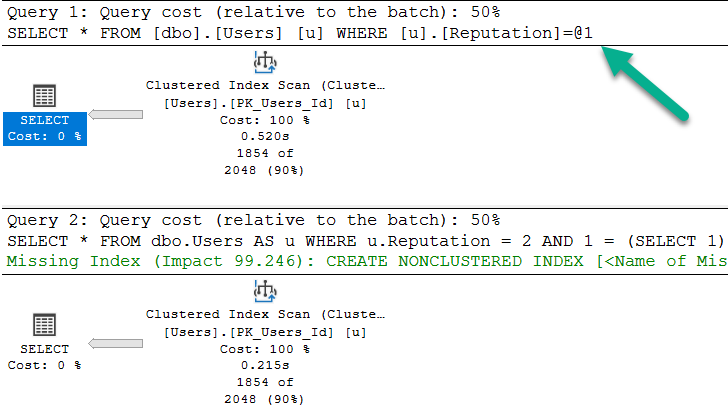
They also don’t reach the “index matching” portion of query optimization, which may trigger missing index requests, with all their fault and frailty.
	/*Nothing for you*/
	SELECT *
	FROM dbo.Users AS u
	WHERE u.Reputation = 2;

	/*Missing index requests*/
	SELECT *
	FROM dbo.Users AS u
	WHERE u.Reputation = 2
	AND 1 = (SELECT 1);
>greentext
Note that the bottom query gets a missing index request, and is not simple parameterized. The only reason the first query takes ~2x as long as the second query is because the cache was cold. In subsequent runs, they’re equal enough.
What Gets Fully Optimized?
Generally, things that introduce cost based decisions, and/or inflate the cost of a query > Cost Threshold for Parallelism.
Joins
Subqueries
Aggregations
Ordering without a supporting index
As a quick example, these two queries are fairly similar, but…
	/*Unique column*/
	SELECT TOP 1000 u.Id --Not this!
	FROM dbo.Users AS u
	GROUP BY u.Id;

	/*Non-unique column*/
	SELECT TOP 1000 u.Reputation --But this will!
	FROM dbo.Users AS u
	GROUP BY u.Reputation;
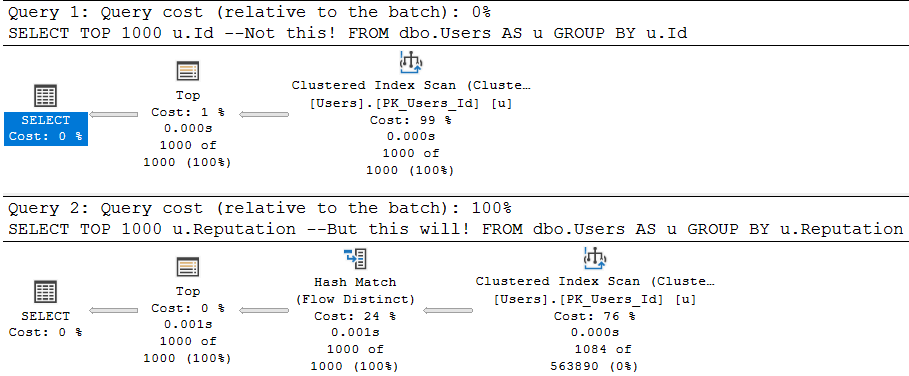
One attempts to aggregate a unique column (the pk of the Users table), and the other aggregates a non-unique column.
The optimizer is smart about this:
Flowy
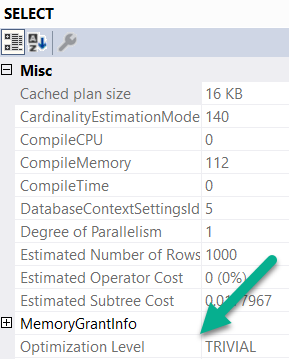
The first query is trivially optimized. If you want to see this, hit F4 when you’re looking at a query plan. Highlight the root operator (select, insert, update, delete — whatever), and look at the optimization level.
wouldacouldashoulda
Since aggregations have no effect on unique columns, the optimizer throws the group by away. Keep in mind, the optimizer has to know a column is unique for that to happen. It has to be guaranteed by a uniqueness constraint of some kind: primary key, unique index, unique constraint.
The second query introduces a choice, though! What’s the cheapest way to aggregate the Reputation column? Hash Match Aggregate? Stream Aggregate? Sort Distinct? The optimizer had to make a choice, so the optimization level is full.
What About Indexes?
Another component of trivial plan choice is when the choice of index is completely obvious. I typically see it when there’s either a) only a clustered index or b) when there’s a covering nonclustered index.
If there’s a non-covering nonclustered index, the choice of a key lookup vs. clustered index scan introduces that cost based decision, so trivial plans go out the window.
Here’s an example:
	CREATE INDEX ix_creationdate
	    ON dbo.Users(CreationDate);

	SELECT u.CreationDate, u.Id
	FROM dbo.Users AS u
	WHERE u.CreationDate >= '20131229';

	SELECT u.Reputation, u.Id
	FROM dbo.Users AS u
	WHERE u.Reputation = 2;

	SELECT u.Reputation, u.Id
	FROM dbo.Users AS u WITH(INDEX = ix_creationdate)
	WHERE u.Reputation = 2;
With an index only on CreationDate, the first query gets a trivial plan. There’s no cost based decision, and the index we created covers the query fully.
For the next two queries, the optimization level is full. The optimizer had a choice, illustrated by the third query. Thankfully it isn’t one that gets chosen unless we force the issue with a hint. It’s a very bad choice, but it exists.
When It’s Wack
Let’s say you create a constraint, because u loev ur datea.
	ALTER TABLE dbo.Users
        ADD CONSTRAINT cx_rep CHECK
			( Reputation >= 1 AND Reputation <= 2000000 );
When we run this query, our newly created and trusted constraint should let it bail out without doing any work.
	SELECT u.DisplayName, u.Age, u.Reputation
    FROM dbo.Users AS u
    WHERE u.Reputation = 0;
But two things happen:
my name is bogus
The plan is trivial, and it’s auto-parameterized.
The auto-parameterization means a plan is chosen where the literal value 0 is replaced with a parameter by SQL Server. This is normally “okay”, because it promotes plan reuse. However, in this case, the auto-parameterized plan has to be safe for any value we pass in. Sure, it was 0 this time, but next time it could be one within the range of valid reputations.
Since we don’t have an index on Reputation, we have to read the entire table. If we had an index on Reputation, it would still result in a lot of extra reads, but I’m using the clustered index here for ~dramatic effect~
Table 'Users'. Scan count 1, logical reads 44440
Of course, adding the 1 = (SELECT 1) thing to the end introduces full optimization, and prevents this.
The query plan without it is just a constant scan, and it does 0 reads.
Rounding Down
So there you have it. When you see me (or anyone else) use 1 = (SELECT 1), this is why. Sometimes when you write demos, a trivial plan or auto-parameterization can mess things up. The easiest way to get around it is to add that to the end of a query.
Thanks for reading!
Going Further
If this is the kind of SQL Server stuff you love learning about: these days I have AI do the annoying stuff for me. My new video course teaches you to work the same way, and I teach whole teams in a one-day workshop. Someone still has to know enough SQL Server to keep the robots in check, and that’s what my training is for.
In this video, I tested my SneakyTops demo in SQL Server 2019 Community Technology Preview 3.1 to see if it was still susceptible to the same issues as before. As you’ll see, I had a bit of an accident with a bottle of water during the recording, but that’s all part of the fun! The main focus was on parameter sniffing and how SQL Server’s optimizer handles top expressions with dynamic parameters. Even though I updated the parameter value to 1000 and tried recompiling the query, SQL Server still guessed 100 rows—just as it did in previous versions. This test didn’t reveal any improvements in SQL Server 2019 regarding this particular issue, which is a bit disappointing but not entirely surprising given the complexity of parameter sniffing scenarios.
Full Transcript
Yeah. So I finished recording the last video on SneakyTops. And what I realized is that I should test my SneakyTops demo in SQL Server 2019 to see if it was still susceptible to SneakyTops. So here we go. On SQL Server 2019, this is CTP 3.1. You can see down there in the corner, maybe, probably. I don’t know. If you stare hard enough, if you squint, I’ll zoom in, I guess. I suppose I’m a nice person. Oh, there we go. Wow. So that, I don’t know really how that worked out, but I’m never zooming again in this thing. So I don’t know what you saw on the screen. Could have been anything, but we’re gonna, we’re gonna leave that as is. You may have seen my Twitter mentions. You may have seen another SSMS window. I don’t care. Anyway. Point is here, I almost knocked over a bottle of water, that no matter what we do, so this expression up here, right, let’s say, right now it’s at 100, right? So if we run this query, this will run for, I don’t know, two and a half seconds. And we get back 100 rows. And if we look at what SQL Server guessed was going to come out of there, it is still 100. Okay, so we have 100 row guess. But if we update, that setting to be 1000, that setting to be 1000, and we run this again, SQL Server’s guess is going to remain at 100, right there. And even if we tag in recompile, and run this, well, SQL Server is still going to guess 100. So, this is not Freud’s fault. So what I wanted to test was the Freud inlining of functions, and see SQL Server would take this and say, hey, we can inline this function. Maybe we can guess at the outcome of it with a recompile hands or without or really just anything. Is there any change here? And there isn’t. So don’t look forward to SQL Server 2019 fixing that problem.
Again, this isn’t like the fault of Freud. This is kind of a weird thing to be doing anyway. And I didn’t, I don’t expect the optimizer to cover every single bizarre scenario that I might encounter. But I did want to, for the sake of completeness with my sneaky top, I did want to see if SQL Server 2019 helped. And it doesn’t look like the guess for a top with an expression is different here. So, and that’s fine. I again, I don’t expect that to, you know, get improved, or change even. I don’t see what the point is. Anyway, thanks for watching. I’m going to open my door and get some air conditioning now. Goodbye. Bye.
Video Summary
In this video, I tested my SneakyTops demo in SQL Server 2019 Community Technology Preview 3.1 to see if it was still susceptible to the same issues as before. As you’ll see, I had a bit of an accident with a bottle of water during the recording, but that’s all part of the fun! The main focus was on parameter sniffing and how SQL Server’s optimizer handles top expressions with dynamic parameters. Even though I updated the parameter value to 1000 and tried recompiling the query, SQL Server still guessed 100 rows—just as it did in previous versions. This test didn’t reveal any improvements in SQL Server 2019 regarding this particular issue, which is a bit disappointing but not entirely surprising given the complexity of parameter sniffing scenarios.
Full Transcript
Yeah. So I finished recording the last video on SneakyTops. And what I realized is that I should test my SneakyTops demo in SQL Server 2019 to see if it was still susceptible to SneakyTops. So here we go. On SQL Server 2019, this is CTP 3.1. You can see down there in the corner, maybe, probably. I don’t know. If you stare hard enough, if you squint, I’ll zoom in, I guess. I suppose I’m a nice person. Oh, there we go. Wow. So that, I don’t know really how that worked out, but I’m never zooming again in this thing. So I don’t know what you saw on the screen. Could have been anything, but we’re gonna, we’re gonna leave that as is. You may have seen my Twitter mentions. You may have seen another SSMS window. I don’t care. Anyway. Point is here, I almost knocked over a bottle of water, that no matter what we do, so this expression up here, right, let’s say, right now it’s at 100, right? So if we run this query, this will run for, I don’t know, two and a half seconds. And we get back 100 rows. And if we look at what SQL Server guessed was going to come out of there, it is still 100. Okay, so we have 100 row guess. But if we update, that setting to be 1000, that setting to be 1000, and we run this again, SQL Server’s guess is going to remain at 100, right there. And even if we tag in recompile, and run this, well, SQL Server is still going to guess 100. So, this is not Freud’s fault. So what I wanted to test was the Freud inlining of functions, and see SQL Server would take this and say, hey, we can inline this function. Maybe we can guess at the outcome of it with a recompile hands or without or really just anything. Is there any change here? And there isn’t. So don’t look forward to SQL Server 2019 fixing that problem.
Again, this isn’t like the fault of Freud. This is kind of a weird thing to be doing anyway. And I didn’t, I don’t expect the optimizer to cover every single bizarre scenario that I might encounter. But I did want to, for the sake of completeness with my sneaky top, I did want to see if SQL Server 2019 helped. And it doesn’t look like the guess for a top with an expression is different here. So, and that’s fine. I again, I don’t expect that to, you know, get improved, or change even. I don’t see what the point is. Anyway, thanks for watching. I’m going to open my door and get some air conditioning now. Goodbye. Bye.
Going Further
If this is the kind of SQL Server stuff you love learning about: these days I have AI do the annoying stuff for me. My new video course teaches you to work the same way, and I teach whole teams in a one-day workshop. Someone still has to know enough SQL Server to keep the robots in check, and that’s what my training is for.
In this video, I delve into a clever but sneaky use of user functions within SQL queries that can lead to unexpected behavior and potential security issues. Specifically, I explore how a seemingly innocuous function call can disrupt query parallelism and how different workarounds like using variables or dynamic SQL might seem like solutions but come with their own set of challenges, such as plan caching and performance variability. I also touch on the security implications of these techniques, particularly when it comes to dynamically constructing queries based on user inputs, and offer some practical advice on mitigating risks while still achieving desired functionality.
Full Transcript
Hello, Erik Darling here with Erik Darling Data in the midst of a heat crisis. It’s terrible. I was recently advised that what I thought was fluid in my ears was actually just pressure escaping my sinuses via my most, apparently, the narrowest ear canals that have ever been designed by God or man and put inside someone’s head. So anyway, I wanted to talk about a very sneaky place that I saw a function today. And it was just so stupendously clever of a place to see a function end up. And it looked exactly, the query, I mean, didn’t look like this because it’s not Stack Overflow, but it looked close enough to this to, you know, to give you a good idea of what happened. Where there was a user function, which took a, I mean, it didn’t just take a, this thing, there was like a whole thing that like, you know, figured out what the user was and other stuff and whatever. This is just simpler for me to write. I’m not that smart. So anyway, what happens is if we run this and we just look at what happens when we run this function, we get back to number 100. So the purpose of this function inside this expression right here was to return whatever a particular user setting was for how many rows they wanted to get back at once. So you could run this query, and I bet you thought that would throw an error, but it doesn’t. We can run this query, and we can get back our 100 rows, and we have, you know, whatever, we have an execution plan. And when we dug a little bit deeper into what was going on, the function looked something a little bit like this, where you would go look at a table called user settings or something, and you would return some values and, you know, kind of like stuff that a regular function does. And there was a table that backed it up with a row in it that looked like that. Okay, pretty simple. Not bad.
So, but, you know, when we run it, you know, we go do this, and we run our query with our function in it. This, even though we’re only setting a value for the top expression up here, we still hit the same exact problem that functions cause just about anywhere else in the known SQL universe where they prevent our query from running in parallel. We cannot generate a valid parallel plan with that function even up in the top here. So, that’s kind of a downer, right? So, one way around that, potentially, is to set top equal to a variable, and when we do that, we will get back a slightly faster version of our query that went parallel, right? So, we see a parallel plan down here, and all the pain of, I mean, all the forced serialization associated with that scalar value function happen up here where we declare the variable, and not down here where we mess with anything.
So, that’s an okay solution, and I think I’ve blogged about this before. I might even have another video on it. I’m not sure at this point. I’ve written a lot and videoed a lot. I lose track, and my brain is full of mush and wet newspapers and hairballs, so, and apparently, a lot of pressure that just escapes and feels like there’s fluid in my head, so that’s nice, too. So, yeah, one way around it is to potentially, I mean, like, I messed that up. The problem, we just showed a potential workaround.
The problem with that workaround, there we go, is that no matter what number we declare up here, because this is a declared variable, it has the same-ish local variable effect with being in a top expression, is when you put it in, like, a where clause or something, where SQL Server just has a, like, a solid, a steady guess for what it’s going to use for a number, it doesn’t actually change that. So, we could put 10,000 up there. I’m going to free the proc cache, so we know that we’re not reusing that plan at all, right?
So, we can just be pretty sure that the plan that SQL Server is coming up with is a new one. I can’t use recompile here, and I’ll show you why in a second. So, if we free the proc cache, and I select 10,000 rows, and I look at how many SQL Server is estimating up here, it’ll be 100 rows right there. So, that’s not very good, and it doesn’t matter if I put in 1,000, 5,000, 50,000, if I go and run that and return some rows.
SQL Server’s guess is always going to be 100 right here. So, that’s not ideal, because if you are selecting way more than 100 rows in your top, SQL Server might choose different plans based on different row goals, right?
So, that’s not great. So, your options are, of course, a recompile hint. If we stick a recompile hint in there, then SQL Server will all of a sudden magically understand that we wanted 1,000 rows, and not just 100 rows. So, there’s that, which is okay.
But with anything, when I’m saying recompile, I’m not worried about burning down the house with CPU. I’m more worried about the forensic aspect of things. So, like, you know, you have this query in there with recompile, and it might be a very important query, and now all of a sudden you’ve got no history of it in your plan cache, right?
So, like, every time this runs, SQL Server’s going to not cache a plan, say, we don’t need to bother with this. And if we wanted to troubleshoot performance with this query, we wouldn’t have a really good way to do it, right? We would have, like, no history of this query at all in there. So, one thing, well, a couple things you can do that can help.
Well, one of them is dynamic SQL. And this is safer or more safe or even more safer or more safer or more safer. But this is ultimately sniffable.
When we use totally safe dynamic SQL, it gets treated like a stored procedure in that this variable gets sniffed, or this parameter gets sniffed because we’re passing it in as a parameter down here. So, if we put 100 in the first time and we use 1,000 the second time, SQL Server will reuse the plan for 100 unless something happened where it needed to come up with a new plan.
Anyway, this is less safe but also less sniffable. Cool. All right. So, you can use a variable like this. And you can use, like, rtrim or you can say convert top barcar whatever 11, 52, 78, 25 hike. Whatever you want to do in here to make this a concatenatable from an integer to a concatenatable string value in here.
And you can execute that. And this will have a lower chance of reusing a plan. I’m not going to say it’s 100% never going to reuse a plan, but it’s a lower chance. A lower chance.
But this kind of comes back to, well, not the same problem as recompile where you would have no plans in the cache, but sort of the opposite problem of recompile where you could, depending on how popular this query is, you could have a bunch of plans in the cache. You could have a whole mess of stuff that’s coming in with all these top however many row queries. And, you know, again, you know, whenever we talk about dynamic SQL like this, you know, everyone has to talk about SQL injection and, you know, the potential security risk and how that can be a pretty big downfall with this stuff.
And I agree it is. You know, I will say that, you know, the chance is, the chance of someone coming in and, like, you know, dropping tables or doing anything crazy is lessened a bit because this is an integer value up here. Right?
So, I mean, to my mind, it’s, like, hard to figure out a way to pass in something as an integer that would be validated here that could then be transformed down here in a way that would, you know, execute an extra command. Right?
Like, it’s hard for me to figure that out. I’m sure someone out there is smart enough to do it. It’s just not me. But one thing you can do, even with totally safe dynamic SQL, is something like this. Now, you can explore a little bit of user function stuff with these functions up here and these built-in functions. And, granted, you can restrict access to these via the appropriate permissions.
But that’s hard. And a lot of times, the app login needs elevated permissions to do weird stuff, create tables, create databases. Oftentimes, applications, like, at minimum, kind of want DB owner.
And so that makes it a little bit harder to, like, you know, revoke or deny sort of basic privileges. But one thing I want to point out here is that if I run these queries, right? So if I run select suzer sid, I get OXO1 back. And I can convert that to an integer, which is 1.
And then if I run suzer name with 1, I get back SA. So SA is always 1. SA always has this OXO1. And so what I can do that’s kind of sneaky, even with totally safe dynamic SQL, is say I want my top to be 1000 plus converting suzer sid to an int. And when I run this, instead of getting 1,000 rows back, I get back, oops, there we go, 1,001 rows, which isn’t, again, a performance issue, but it is one way that someone perhaps a bit on the clever side could mess up or could get some extra information without doing anything too crazy.
They could figure out which, well, I mean, at least which login was coming. I mean, if they were logged in as SA, if they get one back, if they get back a number higher than one, then, you know, they maybe do something else to figure that out.
Anyway, that’s with the safe version of dynamic SQL. Even with that, you can play some tricks. So it would be up to, like, you know, someone on the front end to validate, you know, that there’s nothing weird coming in for, like, wherever someone enters in 1,000. Like, use a drop-down menu with static numbers in it or validate your inputs.
Again, everyone should validate their inputs. Anyway, that’s all I wanted to talk about. We’re a little over 10 minutes, which is longer than I wanted, but I messed up a time or two. Sorry about that.
I blame it on the pressure leaking out of my skull. Anyway, thanks for watching, and I will see you in another video, perhaps. Goodbye. Goodbye.
Video Summary
In this video, I delve into a clever but sneaky use of user functions within SQL queries that can lead to unexpected behavior and potential security issues. Specifically, I explore how a seemingly innocuous function call can disrupt query parallelism and how different workarounds like using variables or dynamic SQL might seem like solutions but come with their own set of challenges, such as plan caching and performance variability. I also touch on the security implications of these techniques, particularly when it comes to dynamically constructing queries based on user inputs, and offer some practical advice on mitigating risks while still achieving desired functionality.
Full Transcript
Hello, Erik Darling here with Erik Darling Data in the midst of a heat crisis. It’s terrible. I was recently advised that what I thought was fluid in my ears was actually just pressure escaping my sinuses via my most, apparently, the narrowest ear canals that have ever been designed by God or man and put inside someone’s head. So anyway, I wanted to talk about a very sneaky place that I saw a function today. And it was just so stupendously clever of a place to see a function end up. And it looked exactly, the query, I mean, didn’t look like this because it’s not Stack Overflow, but it looked close enough to this to, you know, to give you a good idea of what happened. Where there was a user function, which took a, I mean, it didn’t just take a, this thing, there was like a whole thing that like, you know, figured out what the user was and other stuff and whatever. This is just simpler for me to write. I’m not that smart. So anyway, what happens is if we run this and we just look at what happens when we run this function, we get back to number 100. So the purpose of this function inside this expression right here was to return whatever a particular user setting was for how many rows they wanted to get back at once. So you could run this query, and I bet you thought that would throw an error, but it doesn’t. We can run this query, and we can get back our 100 rows, and we have, you know, whatever, we have an execution plan. And when we dug a little bit deeper into what was going on, the function looked something a little bit like this, where you would go look at a table called user settings or something, and you would return some values and, you know, kind of like stuff that a regular function does. And there was a table that backed it up with a row in it that looked like that. Okay, pretty simple. Not bad.
So, but, you know, when we run it, you know, we go do this, and we run our query with our function in it. This, even though we’re only setting a value for the top expression up here, we still hit the same exact problem that functions cause just about anywhere else in the known SQL universe where they prevent our query from running in parallel. We cannot generate a valid parallel plan with that function even up in the top here. So, that’s kind of a downer, right? So, one way around that, potentially, is to set top equal to a variable, and when we do that, we will get back a slightly faster version of our query that went parallel, right? So, we see a parallel plan down here, and all the pain of, I mean, all the forced serialization associated with that scalar value function happen up here where we declare the variable, and not down here where we mess with anything.
So, that’s an okay solution, and I think I’ve blogged about this before. I might even have another video on it. I’m not sure at this point. I’ve written a lot and videoed a lot. I lose track, and my brain is full of mush and wet newspapers and hairballs, so, and apparently, a lot of pressure that just escapes and feels like there’s fluid in my head, so that’s nice, too. So, yeah, one way around it is to potentially, I mean, like, I messed that up. The problem, we just showed a potential workaround.
The problem with that workaround, there we go, is that no matter what number we declare up here, because this is a declared variable, it has the same-ish local variable effect with being in a top expression, is when you put it in, like, a where clause or something, where SQL Server just has a, like, a solid, a steady guess for what it’s going to use for a number, it doesn’t actually change that. So, we could put 10,000 up there. I’m going to free the proc cache, so we know that we’re not reusing that plan at all, right?
So, we can just be pretty sure that the plan that SQL Server is coming up with is a new one. I can’t use recompile here, and I’ll show you why in a second. So, if we free the proc cache, and I select 10,000 rows, and I look at how many SQL Server is estimating up here, it’ll be 100 rows right there.
So, that’s not very good, and it doesn’t matter if I put in 1,000, 5,000, 50,000, if I go and run that and return some rows. SQL Server’s guess is always going to be 100 right here. So, that’s not ideal, because if you are selecting way more than 100 rows in your top, SQL Server might choose different plans based on different row goals, right?
So, that’s not great. So, your options are, of course, a recompile hint. If we stick a recompile hint in there, then SQL Server will all of a sudden magically understand that we wanted 1,000 rows, and not just 100 rows. So, there’s that, which is okay.
But with anything, when I’m saying recompile, I’m not worried about burning down the house with CPU. I’m more worried about the forensic aspect of things. So, like, you know, you have this query in there with recompile, and it might be a very important query, and now all of a sudden you’ve got no history of it in your plan cache, right?
So, like, every time this runs, SQL Server’s going to not cache a plan, say, we don’t need to bother with this. And if we wanted to troubleshoot performance with this query, we wouldn’t have a really good way to do it, right? We would have, like, no history of this query at all in there.
So, one thing, well, a couple things you can do that can help. Well, one of them is dynamic SQL. And this is safer or more safe or even more safer or more safer or more safer.
But this is ultimately sniffable. When we use totally safe dynamic SQL, it gets treated like a stored procedure in that this variable gets sniffed, or this parameter gets sniffed because we’re passing it in as a parameter down here.
So, if we put 100 in the first time and we use 1,000 the second time, SQL Server will reuse the plan for 100 unless something happened where it needed to come up with a new plan. Anyway, this is less safe but also less sniffable.
Cool. All right. So, you can use a variable like this. And you can use, like, rtrim or you can say convert top barcar whatever 11, 52, 78, 25 hike. Whatever you want to do in here to make this a concatenatable from an integer to a concatenatable string value in here.
And you can execute that. And this will have a lower chance of reusing a plan. I’m not going to say it’s 100% never going to reuse a plan, but it’s a lower chance.
A lower chance. But this kind of comes back to, well, not the same problem as recompile where you would have no plans in the cache, but sort of the opposite problem of recompile where you could, depending on how popular this query is, you could have a bunch of plans in the cache.
You could have a whole mess of stuff that’s coming in with all these top however many row queries. And, you know, again, you know, whenever we talk about dynamic SQL like this, you know, everyone has to talk about SQL injection and, you know, the potential security risk and how that can be a pretty big downfall with this stuff.
And I agree it is. You know, I will say that, you know, the chance is, the chance of someone coming in and, like, you know, dropping tables or doing anything crazy is lessened a bit because this is an integer value up here.
Right? So, I mean, to my mind, it’s, like, hard to figure out a way to pass in something as an integer that would be validated here that could then be transformed down here in a way that would, you know, execute an extra command.
Right? Like, it’s hard for me to figure that out. I’m sure someone out there is smart enough to do it.
It’s just not me. But one thing you can do, even with totally safe dynamic SQL, is something like this. Now, you can explore a little bit of user function stuff with these functions up here and these built-in functions.
And, granted, you can restrict access to these via the appropriate permissions. But that’s hard. And a lot of times, the app login needs elevated permissions to do weird stuff, create tables, create databases.
Oftentimes, applications, like, at minimum, kind of want DB owner. And so that makes it a little bit harder to, like, you know, revoke or deny sort of basic privileges. But one thing I want to point out here is that if I run these queries, right?
So if I run select suzer sid, I get OXO1 back. And I can convert that to an integer, which is 1. And then if I run suzer name with 1, I get back SA.
So SA is always 1. SA always has this OXO1. And so what I can do that’s kind of sneaky, even with totally safe dynamic SQL, is say I want my top to be 1000 plus converting suzer sid to an int.
And when I run this, instead of getting 1,000 rows back, I get back, oops, there we go, 1,001 rows, which isn’t, again, a performance issue, but it is one way that someone perhaps a bit on the clever side could mess up or could get some extra information without doing anything too crazy.
They could figure out which, well, I mean, at least which login was coming. I mean, if they were logged in as SA, if they get one back, if they get back a number higher than one, then, you know, they maybe do something else to figure that out.
Anyway, that’s with the safe version of dynamic SQL. Even with that, you can play some tricks. So it would be up to, like, you know, someone on the front end to validate, you know, that there’s nothing weird coming in for, like, wherever someone enters in 1,000.
Like, use a drop-down menu with static numbers in it or validate your inputs. Again, everyone should validate their inputs. Anyway, that’s all I wanted to talk about.
We’re a little over 10 minutes, which is longer than I wanted, but I messed up a time or two. Sorry about that. I blame it on the pressure leaking out of my skull. Anyway, thanks for watching, and I will see you in another video, perhaps.
Goodbye. Goodbye.
Going Further
If this is the kind of SQL Server stuff you love learning about: these days I have AI do the annoying stuff for me. My new video course teaches you to work the same way, and I teach whole teams in a one-day workshop. Someone still has to know enough SQL Server to keep the robots in check, and that’s what my training is for.
After a while tuning a query, sometimes it’s fun to mess with the DOP it’s run at to see how things change.
I wouldn’t consider this a query tuning technique, more like a point of interest.
For a long time, when I’d look at a serial plan, and then a parallel plan for a query, the shape would be the same.
But that’s not always true.
DOP 1
At DOP 1, the plan looks like this:
Mergey-Toppy
DOP 2
At DOP 2, the plan looks like this:
Tutu
Mo’ DOP
At DOP 3-8, the plan looks like this:
Shapewear
No DOP
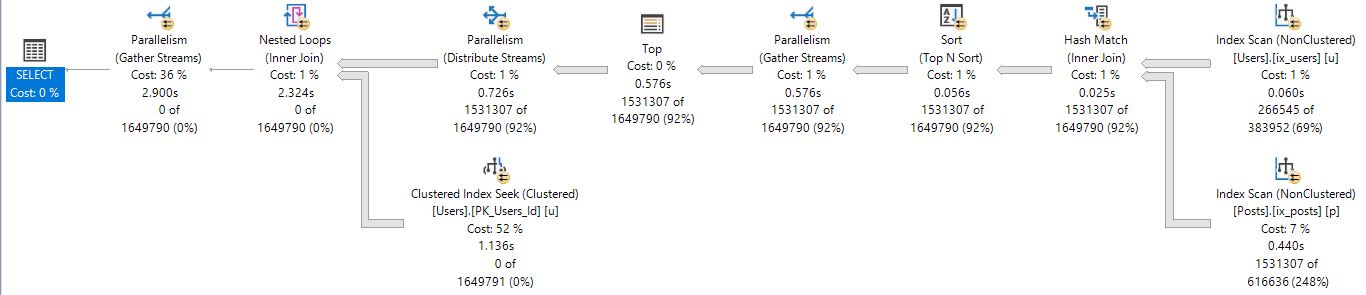
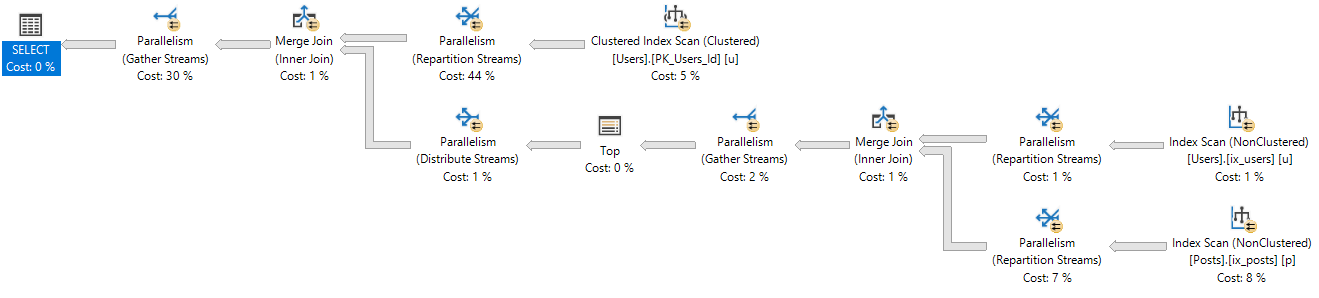
The DOP 2 plan has a significantly different shape than the serial, or more parallel plans.
It also chooses different types of joins.
Of course, we can use a merge join hint to have it pick the same plan as higher DOPs, but where’s the fun in that?
Anyway, the reason I found this interesting is because I always thought the general optimization process was:
Come up with a serial plan
If the plan cost is > CTFP, look at the parallel version of the serial plan
If the parallel version is cheaper, go with it
Though it appears like there’s an extra step where the optimizer considers multiple parallel alternatives to the serial plan, and not just the parallel version of the serial plan.
The process is closer to:
Come up with a serial plan
If the plan cost is > CTFP, create a *NEW* plan using parallelism
If the parallel version is cheaper, go with it
In many cases, the *NEW* plan will be the “same” as the serial plan, just using parallelism. The optimizer is a creature of habit, and applies the same rules and transformations.
Thanks for reading!
Going Further
If this is the kind of SQL Server stuff you love learning about: these days I have AI do the annoying stuff for me. My new video course teaches you to work the same way, and I teach whole teams in a one-day workshop. Someone still has to know enough SQL Server to keep the robots in check, and that’s what my training is for.
A lot of people still expect odd things from CTEs.
Performance fences
Cached results
There’s no clue in how they’re written that you won’t get those.
I’ve gone back and forth on whether or not this would be worthwhile. It totally could be, but it’d have to be pretty thoughtful.
Materialization vs. Fencing
The difference here is subtle but necessary. Right now, people will use TOP, which sets a row goal, and provides some logical isolation of the query in your CTE.
The problem remains that if that CTE is referenced via join > 1 time, the internal syntax is re-run each time.
Even if your query is fenced off, it is not materialized.
Fencing could leverage existing NOEXPAND hints, but materialization would likely require a new hint that performed the equivalent of SELECT… INTO #t, and then replaced references to the CTE alias with a pointer to the temporary object.
Indexing
One appeal of temp tables is that there is additional indexing flexibility, so any syntax would have to allow existing inline index syntax of temp tables to be used.
In other words, an index that may not make sense on a real table given your existing workload might make sense on a temp table. Or like, if a temp table is the result of joining two tables together, there could be a compound index you could create on the temp table that’s otherwise impossible to create.
Next feature request: multi-table indexes ?
Thanks for reading!
Going Further
If this is the kind of SQL Server stuff you love learning about: these days I have AI do the annoying stuff for me. My new video course teaches you to work the same way, and I teach whole teams in a one-day workshop. Someone still has to know enough SQL Server to keep the robots in check, and that’s what my training is for.
Often when query tuning, I’ll try a change that I think makes sense, only to have it backfire.
It’s not that the query got slower, it’s that the results that came back were wrong different.
Now, this can totally happen because of a bug in previously used logic, but that’s somewhat rare.
And wrong different results make testers nervous. Especially in production.
Here’s a Very Cheeky™ example.
Spread’em
This is my starting query. If I run it enough times, I’ll get a billion missing index requests.
WITH topusers AS
(
    SELECT   TOP (1)
             u.Id, u.DisplayName
    FROM     dbo.Users AS u
    ORDER BY u.Reputation DESC
)
SELECT   u.Id,
         u.DisplayName,
         SUM(p.Score * 1.0) AS PostScore,
         SUM(c.Score * 1.0) AS CommentScore,
         COUNT_BIG(*) AS CountForSomeReason
FROM     topusers AS u
JOIN     dbo.Posts AS p
    ON p.OwnerUserId = u.Id
JOIN     dbo.Comments AS c
    ON c.UserId = u.Id
WHERE    p.Score >= 5
AND      c.Score >= 1
GROUP BY u.Id, u.DisplayName;
For the sake of argument, I’ll add them all. Here they are:
CREATE INDEX ix_tabs
    ON dbo.Users ( Reputation DESC, Id )
    INCLUDE ( DisplayName );

CREATE INDEX ix_spaces
    ON dbo.Users ( Id, Reputation DESC )
    INCLUDE ( DisplayName );

CREATE INDEX ix_coke
    ON dbo.Comments ( Score) INCLUDE( UserId );

CREATE INDEX ix_pepsi
    ON dbo.Posts ( Score ) INCLUDE( OwnerUserId );

CREATE NONCLUSTERED INDEX ix_tastes_great
    ON dbo.Posts ( OwnerUserId, Score );

CREATE NONCLUSTERED INDEX ix_less_filling
    ON dbo.Comments ( UserId, Score );
With all those indexes, the query is still dog slow.
Maybe It’s Me
I’ll take my own advice. Let’s break the query up a little bit.
DROP TABLE IF EXISTS #topusers;

WITH topusers AS
(
    SELECT   TOP (1)
             u.Id, u.DisplayName
    FROM     dbo.Users AS u
    ORDER BY u.Reputation DESC
)
SELECT *
INTO #topusers
FROM topusers;

CREATE UNIQUE CLUSTERED INDEX ix_whatever
    ON #topusers(Id);

SELECT   u.Id,
         u.DisplayName,
         SUM(p.Score * 1.0) AS PostScore,
         SUM(c.Score * 1.0) AS CommentScore,
         COUNT_BIG(*) AS CountForSomeReason
FROM     #topusers AS u
JOIN     dbo.Posts AS p
    ON p.OwnerUserId = u.Id
JOIN     dbo.Comments AS c
    ON c.UserId = u.Id
WHERE    p.Score >= 5
AND      c.Score >= 1
GROUP BY u.Id, u.DisplayName;
Still dog slow.
Variability
Alright, I’m desperate now. Let’s try this.
DECLARE @Id INT,
        @DisplayName NVARCHAR(40);

SELECT   TOP (1)
            @Id = u.Id,
		    @DisplayName = u.DisplayName
FROM     dbo.Users AS u
ORDER BY u.Reputation DESC;


SELECT   @Id AS Id,
         @DisplayName AS DisplayName,
         SUM(p.Score * 1.0) AS PostScore,
         SUM(c.Score * 1.0) AS CommentScore,
         COUNT_BIG(*) AS CountForSomeReason
FROM dbo.Posts AS p
JOIN  dbo.Comments AS c
    ON c.UserId = p.OwnerUserId
WHERE    p.Score >= 5
AND      c.Score >= 1
AND      (c.UserId = @Id OR @Id IS NULL)
AND      (p.OwnerUserId = @Id OR @Id IS NULL);
Let’s get some worst practices involved. That always goes well.
Except here.
Getting the right results seemed like it was destined to be slow.
Differently Resulted
At this point, I tried several rewrites that were fast, but wrong.
What I had missed, and what Joe Obbish pointed out to me, is that I needed a cross join and some math to make it all work out.
WITH topusers AS
(
    SELECT   TOP (1)
             u.Id, u.DisplayName
    FROM     dbo.Users AS u
    ORDER BY u.Reputation DESC
)
SELECT     t.Id AS Id,
           t.DisplayName AS DisplayName,
           p_u.PostScoreSub * c_u.CountCSub AS PostScore,
           c_u.CommentScoreSub * p_u.CountPSub AS CommentScore,
           c_u.CountCSub * p_u.CountPSub AS CountForSomeReason
FROM       topusers AS t
JOIN       (   SELECT   p.OwnerUserId,
                        SUM(p.Score * 1.0) AS PostScoreSub,
						COUNT_BIG(*) AS CountPSub
               FROM     dbo.Posts AS p
               WHERE    p.Score >= 5
               GROUP BY p.OwnerUserId ) AS p_u
			   ON p_u.OwnerUserId = t.Id
CROSS JOIN (   SELECT   c.UserId, SUM(c.Score * 1.0) AS CommentScoreSub, COUNT_BIG(*) AS CountCSub
               FROM     dbo.Comments AS c
               WHERE    c.Score >= 1
               GROUP BY c.UserId ) AS c_u
               WHERE c_u.UserId = t.Id;
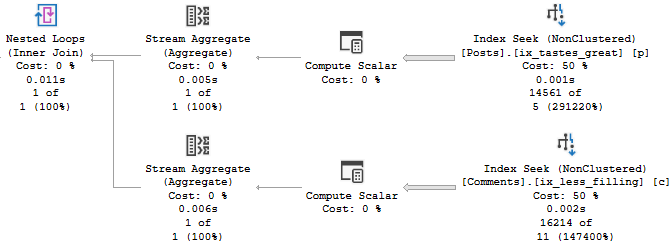
This finishes instantly, with the correct results.
The value of a college education!
Realizations and Slowness
After thinking about Joe’s rewrite, I had a terrible thought.
All the rewrites that were correct but slow had gone parallel.
“Parallel”
Allow me to illustrate.
In a row?
Repartition Streams usually does the opposite.
But here, it puts all the rows on a single thread.
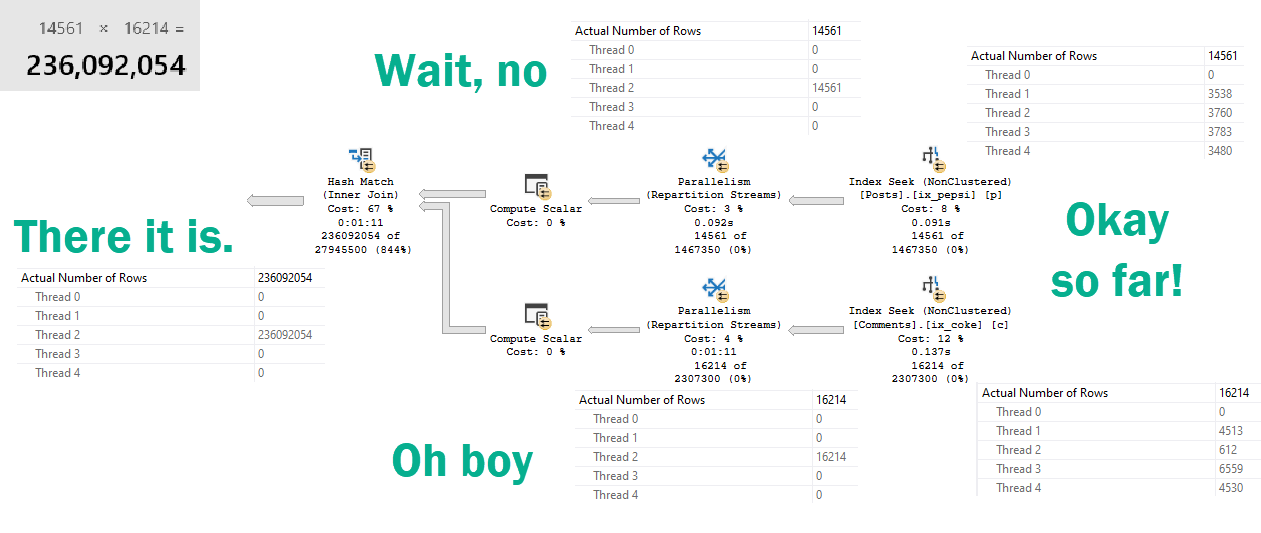
“For correctness”
Which ends up in a 236 million row parallel-but-single-threaded-cross-hash-join.
SQL Server uses the correct join (inner or outer) and adds projections where necessary to honour all the semantics of the original query when performing internal translations between apply and join.
The differences in the plans can all be explained by the different semantics of aggregates with and without a group by clause in SQL Server.
What’s amazing and frustrating about the optimizer is that it considers all sorts of different ways to rewrite your query.
In milliseconds.
It may have even thought about a plan that would have been very fast.
But we ended up with this one, because it looked cheap.
Untuneable
The plan for Joe’s version of the query is amazingly simple.
Bruddah.
Sometimes giving the optimizer a different query to work with helps, and sometimes it doesn’t.
Rewriting queries is tough business. When you change things and still get the same plan, it can be really frustrating.
Just know that behind the scenes the optimizer is working hard to rewrite your queries, too.
If you really want to change the execution plan you end up with, you need to present the logic to the optimizer in different ways, and often with different indexes to use.
Other times, you just gotta ask Joe.
Thanks for reading!
Going Further
If this is the kind of SQL Server stuff you love learning about: these days I have AI do the annoying stuff for me. My new video course teaches you to work the same way, and I teach whole teams in a one-day workshop. Someone still has to know enough SQL Server to keep the robots in check, and that’s what my training is for.
In SQL Server 2019, a few cool performance features under the intelligent query processing umbrella depend on cardinality estimation.
Batch Mode For Row Store (which triggers the next two things)
Adaptive Joins
Memory Grant Feedback
If SQL Server doesn’t estimate > 130k(ish) rows are gonna hop on through your query, you don’t get the Batch Mode processing that allows for Adaptive Joins and Memory Grant feedback. If you were planning on those things helping with parameter sniffing, you now have something else to contend with.
Heft
Sometimes you might get a plan with all that stuff in it. Sometimes you might not.
The difference between a big plan and little plan just got even more confusing.
Let’s say you have a stored procedure that looks like this:
CREATE OR ALTER PROCEDURE dbo.lemons(@PostTypeId INT)
AS
BEGIN

    SELECT OwnerUserId,
	       PostTypeId,
		   SUM(Score * 1.0) AS TotalScore,
		   COUNT_BIG(*) AS TotalPosts
	FROM dbo.Posts AS p
	JOIN dbo.Users AS u
	    ON p.OwnerUserId = u.Id
	WHERE PostTypeId = @PostTypeId
	AND u.Reputation > 1
	GROUP BY OwnerUserId,
             PostTypeId
	HAVING COUNT_BIG(*) > 100;

END
GO
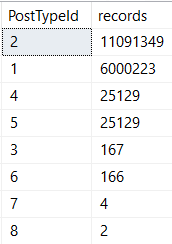
There’s quite a bit of skew between post types!
Working my way down
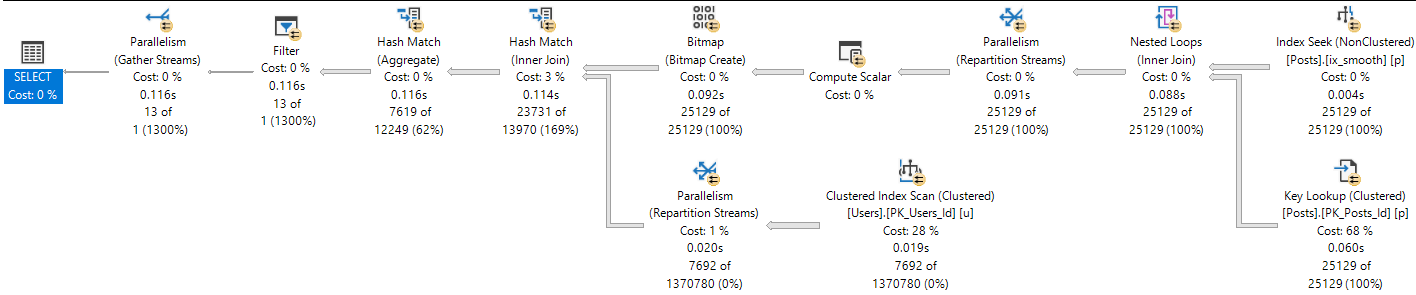
Which means different parameters will get different plans, depending on which one comes first.
At 12 seconds, one might accuse our query of sub-par performance.
One and Lonely
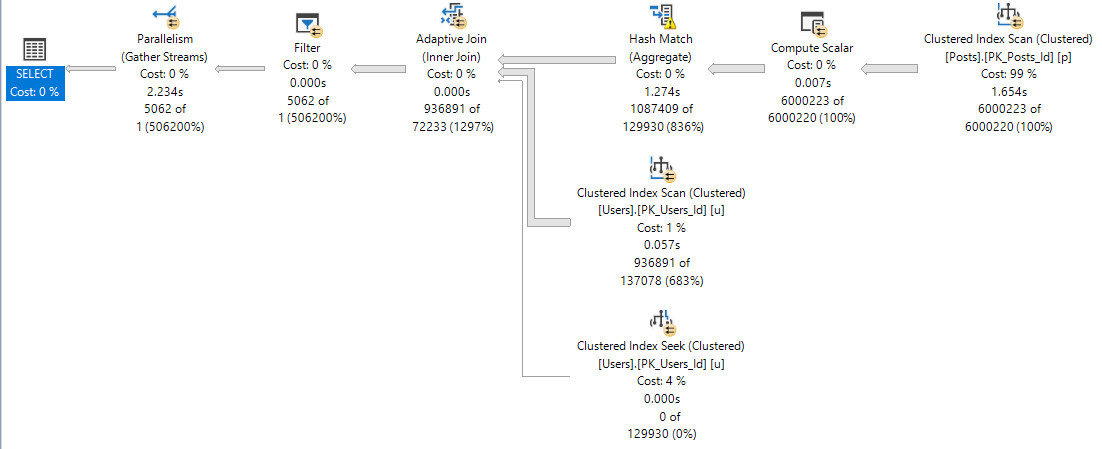
When one runs first, the plan is insanely different.
22 2s
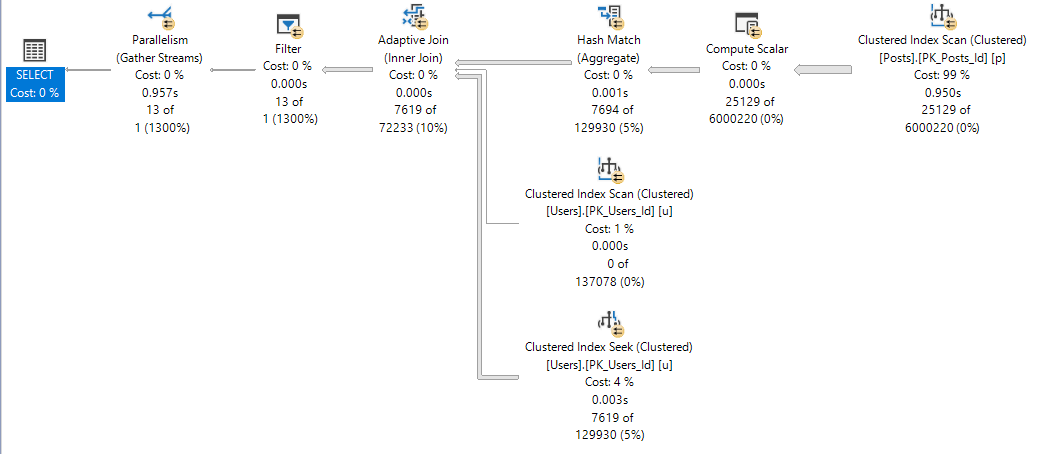
It’s about 10 seconds faster. And the four plan?
Not too shabby.
Four play
We notice the difference between 116ms and 957ms in SSMS.
Are application end users aware of ~800ms? Sometimes I wonder.
Alma Matters
The adaptive join plan with batch mode operators is likely a better plan for a wider range of values than the small plan.
Batch mode is generally more efficient with larger row counts. The adaptive join means no one who doesn’t belong in nested loops hell will get stuck there (probably), and SQL Server will take a look at the query in between runs to try to find a happy memory grant medium (this doesn’t always work splendidly, but I like the effort).
Getting to the point, if you’re going to SQL Server 2019, and you want to get all these new goodies to help you avoid parameter sniffing, you’re gonna have to start getting used to those OPTIMIZE FOR hints, and using a value that results in getting the adaptive plan.
I wish there was a query hint that pushed the optimizer towards picking this sort of plan, so we don’t have to rely on potentially changing values to optimize for.
Thanks for reading!
Going Further
If this is the kind of SQL Server stuff you love learning about: these days I have AI do the annoying stuff for me. My new video course teaches you to work the same way, and I teach whole teams in a one-day workshop. Someone still has to know enough SQL Server to keep the robots in check, and that’s what my training is for.
Rounding out a few posts about SQL Server’s choice of one or more indexes depending on the cardinality estimates of literal values.
Today we’re going to look at how indexes can contribute to parameter sniffing issues.
It’s Friday and I try to save the real uplifting stuff for these posts.
Procedural
Here’s our stored procedure! A real beaut, as they say.
CREATE OR ALTER PROCEDURE dbo.lemons(@Score INT)
AS
BEGIN
    SELECT TOP (1000)
	       p.Id,
           p.AcceptedAnswerId,
           p.AnswerCount,
           p.CommentCount,
           p.CreationDate,
           p.LastActivityDate,
		   DATEDIFF( DAY,
		             p.CreationDate,
					 p.LastActivityDate
				   ) AS LastActivityDays,
           p.OwnerUserId,
           p.Score,
		   u.DisplayName,
		   u.Reputation
	FROM dbo.Posts AS p
	JOIN dbo.Users AS u
	    ON u.Id = p.OwnerUserId
	WHERE p.PostTypeId = 1
	AND   p.Score > @Score
	ORDER BY u.Reputation DESC;
END
GO
Here are the indexes we currently have.
CREATE INDEX smooth
    ON dbo.Posts(Score, OwnerUserId);

CREATE INDEX chunky
    ON dbo.Posts(OwnerUserId, Score)
	INCLUDE(AcceptedAnswerId, AnswerCount, CommentCount, CreationDate, LastActivityDate);
Looking at these, it’s pretty easy to imagine scenarios where one or the other might be chosen.
Heck, even a dullard like myself could figure it out.
Rare Score
Running the procedure for an uncommon score, we get a tidy little loopy little plan.
EXEC dbo.lemons @Score = 385;
It’s hard to hate a plan that sinishes in 59ms
Of course, that plan applied to a less common score results in tomfoolery of the highest order.
Lowest order?
I’m not sure.
Except when it takes 14 seconds.
In both of these queries, we used our “smooth” index.
Who created that thing? We don’t know. It’s been there since the 90s.
Sloane Square
If we recompile, and start with 0 first, we get a uh…
Well darnit
We get an equally little loopy little plan.
The difference? Join order, and now we use our chunky index.
Running our procedure for the uncommon value…
Don’t make fun of me later.
Well, that doesn’t turn out so bad either.
Pound Sand
When you’re troubleshooting parameter sniffing, the plans might not be totally different.
Sometimes a subtle change of index usage can really throw gas on things.
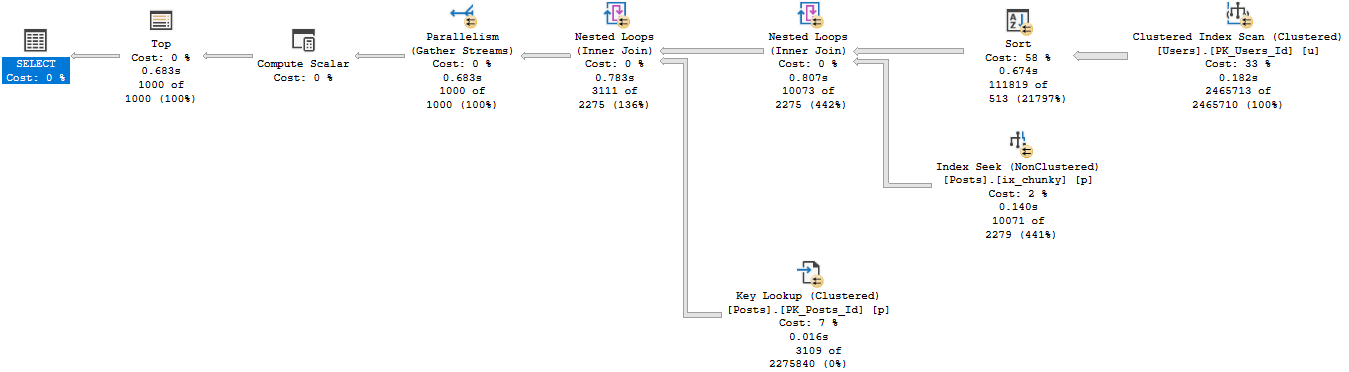
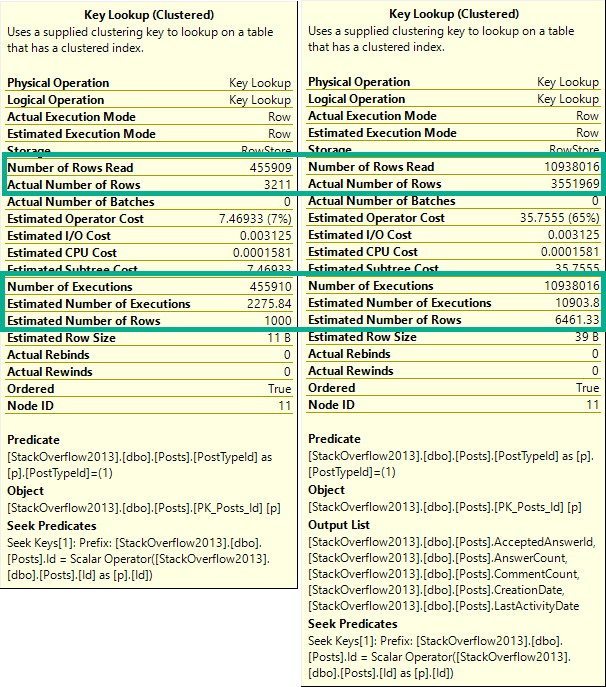
It’s also a good example of how Key Lookups aren’t always a huge problem.
Both plans had them, just in different places.
Which one is bad?
It would be hard to figure out if one is good or bad in estimated or cached plans.
Especially because they only tell you compile time parameters, and not runtime parameters.
Neither one is a good time parameter.
Thanks for reading!
Going Further
If this is the kind of SQL Server stuff you love learning about: these days I have AI do the annoying stuff for me. My new video course teaches you to work the same way, and I teach whole teams in a one-day workshop. Someone still has to know enough SQL Server to keep the robots in check, and that’s what my training is for.