Video: How The Right Indexes Help SQL Server Make Better Use Of Memory

Sphinx For The Mahogany


All the helper objects for the below demos are available on my GitHub repo.

Video Summary

In this video, I delve into how better indexes can significantly enhance the memory efficiency of SQL Server operations. I walk through two custom views that provide detailed insights into index usage and buffer pool activity. By running various queries and analyzing their impact on memory, I demonstrate how using specific indexes for certain operations can reduce the amount of data read into memory, leading to more efficient use of resources. Whether you’re dealing with a full table scan or filtering by a particular column, understanding these nuances can help optimize your SQL Server environment and improve overall performance.

Full Transcript

Howdy folks, Erik Darling here with Erik Darling Data, now complete with stickers. So I at least can’t close down shop until I’ve given all these stickers out. So you got me around for a little while. And today I wanted to talk to you about something that I think is really interesting in SQL Server and is how better indexes can help you make the most of your SQL Server’s memory. Now I have a couple views that I’ve written. I’m not going to go over the full text of them in the video, but they will be available in the blog post. One of them just kind of gives you a basic view of what indexes you have for, I mean, you can do it for a bunch of tables, but I have it filtered down to just the users table here. So you can see it’s a schema, the table name, the name of any indexes we have on there, how many rows are in the table, how many pages, some information about how big it is, how big the log data is. So good basic information about an index. And that is going to work alongside this other view that I’ve written that will tell you what’s going on in the buffer pool. So like what pages ended up in the buffer pool when you did a particular thing.

Right now we have the entire primary key clustered index for the users table up in the buffer pool. We’ll come back to that. The way this script is generally going to work is I’m going to select everything from the view so that we can see exactly how big and how many pages are in the index. So it’s right at the top. So we always see it. Then I’m going to drop the ever loving crap out of clean buffers and I’m going to clear out the proc cache just to make sure there’s nothing in there.

And to verify that I’m going to run a first select from the memory view. Right. So drop everything out, make sure nothing’s in there. And then I’m going to run some queries in different ways. And after after we’re done with that, we’ll check, we’ll do another check to see what ended up in the buffer pool. So we’re going to go from clean buffer pool, verify that, run a query, see what ended up in the buffer pool afterwards. Good stuff.

The first thing I’m going to run is a select count from the users table. So let’s unquote that. And I’m just going to go hit F5 up here and we’re going to be off to the races. So we have our initial set of information about the index. We have verified that the buffer pool is empty right here. We have our count query that we ran. We have a query plan for it. The, I don’t know why I stuck in there just in case anything happens.

And then we have our select query, right? We can select query from the buffer pool. So now we see that when we did, we ran that count query, we ended up with the, nearly the entire clustered index up in memory. Right. So when we got a count from the clustered index, we needed absolutely everything.

Right. We have 8,505 pages here, 8,505 pages here. We didn’t go and get all that lob data. So one really cool thing about SQL Server is that if you have lob data, but you don’t specifically ask for it, SQL Server doesn’t go run out and find it. They’re not going to read a bunch of lob data into memory if you don’t really need it.

But we can see that we did read everything else up into memory just to get that count. So we know now that if we need to count a whole table and we end up using that clustered index, we need the whole clustered index. But we can do it a little bit differently. Let’s quote this out and let’s run a count for just a single user.

Now the ID column here is the primary key clustered index. So there’s only going to be one user with this ID. And when we go looking to find this user, we’re not going to need to read the entire index in because SQL Server is just going to go get the pages that we need to find this particular user. So now we only end up with 15 pages in the buffer pool and we don’t end up with all 60 some 66 just megs in there.

Right. So there’s 8,505 pages in the index, but we only read 15 in to get that data. So that’s pretty nice. Right. So like SQL Server is also not going to read all of the index in when we don’t need the entire thing. Let’s run a query slightly differently. So I’m going to quote this out. And the first thing I’m going to do is run is I’m going to start using this query now.

So we have a count from the users table where the reputation is greater than or equal to 100,000, but we don’t have an index that helps this query. So when we run this and we get our information back, we’re going to see that once again, SQL Server had to read the entire clustered index up into memory to get the pages that we want to get a count there. This changes when we add an index on the reputation column. So let’s go up here and let’s create this index just on reputation to make our lives easier.

And we’ll rerun that query batch again. And now we can see that for the index information, we have this entry for the nonclustered index that we just created, which is far smaller than the clustered index. Right. It’s only 523 pages versus 8,505 because we can fit a whole lot more of just a single integer on data pages than if you have all the other columns that are in the users table. Now, when we look at what’s in the buffer pool, we only have about 10 total pages from our nonclustered index sitting in there.

So SQL Server is able to say, ah, we have this nonclustered index and I can find this data very easily. I’m only going to get 10 pages from here in order to give you this count. Now, this helps regular count queries too. And I’m going to show you how.

If we quote this back out and we rerun our initial count query, quote that out, run this. We’re going to get our index information again and we will eventually get the remainder of stuff. So there’s our, what’s in the buffer pool? I don’t know.

Somehow that one page stuck around in there. It’s a sneaky clustered index page. But now when we go, when we look at what got read into SQL Server, rather than using the clustered index, used our narrow nonclustered index on reputation.

Right. So we use a smaller index to get a count and we read less into memory. Right. So we rather than using all 8,505 pages of the clustered index, SQL Server was able to get an accurate row count from this nonclustered index, which is only 523 pages.

So smaller indexes can help there. And the right indexes can help SQL Server use memory much more efficiently. We didn’t have, rather than reading an entire index in and saying, I don’t know what we’re going to need. Let’s just get this all up here.

So you will serve. We can go find the right pages and say, hey, you come into memory. The rest of you guys hang out, sit on disk. You do something else for a little while. So pretty cool. I think. Anyway, that was it. I think. Was I anything else? No, I don’t think I had anything else. Cool. All right.

Well, thanks for watching. I hope you learned something. I hope you got some fun stuff out of this. Again, keep an eye out for the blog post. It’ll be out, I don’t know, sometime soon. I’m going to schedule everything today.

And that’s when the full scripts will be available for you to take a look at. Anyway, thanks for watching. And I’ll see you next time. Bye.

Video Summary

In this video, I delve into how better indexes can significantly enhance the memory efficiency of SQL Server operations. I walk through two custom views that provide detailed insights into index usage and buffer pool activity. By running various queries and analyzing their impact on memory, I demonstrate how using specific indexes for certain operations can reduce the amount of data read into memory, leading to more efficient use of resources. Whether you’re dealing with a full table scan or filtering by a particular column, understanding these nuances can help optimize your SQL Server environment and improve overall performance.

Full Transcript

Howdy folks, Erik Darling here with Erik Darling Data, now complete with stickers. So I at least can’t close down shop until I’ve given all these stickers out. So you got me around for a little while. And today I wanted to talk to you about something that I think is really interesting in SQL Server and is how better indexes can help you make the most of your SQL Server’s memory. Now I have a couple views that I’ve written. I’m not going to go over the full text of them in the video, but they will be available in the blog post. One of them just kind of gives you a basic view of what indexes you have for, I mean, you can do it for a bunch of tables, but I have it filtered down to just the users table here. So you can see it’s a schema, the table name, the name of any indexes we have on there, how many rows are in the table, how many pages, some information about how big it is, how big the log data is. So good basic information about an index. And that is going to work alongside this other view that I’ve written that will tell you what’s going on in the buffer pool. So like what pages ended up in the buffer pool when you did a particular thing.

Right now we have the entire primary key clustered index for the users table up in the buffer pool. We’ll come back to that. The way this script is generally going to work is I’m going to select everything from the view so that we can see exactly how big and how many pages are in the index. So it’s right at the top. So we always see it. Then I’m going to drop the ever loving crap out of clean buffers and I’m going to clear out the proc cache just to make sure there’s nothing in there.

And to verify that I’m going to run a first select from the memory view. Right. So drop everything out, make sure nothing’s in there. And then I’m going to run some queries in different ways. And after after we’re done with that, we’ll check, we’ll do another check to see what ended up in the buffer pool. So we’re going to go from clean buffer pool, verify that, run a query, see what ended up in the buffer pool afterwards. Good stuff.

The first thing I’m going to run is a select count from the users table. So let’s unquote that. And I’m just going to go hit F5 up here and we’re going to be off to the races. So we have our initial set of information about the index. We have verified that the buffer pool is empty right here. We have our count query that we ran. We have a query plan for it. The, I don’t know why I stuck in there just in case anything happens.

And then we have our select query, right? We can select query from the buffer pool. So now we see that when we did, we ran that count query, we ended up with the, nearly the entire clustered index up in memory. Right. So when we got a count from the clustered index, we needed absolutely everything.

Right. We have 8,505 pages here, 8,505 pages here. We didn’t go and get all that lob data. So one really cool thing about SQL Server is that if you have lob data, but you don’t specifically ask for it, SQL Server doesn’t go run out and find it. They’re not going to read a bunch of lob data into memory if you don’t really need it.

But we can see that we did read everything else up into memory just to get that count. So we know now that if we need to count a whole table and we end up using that clustered index, we need the whole clustered index. But we can do it a little bit differently. Let’s quote this out and let’s run a count for just a single user.

Now the ID column here is the primary key clustered index. So there’s only going to be one user with this ID. And when we go looking to find this user, we’re not going to need to read the entire index in because SQL Server is just going to go get the pages that we need to find this particular user. So now we only end up with 15 pages in the buffer pool and we don’t end up with all 60 some 66 just megs in there.

Right. So there’s 8,505 pages in the index, but we only read 15 in to get that data. So that’s pretty nice. Right. So like SQL Server is also not going to read all of the index in when we don’t need the entire thing. Let’s run a query slightly differently. So I’m going to quote this out. And the first thing I’m going to do is run is I’m going to start using this query now.

So we have a count from the users table where the reputation is greater than or equal to 100,000, but we don’t have an index that helps this query. So when we run this and we get our information back, we’re going to see that once again, SQL Server had to read the entire clustered index up into memory to get the pages that we want to get a count there. This changes when we add an index on the reputation column. So let’s go up here and let’s create this index just on reputation to make our lives easier.

And we’ll rerun that query batch again. And now we can see that for the index information, we have this entry for the nonclustered index that we just created, which is far smaller than the clustered index. Right. It’s only 523 pages versus 8,505 because we can fit a whole lot more of just a single integer on data pages than if you have all the other columns that are in the users table. Now, when we look at what’s in the buffer pool, we only have about 10 total pages from our nonclustered index sitting in there.

So SQL Server is able to say, ah, we have this nonclustered index and I can find this data very easily. I’m only going to get 10 pages from here in order to give you this count. Now, this helps regular count queries too. And I’m going to show you how.

If we quote this back out and we rerun our initial count query, quote that out, run this. We’re going to get our index information again and we will eventually get the remainder of stuff. So there’s our, what’s in the buffer pool? I don’t know.

Somehow that one page stuck around in there. It’s a sneaky clustered index page. But now when we go, when we look at what got read into SQL Server, rather than using the clustered index, used our narrow nonclustered index on reputation.

Right. So we use a smaller index to get a count and we read less into memory. Right. So we rather than using all 8,505 pages of the clustered index, SQL Server was able to get an accurate row count from this nonclustered index, which is only 523 pages.

So smaller indexes can help there. And the right indexes can help SQL Server use memory much more efficiently. We didn’t have, rather than reading an entire index in and saying, I don’t know what we’re going to need. Let’s just get this all up here.

So you will serve. We can go find the right pages and say, hey, you come into memory. The rest of you guys hang out, sit on disk. You do something else for a little while. So pretty cool. I think. Anyway, that was it. I think. Was I anything else? No, I don’t think I had anything else. Cool. All right.

Well, thanks for watching. I hope you learned something. I hope you got some fun stuff out of this. Again, keep an eye out for the blog post. It’ll be out, I don’t know, sometime soon. I’m going to schedule everything today.

And that’s when the full scripts will be available for you to take a look at. Anyway, thanks for watching. And I’ll see you next time. Bye.

Going Further


If this is the kind of SQL Server stuff you love learning about, you’ll love my training. Blog readers get 25% off the Everything Bundle — over 100 hours of performance tuning content. I’m also available for consulting if you just don’t have time for that and need to solve performance problems quickly.

Demoman!


USE StackOverflow2010;
SET NOCOUNT ON;
GO 

/*
--Basic index info
SELECT *
FROM dbo.WhatsUpIndexes AS wui
WHERE wui.table_name = 'Users'
OPTION ( RECOMPILE );
GO   

--What's in the buffer pool?
SELECT *
FROM dbo.WhatsUpMemory AS wum
WHERE wum.object_name = 'Users'
OPTION ( RECOMPILE );
GO 
*/

--CREATE INDEX ix_whatever ON dbo.Users (Reputation);
GO 

SELECT *
FROM dbo.WhatsUpIndexes AS wui
WHERE wui.table_name = 'Users'
OPTION ( RECOMPILE );
GO            


DBCC DROPCLEANBUFFERS;
CHECKPOINT;
DBCC FREEPROCCACHE;
CHECKPOINT;
GO 5


SELECT *
FROM dbo.WhatsUpMemory AS wum
WHERE wum.object_name = 'Users'
OPTION ( RECOMPILE );
GO 

    SET STATISTICS TIME, IO, XML ON;
    SET NOCOUNT OFF;

    --/*Select a count of everything*/
    SELECT COUNT(*) AS records
    FROM dbo.Users AS u
    WHERE 1 = (SELECT 1);

    --/*Select a count of one user*/
 --   SELECT COUNT(*) AS records
 --   FROM dbo.Users AS u
 --   WHERE u.Id = 22656 
	--AND 1 = (SELECT 1);


    --/*Select a count of rep > 100k*/
    --SELECT COUNT(*) AS records
    --FROM dbo.Users AS u
    --WHERE u.Reputation >= 100000
    --AND 1 = (SELECT 1);

    SET NOCOUNT ON;
    SET STATISTICS TIME, IO, XML OFF;

SELECT *
FROM dbo.WhatsUpMemory AS wum
WHERE wum.object_name = 'Users'
OPTION ( RECOMPILE );
GO 

The Metrics That Matter For SQL Server Performance Tuning

Generality vs. Specificity


2019 02 09 20 44 15

If you’re stepping up to a SQL Server you’ve never seen before, you’re probably only armed with what people tell you the problem is.

Sometimes they’re right, more often they’re wrong. Even more often they’re just too vague, and it falls back to you to figure out exactly what’s “slow”.


As you start digging in, you’ll start noticing things you want to change, and building a mental case for why you want to change them:

  • Maybe the CX waits will be really high, and no one has changed MAXDOP and CTFP from defaults
  • Maybe there’s a lot of locking waits, and there’s a lot of overlapping indexes or you want to use RCSI
  • Maybe there’s a lot of PAGEIOLATCH waits and there’s not many nonclustered indexes or you don’t have enough RAM

Those are good general patterns to watch out for, and while there may be regressions in some places, you’re likely to make the server a better place overall.

Sometimes you’ll get handed a query to tune.

Or more realistically, you get handed a few-thousand line stored procedure to tune. It probably calls other stored procedures, too.

Your job, one way or another, is to reduce the length of time between hitting F5 and having it complete.

For different sets of parameters.

Things That Change


In a perfect world, you’d change one variable (this could be a setting, and index, the way a query is written, or an actual variable being passed in), and see how the metrics you care about change.

But that hardly ever happens, does it?

You’ll probably:

  • Change a few settings you’re confident about
  • Deduplicate a bunch of indexes for a table at a time
  • Adjust a bunch of things in a stored procedure as you scroll through
  • Fix some Heaps all together

Look, it’s okay. You might need to be really effective and make a lot of progress quickly. Not everyone has weeks or months to make incremental changes towards better performance.

But you need to be aware of which metrics you’re hoping to improve when you make a change, and you need to be sure that the changes you make can actually make it wiggle.

For a query, it’s likely just a mix of elapsed time, CPU time, and memory grants. In a way, that’s a lot easier.

For a whole server, you need to understand the problems, and how SQL Server surfaces them.

Thanks for reading!

Going Further


If this is the kind of SQL Server stuff you love learning about, you’ll love my training. Blog readers get 25% off the Everything Bundle — over 100 hours of performance tuning content. Need hands-on help? I offer consulting engagements from targeted investigations to ongoing retainers. Want a quick sanity check before committing to a full engagement? Schedule a call — no commitment required.

Implicit vs Explicit Spools In SQL Server Query Plans

Spools Of A Feather


There are plenty of spools in query plans, and they’re all pretty well labeled.

  • Index
  • Table
  • Rowcount
  • Window

They can be either eager or lazy.

An eager spool will take all the rows at once and cache them, and a lazy spool will only go get rows as needed.

But what else can act like a spool?

Phases On


In general, a blocking operator, or as my upside down friend Paul calls them, “phase separators” can act as a spool.

A spool, after all, is just something that keeps track of some rows, which is exactly what a Sort or a Hash do.

They keep track of rows that arrive, and either sort them according to a need, or create a hash table of the value.

While either of these happen, any downstream work in the query have to wait for them to complete. This is why they’re called blocking, stop and go, or, more eloquently, phase separators.

Eager spools have the same basic feature: wait for all the rows from downstream to arrive, and perform an action (or just feed them to another operator).

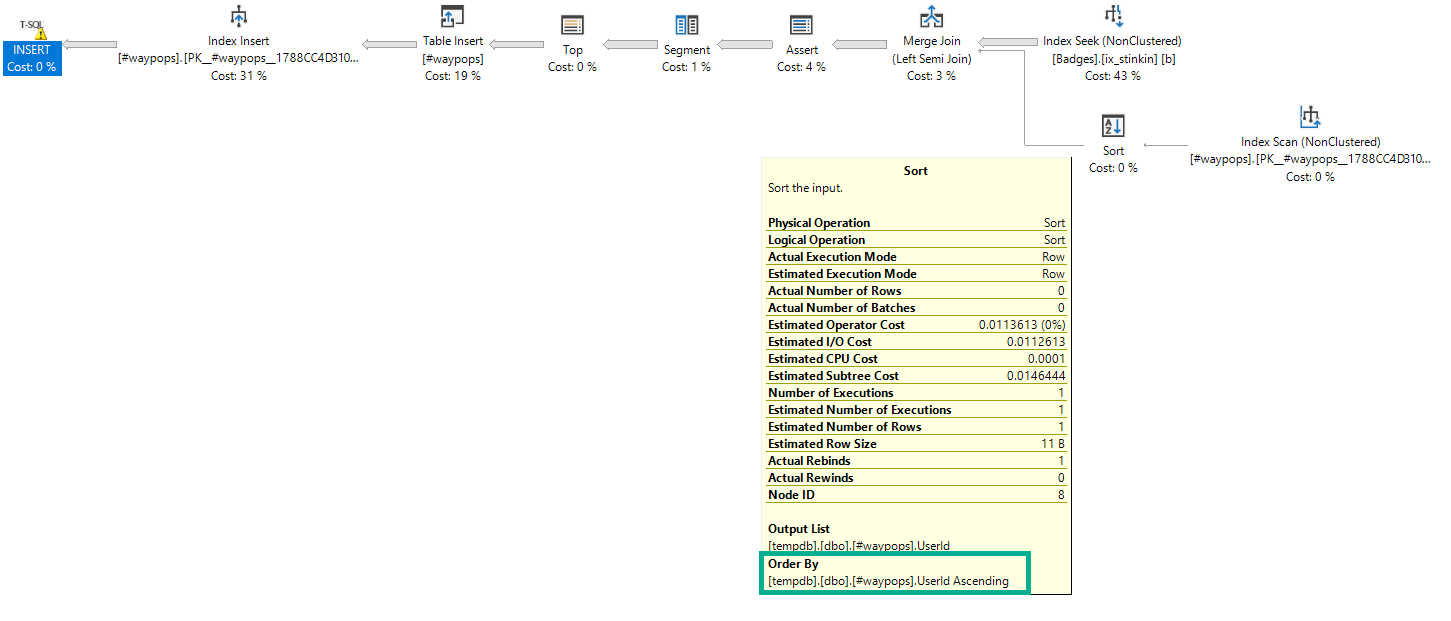
Here’s an example of a Sort acting as a spool:

DROP TABLE IF EXISTS #waypops;

CREATE TABLE #waypops
(
  UserId INT
  , PRIMARY KEY NONCLUSTERED (UserId) WITH (IGNORE_DUP_KEY = ON)
);

INSERT #waypops WITH(TABLOCKX) 
       ( UserId)
SELECT b.UserId
FROM dbo.Badges AS b
WHERE b.Name = N'Popular Question';
A SQL Server query plan
Enjoy the silence

The Sort is in the same order as the index it’s reading from, but just reading from the index wouldn’t provide any separation.

Just Passing By


This is weird, niche stuff. That’s why I’m posting it on a Friday. That, and I wanna bully someone into writing about using a hash join to do the same thing.

Thanks for reading!

Going Further


If this is the kind of SQL Server stuff you love learning about, you’ll love my training. Blog readers get 25% off the Everything Bundle — over 100 hours of performance tuning content. Need hands-on help? I offer consulting engagements from targeted investigations to ongoing retainers. Want a quick sanity check before committing to a full engagement? Schedule a call — no commitment required.

How SQL Server Can Handle Complex Query Predicates (Sometimes)

Optimizer Optimizes


Sometimes, the optimizer can take a query with a complex where clause, and turn it into two queries.

This only happens up to a certain point in complexity, and only if you have really specific indexes to allow these kinds of plan choices.

Here’s a haphazard query:

SELECT COUNT(*) AS records
FROM dbo.Posts AS p
WHERE ( 
           p.PostTypeId = 1
       AND p.AcceptedAnswerId <> 0
       AND p.CommentCount > 5
       AND p.CommunityOwnedDate IS NULL
       AND p.FavoriteCount > 0
      )
OR   (
          p.PostTypeId = 2
      AND p.CommentCount > 1
      AND p.LastEditDate IS NULL
      AND p.Score > 5
      AND p.ParentId = 0
     )
AND (p.ClosedDate IS NULL);

There’s a [bunch of predicates], an OR, then a [bunch of predicates]. Since there’s some shared spaced, we can create an okay general index.

It’s pretty wide, and it may not be the kind of index I’d normally create, unless I really had to.

CREATE INDEX whatever 
    ON dbo.Posts (PostTypeId, CommentCount, ParentId)
         INCLUDE(AcceptedAnswerId, FavoriteCount, LastEditDate, Score, ClosedDate, CommunityOwnedDate);

It covers every column we’re using. It’s a lot. But I had to do it to show you this.

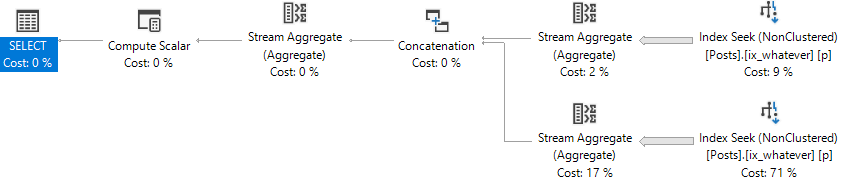
A SQL Server query plan
Computer Love

The optimizer took each separate group of predicates, and turned it into a separate index access, with a union operator.

It’s like if you wrote two count queries, and then counted the results of both.

But With A Twist


Let’s tweak the where clause a little bit.

SELECT COUNT(*) AS records
FROM dbo.Posts AS p
WHERE ( 
           p.PostTypeId = 1
       AND p.AcceptedAnswerId <> 0
       AND p.CommentCount > 5
       OR p.CommunityOwnedDate IS NULL --This is an OR now
       AND p.FavoriteCount > 0
      )
OR   (
          p.PostTypeId = 2
      AND p.CommentCount > 1
      AND p.LastEditDate IS NULL
      OR p.Score > 5 -- This is an OR now
      AND p.ParentId = 0
     )
AND (p.ClosedDate IS NULL)
A SQL Server query plan
Wham!

We don’t get the two seeks anymore. We get one big scan.

Is One Better?


The two seek plan has this profile:

Table 'Posts'. Scan count 10, logical reads 30678
Table 'Worktable'. Scan count 0, logical reads 0
Table 'Workfile'. Scan count 0, logical reads 0

 SQL Server Execution Times:
   CPU time = 439 ms,  elapsed time = 108 ms.

Here’s the scan plan profile:

Table 'Posts'. Scan count 5, logical reads 127472

 SQL Server Execution Times:
   CPU time = 4624 ms,  elapsed time = 1617 ms.

In this case, the index union optimization works in our favor.

We can push the optimizer towards a plan like that by breaking up complicated where clauses.

SELECT COUNT(*)
FROM (
SELECT 1 AS x
FROM dbo.Posts AS p
WHERE ( 
           p.PostTypeId = 1
       AND p.AcceptedAnswerId <> 0
       AND p.CommentCount > 5
       AND p.CommunityOwnedDate IS NULL
       AND p.FavoriteCount > 0
      )  

UNION ALL

SELECT 1 AS x
FROM dbo.Posts AS p   
WHERE (
          p.PostTypeId = 2
      AND p.CommentCount > 1
      AND p.LastEditDate IS NULL
      AND p.Score > 5
      AND p.ParentId = 0
     )
AND (p.ClosedDate IS NULL)
) AS x

Et voila!

A SQL Server query plan
Chicken Leg

Which has this profile:

Table 'Posts'. Scan count 2, logical reads 30001

 SQL Server Execution Times:
   CPU time = 329 ms,  elapsed time = 329 ms.

Beat My Guest


The optimizer is full of all sorts of cool tricks.

The better your indexes are, and the more clearly you write your queries, the more of those tricks you might see it start using

Thanks for reading!

Going Further


If this is the kind of SQL Server stuff you love learning about, you’ll love my training. Blog readers get 25% off the Everything Bundle — over 100 hours of performance tuning content. Need hands-on help? I offer consulting engagements from targeted investigations to ongoing retainers. Want a quick sanity check before committing to a full engagement? Schedule a call — no commitment required.

Top 1 vs. Row Number in SQL Server

Cruel, Cruel Number


One is the loneliest number. Sometimes it’s also the hardest number of rows to get, depending on how you do it.

In this video, I’ll show you how a TOP 1 query can perform much differently from a query where you generate row numbers and look for the first one.

Thanks for watching!

Video Summary

In this video, I delve into an interesting performance discrepancy between two queries that produce the same results but exhibit vastly different execution times. The primary query uses a `CROSS APPLY` with `TOP 1`, which surprisingly took over a minute to return just 101 rows, despite minimal logical reads on the involved tables. By examining the execution plan and statistics, I highlight how an index spool operator was created behind the scenes by SQL Server, significantly impacting performance due to its single-threaded nature even in a parallel query context. To contrast this, I demonstrate a slightly modified version of the query that uses `ROW_NUMBER` instead, achieving a much faster execution time with similar logical reads but vastly reduced CPU and elapsed times. This comparison underscores how simple query rewrites can have substantial performance benefits.

Full Transcript

Howdy folks, Erik Darling here with Erik Darling Data because Brent is lazy. And I was kind of enjoying my Saturday afternoon and writing some blog posts when I came across what I thought was an interesting difference between two queries that are written slightly differently, give you the same results but quite different performance. So I wanted to talk about that with you and unfortunately to talk about that with you I have to put this drink down to operate the computer. So, but that’s okay. because it’s a quick video and hopefully no one will notice. Now, I have this query here and the whole point of the query is to get the top 100 users by reputation and their most recent badge. And to do that I’m using cross apply with the top one over to the badges table. And if you look down in the corner you can probably see that this query ran for a little over a minute to return those 101 rows. That’s a pretty long time for not a lot of data.

Now, we can figure out why when we start looking at some different aspects of the query. And by different aspects I mean what happened with statistics time and IO and what happened in the query plan. Now, the CPU and elapsed time are almost the same which is a little bit weird because this is a parallel plan. Usually the whole point of a parallel plan is to use multiple threads to cut down on the total elapsed time. So you sacrifice using extra CPU to make the query overall run quicker. And you can also see that we didn’t do a lot of work against users or badges.

The users table we did 44,000 logical reads and the badges table we did about 50,000 logical reads. That’s not a lot of reads. The other thing we’re running into though is that we have this work table.

And this work table does a ton of logical reads. That’s about 24 million. So we have to ask ourselves where that came from.

And if we look over at the execution plan, it’ll become a little bit more obvious. Well, it’s really obvious to me and now it’s going to be obvious to you too. That work table comes from this index spool operator.

SQL Server wanted an index so badly on this data that it created an index behind your back up in tempdb. And it didn’t ask for an index. If you look at this top line here, there is no missing index request.

If we go and we look in the execution plan XML, there will be no missing index request. There is just this query running where SQL Server says, I’m going to create an index for you, you lazy bad DBA. What really stinks about this index spool?

Well, there’s a couple things that stink about it. One is that after this query runs, SQL Server will throw it away. And if this query runs again, or if this query runs a million times, every time this query runs, this spool will get created and thrown away. But what’s particularly nasty about these index spools is that if we go look at the properties, and we look at where all the rows line up across the parallel threads in the query, they all end up on one.

And it doesn’t matter how big this table is. It doesn’t matter, like if you use a different table, if I use seven different tables. Index spools build the index behind them single threaded.

That’s just the way it goes. So all eight million rows end up on one single thread. In this case, it’s thread three.

If I ran it a bunch of different times, they might end all end up on one different thread, but they would all always end up on one thread. That’s no good. We don’t like that.

And that’s basically what made this parallel query run like a serial query. Because this whole unit of work is done serially. And this is really where we spent the majority of the time in the query.

Well, that stinks. And you see this pretty frequently, specifically with cross-apply with a top one. And it’s because the optimizer can’t really unroll that.

And what I mean by unroll that is just turn it into a regular join. It’s going to use like kind of like the literal translation of cross-apply to go get a row and apply it to what’s down here. The optimizer is free to transform that into a regular join, but it doesn’t, especially when a top is involved.

Now, let’s contrast that with a query that’s written slightly differently. It’s still going to return the same results, but we’re going to use row number instead. We’re even still going to use cross-apply.

And we’re going to select the user ID and the name from the badges table. But this time we’re going to generate a row number over the same columns that we generated the top one with. And then we’re going to end up filtering out the results to only where row number equals one.

Now, remember that first query took a minute and three seconds to run. And if we go and execute this, it will be significantly faster. I forget how fast, but long enough for me to take a sip.

Now, that took six seconds. Why did that only take six seconds? Why did we end up with like, you know, you can see that it’s the same amount of reads here, the 44,000 and 49,000.

But for the CPU time and elapsed time, we did way better. That’s about, you know, there was like a tenth of the time. One percent of the time.

I’m not good. I’m not good at math no matter what. It doesn’t matter if it’s Saturday morning or not. If we look over in the execution plan, this plan is also parallel. But we don’t have any spooling operators.

You know, we, in this case, the optimizer was free to take that cross supply. And rather than do a nested loops row by row join, it was free to transform that into a hash join right here. And when we went and generated the row number over all the results of the badges table partitioned by user ID and ordered by the date column, we filtered out all of those rows, all of the rows that we weren’t using with this filter operator pretty early on.

So we still did it. And I’m not saying that this query is perfect and that we couldn’t tune things better and that we couldn’t make things better for this query. But it just goes to show you that sometimes a pretty simple rewrite can have pretty profound effects on a query.

And that, you know, sometimes that cross-apply with top is not always the best form of a query that can be written. Anyway, I’m going to go get back to the rest of this. I hope you enjoyed this.

I hope you learned something. And I will see you, I don’t know, maybe, maybe, maybe I’ll record something later that I won’t remember. I don’t know. We’ll see. Thanks for watching.

Video Summary

In this video, I delve into an interesting performance discrepancy between two queries that produce the same results but exhibit vastly different execution times. The primary query uses a `CROSS APPLY` with `TOP 1`, which surprisingly took over a minute to return just 101 rows, despite minimal logical reads on the involved tables. By examining the execution plan and statistics, I highlight how an index spool operator was created behind the scenes by SQL Server, significantly impacting performance due to its single-threaded nature even in a parallel query context. To contrast this, I demonstrate a slightly modified version of the query that uses `ROW_NUMBER` instead, achieving a much faster execution time with similar logical reads but vastly reduced CPU and elapsed times. This comparison underscores how simple query rewrites can have substantial performance benefits.

Full Transcript

Howdy folks, Erik Darling here with Erik Darling Data because Brent is lazy. And I was kind of enjoying my Saturday afternoon and writing some blog posts when I came across what I thought was an interesting difference between two queries that are written slightly differently, give you the same results but quite different performance. So I wanted to talk about that with you and unfortunately to talk about that with you I have to put this drink down to operate the computer. So, but that’s okay. because it’s a quick video and hopefully no one will notice. Now, I have this query here and the whole point of the query is to get the top 100 users by reputation and their most recent badge. And to do that I’m using cross apply with the top one over to the badges table. And if you look down in the corner you can probably see that this query ran for a little over a minute to return those 101 rows. That’s a pretty long time for not a lot of data.

Now, we can figure out why when we start looking at some different aspects of the query. And by different aspects I mean what happened with statistics time and IO and what happened in the query plan. Now, the CPU and elapsed time are almost the same which is a little bit weird because this is a parallel plan. Usually the whole point of a parallel plan is to use multiple threads to cut down on the total elapsed time. So you sacrifice using extra CPU to make the query overall run quicker. And you can also see that we didn’t do a lot of work against users or badges.

The users table we did 44,000 logical reads and the badges table we did about 50,000 logical reads. That’s not a lot of reads. The other thing we’re running into though is that we have this work table.

And this work table does a ton of logical reads. That’s about 24 million. So we have to ask ourselves where that came from.

And if we look over at the execution plan, it’ll become a little bit more obvious. Well, it’s really obvious to me and now it’s going to be obvious to you too. That work table comes from this index spool operator.

SQL Server wanted an index so badly on this data that it created an index behind your back up in tempdb. And it didn’t ask for an index. If you look at this top line here, there is no missing index request.

If we go and we look in the execution plan XML, there will be no missing index request. There is just this query running where SQL Server says, I’m going to create an index for you, you lazy bad DBA. What really stinks about this index spool?

Well, there’s a couple things that stink about it. One is that after this query runs, SQL Server will throw it away. And if this query runs again, or if this query runs a million times, every time this query runs, this spool will get created and thrown away. But what’s particularly nasty about these index spools is that if we go look at the properties, and we look at where all the rows line up across the parallel threads in the query, they all end up on one.

And it doesn’t matter how big this table is. It doesn’t matter, like if you use a different table, if I use seven different tables. Index spools build the index behind them single threaded.

That’s just the way it goes. So all eight million rows end up on one single thread. In this case, it’s thread three.

If I ran it a bunch of different times, they might end all end up on one different thread, but they would all always end up on one thread. That’s no good. We don’t like that.

And that’s basically what made this parallel query run like a serial query. Because this whole unit of work is done serially. And this is really where we spent the majority of the time in the query.

Well, that stinks. And you see this pretty frequently, specifically with cross-apply with a top one. And it’s because the optimizer can’t really unroll that.

And what I mean by unroll that is just turn it into a regular join. It’s going to use like kind of like the literal translation of cross-apply to go get a row and apply it to what’s down here. The optimizer is free to transform that into a regular join, but it doesn’t, especially when a top is involved.

Now, let’s contrast that with a query that’s written slightly differently. It’s still going to return the same results, but we’re going to use row number instead. We’re even still going to use cross-apply.

And we’re going to select the user ID and the name from the badges table. But this time we’re going to generate a row number over the same columns that we generated the top one with. And then we’re going to end up filtering out the results to only where row number equals one.

Now, remember that first query took a minute and three seconds to run. And if we go and execute this, it will be significantly faster. I forget how fast, but long enough for me to take a sip.

Now, that took six seconds. Why did that only take six seconds? Why did we end up with like, you know, you can see that it’s the same amount of reads here, the 44,000 and 49,000.

But for the CPU time and elapsed time, we did way better. That’s about, you know, there was like a tenth of the time. One percent of the time.

I’m not good. I’m not good at math no matter what. It doesn’t matter if it’s Saturday morning or not. If we look over in the execution plan, this plan is also parallel. But we don’t have any spooling operators.

You know, we, in this case, the optimizer was free to take that cross supply. And rather than do a nested loops row by row join, it was free to transform that into a hash join right here. And when we went and generated the row number over all the results of the badges table partitioned by user ID and ordered by the date column, we filtered out all of those rows, all of the rows that we weren’t using with this filter operator pretty early on.

So we still did it. And I’m not saying that this query is perfect and that we couldn’t tune things better and that we couldn’t make things better for this query. But it just goes to show you that sometimes a pretty simple rewrite can have pretty profound effects on a query.

And that, you know, sometimes that cross-apply with top is not always the best form of a query that can be written. Anyway, I’m going to go get back to the rest of this. I hope you enjoyed this.

I hope you learned something. And I will see you, I don’t know, maybe, maybe, maybe I’ll record something later that I won’t remember. I don’t know. We’ll see. Thanks for watching.

Going Further


If this is the kind of SQL Server stuff you love learning about, you’ll love my training. Blog readers get 25% off the Everything Bundle — over 100 hours of performance tuning content. Need hands-on help? I offer consulting engagements from targeted investigations to ongoing retainers. Want a quick sanity check before committing to a full engagement? Schedule a call — no commitment required.

Index Tuning In SQL Server Availability Groups Is, Like, Hard

Let’s Say You’re Offloading


Because you’ve got the cash money to pay for Enterprise Edition, some nice hardware, and also Enterprise Edition on another server or two.

Maybe you have queries that need fresh data going to a sync replica, and queries that can withstand slightly older data going to an async replica.

Every week or every month, you want to be a dutiful data steward and see how your indexes get used. Or not used.

So you run Your Favorite Index Analysis Script® on the primary, and it looks like you’ve got a bunch of unused indexes.

Can you drop them?

Not By A Long Shot


You’ve still gotta look at how indexes are used on any readable copy. Yes, you read that right.

DMV data is not sent back and centralized on the primary. Not for indexes, wait stats, queries, file stats, or anything else you might care about.

If you wanna centralize that, it’s up to you (or your monitoring tool) to do it. That can make getting good feedback about your indexes tough.

Failovers Also Hurt


Once that happens, your DMV data is all murky.

Things have gotten all mixed in together, and there’s no way for you to know who did what and when.

AGs, especially readable ones, mean you need to take more into consideration when you’re tuning.

You also have to be especially conscious about who the primary is, and how long they’ve been the primary.

If you patch regularly (and you should be patching regularly), that data will get wiped out by reboots.

Now what?


If you use SQL Server’s DMVs for index tuning (and really, why wouldn’t you?), you need to take other copies of the data into account.

This isn’t just for AGs, either. You can offload reads to a log shipped secondary or a mirroring partner, too.

Perhaps in the future, these’ll be centralized for us, but for now that’s more work for you to do.

Thanks for reading!

Going Further


If this is the kind of SQL Server stuff you love learning about, you’ll love my training. Blog readers get 25% off the Everything Bundle — over 100 hours of performance tuning content. Need hands-on help? I offer consulting engagements from targeted investigations to ongoing retainers. Want a quick sanity check before committing to a full engagement? Schedule a call — no commitment required.

SQL Server Indexes Sort Data For Us

Yelling and Screaming2019 01 21 13 03 05


If you saw my post about parameterized TOPs, one thing you may have immediately hated is the index I created.

And rightfully so — it was a terrible index for reasons we’ll discuss in this post.

If that index made you mad, congratulations, you’re a smart cookie.

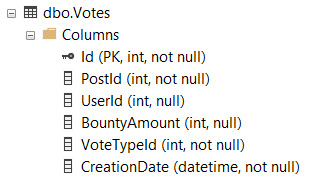
CREATE INDEX whatever ON dbo.Votes(CreationDate DESC, VoteTypeId)
GO

Yes, my friends, this index is wrong.

It’s not just wrong because we’ve got the column we’re filtering on second, but because there’s no reason for it to be second.

Nothing in our query lends itself to this particular indexing scenrio.

CREATE OR ALTER PROCEDURE dbo.top_sniffer (@top INT, @vtid INT)
AS
BEGIN

    SELECT   TOP (@top) 
             v.Id, 
             v.PostId, 
             v.UserId, 
             v.BountyAmount, 
             v.VoteTypeId, 
             v.CreationDate
    FROM     dbo.Votes AS v
    WHERE    v.VoteTypeId = @vtid
    ORDER BY v.CreationDate DESC;

END;

We Index Pretty


The reason I sometimes see columns appear first in an index is to avoid having to physically sort data.

If I run the stored procedure without any nonclustered indexes, this is our query plan:

EXEC dbo.top_sniffer @top = 1, @vtid = 1;
A SQL Server query plan
spillo

A sort, a spill, kablooey. We’re not having any fun, here.

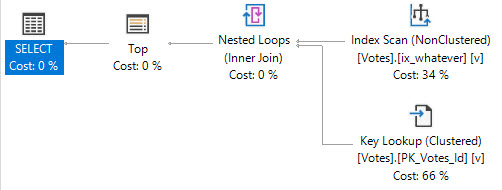
With the original index, our data is organized in the order that we’re asking for it to be returned in the ORDER BY.

This caused all sorts of issues when we were looking for VoteTypeIds that were spread throughout the index, where we couldn’t satisfy the TOP quickly.

There was no Sort in the plan when we had the “wrong” index added.

A SQL Server query plan
Primal

B-Tree Equality


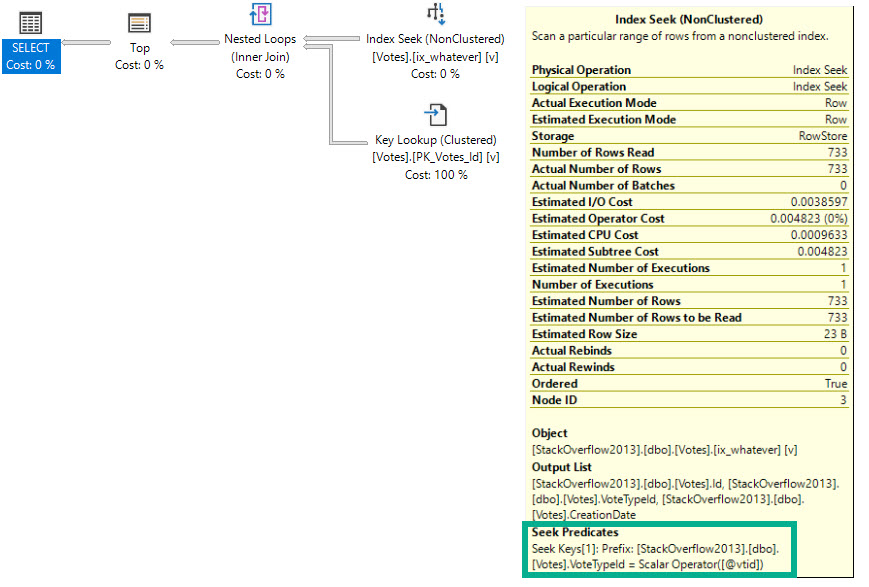
We can also avoid having to sort data by having the ORDER BY column(s) second in the key of the index, because our filter is an equality.

CREATE INDEX whatever ON dbo.Votes(VoteTypeId, CreationDate DESC)
GO

Having the filter column first also helps us avoid the longer running query issue when we look for VoteTypeId 4.

EXEC dbo.top_sniffer @top = 5000, @vtid = 4;
A SQL Server query plan
I like you better.
Table 'Votes'. Scan count 1, logical reads 2262

 SQL Server Execution Times:
   CPU time = 0 ms,  elapsed time = 148 ms.

Solving for Sorts


If you’ve been following my blogging for a while, you’ve likely seen me say this stuff before, because Sorts have some issues.

  • They’re locally blocking, in that every row has to arrive before they can run
  • They require additional memory space to order data the way you want
  • They may spill to disk if they don’t get enough memory
  • They may ask for quite a bit of extra memory if estimations are incorrect
  • They may end up in a query plan even when you don’t explicitly ask for them

There are plenty of times when these things aren’t problems, but it’s good to know when they are, or when they might turn into a problem.

Thanks for reading!

Going Further


If this is the kind of SQL Server stuff you love learning about, you’ll love my training. Blog readers get 25% off the Everything Bundle — over 100 hours of performance tuning content. Need hands-on help? I offer consulting engagements from targeted investigations to ongoing retainers. Want a quick sanity check before committing to a full engagement? Schedule a call — no commitment required.

Predicate Selectivity And SQL Server Index Design

Loose Ends


A while back I promised I’d write about what allows SQL Server to perform two seeks rather than a seek with a residual predicate.

More recently, a post touched a bit on predicate selectivity in index design, and how missing index requests don’t factor that in when requesting indexes.

This post should tie the two together a bit. Maybe. Hopefully. We’ll see where it goes, eh?

If you want a TL;DR, it’s that neighboring index key columns support seeks quite easily, and that choosing the leading column should likely be a reflection of which is filtered on most frequently.

If you want more specific advice, I’d be happy to give it to you.

Index Management


Let’s get real wacky and create two indexes.

CREATE NONCLUSTERED INDEX whatever
    ON dbo.Posts ( PostTypeId, ClosedDate );

CREATE NONCLUSTERED INDEX apathy
    ON dbo.Posts ( ClosedDate, PostTypeId );

Now let’s run two identical queries, and have each one hit one of those indexes.

SELECT p.Id, p.PostTypeId, p.ClosedDate
FROM   dbo.Posts AS p WITH (INDEX = whatever)
WHERE  p.PostTypeId = 1
AND    p.ClosedDate >= '2018-06-01';

SELECT p.Id, p.PostTypeId, p.ClosedDate
FROM   dbo.Posts AS p WITH (INDEX = apathy)
WHERE  p.PostTypeId = 1
AND    p.ClosedDate >= '2018-06-01';

If you run them a bunch of times, the first query tends to end up around ~50ms ahead of the second, though they both sport nearly identical query plans.

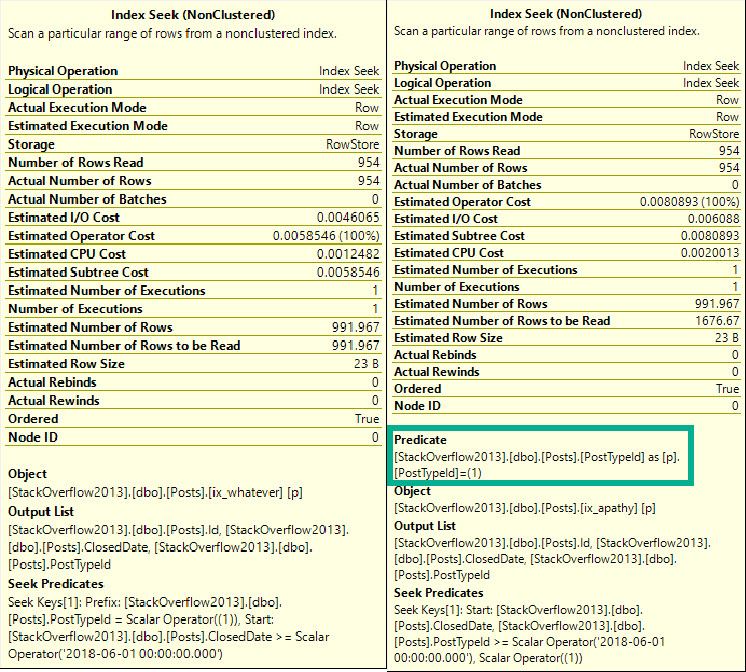
The seek may look confusing, because PostTypeId seems to appear as both a seek and a residual predicate. That’s because it’s sort of both.

The seek tells us where we start reading, which means we’ll find rows starting with ClosedDate 2018-06-01, and with PostTypeId 1.

From there, we may find higher PostTypeIds, which is why we have a residual predicate; to filter those out.

More generally, a seek can find a single row, or a range of rows as long as they’re all together. When the leading column of an index is used to find a range, we can seek to a starting point, but we need a residual predicate to check for other predicates afterwards.

This is why the index rule of thumb for many people is to start indexes with equality predicates. Any rows located will be contiguous, and we can easily continue the seek while applying any other predicates.

Tool Tips from a SQL Server query plan
Seeky Scanny

There’s also differences in stats time and IO.

Table 'Posts'. Scan count 1, logical reads 8, physical reads 0, read-ahead reads 0, lob logical reads 0, lob physical reads 0, lob read-ahead reads 0.

 SQL Server Execution Times:
   CPU time = 0 ms,  elapsed time = 156 ms.

Table 'Posts'. Scan count 1, logical reads 6, physical reads 0, read-ahead reads 0, lob logical reads 0, lob physical reads 0, lob read-ahead reads 0.

 SQL Server Execution Times:
   CPU time = 0 ms,  elapsed time = 106 ms.

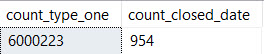
Remember that this is how things break down for each predicate:

Counts from SQL Server Management Studio
Lotsa and Nunna

But in neither case do we need to touch all ~6mm rows of PostTypeId 1 to locate the correct range of ClosedDates.

Downstairs Mixup


When does that change?

When we design indexes a little bit more differenter.

CREATE NONCLUSTERED INDEX ennui
    ON dbo.Posts ( PostTypeId ) INCLUDE (ClosedDate);

CREATE NONCLUSTERED INDEX morose
    ON dbo.Posts ( ClosedDate ) INCLUDE (PostTypeId);

Running the exact same queries, something changes quite drastically for the first one.

Table 'Posts'. Scan count 1, logical reads 16344, physical reads 0, read-ahead reads 0, lob logical reads 0, lob physical reads 0, lob read-ahead reads 0.

 SQL Server Execution Times:
   CPU time = 297 ms,  elapsed time = 301 ms.

Table 'Posts'. Scan count 1, logical reads 6, physical reads 0, read-ahead reads 0, lob logical reads 0, lob physical reads 0, lob read-ahead reads 0.

 SQL Server Execution Times:
   CPU time = 0 ms,  elapsed time = 187 ms.

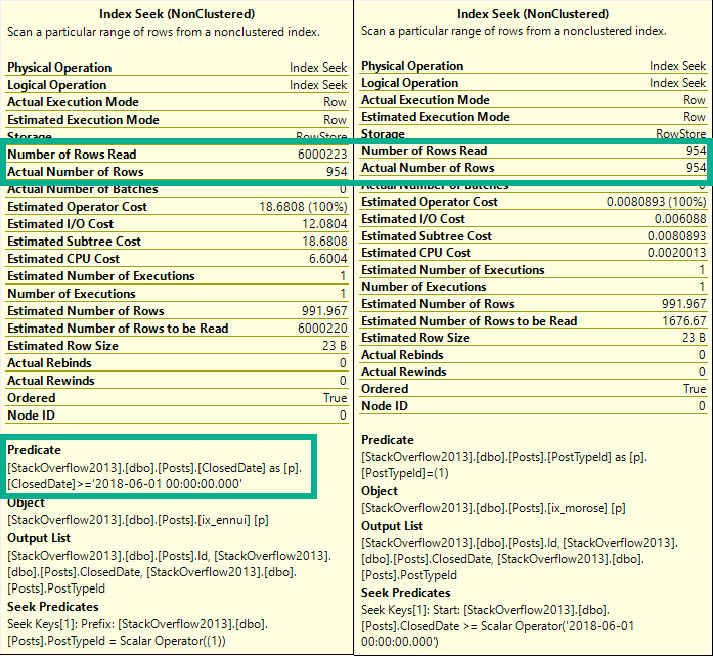
This time, the residual predicate hurts us, when we look for a range of values.

Took Tips from a SQL Server Management Studio
Yaw yaw yaw

We do quite a lot of extra reads — in fact, this time we do need to touch all ~6mm rows of PostTypeId 1.

Off By One


Something similar happens if we only rearrange key columns, too.

CREATE NONCLUSTERED INDEX ennui
    ON dbo.Posts ( PostTypeId, OwnerUserId, ClosedDate ) WITH ( DROP_EXISTING = ON );

CREATE NONCLUSTERED INDEX morose
    ON dbo.Posts ( ClosedDate, OwnerUserId, PostTypeId ) WITH ( DROP_EXISTING = ON );

I have both columns I’m querying in the key of the index this time, but I’ve stuck a column I’m not querying at all between them — OwnerUserId.

This also throws off the range predicate. We read ~30k more pages here because the index is larger.

Table 'Posts'. Scan count 1, logical reads 19375, physical reads 0, read-ahead reads 0, lob logical reads 0, lob physical reads 0, lob read-ahead reads 0.

 SQL Server Execution Times:
   CPU time = 312 ms,  elapsed time = 314 ms.

Table 'Posts'. Scan count 1, logical reads 7, physical reads 0, read-ahead reads 0, lob logical reads 0, lob physical reads 0, lob read-ahead reads 0.

 SQL Server Execution Times:
   CPU time = 0 ms,  elapsed time = 178 ms.

The Seeks here look identical to the ones when I had columns in the include section of the index.

What’s It All Mean?


Index column placement, whether it’s in the key or in the includes, can have a non-subtle impact on reads, especially when we’re searching for ranges.

Even when we have a non-selective leading column like PostTypeId with an equality predicate on it, we don’t need to read every single row that meets the filter to apply a range predicate, as long as that predicate is seek-able.

When we move the range column to the includes, or we add a column before it in the key, we end up doing a lot more work to locate rows.

Thanks for reading!

Going Further


If this is the kind of SQL Server stuff you love learning about, you’ll love my training. Blog readers get 25% off the Everything Bundle — over 100 hours of performance tuning content. Need hands-on help? I offer consulting engagements from targeted investigations to ongoing retainers. Want a quick sanity check before committing to a full engagement? Schedule a call — no commitment required.

SQL Server Query Performance When You Search For Rare Data Points

I Got No Rows


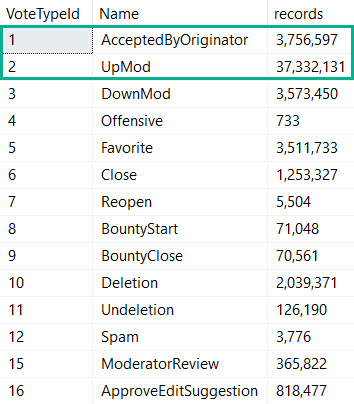
Over in the Votes table in the Stack Overflow database, a couple of the more popular vote types are 1 and 2.

A vote type of 1 means that an answer was accepted as being the solution by a user, and a vote type of 2 means someone upvoted a question or answer.

SQL Server Query Results
I Voted!

What this means is that it’s impossible for a question to ever have an accepted answer vote cast for it. A question can’t be an answer, here.

Unfortunately, SQL Server doesn’t have a way of inferring that.

SQL Server Query Results
ANSWER ME!

Anything with a post type id of 1 is a question.

The way the tables are structured, VoteTypeId and PostTypeId don’t exist together, so we can’t use a constraint to validate any conditions that exist between them.

SQL Server Management Studio Table
Votan
SQL Server Management Studio Table
Postan

Lost And Found


When we run a query that looks for posts with a type of 2 (that’s an answer) that have a vote type of 1, we can find 2500 of them relatively quickly.

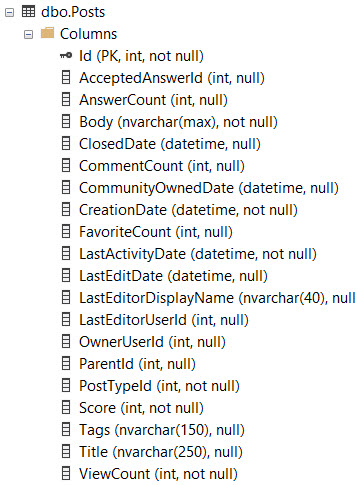
    SELECT   TOP (2500) 
             p.OwnerUserId, 
             p.Score, 
             p.Title, 
             v.CreationDate,
             ISNULL(v.BountyAmount, 0) AS BountyAmount
    FROM     dbo.Posts AS p
    JOIN     dbo.Votes AS v
        ON  p.Id = v.PostId
    WHERE v.VoteTypeId = 2 --WHERE VoteTypeId = 2
    AND   p.PostTypeId = 1
    ORDER BY v.CreationDate DESC;

Here’s the stats:

Table 'Posts'. Scan count 0, logical reads 29044
Table 'Votes'. Scan count 1, logical reads 29131

 SQL Server Execution Times:
   CPU time = 63 ms,  elapsed time = 272 ms.

And here’s the plan:

SQL Server Query Plan
Nelly.

Colossus of Woes


Now let’s ask SQL Server for some data that doesn’t exist.

    SELECT   TOP (2500) 
             p.OwnerUserId, 
             p.Score, 
             p.Title, 
             v.CreationDate,
             ISNULL(v.BountyAmount, 0) AS BountyAmount
    FROM     dbo.Posts AS p
    JOIN     dbo.Votes AS v
        ON  p.Id = v.PostId
    WHERE v.VoteTypeId = 1 --Where VoteTypeId = 1
    AND   p.PostTypeId = 1
    ORDER BY v.CreationDate DESC;

Here’s the stats:

Table 'Posts'. Scan count 0, logical reads 11504587
Table 'Votes'. Scan count 1, logical reads 11675392

 SQL Server Execution Times:
   CPU time = 14813 ms,  elapsed time = 14906 ms.

You could say things got “worse”.

Not only that, but they got worse for the exact same plan.

SQL Server Query Plan
Argh.

So What Happened?


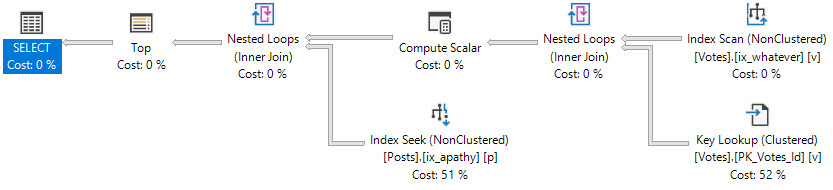
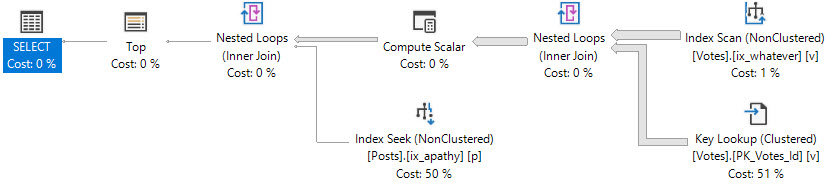
In the original plan, the TOP asked for rows, and quickly got them.

In the second plan, the TOP kept asking for rows, getting them from the Votes table, and then losing them on the join to Posts.

There was no parameter sniffing, there were no out of date stats, no blocking, or any other oddities. It’s just plain bad luck because of the data’s relationship.

If we apply hints to this query to:

  • Scan the clustered index on Votes
  • Choose Merge or Hash joins instead of Nested Loops
  • Force the join order as written

We get much better performing queries. The plan we have is chosen because the TOP sets a row goal that makes a Nested Loops plan using narrow (though not covering) indexes attractive to the optimizer. When it’s right, like in the original query, you probably don’t even think about it.

When it’s wrong, like in the second query, it can be quite mystifying why such a tiny query can run forever to return nothing.

If you want to try it out for yourself, use these indexes:

    CREATE INDEX whatever 
        ON dbo.Votes( CreationDate, VoteTypeId, PostId );

    CREATE NONCLUSTERED INDEX apathy
        ON dbo.Posts ( PostTypeId )
            INCLUDE ( OwnerUserId, Score, Title );

Thanks for reading!

Going Further


If this is the kind of SQL Server stuff you love learning about, you’ll love my training. Blog readers get 25% off the Everything Bundle — over 100 hours of performance tuning content. Need hands-on help? I offer consulting engagements from targeted investigations to ongoing retainers. Want a quick sanity check before committing to a full engagement? Schedule a call — no commitment required.

What Metrics Does Rebuilding Indexes Improve In SQL Server?

Gall Of A Red Ox


For Row Store indexes — Columnstore is different and should be maintained differently — rebuilding indexes gets prescribed as a cure for performance issues of all types.

  • Sudden query slowdown? Rebuild’em!
  • Blocking? Rebuild’em!
  • High CPU? Rebuild’em!
  • No idea what’s going on? Rebuild’em!

While an index rebuild will update stats, which is sometimes beneficial, it’s a lot easier to, you guessed it, just update stats.

The main problem is that your index rebuild script is probably measuring the wrong thing.

It’ll have the same net effect on plan invalidation, with a heck of a lot of less resource usage and, potentially, blocking.

Bear Bile


It’s my opinion, and you can take it or leave it, that index rebuilds should be reserved for special circumstances.

  • You deleted a lot of data
  • You need to change something about the index
  • You have a Heap with a lot of forwarded fetches

But why is that my opinion? What evidence has informed it? No, it’s not just because I like to be disagreeable. It’s mostly that I went through a fairly normal progression.

  • A lot of people are talking about index fragmentation, sounds bad!
  • Hey, I think this fixed something? I’m gonna keep doing it.
  • Well, I still have problems, but at least I don’t have fragmentation.
  • I don’t have enough time to run CHECKDB, I need to rebuild less often.
  • No one seems to be complaining when I don’t rebuild indexes…
  • My problems had nothing to do with index fragmentation!

Here’s How To Order


But what metrics might an index rebuild fix, and why was so much fuss made about them for so long?

To test this, and to get you, dear reader, an explanation, I set up some tests.

First, I created a simple index.

CREATE INDEX ix_whatever ON dbo.Users (Reputation);

Then, I wrote queries that will touch 1%, 10%, and 100% of the Users table (2013 version, 2.4mm rows).

SELECT COUNT(*) AS records
FROM dbo.Users AS u
WHERE u.Reputation = 289
AND 1 = (SELECT 1);


SELECT COUNT(*) AS records
FROM dbo.Users AS u
WHERE u.Reputation BETWEEN 100 AND 450
AND 1 = (SELECT 1);


SELECT COUNT(*) AS records
FROM dbo.Users AS u
WHERE 1 = (SELECT 1);

After that, it’s a matter of introducing the “harmful” kind of fragmentation — empty space on pages.

This is the kind of fragmentation that bloats your indexes, both on disk and in memory, leaving less room for other things.

ALTER INDEX ix_whatever ON dbo.Users REBUILD WITH(FILLFACTOR = 5);
ALTER INDEX ix_whatever ON dbo.Users REBUILD WITH(FILLFACTOR = 10);
ALTER INDEX ix_whatever ON dbo.Users REBUILD WITH(FILLFACTOR = 20);
ALTER INDEX ix_whatever ON dbo.Users REBUILD WITH(FILLFACTOR = 30);
ALTER INDEX ix_whatever ON dbo.Users REBUILD WITH(FILLFACTOR = 40);
ALTER INDEX ix_whatever ON dbo.Users REBUILD WITH(FILLFACTOR = 50);
ALTER INDEX ix_whatever ON dbo.Users REBUILD WITH(FILLFACTOR = 60);
ALTER INDEX ix_whatever ON dbo.Users REBUILD WITH(FILLFACTOR = 70);
ALTER INDEX ix_whatever ON dbo.Users REBUILD WITH(FILLFACTOR = 80);
ALTER INDEX ix_whatever ON dbo.Users REBUILD WITH(FILLFACTOR = 90);
ALTER INDEX ix_whatever ON dbo.Users REBUILD WITH(FILLFACTOR = 100);

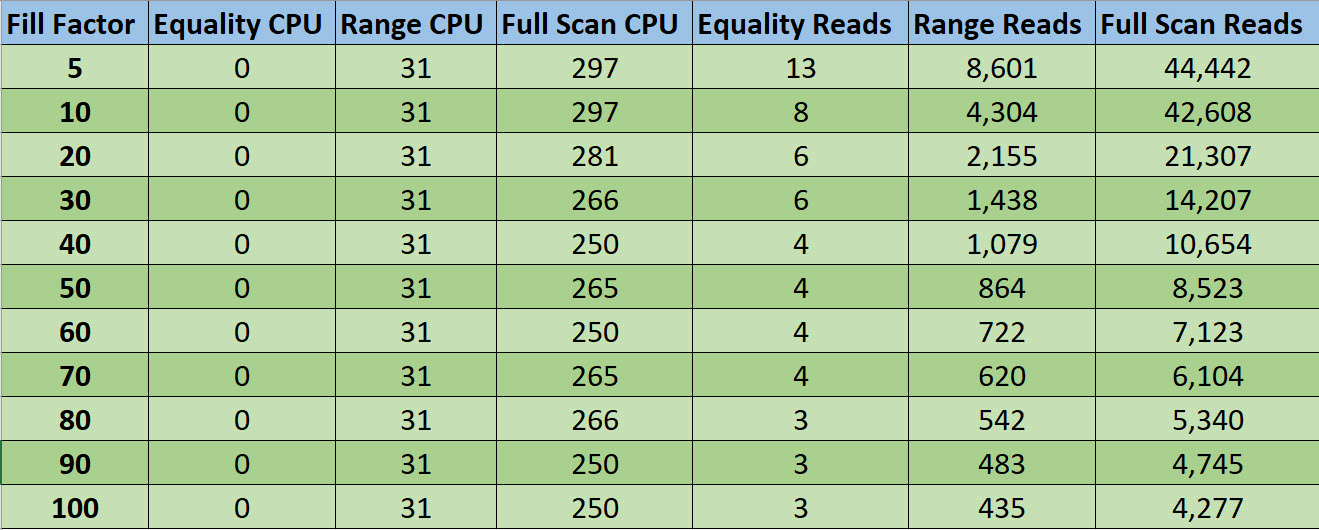
Now, since I don’t wanna take that many screenshots, I embraced my long-lost ENTJ and made an Excel table.

2019 01 13 13 17 43
Retirement Plan

Not surprisingly, the chief metric that went down as fill factor went up is reads. CPU didn’t change much, if at all.

That being said, you have to be real goofy about fill factor to get reads to matter.

Within a sane boundary of fill factors, which I’d call 70 to 100, ask yourself if any variation there is the root cause of your performance problems.

Now, I know you. It’s hard to talk you out of your superstitions, and you’re gonna keep thrashing that expensive SAN with constant I/O nonsense.

But maybe I can talk you into raising the threshold that you do it at. Maybe I can get you to not rebuild (or reorg) your indexes until they hit >70% fragmentation. That’s 30% fill factor on the chart.

Virgin Wax


Alright, now we know that rebuilds help reads. When would number of reads matter most?

  • If your disks are the quite elderly spinning variety
  • And you don’t have enough memory to cache your hot data
  • And maybe your hot data could fit into memory if were defragmented to 100% fill factor

You can kinda start to put a picture together of when it mattered. Before SSDs, before 64bit OSes (32b capped out at ~3GB RAM), and well before flash storage, etc.

Way back when, rebuilding made sense. Reading unordered data could have a big impact on a workload because disks would have to physically move to find unordered/spread out data.

So yeah, if you notice that your workload is doing a lot more reads over time, and rebuilding at 100% fill factor reduces reads, it might be worth rebuilding at some point. But to solve any other common workload problems, look somewhere else. Rebuilding indexes is not the cure.

Thanks for reading!

Going Further


If this is the kind of SQL Server stuff you love learning about, you’ll love my training. Blog readers get 25% off the Everything Bundle — over 100 hours of performance tuning content. Need hands-on help? I offer consulting engagements from targeted investigations to ongoing retainers. Want a quick sanity check before committing to a full engagement? Schedule a call — no commitment required.