Let’s say at some point, you just didn’t know any better, and you wrote a scalar function to make some common thing you needed to do all “modular” and “portable” and stuff.
Good on you, not repeating yourself. Apparently I repeat myself for a living.
Anyway, you know what stinks? When you hit divide by zero errors. It’d be cool if math fixed that for us.
Does anyone know how I can get in touch with math?
Uncle Function
Since you’re a top programmer, you know about this sort of stuff. So you write a bang-up function to solve the problem.
Maybe it looks something like this.
CREATE OR ALTER FUNCTION dbo.safety_dance(@n1 INT, @n2 INT)
RETURNS INT
WITH SCHEMABINDING,
     RETURNS NULL ON NULL INPUT
AS
BEGIN
RETURN
(
    SELECT @n1 / NULLIF(@n2, 0)
);
END
GO
You may even be able to call it in queries about like this.
SELECT TOP (5)
    u.DisplayName,
    fudge = dbo.safety_dance(SUM(u.UpVotes), COUNT(*))
FROM dbo.Users AS u
GROUP BY u.DisplayName
ORDER BY fudge DESC;
The problem is that it makes this query take a long time.
you compute that scalar, sql server
At 23 seconds, this is probably unacceptable. And this is on SQL Server 2019, too. The function inlining thing doesn’t quite help us, here.
One feature restriction is this, so we uh… Yeah.
The UDF does not contain aggregate functions being passed as parameters to a scalar UDF
But we’re probably good query tuners, and we know we can write inline functions.
Ankle Fraction
This is a simple enough function. Let’s get to it.
CREATE OR ALTER FUNCTION dbo.safety_dance_inline(@n1 INT, @n2 INT)
RETURNS TABLE
WITH SCHEMABINDING
AS
RETURN
(
    SELECT @n1 / NULLIF(@n2, 0) AS safety
);
Will it be faster?
SELECT TOP (5)
    u.DisplayName,
    fudge = (SELECT * FROM dbo.safety_dance_inline(SUM(u.UpVotes), COUNT(*)))
FROM dbo.Users AS u
GROUP BY u.DisplayName
ORDER BY fudge DESC;
Well, yes. Mostly because it throws an error.
Msg 4101, Level 15, State 1, Line 35
Aggregates on the right side of an APPLY cannot reference columns from the left side.
Well that’s weird. Who even knows what that means? There’s no apply, here.
What’s your problem, SQL Server?
Fixing It
To get around this restriction, we need to also rewrite the query. We can either use a CTE, or a derived table.
--A CTE
WITH counts AS
(
    SELECT
        u.DisplayName,
        SUM(Upvotes) AS Upvotes,
        COUNT(*) AS records
    FROM dbo.Users AS u
    GROUP BY u.DisplayName
)
SELECT TOP(5)
    c.DisplayName,
    fudge = (SELECT * FROM dbo.safety_dance_inline(c.Upvotes, c.records) AS s)
FROM counts AS c
ORDER BY fudge DESC;

--A derived table
SELECT TOP(5)
    c.DisplayName,
    fudge = (SELECT * FROM dbo.safety_dance_inline(c.Upvotes, c.records) AS s)
FROM
(
    SELECT
        u.DisplayName,
        SUM(Upvotes) AS Upvotes,
        COUNT(*) AS records
    FROM dbo.Users AS u
    GROUP BY u.DisplayName
) AS c
ORDER BY fudge DESC;
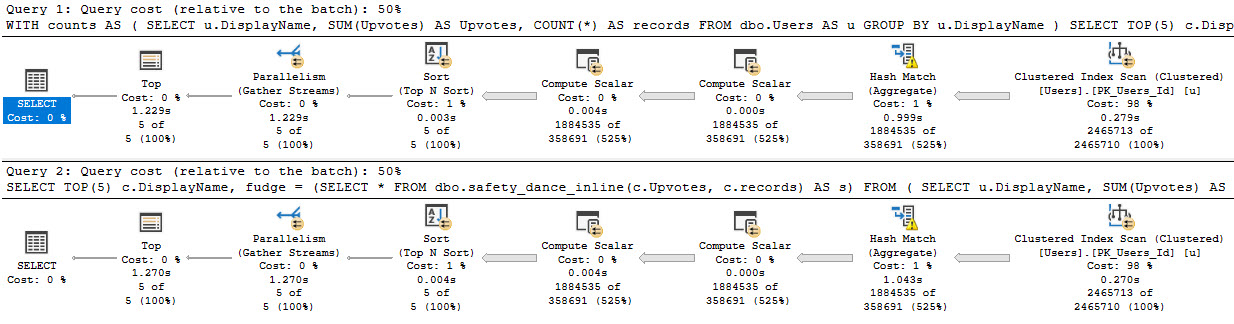
Is it faster? Heck yeah it is.
you’re just so parallel, baby
Thanks for reading!
Going Further
If this is the kind of SQL Server stuff you love learning about: these days I have AI do the annoying stuff for me. My new video course teaches you to work the same way, and I teach whole teams in a one-day workshop. Someone still has to know enough SQL Server to keep the robots in check, and that’s what my training is for.
In this video, I’m diving into a rather mundane topic—specifically, the behavior of scalar-valued functions in SQL Server across different compatibility levels. I walk through a simple query and then nest it within a function to illustrate how performance can vary significantly depending on the version of SQL Server you’re using. The video covers the differences between compatibility levels 140 and 150, highlighting how materialization of branches can impact execution time. If your name isn’t Forrest McDaniel, you might find this content quite dull; however, I appreciate your patience if you stuck around!
Full Transcript
I’m recording a very boring video for my friend Forrest. If your friend, if your name isn’t Forrest McDaniel, you will probably find this video very, very dull and uninteresting. You should probably just stop watching right here. I won’t take it personally if the watch time on this thing plummets because your name isn’t Forrest McDaniel and you would be terribly uninterested in this very boring material. Promise. So, without further ado, here’s some very boring material. I have this query. Alright, I declare a couple variables and I set each variable equal to something. Let’s say I’m going to do some stuff with them later. If I run this query with the query plans turned on and I look at the query plan for it, I have one seek into the comments table because I’m a top lad and I created an index that my query could seek into. Then I have one stream aggregate where both of these expressions are calculated. Actually, there are three things that calculate there, but, uh, so because, uh, you know, uh, I don’t know why there are three off the top of my head, but they’re, but the two that I calculated are in there, I promise. They’re, they’re both there. So, what I want to do is put that in a function and when I put that into a function, like, I’m going to call that comment score for some reason. I don’t know why. I’ll put that into a function and inside the function I’m going to declare those things, uh, set them, you know, declare my, uh, my internal variables, set them equal to stuff.
And then I’m going to return, uh, the comment count times the comment score. Good stuff. So, uh, the first thing that I need to show you is that in compatibility level 140, uh, if I run these queries, uh, they’re going to run pretty quickly because even though that’s a scalar valued function, it’s not running over a ton of rows. It’s not doing a ton of work. And I have proper indexes in place for my function. When we look at the query plan, like we know about scalar values, functions, it’s not going to tell us what the function did. It’s going to completely lie to us. If you’re, if you’re like, like creeped out by this, then you should just go watch my, my plan cache liars videos. Anyway, moving right along. If I run this and we get the estimated plan and we see what the function is doing, the function is doing exactly what the query did. We have one seek, we have one stream aggregate, even for the larger query that, uh, that hits more rows. We have one seek and one stream aggregate. The difference between these two is this is just where one user. I’m just getting that for one user. And the down here, I’m getting, uh, I’m getting the comments where for every user with a reputation over a hundred thousand where things start to get weird is in compat level 150. When we turn on scale, our UDF and lining. Now what I’m going to do is run both of these.
So the flow is about 10 milliseconds before not the end of the world, but it, it, it, it, it’s, it’s, it’s noticeable there. It’s even more noticeable in this query where before when it took about a second. Now we’re looking at it taking about a second and a half because each one of these branches with this stream aggregate is materialized. So this top branch takes 475 and this bottom branch takes 7.726 milliseconds. So about a half a second, a little bit closer to a second. And you can see the final tally on this plan is about a second and a half. The first one was should have been around a second or so. This gets even crappier. If we drop the index that I created on comments, I’m just going to get the estimated plan here because, uh, I don’t want this. I don’t want this video to drag on forever and ever.
But if we look at the estimated plan now and we see that we are indeed missing that index that I created earlier. Um, Oh, you know what? It doesn’t show up my, well, that’s my fault. It doesn’t show up in the estimated plan. It only shows up in the actual plan. So what I got to do now is, uh, run this and let’s go over here. Let’s do this. Let’s do this. Any who is active. All right. Yeah. Yeah. One. Run that.
And look at the execution plan and we will see that SQL Server has chosen to do two index spools, uh, one for each branch in there. Now I know that I could get around this by doing the math from the function all in one go. Like I could just, you know, up here, I could just say set, total comment score equals count big times sum. I know, I get it, but I think this is kind of a missed opportunity to fold some expressions in and do everything all in one go, because if you if you have a bunch of these they’re all gonna kind of add up. And I see a lot of scalar value functions that do a lot of variable assignment like this. If it’s not all in one line then you’re looking at having to rewrite the function to prevent all of those branches from expanding. Anyway, I’m gonna go get brunch now, or take a shower and then go get brunch. I’m still sort of in my PJs, but yeah. Again, totally boring stuff. If your name isn’t Forrest McDaniel you’re probably gonna not enjoy a single second of that. Totally uninteresting. But thank you for not watching, and I will not see you in the next video because you didn’t see this because your name isn’t Forrest.
Isn’t that funny? Isn’t it funny how that works out? You listened to me, didn’t you? You listened to me for once. Thank you. I appreciate it. Sweetie. thank you.
amp police
Going Further
If this is the kind of SQL Server stuff you love learning about: these days I have AI do the annoying stuff for me. My new video course teaches you to work the same way, and I teach whole teams in a one-day workshop. Someone still has to know enough SQL Server to keep the robots in check, and that’s what my training is for.
I had a client recently with, wait for it, a performance problem. Or rather, two problems.
The OLTP part was working fine, but there was a reporting element that was dog slow, and would cause all sorts of problems on the server.
When we got into things, I noticed something rather funny: All of their reporting queries had very high estimated costs, and all the plans were totally serial.
The problem came down to two functions that were used in the OLTP portion, which were reused in the reporting portion.
Uh Ohs
I know what you’re thinking: 2019 would have fixed it.
Buuuuuuuuuuut.
No.
As magnificent and glorious as FROID is, there are a couple limitations that are pretty big gotchas:
The UDF does not invoke any intrinsic function that is either time-dependent (such as GETDATE()) or has side effects3 (such as NEWSEQUENTIALID()).
And
1SELECT with variable accumulation/aggregation (for example, SELECT @val += col1 FROM table1) is not supported for inlining.
Which is what both were doing. One was doing some date math based on GETDATE, the other was assembling a string based on some logic, and not the kind of thing that STRING_AGG would have helped with, unfortunately.
They could both be rewritten with a little bit of work, and once we did that and fixed up the queries using them, things looked a lot different.
Freeee
For these plans, it wasn’t just that they were forced to run on one CPU that was harming performance. In some cases, these functions were in WHERE clauses. They were being used to filter data from tables with many millions of rows.
Yes, there was a WHERE clause that looked like AND dbo.function(somecol) LIKE ‘%thing%’, which was… Brave?
Getting rid of those bottlenecks relieved quite a lot of pain.
If you want to find stuff like this on your own, here’s what you can do:
Looking at the execution plan, hit get the properties of the select operator and look for a “NonParallelPlanReason”
Run sp_BlitzCache and look for “Forced Serialization” warnings
Inspect Filter operators in your query plans (I’m almost always suspicious of these things)
Review code for scalar valued function calls
Thanks for reading!
Going Further
If this is the kind of SQL Server stuff you love learning about: these days I have AI do the annoying stuff for me. My new video course teaches you to work the same way, and I teach whole teams in a one-day workshop. Someone still has to know enough SQL Server to keep the robots in check, and that’s what my training is for.
In this video, I tested my SneakyTops demo in SQL Server 2019 Community Technology Preview 3.1 to see if it was still susceptible to the same issues as before. As you’ll see, I had a bit of an accident with a bottle of water during the recording, but that’s all part of the fun! The main focus was on parameter sniffing and how SQL Server’s optimizer handles top expressions with dynamic parameters. Even though I updated the parameter value to 1000 and tried recompiling the query, SQL Server still guessed 100 rows—just as it did in previous versions. This test didn’t reveal any improvements in SQL Server 2019 regarding this particular issue, which is a bit disappointing but not entirely surprising given the complexity of parameter sniffing scenarios.
Full Transcript
Yeah. So I finished recording the last video on SneakyTops. And what I realized is that I should test my SneakyTops demo in SQL Server 2019 to see if it was still susceptible to SneakyTops. So here we go. On SQL Server 2019, this is CTP 3.1. You can see down there in the corner, maybe, probably. I don’t know. If you stare hard enough, if you squint, I’ll zoom in, I guess. I suppose I’m a nice person. Oh, there we go. Wow. So that, I don’t know really how that worked out, but I’m never zooming again in this thing. So I don’t know what you saw on the screen. Could have been anything, but we’re gonna, we’re gonna leave that as is. You may have seen my Twitter mentions. You may have seen another SSMS window. I don’t care. Anyway. Point is here, I almost knocked over a bottle of water, that no matter what we do, so this expression up here, right, let’s say, right now it’s at 100, right? So if we run this query, this will run for, I don’t know, two and a half seconds. And we get back 100 rows. And if we look at what SQL Server guessed was going to come out of there, it is still 100. Okay, so we have 100 row guess. But if we update, that setting to be 1000, that setting to be 1000, and we run this again, SQL Server’s guess is going to remain at 100, right there. And even if we tag in recompile, and run this, well, SQL Server is still going to guess 100. So, this is not Freud’s fault. So what I wanted to test was the Freud inlining of functions, and see SQL Server would take this and say, hey, we can inline this function. Maybe we can guess at the outcome of it with a recompile hands or without or really just anything. Is there any change here? And there isn’t. So don’t look forward to SQL Server 2019 fixing that problem.
Again, this isn’t like the fault of Freud. This is kind of a weird thing to be doing anyway. And I didn’t, I don’t expect the optimizer to cover every single bizarre scenario that I might encounter. But I did want to, for the sake of completeness with my sneaky top, I did want to see if SQL Server 2019 helped. And it doesn’t look like the guess for a top with an expression is different here. So, and that’s fine. I again, I don’t expect that to, you know, get improved, or change even. I don’t see what the point is. Anyway, thanks for watching. I’m going to open my door and get some air conditioning now. Goodbye. Bye.
Video Summary
In this video, I tested my SneakyTops demo in SQL Server 2019 Community Technology Preview 3.1 to see if it was still susceptible to the same issues as before. As you’ll see, I had a bit of an accident with a bottle of water during the recording, but that’s all part of the fun! The main focus was on parameter sniffing and how SQL Server’s optimizer handles top expressions with dynamic parameters. Even though I updated the parameter value to 1000 and tried recompiling the query, SQL Server still guessed 100 rows—just as it did in previous versions. This test didn’t reveal any improvements in SQL Server 2019 regarding this particular issue, which is a bit disappointing but not entirely surprising given the complexity of parameter sniffing scenarios.
Full Transcript
Yeah. So I finished recording the last video on SneakyTops. And what I realized is that I should test my SneakyTops demo in SQL Server 2019 to see if it was still susceptible to SneakyTops. So here we go. On SQL Server 2019, this is CTP 3.1. You can see down there in the corner, maybe, probably. I don’t know. If you stare hard enough, if you squint, I’ll zoom in, I guess. I suppose I’m a nice person. Oh, there we go. Wow. So that, I don’t know really how that worked out, but I’m never zooming again in this thing. So I don’t know what you saw on the screen. Could have been anything, but we’re gonna, we’re gonna leave that as is. You may have seen my Twitter mentions. You may have seen another SSMS window. I don’t care. Anyway. Point is here, I almost knocked over a bottle of water, that no matter what we do, so this expression up here, right, let’s say, right now it’s at 100, right? So if we run this query, this will run for, I don’t know, two and a half seconds. And we get back 100 rows. And if we look at what SQL Server guessed was going to come out of there, it is still 100. Okay, so we have 100 row guess. But if we update, that setting to be 1000, that setting to be 1000, and we run this again, SQL Server’s guess is going to remain at 100, right there. And even if we tag in recompile, and run this, well, SQL Server is still going to guess 100. So, this is not Freud’s fault. So what I wanted to test was the Freud inlining of functions, and see SQL Server would take this and say, hey, we can inline this function. Maybe we can guess at the outcome of it with a recompile hands or without or really just anything. Is there any change here? And there isn’t. So don’t look forward to SQL Server 2019 fixing that problem.
Again, this isn’t like the fault of Freud. This is kind of a weird thing to be doing anyway. And I didn’t, I don’t expect the optimizer to cover every single bizarre scenario that I might encounter. But I did want to, for the sake of completeness with my sneaky top, I did want to see if SQL Server 2019 helped. And it doesn’t look like the guess for a top with an expression is different here. So, and that’s fine. I again, I don’t expect that to, you know, get improved, or change even. I don’t see what the point is. Anyway, thanks for watching. I’m going to open my door and get some air conditioning now. Goodbye. Bye.
Going Further
If this is the kind of SQL Server stuff you love learning about: these days I have AI do the annoying stuff for me. My new video course teaches you to work the same way, and I teach whole teams in a one-day workshop. Someone still has to know enough SQL Server to keep the robots in check, and that’s what my training is for.
This bit of confusion is largely solved in SQL Server 2019 under compatibility level 150, when FROID (scalar udf inlining) kicks in.
But, you know, we’re a ways off from 2019 dropping, being adopted, and compat level 150 being the operating norm.
So here goes!
Functional Querying
I’ve got a scalar valued function. What it does is unimportant, but I’m calling it in a query like this:
SELECT u.DisplayName,
       dbo.TotalScore(u.Id) AS TotalScore --<functione
FROM dbo.Users AS u
WHERE u.Reputation >= 200000
ORDER BY u.Id;
When I run this in SSMS, it’s obvious to us what’s going on.
But if I’m watching what’s happening on a server using sp_WhoIsActive, what’s going on might not be obvious.
I’m doing all this with just my query running to show how confusing things can get.
First Confusion: Query Text
Foggy
This doesn’t look at all like the text of our query. We can guess that it’s the function running in the select list since we know what we’re doing, but, you know…
We can bring some clarity by running sp_WhoIsActive like this:
This part is a little less obvious, but if we get an estimated plan for our query, or track down the query plan for the function, it becomes more obvious.
Questionable Taco
The query plan for the function is parallel — a cute ~nuance~ about scalar udfs is that they only prevent the query calling them from going parallel.
The function itself can go parallel. So that’s… nice.
I guess.
They Walked Inlined
In compat level 150, things are more clear.
CLRLY
The inner and outer text are the same. There’s more of that CXCONSUMER, though. Hoowee.
Might as well jump.
But at least now we have a query plan that matches the parallel waits, right?
In the next post, we’re gonna talk more about those wait stats, though.
In yesterday’s post, we looked at a clever way to reduce calls to a scalar UDF using APPLY.
Today, we’re going to see if 2019 changes anything, and if our old trick still tricks.
Because, you know, what else do you do when you need to write 5 blog posts a week?
LOVE YOU!
Don’t Be A Donkey
I’m going to abridge this a little bit, since all the code is referenced at the link up there.
I’m also going to show you some stuff using Plan Explorer.
Why?
Because SSMS kept opening the plan XML as XML, and that makes for crap screenshots.
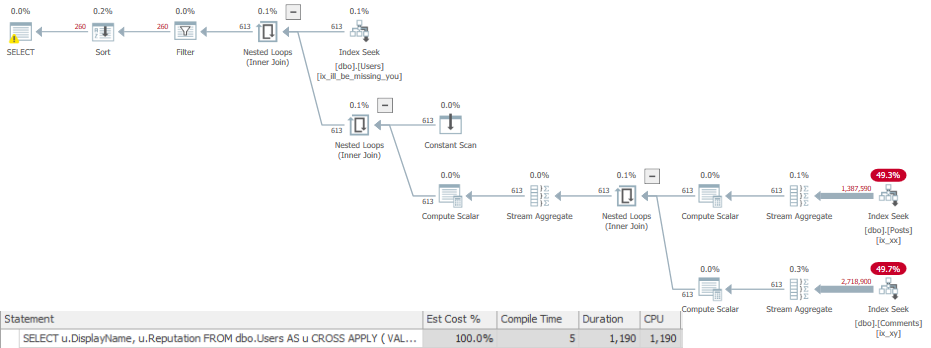
Here’s the results for the plan with two function references. It runs for ~2.2 seconds.
Honesty, at last.
If you remember yesterday’s post (and why wouldn’t you, hm?) the query plans didn’t show us touching other tables at all.
Just seeking into the Users table and then magically computing scalars and filtering.
One of the nice things about scalar UDF inlining: honesty.
But, you know, the two where clause references end up expanding. We’re hitting pretty big tables, here, too.
Apply-ish-ness
Using APPLY has a similar *ffect here. The function is only referenced and filtered once, and the duration is cut roughly in half.
Now, I know you’re probably thinking, because YOU REMEMBER YESTERDAY’S POST!
Ming the Merciless
How come these queries are so much slower with the functions inlined?
Well, they’re not. With query plans turned off, the first one runs in ~900ms, and the second one runs in ~500ms.
Yesterday’s plans run for 1.6s and 600ms respectively with plans turns off.
Apparently observation has overhead. If only there were a clever phrase for that.
Not All Functions
The idea behind FROID is that it removes some restrictions around scalar valued functions.
They can be inlined into the query, not run per-row returned
They don’t force serial execution, so you can get a parallel plan
If your functions already run pretty quickly over a small number of rows, and the calling query doesn’t qualify for parallelism, you may not see a remarkable speedup.
That’s fine, though, because inlining has other benefits:
Query plans are honest about the work they do
Measuring the query will show you work that used to be hidden behind the function call(s)
Even if every query doesn’t magically finish before you run it, you’ll see pretty good gains.
Thanks for reading!
Going Further
If this is the kind of SQL Server stuff you love learning about: these days I have AI do the annoying stuff for me. My new video course teaches you to work the same way, and I teach whole teams in a one-day workshop. Someone still has to know enough SQL Server to keep the robots in check, and that’s what my training is for.
The things I see people doing with them range from “you know there’s a system function that does that” to “oh wow, you wrote an entire program in here”.
I’m not kidding. I once saw a function that was a wrapper for ISNULL that returned the results of ISNULL. I have no idea why.
If I had to think of a DBA prank, writing scalar UDFs that are just wrappers for system functions would be pretty high up there.
Especially if they had the same names as the system functions.
Turning Down The Suck
A while back, Jonathan Kehayias blogged about a way to speed up UDFs that might see NULL input.
Which is great, if your functions see NULL inputs.
But what if… What if they don’t?
And what if they’re in your WHERE clause?
And what if they’re in your WHERE clause multiple times?
Oh my.
Tick, Tick, Tick
Here’s our function.
CREATE FUNCTION dbo.TotalScore(@UserId INT)
RETURNS BIGINT
WITH RETURNS NULL ON NULL INPUT, SCHEMABINDING
AS
BEGIN
    DECLARE @TotalScore BIGINT;
    SELECT @TotalScore =
    (
        SELECT ISNULL(SUM(p.Score), 0)
        FROM dbo.Posts AS p
        WHERE p.OwnerUserId = @UserId
    ) +
    (
        SELECT ISNULL(SUM(c.Score), 0)
        FROM dbo.Comments AS c
        WHERE c.UserId = @UserId
    )
    RETURN @TotalScore;
END
GO
What it does is go out to the Posts and Comments tables and sums up the Score columns for a user.
We’ll use it in our query like this:
SELECT u.DisplayName,
       u.Reputation
FROM dbo.Users AS u
WHERE u.Reputation >= 100000
AND dbo.TotalScore(u.Id) >= 10000
AND dbo.TotalScore(u.Id) < 20000
ORDER BY u.Id;
We want to find people with a total score between 10 and 20 thousand.
Right on.
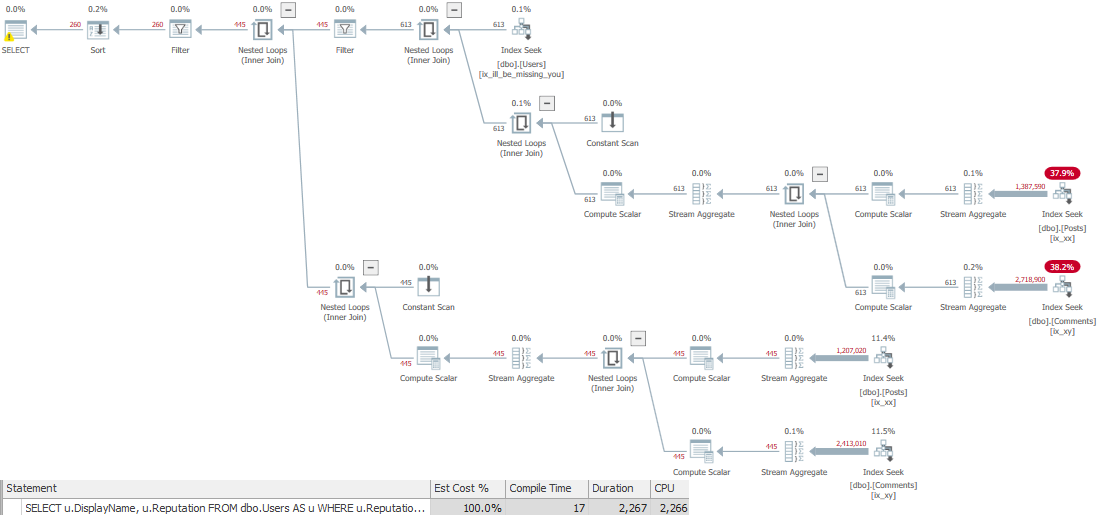
When we run the query, the plan looks like this, showing 2 seconds of runtime.
Two seconds for 260 rows is kinda wack tho
Tock, Tock, Tock
I know, I know. Get to the point. Make it faster, bouncer-man.
Our goal is to get the function to run fewer times, so we’ll replace multiple calls to it with one call.
SELECT u.DisplayName,
       u.Reputation
FROM dbo.Users AS u
CROSS APPLY
    (
        VALUES (dbo.TotalScore(u.Id))
    ) AS t (Score)
WHERE u.Reputation >= 100000
AND   t.Score >= 10000
AND   t.Score < 20000
ORDER BY u.Id;
Using this technique, the query runs for about 780ms.
Check you out.
Tale of the XE
What happens that makes this faster is more evident if we use the XE session from Jonathan’s post for similar reasons, and look at how many times the function was called.
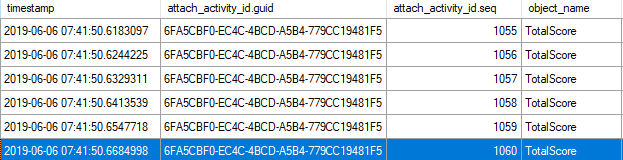
If we look at the activity sequence, it goes up to 1060 for the first query:
Moved Out The Hood
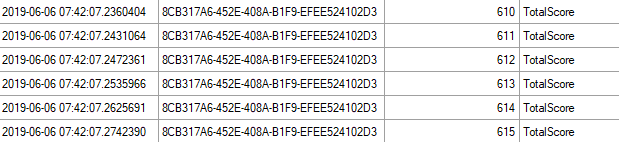
And only 615 for the second query:
Thinner~
Exeunt
Right now, if we want scalar UDFs to run faster, we can:
Tune the underlying query (if there is one)
Have them run fewer times
Wait for SQL Server 2019
In tomorrow’s post, I’ll look at the same scenario using CTP 3 of SQL Server 2019.
Thanks for reading!
Going Further
If this is the kind of SQL Server stuff you love learning about: these days I have AI do the annoying stuff for me. My new video course teaches you to work the same way, and I teach whole teams in a one-day workshop. Someone still has to know enough SQL Server to keep the robots in check, and that’s what my training is for.
I’ve trademarked: Froidrage, Froidulent, and Froidpocalypse.
If you want to use them, you have to pay me $10,000.
Alright, I’m being told by my lawyer that writing them on cocktail napkins and showing them to confused bartenders doesn’t actually register a trademark.
Nevermind.
Here’s What’s Gonna Happen
And it’s not a problem that you need SQL Server 2019 to see. All you have to do is try to rewrite a function.
Here’s our Villain, a scalar UDF.
CREATE FUNCTION dbo.Villain (@UserId INT)
RETURNS INT
WITH SCHEMABINDING, RETURNS NULL ON NULL INPUT
AS
BEGIN

    DECLARE @Score INT
	SELECT TOP (1)
	         @Score = p.Score
	FROM dbo.Posts AS p
	WHERE p.OwnerUserId = @UserId
	AND   p.PostTypeId = 1
	ORDER BY p.Score DESC;

	RETURN @Score;

END
GO
Here’s the query that’s gonna call it:
SELECT      TOP ( 10 )
              u.DisplayName,
			  u.Reputation,
			  dbo.Villain(u.Id)
FROM        dbo.Users AS u
ORDER BY    u.Reputation DESC;
GO
I’m Going To Show You Two Things
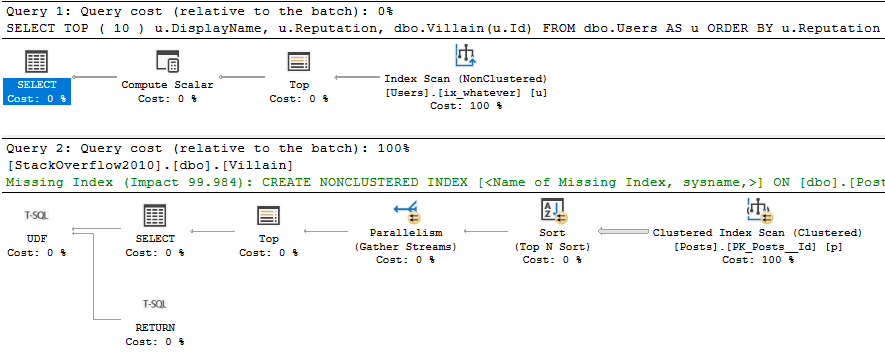
The estimated plan, and the actual plan.
I need to show you the estimated plan so you can see what the function does, because that’s not included in the actual plan.
Yes, the estimated plan is more accurate than the actual plan.
Marinate on that.
On The Dancefloor
The important thing is the second plan, which is the function’s execution plan. Notice that it generated a missing index request, and doesn’t spool anything at all.
It handles the query logic with a Top N Sort.
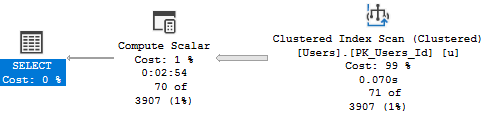
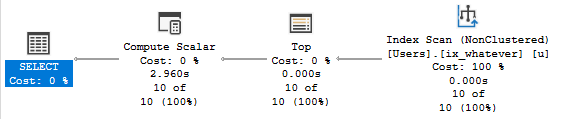
Here’s the actual plan:
A NONCLUSTERED INDEX SCAN!!!
Let’s talk about a couple things:
A nonclustered index scan that costs 100% and runs for 0.000s
A compute scalar that costs 0% and runs for ~3s
The compute scalar thing is well documented by… Well, not by official Microsoft documentation.
Would say “I can rewrite that function and make things better”.
Because of course an inline function is always better than a scalar function.
Enter our Hero.
CREATE FUNCTION dbo.Hero (@UserId INT)
RETURNS TABLE
WITH SCHEMABINDING
AS
RETURN

	SELECT TOP (1)
	         p.Score
	FROM dbo.Posts AS p
	WHERE p.OwnerUserId = @UserId
	AND   p.PostTypeId = 1
	ORDER BY p.Score DESC;

GO
Here’s the query that’s gonna call it:
SELECT      TOP ( 10 )
              u.DisplayName,
			  u.Reputation,
			  h.*
FROM        dbo.Users AS u
CROSS APPLY dbo.Hero(u.Id) AS h
ORDER BY    u.Reputation DESC;
I Only Need To Show You One Thing
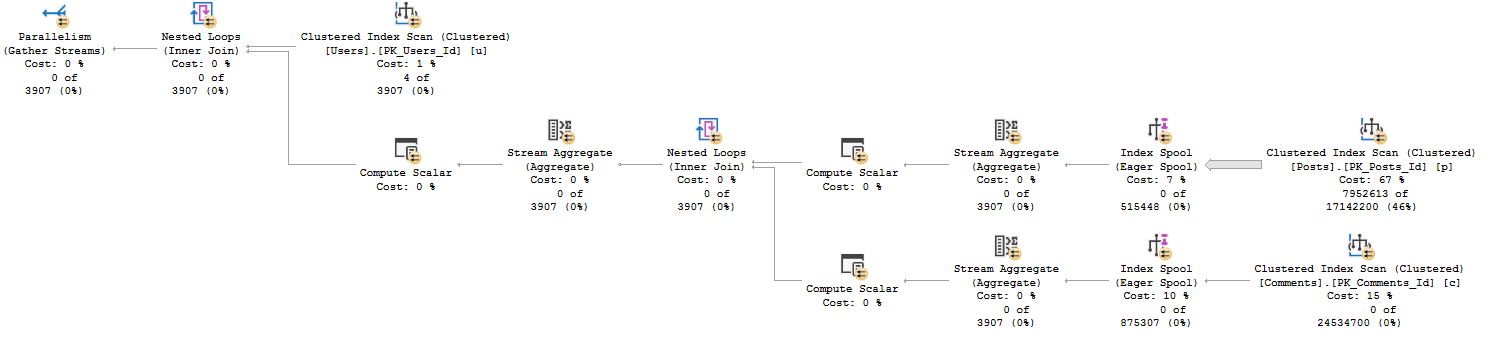
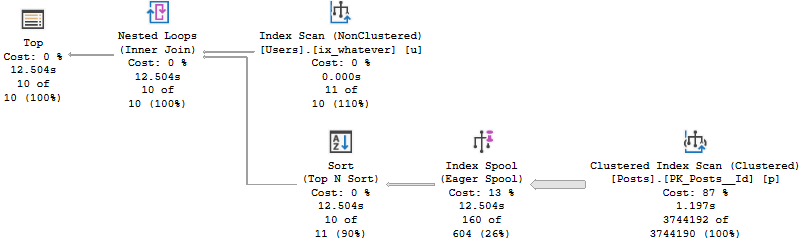
Since the function is an inline type, the query processor is honest with us about the full query plan.
Spiced Ham
Two things happened here:
The “function body” no longer goes parallel
The TOP (1) is run against an eager index spool rather than the clustered index
What’s The Point?
This is what FROID does for you without a rewrite. It’ll inline the scalar UDF.
The plan may be better, or it may be worse.
The scalar UDF plan ran for 3 seconds, and the inline version ran for almost 13 seconds.
Stay tuned for tomorrow’s post. I have a couple suggestions for how The SQL Server team can help end users stay on top of these problems in SQL Server 2019.
Thanks for reading!
Going Further
If this is the kind of SQL Server stuff you love learning about: these days I have AI do the annoying stuff for me. My new video course teaches you to work the same way, and I teach whole teams in a one-day workshop. Someone still has to know enough SQL Server to keep the robots in check, and that’s what my training is for.
“We recently upgraded to SQL Server 201(4, 6, 7), and performance is AWFUL…”
And the problem was pretty easily solved by flipping the compatibility level back to 110, which fixed (most) of the issues?
(Or just went back to having the issues they knew that they had before, which is often far less scary.)
In those versions, flipping compatibility level uses the new Cardinality Estimator (CE). That new Cardinality Estimator is real hit or miss.
The worst part is that there’s practically no gain to be realized for using higher compatibility levels — that changes with SQL Server 2019.
Feature Creature
There are two things that are pretty cool in SQL Server 2019: Scalar UDF Inlining (FROID), and Batch Mode for Row Store (BMFRS?).
FROID potentially solves a big problem that’s been plaguing SQL Server users for decades. Scalar UDFs are just straight up performance poison.
This fixes the problems with them (I mean, sure, not every UDF is eligible, and you can run into other problems, but still…).
BMFRS does a bunch of stuff: It makes Batch Mode processing available for Row Store indexes (duh), it also makes Adaptive Joins and Memory Grant Feedback available for them.
Those two things were introduced in 2017, but only available if you used column store (which is what Batch Mode was originally created for).
These things have the potential to fix some very big workload problems for people.
But there’s a thing.
Monkey Paw
In order to use them, you gotta be in compatibility level 150. That also brings along the new CE.
You could be trading one set of problems for another, here. That makes flipping the switch a hard sell.
It all depends on where your biggest problems are, and the time and resources you have to fix regressions.
For most people, it’s not realistic to test their entire workload. You can test your most important queries, as long as they’re reliable.
This is a good place to plug Workload Tools by Gianluca Sartori, which can make this easier.
You can also flip the switch during a low usage time and see if monitoring freaks out.
If it doesn’t, great. If it does, you have a lot of work to do.
Of course, if you’re on SQL Server Standard Edition, this might not matter. As of this writing, I have no idea if these two features will be available there.
Whack-A-Query
The addition of these two features is pretty neat. I’m excited for them.
I’m also very interested to see how customers react, both from the point of view of adopting SQL Server 2019, and adopting compatibility level 150.
I bet a lot of people are gonna want UDF inlining without having to buy the cow.
Thanks for reading!
Going Further
If this is the kind of SQL Server stuff you love learning about: these days I have AI do the annoying stuff for me. My new video course teaches you to work the same way, and I teach whole teams in a one-day workshop. Someone still has to know enough SQL Server to keep the robots in check, and that’s what my training is for.
Despite being a bouncer for many years, I have no interest at all in security.
Users, logins, roles, grant, deny. Not for me. I’ve seen those posters, and they’re terrifying.
Gimme 3000 lines of dynamic SQL any day.
This is a slightly different take on yesterday’s post, which is also a common problem I see in queries today.
Someone wrote a function to figure out if a user is trusted, or has the right permissions, and sticks it in a predicate — it could be a join or where clause.
High Finance
Stack Overflow isn’t exactly a big four accounting firm, but for some reason big four accounting firms don’t make their databases public under Creative Commons licensing.
So uh. Here we are.
And here’s our query.
DECLARE @UserId INT = 22656, --2788872, 22656
		@SQL NVARCHAR(MAX) = N'';

SET @SQL = @SQL + N'
SELECT    p.Id,
          p.AcceptedAnswerId,
          p.AnswerCount,
          p.CommentCount,
          p.CreationDate,
          p.FavoriteCount,
          p.LastActivityDate,
          p.OwnerUserId,
          p.Score,
          p.ViewCount,
          v.BountyAmount,
          c.Score
FROM      dbo.Posts AS p
LEFT JOIN dbo.Votes AS v
    ON p.Id = v.PostId
	AND dbo.isTrusted(@iUserId) = 1
LEFT JOIN dbo.Comments AS c
    ON p.Id = c.PostId
WHERE     p.PostTypeId = 5;
';

EXEC sys.sp_executesql @SQL,
                       N'@iUserId INT',
					   @iUserId = @UserId;
There’s a function in that join to the Votes table. This is what it looks like.
CREATE OR ALTER FUNCTION dbo.isTrusted ( @UserId INT )
RETURNS BIT
WITH SCHEMABINDING, RETURNS NULL ON NULL INPUT
AS
    BEGIN
        DECLARE @Bitty BIT;

        SELECT @Bitty = CASE WHEN u.Reputation >= 10000
		                     THEN 1
							 ELSE 0
					    END
        FROM   dbo.Users AS u
        WHERE  u.Id = @UserId;

		RETURN @Bitty;

    END;
GO
Bankrupt
There’s not a lot of importance in the indexes, query plans, or reads.
What’s great about this is that you don’t need to do a lot of analysis — we can look purely at runtimes.
It also doesn’t matter if we run the query for a trusted (22656) or untrusted (2788872) user.
In compat level 140, the runtimes look like this:
ALTER DATABASE StackOverflow2013 SET COMPATIBILITY_LEVEL = 140;

 SQL Server Execution Times:
   CPU time = 7219 ms,  elapsed time = 9925 ms.

 SQL Server Execution Times:
   CPU time = 7234 ms,  elapsed time = 9903 ms.
In compat level 150, the runtimes look like this:
ALTER DATABASE StackOverflow2013 SET COMPATIBILITY_LEVEL = 150;

 SQL Server Execution Times:
   CPU time = 2734 ms,  elapsed time = 781 ms.

 SQL Server Execution Times:
   CPU time = 188 ms,  elapsed time = 142 ms.
In both runs, the trusted user is first, and the untrusted user is second.
Sure, the trusted user query ran half a second longer, but that’s because it actually had to produce data in the join.
One important thing to note is that the query was able to take advantage of parallelism when it should have (CPU time is higher than elapsed time).
In older versions (or even lower compat levels), scalar valued functions would inhibit parallelism. Now they don’t when they’re inlined.
Thanks for reading!
Going Further
If this is the kind of SQL Server stuff you love learning about: these days I have AI do the annoying stuff for me. My new video course teaches you to work the same way, and I teach whole teams in a one-day workshop. Someone still has to know enough SQL Server to keep the robots in check, and that’s what my training is for.