When you’re writing code, you have some options when it comes to leaving comments:
Double dashes at the start of a line: -- Comment!
Block quotes around a section of text: /* Comment! */
No comment whatsoever:
The problem with the double-dash method is that there’s no terminator for it. If you end up pasting the query from a DMV where it’s not all nicely formatted, it’s pretty likely going to end up all on a single line.
With a long enough query, it can be a real pain to scroll across looking for comments and separating them to a new line so you can run the query.
What really sucks is that tools that can automatically format T-SQL for you can’t handle this either. If I could just right click and solve the problem, I’d be talking about that instead.
So, please: If you’re going to put comments in your code, use the block quotes.
clearly superior
Thanks for reading!
Going Further
If this is the kind of SQL Server stuff you love learning about, you’ll love my training. Blog readers get 25% off the Everything Bundle — over 100 hours of performance tuning content. Need hands-on help? I offer consulting engagements from targeted investigations to ongoing retainers. Want a quick sanity check before committing to a full engagement? Schedule a call — no commitment required.
I got the chance to sit down and chat about index and statistics maintenance with the wonderful Erin Stellato (b|t), and the nice folks at eightkb.
Enjoy! And make sure to subscribe to their YouTube Channel for more great content.
Thanks for watching!
Going Further
If this is the kind of SQL Server stuff you love learning about, you’ll love my training. Blog readers get 25% off the Everything Bundle — over 100 hours of performance tuning content. Need hands-on help? I offer consulting engagements from targeted investigations to ongoing retainers. Want a quick sanity check before committing to a full engagement? Schedule a call — no commitment required.
I started writing this series as a beginner’s guide to some of the oddities in SQL Server, and to address some of the incorrectness in the world when it comes to database practitioner-ing. It was enjoyable to write, but I think two months is probably enough.
Sometimes you have to clear a lot of material out before you can start on different stuff. Like burning dead brush or something. That’s my only advice about writing.
I hope you’ve enjoyed it, and you’ve learned some stuff along the way.
Anyway, for your convenience, here’s the full list.
If this is the kind of SQL Server stuff you love learning about, you’ll love my training. Blog readers get 25% off the Everything Bundle — over 100 hours of performance tuning content. Need hands-on help? I offer consulting engagements from targeted investigations to ongoing retainers. Want a quick sanity check before committing to a full engagement? Schedule a call — no commitment required.

In case you missed it, because you probably missed it, a long time ago I wrote a post about logging dynamic SQL to a table to track execution history.
And while I still like that post, I wanted to give it another go with a little more chutzpah. It’s a little bit more complicated too, but hey.
To avoid doing version control in blog posts, I’ve got this script up on GitHub. If there are any issues, please raise them over there. Remember the last sentence about not doing version control in blog posts? Thanks for playing along.
I full admit this is mostly a bad idea, but it was a fun one to go on with.
Half The Battle
See, and see very very well. Getting the procedure to put stuff in the table was easy, but… I also wanted the query plan.
Why? The plan cache is an unstable wreck on a lot of servers I look at, and a lot of people are still totally unaware of, or totally not on a version of SQL Server that supports Query Store. And besides, I enjoy forms of self-torture.
Of course, getting the query plan was an exercise in limitations. It’s uh. Well, you’ll see.
Here’s what I ended up having to do: I had to get the query plan inside the dynamic SQL.
DECLARE @sql NVARCHAR(MAX) = N'';
SET @sql += N'
SELECT COUNT_BIG(*) AS records
/*dbo.logging_test*/
FROM dbo.Badges AS b
JOIN dbo.Users AS u
ON b.UserId = u.Id
WHERE u.Reputation > @i;
SELECT @query_plan = detqp.query_plan
FROM sys.dm_exec_requests AS der
CROSS APPLY sys.dm_exec_text_query_plan(der.plan_handle, 0, -1) AS detqp
WHERE der.session_id = @@SPID;
';
See, the dynamic SQL executes in a separate context, but the same SPID. If I try to do this outside of the dynamic SQL, I get the wrong plan. I get the plan for the outer procedure, which doesn’t tell me anything. But now I have to pass the query plan out of the dynamic SQL, too.
And what really sucks? It also gives me back the plan for the DMV query to get the plan.
So we gotta modify XML. What a treat.
SET @query_plan.modify('
declare namespace p = "http://schemas.microsoft.com/sqlserver/2004/07/showplan";
delete //p:StmtSimple[2]')
If you have more than one statement in there, you’d have to change the number in the bracket. Of course, if you’re executing more than one query inside the dynamic SQL, you’ve got worse ideas than me.
This Is Not A Great Post
So if you really wanna do this, you’ll have to call everything like so:
Sure, I probably could have done something with SCOPE_IDENTITY() here, but why miss an excuse to use a GUID and alienate most right-thinking people?
Thanks to a comment from Charlie for pointing me to towards a more flexible way to delete only the last chunk of plan XML!
End Result
Making sure it works:
EXEC dbo.logging_test @i = 0;
GO
SELECT * FROM dbo.logger AS l ORDER BY l.run_date;
GO
something something something
I can hear you asking yourself: why is this in a series of posts called “Starting SQL” when it seems like a bunch of advanced techniques?
It’s because I want to show you that not all good ideas have good implementations, and it can be genuinely difficult to get good information without a lot of changes and overhead. A lot of times, it’s just not worth it, and this is a great example of that.
A valuable lesson to anyone getting started with SQL Server: sometimes it’s just not worth it.
Thanks for reading!
Going Further
If this is the kind of SQL Server stuff you love learning about, you’ll love my training. Blog readers get 25% off the Everything Bundle — over 100 hours of performance tuning content. Need hands-on help? I offer consulting engagements from targeted investigations to ongoing retainers. Want a quick sanity check before committing to a full engagement? Schedule a call — no commitment required.

It doesn’t take much to let a bad person get at your data. I mean, the internet. Right? What a mistake.
Most of the time, you need to parameterize your code to avoid SQL injection. Hooray, we did it.
But there are some aspects to dynamic SQL where you can’t use parameters, like database, schema, table and column names. Worse, if you need to pass in or build a list of columns, you can’t possibly parameterize each one.
These strings are where the biggest potential for problems lies, though. They’ll often be declared are some long variable length to safeguard against string truncation, which leaves plenty of room to tack on whatever additional payload you want the query to execute.
Not Dropping, Dumping
When it comes to permissions, it’s somewhat easier to disallow an app login from dropping databases or tables. Of course, it’s a bit of a joke expecting that sort of granularity from most applications.
They’ll all wanna do something that requires that privilege occasionally, so will be granted the privilege perpetually.
What a nice time that is.
But let’s face it, dropping things is at best a temporary disruption. Stealing data is forever, especially if you can just keep stealing it. For example, this query can be used to get the results of what’s in sys.tables along with regular query results. It doesn’t take a rocket surgeon to figure out how things line up.
DECLARE @SQLString NVARCHAR(MAX) = N'';
DECLARE @Filter NVARCHAR(MAX) = N'';
DECLARE @nl NCHAR(2) = NCHAR(13);
DECLARE @Title NVARCHAR(250) = N'''
UNION ALL
SELECT t.object_id,
t.schema_id,
t.name,
SCHEMA_NAME(t.schema_id),
t.create_date,
t.modify_date,
NULL
FROM sys.tables AS t --';
SET @SQLString = @SQLString +
N'
SELECT TOP (5000)
p.OwnerUserId,
p.Score,
p.Tags,
p.Title,
p.CreationDate,
p.LastActivityDate,
p.Body
FROM dbo.Posts AS p
WHERE p.OwnerUserId = 22656 ' + @nl;
IF @Title IS NOT NULL
BEGIN SET @Filter = @Filter + N' AND p.Title LIKE ''' + N'%' + @Title + N'%''' + @nl; END;
IF @Filter IS NOT NULL
BEGIN SET @SQLString += @Filter; END;
SET @SQLString += N' ORDER BY p.Score DESC;';
PRINT @SQLString;
EXEC (@SQLString);
And of course, after sys.tables you have sys.columns, and once you know which columns are in which table you want to go after, the rest is soft cheese.
Zero Injection Policy
If we wanted to not have that happen, we could write our SQL like this instead:
DECLARE @SQLString NVARCHAR(MAX) = N'';
DECLARE @Filter NVARCHAR(MAX) = N'';
DECLARE @nl NCHAR(2) = NCHAR(13);
DECLARE @Title NVARCHAR(250) = N'''
UNION ALL
SELECT t.object_id,
t.schema_id,
t.name,
SCHEMA_NAME(t.schema_id),
t.create_date,
t.modify_date,
NULL
FROM sys.tables AS t --';
SET @SQLString = @SQLString +
N'
SELECT TOP (5000)
p.OwnerUserId,
p.Score,
p.Tags,
p.Title,
p.CreationDate,
p.LastActivityDate,
p.Body
FROM dbo.Posts AS p
WHERE p.OwnerUserId = 22656 ' + @nl;
IF @Title IS NOT NULL
BEGIN SET @Filter = @Filter + N' AND p.Title LIKE %@Title% ' + @nl; END;
IF @Filter IS NOT NULL
BEGIN SET @SQLString += @Filter; END;
SET @SQLString += N' ORDER BY p.Score DESC;';
PRINT @SQLString;
EXEC sys.sp_executesql @SQLString,
N'@Title NVARCHAR(250)',
@Title;
The difference in output is quite apparent:
the broom snapped in two
But What About!
Yes, all those object names. Terrible about them, huh?
Of course, we have QUOTENAME to save us from those, and examples of it aren’t terribly interesting. This time, you get a link to the docs page.
Thanks for reading!
Going Further
If this is the kind of SQL Server stuff you love learning about, you’ll love my training. Blog readers get 25% off the Everything Bundle — over 100 hours of performance tuning content. Need hands-on help? I offer consulting engagements from targeted investigations to ongoing retainers. Want a quick sanity check before committing to a full engagement? Schedule a call — no commitment required.
Temporary objects are a necessity for just about every workload I’ve ever seen. One cannot trust the optimizer with overly large and complex queries.
At some point, you’ve gotta break things up, down, or sideways, in order to stabilize a result set for better cardinality estimation on one (or both) sides of the query.
But there are some tricks and oddities around how and where you can use temporary objects in dynamic SQL.
It’s important to consider scope, and object type, when dealing with both at once.
Since they’re my least favorite, let’s start with table variables.
Well, It Beats String Splitting
Under normal circumstances, you can’t pass table variables into dynamic SQL, nor can you declare a table variable outside of dynamic SQL and use it inside.
Trying to do either one of these things will result in an error!
DECLARE @crap TABLE(id INT);
DECLARE @sql NVARCHAR(MAX) = N'SELECT COUNT(*) AS records FROM @crap;'
EXEC sp_executesql @sql;
GO
DECLARE @crap TABLE(id INT);
DECLARE @sql NVARCHAR(MAX) = N'SELECT COUNT(*) AS records FROM @crap;'
EXEC sp_executesql @sql, N'@crap TABLE (id INT)', @crap;
GO
A big, stupid, milk-brained error. But you can do it with a User Defined Type:
CREATE TYPE crap AS TABLE(id INT);
GO
DECLARE @crap AS crap;
DECLARE @sql NVARCHAR(MAX) = N'SELECT COUNT(*) AS records FROM @crap;'
EXEC sp_executesql @sql, N'@crap crap READONLY', @crap;
GO
In the same way that you can pass Table Valued Parameters into stored procedures, you can pass them into dynamic SQL, too. That’s pretty handy for various reasons.
But passing one out, no dice.
DECLARE @crap AS crap;
DECLARE @sql NVARCHAR(MAX) = N'DECLARE @crap AS crap;'
EXEC sp_executesql @sql, N'@crap crap OUTPUT', @crap = @crap OUTPUT;
GO
But of course, it might be even easier to use a temp table, so here we go.
I Don’t See Nothing Wrong
Of course, with temp tables, there is no problem using them with inner dynamic SQL
CREATE TABLE #gold(id INT);
DECLARE @sql NVARCHAR(MAX) = N'SELECT COUNT(*) AS records FROM #gold;'
EXEC sp_executesql @sql;
DROP TABLE #gold;
GO
But we don’t find nearly as much joy doing things in reverse.
DECLARE @sql NVARCHAR(MAX) = N'CREATE TABLE #gold(id INT);'
EXEC sp_executesql @sql;
SELECT COUNT(*) AS records FROM #gold;
DROP TABLE #gold;
GO
That’s why, rather than create a UDT, which gives you another dependency with not a lot of upside, people will just dump the contents of a TVP into a temp table, and use that inside dynamic SQL.
It’s a touch less clunky. Plus, with everything we know about table variables, it might not be such a great idea using them.
If this is the kind of SQL Server stuff you love learning about, you’ll love my training. Blog readers get 25% off the Everything Bundle — over 100 hours of performance tuning content. Need hands-on help? I offer consulting engagements from targeted investigations to ongoing retainers. Want a quick sanity check before committing to a full engagement? Schedule a call — no commitment required.

I think it was Doug Lane who coined the stages of dynamic SQL. One of them dealt with the fact that once you start using it, you just wanna use it everywhere, even places where you think you don’t need it.
Most of the time, you don’t. A parameter is good enough. But like we saw last week, sometimes parameters can backfire, and you can use dynamic SQL to save query performance.
That’s one great use, but it’s one you’re gonna have to use constantly. Most of the time when you’re using dynamic SQL, it’s not going to be to correct performance.
You want to build or use a different string based on some input
You have a statement you want to execute over multiple targets
Your script has to support multiple versions of SQL Server
Of course, one can’t reasonably write about dynamic SQL in SQL Server without linking to Erland. Boy howdy, did I learn most everything I know from him.
I Disconnect From You
One of the big downsides of dynamic SQL is that statements in a stored procedure are no longer associated with that stored procedure in system DMVs.
Of course, you can address this somewhat by adding a comment to the query inside the dynamic SQL:
/*headless*/
DECLARE @super_cool_sql NVARCHAR(MAX) = N'
SELECT *
FROM ALL THE TABLES!
';
/*more headed*/
DECLARE @super_cool_sql NVARCHAR(MAX) = N'
SELECT *
/*super cool procedure name*/
FROM ALL THE TABLES!
';
Where you put the comment is irrelevant, but if it’s a particularly long query, I’d probably want it close to or above the select so it doesn’t get truncated.
But we’re all nice people who don’t write queries with more than 65k characters and spaces in them.
Right? Right.
While it’s nice to know where they came from, they’re not easy to track down because they don’t have a parent object id — they’re rogue agents in the plan cache.
It can also make troubleshooting a stored procedure difficult because it can be a little harder to see which statements did the most work.
You might be conditionally executing certain blocks of dynamic SQL for different reasons
You might be building dynamic where clauses that have different performance profiles
Yes, you can control the flow of logic, but it has no desirable impact on query plan compilation. Everything gets compiled the first time.
Instead of dynamic SQL, though, you could use separate stored procedures, which at least makes the objects a little easier to track down in the plan cache or Query Store.
CREATE OR ALTER PROCEDURE dbo.VoteCount (@VoteTypeId INT, @YearsBack INT)
AS
BEGIN
IF @VoteTypeId IN (2, 1, 3, 5, 10, 6)
BEGIN
EXEC dbo.VoteCount_InnerBig @VoteTypeId, @YearsBack;
END;
IF @VoteTypeId IN (16, 15, 11, 8, 9, 7, 12, 4)
BEGIN
EXEC dbo.VoteCount_InnerSmall @VoteTypeId, @YearsBack;
END;
END;
Both of those stored procedures can have the same statement in them, without the ? = (SELECT ?) addition needed with the dynamic SQL option.
That they’re owned by different objects is enough to get them separate optimization paths. You’re also a bit less prone to permissions issues, if you’re the kind of person who takes those seriously. But if your app logs in as db_owner or whatever, well, BOFL with that.
Speaking of which, even though I find security incredibly dull and frustrating, let’s talk a little about how people can take advantage of bad dynamic SQL.
Thanks for reading!
Going Further
If this is the kind of SQL Server stuff you love learning about, you’ll love my training. Blog readers get 25% off the Everything Bundle — over 100 hours of performance tuning content. Need hands-on help? I offer consulting engagements from targeted investigations to ongoing retainers. Want a quick sanity check before committing to a full engagement? Schedule a call — no commitment required.

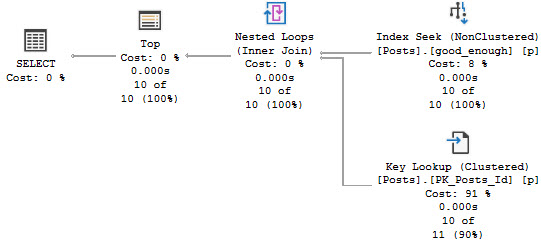
It would certainly be a good candidate for index changes though, because the first thing we need to address is that key lookup.
It’s a sensitive issue.
King Index
We’re going to walk through something I talked about what seems like an eternity ago. Why? Because it has practical application here.
When you look at the core part of the query, PostId is only in the select list. Most advice around key lookups (including, generally, my own) is to consider putting columns only in the output into the includes of the index.
and that’s where this is
But we’re in a slightly different situation, here.
SELECT v.VoteTypeId,
v.PostId,
COUNT_BIG(v.PostId) AS TotalPosts,
COUNT_BIG(DISTINCT v.PostId) AS UniquePosts
FROM dbo.Votes AS v
WHERE v.CreationDate >= DATEADD(YEAR, (-1 * @YearsBack), '2014-01-01')
AND v.VoteTypeId = @VoteTypeId
GROUP BY v.VoteTypeId,
v.PostId
We’re getting a distinct count, and SQL Server has some choices for coming up with that.
If we follow the general advice here and create this index, we’ll end up in trouble:
CREATE INDEX v
ON dbo.Votes(VoteTypeId, CreationDate) INCLUDE(PostId)
WITH (DROP_EXISTING = ON);
growling intensifies
Since the Stream Aggregate expects ordered data, and PostId isn’t in order in the index (because includes aren’t in any particular order), we need to sort it. For a small amount of data, that’s fine. For a large amount of data, it’s not.
There is a second Sort in the plan further down, but it’s on the count expression, which means we can’t index it without adding in additional objects, like an indexed view.
SELECT TOP (1000)
x.VoteTypeId,
x.PostId,
x.TotalPosts,
x.UniquePosts
FROM
(
SELECT v.VoteTypeId,
v.PostId,
COUNT_BIG(v.PostId) AS TotalPosts, -- this is the expression
COUNT_BIG(DISTINCT v.PostId) AS UniquePosts
FROM dbo.Votes AS v
WHERE v.CreationDate >= DATEADD(YEAR, (-1 * @YearsBack), '2014-01-01')
AND v.VoteTypeId = @VoteTypeId
GROUP BY v.VoteTypeId,
v.PostId
) AS x
ORDER BY x.TotalPosts DESC; -- this is the ordering
What’s An Index To A Non-Believer?
A better index in this case looks like this:
CREATE INDEX v
ON dbo.Votes(VoteTypeId, PostId, CreationDate)
WITH (DROP_EXISTING = ON);
It will shave about 6 seconds off the run time, but there’s still a problem when the “big” data doesn’t go parallel:
big data differences
When the plan goes parallel, it’s about 4x faster than the serial version. Now I know what you’re thinking, here. We could use OPTIMIZE FOR to always get the plan for the big value. And that’s not a horrible idea — the small data parameter runs very quickly re-using the parallel plan here — but there’s another way.
Let’s look at our data.
Don’t Just Stare At It
Let’s draw an arbitrary line. I think a million is a popular number. I wish it was a popular number in my bank account, but you know.
unwritten law
I know we’re ignoring the date column data, but this is good enough for now. There’s only so much I can squeeze into one blog post.
The point here is that we’re going to say that anything under a million rows is okay with using the small plan, and anything over a million rows needs the big plan.
Sure, we might need to refine that later if there are outliers within those two groups, but this is a blog post.
How do we do that? We go dynamic.
Behike 54
Plan ol’ IF branches plan ol’ don’t work. We need something to get two distinct plans that are re-usable.
Here’s the full procedure:
CREATE OR ALTER PROCEDURE dbo.VoteCount (@VoteTypeId INT, @YearsBack INT)
AS
BEGIN
DECLARE @sql NVARCHAR(MAX) = N'';
SET @sql += N'
SELECT TOP (1000)
x.VoteTypeId,
x.PostId,
x.TotalPosts,
x.UniquePosts
/*dbo.VoteCount*/
FROM
(
SELECT v.VoteTypeId,
v.PostId,
COUNT_BIG(v.PostId) AS TotalPosts,
COUNT_BIG(DISTINCT v.PostId) AS UniquePosts
FROM dbo.Votes AS v
WHERE v.CreationDate >= DATEADD(YEAR, (-1 * @YearsBack), ''2014-01-01'')
AND v.VoteTypeId = @VoteTypeId '
IF @VoteTypeId IN (2, 1, 3, 5, 10, 6)
BEGIN
SET @sql += N'
AND 1 = (SELECT 1)'
END
IF @VoteTypeId IN (16, 15, 11, 8, 9, 7, 12, 4)
BEGIN
SET @sql += N'
AND 2 = (SELECT 2)'
END
SET @sql += N'
GROUP BY v.VoteTypeId,
v.PostId
) AS x
ORDER BY x.TotalPosts DESC;
';
RAISERROR('%s', 0, 1, @sql) WITH NOWAIT;
EXEC sys.sp_executesql @sql,
N'@VoteTypeId INT, @YearsBack INT',
@VoteTypeId, @YearsBack;
END;
There’s a bit going on in there, but the important part is in the middle. This is what will give use different execution plans.
IF @VoteTypeId IN (2, 1, 3, 5, 10, 6)
BEGIN
SET @sql += N'
AND 1 = (SELECT 1)'
END
IF @VoteTypeId IN (16, 15, 11, 8, 9, 7, 12, 4)
BEGIN
SET @sql += N'
AND 2 = (SELECT 2)'
END
Sure, there are other ways to do this. You could even selectively recompile if you wanted to. But some people complain when you recompile. It’s cheating.
Because the SQL Server Query Optimizer typically selects the best execution plan for a query, we recommend only using hints as a last resort for experienced developers and database administrators.
See? It’s even documented.
Now that we’ve got that all worked out, we can run the procedure and get the right plan depending on the amount of data we need to shuffle around.
strangers in the night
Little Star
Now I know what you’re thinking. You wanna know more about that dynamic SQL. You want to solve performance problems and have happy endings.
We’ll do that next week, where I’ll talk about common issues, best practices, and more tricks you can use to get queries to perform better with it.
Thanks for reading!
Going Further
If this is the kind of SQL Server stuff you love learning about, you’ll love my training. Blog readers get 25% off the Everything Bundle — over 100 hours of performance tuning content. Need hands-on help? I offer consulting engagements from targeted investigations to ongoing retainers. Want a quick sanity check before committing to a full engagement? Schedule a call — no commitment required.

There are lots of different ways that parameter sniffing can manifest in both the operators chosen, the order of operators chosen, and the resources acquired by a query when a plan is compiled. At least in my day-to-day consulting, one of the most common reasons for plans being disagreeable is around insufficient indexes.
One way to fix the issue is to fix the index. We’ll talk about a way to do it without touching the indexes tomorrow.
Let’s say we have this index to start with. Maybe it was good for another query, and no one ever thought twice about it. After all, you rebuild your indexes every night, what other attention could they possible need?
CREATE INDEX v
ON dbo.Votes(VoteTypeId, CreationDate);
If we had a query with a where clause on those two columns, it’d be be able to find data pretty efficiently.
But how much data will it find? How many of each VoteTypeId are there? What range of dates are we looking for?
Well, that depends on our parameters.
Cookie Cookie
Here’s our stored procedure. There’s one column in it that isn’t in our index. What a bummer.
CREATE OR ALTER PROCEDURE dbo.VoteCount (@VoteTypeId INT, @YearsBack INT)
AS
BEGIN
SELECT TOP (1000)
x.VoteTypeId,
x.PostId,
x.TotalPosts,
x.UniquePosts
FROM
(
SELECT v.VoteTypeId,
v.PostId,
COUNT_BIG(v.PostId) AS TotalPosts,
COUNT_BIG(DISTINCT v.PostId) AS UniquePosts
FROM dbo.Votes AS v
WHERE v.CreationDate >= DATEADD(YEAR, (-1 * @YearsBack), '2014-01-01')
AND v.VoteTypeId = @VoteTypeId
GROUP BY v.VoteTypeId,
v.PostId
) AS x
ORDER BY x.TotalPosts DESC;
END;
That doesn’t matter for a small amount of data, whether it’s encountered because of the parameters used, or the size of the data the procedure is developed and tested against. Testing against unrealistic data is a recipe for disaster, of course.
Cookie Cookie
What can be tricky is that if the sniffing is occurring with the lookup plan, the optimizer won’t think enough of it to request a covering index, either in plan or in the index DMVs. It’s something you’ll have to figure out on your own.
i said me toooh yeah that
So we need to add that to the index, but where? That’s an interesting question, and we’ll answer it in tomorrow’s post.
Thanks for reading!
Going Further
If this is the kind of SQL Server stuff you love learning about, you’ll love my training. Blog readers get 25% off the Everything Bundle — over 100 hours of performance tuning content. Need hands-on help? I offer consulting engagements from targeted investigations to ongoing retainers. Want a quick sanity check before committing to a full engagement? Schedule a call — no commitment required.
Alright, maybe not any database. Let’s stick with SQL Server. That’s the devil we know.
At some point in your life, you’re going to construct a query that takes user input, and that input is likely going to come in the form of a parameter.
It could be a stored procedure, dynamic SQL, or something from your application. But there it is.
Waiting. Watching.
Sniffing.
Defining A Problem
When we use parameters, we re-use execution plans, at least until a Qualifying Event™ occurs.
What’s a qualifying event?
Recompile hint
Stats update
Temp table modification threshold
Plan eviction
Server restart
Now, it might be reasonable to think that a mature optimizer — and it is an optimizer, not just a planner — would be able to do something a bit more optimal. After all, why would anyone think it would take the same amount of work to get through 100 rows as it would take to get through 1,000,000 rows? It’s a fundamentally different approach.
Doing a run to the grocery store to replenish a few things requires a far different mindset from going to prepare for a large family meal. You have to choose between a basket or a cart, whether you can jump right to the couple spots you need or you need to walk up and down every aisle, and even if you might need to write down a list because it doesn’t fit into brain memory.
One might also have the expectation that if a significant inaccuracy is detected at runtime, the strategy might change. While that does sort of happen with Adaptive Joins, it’s not a full plan rewrite.
Detecting A Problem
The plan cache usually sucks for this, unless you’re saving the data off to more stable tables. Why? Because most people only figure out they’ve been sniffed after a plan changes, which means it’s not in the cache anymore. You know, when end users start complaining, the app goes unresponsive, you can’t connect to the server, etc.
You could set your watch to it.
But sometimes it’s there. Some funny looking little plan that looks quite innocent, but seems to do a lot of work when you bang it up against other DMVs.
If you have the luxury, Query Store is quite a better tool for detecting plan changes. It’s even got reports built in just for that.
how nice of you.
For the extra fancy amongst you, I pray that your expensive monitoring tool has a way to tell you when query plans change, or when normally fast plans deviate from that.
Deciphering A Problem
This is where things can get difficult, unless you’re monitoring or logging information. You typically need a few different combinations of parameter values to feed in to your query, so you can see what changed and when. Quite often, there’s no going back easily.
Let’s say you had a plan, and it was a good plan. Then one of those pesky qualifying events comes along, and it’s decided that you need a new plan.
And what if… that new plan is worse? No matter how much you recompile or update stats or toggle with cardinality estimation, you just can’t go back to the way things were without lots of hints or changes to the query? Maybe that’s not parameter sniffing. Maybe that’s parameter snuffing. I’m gonna copyright that.
Most parameter sniffing will result in a plan with a set of bad choices for different amounts of data, which will result in something like this:
not crafty
This isn’t a “bad estimate” — it was a pretty good estimate for the first parameter value. It just wasn’t a good estimate for the second parameter value.
And to be honest, quite a bit of parameter sniffing issues come from Nested Loops. Not because it’s bad, but because it’s bad for large amount of data, especially in a serial plan. It’s a pretty easy way to gum up a query, though. Make it get stuck in a loop for 13 million rows. It wasn’t fast? No kidding. Poof, be gone.
But then opposite-land isn’t good, either.
like falling, baby
This plan probably makes plenty of sense for a big chunk of data. One big scan, one big hash, one big sort. Done.
Of course, for a small amount of data, we go from taking 1ms to taking 2s. Small amount of data people will likely not be happy with that. Your server might not be either, what with all the extra CPU resources we’re using in this here parallel plan all the time now.
Tomorrow, we’ll look at how sometimes you can fix parameter sniffing with better indexes.
Thanks for reading!
Going Further
If this is the kind of SQL Server stuff you love learning about, you’ll love my training. Blog readers get 25% off the Everything Bundle — over 100 hours of performance tuning content. Need hands-on help? I offer consulting engagements from targeted investigations to ongoing retainers. Want a quick sanity check before committing to a full engagement? Schedule a call — no commitment required.