Software Vendor Mistakes With SQL Server: Not Getting Parallel Inserts Into #Temp Tables

Do That, But Faster


Serial zones in parallel plans can leave a lot of performance on the table. One of the best ways to see that is with insert queries that do a lot of work. A big contrast between @table variables and #temp tables is that the former fully disallows parallelism in modification queries, and the latter do not.

The story gets a little more complicated when inserting into a columnstore index, but this post isn’t really about that.

Let’s look at some scenarios where a fully parallel insert is allowed, and then not allowed.

The thing to keep an eye out for is the insert operator being in the serial zone. For the purposes of this thread:
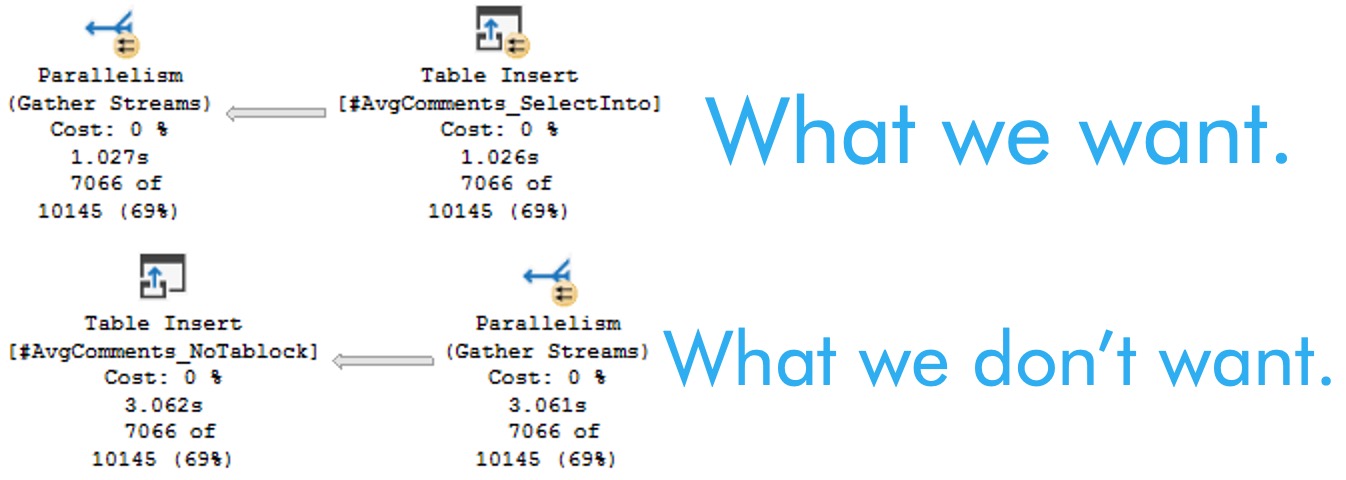
SQL Server Query Plan
attention, please

Works: SELECT INTO


As long as you don’t do anything too goofy here, a fully parallel insert will “always” be allowed, here.

Goofy things will be explained later in the post.

--This will "always" work, as long as you don't do 
--anything listed below in the "broken" select
SELECT
    C.UserId,
    SumScore = 
        SUM(C.Score)
INTO
    #AvgComments_SelectInto
FROM 
    dbo.Comments AS C
GROUP BY 
    C.UserId
HAVING 
    SUM(C.Score) > 200;

DROP TABLE #AvgComments_SelectInto;

Works: INSERT, with TABLOCK


Rather than selecting directly into a table, here we’re gonna create the table and issue an insert statement with the tablock hint.

--This *will* get you a fully parallel insert, unless goofiness is involved.
CREATE TABLE
    #AvgComments_Tablock
(
    UserId int,
    SumScore int
);

INSERT 
    #AvgComments_Tablock WITH (TABLOCK)
(
    UserId, 
    SumScore
)
SELECT 
    C.UserId,
    AvgScore = 
        SUM(C.Score)
FROM 
    dbo.Comments AS C
GROUP BY 
    C.UserId
HAVING 
    SUM(C.Score) > 200

DROP TABLE #AvgComments_Tablock

Doesn’t Work: INSERT, without TABLOCK


Without the tablock hint, this will get you the plan we don’t want, where the insert operator is outside the parallel zone.

--This will not get you a fully parallel insert
CREATE TABLE
    #AvgComments_NoTablock
(
    UserId int,
    SumScore int
);

INSERT 
    #AvgComments_NoTablock 
(
    UserId, 
    SumScore
)
SELECT
    C.UserId,
    SumScore = 
        SUM(C.Score)
FROM 
    dbo.Comments AS C
GROUP BY 
    C.UserId
HAVING 
    SUM(C.Score) > 200;

DROP TABLE #AvgComments_NoTablock;

Doesn’t Work: A Whole Laundry List Of Stuff


Basically any one thing quoted out has the ability to deny the parallel insert that we’re after.

If you’re doing any of this stuff, like, bye.

--SET ROWCOUNT Any_Number;
--ALTER DATABASE StackOverflow2013 
--    SET COMPATIBILITY_LEVEL = Anything_Less_Than_130;
CREATE TABLE
    #AvgComments_BrokenTablock
(
    --Id int IDENTITY,
    UserId int,
    SumScore int,
    --INDEX c CLUSTERED(UserId)
    --INDEX n NONCLUSTERED(UserId)
);

--Also, if there's a trigger or indexed view on the target table
--But that's not gonna be the case with #temp tables
INSERT 
    #AvgComments_BrokenTablock WITH (TABLOCK)
(
    UserId, 
    SumScore
)
--The rules here are a little weird, so
--be prepared to see weird things if you use OUTPUT
--OUTPUT Inserted.*
--To the client or
--INTO dbo.some_table
--INTO @table_varible
SELECT
    --Id = IDENTITY(bigint, 1, 1),
    --dbo.A_Scalar_UDF_Not_Inlined_By_Froid
    C.UserId,
    SumScore = 
        SUM(C.Score)
FROM 
    dbo.Comments AS C
--Any reference to the table you're inserting into
--Not exists is just an easy example of that
--WHERE NOT EXISTS
--(
--    SELECT
--	    1/0
--	FROM #AvgComments_BrokenTablock AS A
--	WHERE A.UserId = C.UserId
--)
GROUP BY 
    C.UserId
HAVING 
    SUM(C.Score) > 200;

DROP TABLE #AvgComments_BrokenTablock;

Explainer


There are many good reasons to want a fully parallel insert, but you need to make sure that the bottleneck isn’t earlier in the plan.

If it is, you may not see the full performance gains from getting it.

In general, it’s a good strategy when building larger #temp tables, but at this point I add a tablock hint to every #temp table insert at first to test things out.

Thanks for reading!

Going Further


If this is the kind of SQL Server stuff you love learning about, you’ll love my training. Blog readers get 25% off the Everything Bundle — over 100 hours of performance tuning content. Need hands-on help? I offer consulting engagements from targeted investigations to ongoing retainers. Want a quick sanity check before committing to a full engagement? Schedule a call — no commitment required.
Software Vendor Mistakes With SQL Server: Not Using #Temp Tables

Wind Charms


After yesterday’s post about when to use or not use @table variables in SQL Server, you can probably make choices more confidently.

Most of the time, you want to be using #temp tables, when plan choices and statistics matter to overall performance, and @table variables when code executes at a high frequency over a small-ish number of rows, where plan choices and statistics don’t matter to overall performance.

In case you didn’t pick that up, or something.

Let’s move on.

Use Cases For #Temp Tables


The best use cases for #temp tables are for materializing things like:

  • Non-SARGable expressions
  • Complicated CTEs or Derived Tables
  • Parameter-sensitive portions of queries
  • CTEs that need to be referenced multiple times

Just to name a few-plus-one things that can generally be improved.

There are many more, of course. But getting overly-encyclopedic in blog posts tends to be over-productive. Plus, no one reads them, anyway.

What I think the real value of breaking queries up into more atomic pieces is, though, is that it’s a bit easier to isolate exactly which parts are the slowest, and work on them independently.

When you’ve got one gigantic query, it can be difficult to tune or figure out how all the different pieces interact. What’s slow for one execution might be fast for another, and vice-versa.

Chomper


Of course, temporary objects aren’t always strictly necessary. Sometimes it’s enough to break disjunctive predicates up into UNION-ed clauses. Sometimes having the right index or using batch mode can get you where you need to go.

Choosing to use a temporary object comes with choices:

  • Can I afford to take up this much space in tempdb?
  • Can I afford to execute this under high concurrency?
  • Have I exhausted other options for tuning this query?

You don’t necessarily need to answer all of those things immediately, but you should exercise some domain knowledge during tuning efforts.

Thanks for reading!

Going Further


If this is the kind of SQL Server stuff you love learning about, you’ll love my training. Blog readers get 25% off the Everything Bundle — over 100 hours of performance tuning content. Need hands-on help? I offer consulting engagements from targeted investigations to ongoing retainers. Want a quick sanity check before committing to a full engagement? Schedule a call — no commitment required.
Software Vendor Mistakes With SQL Server: Misusing @Table Variables

The Miseducation Of Everyone


Temporary objects are one of those tricky things. You probably know you should be using them for certain things, but which one to use is a constant source of trial, error, and coin-tosses.

In these videos from my training, I’m going to go through the downsides of table variables. There’s one free video from YouTube at the end about when you should use them, too.


Going Further


If this is the kind of SQL Server stuff you love learning about, you’ll love my training. Blog readers get 25% off the Everything Bundle — over 100 hours of performance tuning content. Need hands-on help? I offer consulting engagements from targeted investigations to ongoing retainers. Want a quick sanity check before committing to a full engagement? Schedule a call — no commitment required.

Software Vendor Mistakes With SQL Server: Not Taking Advantage Of Index Compression

Greater Than Many


This post is rather short, because it’s more of a link round-up than anything.

I think that index compression is so generally useful that I’d start off any new system with it enabled, just to avoid issues with needing to apply it later. Where it’s particularly useful is on systems where data is plenty, and memory is scarce.

Having index structures that are much smaller both on disk and in memory is quite useful. It’s also nice when you’re on Standard Edition, and you need to make the most of out the 128GB cap on the buffer pool.

For some great information and detail on index compression, check out My Friend Andy™ who has very helpful blog posts about it.

And More


There are some obvious bits here, like being extra careful with choosing string length.

LOB data can lead to weird locking, and mess with memory grants.

And of course, overly-wide, non-normalized tables can also lead to issues.

If you’re running an OLTP workload, you may also want to make sure that your critical tables aren’t heaps.

Going Further


If this is the kind of SQL Server stuff you love learning about, you’ll love my training. Blog readers get 25% off the Everything Bundle — over 100 hours of performance tuning content. Need hands-on help? I offer consulting engagements from targeted investigations to ongoing retainers. Want a quick sanity check before committing to a full engagement? Schedule a call — no commitment required.

Software Vendor Mistakes With SQL Server: Thinking Index Rebuilds Solve Every Problem

Salt Flats


It’s hard to believe that this is still a lively debate, given how far technology has come since the original conversations around if and when fragmentation is a problem were a thing, but here we are in 2020 for the third year straight.

I will give people some credit where it’s due, I’ve seen index maintenance habits change a bit over the years:

  • Reducing frequency to once a week or once a month from every night
  • Bumping the thresholds that they reorg and rebuild way higher than 5% and 30%, like 50% and 80%
  • Abandoning it all together when using AGs or other data synchronization technologies
  • Realizing how powerful and flexible statistics updates are, especially when using Ola’s scripts

It’s a good start, but people still ascribe far too many benefits to doing it. Rather than rehash everything I’ve ever said about it, I’m gonna post a video of Erin Stellato (b|t) and I discussing the pros, cons, whens, wheres, whys, and hows in this video:

Thanks for reading (and watching)!

Going Further


If this is the kind of SQL Server stuff you love learning about, you’ll love my training. Blog readers get 25% off the Everything Bundle — over 100 hours of performance tuning content. Need hands-on help? I offer consulting engagements from targeted investigations to ongoing retainers. Want a quick sanity check before committing to a full engagement? Schedule a call — no commitment required.

Software Vendor Mistakes With SQL Server: Lowering Fill Factor For Every Index

Times And Places


I can’t remember the last time I saw someone lower fill factor for a good reason. Perhaps those just aren’t the type of folks who need my help, or perhaps no one has done it for a good reason since Windows 2003 dropped and part of Any Good Consultation™ was checking to make sure disks were aligned properly.

What a bad time for disks, that was. Thank the Magnetic Fields that SSD and Flash came along to sit at the other end of a SAN with a shoestring and some Dixie cups between them.

But anyway, the story used to go something like this:

We have a lot of page splits

Are they good or bad?

Aren’t they all bad?

No, but we should look more closely at page density to figure out…

FIXED IT!

What?

I set Fill Factor to 70 for everything. We’re cool.

This is, of course, wrong-headed in the same way that applying anything that works to fix a specific thing across the board is.

What Fill Factor Does


When you change Fill Factor, whether it’s at the database level, or index level, is leave your chosen percent as free space. on each data page at the leaf level of an index. But only when you rebuild or reorganize them. At no point in-between does SQL Server care about that percentage.

At the very best, you’re only buying yourself some time until you have “page splits” again. Depending on how busy a bottom your table is, you might need to do index maintenance quite frequently in order to get that fill factor back.

And you know what? That’s a real bad time. It’s what I refer to as spinning disk mentality.

I can’t imagine how anyone would track bad page splits in a meaningful way, and apply fill factor in a way that would permanently keep them at bay.

The worst part about Fill Factor is that it gets applied to all pages — even ones that are in no danger of facing a split — and every time you apply it, your indexes get bigger as you add free space back to new pages.

Since people always seem to want to shrink the ever lovin’ beet juice out of their databases, I assume they hate big databases that take up a lot of disk space. One way to get a big database really fast is to add a bunch of empty space to all of your tables and indexes.

What Fill Factor Doesn’t Do


Fill Factor doesn’t make read queries faster, especially if you’ve designed them mostly to accommodate Seeks in an OLTP environment. Seeks do not fall victim to these things the way scans do, because they navigate to individual rows.

They do just about the same amount of work no matter what, unless you add more levels to your indexes, but that tends to happen as they get larger, anyway.

And, good news, lowering Fill Factor will make Big Scans way slower. Why? They have to read more pages, because you decided to add a bunch of empty space to them. You’re really racking up the wins here, boss.

Not only is your database artificially huge, but all those reporting queries you’re worried about bringing your transactional queries to a halt take longer and do the dreaded “more reads” 😱 😱 😱

I often call Fill Factor “silent fragmentation”, because it reduces the density of your data pages dramatically, depending on what you lower it to. And it’s the actual bad kind of fragmentation — physical fragmentation — not the stuff your index maintenance scripts look at.

Thanks for reading!

Going Further


If this is the kind of SQL Server stuff you love learning about, you’ll love my training. Blog readers get 25% off the Everything Bundle — over 100 hours of performance tuning content. Need hands-on help? I offer consulting engagements from targeted investigations to ongoing retainers. Want a quick sanity check before committing to a full engagement? Schedule a call — no commitment required.

Software Vendor Mistakes With SQL Server: Not Using Filtered Indexes Or Indexed Views

Basic Training


In yesterday’s post, we covered some of the basics of designing nonslustered indexes to make queries go faster, but sometimes those aren’t quite enough.

In today’s post, I’m going to give you more of my paid training about filtered indexes and indexed views.

What I cover here is how to use them correctly, and some of the things they just don’t work well with. Again, if you like what you see, hit the link at the end of the post for 75% off.

Filtered Indexes


Here’s the intro to filtered indexes

Here are the demos:

Indexed Views


Here’s the intro to indexed views:

Here are the demos for indexed views:

Going Further


If this is the kind of SQL Server stuff you love learning about, you’ll love my training. Blog readers get 25% off the Everything Bundle — over 100 hours of performance tuning content. Need hands-on help? I offer consulting engagements from targeted investigations to ongoing retainers. Want a quick sanity check before committing to a full engagement? Schedule a call — no commitment required.

Software Vendor Mistakes With SQL Server: Designing Nonclustered Indexes Poorly

Jammy Jam


There’s a bit of magic to index tuning, once you move beyond the basics. But we do have to start with the basics. In order to do that quickly, I’m putting a couple videos from my paid training in this post. If you like what you see, hit the link at the end of the post to get 75% off everything.

Going Further


If this is the kind of SQL Server stuff you love learning about, you’ll love my training. Blog readers get 25% off the Everything Bundle — over 100 hours of performance tuning content. Need hands-on help? I offer consulting engagements from targeted investigations to ongoing retainers. Want a quick sanity check before committing to a full engagement? Schedule a call — no commitment required.

Software Vendor Mistakes With SQL Server: Avoiding Clustered Indexes

Come Clean


Without fail, I seem to have this conversation every week:

Why is this a heap?

The vendor doesn’t like clustered indexes.

Ah, okay, why?

I don’t know.

There’s a nonclustered primary key, though…

Isn’t that the default?

No, you have to go out of your way to choose that.

Wann Ist Es


Heaps aren’t always bad, but you have to be careful when you choose to use them, because the problems that sneak up with them are tricky to detect and annoying to fix. If you never run into them, great.

But if you do, try to keep an open mind. Clustered indexes work wonderfully for a great many people, and it’s unlikely that you fall far out of that category, especially if you have anything within a horseshoe or hand grenade from an OLTP workload.

When I look at client workloads  that have problems with heaps, the main things that I call out are either:

  • Forwarded fetches that result in uneven I/O patterns
  • Captive pages from tiny deletes that don’t remove empty pages

Rather than go on and on about this stuff, here are a couple videos where I discuss the downsides and upsides of heaps. Normally they’re part of my paid training, but I’m making them available here to you for free:

To find tables that might need clustered indexes, a good, free tool is sp_BlitzIndex. It’s part of an open source project that I’ve spent a lot of time on. It’ll warn you about heaps that have forwarded records in them, and that have been deleted from. From there, it’s up to you to figure out if the table is big and critical enough to warrant adding a clustered index to.

Going Further


If this is the kind of SQL Server stuff you love learning about, you’ll love my training. Blog readers get 25% off the Everything Bundle — over 100 hours of performance tuning content. Need hands-on help? I offer consulting engagements from targeted investigations to ongoing retainers. Want a quick sanity check before committing to a full engagement? Schedule a call — no commitment required.

Software Vendor Mistakes With SQL Server: Not Indexing For Evolving Queries

Fledgling


Like many things, applications tend to evolve over time. New and improved functionality, Bug Fixed And Performance Improvements™, and ever expanding schema usually lead to new queries or tweaks to existing ones.

When designing new queries, creating or tweaking indexes to help them along is perhaps a bit more intuitive, depending on how comfortable you are with such things. If you’re starting from near-zero there, check the link at the end of my post for 75% off of my video training. I’ll teach you how to design effective indexes.

One of the more common issues I see is that someone tweaked a query to support new functionality, and it just happened to use indexes well-enough in a development environment that’s much smaller than real customer deployments.

In these cases, a better index may not be recommended by SQL Server. If it’s not obvious to the optimizer, it may also not be obvious to you, either. No offense.

All Devils


Let’s say we have this query. It’s nothing magnificent, but it’s enough to prove a couple points.

CREATE INDEX c ON dbo.Comments(CreationDate, UserId);

SELECT TOP (1000)
    C.CreationDate,
    C.Score,
    C.Text,
    DisplayName = 
        (
            SELECT 
                U.DisplayName 
            FROM dbo.Users AS U 
            WHERE U.Id = C.UserId
        )
FROM dbo.Comments AS C
WHERE C.CreationDate >= '20131215'
ORDER BY C.CreationDate DESC;

Our index serves three purposes:

  • The predicate on CreationDate
  • The order by on CreationDate
  • The correlated subquery on UserId

It’s important to keep things like this in mind, that sorted data is useful for making more efficient.

Let’s Go


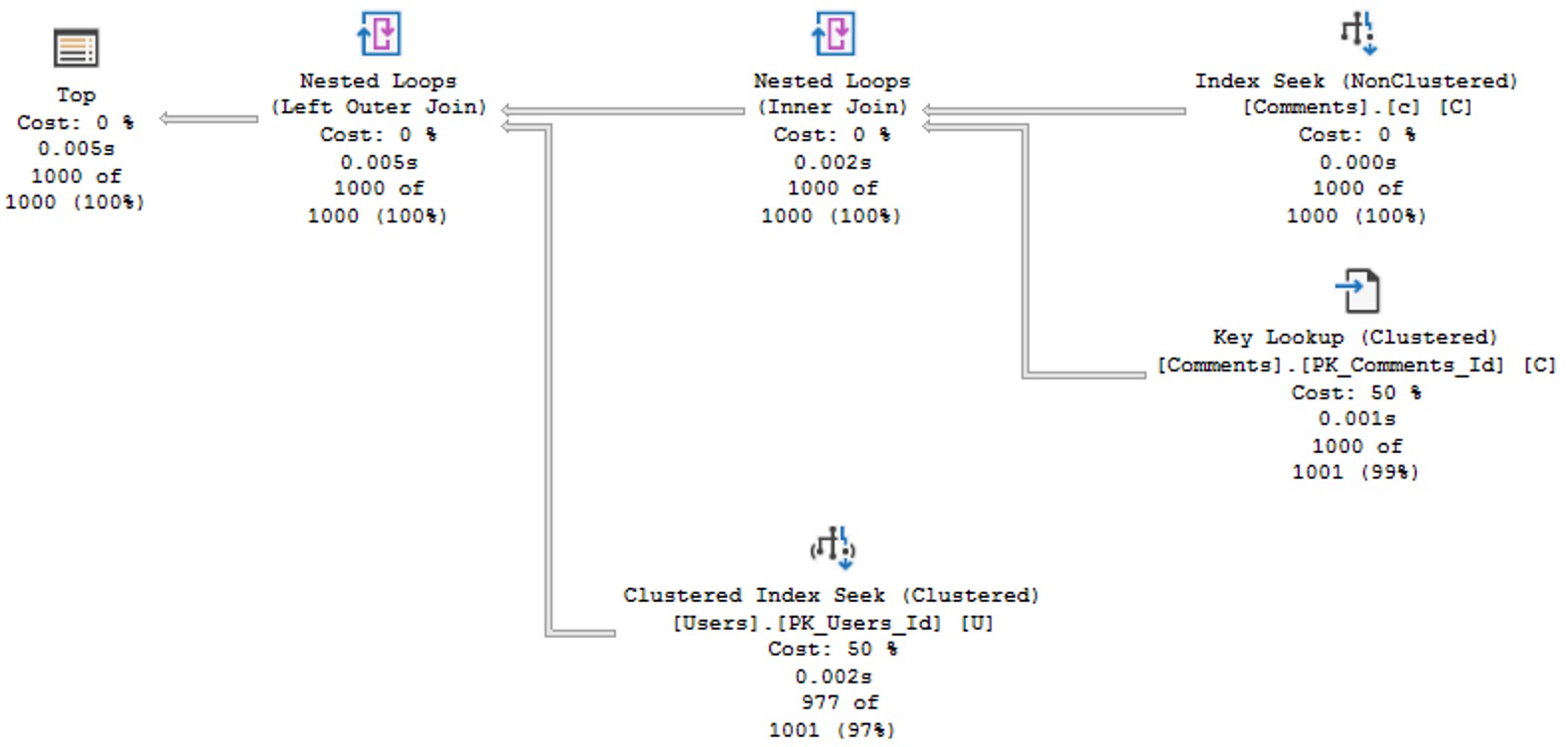
The query plan for this is quite simple and efficient.

SQL Server Query Plan
no problems

It’s hard to ask for anything faster, here, even if I am running on a VM. Two seeks, a small lookup, and everything done in 5 milliseconds.

Wolves At


But then one day a pull request comes along that changes the query slightly, to let us also filter and order by the Score column.

It looks like this now:

SELECT TOP (1000)
    C.CreationDate,
    C.Score,
    C.Text,
    DisplayName = 
        (
            SELECT 
                U.DisplayName 
            FROM dbo.Users AS U 
            WHERE u.Id = C.UserId
        )
FROM dbo.Comments AS C
WHERE C.CreationDate >= '20131215'
AND   C.Score >= 8
ORDER BY
    C.CreationDate DESC,
    C.Score DESC;

In real life, if you’re smart, your queries will be parameterized. In this blog post, these values are to show you what can happen even with small changes to a query. The query plan looks like this now:

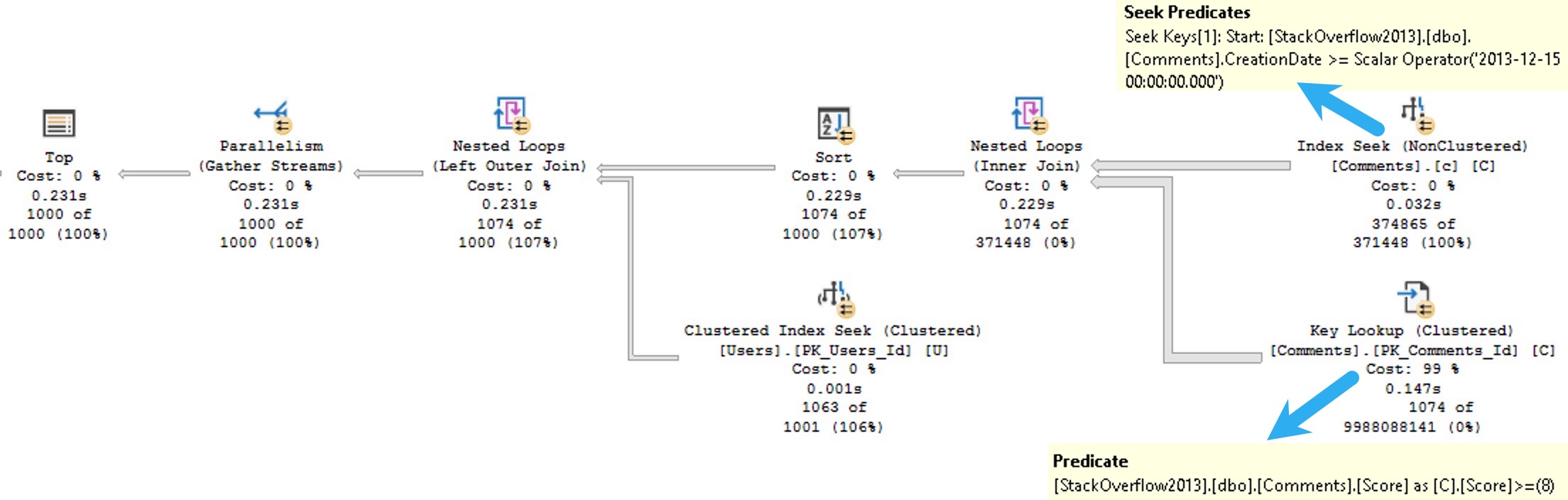
SQL Server Query Plan
MPR

Arf Arf


We still seek into our nonclustered index to search for CreationDates that pass our predicate, but now we need to evaluate the Score predicate when we do our key lookup.

Rather than just get 1000 rows out immediately, we need to keep findings rows that pass the CreationDate predicate, but that also pass the Score predicate.

Since that’s judged by the optimizer to be a much more “expensive” task, and a parallel plan is chosen. Despite that, it still takes 231 milliseconds of duration, with 844 milliseconds of CPU time.

This could have many effects on the workload, depending on how frequently a query executes within the workload. Parallel queries use more CPU threads, which can get tricky under high concurrency, since they’re a finite resource based on CPU count.

We can save a lot of the problems here with a slightly adjusted index, like this:

CREATE INDEX c ON dbo.Comments(CreationDate, Score, UserId);

Delicious


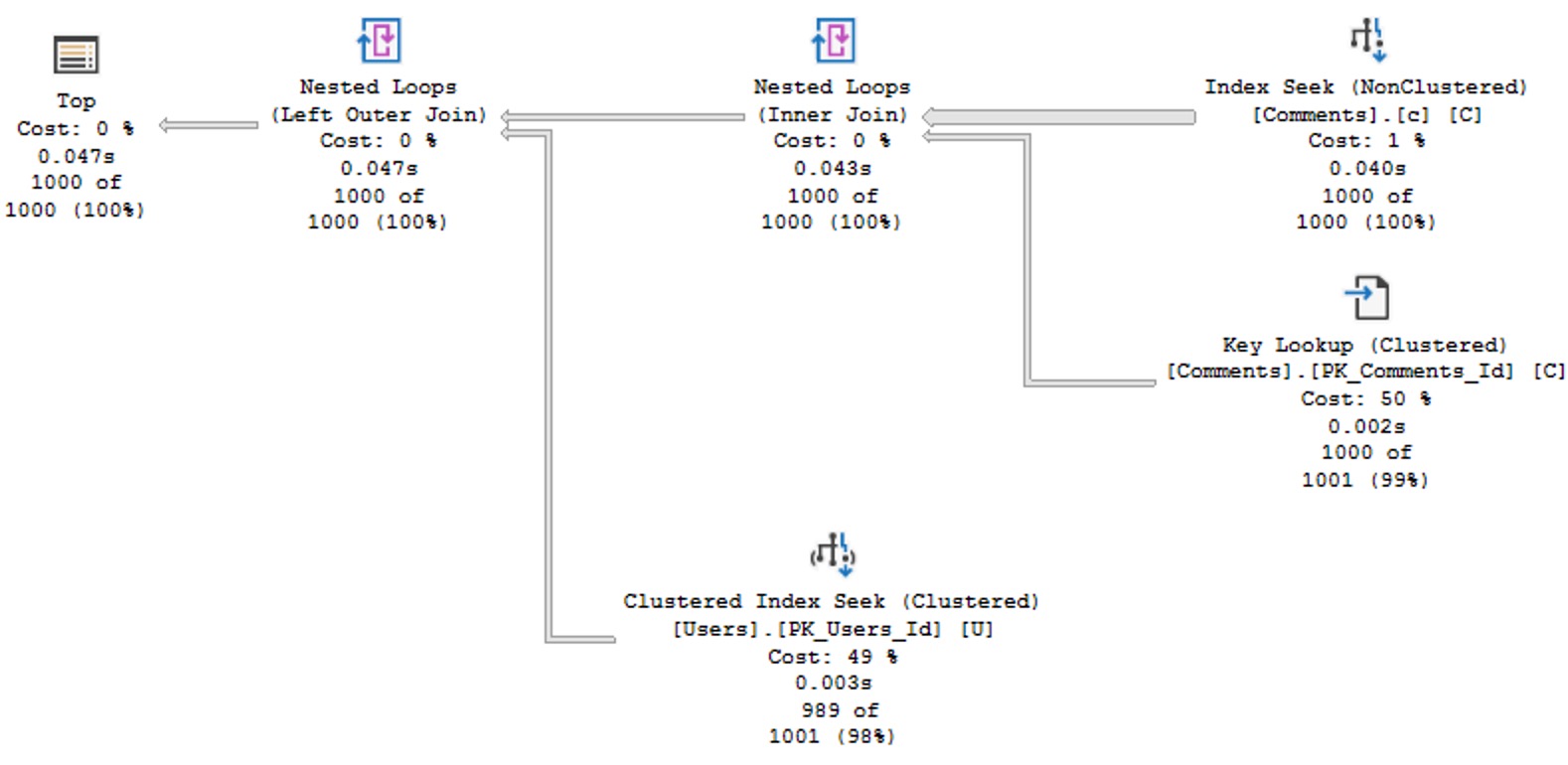
With that index in place, we get a much more efficient plan back, that doesn’t need to go parallel to stay competitively fast. It’s not quite as fast as the original query, but it’s Good Enough™.

SQL Server Query Plan
get bomb

Cheese Wants


I know you’re all smart folks out there, and you’re going to have questions about the index I created, and why the columns are in the order they’re in.

If you have a copy of the StackOverflow2013 database, you might do some poking around and find that there are 374,865 rows that pass our CreationDate predicate, and only 122,402 that pass our Score filter, making Score more selective for this version of the query.

But that’s just this one execution, and things could be a lot different depending on what users filter on. The big advantage to keeping the columns in this order is that the order by remains supported. Without that, the optimizer goes back to choosing a parallel plan, and asking for a memory grant.

Thanks for reading!

Going Further


If this is the kind of SQL Server stuff you love learning about, you’ll love my training. Blog readers get 25% off the Everything Bundle — over 100 hours of performance tuning content. Need hands-on help? I offer consulting engagements from targeted investigations to ongoing retainers. Want a quick sanity check before committing to a full engagement? Schedule a call — no commitment required.