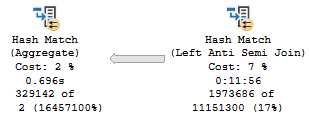
In this video, I delve into an intriguing aspect of SQL Server query optimization by demonstrating how different database compatibility levels can influence execution plans and performance. I illustrate this concept using two databases: the master database set to compatibility level 150 (SQL Server 2019) and the stack overflow database at compatibility level 140. By running a specific query in each context, I show that the same operation yields different execution plans due to batch mode on rowstore being enabled only in the higher compatibility level. This example highlights how changing the database context can lead to more efficient query execution without altering the actual code or adding hints. I hope this video provides you with valuable insights into leveraging database compatibility levels for optimizing your queries, especially when dealing with mixed workloads across different databases.
Full Transcript
That champagne still smells wonderful. Legally wonderful. Anyway, I want to show you something kind of interesting. And you can interpret this in your own way, and you can implement this in your own way when it might suit you. And it may suit you someday. If you have certain groups of queries that work really well, when they do one thing but not really the same. really well when they do another thing. I’m going to show you exactly what I mean by that. Now, let’s start off by making very, very sure that we are all clear about what context this database, what context, what database context, that champagne may have smelt a little too good, what database context this query is taking place in. Let’s also be quite sure that we understand which compatibility levels of data. these two queries are taking place in across these two databases. The master database is in compatibility level 150 and the stack overflow database is in compatibility level 140. So master is in 2019 where we get all sorts of fancy things if we are on the most enterprising edition possible like batch mode on rowstore and well no, because scalar UDF inlining is both standard and enterprise.
So, I don’t know, there’s some other stuff in 2019 that I suppose is okay too. I’m not sure what though. Every time I install it, my computer just blue screens. I’m kidding. I’m kidding. It’s fine. It’s production ready. Go use it. Go crazy. Go crazy. And just to make extra sure, right? Like I’m not kidding with you. We are in the master database.
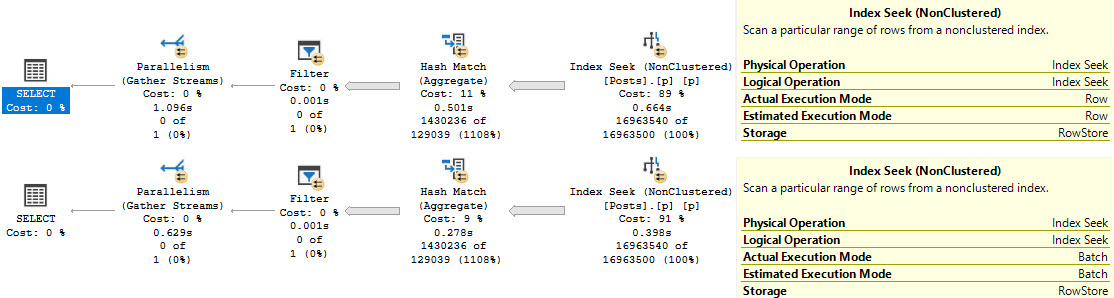
And yet, when I run this query to select a count of records from the post table in the stack overflow 2013 database, we get a very particular query plan. Now, if you’ve watched other videos of mine, you would know that this hash match aggregate to implement a global aggregate could only be done via stream aggregate in prior versions of SQL Server. So, with the proliferation of batch mode, this can now be a hash aggregate. We no longer have to use a stream aggregate.
So, this hash match aggregate is taking place in batch mode. That should be a vocal warm-up exercise. I’m going to tell my vocal coach about that. Hash match aggregate. So, this is a batch aggregate. As well as this clustered index scan are taking place in batch mode. So, the hash match aggregate is batched. I said that fast, didn’t I? And that’s interesting because the stack overflow 2013 database is in 140 compat level where batch mode on rowstore should not be possible.
This is, if you look at the storage. Shut up. Emergency. If you look at the storage, this is rowstore. And we’re not doing any tricky stuff like joining to another table with a clustered columnstore index it on it or something to get batch mode happening. This is a natural occurrence within the query. Right? It just happens. Right? It’s nice. It’s cool. So, great. We have this thing happening.
Now, if you come over here and we very, very clearly use the stack overflow database and we reiterate the fact that the stack overflow database is in 140 compat level and we look at masters and we only run the query in the context of the stack overflow database. And we actually get the query plan. Good job, me. We have a different execution plan. Don’t we?
We see that stream aggregate that was only, that had to be used in prior versions or, not in prior versions of SQL Server, just in the context of a rowstore only query. So, that’s that. And you may find this to be an attractive option if you have a group of, let’s say, reporting queries that you can execute from another database context that’s in compatibility level 150 against another database. Maybe that’s turned more transactional in nature in compatibility level 140 so that we don’t have to worry about hinting and changing all sorts of stuff.
We can just change the, we can just execute from a slightly different context and still get all the benefits of the optimization, the compatibility level and the optimizer abilities of the database where the query originates. So, take that as you will, implement it as you must. I hope you learned something. I hope you enjoyed this thankfully much shorter video so my champagne doesn’t get warm. Well, I don’t like the smell of warm champagne, especially on camera.
Thanks for watching.
Going Further
If this is the kind of SQL Server stuff you love learning about: these days I have AI do the annoying stuff for me. My new video course teaches you to work the same way, and I teach whole teams in a one-day workshop. Someone still has to know enough SQL Server to keep the robots in check, and that’s what my training is for.
In this video, I share my experiences and insights on residual predicates in SQL Server queries, particularly focusing on how they can affect performance when using indexes and temporary tables. I start by recounting a series of 15 frustrating takes where I was interrupted while recording, leading to an impromptu discussion over a Monte Carlo cocktail—2.5 ounces of bourbon, about an ounce of Benedictine, and a dash of bitters—which surprisingly made me more talkative than motivated for writing. The video delves into the nuances of residual predicates by examining an index on the `post` table in the Stack Overflow database, specifically how the order of key columns impacts seek operations and overall query performance. I explore various strategies to optimize queries, including using outer applies twice and leveraging temporary tables, all while emphasizing the importance of understanding index dependencies for effective query tuning.
Full Transcript
This is the, I want to say, 15th take where I’ve started recording and been interrupted rudely, brusquely, or is it brusquely, brusquely, probably brusquely. It’s like a rude broccoli, brusquely. But I’m recording a video today. I was going to just write a blog post, but I was not so rudely interrupted by this lovely drink called the Monte Carlo, which is 2.5 ounces of bourbon, about an ounce of Benedictine, and just about whatever kind of bitters you have sitting around the house. You could do Angostura, cherry, just about anything you might have. And it’s, it’s a very nice cocktail. It’s stiff. It’s a stiff one. And, uh, it, it, it killed my motivation to write, but it did make me a bit talkative. So we’re going to chat today. We’re going to have a little chit chat. A sitting chit chat. It’s probably the best idea. About, uh, residual predicates, uh, and different ways that you can fix them, uh, or make them faster, I guess. Figure out if they’re a problem. It’s probably a good thing. All right. We could figure out if there’s an issue with this residual predicate. Figure it out. So we’ve got this index. Because where would we be without an index? Be nowhere without an index. We’ve got this index on the on the post table. The stack overflow database on the post type ID. Oh, I highlighted too much. Post type ID is score and owner user ID columns. And we have this index because it is fantastic for this query right here. Because this query has a where clause on post type ID and score and a join clause on owner user ID. Now in the grand scheme of things, this is a fairly good indexing strategy.
Because we are, we have our, our key columns up front that help us with the where clause. It helps the where clause find data. But we still have our join, our join clause column in the key of the index. So that’s a pretty good starting place. Like if you need to design an index, you’re like, I need to, I need to help this query. I need to, where this query has to find data, has to join, has to do all sorts of stuff. And that’s a pretty good way to design an index. Help it find all the data that it needs and then help it join whatever data it needs. So that’s a pretty good, pretty good strategy there. And the thing is, when we, we put that data into a temp table, right? Let’s, let’s actually run that and do it. Because I want to show you just how fantastically fast this query runs because of this professional grade index.
It finishes, my friends, in 12 milliseconds. 12 milliseconds. Fantastic. Who’s the best query tuner?
Who’s the best query tuner? The problem is, or the problem becomes, that when we need to, uh, use that temp table to derive some additional information from our database. We want, we have some figuring out to do. Uh, we have a query that just does not run as fast as we would like it to.
So we’ll hit F5 here and we’ll wait patiently for around about seven seconds for this thing to churn its wheels and do whatever it is it needs to do to, to send us data back. Okay. 6.6 seconds. Fine. I said about seven. I didn’t say exactly seven.
I don’t get on my case buster. There is our 6.6 seconds of time. And what happens in the query plan really isn’t all that important. It’s just, it’s not that important.
I mean, we, we can see that we have another semi-disaster as a repartition stream. Oh, I’m sorry. That’s over here. We have this repartition streams over here.
I don’t like. But this query takes about seven seconds. And if we look at the index seek over here, something kind of interesting shows up. We were able to seek to the post type ID that we care about.
Right? One and two. That’s good. That’s fine. We come over here. We join to that owner user ID column.
And that’s, that’s probably fine too. I’m not going to complain too much about that. But I am going to complain about the fact that this takes seven seconds. And that’s about, I don’t know, depending on how good of a query tuner you are, somewhere between four and six seconds too slow.
Now, normally, something that I enjoy getting to do in my, my life and my query tuning work with people is taking a sub query like that, a scalar sub query in the select clause and replacing it with an outer apply. Now we have to use outer apply here. If we use cross apply, we will restrict results.
One thing that this scalar sub query does, despite the fact that it has a where clause with an and in it. So it’s extra, extra where clausey. But one thing that would, might happen is we might not have a result from that sub query show up, but that wouldn’t restrict rows.
This would, this would restrict rows if we used cross apply. But if we use outer apply, something terrible will happen. My, my normal query tuning trickery will not work.
Now, if you’ve read my blog, you may be familiar with how much I hate eager index pools. Now you can’t see how terrible it is here. But if we go look at a query plan that I have saved off professionally, saved off for you, we can see that we have a query that will spend eight seconds scanning the post table and then a minute and 20 seconds building an index for us.
If you want to know more about that, you can read all my other posts about eager index pools. But what’s extra funny about this particular eager index pool, really about every eager index pool, is that even if we got it to go in parallel, it would not run faster. It actually runs a few seconds slower.
Look at that, a minute and 31 seconds. And that is because, of course, the eager index pool is a dirty, filthy liar. And all, I think, I want to say, I’m going to say off the cuff, that’s 46 million rows. And they all end up on one single, solitary thread.
So getting this query to go parallel does not provide any benefit for us whatsoever. Lovely, isn’t that? Lovely.
Lovely. Now, we could try doing all sorts of stuff with top one to get rid of the max, but unfortunately, if we do that, both of those plans are going to end up doing the same gosh darn thing with these eager index pools. Have mercy.
Have mercy on all of us. Hmm. So, this is where I started feeling personally aggrieved because I felt, in my professional query tuning opinion, that there is no way that my lovely outer apply trick should be slower, should result in an index pool. All right.
So, what I did was, rather than go with the max, I wanted to do the top one thing, but I also wanted to try separating things out a little bit, doing things a little bit different, differently. And, so, I’m going to run this select from my temp table with just the results of post type ID 1. Remember, up here, we’re looking for post type ID 1 or 2.
That’s a question or an answer right there. And if we run this, this is remarkably fast. Despite having a very lazy spool over here, it is remarkably fast.
This is not our problem. We can kind of get a feel for this because if we look at the index seek over here, right, we don’t even have to really get the properties. We can just get the tool tip.
But you can see that we read 472,310 rows. Right? It’s not too bad. I mean, maybe a lot of rows, kind of.
But this is a very fast query. Very fast. 233 milliseconds. Nearly broke the sound barrier. Definitely broke a track record.
You show me someone with a 233 second mile. Oh. Love to meet that person. That person is a spaceship. Space jokes.
Hate myself. But if we try that again with the post type ID equals two portion of the query, this will be incredibly slow. And it’s so slow, in fact, that I refuse to run this query and make you watch it run.
Because even though it has the exact same query plan shape, the time is not what it once was. This takes a full two minutes and one second, which is actually somehow a little bit worse than that eager index spool plan. Somehow, we found a way to be worse than an eager index spool.
Now, if we look at the index seek over here, we read quite a few more rows. I don’t know what this number is. It is a three, three, nine, seven, five, four, five, four, nine, oh.
That is a ten digit number of rows that we end up reading. That we end up seeking to. Because you know how seeks are always so much faster.
I kind of wish we had just scanned this thing. Because the seek is not working out for us here. So, despite all we’ve done to set up our query and our indexes to provide a nice seek, we do not get a very timely seek, do we? This is two minutes of seeking.
Now, what’s kind of interesting is we seek to this post type ID. And then we have this residual predicate on owner user ID. This is where the problem really is.
Just as we can seek to post type ID equals two, that doesn’t really buy us a whole lot. There are a lot of post type ID, post type IDs of two in the post table. There are many of them.
There are lots of answers in the post table. And the fact that we can seek to every single one of them is great. But then we can’t just immediately seek to the owner user ID that we care about. Because we have that score column in the middle, remember?
Because we’re using that index over here, that east index. And our index, of course, because it looks like this, we can seek to here. But then we have this sort of thing right here in between what we need to seek to next.
We have this score column sitting between us. And this goes back to a lot of stuff that I’ve said and talked about and written about with indexes, where when you create these rowstore indexes, the order of key columns matters quite a bit because we introduce dependencies going from right to left, right?
So we can seek to post type ID and we can seek to score. But even if we seek to post type ID, we can’t seek to owner user ID after that. We have to go through score somehow to get to owner user ID.
So we kind of get a bit stuck, don’t we? We’re stuck not being able to get through score. And of course, having score second actually works out pretty well for us generally because when we seek to this post type ID, we have score in order for the order by here.
So having score in the index there is actually a good idea. I mean, not only for this part of the query, but that first query that populated the temp table, that was a good idea there too.
That helped that query finish very quickly. So one thing we could do if we were feeling particularly ambitious is we could use outer apply twice. In the first outer apply, we can get the top one score for what we know is fast, right?
Post type ID one is fast. This finishes in 233 milliseconds. God bless.
And we can use the score that we pull out of here as an additional predicate in the second apply. And what this does is it helps us bridge that gap between post type ID and owner user ID. We’re going to use score as another predicate.
So we’re going to be able to use the full extent of our key columns. If we run the query like this, this will also finish very quickly. In fact, we 290 milliseconds is still breaking some records.
So that is absolutely lovely. But keep in mind, we have the optimizers telling us we could have we could do better. We can create an index and do do better.
But that’s okay. It’s okay. You’re allowed to be wrong, optimizer. That’s why I’m here. So whenever I explain that to people, though, they get very confused, right? Because if you look at the query plan, right, you have this one seek up here that does the residual predicate thing.
It is on your owner user ID and it’s fast. It doesn’t matter because it does a very small number of reads, 473, 2,310 reads. And then when we come and look at the index seek down here, it looks a little funny, doesn’t it?
So in this one we look for that post type ID equals 2 first and then we have another seek predicate now. Where score is greater than expression 1,0003. And that’s just lovely.
We have another seek predicate and that other seek predicate helps us have another thing to help us find our data faster. That expression, that expression 1, 0, 0, 3 is what comes from here, right? So getting the score from this part is our, is expression 1, 0, 0, 3.
And one way to kind of make it a little bit easier to visualize what’s going on in your head is to take the result of that first apply operation, right? Where we get post type ID equals 1. And dump that into a temp table, right?
And that happens very quickly. And 57, this goes parallel and takes 57 milliseconds now. Whew. I’m going to have to fan myself.
I’m going to have to spritz, give myself a spritz, take a cold shower. But now, well this 2 isn’t slow. My comment is a liar. But now if we select from that second temp table and we outer apply the portion to get post type beta equals 2, what we’re going to do is take the score that’s in our temp table and use that as a predicate.
So before we took the one from the first outer apply and use it as a predicate in the second outer apply. But a slightly easier way to visualize that is to do something like this. And if we run this query, this will also be lightning fast.
This is 58 milliseconds. That further breaks our track record. Because now we’re down to like a hundred and something milliseconds between the insert into the temp table and that. So that’s actually maybe the better strategy.
Maybe. I don’t know. I might be crazy. Maybe we should take this first outer apply and put it into our initial temp table select and then get the second one after that. And we would only use one temp table instead of two, which would be wonderful and lovely.
But who knows? Who knows? Now, the whole reason why this works is because of the order of the key columns in our index. Again, post type ID and then score sort of set this thing that we can’t get past.
Right? Because the ordering of the index depends on the ordering of our key columns. So it’s ordered by post type ID.
And then within duplicates of post type ID, we have score in order. And then within the duplicates of score, we have owner user ID in order. So it’s that dependency going from left to right or right to left in the in the rowstore indexes that really kind of beat this query up because we couldn’t seek to post type ID and then seek to owner user ID. We couldn’t just like hop, skip and jump over score to get there.
Could we? Now, we could. We could. We could. Try shuffling the key, the order of the key columns, right? We could go post type ID owner user ID then score, but.
We can’t always change indexes. It’s not always easy. That index might be there for a bunch of other queries too. If we change this index, it’s going to mess up a whole bunch of other queries potentially, isn’t it? It’s going to mess a whole bunch of downstream stuff up.
Maybe other queries doing things. We don’t know. We don’t know what might happen. We don’t know. We could add another index, but then we have two indexes that have nearly the same data in them. And that’s.
It’s depressing, isn’t it? Why would we ever want that? Duplicative indexes. Another thing that we could do is. Get our max score a slightly different way by using something like row number.
So we could get row number from posts for that and then do our filtering after we get the row number. But. Ah.
Boy oh boy. In row mode. This sucks. In row mode. This is just as slow as the first query we ran. It took seven seconds. It’s not breaking any. Well, I actually guess that.
I suppose that actually is breaking track record still, isn’t it? No one has a seven second mile. But yeah, this takes this takes actually this one takes much closer to 300 milliseconds closer to seven seconds than the original query, which took 6.6 seconds. But.
If we. Get some batch mode involved. Now I have this table called T. I mean fine. I’m not the most creative person in the world.
I have this table called T in my database. And this table called T is not for Texas. It is for table. And this T table has a clustered columnstore index on it. And if we do a stupid looking left join to that table.
Ah, I messed that all up. Apologize. It’s the first mistake I’ve made all day. We do this stupid join to our T table. Something interesting will happen.
Get you out of here. But this finishes. Now in about 2.2 seconds. Because we have a bunch of stuff that’s going to happen in batch mode now.
We see this window aggregate operator. Fantastic. Fantastic. We’re going to have a sort that happens. Oh, second mistake I made today.
This sort that happens in batch mode. We have this window aggregate that happens in batch mode. And because the sort is a child operator of a window aggregate. All this this can parallelize rather nicely.
A rather nice parallelization. But batch mode sorts when they’re not the child operator of a window aggregate. All the rows end up on one thread which can sometimes be worse.
I mean this they’re still getting the batch mode efficiencies of the sort. But that whole one thread thing is a little little wonky. But anyway.
That’s another way you could potentially fix the query. It’s just by getting a row number and doing some batch modeing. Which is perfectly acceptable. But let’s make sure we clean up after ourselves.
So thank you for watching. I hope you enjoyed this video. I hope you enjoy the remainder of whatever day this is. And well, maybe in the future I’ll drink some more Monte Carlos and get talkative and record some more videos.
I do miss you. Where have you been? Huh.
Around I guess. Cheers. Thank you. I was going to say something profound. I forget what it is now though. That always happens to me.
It’s right on the tip of my tongue. Well, anyway.
Going Further
If this is the kind of SQL Server stuff you love learning about: these days I have AI do the annoying stuff for me. My new video course teaches you to work the same way, and I teach whole teams in a one-day workshop. Someone still has to know enough SQL Server to keep the robots in check, and that’s what my training is for.
USE StackOverflow;

EXEC dbo.DropIndexes;

/*
CREATE INDEX east
    ON dbo.Posts
        (PostTypeId, Score, OwnerUserId)
WITH ( MAXDOP = 8,
       SORT_IN_TEMPDB = ON,
       DATA_COMPRESSION = ROW );
*/

DROP TABLE IF EXISTS #t;
GO

SELECT
    u.Id,
    u.Reputation,
    u.DisplayName,
    p.Id AS PostId,
    p.Title
INTO #t
FROM dbo.Users AS u
JOIN dbo.Posts AS p
    ON p.OwnerUserId = u.Id
WHERE u.Reputation >= 1000
AND   p.PostTypeId = 1
AND   p.Score >= 1000
ORDER BY u.Reputation DESC;


/*
CREATE INDEX east
    ON dbo.Posts(PostTypeId, Score, OwnerUserId);
*/
SELECT
    t.Id,
    t.Reputation,
    (
        SELECT
            MAX(p.Score)
        FROM dbo.Posts AS p
        WHERE p.OwnerUserId = t.Id
        AND   p.PostTypeId IN (1, 2)
    ) AS TopPostScore,
    t.PostId,
    t.Title
FROM #t AS t
ORDER BY t.Reputation DESC;


/*
Usually I love replacing select
list subqueries with APPLY

Just show the saved plan here
*/
SELECT
    t.Id,
    t.Reputation,
    pq.Score,
    t.PostId,
    t.Title
FROM #t AS t
OUTER APPLY --We have to use outer apply to not restrict results!
(
    SELECT
        MAX(p.Score) AS Score
    FROM dbo.Posts AS p
    WHERE p.OwnerUserId = t.Id
    AND   p.PostTypeId IN (1, 2)
) AS pq
ORDER BY t.Reputation DESC;


/*
TOP (1) also spools
*/
SELECT
    t.Id,
    t.Reputation,
    (
        SELECT TOP (1)
            p.Score
        FROM dbo.Posts AS p
        WHERE p.PostTypeId IN (1, 2)
        AND   p.OwnerUserId = t.Id
        ORDER BY p.Score DESC
    ) AS TopPostScore,
    t.PostId,
    t.Title
FROM #t AS t
ORDER BY t.Reputation DESC;

SELECT
    t.Id,
    t.Reputation,
    pq.Score,
    t.PostId,
    t.Title
FROM #t AS t
OUTER APPLY
(
    SELECT TOP (1)
        p.Score
    FROM dbo.Posts AS p
    WHERE p.PostTypeId IN (1, 2)
    AND   p.OwnerUserId = t.Id
    ORDER BY p.Score DESC
) AS pq
ORDER BY t.Reputation DESC;


/*
CREATE INDEX east
    ON dbo.Posts(PostTypeId, Score, OwnerUserId);
*/
SELECT
    t.Id,
    t.Reputation,
    pq.Score,
    t.PostId,
    t.Title
FROM #t AS t
OUTER APPLY --This one is fast
(
    SELECT TOP (1)
        p.Score
    FROM dbo.Posts AS p
    WHERE p.PostTypeId = 1
    AND   p.OwnerUserId = t.Id
    ORDER BY p.Score DESC
) AS pq
ORDER BY t.Reputation DESC;

SELECT
    t.Id,
    t.Reputation,
    pa.Score,
    t.PostId,
    t.Title
FROM #t AS t
OUTER APPLY --This two is slow...
(
    SELECT TOP (1)
        p.Score
    FROM dbo.Posts AS p
    WHERE p.PostTypeId = 2
    AND   p.OwnerUserId = t.Id
    ORDER BY p.Score DESC
) AS pa
ORDER BY t.Reputation DESC;


/*
Use the Score!
*/
SELECT
    t.Id,
    t.Reputation,
    ISNULL(pa.Score, pq.Score) AS TopPostScore,
    t.PostId,
    t.Title
FROM #t AS t
OUTER APPLY --This one is fast
(
    SELECT TOP (1)
        p.Score --Let's get the top score here
    FROM dbo.Posts AS p
    WHERE p.PostTypeId = 1
    AND   p.OwnerUserId = t.Id
    ORDER BY p.Score DESC
) AS pq
OUTER APPLY --This two is slow...
(
    SELECT TOP (1)
        p.Score
    FROM dbo.Posts AS p
    WHERE p.PostTypeId = 2
    AND   p.OwnerUserId = t.Id
    AND   pq.Score < p.Score --Then use it as a filter down here
    ORDER BY p.Score DESC
) AS pa
ORDER BY t.Reputation DESC;


SELECT
    t.Id,
    t.Reputation,
    ISNULL(pq.Score, 0) AS Score,
    t.PostId,
    t.Title
INTO #t2
FROM #t AS t
OUTER APPLY --This one is fast
(
    SELECT TOP (1)
        p.Score --Let's get the top score here
    FROM dbo.Posts AS p
    WHERE p.PostTypeId = 1
    AND   p.OwnerUserId = t.Id
    ORDER BY p.Score DESC
) AS pq;


SELECT
    t.Id,
    t.Reputation,
    ISNULL(pa.Score, t.Score) AS TopPostScore,
    t.PostId,
    t.Title
FROM #t2 AS t
OUTER APPLY
(
    SELECT TOP (1)
        p.Score
    FROM dbo.Posts AS p
    WHERE p.PostTypeId = 2
    AND   p.OwnerUserId = t.Id
    AND   t.Score < p.Score --Then use it as a filter down here
    ORDER BY p.Score DESC
) AS pa
ORDER BY t.Reputation DESC;


/*
What happened?
 * Index key column order
   * (PostTypeId, Score, OwnerUserId)

Other things we could try:
 * Shuffling index key order, or creating a new index
   * (PostTypeId, OwnerUserId, Score)

 * Rewriting the query to use ROW_NUMBER() instead
  * Have to be really careful here, probably use Batch Mode

*/

/*
CREATE TABLE dbo.t
(
id int NOT NULL,
INDEX c CLUSTERED COLUMNSTORE
);
*/

SELECT
    t.Id,
    t.Reputation,
    pa.Score,
    t.PostId,
    t.Title
FROM #t AS t
LEFT JOIN dbo.t AS tt ON 1 = 0
OUTER APPLY
(
    SELECT
        rn.*
    FROM
    (
        SELECT
            p.*,
            ROW_NUMBER()
                OVER
                (
                    PARTITION BY
                        p.OwnerUserId
                    ORDER BY
                        p.Score DESC
                ) AS n
        FROM dbo.Posts AS p
        WHERE p.PostTypeId IN (1, 2)
    ) AS rn
    WHERE rn.OwnerUserId = t.Id
    AND   rn.n = 1
) AS pa
ORDER BY t.Reputation DESC;


DROP TABLE #t, #t2;
I will be able to not care about this sort of thing. But for now, here we are, having to write multiple blogs in a day to cover a potpourri of grievances.
Let’s get right to it!
First, without a where clause, the optimizer doesn’t think that an index could improve one single, solitary metric about this query. We humans know better, though.
WITH Votes AS
(
    SELECT
        v.Id,
        ROW_NUMBER()
            OVER(PARTITION BY
                     v.PostId
                 ORDER BY
                     v.CreationDate) AS n
    FROM dbo.Votes AS v
)
SELECT *
FROM Votes AS v
WHERE v.n = 0;
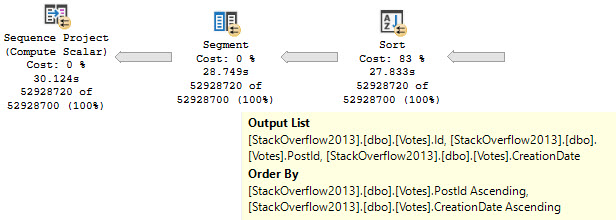
The tough part of this plan will be putting data in order to suit the Partition By, and then the Order By, in the windowing function.
Without any other clauses against columns in the Votes table, there are no additional considerations.
Two Day
What often happens is that someone wants to add an index to help the windowing function along, so they follow some basic guidelines they found on the internet.
What they end up with is an index on the Partition By, Order By, and then Covering any additional columns. In this case there’s no additional Covering Considerations, so we can just do this:
CREATE INDEX v2 ON dbo.Votes(PostId, CreationDate);
If you’ve been following my blog, you’ll know that indexes put data in order, and that with this index you can avoid needing to physically sort data.
limousine
Three Day
The trouble here is that, even though we have Cost Threshold For Parallelism (CTFP) set to 50, and the plan costs around 195 Query Bucks, it doesn’t go parallel.
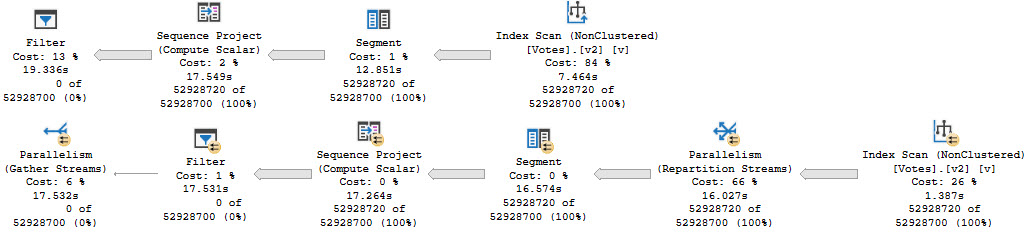
Creating the index shaves about 10 seconds off the ordeal, but now we’re stuck with this serial calamity, and… forcing it parallel doesn’t help.
Our old nemesis, repartition streams, is back.
wackness
Even at DOP 8, we only end up about 2 seconds faster. That’s not a great use of parallelism, and the whole problem sits in the repartition streams.
This is, just like we talked about yesterday, a row mode problem. And just like we talked about the day before that, windowing functions generally do benefit from batch mode.
Thanks for reading!
Going Further
If this is the kind of SQL Server stuff you love learning about: these days I have AI do the annoying stuff for me. My new video course teaches you to work the same way, and I teach whole teams in a one-day workshop. Someone still has to know enough SQL Server to keep the robots in check, and that’s what my training is for.
When queries go parallel, you want them to be fast. Sometimes they are, and it’s great.
Other times they’re slow, and you end up staring helplessly at a repartition streams operator.
brick wall
Sometimes you can reduce the problem with higher DOP hints, or better indexing, but overall it’s a crappy situation.
Snap To
Let’s admire a couple familiar looking queries, because that’s been working really well for us so far.
WITH Comments AS
(
    SELECT
        ROW_NUMBER()
            OVER(PARTITION BY
                     c.UserId
                 ORDER BY
                     c.CreationDate) AS n
    FROM dbo.Comments AS c
)
SELECT *
FROM Comments AS c
WHERE c.n = 0
OPTION(USE HINT('QUERY_OPTIMIZER_COMPATIBILITY_LEVEL_140'));

WITH Comments AS
(
    SELECT
        ROW_NUMBER()
            OVER(PARTITION BY
                     c.UserId
                 ORDER BY
                     c.CreationDate) AS n
    FROM dbo.Comments AS c
)
SELECT *
FROM Comments AS c
WHERE c.n = 0
OPTION(USE HINT('QUERY_OPTIMIZER_COMPATIBILITY_LEVEL_150'));
One is going to run in compatibility level 140, the other in 150, as foretold by ancient alien prophecy.
The two query plans will have a bit in common, but…
just batch
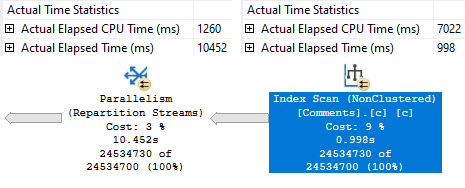
The second query, which runs in batch mode, runs about 15 seconds faster. One big reason why is that we skip that most unfortunate repartition streams operator.
It’s a cold sore. An actual factual cold sore.
The only ways I’ve found to fix it completely are:
Induce batch mode
Use the parallel apply technique
But the parallel apply technique doesn’t help much here, because of local factors.
In this case, me generating the largest possible result set and then filtering it down to nothing at the end.
Thanks for reading!
Going Further
If this is the kind of SQL Server stuff you love learning about: these days I have AI do the annoying stuff for me. My new video course teaches you to work the same way, and I teach whole teams in a one-day workshop. Someone still has to know enough SQL Server to keep the robots in check, and that’s what my training is for.
If you ask people who tune queries why batch mode is often much more efficient with windowing functions, they’ll tell you about the window aggregate operator.
That’s all well and good, but there’s another, often sneaky limitation of fully row mode execution plans with windowing functions.
Let’s go take a look!
Global Aggregates
One thing that causes an early serial zone in execution plans is if you use a windowing function that only has the order by
For example, let’s look at the plans for these two queries:
WITH Comments AS
(
    SELECT
        ROW_NUMBER()
            OVER(ORDER BY
                     c.CreationDate) AS n
    FROM dbo.Comments AS c
)
SELECT *
FROM Comments AS c
WHERE c.n = 0;

WITH Comments AS
(
    SELECT
        ROW_NUMBER()
            OVER(PARTITION BY
                     c.UserId
                 ORDER BY
                     c.CreationDate) AS n
    FROM dbo.Comments AS c
)
SELECT *
FROM Comments AS c
WHERE c.n = 0;
The resulting estimated plans look like this, using the 140 compatibility level:
oops
In the top plan, where the windowing function only has an order by, the serial zone happens immediately before the Segment operator. In the second plan, the parallel zone carries on until right before the select operator.
If you’re wondering why we’re only looking at estimated plans here, it’s because repartition streams ruins everything.
In The Year 2000
In compatibility level 150, things change a bit (yes, a window aggregate appears):
merry christmas
And the window aggregate appears within the parallel zone. The parallel zone does end before the filter operator, which may or may not be a disaster depending on how restrictive your filter is, and how many rows end up at it.
Also note the distinct lack of a repartition streams operator ruining everything. We’ll talk about that tomorrow.
Thanks for reading!
Going Further
If this is the kind of SQL Server stuff you love learning about: these days I have AI do the annoying stuff for me. My new video course teaches you to work the same way, and I teach whole teams in a one-day workshop. Someone still has to know enough SQL Server to keep the robots in check, and that’s what my training is for.
I think Batch Mode is quite spiffy for the right kind of query, but up until SQL Server 2019, we had to play some tricks to get it:
Do a funny join to an empty table with a column store index
Create a filtered column store index with no data in it
If you’re on SQL server 2019 Enterprise Edition, and you’ve got your database in compatibility level 150, you may heuristically receive Batch Mode without those tricks.
One important difference between Batch Mode Tricks™ and Batch Mode On Rowstore (BMOR) is that the latter allows you to read from row mode tables using Batch Mode, while the former doesn’t.
Tricks have limits, apparently.
Squish Squish
To cut down on typing, I’ll often create a helper object like this:
CREATE TABLE dbo.t
(
    id int NULL,
    INDEX c CLUSTERED COLUMNSTORE
);
SELECT
    p.OwnerUserId,
    COUNT_BIG(*) AS records
FROM dbo.Posts AS p
LEFT JOIN dbo.t
    ON 1 = 0
WHERE p.Score < 50
GROUP BY p.OwnerUserId
HAVING COUNT_BIG(*) > 2147483647
OPTION(USE HINT('QUERY_OPTIMIZER_COMPATIBILITY_LEVEL_140'), MAXDOP 8);

SELECT
    p.OwnerUserId,
    COUNT_BIG(*) AS records
FROM dbo.Posts AS p
WHERE p.Score < 50
GROUP BY p.OwnerUserId
HAVING COUNT_BIG(*) > 2147483647
OPTION(USE HINT('QUERY_OPTIMIZER_COMPATIBILITY_LEVEL_150'), MAXDOP 8);
One executes in compatibility level 140, the other in 150.
Splish Splash
There are a couple interesting things, here.
the porter
Even though both queries have operators that execute in Batch Mode (Filter, Hash Match), only the second query can read from the row store clustered index in Batch Mode. In this case, that shaves a couple hundred milliseconds off the seek.
There is likely some additional invisible benefit to not having to convert the row mode seek to a batch mode hash join at the next operator, since one executes for 501ms, and the other executes for 278ms. There’s nothing in the query plan to signal that happening, so you’ll just have to use your imagination.
Thanks for reading!
Going Further
If this is the kind of SQL Server stuff you love learning about: these days I have AI do the annoying stuff for me. My new video course teaches you to work the same way, and I teach whole teams in a one-day workshop. Someone still has to know enough SQL Server to keep the robots in check, and that’s what my training is for.
In this video, I delved into a detailed analysis of query performance and optimization in SQL Server, specifically comparing execution plans between compatibility levels 140 and 150. The primary focus was on understanding how row mode operations behave differently under these settings. As I ran the queries with varying parameters, I noticed significant differences in execution time and memory usage. Compatibility level 140 maintained a relatively quick execution, while level 150, despite using batch mode for certain operators, experienced a much slower sort operation due to single-threaded processing. This led me to explore wait statistics and memory grants more closely, highlighting the limitations of these tools in diagnosing performance issues under different execution modes.
Full Transcript
Thank you.
Welcome. Welcome, welcome, welcome. All you lovely people out there. How is everyone doing?
there are people here so you better answer me of course people started disappearing when I came on screen I guess they were disappointed I guess they were disappointed I guess I wasn’t good looking enough when I showed up I’ll have to go try a face mask or something next time throw that on on camera if you guys can hear me through this maybe this will improve if anyone out there has a Bane fetish maybe I can work with you on that no yeah Steve you were born on a pair of skis or something I’m not going to do the Bane voice that’s where things cut off I don’t do impressions I’m not good at impressions never have been you’re at a ski condo now how does a guy who runs a free free message board end up at a ski condo gotta figure that one out I’m gonna start a free message board wife is successful well she’s gotta be supporting a bum like you lazing about in Hawaiian shirts all day do I have any update to my plans on smoking cigarettes in a French graveyard no just not soon enough not soon enough not soon enough there’s no such thing as soon enough when it comes to that is there every every second you wait is just too long it’s too long sooner the better though still trying to get that all figured out suppose I could call an immigration lawyer right still like look here’s what I do here’s what I want to do here’s why I can only do this in France because you’re the only place that has the proper brand of cigarettes and French graveyards and all I want to do is is work from home not bother anybody and contribute a lot of money to local bars and restaurants and and tobacco shops that’s it I will be an ideal French citizen I mean I’ll be quiet my kids not so much I’ll be quiet but I think I think that I think I would like aside from like being probably like mentally incapable of learning French I would I would be an ideal French citizen whole travel ban thing might have yeah you know that’s a little that’s a little unfortunate but you know hopefully a small travel ban now will result in less of a travel ban in the future or at least like let me just get there and then ban travel let me get there and then travel screw it I’ll figure out I’ll figure out how to SQL Server in French I’m gonna you know what that’s how you know what that’s how I’ll learn French that’s how I’ll learn French I’m gonna learn it from SQL Server error messages so in SQL Server there’s a view right we can do oops from sys.messages and it’s oops I’m gonna start off hitting the right button it’s usually a good good idea and if we look in sys.messages we’ll see all sorts of I mean there’s all sorts of text over here from the messages that you can get from SQL Server right so what’s does anyone know the language ID for French offhand I’m fine go look it up go figure out SQL Server language ID French 1036 ooh la la as the French say so let’s see where oops Steve can you please fix SQL prompt how would I have a with there where language ID equals 1036 run this let’s get oh this is how I’m gonna learn French check this out I have all of the SQL Server error messages in French now you need text to speech I do I do I need text to speech and speech to text because I find that one of the biggest one of the biggest hurdles I have to writing is typos and and like I’m like I think I spend more time going back and fixing things than I do actually writing Duolingo my wife does my wife has been doing Duolingo in French with French specifically for like two years now and Duolingo is still giving her nonsense stuff like the like the men are rich and calm or like the men ate all the strawberries or like the cat is black it’s just like the same stuff like like like like just going like she’s regular with it too every single day and just like nothing like like no real advancement after a certain point so I’m gonna I’m gonna learn it from SQL Server error messages and I’m gonna blow her out of the water the prefix date okay so let’s see the colon prefix does not correspond with the table name okay so apparently what I need to do is figure out a way to have the language IDs alternate and what I’ll do is let’s see in six and let’s say order by I’m on message ID and let’s see well you know it’ll have to be message ID and then language ID will that work no because that’s going to order that first if you just order by message ID it should give us that let’s see if that works no no it didn’t work 102 is it did I miss something did I get something terribly wrong randomly would be funny right 1033 why is language ID 10 oh duh why didn’t anyone yell at me 1036 I had that all wrong there we go now we got it now we got it see I was off by one on that off by one let’s set the whole thing off all right now we got it this is great warning so advertisement anyone help me with the pronunciation there note the error in time and contact your system administrator no the error and the error in time and contract your system administrator well no you see numerically I was off by one but physically I was off on the keyboard by one by 80 I was off numerically by 80 on the keyboard I was off by one so I wanted 1036 and I ended up with what 2016 so I was off by one on the left hand that just screwed everything up screwed up everything but yeah this is great so I figured I have a plan now I have a plan column prefix does not match with a this is great yes I’m going to contact everybody query not allowed and wait for oh this is awesome this is truly awesome oh this is going to be fun I have a plan now I was was wondering how I was going to spend my summer vacation and now I know how I’m going to spend my summer vacation this is great so let’s talk about this query tuning thing now I’ve got a store procedure with two statements in it I’m going to run one at compat level 140 you should sort by language ID no if I sort by language ID then it’s going to be all the 103 3 first I want them to be interspersed like this ordering by message ID so that I can see the English version and then the French version now I don’t want both would screw it up because then I would have all the 103 3 first this way works message 101 message 102 message 103 if I have it by if I sort by language ID then 103 3 will sort first and then all the 103 6 will come later and I want them together so I can see the translation it’s a terrible idea Mr.
P. Shaw I’m ashamed of you ashamed of you no you’re not getting it it’s okay it’s okay all right so let’s look at this thing here right we got one query up here that’s going to run a compat level 140 one query here that’s going to run a compat level 150 and let’s go look at what happens when we execute these so just to be extra short let’s recompile and let’s get that going let’s run this run this all right we’re on we’re on to something else now go talk about order by some go talk about order with yourself I don’t want to talk about this anymore we’re on to the query tuning bits so let’s look at these two query plans they both end up pretty quick all right if you look at these this finishes very quickly and this finishes very quickly good good good we have a sort here and we have a sort here and everything is generally pretty dandy with these sorts but then if we go and run this and we look for a different number for the gap right we’re going to supply a different gap we’re going to go from 9 here to 0 here we’re going to keep post type id at 1 though and if we run this the row mode there’s going to be the compat level 140 is still going to be pretty quick but we’re going to have a real problem with compat level 150 you can see that this thing is kind of still over well that that executed it for a little while there right that gave us about 10 seconds total of execution time if we look at the query plans now this is going to be the row mode plan this is going to be the one that executed in compat level 140 and if we look at the sort it’s going to spill a little bit right now knowing what we know about row mode plans and knowing what we know about reading execution plans with these times in them this operator went for this operator ran for about 256 milliseconds and the next one ran for 1.253 milliseconds but it’s a little bit under a second because 253 there’s the 1.253 minus .256 is going to bring us to about a second because remember in row mode plans operator times are cumulative cumulative right so this is actually just running for about a second and the spill isn’t that bad spill level 2 one thread right about a little bit less than 10,000 pages ended up on disk so I’m totally okay with this this did actually pretty good considering this sort is going to continue to be in row mode because we were looking at it in compat level 140 compat level 140 doesn’t allow batch mode for rowstore compat level 150 does at least if you’re nice enough to pay for enterprise edition or smart enough to just use developer edition instead don’t tell the licensing police I said that but you know all the smart kids are doing that so now we have this section of the plan which is pretty okay but looking down here this is where things all of a sudden got bad boom boom boom boom boom boom boom boom boom boom wow I got spam thanks mr.
gamer 2018 let me update your nickname nerd what’s wrong with you jeez so this is since these two operators run in batch mode all right that’s a batch and even though the storage is row stored since this is compat level 150 we’re able to buy or we’re able to buy we’re able to batch run this in batch mode we’re able to run this in buy mode because we bought enterprise edition apparently we bought followers primes and views because we’re famous we want to be famous I wish I could get famous apparently mr.
gamer left made fun of his nickname too much but now this sort since these two operators are in batch mode right we can see a batch mode here and we can see a batch mode tooltip you weren’t working with me there we can see a batch mode here since these two things run in batch mode this is interesting right since these two things run in batch mode the times are no longer cumulative the times are per operator so this sort really did run for nine almost let’s just call it 9.3 seconds this index seek was very fast but this sort was very slow now there’s a funny quirk with sorts in batch mode it doesn’t apply here it applies to parallel sorts in batch mode where the output from them is single threaded the batch can run multi threaded but the output from a batch mode sort is single threaded unless they’re the child operator of a window aggregate we don’t have one of those here we also have a serial plan here so it doesn’t matter everything’s on one thread anyway but this single threaded batch mode operator well it’s kind of funny isn’t that kind of funny spill level 8 and it only wrote 5142 pages to disk so if we go look at the memory for these two queries this one here got about a meg of memory that’s 1024 kb so we got about a meg of memory here and with that one meg of memory we still had to spill out a little bit but we spilled out about close to 10,000 pages but this happened pretty quickly this happened in about a second the batch mode plan gets just about five and a half well let’s just call it five and a half megs of memory that’s close to 5.4 and 5.4 is pretty close to 5.5 so we’ll just stick with this so we get about a 5.5 meg memory grant here we spill out but man this operator runs for nine seconds nine seconds and it spills about half as many pages now what a lot of people will do when they start trying to tune queries is they might care very much about wait stats newer versions of SQL server have wait stats and query plans which can sometimes be helpful you can sometimes find things in there for the query that runs quickly though well we have about 260 milliseconds of IO completion right that’s fine for a query that ran for a second we don’t know what we did for the other second but we know that we had 260 milliseconds of IO completion that’s the only weight that’s stored in this query plan for the query that runs in batch mode this gets even more curious if go to the properties over here and we look at weight stats well we only have 24 milliseconds of one weight reserved memory allocation ext this is not a terribly helpful weight see one of the real dark sides of some of the things that Microsoft adds is that they decide to filter things out for you they decide what you see and what you don’t see in some of these additions to help you troubleshoot problems the thing is having that knowing that this query waited 25 milliseconds on reserved memory allocation ext is not going to help us figure out what’s wrong with this query but neither would looking at what we actually waited on so let’s look at weight stats using my store procedure sp thunderous underscore look at that look at this thunderous underscore that thing that’ll buckle the these human events and we’ll use it to look at weight stats at least as I’m slowly learning the answer to every SQL question is it depends yes but the important thing for every SQL question is knowing what it depends on because if you know what it depends on then you can solve the problem yes the answer to most things it depends but the secret is knowing what it depends on knowing those dependencies is where one gains expertise depends on what you got it you got it that’s the bumper sticker isn’t it so we’re going to use sp underscore human events we’re going to look at weight stats for this one session right so we’re going to focus this one session and we’re going to get some information out of this now the thing with these is that if we look at the weight stats for this there’s going to be just nothing in there right we didn’t generate a single thing that made us get a weight even for like the other plan in 150 we don’t have really anything of interest in here right there’s nothing about weight stats in here blah blah blah blah blah blah not fun not fun at all doesn’t really help us so let’s use sp queries to finish again all right so that first one finishes quickly we’re probably not going to see much for interesting weights there and this other one is going to execute and this one’s actually going to take a little bit longer now right that was like 9 point something seconds before it’s at 10.1 seconds now so this sort actually did a little bit more work on this one actually no it did about the same it just took longer I hate you so using sp human events we get information about query weights at three different levels right and this is because I do a whole lot of work in my store procedure to give you this data at three different levels for the entire time that it ran we had for the total weights we had 999 weights on this mysterious sleep task weight and then at the database level well the only database that was active because this is just my personal computer this is not Stack Overflow production database this is just my personal laptop so there was only one database active that was Stack Overflow 2013 but that will report that we had the 999 weights and we waited 8.2 seconds on them now the other thing that I try to break down with human events is to give you weights by query and database so we can look at things overall by database then by query and database and we get of course some information here oops I did not hit the right button so we get the query text and the query plan of the queries that generated the weights we can see there what happened to it now since this is two statements in one store procedure we unfortunately get the query plan for the whole store procedure I’m working on something to make this better but I don’t quite have it yet so I’m working on something to focus this in it’s almost there but it needs a little bit more work so we at least see the query that caused the wait since this is a plan that comes from the plan cache we don’t get the actual plan if extended events were better if extended events were a tool that Microsoft cared about us using and using happily we would be able to chain things together we would be able to say hey extended events I want you to fire off this event if this other condition meets whatever I want so let’s say that for us we cared dearly dearly near and dear to our hearts we cared well I mean I care about learning French from error messages but let’s say that we cared nearly and dearly about queries that were waiting on sleep task weights what I would like to be able to tell extended events is hey if you find a query that waits on sleep task go grab the actual execution plan for it we can’t do that together we have not extended events that far into the future we cannot chain events together we cannot chain sequences of events together and that’s a pretty big gaping hole in extended events I’m not saying profiler is any better at you can go get that magically from profiler I’m just saying if Microsoft really wanted extended events to be helpful and usable they might want to invest some time in getting people to actually use it by making it more useful I don’t know just me I’m not angling for a job as the PM of extended events or anything that would be a nightmare because it’s all XML and I’ve seen it and it’s ugly but this is one of those things where if you build it they will come Microsoft built a really crappy it was not a field of dreams it was a field of not quite maybe it is a field of nightmares because of the amount of XML so I wish I could chain things together to get something different but unfortunately if I was going to do this and get wait stats and query plans I would have to collect actual plans all the time and that wouldn’t be a lot of fun because then I’d be collecting wait stats and actual execution plans rather than being able to chain things together and be able to only get actual plans after some other extended event condition got past the filter so I have the estimated plan for the query that this sort ran for a long time but you know this is probably a pretty good lesson in and of itself how can you track just one sort you can read the documentation because it is in there there is an object name filter in there you can track just one procedure that doesn’t apply to every single one because not every single one gives you the ability to track just one procedure you can only do that if you’re tracking queries for wait stats I think you can do something I forget exactly what I wrote the documentation so I wouldn’t have to remember all this stuff but if we look at the estimated plans and this is sort of a good lesson about estimated plans general cash plans in general if I told you I had a query running for 10 seconds it would be very very difficult to ascertain if each query ran for 5 seconds or a second and another query runs for like 10 seconds you can go to my website it’s a good place to start it’s all there so if you look at these two estimated plans estimated plans lie to you estimated plans hide a lot of things estimated plans hide a lot of things because they are only estimates this is what goes in the plan cash this is what goes in the query store this is I am collecting an actual post execution plan I cannot get the level of detail that you are after if you look at a few small differences here if we look at this sort in the estimated plan we have estimates for everything we have estimates for all of these things estimated execution mode operator cost IO cost you can read all those things if we go back and look at the actual plan for it oh I have two versions of that open we don’t need two we just need one if I go back and look at the actual plan for this we get actual values we get what the query encountered when it executed for a bunch of things right we get actuals for this we get actuals for this we get well this we get the actual execution mode we get actuals for many things one set of values in here that we don’t get actuals for are costs see all those costs there’s no actual cost that gets updated at the end there’s no actual cost addition to operators to query plans where SQL server says oh I was totally off about how long this would take I was totally off about these costs my bad I’ll go fix that we don’t get that kind of honesty from SQL server all we get is SQL server saying well I estimated that if I was wrong I was wrong my bad my bad I was merely speculating but what’s important here is that when you run into a situation either where SQL server was wrong or where you have been parameter sniffed you end up with stuff like we know that this sort ran for 10 seconds but the cost is merely 1% if we were looking at this query and saying geez costs are super important let’s try to figure out where SQL server spent all the time we would look at this completely innocent index seek and say wow you are half the cost how do I make an index seek faster bad idea don’t look at costs they are lies they are lies because costs are not about your server costing is a general algorithm that has no idea about your hardware how awesome your disks are the great gobs of memory you have any of that stuff costs have nothing to do with you costing is a general algorithm that has to apply well to everybody regardless of how good or bad their hardware is it just so happens that SQL server is general across a wide variety of hardware but they are still not specific to you that’s why there is no actual costs in an execution plan SQL server doesn’t go back and correct those costs nor does it attempt to cache plans with those costs we can see that the cost for all this stuff 86% in an index dear lord we need to make that seek faster what a terrible time what a terrible thing that we have to do what a terrible thing that we are tasked with and look at the actual plan how long did this thing that cost 85% run for 0.001 milliseconds how much did this thing that cost 55% run for 0.002 milliseconds how long did this thing that cost 2% run for 1.5 seconds it gets worse down here where this thing that cost 1% runs for 9.9 seconds SQL server SQL server I wonder if all of the data in Azure if they’ll be using machine learning to correct cost estimates no because the cost estimates still have to work across a wide variety of Azure machines too I mean Azure is not one size fits all in Azure you can get a server with less than one core I think you get a hyper threaded thread in that case but you can get an Azure server with less than one core and the costing would still have to respect that you would only be able to get a serial plan for that because SQL server will say we have half a core probably round up and say we have one core probably not because even if they did that for the current gen of Azure machines think about in five years or 10 years or even in one year what different Azure machines we would have what kind of hardware might be behind them you know you start adding in like all sorts of like weird cool new features and you start adding in stuff like persistent memory and all of a sudden what do we get much much more difficult to figure out what something would cost and all that coyote McD says why do the percentages add up to more than 100% in that particular plan because SSMS is broken because costing is broken everything is broken the world trembles beneath us and we have no idea what holds it up we have no idea so yeah we have we have this thing we have this thing and we’re not really sure what’s going on but what I want to show you here is this is happening in batch mode and this is going poorly in batch mode so in the interest of full disclosure SQL server 2019 has this lovely mechanism for giving queries feedback about memory grants between executions if we run this a second time they’ll both be fast right so SQL server has adjusted the memory here we have gotten more memory on this execution and this sort no longer spills and we no longer have a big spill here the problem becomes really if we run this query a few more times then memory will eventually adjust back down not for that one but for this one the memory grant on this one is back down to 2.3 megs now and if we run this query it’s going to start spilling again because the memory grant will have adjusted down to compensate for needing less memory and this will run for I don’t 10 seconds again 8 9 there goes 10 seconds and look what we got back to spillsville and back to a bad memory grant for this thing super cyber says would century one plant explorer report correct percent values compared to SSMS I know they do some correction to it let’s look see what happens 0.3 1.3 so yeah it looks like the costs are different in these so that’s let’s go let’s see here this is the first statement in there this is 0.3 1.3 60 38.4 and if we go back to SSMS they got 0 to 85 55 so yeah planet explorer does report correct percentages how would force parameterization affect this affect what exactly everything is parameterized this is parameterized this is parameterized I don’t know what you would expect force parameterization to affect we have force parameterization by actually parameterizing things we have nothing that is not parameterized so we have got that so the problem with memory grant feedback is that it can be a bit schizophrenic if you have queries that really do vary back and forth constantly then if we look at this we can go in the execution plan we can go to the properties and we can see come on tooltip don’t go over where I’m trying to look you can look at the memory grant info and we can see oh where is it oh you’re not hiding there where are you hiding why are you not in there am I losing my mind am I losing my mind no I think I’m losing my mind I think I might be oh no because that’s the that’s why that’s the that’s the that’s the 2017 plan if we look at memory grant info for the 2019 plan I knew I was off by something we have this info and we have this information here about memory grant feedback adjusting going back and forth Lee Brownhill says I’ve stopped using plan explorer unless it’s a monster plan I’m looking at I don’t know where so many items are within PE so you’re I think you’re right plan explorer is not good at showing some things but plan explorer is absolutely masterful in showing you the query plans for long store procedures just because we have a store procedure with two statements in it it’s very difficult to navigate statements within a big store procedure using SSMS but with plan explorer you can’t beat this if SSMS had this I think people would stop using plan explorer completely it’s just it’s a magnificent feature it’s a magnificent feature for that but you know for so like the other thing is that we brought an actual execution plan into plan explorer right we have the duration we have the CPU but we don’t have the per operator times in here like we have an SSMS right it’s just not in there now if now we can get it if we go and get an actual plan come on dummy okay fine whatever it’s not going to let me do it but if we went and got an actual plan from plan explorer then it would show us operator times but right now we don’t see the operator times here we can get it if we measure it with plan explorer but if we have an execution plan like this one that has operator times in it for us then that doesn’t import into can’t you add that no you can’t add that no right click and copy yeah I’m not I’m not dealing with it right now I don’t feel like dealing with it so let’s get back to the query at hand here let’s figure out what could we say about this query what could we say about this that would help people trying to look at issues with moving to SQL server 2019 maybe they’re seeing some weird query regressions maybe things are just not going so well for them well we could generally say that we have to beware of regressions when going from row mode to batch mode if we backtrack a little bit for the people who showed up late ungrateful rude people who showed up late when this query executes in row mode everything kind of goes okay for it right maybe not like perfect right but pretty okay this sort operates in row mode runs for about a second it spills a little but you know like not like like I’m not one of those people who you know like fixates on every single spill in an execution plan you know sometimes spills are just going to happen they’re not always the gigantic performance degradation that people worry about but this spill is this batch mode spill ends up being far far worse than if we have the spill happen in row mode and what’s I mean so like just to kind of go back and like you know make sure that everyone understands the row mode spill spills about 10,000 pages and runs for about a second the batch mode spill spills half as many pages let me get that tooltip focused in correctly just finished was it a pizza because I saw that pizza saw that pizza and that pizza looked good the batch mode spill runs for like 10 like 9 seconds here goes to spill level 8 which which means that we had to read data from the spill 8 times but it spilled half as many pages so we can’t even necessarily say you might see bigger spills in SQL server 2019 and that might cause a problem you could say that smaller spills in SQL server 2019 if they happen in batch mode could be a problem but how could you reasonably ask someone to measure that you could say that batch mode sorts are something you have to be careful of but I think a lot of what I would fish pizza good lord monster but I think a lot of what I would maybe go and warn people about with batch mode sorts would be stuff like they output data in a single threaded even if they run in parallel tempdb activity increase so the spill was smaller right like I’m not sure what activity you would measure to get it to see an increase right we have a smaller spill here so we might even see less of it it’s just it’s curious because like how do you tell people what to do what to look for what to deal with you might be able to tell them that they you know if they’re seeing a big uptick in sleep task weights that they could have something on their hands but you know the problem here is also that sleep task is not just for spills at all it’s not just for that it’s quite strange it’s quite strange so Lisa says I didn’t know fish pizza was a thing I wish I didn’t so I would say the one thing the one place I would be okay with fish pizza one of the best things I’ve ever had was Indian pizza it was just like a big piece of naan with basically just piled with Indian food on it and one of them there was like a tandoori fish one and it was excellent probably excellent because there was no cheese involved I don’t know if you ever watched a cooking show once you involve cheese and fish you’re in trouble cheese and fish should not be on a plate together that’s not a kosher thing that’s just like a human thing like just please do not have cheese and fish cohabitate you would have to be such a magnificent chef to make that work but one of the best things I ever had was a tandoori fish pizza knocked my socks off I lost my mind over it it was fantastic I forget what else was on it but holy cow that was good that was good so like you could like say SQL Server 2019 you could like ask for an uptick you could like say well if you see like some queries slowing down and you see like an uptick in sleep task weights maybe that but oh but man that’s a tough thing to measure and like I was saying sleep task weights don’t only account for sort spills they can also account for hash spills they can also account for anything that the people at SQL Server are too lazy to put in a definite compartment sleep task is just like saying it’s almost worse than the miscellaneous weight it’s almost worse than that so what could we tell people to do here what could we tell people to beware of what could we tell people that would help them fix this because what we have is a sort that SQL Server is using to optimize this nested loops join he says I see a lot of sleep task weights on Azure when restoring databases well it’s probably just a sign that your databases are really boring sorry to say you need more exciting data you are putting your computer to sleep spice things up a little bit get something interesting in there stop having dull data so this is a known thing this is not a new thing so if you look at SQL server let’s look at the fellow up by name Craig Friedman optimize IO nested loops is it is it Paul White Paul how did you steal Craig’s blog yes emerald that stuff emerald your data Lee Brownhill says I’m guessing as well as copying the replicas and yes yes yes production DBA activities are very boring they are very boring now where is this darn blog post why are you hiding from me Craig why are you hiding from me let’s let me let me go look over here because I know we have it let’s just go right to the root of Craig’s blog because then we can find it then we can find it very easily so SQL server has a whole bunch of things built in to the optimizer that can help it they can help help it like optimize certain activities one activity that is a frequently used optimization is putting data into order oftentimes if we don’t have an index that puts data in the right order or we just use a different index than the index that has data in the order we would want it in we can end up with SQL server saying you know I’m going to sort this I’m going to sort this for you we’re going to get this all sorted out for you so SQL server has a number of things that it can do and I’ll stick these links into chat so everyone has them operating operating optimizing I by sorting part one part two it’s a two parter it’s that exciting I wish Craig Friedman would come back he works on all sorts of weird no SQL stuff these days but what Craig talks about in these blog posts is things that are built into SQL and these blog posts are not new these are not spring chickens but these are still things that happen and exist inside SQL server that can contribute to anything that you see in an execution plan today this is SQL server 2019 that I’m running these demos on you still see the same stuff happening you still see SQL server optimizer costing things doing things the exact same way crazy today I had a transaction log corrupted sorted out but with heartache yes that would give me heartache too that would give me a lot of indigestion I I hate stuff like that that is not the type of problem I like solving I do not like that because they are heartache problems they are truly heartache problems they are not problems that often have a happy ending to them right it’s like putting down a dog there is no happy ending when it comes to that it’s terrible but these two blog posts very good actually the entirety of Craig’s blog is pretty awesome I would suggest reading it again even though it’s not the newest material in the world it is all still relevant it is all still absolutely relevant everything he talks about in here is stuff that we don’t need this anymore so we see SQL server sorting data putting things in the right order to make this nested loops go faster and if we look at what we’re sorting so we can see what SQL server is doing Craig is still at Microsoft he’s just working on no SQL stuff now Craig is just working on other things now just not working on SQL server stuff apparently that I know of at least he stopped writing and blocking about SQL server so I assume he went on to do other stuff I know traitor what can you say though maybe he did the right thing maybe he got out at the right time maybe he got out at the right time maybe he got out just when he should have maybe he said SQL server is a mistake I need to go work on something else I wouldn’t blame him I wouldn’t blame him SQL server is a tough one so we have sort of an interesting thing here where let’s say that we had written this query in a very specific way because it solved a very specific problem in SQL server prior to 2019 right we have for a small amount of data this runs very quickly now let’s let’s do this let’s do this backwards let’s run this for a of data first we end up with a parallel plan for both of these right and if we look at the properties of this we look at the number of rows we can see that we have some spread maybe not the greatest most equal evenly balanced spread in the world but that is going to be different if we look at this SQL server is solid old 40 year old technology that yes built on the legacy of Sybase built on the legacy of Sybase did this end up so yeah so this is where things get a little bit interesting if we think back let me actually backtrack a little bit so that I can make sure everyone is on the same page when we run this for a small amount of data first right this second execution plan that has the sort in batch mode and has the seek in batch mode right these both occur in batch mode right even like batch mode for row store that whole thing so for some reason for a very small amount of data SQL server is like throw the batch mode at it if we recompile this and we say hey let’s do this for a big amount of data SQL server is like batch mode not so much not so much the seek is still in batch mode but SQL server is like I don’t want to batch mode sort there right we’re not going to see batch mode at all here because we’re having this query up here is executing in 2017 compatibility mode so when this goes parallel SQL server is all of a sudden like I know it’s not going to be good I don’t want to do that it’s not my jam has the thread count spread improved well let’s go look not really it’s about the same you see the threads end up on different rows so Lee you should know this from yesterday with because you have Joe’s post on how rows are assigned to threads via hash algorithm so we’re getting the same rows and they’re going to end up hashing out so the spread isn’t going to really improve here it’s going to be a little bit different what if it’s already in batch mode we already have batch mode on row store we don’t necessarily need it’s trick with a fake column store index or Nico’s trick with a temp table that has a column store index on it that’s empty we don’t really need either one of those we get batch mode on row store here batch mode sorts have very specific issues where like I said earlier I’m not sure if you caught it or not but batch mode sorts output data single threaded from whatever data comes in so that can cause problems in a parallel plan right so like unless they’re the child operator of a window aggregate then they can output data on parallel threads but otherwise they’re kind of stuck outputting data on a single that’s no good the Joe posts are a weekend reading they’re pretty heavy for my little head yes Joe Joe’s head is like he is megamind Joe’s head is fantastically large it’s got all that brain in it but now what’s interesting here is if we can run this multiple times and this will end up being pretty fast right just without just avoiding that batch mode sort and if we run this for the for the small amount of data this will be reliably fast too so one wonders a little bit with SQL server 2019 is if they start seeing those sort of batch mode sorts like well would you want to force a parallel plan would forcing a parallel plan cause SQL server to change its mind about those batch mode sorts like what could we really tell what is a good call to action for all this what will we tell people to look for what will we tell people that we really need to get ahead of here and it and a tough question because it’s a tough problem because if we happen to run these plans and sniff them for a large amount of data we don’t run into the same problems that we do when they run and we sniff them for a small amount of data I’m not saying this is always going to be the case of course there are times when a big plan would be terrible would cx packet weights change dramatically I’m not sure what you mean because the serial plans won’t have any cx packet weights and the parallel plans are fast and we’re probably not all that consumed with cx packet weights when parallel queries are running quickly if you look at the weight stats over here figure out which cx packet was we’re not going to see cx consumer of course but we on the second one I would be surprised if it was much different because they both finish in a pretty close amount of time cx packet okay yeah a little bit more then a little bit more but probably not enough that I’m terribly concerned about it right because it’s a hundred millisecond difference between one and two if I mean sure absolutely if you know you have let’s see let’s see if we can let’s see if it’s still so here’s an interesting one too is the sort for the fully row mode plan will never adjust because we’re in compat level 140 but the sort for the compat level 150 plan where we end up with the some batch mode operators that will that will adjust the memory grant over here and not like holy cow we really beat the pants off it but we do get rid of this we do alleviate the sort there and we do have just about the same CX packet weights across both of them now so 361 there should be just about the same here too 369 so CX packet weights aren’t going to change dramatically I’ve gotten away from looking at weight stats for the most part on servers they can be helpful at your bottlenecks but when tuning a single query I I’ve never found weight stats terribly helpful and today’s a pretty good example of that like when we looked at weight stats specifically for that query when it spilled we got 8.2 seconds of sleep task and what the hell can you tell someone to do about sleep task weights what can you really tell people to do it’s not a lot there’s not a lot that you can tell people like it’s actionable on sleep tasks like watch out for spills people are already watching out for spills people already have their eyes peeled for spills that’s one of those things that people focus on why did this spill send pages so yeah so eliminate the sort and bam the problem is gone the problem is that if we eliminate the sort here alright so we’re ordering by score descending here if we eliminate the sort here how do we only get the top 500 rows into the app if we take the top out how many rows do we get back and do we want to send all of those rows to the app and then have SQL server sort that so let’s go let’s actually just experiment right why not let’s take the top out of these so we’re no longer going to get the top 500 here we’re no longer going to ask for any ordering here we’re just going to say SQL server go off do your thing return all the rows how do we get only like the top 500 rows in the order we want into the application if we don’t do it in SQL server this returns not too many rows for the first one but we 4,000 rows this returns 4,000 rows but now if we do this for a big chunk of gap we’re going to go from 4,000 rows to a whole lot more rows what if we added a range 1 to 500 filter range based on what but we could generate a row number but then we would have to generate a row number over the entire set and we would have to generate that row number based on some ordering element and that ordering element would have a sort in it if you want the behavior of top your options are to use top or to use offset fetch which are pretty much commensurate within SQL server or your option is to generate a row number and only get that only include rows where the filter on that row number matches what we want to send back but if you want that row number to be ordered in a meaningful way so that we actually get the top 500 rows based on score we need to order by score on the row number which means we have to sort score to get the row number in the right order that doesn’t help us either we still I mean we’re not doing any better here right this one finished and then this one here is still going oh wait no it finished so this took a minute and a half this this returned 1.7 million rows this put this returned 1.7 million rows sure we’re no longer putting data in order but we are running for a pretty long time and we have now shoveled 1.7 million rows into the application and we have now we’re going to ask the application to just cut down on 4 so just to show you what I mean we no longer have the order by here but let’s say we wanted to get things we wanted to generate like the row number over score anyway and we say row number over order by p dot score descending as end now we can’t use this in the where clause directly so we would have to make two changes to this query we would have to not only add the row number here but we would then have to either select we have to turn this into a derived table right and say select star from and do this as x where oops steve fix this thing oh why did you do all that you are crazy it is x where x dot n let’s just do just to have it done between on and 500 so we would have to use as a CTE CTE are garbage stop relying on CTE would it be possible to have an index on score to prevent the sorting yes it would be possible to have an index on score to prevent the sorting but that might mess up other stuff and we do have an index currently on the table it does have score in the include so it’s not in order why is CTE garbage because they don’t do anything useful they don’t fence off queries they don’t materialize data they’re just useless they’re just like having a view or a drive table or anything else they’re not good they don’t help you do anything better so let’s also do select star from this as x where x dot n between 1 and 500 so yes we could change the index to have score in order but then we’d have to disrupt the key columns of the index and if other queries use this index if you know just think of all of the pain that can come from changing key column order in an index because remember key column order matters included column you can have in whatever order you want but if you have key columns set up in a specific way there is a column to column dependency from owner user ID to the diff to post type ID if we put score here or if we put score here or if we put score at the very beginning we would disrupt queries being able to go across that’s a lot of records for a temp table maybe yeah 1.7 could be a lot for a temp table it could also be a lot to stick into an application server because those things are always just murder boxes anyway so we could think about changing the index or adding a different index but we would have to be sure that if we were going to disrupt the order of columns in the key of the index that it was for a very very very very good reason because who knows what crazy legacy application stuff needs the index in this order we could also add a new index that maybe helps things out but then we would have to be sure that new index wouldn’t cause any regressions across other queries and also that new index would actually get used by our query now I haven’t gone down that path of adding a different index and seeing if it gets used I am willing to do that here but let’s just see what happens when we run this with a row number first Zane says it’s more of a created so Zane you’re almost right it’s not an abstraction it’s a distraction it is a complete distraction and you know what we’ll talk about why CTE are silly too what about a column store index what about a column store index tell me what about one you’re going to throw the kitchen sink at me we’re going to have to ask why so when we generate a row number over p.
score we also end up sorting for it here right so this will not help us tremendously I would wager I would wager this would not help us tremendously because we’re still going to have that big old sort now Kelly if you’re suggesting a column store index in order to get batch mode we’re on SQL server 2019 and we already get batch mode for row store which you’ve talked about a little bit here much or maybe you got distracted by CTE and walked away from the webcast for a little bit but we already have batch mode going on in here right problems and he said Zane’s been drinking the Kool-Aid yes Zane loves Kool-Aid I hear but since we had a question about it let’s look at why CTE are stupid of course I misspelled stupid right let’s just say we select top one from users old style top we want to have the new style top in here and since Andy is here we need to take sort very seriously the sort is now batch you have been if you have been paying attention you would have seen that right the entire time the sort has been batch mode the entire time we’ve been talking about it the sort only wasn’t in batch mode when it was parallel the sort was batch mode the entire rest of the time we need to work on your concentration skills so let’s select the top one u.id and let’s capitalize things properly so that our friends in the case sensitive server department do not get angry and let’s just say where id equals 22656 cool I’ve forgotten s there there we go now we’re all sorted out but you didn’t capitalize properly either SQL prompt is broken today let’s see I’m recognizing the delegate for the new style top delegation yes those new style tops hopefully someday hopefully someday I’ll be able to make it so with just running the query inside of the CTE we have one seek to the users table right and if we look at the results that we get back from there we will just have this one column called ID now if we say select star from CTE are stupid and let’s say as C1 we will still get the same execution plan we still have one seek and two users but now let’s go and join CTE are stupid as CTE on that ID column and you know what we don’t even need to get things from other places C1 dot star right and we look at this and we say CTE are stupid and now we look at the execution plan we have two seeks into the users table we no longer have just one and if we go ahead and say join CTE are stupid as C3 on and I don’t care what we do here should I do it on C3 dot ID equals C2 dot ID or C3 dot ID equals C1 dot ID I’m fine doing either one you tell me which whoever answers first I’m going to do what you say we need an Eric blood pressure gauge widget on twitch you know this is cathartic for me C3 equals C1 okay C3 equals C1 here C3 dot ID equals C1 dot ID and if we now run this because CTE are stupid we are now going to have three seeks into the users table CTE are not fun they are not good for you if I add another one just just just because I want you to see it if we join this as C4 all right we go the extra step out of the mile here on let’s just go back to C1 dot ID equals C uh for dot ID this will get a fourth seek into users so generally re-referencing CTE re-referencing CTE will not is not your friend man I need my dev team to watch this desperately good news good news Camaro I do developer training if you would like your developers to learn this and be able to ask questions then boy oh boy we can certainly do that so a CTE would not help us much more here and just to go and you know I’m going to leave this but leave this as is this is going to be the exact same thing as before so if we run this remember remember remember carefully this execution plan this sort was always in batch mode the only time this sort comes out of batch mode is when SQL server says oh you know what oh you know what I would like to run this in parallel and when it runs in parallel well that’s when things things get interesting now what kind of sucks about this is that we don’t get a window aggregate function here I was I was half worried that we would get a window aggregate function but we don’t screw you SQL server 2019 you are not my friend you are not my friend anyway so what could we tell people to do here like what would be what would be what would be the takeaway like we still have this query to figure out what to do like I don’t know the same thing happens if you use table joins I don’t know what that means alternative no sub queries have to execute all that syntax too if you want a stable result set use a temp table use a real table that’s it all you have to worry about so just remember that the query inside the CTE is not materialized anywhere the results aren’t materialized the expressions aren’t materialized anytime you re-reference that CTE you need to re-execute the query inside of that and that means you can do a whole lot of extra work so something like rejoining the CTE to itself would also mess things up tremendously but if you repeat a sub query then repeating a sub query will also re-execute the syntax doesn’t really get you anything it doesn’t really get you anything it’s unfortunate it’s quite unfortunate sounds like a connect item I guess thing is if you if you were to materialize a CTE in any meaningful way then you would need to account for what happens where that data gets materialized do you put an attempt DB do you have a local store for things like that per database how do you manage concurrency there how do you manage rollbacks there how do you manage space the inevitable concurrency issues that come from a whole bunch of queries now trying to use space Zane brings up a good point we don’t know what to do there we don’t know what’s right or wrong there so it would be up to users to or it would be up to Microsoft to give us a hint like option materialize CTE or whatever and it would be up to us to add that and use it there which still doesn’t help people who are on third party vendor apps where they can’t change the code and you know that hint would probably only be on you know the next of SQL server so it might not help people going back all that far and you know it’s just sort of like you add it but at the same time if you’re going to add a hint to materialize a CTE why not just add a temp table yeah exactly so like if you started doing that automatically if you started automatically materializing CTE in temp DB you would be in trouble the only thing I could think of that might make that tolerable is if you used something related to accelerated database recovery where you used a local persistent version store to materialize CTE instead it’s the only thing I could think of that would be neutral ground that would help that out that would have any user craze ifying problems with it you would have to have the database setting you would have to have probably not a server level setting would be dangerous but you have to have the query hint the database scope configuration probably a trace flag then a whole bunch of stuff to turn it off to disable it and like it’s a lot of work it’s a lot of work when people like to add all those hints and settings and everything when really if you just use a temp table you would probably get the equivalent experience of whatever Microsoft would do to materialize a CTE I get that people really want this magic thing but Microsoft doesn’t have a good record of applying any Disney magic to new things so you would probably just get a new thing that is just standing on the shoulders of a bunch of old things there’s no way to have that pan out for free there’s no way for Microsoft to implement materialized CTE without without just like using a temp table behind us yes yes like if you want to see something very funny like people got all wound up about table variables right but if you ever look at a table variable right we don’t even need to put anything in it oh I forgot the word table though nuclear t table there we go well that didn’t go well this isn’t my SQL no back ticks there and then we say select star from t and let’s set statistics io on all right and we we look at this you know this is this is just going to have a temp table behind it anyway so like everything Microsoft does it people are like it’s magic it’s fixed it’s in memory we did it Microsoft solved all the problems it’s not it’s just everything is backed by a temp table everything is tempDB what no one understands is it tempDB all the way down tempDB is the turtles of Microsoft SQL Server hope someone from the tiger watches your channel I’m pretty sure they only watch my channel to print out new things to put on their dart boards yes yes the villain is tempDB all along if you use a temp table with three no no so here’s the difference what’s a good way what’s a better way to show it so let’s say that our query is a little bit more complex right CTE are stupid so with the trivial example I gave you yes it would not be a big deal but let’s say it was users ID where u.id equals 22656 and now let’s do join posts on p.
owner user ID equals u.id and now let’s join badges on b.
user ID equals u.id so now we have a little bit more going on in here you know the same thing will happen if we look at this and if we run from as c1 right if we do this the same basic thing will happen except now as we add references to the CTEin there equals c2 dot id now as we get things a little bit more complicated we start to really see the repetition in the query plan being crappy right and if we add a third one in right we’re going to see that branch come in again right so as c3 on c1 dot id equals oops equals c3 dot id right so now we have a third branch of that so what I mean when I say CTE are garbage is because people what does everyone say about a CTE it makes my code so much more readable what do they end up jamming inside a CTE that 5000 line monster nonsense query that has a filter on the outside based on the four most complicated calculations inside of the CTE and they think that they have performed some active magic performance wizardry by sticking this thing in this query that is the hottest garbage on the hottest day of the year buried 10 feet down on Venus is magically safe and wonderful because it’s in a CTE it’s readable understandable now because I said with before I wrote this query so people tend to put very complicated things inside of common table expressions and when you do that and you start repeating yourself where you touch things from the common table expressions where you touch the code inside it multiple times you start ending up with these repetitions in your query plans and so what I mean by use a temp table instead is if you just said oops and then we said here you would only have to execute that first branch once and then you would have well yes you would have to hit the tables to do the self join you don’t need to expand all of these joins over and over again so like that’s that’s really what I’m getting at because people jam the worst things in CTE and it’s like well it just fixes it so like for putting a single query in there not a big deal right but if you have big complex things in there and you end up needing to execute that big complex thing over and over again you’re in tough shape you are not you’re not in good shape so anyway anyway ah this further off than I thought it would kind of funny but I’m okay with that I’m okay with that so we have about ten minutes left I do want to thank everyone for coming in hanging out watching me kick this queer I am going to have a blog post about this yes they do create a testy Eric and what you know just while we’re here as a thank you for showing up I have two more dates for my I have two more dates for my online performance tuning class Friday July 10th and July 24th if you as a thank you for showing up there should be floating above my head a coupon code that will get you 75 bucks off the cost of the one day training if you want feel like buying a ticket you can go over there and if you sign up and buy a ticket then you get all of the videos on my video training it’s a good 24 25 hours of performance tuning videos that I have available up on my site you get all of those for free if you buy a ticket to the class you get those for life you do not have an expiration date thank you Gino was in the class that I had last week so he is a valid unpaid witness to the things that you will learn in the performance tuning class Eric puts a coupon code above his head so he can flex when he points to it I wish I had anything left to flex here’s the thing I have not been to a gym now since March 5th 7th I forget exactly when I have nothing left to flex there’s zero flex left in me I am really good at flexing my mouse click finger but that is about the end of it I have very good mouse click muscles I have nothing else nothing else I have nothing left to flex I’m going to have to work on that eventually I’m going to have to either move to a state where gyms are open or buy a house in a state where I can afford a house and put a gym in the basement or garage or that’s like my only choices yes I am in New York City so we still do not have gyms open he says agreed class and video sets are legit highly recommended yes thank you Zane and he says 8 ounce chateauneuf de pop curls all of the chateauneuf de pop that I own is currently in my mother’s basement getting ready to go to the summer retreat NYC epicenter yes NYC did not did not do so well yes did not brought to you by Canada Dry I wish if Canada Dry sponsored me I would be so happy they are one of my favorite seltzers and if they sponsored me they would be my absolute favorite seltzer right now it’s between them and polar they are the only seltzers that have strong enough bubbles that get on the tongue and make it hurt a little bit Texas and Florida not doing so hot now hopefully they get things figured out I want to see everyone going back to a happy and healthy world that’s what I’m after let’s see do you ever use one of those soda streams no there’s the so no so I’ve had friends who had soda streams and they did not have very good luck with them they found that the bubbles did not last very long and they could get things quite as bubbly as they wanted to I have very high expectations for bubbles I want strong I want aggressive bubbles I want little scrubber bubbles for my tongue I want get in there get in there so I’ve not heard a review of soda streams that seems to indicate that I could get the kind of bubbles I want out of a soda stream but if someone can point me to how you get the strongest possible fizz into a bottle you can just use standard CO2 and load it up I do that for tonic water Jack Rudy syrup and spray this wow it’s very carbonated is there a good time to put questions into chat during the demos I always feel I ruin the flow of the point you’re trying to make but the delay on the chat doesn’t help no just whenever if I’m in the middle of something that I really want to finish it before answering the question I’m totally fine with questions showing up whenever I like I like having things show up over my head I like having things show up over my head because it lets people know that people are here when they see people are here and active then they’re more prone to being here and active too and I like having things be here and active I want someone to run SP who is active and just see an ASCII image of me pop up here doing it because that’s what’s fun right being here doing stuff talking to people talking to people who I wouldn’t get to see every day anyway you know I’m very grateful to be able to do these to have sort of a setup that works and people who show up regularly to watch me do goofy things it’s nice I enjoy it I enjoy having a bit of an audience alright any other questions anything else you all want to talk about ask about feel inclined to know more about be happy to answer something be happy to answer something stream setup is great thank you Arthur hopefully it stays that way hopefully I don’t end up looking sad and outdated too soon I’m still adjusting to SQL people streaming seem to happen all at once well I mean it’s just sort of circumstances right what else is there to do if you don’t hop on board you you miss out you don’t stream what are you left with you kind of end up with the same people doing the same stuff some people might just blog occasionally some people might blog constantly this does get recorded too this all ends up on YouTube I still record stuff I’d rather go live and talk to people than just talk to a camera I spent 48 hours talking to a camera to get the first round of recorded stuff in and I felt insane at the end of it because it was just like three or four days straight of me recording things and just talking to a camera and while it’s nice to be able to stop and do over if you make a mistake or flip something up still just talking to yourself no no mentions of that so nothing of the sort nothing about hats we’re all grateful for a lack of hat talk all grateful to not have to address hats good times alright so it’s been like an hour and a half wait a minute if you have a condition like this and field one modulus number equals number service yeah that’s not good so it’s going to depend a little bit on where it’s happening so like let’s say like let’s say that you have a query like select count from users where let’s say u dot reputation modulus 11 equals zero run this I mean this is relatively fast because there’s not a lot of data in there and we get like a not great guess here but like what’s even oops not seeing SSMS nope ah there we go I knew it was there somewhere all right so let’s just change that let’s say modulus 2 equals zero count this comes back pretty quick and you know we make sort of a crappy guess here right we make it we were off by a bit in the guess we’re going to have to read everywhere on the table because right now we don’t have an index on reputation but let’s do something so we can figure out let’s do something a little bit different let’s say id equals one actually let’s do 22656 because I know that’s going to come back with something so here we get a very bad guess and we end up scanning the entire clustered index because that’s our only option but if we change this a little bit now we have an index seek because we’re seeking into the id column and the residual predicate on reputation just really doesn’t make a difference so it really depends on what indexes you have what other predicates you have and what else is going on in the query people make a really big deal out of sargability no you’re looking at my SSMS now so I verified that you’re looking at my SSMS because that is what Streamlabs tells me so it really depends on where the lack of sargability is happening so if we have an index or rather if we have a query like this and we’re able to filter we’re able to seek earlier on right we’re able to seek to where id equals zero then the predicate over here on that that sucks it’s not sargable on the reputation column doesn’t make as big a difference if we were to say something like let’s see what other tables are in the post table what else could be doing there select top 10 from users what other columns do we have in there that might be interesting let’s say and display name like well a right well actually let’s make sure that we have our case sets and case sensitivity worked out so now we don’t have an index that’s helpful right so we’re back to scanning this thing if we create some indexes right let’s create index whatever on users let’s do this one on reputation and then display name and then we’ll do one on the opposite direction afterwards oops I didn’t create that I just went right back to the query didn’t I right so now with the leading column being the crappy predicate right we have to scan that index right so that’s not so great there but if we change the order of the index columns now because we’re only doing a trailing wildcard sort on display name it’s not going to be it’s going to be okay ish but now we’re able to seek to the a’s that we care about and the residual predicate on reputation isn’t that big of a deal anymore right so we have a seek predicate down there and then the other one is just not that great so yeah Andy’s right as long as that’s not a variable as long as it’s a literal value then you could totally create a computed column to get around something like that it’s kind of weird logic to me though anyway like why does the modulus math of a number have to equal something in order for it to be to like qualify for it’s like a very weird set of logic like it’s a very odd set of logic but you know I’m going to try not to kink shame anyone here I don’t like kink shaming because I have so many issues but yeah the computed columns are a very good way to get around that and then if you don’t have a computed column data around that then stargability really matters most when it affects the leading column of an index if you have good predicates on other columns and they lead in the index then having the non stargable predicate on a key column that’s later in the index because you were able to row reduction first and it just makes less of a difference let’s see and he says we did exactly this because the app developers do it modules tend to split work into 10 work queues yay app developers they see squirrels everywhere mr.
P Shaw says if reputation modulus one was the only predicate could you get the right query better or is it just going to be bad so the only way you would have to alter table users oops add call add uh chuckles as uh reputation modulus one and you might want to do some art and just to make sure things turn out the way you want it you don’t have to persist it but you would have to index it just like any other column you would have to index it in order for things to turn out well so uh let’s ha ha ha I’m having a good time typing drop come on dummy drop indexes get rid of all the indexes so with this column added but not indexed we’re gonna when we you know we’re gonna have to compute the scalar at some point we’re gonna have to scan the clustered index to get in there right we’re still gonna have that crappy predicate on there but at least sql server will be smart enough to say hey if you add an index to that column we’ll be in better shape so now if we actually just screw it let’s just take the missing index request because in this case sql server is not wrong and it’s missing index request right we add this index on our computed column and display name sql server is able to index let’s see a couple questions here vendors table and code and we can’t alter the table then we’re just stuck yes yeah you yeah like unless the vendor is yeah but if the vendor is any kind of reasonable vendor then making that change is not a problem is the drop index proc available I’ve seen yes you can find it on Brent’s site but now if we have an index on chuckles and display name we are able to seek that predicate on chuckles without anything so computed columns can be very useful can almost be very useful in these cases but just like regular columns they don’t really reach their full potential until they are indexed so if you have computed columns that’s great but you know whatever anyway we’re going to call it here because I need to I’m going to start doing a dance soon and it’s not not not the good kind of dance so I’m going to call it a stream here thanks everyone for showing up I will probably be back tomorrow to do what I don’t know yet I’m going to make something up today but I will see you all back tomorrow thanks for joining remember if you want to join me for a full day of performance tuning stuff you can go to one of those URLs that I am pointing to and you can use that coupon code up there in order to get 75 bucks off so you get a full day of performance tuning training with me and then access to all 25 quite a deal quite a deal thanks and I’ll see you back tomorrow
Going Further
If this is the kind of SQL Server stuff you love learning about: these days I have AI do the annoying stuff for me. My new video course teaches you to work the same way, and I teach whole teams in a one-day workshop. Someone still has to know enough SQL Server to keep the robots in check, and that’s what my training is for.
There was one thing that I didn’t talk about earlier in the week.
You see, there’s a mystery plan.
It only shows up once in a while, like Planet X. And when it does, we get bombarded by asteroids.
Just like when Planet X shows up.
I wouldn’t call it a good all-around plan, but it does something that we would want to happen when we run this procedure for VoteTypeId 5.
Let’s go look!
The Optimizer Discovers Aggregates, Sort Of
This isn’t a good “general” plan. In fact, for any of the previously fast values, it sucks.
It sucks because just like the “optimize for unknown” plan, it has a bunch of startup costs, does a lot of scanning, and is generally a bad choice for VoteTypeIds that produce a small number of values.
Ghost Town
Johnny Four
If you look carefully, you can see what the problem is.
For VoteTypeIds that filter out a lot of rows (which is most of them), that predicate doesn’t get applied until after Posts and Badges have been joined.
In other words, you fully join those tables, and then the result of that join is joined to the predicate-filtered result of Votes.
For this execution, the plan was compiled initially for VoteTypeId 2. It has 130 million entries in Votes. It’s the only VoteTypeId that produces this plan naturally.
The plan you’re looking at above was re-executed with VoteTypeId 4, which has… 8,190 rows in Votes.
I can’t stress enough how difficult it would be to figure out why this is bad just looking at estimated plans.
Though one clue would be the clustered index scan + predicate, if we knew that we had a suitable index.
2legit
This kind of detail with row discrepancies only surfaces with actual plans.
But there is one thing here that wasn’t showing up in other plans, when we wanted it to: The optimizer decides to aggregate OwnerUserId coming from the Posts table prior to joining to Votes.
Johnny Five
If you recall the previously used plan, one complaint was that the result of joining Posts and Badges then joined to Votes had to probe 932 million rows.
You can sort of see that here, where the Adaptive Join prior to the highlighted Hash Match Aggregate produces >100 million rows. It’s more here because we don’t have Bitmaps against both Posts and Badges, but… We’re going off track a bit with that.
That could have been avoided if the optimizer had decided to aggregate OwnerUserId, like it does in this plan.
To compare:
gag order
The top plan has a handy green square to show you a helpful pre-join aggregation.
The bottom plan has no handy green squares because there is no helpful pre-join aggregation.
The product of the aggregation is 3.2 million rows, which is exactly what we got as a distinct count when we began experimenting with temp tables:
SELECT COUNT_BIG(DISTINCT p.OwnerUserId) AS records --3,236,013
FROM dbo.Posts AS p
JOIN dbo.Badges AS b
    ON b.UserId = p.OwnerUserId
WHERE p.PostTypeId = 1;
Outhouse
If the optimizer had chosen to aggregate OwnerUserId prior to the join to Votes, we all could have gone home early on Friday and enjoyed the weekend
Funny, that.
Speaking of which, it’s Friday. Go enjoy the weekend.
Thanks for reading!
Going Further
If this is the kind of SQL Server stuff you love learning about: these days I have AI do the annoying stuff for me. My new video course teaches you to work the same way, and I teach whole teams in a one-day workshop. Someone still has to know enough SQL Server to keep the robots in check, and that’s what my training is for.
Let’s talk about some common hints that people use to fix parameter sniffing:
RECOMPILE: Won’t work here to get us a better plan for VoteTypeId 5, because it sucks when the optimizer knows what’s coming
OPTIMIZE FOR UNKNOWN: Works like once every 5 years, but people still bring it up, and really sucks here (picture below)
OPTIMIZE FOR (VALUE): Plan sharing doesn’t work great generally — if we were gonna do this, it’d have to be dynamic
This is what happens when we optimize for unknown. The density vector guess is 13,049,400.
Stop it with this.
That guess for Vote Types with very few rows ends up with a plan that has very high startup costs.
This version of the query will run for 13-17 seconds for any given parameter. That sucks in zero gravity.
Pictured above is the plan for VoteTypeId 4, which previously finished sub-second using Plan 1 and Plan 2.
With those out of the way, how can we fix this thing?
The Mint
In some circumstances, a #temp table would help if we pre-staged rows from Votes.
The problem is that for many calls, we’d be putting between 7 and 130 MILLION rows into a temp table.
Not my idea of a good time.
RAMDISKS NINETY NINE CENTS
But what about the other part of the query?
If count up distinct OwnerUserIds, we get about 3.2 million.
Better, we can reduce the rows further in the procedure with an EXISTS to Votes (I’ll show you that in a minute).
SELECT COUNT_BIG(DISTINCT p.OwnerUserId) AS records --3,236,013
FROM dbo.Posts AS p
JOIN dbo.Badges AS b
    ON b.UserId = p.OwnerUserId
WHERE  p.PostTypeId = 1
That’s not too bad, depending on:
How frequently it runs
How concurrently it runs
How overwhelmed tempdb is
Your Mom
The Product
That gives us:
CREATE OR ALTER PROCEDURE dbo.VoteSniffing ( @VoteTypeId INT )
AS
BEGIN
SET XACT_ABORT, NOCOUNT ON;

SELECT DISTINCT p.OwnerUserId
INTO #p
FROM dbo.Posts AS p
JOIN dbo.Badges AS b
    ON b.UserId = p.OwnerUserId
WHERE p.PostTypeId = 1
AND EXISTS
(
    SELECT 1/0
    FROM dbo.Votes AS v
    WHERE v.UserId = p.OwnerUserId
    AND   v.VoteTypeId = @VoteTypeId
);

SELECT   ISNULL(v.UserId, 0) AS UserId,
         SUM(CASE WHEN v.CreationDate >= '20190101'
                  AND  v.CreationDate < '20200101'
                  THEN 1
                  ELSE 0
             END) AS Votes2019,
         SUM(CASE WHEN v.BountyAmount IS NULL
                  THEN 0
                  ELSE 1
             END) AS TotalBounty,
         COUNT(DISTINCT v.PostId) AS PostCount,
         @VoteTypeId AS VoteTypeId
FROM     dbo.Votes AS v WITH(FORCESEEK)
WHERE    v.VoteTypeId = @VoteTypeId
AND      NOT EXISTS
        (
            SELECT 1/0
            FROM #p AS p
            WHERE  p.OwnerUserId = v.UserId
        )
GROUP BY v.UserId;

END;
GO
Which works pretty well across all calls, and avoids the primary issue with VoteTypeId 5.
Navy Blue
I’m generally happy with this, with the slight exception of VoteTypeId 8. Yeah, it beats the pants off of when we sniff Plan 2, but it’s about 7 seconds slower than when we get Plan 1.
I pulled the 17 minute execution from this graph for Plan 2/VoteTypeId 5, too, because it’s so distracting. Not having to worry about that thing is a trade off I’m willing to make for Plan 3 being about a second slower than Plan 1.
Not bad for a lazy Sunday afternoon of blogging, though.
Save One For Friday
Query tuning in SQL Server 2019 isn’t always a whole lot different from performance tuning other versions of SQL Server.
You have some more help from optimizer features (especially if you’re on Enterprise Edition), but they don’t solve every problem, and you can run into some very common problems that you’re already used to solving.
You may even be able to use some very familiar techniques to fix things.
In tomorrow’s post, I want to look at a quirk that would have thrown us way off course to explore on our way here.
Thanks for reading!
Going Further
If this is the kind of SQL Server stuff you love learning about: these days I have AI do the annoying stuff for me. My new video course teaches you to work the same way, and I teach whole teams in a one-day workshop. Someone still has to know enough SQL Server to keep the robots in check, and that’s what my training is for.
We’ve got a problem, Sam Houston. We’ve got a problem with a query that has some strange issues.
It’s not parameter sniffing, but it sure could feel like it.
When the procedure compiles and runs with VoteTypeId 5, it runs for 12 minutes
Other VoteTypeIds run well with the same plan that VoteTypeId 5 gets
When VoteTypeId 5 runs with a “small” plan, it does okay at 10 seconds
Allow me to ruin a graph to illustrate. The Y axis is still seconds, but… it goes up a little higher now.
weigh-in
The Frustration (A Minor Digression)
Here’s where life can be tough when it comes to troubleshooting actual parameter sniffing.
If you’re relying solely on the plan cache, you’re screwed. You’ll see the plan, and the compile value, but you won’t have the runtime value anywhere that “caused” the problem. In other words, the set of parameters that were adversely affected by the query plan that didn’t fit.
There are some things that can help, like if you’re watching it happen live, or if you have a monitoring tool that might capture runtime parameters.
Like I said, this isn’t parameter sniffing, but it feels like it.
It could extra-feel like it because you might see a misbehaving query, and a compile-time parameter that runs quickly on its own when you test it, e.g. VoteTypeId 6.
It would be really hard to tell that even if a plan were to compile specifically for a different parameter, it would still run for 12 minutes.
Heck, that’d even catch me off-guard.
But that’s what we have here: VoteTypeId 5 gets a bad plan special for VoteTypeId 5.
Examiner
Let’s dig in on what’s happening to cause us such remarkable grief. There has to be a reason.
I don’t need more grief without reason; I’ve already got a public school education.
I WANT TO KNOW
If we were to summarize the problem here: that Hash Match Left Anti Semi Join runs for 12 minutes on its own.
No other operator, or group of operators, is responsible for a significant amount of time comparatively.
Magnifier
Some things to note:
The bad estimates aren’t from predicates, they’re from Batch Mode Bitmaps
Those bad estimates end up producing a much larger number of rows from the Adaptive Join
The Hash Match ends up needing to probe 932 million rows
el disastero
Taking 12 minutes to probe 932 million rows is probably to be expected, now that I think about it.
If the optimizer had a good estimate from the Bitmaps here, it may have done the opposite of what a certain Pacific Island Dwelling Bird said:
Getting every nuance of this sort of relational transformation correct can be tricky. It is very handy that the optimizer team put the effort in so we do not have to explore these tricky rewrites manually (e.g. by changing the query text). If nothing else, it would be extremely tedious to write all the different query forms out by hand just to see which one performed better in practice. Never mind choosing a different version depending on current statistics and the number of changes to the table.
In this case, the Aggregate happens after the join. If the estimate were correct, or even in the right spacetime dimension, this would be fine.
We can gauge the general efficiency of it by looking at when this plan is used for other parameters that produce numbers of rows that are closer to this estimate.
huey
If the optimizer had made a good guess for this parameter, it may have changed the plan to put an aggregate before the join.
Unfortunately we have very little control over estimates for Bitmaps, and the guesses for Batch Mode Bitmaps are a Shrug of Atlassian proportions.
Finisher
We’ve learned some things:
This isn’t parameter sniffing
Batch Mode Bitmaps wear pants on their head
Batch Mode Bitmaps set their head-pants on fire
Most of the time Batch Mode performance covers this up
The plan for VoteTypeId 5 is not a good plan for VoteTypeId 5
The plan for VoteTypeId 5 is great for a lot of other VoteTypeIds
In tomorrow’s post, we’ll look at how we can fix the problem.
Thanks for reading!
Going Further
If this is the kind of SQL Server stuff you love learning about: these days I have AI do the annoying stuff for me. My new video course teaches you to work the same way, and I teach whole teams in a one-day workshop. Someone still has to know enough SQL Server to keep the robots in check, and that’s what my training is for.