When I first wrote this demo, I called it dbo.ParameterSniffingMonstrosity.
Because , you know, it’s really terrible.
CREATE OR ALTER PROCEDURE dbo.VoteSniffing( @VoteTypeId INT )
AS
SET XACT_ABORT, NOCOUNT ON;
    BEGIN
        SELECT   ISNULL(v.UserId, 0) AS UserId,
                 SUM(CASE WHEN v.CreationDate >= '20190101'
                          AND  v.CreationDate < '20200101'
                          THEN 1
                          ELSE 0
                     END) AS Votes2019,
                 SUM(CASE WHEN v.BountyAmount IS NULL
                          THEN 0
                          ELSE 1
                     END) AS TotalBounty,
                 COUNT(DISTINCT v.PostId) AS PostCount,
                 @VoteTypeId AS VoteTypeId
        FROM     dbo.Votes AS v
        WHERE    v.VoteTypeId = @VoteTypeId
        AND      NOT EXISTS
                (
                    SELECT 1/0
                    FROM dbo.Posts AS p
                    JOIN dbo.Badges AS b
                        ON b.UserId = p.OwnerUserId
                    WHERE  p.OwnerUserId = v.UserId
                    AND    p.PostTypeId = 1
                )
        GROUP BY v.UserId;
    END;
GO
The only parameter is for VoteTypeId, which has some pretty significant skew towards some types, especially in the full size Stack Overflow database.
Ask me about my commas
It’s like, when people tell you to index the most selective column first, well.
Sometimes it’s pretty selective.
Sometimes it’s not very selective
But this is exactly the type of data that causes parameter sniffing issues.
With almost any data set like this, you can draw a line or three, and values within each block can share a common plan pretty safely.
But crossing those lines, you run into issues where either little plans do far too much looping and seeking and sorting for “big” values, and big plans do far too much hashing and scanning and aggregating for “little” values.
This isn’t always the exact case, but generally speaking you’ll observe something along these lines.
It’s definitely not the case for what we’re going to be looking at this week.
This week is far more interesting.
That’s why it’s a monstrosity.
Fertilizer
The indexes that I create to support this procedure look like so — I’ve started using compression since at this point in time, 2016 SP1 is commonplace enough that even people on Standard Edition can use them — and they work quite well for the majority of values and query plans.
CREATE INDEX igno
ON dbo.Posts
    (OwnerUserId, PostTypeId)
    WHERE PostTypeId = 1
WITH(MAXDOP = 8, SORT_IN_TEMPDB = ON, DATA_COMPRESSION = ROW);
GO

CREATE INDEX rant
ON dbo.Votes
    (VoteTypeId, UserId, PostId)
INCLUDE
    (BountyAmount, CreationDate)
WITH(MAXDOP = 8, SORT_IN_TEMPDB = ON, DATA_COMPRESSION = ROW);
GO

CREATE INDEX clown ON dbo.Badges( UserId )
WITH(MAXDOP = 8, SORT_IN_TEMPDB = ON, DATA_COMPRESSION = ROW);
GO
If there are other indexes you’d like to test, you can do that locally.
What I want to point out is that for many values of VoteTypeId, the optimizer comes up with very good, very fast plans.
Good job, optimizer.
In fact, for any of these runs, you’ll get a good enough plan for any of the other values. They share well.
VoteTypeIds 1, 2, 3, 5, 8, and 10 have some quirks, but even they mostly do okay using one of these plans.
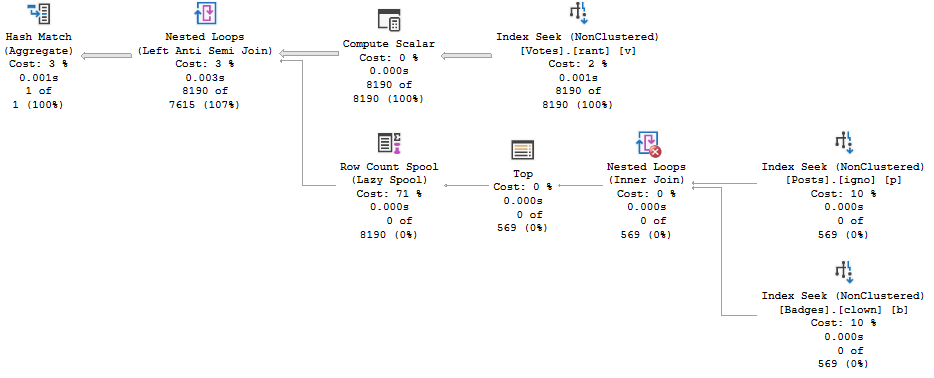
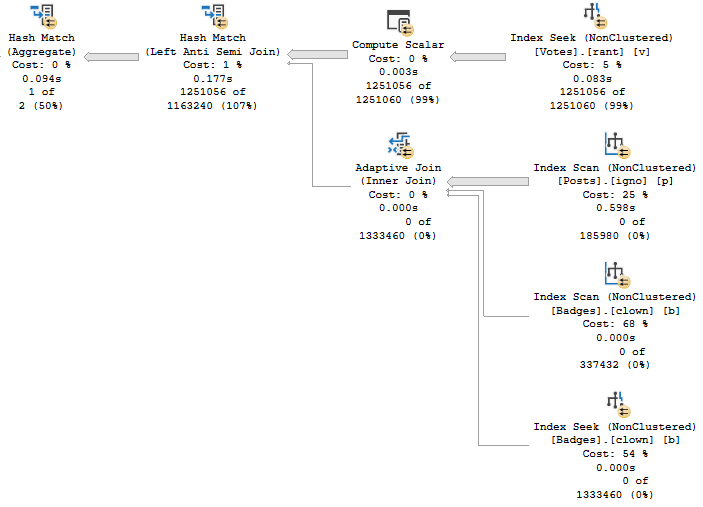
There are two plans you may see occur for these.
Plan 1
teeny tiny
Plan 2
it has adapted
Particulars & Peculiars
Plan 1 is first generated when the procedure is compiled with VoteTypeId 4, and Plan 2 is first generated when the procedure is compiled with VoteTypeId 6.
There’s a third plan that only gets generated when VoteTypeId 2 is compiled first, but we’ll have to save that for another post, because it’s totally different.
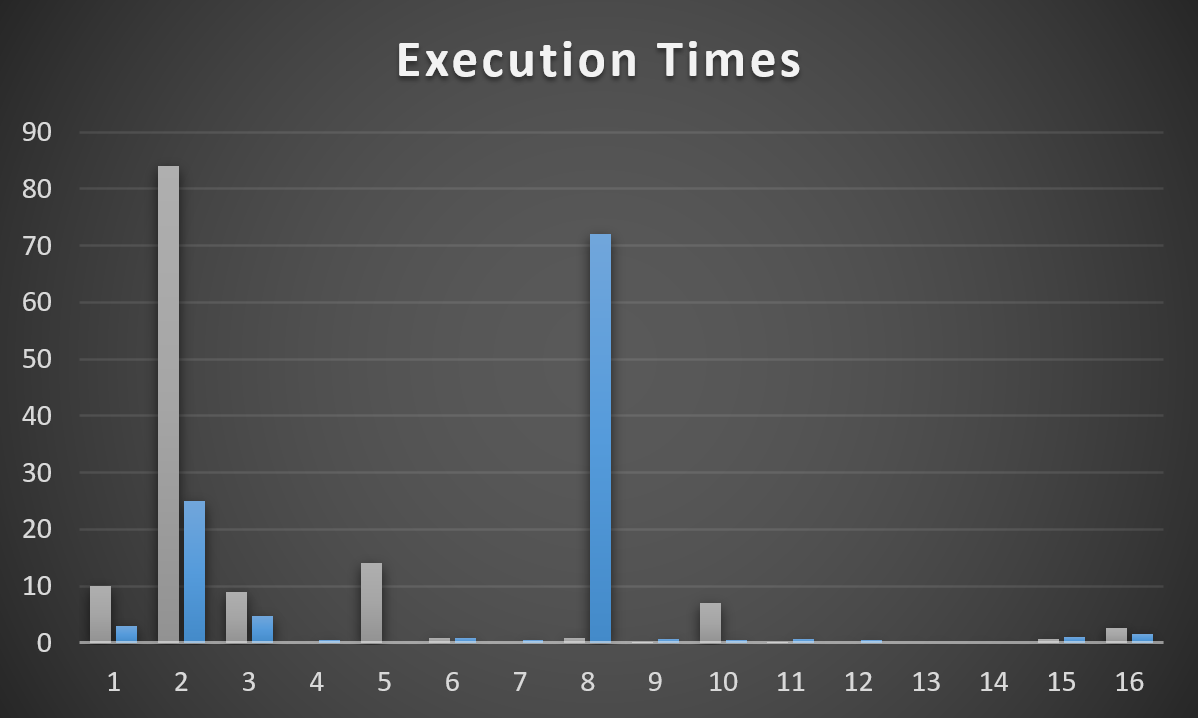
Here’s how each of those plans works across other possible parameters.
this is my first graph
Plan 1 is grey, Plan 2 is blue. It’s pretty easy to see where each one is successful, and then not so much. Anything < 100ms got a 0.
The Y axis is runtime in seconds. A couple are quite bad. Most are decent to okay.
Plans for Type 2 & 8 obviously stick out, but for different plans.
This is one of those things I need to warn people about when they get wrapped up in:
Forcing a plan (e.g. via Query Store or a plan guide)
Optimizing for unknown
Optimizing for a specific value
Recompiling every time (that backfires in a couple cases here that I’m not covering right now)
One thing I need to point out is that Plan 2 doesn’t have an entry here for VoteTypeId 5. Why?
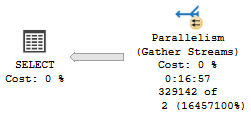
Because when it inherits the plan for VoteTypeId 6, it runs for 17 minutes.
singalong
This is probably where you’re wondering “okay, so what plan does 5 get when it runs on its own? Is this the mysterious Plan 4 From Outer Space?”
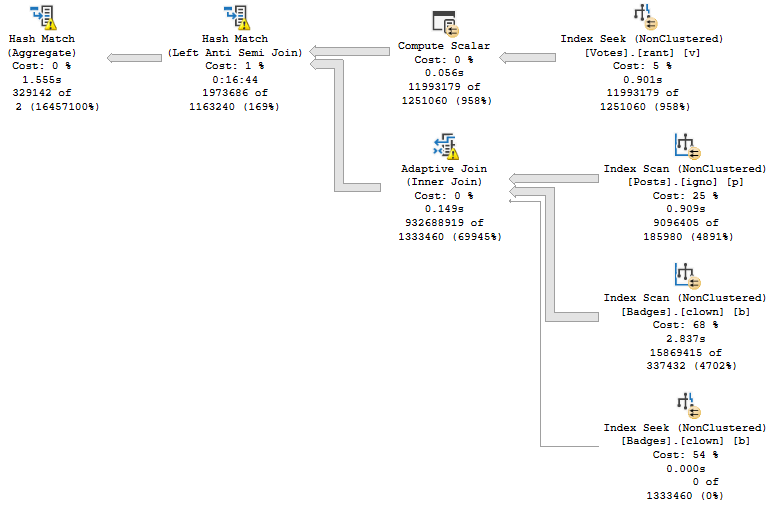
Unfortunately, the plan that gets generated for VoteTypeId 5 is… the same one that gets generated for VoteTypeId 6, but 6 has a much smaller memory grant.
Since this plan is all Batch Mode operators, each operator will track its time individually.
The Non-Switch
VoteTypeId 5 runtime, VoteTypeId 6 compile time
If I were to put a 17 minute runtime in the graph (>1000 seconds), it would defeat the purpose of graphing things.
Note the Hash Match has, by itself, 16 minutes and 44 seconds of runtime.
pyramids
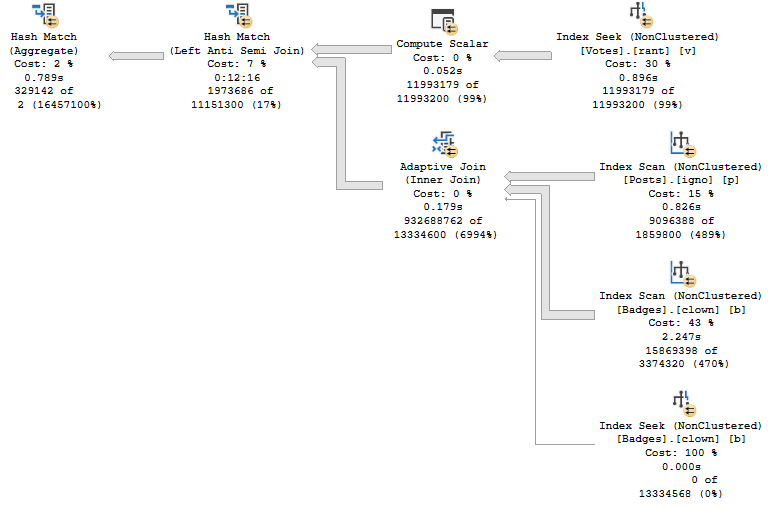
VoteTypeId 5 runtime, and compile time
This isn’t awesome, either.
The Hash Join, without spilling, has 12 minutes and 16 seconds of runtime.
lost
Big Differentsiz
You have the same plan shape and operators. Even the Adaptive Join follows the same path to hash instead of loop.
Sure, the spills account for ~4 minutes of extra time. They are fairly big spills.
But the plan for VoteTypeId 5, even when compiled specifically for VoteTypeId 5… sucks, and sucks royally.
There are some dismally bad estimates, but where do they come from?
We just created these indexes, and data isn’t magically changing on my laptop.
TUNE IN TOMORROW!
Thanks for reading
Going Further
If this is the kind of SQL Server stuff you love learning about, you’ll love my training. Blog readers get 25% off the Everything Bundle — over 100 hours of performance tuning content. Need hands-on help? I offer consulting engagements from targeted investigations to ongoing retainers. Want a quick sanity check before committing to a full engagement? Schedule a call — no commitment required.
I’ve always had trouble standing still on SQL Server versions, but most companies don’t. Hardly anyone I talk to is on SQL Server 2017, though these days SQL Server 2016 seems more common than SQL Server 2012, so at least there’s that. Mostly I’m happy to not see SQL Server 2014. God I hate SQL Server 2014.
Despite the lack of adoption, I’ve been moving all my training material to SQL Server 2019. Heck, in a few years, my old posts might come in handy for you.
But during that process, I kept running into the same problem: The demos generally still worked for the OLTP-ish queries, but for the report-ish queries Batch Mode On Rowstore (BMOR, from here) was kicking butt (most of the time anyway, we’re gonna look at some hi-jinks this week).
The problem, so far as I could tell, was that the Stack Overflow 2013 database just wasn’t enough database for SQL Server 2019 (at least with my hardware). My laptop is quad core (8 with HT) @2.9GHz, with 64GB of RAM, and max server memory set to 50GB. The SO2013 database is… just about 50GB.
While it’s fun to be able to create performance problems even with the whole database in memory, it doesn’t match what lot of people are dealing with in real life.
Dropping max server memory down is okay for the buffer pool, but SQL Server (it seems especially with column store/batch mode) is keen to use memoryabove that for other things like memory grants.
A lot of the interesting struggle I see on client servers between the buffer pool and query memory grants didn’t happen when I did that.
Using a VM with lower memory, while convenient, just didn’t seem as fun. Plus, part of the problem is that, while I make fun of other sample databases for being unrealistically tiny, at least they have relatively modern dates in some of them.
I was starting to feel really goofy having time stop on January 31st, 2013.
I suppose I could have updated all the CreationDate columns to modernize things, but who knows what that would have thrown off.
Plus, here’s a dirty little secret: all the date columns that start with “Last” that track stuff like when someone last logged in, or when a post was last active/edited, they don’t stop at 2013-12-31. They extend up to when the database was originally chopped down to size, in 2017 or so. I always found that a bit jarring, and I’d have to go and add time to them, too, to preserve the gaps.
It all starts to feel a bit like revisionist history.
The End Is Thigh
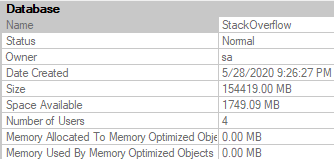
In the end, I settled on using the most recent version available here, but with a couple of the tables I don’t regularly use in demos cut out: PostHistory, and PostLinks. Once you drop those out, a 360GB database drops down to a much more manageable 150Gb or so.
The nice thing is that the general cadence of the data is the same in many ways and places, so it doesn’t take a lot to adjust demos to work here. Certain Post and Vote Types, User Ids, Reputations, etc. remain skewed, and outliers are easy to find. Plus, at 3:1 data to memory, it’s a lot harder to keep everything safely in the buffer pool.
This does present different challenges, like index create time to set up for things, database distribution, etc.
But if I can give you better demos, that seems worth it.
Plus, I hear everything is in the cloud now anyway.
Alluding To
In the process of taking old demos and seeing how they work with the new database, I discovered some interesting stuff that I want to highlight a little bit. So far as I can tell, they’re not terribly common (yet), but that’s what makes them interesting.
If you’re the kind of person who’s looking forward to SQL Server 2019’s performance features solving some problems for you auto-magick-ally, these may be things you need to watch out for, and depending on your workload they may end up being quite a bit more common than I perceive.
I’m going to be specifically focusing on how BMOR (and to some extent Adaptive Joins) can end up not solving performance issues, and how you may end up having to do some good ol’ fashion query tuning on your own.
In the next post, we’ll look at how one of my favorite demos continues to keep on giving.
Thanks for reading!
Going Further
If this is the kind of SQL Server stuff you love learning about, you’ll love my training. Blog readers get 25% off the Everything Bundle — over 100 hours of performance tuning content. Need hands-on help? I offer consulting engagements from targeted investigations to ongoing retainers. Want a quick sanity check before committing to a full engagement? Schedule a call — no commitment required.
In this video, I share a minor yet intriguing discovery related to SQL Server 2019 and its batch mode for rowstore operations. Specifically, I delve into how the query optimizer behaves differently when running scale R aggregate queries—those that should return only one result—and how adding a phony GROUP BY clause can lead to unexpected execution plans. The video highlights the transition from row mode to batch mode in SQL Server 2019 and explains why this change might impact memory grants and stop-and-go operators, offering insights for those moving to or already using this version of SQL Server.
Full Transcript
Happy Sunday, isn’t it? What a, what a day, what a time, what a date time to be alive. The year get date, we are, we are alive and well and happy. I wanted to record a video before I go off to do other things about a very mild, minor discovery. I’m probably late to this discovery by months. But I don’t care. That never stopped me before. When I, I’ll, I’ll discover new things all day. Just the other day, I discovered South Brooklyn. It’s amazing. Can’t believe how well it was developed for something that I just discovered. Anyway, so with SQL Server 2019, we get batch mode for Roastore if we’re on Enterprise Edition and then compat level 150 and all sorts of things. other good stuff. But yeah, it used to be. Now I learned this from a, a Craig Friedman talk on the query processor, like years ago, that the only option when we run a, a scale R aggregate, meaning an aggregate that will only, only ever return one result. Like if I select some score from comments with this where clause, we’re only going to get one line back or one row back or whatever. But then we’re going to get one line back or whatever. But we’re going to get one line back or one row back or whatever. But we’re going to get one line back or one row back or whatever.
But if I were to say like group by user ID or group by post, then we get a whole list of scores. I mean, without, if we don’t put those columns in the select list, then, you know, it’s not very helpful because we don’t know which user, which, which posts we have the sum of scores for. But we could still do that and return a bunch of sums back, which is not helpful, but something we could do. With the old way of doing things in row mode plans, the only option available to the optimizer when you run a query like this is to use a stream aggregate. We have one stream there. This is a partial aggregate and then one stream over here and that’s a global aggregate and whatever. That’s, that’s nice. That’s all well and good. And I don’t know. It’s interesting. Now, what’s even more interesting, I think, is that even if we add a phony group by and we tell the optimizer, we’re like, buddy, listen, I want you to use a hash group on this. And we run this query.
Well, we, we don’t get an error. A lot of times if you add an option hint to a query and the optimizer can’t come up with a feasible execution plan, you’ll get that error. That’s like, yeah, I couldn’t generate a good plan. I can generate a plan based on those hints. Please remove them and try again. We don’t get that. We don’t get that here, but we also don’t get the hash group. We get one to stream aggregate. So we’re at, we have a very disobedient optimizer. We need to spank this optimizer. Optimizer needs a spank and probably a grounding and take its iPad away or something. But this all changes with SQL Server 2019, assuming you are on enterprise edition and also perhaps assuming that you are in compat level 150.
Now, if we run these queries, right, we select some creation date and slept blah, blah, blah, blah, blah, blah, blah, blah, option hash group. Now, when we run those, we can see that the optimizer had a hash match aggregate in the plan. We did not do the, the partial stream and then go serial and then another than the full stream aggregate. We have just a single hash match aggregate in here. It’s exciting stuff, right? Why, why do we have that? Well, in compat level 140, we were in row mode, but now the magic of compat level 150, our, our clustered index scan over here is, uh, is in batch mode.
Nice, nice. And our hash match aggregate over here is in batch mode. Nice, nice. There we go. All right. So why is that interesting? Why does that make a difference? Why is this a big deal? Well, there’s a couple things at play here. Uh, internally, uh, stream aggregates are, uh, non-blocking, meaning that, uh, like with, so like if you have a, a hash aggregate or a hash join, there is a pause within the query for the hash table to get built. And then when things begin probing, things carry on in the plan. That’s what they’re called blocking or stop and go operators.
Uh, stream aggregates don’t have that. The other thing about stream aggregates is that stream aggregates don’t require a memory grant where hash aggregates do because we need some scratch space to write all that stuff down in. So if you have queries where you’re, uh, uh, performing a scalar aggregate and, uh, perhaps where, uh, you had, you know, some reliance on there being a streaming operation or perhaps just where you didn’t have a memory grant before, you may find yourself having memory grants. Now you might find yourself having stop and go operations in your, in your query plans now, because with this additional choice available, we change the query plans that are available for these queries. So is this incredibly interesting?
Eh, it’s sort of interesting. Um, is this incredibly dangerous? Probably not any more dangerous than any of the, of the other possibilities that, uh, become, become available with, uh, batch mode on rowstore. But it is something interesting to consider. Um, you know, if, if you, especially if you are getting, uh, scalar aggregates for very large data sets, you may find that those, uh, those hash match aggregates ask for potentially large amounts of memory.
That could, that could change the, uh, the face of your workload if this is happening, like, during some overnight process that, like, populates, I don’t know, let’s just call it like ETL ish, right? Like you might load a bunch of summary data into a table. You might actually have an ETL process. You might actually do something. Uh, and like, you might even try to make it concurrent.
So you’re like, I’m going to do a bunch of these sums at once and I’m just going to send them on and, you know, pass stuff over. Whatever it is, whatever it is, it doesn’t matter. Just, it’s different. It’s new. It’s different. And I want to tell you about it. So I want you to be aware of it and I want you to not be astounded or shocked or dismayed when you find these new things in your query plans as you all slowly move to SQL Server 2019, which I think you should, because that’ll give me more interesting stuff to do, other than like, we must fix the function. We, this, this, this, this, this, this, this, this, this, this, this, this, this, this, this, this, this, and we got an inappropriate joy.
Like, there’s a lot of stuff that I, I wish we were all on SQL Server 2019. So I could, I could, I could start fixing more, more, more things than this sort of groundhog day stuff that it’s been a problem in SQL Server forever and ever. Anyway, I’m not going to turn down groundhog day work. Just keep in mind that, um, you know, SQL Server 2019 does fix a lot of the groundhog day stuff that has, has been shocking and dismaying and annoying and aggravating people for 20 years now.
So I’m excited. I can’t wait. I can’t wait for, uh, for it to be widely adopted or who knows, maybe by the time it’s, it’s even close to widely adopted, we’ll be on like SQL Server 2025 or something. Maybe I’ll have opened a gym by then. Maybe I’ll just not even be looking at SQL Server anymore. Who knows? Who knows? I don’t know.
Um, but heck, I’m optimistic about the future. All right. Goodbye. See you in the next video.
Going Further
If this is the kind of SQL Server stuff you love learning about, you’ll love my training. Blog readers get 25% off the Everything Bundle — over 100 hours of performance tuning content. Need hands-on help? I offer consulting engagements from targeted investigations to ongoing retainers. Want a quick sanity check before committing to a full engagement? Schedule a call — no commitment required.
Of the new things in SQL Server 2019 that I plan on presenting about, the Batch Mode on Row Store (BMOR, from here) enhancements are probably the most interesting from a query tuning point of view.
The thing with BMOR is that it’s not just one thing. Getting Batch Mode also allows Adaptive Joins and Memory Grant Feedback to kick in.
But they’re all separate heuristics.
Getting Batch Mode
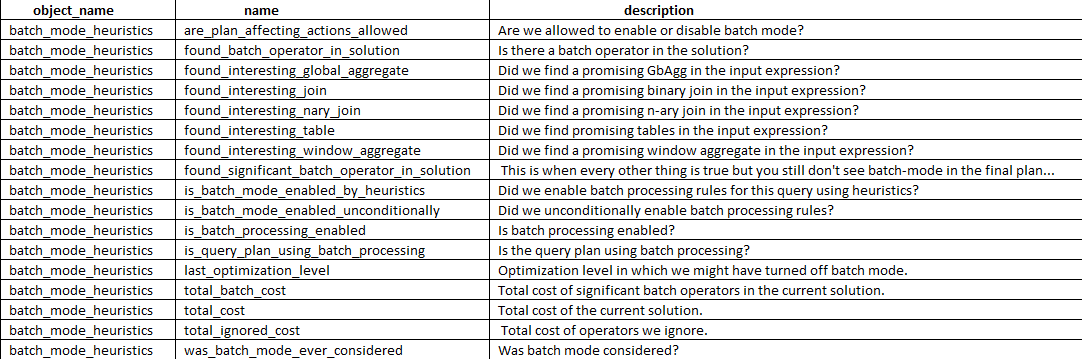
To get Batch Mode to kick in for a Row Store query, it has to pass a certain set of heuristics, which can be viewed in Extended Events.
SELECT dxoc.object_name, dxoc.name, dxoc.description
FROM sys.dm_xe_object_columns AS dxoc
JOIN sys.dm_xe_objects AS dxo
    ON  dxo.package_guid = dxoc.object_package_guid
    AND dxo.name = dxoc.object_name
WHERE dxo.name = 'batch_mode_heuristics' AND dxoc.column_type = 'data'
ORDER BY dxoc.name;
Once we’ve got Batch Mode, we can use the other stuff. But they have their own jim-jams.
Getting Adaptive Joins
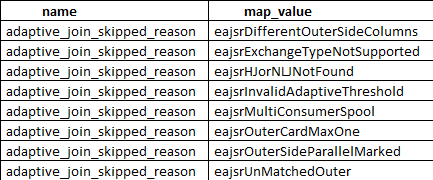
To get Adaptive Joins, you need to pass these heuristics.
SELECT dxmv.name,
       dxmv.map_value,
       dxo.description
FROM sys.dm_xe_map_values AS dxmv
    JOIN sys.dm_xe_objects AS dxo
        ON dxmv.object_package_guid = dxo.package_guid
           AND dxmv.name = dxo.name
WHERE dxmv.name = 'adaptive_join_skipped_reason';
Try refreshing
No, those aren’t plain English, but you can decode most of them. They mostly deal with index matching, and cardinality making sense to go down this route.
For excessive grants, if the granted memory is more than two times the size of the actual used memory, memory grant feedback will recalculate the memory grant and update the cached plan. Plans with memory grants under 1MB will not be recalculated for overages.
For insufficiently sized memory grants that result in a spill to disk for batch mode operators, memory grant feedback will trigger a recalculation of the memory grant. Spill events are reported to memory grant feedback and can be surfaced via the spilling_report_to_memory_grant_feedback XEvent event. This event returns the node id from the plan and spilled data size of that node.
We can still see some stuff, though.
SELECT dxoc.object_name,
       dxoc.name,
       dxoc.description
FROM sys.dm_xe_object_columns AS dxoc
JOIN sys.dm_xe_objects AS dxo
ON dxo.package_guid = dxoc.object_package_guid
AND dxo.name = dxoc.object_name
WHERE dxo.name = 'memory_grant_feedback_loop_disabled'
AND dxoc.column_type = 'data'

UNION ALL

SELECT dxoc.object_name,
       dxoc.name,
       dxoc.description
FROM sys.dm_xe_object_columns AS dxoc
JOIN sys.dm_xe_objects AS dxo
ON dxo.package_guid = dxoc.object_package_guid
AND dxo.name = dxoc.object_name
WHERE dxo.name = 'memory_grant_updated_by_feedback'
AND dxoc.column_type = 'data'
ORDER BY dxoc.name;
Leeches
Getting All Three
In SQL Server 2019, you may see plans with Batch Mode operators happening for Row Store indexes, but you may not get an Adaptive Join, or Memory Grant Feedback. If you have a lot of single-use plans, you’ll never see them getting Memory Grant Feedback (I mean, they might, but it won’t matter because there won’t be a second execution, ha ha ha).
It’s important to remember that this isn’t all just one feature, but a family of them for improving query performance for specific scenarios.
If this is the kind of SQL Server stuff you love learning about, you’ll love my training. Blog readers get 25% off the Everything Bundle — over 100 hours of performance tuning content. Need hands-on help? I offer consulting engagements from targeted investigations to ongoing retainers. Want a quick sanity check before committing to a full engagement? Schedule a call — no commitment required.
If this is the kind of SQL Server stuff you love learning about, you’ll love my training. Blog readers get 25% off the Everything Bundle — over 100 hours of performance tuning content. Need hands-on help? I offer consulting engagements from targeted investigations to ongoing retainers. Want a quick sanity check before committing to a full engagement? Schedule a call — no commitment required.
I’m excited about this feature. I’m not being negative, here. I just want you, dear reader, to have reasonable expectations about it.
This isn’t a post about it making a query slower, but I do have some demos of that happening. I want to show you an example of it not kicking in when it probably should. I’m going to use an Extended Events session that I first read about on Dmitry Pilugin’s blog here. It’ll look something like this.
CREATE EVENT SESSION heristix
    ON SERVER
    ADD EVENT sqlserver.batch_mode_heuristics
        ( ACTION( sqlserver.sql_text ))
    ADD TARGET package0.event_file
        ( SET filename = N'c:\temp\heristix' )
    WITH
        ( MAX_MEMORY = 4096KB,
          EVENT_RETENTION_MODE = ALLOW_SINGLE_EVENT_LOSS,
          MAX_DISPATCH_LATENCY = 1 SECONDS,
          MAX_EVENT_SIZE = 0KB,
          MEMORY_PARTITION_MODE = NONE,
          TRACK_CAUSALITY = OFF,
          STARTUP_STATE = ON );
GO
The Setup
Let’s start with some familiar indexes and a familiar query from other posts the last couple weeks.
CREATE INDEX something ON dbo.Posts(PostTypeId, Id, CreationDate);
CREATE INDEX stuffy ON dbo.Comments(PostId, Score, CreationDate);
SELECT COUNT(*)
FROM   dbo.Posts AS p
JOIN   dbo.Comments AS c
    ON  p.Id = c.PostId
WHERE DATEDIFF(YEAR, p.CreationDate, c.CreationDate) > 1
AND p.PostTypeId = 1
AND c.Score > 0;
The query plan is unimportant. It just doesn’t use any Batch Mode, and takes right about 2 seconds.
Blech Mode
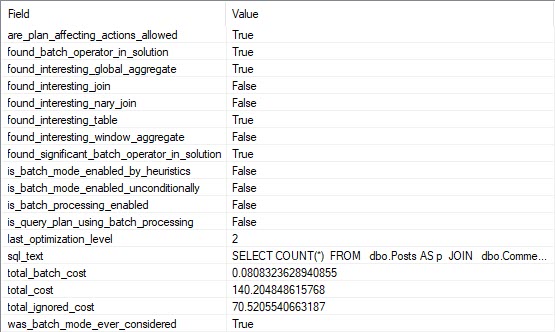
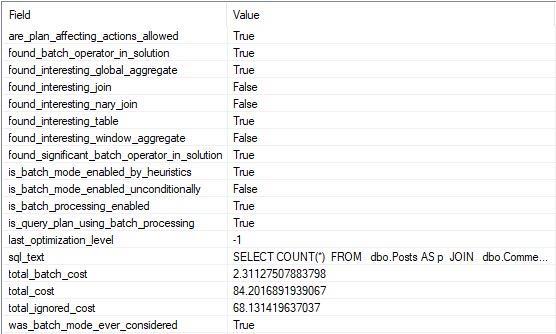
If we look at the entry for this query in our XE session, we can see that the optimizer considered the heck out of Batch Mode, but decided against it.
All The Heck
Curiouser
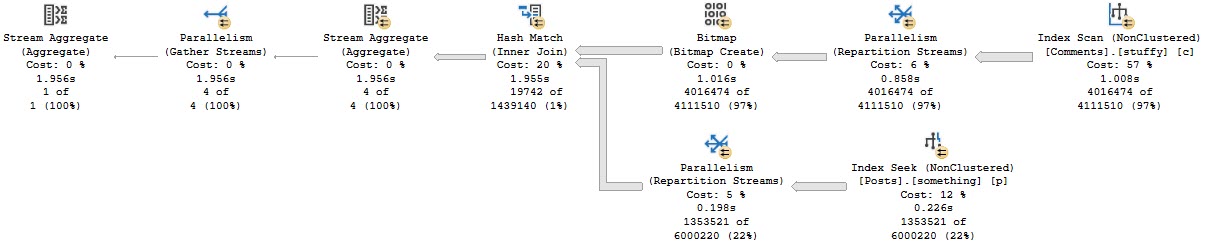
If we add a hash join hint to the query, it finishes in about 800ms.
SELECT COUNT(*)
FROM   dbo.Posts AS p
JOIN   dbo.Comments AS c
    ON  p.Id = c.PostId
WHERE DATEDIFF(YEAR, p.CreationDate, c.CreationDate) > 1
AND p.PostTypeId = 1
AND c.Score > 0
OPTION(HASH JOIN);
Every Time
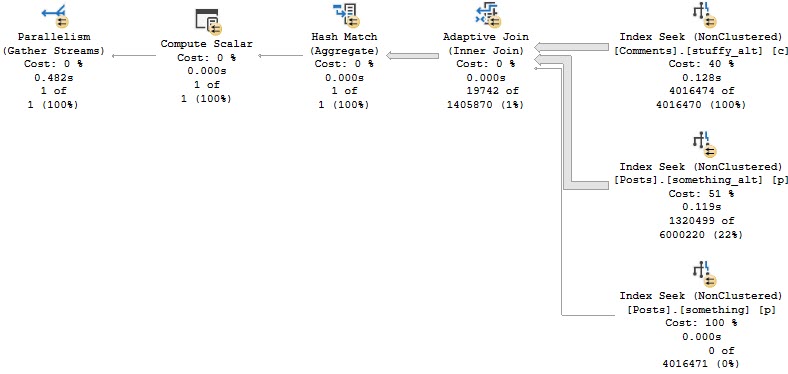
All the operators in this plan except Gather Streams are run in Batch Mode. Clearly it was helpful.
See Ghosts
And according to the XE session, we can see that decision in writing. Yay.
Alt Roq
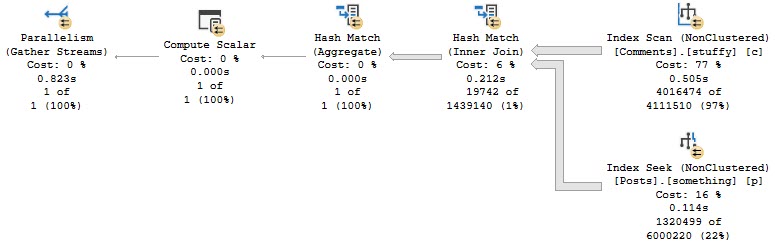
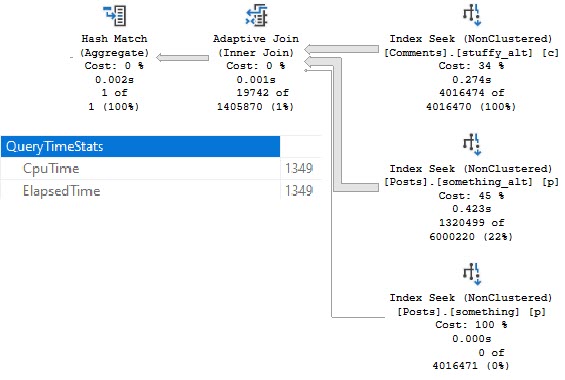
If we modify our indexes slightly, we can get an Adaptive Join plan.
CREATE INDEX something_alt ON dbo.Posts(PostTypeId, CreationDate, Id);
CREATE INDEX stuffy_alt ON dbo.Comments(Score, CreationDate, PostId);
And, yes, this is about twice as fast now (compared to the last Batch Mode query), mostly because of the better indexing.
Montage
Is There A Moral So Far?
Yes, don’t count on Batch Mode to kick in for every query where it would be helpful.
If you want queries to consistently use Batch Mode, you’ll need to do something like this.
SELECT COUNT(*)
FROM   dbo.Posts AS p
JOIN   dbo.Comments AS c
    ON  p.Id = c.PostId
LEFT JOIN dbo.t ON 1 = 0
WHERE DATEDIFF(YEAR, p.CreationDate, c.CreationDate) > 1
AND p.PostTypeId = 1
AND c.Score > 0;
But you have to be careful there too.
Mad Mad Mad Mad
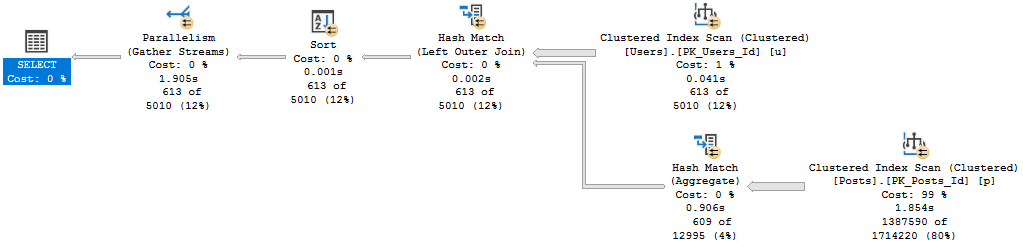
You might lose your nice parallel plan and end up with a slower query.
Huh.
Thanks for reading!
Going Further
If this is the kind of SQL Server stuff you love learning about, you’ll love my training. Blog readers get 25% off the Everything Bundle — over 100 hours of performance tuning content. Need hands-on help? I offer consulting engagements from targeted investigations to ongoing retainers. Want a quick sanity check before committing to a full engagement? Schedule a call — no commitment required.
In this video, I delve into the intricacies of SQL Server memory grants and compatibility levels, particularly focusing on how they behave differently between SQL Server 2017 and 2019. I demonstrate a practical example where I compare the memory requests for identical queries run at different compatibility levels to highlight the significant increase in memory grant sizes with SQL Server 2019. This comparison underscores the challenges faced by users of Standard Edition, especially when dealing with limited RAM resources or virtual machine constraints. By walking through these examples, I aim to provide insights and potential workarounds for those navigating the complexities of SQL Server memory management on a budget.
Full Transcript
Hello everyone, Erik Darling here with Erik Darling Data. I was so happy this week I got brand new stickers in, which can either be apparently a 45 pound weight plate or an LP, if you’re into that sort of thing. Whichever one you’re into more you can pretend that sticker is. Now, in case you can’t tell, I’m a bit under the weather. I’m not well, I’m sick. I got sick earlier this week. When I found out that Standard Edition of 2019 is still only allowed to have 128 gigs of RAM for the buffer pool. That’s how strongly I feel about what a bad decision that is. What a terrible decision that is. It made me physically ill. And, you know, I was starting to feel a little better. I was on the mend. I was taking my vitamins and drinking my OJ. And then, I started testing some of my old demos on 2019. I just got sick all over again. Now, the thing is that despite the fact that, you know, SQL Server 2019 only has 128 gigs of RAM for the buffer pool, you can use memory above that for queries, but those queries are now, they’re asking for more memory.
And this is going to be a real problem if you can’t have more than 128 gigs of RAM in your server for some reason. Or, like, you know, you’re on a VM where the host is small, or, you know, your boss is a cheapskate and won’t buy you memory. You know, just like lots of reasons, or like you’re in the cloud where there’s just not an instance size that has like a sane amount of processors and memory for SQL Server Standard Edition. Because there’s a whole lot of that going around. So what I want to do is I want to show you exactly what I mean. I have two query windows set up side by side. One of them is compat level 140, which will give us the 2017 behavior.
And the other one is compat level 150, which will give us the SQL Server 2019 behavior. And I’ve got two, I’ve got the same query on both sides. And what this query does is it forces SQL Server to sort data. I don’t have an index on reputation that will help me sort the data that I, in a way that’s meaningful to me. So SQL Server is going to have to break out its tiny little baby hands and sort that data for us.
So here’s what happens. SQL Server 2014. Run this. It executes. We get the execution plan. We see we have a sort here. And we see that this sort asks for 166.528 megs of memory.
All right. Cool. What about that same query and compat level 150? What now? What do you have to say for yourself now, SQL Server, especially when I turn on execution plans?
For some reason, I thought that would be global. I don’t know why I’m that stupid. Let’s run that. I can look again. 186 megs of memory. So about 10% more memory there, I think. At least I think it is. I’m not very good at math.
So that could be right. It could be wrong. So let’s call this 186. And that’s no fun. Now let’s take out a couple contenders here. Let’s bring display name into the mix.
And let’s see what happens now. On 2014, that’s 298 megs of memory. All right. We’re running that. Okay. We’ll go run it over here. What’s the big reveal? On SQL Server 2014, that is still 298.968. Okay.
And in SQL Server 2019 mode, compatibility level 150, 334. Eee. Sweet. Sweet. Summer rain. All right. So that was 334 there. All right. 334. All right. Let’s look.
Let’s add the website URL column in. Let’s see what happens when we do this. All right. We’ll come over here. We’ll run this one. Wait for this to finish. All right. There we go. And we’ll come over here and wait for that to finish. While we do that, we’ll see that this is still at 906.968.
So about 900 megs there. I’m still… Okay. Well, we’ll be fair. We’ll say that’s 906. That is what it was. We come over here and look. What do we have? Uh-oh. We are up over a gig. We are at just about… Okay. So like… I don’t know.
I don’t want to get into like too many decimal places. So I’m going to call this one gig even. All right. We’ll change this to reflect that. So we’re up at one… Well, one gig. Now we have to change it. 1.0 gigabytes. As some of my friends from Eastern Europe say.
Gigabytes. All right. Location. Let’s add this in because now I’m curious. How much is this going to go up? This is… This should be bafflingly fun. All right. That one’s done. We’ll come over here. Run this. All right.
What do we got? 1.2 gigs. Just as we expected. All right. Good stuff there. Happy, happy, happy. What do you ask for? SQL Server 2019 mode. 1.3 and a half gigs. So this went up a bit too.
So we’ll say that went from 1.2 to 1.3 gigs. Now this one asks for 9.7 gigs. 9.7. That’s nearly 10 gigs of memory. To do this. So let’s run this one. And this will run a little bit.
And then this will run this one. We’ll go look over here. We’ll see this. Memory grant. Oh, that one actually went down a little bit. I don’t know. I wonder why that was. Oh. Maybe because I have this VM running. Yeah.
That’s probably it. When I have memory from other things taking up space SQL Server, sometimes it deflates its memory grants. But we go over here. And apparently this is the max memory grant that we can give out right now because I have memory touching other things. So that’s good to know that SQL Server is kind to Camtasia and lets it use memory without trying to take it away.
But anyway. So these were both the same at just around 9 gigs. Now, the one thing that I want to point out is that if we run this query a couple times. We’re already in Compat level 150.
But let’s just make double, triple extra sure. If I run this query once and, ooh, CPU fans kicked in a little bit there. Run this query once. We asked for the 9 gigs of memory. All right. And we have this warning down here. Excessive grant, yada, yada, yada.
And if I run this again in 2019 compatibility level, I will get more sane memory grants. SQL Server will reduce the memory grant because it has this thing called memory grant feedback. And that’s really cool and nice.
But that’s not in Standard Edition either. Yeah. Yeah. So if you need help with Standard Edition, please call me. Because apparently Microsoft is not helping you with Standard Edition. So good job there.
Anyway, my name’s Eric. This thing, whatever. It might be a flying saucer. Who knows? Maybe when I take over the world, this will be the new currency. This will be how people pay each other with Darling Data stickers. That’d be nice.
I’ve always wanted to be on currency. Anyway. Thanks for watching. I’ll see you in the next video. Goodbye. Bye. Bye. Bye. Thank you.
Going Further
If this is the kind of SQL Server stuff you love learning about, you’ll love my training. Blog readers get 25% off the Everything Bundle — over 100 hours of performance tuning content. Need hands-on help? I offer consulting engagements from targeted investigations to ongoing retainers. Want a quick sanity check before committing to a full engagement? Schedule a call — no commitment required.
In yesterday’s post, we looked at plans with a good index. The row number queries were unfortunate, but the MAX and TOP 1 queries did really well.
Today, I wanna see what the future holds. I’m gonna test stuff out on SQL Server 2019 CTP 3.1 and see how things go.
I’m only going to hit the interesting points. If plans don’t change, I’m not gonna go into them.
Query #1
With no indexes, this query positively RIPS. Batch Mode For Row Store kicks in, and this finishes in 2 seconds.
SELECT u.Id,
       u.DisplayName,
	   u.Reputation,
	   ca.Score
FROM dbo.Users AS u
CROSS APPLY
(
    SELECT MAX(Score) AS Score
	FROM dbo.Posts AS p
	WHERE p.OwnerUserId = u.Id

) AS ca
WHERE u.Reputation >= 100000
ORDER BY u.Id;
So many illustrations
With an index, we use the same plan as in SQL Server 2017, and it finishes in around 200 ms.
No big surprise there. Not worth the picture.
Query #2
Our TOP 1 query should be BOTTOM 1 here. It goes back to its index spooling ways, and runs for a minute.
SELECT u.Id,
       u.DisplayName,
	   u.Reputation,
	   ca.Score
FROM dbo.Users AS u
CROSS APPLY
(
    SELECT TOP (1) p.Score
	FROM dbo.Posts AS p
	WHERE p.OwnerUserId = u.Id
	ORDER BY p.Score DESC

) AS ca
WHERE u.Reputation >= 100000
ORDER BY u.Id;
With an index, we use the same plan as in SQL Server 2017, and it finishes in around 200 ms.
No big surprise there. Not worth the picture.
I feel like I’m repeating myself.
Query #3
This is our first attempt at row number. It’s particularly disappointing when we see the next query plan.
SELECT u.Id,
       u.DisplayName,
	   u.Reputation,
	   ca.Score
FROM dbo.Users AS u
CROSS APPLY
(
    SELECT p.Score,
	       ROW_NUMBER() OVER (ORDER BY p.Score DESC) AS n
	FROM dbo.Posts AS p
	WHERE p.OwnerUserId = u.Id
) AS ca
WHERE u.Reputation >= 100000
AND ca.n = 1
ORDER BY u.Id;
On its own, it’s just regular disappointing.
Forget Me
Serial. Spool. 57 seconds.
With an index, we use the same plan as in SQL Server 2017, and it finishes in around 200 ms.
No big surprise there. Not worth the picture.
I feel like I’m repeating myself.
Myself.
Query #4
Why this plan is cool, and why it makes the previous plans very disappointing, is because we get a Batch Mode Window Aggregate.
SELECT u.Id,
       u.DisplayName,
	   u.Reputation,
	   ca.Score
FROM dbo.Users AS u
CROSS APPLY
(
    SELECT *
	FROM
	(
        SELECT p.OwnerUserId,
	           p.Score,
	           ROW_NUMBER() OVER (PARTITION BY p.OwnerUserId
			                      ORDER BY p.Score DESC) AS n
	    FROM dbo.Posts AS p
	) AS p
	WHERE p.OwnerUserId = u.Id
	AND p.n = 1
) AS ca
WHERE u.Reputation >= 100000
ORDER BY u.Id;
Guillotine
It finishes in 1.7 seconds. This is nice. Good job, 2019.
With the index we get a serial Batch Mode plan, which finishes in about 1.4 seconds.
Confused.
If you’re confused about where 1.4 seconds come from, watch this video.
Why Aren’t You Out Yet?
SQL Server 2019 did some interesting things, here.
In some cases, it made fast queries faster.
In other cases, queries stayed… exactly the same.
When Batch Mode kicks in, you may find queries like this speeding up. But when it doesn’t, you may find yourself having to do some good ol’ fashion query and index tuning.
No big surprise there. Not worth the picture.
I feel like I’m repeating myself.
Myself.
Myself.
Going Further
If this is the kind of SQL Server stuff you love learning about, you’ll love my training. Blog readers get 25% off the Everything Bundle — over 100 hours of performance tuning content. Need hands-on help? I offer consulting engagements from targeted investigations to ongoing retainers. Want a quick sanity check before committing to a full engagement? Schedule a call — no commitment required.
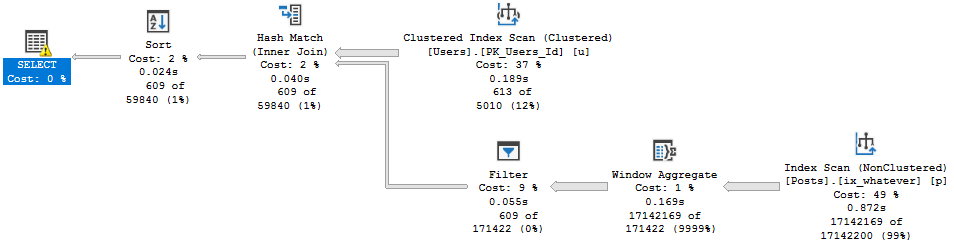
You can pretend it’s in a stored procedure, and that the date filter is a parameter if you want.
SELECT u.DisplayName, p.Score
FROM dbo.Users AS u
JOIN dbo.Posts AS p
ON p.OwnerUserId = u.Id
WHERE u.CreationDate >= '20131201';
A long time ago, when we migrated Stack Overflow from Access to SQL Server 2000, we created indexes.
This one has worked alright.
CREATE INDEX ix_whatever
    ON dbo.Posts(OwnerUserId);
But Now We’re On 2019
And we’ve, like, read a lot about Adaptive Joins, and we think this’ll be cool to see in action.
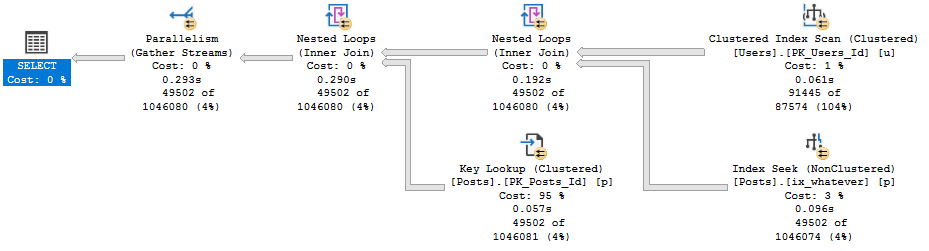
Unfortunately, our query doesn’t seem to qualify.
Shame shame shame
Now, there’s an Extended Event that… Used to work.
These days it just stares blankly at me. But since I’ve worked with this before, I know the problem.
It’s that Key Lookup — I’ll explain more in a minute.
Index Upgrade
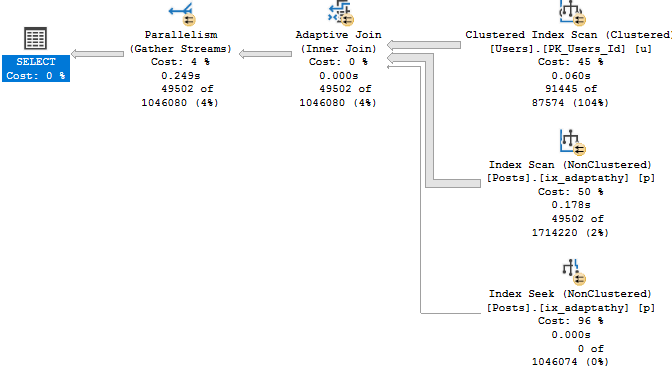
First, let’s get rid of the Lookup so we can see the Adaptive Join happen.
CREATE INDEX ix_adaptathy
    ON dbo.Posts(OwnerUserId, Score);
New new new
As We Proceed
Let’s think about what Adaptive Joins need:
An index on the column(s) you’re joining
This gives us a realistic choice between using a Nested Loops join to do efficient Seeks, or an easy scan for a Hash Join.
That index has to cover the query
Without a covering index, there’s too much for the optimizer to think about.
It’s not just making a choice between a Nested Loops or Hash Join, it’s also factoring in the cost of a Lookup.
This used to trigger the XE on eajsrUnMatchedOuter, meaning the outer table didn’t have an index that matched the query.
Why Revisit This?
When SQL Server 2019 comes out, people are gonna have really high hopes for their workloads automagickally getting faster.
While there are lots of things that it’ll likely help, it’s going to take a lot of work on your part to make sure your queries and indexes allow for the automagick to kick in.
Thanks for reading!
Going Further
If this is the kind of SQL Server stuff you love learning about, you’ll love my training. Blog readers get 25% off the Everything Bundle — over 100 hours of performance tuning content. Need hands-on help? I offer consulting engagements from targeted investigations to ongoing retainers. Want a quick sanity check before committing to a full engagement? Schedule a call — no commitment required.
In this video, I dive into the complexities of operator times and execution plans in SQL Server, particularly focusing on how they behave differently in batch mode versus row mode. I explain that while these new features are incredibly valuable for query performance tuning, there are some quirks that can make them confusing. For instance, I demonstrate how operator times are measured per operator in batch mode but add up along the plan in row mode, and how there’s no clear visual indicator of when a switch between modes occurs. By walking through these examples using SSMS 18, I aim to help you better understand and navigate these peculiarities, making your query tuning efforts more efficient.
Full Transcript
Howdy folks, Erik Darling here with Erik Darling Data. Still six months in I have managed not to fire myself which is amazing because I always considered me to be one of my most underperforming employees so it’s a real tribute to I guess nepotism that I haven’t fired myself yet. Anyway, I’m here to talk about operator times and execution plans. I want to talk about them because they can be really, really confusing. And hopefully me recording this video will help you understand exactly what’s going on with them. Now, they’re only available in SSMS 18. So if you aren’t using SSMS 18, I actually understand why because it’s really buggy. crashes more than normal SSMS. But this is a great new feature for especially unemployed query tuners who, you know, need to make a buck here and there, spare changing outside bodegas and, you know, trying to get some money up for a beer and a beer and a banana or something. But yeah, these things are weird and I’m going to try to explain why. Now, in SQL Server, well, I mean, 2019 CTP3 batch mode is generally available for rowstore queries. You could still see this in SQL Server 2017 or 16 or wherever else, you know, batch mode is available or wherever you have chosen to sneakily introduce batch mode into your rowstore queries with the temp table trick or with the filtered index trick. But anyway, this gets really odd. Now, the first thing I want to explain is that in batch mode plans, the timing is per operator. But there are two things that suck. One is that there’s no general indicator of which operators ran in batch mode. There’s one operator in this plan, that window aggregate that can only happen in batch mode. So we know that’s batch mode.
But if you look at the index scan, the sort, the compute scaler, the filter, any of those other operators, there’s no visual indicator that they happened in batch mode. The other thing that sucks is that there’s no visual indicator when we switch between row mode and batch mode. There’s nothing that says, there’s nothing that says, hey, like there’s no, there’s no, there’s no like little like interruption in the arrow or like, you know, little like, like, like little flippy sign that says, hey, that we switched here. We made it, we made an adjustment. Now, I’m going to show you why this is important. So I run this, I run this query, and this query does run for about four and a half seconds that that timing isn’t up for debate. That did happen in about four and a half seconds.
But what you’ll see across the bottom of the execution plan is that each, like the operator times for each one of those operators looks funky. They don’t add up. So this ran for 1.2 seconds, this ran for 2 seconds, this ran for 0.15 milliseconds, this ran for 0.9, 900 milliseconds, or 157 milliseconds, 900 milliseconds, 0.37 milliseconds.
So all of these are individual times. And if you add them up across the line, they’ll add up to about 4.3. But what gets weird is this is batch mode, right? So batch mode, this is batch mode. In fact, all of these are batch mode up to right here. Where they stop being batch mode is that this gather streams. This is row mode. And this top is also row mode.
There’s a difference between batch mode and row mode here. And the way that these operator times operate. And that is, for batch mode, it’s per operator. For row mode, it adds up along the plan. I know that sounds confusing, so I’m going to change this query slightly and rerun it. And I’m going to show you the difference. So remember what this looks like. Each one of these operators does a thing, and we measure that thing separately until we get to the row mode part.
And the row mode part reflects an adding up of everything here, right? So when we get to that gather streams, we’re adding up all of the child operator times. Prior to that in batch mode, each operator time is individual. Now I’m going to run, I’m going to change the query a little bit, and I’m going to rerun it. And this is going to execute fully in row mode. So this index seek is row mode, this source row mode, segment’s row mode, this is row mode.
Nested loops, of course, is row mode. I wish bash mode nested loops would become a thing, but it just hasn’t yet. But what the difference here is that when we look across these query times, or when we look across these operator times, they add up. So we have 1.04, 1.84, 1.99, 2.16, 2.33, go up here to 2.6, 2.65.
They add up as we go across, right? So that top operator reflects adding up all of the child operators together because they’re all row mode, right? So each row mode operator is a reflection of it and whatever time the operator or operators before it took.
So if that’s not confusing enough, again, like I was saying, when operators in a plan might switch between batch and row mode, we don’t have an indicator of when that happens, right? So in a really complicated plan where there might be a lot of switches, this might be even harder to try and figure out. So rather than me saying, well, you need to get your times right, I think it just might be easier for us as query tuning people to have a visual indicator of when an operator is in batch mode and or when we flip or even if we had like a visual indicator of when we switch between batch and row mode.
Like maybe the arrow gets interrupted, maybe there’s something between the operators, like a little swirly thing that says, hey, we switched here. So you could at least have an indicator that one thing was batch or row mode and the other thing made a switch to batch or row mode from whatever the previous operator was. Another place where this can get kind of confusing is in plans that look like this.
Now, this plan is all row mode. All of these operators are row mode. There is no batch mode happening in any of these, I promise you. But what happens is at the very end, gather streams, finish it.
Well, it says 11.242, but that nested loop says 11.499. So where these pretty accurately add up across the whole thing, they sort of get funky at the gather streams. So gather streams says it finished about, I don’t know, 300 or so milliseconds before the nested loops did, which is a little awkward.
Again, this isn’t like a big query tuning dilemma. It’s just sort of an oddity. And it’s happened across multiple queries for me.
I have another example of it happening over here where, again, all of this stuff happens. Well, I can’t say that’s entirely true. Anyway, all of this stuff happens in row mode.
Where it’s supposed to add up, it doesn’t quite add up because we have this oddity over here where the hash join says that it finished in 5.572 seconds. And then the gather stream says it finished in 5.132 seconds. This is also a little bit of a weird plan because even though it’s in row mode, at least last I checked it was all in row mode.
Who knows what happens between runs? It looks like it’s still in row mode to me. But this stream aggregate.
So these two operators are killing me. So we have this stream aggregate that ran in 1.83. And then this repartition streams that ran in 1.73. So this was supposed to add up, but it didn’t add up for some reason.
So that’s another thing that’s kind of odd. Sometimes, despite your best efforts to understand these things, you run a demo and then you look a little more closely while you’re recording a video. And you spot something even stranger.
So now I have to go figure out just what that was about. But that’s going to require a lot of day drinking. So I need to go get started on that. Anyway, I do think this is incredibly valuable.
As query performance tuners, usually when we’re looking at an execution plan, it’s a lot of guesswork as to, okay, let’s figure out what went wrong here. Let’s figure out what we need to focus on. Let’s figure out what’s bad.
This does help us focus quite a bit of our efforts on, okay, which operator really did take a long time to run? What’s sticking out like that awful sore thumb? Anyway, I’m Erik Darling with Erik Darling Data.
Still haven’t fired myself, and I will see you around in another video when it’s less hot and wearing headphones doesn’t make my ears sweat. Have a lovely Saturday. Can you talk to me today?
Have a lovely night. Hi. Hi. Thank you.
Video Summary
In this video, I dive into the complexities of operator times and execution plans in SQL Server, particularly focusing on how they behave differently in batch mode versus row mode. I explain that while these new features are incredibly valuable for query performance tuning, there are some quirks that can make them confusing. For instance, I demonstrate how operator times are measured per operator in batch mode but add up along the plan in row mode, and how there’s no clear visual indicator of when a switch between modes occurs. By walking through these examples using SSMS 18, I aim to help you better understand and navigate these peculiarities, making your query tuning efforts more efficient.
Full Transcript
Howdy folks, Erik Darling here with Erik Darling Data. Still six months in I have managed not to fire myself which is amazing because I always considered me to be one of my most underperforming employees so it’s a real tribute to I guess nepotism that I haven’t fired myself yet. Anyway, I’m here to talk about operator times and execution plans. I want to talk about them because they can be really, really confusing. And hopefully me recording this video will help you understand exactly what’s going on with them. Now, they’re only available in SSMS 18. So if you aren’t using SSMS 18, I actually understand why because it’s really buggy. crashes more than normal SSMS. But this is a great new feature for especially unemployed query tuners who, you know, need to make a buck here and there, spare changing outside bodegas and, you know, trying to get some money up for a beer and a beer and a banana or something. But yeah, these things are weird and I’m going to try to explain why. Now, in SQL Server, well, I mean, 2019 CTP3 batch mode is generally available for rowstore queries. You could still see this in SQL Server 2017 or 16 or wherever else, you know, batch mode is available or wherever you have chosen to sneakily introduce batch mode into your rowstore queries with the temp table trick or with the filtered index trick. But anyway, this gets really odd. Now, the first thing I want to explain is that in batch mode plans, the timing is per operator. But there are two things that suck. One is that there’s no general indicator of which operators ran in batch mode. There’s one operator in this plan, that window aggregate that can only happen in batch mode. So we know that’s batch mode.
But if you look at the index scan, the sort, the compute scaler, the filter, any of those other operators, there’s no visual indicator that they happened in batch mode. The other thing that sucks is that there’s no visual indicator when we switch between row mode and batch mode. There’s nothing that says, there’s nothing that says, hey, like there’s no, there’s no, there’s no like little like interruption in the arrow or like, you know, little like, like, like little flippy sign that says, hey, that we switched here. We made it, we made an adjustment. Now, I’m going to show you why this is important. So I run this, I run this query, and this query does run for about four and a half seconds that that timing isn’t up for debate. That did happen in about four and a half seconds.
But what you’ll see across the bottom of the execution plan is that each, like the operator times for each one of those operators looks funky. They don’t add up. So this ran for 1.2 seconds, this ran for 2 seconds, this ran for 0.15 milliseconds, this ran for 0.9, 900 milliseconds, or 157 milliseconds, 900 milliseconds, 0.37 milliseconds.
So all of these are individual times. And if you add them up across the line, they’ll add up to about 4.3. But what gets weird is this is batch mode, right? So batch mode, this is batch mode. In fact, all of these are batch mode up to right here. Where they stop being batch mode is that this gather streams. This is row mode. And this top is also row mode.
There’s a difference between batch mode and row mode here. And the way that these operator times operate. And that is, for batch mode, it’s per operator. For row mode, it adds up along the plan. I know that sounds confusing, so I’m going to change this query slightly and rerun it. And I’m going to show you the difference. So remember what this looks like. Each one of these operators does a thing, and we measure that thing separately until we get to the row mode part.
And the row mode part reflects an adding up of everything here, right? So when we get to that gather streams, we’re adding up all of the child operator times. Prior to that in batch mode, each operator time is individual. Now I’m going to run, I’m going to change the query a little bit, and I’m going to rerun it. And this is going to execute fully in row mode. So this index seek is row mode, this source row mode, segment’s row mode, this is row mode.
Nested loops, of course, is row mode. I wish bash mode nested loops would become a thing, but it just hasn’t yet. But what the difference here is that when we look across these query times, or when we look across these operator times, they add up. So we have 1.04, 1.84, 1.99, 2.16, 2.33, go up here to 2.6, 2.65.
They add up as we go across, right? So that top operator reflects adding up all of the child operators together because they’re all row mode, right? So each row mode operator is a reflection of it and whatever time the operator or operators before it took.
So if that’s not confusing enough, again, like I was saying, when operators in a plan might switch between batch and row mode, we don’t have an indicator of when that happens, right? So in a really complicated plan where there might be a lot of switches, this might be even harder to try and figure out. So rather than me saying, well, you need to get your times right, I think it just might be easier for us as query tuning people to have a visual indicator of when an operator is in batch mode and or when we flip or even if we had like a visual indicator of when we switch between batch and row mode.
Like maybe the arrow gets interrupted, maybe there’s something between the operators, like a little swirly thing that says, hey, we switched here. So you could at least have an indicator that one thing was batch or row mode and the other thing made a switch to batch or row mode from whatever the previous operator was. Another place where this can get kind of confusing is in plans that look like this.
Now, this plan is all row mode. All of these operators are row mode. There is no batch mode happening in any of these, I promise you. But what happens is at the very end, gather streams, finish it.
Well, it says 11.242, but that nested loop says 11.499. So where these pretty accurately add up across the whole thing, they sort of get funky at the gather streams. So gather streams says it finished about, I don’t know, 300 or so milliseconds before the nested loops did, which is a little awkward.
Again, this isn’t like a big query tuning dilemma. It’s just sort of an oddity. And it’s happened across multiple queries for me.
I have another example of it happening over here where, again, all of this stuff happens. Well, I can’t say that’s entirely true. Anyway, all of this stuff happens in row mode.
Where it’s supposed to add up, it doesn’t quite add up because we have this oddity over here where the hash join says that it finished in 5.572 seconds. And then the gather stream says it finished in 5.132 seconds. This is also a little bit of a weird plan because even though it’s in row mode, at least last I checked it was all in row mode.
Who knows what happens between runs? It looks like it’s still in row mode to me. But this stream aggregate.
So these two operators are killing me. So we have this stream aggregate that ran in 1.83. And then this repartition streams that ran in 1.73. So this was supposed to add up, but it didn’t add up for some reason.
So that’s another thing that’s kind of odd. Sometimes, despite your best efforts to understand these things, you run a demo and then you look a little more closely while you’re recording a video. And you spot something even stranger.
So now I have to go figure out just what that was about. But that’s going to require a lot of day drinking. So I need to go get started on that. Anyway, I do think this is incredibly valuable.
As query performance tuners, usually when we’re looking at an execution plan, it’s a lot of guesswork as to, okay, let’s figure out what went wrong here. Let’s figure out what we need to focus on. Let’s figure out what’s bad.
This does help us focus quite a bit of our efforts on, okay, which operator really did take a long time to run? What’s sticking out like that awful sore thumb? Anyway, I’m Erik Darling with Erik Darling Data.
Still haven’t fired myself, and I will see you around in another video when it’s less hot and wearing headphones doesn’t make my ears sweat. Have a lovely Saturday. Can you talk to me today?
Have a lovely night. Hi. Hi. Thank you.
Going Further
If this is the kind of SQL Server stuff you love learning about, you’ll love my training. Blog readers get 25% off the Everything Bundle — over 100 hours of performance tuning content. Need hands-on help? I offer consulting engagements from targeted investigations to ongoing retainers. Want a quick sanity check before committing to a full engagement? Schedule a call — no commitment required.