Whether you want to be the next great query tuning wizard, or you just need to learn how to start solving tough business problems at work, you need a solid understanding of not only what makes things fast, but also what makes them slow.
I work with consulting clients worldwide fixing complex SQL Server performance problems. I want to teach you how to do the same thing using the same troubleshooting tools and techniques I do.
I’m going to crack open my bag of tricks and show you exactly how I find which queries to tune, indexes to add, and changes to make. In this day long session, you’re going to learn about hardware, query rewrites that work, effective index design patterns, and more.
Before you get to the cutting edge, you need to have a good foundation. I’m going to teach you how to find and fix performance problems with confidence.
If this is the kind of SQL Server stuff you love learning about, you’ll love my training. Blog readers get 25% off the Everything Bundle — over 100 hours of performance tuning content. Need hands-on help? I offer consulting engagements from targeted investigations to ongoing retainers. Want a quick sanity check before committing to a full engagement? Schedule a call — no commitment required.
Why Multiple Seeks Are Slower For Some SQL Server Queries
Video Summary
In this video, I delve into the fascinating world of SQL Server query optimization by revisiting an intriguing blog post from Paul White that has stood the test of time for over a decade. I share my unique take on his example, illustrating how subtle changes in query syntax and indexing can dramatically affect performance. Through detailed analysis and practical demonstrations, I explore why certain index seeks might not be as efficient as expected, leading to surprising execution times. This video is packed with insights that will challenge your understanding of SQL Server’s optimizer and encourage you to rethink how you phrase your WHERE clauses for better query performance.
Full Transcript
Erik Darling here with Darling Data. Still sound like I’m dragging myself out of a cave a little bit, but that’s alright. I’m never going to have to hear my own voice anyway. One of the joys of being on this side of the camera, the microphone. You never have to listen to me. Plug my ears. Today we are going to talk about something exciting, titillating. And it relates back to this blog post by Mr. Paul White, who very, very kindly uses the pastel crayon. Still not sure what to call it. It’s not exactly a drawing. It’s not exactly a painting. I guess it’s a crayoning that I did of him. It’s all his social media avatars. So that’s quite nice. I never, never, never, never thought that I would be a famous artist. But, I mean, kind of funny that this came up when it did because this post is turning, what, 13 this week? 13 years old. Paul’s been smarter than all of us for 13 years. Can you imagine how heavy a burden that is? Being smarter than everyone?
Like, like, 15 years? Same. But the main thing that we’re talking about here is when is a Sikh not a Sikh? And, well, I would love to just read the article to you. I don’t think that that would be a very nice thing to do. The word is Paul’s copyrighted material. So we’re going to try to avoid any litigiousness in this romantic week that we’re all suffering through. All right. I’m going to get right down to the end here. Because at the end, where the answer is. And the answer is, when is a Sikh not a Sikh? That is, when it is 63 Sikhs.
Well, that is correct. And what we’re going to do is, so, I mean, like, Paul’s post has an example in it where, you know, like, if you run these queries a lot, like, the loop that does this thing down here is a lot faster than the loop that does this big in clause here. I’m going to show you a little bit more of a profound single query example. No loops required here. And to get to, just so you know what the setup here is, I have one index on the post table on post type ID that includes score.
And this is really just to get some faster stuff going on the outer side of the cross apply that I’m doing. And then on the votes table, I have two indexes. I have one that’s just on post ID. And then I have one that is on post ID. Well, I mean, just keyed on post ID.
But it includes user ID, bounty amount, vote type ID, and creation date. And then we have another index down here that is keyed across post ID, vote type ID, and creation date. And descending, that’s why that’s called pvcd there, because its creation date is descending.
That’s probably not the best notation for telling someone that a column is in descending order. But we’re just going to deal with it, because that’s what I felt like doing. But this one also includes user ID and bounty amount.
I forget why. I think the query changed a little bit, but I didn’t change the indexes much. So just deal with it for a minute. But what I want to do is run these two queries first.
And while these two queries run, I’m going to talk a little bit about what’s going on with them, because that seems like a nice thing to do for the folks at home who may not just be able to look at a query and figure out exactly what it’s supposed to do.
So I’m using cross-supply. Again, the reason that I use cross-supply for a lot of things is because a lot of interesting things happen on the inner side of nested loops joins.
And cross-supply is a great way to get the optimizer to say, yep, nested loops join. That’s it for me. Just a little bit of a demo writing shortcut there for all the folks at home. And so what we’re doing is we’re selecting some stuff from posts, and then we’re cross-applying out to the votes table.
The votes table, I mean, they scrub all the user ID stuff out of there. So, like, I mean, there are probably other interesting queries that could be written, except, like, the user ID column in the votes table is largely null, except the thing for, like, bounty stuff.
So it’s just not a very, unless you, like, null join demo, it’s not a very interesting user experience. That’s why I’m going from posts out to votes, because that makes sense.
Every, well, not every post, but many posts have many votes. A good, strong correlation in there. And what we’re looking for in the votes table for this first query, I mean, they’re both the same query.
They really just have different index sense in there, because that’s what I want to show you primarily. And so what we’re doing is we are looking to rank posts by which vote type ID was newest.
I mean, that’s kind of dumb, but we’re going to go with it. And then we are filtering down to where vote type ID is in, 1, 2, 3, and where V.creationDate is greater than 2008-0101.
These are very unselected predicates, right? Like, vote type ID 1 is, like, awarding. Like, when the person who asks a question recognizes an answer as being the answer, and they put a little green checkmark on it.
Vote type 2 is upvotes, and vote type 3 is downvotes. Most of the votes in Stack Overflow are either, yes, that’s the answer, yes, that’s a good answer, yes, that’s a good question, no, that’s a bad answer, no, that’s a bad question.
So vote type 1, 2, and 3 really just are the majority of the table. And we’re using the row number function partitioned by vote type ID, which is not in the key of our index, so we’re going to have to sort to deal with that, and then ordered by creationDate, which is also not in the key of our index.
So we’re going to have to index. We would need an index if we didn’t want to sort that, but, you know, we’re using the index up here that’s just on post ID. None of that stuff is in the key. None of those other columns are in the key of the index, it only includes.
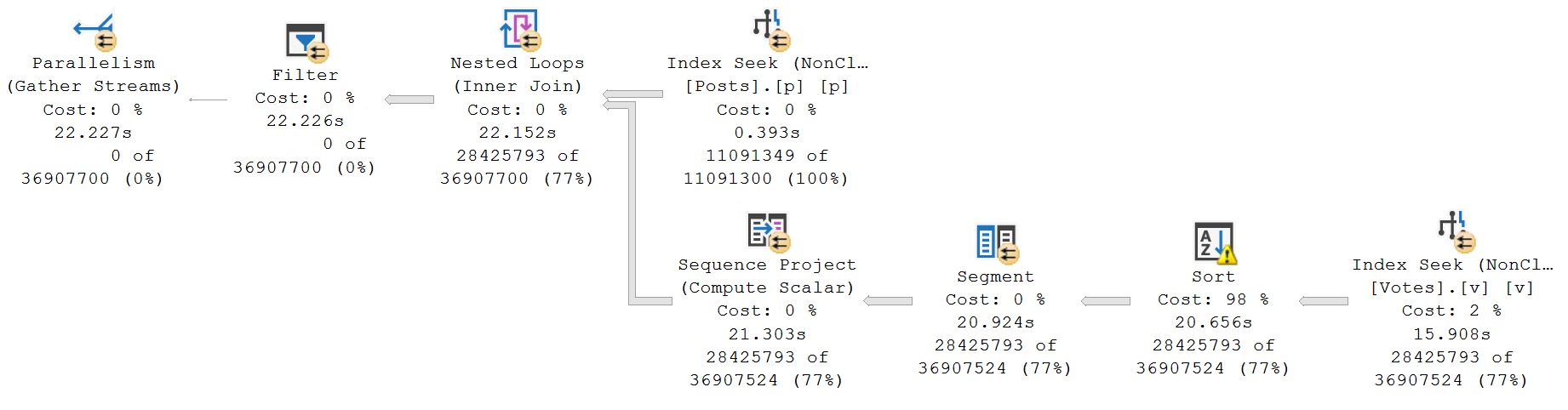
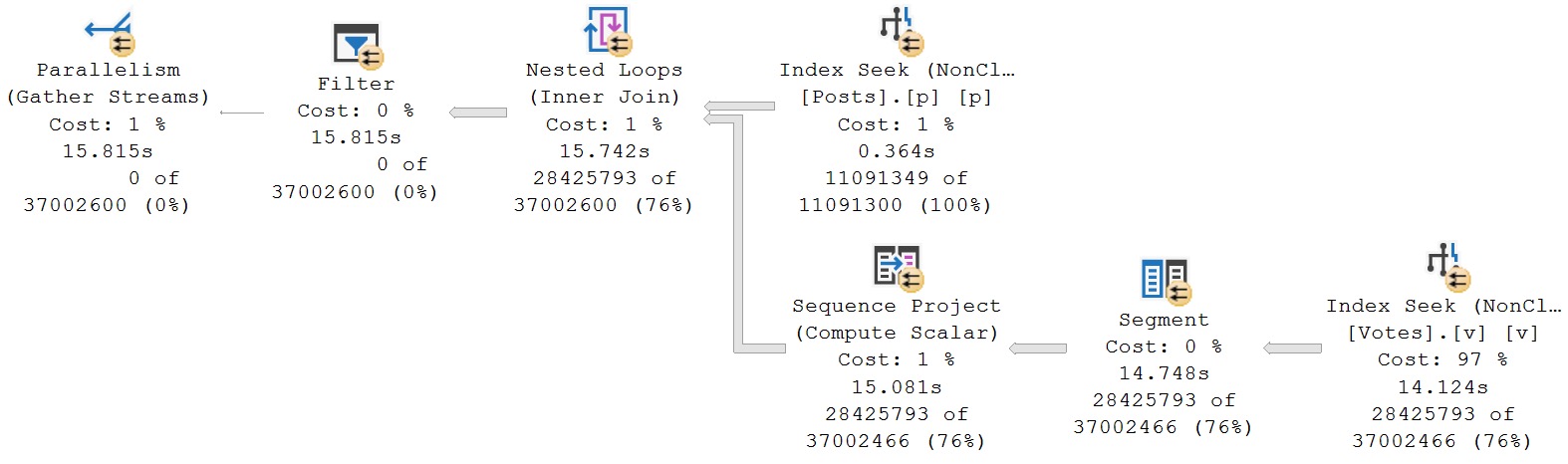
So we’re going to have to sort there. And now in the second query, we are doing the exact same thing, except we’re using the index with all of those key columns in there, right? And I think what’s very interesting about these two execution plans is that they end up taking just about the same amount of time.
This one takes about 15 seconds. This one takes about 16 seconds. That’s interesting, right?
Because we would think that with a great index that allows us to not only seek to all the data that we care about in our index and not have to sort the data that we need sorted for our windowing function, that we would be in great shape, but we’re not.
Not in great shape. Now let’s dig a little bit more into these plans, right? Let’s look more closely at these things. So the index seek over here takes about eight and a half seconds. And then the sort here adds, oh, let’s see, what’s eight and a half minus, well, 13 and a half minus eight and a half.
We can forget the halves. Then that’s 9, 10, 11, 12, 13. So we spend five seconds in the sort there, right? So 8.6 seconds seeking into the votes table, additional five seconds in the sort, mostly because the sort spilled, right?
Spilling sort, oh, boy, watch out. 10 dB, ha! But it’s there. Don’t be afraid of it. And then what’s super interesting, at least to me anyway, is when we look at the second query plan that took about 16 and a half seconds, we spend, we don’t have to sort in here anymore because the index fully supports the sort order that we needed for our windowing function.
So we don’t sort and spill, but we just spend a lot of time in this index seek, right? If we compare the two index seeks, sort of, I mean, not exactly side by side, but at least visible on the same screen together, there’s one index seek, there’s two index seeks, we lose just about all the efficiency of not having to sort here, seeking into this index.
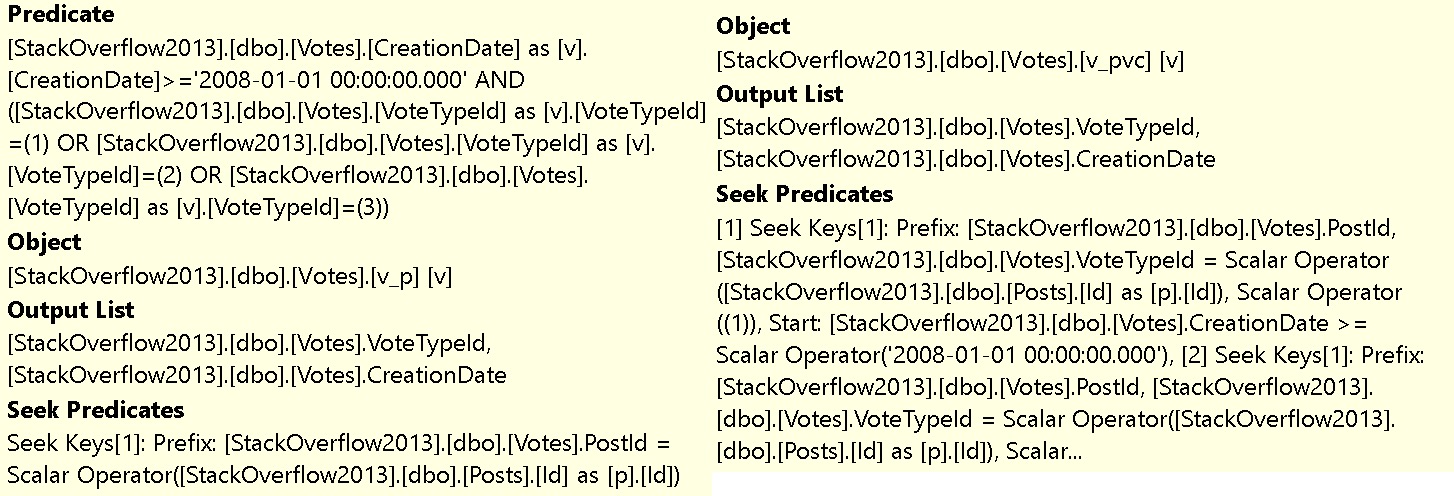
Question is why? The answer is, when is a seek not a seek? Well, in this case, when it is three seeks. So let’s bring this way over here so it’s visible on the screen and my big body is not blocking things.
So if we look at this, we can see that under that one seek predicate, we have three seeks.
One, two, three, right there, right? All three of those are seek operations. Three individual seek operations. Right?
Crazy. And if we reframe this a little bit better, you can even see that we’re doing three separate seeks for vote type ID one, two, and three. Crazy, right?
Insane. How is that possible? Well, let’s go a little bit further and let’s run a copy of this query that looks a little bit more, like, syntactically, like what that multi-seek is doing, right?
So let’s execute this. See what happens. What craziness will ensue here?
What baffling things will happen next? We don’t know. We just don’t know. It’s going to take about 15 seconds. Not to spoil it for anyone at home.
All right. There we go. 15 seconds are up. And here is a more sort of accurate visual representation of what that multi-seek looks like.
It’s actually three separate seeks like this. Right? So the way that this query is written is with three separate select queries, union all together, because we’re not going to get any, like, duplicates in here, because we’re looking for vote type ID one, vote type ID two, and vote type ID three.
So we’re getting three separate results. But this is a more accurate visual representation of what a multi-seek query is doing, because we have the three separate seek operators. And we can see, you know, these ones take about, oh, that’s four and a half seconds.
That’s four seconds. This one’s about five seconds. So, you know, we end up, we can more accurately see how the three seeks don’t exactly work out from, like, a timing perspective, because, again, very non-selective predicates, you know, even for, like, you know, each separate post ID, vote type ID one, two, three, and creation date greater than 2008-01-01.
That’s basically, like, the dawn of time for stack overflow. So we don’t, like, that’s, like, everything in the table anyway, right? So, like, we’re getting everything. So these are three big seeks, and they each take between four and five seconds apiece.
So that’s where the 15 seconds goes in the seek and the other plan. Now, coming back to a video that I recorded the other day, I want to show you something magnificent and interesting.
I recorded a video about how a SQL Server is not always very smart about integers. And guess what? We can play a very similar trick on the optimizer with this query, as we did in the other query.
Ready? You ready for this? So we’re going to say, hey, SQL Server, I don’t want the vote type IDs in one, two, and three. I want vote type IDs greater than zero, and I want vote type IDs less than four.
And guess what? When we do this, well, you’re going to notice that this finishes a little bit faster than 15 seconds.
This actually finishes in about eight seconds, which is about what that original query finished in if we didn’t have, this is about how fast the original query would have been if we didn’t have the sort operator in there.
We no longer spend like 15 seconds in this index seek. We have a very fast seek here, don’t we? That’s much better. Then we no longer have the multi-seek issue that we had in the other query plan where we said in.
So when we are tuning queries, you want to pay very special close attention to how we are phrasing our where clauses. We may want to try phrasing our where clauses involving integers in several different ways.
Don’t think that in or like between or less than, equal to, or anything like that is necessarily the best way to phrase your question.
Always try different things because you may find that you get much faster, better query results when you play along with the optimizer’s stupid games. Right?
Anyway, I got a phone call I got to get on. So I’m going to stop this recording. I’m going to say thank you for watching. If you enjoy this sort of hard-hitting, edgy, in-depth SQL Server content, feel free to give this video the old thumbs up.
If you want to get notified when I post these things, you can always subscribe to the channel. And I hope you enjoyed yourselves. I hope you learned something.
And yeah, I don’t know. That’s it. Thank you for watching. Have a good day. I mean, I’m going to have to record something else today because I’ve got a lot going on. But anyway.
Goodbye.
Going Further
If this is the kind of SQL Server stuff you love learning about, you’ll love my training. Blog readers get 25% off the Everything Bundle — over 100 hours of performance tuning content. Need hands-on help? I offer consulting engagements from targeted investigations to ongoing retainers. Want a quick sanity check before committing to a full engagement? Schedule a call — no commitment required.
The sort of wonderful thing about SQL is that it has many directives which are fairly easy to decipher and use appropriately.
The sort of awful thing about SQL is that it has just as many rules that are somewhat selectively applied as the English language itself.
I have my gripes and grievances with some of the choices, of course, and so will you as you delve further into the language. A petty example is that I sort of wish that SQL used GET instead of SELECT for retrieving data.
Very few people go to the store to select milk, eggs, steak, butter, salt, pepper, and scotch. Most of us just go get it. But enough about breakfast.
Let’s talk about two of the most overlooked and undervalued facilities in the SQL language: EXISTS and NOT EXISTS. Perhaps they’d get more traction is they were called THERE and NOT THERE, but but it would be perilously easy to start confusing your WHERE and THERE clause.
Often besmirched by someone who read a blog post about MySQL in 1998 as “subqueries, which are slower than joins”, they’re two of the most useful things you can grasp and use regularly.
Though they are a bit like subqueries, the columns that you select in an EXISTS or NOT EXISTS subquery can’t be used in the outer query. You can put whatever you want in the select list, from * to 1 to COUNT to 1/0 to the entire contents of the King James Bible, and it will never end up making even the dimmest difference in the world. Likewise, adding DISTINCT, TOP, or any other row-limiting device will do absolutely nothing to change the query plan or performance.
Get over yourself.
Both EXISTS and NOT EXISTS already set a row goal of 1, because all either one has to do is determine if a single row is there or not, just with the logic reversed for each.
Your First Mistakes
Let’s say someone asks you to gin up a list of Users who have Posted anything at all, but whose Reputation still floats at the dreaded 1.
Your first instinct would likely be to write a query that looks like this.
SELECT
    u.Id,
    u.DisplayName
FROM dbo.Users AS u
JOIN dbo.Posts AS p
  ON u.Id = p.OwnerUserId
WHERE u.Reputation = 1
ORDER BY
    u.Id;
But you’d quickly find yourself confronted by many duplicate row values, because that’s what one-to-many joins produce. Duplicates.
Your next move, tongue hanging out, sweating profusely, knuckles creaking, nearly paralyzed by the uncertainty of your continued human functioning, would be to do something like this:
SELECT DISTINCT
    u.Id,
    u.DisplayName
FROM dbo.Users AS u
JOIN dbo.Posts AS p
  ON u.Id = p.OwnerUserId
WHERE u.Reputation = 1
ORDER BY
    u.Id;
And, sure, with a small enough data set, this is an okay choice. You passed the pop quiz, hot shot. Your instinct to use DISTINCT was not wholly incorrect, but there’s a better way.
But as you start dealing with larger and more imposing sets of data, DISTINCT will no longer cut it.
What EXISTS Does Different
While EXISTS will still use a join to match rows between tables, the semantics are quite a bit different. It can move on once it has determined that a row is either there or not there.
You don’t need to add DISTINCT, grouping, or anything else to get the results you wanted in the first place.
SELECT
    u.Id,
    u.DisplayName
FROM  dbo.Users AS u
WHERE u.Reputation = 1
AND EXISTS
(
    SELECT
        1/0
    FROM dbo.Posts AS p
    WHERE p.OwnerUserId = u.Id
)
ORDER BY
    u.Id;
Once EXISTS locates a match, it moves on to the next value from the outer side (in this case the Users table), and attempts to find a match. If no match is found, the row is discarded, which is common to inner joins.
Where a lot of developers get hung up at first is in assuming that EXISTS and NOT EXISTS work like IN or NOT in, and they miss the inner where clause to tell the database which rows should match.
I’ve seen a lot of EXISTS queries written, quite incorrectly, like this:
SELECT
    u.Id,
    u.DisplayName
FROM  dbo.Users AS u
WHERE u.Reputation = 1
AND EXISTS
(
    SELECT
       p.OwnerUserId
    FROM dbo.Posts AS p
)
ORDER BY
    u.Id;
Which will, of course, return absolutely everything. Don’t do this.
The column you select inside of the EXISTS subquery does not infer any sort of matching logic.
Like I said before, it’s essentially discarded by the optimizer.
Your Second Mistakes
No half-assed SQL tutorial is complete without showing you the wrong way to find non-matching rows between two tables.
It will undoubtedly look something like this:
SELECT
   records =
       COUNT_BIG(u.Id)
FROM dbo.Users AS u
LEFT JOIN dbo.Posts AS p
  ON u.Id = p.OwnerUserId
WHERE p.Id IS NULL;
It’s not that this pattern is never better, it’s just that it shouldn’t be your go-to for each and every query with this goal in mind.
You take two tables, you join them together, and you add a predicate to your where clause to find rows where an ordinarily not-NULL column returns NULLs.
The problem is that SQL Server’s query optimizer doesn’t contain any logic to turn this into the type of query plan that you’d get using NOT EXISTS instead.
You end up needing to fully join any tables involved together, and then later on use a filter to remove rows where no match was found. This can be incredibly inefficient, especially on large data sets.
One may even be dealing with “big data” when the follies of this paradigm become quite clear.
A generally better approach to writing this type of query is to tell the database you’re using exactly what you’re after and exactly what you expect:
SELECT
    records =
        COUNT_BIG(u.Id)
FROM dbo.Users AS u
WHERE NOT EXISTS
(
    SELECT
        1/0
    FROM dbo.Posts AS p
    WHERE p.OwnerUserId = u.Id
);
Your developer-life will be a whole lot less confusing and tiresome if you arm yourself with options and alternatives, which means you’ll have lots of mental energy left over to, like, learn 17 new frameworks and really impress your friends.
Think of the frameworks.
Gear Up
You should make good use of the EXISTS and NOT EXISTS patterns in your queries when you don’t require any rows from another table, and you only need to validate if something is there or not.
In cases where you need to get information from another table, joins are likely the most direct path to getting back the data you need.
But this all brings up an interesting question: what if you want to get back information in the select list without adding in join clauses, worrying about inner, outer, full, or cross, and wondering silently if one day things might go pear shaped.
We’ll talk about that in the next post, when we go over correlated subqueries.
Thanks for reading!
Going Further
If this is the kind of SQL Server stuff you love learning about, you’ll love my training. Blog readers get 25% off the Everything Bundle — over 100 hours of performance tuning content. Need hands-on help? I offer consulting engagements from targeted investigations to ongoing retainers. Want a quick sanity check before committing to a full engagement? Schedule a call — no commitment required.
Sort of odd, I have no idea how this idea ended up in the category that it’s in. I was viewing suggestions for SQL Server/SSMS, but when I went to submit this one, it ended up in “Microsoft Entra”.
Maybe I missed something. Maybe someone from Microsoft will be nice enough to move it to the right place. Maybe not. Right now, it lives where it lives.
I use SSMS, because my primary job is SQL Server analysis, performance tuning, and general server fixin’. It’s far and away the most competent tool for the job (sort of like me).
Also sort of like me, there’s not a lot of stiff competition out there 😘
One problem I run into regularly is when I’m tuning a query, and I want to keep one of the resulting execution plans available, so I can:
Compare it after I make some other changes and run the query again
Do some additional analysis without worrying about accidentally losing the plan
The only way to do that is to save the plan, stick the XML in another tool, or keep opening new query tabs to run things in, where I won’t lose the plan.
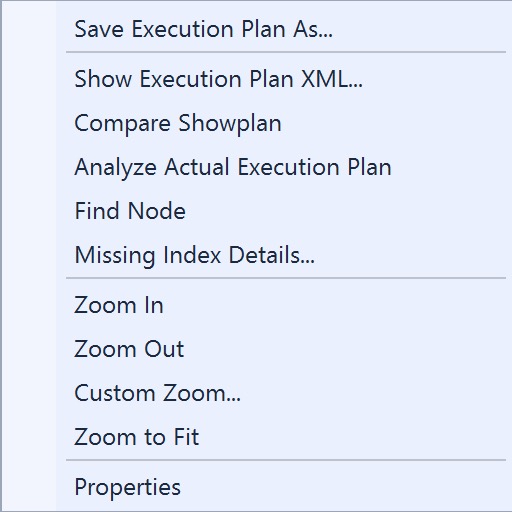
I think it would be a reasonable and helpful extension of the current set of right-click menu options to be able to open a query plan in a new tab.
If this is the kind of SQL Server stuff you love learning about, you’ll love my training. Blog readers get 25% off the Everything Bundle — over 100 hours of performance tuning content. Need hands-on help? I offer consulting engagements from targeted investigations to ongoing retainers. Want a quick sanity check before committing to a full engagement? Schedule a call — no commitment required.
SQL Server is full of landmines options when you’re writing queries. For most queries, you don’t need much beyond the basics.
Think of your standard CRUD operations. Most don’t even require a join; they’re very straightforward. And hey, if you completely denormalize all your data to one huge table, you’ll never have to think about a lot of this stuff anyway.
It’s only when developers are forced to think about things that things start to go wrong. I don’t mean to pick on developers specifically. It’s the human condition. Thinking often leads to poor choices.
In this post, I’m going to give you some basic guidance on when to use various T-SQL facilities, based on years of finding, fixing, and writing queries.
Some of the details and information may not surprise the more seasoned and spiced of you out there.
Here’s a piece of advice that I give everyone: Always start with a SELECT. I don’t care if the final form of your query is going to be an insert, update, or delete (I do care if it’s going to be a merge, because ew), you should always start off by writing a select, so you can validate query results first. It’s easy enough to change things over when you’re done, but please make sure what you’re changing is what you expect to change. I’d even go one step further and say that the first time you run your modification query, you should do it in a transaction with a ROLLBACK command.
I’ll usually do some variation on this, so I can see inserted and deleted results easily:
BEGIN TRANSACTION
    UPDATE TOP (100)
        u
    SET u.Reputation += 1000
    OUTPUT
        'D' AS d, Deleted.*,
        'I' AS i, Inserted.*
    FROM dbo.Users AS u
    WHERE u.Reputation < 1000
    AND   u.Reputation > 1;
ROLLBACK TRANSACTION;
Anyway, on to the cheat codes.
Inner Joins
Joins combine data horizontally (sideways, for the forgetful). The most basic thing you can do with two tables in a database, really.
The important thing to remember is that in one-to-many, and many-to-many relationships, joins will display duplicate matched values.
If you don’t need to show data from another table, don’t use a join. We’ll talk about other options later, but please let this burn into your mind. The number of queries I’ve seen with needless DISTINCT instructions on them is nearing a decent pre-tax cash bonus.
Here’s an example of when a join is necessary. We want to get all of our Users with a Reputation over 500,000, and sum up the Score on all their Posts, plus figure out what kind of Post the points were awarded to.
SELECT
    u.Id,
    u.DisplayName,
    PostType =
        CASE
             p.PostTypeId
             WHEN 1
             THEN 'Question'
             WHEN 2
             THEN 'Answer'
             ELSE 'Other'
        END,
    TotalScore = SUM(p.Score)
FROM dbo.Users AS u
JOIN dbo.Posts AS p
  ON p.OwnerUserId = u.Id
WHERE u.Reputation > 500000
GROUP BY
    u.Id,
    u.DisplayName,
    p.PostTypeId
ORDER BY
    TotalScore DESC;
Because we need multiple columns from the Posts table, we can’t just use a correlated subquery in the select list. Those only allow for one column or expression to be projected from the results.
Since this is an inner join, it restricts the results down only to matching rows. Now, it’s not really possible to get a Reputation over 1 without posting things that other users can vote on, so it doesn’t make sense to use an outer join here.
What if we wanted to find slightly different data?
(Left) Outer Joins
Let’s say we wanted to generate a report of people whose Reputation is sitting at one (the site minimum), to figure out if they’re inactive, unpopular, or if their account has been suspended for some reason.
We could use a query like this to do it.
SELECT
    u.Id,
    u.DisplayName,
    u.Reputation,
    TotalScore = SUM(p.Score),
    c = COUNT_BIG(p.Id)
FROM dbo.Users AS u
LEFT JOIN dbo.Posts AS p
  ON p.OwnerUserId = u.Id
WHERE u.Reputation = 1
GROUP BY
    u.Id,
    u.DisplayName,
    u.Reputation
ORDER BY
    TotalScore;
Before talking about the logic, it’s important to note that when you’re counting rows from the outer side of a join, you’ll usually wanna specify a non-nullable column to pass into the counting function, rather than (*), so you don’t incorrectly count NULL values.
Primary key columns are your friend for this, but any non-NULLable column will do.
We need a left join here, because we want everyone with a Reputation of 1, not just those users who have posted. The left join preserves rows from the Users table in that case.
The results we get back find all sorts of interesting things (that I told you we were looking for):
Users who were very active, but then had their accounts suspended
Users who have posted, but were heavily downvoted
Users who haven’t posted at all
bad, ugly, lazy
I’m not going to talk about right outer joins, because that’s the foolish domain of characterless buffoons who use Venn diagrams to explain join results.
I assume they have good intentions, they just lack the backbone to tell you that there is no natural reason to ever use a right join, that isn’t better logically expressed in a different way.
They’re usually trying to sell you something.
(Full) Outer Joins
In short, these preserve results from both tables, but still with a correlation. I’d nearly put these in the same category as right joins, except they have a couple decent use cases, and aren’t personally offensive to polite society.
Let’s say we want to figure out how many Posts don’t have an associated User, and how many Users don’t have an associated Post all in one query:
SELECT
    PostsWithoutAUser =
        SUM(CASE WHEN u.Id IS NULL THEN 1 ELSE 0 END),
    UsersWithoutAPost =
        SUM(CASE WHEN p.Id IS NULL THEN 1 ELSE 0 END)
FROM dbo.Users AS u
FULL JOIN dbo.Posts AS p
  ON p.OwnerUserId = u.Id;
It’s sort of an exception report, to let you know just how much referential integrity your data lacks.
Aside from oddball situations, you shouldn’t have to think much about these in your day to day life.
Cross Joins
Like full joins, I don’t see cross joins used terribly often, though they do have some uses, like populating a grid.
A reasonably worded example would be something like: you have a table of scotch, and a table of glass sizes, and you want to show someone all possible combinations of scotch and glass sizes.
If you pick a big enough glass, eventually using cross joins in more creative ways will seem like a good idea. One place I’ve been forced to use them is in some of my stored procedures, like sp_PressureDetctor.
Here’s one example:
SELECT
    sample_time =
        CONVERT
        (
            datetime,
            DATEADD
            (
                SECOND,
                (t.timestamp - osi.ms_ticks) / 1000,
                SYSDATETIME()
            )
        ),
    sqlserver_cpu_utilization =
        t.record.value('(Record/SchedulerMonitorEvent/SystemHealth/ProcessUtilization)[1]','int'),
    other_process_cpu_utilization =
        (100 - t.record.value('(Record/SchedulerMonitorEvent/SystemHealth/ProcessUtilization)[1]','int')
         - t.record.value('(Record/SchedulerMonitorEvent/SystemHealth/SystemIdle)[1]','int')),
    total_cpu_utilization =
        (100 - t.record.value('(Record/SchedulerMonitorEvent/SystemHealth/SystemIdle)[1]', 'int'))
FROM sys.dm_os_sys_info AS osi
CROSS JOIN
(
    SELECT
        dorb.timestamp,
        record =
            CONVERT(xml, dorb.record)
    FROM sys.dm_os_ring_buffers AS dorb
    WHERE dorb.ring_buffer_type = N'RING_BUFFER_SCHEDULER_MONITOR'
) AS t
WHERE t.record.exist('(Record/SchedulerMonitorEvent/SystemHealth/ProcessUtilization[.>= sql:variable("@cpu_utilization_threshold")])') = 1
ORDER BY
    sample_time DESC;
The sys.dm_os_sys_info view is a single row, with no relation at all to sys.dm_os_ring_buffers, but I need to use the one value in the one column in the one row for every row that it produces, so that I can turn the timetable column into a human-understandable value.
Here’s another example from the same procedure, slightly abridged:
SELECT
    total_threads =
        MAX(osi.max_workers_count),
    used_threads =
        SUM(dos.active_workers_count),
    available_threads =
        MAX(osi.max_workers_count) - SUM(dos.active_workers_count),
    threads_waiting_for_cpu =
        SUM(dos.runnable_tasks_count),
    requests_waiting_for_threads =
        SUM(dos.work_queue_count),
    current_workers =
        SUM(dos.current_workers_count),
    total_active_request_count =
        SUM(wg.active_request_count),
    total_queued_request_count =
        SUM(wg.queued_request_count),
    total_blocked_task_count =
        SUM(wg.blocked_task_count),
    total_active_parallel_thread_count =
        SUM(wg.active_parallel_thread_count),
    avg_runnable_tasks_count =
        AVG(dos.runnable_tasks_count)
FROM sys.dm_os_schedulers AS dos
CROSS JOIN sys.dm_os_sys_info AS osi
CROSS JOIN
(
    SELECT
        wg.active_request_count,
        wg.queued_request_count,
        wg.blocked_task_count,
        wg.active_parallel_thread_count
    FROM sys.dm_resource_governor_workload_groups AS wg
) AS wg;
In this case, I keep myself safe from exploding result sets by aggregating all of the selected columns. You may also find that necessary, should you choose to work with data so terrible that it requires cross joins.
One thing to be especially aware of is that cross joins can only be physically implemented in SQL Server with a nested loops join, so the larger your tables get, the worse performance will get.
Beware out there.
Thanks for reading!
Going Further
If this is the kind of SQL Server stuff you love learning about, you’ll love my training. Blog readers get 25% off the Everything Bundle — over 100 hours of performance tuning content. Need hands-on help? I offer consulting engagements from targeted investigations to ongoing retainers. Want a quick sanity check before committing to a full engagement? Schedule a call — no commitment required.
Whether you want to be the next great query tuning wizard, or you just need to learn how to start solving tough business problems at work, you need a solid understanding of not only what makes things fast, but also what makes them slow.
I work with consulting clients worldwide fixing complex SQL Server performance problems. I want to teach you how to do the same thing using the same troubleshooting tools and techniques I do.
I’m going to crack open my bag of tricks and show you exactly how I find which queries to tune, indexes to add, and changes to make. In this day long session, you’re going to learn about hardware, query rewrites that work, effective index design patterns, and more.
Before you get to the cutting edge, you need to have a good foundation. I’m going to teach you how to find and fix performance problems with confidence.
If this is the kind of SQL Server stuff you love learning about, you’ll love my training. Blog readers get 25% off the Everything Bundle — over 100 hours of performance tuning content. Need hands-on help? I offer consulting engagements from targeted investigations to ongoing retainers. Want a quick sanity check before committing to a full engagement? Schedule a call — no commitment required.
What SQL Server’s Query Optimizer Doesn’t Know About Numbers
Video Summary
In this video, I delve into the nuances of SQL Server’s query optimizer and its sometimes surprising behavior when dealing with integer values. Specifically, I explore how the same set of indexes can lead to vastly different execution plans based on slight variations in query syntax—demonstrating that even mature software like SQL Server isn’t always as smart as we might expect regarding simple logical equivalences. Through a series of queries and detailed execution plan analysis, I highlight the importance of being mindful of how you phrase your SQL statements, as seemingly minor differences can significantly impact performance.
Full Transcript
Erik Darling here with Darling Data. My hair has reached a level of absurdity that it has not seen, I don’t know, at least since various times in my life when I’ve tried to cut my own hair. Still waiting for my lovely and talented hair person to get back from their vacation. Before I go on my vacation. Um, was it Tuesday? God. Uh, anyway, um, I had to take last week off from recording. There was like, this advanced form of RSV going through, uh, circulating through my household. And, uh, I don’t know, you can still kinda hear it in my voice. Uh, I don’t know, I just, I sound, I sound like I did in my 20s when I smoked cigarettes and enjoyed life. So that, that was, that, that’s what I’m taking from this anyway. At least, you know, I realized that, that, that, that level of happiness is, is quite possibly achieving. Again, my time. We’ll see though. Uh, what else? Um, oh yeah. Uh, if, if anyone out there is, is currently struggling with some advanced form of RSV and, uh, your, your throat hurts constantly, uh, I have some leftover viscous lidocaine gargle.
If you’d like some. Um, I will say that, um, I will say that the viscous lidocaine gargle confirmed, uh, confirmed some things about me. Um, that, uh, I have a petulant gag reflex. Is, is not meant for viscous gargling. That’s, that’s about what I learned about myself last week. That, uh, that, uh, I don’t know.
That, and I have a great immune system. Take the crap out of that. Tank. Absolute unit. All right.
Uh, let’s get back to SQL Server. Apparently that’s where we, that, that’s where we always end up back at SQL Server. And, uh, in today’s video, I want to talk about how, uh, SQL Server’s optimizer isn’t always smart about integers. By that I mean, it does not always infer things from integers that it should when it has plenty of information about the integers.
I don’t know how, I don’t know how the optimizer missed the boat on integers. They’re all over the place. Anyway, uh, I’ve got a couple indexes on a couple tables.
I’ve got, uh, I’ve got an index on the badges table, helpfully called not posts on the name column and the user ID column. And I’ve got an index, helpfully called not badges on the post table on post type ID. Remember, that’s the, it’s a big deal.
It leads on post type ID, uh, has owner user ID as a secondary key column and includes the column. Score. I’ve also gone out of my way to create an index on the post table to tell SQL Server’s cost-based optimizer that the values in the post type ID column are between zero, greater than zero, less than nine. And so it’s the numbers one through eight.
And, uh, I’ve got a couple queries down below and I’ve written, I’ve written these queries. In two different ways. The same query is one slight difference. One teeny, tiny, itty bitty, slight little difference.
And it might, it might shock you to find that there is a huge performance difference. In the way, in, in, in, in the execution plan between one query and another. So let’s, uh, let’s scroll down a little bit and let’s find this hotspot, the hottest spot north of Havana.
And let’s zoom in on it. So in the first query, I have told SQL Server, I want to see all of the post type IDs one and two. This is in one comma two.
Right? So just post type ID one and just post type ID two. And in the second query, I’ve said, I want to see where post type ID is less than three. And the other μέor strip that person has the opposite reality to tens of tens of tens of thousands of tens of thousands of tens of tens of tens of tens of tens of tens of tens of tens of tens of tens of tens of tens of tens of tens of tens of tens of tens of tens of tens of tens of tens of tens of tens.
I mean, four seventies. And for veryーム build on the currentiffe dizendo Houston, KL passé, you could be operational temp base. And, well, we should know that there’s nothing zero or below in there.
We would think so anyway. But here’s what happens when I run them. And I’ve actually, I pre-ran them because, well, I didn’t want to sit around on camera twiddling thumbs waiting for this thing to execute.
I get docked by beer gut magazine every time twiddling thumbs on camera. It’s a long story. It’s a very complicated contract.
But anyway, here is just, you know, some proof that the only numbers possible in the post-type ID column are between 1 and 8, and that’s what my constraint enforces and acknowledges. These eight digits are all you will ever see in there.
Not a very selective predicate, admittedly. Right? For like a 17 million row table, it’s the same eight numbers repeating over and over again. Not terribly.
Not a good clustered index. Just go out on a limb and say this would not make a good clustered index. So anyway, about those query plans, which you got a shocking sneak preview of a second ago, but maybe I was standing in the way.
Let’s see if we can zoom and focus in here. So if we come way over here, we’ve hit the limits of SQL Server being useful. So let’s drag that over here.
So in this top query where I said in 1, 2, what happens? Well, we get a nice little index seek, and we get a sort operator. We need the sort operator because we don’t have score in the key of the index.
That’s okay. It’s not really hurting us here. We get a lazy table spool, which, you know, I have mixed feelings on it. I’m going to do another video this week.
I have, I don’t know, three or four videos lined up to do this week so I can pad out next week. Next week, I’m on vacation. That’s all I ever wanted.
So I’ve got a video about table spools I’m going to also do this week. Maybe even today since the snow day here in Brooklyn. But this, you know, performs pretty okay for what it does, right?
It’s like performance-wise, it’s all right, right? It’s not great, not awful. Just it’s fine for what it does. This whole thing finishes in about 6.2 seconds.
Big score for us, maybe. I don’t know. I don’t really have big feelings about either of the, well, really, rather, I don’t have big feelings about most of either of these query plans, but the one I’m going to show you next is the one that I have much, much bigger feelings about.
Now, this is the query, just to remind you. This is the one we just looked at, where it was in 1.2. The one we’re going to look at next is less than 3.
That is not an emotional heart, all right? No emo, darling data. There’s only goth.
So let’s look at this query plan. Let’s see where this query plan gets offensive, which is something that if you’ve watched enough of my videos, you will immediately recognize and also be offended by.
And it’s when I said in 1.2, SQL Server said, cool, index C, got it, no problem. When I said less than 3, SQL Server said, ah, we’re going to build an index off your index.
Your index needs an index. What’s different about our index? Nothing.
On the same two columns. Oops, got a little weird there. I apologize. Got a little cocky, flew off the handle there.
It’s on the same stuff, right? Post type ID, owner user ID. Who cares, right?
Same index. We output the score column. Same index. SQL Server made a copy of my index. When the query ran, it was the same index. All because I said less than 3.
Maybe that got SQL Server emotional. Maybe I thought, oh, who loves me? I can build an index for it. I don’t know. It’s weird, right?
But it’s just logic that’s not built into SQL Server’s query optimizer. It doesn’t infer less than 3 is the same thing as being in 1.2. Even with an acknowledged, forced, enabled constraint on your table data.
And I think what’s particularly interesting is, actually, no, we should drag both of these way over. Just put the nested loops in the corner there and put the nested loops in the corner there. And the thing that I want to show when we zoom in…
Oops, I don’t need that tooltip. It’ll go away. Weirdo. It’s not even like a cardinality estimation thing. That’s a lot of white space, but whatever.
It’s not even like a cardinality estimation thing. Because if you look at this index seek, right? Look at the number of rows SQL Server estimates from the index seek. Granted, it’s wrong by 338%.
But SQL Server didn’t choose to build a copy of my index when the query ran for this one. The bottom one… I mean, we have the full table cardinality here, which makes sense because we had to read the whole table to make a copy of that index.
But then the estimates from the spool are exactly the same. Excuse me. A bit of last week coming back to haunt me.
It’ll be the only time this happened in this video. But yeah, the index from… So rather, the estimate from here is exactly the same as it was from up here, right? It’s 11635229.
It’s the same 338% that it was off. So, what did we learn? Well, maybe the optimizer isn’t as smart as we give it credit for.
Granted, it’s got a lot to deal with. Having seen your queries, I know just how much it has to deal with. But really, sometimes the way you phrase your queries makes a very, very big difference for performance.
Now, we’ve talked about that a lot from a lot of different angles. Sorgability and exists versus joins and other things like that. But this is a weird one, sort of admittedly, because you would think that a mature, like 30-year-old piece of software would be able to figure out that 1 and 2 are between 0 and 3.
Whether you say in, 1, 2, or you just say less than 3. So, be careful out there. When you’re writing your queries, sometimes little changes make a big difference.
Anyway, before any more of my lung attempts to present itself to you, I’m going to say thank you for watching. If you enjoy this sort of SQL Server content, don’t forget to like the video. If you want to be alerted every time, well, not every time my lungs try to present themselves to you, but every time I post this sort of insightful SQL Server commentary, go ahead and subscribe to the channel.
Coming up on 3,000 subscribers. Pretty happy about that. I don’t get anything at 3,000.
3,000 is actually a pittance of a number compared to people who play video games. Maybe I should start playing video games. I don’t know.
But yeah. Thank you for watching. I hope you enjoyed yourselves. I hope you learned something. And remember, if you need any viscous throat gargle, admit it medicinally, it’s lidocaine, viscous lidocaine.
If you need any of that, let me know. I’ll send you whatever I have left. Thank you for watching.
Going Further
If this is the kind of SQL Server stuff you love learning about, you’ll love my training. Blog readers get 25% off the Everything Bundle — over 100 hours of performance tuning content. Need hands-on help? I offer consulting engagements from targeted investigations to ongoing retainers. Want a quick sanity check before committing to a full engagement? Schedule a call — no commitment required.
When I sit down to write any blog post as a series, I do these things first:
List out topics – it’s cool if it’s stuff I’ve covered before, but I want to do it differently
Look at old posts – I don’t want to fully repeat myself, but I write these things down so I don’t forget them
Write demos – some are easier than others, so I’ll jump around the list a little bit
Having said all that, I also give myself some grace in the matter. Sometimes I’ll want to talk about something else that breaks up the flow of the series. Sometimes I’ll want to record a video to keep the editors at Beergut Magazine happy.
And then, like with this post, I change my mind about the original topic. This one was going to be “Fixing Predicate Selectivity”, but the more I looked at it, the more the demo was going to look like the one in my post in this series about SARGability.
That felt kind of lame, like a copout. And while there are plenty of good reasons for copouts when you’re writing stuff for free, even I felt bad about that one. I almost ended the series early, but a lot of the work I’ve been doing has been on particularly complicated messes.
So now we’re going to talk about one of my favorite things I help clients with: big, unpredictable search queries.
First, What You’re (Probably) Not Going To Do
There’s one thing that you should absolutely not do, and one thing that I’ll sometimes be okay with for these kinds of queries.
First, what you should not do: A universal search string:
WHERE (p.OwnerUserId LIKE N'%' + @SearchString + N'%' OR @SearchString IS NULL)
OR    (p.Title LIKE N'%' + @SearchString + N'%' OR @SearchString IS NULL)
OR    (p.CreationDate LIKE N'%' + @SearchString + N'%' OR @SearchString IS NULL)
OR    (p.LastActivityDate LIKE N'%' + @SearchString + N'%' OR @SearchString IS NULL)
OR    (p.Body LIKE N'%' + @SearchString + N'%' OR @SearchString IS NULL);
The problem here is somewhat obvious if you’ve been hanging around SQL Server long enough. Double wildcard searches, searching with a string type against numbers and dates, strung-together OR predicates that the optimizer will hate you for.
These aren’t problems that other things will solve either. For example, using CHARINDEX or PATINDEX isn’t a better pattern for double wildcard LIKE searching, and different takes on how you handle parameters being NULL don’t buy you much.
So like, ISNULL(@Parameter, Column) will still suck in most cases.
Your other option is something like this, which is only not-sucky with a statement-level OPTION(RECOMPILE) hint at the end of your query.
WHERE  (p.OwnerUserId = @OwnerUserId OR @OwnerUserId IS NULL)
AND    (p.CreationDate >= @CreationDate OR @CreationDate IS NULL)
AND    (p.LastActivityDate < @LastActivityDate OR @LastActivityDate IS NULL)
AND    (p.Score >= @Score OR @Score IS NULL)
AND    (p.Body LIKE N'%' + @Body + N'%' OR @Body IS NULL)
This departs from the universal search string method, and replaces the one string-typed parameter with parameters specific to each column’s data type.
Sure, it doesn’t allow developers to be lazy sons of so-and-so’s in the front end, but you don’t pay $7000 per core for them, and you won’t need to keep adding expensive cores if they spend a couple hours doing things in a manner that resembles a sane protocol.
The recompile advice is good enough, but when you use it, you really need to pay attention to compile times for your queries. It may not be a good idea past a certain threshold of complexity to come up with a “new” execution plan every single time, minding that that “new” plan might be the same plan over and over again.
Second, What You’re Eventually Going To End Up With
SQL Server doesn’t offer any great programmability or optimizer support for the types of queries we’re talking about. It’s easy to fall into the convenience-hole of one of the above methods.
Writing good queries means extra typing and thinking, and who has time for all that? Not you. You’re busy thinking you need to use some in-memory partitioning, or build your own ORM from scratch, no, migrate to a different relational database, that will surely solve all your problems, no, better, migrate to a NoSQL solution, that’ll do it, just give you 18-24 months to build a working proof of concept, learn seven new systems, and hire some consultants to help you with the migration, yeah, that’s the ticket.
You can’t just spend an hour typing a little extra. Someone on HackerNews says developers who type are the most likely to be replaced by AI.
Might as well buy a pick and a stick to DIY a grave for your career. It’ll be the last useful thing you do.
Rather than put 300 lines of code and comments in a blog post, I’m storing it in a GitHub gist here.
What I am going to post in here is the current list of variables, and what each does:
@Top: How many rows you want to see (optional, but has a default value)
@DisplayName: Search for a user’s display name (optional, can be equality or wildcard)
@Reputation: Search for users over a specific reputation (optional, greater than or equal to)
@OwnerUserId: Search for a specific user id (optional, equality)
@CreationDate: Search for posts created on or after a date (optional, greater than or equal to)
@LastActivityDate: Search for posts created before a date (optional, less than)
@PostTypeId: Search for posts by question, answer, etc. (optional, equality)
@Score: Search for posts over a particular score (optional, greater than or equal to)
@Title: Search for posts with key words in the title (optional, can be equality or wildcard)
@Body: Search for posts with key words in the body (optional, can be equality or wildcard)
@HasBadges: If set to true, get a count of badges for any users returned in the results (optional, true/false)
@HasComments: If set to true, get a count of comments for any users returned in the results (optional, true/false)
@HasVotes: If set to true, get a count of votes for any posts returned in the results (optional, true/false)
@OrderBy: Which column you want the results ordered by (optional, but has a default value)
@OrderDir: Which direction you want the results sorted in, ascending or descending (optional, but has a default value)
To round things up:
There are 9 parameters in there which will drive optional searches
Seven of the nine optional searches are on the Posts table, two are on the Users table
There are 3 parameters that drive how many rows we want, and how we want them sorted
There are 3 parameters that optionally hit other tables for additional information
Indexing for the Users side of this is relatively easy, as it’s only two columns. Likewise, indexing for the “Has” parameters is easy, since we just need to correlate to one additional column in Badges, Comments, or Votes.
But that Posts table.
That Posts table.
Index Keys Open Doors
The struggle you’ll often run into with these kinds of queries is that there’s a “typically expected” thing someone will always search for.
In your case, it may be a customer id, or an order id, or a company id… You get the point. Someone will nearly always need some piece of information for normal search operations.
Where things go off the rails is when someone doesn’t do that. For the stored procedure linked above, the role of the “typically expected” parameter will be OwnerUserId.
The data in that column doesn’t have a very spiky distribution. At the high end, you have about 28k rows, and at the low end, well, 1 row. As long as you can seek in that column, evaluating additional predicates isn’t so tough.
In that case, an index like this would get you going a long way:
CREATE INDEX
    p
ON dbo.Posts
    (OwnerUserId, Score DESC, CreationDate, LastActivityDate)
INCLUDE
    (PostTypeId)
WITH
    (SORT_IN_TEMPDB = ON, DATA_COMPRESSION = PAGE);
GO
Since our stored procedure “typically expects” users to supply OwnerUserId, has a default sorting of Score, optional Creation and LastActivity Dates can act as residual predicates without a performance tantrum being thrown.
And since PostTypeId is one of the least selective columns in the whole database, it can go live in the basement as an included column.
Using dynamic SQL, we don’t have to worry about SQL Server trying to re-use a query execution plan for when OwnerUserId is passed in. We would have to worry about that using some other implementations.
Here, the problem is that some searches will be slow without supporting indexes, and not every slow query generates a missing index request.
/*NOPE THIS IS FINE NO INDEX COULD HELP*/
EXEC dbo.ReasonableRates
    @CreationDate = '20130101',
    @LastActivityDate = '20140101',
    @HasBadges = 1,
    @HasComments = 1,
    @HasVotes = 1,
    @Debug = 1;
GO
As an example, this takes ~10 seconds, results in a perfectly acceptable where clause for an index to help with, but no direct request is made for an index.
Of course, there’s an indirect request in the form of a scan of the Posts table.
dirty looks
So, back to the struggle, here:
How do you know how often this iteration of the dynamic SQL runs?
Is it important? Did someone important run it?
Is it important enough to add an index to help?
And then… how many other iterations of the dynamic SQL need indexes to help them, along with all the other questions above.
You may quickly find yourself thinking you need to add dozens of indexes to support various search and order schemes.
Data Access Patterns
This is the big failing of Row Store indexes for handling these types of queries.
CREATE INDEX
    codependent
ON dbo.Posts
(
    OwnerUserId,
    /*^Depends On^*/
    Score,
    /*^Depends On^*/
    CreationDate,
    /*^Depends On^*/
    LastActivityDate,
    /*^Depends On^*/
    PostTypeId,
    /*^Depends On^*/
    Id
)
INCLUDE
    (Title)
/*^Doesn't depend on anything. It's an Include.^*/
WITH
    (MAXDOP = 8, SORT_IN_TEMPDB = ON, DATA_COMPRESSION = PAGE);
In general, if you’re not accessing index key columns starting with the leading-most key column, your queries won’t be as fast (or may not choose to use your index, like in the plan up there), because they’d have to scan the whole thing.
For queries like this, nonclustered column store indexes are a way hotter ticket. Columns can be accessed independently. They may get abused by modification queries, and they may actually need maintenance to keep them compressed and tombstone-free, but quite often these tradeoffs are worth it for improving search queries across the board. Even for Standard Edition users, whom Microsoft goes out of their way to show great disdain for, it can be a better strategy.
Here’s an example:
CREATE NONCLUSTERED COLUMNSTORE INDEX
    nodependent
ON dbo.Posts
    (OwnerUserId, Score, CreationDate, LastActivityDate, PostTypeId, Id, Title)
WITH(MAXDOP = 1);
With this index in place, we can help lots of search queries all in one shot, rather than having to create a swath of sometimes-helpful, sometimes-not indexes.
Even better, we get a less wooly guarantee that the optimizer will heuristically choose Batch Mode.
Two Things
I hope you take two things away from this post:
How to write robust, readable, repeatable search queries
Nonclustered columnstore indexes can go a lot further for performance with unpredictable predicates
Thanks for reading!
Going Further
If this is the kind of SQL Server stuff you love learning about, you’ll love my training. Blog readers get 25% off the Everything Bundle — over 100 hours of performance tuning content. Need hands-on help? I offer consulting engagements from targeted investigations to ongoing retainers. Want a quick sanity check before committing to a full engagement? Schedule a call — no commitment required.
If you’re the kind of person who needs quick and easy ways to troubleshoot SQL Server performance problems, and you haven’t tried my free scripts yet, you’re probably going to keep having SQL Server performance problems.
I don’t get a lot of visitor contributions to my code (and here I thought it was just because it’s perfect), but I had a couple cool recent additions to sp_QuickieStore, my free tool for searching and analyzing Query Store data.
First, Ben Thul did a great job of simplifying the process of searching for only for queries that run during configurable business hours. I had gone through a whole process of creating a lookup table with times and a bunch of other nonsense. Ben, being smart, converted that over to just using parameters with a time type, so it doesn’t matter if you use 12- or 24-hour time. Thank you, Ben.
Second, Bill Finch dropped a really interesting pull request on me that allows for searching for query text that includes square brackets. I had no idea that didn’t work, but apparently I don’t go searching for Entity Framework created query text all that often. Very cool stuff, and a thank you to Bill as well!
Third, since I keep running into databases where Query Store is in a weird state, I added an initial check to see if it’s read only, if the desired and current state disagree with each other, or if auto-cleanup is disabled. Of course, I haven’t run into that since. Lucky me.
Fourth, Cláudio Silva added a new parameter to search Query Store for only plans that have hints (2022+, probably whatever Azure nonsense). An idea so cool, I expanded on it to also allow searching for queries with feedback and variants (also 2022+, probably whatever Azure nonsense)
Numbers are now nicely formatted with commas, so it’s easy to identify the precise scale of misery you’re experiencing.
A Friend At Microsoft told me that wait durations should already be in milliseconds in the system health extended event, and that I didn’t need to divide those numbers by 1000 to convert them from microseconds. This change is somewhat experimental, because some awfully big numbers show up. If you happen to know better, or feel like testing to verify the change, give the latest version a run.
If you’re searching for warnings only, I added a parameter (@pending_task_threshold) to reduce the number of warnings lines from the cpu task details results. You’ll get a warning here even if there’s one pending task, which isn’t very useful. You usually want to find when LOTS of pending tasks were happening. The default is 10.
Finally, I added a contributing guide. It’s not very extensive (which prevents it from being exhausting); the main point I’m trying to get across is that forks and pull requests must be made from and to the dev branch only. Committing directly to main is verboten. Totes verbotes, as they say in Germany and surrounding German-speaking countries, I’ve been informed by Reliable Sources.
If you have questions, run into bugs, or think adding some code to any of my procedures, open up an issue. I don’t do support via email or blog comments.
Thanks for reading!
Going Further
If this is the kind of SQL Server stuff you love learning about, you’ll love my training. Blog readers get 25% off the Everything Bundle — over 100 hours of performance tuning content. Need hands-on help? I offer consulting engagements from targeted investigations to ongoing retainers. Want a quick sanity check before committing to a full engagement? Schedule a call — no commitment required.
A lot of the time, the answer to performance issues with ranking windowing functions is simply to get Batch Mode involved. Where that’s not possible, you may have to resort to adding indexes.
Sometimes, even with Batch Mode, there is additional work to be done, but it really does get a lot of the job done.
In this post I’m going to cover some of the complexities of indexing for ranking windowing functions when there are additional considerations for indexing, like join and where clause predicates.
I also want to show you the limitations of indexing for solving performance problems for ranking windowing functions in Row Mode. This will be especially painful for developers forced to use Standard Edition, where Batch Mode is hopelessly hobbled into oblivion.
At some point, the amount of data that you’re dealing with becomes a bad fit for ranking windowing functions, and other approaches make more sense.
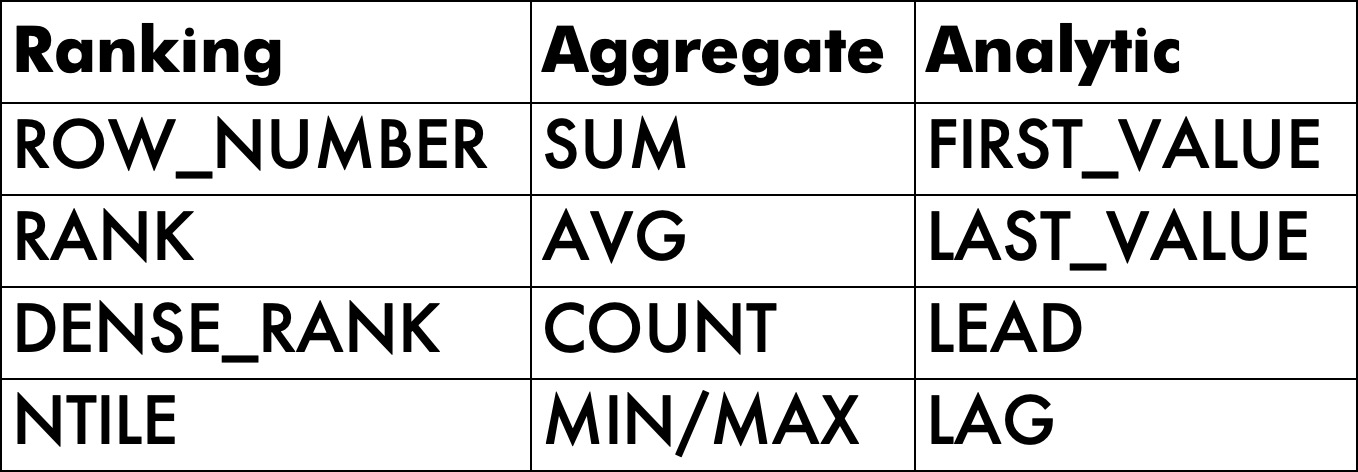
Of course, there are plenty of things that other variety of windowing functions do, that simple query rewrites don’t cover.
Here are some examples:
playing favorites
I realize that aggregate and analytic functions have many more options available, but there are only four ranking functions, and here at Darling Data, we strive for symmetry and equality.
It would be difficult to mimic the results of some of those — particularly the analytic functions — without performance suffering quite a bit, complicated self-joins, etc.
But, again, Batch Mode.
Hey Dude
Let’s start with a scenario I run into far too often: tables with crappy supporting indexes.
These aren’t too-too crappy, because I only have so much patience (especially when I know a blog post is going to be on the long side).
The index on Posts gets me to the data I care about fast enough, and the index on Votes allows for easy Apply Nested Loops seeking to support the Cross Apply.
There are some unnecessary includes in the index on Votes, because the demo query itself changed a bit as I was tweaking things.
But you know, if there’s one thing I’ve learned about SQL Server, there are lots of unnecessary includes in nonclustered indexes because of queries changing over the years.
CREATE INDEX
    p
ON dbo.Posts
    (PostTypeId)
INCLUDE
    (Score)
WITH
    (SORT_IN_TEMPDB = ON, DATA_COMPRESSION = PAGE);

CREATE INDEX
    v
ON dbo.Votes
    (PostId)
INCLUDE
    (UserId, BountyAmount, VoteTypeId, CreationDate)
WITH
    (SORT_IN_TEMPDB = ON, DATA_COMPRESSION = PAGE);
Now, the query I’m using is quite intentionally a bit of a stress test. I’m using two of the larger tables in the database, Posts and Votes.
But it’s a good example, because part of what I want to show you is how larger row counts can really mess with things.
I’m also using my usual trick of filtering to where the generated row number is equal to zero outside the apply.
That forces the query to do all of the window function work, without having to wait for 50 billion rows to render out in SSMS.
SELECT
    p.Id,
    p.Score,
    v.VoteTypeId,
    v.LastVoteByType
FROM dbo.Posts AS p
CROSS APPLY
(
    SELECT
        v.*,
        LastVoteByType =
            ROW_NUMBER() OVER
            (
                PARTITION BY
                    v.VoteTypeId
                ORDER BY
                    v.CreationDate DESC
            )
    FROM dbo.Votes AS v
    WHERE v.PostId = p.Id
    AND   v.VoteTypeId IN (1, 2, 3)
    AND   v.CreationDate >= '20080101'
) AS v
WHERE p.PostTypeId = 2
AND   v.LastVoteByType = 0;
Assume that the initial goal is that we care very much about the ~4.2GB memory grant that this query acquires to Sort data for the windowing function, and to create an index that solves for that.
Dark Therapy
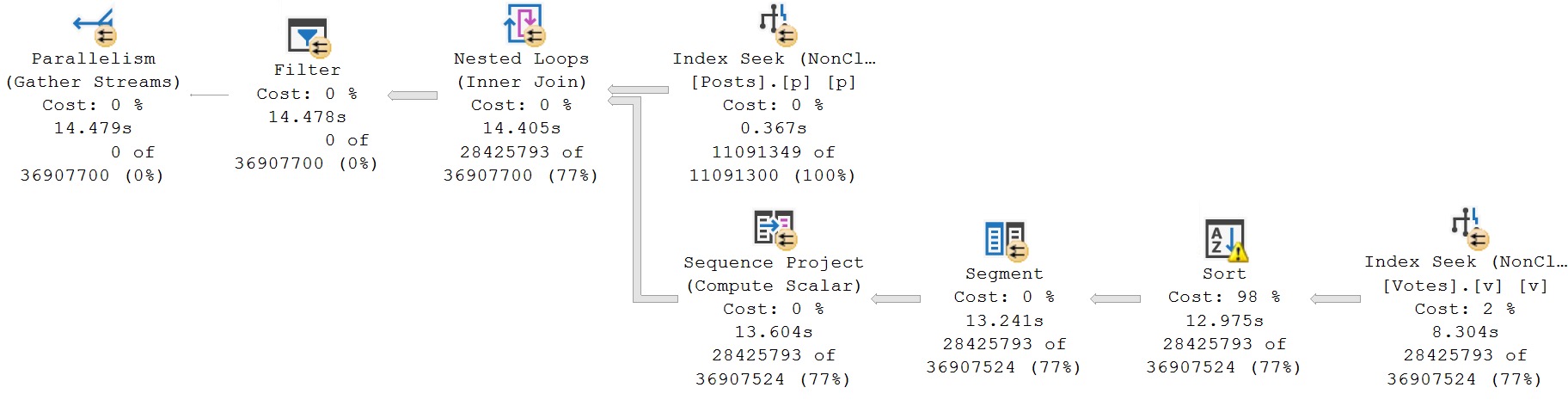
The query plan isn’t too bad, but like we looked at in the post in this series about fixing sorts, there is a bit of a sore spot.
get in line
Now, it has been blogged about many times, so I’m not going to belabor the point too much: the columns that need sorting are the ones in the partition by and order by of the windowing function.
But the index needs to match the sort directions of those columns exactly. For example, if I were to create this index, where the sort direction of the CreationDate column is stored ascending, but the windowing function asks for descending, it won’t work out.
CREATE INDEX
    v
ON dbo.Votes
    (PostId, VoteTypeId, CreationDate)
INCLUDE
    (UserId, BountyAmount)
WITH
    (SORT_IN_TEMPDB = ON, DATA_COMPRESSION = PAGE, DROP_EXISTING = ON);
In fact, it’s gonna slow things down a bit. Score another one for crappy indexes, I suppose.
30 love
The reason why this one is so much slower is because of the Seek. I know, I know, how could a Seek be bad?! Well, it’s not one seek, it’s three seeks in one.
Time spent in each of the Row Mode operators in both of the plans you’ve seen so far is nearly identical, aside from the Seek into the Votes index. If we compare each tool tip…
one seek vs three seeks
The plan properties for the Seek are only interesting for the second query. It’s not very easy to see from the tool tips above, because Microsoft is notoriously bad at user experience in its products.
threefer
It is somewhat easier to see, quite verbosely, that for each PostId, rather than a single seek and residual predicate evaluation, three seeks are done.
But, anyway, the problem we’re aiming to solve persists — the Sort is still there — and we spend about 4.5 seconds in it.
Your Best Won’t Do
With a similar index, the best we can do is get back to the timing of the original query, minus the sort.
The index we created above was useless for that, because we were careless in our specification. We created it with CreationDate sorted in ascending order, and our query uses it in descending order.
CREATE INDEX
    v
ON dbo.Votes
    (PostId, VoteTypeId, CreationDate DESC)
INCLUDE
    (UserId, BountyAmount)
WITH
    (SORT_IN_TEMPDB = ON, DATA_COMPRESSION = PAGE, DROP_EXISTING = ON);
Now, we’ve gotten rid of the sort, so our query is no longer asking for 4.2GB of RAM, but the runtime is only roughly equivalent to the original query.
i see london, i see france
A bit amusing that we were better off with a query plan where the sort spilled to disk, but what can you do? Just marvel at your luck, sometimes.
Improving Runtime
The sort of sad thing is that the cross apply method is purely Row Mode mentality. A bit like when I poke fun at folks who spend a lot of energy on index fragmentation, page splits, and fill factor as having 32bit mentality, modern performance problems often require Batch Mode mentality.
Query tuning is often about trade-offs, and this is no exception. We can reduce runtime dramatically, but we’re going to need memory to do it. We can take this thing from a best of around 15 seconds, to 2-3 seconds, but that Sort is coming back.
Using the normal arsenal tricks, getting Batch Mode on the inner side of a cross apply doesn’t seem to occur easily. A rewrite to get Batch Mode for a cross apply query is not exactly straightforward.
SELECT
    p.Id,
    p.Score,
    v.VoteTypeId,
    v.LastVoteByType
FROM dbo.Posts AS p
CROSS APPLY
(
    SELECT
        v.*
    FROM
    (
        SELECT
            v.*,
            LastVoteByType =
                ROW_NUMBER() OVER
                (
                    PARTITION BY
                        v.VoteTypeId
                    ORDER BY
                        v.CreationDate DESC
                )
        FROM dbo.Votes AS v
    ) AS v
    WHERE v.PostId = p.Id
    AND   v.VoteTypeId IN (1, 2, 3)
    AND   v.CreationDate >= '20080101'
) AS v
WHERE p.PostTypeId = 2
AND   v.LastVoteByType >= '99991231'
OPTION(RECOMPILE);
Let’s change our query to use the method that I normally advise against when working in Row Mode.
SELECT
    p.Id,
    p.Score,
    v.VoteTypeId,
    v.LastVoteByType
FROM dbo.Posts AS p
JOIN
(
    SELECT
        v.*,
        LastVoteByType =
            ROW_NUMBER() OVER
            (
                PARTITION BY
                    v.VoteTypeId
                ORDER BY
                    v.CreationDate DESC
            )
    FROM dbo.Votes AS v
    WHERE v.VoteTypeId IN (1, 2, 3)
    AND   v.CreationDate >= '20080101'
) AS v
  ON v.PostId = p.Id
WHERE p.PostTypeId = 2
AND   v.LastVoteByType = 0;
In Row Mode, this sucks because the entire query in the derived join needs to be executed, producing a full result set of qualifying rows in the Votes table with their associated row number. Watch the video I linked above for additional details on that.
However, if we have our brains in Batch Mode, this approach can be much more useful, but not with the current index we’re using that leads with PostId.
When we used cross apply, having PostId as the leading column allowed for the join condition to be correlated inside the apply. We can’t do that with the derived join, we can only reference it in the outer part of the query.
Tweaking Indexes
An index that looks like this, which allows for finding the rows we care about in the derived join easily makes far more sense.
CREATE INDEX
    v2
ON dbo.Votes
    (VoteTypeId, CreationDate DESC, PostId)
INCLUDE
    (UserId, BountyAmount)
WITH
    (SORT_IN_TEMPDB = ON, DATA_COMPRESSION = PAGE);
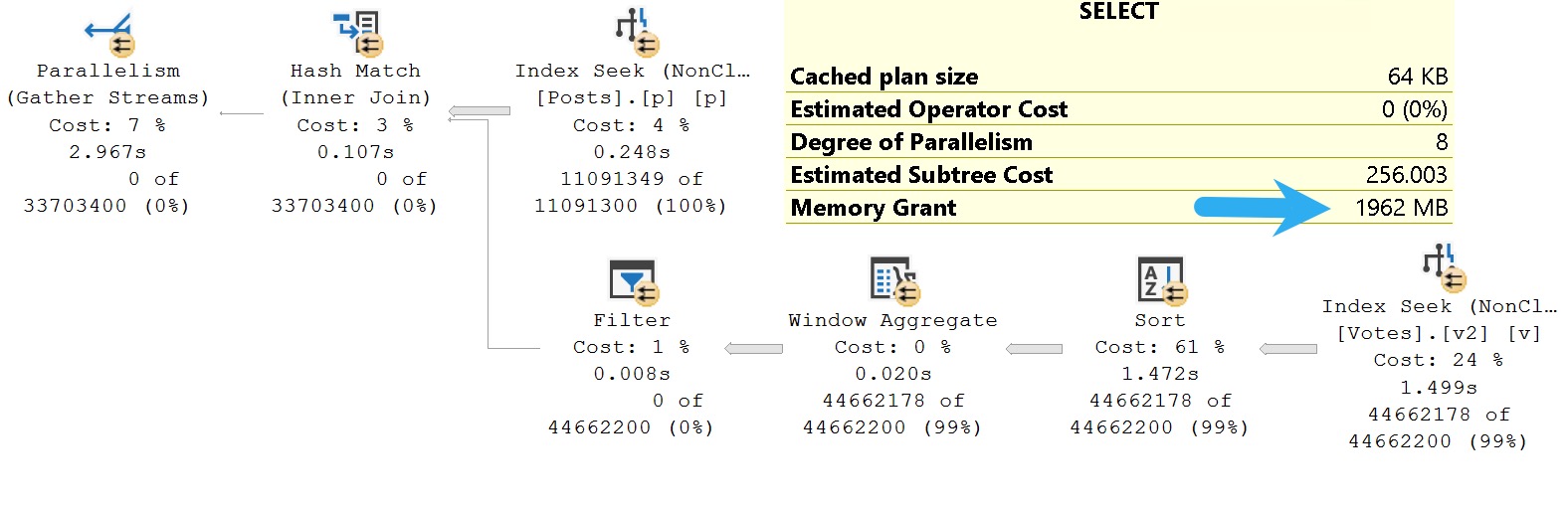
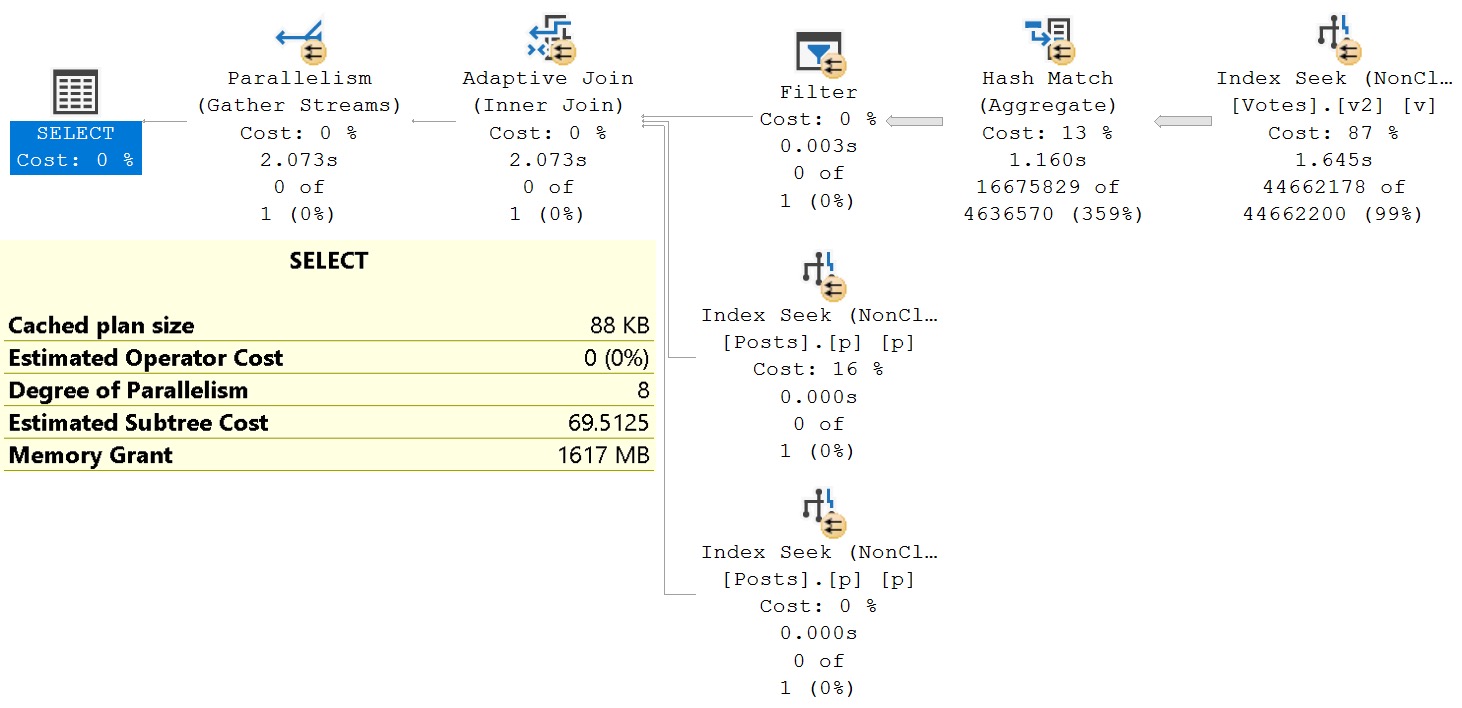
With all that done, here’s our new query plan. Something to point out here is that this is the same query plan as the more complicated rewrite that I showed you in the last section, with the same memory grant. Some of these memory grant numbers are with memory grant feedback involved, largely shifting numbers downwards, which is what you would expect to see if you were doing this in real life.
daydreamer
It could be far less of a concern for concurrency to grant out ~2GB of memory for 2 seconds, than for 15-20 seconds.
Even in a situation where you’re hitting RESOURCE_SEMAPHORE waits, it’s far less harmful to hit them for 3 seconds on average than 15-20 seconds on average. It’s also hard to imagine that you’re on a server where you truly care about high-end performance if 2GB memory grants lead you to RESOURCE_SEMAPHORE waits. If you have 128GB of RAM, and max server memory set to 116-120GB, you would be able to run ~80 of these queries concurrently before having a chance of a problem hitting RESOURCE_SEMAPHORE waits, assuming that you don’t get Resource Governor involved.
Tweaking The Query
Like I said early on, there’s only so good you can get with queries that use windowing functions where there are no alternatives.
Sticking with our Batch Mode mindset, let’s use this rewrite. It’s not that you can’t cross apply this, it’s just that it doesn’t improve things the way we want. It takes about 5 seconds to run, and uses 1.3GB of RAM for a query memory grant.
SELECT
    p.Id,
    p.Score,
    v.VoteTypeId,
    v.LastVoteByType
FROM dbo.Posts AS p
JOIN
(
    SELECT
        v.PostId,
        v.VoteTypeId,
        LastVoteByType =
            MAX(v.CreationDate)
    FROM dbo.Votes AS v
    WHERE v.VoteTypeId IN (1, 2, 3)
    AND   v.CreationDate >= '20080101'
    GROUP BY
        v.PostId,
        v.VoteTypeId
) AS v
  ON v.PostId = p.Id
LEFT JOIN dbo.columnstore_helper AS ch
  ON 1 = 0 /*This is important*/
WHERE p.PostTypeId = 2
AND   v.LastVoteByType >= '99991231';
Note that I don’t naturally get batch mode via Batch Mode On Row Store. I’m using a table with this definition to force SQL Server’s hand a bit, here:
CREATE TABLE
    dbo.columnstore_helper
(
    cs_id bigint NOT NULL,
    INDEX cs_id CLUSTERED COLUMNSTORE
);
But the result is pretty well worth it. It’s around 1 second faster than our best effort, with a 1.6GB memory grant.
waterfall
There may be even weirder rewrites out there in the world that would be better in some way, but I haven’t come across them yet.
Coverage
We covered a number of topics in this post, involving indexing, query rewrites, and the limitations of Row Mode performance in many situations.
The issues you’ll see in queries like this are quite common in data science, or data analysis type workloads, including those run by common reporting tools like PowerBI. Everyone seems to want a row number.
I departed a bit from what I imagined the post would look like as I went along, as additional interesting details came up. I hope it was an enjoyable, and reasonably meandering exploration for you, dear reader.
There’s one more post planned for this series so far, and I should probably provide some companion material for why the multi-seek query plan is 2x slower than the seek + residual query plan.
Anyway, I’m tired.
Thanks for reading!
Going Further
If this is the kind of SQL Server stuff you love learning about, you’ll love my training. Blog readers get 25% off the Everything Bundle — over 100 hours of performance tuning content. Need hands-on help? I offer consulting engagements from targeted investigations to ongoing retainers. Want a quick sanity check before committing to a full engagement? Schedule a call — no commitment required.