The one, the only, the Canadian: Michael J Swart (b|t) recently contributed a really cool piece of code that I’ve been dying to have since I created sp_HumanEventsBlockViewer: the entire blocking chain is visualized in the results.
You don’t have to do anything special to see it, just run the procedure with the updated code, and off we go!
EXEC dbo.sp_HumanEventsBlockViewer
    @session_name = N'insert an extended event capturing the blocked process report here please and thanks';
You’ll see a new column in the results that looks like this:
the clash
This will make troubleshooting long blocking chains a lot easier.
Thanks for reading!
Going Further
If this is the kind of SQL Server stuff you love learning about, you’ll love my training. Blog readers get 25% off the Everything Bundle — over 100 hours of performance tuning content. Need hands-on help? I offer consulting engagements from targeted investigations to ongoing retainers. Want a quick sanity check before committing to a full engagement? Schedule a call — no commitment required.
Introducing sp_LogHunter: Quickly Search For Important Error Log Messages From SQL Server
Video Summary
In this video, I introduce you to a stored procedure called `sp_log_hunter` that I developed after dealing with large and cumbersome SQL Server error logs for a client. The motivation behind creating this tool was the difficulty in filtering through extensive log files using the GUI interface in SQL Server Management Studio (SSMS). Error logs were taking too long to load, often timing out, and filtering them manually was extremely slow and inefficient. To address these issues, I crafted a stored procedure that can quickly sift through error logs based on specific criteria, such as severity level, date range, and custom search terms.
The `sp_log_hunter` stored procedure offers several parameters for customization, including the number of days back to look in the log files, the ability to filter by specific messages or languages, and options to limit searches to particular error logs. It’s designed to be user-friendly with a clear help section detailing its functionality and parameters. Additionally, I’ve included debugging features to ensure robustness and flexibility for future enhancements. This tool is available on GitHub under an MIT license, ensuring it remains open-source and accessible to everyone who needs it.
Full Transcript
Erik Darling here with Darling Data. In today’s video, I’m going to introduce you to a store procedure that I wrote dead sober over the weekend and some of the week, also dead sober, that digs through SQL Server’s error logs. The impetus for this was client-related, but really what happened was they had lots of real really big error log files and we had to track down some nasty stuff happening to the server in those error logs, but that was really difficult to do via the GUI, via the interface that you have to work with error logs in SQL Server Management Studio. The logs were taking a long time to load, they were timing out in some cases, filtering them was really slow, there was just a lot going on, and so I made it my duty and responsibility to do that. I don’t want to make it that way. To find a way to find a way to find a way to find the things in the error logs that we cared about. And then, you know, I turned that into a stored procedure. And then, you know, I started looking at other messages that like, so like SQL Server has that sys.messagesView, and you can find like high severity error messages and things that happen when, you know, bad things are going on with SQL Server. And you can use those to sort of figure out like a common set of terms and messages where bad stuff is happening.
Now, there’s always going to be some false hits if the search is too expensive, but that’s okay because I’d rather like over-report a little bit than under-report things. You know, error logs are usually full of a lot of garbage messages that you don’t need, failed logins, successful backups.
Some people for auditing will log successful logins and like you just have like pages and pages and pages and pages, like millions of entries of just stuff that gets in the way of you figuring out when things were going from bad to worse to the server being broken. So I have this stored procedure now, sp underscore log hunter, which will hopefully make your life easier when you’re trying to find all the interesting stuff in SQL servers error logs as well. It’s available over on GitHub, as all my scripts are. It is free, it is open source, it is MIT licensed, and it will remain that way unless I really go broke. Just kidding. Who would buy this? Everyone buys me. So the stored procedure has a few parameters with some default values. Days back is how far back in the error log you want to look.
By default, it goes back seven days. And this should be a negative value in the stored procedure. There’s logic to flip it from a positive value to a negative value. You can’t search into the future of an error log as much as you’d like to. As much as I’d like to. You can’t see the future of SQL Server. It is too unpredictable. It broke the magic eight ball. So you can choose how far back you want to look in the error log for certain things. If there’s a specific message you want to look for. Now this only works for one string at a time. I think maybe long term I’ll let you just comma separate some stuff. But right now, that’s too much for me. If there’s a specific thing in the error log you want to look for. You can look for that. If you only want to look for that specific thing across error logs, you can do that as well. You can also specify a language ID. By default, it is English. But if you use a different language for SQL Server, you can choose a different language ID. Where this falls a little bit short is that if the error log is in a different language, you’re going to have to do the translation for whatever search terms you want into that other language because I just did not have the moxie for all that. If you only want to search for the first error log because there are a lot of other error logs for whatever reason, you can do that as well. There’s also sort of the stop help debug version parameters that I try to stick in all my store procedures. So here’s the help section. It’s pretty much what you’d expect from me. It goes through the parameters, tells you what the license is, stuff like that. It does a couple checks up front. This doesn’t work with Amazon RDS because Amazon RDS gives you access to a sort of a wrapper store procedure for what I use. And it does not take a search string as a parameter, at least that I’ve been able to find in the documentation.
I don’t have access to an RDS instance to like test it and do stuff with it. So if anyone out there in RDS land does, I’d be more than happy to take your feedback on this. So it can’t, doesn’t run in RDS. And of course it does not run in Azure SQL DB because, well, I don’t know. I’m trying not to get shanked it past. So probably won’t say anything too not nice about Azure SQL DB here, at least outside of my error message. Validates that the language ID that you’re looking for exists, right? Because, you know, it’s important, I guess.
I do, here’s where I fix the days back parameter. So if you set it to zero, I just go one day back. So we will actually look for some stuff. And if you have used a positive number, then I will do a little math, mathemagic right there to set it to a negative number. There’s also heaps of debug stuff in here. I’ll show you that after I show you some other stuff. I’ll show you that in action after I show you some other stuff. There are some temp tables as usual. There is a temp table that builds a dynamic string up and a computed column because why not? That should be persisted.
Yeah, I don’t know. I don’t know how I missed that. Debugging live. You’re welcome. Typing and demos debugging live. I don’t, I mean, it doesn’t need to be persisted. I just prefer to be for various reasons.
Um, there, so what I do in this store procedure is, uh, I use this, uh, this other system store procedure called SP enum error logs. And what that does, I mean, if you just run this sort of outside of the normal scope of the store procedure, is it will look, it returns a list of log files and the dates that they contain data up to in them. And it also tells you the size and bytes, which I guess is helpful for some people. Um, but I use this as part of the filtering mechanism. So, uh, if whatever, however many days back you want to look, I’ll delete anything, any logs from the table, past that days back, uh, uh, past that days back map date math, but only for, uh, archives greater than zero. Because SQL Server, uh, starts with these zero numbering counting system here. And I don’t want to delete out the first log file because we still need to look at something. If I said where, if I just left that is any log that’s, you know, uh, with like, you know, that didn’t meet the date requirement, we would might delete the archive, like the first log file. So that’s no good. Uh, if the, if you want to use the first log only, I just delete everything where the archive is over, the archive number is over one.
And then, uh, I insert some canary strings into our search table. So I always want to look for Microsoft SQL Server detected and SQL Server has encountered, um, because those are things that I look for pretty consistently. And these get a special, uh, treatment for how many days back they search. So the Microsoft SQL Server stuff kind of brings up stuff from the beginning of the error log.
That’s also what detected does. Uh, and there’s, I also want, I’ll always want to search for SQL Server has encountered because that will show you the 15 second IO warnings that show up in the error log when your, uh, storage is under duress. Uh, so either storage or, you know, storage networking is under duress. So I always want to show that as much as possible. So those go back 90 days and less days back is greater than 90 days. You can search back almost as many days as you want in there. I don’t really, I don’t really have too many checks on that, but, um, you know, uh, these are the design choices we make when we’re writing code for better or for worse. So, uh, this is where I list off the strings of, um, stuff I found in error messages that I thought looked important enough to always get. Uh, there’s a lot in here. I don’t want to talk through all of it, but a lot of it had to do with corruption, bad things happening, server terminating crashes, things like that. Uh, and it’s a fairly exhaustive list. And what I tried to do was bring it down to the fewest number of search terms possible.
There’s around 106 or so in there right now. What happened, what I found is like, there are like, there was like really specific error log messages that I wanted to look for. And, uh, there were like groups of them. And the, the, the, the thing about sys.messages and like, but my first attempt, I tried to use the data in sys.messages to give me a list of errors that I cared about.
The thing is that sys.messages has a bunch of tokens in there. So like, when you think about using raise error, when you see those like percents and stuff in there, you can tokenize messages to like, you know, like substitute them with parameters or barrier variables or values or whatever. And the list was really long. And what I found in testing was that it was better to make fewer round trips to the error log to search for things than it was to make more very specific searches for things. So this is where I kind of got into like the over-reporting versus under-reporting thing. Some of these search terms are very like just single words. Like, so there are like a ton of messages and sys.messages that say something like contact system administrator, contact database administrator, contact technical support in various ways. And so searching for all of those strings independently was like a nightmare because it was just like more round trips to the error log to find stuff. So just searching for the word contact was a lot faster than searching for those specific phrases. So there’s a lot of, there’s a lot of sort of, you know, fuzzy searching in here for stuff that I thought sounded important while looking through error messages, like groups of error messages that all had things in common. So I have this down to like the right now, I think the fewest number of important error messages that I could, that I can, that I can like put in the list. If there’s anything else you want in here that like you think, Eric, we always got to find this. Let me know if there’s anything, if there’s any noise that comes in here, you can also tell me about that. And I can add some stuff to the deleting mechanism that does some cleaning up already of what gets returned to the error log. So that’s the, that first part. And then down here, this is where I handle the custom message.
Part of the reason why I don’t have, why I don’t have the multiple custom message thing set up yet is because I haven’t had to use that yet. And of course, this thing is brand new. So I don’t know if it’s a feature even anyone would use. And I don’t, quite frankly, I don’t know if anyone’s even going to use a store procedure. So there’s that. Some more feedback for the, for looping over the error logs and stuff here. So this is the fun part of the store. This was, this was writing loops in SQL Server is one of my favorite things because I am naturally not terribly good at it. And so writing and debugging them is always a fun learning process for me. So this, this has a while loop and a cursor in it, breaking all the rules, right? But so if there are, if you’re, if you’re a search, your days back, all that stuff spans multiple error logs, we need to enumerate those for the search, right? So while the lowest log file is less than the highest log file that meets your date criteria is, is, is, is there for searching, we, we keep doing the loop. We also have a cursor in the loop that goes and hits the, well, it does a couple of things up front. This is where I hit the error log to search for stuff. But the first thing I have to do is sort of replace this string token with the log file that we’re searching for. If we scroll back up a little bit to the computed column, this string of at signs in brackets is the log number that we want to look at. So every time we loop through, I need to change this string to, to the log number that we’re going to search for. And the number one there just signifies error log. There’s like SQL Server Agent also has logs. I haven’t worked out searching for those searching through those yet. I’ve never found anything important enough in there to look through. So I just had, I just didn’t design it for that because it was, you know, again, scoping issues with these initial store procedure rights.
So, um, again, more, some more debug info. Uh, this is the part of the store procedure that inserts, data into the table that I returned from the error logs with the search string that we’re looking for. Uh, there’s a little bit of error handling in here. Um, when I was initially writing this and trying to use sys.messages and like fix token, string tokenization stuff, this was like, there was a lot of errors that I was capturing and being like, oh, that, the hell is that string?
There was some, it was, it was a mess. So I, I abandoned that pretty quickly. Uh, and then, you know, if find the next log file that we want to search through, rerun the loop that goes through the table, searches all those strings and goes and goes and goes, uh, some logic here to figure out if it’s time to stop running to get close out the cursor. Uh, there’s a delete statement here that gets rid of some junk, uh, that was getting returned. Uh, so like, I didn’t want to like DBCC trace on and trace off.
Like I want to know when people are turning trace flags on and off in SQL Server, but the error log is just like chock full of these DBCC trace on, trace off 3604 messages. So I want to get rid of those. There’s also a bunch of messages in there that say this instance of SQL Server has been using a process ID for 10 billion years because you never patched SQL Server or restarted. Uh, there’s some data, uh, database administrative connection messages, some login failed messages that I never want to see. We don’t get successful logins already. So we don’t need to worry about those, uh, some stuff about endpoints and stuff that I don’t care about. So I delete these messages out so we don’t see them again. This is where if there’s something you don’t want to see in, uh, the error log, this is some noisy message that always comes back. You’re like, Eric, we don’t need that. Tell me about it. Add it here. Never see it again.
Um, after that, pretty simple. We just return any data that comes back from the error log. Uh, if there are any errors in the error table from trying to search through the error log, any commands, those will get returned if they exist there. Cool. Uh, this is what the results look like from the store procedure.
So I stuck a custom message into the error log that said, he’s dead Jim. And we found that when we searched for a custom message, uh, again, like I tried to get some of the, like some of the stuff that I think is interesting or important from like the startup portion of SQL Server, because there’s always some ghosts and goblins and gremlins in there. Uh, so I try to get some canary values just to show that like there’s stuff in the error log. Like, even if it’s not like the crazy stuff that we need to find and get to at first, we at least know that there’s stuff in there that’s coming back.
Now the debug mechanism, if you run into any issues with this and you want to see what’s going on when, while this is running, I’m, you know, pretty, pretty psyched on this. It’ll tells you what the days back parameter, uh, is it’ll tell you how many, what log files we got, uh, how many were valid for searching after we deleted stuff. Uh, it shows you the, uh, search command table, right? So this is all the stuff that goes into the table and this is the final command that runs to find data in the error logs. All right. And then down here we have the, again, the final results from that. And then, uh, uh, I don’t know, good stuff there. Anyway, this is what the messages tab looks like. And I’m going to zoom in a little bit so that you can, uh, see, uh, we, you know, there’s a bunch of razors in there to, oops, uh, tell us what, what point in the loop we’re at in doing things. Uh, there is mess, there are messages in there that tell us how many log files and how many searches we have to run.
Um, and the, I really, I mean, this is not really a great, you know, static value to have, but, uh, I find it, found it was useful in here to sort of keep track of, you know, how many searches, uh, how many searches I’ve done out of how many total searches there are. Uh, we also print out the string of what we’re running. So if, if you just want to like, see what may, like, if you get an error, while this is executing, you shouldn’t, but if you do, uh, if you get an error while this is executing, you can see exactly which command command was, uh, what it hit a problem with. So it prints out all this stuff. And I’m just going to scroll down a little bit further to where the log number changes, because, uh, I think if you, if you follow me on Twitter, you may have recently seen a tweet of mine that said, uh, there’s nothing more satisfying than seeing debug messages get raised in a, in a loop that’s running correctly. And this is, this is what I was talking about. So if we get down, uh, this is where I get, I guess having 106 search terms is, uh, bite me in the keister a little bit, but, uh, if we get down to, uh, where things change, you can see the message where we get the next log.
We go back into the cursor and then we restart our searches on the next log file. So interesting, practical debugging methodology brought to you by Erik Darling of Erik Darling data. Uh, so this is, again, brand new store procedure. I would still consider it sort of in beta, even though I’m very happy with the beta version of it. Um, I would encourage you to go over to GitHub, download it, uh, keep an eye on GitHub because these new store procedures often get a lot of tweaks and tinkering, even live in videos where you had persisted to a computed column, stuff like that. Uh, so GitHub is the place to go for questions, support, enhancement, requests, stuff like that. Um, that’s, that’s, that’s where you do it since that’s where I do things. Blog comments are not the place for that.
Uh, and I guess that’s that. I guess we’re just about at the 20 minute mark. I’m sick of talking. I’m going to take a break while this thing renders and uploads to YouTube and record another video, uh, about some cool new stuff that got added to SP underscore human events block viewer.
And, uh, we’ll see what else happens anyway. Thank you for watching. Uh, if you liked the video, don’t be afraid to give it the old thumbs up. Uh, if you, uh, like this type of SQL Server content, uh, pretty, pretty, pretty please with, um, more free SQL Server content on top. Uh, give, give me, give me the old subscribe. Um, if, if you have a problem with this video, whether it’s, it’s me, my physicality, my breathing, my audio, my video, uh, let, please leave constructive comments on the video. Uh, if you, if you, if something is wrong, you need to, you need to kind of give, give me a little bit more, a little, a little more specific feedback as to what I need to, what I need to fix for the next one. Anyway, that’s SP underscore log hunter. Go over to GitHub.
Get, uh, I guess happy hunting as they say. Why did you keep popping up? Go away. Anyway, uh, thank you for watching. Okay.
Going Further
If this is the kind of SQL Server stuff you love learning about, you’ll love my training. Blog readers get 25% off the Everything Bundle — over 100 hours of performance tuning content. Need hands-on help? I offer consulting engagements from targeted investigations to ongoing retainers. Want a quick sanity check before committing to a full engagement? Schedule a call — no commitment required.
SQL Server has incredibly verbose error logs, and sifting through them for the highlight reel can be a pain. They’re often full of messages that you aren’t actionable.
Failed logins
Successful logins
Successful backups
Making matters worse is that when you open large log files, the response time for loading all those messages can be painful, and even time out.
Then you have the nice folks who create a new log file every day and keep months of log files around.
But probably the worst thing is that you can’t really search for multiple things without losing all of the other messages.
If you’re like me, and you need to know when interesting or critical events happened, you’re going to love sp_LogHunter.
Right now, it has these parameters:
@days_back int = -7 /*How many days back you want to look in the error logs*/
@custom_message nvarchar(4000) = NULL /*If there's something you specifically want to search for*/
@custom_message_only bit = 0 /*If you only want to search for this specific thing*/
@language_id int = 1033 /*If you want to use a language other than English*/
@first_log_only bit = 0 /*If you only want to search the first log file*/
Along with the usual version, help, and debug parameters I add in to my procedures.
If this is the kind of SQL Server stuff you love learning about, you’ll love my training. Blog readers get 25% off the Everything Bundle — over 100 hours of performance tuning content. Need hands-on help? I offer consulting engagements from targeted investigations to ongoing retainers. Want a quick sanity check before committing to a full engagement? Schedule a call — no commitment required.
A Little About Locking And Isolation Levels In SQL Server
Video Summary
In this video, I delve into the intricate world of locks, blocking, and isolation levels in SQL Server, sharing insights gained from years of consulting work that often involves troubleshooting store procedures for blocking and deadlocking issues. I explain how not all locking leads to blocking and discuss various isolation levels—read committed, snapshot, repeatable read, serializable—and their implications on query execution. Additionally, I cover different types of locks SQL Server can take, such as row identifier, key or row level, page, extent, heap or b-tree, object, application, metadata, allocation unit, and database-level locks, providing practical examples to help you better understand these concepts in action.
Full Transcript
Erik Darling here with Darling Data. And I just slammed a shot of espresso, so I am quite jazzed to do this video. What I wanted to talk about in this video is a little bit about sort of locks, blocking, and isolation levels in SQL Server, because I get a lot of questions about it. I suppose that’s the peril of working on store procedures that help folks sort out blocking and deadlocking issues. SQL Server, SP Blitzlock, do a ton of work on that, SP Human Events Block Viewer. SP Blitzlock will look at deadlocks, SP Human Events Block Viewer will look at blocking chain stuff. Both very useful store procedures to me in the consulting work that I do. But the thing that we’re going to talk about off the bat is that not all locking leads to blocking. Many modification queries under various circumstances can push through without impacting any other user queries at all. With optimistic isolation levels, you can, of course, avoid a lot of the most basic reader on writer and writer on reader locking and blocking issues that SQL Server offers you by design under the pessimistic read committed isolation level that it uses by default, which was a terrible mistake.
And you can also, under the snapshot isolation level, to some extent, have modification queries not block each other. But I don’t run into a lot of people using that very happily or very successfully. All right, so let’s start at the top. There are different types of locks that can be taken. If you have a table that does not have a clustered index, and you have row identifiers in it, SQL Server can take row identifier locks. It can also take key or row level locks on clustered and nonclustered indexes.
I use key and row interchangeably because a lot of people in the database universe do that. I do not want to make sure that everyone understands me when I’m talking about these things until someone comes down from Mount Database and has tablets in hand that tells me which term to use for those types of locks. From here on out, I’m going to use them both and use them interchangeably. SQL Server can lock pages, it can lock extents, it can lock heap or b trees, it can lock objects, it can lock application. If you use sp-get-app-lock, you can sort of take a logical lock via a portion of code that disallows other portions of other code to execute until that lock is released.
SPF app-lock is great. I have an old video about that. I might update that in the future, I don’t know. It can take metadata, allocation unit and database level locks. All right, so going back up the list a little bit, I think the extent locking thing was a bit more common when TempDB had a lot of mixed extents in it.
SQL Server would lock extents, that’s why there used to be a lot more. They used to have to use trace flags to avoid a lot of TempDB contention stuff. You can further avoid metadata contention in TempDB by using the in-memory TempDB system tables that popped out with SQL Server 2019.
Got some improvements in 2022. A lot of metadata locks that you might see otherwise would be, you know, if you’re, well, I mean, like, so reading from TempDB system tables while there’s a lot of TempDB activity can cause blocking in there. You know, some of the views that describe tables, indexes, identity columns, things like that, those can get blocked if there’s, like, active inserts to, big inserts to a table or something.
Those are sort of typical metadata locks that I’ve seen around. Also, if you’re updating stats, and, like, queries and store procedures are trying to compile, I’ve seen metadata contention around that. Allocation unit locks I don’t think I’ve seen in the wild.
I would imagine those would have something to do with files, file groups, partition switching, something along those lines. But, again, I don’t, that’s all speculative. I don’t, like I said, I’ve never actually seen allocation units get locked or cause blocking in my travels through SQL Server.
And, of course, database level locks, stuff like, you know, altering the database, alter database commands. You might also see metadata locks if you alter objects within the database. And then you have lock.
And so those types of locks, a lot of those locks, especially, like, the key, page, and object level locks. And, well, at the query level, you can affect those with various hints. You can instruct the storage engine how you think it should go.
But if you don’t do that, then the storage engine really decides both whether to start with the rid or key slash row locks or page locks and then escalate up to object level locks. You can instruct the query to start with one of those, but it’s still, escalation is still possible. You can also, of course, use, like, tab lock, tab lock X to lock down an object entirely.
I do that a lot with inserts into temp tables in order to influence a parallel execution plan. You do need compat level 130 and up to get that going, or you select into and compat level 130 and up. Then you have lock modes.
So shared update, intent exclusive, exclusive, schema stability, schema modification, bulk update, key range. Key range is pretty specific to the repeatable read and serializable isolation levels. You can, to some extent, affect the lock modes that queries use with query hints.
I think probably the most common one you would see is instructing select queries to use upd lock hints. Maybe in combination with some other hints to lock specific rows via select for, like, queuing processes, other stuff like that. Then you have isolation levels.
Now, isolation levels are not decided by the storage engine at all. Isolation levels are decided by queries and database settings and stuff like that, so to some extent, connection string settings. But if left to its own devices, the storage engine, together with the query optimizer via cardinality estimation, decides locks and lock modes.
Now, depending on the intent of the query, the lock mode might be sort of unavoidable. You know, if you’re updating, deleting, inserting data, you’re going to need exclusivity at some point in those processes. And if you’re altering something about the database, you’re going to need exclusivity via, like, alter table, alter column, alter database, stuff like that.
So that stuff gets decided kind of for you, kind of depending on what the query is and what hints you provide. Also, indexes have a lot of impact on the types of locks that the storage engine will be influenced to use. Isolation levels are completely decided by you, the query writer, or you, the database administrator.
Now, you can choose read uncommitted or no lock. You can choose, well, again, the database default is read committed. You can enable read committed snapshot isolation to help your reader and writer queries not step all over each other.
You can enable snapshot isolation to do the same thing, but that does require you to request that isolation level either at the query or at the store procedure level for that to happen. You can also choose repeatable read or serializable. Certain things in the SQL Server will escalate to the serializable isolation level to complete.
Probably the most common one of those would be foreign keys with cascading actions. So if you’re foreign keys, cascade, updates, deletes, or anything like that, then those will be promoted to serializable to respect referential integrity and all that good stuff. You can also, if you so choose, use what’s called the read past hint.
Read past is often sort of confused with the no lock read uncommitted hint, but it is different. Rather than reading in-flight changes to rows, if rows are locked in a table or index, it just says, we’re just not going to read those. We’re going to go on to the next thing.
That’s also very helpful with queuing processes where you don’t want the query trying to find the next thing to work on in the queue to get stuck waiting for something else to release a lock on a row so that it can proceed. The hints in the indexing for those types of processes are really important. So the important thing to remember here is that isolation levels are decided by you, by database level settings, and by certain conventions that you use in the database.
Again, cascading foreign keys, probably the most common thing that you’ll see get escalated to the serializable isolation level. But the isolation level is largely dictated by you. Lock mode is largely dictated by the intent of the query or command that you’re sending over to SQL Server.
You can impact this a bit via various locking hints, but for the most part, again, like I said, some of these lock modes are unavoidable depending on the intent of the query, especially insert, update, delete, or the most unfortunate knuckleball in the world, the merge syntax. And then locks are typically decided by the storage engine and cardinality optimization from the query optimization process. But you can also, to some extent, send directives and hints to the storage engine about what type of locks you want to take.
It is, I guess, a fairly common practice to request row locks, but that can be ignored and those can be escalated up to object level locks. Page level locks are typically not ignored, but those can also escalate up to object level locks. And then, you know, everyone has a weird day.
But of course, like I said before, indexing also will have a bit to do with the types of locks that SQL Server takes, especially for modification queries. It’s very important to index appropriately for the where clause and join conditions of your modification queries. The easier it is for SQL Server to find the data that it needs to modify, typically the better choices it will make as far as which locks to use when those queries execute.
So, a little bit of fun there. Anyway, that’s about enough about that. A lot of abouts in there.
People think I’m Canadian when they hear me say about, because I don’t know why. Maybe I’ve just got a Canadian tongue. Never can tell.
I don’t have any other Canadian mannerisms, though. I can tell by my lack of politeness and… I don’t know.
I don’t want to besmirch any Canadians. My Canadian friend Michael really helped me out with SB Human Events Block Viewer, which I just recorded a video about. So, I’m going to leave the Canadians alone on this one.
Unless they start any more wildfires on me. Turn New York into Mars again. Anyway. Thank you for watching. I hope you enjoyed the video.
If you did, thumbs up. It’s greatly appreciated. I like watching those numbers go up. If you like this type of content, hit the little bell button to subscribe to the channel. I’ll produce a lot of stuff.
Though I am going to be on vacation for a little bit in August. So, video production will necessarily grind to a screeching halt then, most likely. But, you know.
I’ll be back at it someday. And, of course, I hope you learned something. I hope you enjoyed yourselves. And I will see you in another video sometime. Thank you.
Going Further
If this is the kind of SQL Server stuff you love learning about, you’ll love my training. Blog readers get 25% off the Everything Bundle — over 100 hours of performance tuning content. Need hands-on help? I offer consulting engagements from targeted investigations to ongoing retainers. Want a quick sanity check before committing to a full engagement? Schedule a call — no commitment required.
If this is the kind of SQL Server stuff you love learning about, you’ll love my training. Blog readers get 25% off the Everything Bundle — over 100 hours of performance tuning content. Need hands-on help? I offer consulting engagements from targeted investigations to ongoing retainers. Want a quick sanity check before committing to a full engagement? Schedule a call — no commitment required.
If this is the kind of SQL Server stuff you love learning about, you’ll love my training. Blog readers get 25% off the Everything Bundle — over 100 hours of performance tuning content. Need hands-on help? I offer consulting engagements from targeted investigations to ongoing retainers. Want a quick sanity check before committing to a full engagement? Schedule a call — no commitment required.
In this video, I delve into some common issues in query writing and indexing that can significantly impact performance. Starting off with a few personal updates, I recently got a new haircut and am experimenting with different socks—though you won’t see them in the video, I’m trying to figure out which level of subscription is best for revealing my sock choices! Moving on from the fun stuff, I address a query scenario where using `ROW_NUMBER()` in conjunction with joins can lead to performance bottlenecks. By examining how SQL Server handles this situation without indexes and then creating an appropriate index, we uncover some interesting insights into parallel execution plans and the importance of proper indexing for windowing functions. This video is inspired by a real-world issue I faced recently where a query was running extremely slow, taking up to five minutes before optimization. Through better syntax and strategic indexing, we see significant improvements in both performance and execution plan efficiency.
Full Transcript
Erik Darling here with Darling Data. And I just want to give you a couple personal updates on me. One is that I got a haircut. Feeling good about the haircut. Two is I’m wearing a new pair of socks. You can’t see that. I haven’t quite decided which subscriber level I want to start revealing my socks at, but we’ll figure that out eventually. From a technical perspective, well, a few things. Got a rather brusk comment the other day. Someone saying that they could hear me breathing and they didn’t like that I cleared my throat and that I was full of myself. So, I’ve taken some steps to remedy all three of those things. One, as a fellow misophonia sufferer, I understand the… as well.
So. it, as sortwa- not because I believe in juice cleanses but just because I am trying to be less full of myself and so I am replacing myself with various cold-pressed juices that’s going fairly well I am very very much not as full of myself after a few days of that but in this video what I’d like to talk about is a common I think well it’s a mix of it’s a mix of problems all right it’s sort of a query writing problem and then when you once you write the query correctly you might even uncover an indexing problem and the problem we’re going to talk about is related to when you need to do a join that involves a row number or a windowing function that you’re filtering on you can see in my query here I have row number generating some some numbers over rows and then I’m filtering on that row number outside of the the join so if we have no indexes on the table and I’m pretty sure that I already dropped indexes but we can validate that there if we get rid of all the indexes on the table now this is the index I’m gonna create and I’ll talk to you about why of course because I care about you and I care about you learning for free what we have here when we do when we run this query I’m gonna try not to scroll down any further and give away too much about the the rewrite but we’ll stick with this for now when we run this query it’s gonna take about two and a half seconds at least it did before it might be might be a little bit longer oh I was so close I was so very close 2.553 I was almost on the nose there and I mean that’s not horrible but I’ve written I’ve engineered this query a bit to not be so horrible so that I can record a short video and not sit here for a half hour waiting for a query to run this video was inspired by the fact that I actually just fixed a query like this today it was running for four and a half five minutes so it can get kind of gnarly out there anyway so what this query does is it goes parallel which is understandable because this query has quite a bit of work to do when multiple CPU threads and cores working on this thing all at all at once it’s probably a good idea and SQL Server asks for an index to support this query it says an index would be very useful here I want an index on post type ID and score and it wants us to include owner user ID which is I guess like a an okay junior DBA index it doesn’t take into account several things I mean well it is focused on on the where clause that we have inside of the join where we have an equality predicate on post type ID and an inequality predicate range predicate on score it doesn’t really take into account the fact that we need to partition by owner user ID order by score here order by score here that we need to join on owner user ID here so well it would help the where clause wouldn’t be very useful for any other part of the query this is another another big reason why over the years I’ve grown to really just trust missing indexes don’t think I don’t think they’re often worth prescribing to people outside of rather narrow circumstances where there’s sort of just blood everywhere and you need to you need to like there’s just no nonclustered indexes on any tables and you need a starting point and you can you can tune queries more individually from from there on out but uh so that’s not it’s not a very good missing index request but it will at least get you somewhere right wouldn’t wouldn’t get you all you know across the finish line but it would get you at least it would at least get your sneakers on so you could you could make you could make the run a better way of writing this query is usually to use uh the apply syntax in this case we have a left join up top so we’re going to use outer apply here to make sure that our query is semantically correct which is a I hear it’s important people want accurate results at least sometimes mountain no lock hence I see makes me wonder why people are like oh well I don’t think the results are right like well were they ever good question but I’m not going to run this as is because if we run this as is it’s going to take a long time and the reason it’s going to take a long time is well if you’ve been paying attention to my youtube channel or my blog for any uh any period of time you may have seen me post or talk about eager index spools and we’re going to hit one of those here the reason why we’re going to hit one of those here is because when we use the outer apply syntax sql server is going to choose a nested loops join to uh execute this query uh where is above we used a hash join and nested loops join because we take a row and we go do some work well if we don’t have a good index we’re going to end up scanning that post table a whole lot so sql server I want you to pay close attention up here because there is no green text along here like there was in the query above saying hey we could use an index sql server just creates one for you and if we look at what happens we talk about this a little bit now I know I have another video on eager index pools somewhere somewhere along my channel but you know I’m just going to talk through it a little bit because I don’t want to make you go jumping around from video to video searching for things I don’t know it doesn’t seem like fun to me so uh there there are a few fundamental issues that I have with eager index pools one is that in the context of a parallel plan they are absolute liars uh they are built on a single thread you can read from them uh multi-threaded but uh reading all of the data out of the post table will happen on a single thread that’s like a 17 million row table building a 17 million row index on the fly is not fun especially because uh spools in general which are built over in temp db don’t really have any of the optimizations that creating temp table selecting data into inserting data into creating indexes in temp db have uh they are uh built a row at a time which is also another rather unfortunate scenario uh for the eager index pool um if you find that a weight on your server called exec sync e-x-e-c-s-y-n-c all one word is pretty high you should start going through query plans looking for large eager index pools small ones probably won’t make that big of a difference if the table is like you know 10 000 100 000 500 000 rows you probably won’t have too much of an issue building uh an eager index pool in a plan and i mean if you have to build it multiple times that’s a different story but um usually it’s when tables tend to get on the larger side i think 17 million rows qualifies at least in this case for being on the larger side uh the bigger the table is the more painful building the spool gets um and of course sql server doesn’t offer you a missing index request to say hey i’d like to stop building this index every time the query runs i’m just going to build it every time it runs and i’m going to make fun of you behind your back so this is how uh using better syntax can uh sort of uh unveil indexing issues uh in in the uh in the in the database and uh if we hover over the eager index pool we can of course see the definition of the eager index pool that’s equal the the definition of the index rather the sql server creates uh the output list is irrelevant in this case because the score column is represented here already so we don’t need to care too much about that uh what we do need to do is take into uh mentally take into account that we are seeking on three columns owner user id post type id and score all right so for most eager index pools you want to take the seek predicates and create an index with a key on the seek predicate columns and then if there are any columns that are in the output list that are not already represented in the key of the index and we’d want to add those to the included columns cool we got that we’re good there so again i’m not going to run that because it would take a while to run but i want to i want you to keep in mind that when we run this query i’m just going to take again about two and a half seconds 2.6 this time shocking uh when we run this query we get a fully parallel execution plan we scan the clustered index and we filter to where the row number equals one here then we come out here and we sort our data here we also have another sort inside the inner part of the nested loops join and because we don’t have an index that helps us with the uh with the row number function again that’s owner user id partition by and score descending ordered by uh we have to we have to sort that data for all of the results that come out of the post table here right that that that sort is going to ask for 490 megs of memory to to run and do that so let’s create our index and let’s see how the plans for these change now the index i’m creating leads with owner user id and it’s going to lead with owner user id because i’m tailoring this index to the apply syntax if i were trying to tailor this syntax this index to the left join syntax i would probably put post type id score first and then owner user id because we can’t do the filtering for this query until we hit the join with the apply syntax and we when we get the nested loops join we can get uh the apply nested loops version of a nested loops join and push the owner user id column into the inner side of the nested loops where it acts as a predicate which i’ll of course show you when we get there eventually so let’s run these two queries now and we’re going to see how the execution plans for these change now i know we only looked at the estimated plan for the apply syntax before but again i don’t i didn’t want to sit there for you know a couple minutes waiting for that to run first thing i want you to notice is that sql server uh asks for a different index on the well actually that’s for the same index on the post table uh because it still wants the filtering in here first because it has to join on this later but again you know owner user id is a join column i don’t understand quite understand why we wouldn’t want that to be um we wouldn’t want that to be uh in the key of the index so this plan is single threaded now uh and this is what happens a lot when you’re indexing for queries especially that use windowing functions in the real world is something that i see happen all the time you create a better index and even though this query is has a cost of sorry an estimated cost of 108.731 query bucks a sql server does not choose a parallel execution plan for it perhaps sql server is catching on to the fact that parallel merge joins were a mistake and because it chooses a merge join here we don’t need we would we would need to uh we we sorry we run the risk of uh getting all sorts of uh intra-parallel query uh uh thread dependencies and deadlocks because of potential ordering but um one thing that is kind of interesting about this query plan is most of so uh most of the time um you know you like the merge join of course expects sorted input and since we have owner user id sorted we can do the merge join without a uh without without a sort operator in the plan and double that with the fact that you know uh the row number function is kind of putting owner user keeping owner user id in order we don’t need to sort the data any any further to support the merge join it’s a little interesting that uh sql server did not join a did not choose a hash join here or it did not and that it did not choose a nested loops join here considering we have a pretty prime index to support a nested loops join and we would have uh at least a pretty good scenario for a merge join we could if this plan went parallel we used a bitmap we could probably do a little bit more work there or a little bit less work there especially because we end up you know it’s a merge join we have to scan this whole index anyway all right we have to do an index scan of the nonclustered index i’m going to frame that up because i’m kind of standing in the way of it all right and this is why sql server wants the missing index request on these two columns again here because it has to do this filtering first and then way over at the merge join is when we can finally evaluate if all right a little bit of screen lag there’s where we can finally evaluate if owner user id equals the id column in the users table so the the second query the outer apply query is in a slightly different shape uh rather than taking 4.2 seconds this takes about a little under 500 milliseconds you zoom in on that hello screen lag 483 milliseconds this does get a parallel plan now i could have nerfed this to get a max stop one plan or a single threaded plan but i chose not to because i want you to see what i encounter a lot of the times in query tuning and that is that with a like you know better indexing in place oftentimes the the query pattern above that i showed you with the left join to the the select from the post table then joining to the user’s table outside and also filtering to the row number function outside uh is slower right a lot of the times because sql server will choose a serial execution plan for that now part of the beauty of using the apply is that we don’t do one big scan of the post table we take a pretty small set of rows from the users table right we take about 13 000 rows from the users table we go into our nested loops join and for each iteration of the nested loops join we seek into uh the index that we created on the post table which you know that’s not bad for the amount of rows that we have to go and do go and like find over there and go do stuff with uh we generate our window function and of course over here we filter out our window function at the end which is good enough i think bring the query from you know uh the the original form with no indexes to support it to uh the the form where we do have an index to support the query and then uh writing the correct syntax we made it we made enough of a dent in this query i think to to say hey i think i think i think we’re in good enough shape here there’s not really a whole lot else you could do now keep another reason why um over time i’ve grown to distrust the misinformation that are that is missing index requests is now sql server for this query is saying oh we need an index on the users table on reputation and display name well i guess we guess we could shave 76 milliseconds off this thing maybe i don’t think that’s really i don’t think that’s really what i would call a victory at least i wouldn’t i wouldn’t i wouldn’t i would never go to someone who hired me and say hey we’re down 76 milliseconds here’s the invoice doesn’t seem doesn’t seem like a good plan to me anyway uh to kind of recap what we talked about here because we are getting up around the 20 minute mark and i must my mustache is a little bit itchy uh when you’re writing queries where you’re going to use a windowing function to uh determine the top you know one thing for something we could you know again if i was working on this for a long time i might experiment with writing the query as a top one uh or something like that it all kind of depends a little bit might even might even try like a max query here right get the see how that works so it kind of depends on the data and the indexes a little bit might also depend on you know if i’m even able to create indexes maybe i maybe i’d want to do just like a big aggregate where i get batch mode or something but when you’re writing queries that need to find the this specifically where you’re looking for the row number you’re filtering to the row number and uh you need it to be fast generally the better i the better prescription for writing this is to use the apply syntax to encourage the optimizer to use a nested loops join and also to have a decent supporting index for what the query is uh well in this case the join columns the filtering columns and of course the the windowing function columns are all very important things to consider um one pretty big deal that uh that i find is uh if you don’t have an index that perfectly supports the windowing function and you end up like we saw originally with with a sort on the inner side of the nested loops to put the data in order for the windowing function uh that one big sort on the inner side is typically a whole lot more painful than doing one sort per owner user id on the inside right because you you you would you would you would only need to sort data that you found for each owner user id rather than sorting the entire table that you’ve that you found after filtering out these predicates by owner user id so i forgot what i was saying must be the juice cleanse cleaned out my brains apparently i don’t know what that says about where my brains are anyway uh thank you for watching if you liked this video even in the tiniest bit like an iota if you like this video uh please also hit the thumbs up button to like it uh if you like me my haircut you want to see my new socks uh or you appreciate my uh advanced noise gate technology or you no longer have to know that i am a biologically viable uh entity you can subscribe to my channel for more noise-free sql server content uh we hit 21 minutes on this which i did not intend to do so i’m going to uh i don’t know maybe i’ll go faint anyway uh thank you for watching
Going Further
If this is the kind of SQL Server stuff you love learning about, you’ll love my training. Blog readers get 25% off the Everything Bundle — over 100 hours of performance tuning content. Need hands-on help? I offer consulting engagements from targeted investigations to ongoing retainers. Want a quick sanity check before committing to a full engagement? Schedule a call — no commitment required.
For this most recent T-SQL Tuesday, I challenged bloggers (using the term challenge weakly here) to think of the last time code they saw made them feel a feeling.
I wasn’t terribly specific about what kind of feelings were in play, and so I kind of expected some negative ones to creep in. Most of the results were overwhelmingly positive.
This challenge made me realize that code, like people, comes in all shapes and sizes. And that code, like music, has quite a wide audience. Some folks get down with the Bieber, and others need a full symphony to locate their jollies.
I’m not judging here, just making a casual observation. Just don’t wear a t-shirt of the language to the conference, and we’re still cool.
Anyway, on the roundup!
Comment Section
I’m curating these from the comment section of my post, in order. Here at Darling Data, we strive for fairness in all things.
If you wrote a post that didn’t ping back to me, or you didn’t leave a comment with the link, please let me know so I can add it here.
Thanks for reading!
Going Further
If this is the kind of SQL Server stuff you love learning about, you’ll love my training. Blog readers get 25% off the Everything Bundle — over 100 hours of performance tuning content. Need hands-on help? I offer consulting engagements from targeted investigations to ongoing retainers. Want a quick sanity check before committing to a full engagement? Schedule a call — no commitment required.
I recently found myself in the midst of a client issue that lead me to need a bunch of corroborating data from the system health extended event session.
There’s hardly any good documentation on it, and even fewer well-written queries or resources for parsing data out of it.
So now I’m making it easy for you, because I care about you more that Microsoft does.
If you need further proof of that, just look at the Query Store or Extended Events GUI.
Since this is currently in beta, it’s missing a lot of the bells and whistles that my other stored procedures have.
Right now, it just pulls all of the useful performance data out that I can get at:
Queries with significant waits
Top waits by count
Top waits by duration
Potential IO issues
CPU usage details
Memory usage details
Critical system health issues
CPU intensive queries
An incredibly nerfed blocked process report
Query plans for blocked queries
I know that there’s gobs of data around errors and security and all that jazz, but that stuff is often irrelevant to what I’m trying to coax out of a SQL Server.
In the future, I’ll be doing what I can to make sure I’m pulling all of the performance-related event data that I can, and trying to add some analysis and additional filtering to each section.
If you have any feedback, please open issues on GitHub.
If this is the kind of SQL Server stuff you love learning about, you’ll love my training. Blog readers get 25% off the Everything Bundle — over 100 hours of performance tuning content. Need hands-on help? I offer consulting engagements from targeted investigations to ongoing retainers. Want a quick sanity check before committing to a full engagement? Schedule a call — no commitment required.
I’ve been spending a lot of time lately working on my free scripts. And, I know, I’ve been recording videos about them, but some folks out there like to read things.
In this post, I’m going to talk about a couple cool changes to sp_HumanEventsBlockViewer, a procedure I wrote to analyze the blocked process report via Extended Events, and wish I had given a snazzier name to.
You see, when I wrote it, I pictured it as a utility script for sp_HumanEvents, which will set up the blocked process report and an extended event. But it turns out I use it a lot more on its own.
Go figure.
Well, you live and your learn. Sometimes.
Plans!
It used to be that there was a column in the output with SQL handles pulled from the blocked process report, and you could take those SQL handles and run Your Favorite Plan Cache Script to (maybe) find the plans for those queries.
That’s clunky, as a wise man once said. Now, there’s an additional result set with all of the available cached plans related to the blocked/blocking queries.
It will look something like this, and there are many related query execution metrics also returned. It just doesn’t make a good screenshot to capture them all.
metrical system
Priorities!
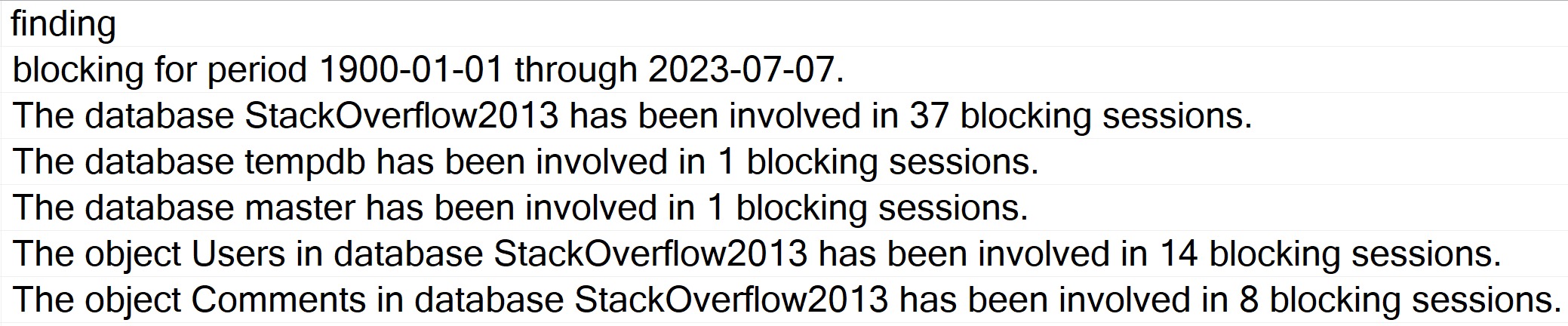
The findings results section used to only be sorted by the check ID. Through the magic of window functions and aggregates, I’m now also sorting the results by which database/objects/whatever had the highest amount of blocking.
It should look something like this:
get to it
The code that handles this is pretty cool, and it’s not something I’ve seen many people do. It’s an aggregate inside of a windowing function, that does something like this:
SELECT TOP (10)
    p.OwnerUserId,
    n = ROW_NUMBER() OVER
        (
            ORDER BY
                COUNT_BIG(*) DESC
        )
FROM dbo.Posts AS p
GROUP BY
    p.OwnerUserId;
In a normal query, you could just sort by COUNT_BIG(*) DESC to order results, but when you’re putting results into a table to return later, the sorting won’t be preserved.
Assigning a row number to the aggregates means I can sort by check number, and then the row number within each check, to put the worst offenders up at the top.
Thanks for reading!
Going Further
If this is the kind of SQL Server stuff you love learning about, you’ll love my training. Blog readers get 25% off the Everything Bundle — over 100 hours of performance tuning content. Need hands-on help? I offer consulting engagements from targeted investigations to ongoing retainers. Want a quick sanity check before committing to a full engagement? Schedule a call — no commitment required.