No THREADPOOL Waits In Query Store

Yep Nope


Video Summary

In this video, I delve into the intricacies of how thread pool weights do not appear in QueryStore, despite generating significant thread pool waits during execution. I walk through a detailed experiment using my custom `ThreadPooler` stored procedure and StackOverflow 2013 database on SQL Server 2019, running 150 concurrent queries to simulate high thread demand. Despite hitting the thread pool limits and experiencing contention, QueryStore fails to capture any thread pool weights, leading me to question the current implementation and documentation of the query store waitstats view. This video is a deep dive for my dear friend William at Microsoft, aimed at clarifying these details and potentially improving the user experience in the query store GUI.

Full Transcript

Erik Darling here with Erik Darling Data. Recently voted the consultant most likely to die in front of their computer by BearGut Magazine. So I’d like to thank the editors, the writers, and all the voters out there, all the BearGut heads out there who voted for me. I think what really pushed me over the edge was when I shared my Windows Update notifications where it said, we notice that you use your computer mostly between 5am and 9pm, so we’re not going to restart your computer. I think that’s what really sealed the deal for me, but, you know, just want to make sure, make sure they show everyone at BearGut Magazine my appreciation there. Love you guys and gals, all you fine people at BearGut Magazine. So, this video is for my dear friend William at Microsoft, and it is to hopefully clarify some details around how I think that thread pool weights do not actually end up in QueryStore. So, to kind of step through a couple things up front, this is QueryStore. I have recently purged all QueryStore data from here because I don’t, I want to start fresh. I had a little bit of a difficult time clearing that out. There were some really interesting things that I had created in there. That’s okay.

What was I going to do? Take a backup? Okay. So, that’s that. So, this is QueryStore. It’s on. The capture mode is on. The wait stats capture mode is on. Everything is good to go here. That’s StackOverflow 2013. The store procedure that I’m using to generate thread pool is a store procedure called ThreadPooler right here, and the query in it is written in kind of a funny, silly way in order to do a very specific thing. And that very specific thing is run at, come on, buddy, run at DOP8 and reserve eight threads per concurrent parallel branch, which brings us to 24 threads, because the best way to generate thread pool is to generate parallel queries and run a whole bunch of them at the same time.

In order to run a whole bunch of them at the same time, we’re going to be using Osterest, but we’ll talk about that in a minute. So, this is a freshly restarted SQL Server. I just restarted it before recording this because I want wait stats to be buck naked.

We have nine thread pool waits on the server. We have nine thread pool waits because the thread pool is an artifact of both of creating threads, which happens during SQL Server’s lifetime. It will create and trim the family of threads that run queries on here. So, when you create threads, you hit thread pool waits.

Not for a very long time. You can see the max wait time is one millisecond. And, you know, that’s pretty good. That’s pretty fast. Fast threads. It must be using lightweight pooling or something. It must have priority boost turned on to get threads created that quickly.

But we have these thread pool waits on the servers. We have a few of them. Not a lot, though. So, fine. In sys.queryStoreWeightStats, this should be completely empty because I haven’t run anything. WeightCategory2 is, of course, the one that would be responsible for tracking thread pool waits.

So, I have SPPressureDetector, my shameless plug for my store procedure here, which is going to tell us some information about CPU pressure on the server. I’m using the remote DAC so that I don’t get held up by the test that causes thread pool waits because there’s nothing more useless than sitting there waiting for DMV queries to finish.

So, my server is allowed… Oops, I didn’t do that very well. I didn’t frame that up very well. My server is allowed to use up to 744 threads. We have currently used 39 threads, and we have 665 threads available.

Nearly 666 threads available, which would be devil worship, which is the only way that consultants actually get business. So, I don’t know.

I don’t know what the correlation there is. Maybe I should worry about business if I only have 665 threads. But, yeah. So, this is the current setup for this. The way I’m going to be testing things is running my thread pooler procedure against the StackOverflow 2013 database.

Again, making sure that context is ultra clear here. This is the server we’re hitting, SQL Server 2019. And I’m going to be running 150 threads over 20 rounds of executions. So, 150 concurrent queries of thread pooler.

I was running this up higher before, but I was getting a lot of timeouts from Ostrust. And I don’t want timeouts. I want queries that hit thread pool, but complete.

I don’t want there to be failed executions getting into the mix and mucking things up. Because, even though I know Query Store tracks failed executions, this is a failure before anything even happens. So, there’s no way the Query Store would be able to say, oh, you were going to run that query, but you couldn’t get a thread.

So, there’s no way to put that together. So, I don’t want failures. I want contention, but not like timeout, disaster, the usual kind of thread pool stuff that I demo. So, let’s kick that off and get that working.

And we’re immediately going to see SP Pressure Detector telling us about thread pool weights. All right. So, you can see that we are the 704 threads that we are allowed to use. We have used 755 now.

We’re at negative 59. So, that’s a bad time. And we have 17 requests waiting for threads. And that’s going to be just about 17 down. Oh, wow. More than that. So, in the span of time between this query running and this query running, 10 extra threads got on a line waiting for CPU.

That’s fun. Or 10 extra tasks started waiting for the thread, rather. If we run this a couple few times during the course of things going, we’re going to see more thread pool weights here and there.

So, we’re going to see some. We’re going to see them come and go. And we’re going to see, if we look at Ostrass first, we’re not going to see anything timing out. When Ostrass has queries time out, it gets very, very loud about it.

There’s all sorts of messages and flooding and going on in there. But if we run this, you know, and we find some stuff with this thread pool, come on, baby, give me something. Anything.

One row, one row. Screw you. Make me look bad in front of my friend William. What we’re going to see over here is something kind of interesting. You know, there’s a bunch of queries executing at DOP8 that have 24 worker threads. But then as we get down a little bit lower, we’ll see SQL Server starting to force some queries to use lower DOPs because we’re hitting these thread pool weights.

Right? So, we’ll see DOP7, DOP3, DOP1, and then, you know, whatever. So, we can tell that we’re hitting thread pool. But we can also tell that queries are at least finishing.

Right? Like, queries are getting through and eventually completing. So, there’s that. Great. Wonderful everything. We’re going to see as this thing starts executing that weights are going to, or thread pool weights are going to go up on the server.

Not constantly because we’re not constantly hitting thread pool anymore. You know, it was sort of inconsistent in the pressure detector stuff where, like, some queries were and some queries weren’t. But, you know, we see that from the, I think, nine waiting tasks that we had before, we’re up to 616 now.

So, we added a whole bunch of them in. You know, if we run this, we might see some more. I don’t know. I forget. So, whatever.

This thing has been dragging on long enough. Oh, there’s a whole bunch more. Woo-hoo! We hit more thread pool. We did our job. Let’s come back over here and look. Okay. Maybe it hasn’t quite made it to that DMV yet. Consistency is an eventual thing, I suppose.

So, let’s kill that. And let’s poke around a little bit. We’ll see thread pool weights down here. We don’t see any weights in here.

We don’t see any thread pool weights in query store. And if we run here, we’re going to see, you know, queries and stuff running. We see all sorts of other weights get populated, but nothing for that weight category of thread pool. So, that’s a bummer.

And, you know, we can probably see if we poke through query store. Maybe. I mean, I hope we do anyway. If we go look at query store. And we go look at top resource consuming queries.

And let’s view those. And let’s see here. There’s our top resource consuming query. And that’s from our stored procedure thread pooler, which had 293 executions. All right.

So, it did a lot of work. Did a lot of stuff. Executed a whole bunch of times. We did a bunch of thread pool. But we have no thread pool weights in here. All right. If you look at wait time, query ID 37, you know, there’s no wait time. So, I don’t know.

Whatever. I’m exhausted. Give me a break. If the query store GUI worked better, that would be probably more illustrative that we didn’t have any of that in there. So, I don’t know.

Maybe that’s a separate issue that I’ll open up. Fix the query store GUI. Get some UX in the query store GUI. Something like that. User experience points. Tell a user story.

Great user story with the GUI. Anyway. William. I hope you enjoyed this video. I hope it helps you in your quest to fix the documentation in the query store waitstats view. Anyone else watching this?

You shouldn’t have watched it. This video was only for my best friend William at Microsoft. So, you’re a disgusting individual. And I’ve lost all respect for you. All the non-Williams out there. How dare you intrude on this special time that we had together.

Anyway. It’s Friday. So are you. I’m going to leave now.

Going Further


If this is the kind of SQL Server stuff you love learning about, you’ll love my training. Blog readers get 25% off the Everything Bundle — over 100 hours of performance tuning content. Need hands-on help? I offer consulting engagements from targeted investigations to ongoing retainers. Want a quick sanity check before committing to a full engagement? Schedule a call — no commitment required.

Wait Stats SQL Server’s Query Store Doesn’t Actually Track

Miss Leading


There are some oddities in the documentation for query store wait stats.

One is that RESOURCE_SEMAPHORE_QUERY_COMPILE is listed as a collected wait, but with an asterisk that says it’s not actually collected. I’ve tested workloads that generate lots of that wait, and just like the docs say, it doesn’t end up there.

Of course, since I added wait stats recently to sp_QuickieStore, I wanted to make sure other waits that I care about actually show up in there.

THREADPOOL Doesn’t


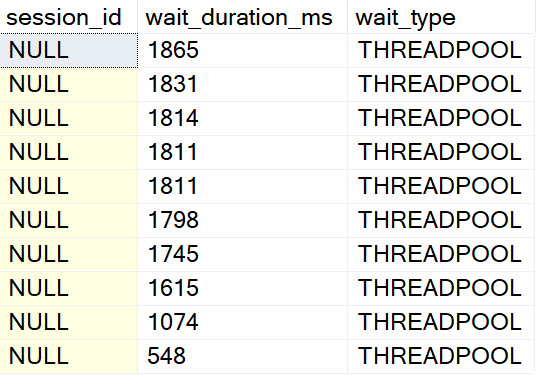
I ran a workload where 747 queries waited on THREADPOOL before running and completing.

THREADPOOL
el threado

But nothing shows up in query store wait stats. The stored procedure I ran to create the THREADPOOL waits shows up, and it has other waits — CPU and stuff — but nothing about workers. My guess why is because that’s a pre-compilation wait. When they pile up, there’s no execution context.

They’re quite not-figuratively spidless.

THREADPOOL
lezz than zero

So, uh, I had to pull filtering for that wait out.

RESOURCE_SEMAPHORE Does


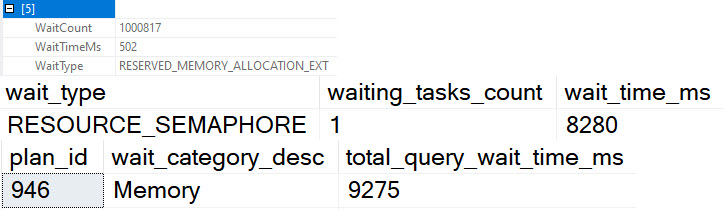
Running a similar workload, I can see where queries start to rack up RESOURCE_SEMAPHORE waits. At least, I’m pretty sure they do.

See, those waits are buried in a bunch of memory waits that are usually insignificant — and hell, on well-functioning server so is RESOURCE_SEMAPHORE — but I see the time spent on that, plus some other memory related waits.

RESOURCE_SEMAPHORE
carry the um

And that’s probably good enough for hand grenades.

Thanks for reading!

Going Further


If this is the kind of SQL Server stuff you love learning about, you’ll love my training. Blog readers get 25% off the Everything Bundle — over 100 hours of performance tuning content. Need hands-on help? I offer consulting engagements from targeted investigations to ongoing retainers. Want a quick sanity check before committing to a full engagement? Schedule a call — no commitment required.
Updates to sp_QuickieStore, sp_PressureDetector, and sp_HumanEvents

A Thing Of Things


sp_QuickieStore:

  • Added the ability to search query store wait stats for queries that generated a large amount of a specific wait category.
  • Noticed a couple TOP queries were missing DESC for the ordering
  • Increased length of all_plan_ids column to max after someone said they hit a truncation error with a length of 1000
  • Updated documentation to reflect more specific version support: 2016 SP2+, SQL Server 2017 CU3+, 2019+, and Probably Azure

sp_PressureDetector:

  • Added a parameter to skip getting execution plans when server is really hammered
  • Added database name to memory query
  • Added a missing isolation level set
  • Increased decimal length for servers with larger amounts of memory

sp_HumanEvents:

  • Updated procedure to format queries to suit current formatting memes I enjoy
  • Organized the procedure a little bit better, putting all the declared variables and temp table creation at the beginning
  • Fixed some inevitable bugs that come with formatting and reorganizing really long stored procedures
  • Cleaned up error handling
  • Added a check for the signed query hash action; I found the procedure failed on some earlier builds of 2014 and 2012

So uh, go get those. Use’em. Have fun.

Do a SQL.

Thanks for reading!

Going Further


If this is the kind of SQL Server stuff you love learning about, you’ll love my training. Blog readers get 25% off the Everything Bundle — over 100 hours of performance tuning content. Need hands-on help? I offer consulting engagements from targeted investigations to ongoing retainers. Want a quick sanity check before committing to a full engagement? Schedule a call — no commitment required.
Empty Strings Aren’t Better Than NULLs

Scene


Prove me wrong.

CHAR vs VARCHAR Memory Grants In SQL Server Queries

Strings Were A Mistake


While working with a client recently, we found that someone, at some point in time, probably during the original migration from Access, had chosen CHAR columns rather than VARCHAR columns.

Okay, fine. How bad could it be?

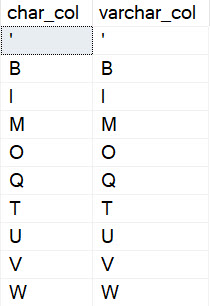
Bad enough that… A whole bunch of columns that only had a single character in them were stored in CHAR(1000) columns.

Which was wildly inflating memory grants, and causing all sorts of nasty issues.

Table create script it at the end of the post!

Del Granto


To show how you much different grants are for char vs varchar, I need to give you a little background on sort memory grant estimates.

When the optimizer estimates how much memory it’ll need, the calculation is based on the number and width of the rows that will have to get sorted.

For variable length string columns, it estimates that half the number of bytes will be filled. So if you have a varchar(100) column it’ll estimate 50 bytes will be filled for every row, and for an nvarchar(100) column it’ll estimate that 100 bytes will be filled for every row, because unicode characters are stored as double-byte to account for accent marks, etc.

So, yes, identically sized varchar and nvarchar columns will have different memory grant requirements.

And yes, identically sized (n)char and (n)varchar columns will also have different memory grant requirements.

Granto Loco


Let’s take these two queries, and let memory grant feedback right-size the grants for these two queries:

DECLARE 
    @c char(1000);
SELECT
    @c = m.char_col
FROM dbo.murmury AS m
ORDER BY m.some_date DESC;

DECLARE 
    @v varchar(1000);
SELECT
    @v = m.varchar_col
FROM dbo.murmury AS m
ORDER BY m.some_date DESC;

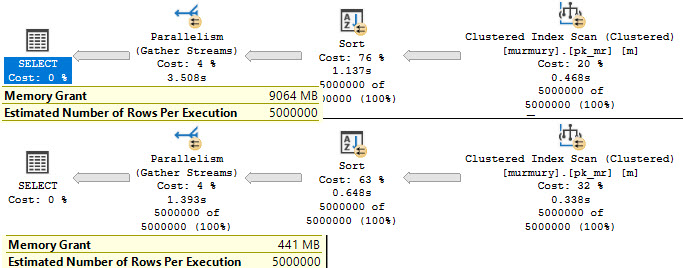
Here are the fully adjusted and stabilized grants:

SQL Server Query Plan
hangin’ tough

Around 9GB vs 441MB. All because those CHAR columns are padded out with 999 empty characters.

SQL Server Query Results
camp nightmare

So hey, if you need a reason to review schema for char column sanity, this just might be it.

Thanks for reading!

Going Further


If this is the kind of SQL Server stuff you love learning about, you’ll love my training. Blog readers get 25% off the Everything Bundle — over 100 hours of performance tuning content. Need hands-on help? I offer consulting engagements from targeted investigations to ongoing retainers. Want a quick sanity check before committing to a full engagement? Schedule a call — no commitment required.
Why Expressions Are Better Than Local Variables For Performance In SQL Server Queries

Often Enough


I see people writing stored procedures that use local variables either because they read that all functions in a where clause are dangerous, or because they need to perform a calculation on one of the parameters that get passed in.

In nearly all cases, you’re better off… not doing that.

Here are a couple examples of why.

Hard Yes


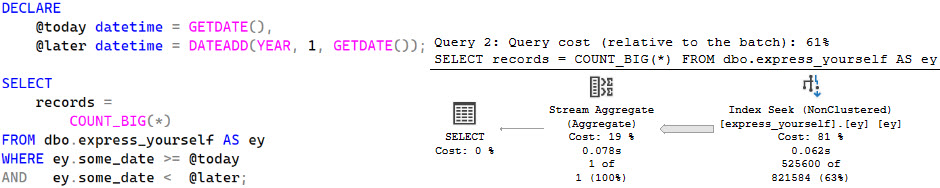
Passing in a function like GETDATE, and even passing it to another function like DATEADD, the optimizer can interpret them to their current values and make a pretty decent guess based on them.

SQL Server Query Plan
goo

This is a Good Enough™ guess.

Hard Pass


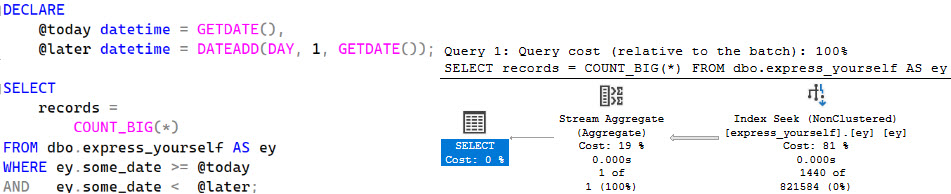
Once you assign that function to a value, everything gets awkward.

SQL Server Query Plan
bang bang

That’s a Pretty Bad™ guess, but not the end of the world. What’s bad is that the guess never changes even if you change the span of time.

Look what happens if we just add one day instead of one year.

SQL Server Query Plan
one day at a time

We get the exact same guess as before — 821,584 rows. Bummer.

Storied Tradition


It’s nearly the same thing in stored procedures. What I see more often is people there is people passing in one parameter for a start date, and then using a local variable to figure out an end date.

CREATE OR ALTER PROCEDURE dbo.dangit_bobby
(
    @start_date datetime
)
AS
BEGIN
SET NOCOUNT, XACT_ABORT ON;

DECLARE
    @later datetime = DATEADD(DAY, 1, GETDATE());

    SELECT
        records = 
            COUNT_BIG(*)
    FROM dbo.express_yourself AS ey
    WHERE ey.some_date >= @start_date
    AND   ey.some_date <  @later;

END;
GO

EXEC dbo.dangit_bobby 
    @start_date = '2021-05-19';
GO
SQL Server Query Plan
FAR OFF DUDE

Advanced Calculus


Let’s change how we use the parameter, and put it into some date math in the where clause instead.

CREATE OR ALTER PROCEDURE dbo.dangit_bobby
(
    @start_date datetime
)
AS
BEGIN
SET NOCOUNT, XACT_ABORT ON;

    SELECT
        records = 
            COUNT_BIG(*)
    FROM dbo.express_yourself AS ey
    WHERE ey.some_date >= @start_date
    AND   ey.some_date <  DATEADD(DAY, 1, @start_date);

END;
GO 
EXEC dbo.dangit_bobby 
    @start_date = '2021-05-19';
GO

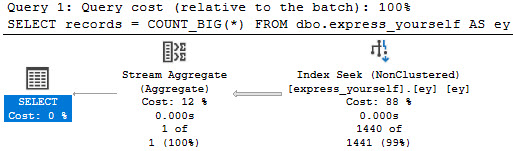
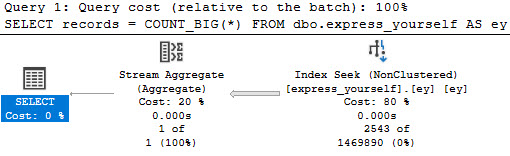
We get a Much Closer™ estimate. What a lovely day.

SQL Server Query Plan
go for both

Hardest Part


It’s often tempting to take shortcuts like this, especially if you need to reuse the same calculation multiple times.

Now, look, if you stare closely enough at these plans, you’ll notice that they all finish quickly enough. That’s because I have a small table with a wonderful index on the column I care about.

The point here is to show you how bad estimates can turn up even in ideal circumstances when you do things The Wrong Way™.

As long as you’re not wrapping columns in functions like this, you’re probably okay.

Thanks for reading!

Going Further


If this is the kind of SQL Server stuff you love learning about, you’ll love my training. Blog readers get 25% off the Everything Bundle — over 100 hours of performance tuning content. Need hands-on help? I offer consulting engagements from targeted investigations to ongoing retainers. Want a quick sanity check before committing to a full engagement? Schedule a call — no commitment required.

Inlining Financial Functions In SQL Server For Better Query Performance

Big Tuning


I work with a lot of clients who do things with money. Loads of money. I’m a very trustworthy person.

At just about every client site, I see a common set of financial functions being used to calculate various things. The code is all the same, too.

Some of it comes from published government guidelines, and some of it comes straight out of accounting 101 books.

The big problem is that all of these functions were written as scalar UDFs, and performance becomes dead.

Recently, one of my clients was nice enough to agree to let me publish my rewrites of their functions as inline table valued functions.

You can download them here.

License and Fair Warning


These functions are provided with no license whatsoever. You can take them and do whatever you want with them

The caveat here is that I take no responsibility for anything you do with them. I did not write any of the mathematical formulas in these functions, and I take no credit for any of the code for anything in this folder, other than rewriting the scalar UDFs as inline table valued functions. I was given permission to publish these by the people who wrote and/or incorporated the code originally.

They returned the same results as the scalar UDFs in local tests, so to that end the results are accurate. You will have to do your own local tests to make sure they work the same as whatever they’re replacing.

Aside from logical requirements, you also need to make sure they satisfy any legal or regulatory requirements for your industry. That sounds important, too.

The bottom line here is that you can’t sue me, so sayeth the law offices of Na Na Na Boo Boo.

You can download them here.

Contributing


If you find any issues with these functions, you have another version, or you want to add a function to the library, you can contribute over at the GitHub repo.

If you’d prefer to do so anonymously, you can email me.

Thanks for reading!

Going Further


If this is the kind of SQL Server stuff you love learning about, you’ll love my training. Blog readers get 25% off the Everything Bundle — over 100 hours of performance tuning content. Need hands-on help? I offer consulting engagements from targeted investigations to ongoing retainers. Want a quick sanity check before committing to a full engagement? Schedule a call — no commitment required.
Allow Memory Grant Percent In SQL Server Standard Edition

Voice Of Users


I recently opened a User Voice issue for this, and I’d appreciate if you’d vote for it (note: this link is dead now, long live the first party solution)

From the issue:

In 2016 SP1 we got many features handed down to Standard Edition, but Resource Governor was not one of them.

In Enterprise Edition, Resource Governor is frequently used to reduce the maximum memory grant percent down from 25. That prevents queries that you don’t have control over from totally trashing your server. Since memory grant feedback is not available in Standard Edition, users aren’t left with many options. Query hints are nice, but only if you can change the queries.

Max grant percent should be either settable in Standard Edition, or decoupled from Resource Governor and settable at the database or server level.

Furthers Day


Adding in a bit more editorializing than I thought was appropriate in the User Voice issue, this setting is irresponsibly high for most workloads. If you have Max Server Memory set to 100GB, do you really want queries being able to ask for 25GB of it?

Because, like, they can.

If you have control over the queries and indexes on a server, there are all sorts of potential things you can do to “fix” memory grants. Sometimes they come from bad estimates, other times they come from inflated string column sizes — think about that column you have called “State” that’s an nvarchar max — because the optimizer guesses that every value will be about half the size of the definition.

There are lots of reasons! So many reasons, in fact, that Microsoft has a performance feature called Memory Grant Feedback. The problem is that this feature is only available in Enterprise Edition, and not readily available to Row Mode queries until SQL Server 2019. In SQL Server 2017, you needed some column store/batch mode operations in your query for it to apply.

While there are hints that can be used to control memory grants at the query level, query hints can be hard to apply in some circumstances. Vendor code, ORMs, ad hoc heavy workloads, and more make the broad application of query hints impossible.

Having this as a setting outside of Resource Governor (or, heck, making Resource Governor available in Standard Edition), would be a huge benefit to what seems like a forgotten group of SQL Server customers.

Thanks for reading!

Going Further


If this is the kind of SQL Server stuff you love learning about, you’ll love my training. Blog readers get 25% off the Everything Bundle — over 100 hours of performance tuning content. Need hands-on help? I offer consulting engagements from targeted investigations to ongoing retainers. Want a quick sanity check before committing to a full engagement? Schedule a call — no commitment required.
Things SQL Server vNext Should Address: Optional Parameters

Lamp


This issue is one that could be linked to other times when the optimizer defers certain portions of optimization to later stages. It’s also something that could lead to complications, because the end result is multiple execution plans for the same query.

But it goes back to a couple basic approaches to query writing that I think people need to keep in mind: write single purpose queries, and things that make your job easier make the optimizer’s job harder.

A good example of a multi-purpose query is a merge statement. It’s like throwing SQL Server a knuckleball.

Fiji


Another example of a knuckleball is this knucklehead pattern:

SELECT 
    p.*
FROM dbo.Posts AS p
WHERE (p.OwnerUserId   = @OwnerUserId OR @OwnerUserId IS NULL)
AND   (p.CreationDate >= @CreationDate OR @CreationDate IS NULL);

SELECT 
    p.*
FROM dbo.Posts AS p
WHERE (p.OwnerUserId   = ISNULL(@OwnerUserId, p.OwnerUserId))
AND   (p.CreationDate >= ISNULL(@CreationDate, p.CreationDate));
GO 

SELECT 
    p.*
FROM dbo.Posts AS p
WHERE (p.OwnerUserId   = COALESCE(@OwnerUserId, p.OwnerUserId))
AND   (p.CreationDate >= COALESCE(@CreationDate, p.CreationDate))
ORDER BY p.Score DESC;
GO

I hate seeing this, because I know how many bad things can happen as a result of this.

One example I love is creating these two indexes and running the first query up there.

CREATE INDEX onesie ON dbo.Posts(OwnerUserId, Score, CreationDate);
CREATE INDEX threesie ON dbo.Posts(ParentId, OwnerUserId);

The optimizer chooses the wrong index — the one that starts with ParentId — even though the query is clearly looking for a potential equality predicate on OwnerUserId.

SQL Server Query Plan
180

Deferential


It would be nice if the optimizer did more to sniff out NULL values here to come up with more stable plans for the non-NULL values, essentially doing the job that dynamic SQL does by only adding predicates to the where clause when they’re not NULL.

It doesn’t have to look further at actual values on compilation, because that’s essentially a RECOMPILE hint on every query.

Thanks for reading!

Going Further


If this is the kind of SQL Server stuff you love learning about, you’ll love my training. Blog readers get 25% off the Everything Bundle — over 100 hours of performance tuning content. Need hands-on help? I offer consulting engagements from targeted investigations to ongoing retainers. Want a quick sanity check before committing to a full engagement? Schedule a call — no commitment required.
Things SQL Server vNext Should Address: Lookup Placement

All Looked Up


Lookups are interesting. On the one hand, I think the optimizer should be less biased against them, and on the other hand they can cause a lot of issues.

They’re probably the most common issue in queries that suffer from parameter sniffing that I see, though far from the only unfortunate condition.

Under the read committed isolation level, lookups can cause readers to block writers, and even cause deadlocks between readers and writers.

This isn’t something that happens under optimistic isolation levels, which may or may not have something to do with my earlier suggestion to make new databases use RCSI by default and work off the local version store associated with accelerated database recovery.

Ahem.

Leafy Greens


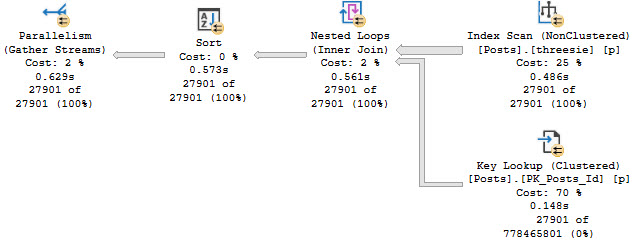
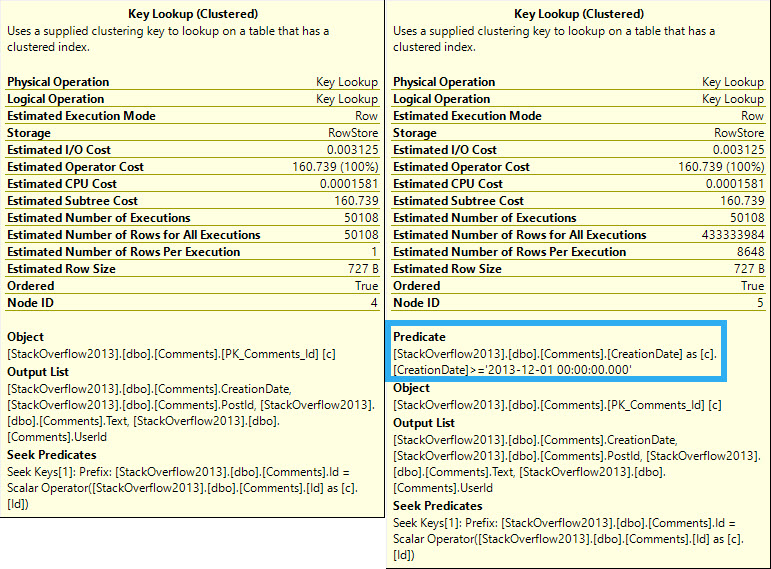
One thing that would make lookups less aggravating would be giving the optimizer the ability to move them around.

But that really only works depending on what the lookup is doing. For example, some Lookups just grab output columns, and some evaluate predicates:

SQL Server Query Plan
all one word

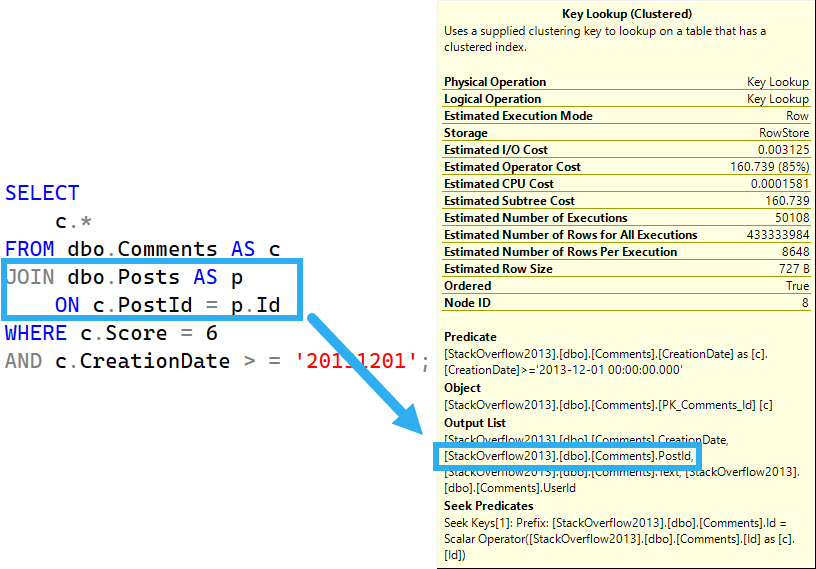
Further complicating things is if one of the columns being output is used in a join.

SQL Server Query Plan
bad movie

Outside Chance


There are likely other circumstances where decoupling the lookup and moving the join to another part of the plan would be impossible or maybe even make things worse. It might even get really weird when dealing with a bunch of left joins, but that’s the sort of thing the optimizer should be allowed to explore during, you know, optimization.

Thanks for reading!

Going Further


If this is the kind of SQL Server stuff you love learning about, you’ll love my training. Blog readers get 25% off the Everything Bundle — over 100 hours of performance tuning content. Need hands-on help? I offer consulting engagements from targeted investigations to ongoing retainers. Want a quick sanity check before committing to a full engagement? Schedule a call — no commitment required.