I know, I said we’d talk about indexes, and heaps are basically the opposite of indexes.
Even if you have a heap with a nonclustered primary key, or nonclustered indexes hanging around, the base table is still a heap.
Why? It’s all about that clustered index.
Do you always need a clustered index? Sometimes not. But if you’re running an OLTP workload, you probably do.
It’s not that heaps can’t be useful, it’s just that their best use-case is still loading the big datas.
Downsides Of Heaps
Heaps have a couple issues that are going to sound a lot like index fragmentation. In fact, they’re a lot like index fragmentation.
Forwarded fetches from updates
Empty pages from deletes
Forwarded Fetches
Forwarded fetches are a lot like logical fragmentation, which is when pages are out of order. Instead of having clustered index keys to follow, we have pointers from where the row used to be to where it got moved to.
This happens because updates change a value that makes a row not fit on a page anymore.
Heaps compound the issue a little bit though, because you can’t seek into a heap to avoid forwarded fetches (though you can seek into any index created on top of a heap). You can seek into a clustered index to avoid logical fragmentation.
Empty Space
Empty space from deletes goes a little bit further, too. You can end up with entire pages being empty, if queries that delete data don’t successfully escalate locks to the table level. Worse, those empty pages get read when the heap is scanned.
Sure, clustered indexes can end up with a bunch of empty space on pages, but when pages are totally emptied out they will get deallocated. Heaps don’t do that without a table level lock during the delete.
The thing is that both of these only happen to the heap itself. If you’ve got nonclustered indexes on the heap and queries mostly use those, you may not notice either of these problems. Perhaps a little bit if you do bookmark lookups.
When They Might Matter
This is largely a size thing. The bigger your heaps are, the more pronounced these problems can be.
It also depends a bit on what heap tables get used for. Or more importantly, who uses them.
If they’re staging tables that end users don’t touch, fixing them probably won’t solve a big problem for you outside of ETL.
To fix them, you can rebuild the heap, or create a clustered index. In either case, be very careful if you’ve got nonclustered indexes on the table, because they’ll need to all get rebuilt to either fix the RIDs in a heap, or add the clustered index keys.
Your next question is: Erik, how do I pick a clustered index? We’ll talk about that tomorrow!
Thanks for reading!
Going Further
If this is the kind of SQL Server stuff you love learning about, you’ll love my training. Blog readers get 25% off the Everything Bundle — over 100 hours of performance tuning content. Need hands-on help? I offer consulting engagements from targeted investigations to ongoing retainers. Want a quick sanity check before committing to a full engagement? Schedule a call — no commitment required.
We don’t need to add a ton of columns to our query to have index usage change, but we do need to go back in time a little bit.
Here’s our query now, with just a one day difference in the where clause.
SELECT p.CreationDate,
       COUNT_BIG(*) AS records
FROM dbo.Posts AS p
WHERE p.CreationDate >= '20131015'
AND   p.OwnerUserId = 22656
GROUP BY p.CreationDate;


SELECT p.CreationDate,
       COUNT_BIG(*) AS records
FROM dbo.Posts AS p
WHERE p.CreationDate >= '20131016'
AND   p.OwnerUserId = 22656
GROUP BY p.CreationDate;
Not quite Halloween, but I’ll take the spooky factor.
The other difference is that now we’ve got the OwnerUserId column in there, which isn’t in our nonclustered index.
It’s in the where clause, not the select list, but if we added it there it would have a similar effect on the query. Either way, we have to do something with this new column, and we have to get it from somewhere.
CREATE INDEX CreationDate ON dbo.Posts(CreationDate);
Things Are Looking Up
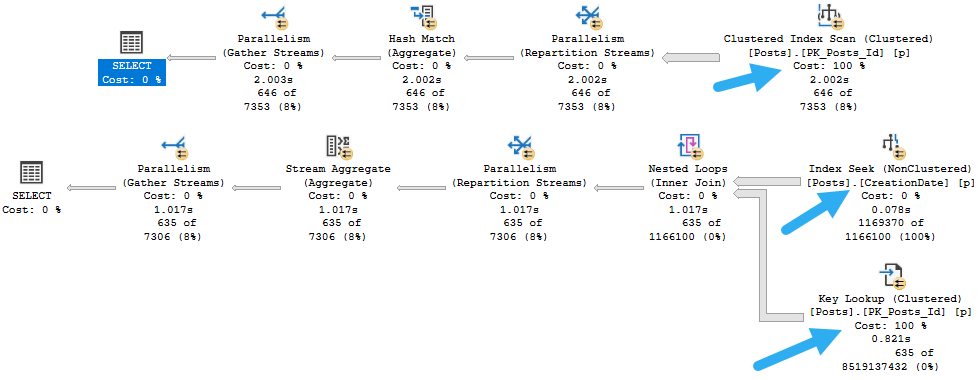
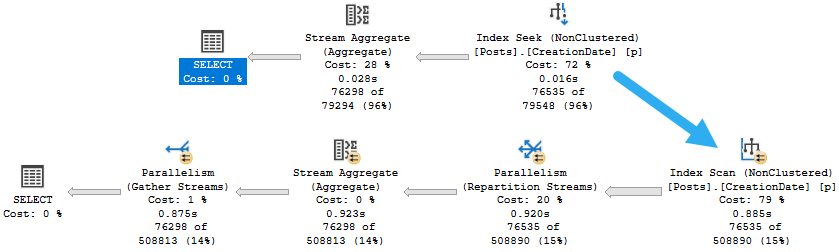
The query plans for these will look a little bit different.
what’s it for
If you’re not familiar with what just happened here, a Key Lookup is a trick the optimizer has up its sleeve. It uses two indexes from the same table to satisfy one query.
We find rows in our nonclustered index that qualify for the filter on CreationDate. That’s a smart start!
Then we join the nonclustered index to the clustered index to find any columns we might need. Remember the clustered index has all the table columns in it.
Stuff like this is made possible by nonclustered indexes inheriting clustered index key columns. Crazy, right?
The Point At This Point
There are many internal details to explore around Key Lookups. There are even some interesting things about how clustered index keys get stored in nonclustered indexes.
What you need to know about Lookups right now is what they are (which we talked about), and that they represent a choice the optimizer has when it comes to index usage.
If you create a narrow index, say one that satisfies some part of the query like the join or where clause, but doesn’t fully contain all of the columns referenced in your query, it may not get used reliably. The usage is decided based on cardinality estimates. The more rows SQL Server expects, the less likely it is that your narrow index will get used.
For example, it may only get used when the value for CreationDate is estimated to return a small-ish number of rows. Parameterization and plan re-use can make this even more confusing.
Next, we’ll look at how we can encourage the optimizer to choose narrow indexes, and the problems we might run into.
Thanks for reading!
Going Further
If this is the kind of SQL Server stuff you love learning about, you’ll love my training. Blog readers get 25% off the Everything Bundle — over 100 hours of performance tuning content. Need hands-on help? I offer consulting engagements from targeted investigations to ongoing retainers. Want a quick sanity check before committing to a full engagement? Schedule a call — no commitment required.
Yesterday we created an index, and things went pretty well. Good for us. By next week we’ll have six pack abs.
Today we’re going to look at things that I see happen pretty often in queries that mess with effciency.
If one were to sit and think carefully about the way B-Tree indexes are implemented, where key columns define order, one may see these problems coming a mile away.
Then again, one might expect a full formed datababby system to be able to figure some of these things out and use indexes appropriately anyway.
General Anti-Patterns
I’ve posted this on here a number of times, but here it goes again.
Things that keep SQL Server from being able to seek:
Function(Column) = …
Column + Column = …
Column + Value = …
Value + Column = …
Column = @Value or @Value IS NULL
Column LIKE ‘%…’
Some implicit conversions (data type mismatches)
Seeks aren’t always necessary, or even desirable, and likewise scans aren’t always bad or undesirable. But if we’re going to give our queries the best chance of running well, our job is most often to give the optimizer every opportunity to make the right decisions. Being the optimizer is hard enough without us grabbing it by the nose and poking it in the eyes.
To fix code, or make code that looks like that tolerable to The Cool DBA Kids™, there are some options like:
Computed columns
Dynamic SQL
Rewrites
Different options work well in different scenarios, of course. And since we’re here, I might as well foreshadow a future post: These patterns are most harmful when applied to the leading key column of an index. When they’re residual predicates that follow seek predicates, they generally make less of a difference. But we’re not quite there yet.
The general idea, though, is that as soon as we write queries in a way that obscure column data, or introduce uncertainty about what we’re searching for, the optimizer has a more difficult time of things.
Do It Again
Let’s compare a couple different ways of writing yesterday’s query. One good, one bad (in that order).
SELECT p.CreationDate,
       COUNT_BIG(*) AS records
FROM dbo.Posts AS p
WHERE p.CreationDate >= '20131225'
GROUP BY p.CreationDate;

SELECT p.CreationDate,
       COUNT_BIG(*) AS records
FROM dbo.Posts AS p
WHERE YEAR(p.CreationDate) = 2013
AND   MONTH(p.CreationDate) = 12
AND   DAY(p.CreationDate) >= 25
GROUP BY p.CreationDate;
The mistake people often make here is that they think these presentation layer functions have some relational meaning. They don’t.
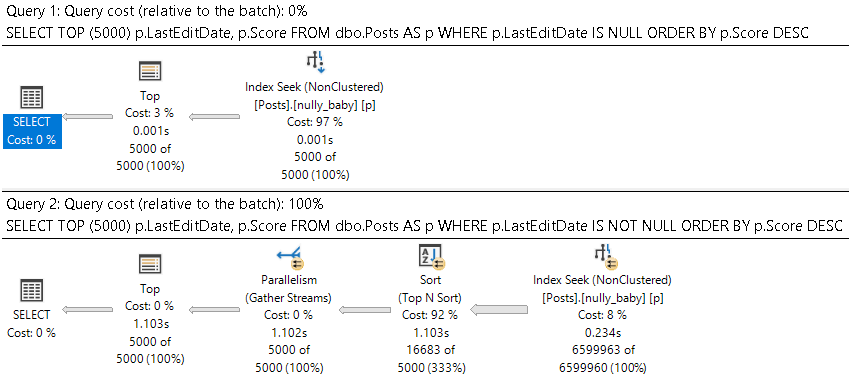
They’re presentation layer functions. Let’s see those execution plans. Maybe then you’ll believe me.
horse and carriage
Things are not so hot when we pile a Mess Of Functions™ into the where clause, are they?
I mean, our CPUs are hot, but that’s generally not what we’re after.
The Use Of Indexes
We could still use our index. Many people will talk about functions preventing the use of indexes, but more precisely we just can’t seek into them.
But you know what can prevent the use of nonclustered indexes? Long select lists.
Next time, we’ll look at that.
Thanks for reading!
Going Further
If this is the kind of SQL Server stuff you love learning about, you’ll love my training. Blog readers get 25% off the Everything Bundle — over 100 hours of performance tuning content. Need hands-on help? I offer consulting engagements from targeted investigations to ongoing retainers. Want a quick sanity check before committing to a full engagement? Schedule a call — no commitment required.
In this video, I delved into a detailed analysis of query performance and optimization in SQL Server, specifically comparing execution plans between compatibility levels 140 and 150. The primary focus was on understanding how row mode operations behave differently under these settings. As I ran the queries with varying parameters, I noticed significant differences in execution time and memory usage. Compatibility level 140 maintained a relatively quick execution, while level 150, despite using batch mode for certain operators, experienced a much slower sort operation due to single-threaded processing. This led me to explore wait statistics and memory grants more closely, highlighting the limitations of these tools in diagnosing performance issues under different execution modes.
Full Transcript
Thank you.
Welcome. Welcome, welcome, welcome. All you lovely people out there. How is everyone doing?
there are people here so you better answer me of course people started disappearing when I came on screen I guess they were disappointed I guess they were disappointed I guess I wasn’t good looking enough when I showed up I’ll have to go try a face mask or something next time throw that on on camera if you guys can hear me through this maybe this will improve if anyone out there has a Bane fetish maybe I can work with you on that no yeah Steve you were born on a pair of skis or something I’m not going to do the Bane voice that’s where things cut off I don’t do impressions I’m not good at impressions never have been you’re at a ski condo now how does a guy who runs a free free message board end up at a ski condo gotta figure that one out I’m gonna start a free message board wife is successful well she’s gotta be supporting a bum like you lazing about in Hawaiian shirts all day do I have any update to my plans on smoking cigarettes in a French graveyard no just not soon enough not soon enough not soon enough there’s no such thing as soon enough when it comes to that is there every every second you wait is just too long it’s too long sooner the better though still trying to get that all figured out suppose I could call an immigration lawyer right still like look here’s what I do here’s what I want to do here’s why I can only do this in France because you’re the only place that has the proper brand of cigarettes and French graveyards and all I want to do is is work from home not bother anybody and contribute a lot of money to local bars and restaurants and and tobacco shops that’s it I will be an ideal French citizen I mean I’ll be quiet my kids not so much I’ll be quiet but I think I think that I think I would like aside from like being probably like mentally incapable of learning French I would I would be an ideal French citizen whole travel ban thing might have yeah you know that’s a little that’s a little unfortunate but you know hopefully a small travel ban now will result in less of a travel ban in the future or at least like let me just get there and then ban travel let me get there and then travel screw it I’ll figure out I’ll figure out how to SQL Server in French I’m gonna you know what that’s how you know what that’s how I’ll learn French that’s how I’ll learn French I’m gonna learn it from SQL Server error messages so in SQL Server there’s a view right we can do oops from sys.messages and it’s oops I’m gonna start off hitting the right button it’s usually a good good idea and if we look in sys.messages we’ll see all sorts of I mean there’s all sorts of text over here from the messages that you can get from SQL Server right so what’s does anyone know the language ID for French offhand I’m fine go look it up go figure out SQL Server language ID French 1036 ooh la la as the French say so let’s see where oops Steve can you please fix SQL prompt how would I have a with there where language ID equals 1036 run this let’s get oh this is how I’m gonna learn French check this out I have all of the SQL Server error messages in French now you need text to speech I do I do I need text to speech and speech to text because I find that one of the biggest one of the biggest hurdles I have to writing is typos and and like I’m like I think I spend more time going back and fixing things than I do actually writing Duolingo my wife does my wife has been doing Duolingo in French with French specifically for like two years now and Duolingo is still giving her nonsense stuff like the like the men are rich and calm or like the men ate all the strawberries or like the cat is black it’s just like the same stuff like like like like just going like she’s regular with it too every single day and just like nothing like like no real advancement after a certain point so I’m gonna I’m gonna learn it from SQL Server error messages and I’m gonna blow her out of the water the prefix date okay so let’s see the colon prefix does not correspond with the table name okay so apparently what I need to do is figure out a way to have the language IDs alternate and what I’ll do is let’s see in six and let’s say order by I’m on message ID and let’s see well you know it’ll have to be message ID and then language ID will that work no because that’s going to order that first if you just order by message ID it should give us that let’s see if that works no no it didn’t work 102 is it did I miss something did I get something terribly wrong randomly would be funny right 1033 why is language ID 10 oh duh why didn’t anyone yell at me 1036 I had that all wrong there we go now we got it now we got it see I was off by one on that off by one let’s set the whole thing off all right now we got it this is great warning so advertisement anyone help me with the pronunciation there note the error in time and contact your system administrator no the error and the error in time and contract your system administrator well no you see numerically I was off by one but physically I was off on the keyboard by one by 80 I was off numerically by 80 on the keyboard I was off by one so I wanted 1036 and I ended up with what 2016 so I was off by one on the left hand that just screwed everything up screwed up everything but yeah this is great so I figured I have a plan now I have a plan column prefix does not match with a this is great yes I’m going to contact everybody query not allowed and wait for oh this is awesome this is truly awesome oh this is going to be fun I have a plan now I was was wondering how I was going to spend my summer vacation and now I know how I’m going to spend my summer vacation this is great so let’s talk about this query tuning thing now I’ve got a store procedure with two statements in it I’m going to run one at compat level 140 you should sort by language ID no if I sort by language ID then it’s going to be all the 103 3 first I want them to be interspersed like this ordering by message ID so that I can see the English version and then the French version now I don’t want both would screw it up because then I would have all the 103 3 first this way works message 101 message 102 message 103 if I have it by if I sort by language ID then 103 3 will sort first and then all the 103 6 will come later and I want them together so I can see the translation it’s a terrible idea Mr.
P. Shaw I’m ashamed of you ashamed of you no you’re not getting it it’s okay it’s okay all right so let’s look at this thing here right we got one query up here that’s going to run a compat level 140 one query here that’s going to run a compat level 150 and let’s go look at what happens when we execute these so just to be extra short let’s recompile and let’s get that going let’s run this run this all right we’re on we’re on to something else now go talk about order by some go talk about order with yourself I don’t want to talk about this anymore we’re on to the query tuning bits so let’s look at these two query plans they both end up pretty quick all right if you look at these this finishes very quickly and this finishes very quickly good good good we have a sort here and we have a sort here and everything is generally pretty dandy with these sorts but then if we go and run this and we look for a different number for the gap right we’re going to supply a different gap we’re going to go from 9 here to 0 here we’re going to keep post type id at 1 though and if we run this the row mode there’s going to be the compat level 140 is still going to be pretty quick but we’re going to have a real problem with compat level 150 you can see that this thing is kind of still over well that that executed it for a little while there right that gave us about 10 seconds total of execution time if we look at the query plans now this is going to be the row mode plan this is going to be the one that executed in compat level 140 and if we look at the sort it’s going to spill a little bit right now knowing what we know about row mode plans and knowing what we know about reading execution plans with these times in them this operator went for this operator ran for about 256 milliseconds and the next one ran for 1.253 milliseconds but it’s a little bit under a second because 253 there’s the 1.253 minus .256 is going to bring us to about a second because remember in row mode plans operator times are cumulative cumulative right so this is actually just running for about a second and the spill isn’t that bad spill level 2 one thread right about a little bit less than 10,000 pages ended up on disk so I’m totally okay with this this did actually pretty good considering this sort is going to continue to be in row mode because we were looking at it in compat level 140 compat level 140 doesn’t allow batch mode for rowstore compat level 150 does at least if you’re nice enough to pay for enterprise edition or smart enough to just use developer edition instead don’t tell the licensing police I said that but you know all the smart kids are doing that so now we have this section of the plan which is pretty okay but looking down here this is where things all of a sudden got bad boom boom boom boom boom boom boom boom boom boom wow I got spam thanks mr.
gamer 2018 let me update your nickname nerd what’s wrong with you jeez so this is since these two operators run in batch mode all right that’s a batch and even though the storage is row stored since this is compat level 150 we’re able to buy or we’re able to buy we’re able to batch run this in batch mode we’re able to run this in buy mode because we bought enterprise edition apparently we bought followers primes and views because we’re famous we want to be famous I wish I could get famous apparently mr.
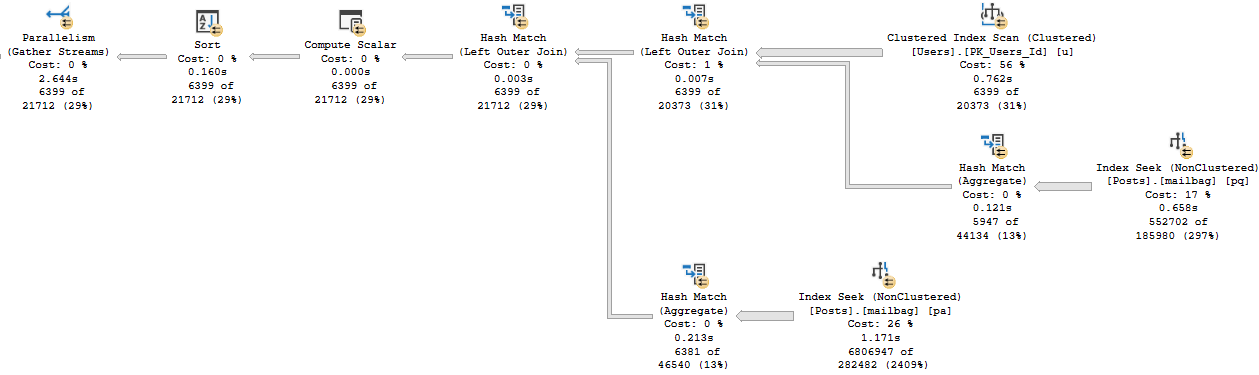
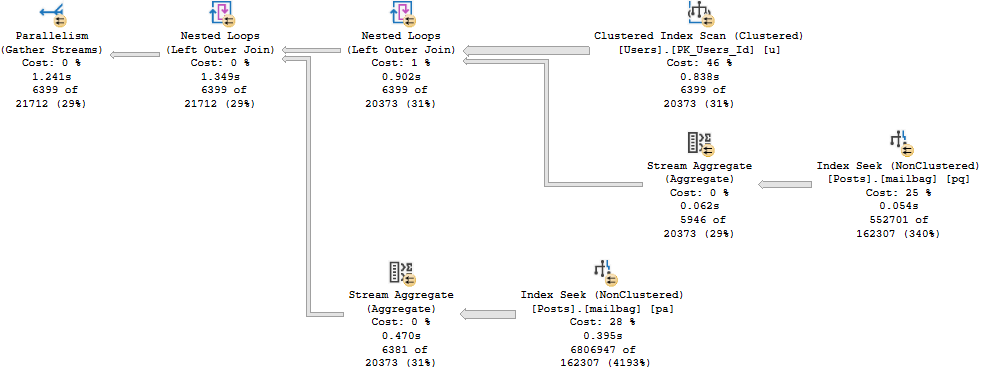
gamer left made fun of his nickname too much but now this sort since these two operators are in batch mode right we can see a batch mode here and we can see a batch mode tooltip you weren’t working with me there we can see a batch mode here since these two things run in batch mode this is interesting right since these two things run in batch mode the times are no longer cumulative the times are per operator so this sort really did run for nine almost let’s just call it 9.3 seconds this index seek was very fast but this sort was very slow now there’s a funny quirk with sorts in batch mode it doesn’t apply here it applies to parallel sorts in batch mode where the output from them is single threaded the batch can run multi threaded but the output from a batch mode sort is single threaded unless they’re the child operator of a window aggregate we don’t have one of those here we also have a serial plan here so it doesn’t matter everything’s on one thread anyway but this single threaded batch mode operator well it’s kind of funny isn’t that kind of funny spill level 8 and it only wrote 5142 pages to disk so if we go look at the memory for these two queries this one here got about a meg of memory that’s 1024 kb so we got about a meg of memory here and with that one meg of memory we still had to spill out a little bit but we spilled out about close to 10,000 pages but this happened pretty quickly this happened in about a second the batch mode plan gets just about five and a half well let’s just call it five and a half megs of memory that’s close to 5.4 and 5.4 is pretty close to 5.5 so we’ll just stick with this so we get about a 5.5 meg memory grant here we spill out but man this operator runs for nine seconds nine seconds and it spills about half as many pages now what a lot of people will do when they start trying to tune queries is they might care very much about wait stats newer versions of SQL server have wait stats and query plans which can sometimes be helpful you can sometimes find things in there for the query that runs quickly though well we have about 260 milliseconds of IO completion right that’s fine for a query that ran for a second we don’t know what we did for the other second but we know that we had 260 milliseconds of IO completion that’s the only weight that’s stored in this query plan for the query that runs in batch mode this gets even more curious if go to the properties over here and we look at weight stats well we only have 24 milliseconds of one weight reserved memory allocation ext this is not a terribly helpful weight see one of the real dark sides of some of the things that Microsoft adds is that they decide to filter things out for you they decide what you see and what you don’t see in some of these additions to help you troubleshoot problems the thing is having that knowing that this query waited 25 milliseconds on reserved memory allocation ext is not going to help us figure out what’s wrong with this query but neither would looking at what we actually waited on so let’s look at weight stats using my store procedure sp thunderous underscore look at that look at this thunderous underscore that thing that’ll buckle the these human events and we’ll use it to look at weight stats at least as I’m slowly learning the answer to every SQL question is it depends yes but the important thing for every SQL question is knowing what it depends on because if you know what it depends on then you can solve the problem yes the answer to most things it depends but the secret is knowing what it depends on knowing those dependencies is where one gains expertise depends on what you got it you got it that’s the bumper sticker isn’t it so we’re going to use sp underscore human events we’re going to look at weight stats for this one session right so we’re going to focus this one session and we’re going to get some information out of this now the thing with these is that if we look at the weight stats for this there’s going to be just nothing in there right we didn’t generate a single thing that made us get a weight even for like the other plan in 150 we don’t have really anything of interest in here right there’s nothing about weight stats in here blah blah blah blah blah blah not fun not fun at all doesn’t really help us so let’s use sp queries to finish again all right so that first one finishes quickly we’re probably not going to see much for interesting weights there and this other one is going to execute and this one’s actually going to take a little bit longer now right that was like 9 point something seconds before it’s at 10.1 seconds now so this sort actually did a little bit more work on this one actually no it did about the same it just took longer I hate you so using sp human events we get information about query weights at three different levels right and this is because I do a whole lot of work in my store procedure to give you this data at three different levels for the entire time that it ran we had for the total weights we had 999 weights on this mysterious sleep task weight and then at the database level well the only database that was active because this is just my personal computer this is not Stack Overflow production database this is just my personal laptop so there was only one database active that was Stack Overflow 2013 but that will report that we had the 999 weights and we waited 8.2 seconds on them now the other thing that I try to break down with human events is to give you weights by query and database so we can look at things overall by database then by query and database and we get of course some information here oops I did not hit the right button so we get the query text and the query plan of the queries that generated the weights we can see there what happened to it now since this is two statements in one store procedure we unfortunately get the query plan for the whole store procedure I’m working on something to make this better but I don’t quite have it yet so I’m working on something to focus this in it’s almost there but it needs a little bit more work so we at least see the query that caused the wait since this is a plan that comes from the plan cache we don’t get the actual plan if extended events were better if extended events were a tool that Microsoft cared about us using and using happily we would be able to chain things together we would be able to say hey extended events I want you to fire off this event if this other condition meets whatever I want so let’s say that for us we cared dearly dearly near and dear to our hearts we cared well I mean I care about learning French from error messages but let’s say that we cared nearly and dearly about queries that were waiting on sleep task weights what I would like to be able to tell extended events is hey if you find a query that waits on sleep task go grab the actual execution plan for it we can’t do that together we have not extended events that far into the future we cannot chain events together we cannot chain sequences of events together and that’s a pretty big gaping hole in extended events I’m not saying profiler is any better at you can go get that magically from profiler I’m just saying if Microsoft really wanted extended events to be helpful and usable they might want to invest some time in getting people to actually use it by making it more useful I don’t know just me I’m not angling for a job as the PM of extended events or anything that would be a nightmare because it’s all XML and I’ve seen it and it’s ugly but this is one of those things where if you build it they will come Microsoft built a really crappy it was not a field of dreams it was a field of not quite maybe it is a field of nightmares because of the amount of XML so I wish I could chain things together to get something different but unfortunately if I was going to do this and get wait stats and query plans I would have to collect actual plans all the time and that wouldn’t be a lot of fun because then I’d be collecting wait stats and actual execution plans rather than being able to chain things together and be able to only get actual plans after some other extended event condition got past the filter so I have the estimated plan for the query that this sort ran for a long time but you know this is probably a pretty good lesson in and of itself how can you track just one sort you can read the documentation because it is in there there is an object name filter in there you can track just one procedure that doesn’t apply to every single one because not every single one gives you the ability to track just one procedure you can only do that if you’re tracking queries for wait stats I think you can do something I forget exactly what I wrote the documentation so I wouldn’t have to remember all this stuff but if we look at the estimated plans and this is sort of a good lesson about estimated plans general cash plans in general if I told you I had a query running for 10 seconds it would be very very difficult to ascertain if each query ran for 5 seconds or a second and another query runs for like 10 seconds you can go to my website it’s a good place to start it’s all there so if you look at these two estimated plans estimated plans lie to you estimated plans hide a lot of things estimated plans hide a lot of things because they are only estimates this is what goes in the plan cash this is what goes in the query store this is I am collecting an actual post execution plan I cannot get the level of detail that you are after if you look at a few small differences here if we look at this sort in the estimated plan we have estimates for everything we have estimates for all of these things estimated execution mode operator cost IO cost you can read all those things if we go back and look at the actual plan for it oh I have two versions of that open we don’t need two we just need one if I go back and look at the actual plan for this we get actual values we get what the query encountered when it executed for a bunch of things right we get actuals for this we get actuals for this we get well this we get the actual execution mode we get actuals for many things one set of values in here that we don’t get actuals for are costs see all those costs there’s no actual cost that gets updated at the end there’s no actual cost addition to operators to query plans where SQL server says oh I was totally off about how long this would take I was totally off about these costs my bad I’ll go fix that we don’t get that kind of honesty from SQL server all we get is SQL server saying well I estimated that if I was wrong I was wrong my bad my bad I was merely speculating but what’s important here is that when you run into a situation either where SQL server was wrong or where you have been parameter sniffed you end up with stuff like we know that this sort ran for 10 seconds but the cost is merely 1% if we were looking at this query and saying geez costs are super important let’s try to figure out where SQL server spent all the time we would look at this completely innocent index seek and say wow you are half the cost how do I make an index seek faster bad idea don’t look at costs they are lies they are lies because costs are not about your server costing is a general algorithm that has no idea about your hardware how awesome your disks are the great gobs of memory you have any of that stuff costs have nothing to do with you costing is a general algorithm that has to apply well to everybody regardless of how good or bad their hardware is it just so happens that SQL server is general across a wide variety of hardware but they are still not specific to you that’s why there is no actual costs in an execution plan SQL server doesn’t go back and correct those costs nor does it attempt to cache plans with those costs we can see that the cost for all this stuff 86% in an index dear lord we need to make that seek faster what a terrible time what a terrible thing that we have to do what a terrible thing that we are tasked with and look at the actual plan how long did this thing that cost 85% run for 0.001 milliseconds how much did this thing that cost 55% run for 0.002 milliseconds how long did this thing that cost 2% run for 1.5 seconds it gets worse down here where this thing that cost 1% runs for 9.9 seconds SQL server SQL server I wonder if all of the data in Azure if they’ll be using machine learning to correct cost estimates no because the cost estimates still have to work across a wide variety of Azure machines too I mean Azure is not one size fits all in Azure you can get a server with less than one core I think you get a hyper threaded thread in that case but you can get an Azure server with less than one core and the costing would still have to respect that you would only be able to get a serial plan for that because SQL server will say we have half a core probably round up and say we have one core probably not because even if they did that for the current gen of Azure machines think about in five years or 10 years or even in one year what different Azure machines we would have what kind of hardware might be behind them you know you start adding in like all sorts of like weird cool new features and you start adding in stuff like persistent memory and all of a sudden what do we get much much more difficult to figure out what something would cost and all that coyote McD says why do the percentages add up to more than 100% in that particular plan because SSMS is broken because costing is broken everything is broken the world trembles beneath us and we have no idea what holds it up we have no idea so yeah we have we have this thing we have this thing and we’re not really sure what’s going on but what I want to show you here is this is happening in batch mode and this is going poorly in batch mode so in the interest of full disclosure SQL server 2019 has this lovely mechanism for giving queries feedback about memory grants between executions if we run this a second time they’ll both be fast right so SQL server has adjusted the memory here we have gotten more memory on this execution and this sort no longer spills and we no longer have a big spill here the problem becomes really if we run this query a few more times then memory will eventually adjust back down not for that one but for this one the memory grant on this one is back down to 2.3 megs now and if we run this query it’s going to start spilling again because the memory grant will have adjusted down to compensate for needing less memory and this will run for I don’t 10 seconds again 8 9 there goes 10 seconds and look what we got back to spillsville and back to a bad memory grant for this thing super cyber says would century one plant explorer report correct percent values compared to SSMS I know they do some correction to it let’s look see what happens 0.3 1.3 so yeah it looks like the costs are different in these so that’s let’s go let’s see here this is the first statement in there this is 0.3 1.3 60 38.4 and if we go back to SSMS they got 0 to 85 55 so yeah planet explorer does report correct percentages how would force parameterization affect this affect what exactly everything is parameterized this is parameterized this is parameterized I don’t know what you would expect force parameterization to affect we have force parameterization by actually parameterizing things we have nothing that is not parameterized so we have got that so the problem with memory grant feedback is that it can be a bit schizophrenic if you have queries that really do vary back and forth constantly then if we look at this we can go in the execution plan we can go to the properties and we can see come on tooltip don’t go over where I’m trying to look you can look at the memory grant info and we can see oh where is it oh you’re not hiding there where are you hiding why are you not in there am I losing my mind am I losing my mind no I think I’m losing my mind I think I might be oh no because that’s the that’s why that’s the that’s the that’s the 2017 plan if we look at memory grant info for the 2019 plan I knew I was off by something we have this info and we have this information here about memory grant feedback adjusting going back and forth Lee Brownhill says I’ve stopped using plan explorer unless it’s a monster plan I’m looking at I don’t know where so many items are within PE so you’re I think you’re right plan explorer is not good at showing some things but plan explorer is absolutely masterful in showing you the query plans for long store procedures just because we have a store procedure with two statements in it it’s very difficult to navigate statements within a big store procedure using SSMS but with plan explorer you can’t beat this if SSMS had this I think people would stop using plan explorer completely it’s just it’s a magnificent feature it’s a magnificent feature for that but you know for so like the other thing is that we brought an actual execution plan into plan explorer right we have the duration we have the CPU but we don’t have the per operator times in here like we have an SSMS right it’s just not in there now if now we can get it if we go and get an actual plan come on dummy okay fine whatever it’s not going to let me do it but if we went and got an actual plan from plan explorer then it would show us operator times but right now we don’t see the operator times here we can get it if we measure it with plan explorer but if we have an execution plan like this one that has operator times in it for us then that doesn’t import into can’t you add that no you can’t add that no right click and copy yeah I’m not I’m not dealing with it right now I don’t feel like dealing with it so let’s get back to the query at hand here let’s figure out what could we say about this query what could we say about this that would help people trying to look at issues with moving to SQL server 2019 maybe they’re seeing some weird query regressions maybe things are just not going so well for them well we could generally say that we have to beware of regressions when going from row mode to batch mode if we backtrack a little bit for the people who showed up late ungrateful rude people who showed up late when this query executes in row mode everything kind of goes okay for it right maybe not like perfect right but pretty okay this sort operates in row mode runs for about a second it spills a little but you know like not like like I’m not one of those people who you know like fixates on every single spill in an execution plan you know sometimes spills are just going to happen they’re not always the gigantic performance degradation that people worry about but this spill is this batch mode spill ends up being far far worse than if we have the spill happen in row mode and what’s I mean so like just to kind of go back and like you know make sure that everyone understands the row mode spill spills about 10,000 pages and runs for about a second the batch mode spill spills half as many pages let me get that tooltip focused in correctly just finished was it a pizza because I saw that pizza saw that pizza and that pizza looked good the batch mode spill runs for like 10 like 9 seconds here goes to spill level 8 which which means that we had to read data from the spill 8 times but it spilled half as many pages so we can’t even necessarily say you might see bigger spills in SQL server 2019 and that might cause a problem you could say that smaller spills in SQL server 2019 if they happen in batch mode could be a problem but how could you reasonably ask someone to measure that you could say that batch mode sorts are something you have to be careful of but I think a lot of what I would fish pizza good lord monster but I think a lot of what I would maybe go and warn people about with batch mode sorts would be stuff like they output data in a single threaded even if they run in parallel tempdb activity increase so the spill was smaller right like I’m not sure what activity you would measure to get it to see an increase right we have a smaller spill here so we might even see less of it it’s just it’s curious because like how do you tell people what to do what to look for what to deal with you might be able to tell them that they you know if they’re seeing a big uptick in sleep task weights that they could have something on their hands but you know the problem here is also that sleep task is not just for spills at all it’s not just for that it’s quite strange it’s quite strange so Lisa says I didn’t know fish pizza was a thing I wish I didn’t so I would say the one thing the one place I would be okay with fish pizza one of the best things I’ve ever had was Indian pizza it was just like a big piece of naan with basically just piled with Indian food on it and one of them there was like a tandoori fish one and it was excellent probably excellent because there was no cheese involved I don’t know if you ever watched a cooking show once you involve cheese and fish you’re in trouble cheese and fish should not be on a plate together that’s not a kosher thing that’s just like a human thing like just please do not have cheese and fish cohabitate you would have to be such a magnificent chef to make that work but one of the best things I ever had was a tandoori fish pizza knocked my socks off I lost my mind over it it was fantastic I forget what else was on it but holy cow that was good that was good so like you could like say SQL Server 2019 you could like ask for an uptick you could like say well if you see like some queries slowing down and you see like an uptick in sleep task weights maybe that but oh but man that’s a tough thing to measure and like I was saying sleep task weights don’t only account for sort spills they can also account for hash spills they can also account for anything that the people at SQL Server are too lazy to put in a definite compartment sleep task is just like saying it’s almost worse than the miscellaneous weight it’s almost worse than that so what could we tell people to do here what could we tell people to beware of what could we tell people that would help them fix this because what we have is a sort that SQL Server is using to optimize this nested loops join he says I see a lot of sleep task weights on Azure when restoring databases well it’s probably just a sign that your databases are really boring sorry to say you need more exciting data you are putting your computer to sleep spice things up a little bit get something interesting in there stop having dull data so this is a known thing this is not a new thing so if you look at SQL server let’s look at the fellow up by name Craig Friedman optimize IO nested loops is it is it Paul White Paul how did you steal Craig’s blog yes emerald that stuff emerald your data Lee Brownhill says I’m guessing as well as copying the replicas and yes yes yes production DBA activities are very boring they are very boring now where is this darn blog post why are you hiding from me Craig why are you hiding from me let’s let me let me go look over here because I know we have it let’s just go right to the root of Craig’s blog because then we can find it then we can find it very easily so SQL server has a whole bunch of things built in to the optimizer that can help it they can help help it like optimize certain activities one activity that is a frequently used optimization is putting data into order oftentimes if we don’t have an index that puts data in the right order or we just use a different index than the index that has data in the order we would want it in we can end up with SQL server saying you know I’m going to sort this I’m going to sort this for you we’re going to get this all sorted out for you so SQL server has a number of things that it can do and I’ll stick these links into chat so everyone has them operating operating optimizing I by sorting part one part two it’s a two parter it’s that exciting I wish Craig Friedman would come back he works on all sorts of weird no SQL stuff these days but what Craig talks about in these blog posts is things that are built into SQL and these blog posts are not new these are not spring chickens but these are still things that happen and exist inside SQL server that can contribute to anything that you see in an execution plan today this is SQL server 2019 that I’m running these demos on you still see the same stuff happening you still see SQL server optimizer costing things doing things the exact same way crazy today I had a transaction log corrupted sorted out but with heartache yes that would give me heartache too that would give me a lot of indigestion I I hate stuff like that that is not the type of problem I like solving I do not like that because they are heartache problems they are truly heartache problems they are not problems that often have a happy ending to them right it’s like putting down a dog there is no happy ending when it comes to that it’s terrible but these two blog posts very good actually the entirety of Craig’s blog is pretty awesome I would suggest reading it again even though it’s not the newest material in the world it is all still relevant it is all still absolutely relevant everything he talks about in here is stuff that we don’t need this anymore so we see SQL server sorting data putting things in the right order to make this nested loops go faster and if we look at what we’re sorting so we can see what SQL server is doing Craig is still at Microsoft he’s just working on no SQL stuff now Craig is just working on other things now just not working on SQL server stuff apparently that I know of at least he stopped writing and blocking about SQL server so I assume he went on to do other stuff I know traitor what can you say though maybe he did the right thing maybe he got out at the right time maybe he got out at the right time maybe he got out just when he should have maybe he said SQL server is a mistake I need to go work on something else I wouldn’t blame him I wouldn’t blame him SQL server is a tough one so we have sort of an interesting thing here where let’s say that we had written this query in a very specific way because it solved a very specific problem in SQL server prior to 2019 right we have for a small amount of data this runs very quickly now let’s let’s do this let’s do this backwards let’s run this for a of data first we end up with a parallel plan for both of these right and if we look at the properties of this we look at the number of rows we can see that we have some spread maybe not the greatest most equal evenly balanced spread in the world but that is going to be different if we look at this SQL server is solid old 40 year old technology that yes built on the legacy of Sybase built on the legacy of Sybase did this end up so yeah so this is where things get a little bit interesting if we think back let me actually backtrack a little bit so that I can make sure everyone is on the same page when we run this for a small amount of data first right this second execution plan that has the sort in batch mode and has the seek in batch mode right these both occur in batch mode right even like batch mode for row store that whole thing so for some reason for a very small amount of data SQL server is like throw the batch mode at it if we recompile this and we say hey let’s do this for a big amount of data SQL server is like batch mode not so much not so much the seek is still in batch mode but SQL server is like I don’t want to batch mode sort there right we’re not going to see batch mode at all here because we’re having this query up here is executing in 2017 compatibility mode so when this goes parallel SQL server is all of a sudden like I know it’s not going to be good I don’t want to do that it’s not my jam has the thread count spread improved well let’s go look not really it’s about the same you see the threads end up on different rows so Lee you should know this from yesterday with because you have Joe’s post on how rows are assigned to threads via hash algorithm so we’re getting the same rows and they’re going to end up hashing out so the spread isn’t going to really improve here it’s going to be a little bit different what if it’s already in batch mode we already have batch mode on row store we don’t necessarily need it’s trick with a fake column store index or Nico’s trick with a temp table that has a column store index on it that’s empty we don’t really need either one of those we get batch mode on row store here batch mode sorts have very specific issues where like I said earlier I’m not sure if you caught it or not but batch mode sorts output data single threaded from whatever data comes in so that can cause problems in a parallel plan right so like unless they’re the child operator of a window aggregate then they can output data on parallel threads but otherwise they’re kind of stuck outputting data on a single that’s no good the Joe posts are a weekend reading they’re pretty heavy for my little head yes Joe Joe’s head is like he is megamind Joe’s head is fantastically large it’s got all that brain in it but now what’s interesting here is if we can run this multiple times and this will end up being pretty fast right just without just avoiding that batch mode sort and if we run this for the for the small amount of data this will be reliably fast too so one wonders a little bit with SQL server 2019 is if they start seeing those sort of batch mode sorts like well would you want to force a parallel plan would forcing a parallel plan cause SQL server to change its mind about those batch mode sorts like what could we really tell what is a good call to action for all this what will we tell people to look for what will we tell people that we really need to get ahead of here and it and a tough question because it’s a tough problem because if we happen to run these plans and sniff them for a large amount of data we don’t run into the same problems that we do when they run and we sniff them for a small amount of data I’m not saying this is always going to be the case of course there are times when a big plan would be terrible would cx packet weights change dramatically I’m not sure what you mean because the serial plans won’t have any cx packet weights and the parallel plans are fast and we’re probably not all that consumed with cx packet weights when parallel queries are running quickly if you look at the weight stats over here figure out which cx packet was we’re not going to see cx consumer of course but we on the second one I would be surprised if it was much different because they both finish in a pretty close amount of time cx packet okay yeah a little bit more then a little bit more but probably not enough that I’m terribly concerned about it right because it’s a hundred millisecond difference between one and two if I mean sure absolutely if you know you have let’s see let’s see if we can let’s see if it’s still so here’s an interesting one too is the sort for the fully row mode plan will never adjust because we’re in compat level 140 but the sort for the compat level 150 plan where we end up with the some batch mode operators that will that will adjust the memory grant over here and not like holy cow we really beat the pants off it but we do get rid of this we do alleviate the sort there and we do have just about the same CX packet weights across both of them now so 361 there should be just about the same here too 369 so CX packet weights aren’t going to change dramatically I’ve gotten away from looking at weight stats for the most part on servers they can be helpful at your bottlenecks but when tuning a single query I I’ve never found weight stats terribly helpful and today’s a pretty good example of that like when we looked at weight stats specifically for that query when it spilled we got 8.2 seconds of sleep task and what the hell can you tell someone to do about sleep task weights what can you really tell people to do it’s not a lot there’s not a lot that you can tell people like it’s actionable on sleep tasks like watch out for spills people are already watching out for spills people already have their eyes peeled for spills that’s one of those things that people focus on why did this spill send pages so yeah so eliminate the sort and bam the problem is gone the problem is that if we eliminate the sort here alright so we’re ordering by score descending here if we eliminate the sort here how do we only get the top 500 rows into the app if we take the top out how many rows do we get back and do we want to send all of those rows to the app and then have SQL server sort that so let’s go let’s actually just experiment right why not let’s take the top out of these so we’re no longer going to get the top 500 here we’re no longer going to ask for any ordering here we’re just going to say SQL server go off do your thing return all the rows how do we get only like the top 500 rows in the order we want into the application if we don’t do it in SQL server this returns not too many rows for the first one but we 4,000 rows this returns 4,000 rows but now if we do this for a big chunk of gap we’re going to go from 4,000 rows to a whole lot more rows what if we added a range 1 to 500 filter range based on what but we could generate a row number but then we would have to generate a row number over the entire set and we would have to generate that row number based on some ordering element and that ordering element would have a sort in it if you want the behavior of top your options are to use top or to use offset fetch which are pretty much commensurate within SQL server or your option is to generate a row number and only get that only include rows where the filter on that row number matches what we want to send back but if you want that row number to be ordered in a meaningful way so that we actually get the top 500 rows based on score we need to order by score on the row number which means we have to sort score to get the row number in the right order that doesn’t help us either we still I mean we’re not doing any better here right this one finished and then this one here is still going oh wait no it finished so this took a minute and a half this this returned 1.7 million rows this put this returned 1.7 million rows sure we’re no longer putting data in order but we are running for a pretty long time and we have now shoveled 1.7 million rows into the application and we have now we’re going to ask the application to just cut down on 4 so just to show you what I mean we no longer have the order by here but let’s say we wanted to get things we wanted to generate like the row number over score anyway and we say row number over order by p dot score descending as end now we can’t use this in the where clause directly so we would have to make two changes to this query we would have to not only add the row number here but we would then have to either select we have to turn this into a derived table right and say select star from and do this as x where oops steve fix this thing oh why did you do all that you are crazy it is x where x dot n let’s just do just to have it done between on and 500 so we would have to use as a CTE CTE are garbage stop relying on CTE would it be possible to have an index on score to prevent the sorting yes it would be possible to have an index on score to prevent the sorting but that might mess up other stuff and we do have an index currently on the table it does have score in the include so it’s not in order why is CTE garbage because they don’t do anything useful they don’t fence off queries they don’t materialize data they’re just useless they’re just like having a view or a drive table or anything else they’re not good they don’t help you do anything better so let’s also do select star from this as x where x dot n between 1 and 500 so yes we could change the index to have score in order but then we’d have to disrupt the key columns of the index and if other queries use this index if you know just think of all of the pain that can come from changing key column order in an index because remember key column order matters included column you can have in whatever order you want but if you have key columns set up in a specific way there is a column to column dependency from owner user ID to the diff to post type ID if we put score here or if we put score here or if we put score at the very beginning we would disrupt queries being able to go across that’s a lot of records for a temp table maybe yeah 1.7 could be a lot for a temp table it could also be a lot to stick into an application server because those things are always just murder boxes anyway so we could think about changing the index or adding a different index but we would have to be sure that if we were going to disrupt the order of columns in the key of the index that it was for a very very very very good reason because who knows what crazy legacy application stuff needs the index in this order we could also add a new index that maybe helps things out but then we would have to be sure that new index wouldn’t cause any regressions across other queries and also that new index would actually get used by our query now I haven’t gone down that path of adding a different index and seeing if it gets used I am willing to do that here but let’s just see what happens when we run this with a row number first Zane says it’s more of a created so Zane you’re almost right it’s not an abstraction it’s a distraction it is a complete distraction and you know what we’ll talk about why CTE are silly too what about a column store index what about a column store index tell me what about one you’re going to throw the kitchen sink at me we’re going to have to ask why so when we generate a row number over p.
score we also end up sorting for it here right so this will not help us tremendously I would wager I would wager this would not help us tremendously because we’re still going to have that big old sort now Kelly if you’re suggesting a column store index in order to get batch mode we’re on SQL server 2019 and we already get batch mode for row store which you’ve talked about a little bit here much or maybe you got distracted by CTE and walked away from the webcast for a little bit but we already have batch mode going on in here right problems and he said Zane’s been drinking the Kool-Aid yes Zane loves Kool-Aid I hear but since we had a question about it let’s look at why CTE are stupid of course I misspelled stupid right let’s just say we select top one from users old style top we want to have the new style top in here and since Andy is here we need to take sort very seriously the sort is now batch you have been if you have been paying attention you would have seen that right the entire time the sort has been batch mode the entire time we’ve been talking about it the sort only wasn’t in batch mode when it was parallel the sort was batch mode the entire rest of the time we need to work on your concentration skills so let’s select the top one u.id and let’s capitalize things properly so that our friends in the case sensitive server department do not get angry and let’s just say where id equals 22656 cool I’ve forgotten s there there we go now we’re all sorted out but you didn’t capitalize properly either SQL prompt is broken today let’s see I’m recognizing the delegate for the new style top delegation yes those new style tops hopefully someday hopefully someday I’ll be able to make it so with just running the query inside of the CTE we have one seek to the users table right and if we look at the results that we get back from there we will just have this one column called ID now if we say select star from CTE are stupid and let’s say as C1 we will still get the same execution plan we still have one seek and two users but now let’s go and join CTE are stupid as CTE on that ID column and you know what we don’t even need to get things from other places C1 dot star right and we look at this and we say CTE are stupid and now we look at the execution plan we have two seeks into the users table we no longer have just one and if we go ahead and say join CTE are stupid as C3 on and I don’t care what we do here should I do it on C3 dot ID equals C2 dot ID or C3 dot ID equals C1 dot ID I’m fine doing either one you tell me which whoever answers first I’m going to do what you say we need an Eric blood pressure gauge widget on twitch you know this is cathartic for me C3 equals C1 okay C3 equals C1 here C3 dot ID equals C1 dot ID and if we now run this because CTE are stupid we are now going to have three seeks into the users table CTE are not fun they are not good for you if I add another one just just just because I want you to see it if we join this as C4 all right we go the extra step out of the mile here on let’s just go back to C1 dot ID equals C uh for dot ID this will get a fourth seek into users so generally re-referencing CTE re-referencing CTE will not is not your friend man I need my dev team to watch this desperately good news good news Camaro I do developer training if you would like your developers to learn this and be able to ask questions then boy oh boy we can certainly do that so a CTE would not help us much more here and just to go and you know I’m going to leave this but leave this as is this is going to be the exact same thing as before so if we run this remember remember remember carefully this execution plan this sort was always in batch mode the only time this sort comes out of batch mode is when SQL server says oh you know what oh you know what I would like to run this in parallel and when it runs in parallel well that’s when things things get interesting now what kind of sucks about this is that we don’t get a window aggregate function here I was I was half worried that we would get a window aggregate function but we don’t screw you SQL server 2019 you are not my friend you are not my friend anyway so what could we tell people to do here like what would be what would be what would be the takeaway like we still have this query to figure out what to do like I don’t know the same thing happens if you use table joins I don’t know what that means alternative no sub queries have to execute all that syntax too if you want a stable result set use a temp table use a real table that’s it all you have to worry about so just remember that the query inside the CTE is not materialized anywhere the results aren’t materialized the expressions aren’t materialized anytime you re-reference that CTE you need to re-execute the query inside of that and that means you can do a whole lot of extra work so something like rejoining the CTE to itself would also mess things up tremendously but if you repeat a sub query then repeating a sub query will also re-execute the syntax doesn’t really get you anything it doesn’t really get you anything it’s unfortunate it’s quite unfortunate sounds like a connect item I guess thing is if you if you were to materialize a CTE in any meaningful way then you would need to account for what happens where that data gets materialized do you put an attempt DB do you have a local store for things like that per database how do you manage concurrency there how do you manage rollbacks there how do you manage space the inevitable concurrency issues that come from a whole bunch of queries now trying to use space Zane brings up a good point we don’t know what to do there we don’t know what’s right or wrong there so it would be up to users to or it would be up to Microsoft to give us a hint like option materialize CTE or whatever and it would be up to us to add that and use it there which still doesn’t help people who are on third party vendor apps where they can’t change the code and you know that hint would probably only be on you know the next of SQL server so it might not help people going back all that far and you know it’s just sort of like you add it but at the same time if you’re going to add a hint to materialize a CTE why not just add a temp table yeah exactly so like if you started doing that automatically if you started automatically materializing CTE in temp DB you would be in trouble the only thing I could think of that might make that tolerable is if you used something related to accelerated database recovery where you used a local persistent version store to materialize CTE instead it’s the only thing I could think of that would be neutral ground that would help that out that would have any user craze ifying problems with it you would have to have the database setting you would have to have probably not a server level setting would be dangerous but you have to have the query hint the database scope configuration probably a trace flag then a whole bunch of stuff to turn it off to disable it and like it’s a lot of work it’s a lot of work when people like to add all those hints and settings and everything when really if you just use a temp table you would probably get the equivalent experience of whatever Microsoft would do to materialize a CTE I get that people really want this magic thing but Microsoft doesn’t have a good record of applying any Disney magic to new things so you would probably just get a new thing that is just standing on the shoulders of a bunch of old things there’s no way to have that pan out for free there’s no way for Microsoft to implement materialized CTE without without just like using a temp table behind us yes yes like if you want to see something very funny like people got all wound up about table variables right but if you ever look at a table variable right we don’t even need to put anything in it oh I forgot the word table though nuclear t table there we go well that didn’t go well this isn’t my SQL no back ticks there and then we say select star from t and let’s set statistics io on all right and we we look at this you know this is this is just going to have a temp table behind it anyway so like everything Microsoft does it people are like it’s magic it’s fixed it’s in memory we did it Microsoft solved all the problems it’s not it’s just everything is backed by a temp table everything is tempDB what no one understands is it tempDB all the way down tempDB is the turtles of Microsoft SQL Server hope someone from the tiger watches your channel I’m pretty sure they only watch my channel to print out new things to put on their dart boards yes yes the villain is tempDB all along if you use a temp table with three no no so here’s the difference what’s a good way what’s a better way to show it so let’s say that our query is a little bit more complex right CTE are stupid so with the trivial example I gave you yes it would not be a big deal but let’s say it was users ID where u.id equals 22656 and now let’s do join posts on p.
owner user ID equals u.id and now let’s join badges on b.
user ID equals u.id so now we have a little bit more going on in here you know the same thing will happen if we look at this and if we run from as c1 right if we do this the same basic thing will happen except now as we add references to the CTEin there equals c2 dot id now as we get things a little bit more complicated we start to really see the repetition in the query plan being crappy right and if we add a third one in right we’re going to see that branch come in again right so as c3 on c1 dot id equals oops equals c3 dot id right so now we have a third branch of that so what I mean when I say CTE are garbage is because people what does everyone say about a CTE it makes my code so much more readable what do they end up jamming inside a CTE that 5000 line monster nonsense query that has a filter on the outside based on the four most complicated calculations inside of the CTE and they think that they have performed some active magic performance wizardry by sticking this thing in this query that is the hottest garbage on the hottest day of the year buried 10 feet down on Venus is magically safe and wonderful because it’s in a CTE it’s readable understandable now because I said with before I wrote this query so people tend to put very complicated things inside of common table expressions and when you do that and you start repeating yourself where you touch things from the common table expressions where you touch the code inside it multiple times you start ending up with these repetitions in your query plans and so what I mean by use a temp table instead is if you just said oops and then we said here you would only have to execute that first branch once and then you would have well yes you would have to hit the tables to do the self join you don’t need to expand all of these joins over and over again so like that’s that’s really what I’m getting at because people jam the worst things in CTE and it’s like well it just fixes it so like for putting a single query in there not a big deal right but if you have big complex things in there and you end up needing to execute that big complex thing over and over again you’re in tough shape you are not you’re not in good shape so anyway anyway ah this further off than I thought it would kind of funny but I’m okay with that I’m okay with that so we have about ten minutes left I do want to thank everyone for coming in hanging out watching me kick this queer I am going to have a blog post about this yes they do create a testy Eric and what you know just while we’re here as a thank you for showing up I have two more dates for my I have two more dates for my online performance tuning class Friday July 10th and July 24th if you as a thank you for showing up there should be floating above my head a coupon code that will get you 75 bucks off the cost of the one day training if you want feel like buying a ticket you can go over there and if you sign up and buy a ticket then you get all of the videos on my video training it’s a good 24 25 hours of performance tuning videos that I have available up on my site you get all of those for free if you buy a ticket to the class you get those for life you do not have an expiration date thank you Gino was in the class that I had last week so he is a valid unpaid witness to the things that you will learn in the performance tuning class Eric puts a coupon code above his head so he can flex when he points to it I wish I had anything left to flex here’s the thing I have not been to a gym now since March 5th 7th I forget exactly when I have nothing left to flex there’s zero flex left in me I am really good at flexing my mouse click finger but that is about the end of it I have very good mouse click muscles I have nothing else nothing else I have nothing left to flex I’m going to have to work on that eventually I’m going to have to either move to a state where gyms are open or buy a house in a state where I can afford a house and put a gym in the basement or garage or that’s like my only choices yes I am in New York City so we still do not have gyms open he says agreed class and video sets are legit highly recommended yes thank you Zane and he says 8 ounce chateauneuf de pop curls all of the chateauneuf de pop that I own is currently in my mother’s basement getting ready to go to the summer retreat NYC epicenter yes NYC did not did not do so well yes did not brought to you by Canada Dry I wish if Canada Dry sponsored me I would be so happy they are one of my favorite seltzers and if they sponsored me they would be my absolute favorite seltzer right now it’s between them and polar they are the only seltzers that have strong enough bubbles that get on the tongue and make it hurt a little bit Texas and Florida not doing so hot now hopefully they get things figured out I want to see everyone going back to a happy and healthy world that’s what I’m after let’s see do you ever use one of those soda streams no there’s the so no so I’ve had friends who had soda streams and they did not have very good luck with them they found that the bubbles did not last very long and they could get things quite as bubbly as they wanted to I have very high expectations for bubbles I want strong I want aggressive bubbles I want little scrubber bubbles for my tongue I want get in there get in there so I’ve not heard a review of soda streams that seems to indicate that I could get the kind of bubbles I want out of a soda stream but if someone can point me to how you get the strongest possible fizz into a bottle you can just use standard CO2 and load it up I do that for tonic water Jack Rudy syrup and spray this wow it’s very carbonated is there a good time to put questions into chat during the demos I always feel I ruin the flow of the point you’re trying to make but the delay on the chat doesn’t help no just whenever if I’m in the middle of something that I really want to finish it before answering the question I’m totally fine with questions showing up whenever I like I like having things show up over my head I like having things show up over my head because it lets people know that people are here when they see people are here and active then they’re more prone to being here and active too and I like having things be here and active I want someone to run SP who is active and just see an ASCII image of me pop up here doing it because that’s what’s fun right being here doing stuff talking to people talking to people who I wouldn’t get to see every day anyway you know I’m very grateful to be able to do these to have sort of a setup that works and people who show up regularly to watch me do goofy things it’s nice I enjoy it I enjoy having a bit of an audience alright any other questions anything else you all want to talk about ask about feel inclined to know more about be happy to answer something be happy to answer something stream setup is great thank you Arthur hopefully it stays that way hopefully I don’t end up looking sad and outdated too soon I’m still adjusting to SQL people streaming seem to happen all at once well I mean it’s just sort of circumstances right what else is there to do if you don’t hop on board you you miss out you don’t stream what are you left with you kind of end up with the same people doing the same stuff some people might just blog occasionally some people might blog constantly this does get recorded too this all ends up on YouTube I still record stuff I’d rather go live and talk to people than just talk to a camera I spent 48 hours talking to a camera to get the first round of recorded stuff in and I felt insane at the end of it because it was just like three or four days straight of me recording things and just talking to a camera and while it’s nice to be able to stop and do over if you make a mistake or flip something up still just talking to yourself no no mentions of that so nothing of the sort nothing about hats we’re all grateful for a lack of hat talk all grateful to not have to address hats good times alright so it’s been like an hour and a half wait a minute if you have a condition like this and field one modulus number equals number service yeah that’s not good so it’s going to depend a little bit on where it’s happening so like let’s say like let’s say that you have a query like select count from users where let’s say u dot reputation modulus 11 equals zero run this I mean this is relatively fast because there’s not a lot of data in there and we get like a not great guess here but like what’s even oops not seeing SSMS nope ah there we go I knew it was there somewhere all right so let’s just change that let’s say modulus 2 equals zero count this comes back pretty quick and you know we make sort of a crappy guess here right we make it we were off by a bit in the guess we’re going to have to read everywhere on the table because right now we don’t have an index on reputation but let’s do something so we can figure out let’s do something a little bit different let’s say id equals one actually let’s do 22656 because I know that’s going to come back with something so here we get a very bad guess and we end up scanning the entire clustered index because that’s our only option but if we change this a little bit now we have an index seek because we’re seeking into the id column and the residual predicate on reputation just really doesn’t make a difference so it really depends on what indexes you have what other predicates you have and what else is going on in the query people make a really big deal out of sargability no you’re looking at my SSMS now so I verified that you’re looking at my SSMS because that is what Streamlabs tells me so it really depends on where the lack of sargability is happening so if we have an index or rather if we have a query like this and we’re able to filter we’re able to seek earlier on right we’re able to seek to where id equals zero then the predicate over here on that that sucks it’s not sargable on the reputation column doesn’t make as big a difference if we were to say something like let’s see what other tables are in the post table what else could be doing there select top 10 from users what other columns do we have in there that might be interesting let’s say and display name like well a right well actually let’s make sure that we have our case sets and case sensitivity worked out so now we don’t have an index that’s helpful right so we’re back to scanning this thing if we create some indexes right let’s create index whatever on users let’s do this one on reputation and then display name and then we’ll do one on the opposite direction afterwards oops I didn’t create that I just went right back to the query didn’t I right so now with the leading column being the crappy predicate right we have to scan that index right so that’s not so great there but if we change the order of the index columns now because we’re only doing a trailing wildcard sort on display name it’s not going to be it’s going to be okay ish but now we’re able to seek to the a’s that we care about and the residual predicate on reputation isn’t that big of a deal anymore right so we have a seek predicate down there and then the other one is just not that great so yeah Andy’s right as long as that’s not a variable as long as it’s a literal value then you could totally create a computed column to get around something like that it’s kind of weird logic to me though anyway like why does the modulus math of a number have to equal something in order for it to be to like qualify for it’s like a very weird set of logic like it’s a very odd set of logic but you know I’m going to try not to kink shame anyone here I don’t like kink shaming because I have so many issues but yeah the computed columns are a very good way to get around that and then if you don’t have a computed column data around that then stargability really matters most when it affects the leading column of an index if you have good predicates on other columns and they lead in the index then having the non stargable predicate on a key column that’s later in the index because you were able to row reduction first and it just makes less of a difference let’s see and he says we did exactly this because the app developers do it modules tend to split work into 10 work queues yay app developers they see squirrels everywhere mr.
P Shaw says if reputation modulus one was the only predicate could you get the right query better or is it just going to be bad so the only way you would have to alter table users oops add call add uh chuckles as uh reputation modulus one and you might want to do some art and just to make sure things turn out the way you want it you don’t have to persist it but you would have to index it just like any other column you would have to index it in order for things to turn out well so uh let’s ha ha ha I’m having a good time typing drop come on dummy drop indexes get rid of all the indexes so with this column added but not indexed we’re gonna when we you know we’re gonna have to compute the scalar at some point we’re gonna have to scan the clustered index to get in there right we’re still gonna have that crappy predicate on there but at least sql server will be smart enough to say hey if you add an index to that column we’ll be in better shape so now if we actually just screw it let’s just take the missing index request because in this case sql server is not wrong and it’s missing index request right we add this index on our computed column and display name sql server is able to index let’s see a couple questions here vendors table and code and we can’t alter the table then we’re just stuck yes yeah you yeah like unless the vendor is yeah but if the vendor is any kind of reasonable vendor then making that change is not a problem is the drop index proc available I’ve seen yes you can find it on Brent’s site but now if we have an index on chuckles and display name we are able to seek that predicate on chuckles without anything so computed columns can be very useful can almost be very useful in these cases but just like regular columns they don’t really reach their full potential until they are indexed so if you have computed columns that’s great but you know whatever anyway we’re going to call it here because I need to I’m going to start doing a dance soon and it’s not not not the good kind of dance so I’m going to call it a stream here thanks everyone for showing up I will probably be back tomorrow to do what I don’t know yet I’m going to make something up today but I will see you all back tomorrow thanks for joining remember if you want to join me for a full day of performance tuning stuff you can go to one of those URLs that I am pointing to and you can use that coupon code up there in order to get 75 bucks off so you get a full day of performance tuning training with me and then access to all 25 quite a deal quite a deal thanks and I’ll see you back tomorrow
Going Further
If this is the kind of SQL Server stuff you love learning about, you’ll love my training. Blog readers get 25% off the Everything Bundle — over 100 hours of performance tuning content. Need hands-on help? I offer consulting engagements from targeted investigations to ongoing retainers. Want a quick sanity check before committing to a full engagement? Schedule a call — no commitment required.
In this video, I delve into how indexes can significantly enhance query performance by providing SQL Server better join choices. We start with a simple query that joins two tables: `posts` and `users`, where we count the number of posts made by users with a reputation over 100,000. Although the initial execution plan shows a quick scan of the `users` table, leading to only 613 rows, it highlights how SQL Server reads about 2.4 million rows from the `posts` table to retrieve these results. Despite this, the overall query takes around 1.86 seconds, with most of the time spent on reading those additional rows. As we progress through the video, I explain that while creating an index might not drastically improve this particular query’s performance, understanding how indexes work and their impact on execution plans is crucial for tackling more complex scenarios.
Full Transcript
Thank you. Beep.
There we go. We are unmuted. live and unmuted I had to wait to unmute myself because there was this really really terrible honking going on outside it was because as soon as anyone was allowed to do anything ever again in their life everyone started honking again everywhere it’s terrible it’s disgraceful absolutely disgraceful absolutely disgraceful alright here we go some people starting to file in thank you far too kind hanging out with me today this afternoon I hope it’s not too late for anyone in Europe I know you have very strict schedules about when you need to start drinking I appreciate that about you I really do I really do do do do do a little bit longer longer than they have to it’s no fun waste of time waste of time sitting here listening to me blathering banter on hello Kapil how are you always happy when when there’s some chat message that way I know that like there are actual live people out there and not just bots not just bots because if I’m just getting watched by a bunch of bots then I don’t know they’re going to be like I think bots would finally like figure out a way to kill themselves like that’s enough end end they’ll figure out how to quit them and that’ll be it I’ve heard that’s a funny joke getting rid of some stuff getting rid of some stuff so how’s everyone doing today hey how’s it going what’s different today today’s stream is well yesterday was me working through the deck and demos for a future presentation it was it was me working like just trying to figure out what I want to do rehearsing a little bit today is a presentation that I’ve had I’ve had done it in the books for a while that I just really liked it’s about indexes it’s not not quite as I don’t know it’s a little bit more advanced than yesterday’s stuff it’s going to going to dig into some more interesting things with query tuning not just kind of like what indexes are you know not just just that today’s going to be a little bit a little bit more advanced I have to figure out how to follow people on twitch whenever I search for people I can’t find them it’s craziness craziness out there alright let’s see here do do do do do do do yes it will be an adventure it will be an adventure of sorts we’ll see what happens hopefully it’s a an adventure free of failing demos that one yesterday is still bothering me I want to know I want to know when I made that change it messed everything up it’s like huh what happened what happened to you what happened to you you went all cuckoo on me it’s just me and brent on twitch yeah that figures figures trying to be I don’t know boldly go where no dba has gone before I don’t know if this doesn’t work out then I’ll stream me being terrible at video games on twitch which I don’t know maybe that would be more interesting to people I’m not sure I’m not sure I don’t know a lot of other I mean other people who are supposedly good at SQL uh stream things and do things I don’t know I don’t know if they stream on twitch or anywhere else but apparently apparently things happen I don’t know apparently things happen it’s it’s crazy it’s insane people keep wanting to learn things good for you good for you alright we’ll give it one more minute here and then we’ll get started I think there are there are just about enough people for me to say thumbs up let’s go I wish I was I wish I was good at more things like whenever whenever I I talk to people who are uh good at SQL Server they always have like all these other interests that they’re like like very like very much into very good at uh like just like profoundly talented people in many ways and I I feel like a one trick pony a lot of the time because I’m like I know kind of a bit about databases like yeah but what do you do for fun and I’m like I don’t know fun forget what that is I don’t know it’s like this and like uh this and like lifting weights back when back when gyms were allowed I I was pretty good at that too but I don’t know if that’s really a talent that’s it’s just insanity all right it’s 10 past we’ll get going uh we will start talking about one of my favorite subjects in the world that is indexes and the reason why uh I am I am so profoundly attracted to indexes in SQL Server is because um I love being able to uh get performance better without having to change code or more importantly not without having to change the logic of code whenever I have to change the logic of code I get very nervous about getting incorrect results back because you know despite the fact that every query in the world I see has no lock on it already I’m worried about results being wrong so I’m like look we’re gonna try this we’ll see what happens but I don’t know it’s very very tough to write logically equivalent queries sometimes right when people are just like we need to rewrite the query and I’m like okay to what like like what are you gonna do like what’s your big plan for a rewrite it’s like it’s like a query with a few joins what are you are you gonna reorganize the joins you’re like what are you gonna do what’s your solution here for rewriting the query now there’s all sorts of domain knowledge stuff that comes in there too right like like you might find a query looking at someone’s server and be like this query is a piece of crap who wrote this we gotta fix this immediately and they’re like oh that should have gone away we don’t even use that module anymore and they’ll like like spend a few minutes looking through source code and be like delete it and be like gone and like to me that’s like a perfectly tuned query is one that just never executes right it’s just gone it’s never gonna run that is the fastest possible query you can ask for they’re like I hate making like big structural rewrite changes to queries because I’m like I don’t know if I’m gonna get this right and then like there’s it’s always very difficult and confusing when you’re doing that because if you get different results back you’re just like what did I what happened it’s very frustrating so I love indexes because usually adding indexes or you know even not just adding a net new index sometimes just changing the way an existing index is arranged can just have such a profound impact on performance make things a whole lot better and that’s the kind of thing that I love because I’m a consultant and the less time I have to spend actually doing something the more my time is worth which is awesome so if I can make quick index changes or if I can identify indexes it’ll help like a bunch of queries and I’m like sweet I don’t have to I have to do far less work a lot of the times when I come in and start working with people the situation will end up being something like no one has ever really looked at like SQL Server as index DMVs for anything and I can identify like a couple few indexes from there there’s like like they may not be perfect because the missing index requests aren’t perfect but they might be good enough to get like a like a whole bunch of queries to a better place so if I can add in like you know somewhere between like you know five and ten indexes and I can get like an entire workload to be better off then I’m psyched because I don’t have to go in and actually start tuning code and things I’m very happy when I can just like adjust indexes a little bit and have like the workload overall be better right yeah and people love that’s the kind of stuff that end users are like wow like it has like a good effect on people like you know like working with people when you know they like they have no interest in databases they have no interest in SQL Server indexes anything like that they’re just sitting there pressing a button they’re like I just want to know why every time I press this button I waste 30 seconds of my life I want to know like if I have to press this button ten times in a day those 30 seconds start adding up right if I have to press this button a hundred times in a day forget it I’m never going to leave work all I want to do is press this button and not waste 30 seconds of my life and sometimes indexes really can do that there’s like all those like you know like consultant like glamour stories or just like let me tell you about this one time sit down everyone sit down there was this queer there was this report and it ran for 48 hours it would take all weekend I came in I added an index and it finished so fast everyone thought that the process was broken because it finished so fast and you’re like wow cool what was the index and it’s just like like the most boring index in the world but that’s how good they are that’s how much indexes really do help things that’s how like important indexes are to a workload when I talk about indexes and databases you know you do have to spend some time getting like the right amount in there because indexes to databases are a lot like salt to food right you want to make sure that you have enough salt in there that you can taste it but not so much that you end up like pre-hypertensive right because it’s not a good look either right just getting getting sweaty and out of breath constantly is not not a good look for databases so they are in the same way it’s very easy to tell when you look at a database if there is too much or too little salt in there because it’s the same way when you take a bite of food and it’s just like like this doesn’t taste like anything or if you take a bite of food and you’re like like I I just had a heart attack thinking about it it’s wonderful wonderful Wes says I’m so glad that I don’t know the data model for the databases I manage I get to look at the indexes and not the bad queries that the reporting team writes yeah absolutely like the less you know but the big like if you know nothing and you can still have a big impact that’s awesome because you can spend like the rest of your brain like the rest of your brain space on more important things right it’s like I don’t know people’s birthdays like non-SQL jeopardy facts it’s great it’s great to have so anyway let’s go and we’re gonna so the way this thing is the way this talk is set up we’re gonna start on the easy side and we’re gonna work in and things are gonna get a little bit more challenging as we go along and we’re gonna solve tougher problems as we move along in this right so we’re gonna start off with like some pretty bit like a couple some basic stuff to make sure that everyone kind of understands what where we’re at and then we’ll get on to harder stuff so don’t worry if you feel like the first demo is not really like the most advanced thing you’ve ever seen in the world you’re right it’s not it’s just kind of a warm up just to make sure that we’re all cool here so let’s get going and let’s talk about how indexes can give SQL Server better choices for how we join tables together right so let me actually just go back up here let me make sure that we are starting from fresh because I don’t want to start from not fresh so if I start from not fresh then demos are going to get confusing when I run them so what we have here is a pretty simple query it’s just one join in there and just one part of the where clause we’re going to join a table called posts to a table called users users make posts and based on how good posts users make they get higher reputations if you know anything about Stack Overflow Stack Exchange if you post questions and answers on there you’ll know that it’s really really hard to get a high reputation like you have to really post a lot in order to get a lot of upvotes or you have to have like really good posts to get a lot of upvotes rather so it’s not it’s not an easy task to have a reputation over 100,000 if I stick a comma in there that is the right number that very rarely happens to me I’m very proud of myself for that so what we’re going to do is we’re going to get a count from this join just for how many posts do users with a reputation over 100,000 have and that’s not a whole lot of people but this query is a little weird this query takes a little bit longer than I would want and if we go look at the execution plan we go look at the details we can zoom in a little bit here let’s look at what happened well we started off with a scan of the users table and this didn’t take long at all this was pretty quick right we scanned the users table we get the 613 rows that we care about again not a lot of people have a reputation over 100,000 if we go and highlight over this arrow and I will zoom in actually do I have to kill that this is crazy I don’t remember if I restarted my computer yesterday that’s how much of a goldfish I am and I didn’t know if I still had zoom it running which it doesn’t look like I do so I should be able to just zoom inside of this VM for free so if we look at this SQL Server did a pretty good chunk of reads here we didn’t pass on all the rows but we had to read about 2.4 million rows just to get 613 out of there but this was fast this was fast this was okay at 47 milliseconds even if I created a great index there this wouldn’t fix the overall performance of the query because this query if we go over here and we look at how long it took we can see that it took about 1.86 seconds if I cut 47 milliseconds out of that I’m no hero right this is not where the index kicks in and it’s just like you did it no that’s not where it is where it is is down over here and I love new versions of SQL Server and Management Studio where we start to get this kind of feedback back from execution plans otherwise people just like they get all caught up in costs and like you know just like weird metrics and they’re like oh we gotta fix this we gotta fix this but like the real root problems become much much more obvious when you have these operator times in there these operator times if you’re new to this stuff it’s just these numbers here that come up under the operators in newer versions of SQL Server when you go ahead and get the actual execution plan so all these things now a couple little differences here if you if it’s a query that only has row mode operators in it remember there’s like this batch mode thing that happens with column store and on and sometimes on SQL Server 2019 the times are going to accumulate going from right to left so if we look across here this was 47 milliseconds this was this didn’t take any time this didn’t take any time and then if you look down here that was 1.78 1.78 and then we spent like we didn’t spend another 1.8 seconds here it was the like 1.8 minus the 1.778 down here so like the times accumulate going from right to left so that’s the that’s the way this thing kind of works there are there is some weirdness with it but and it’s not like totally perfect but for the most part that’s the behavior you can count on so this takes 1.8 seconds and we can see looking at this a lot of the time was spent in this clustered index scan on posts right and that we have this here because we don’t have an index on the column in the post table that we’re joining to this I know is rudimentary stuff but let’s think a little bit more about why there’s a hash join here right because that’s because really the root of it is is not exactly the like like that there’s a scan over here the root of it is kind of like why a hash join why SQL Server would you choose to hash this well think about the SQL Server’s two alternatives the other types of joins that we can have is that we could have is a merge join right so if I run this and we look at what happens when we tell SQL Server to give us a merge join oops I got a little excited there but we’re telling SQL Server give me a merge join here remember the other query finished in 1.8 seconds with a merge join we finish in 5.7 seconds right so that’s that’s that’s not an improvement SQL server was right about that merge join a key difference in the execution plans when we add when when she when if SQL Server chooses a merge join is it needs sorted input going into the join I kind of messed up on the zoom there there we go that’s what I wanted so this merge join over here is going to expect sorted input from both sides the users table is already in a useful order for us because it’s on the the ID column that we’re joining from the users table is indexed it’s a primary key it’s a clustered index so we have that data in order we don’t have the owner user ID column in order so SQL Server has to sort it and prior to sorting it SQL Server is like well if I have to sort all these duplicate values the first thing I’m going to do is aggregate them down to the smallest possible list I can this adds a bunch of overhead and we actually end up spilling out to disk a little bit I’m not saying the spills here are like the cause of the performance problem but you can see that SQL server had to do extra work to implement a merge join here the other option would be a loop join and loop joins really make the most sense when you have both sides of the of the of a join indexed on the join call like with like the like the the join columns in the index somewhere kind of depends on what your where clause might be up to but let’s just say that you know your join column should be indexed at some point if we look at what a loop join does it’s not really any prettier than the merge join or the hash join right like this is kind of bad news this is taking this is taking a while too this took nine seconds what’s up Lee how’s it going so this took a while too and if we’re looking at what happened here like this isn’t like this is about what we expected but then you know SQL Server starts picking up a whole bunch of steam on here and then things just don’t go so well so SQL Server in order to do a merge join or a loop join would have to do a lot of extra work a lot more work than it does then it we’d have to do with the hash join right the hash join actually turns out pretty well comparatively but the hash join does require a scan on both sides and you know it’s it’s a lot of work I think because like going back to this a little bit it’s a lot of work for a for a tape for a join that we know is only going to produce 613 rows here so if we have to give SQL Server more choices if we want to give SQL Server easier choices about using different kinds of joins then we need to make sure that the date that the columns that we need to relate from one table to another have indexes on them and like again I know this is pretty rudimentary stuff you know very smart people out there but you know everyone everyone has to start somewhere and so if there’s anyone in there who who maybe is not you know like the absolute of it like like you know hasn’t been tuning queries and indexes for I don’t know a while like it just needs a little sort of basic guidance on this stuff usually you want to have columns indexed and once we add an index and this is again very simple index just because our query is very simple this isn’t the kind of index that I would go and create in real life because it’s just a single column non-clustered index that’s not going to be helpful to a ton of queries but with but for this demo with this index in place if I just have that index right there are known or user ID SQL Server all of a sudden has lots of choices and lots of cheaper choices for coming up with the join that it wants so now not only do we have a much faster query with this thing taking 343 milliseconds rather than you know 1.8 seconds or you know darn what six seconds or 10 seconds with the it with it without the index and the other joint types this ends up much better we still scan the clustered index of the users table but now we’re able to to use a nested loops join and we’re able to go and seek into the post table for just the 613 rows that we care about that come out of the users table remember that they’re like even though the users table is pretty big at around 2.4 million rows there are only 613 rows coming out of this that we care about that makes it very easy for SQL server to say I have 613 of these yes I am going to seek 613 times but boy is it going to be a lot faster than 1.8 seconds are there any questions on the joins part before we move on it’s totally fine if there’s not I’ll give you a couple seconds to uh to say something just because I know there’s a little bit of lag here and I I don’t want to like get started and have like a great question come up to go back because boy is that embarrassing boy would that be embarrassing be sad right sad I would be sad I would be sad if I had to do that all right so indexing uh indexing join columns pretty pretty normal thing to want to do um without the index really hash was the only sensible join strategy merge would have to sort and aggregate and then nested loops would also have to do some pretty ugly stuff with the sorting and aggregating too because there’s really no other way to get those joins to be fast without doing that work and especially for merge where you need that sorted input not having an index there just really makes it suck actually I I should show you the difference when I when I force the merge join with an index on owner user ID this here will be a lot better choice too like it’s not going to be like the fastest thing in the world but if you remember the other query plan notice that we no longer have to sort any data coming out of the post table we have that we have the data in the order that we want it in right so we don’t have to hash that data and we don’t have to to sort that data but we do still choose to aggregate that data just to make the joint a little bit more efficient all right cool so let’s move on to the next bit the next next next thing is one of my absolute favorite demos in the world because it deals with one of my least favorite query plan operators in the world and that is an eager index pool and rather than like try to talk to you about it first I’d much rather just talk through exactly what an eager index pool is and what it does so let’s clear out our old indexes because we don’t we don’t need these anymore and what I want to do is run this query with a top 38 here all right so I’m going to get the top 38 rows from users and I’m going to cross apply to badges to get the everyone’s most recent badge right so I’m getting the top one name from badges correlated on user ID and ordered by date descending so I’m going to run this query with a top 38 and this isn’t going to be too bad it’s not spectacular it’s not spectacular but it is it is not too bad comparatively so just think about just memorize the shape of the plan memorize the shape of the plan a little bit we don’t need to memorize the entire plan we don’t need to make a big fuss out of what exactly happened but notice that we have the users table we have a sort we have a loop join we have a sort down here and we have a clustered index scan down here too all right so just the sort of general shape we scan users we sort it we go into a loop join we can we sort stuff coming out of the badges table to pretty nice pretty simple now let’s look at what happens when we bump that up to a top 39 when we bump this up to a top 39 things are going to slow down pretty considerably and while things are slow let’s let’s let’s chat a little bit let’s see stefano says nice ascii art thank you oh you know what i’m going to put a link to where i make all my ascii arts into chat so that if any of you want to also ascii up your presentations or whatever you can do that let’s see here lee says my nemesis of late you have a very easy job because you can those are problems you can solve real quick uh hi david nice to have you here great to catch you live too beats the alternatives right anyway so this took 22 seconds 22 full seconds all right 21.884 seconds but you know what this is horseshoes this is hand grenades this is close enough to 22 for me i’m not going to split too many hairs here now we’re going to go back to using our old friend operator times and we’re going to remember that reading the query from right to left operator times aggregate from operator to operator so we can see that this part here was quick right this was not slow and we can even see that this clustered index scan on badges was not slow that took about a second what took a long time here what 21.829 seconds was building this eager index spool now eager index pools are interesting for a couple reasons one they uh will they represent sql server calling you a very lazy person they’re a very passive aggressive operator because sql server has chosen to make an index for us while the query ran sql server has chosen to take the entire badges table spool the columns that we care about to tempdb into if what’s effectively a temp table with a clustered index on it but it gets more interesting it gets a little bit more interesting because when we if we get the properties now one of the most important things in the world one thing that i cannot stress enough to you about how important it is always get the properties of these different operators if we get the properties of the clustered index scan even though sql server is telling us that this went parallel we have our little parallelism badge we have a little erasing stripes there even though sql server is telling us that this went parallel all eight million rows are going to end up on a single thread they might like which thread they end up on might change but the fact that all of the table gets read single threaded to make create the index is always true this is eight million rows and this takes 21 seconds so uh really the big the big thing here is that even in a parallel plan this scan before an eager index spool is going to be single threaded and that’s that’s just kind of bad news now i used to think that this was microsoft like really just kind of enforcing a weird limit because like when you create indexes in enterprise edition or developer edition what do you get you can get parallel index builds right good stuff standard edition you don’t get that so i thought this was like microsoft being like uh-uh standard edition people you get nothing nothing like that but it actually turns out um but i would talk to a very very uh smart person at microsoft who told me that uh there was a very very high likelihood of deadlocks if we build indexes in parallel on the inner side uh or within an eager index pool so apparently there’s a good reason for it but you know who am i to judge now we can read from the index pool in parallel if we look at what happens here it is maybe not the prettiest most even spread in the world but it’s not terrible this isn’t the end of the world here so we can read from the index pool in parallel but when we bring data into the index pool that’s going to be single threaded the good news sort of is that there is a weight type that gets associated with this if you have a parallel plan like this and an eager index pool gets built if you again this is why it’s always important to go looking at the properties and the properties of on newer versions of sql server we can see the weight stats that a query generated while it ran well not all of them not all of the good and important ones but we can see a pretty good chunk of them and if we look at uh weight stats that got generated for this query we can see like some pretty pretty normal ones that we might usually see on a sql server sql server memory allocation cx packet but then we have this sort of oddball one down here this oddball one down here is called exec sync now there are other things in sql server that can cause exec sync weights to happen but normal like normally when i go and look at a server and i you know use uh it doesn’t matter if it’s paul randall script if it’s uh sp blitz first whatever weight stat script you like if i see exec sync weights on a server that are you know like fairly high and especially if they have an like a long average duration like if you look at this one this one this this this this this weight actually generated 65 seconds of wait time because remember it’s generating in parallel there are multiple threads waiting on that eager index pool to get built there are this is a dot for a query so there are four quid four threads waiting on that so we have this exec sync weight coming up if i see like this is a pretty long weight on average if i had this query running a lot it would always be waiting 20 seconds on the the index pool to get built because remember they get thrown away as soon as the query is done sql server doesn’t keep them around for anything but if we have this exec sync weight and it’s we see that like it has a pretty long average duration then i might be paying special attention looking uh for looking at poorly performing queries for eager index pools now if this plan was sick was serial if this was a single threaded plan we wouldn’t have a weight that was helpful to us but in parallel plans that thing shows up and is a pretty good uh pretty good red flag about what might be going on now if we want to fix eager index pools we can’t count on help from sql server there’s no missing index request here there’s no sql server like sql server is not sitting there saying oh green text green text we we need help danger will robinson uh there’s nothing there and it’s not like this this is just sms ssms being broken there’s no missing index in the xml either i’m not going to spend a lot of time scrolling through that but you get the point sql server isn’t telling us that it needs an index sql server is just hauling off and building this index and it’ll do it every time the query runs it’ll toss out the result the the the the index data later it’s up to us to look at what’s going on and kind of figure out a good index now the easiest way to do it if you don’t want to spend any time on it if you look at the pro if you look at the eager index pool right and i’ll zoom in here there are going to be a couple different parts of the eager index pool well one part is optional one part is always going to be there the part that’s always going to be there is going to be a seek predicate and you can think of the seek predicate as sort of like what the key of the index would be uh would the sort indicate help i’ll cover that in a second so the seek predicate here is going to be what sql server built the key of the index on now uh sql server of course when it creates an eager index pool the object up in tempdb is pretty much like a temp table with a clustered index on it we already have a clustered index so we would have to build a nonclustered index to satisfy this query but we don’t right now on the badges table we don’t have an index on this user id column and the user id column is what sql server wants the key of the index on we also have two other columns involved here we have the name column and we have the date column because remember what we’re doing is selecting the name of the badge for a user ordered by date descending so we’re getting their most recent badge so we have three columns that we would need in an index in order to make this thing go away so if you wanted to do the like the easiest most basic thing in the world it would be to look at this look at this tooltip create an index with a key column on user id and then create uh or then add name and date as uh as included columns that would be very easy but remember something remember what the query looks like we’re ordering by date descending so what we might want to do and this is only something that you can do if you if you look at the query and you look at the execution plan what we might want to do is also have date as a key column so that we can have the date column in order for free when this runs and i’ll show you what i mean we don’t need to have the date column first in the index we just need we need to have user id first in the index because that’s going to be what we seek to and then what we’re going to have next is the date column this doesn’t even have to be descending what i’m going to show you but then we’ll have name included here so what i’m going to do is create this index and the nice thing about creating this index is that it doesn’t take 21 seconds to create does it it doesn’t take 21.8 something seconds no creating this index nice fast in parallel takes 1.7 seconds what the hell was sql server doing for another 20 seconds when it created it on its own i don’t know apparently there’s a whole bunch of stuff about spools that just like didn’t get the message about certain optimizations that the rest of sql server did i’m not going to get into it here because you know we only have so much time but this is a like they’re just that like they kind of fell behind a little bit like when like we have like the no child left behind thing in america we should have the no operator left behind thing because some of these operators were left very far behind so now that we have this index on user id date and include name if we run this query asking for the top 39 we’re not going to have that index pool anymore sql server already has data or has the data that it uh it wants in the right order right so when we we seek into the badges table this takes nothing and when we look at the top right again we don’t need to sort we don’t need this isn’t a top end sort it’s just a regular sort the only sort that’s happening is actually on the user’s side kind of kind of shocking kind of shocking i don’t know why it’s shocking but it’s kind of shocking it’s a little shocking we have to up here we have to order by reputation descending because that’s part of that’s what we’re doing there right so it’s no no no funny tricks that’s that’s ordering by reputation but now this finishes a lot faster and now this is actually something that i was i was trying to trying very hard to write a demo to uh to do yesterday but um now i have one magically today sql server now we have a missing index request right when this query took 22 seconds and we were building an index in like while the query ran no missing index request now that we have this query down to like under 200 milliseconds sql server is like oh i got it i got the solution i know how to fix it i can do it i can do it it asks for an index on on the reputation call on the users table it says give me an index on reputation and include display name what is that gonna fix like it like cool it’ll take off i don’t know what 100 milliseconds 85 milliseconds we already did all the work screw you sql server why why are you chiming in now with this nonsense so whenever you see uh eager index pools and execution plans they are a giant red flag that we have that we just have some yet there is some very obvious index for this query that does not exist uh on the table currently and that adding and though sort of and remember always use as much feedback as you can before you go and make these changes like for for this query was very very obvious that we needed an index because it was taking 22 seconds and most of that 22 seconds was spent building the eager index pool if you see eager index pools and plans and you’re able to get the actual operator times but the eager index pools aren’t the thing that’s taking a long time to like build they’re not they’re not like really the reason why the execution plan is slow then it might not be worth it to fix them but in general when you see your index pools and plans that is something that you should focus on at some point in your investigation because i guarantee you that there’s an index in there that could help especially if you’re dealing with a long-running query and especially if the table that the eager index pool is being built from is a rather large table i think that’s probably the best rule of thumb think about the size of the table that uh the that’s being fed into the eager index pool and if that’s a big table then you then that’s probably something that you’re going to want to fix because the bigger a table that feeds into an eager index pool is the longer building that eager index pool is going to take so uh it doesn’t look like there’s any questions so i’m going to move on and we’re going to talk about a slightly different kind of spool of course if you have any questions just chime in and chat i’ll i’ll backtrack and answer them but uh for now i’m going to move on and we’re going to talk about table spools table spools are sort of like index spools except that they don’t have any index on them they’re just sort of like where where uh an index pool is sort of like a temp temp table with an index on it table spools are like a temp table with no index on it um they get used for different reasons but uh you know again implementation details are kind of boring to get into but table spools you know they they get they happen for different reasons and they sort of have a different uh sort sort of have a different usage pattern now i’m going to well i’m going to create these two indexes and while they create i’m going to talk a little bit about the query and i’m going to talk a little bit talk a little bit about why uh the last query for eager index pools and this query uh for table spools have some things in common now uh one of my absolute heroes in sql server is a guy named adam mechanic and i used to always see him writing cross supply queries and i said man those cross supply quits are awesome i get to write cross supply queries and whenever when i started doing that i started running into very adam mechanic problems i started understanding the things that he would talk about more and more uh and like like whenever i would see him talk about it’s like oh that makes that makes total sense now thank you adam uh but this is a this is a cool one uh so the reason that cross supply tends to work well for table for uh demos that have spools in them is because cross supply is just about always optimized as a nested loops join whenever you have a nested loops join you have a loop and whenever you have a loop you have something that is going to happen repetitively that is what a loop is you have the part of the query that’s like you have what’s called the outer side of the loop right which is up here and then that is you know kind of like the thing that happens once and feeds into the loop then you have the inner side of the loop and the inner side of the loop is a thing that needs to happen over and over again spools as spools usually happen because sql server wants to do something less repetitively if we think about the last query that we ran that uh where the the tipping point between 38 and 39 rows in the top at 39 rows sql server said i don’t feel like scanning the badges table a 39th time i’m going to build an index once and i’m going to use that index 39 times for this query you’re going to see something kind of similar you’re going to see sql server use it like we’re going to have a nested loops join because of the cross apply and sql server is going to try to cut down on repetitive work by using a spool to only get data only get new data sometimes and i’ll explain to you exactly what that means uh when the when we look at the execution plan ronald says do you ever use live execution plans uh occasionally occasionally i’ll use live execution plans only if um i am completely dissatisfied with how long i’m i’ve been waiting for a query i might kill it and run use a live execution plan to see where things are getting gummed up but a lot of the times if you turn on actual execution plans and you use like sp blitz who or sp who is active they’ll give you a snapshot of the live execution plan so you can kind of see where things are at anyway live execution plans are totally fun to watch just sort of like you know as trivia but they’re not something that i rely on for query tuning regularly so what we’re going to do here is uh we’re going to stick some data into uh this this temp table and this temp table doesn’t have any indexes on it’s just a single column and what we’re going to do is we’re going to stick in user ids for anyone who has this badge called popular question the thing about this badge is that you can get this badge many times and we’ll look at that in a second but now let’s run a query that uh takes data from the temp table and we do some work to figure out like someone’s like the most popular uh question by score that someone asked who had a popular question right so it’s a pretty i don’t know kind of a useful query right so we we we we take people who have this popular question badge and then we do some work to figure out what their most popular questions are right so it’s a pretty good thing to do we say okay you have a lot of this badge what do you got what’s in there sport like what what do you got going on what’s what’s so great about you this will run for about 11 seconds all right so again 10.8 it’s close close enough for me it’s close close enough to 11 for me i’m not gonna again horseshoes hand grenades and eight i’m gonna round up a little bit and you know again backtracking reading execution plans from right to left or at least at least looking at the the operator times from right to left we can see that we build up a lot here right and we spend a lot of time in here remember this is 1.126 seconds and this is 7.429 seconds so like the majority of the query time is spent here now we talked about eager index spools last time lazy table spools are a tad different and they’re a tad different because where eager index spools or rather where eager spools in general are different from lazy spools is eager index spools will read the entire result set into the spool like at the get-go lazy spools are different because they only go and get data when something changes and i’ll show you how you can look at that whenever you look at the properties and again always be looking at properties a b c always be looking at properties if you look at the properties of a table spool which is especially helpful and actual again especially helpful in actual execution plans uh we’ll have these two things here we’ll have rebinds and rewinds the thread spread on them isn’t really the most important thing what’s important is understanding what they mean so if we have a rebind that means that we reused data inside of this spool we went and got data from all from all the way over here we populated the spool with it and then we reuse data in that spool when we have a rewind that means oh i’m sorry i have that backwards and we have a rewind when we have a rewind that means that we reused data inside of the spool you can think of that like a cache hit when we have a rebind that means that we went and got new data and put it in the spool you can think of that sort of like a cache miss lee says i noticed the estimates are out of whack that’s connected to the table spool too right uh you know i haven’t really looked at that so much but yeah generally you know um the since the table spool is an operator that executes multiple times it’s i think when you get into situations like that it becomes more difficult to sort of forecast exactly how many rows are going to happen from one to the other uh so you know sql server might make like a best effort estimate based on the uh the distribution of values that it comes up with when it looks at the um the uh the histogram for the temp table so yeah generally it’s going to be connected to the spool but uh you know it’s a very i would say it’s a very it’s a very difficult thing to figure out uh for the optimizer and it’s like i wouldn’t focus on necessarily the the um the estimates being way off for it i would more focus on why the spool is happening in the first place so we can see that this spool is doing a fair amount of work so every time we need to rebind we had to rebind 109 000 times we need to we needed to take the data that was in the spool truncate it and then rerun all of these operators to fill it back up this happens because there are a bunch of duplicate values in the temp table sql server if like let’s just say that this had the numbers one through ten and the numbers one through ten each happened ten times so we had ten ones ten twos right on down to ten tens sql server takes the number like let’s just say that the first one first id that comes out of here is a number one so sql server says i’m going to scan you i have the numbers one through ten and i have them ten times i’m going to put them in order so i have my ones and i have my ten ones in a row my ten twos in a row and so on then we go into this nested loops join sql server says i have a one table spool what’s in you the table spool says i’m empty the sql server says go get all the values for id one the table spool executes goes and does all this stuff and it brings back all the data for id one and then for the next nine times that the the nested loops join takes the number one like from from the from the sort it’ll just reuse data inside of the spool so it’ll hit this spool ten times in total then the number two will come around come along nested loops join will say i have a two index pool or table spool what do you have and the table spool will say i have all the values for one and sql server will say nope go back and get me all the twos and then sql server will come over here get all the twos come back repopulate the spool with all the all this all the twos and then the the data in the spool for the tools will all get reused nine more times so that’s why spool that’s why spools like this exist the thing is there is almost no reason for us to have duplicates coming in here because the purpose of the query is to just get a sum of scores for people based on their high scores right it’s we don’t need to look at someone to look at a single user’s high scores over and over again now if we look at what’s actually in the temp table so we’re going to look at like what got in there we’re going to look at user ids and how many exist and then we’re going to look at a count of distinct records overall we’ll see that you know for the number of records that are in there or the number of distinct like the number of user ids that we have in there versus the number of distinct records are in there it’s like a lot of these a lot of the reason that we have 368 000 rows because we have hundreds of entries for other user ids right and that’s that’s not something like we don’t need to know user i the sum for user id 4653 623 times you just don’t need that this is not going to do anything for us so what we can do is rather than put all that like additional data in there is we can stick a primary key on our temp table and we can only distinct only select distinct user ids into it and we’ll end up with far fewer rows in the table overall right so i’ve dropped that old temp table i put new data in it and now when we run this query it’s maybe not going to be the fastest thing in the world like there’s probably still some index tuning that we could do but i think three seconds is a lot better than 11 seconds and that’s that’s 3.3 verse 10.8 and if we go and look on the drag that over there bring that plan back if you go look there is no eager there is no lazy table spool on the inner side of the nested loops seagull server just goes over here scans the clustered index and we do a very simple loop and we just get the rows that we need so well the spool does help us with not doing repetitive work between you know the theoretical here and here we do have to touch that data inside of the spool over and over and over again which is kind of a bummer so with uh just like you know not even sticking a different index on the post table just sticking uh the right index on the temp table we can have a much better query we don’t have to use that spool we don’t have all those duplicate duplicate values in there we can solve a lot of problems uh if there are any questions on this go ahead and stick them into chat uh i’m gonna you know i’m gonna i’m gonna move on but at the same time if you have questions i don’t mind i don’t mind backtrack backtracking a little bit it’s always always a pleasure to answer questions so now let’s talk a little bit about how indexes can help solve blocking problems all right so if we again clear out clear out our indexes here and what i’m going to do is run this update here now i’m going to use begin train to exacerbate things i know that begin train isn’t like i know that like begin train and waiting a while isn’t the most like uh um you know realistic thing that you might see in production maybe it is if it is i’d love to come help you out there’s a contact from my on my website we could chat about that i’d love to help you with that but let’s just say that you know this this was a long-running update for other reasons so we’re going to run this update with the begin train and we’re going to come over here and we’re going to try to run two queries right we’re already using the right database if i run this query this query finishes instantly all right good stuff there so we have this data back this this query was not blocked if we run this query though this query will start taking a suspiciously long time this query will not finish instantly this thing is still down here spinning away if we go and look at again if we go look at sp who is active we can get some we can get some interesting information about what locks got taken here again well first off we can see that this query has been blocked for about nine seconds and it’s still going it’s like because that begin train is open this thing is just going to sit around waiting all day long and i know this is exactly why people use no lock who the hell has time for this but if we go and examine things a little bit come over here the query plans really aren’t all that important here but what is sort of important are the locks that get taken so right now sql server has taken an intent exclusive lock on the object which if you were here yesterday you know that this does not mean that the object is locked this just means that uh we can oh hello party time this just means that sql server has taken an intent exclusive lock at the object level so that it can lock uh things at a more granular level david says is there anywhere we can grab the sql that you use in your streams um sometimes uh this stuff not really uh uh it’s i mean if you have the stack overflow 2013 database it might be interesting but a lot of the times people don’t have that and don’t feel like getting it uh if you really want it i can publish it somewhere but uh you know a lot of people just don’t like i i have bitly links to this stuff and i look at the download from them like before and after i give presentations and they hardly go anywhere you too so i mean if you really want them i can i can give you a link to them but uh yeah so we see here is um that sql server did take some page locks and those are exclusive locks right so that did happen and we can see that there are nine of them so we just got very unlucky that the the id that we wanted 1317729 was just happened to be on a page that was blocked by that update if we go and run sp who is active again we can see that i mean i don’t want to figure out what that number is but it’s a it’s a long number so let’s kill this off and let’s think a little bit about what’s happening all right we should probably we should probably roll this back before we go and do anything else right so what we have is an uh is an update against the uh the badges table now if i run this and i just get the query plan for it we can see pretty simply that this thing has scanned the entire badges table uh and then we have to update the badges table based on that so uh what we’ll see is that this thing we have to scan the badges table and now something kind of quirky now this isn’t i want i want you to understand that this is not like an always and forever like pinky swear sort of rule in sql server but sort of generally if you have a modification query and you start with a scan you’re going to have either page you’re going to start with page locks if you have a modification query and you start with a seek you are most likely going to start taking row or key locks right this kind of the same thing but some people call them row locks some people call them key locks there’s not a lot of not a lot of other terminology out there for pages that’s sort of a general rule it’s not a perfect rule but it’s something that you can keep in mind if you see a scan uh where the data is coming from in a modification query before you come over to the right you’re most likely going to start taking page locks either one of them might escalate to an object lock right you might go from like the row slash key lock to an object or a page lock to an object you don’t go from row to page keep in mind that doesn’t happen but if you uh if you go from uh you can go from like the row or key locks up to object or the page locks up to object so in this case we didn’t escalate locks the entire object wasn’t locked that row just happened to be on a page that got locked because sql server said i don’t really know where this data is i don’t i don’t really have a good way to find this data even though even though i’m searching by id like sql server is like i don’t know where to find these dates these dates could be anywhere but with a good index on the date column what we’ll do is create that so now sql server has a very good way to find dates and since we’re updating user id we’re not updating the date column we can begin tran over here and when we run these two queries now they both finish instantly the difference of course is the type of locks that sql server took when this thing was rolling along now if we go look at the locks column things will be a little bit different we’ll see intent again we’ll see the intent exclusive locks on pages and we’ll see the intent exclusive lock on uh the object but the only thing that actually gets exclusive locks it only gets this x are the keys of the primary key right so only key columns there were 1447 of them which is more than you know the page locks that we got but that’s okay because it it finished really quickly and if if we weren’t you know being knuckleheads and doing a begin tran then we wouldn’t we wouldn’t have a problem and if we go look at the execution plan now we’ll see that we have done a seek into that index to find the right dates and because again general rule of thumb like there’s a lot of sort of like nice sort of cloudy stuff around this because we started with the seek we most likely started taking row slash key locks rather than taking page locks so that’s a nice thing to do there so always whenever you’re trying to make whenever you’re trying to solve locking problems one thing that i always want people to be looking at is uh their modification queries if those modification queries have a join or a where clause it might be a very is a very very good chance that we are just missing an index to help those queries find data david says i always use a stack overflow database when following run streams yeah so just to make sure that you understand this is stack overflow 2013 this is not the full-size stack overflow database so these might not translate totally fully over to you but uh if you have 2013 then they should work pretty well yeah so let’s see mr shah says so is proper indexing the correct answer to what i should use instead of no lock uh it really i mean it depends a bit on the situation um uh proper indexing is generally a very good place to start uh for these things uh or another thing to consider is that you might have you might just have modification queries that uh are just doing too much at once and i’ll i’m gonna what i mean by that is if you have a modification query that even if it has a perfect index so it can find the data it needs if it’s updating like tens of thousands or 20s of thousands or millions of rows that thing is always going to try to escalate and there’s always going to be blocking kind of like the more stuff you have to change in one go the longer that query is going to take a friend of mine he’s canadian don’t hold it don’t hold it against him too much he’s he’s nice uh let me get the url uh but he wrote a wonderful blog post about scripting batches to um to uh to reduce the amount of locking be nice here to transaction logs not have like that specter of lock escalation uh popping at you so this is a very good blog post about that i would say generally when i’m trying to solve blocking problems one of the first things i’m going to do is a i’m going to figure out if the good if the database is a good fit for an optimistic isolation level uh like read committed snapshot isolation or if i just need to target specific queries and maybe snapshot isolation second might be trying to figure out if my modification queries uh are could use an index to help them find data third might be okay how much like how many rows are we typically modifying should we rewrite this process to batch the modification query so that we’re not we’re not taking uh like as excessive locks for as long uh and then after that i would be totally cool with you using no lock hints because you have exhausted all your sort of sane and rational options so there is that uh chris says i’d also love the data love to have the database well if uh if you want the database uh you can go uh let’s see i know i have that somewhere give me a minute if you want the database why are you asking me to log in oh you knucklehead uh i forget how i log in here there we go all right give me a second let me grab uh uh i i have to warn you it’s not going to be a fast download because it’s it’s it is a decent sized database so let me copy this link and let me come back over to chat so uh if you want the database you can go there and i think i have i do oh that’s an old version though yeah i have an older version i have a link to an older version of this in bitly let me see if there’s a newer one because then i might be able to just throw you the scripts real easy oh you know what uh i can’t find it quickly so i’m going to move on but uh yeah if you want to grab the database that’s right there uh if you want the script so i will i’ll put it out on twitter or something when i’m done or i don’t know if i can add a link to like the the data like the the description of this thing and i’ll do it there but anyway let’s move on from this and let’s talk about uh something else that indexes can help with now this is where problems start getting a little bit more difficult this is where problems admittedly start getting into like the oh crap the server’s broken type of problems like these are like not just like oh i have a locking problem oh the query’s slow oh we could fix this oh this is no this out of the other thing this is where things this is where things really start to hit the fan this is when like you start getting alerts about like like red alerts from your monitoring tool users start calling you there’s all sorts of like like like like you’re like your big important line of business application is down people like i can’t connect like nothing will run these are the kind of problems you can sometimes run into so um what i’m going to do let’s see here oh there’s a question my environment application takes rollox and another update query needs that row so there’s always blocking is that solvable by indexes uh if you if you need the row then no so if you have an update query that’s locking let’s say id one and another query comes along and needs id one then no that’s not solvable by indexes that’s that’s only i would that’s only correctly solvable by using an optimistic isolation level either read committed snapshot isolation or a snapshot isolation those are two kind of big big big areas uh they’re big topics to talk about so i couldn’t really i couldn’t do them i couldn’t do them right by talking about them here uh because there would it’s a again it’s a very very big topic but uh it would be that would be what you would want to do it’s better than no lock they’re better than no lock because what you get back is the previously committed versions of values in that row so those values were correct at some point you don’t subject your application to the uh like the like i if it’s not a word it’s a word now to the potentiality of dirty data so you skip over like the phantom reads stuff you might see like if a transaction is currently in flight that’s kind of the better way to go there if you if you start falling into using read uncommitted or no lock which are effectively do the same thing no lock is a terrible word for the hint no lock no lock really should be no respect because what it does it doesn’t no lock doesn’t mean that you don’t take locks no lock means that you don’t respect locks taken by other queries so whenever you have a right query that takes out locks and says i need to modify this data please don’t read it because i don’t know what it’s i don’t know what it’s going to look like the re-cray is just like whatever pal i want it i’m going to take it so uh yeah it is i think drop indexes is the very fast or procedure it’s it sets a record but yeah so if you want to if you need to if you have a problem where you know you truly have modification queries that are touching the row they need but another query needs that row your only really good valid option is going to be an optimistic isolation level all right so let’s look at uh how indexes can affect memory we don’t need these windows open anymore so i’ll clean those up a little bit nothing nothing in there would uh we let’s see uh john wouldn’t it be possible that problem roll lock queries are tunable if they have poor plans uh no because the problem that he’s he’s having or that sorry that they are having is that uh the row that another query needs is locked specifically right so if you have a update that’s taking row locks and another query needs to read those rows it doesn’t matter if your other query has a good plan or a bad plan it matters that those the rows that you actually need are locked and if you need rows that are locked your really only valid uh uh option is to you know uh use an optimistic isolation level sure you could tune the if you have a very very bad plan for those modification queries and they’re taking longer than they should you could tune those queries to be faster but that sort of that that that infers that the that the queries are a bad that they’re taking longer than they should and that this that the the modification queries that are going in and taking those locks aren’t taking them and holding on to them for a reason there’s a lot of processes that people have written into databases that that rely on locks like that to set up a proper queuing of things and it’s not always possible to say oh if we just tune this query to be faster or you know release this lock earlier we can you know we can we can resolve blocking problems because a lot of the time those when people are write things that specifically take row locks and they need to modify this row but something else needs to work with it that’s always like every time almost every time i’ve seen that it’s been some like some weird queue that someone has written into the database yes no i understand if it’s if it’s locking them for too long then yes you could tune a query to do it but that doesn’t sound like it’s a situation here if if if they had asked a different question if they had asked about tuning the the queries but it sounds if it sounds very much like this is a pretty simple situation where uh that’s not it’s like like the query is not going to get any faster we’re taking that lock and holding it for other reasons so i agree there are there might be a time when uh if the lock was being held on for too long because the query was long running that’s one thing but it doesn’t sound like that’s it yeah exactly some some type of queuing all right so let’s talk a little bit about memory we’ve got we’ve got indexes cleared out here and i’ve got this store procedure now the gut of guts of this store this this store procedure does not take any parameters and i don’t want it to take any parameters because that would ruin the fun people get all caught up talking about parameters and parameters have nothing to do with this now we’re going to do a couple things let me crack open oh yeah yeah every time i do this sequels are windows is like i don’t know where rml utilities are i can’t find rml utilities but meanwhile if i go right here i can find the rml command prompt and everything is fine it’s like i’m being messed with i’m being messed with constantly if i say rml like oh i can’t find it but it’s right there like stop being stupid windows like like every time i do this i’m like why why not linux windows is such a dummy such a dummy i can’t take it can’t take it some days but i’ve got this uh store procedure and the guts of the store procedure run this kind of big goofy looking query and what i want to do is stick this into a new window this is my store procedure uh sp pressure detector and i believe everything’s spelled right and it should run good stuff but what this does is uh two very specific things it is not meant to compete with sp who is active or any of the blitz scripts it is sort of its own thing and it and you can choose to run one of two queries or both all right so what you can choose to do is uh what you can choose to do is either look at memory pressure or like things that might cause memory pressure or things that might cause cpu pressure we’ll do both here but uh right first we’re going to look at memory so what this what this gives you back when you look at memory is if we had any queries running that were asking for memory they would show up in this top space if we had any queries that were or rather sorry if we hadn’t if we had any queries or asking for memory we would see some of the numbers down here start to change a little bit we can see that looking at some of these numbers going across sql server says right now i am willing to give out just about 38 gigs of the 50 gigs max server memory i have this is a vm with 64 gigs of memory uh i’m willing to give out just about 38 gigs of memory right now two queries that might need it for memory grants okay fair enough sql server fair enough let’s see just to keep up with chat uh it’s already rcsi so if it’s already rcsi in the and you have queries taking roll locks and they’re kind of getting held on to there um i would also suspect to see i would also suspect like or rather i would also expect to see other locking hands like maybe hold lock or something in there uh so that you know things are kind of held on to but not sure and i don’t know uh yeah fun stuff but we can see right now but we haven’t given any out right so sql server is like i would give out about 38 gigs i haven’t given any out now nothing’s going on that’s totally cool if i go and run this query and all i need is the guts of the store procedure i don’t need to execute the entire store procedure but if i go and run that and i look at what sql server does i don’t need this to keep running we’ll let that let that die gracefully since i just executed it we can see that this query has asked for about 9.4 gigs of memory that’s 9 474 megs of memory which is just about 9.5 gigs right that’s a lot all right that’s a lot now ideally or rather um what we see down here is where sql server has taken as total memory or rather available memory there we go available memory is now down to 28 because we have granted out 9.4 gigs right so the total memory now is still the total memory is still the same total memory is like we’ll still get about throughout 38 gigs but we we have much less of it available because we gave some out now i don’t know if any of you are good at math i’m not good at math but i’m going to tell you what happens if we try to run a bunch of copies of this query all at once so i’m going to use this i’m going to use the the o stress uh utility or rather the o stress uh program from rml utilities if you want rml utilities you can go over here and get them it is a pretty neat spiffy fun tool i like it um i also like sql query stress but uh sql query stress kind of crashes a lot sometimes especially if you ask it to use a lot of threads so just kind of for safety i uh i like to use i like to use uh o stress uh narav says let me guess bad things happen yes indeedy duty so what i’m going to do is i’m going to run four copies of this store procedure all at once we’ll get that going over here yeah no whammies excellent come over here run this and while that happens i’m going to kill this off because i don’t want my laptop to get too angry with me so we we have the we have the information we need we don’t need any more information right now so what we have is three copies of this query that run and run pretty well or rather they they run they sql server gives them the memory that they need or that they ask for whether they need it or not is complete completely besides the point but uh sql server is just like yeah for these three go ahead you can take it that’s all you you can have it i don’t mind but you but you session id 57 you get nothing the grant time down here is null the granted memory is no right it is still asked for nine point well it’s about 9.5 gigs of memory but it hasn’t gotten it right now this query is off waiting in a queue waiting in a queue to get memory so that it can start running while it waits in this queue you will generate this very very silly weight up here remember that all the queries that have gotten their memory grant and are off doing things have cx packet weights but our poor query down here that has not gotten memory that is waiting for memory is getting these resource semaphore weights notice it doesn’t have any workers it hasn’t doing anything we still have we have a query plan for it that’s not really the point but we what we don’t have is enough memory for this query to run which is kind of funny because if we look at how much memory this thing has asked for that’s exactly how much memory we have left to give all right so we we have nine point four nine nine four seven four point seven five lots of zeros left but and we have we have this query asking for but it’s not it’s not getting it it’s not getting it because our query would need nine point nine nine point five plus half of nine point five in order to run right so you need to have not only when a query wants to run this asking for a memory grant the available memory not only has to cover that memory grant but also another half so that if anything else comes along it needs a memory grant so you’ll sort of be like yes you can have that memory well this thing waits because it is terrible so yeah this is this is not a good situation and you can run into this when you have a like either says something like this where you have a few queries that ask for very big memory grants or you have lots of queries that ask for kind of smaller memory grants and they all sort of add and stack up now this very simply this is three queries that have asked for about 28 and a half gigs of memory you could totally write a query that wanted like one or two gigs of memory and run like 14 or 15 of them and have the same hell break loose it doesn’t matter all those memory grants have to come from the same place query memory grants uh come from typically there are of course a couple few outliers nothing nothing like nothing that i think is so constant that you need to be concerned about it but query memory grants typically come from two places or two specific operators in a query plan they come from sorts and they come from hashes this query has a little bit of both in them all right we have a hash join up here and we have a sort right about here the thing is hashes when you see a hash they typically build a a hash table based on whatever input goes in the hash table over here isn’t all that gigantic right it’s only for a couple million rows and if we uh i forget if this is going to be completely accurate if you look at the memory fractions here uh the closer you get to the number one the higher the the higher the fraction of memory you get is so this this hash join actually got a very very small amount of memory rather got a very very small amount of the 9.4 just about 9.5 gig grant that sql server gave to this query the majority of the memory will and in most cases will always go to sorts sorts can sorts can really just ask for a size of data as far as memory goes it’s pretty crazy what sorts can ask for if you look at the memory fractions for this sort this memory fraction is very very close to one so you can see that the sort got almost all of the memory now operators and query plans can reuse memory like if they finish they can pass memory along that’s why memory fractions are often kind of weird and don’t always line up perfectly it’s because memory might get like you know reused and shuffled along but it’s a little bit more complicated than i want to cover here because this is after all about indexes this is not about memory of course so stuff to keep in mind now let’s go look at what or rather before i close out let’s look at what was sorting we have an order by on user id ascending and score descending and we have an output list that is just about every other column in the comments table most of these columns are harmless and by harmless i mean they are numbers and they are dates dates and numbers don’t really have a big memory footprint now you might have a very very long data set right and we have a very very long data set sure you might have a bigger memory grant because you have more things to sort but what really really starts to chew into memory grants and like get sql server to really inflate memory grants are going to be string columns this column is called text it’s not a text data type or an n text data type i think i want to say it’s an nvarkar 700 so it’s not even gigantic but the way that’s the optimizer guesses memory grants or how much memory it will need when we have to know now i’m going to show i’m going to show you something important in a second so don’t get too carried away but whenever you need to sort text columns remember we’re only so we’re ordering by user id and score we’re not ordering by the text column but the text column is part of the result set so what we need to do is we need to write user id and score down in order in the order that we’re asking for but all these columns that accompany user id and score i mean i mean aside from user id and score so like id creation date post id and text we have to write those down in the order that we sort user id and score in sql server will estimate for string columns that every row is half full so let’s just to make it very simple let’s say you have a varkar 100 column sql server will estimate that every single row for that varkar 100 column has 50 bytes in it meaning that it’s half full that gives it some fudge factor if some are very full and some are not that full then we kind of meet in the middle and you probably have a proper memory grant the bigger your columns are regardless of how full they are all the way up to max data types which will ask for a big honking memory grant uh the bigger your the wider your columns are your wider your string columns are so if this was like an barcar 1400 or 38 400 or 2800 or whatever whatever numbers add up sql server would ask would assume that that column is half full and ask for more and more memory that sucks that’s not good it’s not a good situation so whenever people have like you know those those big long presentations about right size and data types and like no don’t use date time if you only need a date and don’t use a big int if only need an inch sure sure knock your socks off what i care the most about are those string columns because people will always get carried away and they say i have no idea how much data can it can get in there i better make it a max and whenever they do that the next thing i see is queries like this that start asking for 9.4 gigs of memory to sort that text column by a couple other columns now what the query itself is doing over here right if we go and we look at what that query is actually doing right we don’t have an order by here and we don’t have an order by here what we have is a windowing function and this windowing function is partitioning by user id so that was the first remember when we looked at the execution plan it was order by user id then order by score descending so we’re partitioning by user id which means we have to like you can almost think of partition by like group by without a grouping what it does is sql server just looks at the results and every time it gets to like like for every like bunch of duplicates we’ll say this is like group one this is partition one we find another group of duplicates that’s partition two we find like a single row that’s a new one we’ll say that’s partition three and so on uh let’s see narav says it’s worse when people use car versus var car yeah so for car it assumes complete complete fullness well car car is different because it is completely full anyway right so for car if you have a column that’s car 100 and you only have like three or four characters full in it the other like 96 97 characters is going to be like just padded right it’s like that anti-padding stupid setting or whatever so like yeah it can totally get weird in there but car car is worse and and and var cars of course worse because it’s unicode and it’s double byte uh double byte encoded so you so if you had a nvarkar one uh 100 sql server would count it as a would would you know of course multiply it by two so you get a 100 byte guess there uh with a plc index help here yes but you are jumping the gun lee damn it you’re banned from all my future webcasts but yeah so uh what we have here is a row number function on user id and score descending and since we’re selecting a bunch of other columns sql server needs to write down all of these other columns in order i’m not a huge fan of excel and also not a huge fan of comparing sql server to excel but i think explaining it like an excel file is a lot more relatable to people let’s say you crack open an excel file and it’s full of data going across and you click that little button up in the top left hand corner that highlights all the rows and columns and then you choose to sort data by one column the entire spreadsheet will flip to match the order of that column and that’s a lot like what order by does and when you in a query you don’t really you don’t just order like you don’t just order that column that you’re saying order by you have to order the entire result set for that like for that column so you’re not just like sorting that one column in memory you’re sorting that one column in memory plus all the columns you’re selecting uh if there’s bandwidth issues i don’t know sometimes no it’s it’s it happens sometimes sorry about that there is there is relatively little i can do i can all i can do is for uh for uh my streaming service to to catch up i apologize uh these things happen uh going live is is crazy uh if you know what you know what i’ll do though i’ll wait a second until people say that things have calmed down and then i’ll uh then i’ll then i’ll pick back up yeah this this happened a little bit yesterday too uh it was back at the beginning of the stream when it happened uh today it’s happening at the end of the stream for some reason i don’t know i guess i’m just lucky uh you know perils of the perils the perils of live broadcasting so we’ve got this query here and really what’s what’s what’s asking for the memory is this part of the query where we’re generating a row number where we’re saying or partition by and order by looks good now sweet let’s get back to business then so what we’re going to do is um we’re going to create this index and this index is going to help our windowing function do its work so we’re going to have user id as the first column because in the when we looked at the sort operator user id was sorted by first ascending then we’re going to put score descending as the second key column so our in our index will be ordered by user id and then score descending which is a great index for this query and since i i have relatively little caring uh for what’s going on on this thing because it’s it’s all just a funny uh dev server to me i’m going to include all of the other columns that we need in here in order to cover the query entirely because remember we’re all we’re you know we’re selecting basically everything in the table and then we’re having this row number generate over these two dads right so this is i mean this is i don’t know is this an index that i would create in production if this query was important enough sure but it also might be a little nervous about it but what’s cool now is if i go back to rml utilities and i’ll clear the screen and i’m going to rerun this if we come back over here now and we look at sp pressure detector well nothing’s happening we haven’t given out any memory right there’s no memory given out and there’s no memory granted out here we have granted out a big whopping goose egg no queries are showing up no queries are showing up here because no queries are asking for memory grants this specifically will check for queries that are asking for memory grants one way we can see what’s going on is if we rerun that and we go look at sp who is active this will show us what’s what’s running like oh i should probably not have query plans on for sp who is active should i what that would be scary but if we look over here we’ll see four queries running those are our four queries that we care about and if we look across we can see that they have used very very little memory that’s like what not much that’s a four that’s nothing at all and if we go and look at did i get the execution plan i didn’t let’s go get the execution plan from over here that sounds like a good idea to me so if we run this query and we get the full execution plan this should finish in about six or seven seconds if it doesn’t um then i owe you all a drink the next time i see you whatever you drink it doesn’t matter i hope you like water okay i lied it’s probably about double that okay i lied it might be triple that okay i lied it’s returned a lot of rows okay it didn’t actually take 19 seconds it took about seven and a half seconds up here all right good for us seven seven point four seconds okay close enough close enough but notice that we don’t have a sort operator down here we no longer have to sort data and we no longer have a hash join we have a merge join since everything is in the order that we wanted in which is lovely too i like i like that is this a perfectly tuned great query well you know it runs seven and a half seconds it returns a crap load of road like we might want to do something about this eventually because it this runs for 19 seconds like most of that time is returning three million rows to stupid ssms and the query finishes in seven and a half but what’s important is that if we go and we look at the properties uh if we look at the memory grant info this query isn’t isn’t asking for any additional memory every query plan every query that runs in the world is going to need some memory it’s going to need a little bit of stuff for like operator state and other things but it’s not going to ask for an additional memory grant that other query or rather this query that other query plan which was this query without the index went and asked for nine and a half gigs of memory this one’s not asking for that extra memory grant but you still always need a little bit of something to have the query run because memory is pretty essential for everything so we have that query asking for a little bit of memory but we don’t have it asking for the big grant now sorts are one of those things that can ask for crazy crazy amounts of memory i’m not saying you always have to index to fix them but what i am saying is you should if you have queries that are asking for large memory grants sorts are probably the first thing that i would look at before hash joins or hash aggregates i’m not saying to rule them out entirely i would just usually focus on the sorts first look at the columns we’re selecting like look at like look what we’re ordering by and sorts don’t only happen with like you know windowing functions or just putting an order by in there sometimes you might put a select distinct in there and sql will choose to order by all sorts of things sometimes sql server might choose to implement a merge join or a stream aggregate where we don’t have the data in the order we want and it’ll choose to sort that data going into those operators even sometimes for key lookups it’ll reorder data going in so there’s all sorts of reasons why you might see a sort in an execution plan that have nothing to do with the way you like you writing the query with an order by or something in it that might not ever show up but there are all sorts of things in databases that ordered data is helpful for all right uh i don’t think there’s any questions on that hopefully everyone is still alive uh i guess it looks like a few people left when things got choppy thanks for braving the storm with me it’s not nice make me feel bad now all right anyway let’s go look at one last kind of fun interesting thing let’s go look at how sql server or rather how we can deal with another awful crappy crazy kind of weight that has to do with threads would you ever create an index with descending uh yeah sure i created one up here with it was descending score descending uh it’s it’s a funny trick um so sort of generally uh there is a very funny thing in sql server where uh backwards scans of indexes can’t be parallelized uh and sometimes if you if if you see if you see like uh like a something looks kind of funny let’s like let’s say you have a query plan that is like 99 parallel but you have like one big index scan that for some reason is serial and then like right afterwards it’s a distribute streams or repartition streams and you see that you might want to like again look at the properties of the operator you can look at the properties by either i don’t think i have a query plan open right now but uh let’s just grab this get an estimated plan if you like either you know right click and get properties or hit f4 uh you can see the uh scan direction in the in the in the query plan operators you don’t it doesn’t show up in the tooltip i don’t yeah it doesn’t show up in the tooltip it only shows up in the properties but if you look at this scan direction it ever says backwards and you have a mostly parallel plan except for this one thing that’s uh that’s serial then uh that then you know you what you’re doing is you’re scanning the index in a backwards order and that and that cannot be parallelized right now in sql server that’s supposed to have been done for like i don’t know 10 years or something but just no one’s ever done it so yeah it’s something that i would do um you know uh in certain circumstances but uh and a lot of times it has sort of limited usage so that’s fun let’s see uh sql server licensing oh god i don’t want to talk about that you have any idea what that’s like a that would only be valid for like six months would not be um could not not be useful like in like a year from now like no one would care about it it would be awful uh and i would get sued i would get sued so much i would get sued i would get sued constantly and say i heard eric darling say that we only need a license blah blah blah and then i would say oh boy uh sorry about your audit i’m sorry about the state of that all right so let’s move on a little bit now and let’s talk about how sql server can uh or let’s look at a crazy situation with a different kind of crappy weight this one’s going to be all about threads now if i run this query this query actually finishes relatively quickly relatively quickly it’s a relatively quick query thankfully like i’m happy i’m happy with how fast this query is it’s good that it’s fast right we like fast queries but regardless of how fast this query is this query does something kind of crappy so let’s go look at properties over here and let’s go look at thread stat so this is something that i’m going to say new but by new i mean this came out in sql server 2012. um let’s see stevano says i reckon one can scan through the execution plan yes uh so actually there’s a check in sp blitz cache under expert mode that i wrote that will find backwards scans uh that does show up in there and that is something that you can look for but it’s under expert mode because the number of times that i’ve found it being the root cause of a performance problem have been pretty slim um you know i’m not saying that it’s something that you never want to uh look at and i’m not saying that it’s not something microsoft should like should fit like listen microsoft shouldn’t fix it but uh at the same time like very rarely have i been like aha it was the backward scan that did it we fixed the problem it’s always been like there’s like a thousand things wrong here the backward scan was just one of many and usually if you like you know if you just create an index that is like most of the way to being helpful then the the backward scan just becomes less of an issue um so just just my experience i’m sure someone out there can show you where a backward scan has been like the most awful red-handed red-headed culprit for a query performance but uh you know uh it just it hasn’t been my experience that that that has often been the root cause of an issue but yeah blitzcache will find it if you run expert mode and uh it happens to pick up on a query where that happens so parallel queries are kind of funny parallel queries or rather queries in general uh well if you join tables together if there’s a key lookup you’ll have these branches all right so by branches i mean this is like one branch and then down here this is another branch if we scroll over to the right left a little bit uh you’ll see another branch that sort of diverges off that main path there and in a so when people talk about parallelism settings when people talk about max stop and cost threshold for parallelism cost threshold for parallelism is pretty easy to explain if you hover over the select operator and we zoom in a little bit we can see that the estimated subtree cost for this query is 860 query bucks and so this was a fairly expensive query at least it was expensive enough for sql server to uh or rather the so this is where things get even funnier this query this parallel query cost 860 query bucks sql server chose this parallel query because it was cheaper than the serial query if we just you know let’s just you know for uh for some fun and giggles let’s just stick an option max stop one here and let’s just get an estimated plan real quick if we look at how much of that the serial query cost it’s 991 query bucks a lot of people will look at parallel plans and say i don’t get it why did the why is the parallel plan less than cost threshold for parallelism because the parallel plan doesn’t have to be worse than cost threshold for parallelism the serial version of an execution plan that the optimizer comes up with first that’s what has to be higher than cost threshold for parallelism so at 990 query bucks that’s way higher than what i have it set to on my server on my server my my server which is like 50 query bucks now if you go look at the the the parallel version of the plan all right we’ll go run this real quick again we’ll get rid of that hint and we’ll rerun this if we go look at the parallel version which cost 860 query bucks that is about 130 query bucks cheaper so that’s why sql server chose a parallel plan here totally fine totally like easy pretty easy thing to explain to people max stop is where things get a little bit trickier a lot of people will say well it limits the number of cores that a parallel query can use which is mostly true like some some of my friends might yell at you that it actually limits the number of schedulers that a query can use which is apparently different from cpus in a way that i have never been able to to expunge on them as much as i try to ring them ring these smart people out for details they’ll never budge on it but what maxed up also controls aside from the number of schedulers that you can use is the number of threads that each concurrent parallel branch can use i know that sounds tricky and it is so in this query there are indeed you know three branches off here there’s a little bit more technical detail behind what what defines a branch it’s really the space between any two parallel exchanges so over here we have a repartition streams and down here we have a repartition streams and over here we have another repartition streams so technically this is one branch right technically these operators between a repartition streams are a branch ditto some of these over here like when we go past that repartition streams we might we might call all the operators between the gather streams and the repartition streams another branch which should be all these operators now there’s a repartition streams down here too so things get things just get all sorts of weird but this query does have this query has three parallel three branches that could run concurrently you might see parallel queries that have many many more branches than show up down here what the what branches measures here is not the total number of branches but the total number of branches that could possibly be running at the same time that could be running concurrently there are again going back to memory consuming operators hashes and sorts those are also what we call stop and go operators which means all the rows that they need to process need to show up there before they can start running that’s one thing that can sort of separate which branches can run concurrently in this query plan aside from the fact that we have repartition streams operators that that define branches we have hash joins like this one right here all right there’s a hash join right here which means that all the rows from this part of the branch have to show up here so we can build the hash table all those rows have to show up and then once that starts kicking off this can start running while that’s running rather well while that’s running uh and rows start coming out of here and passing through the hash join here then all sorts of stuff can happen in here up into the point where we need to start building another hash table here and then once that hash table is built and we start probing in down here all the rows that start passing out from down here can start coming out up here so at any given time we can have three concurrent parallel branches and that gets borne out when we look at the thread stat properties of this plan now i have max stop set to four so my degree of parallelism for this is four the number of threads that this branch uses is 12. i want to say the reservation matches here it does so we’ve reserved and used 12 threads so we have dot four right we have max rear parallelism set to four so we can use four schedulers to run this query but we can use four threads per branch for this query meaning all together this query will reserve and hopefully you and hopefully use all 12 threads right three times four you got it i just i just like to explain it the long way because a lot of people when i just if i just said three times four they would say huh but yeah three times four is 12 so we have 12 used threads 12 reserve threads and we have three parallel branches for a dot four query so i promise you it all well it doesn’t add up does it it all multiplies up good that it multiplies up but and this is where things get tough if we look at the number of schedulers the number of worker threads that my uh i just like saying schedulers but if you look at the number of worker threads that my server has it’s 576 total now this is a microsoft supplied algorithm if we take 512 plus the count of schedulers that are visible online minus four times 16 that is how many worker threads you have on your server unless someone has messed with the max worker thread setting that is the way it will happen i want to say things change a little bit beyond from 64 cores and up but this is what we have and what’s what’s terrible is that it’s it’s shockingly easy to run out of cpu of cpu of worker threads so what i’m going to do is and i’m going to i’m going to hope that this works because it worked last time is i’m going to change the connection here and i’m going to use the admin connection and it’s going to say that it failed which is okay but i’m using the remote dac right now and but you can tell that i am because i have this admin connection down here and the reason that i’m using this is because when i do this cpu demo and i start to run out of worker threads it becomes very very difficult very very difficult to connect to the server and even run simple dmv queries so you can see i have 576 threads right now sql server in the background just for whatever is using 28 threads for other things right bad and what things i don’t know they might be bad they might be good i don’t i don’t really don’t know now what i’m going to do is go back to o stress and i’m going to run a whole crap load of queer of copies of this query that take 12 worker threads i’m going to exacerbate the situation sure i could try to play with it so we got like the exact number and took out the exact but blah blah blah but i just really like to kick the crap out of it here so people understand what things what things will look like when when everything kind of goes goes south on them so i’m going to run this and we’re going to immediately have exactly what i want i’m going to run this one more time for good luck and then i’m going to kill this off so sp pressure detector we’ve changed us to be from memory to look at cpu we’ve connected via the remote dac so that we don’t get thread pooled out of running these queries but this is what happens we had we had a whole bunch of copies of this query running taking 12 worker threads for each well i want to say taking 12 worker threads for each copy that’s not going to totally be true and i’ll show you that i’ll show you what i mean in a minute but if you look at what happened here we have 576 total threads we’ve used 612 which gives us a grand total of negative 36 threads we have 221 threads waiting for a cpu and 96 requests waiting for threads those request those 96 requests are all going to be in this section if we look down here we’ll see that for the section of queries or for that section we have 96 rows right so that’s the 96 requests waiting for threads requests waiting for threads is where we have thread pool weights if we look in here this is where we’re going to see those 96 rows now where things get very very tricky and very very ugly is when you have a script that goes to show you what’s currently running on your server what’s it what’s the first thing it’s going to do it’s going to join in some order dm exec requests to dm exec sessions and it’s going to join them together on session id the problem with that is that if it’s an inner join you’re not going to see any of this because this session id column is completely null there is no data there is no session id in here to join those tables together on.
When SQL Server runs out of worker threads, we can’t even give queries a spid to run on. That’s how completely out of CPU resources we are.
We are completely shot. When I ran this the second time, queries had been waiting nearly six and a half seconds to get worker threads to execute.
All right, and if we scroll down this list, we’re going to see all 96 queries. This one was waiting almost three seconds, but from almost three seconds up to about six and a half seconds just to get threads to run.
If we weren’t connected via the DAC and I tried to run this query, it would time out, SSMS would throw an error message, and we would say, I don’t know, server’s down, restart it.
We would restart it, and things would probably go back to normal. But that’s no fun, right? That’s no fun. I like to give you the information that you would get if you had listened to me about setting your server up right.
And you would enable the remote DAC. That’s all I want. Now, the third set of results from SP Pressure Detector is going to give you CPU-intensive queries.
Now, these are all queries that at least, I mean, do they all have session IDs? I forget. Yeah, these queries all have session IDs. So this is 243 rows.
So these 243 queries all got spids, and we’re all able to start running. But there is a big but here, and this is the kind of big but that Sir Mixalock does not care for.
If we go over here and look at what happened to some of these queries, we’ll see that very many of them are running at DOP4 and have reserved those 12 worker threads that we talked about.
But if we start scrolling down a little bit, we will eventually see that change. What happened?
DOP is two here, and we have six worker threads. DOP is one here. And this is going to be null for the worker thread count because we can generally infer enough that a DOP1 query is only going to need one worker thread.
We can do that. But what’s super sucky, crappy, just plain mean is that SQL Server won’t tell us that these queries were actually running at DOP1.
So what we have here, I’m going to bring only the DOP1 queries into the screen. This is all DOP1. And if we go all the way across to where the query plans are, did I go too far or not far enough?
There we go. So these queries were all running at DOP1, but the query plan that we see from them is going to tell us that it’s running in parallel. So SQL Server, when you start running out of worker threads, one thing that SQL Server will do is start downgrading DOP for your parallel queries.
Remember, we have this one query up here that was running at DOP2, and then all of a sudden it drops off to DOP1. So SQL Server, the first thing it will do is say, parallel queries, sorry, I don’t have room for you.
We’re going to run you at DOP1. If you don’t like it, talk to the person who bought the CPUs, or talk to the person who tunes the queries. You know, I can’t do anything for you.
No room at the end. But we’ll see that a whole lot of these were actually running at DOP1. So SQL Server actually did a lot, a lot, to try and avoid running out of worker threads. But at the end of the day, we just completely overwhelmed it with queries, and we had 96 of them that just couldn’t even get a worker thread.
When you can’t get a worker thread, you end up showing this thread pool weight. We’ve looked at two pretty terrible weights today. We looked at resource semaphore, and we’ve looked at worker threads, or thread pool rather.
If you see a lot of these weights on your server, your server is in tough, tough shape. He says, is there a way to set that threshold where it starts limiting threads? No, I don’t think that’s something you can set even in resource, Governor.
I think that’s just something that SQL Server fires off internally at some threshold. I’m not sure what it is or where. There might be a weird trace flag for it. I don’t know.
I wish I knew. I wish I was that smart. But yeah, I don’t know. But no, I don’t think there is a way to do that. I think that’s like a judgment call from SQL Server. It’s like, at what point does the pain here mean you call 911?
I don’t know. I’m sure that threshold is different for different circumstances and different people. But pretty cool there. But of course, the main thing with this query, if we think about what that query is doing, this query runs pretty quickly.
It’s parallel. But if we throw enough copies of it out there, it’ll suck. But if you go look at the query, we’re joining stuff together. We have a where clause on reputation.
But at the same time, we don’t really have indexes that support this query very well. He says, I would be more conservative than SQL. Well, you know, I don’t know if that’s easy.
In some regards, it’s easy. In some regards, that’s hard. It’s a hard decision to make. But really, the problem here is that we just don’t have very good indexes to support this query that we’re running.
So let’s create some indexes. Because remember, the whole point of this session is about problems you can fix with indexes. And this is another problem that you can pretty reliably fix with indexes.
Because with the right indexes in place to help queries find data and join things together and sort of get things done in the right way, we can end up with a query that runs pretty quickly and doesn’t need to go parallel.
Right? So this thing finishes in 849 milliseconds. There’s no parallelism going on here, which means that we are running at DOP1, which means that we could run 500 copies of this without SQL Server really, you know, go and crap things out.
Let’s see. Ronald says, can a sleeping session still use a lot of CPU? So the way that the DMVs work is they just tally things up. Right?
They just tally things up as things run. So a really awesome thing to do if you have queries that are sleeping that have a high amount of CPU is you can do exec SP who is active and you can do at, I want to say it’s delta interval equals 5.
I might be, oops, I might be wrong about the delta interval. No, I’m right. And what this will do is it will look at how much progress, I’ll put that into chat, it’ll look at how much progress or how much resources your query has used over a span of time.
Right? So for this one, I ran it for 5 seconds. So what SP who is active will do is it’ll go through and do like the initial run of SP who is active. It’ll wait 5 seconds. Like if you’ve ever used SP blitz first and done like the second sample, it’s totally like, it’s almost the same thing except for who is active.
And what it will do is it will go through and it will add these columns in called delta. And these delta columns will tell you how much resources that query has used over a span of time.
So if you have a sleeping session and that sleeping session has a high amount of CPU, run who is active with a delta interval and see if it’s still accumulating CPU.
If a session is asleep, that usually means that the query has finished and either the application has forgot to close it or some weird connection pooling thing is happening.
Maybe there’s a leak, but the connection hasn’t closed. So typically a sleeping session isn’t going to keep accumulating resource usage if it’s been like, you know, sleeping for a long time. You know, usually something has to be like running or runnable in order to get more stuff.
Let’s see. Wes says, can’t I just tell my director that I need more resources and ignore all this? Yes, up to a point. But, you know, it depends on where the budget for more resources comes from.
So if the budget for more resources comes from your, like your bonus or your paycheck, I might want to, I might want to fix a problem. Max stop one is the ultimate solution.
Yes, if you want everything to be terrible. Right? You want everything to be terrible, max stop one is a good solution. I like, I like parallelism. I love parallelism.
It’s one of my favorite things. Okay, let’s see here. What else do I have left? I think that’s it. Is that the end? That is the end. Wow, that’s the end. Good for us. So, what did we learn?
All sorts of ways to fix problems with indexes. We looked at how to solve performance problems, how to fix spools, how to fix blocking, and how to fix queries that just use way too many resources.
I think it’s a pretty good run. It’s been almost two hours since I started. So I’m going to stick around for another like five or so minutes right until the top of the hour if you have any more questions, comments, anything like that.
Stick around for that. But other than that, I could use, I’m starting to get this, so I could use some liquid, and I could use, I don’t know, I would like to sit down again, to be honest with you.
But if you need, if you have any other questions, anything else you want to ask about, I know there was someone on earlier who asked for a copy of the script. I’ll put that up in the resources either on Twitch or on YouTube.
I just have to, I have to make sure that I have the most recent version of everything all zipped up, and then I’ll get that out there. Let’s see. Tell your director that, then fix the issue.
You’ll be swimming in resources. Yeah, yeah. But, and then you could, you know what you could do after that too, is you could tell the director that you fixed the problem and give a bunch of resources back and say, look at all the money I saved you.
Give me a raise. This is something that people love doing during pandemics. Says, this is great. Your streams are top notch. Thank you.
I hope I can keep, I hope that I can keep up the top notchness. I’m thinking about bringing back the office hoursy type thing because that seems, I don’t, I don’t think anyone or really anyone’s doing that either on Twitch or YouTube or anywhere right now.
So, you know, maybe I’ll start doing something like that once a week again. I don’t know. Yeah, I’ll get the scripts out as soon as I can.
I’m gonna, I’m gonna go faint for like 20 minutes when I’m done and then, then I’ll come, I’ll get the scripts ready. All right. I’ll start doing them again.
It was tough. It was tough last time around. There’s, I don’t know, it was only on YouTube and the setup was rather unsophisticated and, you know, the schedule got tough because, you know, once, once, once like client work really picked up, I couldn’t always do the Friday thing.
So, you know, ah, well, Mr. P. Shaw, I will, I will pick it back up. If you come to me day one for a 64 core box, you buy it.
In day two, you say, by the way, I tune the code, we can run on four cores. I’m not gonna be smiling. Yeah, I guess, but just think of all the room to grow you’ll have. Think about, think about the upward expansion that you have there.
Think, think about that. You have 60 cores that you can grow into. Oh, yeah, I know. It’s, it’s so tough. Sometimes services get, sometimes services get, one service is blocked, another one doesn’t.
If I, if I do it, I’m gonna do it just like these and it’s gonna be YouTube and Twitch. I don’t really have any other places to stream things out to. So if anyone has like suggestions for other services they can stream, that I can stream to, that would be, that would be it.
Gina R. Fria says, I have simple queries running 10,000 times an hour. How do I fix this? That, that, that is something you can really only fix with developers. Mixer.
I don’t know. I’ve never heard of Mixer. I’m, I’m old, but I’ll, I’ll look into it. But that, that is really something that only developers can fix because things that are running that frequently, are they’re not running that?
Well, okay, I’m going to take that back. I’m going to walk that back a little bit in a minute, but if you have queries running that frequently from the application, then that’s something that developers, developers would have to fix either by, you know, not, I’ll say something obvious, not running those queries so much or having those queries hit like some caching layer and only refreshing the cache for those queries like less frequently.
The other times that I see simple queries running constantly like that is when you have scalar valued functions or multi-statement table valued functions that are called in queries that return lots and lots of rows because one kind of hidden issue with, with, with functions like that is that they don’t run once per query.
They run once per row returned by the query. So that can, they can really sort of, they can really run quite frequently if you call them in queries that return or process lots of rows.
It could also be like, you know, it could also be like cursors or something that, you know, you know, couldn’t fix, but there’s no, there’s no like no button you can push in SQL Server that says, you’re only allowed to run a hundred times an hour.
I wish there was, but that might be dangerous. If only SQL Server had a caching layer, I guess, I don’t know. I don’t, I don’t want that.
If anyone from Microsoft is listening or watching, I don’t, I don’t actually want that. But yeah, that is, that is typically a developer problem. That’s typically not something that a DBA can, can fix or limit on their own unless it’s happening from functions.
What I would say is if you want to, if you want like sort of a decent way to, oops, I did that all wonky. You want a decent way to track that down. Oh my God.
Hmm. I can’t type today. This guy, this is why I type everything ahead of time because I can’t type, especially when people are watching. If we do SP, which let’s cash and we do sort order equals XPM.
XPM stands for executions per minute. And what we can catch with executions per minute is stuff that executes quite frequently. And it just might be a sort of easy way to catch high, high frequency execution things.
So unfortunately, I don’t have anything all that interesting in here now. We could also just do plain executions and run that.
And this would sort the plan cache by executions. And this is another way to kind of find things that execute frequently that, but, you know, just may not use a ton of resources.
So like this has executed 243 times. Executions per minute isn’t something that the plan cache directly tracks. It’s something that Blitz cache tracks by looking at the number of minutes between when the plan was created and last executed, and then doing some division to see how many times it was executed in those minutes.
So it’s coming up as zero here because of how fast those 243 executions happen. But generally, using either XPM or executions, you can catch what’s happening.
If they are functions, then they might be things that you could rewrite and fix. But if they are, if they are, you know, just pure like, I don’t know, like entity for ORM queries, something like that coming in, then it’s not anything you can do.
Uh, Kryron says, when we use max.dop8 and index, how is the index structure? Uh, I only use it so the index, uh, creates a little bit faster.
Um, there’s, there’s really nothing about the way the index is structured that, uh, it changes or helps. Um, at least for rowstore indexes, for columnstore indexes, dop can affect compression and typically the lower dop, the lower dop is, the better compression you get, or rather the few open, like row groups or whatever you can have.
But for rowstore indexes, I only do it here. I really only do it here during demos so that the indexes create a little bit faster. It’s really not, um, really not anything like, it’s really not any special magic, like, you know, God mode, ID clip, you know, contra code thing to get extra index lives or anything like that.
All right. I’ll give it another minute. Any other questions? Anyone else want to talk about anything? This went on longer than I thought it would.
I didn’t realize I had so much to say until I started talking. And then I, and I just kind of went off the rails. And now I have nothing.
Now I’m just brain dead and have nothing to say, which is probably nice. Like some people probably are grateful that I’m brain dead and have nothing to say. All right. Anyway, uh, thanks for showing up. Thanks for hanging out.
Thanks for watching. Um, if you have not already done it and you are the type of person who enjoys SQL Server content, um, if you follow me on Twitch or as, as the kids say, like, and subscribe over on YouTube, uh, you’ll get notified whenever I start doing one of these things.
If you follow me on Twitter, you’ll, you’ll also get that. Um, but you know, it’s, it’s always nice to, you know, have a good crowd in here to do things. I like having lots of people, lots of questions, you know, lots of different levels of experience.
So, you know, come on back, um, you know, tell a friend, invite, whatever it is. I forget how the, I forget how all this stuff works, but you know, please, you know, follow along. Uh, I’m going to be doing a lot more of these, uh, now that I’m kind of set up to do it, and I have all sorts of fun things, uh, on my mind, then I, I hope that, uh, you find it useful and entertaining and enjoyable, and I will see you, um, I don’t know, maybe, maybe I’ll even come back tomorrow and do something, but thanks for showing up, thanks for hanging out, and I will see you next time.
Adios. Adios.
Going Further
If this is the kind of SQL Server stuff you love learning about, you’ll love my training. Blog readers get 25% off the Everything Bundle — over 100 hours of performance tuning content. Need hands-on help? I offer consulting engagements from targeted investigations to ongoing retainers. Want a quick sanity check before committing to a full engagement? Schedule a call — no commitment required.
Why is IS NULL (not to be confused with ISNULL, the function) considered an equality predicate, and IS NOT NULL considered an inequality (or range) predicate?
It seems like they should be fairly equivalent, though opposite. One tests for a lack of values, and one tests for the presence of values, with no further examination of what those values are.
The trickier thing is that we can seek to either condition, but what happens next WILL SHOCK YOU.
Ze Index
The leading column in this index is NULLable, and has a bunch of NULLs in it.
CREATE INDEX nully_baby
    ON dbo.Posts(LastEditDate, Score DESC);
Knowing what we know about what indexes do to data, and since the LastEditDate column is sorted ascending, all of the NULL values will be first, and then within the population of NULLs values for Score will be sorted in descending order.
But once we get to non-NULL values, Score is sorted in descending order only within any duplicate date values. For example, there are 4000 some odd posts with a LastEditDate of “2018-07-09 19:34:03.733”.
Why? I don’t know.
But within that and any other duplicate values in LastEditDate, Score will be in descending order.
Proving It
Let’s take two queries!
SELECT TOP (5000)
    p.LastEditDate,
    p.Score
FROM dbo.Posts AS p
WHERE p.LastEditDate IS NULL
ORDER BY p.Score DESC;

SELECT TOP (5000)
    p.LastEditDate,
    p.Score
FROM dbo.Posts AS p
WHERE p.LastEditDate IS NOT NULL
ORDER BY p.Score DESC;
Which get very different execution plans.
you can’t get it
But Why?
I know, I know. The sort is technically non-deterministic, because Score has duplicates in it. Forget about that for a second.
For the NULL values though, Score is at least persisted in the correct order.
For the NOT NULL values, Score is not guaranteed to be in a consistent order across different date values. The ordering will reset within each group.
We’ll talk about how that works tomorrow.
Thanks for reading!
Going Further
If this is the kind of SQL Server stuff you love learning about, you’ll love my training. Blog readers get 25% off the Everything Bundle — over 100 hours of performance tuning content. Need hands-on help? I offer consulting engagements from targeted investigations to ongoing retainers. Want a quick sanity check before committing to a full engagement? Schedule a call — no commitment required.
Right now, the optimizer’s costing algorithm’s cost lookups as being pretty expensive.
Why? Because it’s stuck in the 90s, and it thinks that random I/O means mechanical doo-dads hopping about on a spinning platter to fetch data.
And look, I get why changes like this would be really hard. Not only would it represent a change to how costs are estimated, which could throw off a whole lot of things, but you also open potentially more queries up to parameter sniffing issues.
Neither of those prospects are great, but I hear from reliable sources that Microsoft “hope[s] to make parameter sniffing less of a problem for customers” in the future.
In the meantime, what do I mean?
Kiss of Death
Scanning clustered indexes can be painful. Not always, of course, but often enough that it’s certainly something to ask questions about in OLTP-ish queries.
Let’s use the example query from yesterday’s blog post again, with a couple minor changes, and an index.
CREATE INDEX unusable
    ON dbo.Posts(OwnerUserId, Score DESC, CreationDate, LastActivityDate)
    INCLUDE(PostTypeId);
Let’s run this hyper-realistic query, with slightly different dates in the where clause.
SELECT TOP (5000)
    p.OwnerUserId,
    p.Score,
    ISNULL(p.Tags, N'N/A: Question') AS Tags,
    ISNULL(p.Title, N'N/A: Question') AS Title,
    p.CreationDate,
    p.LastActivityDate,
    p.Body
FROM dbo.Posts AS p
WHERE p.OwnerUserId IS NOT NULL
AND   p.CreationDate >= '20130927'
AND   p.LastActivityDate < '20140101'
ORDER BY p.Score DESC;


SELECT TOP (5000)
    p.OwnerUserId,
    p.Score,
    ISNULL(p.Tags, N'N/A: Question') AS Tags,
    ISNULL(p.Title, N'N/A: Question') AS Title,
    p.CreationDate,
    p.LastActivityDate,
    p.Body
FROM dbo.Posts AS p
WHERE p.OwnerUserId IS NOT NULL
AND p.CreationDate >= '20130928'
AND p.LastActivityDate < '20140101'
ORDER BY p.Score DESC;
The query plan for the first query looks like this:
optimal, sub
We scan the clustered index, and the query as a whole takes around 9 seconds.
Well, okay.
What about the other query plan?
mwah
That runs about 7 seconds faster. But why?
Come Clean
There’s one of those ✌tipping points✌ you may have heard about. One day. What a difference, huh?
Let’s back up to the first query.
SELECT TOP (5000)
    p.OwnerUserId,
    p.Score,
    ISNULL(p.Tags, N'N/A: Question') AS Tags,
    ISNULL(p.Title, N'N/A: Question') AS Title,
    p.CreationDate,
    p.LastActivityDate,
    p.Body
FROM dbo.Posts AS p
WHERE p.OwnerUserId IS NOT NULL
AND   p.CreationDate >= '20130927'
AND   p.LastActivityDate < '20140101'
ORDER BY p.Score DESC;

SELECT TOP (5000)
    p.OwnerUserId,
    p.Score,
    ISNULL(p.Tags, N'N/A: Question') AS Tags,
    ISNULL(p.Title, N'N/A: Question') AS Title,
    p.CreationDate,
    p.LastActivityDate,
    p.Body
FROM dbo.Posts AS p WITH(INDEX = unusable)
WHERE p.OwnerUserId IS NOT NULL
AND   p.CreationDate >= '20130927'
AND   p.LastActivityDate < '20140101'
ORDER BY p.Score DESC;
There’s no way one day should make this thing 7 seconds slower, so we’re going to hint one copy of it to the use nonclustered index.
How do we do there?
i’m lyin’
The much slower plan has a lower cost. The optimizer gave the seek + lookup a higher cost than the scan.
If we look at the subtree cost of the first operator, you’ll see what I mean.
pina colada
Zone Out
You may hear people talk about costs, either of query plans, or of operators, that indicate what took the most time. This is unfortunately not quite the case.
Note that there are no “actual cost” metrics that get calculated and added to the plan later. The estimates remain with no counterparts.
You can answer some common questions this way:
Why didn’t my index get chosen? The optimizer thought it’d be more work
How did it make that choice? Estimated costs of different potential plans
Why was the optimizer wrong? Because it’s biased against random I/O.
Thanks for reading!
Going Further
If this is the kind of SQL Server stuff you love learning about, you’ll love my training. Blog readers get 25% off the Everything Bundle — over 100 hours of performance tuning content. Need hands-on help? I offer consulting engagements from targeted investigations to ongoing retainers. Want a quick sanity check before committing to a full engagement? Schedule a call — no commitment required.
The problem with relying on any data point is that when it’s not there, it can look like there’s nothing to see.
Missing indexes requests are one of those data points. Even though there are many reasons why they might not be there, sometimes it’s not terribly clear why one might not surface.
That can be annoying if you’re trying to do a general round of tuning on a server, because you can miss some easy opportunities to make improvements.
Here’s an example of a query that, with no indexes in place, probably should generate a missing index request.
SELECT TOP (5000)
    p.OwnerUserId,
    p.Score,
    ISNULL(p.Tags, N'N/A: Question') AS Tags,
    ISNULL(p.Title, N'N/A: Question') AS Title,
    p.CreationDate,
    p.LastActivityDate,
    p.Body
FROM dbo.Posts AS p
WHERE 1 = 1
AND p.CreationDate >= '20131230'
AND p.CreationDate < '20140101'
ORDER BY p.Score DESC;
Big Ol’ Blank
Here’s the query plan! It’s like uh. Why wouldn’t you want this to take less than 25 seconds?
clap your hands
The posts table is a little over 17 million rows. The optimizer expects around 20k rows to qualify, but doesn’t think an easier way to find those rows would be helpful.
At least not the way we’ve written the query.
Let’s make a small change
Five and Dime
If we quote out the Body column, which is an NVARCHAR(MAX), we get our green text.
SELECT TOP (5000)
    p.OwnerUserId,
    p.Score,
    ISNULL(p.Tags, N'N/A: Question') AS Tags,
    ISNULL(p.Title, N'N/A: Question') AS Title,
    p.CreationDate,
    p.LastActivityDate--,
    --p.Body
FROM dbo.Posts AS p
WHERE 1 = 1
AND p.CreationDate >= '20131230'
AND p.CreationDate < '20140101'
ORDER BY p.Score DESC;
Who’d want that in an index?
Which is interesting, because the optimizer isn’t always that smart. It’s much easier to tempt it into bad ideas with equality predicates.
Good and Hard
Check this out!
SELECT TOP (5000) *
FROM dbo.Posts AS p
WHERE p.ParentId = 184618;


SELECT TOP (5000) *
FROM dbo.Posts AS p
WHERE p.ParentId > 184617
AND   p.ParentId < 184619;
hot cars
The missing index for this is a mistake.
CREATE NONCLUSTERED INDEX [<Name of Missing Index, sysname,>]
ON [dbo].[Posts] ([ParentId])
INCLUDE ([AcceptedAnswerId],[AnswerCount],[Body],[ClosedDate],[CommentCount],[CommunityOwnedDate],[CreationDate],[FavoriteCount],[LastActivityDate],[LastEditDate],[LastEditorDisplayName],[LastEditorUserId],[OwnerUserId],[PostTypeId],[Score],[Tags],[Title],[ViewCount])
What Did We Learn?
How we write queries (and design tables) can change how the optimizer feels about our queries. If you’re the kind of person who relies on missing index requests to fix things, you could be missing pretty big parts of the picture.
Thanks for reading!
Going Further
If this is the kind of SQL Server stuff you love learning about, you’ll love my training. Blog readers get 25% off the Everything Bundle — over 100 hours of performance tuning content. Need hands-on help? I offer consulting engagements from targeted investigations to ongoing retainers. Want a quick sanity check before committing to a full engagement? Schedule a call — no commitment required.
I was investigating a query slowdown recently, and came across something kind of odd with windowing functions and order by.
Let’s talk about these three queries:
SELECT u.DisplayName,
       ROW_NUMBER() OVER (ORDER BY u.UpVotes) AS UpVotesWhatever, --UpVotes first
       ROW_NUMBER() OVER (ORDER BY u.DownVotes) AS DownVotesWhatever --DownVotes second
FROM dbo.Users AS u
WHERE u.Reputation > 100000
ORDER BY UpVotes; --Order by UpVotes

SELECT u.DisplayName,
       ROW_NUMBER() OVER (ORDER BY u.UpVotes) AS UpVotesWhatever, --UpVotes first
       ROW_NUMBER() OVER (ORDER BY u.DownVotes) AS DownVotesWhatever --DownVotes second
FROM dbo.Users AS u
WHERE u.Reputation > 100000
ORDER BY u.DownVotes; --Order by DownVotes

SELECT u.DisplayName,
       ROW_NUMBER() OVER (ORDER BY u.DownVotes) AS DownVotesWhatever, --DownVotes first
       ROW_NUMBER() OVER (ORDER BY u.UpVotes) AS UpVotesWhatever --UpVotes second
FROM dbo.Users AS u
WHERE u.Reputation > 100000
ORDER BY UpVotes; --Order by UpVotes
Goings On
If we’re going to generate row numbers on these columns, we need to sort them.
I know and you know, we can add indexes to put column data in the order we want it in, and that’ll cut down on the amount of work Our Server™ has to do to execute this query. But we can’t just index everything, that’d be insane. I know because I’ve seen your servers, and I’ve seen you try to do that.
Plus, they just get fragmented anyway.
Here are the execution plans. This is a big picture, because I want you to spot the difference.
get big
Fascination Street
That first plan has an extra Sort operator in it. See it up there? Right next to the Select operator?
shame on you
That sort is ordering by UpVotes ascending, which is a shame because we’ve already done that once. That sort doesn’t occur in the second two plans, because the row number function has already sorted data by them. If the optimizer were a little smarter here, it could reorder the sequence it generates row numbers in to avoid that, but it doesn’t.
If we rewrite the query to do that on our own, the data ends up in the right order. In case you’re wondering, we get the same results referencing the row numbers in the order by instead of the underlying column:
SELECT u.DisplayName,
       ROW_NUMBER() OVER (ORDER BY u.UpVotes) AS UpVotesWhatever, --UpVotes first
       ROW_NUMBER() OVER (ORDER BY u.DownVotes) AS DownVotesWhatever --DownVotes second
FROM dbo.Users AS u
WHERE u.Reputation > 100000
ORDER BY UpVotesWhatever; --Order by UpVotesWhatever

SELECT u.DisplayName,
       ROW_NUMBER() OVER (ORDER BY u.UpVotes) AS UpVotesWhatever, --UpVotes first
       ROW_NUMBER() OVER (ORDER BY u.DownVotes) AS DownVotesWhatever --DownVotes second
FROM dbo.Users AS u
WHERE u.Reputation > 100000
ORDER BY DownVotesWhatever; --Order by DownVotesWhatever

SELECT u.DisplayName,
       ROW_NUMBER() OVER (ORDER BY u.DownVotes) AS DownVotesWhatever, --DownVotes first
       ROW_NUMBER() OVER (ORDER BY u.UpVotes) AS UpVotesWhatever --UpVotes second
FROM dbo.Users AS u
WHERE u.Reputation > 100000
ORDER BY UpVotesWhatever; --Order by UpVotesWhatever
Thanks for reading!
Going Further
If this is the kind of SQL Server stuff you love learning about, you’ll love my training. Blog readers get 25% off the Everything Bundle — over 100 hours of performance tuning content. Need hands-on help? I offer consulting engagements from targeted investigations to ongoing retainers. Want a quick sanity check before committing to a full engagement? Schedule a call — no commitment required.
WHAT DO YOU MEAN YOU’RE NOT ON SQL SERVER 2019 YET.
Oh. Right.
That.
Regressed
Look, whenever you make changes to the optimizer, you’re gonna hit some regressions.
And it’s not just upgrading versions, either. You can have regressions from rebuilding or restarting or recompiling or a long list of things.
Databases are terribly fragile places. You have to be nuts to work with them.
I’m not mad at 2019 or Batch Mode On Rowstore (BMOR) or anything.
But if I’m gonna get into it, I’m gonna document issues I run into so that hopefully they help you out, too.
One thing I ran into recently was where BMOR kicked in for a query and made it slow down.
Repro
Here’s my index:
CREATE INDEX mailbag ON dbo.Posts(PostTypeId, OwnerUserId) WITH(DATA_COMPRESSION = ROW);
And here’s my query:
SELECT u.Id, u.DisplayName, u.Reputation,
       (SELECT COUNT_BIG(*) FROM dbo.Posts AS pq WHERE pq.OwnerUserId = u.Id AND pq.PostTypeId = 1) AS q_count,
       (SELECT COUNT_BIG(*) FROM dbo.Posts AS pa WHERE pa.OwnerUserId = u.Id AND pa.PostTypeId = 2) AS a_count
FROM dbo.Users AS u
WHERE u.Reputation >= 25000
ORDER BY u.Id;
It’s simplified a bit from what I ran into, but it does the job.
Batchy
This is the batch mode query plan. It runs for about 2.6 seconds.
who would complain?
Rowy
And here’s the row mode query plan. It runs for about 1.3 seconds.
oh that’s why.
What Happened?
Just when you think the future is always faster, life comes at you like this.
So why is the oldmode query more than 2x faster than the newhotmode query?
There are a reason, and it’s not very sexy.
Batch Like That
First, the hash joins produce Bitmaps.
bitted
You don’t see Bitmaps in Batch Mode plans as operators like you’re used to in Row Mode plans. You have to look at the properties (not the tool tip) of the Hash Join operator.
Even though both plans seek into the index on Posts, it’s only for the PostTypeId in the Batch Mode plan.
It would be boring to show you both, so I’m just going to use the details from the branch where we find PostTypeId = 2.
buck fifty
Remember this pattern: we seek to all the values where PostTypeId = 2, and then apply the Bitmap as a residual predicate.
Which means on the inner side of the join, both the PostTypeId and the OwnerUserId qualify as seek predicates:
oh yeah that
Reading Rainbow
The better performance comes from doing fewer reads when indexes are accessed.
psychic tv
Though both produce the same number of rows, the Hash Join plan in Batch Mode reads 28 million rows, or about 21 million more rows than the Nested Loop Join plan in row mode. In this case, the double seek does far fewer reads, and even Batch Mode can’t cover that up.
Part of the problem is that the optimizer isn’t psychic.
Fixing It
There are two ways I found to get the Nested Loop Join plan back.
The boring one, using a compat level hint:
SELECT u.Id, u.DisplayName, u.Reputation,
       (SELECT COUNT_BIG(*) FROM dbo.Posts AS pq WHERE pq.OwnerUserId = u.Id AND pq.PostTypeId = 1) AS q_count,
       (SELECT COUNT_BIG(*) FROM dbo.Posts AS pa WHERE pa.OwnerUserId = u.Id AND pa.PostTypeId = 2) AS a_count
FROM dbo.Users AS u
WHERE u.Reputation >= 25000
ORDER BY u.Id
OPTION(USE HINT('QUERY_OPTIMIZER_COMPATIBILITY_LEVEL_140'));
And the more fun one, rewriting the correlated subqueries as outer apply:
SELECT u.Id, u.DisplayName, u.Reputation, q_count, a_count
FROM dbo.Users AS u
    OUTER APPLY(SELECT COUNT_BIG(*) AS q_count FROM dbo.Posts AS pq WHERE pq.OwnerUserId = u.Id AND pq.PostTypeId = 1) AS q_count
    OUTER APPLY(SELECT COUNT_BIG(*) AS a_count FROM dbo.Posts AS pa WHERE pa.OwnerUserId = u.Id AND pa.PostTypeId = 2) AS a_count
WHERE u.Reputation >= 25000
ORDER BY u.Id;
Thanks for reading!
Going Further
If this is the kind of SQL Server stuff you love learning about, you’ll love my training. Blog readers get 25% off the Everything Bundle — over 100 hours of performance tuning content. Need hands-on help? I offer consulting engagements from targeted investigations to ongoing retainers. Want a quick sanity check before committing to a full engagement? Schedule a call — no commitment required.