I was helping a client troubleshoot a scalability issue recently, where during one point in their workload tempdb went out of control.
What was puzzling them was that nothing in the stored procedure did anything with temporary objects, cursors, or any of the other obvious things that go to el baño público. And the query plan itself was a pretty simple little loopy thing.
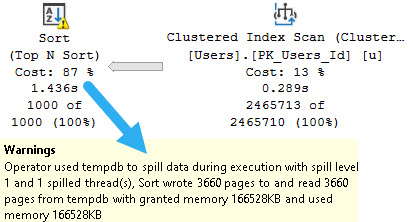
Despite the fact that the query was only passing around 7 rows, we were getting a one row estimate, and there was a spilling Sort operator.
Chance Of Cloudballs
There were a couple compounding issues here, of course, like that their database is hosted in the cloud.
It doesn’t matter which cloud you talk about, this is a problem they all have and I see people face constantly.
I/O sucks, up there.
It was a lot harder to get this to repro on my local hardware, because I have very nice drives.
Let’s take a look!
Bleak
If I run this query, it’ll spill a little bit. I have the MAXDOP 1 hint on there to artificially slow it down. Without that, the fast query and I/O make the contention harder to hit.
SELECT TOP (1000)
    u.Id
FROM dbo.Users AS u
ORDER BY u.Reputation
OPTION(MAXDOP 1);
just like me
I stuck it in a stored procedure to make calling it from ostress a little bit easier.
No Return
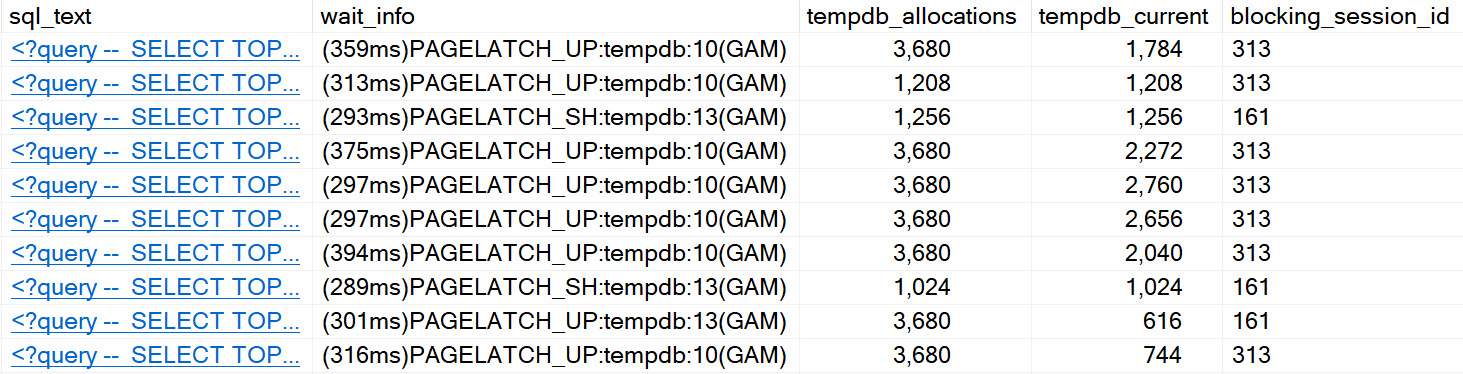
After running for a bit, eventually we hit GAM contention:
tuesday
We can see all the classic signs of tempdb contention, arising from spills.
It’s worth noting that enabling in-memory tempdb seems to alleviate this issue for the most part. I’d show you a picture of that, but it’s not worth 1000 words.
Fixing The Spill
Normally, I wouldn’t bother fixing a spill of that size, but in this case it was worthwhile because it was harming concurrency.
The quick fix was to add a MIN_GRANT_PERCENT hint. The long-term fix is to add an index to support the Sort operation.
There are many reasons why a spill may occur. Poor estimates are quite common, but the reason for that poor estimate has about a billion potential root causes.
Even if your query gets enough memory, sometimes you may still see spills because certain operators had to share memory.
It’s a wild world.
Thanks for reading!
Going Further
If this is the kind of SQL Server stuff you love learning about: these days I have AI do the annoying stuff for me. My new video course teaches you to work the same way, and I teach whole teams in a one-day workshop. Someone still has to know enough SQL Server to keep the robots in check, and that’s what my training is for.
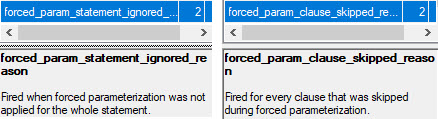
There are a couple Extended Events that I was really excited about adding to sp_HumanEvents, but try as I might they wouldn’t fire off anything. Ever.
Why was I excited? Because they would tell us why forced parameterization wasn’t used.
cool! great. wait, no.
The thing is, they only work if you know someone who isn’t Australian and they know how to change memory bits in WinDbg.
So like. Don’t bother with them for now.
Thanks for reading!
Going Further
If this is the kind of SQL Server stuff you love learning about: these days I have AI do the annoying stuff for me. My new video course teaches you to work the same way, and I teach whole teams in a one-day workshop. Someone still has to know enough SQL Server to keep the robots in check, and that’s what my training is for.
If this is the kind of SQL Server stuff you love learning about: these days I have AI do the annoying stuff for me. My new video course teaches you to work the same way, and I teach whole teams in a one-day workshop. Someone still has to know enough SQL Server to keep the robots in check, and that’s what my training is for.
In this video, I dive into the fascinating world of SQL Server’s `sp_whoisactive` and its cousin, `SP_HumanEvents`, to explore how they can help us track down blocking, compiles, and recompiles. I also delve into their utility for analyzing queries and weights, showcasing examples where running similar statements in separate batches versus within a stored procedure yields different insights. By using `SP_HumanEvents` to collect data over 30 seconds, I demonstrate how it can provide detailed execution plans, memory grants, and query metrics, even when run from a stored procedure like `sp_BlitzCache`. Additionally, I highlight the unique value of weight stats in identifying performance bottlenecks through page IO latch weights and SOS scheduler yield weights, emphasizing the importance of setting appropriate thresholds to avoid overwhelming data.
Full Transcript
Mmmhmm. My wife tells me that I get to have champagne after I finish this video, so I’m going to make sure this one’s real good. Now, we talked about how SP underscore human events can help you track down blocking, compiles, and recompiles. Next, we’re going to talk about how it can help you with queries and weights. Now, there are some second samples in here that are 30, and when we hit those, I’m going to hit pause while this runs, because I don’t want to sit there going like this with you as much as I love you. I don’t want to sit there staring at you while this thing runs for 30 seconds to collect data. So, without further ado, let’s talk a little bit about what happens when statements run in different ways. So, the first thing I have, you see there’s two batches here. There’s no goes in this one. This one’s all goes. And this is the same five or six queries that repeat one after the other. You can see there is, let’s see, greater than 10. We have this batch of queries that run, and then this batch of queries that run. They’re all technically the same thing, except this one which has a different at ID, because I got errors when I tried to declare the same ID. Well, when I tried to do it down here. So, I just used the second one.
You can cut the irony with a knife there. Anyway, so what I’m going to do is kick SP underscore human events off to run for 13 seconds and collect information about queries that run in the Stack Overflow database. And then I’m going to come over here and run this bunch of separate statements. Now, human events isn’t going to collect information about all of them. There are certain default values for parameters that not all of these queries will meet the barrier for entry on. So, we won’t collect information about every single thing that runs here.
We will collect some about a couple of queries that ran, or a few queries that ran here, that did meet our criteria. So, we have this one here where we selected something. Well, let’s just not talk about what the query did. It doesn’t matter what the query did. But in this case, when they’re all separated by goes, this batch of statement text column will be the same thing as this column.
And I haven’t figured out, like, long term, if I want to figure out a way to, like, say, hey, if this text column equals that text column, then just show one of them. Because quite frankly, we’re going to end up getting some big text back. I don’t know if that’s how I want to spend my CPU cycles in here. But we get back, again, some commensurate information with other stuff. We get the database name.
This is obviously not dynamic SQL. This is obviously regular SQL. But it’s not coming from the stored procedure, so we don’t have a legit object name there. We have the text of the queries that come back. We get their execution plans.
We see how many times they were executed. I guess we used a cached plan for that other ZZ thing. And we get to see some blitz cache-ish information about the queries that ran. So we’ll get total and average CPU, total and average logical reads, physical reads, duration, writes, bills, if available, memory, a whole bunch of stuff about memory grants.
None of these got memory grants, apparently. We’ll see how many rows they returned. We’ll get the DOP. And then I’ll give you some, you know, sort of forensic information in case you want to go digging about looking for more stuff on these. So I’m going to go to the query plan hash, the query hash, and the plan handle.
So you can go off and try to find more stuff there. Since this is v1, I just wanted to, like, like, yeah, I could go to the plan cache to try and find more stuff. But I don’t really see the point since everything I would go out to the plan cache for I get pretty well here.
I don’t really know. Like, I might try to add more stuff in later. But I think for now this is a kind of a good enough report. Now, where this is, why I’m showing this to you in two separate runs is because if we run this with all the GOs, these each register as a separate statement.
If I run all of this as one big monolithic chunk, so I’m going to come back over here, I’m going to run the same thing. And now I’m going to run this all as, again, one big monolithic chunk. The results are going to be a little bit different.
And I think it’ll help explain why I did things the way that I did things. Maybe, maybe not. We’ll see. So this time we get back four queries. Yeehaw. Lucky us. And now we’re going to see that things are slightly different here.
So this did just give us the individual query text, which is what we want. This is good. This is like good information to have. But this gives us back the entire text of what ran.
So this is all of those selects at once. This is different because with all the GOs in there, these were, this matched here. But without this, this, we got blah, blah, blah.
You understand what I’m saying. Anyway. We also get back the sort of the same information. We get back the XML. We get back the query metrics. And going on over here, the same stuff.
Cool. You understand that. That’s great. I’m happy for us. I’m happy for us all to be able to hang out together. Now, this is going to run for 30 seconds. So I am going to hit pause now, run this.
And what I’m going to look at now is how things look when they come from a store procedure. I’m just using Blitzcache here because I had it available and I know it does some crazy XML stuff. There are a lot of different statements in there.
And I think that’s a little bit more of a challenge. So here we go hitting pause. And I’ll be back in 30 seconds with some results for you. I missed you so much.
I missed you so much. So it is 30 seconds later. I have run SP underscore human events for 30 seconds to collect information about queries that are running inside of SP Blitzcache.
Now, hmm, hmm, hmm, hmm, hmm. What I see is something helpful and then, well, I mean, it’s all generally helpful. So we get the database.
We get the object name back this time. There’s actually something in there. And now this is where things get a little bit more interesting for store procedures because now we get back the statement text of the part of the store procedure that ran. So we get the exact statement that was running that generated those metrics.
And now SQL text shows us the command that we ran when this thing happened. So this is where things can get really helpful because a lot of times when I’m trying to troubleshoot a problem with a client, what will happen is we’ll be like looking at something and be like, okay, cool, store procedure.
But now we need to figure out how it ran and you can’t figure out what happened. I don’t know. This helps you figure it out.
So then we get the execution plan for what happened. And we also get the metrics here. So we get the total and averages again, like you’ve seen before. We get how many rows, estimated rows.
And I’m going to do a little work to put like some, maybe like a warnings column in here to help deal with, you know, if row, if actual row counts are way different from estimates or if, where is it? Here we go.
Used memory or used memory and granted memory are off in some weird way. Blah, blah, blah, blah, blah. So you understand that. Not a whole lot new to here to show you with that.
Cool. Let’s move on and let’s look at queries. I mean, let’s look at weights. Because I did some, I think I did, I think I did some kind of cool stuff in here.
So again, this is going to run for 30 seconds. And while that runs, I’m going to run this query. But first I’m going to drop clean buffers so that I have to read a bunch of stuff from disk so that I generate some page IO latch weights.
Because that just makes this thing a little bit more interesting. So I’m going to run this and run all of this and I will see you back in 30 seconds. So this is the part that I’m like really excited about with this store procedure.
So again, I ran and I collected weight stats for 30 seconds. And I collected weight stats, well I mean not specifically for this query, but you know, this was the only thing really running at the time. So that’s the only thing that we’re going to get any information back.
Now this returns three result sets. This was total weights, total weights by database, and then weights by query. And then we’re going to run the total weights, which is fantastic.
Now you can see from the total weights that we generated a whole lot of page IO latch weights. And so this looked insane to me when I first saw it. I said, I am screwing something up.
I did something royally awful. I mangled this calculation somehow. But then I opened up the event XML and it turns out I was 100% right. CX packet logged one weight for almost 21 seconds.
It’s not me messing anything up. You can go look at the XML if you want. You can do that by using the debug parameter. It’ll show you the XML as it lives and breathes.
So there’s that. And then next section down, you know, not terribly interesting pattern here. Database name, the weight type, and then some more information about the total weights and all the average milliseconds per weight, which is one of my absolute favorite things to measure with weight stats to see if there’s any, like, like, you know, there’s like the two different sort of issues you can hit with weights.
There’s like the lots of little weights that add latency. And then there’s like the really long weights that add weird latency. But here is my absolute tutti frutti favorite part of this whole thing.
Getting weights per query. So what we’ll have here is not only because this is one of those things that like, you know, you get, you sample SQL Server, you look at weight stats, you’re like, cool, but what query caused them?
This can correlate that a bit sometimes. So we’ll get the, again, the same weights as before, but now we will also get the query that caused them with the query plan. So we get the text and the query plan.
Now this is a bit repetitive. In the future, I might like do some string ag work on this to sort of make this all one line rather than have a whole bunch of things here. Because, you know, I mean, showing you the same execution plan four times is maybe not the greatest look in the world, but it’s probably not the worst thing either.
Now, where weight stats get kind of complicated, at least with extended events, is with SOS scheduler yield weights. Now, I have this other, I have this sampling down here. And what I’m going to do is I’m going to come back to the queries.
And I’ve set up some things here to collect information that I normally wouldn’t. So the weight duration here is 0 milliseconds, and I have to use the gimmeDanger parameter to grab this stuff. And so I’m going to run this, and I’m also going to run all of these.
So I will be back in 30 seconds to show you the insanity of this. All right. We are back 30 seconds into the future. And so what I did was, again, just to recap, I ran sp underscore human events for 30 seconds.
And I set my weight threshold to 0 milliseconds, and I had to use gimmeDanger to get that information back. And I ran all of these queries. I ran them, like, twice, actually, to fill up the sample time.
But that’s not really the important thing. The important thing that I want to show you, excuse you, is SOS scheduler yield and some limitations of the ring buffer. Now, every time I run this, I get 1,000 lines back from this, meaning that I filled up the ring buffer got full after 1,000 lines of this nonsense.
And, you know, I’m not sure if that’s, I’m not fully sure if that’s because the ring buffer has some limitation of 1,000 lines or if it’s because of the size that I chose for the ring buffer and the size of the data that I’m putting in there. I’m not fully sure on that, but kind of second to the point that it’s not always helpful to get more and more information back.
Now, you can see that the weight stats that I got back, I got back 1,000 weights on SOS scheduler yield, but they didn’t have any real duration to them. And that shows per database, and that also shows at the query level where we have a bunch of SOS scheduler yield weights, but all the durations on here are zero. So, in some cases, it is very unhelpful to set the milliseconds down this low.
You just don’t get really good information back. You can see that there are some different queries here that all generated SOS scheduler yield weights, but nothing really beyond that that’s all that helpful. So, I guess if there is a moral to this story, it’s maybe the really fast weights are not where you should be focusing 100% of your time on here.
Like, if it’s zero, maybe leave it alone. We don’t really need zero here. So, be careful with that.
I’m not saying never, just, you know, be nice to your server. Be nice to your ring buffer. Anyway, that is all I had for now to show you about SP underscore human events. After this, I’m going to go drink my celebratory champagne and begin my weekend of turning into a useless puddle.
So, I hope that you enjoy this door procedure. I hope that you learn some stuff. I hope that you can use it to fix some problems or find some problems or maybe find some problems and call me to fix some problems.
Because you’re like, ooh, this is hard. We should call Eric. He seems nice. That nice fellow from YouTube. Anyway, that’s it for now.
I will see you in some other video some other time. Thanks for watching. And that’s it for me.
I will see you in some other video some other time. Thanks for watchin’.
Going Further
If this is the kind of SQL Server stuff you love learning about: these days I have AI do the annoying stuff for me. My new video course teaches you to work the same way, and I teach whole teams in a one-day workshop. Someone still has to know enough SQL Server to keep the robots in check, and that’s what my training is for.
If this is the kind of SQL Server stuff you love learning about: these days I have AI do the annoying stuff for me. My new video course teaches you to work the same way, and I teach whole teams in a one-day workshop. Someone still has to know enough SQL Server to keep the robots in check, and that’s what my training is for.
In this video, I introduce SP_human_events, a stored procedure designed to make extended events more accessible for SQL Server users. I delve into the help parameter and how it can be used to get additional support or clarification on specific issues. The video covers various parameters and their default values, limitations such as memory constraints and compatibility requirements, and provides example calls to demonstrate its usage in different scenarios. While this procedure aims to simplify extended events for you, I emphasize that proper use is crucial to avoid potential problems with your SQL Server. If you need more detailed assistance or have specific questions, the video encourages viewers to visit my GitHub repo where they can ask questions, submit issues, and even contribute code fixes if needed.
Full Transcript
Et voila! Here we are with the second video to introduce SP underscore human events, my stored procedure to help make extended events a little bit more accessible to the fine people of Planet SQL Server. And this video is just going to be a short one about the help parameter and how you can use it to get more help. Now, if you are watching this video, pay careful attention to the upload information on the YouTube. If you are watching this video far into the future, there’s a pretty good chance this stuff has changed. Actually, there’s a pretty good chance this stuff will change like tomorrow. Because I’m, I’m, I am always working on this thing to make it better for you fine people. And, um, yeah, so there’s that. Uh, anyway, it, it, this is just about getting help. And if you’re here, I assume you need help or want help or I don’t know, there’s something wrong in your life.
Maybe this stored procedure will fix it. Maybe it won’t. I don’t know. But anyway, uh, the first thing that I have to start off with here is a warning. If you misuse this thing, you can cause problems. If you do something terrible with this stored procedure, you can harm your precious SQL Server. So don’t misuse it. If I give you a car and a bottle of whiskey, it is up to you as an adult, probably human being to make a sane and rational choice with what to do with that combination of items. Just like it is up to you as a sane and rational human being to, um, make a sane and rational choice about what to do with the combination of parameters that you feed in to SP human events.
So, that is the warning. If you need additional support, there is a very helpful, I promise not spam bit.ly link. Uh, there, where that’ll, that’ll bring you right to my GitHub repo where you can ask questions, um, create issues, submit code fixes. Just, just please open, open an issue first so we can at least talk about whether this is a good idea for you or not, or a good idea for the procedure or not. Um, and then the second section down is just a short sort of introduction. Uh, tells you what sort of issues we can, uh, track down using SP human events.
And then if we go a little bit further, we, I discuss some of the limitations. Uh, first is that you need to be on at least SQL Server 2012 or higher. That does not set a very high bar. Um, but if you’re on SQL Server 2008, you are out of luck. You better call Saul. Um, the second is that, uh, this is designed to make things easier. And, uh, one way to make things hard is to present someone with many, many options.
And I do not want to make extended events harder for you. I want to make them easier for you. So, some customizations are limited. Um, you know, also the more customizations I offer, the more complicated dynamic SQL gets, and the more time I spend drinking and the more chances there are of there being bugs. And I just don’t want that for you.
Um, a couple of things down here are, I don’t want to create files. Uh, one of the chief things that extended events do or can do is create an event file to track, uh, information into stored data in. And I just don’t want to do that. That introduces, um, the potential to, uh, you know, write a, you know, big, big files out to your SQL Server somewhere. And there’s not an, there’s not a good, easy way to clean them up unless I use XP command shell.
And I just don’t like it. Uh, I don’t want to check file path validity. I don’t want to have to deal with Azure file paths that start with HTTP. It’s not, it’s not, it’s not, not fun. I did that with SP blitz lock, not doing that here. Um, so with the use of the ring buffer, which I am using, which is just an in memory, um, chunk of information, there are some limitations.
You may not see full event information and, uh, we may wrap around, uh, during the time that we choose to collect information because I am choosing intentionally not to use more than one gig of memory in order to store this data in. Um, I will perhaps make that configurable someday, but today it is not.
Uh, the other thing is that if you want to use the blocking event, you will need to turn on the blocked process report. If you try blocking, if you try to view blocking and you don’t have that turned on, you will get, um, uh, an error and you will get the code needed to turn on the blocked process report.
You can also get it from this URL or URI depending on, uh, how much of a geek you are, whatever you want to call it. The next section down describes some of the parameters in this fine store procedure. Uh, we have event type, which you use to choose which session you want to spin up.
You can use blocking, query, weights, recompile, compiles, and cert, excuse me, certain variations on those words. So you can just put in block, query, queries, wait, weights, recompiles, recompilations, uh, compiles, compilations. There’s a, we, we account for a lot of different things in there.
I, I don’t expect you to be exactly on top of the wording here. Um, and then a little bit over, we see the default values for things. So then we have some other filters, uh, query duration.
We have a query sort order for which way you want to order data. If you do choose the query event, um, how long things would have to block for in order to qualify, um, weight type. So this can either be a single weight that you want to monitor, or it can be a CSV list of weight types.
Uh, the minimum duration for a weight, uh, if you want to capture execution plans. And then some other filters for, um, if you want to filter to a specific client or host or database or session ID. Or if you want to sample a workload.
So you’re probably wondering why session ID isn’t in VARCAR. And I bet you’re sitting there gritting your teeth and saying, Eric, you’re not following best practices.
You’re storing a number as a string. You’re a bad person. Well, that’s because you have choices. You can either put in a number, which I will dutifully check using, not using is numeric to make sure that you have entered a valid number. Or you can put in the word sample or sampled.
And you can put in a divisor. And what this will do is allow you to sample an entire workload by, uh, figuring out which session IDs, uh, evenly divide by the number you choose as a divisor and only getting information for those. So if you have thousands of sessions and you say, I want only want sessions that divide evenly by a hundred, we can narrow down the amount of data we’re collecting for.
We can also filter to a username, an object name. And if you’re using the block, so this is where things get a little tricky. If you’re using the blocking session, uh, or the event session here, um, that it can, for some reason it doesn’t use, it can’t filter to an object name.
It can only filter to an object ID. So if you’re using blocking, or if you’re using blocking, you want to filter to a specific table, we also need the schema of that table. By, by default that goes to DBO.
But if you need a different schema, you can put that in there. If you’re just searching for a store procedure name, you don’t need to put that in there. Uh, then we also have some filters for, um, excuse me, my mouse wheel is all amok, uh, for how long you want to run the session for. And, like a lot of things, I don’t want to put in, I don’t want to allow you to put in what I think are bad idea, parameters, without some warning.
So, uh, there are some values for some of those filters, especially like very low millisecond weights on things, where, um, if, if you, if you put in values that I deem, whack-a-do, then you will have to use the gimmeDanger parameter set to one in order to use those. Otherwise, I will set them back to what I consider to be same values or throw an error, depending on what I care about most.
Uh, then we have this keep alive one. This isn’t functional yet. Um, I’m working on the ability to, uh, put data into the ring buffer, move it out and into real tables. And, uh, those were, that would, that would allow sessions to stay alive longer.
Um, but that is not functional yet. That will be something that happens in a future release. I wanted to get, uh, an MVP out there for people to start kicking around before I started adding more, uh, more involved features. Uh, the next section down is a list of, uh, example calls to the stored procedure.
So some different, so different ways to look at things in different scenarios. Uh, that’s all very useful stuff. I’m not going to read it all out loud for you because it’s all fairly self-explanatory once you get to reading it. And of course, like every, oh, well, I think like most of the code that I write, uh, this is MIT license.
It is completely open source. Uh, I don’t want to print the entire MIT license out here. I tried a few different variations on that and none of them were good. But if, uh, if you use help and you go over to the massages tab, uh, you will see the full MIT license printout in all its open source glory, making Richard Stallman a very happy person. I think maybe, I don’t know.
I am doing this on, on windows or SQL Server, which is decidedly not free software. So maybe, maybe not like happy, happy, maybe just like, I don’t know, a little bit less miserable. I don’t know. I don’t, I don’t know how to predict that.
Anyway, um, I think that’s it for the help section. Uh, yeah, that, that, that about wraps it up. That’s, that’s all I have in here for now, but I hope that, uh, you found this useful and informative and that, um, me, me rambling on and on in this short video. Uh, helps you learn a few things about how the proper use and functioning of, um, sp underscore human events.
Uh, I’m going to start recording some other videos about actual use cases. So I will see you in those. Au revoir.
Going Further
If this is the kind of SQL Server stuff you love learning about: these days I have AI do the annoying stuff for me. My new video course teaches you to work the same way, and I teach whole teams in a one-day workshop. Someone still has to know enough SQL Server to keep the robots in check, and that’s what my training is for.
But when I do, it’s usually to tell people they should use RCSI, and then disappear in a cloud of smoke.
Recently I was thinking about lock promotion, because that’s what happens when I get lonely.
While digging around, I found some interesting stuff.
This is the part where I share it with you.
Without Five I Couldn’t Count To Six
The first thing I wanted was a table that I wouldn’t care about messing up, so I made a copy of the Users table.
SELECT *
INTO dbo.IDontCareAboutUsers
FROM dbo.Users AS u

ALTER TABLE dbo.IDontCareAboutUsers
    ADD CONSTRAINT pk_IDontCareAboutUsers_id PRIMARY KEY CLUSTERED (Id);
Then I picked on a Reputation that only has one entry in the table: 20720.
BEGIN TRAN
UPDATE idcau
SET idcau.Reputation = 0
FROM dbo.IDontCareAboutUsers AS idcau
WHERE idcau.Reputation = 20720
OPTION(MAXDOP 4)

ROLLBACK
What followed was a full morning of wishing I paid more attention in internals class.
Number One
The first thing I found is that there were 16 attempts at promotion, and four successful promotions.
4×4
Why did this seem weird? I dunno.
Why would there be only 4 successful attempts with no competing locks from other queries?
Why wouldn’t all 16 get promotions?
Number Two
Well, that’s a parallel plan. It’s running at DOP 4.
I added the hint in the update query above so I wouldn’t have to, like, do more to prove it.
Plantar
Okay, maybe this makes a little more sense. Four threads.
If each one tried four times, maybe another thread was like “nah, yo”, and then got by on the fifth try.
Number Three
Looking at perfmon counters before and after running showed.. exactly four!
This isn’t wrong, necessarily. This is how things look in the DMVs it touches after the update runs, but the transaction is still open.
I’m not mad, but I am curious. I wanna know what happened in the middle.
Number Five
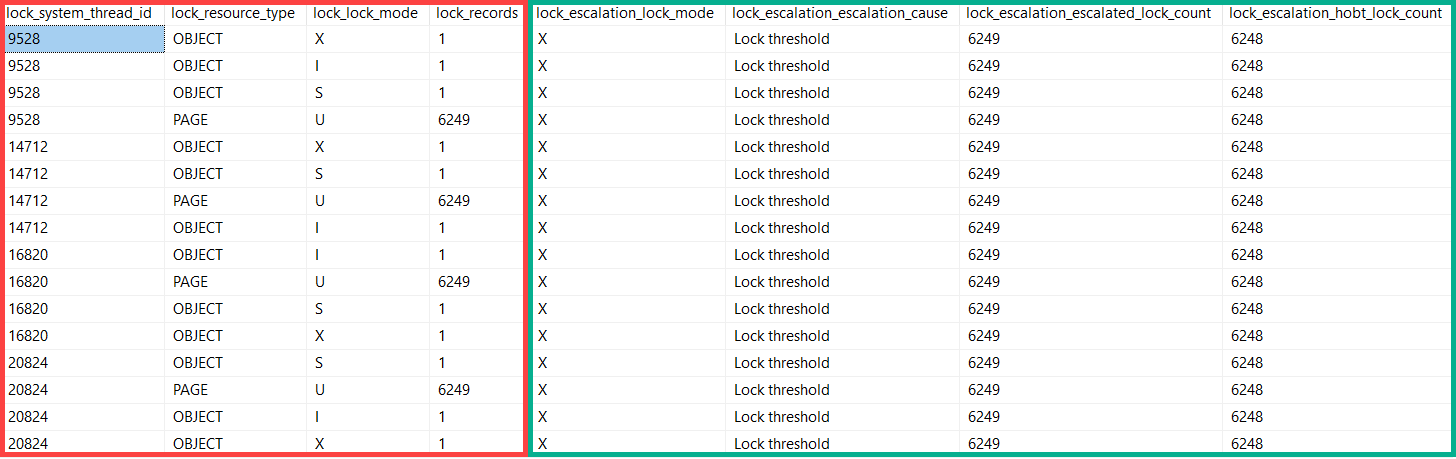
I set up a couple Extended Event sessions, one to capture locks acquired, and one to capture lock escalations.
This was neat.
Tell’em, picture
The red rectangle comes from locks acquired during the course of the update. You can see four separate threads going through and grabbing locks.
Each thread got the okay to escalate at 6,249 page locks.
Number Six
Lock promotion isn’t only denied when competing locks on the table are held by other queries.
Modification queries taking locks will attempt promotion every 1,250 locks.
Documentation regarding lock promotion points to at least 5,000 locks needing to be held before it occurs, as one factor (incompatible locks not being present are another).
If we have four threads asking every 1,250 locks (in this case on pages), they all will have made four attempts before finally escalating at 6,249.
6,249 / 1,250 is right around 5, for those who don’t have a calculator installed.
Don’t freak out if your monitoring tool tells you there’s a lot of attempts at escalation, and very few are successful.
It’s not always a sign that there’s blocking, though you may be able to correlate that with lock waits if both are present.
Thanks for reading!
Going Further
If this is the kind of SQL Server stuff you love learning about: these days I have AI do the annoying stuff for me. My new video course teaches you to work the same way, and I teach whole teams in a one-day workshop. Someone still has to know enough SQL Server to keep the robots in check, and that’s what my training is for.
This is a short post to “document” something interesting I noticed about… It’s kind of a mouthful.
See, hash joins will bail out when they spill to disk enough. What they bail to is something akin to Nested Loops (the hashing function stops running and partitioning things).
This usually happens when there are lots of duplicates involved in a join that makes continuing to partition values ineffective.
It’s a pretty atypical situation, and I really had to push (read: hint the crap out of) a query in order to get it to happen.
I also had to join on some pretty dumb columns.
Dupe-A-Dupe
Here’s a regular row store query. Bad idea hints and joins galore.
SELECT *
FROM dbo.Posts AS p
LEFT JOIN dbo.Votes AS v
ON  p.PostTypeId = v.VoteTypeId
WHERE ISNULL(v.UserId, v.VoteTypeId) IS NULL
OPTION (
       HASH JOIN, -- If I don't force this, the optimizer chooses Sort Merge. Smart!
       USE HINT('ENABLE_PARALLEL_PLAN_PREFERENCE'),
       MAX_GRANT_PERCENT = 0.0
       );
As it runs, the duplicate-filled columns being forced to hash join with a tiny memory grant cause a bunch of problems.
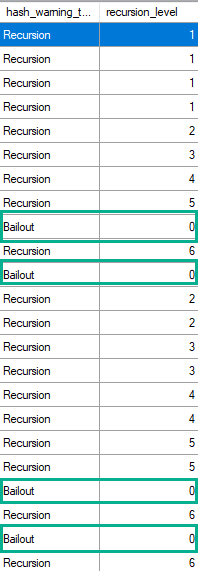
The value is a constant, hard coded in the product, and its value is five (5). This means that before the hash scan operator resorts to a sort based algorithm for any given subpartition that doesn’t fit into the granted memory from the workspace, five previous attempts to subdivide the original partition into smaller partitions must have happened.
At runtime, whenever a hash iterator must recursively subdivide a partition because the original one doesn’t fit into memory the recursion level counter for that partition is incremented by one. If anyone is subscribed to receive the Hash Warning event class, the first partition that has to recursively execute to such level of depth produces a Hash Warning event (with EventSubClass equals 1 = Bailout) indicating in the Integer Data column what is that level that has been reached. But if any other partition later also reaches any level of recursion that has already been reached by other partition, the event is not produced again.
It’s also worth mentioning that given the way the event reporting code is written, when a bail-out occurs, not only the Hash Warning event class with EventSubClass set to 1 (Bailout) is reported but, immediately after that, another Hash Warning event is reported with EventSubClass set to 0 (Recursion) and Integer Data reporting one level deeper (six).
But It’s Different With Batch Mode
If I get batch mode involved, that changes.
CREATE TABLE #hijinks (i INT NOT NULL, INDEX h CLUSTERED COLUMNSTORE);

SELECT *
FROM dbo.Posts AS p
LEFT JOIN dbo.Votes AS v
ON  p.PostTypeId = v.VoteTypeId
LEFT JOIN #hijinks AS h ON 1 = 0
WHERE ISNULL(v.UserId, v.VoteTypeId) IS NULL
OPTION (
       HASH JOIN, -- If I don't force this, the optimizer chooses Sort Merge. Smart!
       USE HINT('ENABLE_PARALLEL_PLAN_PREFERENCE'),
       MAX_GRANT_PERCENT = 0.0
       );
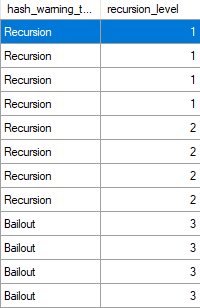
The plan yields several batch mode operations, but now we start bailing out after three recursions.
Creeky
I’m not sure why, and I’ve never seen it mentioned anywhere else.
My only guess is that the threshold is lower because column store and batch mode are a bit more memory hungry than their row store counterparts.
Thanks for reading!
Going Further
If this is the kind of SQL Server stuff you love learning about: these days I have AI do the annoying stuff for me. My new video course teaches you to work the same way, and I teach whole teams in a one-day workshop. Someone still has to know enough SQL Server to keep the robots in check, and that’s what my training is for.