There are many good reasons to parameterize queries.
There are, of course, downsides, too. Parameter sensitivity, AKA parameter sniffing, being the prime one.
But let’s say you consult the internet, or find a consultant on the internet, and they tell you that you ought to parameterize your queries.
It all sounds like a grand idea — you’ll get better plan reuse, and hopefully the plan cache will stop clearing itself out like a drunken ourobouros.
You could even use a setting called forced parameterization, which doesn’t always work.
Apart from the normal rules about when parameteriztion, forced or not, may not work, there’s another situation that can make things difficult.
Client Per Thing
Let’s assume for a second that you have a client-per-database, or client-per-schema model.
If I execute parameterized code like this:
DECLARE @i INT = 2
DECLARE @sql NVARCHAR(MAX) = N'
SELECT COUNT(*) AS records
FROM dbo.Users AS u
WHERE u.Reputation = @ii
'

EXEC sys.sp_executesql @sql, N'@ii INT', @ii = @i;
But from different database contexts (I have a few different versions of StackOverflow on my server, but I’m going to show results from 2013 and 2010), we’ll get separate cached plans, despite them having identical:
Costs
Query Plans
SQL Handles
Query Hashes
Frida Fredo
The same thing would happen with any parameterized code executed in a different context — stored procedures, functions… well. You get the idea.
Forced parameterization may help queries within the same context with plan reuse, but there are certain boundaries they won’t cross.
Don’t get me wrong, here. I’m not complaining. There’s so much that could be different, I wouldn’t want plan reuse across these boundaries. Heck, I may even separate stuff specifically to get different plans. As usual, I don’t want you, dear reader, to be surprised by this behavior.
Thanks for reading!
Going Further
If this is the kind of SQL Server stuff you love learning about, you’ll love my training. Blog readers get 25% off the Everything Bundle — over 100 hours of performance tuning content. Need hands-on help? I offer consulting engagements from targeted investigations to ongoing retainers. Want a quick sanity check before committing to a full engagement? Schedule a call — no commitment required.
In this video, I delve into an interesting quirk of SQL Server execution plans when using bad dynamic SQL—specifically, when concatenating values directly into the `EXEC` statement. I demonstrate how, despite the common belief that such practices don’t lead to plan reuse, certain conditions can result in unexpected parameterization behavior. By running a series of queries with varying numeric values, I show how SQL Server’s simple or auto-parameterization can cause execution plans to be reused in ways that might not be immediately obvious. This video aims to highlight the nuances of dynamic SQL and execution plans, providing insights into why and when plan reuse occurs, even in seemingly straightforward scenarios.
Full Transcript
Ehh, it’s you again. Uh, Erik Darling, doing Erik Darling data stuff, and loving every, every other minute of it. Maybe, maybe every other hour. I don’t know. Everything’s, everything’s fun though. Everything’s great. Uh, I wanted to talk about a funny little quirk with, uh, how execution plans sometimes get cached when you use the bad dynamic SQL. And by bad dynamic SQL, I mean when you just use exec and when you concatenate things right into the string like this. I don’t mean like the good kind of dynamic SQL where you use SP execute SQL and you don’t leave yourself at least somewhat prone to SQL injection problems. So, what’s gonna happen here? is really best described by a demo. So, I’m not gonna talk too much. I’m not gonna preamble too much about it. I just want to point out that I’m, I’m using nvarkar 10 here because nvarkar 10 is the length of the longest possible integer after, after, after, well, no, it’s not like after this thing goes up a digit, but after this thing goes up like a number, this thing is no longer a regular integer. It is then a big int. And big ints can get very long. So I left, I left nvarkar 10 is, you know, the, the, the cap for how long that number is.
that number will ever be. Now, when I run the, when I run these queries, something kind of cute and funny is going to happen. And we’ll look here and we get some results back and we’ll look and we’ll see. We wouldn’t expect that using exec would result in plan reuse, but in this case it does for a very specific reason. We see that we have one instance of this query and our, uh, our literal value, our, the value that we tacked on there has been replaced with a part of this query.
parameter. So SQL Server has done something a little bit tricky. If we scroll over here a little bit, we’ll see that that query actually got executed twice. Now what happened is the reason why we got this thing over here, we got this, uh, this parameter replaced our literal value. That’s a side effect of something called, uh, simple parameterization or auto parameterization.
Uh, it’s, it’s referred to, it’s been referred to as both over the years, but that happens when you get a trivial plan. If I go over here and I hit a four and I hopefully zoom in, Oh, that didn’t do it for some reason. Uh, that, all right, let’s try controlling one. There we go.
When we run in and do that and we look, that’s a trivial plan is, and that’s the thing that makes, uh, simple parameterization or auto automatic parameterization possible. You can see that our value got replaced by a one there. Now that’s all well and good, but where this starts to, to go astray a little bit is, uh, if this number changes. Now it’s not like if I change this to 25, it’s going to make a difference. We’ll still get plan reuse there.
And we still get that one line with, uh, the select count query. It is still parameterized. And if we can slide over here a little bit, that still has two executions that’ll remain true. Even if I go up to two 55 and I look at this and we see that this is still that same select count.
It’s still parameterized and we still have two executions right there where this will get where this will get changed, where this will be different is if I change that to two 56 and I run this and now we’ll have two instances of that count query. They’ll both be parameterized. There’s an at one there and an at one there, but the difference now is what that at one got parameterized to. If you were paying really close attention in the first plan, you may have noticed under the parameter list that one here was a tiny int.
Now, if I go look at the other query plan, it’ll still be simply or automatically parameterized, but the parameter type will be different. If we go look at the parameter list now, it’s not, not a tiny int. It’s a small int. So a SQL Server for values between one and 255, which is a tiny int, it will create a plan where the parameter has a type of tiny int.
As soon as we get above that, it’ll move up to a small int. And if we say two five six zero zero zero, I believe that should, that should get us into the regular integer range. If we run that, we’ll still have that second plan, right? If we go and look at that only that second plan this time, we can see that the parameter list now shows us that the data type is an integer. So it moved beyond a tiny int or a small int, which caps off at like 65,000 or something, if I’m remembering correctly.
I hardly ever remember things correctly, which is why I have to think about things so hard. So you can, with simple enough queries, get some plan reuse from Dynamic SQL. Granted, this all goes out the window as soon as you do something more complicated where you can no longer get a trivial plan or a simple slash automatic parameterization.
There’s all sorts of kind of weird and funny rules around parameter, around the simple automatic parameterization stuff and around the trivial plan stuff. I’m not going to get into those here because I just wanted, I wanted to keep this as a short video. So in some cases you can, in some quirky cases, you can get plan reuse when you use exec, even when you concatenate variables, variables, variables, variables directly into the string.
But under most circumstances, your queries are just going to be big, bad, gnarly, complicated enough that you won’t get a trivial plan, nor will you get simple slash automatic parameterization. All right, cool. Anyway, that’s all I had.
Thank you for watching. I hope you learned something. I hope you enjoyed yourselves. And I will see you in another video, another time, another place. I don’t know. Maybe I’ll even be sober for that one. We’ll see. We’ll see how it goes. It’s a weird thing. Thank you.
Going Further
If this is the kind of SQL Server stuff you love learning about, you’ll love my training. Blog readers get 25% off the Everything Bundle — over 100 hours of performance tuning content. Need hands-on help? I offer consulting engagements from targeted investigations to ongoing retainers. Want a quick sanity check before committing to a full engagement? Schedule a call — no commitment required.
Having some key lookups in your query plans is generally unavoidable.
You’ll wanna select more columns than you wanna put in a nonclustered index, or ones with large data types that you don’t wanna bloat them with.
Enter the key lookup.
They’re one of those things — I’d say even the most common thing — that makes parameterized code sensitive to the bad kind of parameter sniffing, so they get a lot of attention.
The thing is, most of the attention that they get is just for columns you’re selecting, and most of the advice you get is to “create covering indexes”.
That’s not always possible, and that’s why I did this session a while back on a different way to rewrite queries to sometimes make them more efficient. Especially since key lookups may cause blocking issues.
Milk and Cookies
At some point, everyone will come across a key lookup in a query plan, and they’ll wonder if tuning it will fix performance.
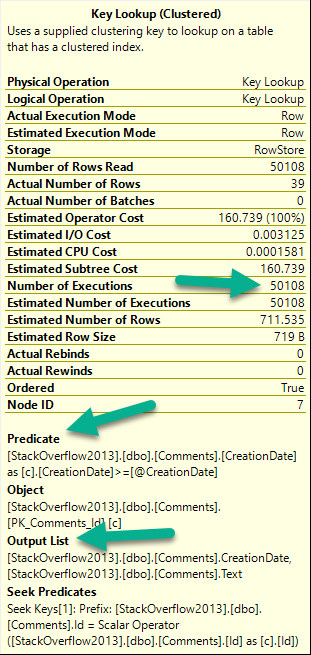
There are three things to pay attention to when you look at a key lookup:
I know what to do
Number of executions: This is usually more helpful in an actual plan
If there are any Predicates involved: That means there are parts of your where clause not in your nonclustered index
If there’s an Output List involved: That means you’re selecting columns not in your nonclustered index
For number of executions, generally higher numbers are worse. This can be misleading if you’re looking at a cached plan because… You’re going to see the cached number, not the runtime number. They can be way different.
Notice I’m not worried about the Seek Predicates here — that just tells us how the clustered index got joined to the nonclustered index. In other words, it’s the clustered index key column(s).
Figure It Out
Here’s our situation: we’re working on a new stored procedure.
CREATE PROCEDURE dbo.predicate_felon (@Score INT, @CreationDate DATETIME)
AS
BEGIN

    SELECT *
    FROM dbo.Comments AS c
    WHERE c.Score = @Score
    AND   c.CreationDate >= @CreationDate
    ORDER BY c.CreationDate DESC;

END;
Right now, aside from the clustered index, we only have this nonclustered index. It’s great for some other query, or something.
CREATE INDEX ix_whatever
ON dbo.Comments (Score, UserId, PostId)
GO
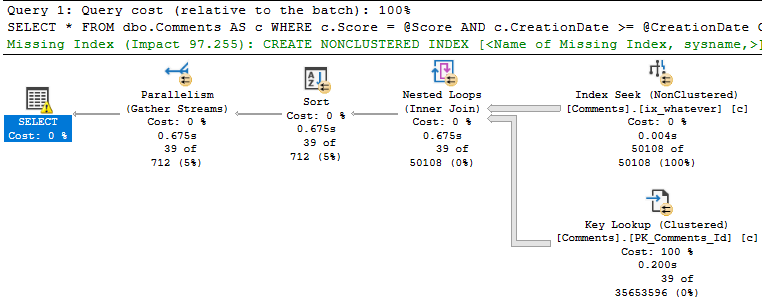
When we run the stored procedure like this, it’s fast.
SQL Server wants an index — a fully covering index — but if we create it, we end up a 7.8GB index that has every column in the Comments table in it. That includes the Text column, which is an NVARCHAR(700). Sure, it fixes the key lookup, but golly and gosh, that’s a crappy index to have hanging around.
Bad Problems On The Rise
The issue turns up when we run the procedure like this:
EXEC dbo.predicate_felon @Score = 0, --El Zero
                         @CreationDate = '2013-12-31';
Not so much.
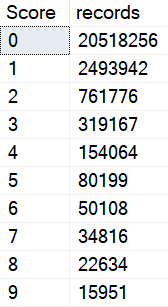
This happens because there are a lot more 0 scores than 6 scores.
Quiet time
Smarty Pants
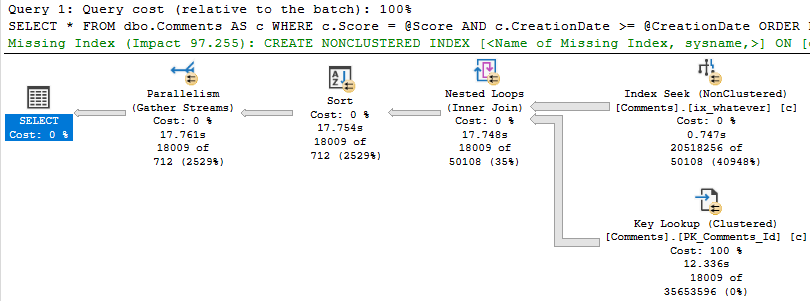
Eagle eyed readers will notice that the second query only returns ~18k rows, but it takes ~18 seconds to do it.
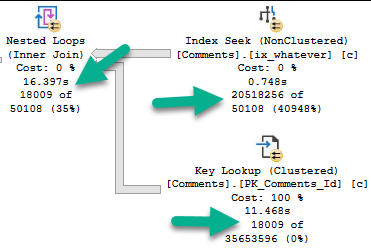
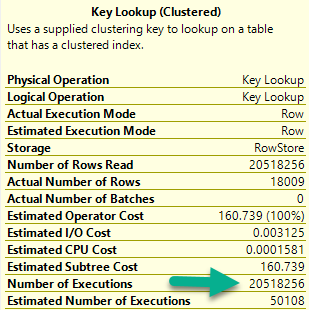
The problem is how much time we spend locating those rows. Sure, we can Seek into the nonclustered index to find all the 0s, but there are 20.5 million of them.
Looking at the actual plan, we can spot a few things.
Hunger ManagementHangman
The 18k rows we end up with are only filtered to with they key lookup, but it has to execute 20.5 million times to evaluate that extra predicate.
If we just index the key columns, the key lookup to get the other columns (PostId, Text, UserId) will only execute ~18k times. That’s not a big deal at all.
CREATE NONCLUSTERED INDEX keys_only
    ON dbo.Comments ( Score, CreationDate );
This index is only ~500MB, which is a heck of a lot better than nearly 8GB covering the entire thing.
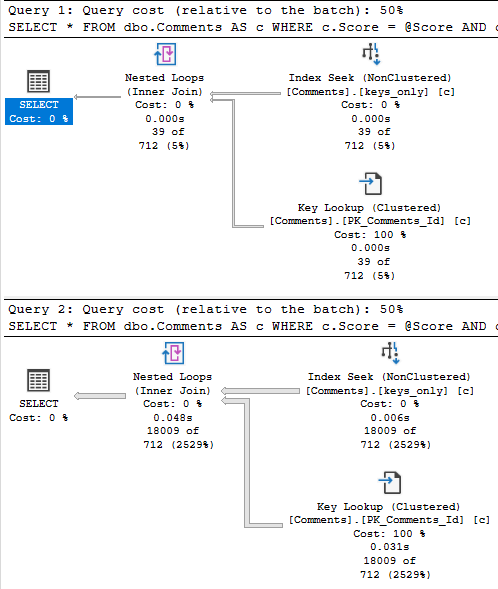
With that in place, both the score 6 and score 0 plans are fast.
rq
Why This Is Effective, and When It Might Not Be
This works here because the date filter is restrictive.
When we can eliminate more rows via the index seek, the key lookup is less of a big deal.
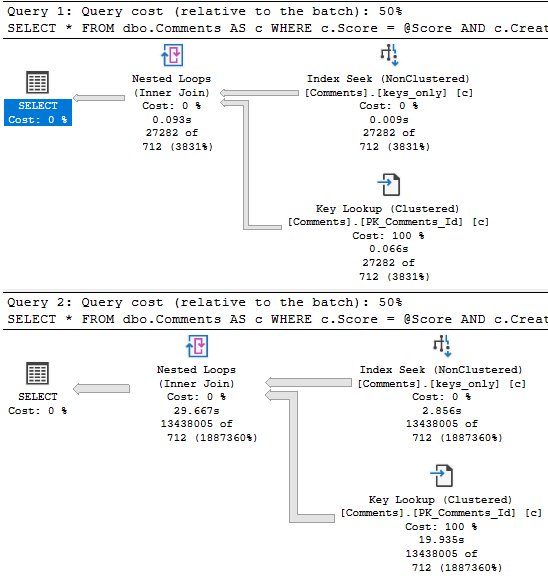
If the date predicate were much less restrictive, say going back to 2011, boy oh boy, things get ugly for the 0 query again.
Of course, returning that many rows will suck no matter what, so this is where other techniques come in like Paging, or charging users by the row come into play.
What? Why are you looking at me like that?
Thanks for reading!
Going Further
If this is the kind of SQL Server stuff you love learning about, you’ll love my training. Blog readers get 25% off the Everything Bundle — over 100 hours of performance tuning content. Need hands-on help? I offer consulting engagements from targeted investigations to ongoing retainers. Want a quick sanity check before committing to a full engagement? Schedule a call — no commitment required.
When you find unused indexes, whether using Some Script From The Internet™, sp_BlitzIndex, or Database Telepathy, the first thing most people think of is “wasted space”.
Sure, okay, yeah. That’s valid. They’re in backups, restores, they get hit by CHECKDB. You probably rebuild them if there’s a whisper of fragmentation.
But it’s not the end of the story.
Not by a long shot.
Today we’re going to look at how redundant indexes can clog the buffer pool up.
Holla Back
If you want to see the definitions for the views I’m using, head to this post and scroll down.
Heck, stick around and watch the video too.
LIKE AND SUBSCRIBE.
Now, sp_BlitzIndex has two warnings to catch these “bad” indexes:
Unused Indexes With High Writes
NC Indexes With High Write:Read Ratio
Unused are just what they sound like: they’re not helping queries read data at all. Of course, if you’ve rebooted recently, or rebuilt indexes on buggy versions of SQL Server, you might get this warning on indexes that will get used. I can’t fix that, but I can tell you it’s your job to keep an eye on usage over time.
Indexes with a high write to read ratio are also pretty self-explanatory. They’re sometimes used, but they’re written to a whole lot more. Again, you should keep an eye on this over time, and try to understand both how important they might be to your workload, or how much they might be hurting your workload.
I’m not going to set up a fake workload to generate those warnings, but I am going to create some overlapping indexes that might be good candidates for you to de-clutter.
Index Entrance
The Votes table is pretty narrow, but it’s also pretty big — 53 million rows or so as of Stack 2013.
Here are my indexes:
CREATE INDEX who ON dbo.Votes(PostId, UserId) INCLUDE(BountyAmount);
CREATE INDEX what ON dbo.Votes(UserId, PostId) INCLUDE(BountyAmount);
CREATE INDEX [where] ON dbo.Votes(CreationDate, UserId) INCLUDE(BountyAmount);
CREATE INDEX [when] ON dbo.Votes(BountyAmount, UserId) INCLUDE(CreationDate);
CREATE INDEX why ON dbo.Votes(PostId, CreationDate) INCLUDE(BountyAmount);
CREATE INDEX how ON dbo.Votes(VoteTypeId, BountyAmount) INCLUDE(UserId);
First, I’m gonna make sure there’s nothing in memory:
CHECKPOINT;
GO 2
DBCC DROPCLEANBUFFERS;
GO
Don’t run that in production. It’s stupid if you run that in production.
Now when I go to look at what’s in memory, nothing will be there:
SELECT *
FROM dbo.WhatsUpMemory AS wum
WHERE wum.object_name = 'Votes'
I’m probably not going to show you the results of an empty query set. It’s not too illustrative.
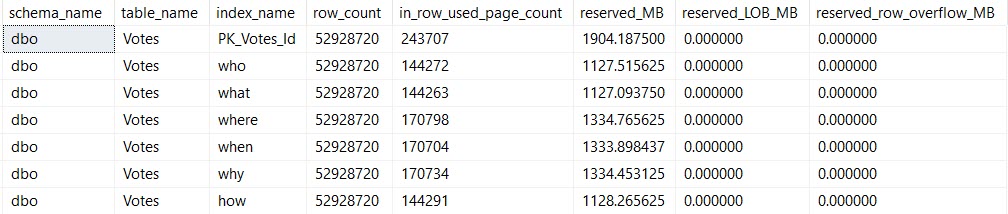
I am going to show you the index sizes on disk:
SELECT *
FROM dbo.WhatsUpIndexes AS wui
WHERE wui.table_name = 'Votes';
Size Mutters
And I am going to show you this update:
UPDATE v
SET v.BountyAmount = 2147483647
FROM dbo.Votes AS v
WHERE v.BountyAmount IS NULL
AND   v.CreationDate >= '20131231'
AND v.VoteTypeId > 2;
After The Update
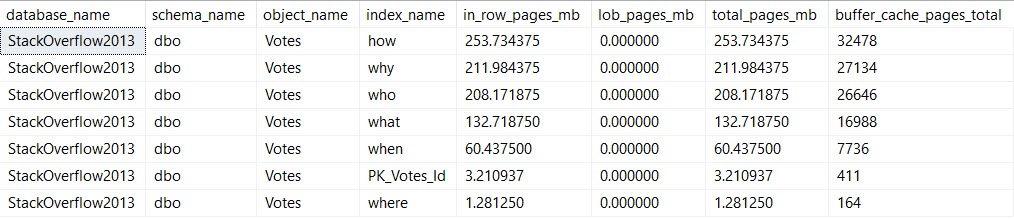
This is when things get more interesting for the memory query.
Life Of A Moran
We’re updating the column BountyAmount, which is present in all of the indexes I created. This is almost certainly an anti-pattern, but it’s good to illustrate the problem.
Pieces of every index end up in memory. That’s because all data needs to end up in memory before SQL Server will work with it.
It doesn’t need the entirety of any of these indexes in memory — we’re lucky enough to have indexes to help us find the 10k or so rows we’re updating. I’m also lucky enough to have 64GB of memory dedicated to this instance, which can easily hold the full database.
But still, if you’re not lucky enough to be able to fit your whole database in memory, wasting space in the buffer pool for unused (AND OH GODD PROBABLY FRAGMENTED) indexes just to write to them is a pretty bad idea.
After all, it’s not just the buffer pool that needs memory.
You also need memory for memory grants (shocking huh?), and other caches and activities (like the plan cache, and compressed backups).
Cleaning up those low-utilization indexes can help you make better use of the memory that you have.
Thanks for reading!
Going Further
If this is the kind of SQL Server stuff you love learning about, you’ll love my training. Blog readers get 25% off the Everything Bundle — over 100 hours of performance tuning content. Need hands-on help? I offer consulting engagements from targeted investigations to ongoing retainers. Want a quick sanity check before committing to a full engagement? Schedule a call — no commitment required.
In dramatic fashion, I’m revisiting something from this post about stats updates.
It’s a quick post, because uh… Well. Pick a reason.
Get In Gear
Follow along as I repeat all the steps in the linked post to:
Load > 2 billion rows into a table
Create a stats object on every column
Load enough new data to trigger a stats refresh
Query the table to trigger the stats refresh
Except this time, I’m adding a mAxDoP 1 hint to it:
SELECT COUNT(*)
FROM dbo.Vetos
WHERE UserId = 138
AND   PostId = 138
AND   BountyAmount = 138
AND   VoteTypeId = 138
AND   CreationDate = 138
OPTION(MAXDOP 1);
Here’s Where Things Get Interesting
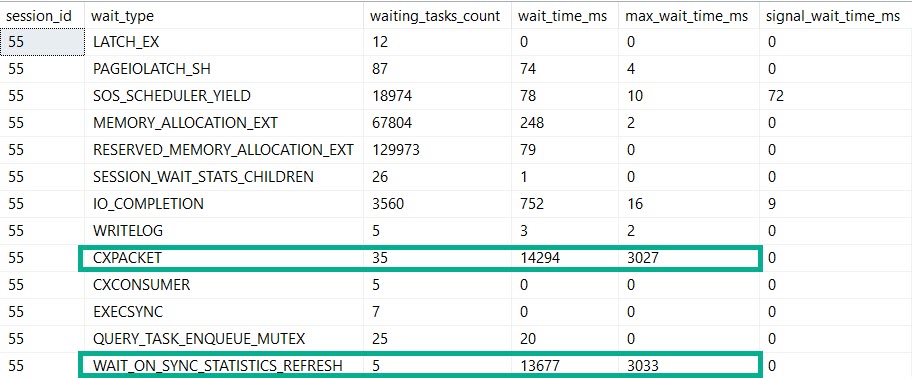
Bothsies
Our MaXdOp 1 query registers nearly the same amount of time on stats updates and parallelism.
If this is madness…
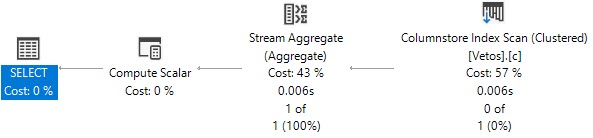
But our plan is indeed serial. Because we told it to be.
By setting maxDOP to 1.
Not Alone
So, if you’re out there in the world wondering why this crazy kinda thing goes down, here’s one explanation.
Are there others? Probably.
But you’ll have to find out by setting MAXdop to 1 on your own.
Thanks for reading!
Going Further
If this is the kind of SQL Server stuff you love learning about, you’ll love my training. Blog readers get 25% off the Everything Bundle — over 100 hours of performance tuning content. Need hands-on help? I offer consulting engagements from targeted investigations to ongoing retainers. Want a quick sanity check before committing to a full engagement? Schedule a call — no commitment required.
I’ve written about all of these separately in various places, so if you’ve been reading my blog(s) and Stack Exchange answers for a while, these may seem old news.
Of course, collecting them all in one place was inspired by another recent Q&A.
Let’s get going.
Eyeroll
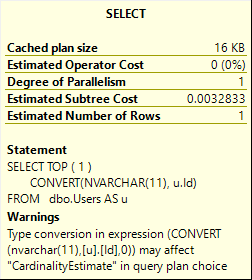
SELECT TOP ( 1 )
       CONVERT(NVARCHAR(11), u.Id)
FROM   dbo.Users AS u;
Seems pretty explicit to me, pal.
Yep. I’d ignore this one all day long.
Squints
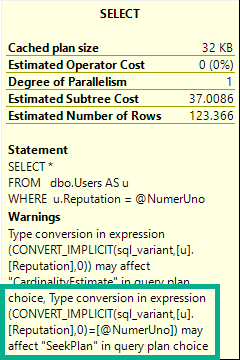
DECLARE @NumerUno SQL_VARIANT = '10000000';
SELECT *
FROM   dbo.Users AS u
WHERE  u.Reputation = @NumerUno;
Cheap haircut
That’s awfully presumptuous.
I don’t even have A index on Reputation, nevermind enough index to facilitate an entire Seek Plan.
I’ve seen this catch people off guard. They fix the implicit conversion, and expect an index seek.
Ah well.
Checks Notes
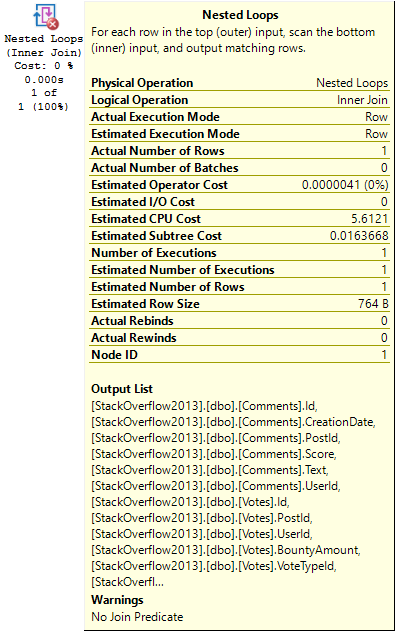
CREATE INDEX tabs
	ON dbo.Comments(UserId);

CREATE INDEX spaces
    ON dbo.Votes(UserId);

SELECT TOP (1) *
FROM   dbo.Comments AS c
JOIN   dbo.Votes AS v
    ON v.UserId = c.UserId
WHERE  c.UserId = 22656;
RFC
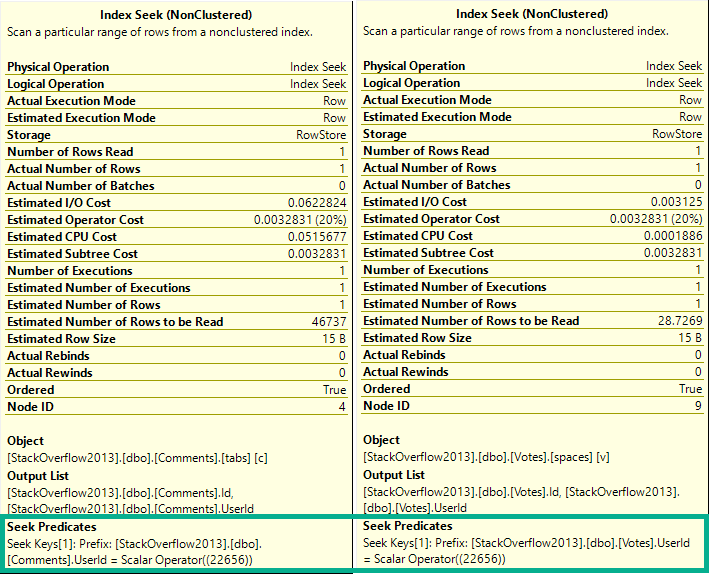
The check for this happens at the join. There’s no further down-plan check on the index access operations.
If there were, it’d see this:
Complaint Apartment
Only matching rows come out, anyway. The join predicate is, like, implied in the where clause.
Oh Um Sweatie No No No No No
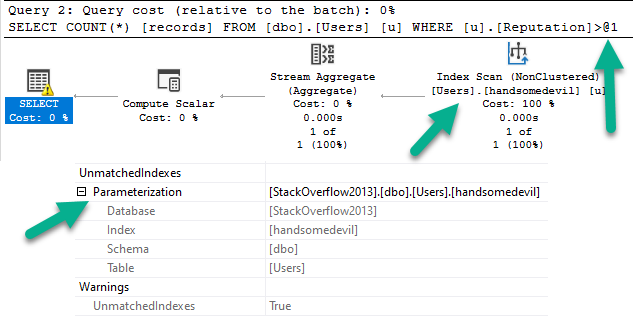
CREATE INDEX handsomedevil
    ON dbo.Users(Reputation)
        WHERE Reputation > 1000000;

SELECT COUNT(*) AS records
FROM dbo.Users AS u
WHERE u.Reputation > 1000000;
Ayyyyyyyy
So the simple parameterization thing fires off a warning about a filtered index that we used not being used.
yep yep yep yep yep yep
First Of All, Ew.
Genie In A Bottle
This thing needs some boundaries. Maybe like available memory should figure in or something?
Probably?
Call me, I have lots of great ideas.
Thanks for reading!
Going Further
If this is the kind of SQL Server stuff you love learning about, you’ll love my training. Blog readers get 25% off the Everything Bundle — over 100 hours of performance tuning content. Need hands-on help? I offer consulting engagements from targeted investigations to ongoing retainers. Want a quick sanity check before committing to a full engagement? Schedule a call — no commitment required.
Instead, let’s talk about a different one: Editable Execution Plans.
We already have this to some degree via query hints and turning optimizer rules on and off.
The problem is that you have to remember all those crazy things, and some hints can affect multiple parts of the plan that you don’t want changed.
If the query you’re changing is in the middle of a big ol’ stored procedure, this process is even more tedious.
Glamorous
Let’s say you wanna experiment with different things, but not without re-running a query over and over to check on the plan with your written hints.
You could change:
Join order
Join types
Index choices
Aggregations
Seeks or Scans
Memory grants and fractions
Basically any element exposed in the XML would be up for grabs — I won’t list them all here, because I think you get the point.
Then you can run your query with your new plan.
If it’s a stunning success, you can force that plan.
Spool Removal
This has downsides, of course.
You could make things worse (but you could do that anyway — trust me, I do it all the time), you could get incorrect results, or errors if you remove certain operators (again, these are all things you can do by being silly anyway).
But, like query hints, this could be a really powerful tool in the hands of experienced query tuners, and people looking to get better at query tuning.
Thanks for reading!
Going Further
If this is the kind of SQL Server stuff you love learning about, you’ll love my training. Blog readers get 25% off the Everything Bundle — over 100 hours of performance tuning content. Need hands-on help? I offer consulting engagements from targeted investigations to ongoing retainers. Want a quick sanity check before committing to a full engagement? Schedule a call — no commitment required.
I know, you’re sitting there and you’re staring at this post thinking “but I use Plan Explorer”.
I use it too, sometimes. The problem is that when I’m with a client, they don’t always have it.
More locally, I think there are some things SSMS visualizes better than Plan Explorer.
One example is rows on parallel threads. Another example is the operator times that started showing up a while back in SSMS 18, which aren’t there at all yet.
There’s some other stuff, but this isn’t what the post is about.
Complaint Department
A lot of the complaints people have about query plans in SSMS are with what’s in front of them.
It’s one of the like, 2 episodes I remember. I think a dog dies or something in the other one.
Anyway, the redhead one from the staring meme moves in with the drunk robot one and thinks the apartment is a closet but then opens a door and reveals a big apartment with a great view at the end of the commercial delivery time.
The part of SSMS people complain about.
And I get it. There’s a real lack of attention paid to UX in query plans.
It’s not quite as bad as Extended Events, but it’s there.
BUUUUUUUUUUUUUUUUUUTT…
Button Pusher
I read a lot of posts about query plans, and I rarely see people bring up the properties tab.
And I get it. The F4 button is right next to the F5 button. If you hit the wrong one, you might ruin everything.
But hear me out, dear reader. I care about you. I want your query plan reading experience to be better.
Hit F4.
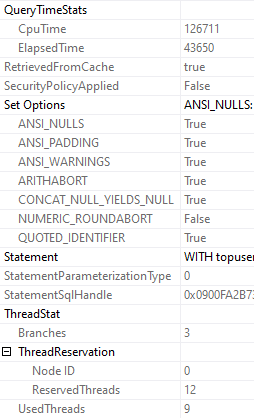
Look at what you can get, just from the SELECT operator:
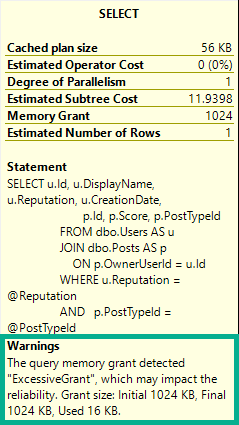
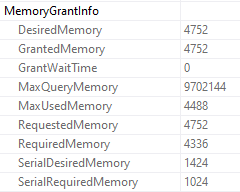
Memory Grant
Ooey, gooey, memory grant info.
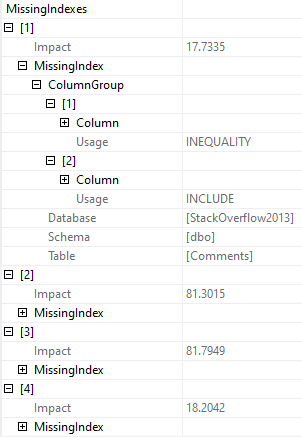
Missing Indexes
If there’s more than one missing index, you can see all of them.
Now, yeah, this sucks because you can’t script them out. Assembling them from here is pretty crappy.
But at least it’s not just the first one that may or may not be the best one.
Goldmine
You can see the CPU and elapsed time. Since we’re on the select operator, we get the full plan’s timing.
If you get the properties on individual operators, you can see the timing for (most) specific operators.
One part that I love is ThreadStat, which tells you how many concurrent parallel branches, and how many threads your query reserved and used.
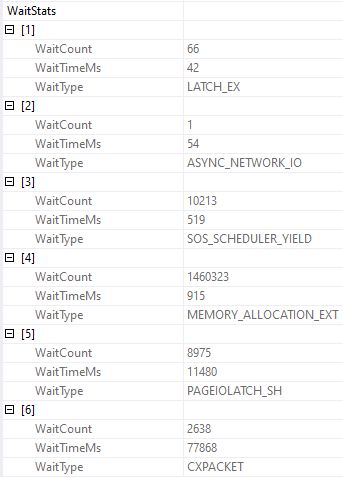
Waist. Waste. Waits.
You can also get wait stats, if you’re into that sort of thing.
And, yeah, this part leaves some data out. You won’t see CXCONSUMER here, or LCK_ waits, which is frustrating.
Nopebooks
Since query plans are what I primarily care about, I’m sticking with SSMS.
And when I look at query plans, I’m hitting F4.
Trust me. If you start poking around in there, you’ll be amazed at what you can find.
If only you knew how bad things really are.
Thanks for reading!
Going Further
If this is the kind of SQL Server stuff you love learning about, you’ll love my training. Blog readers get 25% off the Everything Bundle — over 100 hours of performance tuning content. Need hands-on help? I offer consulting engagements from targeted investigations to ongoing retainers. Want a quick sanity check before committing to a full engagement? Schedule a call — no commitment required.
I use it often in my demo queries because I try to make the base query to show some behavior as simple as possible. That doesn’t always work out, but, whatever. I’m just a bouncer, after all.
The problem with very simple queries is that they may not trigger the parts of the optimizer that display the behavior I’m after. This is the result of them only reaching trivial optimization. For example, trivial plans will not go parallel.
If there’s one downside to making the query as simple as possible and using 1 = (SELECT 1), is that people get very distracted by it. Sometimes I think it would be less distracting to make the query complicated and make a joke about it instead.
The Trouble With Trivial
I already mentioned that trivial plans will never go parallel. That’s because they never reach that stage of optimization.
They also don’t reach the “index matching” portion of query optimization, which may trigger missing index requests, with all their fault and frailty.
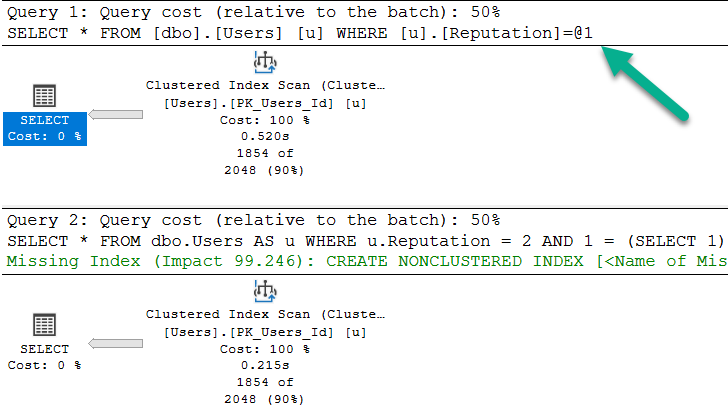
	/*Nothing for you*/
	SELECT *
	FROM dbo.Users AS u
	WHERE u.Reputation = 2;

	/*Missing index requests*/
	SELECT *
	FROM dbo.Users AS u
	WHERE u.Reputation = 2
	AND 1 = (SELECT 1);
>greentext
Note that the bottom query gets a missing index request, and is not simple parameterized. The only reason the first query takes ~2x as long as the second query is because the cache was cold. In subsequent runs, they’re equal enough.
What Gets Fully Optimized?
Generally, things that introduce cost based decisions, and/or inflate the cost of a query > Cost Threshold for Parallelism.
Joins
Subqueries
Aggregations
Ordering without a supporting index
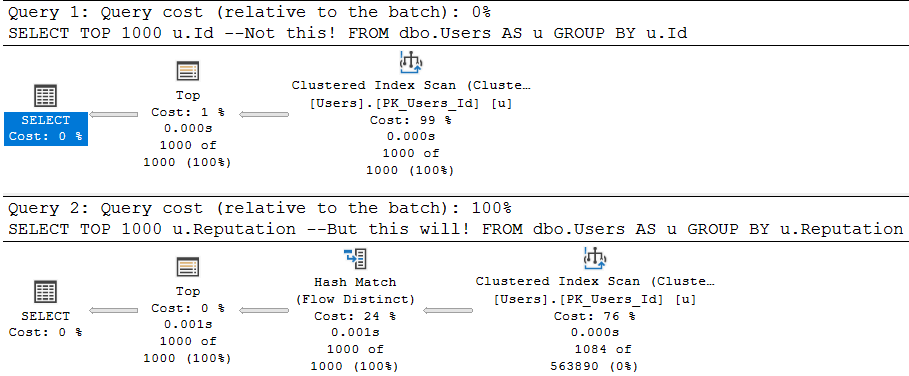
As a quick example, these two queries are fairly similar, but…
	/*Unique column*/
	SELECT TOP 1000 u.Id --Not this!
	FROM dbo.Users AS u
	GROUP BY u.Id;

	/*Non-unique column*/
	SELECT TOP 1000 u.Reputation --But this will!
	FROM dbo.Users AS u
	GROUP BY u.Reputation;
One attempts to aggregate a unique column (the pk of the Users table), and the other aggregates a non-unique column.
The optimizer is smart about this:
Flowy
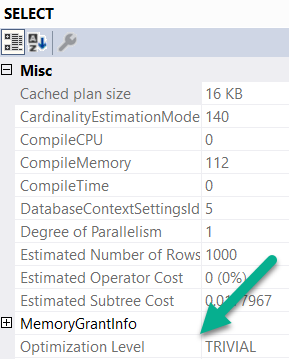
The first query is trivially optimized. If you want to see this, hit F4 when you’re looking at a query plan. Highlight the root operator (select, insert, update, delete — whatever), and look at the optimization level.
wouldacouldashoulda
Since aggregations have no effect on unique columns, the optimizer throws the group by away. Keep in mind, the optimizer has to know a column is unique for that to happen. It has to be guaranteed by a uniqueness constraint of some kind: primary key, unique index, unique constraint.
The second query introduces a choice, though! What’s the cheapest way to aggregate the Reputation column? Hash Match Aggregate? Stream Aggregate? Sort Distinct? The optimizer had to make a choice, so the optimization level is full.
What About Indexes?
Another component of trivial plan choice is when the choice of index is completely obvious. I typically see it when there’s either a) only a clustered index or b) when there’s a covering nonclustered index.
If there’s a non-covering nonclustered index, the choice of a key lookup vs. clustered index scan introduces that cost based decision, so trivial plans go out the window.
Here’s an example:
	CREATE INDEX ix_creationdate
	    ON dbo.Users(CreationDate);

	SELECT u.CreationDate, u.Id
	FROM dbo.Users AS u
	WHERE u.CreationDate >= '20131229';

	SELECT u.Reputation, u.Id
	FROM dbo.Users AS u
	WHERE u.Reputation = 2;

	SELECT u.Reputation, u.Id
	FROM dbo.Users AS u WITH(INDEX = ix_creationdate)
	WHERE u.Reputation = 2;
With an index only on CreationDate, the first query gets a trivial plan. There’s no cost based decision, and the index we created covers the query fully.
For the next two queries, the optimization level is full. The optimizer had a choice, illustrated by the third query. Thankfully it isn’t one that gets chosen unless we force the issue with a hint. It’s a very bad choice, but it exists.
When It’s Wack
Let’s say you create a constraint, because u loev ur datea.
	ALTER TABLE dbo.Users
        ADD CONSTRAINT cx_rep CHECK
			( Reputation >= 1 AND Reputation <= 2000000 );
When we run this query, our newly created and trusted constraint should let it bail out without doing any work.
	SELECT u.DisplayName, u.Age, u.Reputation
    FROM dbo.Users AS u
    WHERE u.Reputation = 0;
But two things happen:
my name is bogus
The plan is trivial, and it’s auto-parameterized.
The auto-parameterization means a plan is chosen where the literal value 0 is replaced with a parameter by SQL Server. This is normally “okay”, because it promotes plan reuse. However, in this case, the auto-parameterized plan has to be safe for any value we pass in. Sure, it was 0 this time, but next time it could be one within the range of valid reputations.
Since we don’t have an index on Reputation, we have to read the entire table. If we had an index on Reputation, it would still result in a lot of extra reads, but I’m using the clustered index here for ~dramatic effect~
Table 'Users'. Scan count 1, logical reads 44440
Of course, adding the 1 = (SELECT 1) thing to the end introduces full optimization, and prevents this.
The query plan without it is just a constant scan, and it does 0 reads.
Rounding Down
So there you have it. When you see me (or anyone else) use 1 = (SELECT 1), this is why. Sometimes when you write demos, a trivial plan or auto-parameterization can mess things up. The easiest way to get around it is to add that to the end of a query.
Thanks for reading!
Going Further
If this is the kind of SQL Server stuff you love learning about, you’ll love my training. Blog readers get 25% off the Everything Bundle — over 100 hours of performance tuning content. Need hands-on help? I offer consulting engagements from targeted investigations to ongoing retainers. Want a quick sanity check before committing to a full engagement? Schedule a call — no commitment required.
In this video, I delve into a clever but sneaky use of user functions within SQL queries that can lead to unexpected behavior and potential security issues. Specifically, I explore how a seemingly innocuous function call can disrupt query parallelism and how different workarounds like using variables or dynamic SQL might seem like solutions but come with their own set of challenges, such as plan caching and performance variability. I also touch on the security implications of these techniques, particularly when it comes to dynamically constructing queries based on user inputs, and offer some practical advice on mitigating risks while still achieving desired functionality.
Full Transcript
Hello, Erik Darling here with Erik Darling Data in the midst of a heat crisis. It’s terrible. I was recently advised that what I thought was fluid in my ears was actually just pressure escaping my sinuses via my most, apparently, the narrowest ear canals that have ever been designed by God or man and put inside someone’s head. So anyway, I wanted to talk about a very sneaky place that I saw a function today. And it was just so stupendously clever of a place to see a function end up. And it looked exactly, the query, I mean, didn’t look like this because it’s not Stack Overflow, but it looked close enough to this to, you know, to give you a good idea of what happened. Where there was a user function, which took a, I mean, it didn’t just take a, this thing, there was like a whole thing that like, you know, figured out what the user was and other stuff and whatever. This is just simpler for me to write. I’m not that smart. So anyway, what happens is if we run this and we just look at what happens when we run this function, we get back to number 100. So the purpose of this function inside this expression right here was to return whatever a particular user setting was for how many rows they wanted to get back at once. So you could run this query, and I bet you thought that would throw an error, but it doesn’t. We can run this query, and we can get back our 100 rows, and we have, you know, whatever, we have an execution plan. And when we dug a little bit deeper into what was going on, the function looked something a little bit like this, where you would go look at a table called user settings or something, and you would return some values and, you know, kind of like stuff that a regular function does. And there was a table that backed it up with a row in it that looked like that. Okay, pretty simple. Not bad.
So, but, you know, when we run it, you know, we go do this, and we run our query with our function in it. This, even though we’re only setting a value for the top expression up here, we still hit the same exact problem that functions cause just about anywhere else in the known SQL universe where they prevent our query from running in parallel. We cannot generate a valid parallel plan with that function even up in the top here. So, that’s kind of a downer, right? So, one way around that, potentially, is to set top equal to a variable, and when we do that, we will get back a slightly faster version of our query that went parallel, right? So, we see a parallel plan down here, and all the pain of, I mean, all the forced serialization associated with that scalar value function happen up here where we declare the variable, and not down here where we mess with anything.
So, that’s an okay solution, and I think I’ve blogged about this before. I might even have another video on it. I’m not sure at this point. I’ve written a lot and videoed a lot. I lose track, and my brain is full of mush and wet newspapers and hairballs, so, and apparently, a lot of pressure that just escapes and feels like there’s fluid in my head, so that’s nice, too. So, yeah, one way around it is to potentially, I mean, like, I messed that up. The problem, we just showed a potential workaround.
The problem with that workaround, there we go, is that no matter what number we declare up here, because this is a declared variable, it has the same-ish local variable effect with being in a top expression, is when you put it in, like, a where clause or something, where SQL Server just has a, like, a solid, a steady guess for what it’s going to use for a number, it doesn’t actually change that. So, we could put 10,000 up there. I’m going to free the proc cache, so we know that we’re not reusing that plan at all, right?
So, we can just be pretty sure that the plan that SQL Server is coming up with is a new one. I can’t use recompile here, and I’ll show you why in a second. So, if we free the proc cache, and I select 10,000 rows, and I look at how many SQL Server is estimating up here, it’ll be 100 rows right there. So, that’s not very good, and it doesn’t matter if I put in 1,000, 5,000, 50,000, if I go and run that and return some rows.
SQL Server’s guess is always going to be 100 right here. So, that’s not ideal, because if you are selecting way more than 100 rows in your top, SQL Server might choose different plans based on different row goals, right?
So, that’s not great. So, your options are, of course, a recompile hint. If we stick a recompile hint in there, then SQL Server will all of a sudden magically understand that we wanted 1,000 rows, and not just 100 rows. So, there’s that, which is okay.
But with anything, when I’m saying recompile, I’m not worried about burning down the house with CPU. I’m more worried about the forensic aspect of things. So, like, you know, you have this query in there with recompile, and it might be a very important query, and now all of a sudden you’ve got no history of it in your plan cache, right?
So, like, every time this runs, SQL Server’s going to not cache a plan, say, we don’t need to bother with this. And if we wanted to troubleshoot performance with this query, we wouldn’t have a really good way to do it, right? We would have, like, no history of this query at all in there. So, one thing, well, a couple things you can do that can help.
Well, one of them is dynamic SQL. And this is safer or more safe or even more safer or more safer or more safer. But this is ultimately sniffable.
When we use totally safe dynamic SQL, it gets treated like a stored procedure in that this variable gets sniffed, or this parameter gets sniffed because we’re passing it in as a parameter down here. So, if we put 100 in the first time and we use 1,000 the second time, SQL Server will reuse the plan for 100 unless something happened where it needed to come up with a new plan.
Anyway, this is less safe but also less sniffable. Cool. All right. So, you can use a variable like this. And you can use, like, rtrim or you can say convert top barcar whatever 11, 52, 78, 25 hike. Whatever you want to do in here to make this a concatenatable from an integer to a concatenatable string value in here.
And you can execute that. And this will have a lower chance of reusing a plan. I’m not going to say it’s 100% never going to reuse a plan, but it’s a lower chance. A lower chance.
But this kind of comes back to, well, not the same problem as recompile where you would have no plans in the cache, but sort of the opposite problem of recompile where you could, depending on how popular this query is, you could have a bunch of plans in the cache. You could have a whole mess of stuff that’s coming in with all these top however many row queries. And, you know, again, you know, whenever we talk about dynamic SQL like this, you know, everyone has to talk about SQL injection and, you know, the potential security risk and how that can be a pretty big downfall with this stuff.
And I agree it is. You know, I will say that, you know, the chance is, the chance of someone coming in and, like, you know, dropping tables or doing anything crazy is lessened a bit because this is an integer value up here. Right?
So, I mean, to my mind, it’s, like, hard to figure out a way to pass in something as an integer that would be validated here that could then be transformed down here in a way that would, you know, execute an extra command. Right?
Like, it’s hard for me to figure that out. I’m sure someone out there is smart enough to do it. It’s just not me. But one thing you can do, even with totally safe dynamic SQL, is something like this. Now, you can explore a little bit of user function stuff with these functions up here and these built-in functions. And, granted, you can restrict access to these via the appropriate permissions.
But that’s hard. And a lot of times, the app login needs elevated permissions to do weird stuff, create tables, create databases. Oftentimes, applications, like, at minimum, kind of want DB owner.
And so that makes it a little bit harder to, like, you know, revoke or deny sort of basic privileges. But one thing I want to point out here is that if I run these queries, right? So if I run select suzer sid, I get OXO1 back. And I can convert that to an integer, which is 1.
And then if I run suzer name with 1, I get back SA. So SA is always 1. SA always has this OXO1. And so what I can do that’s kind of sneaky, even with totally safe dynamic SQL, is say I want my top to be 1000 plus converting suzer sid to an int. And when I run this, instead of getting 1,000 rows back, I get back, oops, there we go, 1,001 rows, which isn’t, again, a performance issue, but it is one way that someone perhaps a bit on the clever side could mess up or could get some extra information without doing anything too crazy.
They could figure out which, well, I mean, at least which login was coming. I mean, if they were logged in as SA, if they get one back, if they get back a number higher than one, then, you know, they maybe do something else to figure that out.
Anyway, that’s with the safe version of dynamic SQL. Even with that, you can play some tricks. So it would be up to, like, you know, someone on the front end to validate, you know, that there’s nothing weird coming in for, like, wherever someone enters in 1,000. Like, use a drop-down menu with static numbers in it or validate your inputs.
Again, everyone should validate their inputs. Anyway, that’s all I wanted to talk about. We’re a little over 10 minutes, which is longer than I wanted, but I messed up a time or two. Sorry about that.
I blame it on the pressure leaking out of my skull. Anyway, thanks for watching, and I will see you in another video, perhaps. Goodbye. Goodbye.
Video Summary
In this video, I delve into a clever but sneaky use of user functions within SQL queries that can lead to unexpected behavior and potential security issues. Specifically, I explore how a seemingly innocuous function call can disrupt query parallelism and how different workarounds like using variables or dynamic SQL might seem like solutions but come with their own set of challenges, such as plan caching and performance variability. I also touch on the security implications of these techniques, particularly when it comes to dynamically constructing queries based on user inputs, and offer some practical advice on mitigating risks while still achieving desired functionality.
Full Transcript
Hello, Erik Darling here with Erik Darling Data in the midst of a heat crisis. It’s terrible. I was recently advised that what I thought was fluid in my ears was actually just pressure escaping my sinuses via my most, apparently, the narrowest ear canals that have ever been designed by God or man and put inside someone’s head. So anyway, I wanted to talk about a very sneaky place that I saw a function today. And it was just so stupendously clever of a place to see a function end up. And it looked exactly, the query, I mean, didn’t look like this because it’s not Stack Overflow, but it looked close enough to this to, you know, to give you a good idea of what happened. Where there was a user function, which took a, I mean, it didn’t just take a, this thing, there was like a whole thing that like, you know, figured out what the user was and other stuff and whatever. This is just simpler for me to write. I’m not that smart. So anyway, what happens is if we run this and we just look at what happens when we run this function, we get back to number 100. So the purpose of this function inside this expression right here was to return whatever a particular user setting was for how many rows they wanted to get back at once. So you could run this query, and I bet you thought that would throw an error, but it doesn’t. We can run this query, and we can get back our 100 rows, and we have, you know, whatever, we have an execution plan. And when we dug a little bit deeper into what was going on, the function looked something a little bit like this, where you would go look at a table called user settings or something, and you would return some values and, you know, kind of like stuff that a regular function does. And there was a table that backed it up with a row in it that looked like that. Okay, pretty simple. Not bad.
So, but, you know, when we run it, you know, we go do this, and we run our query with our function in it. This, even though we’re only setting a value for the top expression up here, we still hit the same exact problem that functions cause just about anywhere else in the known SQL universe where they prevent our query from running in parallel. We cannot generate a valid parallel plan with that function even up in the top here. So, that’s kind of a downer, right? So, one way around that, potentially, is to set top equal to a variable, and when we do that, we will get back a slightly faster version of our query that went parallel, right? So, we see a parallel plan down here, and all the pain of, I mean, all the forced serialization associated with that scalar value function happen up here where we declare the variable, and not down here where we mess with anything.
So, that’s an okay solution, and I think I’ve blogged about this before. I might even have another video on it. I’m not sure at this point. I’ve written a lot and videoed a lot. I lose track, and my brain is full of mush and wet newspapers and hairballs, so, and apparently, a lot of pressure that just escapes and feels like there’s fluid in my head, so that’s nice, too. So, yeah, one way around it is to potentially, I mean, like, I messed that up. The problem, we just showed a potential workaround.
The problem with that workaround, there we go, is that no matter what number we declare up here, because this is a declared variable, it has the same-ish local variable effect with being in a top expression, is when you put it in, like, a where clause or something, where SQL Server just has a, like, a solid, a steady guess for what it’s going to use for a number, it doesn’t actually change that. So, we could put 10,000 up there. I’m going to free the proc cache, so we know that we’re not reusing that plan at all, right?
So, we can just be pretty sure that the plan that SQL Server is coming up with is a new one. I can’t use recompile here, and I’ll show you why in a second. So, if we free the proc cache, and I select 10,000 rows, and I look at how many SQL Server is estimating up here, it’ll be 100 rows right there.
So, that’s not very good, and it doesn’t matter if I put in 1,000, 5,000, 50,000, if I go and run that and return some rows. SQL Server’s guess is always going to be 100 right here. So, that’s not ideal, because if you are selecting way more than 100 rows in your top, SQL Server might choose different plans based on different row goals, right?
So, that’s not great. So, your options are, of course, a recompile hint. If we stick a recompile hint in there, then SQL Server will all of a sudden magically understand that we wanted 1,000 rows, and not just 100 rows. So, there’s that, which is okay.
But with anything, when I’m saying recompile, I’m not worried about burning down the house with CPU. I’m more worried about the forensic aspect of things. So, like, you know, you have this query in there with recompile, and it might be a very important query, and now all of a sudden you’ve got no history of it in your plan cache, right?
So, like, every time this runs, SQL Server’s going to not cache a plan, say, we don’t need to bother with this. And if we wanted to troubleshoot performance with this query, we wouldn’t have a really good way to do it, right? We would have, like, no history of this query at all in there.
So, one thing, well, a couple things you can do that can help. Well, one of them is dynamic SQL. And this is safer or more safe or even more safer or more safer or more safer.
But this is ultimately sniffable. When we use totally safe dynamic SQL, it gets treated like a stored procedure in that this variable gets sniffed, or this parameter gets sniffed because we’re passing it in as a parameter down here.
So, if we put 100 in the first time and we use 1,000 the second time, SQL Server will reuse the plan for 100 unless something happened where it needed to come up with a new plan. Anyway, this is less safe but also less sniffable.
Cool. All right. So, you can use a variable like this. And you can use, like, rtrim or you can say convert top barcar whatever 11, 52, 78, 25 hike. Whatever you want to do in here to make this a concatenatable from an integer to a concatenatable string value in here.
And you can execute that. And this will have a lower chance of reusing a plan. I’m not going to say it’s 100% never going to reuse a plan, but it’s a lower chance.
A lower chance. But this kind of comes back to, well, not the same problem as recompile where you would have no plans in the cache, but sort of the opposite problem of recompile where you could, depending on how popular this query is, you could have a bunch of plans in the cache.
You could have a whole mess of stuff that’s coming in with all these top however many row queries. And, you know, again, you know, whenever we talk about dynamic SQL like this, you know, everyone has to talk about SQL injection and, you know, the potential security risk and how that can be a pretty big downfall with this stuff.
And I agree it is. You know, I will say that, you know, the chance is, the chance of someone coming in and, like, you know, dropping tables or doing anything crazy is lessened a bit because this is an integer value up here.
Right? So, I mean, to my mind, it’s, like, hard to figure out a way to pass in something as an integer that would be validated here that could then be transformed down here in a way that would, you know, execute an extra command.
Right? Like, it’s hard for me to figure that out. I’m sure someone out there is smart enough to do it.
It’s just not me. But one thing you can do, even with totally safe dynamic SQL, is something like this. Now, you can explore a little bit of user function stuff with these functions up here and these built-in functions.
And, granted, you can restrict access to these via the appropriate permissions. But that’s hard. And a lot of times, the app login needs elevated permissions to do weird stuff, create tables, create databases.
Oftentimes, applications, like, at minimum, kind of want DB owner. And so that makes it a little bit harder to, like, you know, revoke or deny sort of basic privileges. But one thing I want to point out here is that if I run these queries, right?
So if I run select suzer sid, I get OXO1 back. And I can convert that to an integer, which is 1. And then if I run suzer name with 1, I get back SA.
So SA is always 1. SA always has this OXO1. And so what I can do that’s kind of sneaky, even with totally safe dynamic SQL, is say I want my top to be 1000 plus converting suzer sid to an int.
And when I run this, instead of getting 1,000 rows back, I get back, oops, there we go, 1,001 rows, which isn’t, again, a performance issue, but it is one way that someone perhaps a bit on the clever side could mess up or could get some extra information without doing anything too crazy.
They could figure out which, well, I mean, at least which login was coming. I mean, if they were logged in as SA, if they get one back, if they get back a number higher than one, then, you know, they maybe do something else to figure that out.
Anyway, that’s with the safe version of dynamic SQL. Even with that, you can play some tricks. So it would be up to, like, you know, someone on the front end to validate, you know, that there’s nothing weird coming in for, like, wherever someone enters in 1,000.
Like, use a drop-down menu with static numbers in it or validate your inputs. Again, everyone should validate their inputs. Anyway, that’s all I wanted to talk about.
We’re a little over 10 minutes, which is longer than I wanted, but I messed up a time or two. Sorry about that. I blame it on the pressure leaking out of my skull. Anyway, thanks for watching, and I will see you in another video, perhaps.
Goodbye. Goodbye.
Going Further
If this is the kind of SQL Server stuff you love learning about, you’ll love my training. Blog readers get 25% off the Everything Bundle — over 100 hours of performance tuning content. Need hands-on help? I offer consulting engagements from targeted investigations to ongoing retainers. Want a quick sanity check before committing to a full engagement? Schedule a call — no commitment required.