If this is the kind of SQL Server stuff you love learning about, you’ll love my training. Blog readers get 25% off the Everything Bundle — over 100 hours of performance tuning content. Need hands-on help? I offer consulting engagements from targeted investigations to ongoing retainers. Want a quick sanity check before committing to a full engagement? Schedule a call — no commitment required.
For Row Store indexes — Columnstore is different and should be maintained differently — rebuilding indexes gets prescribed as a cure for performance issues of all types.
Sudden query slowdown? Rebuild’em!
Blocking? Rebuild’em!
High CPU? Rebuild’em!
No idea what’s going on? Rebuild’em!
While an index rebuild will update stats, which is sometimes beneficial, it’s a lot easier to, you guessed it, just update stats.
It’ll have the same net effect on plan invalidation, with a heck of a lot of less resource usage and, potentially, blocking.
Bear Bile
It’s my opinion, and you can take it or leave it, that index rebuilds should be reserved for special circumstances.
You deleted a lot of data
You need to change something about the index
You have a Heap with a lot of forwarded fetches
But why is that my opinion? What evidence has informed it? No, it’s not just because I like to be disagreeable. It’s mostly that I went through a fairly normal progression.
A lot of people are talking about index fragmentation, sounds bad!
Hey, I think this fixed something? I’m gonna keep doing it.
Well, I still have problems, but at least I don’t have fragmentation.
I don’t have enough time to run CHECKDB, I need to rebuild less often.
No one seems to be complaining when I don’t rebuild indexes…
My problems had nothing to do with index fragmentation!
Here’s How To Order
But what metrics might an index rebuild fix, and why was so much fuss made about them for so long?
To test this, and to get you, dear reader, an explanation, I set up some tests.
First, I created a simple index.
CREATE INDEX ix_whatever ON dbo.Users (Reputation);
Then, I wrote queries that will touch 1%, 10%, and 100% of the Users table (2013 version, 2.4mm rows).
SELECT COUNT(*) AS records
FROM dbo.Users AS u
WHERE u.Reputation = 289
AND 1 = (SELECT 1);


SELECT COUNT(*) AS records
FROM dbo.Users AS u
WHERE u.Reputation BETWEEN 100 AND 450
AND 1 = (SELECT 1);


SELECT COUNT(*) AS records
FROM dbo.Users AS u
WHERE 1 = (SELECT 1);
After that, it’s a matter of introducing the “harmful” kind of fragmentation — empty space on pages.
This is the kind of fragmentation that bloats your indexes, both on disk and in memory, leaving less room for other things.
ALTER INDEX ix_whatever ON dbo.Users REBUILD WITH(FILLFACTOR = 5);
ALTER INDEX ix_whatever ON dbo.Users REBUILD WITH(FILLFACTOR = 10);
ALTER INDEX ix_whatever ON dbo.Users REBUILD WITH(FILLFACTOR = 20);
ALTER INDEX ix_whatever ON dbo.Users REBUILD WITH(FILLFACTOR = 30);
ALTER INDEX ix_whatever ON dbo.Users REBUILD WITH(FILLFACTOR = 40);
ALTER INDEX ix_whatever ON dbo.Users REBUILD WITH(FILLFACTOR = 50);
ALTER INDEX ix_whatever ON dbo.Users REBUILD WITH(FILLFACTOR = 60);
ALTER INDEX ix_whatever ON dbo.Users REBUILD WITH(FILLFACTOR = 70);
ALTER INDEX ix_whatever ON dbo.Users REBUILD WITH(FILLFACTOR = 80);
ALTER INDEX ix_whatever ON dbo.Users REBUILD WITH(FILLFACTOR = 90);
ALTER INDEX ix_whatever ON dbo.Users REBUILD WITH(FILLFACTOR = 100);
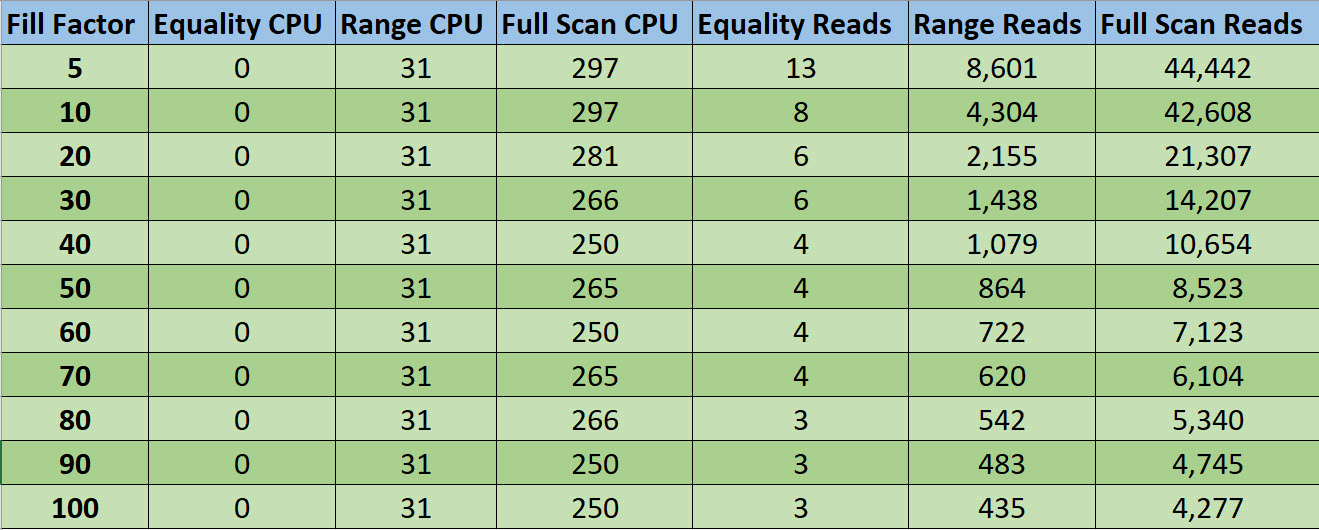
Now, since I don’t wanna take that many screenshots, I embraced my long-lost ENTJ and made an Excel table.
Retirement Plan
Not surprisingly, the chief metric that went down as fill factor went up is reads. CPU didn’t change much, if at all.
That being said, you have to be real goofy about fill factor to get reads to matter.
Within a sane boundary of fill factors, which I’d call 70 to 100, ask yourself if any variation there is the root cause of your performance problems.
Now, I know you. It’s hard to talk you out of your superstitions, and you’re gonna keep thrashing that expensive SAN with constant I/O nonsense.
But maybe I can talk you into raising the threshold that you do it at. Maybe I can get you to not rebuild (or reorg) your indexes until they hit >70% fragmentation. That’s 30% fill factor on the chart.
Virgin Wax
Alright, now we know that rebuilds help reads. When would number of reads matter most?
If your disks are the quite elderly spinning variety
And you don’t have enough memory to cache your hot data
And maybe your hot data could fit into memory if were defragmented to 100% fill factor
You can kinda start to put a picture together of when it mattered. Before SSDs, before 64bit OSes (32b capped out at ~3GB RAM), and well before flash storage, etc.
Way back when, rebuilding made sense. Reading unordered data could have a big impact on a workload because disks would have to physically move to find unordered/spread out data.
So yeah, if you notice that your workload is doing a lot more reads over time, and rebuilding at 100% fill factor reduces reads, it might be worth rebuilding at some point. But to solve any other common workload problems, look somewhere else. Rebuilding indexes is not the cure.
Thanks for reading!
Going Further
If this is the kind of SQL Server stuff you love learning about, you’ll love my training. Blog readers get 25% off the Everything Bundle — over 100 hours of performance tuning content. Need hands-on help? I offer consulting engagements from targeted investigations to ongoing retainers. Want a quick sanity check before committing to a full engagement? Schedule a call — no commitment required.
I’ll be on YouTube Friday at Noon EST, answering your questions about life, love, SQL Server, and fashion choices.
This time with 33% less potato.
Last week I was a victim of “how hard can this be?”, only to find out that I needed to download an encoder and figure out how to use it to broadcast.
Which is weird, because when I did a dry run, the website seemed to pick up on all the hardware stuff. Ah well. I’m still working on the single channel audio thing, which is apparently something that a lot of people with my setup have. Which solution will work?
TUNE IN TO FIND OUT!
If you wanna watch last week’s episode catch it here!
Thanks for reading!
Going Further
If this is the kind of SQL Server stuff you love learning about, you’ll love my training. Blog readers get 25% off the Everything Bundle — over 100 hours of performance tuning content. Need hands-on help? I offer consulting engagements from targeted investigations to ongoing retainers. Want a quick sanity check before committing to a full engagement? Schedule a call — no commitment required.
Make a list of the top 3-5 problems you have on your SQL Server. Go ahead, I’ll wait.
Now put them in order. Which one is the biggest problem, and who is it a problem for?
That’s a big problem, huh? It’d take a lot of time and effort to fix that problem.
But what about the rest of your problems? If you look down the list, you’ll probably find stuff that you could make some progress on in the meantime.
Don’t Get Stuck
Just as an example, let’s say you have to install SQL Server. When you go to set it up, you realize that the service accounts weren’t made for it, and the Sysadmin who takes care of that stuff is out sick (of being a Sysadmin).
You might hold off on doing everything else because of that roadblock, even though you could have the server ready to go, and just swap the service account in later.
The same thing happens to people with other problems, too. Let’s say the list looks like this:
We’re importing XML and shredding it constantly while queries run
There are some scalar valued functions that we use as helpers to parse the XML
We’ve got tables that need indexes (including clustered indexes)
tempdb only has one data file
Our parallelism settings are wrong
A lot of people will get stuck on their biggest problem. It’s happened to me, too.
Heck, just setting things up here over the past week has been full of roadblocks, and sometimes I’d find myself saying “well, what’s the point of doing X if I don’t have Y yet?”.
Current Events
Right now, my biggest problem is waiting on some paperwork so I can open a business checking account, but if I sat around waiting on that before setting up a mailing list, blogging, setting up Zapier, and all that, I’d be way far behind when that stuff did come in.
And when it did, my second biggest problem would turn into my biggest problem.
If you find yourself not working on other problems because you’ve got one monolithic problem, try to remember that solving smaller problems has an upstream effect. Especially with SQL Server, where small changes can make big impacts.
I’ve seen servers go from constantly running out of worker threads to humming along happily just by having smarter parallelism settings.
Going Further
If this is the kind of SQL Server stuff you love learning about, you’ll love my training. Blog readers get 25% off the Everything Bundle — over 100 hours of performance tuning content. Need hands-on help? I offer consulting engagements from targeted investigations to ongoing retainers. Want a quick sanity check before committing to a full engagement? Schedule a call — no commitment required.
When someone says that something is slower than it was before, whether it’s a query, a whole SQL Server, a website, or an app screen, it’s almost never while the perceived slowness is happening, nor is it reproducible (especially when a consultant is watching).
There are some basic things you need to have historical record of if you wanna figure it out:
What queries were running
What queries were waiting on
What was different from last time those queries ran
Microsoft has taken some steps to help us figure this out with Query Store, but really only for SQL Server 2017, when aggregated wait stats were added to the family of Query Store views.
But if you’re like most people, you’re not on SQL Server 2017, and even further into that segment, you don’t have Query Store enabled.
I think there’s more Microsoft could do to improve data that’s collected, but right now it’s just a collection of votes.
Right now, the GUI is so limited in what you can search for that I wrote a sp_QuickieStore to make working with the data easier.
Compared To What?
If you’re on older versions of SQL Server, including those about to be taken off life support, what are your options?
You can use sp_WhoIsActive, and log those results to a table
For Money!
There’s a whole landscape of SQL Server monitoring tools out there, as well as things people get confused with SQL Server monitoring tools.
Ultimately, the best monitoring tool for you is one you:
Will actually use
Will enable you to find problems
Will enable you to solve problems
Getting overwhelmed with meaningless metrics (there werehow many logouts per second?!), standalone charts that don’t allow you to correlate system activity to resource usage (save as image?!), or long lists of queries that may or may not run when anyone cares (yes, CHECKDB did a lot of reads, thanks) doesn’t help anyone. If that sounds like your monitoring tool, it might be time to trade it for a carton of Gatorade.
You’ve got a glorified FitBit strapped onto your SQL Server.
Here And Now
What’s currently happening on your SQL Server is often only a symptom of what’s been happening on your SQL Server for a long time.
There are very few problems I’ve seen that are truly “sudden”, unless someone recently made an ill-advised change to the server, like dropping an important index, etc.
The longer you let things like aging hardware, growing data, and ignoring query and index problems go, the worse things get.
Monitoring your server is a good first step, but it’s still up to you to address the problems, and address the right problems.
Thanks for reading!
Going Further
If this is the kind of SQL Server stuff you love learning about, you’ll love my training. Blog readers get 25% off the Everything Bundle — over 100 hours of performance tuning content. Need hands-on help? I offer consulting engagements from targeted investigations to ongoing retainers. Want a quick sanity check before committing to a full engagement? Schedule a call — no commitment required.
If you said to me “Erik, I wanna run a mile in 10 minutes”, my first question would be “how fast can you run one now?”
Most everyone wants their SQL Server to go faster, but getting it to go faster isn’t always the first thing you should worry about.
Let’s say our intrepid runner doesn’t know how fast they can run a mile now because they smoke a pack a day, are 200lbs overweight, and just had a heart attack.
Obviously, there are issues to address before they can even walk a mile, nevermind run a mile, nevermind run one in 10 minutes.
Chest Hair
The point is, it doesn’t do you any good to have the fastest SQL Server in the world, if:
You can lose all your data because you’re not taking backups
You can lose more data than the business wants because you’re not taking backups often enough
You can lose data to corruption you’re not checking for
You can lose all your backups because they’re on the same disks your server is
The nice part about most of these things is that they’ve been automated for years. For free. Ola Hallengren has made it ridiculously easy for you.
Once this stuff is set up, you have the mostly passive job of making sure they’re running and finishing, which you can make even more passive with email alerts.
Undertrained
If you’re not sure where to start, start with your boss. Ask how much data you’re allowed to lose. Ask sales people if they’re telling people they’ll only lose a certain amount of data.
If you really wanna find out, tell them how much data you can lose right now. You can get this number by looking at your most frequent type of backups.
Only taking full backups once a day? That’s 24 hours.
Only taking log backups every 2 hours? That’s 2 hours.
And of course, if you’ve never tested restoring your backups, it’s ∞∞∞Infinity∞∞∞
Thanks for reading!
Going Further
If this is the kind of SQL Server stuff you love learning about, you’ll love my training. Blog readers get 25% off the Everything Bundle — over 100 hours of performance tuning content. Need hands-on help? I offer consulting engagements from targeted investigations to ongoing retainers. Want a quick sanity check before committing to a full engagement? Schedule a call — no commitment required.
Since I know this’ll come out Friday, I get to have fun.
I have a feeling most of you know what Candy Crush is. It’s a mindless, infinite thumb scroll replacement.
When you’re playing, Candy Crush will suggest moves to you. It thinks they’re good ideas. Though I don’t know what the algorithm is, it seems to recommend some goofy stuff.
Take this example. It wants me to move the orange piece. It’s not a bad move, but it’s not the best possible move.
Savvy Candy Crush players will see the obvious choice. Make five in a row with the purple pieces, get the cookie thing, cookie thing drops down next to the explodey thing, and when you combine it with the wrapped candy thing, all the purple pieces turn into explodey pieces.
Level over, basically.
But Candy Crush isn’t thinking that far ahead. Neither are missing index requests.
SQL Server Does The Same Thing
Let’s take this query, for example. It’s very Post-centric.
SELECT   p.OwnerUserId, p.Score, p.Title
FROM     dbo.Comments AS c
JOIN     dbo.Posts AS p
    ON p.OwnerUserId = c.UserId
WHERE    p.PostTypeId = 1
AND      p.ClosedDate >= '2018-06-01'
ORDER BY p.Score DESC;
Right now, the only indexes I have are clustered, and they’re not on any columns that help this query. Sure, they help other things, and having clustered indexes is usually a good idea.
This is the home run use-case for nonclustered indexes. You know. Organized copies of other parts of your data that users might query.
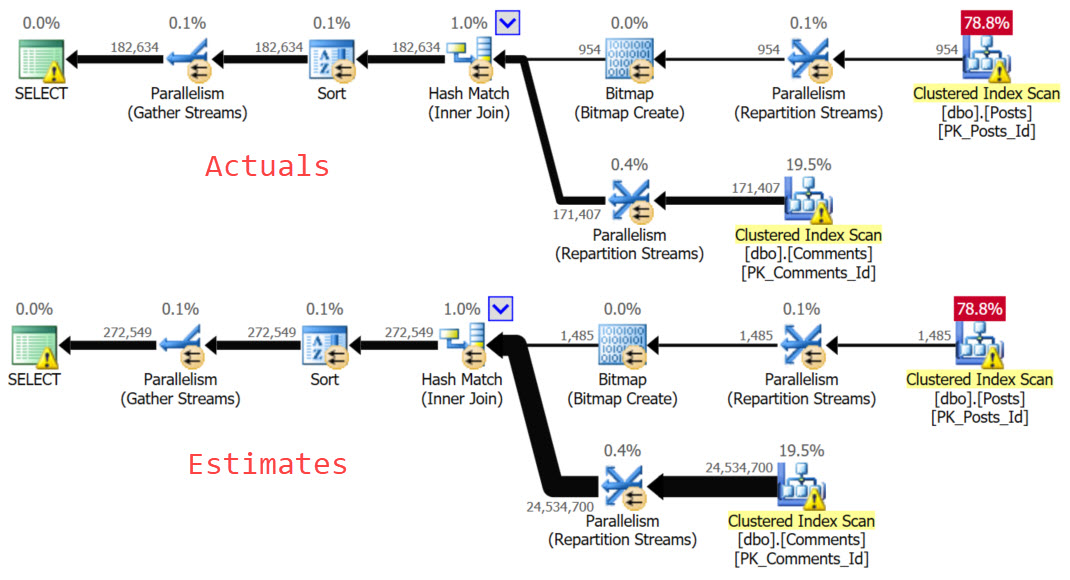
This is such an obvious move that SQL Server is all like “hey, got a minute?”
This is where things get all jumpy-blinky. Just like in Candy Crush.
Hints-a-Hints
This is the index SQL Server wants:
CREATE NONCLUSTERED INDEX [<Name of Missing Index, sysname,>]
ON [dbo].[Posts] ([PostTypeId],[ClosedDate])
INCLUDE ([OwnerUserId],[Score],[Title])
Would this be better than no index? Yes.
Is it the best possible index? No. Not by a long shot.
Let’s start with our predicates. SQL Server picked PostTypeId as the leading key column.
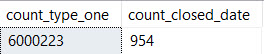
SELECT SUM(CASE p.PostTypeId WHEN 1 THEN 1 ELSE 0 END) AS [count_type_one],
       SUM(CASE WHEN p.ClosedDate >= '2018-06-01' THEN 1 ELSE 0 END) AS count_closed_date
FROM dbo.Posts AS p
Is it selective?
That ain’t good
Regardless of selectivity, the missing index request mechanism will always put equality predicates first.
What I’m getting at is that the missing index request isn’t as well thought out as a lot of people hope. It’s just one possible index for a query weighted to helping us find data in the where clause.
With a human set of eyes on it, you may discover one or more better possible indexes. You may even discover one on for the Comments table, too.
Other Issues
There’s also the issue of the included columns it chose. We’re ordering by Score. We’re joining on OwnerUserId.
Those may be helpful as key columns, depending on how much data we end up joining, and how much data we end up sorting.
Guesses. Just guesses.
Complicated Game
If you don’t have anyone doing regular index tuning, missing index hints are worth following because they’re better than nothing.
They’re like… acceptable. Most of the time.
The big things you have to watch out for are the incredibly wide requests, duplicative requests, and ones that want big string columns.
Thanks for reading!
Going Further
If this is the kind of SQL Server stuff you love learning about, you’ll love my training. Blog readers get 25% off the Everything Bundle — over 100 hours of performance tuning content. Need hands-on help? I offer consulting engagements from targeted investigations to ongoing retainers. Want a quick sanity check before committing to a full engagement? Schedule a call — no commitment required.
You can read a lot about how indexes might improve queries.
But there are certain query mechanics that indexes don’t solve for, and you can not only get stuck with an index that isn’t really helping, but all the same query problems you were looking to solve.
Understanding how indexes and queries interact together is a fundamental part of query tuning.
In this post, we’re going to look at some query patterns that indexes don’t do much to fix.
Part Of The Problem
Indexes don’t care about your queries. They care about storing data in order.
There are very definite ways that you can encourage queries to use them efficiently, and probably even more definite ways for you to discourage them from using them efficiently.
Even with syntax that seems completely transparent, you can get into trouble.
Take the simple example of two date columns: there’s nothing in your index that tracks how two dates in a row relate to each other.
Nothing tracks how many years, months, weeks, days, hours, minutes, seconds, milliseconds, or whatever magical new unit Extended Events has to make itself less usable.
Heck, it doesn’t even track if one is greater or less than another.
Soggy Flautas
Ah, heck, let’s stick with Stack Overflow. Let’s even create an index.
CREATE INDEX whatever
ON dbo.Posts(CreationDate, ClosedDate);
Now let’s look at these super important queries.
    SELECT   COUNT(*) AS records
    FROM     dbo.Posts AS p
    WHERE    p.CreationDate < p.ClosedDate;


    SELECT   COUNT(*) AS records
    FROM     dbo.Posts AS p
    WHERE    p.CreationDate > p.ClosedDate;
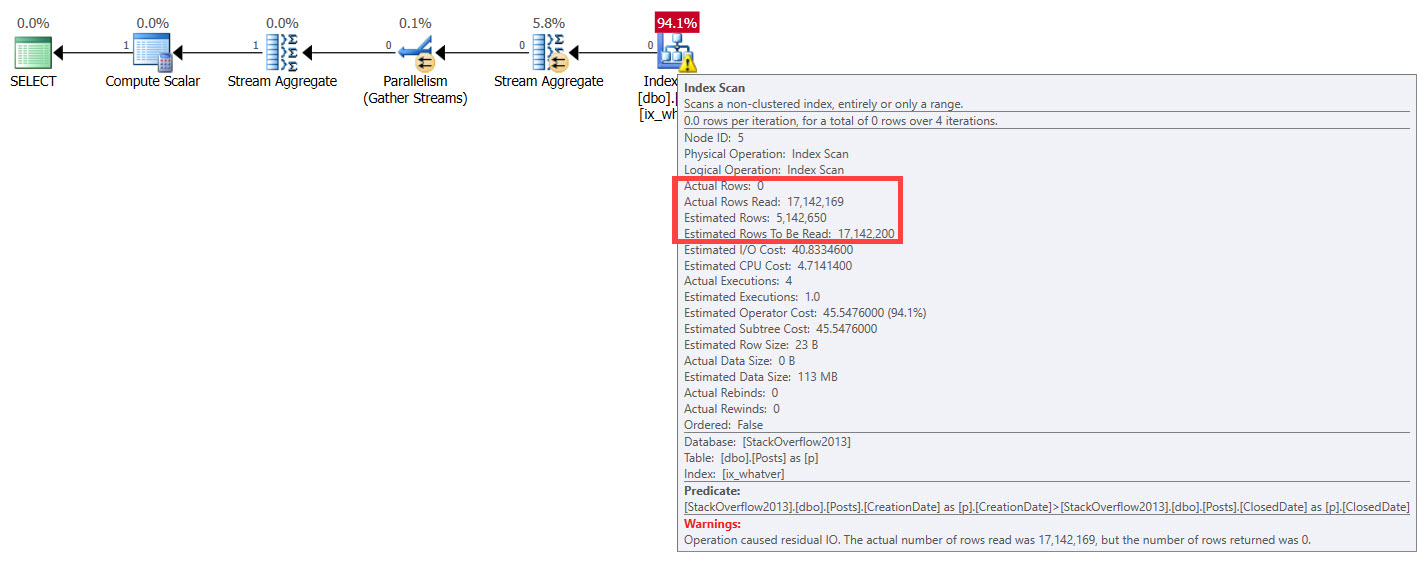
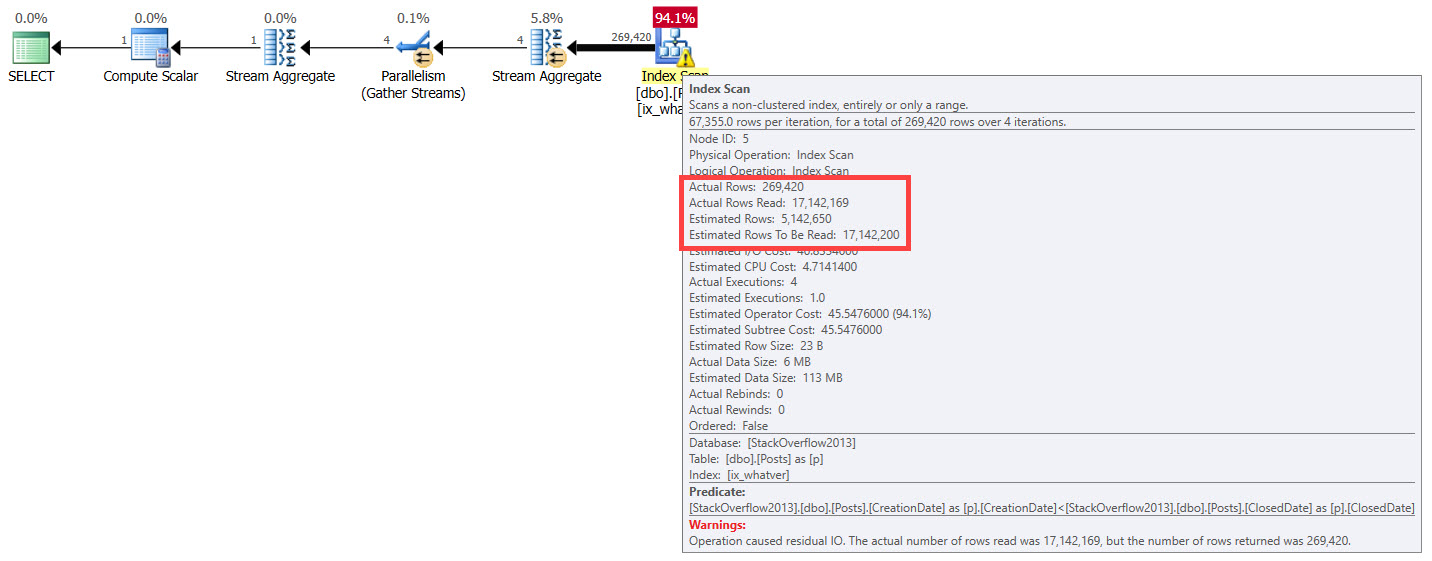
How much work will the optimizer think it has to do, here? How many rows will it estimate? How will it treat different queries, well, differently? If you said “it won’t”, you’re a smart cookie. Aside from the “Actual rows”, each plan has the same attributes across.
And I’m Homosapien like youAnd we’re Homosapien too
Treachery
Neither of these query plans is terrible on its own.
The problem is really in larger plans, where bad decisions like these have their way with other parts of a query plan.
Nasty little lurkers they are, because you expect things to get better when creating indexes and writing SARGable predicates.
Yet for both queries, SQL Server does the same thing, based on the same guesses on the perceived number of rows at play. It’s one of those quirky things — if it’s a data point we care about, then it’s one we should express somehow.
A computed column might work here:
    ALTER TABLE dbo.Posts
        ADD created_less_closed AS
            CONVERT(BIT, CASE WHEN CreationDate < ClosedDate
                              THEN 1
                              WHEN CreationDate > ClosedDate
                              THEN 0
                         END)


    CREATE INDEX apathy
        ON dbo.Posts (created_less_closed);
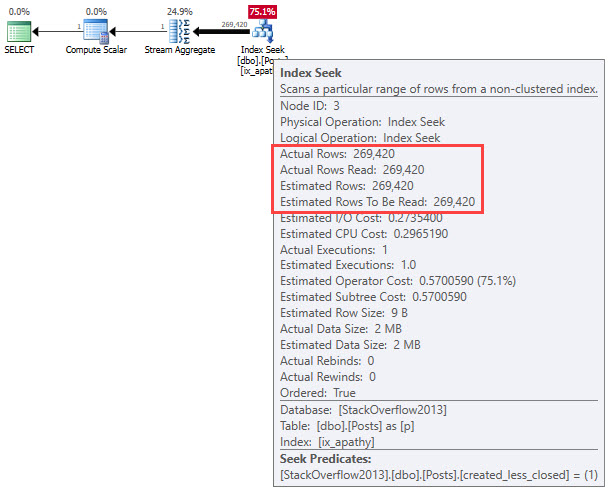
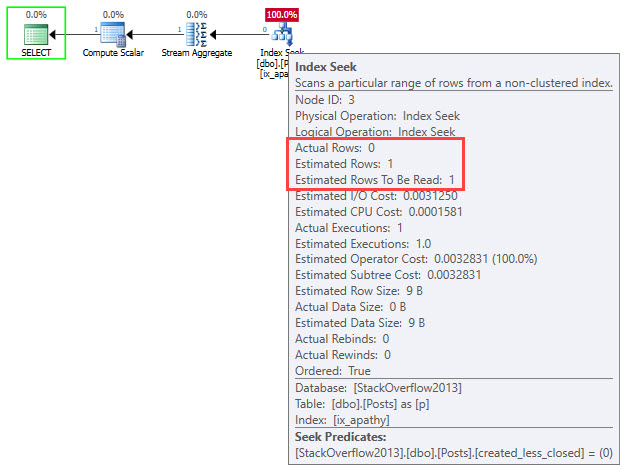
Which means we’d have to change our queries a bit, since expression matching has a hard time reasoning this one out:
    SELECT   COUNT(*) AS records
    FROM     dbo.Posts AS p
    WHERE    1 = CONVERT(BIT, CASE WHEN CreationDate < ClosedDate
                              THEN 1
                              WHEN CreationDate > ClosedDate
                              THEN 0
                         END)
    AND 1 = (SELECT 1);


    SELECT   COUNT(*) AS records
    FROM     dbo.Posts AS p
    WHERE    0 = CONVERT(BIT, CASE WHEN CreationDate < ClosedDate
                              THEN 1
                              WHEN CreationDate > ClosedDate
                              THEN 0
                         END)
    AND 1 = (SELECT 1);
BetterButter
What Would Be Better?
Practically speaking, it isn’t the job of an index (or statistic) to track things like this. We need to have data that represents things that are important to users.
Though neither of these plans is terrible in isolation, bad guesses like these flow all through query plans and can lead to other bad decisions and oddities.
It’s one of those terrible lurkers just waiting to turn an otherwise good query into that thing you regard with absolute loathing every time it shows up in [your favorite monitoring tool].
Knowing this, we can start to design our data to better reflect data points we care about. A likely hero here is a computed column to return some value based on which is greater, or a DATEDIFF of the two columns.
Going Further
If this is the kind of SQL Server stuff you love learning about, you’ll love my training. Blog readers get 25% off the Everything Bundle — over 100 hours of performance tuning content. Need hands-on help? I offer consulting engagements from targeted investigations to ongoing retainers. Want a quick sanity check before committing to a full engagement? Schedule a call — no commitment required.
You Fine And All
You can read a lot about how indexes might improve queries.
But there are certain query mechanics that indexes don’t solve for, and you can not only get stuck with an index that isn’t really helping, but all the same query problems you were looking to solve.
Understanding how indexes and queries interact together is a fundamental part of query tuning.
In this post, we’re going to look at some query patterns that indexes don’t do much to fix.
Part Of The Problem
Indexes don’t care about your queries. They care about storing data in order.
There are very definite ways that you can encourage queries to use them efficiently, and probably even more definite ways for you to discourage them from using them efficiently.
Even with syntax that seems completely transparent, you can get into trouble.
Take the simple example of two date columns: there’s nothing in your index that tracks how two dates in a row relate to each other.
Nothing tracks how many years, months, weeks, days, hours, minutes, seconds, milliseconds, or whatever magical new unit Extended Events has to make itself less usable.
Heck, it doesn’t even track if one is greater or less than another.
Soggy Flautas
Ah, heck, let’s stick with Stack Overflow. Let’s even create an index.
CREATE INDEX whatever
ON dbo.Posts(CreationDate, ClosedDate);
Now let’s look at these super important queries.
    SELECT   COUNT(*) AS records
    FROM     dbo.Posts AS p
    WHERE    p.CreationDate < p.ClosedDate;


    SELECT   COUNT(*) AS records
    FROM     dbo.Posts AS p
    WHERE    p.CreationDate > p.ClosedDate;
How much work will the optimizer think it has to do, here? How many rows will it estimate? How will it treat different queries, well, differently? If you said “it won’t”, you’re a smart cookie. Aside from the “Actual rows”, each plan has the same attributes across.
And I’m Homosapien like youAnd we’re Homosapien too
Treachery
Neither of these query plans is terrible on its own.
The problem is really in larger plans, where bad decisions like these have their way with other parts of a query plan.
Nasty little lurkers they are, because you expect things to get better when creating indexes and writing SARGable predicates.
Yet for both queries, SQL Server does the same thing, based on the same guesses on the perceived number of rows at play. It’s one of those quirky things — if it’s a data point we care about, then it’s one we should express somehow.
A computed column might work here:
    ALTER TABLE dbo.Posts
        ADD created_less_closed AS
            CONVERT(BIT, CASE WHEN CreationDate < ClosedDate
                              THEN 1
                              WHEN CreationDate > ClosedDate
                              THEN 0
                         END)


    CREATE INDEX apathy
        ON dbo.Posts (created_less_closed);
Which means we’d have to change our queries a bit, since expression matching has a hard time reasoning this one out:
    SELECT   COUNT(*) AS records
    FROM     dbo.Posts AS p
    WHERE    1 = CONVERT(BIT, CASE WHEN CreationDate < ClosedDate
                              THEN 1
                              WHEN CreationDate > ClosedDate
                              THEN 0
                         END)
    AND 1 = (SELECT 1);


    SELECT   COUNT(*) AS records
    FROM     dbo.Posts AS p
    WHERE    0 = CONVERT(BIT, CASE WHEN CreationDate < ClosedDate
                              THEN 1
                              WHEN CreationDate > ClosedDate
                              THEN 0
                         END)
    AND 1 = (SELECT 1);
BetterButter
What Would Be Better?
Practically speaking, it isn’t the job of an index (or statistic) to track things like this. We need to have data that represents things that are important to users.
Though neither of these plans is terrible in isolation, bad guesses like these flow all through query plans and can lead to other bad decisions and oddities.
It’s one of those terrible lurkers just waiting to turn an otherwise good query into that thing you regard with absolute loathing every time it shows up in [your favorite monitoring tool].
Knowing this, we can start to design our data to better reflect data points we care about. A likely hero here is a computed column to return some value based on which is greater, or a DATEDIFF of the two columns.
Going Further
If this is the kind of SQL Server stuff you love learning about, you’ll love my training. Blog readers get 25% off the Everything Bundle — over 100 hours of performance tuning content. Need hands-on help? I offer consulting engagements from targeted investigations to ongoing retainers. Want a quick sanity check before committing to a full engagement? Schedule a call — no commitment required.
I even miss your random questions. Well, not the ones about replication or security, but the rest of them were pretty good.
Mostly.
If you feel like watching me evade responsibility for my physical appearance again, join me on YouTube for a live SQL Sever Q&A.
It starts Friday at noon EST, and I’ll go until you run of out stuff to ask me.
Or I run out of champagne.
See you there!
Going Further
If this is the kind of SQL Server stuff you love learning about, you’ll love my training. Blog readers get 25% off the Everything Bundle — over 100 hours of performance tuning content. Need hands-on help? I offer consulting engagements from targeted investigations to ongoing retainers. Want a quick sanity check before committing to a full engagement? Schedule a call — no commitment required.