Azure VMs with hyper-threading enabled are sized according to logical cores instead of physical cores. These logical cores can perform with 50% of the power of physical cores for high levels of activity but will always perform at 100% of the SQL Server licensing cost rate. As a result, moving from a busy on-premises SQL Server VM sized to an Azure VM with hyper-threading enabled can result in a surprise SQL Server licensing bill.
The Evidence
In my opinion, the documentation is fairly clear that logical cores are what’s for sale here, but there seems to be a fair amount of confusion on this topic. Hopefully one of these five exhibits is able to convince the reader.
Exhibit A: Hyper-threading can be disabled and it cuts the vCPU count in half
It is possible to disable hyper-threading within the VM as demonstrated here. The number of available vCPUs within the VM is reduced by half after hyper-threading is disabled. Conveniently, the blog post also provides a command line method to see physical core and virtual core count. The physical core count stays the same between configurations.
Exhibit B: Marketing language used for VMs that don’t allow SMT
Quoting from the Famsv7 series document, with emphasis mine:
The Famsv7-series utilizes AMD’s 5th Generation EPYC™ 9005 processor that can achieve a boosted maximum frequency of up to 4.5 GHz. The Famsv7-series VM comes without Simultaneous Multithreading (SMT), meaning a vCPU is now mapped to a full physical core, allowing software processes to run on dedicated and uncontested resources. These new full core VMs suit workloads demanding the highest CPU performance. Famsv7-series offers up to 80 full core vCPUs and 640 GiB of RAM.
These documents will present the VMs in the best possible light, and there sure is a lot of writing stressing physical cores. There’s no similar language for the document describing the Ebdsv5 and Ebsv5 series.
Exhibit C: Microsoft’s AI helper
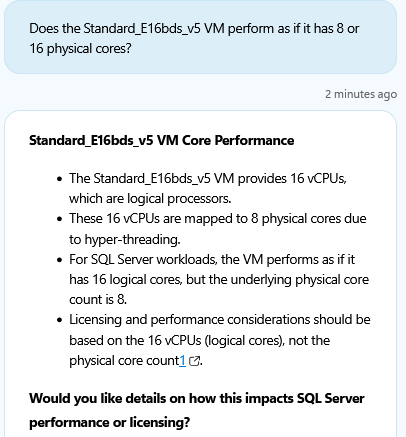
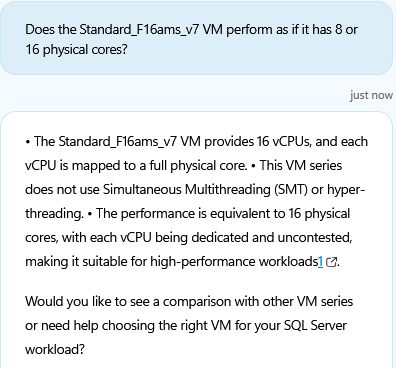
- Check
- out
- my
- superior
- use
- of
- bullet
- points
- AI
- could
- never
Exhibit D: Not enough sockets
The Ebdsv5 and Ebsv5 series is backed by the Intel® Xeon® Platinum 8370C (Ice Lake) processor. This processor has a physical core count of 32, a logical core count of 64, and can support up to a two socket configuration. Microsoft offers VMs above 64 vCPU, so presumably the the vCPU count cannot represent physical cores. The only alternative is some kind of super NUMA that is stitching together sockets from different physical hosts into a single VM, and it’s best not to think about the implications of that.
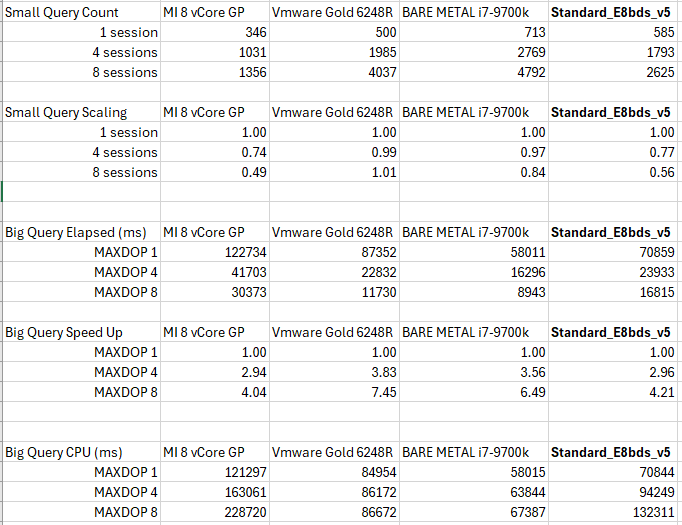
Exhibit E: Simple scaling testing on the Standard_E8bds_v5
The scalability tests described here were also run against a Standard_E8bds_v5 Azure VM. No special configuration was done for the VM. Tests were run after installing SQL Server 2022 Developer Edition and SSMS. The scaling of Standard_E8bds_v5 Azure acts as expected of a VM with 4 physical cores and 8 virtual cores:
The Difference
Consider a small company using VMware which is able to fit its entire production workload onto a two socket host with little to no oversubscription of CPU resources. Suppose that company has a single 8 vCPU VM running SQL Server and owns SQL licenses for 8 cores. ESXI will preferentially schedule those 8 vCPU onto 8 different physical cores, so the VM will likely scale as if it has 8 physical cores:
ESXi hosts manage processor time intelligently to guarantee that load is spread smoothly across processor cores in the system. Logical processors on the same core have consecutive CPU numbers, so that CPUs 0 and 1 are on the first core together, CPUs 2 and 3 are on the second core, and so on. Virtual machines are preferentially scheduled on two different cores rather than on two logical processors on the same core.
Of course, this is not guaranteed behavior. However, SQL licenses can be expensive, so it can often make business sense to make sure that the SQL Server VM is able to get as much physical CPU power as allowed by the vCPU count. This is entirely different conceptually compared to getting a VM in the cloud. The rented cloud VM will run on a physical host with other VMs from different customers. Cloud providers carefully limit resources available to each VM to make things fair for everyone instead of giving as much resources as possible to the VMs with expensive software licensing costs per core.
The Trap
Mapping an on-premises VM to the closest Azure VM in terms of CPU power requires careful analysis accounting for differences in clock speed, processor generation, resource usage within the VM, oversubscription of the VM host, and other factors. To keep things simple, imagine going dumpster diving on Microsoft property and building a single socket Intel® Xeon® Platinum 8370C (Ice Lake) server. All of the configuration scenarios in the table below are appropriately sized for their SQL Server workloads and there is no oversubscription of CPU on the VM host, when applicable. Matching the effective physical CPU count in Azure VMs requires doubling the SQL licenses for many different configurations of the OS running SQL Server:
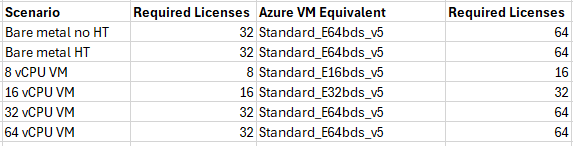
This could be quite the expensive surprise for SQL Server Enterprise Edition.
The Escape
Paying monthly for new licenses instead of bringing your own licenses with software assurance does not avoid this problem. Looking today at US East, the F16ams v7 model costs
$5962.64 per month for a SQL Enterprise VM and $1810.40 per month for a Windows OS VM, for an effective SQL licensing cost of $259.52 per physical core. The E16bds v5 model costs $5,892.56 per month for a SQL Enterprise VM and $1,512.56 per month for a Windows OS VM, for an effective SQL licensing cost of $547.50 per physical core. Naturally, the license costs per vCore are quite similar between models.
Constrained vCPU sizes for database workloads can be used to reduce licensing costs, but this feature is designed to offer better memory, storage, and I/O bandwidth at lower CPU counts. It is unlikely that reducing the vCPU size in this way will somehow lead to physical core scaling instead of vCore scaling behavior. However, note that this configuration was not directly tested.
Sadly, there is no recent licensing update that allows for CPU affinity to be used to reduce licensing costs. All of the vCPUs exposed within the VM OS must be licensed for SQL Server.
There are a few VM series offered within the Azure VM family which do not offer SMT. This directly resolves the license trap, but there aren’t many choices available at the time of publication for this blog post. The Famsv7 series mentioned earlier is one modern example, and perhaps this is a great CPU for SQL Server workloads, but its VMs do not offer any local temporary storage.
It is otherwise possible to disable hyper-threading within the VM using a preview feature. This will reduce licensing costs for Windows OS VMs for which a SQL Server license is supplied by the user, but will not reducing licensing costs when paying directly for new licenses by renting a “SQL Server on Azure Windows” VM. Disabling hyper-threading may not be straightforward to do and hesitance to rely on preview features is understandable, but the potential license cost savings here can be huge depending on the size of the VM.
Final Thoughts
Some cloud vendors offer virtual machines with “hyper-threaded cores” which seems to allow them to offer bigger vCPU counts for a lower price. Unfortunately, a virtual machine with lots of weak vCPUs is not cost-effective for software with a high license cost per vCPU, such as SQL Server Enterprise Edition. Be sure to understand what each cloud vendor’s vCPU count truly represents in terms of supporting your workload. Thanks for reading!
Hey Joe! Great post. We found this a year ago and it’s saved us a great deal on licensing. Barely any performance hit. This seems intentional, honestly. I can’t imagine someone at Microsoft who knew about Hyperthreading and SQL Licensing had no review or input in this.
Joe!!!!! Long time, my friend 🙂
Ahhh, constrained cpu configurations and disabling HT via Windows registry setting or Azure tag. Good stuff! One thing to consider when testing these options (the consideration is really the same as when disabling SMT on physical server or using one vcpu to one core on VMware).
The max number of user workers is based on logical/virtual cpu count. In order to not lose parallelism for some queries under high px query concurrency after going to one vcpu per core, some systems may benefit from setting “max worker threads” to the value it would have been if SMT were still enabled.
https://learn.microsoft.com/en-us/sql/database-engine/configure-windows/configure-the-max-worker-threads-server-configuration-option?view=sql-server-ver17