Common SQL Server Consulting Advice: Setting MAXDOP And Cost Threshold For Parallelism

Dirty Work


There are three classes of administrator when it comes to parallelism settings

  • Never changed the defaults
  • Changed the defaults to something wacky
  • Changed the defaults to something safe

The beginning of this post is for the first couple of genus of administrator.

Even though Microsoft added a MAXDOP calculation to the installer starting with SQL Server 2016, I’ve seen cases where the recommended setting was wrong because hardware changed after the initial config.

As an example: Your VM admin created the smallest possible machine to get things set up for you, and added CPU and memory later on, and you ended up with MAXDOP set to 1.

The installer still doesn’t let you change Cost Threshold For Parallelism at setup, which is plum bizarre. I get why making a recommendation here is hard (and I’ll talk about that later on), but you should at least give folks the option.

I want to add this here, before we get too far along: The point of adjusting these values is not “because there’s too much parallelism” or “because there’s too much CX… waits”. The goal is to increase concurrency by only allowing queries that benefit from parallelism to use it, because parallel queries can reserve many CPU threads (DOP * parallel branches), and if you throw enough of them at a server you can end up running out of worker threads, and hitting THREADPOOL waits.

Some folks do Good Enough© with the stock advice of a max degree of parallelism of 4 to 8, and cost threshold for parallelism of 50. Others have a harder time finding a sweet spot that properly balances performance and concurrency.

But you need to start somewhere.

If you truly have no idea how to change these settings, review these example commands, but don’t just blindly run them.

EXEC sys.sp_configure
    @configname = 'show advanced options',
    @configvalue = 1;
RECONFIGURE;

EXEC sys.sp_configure
    @configname = 'cost threshold for parallelism',
    @configvalue = 50;
RECONFIGURE;

EXEC sys.sp_configure
    @configname = 'max degree of parallelism',
    @configvalue = 8;
RECONFIGURE;

Read the rest of the post first.

Evaluating


The easy way to see your settings and if they’re relatively sane is like so:

SELECT
    c.name,
    c.value,
    c.value_in_use,
    c.description,
    socket_count = 
        CASE c.name
             WHEN N'max degree of parallelism'
             THEN osi.socket_count
             ELSE NULL
        END, 
    cores_per_socket = 
        CASE c.name
             WHEN N'max degree of parallelism'
             THEN osi.cores_per_socket
             ELSE NULL
        END
FROM sys.configurations AS c
CROSS JOIN
(
    SELECT 
        osi.socket_count,
        osi.cores_per_socket
    FROM sys.dm_os_sys_info AS osi
) AS osi
WHERE c.name IN 
(
    N'cost threshold for parallelism',
    N'max degree of parallelism'
);

Whenever I query sys.configurations, I get the value and value in use, because sometimes folks forget to run RECONFIGURE; after they change something.

But back to the point! Whatcha got here?

  • Is Cost Threshold For Parallelism a number higher than 5 and lower than 200?
  • Is Max Degree Of Parallelism an even number between 4 and 8?

If so, you probably don’t need to make any changes here, unless something else is going on.

And hey, if you’ve got one of those really awful vendor products that tells you to set MAXDOP to one, you should be using database scoped configurations for that, these days.

For most folks, this will get you to an okay place. You may have some other considerations based on the number of cores and/or sockets, and that can get pretty confusing.

Changing these setting will clear out the plan cache, so you should be a little careful when you do it, but you don’t need to restart or anything.

Thinking Harder About Cost Threshold For Parallelism


Many folks who end up here are already pretty sophisticated when it comes to SQL Server, and I’d hate to leave them hanging.

Let’s talk more about each setting, and how they interact with your server and queries.

First up, alphabetically, is cost threshold for parallelism. Right now, you can only set it at the server level. You can technically remove it from the equation by:

  • Setting MAXDOP to 1
  • Using undocumented trace flag 8649, or…
  • Using undocumented query hint ENABLE_PARALLEL_PLAN_PREFERENCE to force a parallel plan

It would be neat if you could set it at the database level, like MAXDOP, but whatever.

One thing that comes up consistently when talking about this setting is that folks often see parallel queries with costs lower than the cost threshold for parallelism. All that means is that the serial query plan broke the threshold, and the parallel plan was chosen because it was cheaper. Cheaper can be lower than cost threshold for parallelism.

When a query executes, assuming there isn’t some parallelism-inhibiting factor in place (scalar UDFs, table variable inserts, etc.), it has to “cost” more than this threshold for a parallel plan to get considered. If it does, and the optimizer can come up with a parallel plan that’s cheaper than the serial plan, then you can pretty well count on it being chosen.

This is where things get tricky! Right off the bat!

See, query costs are all estimates, and there’s no actual counterpart to them in your query plans. If you’re anything like me, you’ve probably seen some low “cost” queries run for a really long time.

Many things contribute to pinning this setting down being difficult:

  • Incorrect assumptions about too much of a CX wait (this goes for MAXDOP too)
  • Untuned workloads having consistently high cost queries
  • Wasting time looking at the plan cache for average costs
  • Changing the setting not having an appreciable effect
  • Misunderstanding what costs actually mean

What does it all mean for you? Well, usually increasing the setting from the default — which is 5 — to a meaningfully higher number, will reduce the total number of queries that are eligible for a parallel plan.

This doesn’t mean performance is doomed for those queries, heck, they may not have needed a parallel plan to begin with. The optimizer is pretty good at costing queries generally. But it’s not perfect, and that’s where generalized workload settings need to be overridden or changed.

Having fewer queries be eligible for gobbling up a whole bunch of CPU threads is one way of increasing overall concurrency. Individual query performance may change for better or worse, and you may need to raise or lower the number you picked here, but that’s part of the process.

Thinking Harder About Max Degree Of Parallelism


The second option you have to address concurrency and performance issues stemming from parallelism is setting an upper limit on the number of cores, and threads per parallel branch that a parallel query is allowed to engage and acquire.

In a way, this setting is a little easier to settle on than Cost Threshold for Parallelism, but there are some things you should be aware of:

  • The parallel version of a plan isn’t just the serial version with parallelism; you can end up with a very different set of operators
  • The optimizer may choose a serial plan if DOP is set too low for a parallel plan to make sense
  • Whatever you set DOP to, parallel plans will use at least one extra coordinator thread to manage DOP threads
  • Leaving this set to zero is only really dangerous on servers with > 8 cores
  • Setting this to an odd number is generally not a good global setting, though it can be useful in edge cases for a single query

There have been times when I’ve suggested MAXDOP of 4 on servers with a single 8 core processor, but that was mostly a temporary fix until some more meaningful tuning work could be done.

It’s okay to use these settings as band aids, just don’t let them be habit-forming.

How can you tell if a parallel query plan is effective, and how can you decide if you need higher or lower DOP? Great question(s)! Look at you. I’m so proud.

  • If your parallel and serial plans have roughly equivalent CPU and duration, the parallel plan isn’t better
  • If your parallel plan isn’t anywhere near DOP faster than your serial query, the parallel plan probably isn’t better
  • If your parallel plan hits exchange spills or deadlocks, buckle up, you’re in for a fun day (of MAXDOP 1 hints)
  • If your parallel plan gets slower as you touch more data, you might want to try hinting a higher DOP

I know, it sounds kooky, but this is all stuff I have to think about and mess with when I’m tuning queries for clients. Many times, it seems like an attractive concept to force a parallel plan on a slow query, but the end result isn’t necessarily better.

It’s sort of like when I expect a query to use a nested loops join, but it doesn’t. If you hint the query to do the loop join, you might get a missing index request that lead the optimizer to think that a different join type was cheaper. Or you might just find out the optimizer was wrong. Again.

Getting back to the main point, though: parallelism is a very effective equalizer for the right kind of queries. It just doesn’t necessarily help every query.

Slug Away


To summarize and recap a little bit, here. Most SQL Server users out there will do fine following basic advice about cost threshold for parallelism and max degree of parallelism.

There will be outliers, edge cases, and times when you need to work outside of those settings for particular queries to run optimally. Heck, if a client tells me they’re running a data warehouse, the last thing I’m going to get hung up on is cost threshold for parallelism.

If you change those settings away from the defaults, and you’re still for some reason dissatisfied with the amount of CX_ waits on your server, try focusing on the queries that are going parallel and tuning them to reduce their estimated costs to lower numbers.

Sometimes those waits really are your fault.

Thanks for reading!

Going Further


If this is the kind of SQL Server stuff you love learning about, you’ll love my training. Blog readers get 25% off the Everything Bundle — over 100 hours of performance tuning content. Need hands-on help? I offer consulting engagements from targeted investigations to ongoing retainers. Want a quick sanity check before committing to a full engagement? Schedule a call — no commitment required.

Thoughts On Setting MAXDOP Correctly In SQL Server

Microsoft recently published new guidance on setting server level MAXDOP. I hope to help the community by analyzing the new guidance and offering some of my own thoughts on query parallelism.

Line by line


Documentation is meant to be shared after all, so hopefully no one minds if I quote most of it:

Starting with SQL Server 2016 (13.x), during service startup if the Database Engine detects more than eight physical cores per NUMA node or socket at startup, soft-NUMA nodes are created automatically by default. The Database Engine places logical processors from the same physical core into different soft-NUMA nodes.

This is true and one of the bigger benefits of auto soft-NUMA as far as I’ve been able to tell.

The recommendations in the table below are aimed at keeping all the worker threads of a parallel query within the same soft-NUMA node.

SQL Server is not designed to keep all worker threads in a single soft-NUMA node. That might have been true in SQL Server 2008, but it changed in 2012. The only semi-official documentation that I know of is here and I looked into the behavior here. Read through both if you’re interested in how scheduling of parallel worker threads is performed by SQL Server, but I’ll provide a quick summary via example here.

Suppose you have two soft-NUMA nodes of 6 schedulers each and the server just restarted.NUMA node 0 has positions 0-5 and NUMA node 1 has positions 6-11. The global enumerator starts at position 0. If I run a MAXDOP 4 query then the enumerator advances by 4. The parallel workers are allowed in positions 0-3 which means that any four out of six schedulers can be chosen from NUMA node 0. All parallel worker threads are in NUMA node 0 for the first query. Suppose I run another MAXDOP 4 query. The enumerator advances by 4 and the allowed positions are 4-7. That means that any two schedulers can be chosen from NUMA node 0 and any two schedulers can be chosen from NUMA node 1. The worker threads are split over two soft-NUMA nodes even though query MAXDOP is less than the size of the soft-NUMA nodes.

Unless you’re on a server with a single soft-NUMA node it is difficult to guarantee that all worker threads end up on the same soft-NUMA node. I strongly recommend against aiming for that as a goal. There are more details in the “Preventing hard NUMA worker splits” section of this blog post.

This will improve the performance of the queries and distribution of worker threads across the NUMA nodes for the workload. For more information, see Soft-NUMA.

I’ve heard some folks claim that keeping all parallel workers on a single hard NUMA nodes can be important for query performance. I’ve even seen some queries experience reduced performance when thread 0 is on a different hard NUMA node than parallel worker threads. I haven’t heard of anything about the importance of keeping all of a query’s worker threads on a single soft-NUMA node. It doesn’t really make sense to say that query performance will be improved if all worker threads are on the same soft-NUMA node. Soft-NUMA is a configuration setting. Suppose I have a 24 core hard NUMA node and my goal is to get all of a parallel query’s worker threads on a single soft-NUMA node. To accomplish that goal the best strategy is to disable auto soft-NUMA because that will give me a NUMA node size of 24 as opposed to 8. So disabling auto soft-NUMA will increase query performance?

Starting with SQL Server 2016 (13.x), use the following guidelines when you configure the max degree of parallelism server configuration value:

Server with single NUMA node [and] Less than or equal to 8 logical processors: Keep MAXDOP at or below # of logical processors

I don’t understand this guidance at all. If MAXDOP is set to above the number of logical processors then the total number of logical processors is used. This is even mentioned earlier on the same page of documentation. This line is functionally equivalent to “Set MAXDOP to whatever you want”.

Server with single NUMA node [and] Greater than 8 logical processors: Keep MAXDOP at 8

This configuration is only possible with a physical core count between 5 and 8 and with hyperthreading enabled. Setting MAXDOP above the physical core count isn’t recommended by some folks, but I suppose there could be some scenarios where it makes sense. Keeping MAXDOP at 8 isn’t bad advice for many queries on a large enough server, but the documentation is only talking about small servers here.

Server with multiple NUMA nodes [and] Less than or equal to 16 logical processors per NUMA node: Keep MAXDOP at or below # of logical processors per NUMA node

I have never seen an automatic soft-NUMA configuration result in more than 16 schedulers per soft-NUMA node, so this covers all server configurations with more than 8 physical cores. Soft-NUMA scheduler counts per node can range from 4 to 16. If you accept this advice then in some scenarios you’ll need to lower MAXDOP as you increase the number of physical cores per socket. For example, if I have 24 schedulers per socket without hyperthreading then auto soft-NUMA gives me three NUMA nodes of 8 schedulers, so I might set MAXDOP to 8. But if the scheduler count is increased to 25, 26, or 27 then I’ll have at least one soft-NUMA node of 6 schedulers. So I should lower MAXDOP from 8 to 6 because the physical core count of the socket increased?

Server with multiple NUMA nodes [and] Greater than 16 logical processors per NUMA node: Keep MAXDOP at half the number of logical processors per NUMA node with a MAX value of 16

I have never seen an automatic soft-NUMA configuration result in more than 16 schedulers per soft-NUMA node. I believe that this is impossible. At the very least, if it possible I can tell you that it’s rare. This feels like an error in the documentation. Perhaps they were going for some kind of hyperthreading adjustment?

NUMA node in the above table refers to soft-NUMA nodes automatically created by SQL Server 2016 (13.x) and higher versions.

I suspect that this is a mistake and that some “NUMA node” references are supposed to refer to hard NUMA. It’s difficult to tell.

Use these same guidelines when you set the max degree of parallelism option for Resource Governor workload groups.

There are two benefits to using MAXDOP at the Resource Governor workload group level. The first benefit is that it allows different workloads to have different MAXDOP without changing lots of application code. The guidance here doesn’t allow for that benefit. The second benefit is that it acts as a hard limit on query MAXDOP as opposed to the soft limit provided with server level MAXDOP. It may also be useful to know that the query optimizer takes server level MAXDOP into account when creating a plan. It does not do so for MAXDOP set via Resource Governor.

I haven’t seen enough different types of workloads in action to provide generic MAXDOP guidance, but I can share some of the issues that can occur with query parallelism being too low or too high.

What are some of the problems with setting MAXDOP too low?


  1. Better query performance may be achieved with a higher MAXDOP. For example, a well-written MAXDOP 8 query on a quiet server may simply run eight times as quickly as the MAXDOP 1 version. In some scenarios this is highly desired behavior.
  2. There may not be enough concurrent queries to get full value out of the server’s hardware without increasing query MAXDOP. Unused schedulers can be a problem for batch workloads that aim to get a large, fixed amount of work done as quickly as possible.
  3. Row mode bitmap operators associated with hash joins and merge joins only execute in parallel plans. MAXDOP 1 query plans lose out on this optimization.

What are some of the problems with setting MAXDOP too high?


  1. At some point, throwing more and more parallel queries at a server will only slow things down. Imagine adding more and more cars to an already gridlocked traffic situation. Depending on the workload you may not want to have many active workers per scheduler.
  2. It is possible to run out of worker threads with many concurrent parallel queries that have many parallel branches each. For example, a MAXDOP 8 query with 20 branches will ask for 160 parallel workers. When this happens parallel queries can get downgraded all the way to MAXDOP 1.
  3. Row mode exchange operators need to move rows between threads and do not scale well with increased query MAXDOP.
  4. Some types of row mode exchange operators evenly divide work among all parallel worker threads. This can degrade query performance if even one worker thread is on a busy scheduler. Consider a server with 8 schedulers. Scheduler 0 has two active workers and all other schedulers have no workers. Suppose there is 40 seconds of CPU work to do, the query scales with MAXDOP perfectly, and work is evenly distributed to worker threads. A MAXDOP 4 query can be expected to run in 40/4 = 10 seconds since SQL Server is likely to pick four of the seven less busy schedulers. However, a MAXDOP 8 query must put one of the worker threads on scheduler 0. The work on schedulers 1 – 7 will finish in 40/8 = 5 seconds but the worker thread on scheduler 0 has to yield to the other worker threads. It may take 5 * 3 = 15 seconds if CPU is shared evenly, so in this example increasing MAXDOP from 4 to 8 increases query run time from 10 seconds to 15 seconds.
  5. The query memory grant for parallel inserts into columnstore indexes increases with MAXDOP. If MAXDOP is too high then memory pressure can occur during compression and the SELECT part of the query may be starved for memory.
  6. The query memory grant for memory-consuming operators on the inner side of a nested loop is often not increased with MAXDOP even though the operator may execute concurrently once on each worker thread. In some uncommon query patterns, increasing MAXDOP will increase the amount of data spilled to tempdb.
  7. Increasing MAXDOP increases the number of queries that will have parallel workers spread across multiple hard NUMA nodes. If MAXDOP is greater than the number of schedulers in a hard NUMA node then the query is guaranteed to have split workers. This can degrade query performance for some types of queries.
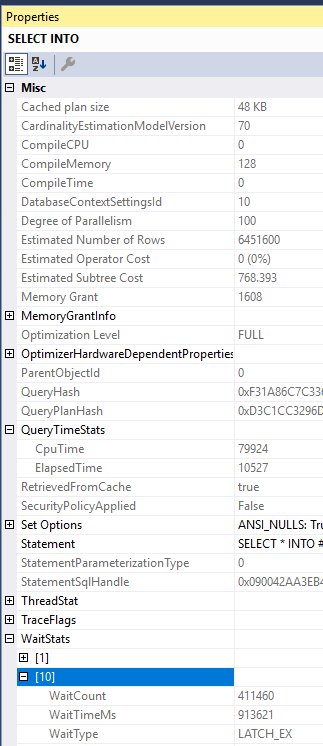
  8. Worker threads may need to wait on some type of shared resource. Increasing MAXDOP can increase contention without improving query performance. For example, there’s nothing stopping me from running a MAXDOP 100 SELECT INTO, but I certainly do not get 100X of the performance of a MAXDOP 1 query. The problem with the below query is the NESTING_TRANSACTION_FULL latch:

SQL Server Query Plan Properties

Preventing hard NUMA worker splits


It generally isn’t possible to prevent worker splits over hard NUMA nodes without changing more than server level and query level MAXDOP. Consider a server with 2 hard NUMA nodes of 10 schedulers for each. To avoid a worker split, an administrator might try setting server level MAXDOP to 10, with the idea being that each parallel query spreads its workers over NUMA node 0 or NUMA node 1. This plan won’t work if any of the following occur:

  • Any query runs with a query level MAXDOP hint other than 0, 1, 10, or 20.
  • Any query is downgraded in MAXDOP but still runs in parallel.
  • A parallel stats update happens. The last time I checked these run with a query level MAXDOP hint of 16.
  • Something else unexpected happens.

In all cases the enumerator will be shifted and any MAXDOP 10 queries that run after will split their workers. TF 2467 can help, but it needs to be carefully tested with the workload. With the trace flag, as long as MAXDOP <= 10 and automatic soft-NUMA is disabled then the parallel workers will be sent to a single NUMA node based on load. Note that execution context 0 thread can still be on a different hard NUMA node. If you want to prevent that then you can try Resource Governor CPU affinity at the Resource Pool level. Create one pool for NUMA node 0 and one pool for NUMA node 1. You may experience interesting consequences when doing that.

The most reliable method by far is to have a single hard NUMA node, so if you have a VM that fits into a single socket of a VM host and you care about performance then ask your friendly VM administrator for some special treatment.

Final thoughts


I acknowledge that it’s difficult to create MAXDOP guidance that works for all scenarios and I hope that Microsoft continues to try to improve their documentation on the subject. Thanks for reading!

Video: Is Setting MAXDOP and Cost Threshold for Parallelism Really Easy?

Asked and Answered


Thanks for watching!

Video Summary

In this video, I dive into the nuances of setting `max degree of parallelism` (MAXDOP) and `cost threshold for parallelism` in SQL Server. While many suggest these settings are straightforward—like just setting MAXDOP to the number of cores per NUMA node or cost threshold to any value higher than five—I argue that it’s not always as simple. I explore how different core configurations can affect query performance, especially with varying numbers of sockets and cores. Through practical examples on my laptop, I demonstrate the impact of these settings on query execution times and thread usage, revealing why tuning queries and indexes remains crucial for optimal performance.

Full Transcript

Howdy folks, Erik Darling here with Erik Darling Data. And now that I’ve got stickers to prove it, I think it’s a real company. I think it’s like a thing now. It’s not just like some imaginary website. It’s got like physical goods attached to it. So watch out! And today I’m here to ask an annoying question. And it’s a question, I think it’s annoying because to a lot of people it seems like pretty settled advice, at least to, you know, pretty casual observers of SQL Server, just like, you know, like kind of like aware of best practice. And like, yeah, just do this and this and you’re cool. And that question is, is setting maxed up and cost threshold for parallelism really as easy as it seems?

And I don’t think that it always is. And the reason I think that is because when you take the advice from maxed up, it’s like if you have one socket, you can sometimes leave it alone. But if you have like, you know, eight, 12, 16, but holy God, like you have like a weird VM with like a whole bunch of cores in one socket, then the advice to not set maxed up there kind of makes less sense because then you still have one query that can use a whole bunch of cores in that socket. Right. And you have more than one socket. People like, OK, well, just set it to, you know, the number of cores in a single Numa node up to eight.

And you can just kind of leave it alone after that. It’s fine. And for cost threshold for parallelism, the advice is to start at any number higher than five, like 20, 50, 75, just some number that’s for the love of God, not five. And then you can tweak from there kind of based on like the how you see queries running. Now you can maybe raise it up a little, pull it down a little bit. That’s up to you. That’s a very personal thing.

But that’s one of those things that kind of makes setting it not as easy as the the line where you want to draw. OK, I want queries this expensive to go parallel. It’s going to be way different from environment to environment. But that device is probably usually mostly fine.

But where you can kind of get screwed, and this is true for any environment, you know, if all your queries and indexes are just so horribly untuned that they all have this astronomical cost, then like setting cost threshold for parallelism for like 5000 might not even get you all that much. Like you might just have these terrible queries that just run with like a very high cost constantly.

And they’re just going to go parallel, like almost up to this crazy point. Like unless you set max stop don’t wonder, set cost threshold for parallelism to like the maximum value. You just might never get rid of those queries going parallel.

And if all your queries are just like big, huge joins across lots and lots of tables, max stop is going to be really hard to set too. Now, of course, these things do get more complicated, like even beyond that, if you start looking at like, you know, if you have a bunch of users connecting, and like they’re all doing really like doing things of really, really high concurrency, or if you have like an AG or mirroring with like a bunch of like thousands of databases or something in it, and they’re all synchronizing data because that takes up a bunch of worker threads too.

But let’s get back to just sort of a basic thing at the query level. Now on my laptop, I have eight cores visible to SQL Server, which means I have 576 worker threads. You can see that number right there. 576.

Right? So I like at any point I can run like 576 serial queries, probably, or like, you know, some divisor of parallel queries depending on how many threads they get. Now over in this window, I’ve got some interesting stuff going on.

I ran a bunch of really big queries, right? Like joining a whole bunch of tables together. And I’ve run them at different max stops. I got a max stop two.

I got a max stop four. I got a max stop six. I got a max stop eight down here, which is the highest I can go up to with it before SQL is just like, okay, you’re drunk. We can’t use more dots than we have. Right?

That’d be silly. Now, here’s where setting max stop gets weird. If we start looking at the timing differences between these queries, this one here at max stop two, that takes about 120 seconds. If we scroll down to the one that runs at max stop four, we’re down to about 42 seconds, which is a big jump from max stop two to four, right?

120 to 42. That’s a huge jump. If I were as an end user, I’d be like, sweet.

Good job, query tuning. Thanks for that. We go to max stop six, we get down to 31 seconds. And if we get to, when we get down to max stop eight, we’re at about 30 seconds. So not a big difference between six and eight, but you know, just a little, little difference.

And this is why it’s tricky. So at some point you have to sacrifice the number of queries that you want to run simultaneously for how fast you want them to run. So right now with the way my laptop is set up with the 576 threads, I could run 18 queries that use 32 threads.

I could run 24 queries that use 24 threads. I could run 36 queries that use 16 threads. And I can run 17 queries that use eight threads.

And now you’re thinking, well, max stop two, you only use two threads. And that’s why you’re wrong. You’re so wrong. And I’m going to show you why you’re wrong. Now in the actual execution plans for all of these, there’s a helpful little doodad.

If you hit F4 and you look at the select operator and you scroll down a little bit, you come to this part of the properties called thread stat. And thread stat is going to give you some interesting information. So for this one query, I had four branches in this query.

That means there were four branches that SQL Server said, oh, you could run at the exact same time. So that’s four branches that can run in parallel concurrently. And for each of those branches, I got two threads.

So I two times four is eight. Right. And you can see that I reserved eight threads and I used eight threads for this one query at max stop two. So we see that max stop doesn’t limit the number of threads that you get.

Max stop limits the number of threads per concurrent parallel branch that you get. I know, right? Crappy.

If we scroll down to the max stop four query and we look at that same thing. Now for our four branches, we got four threads per branch and now we’re reserving 16 threads. So this is where we just made a jump from being able to run 32, 72 queries simultaneously to being able to run 36 queries simultaneously.

And that’s a pretty big jump because that’s like, like half. And you can probably imagine that if we scroll down to the max stop six query, our brand, our thread usage is going to go up to 24. So now if we have 24 of these, I can only run 24 of them.

I can have 24 instances of this query running at once before I start running out of worker threads to use. And I know because you’re good at math. You’re better at math than I am.

If we scroll down to this last query and we look at the thread stat usage for four branches, we’re now up to using 32 threads. I wasn’t just making those numbers up. I was serious.

So what happens after you have 18 instances of this query running at once? Let’s say that, you know, 18 users log in and when they log in, this query runs to give them some information. What happens when user 19 logs in?

You do not have any more worker threads to give to user 19. And user 19 has to wait for all of these other queries to finish before it can take, it says, I would like to reserve 32 threads, please. And SQL Server says, well, you have to wait for those 32.

You can use less if it’s emergency. Well, you could wait for 32. So that’s what’s called thread pool. And that’s when SQL Server does plum runs out of worker threads to give to new queries.

And that’s why I think that when you’re going to, you know, make changes to settings like maxed up and cost resh over parallelism, the starting point advice is better than the defaults, 100% better than the defaults. But at some point when you need to tune a highly concurrent workload, you need to look at things a little bit more closely.

You need to say, okay, well, you know, when queries go big and crazy and they start running, well, you know, we get lots of thread pool weights because we have lots of queries that are trying to reserve lots of threads and go. And so that’s when, you know, making those settings changes is like lowering maxed up or raising cost threshold can be beneficial. But at the same time, you’re looking at possibly regressing query performance, right?

If you change maxed up from six to four or four to two, there’s some pretty big changes in how long those queries ran for. Users might not be so happy with you. So it’s a very, very careful thing you have to balance.

And at some point, query and index tuning does have to come into the picture. Anyway, that’s just a quick video because I was bored on a, I don’t know what day it is. I think my vitamin K said it was Thursday.

So I’m going to guess it’s Thursday. I might be wrong though. Anyway, I’m Erik Darling again with Erik Darling data. You can, I don’t know if you, if you’re watching this, you can probably figure out where to find me.

Anyway, thank you for, thank you for watching. I hope you learned something. Hope you had some fun and I will see you next time. Hopefully.

I hope I get to record more videos. If I don’t, I’ll be pretty sad. All right. Computer don’t fail me now. Thanks for watching.

Going Further


If this is the kind of SQL Server stuff you love learning about, you’ll love my training. Blog readers get 25% off the Everything Bundle — over 100 hours of performance tuning content. Need hands-on help? I offer consulting engagements from targeted investigations to ongoing retainers. Want a quick sanity check before committing to a full engagement? Schedule a call — no commitment required.