Inlining Financial Functions In SQL Server For Better Query Performance

Big Tuning


I work with a lot of clients who do things with money. Loads of money. I’m a very trustworthy person.

At just about every client site, I see a common set of financial functions being used to calculate various things. The code is all the same, too.

Some of it comes from published government guidelines, and some of it comes straight out of accounting 101 books.

The big problem is that all of these functions were written as scalar UDFs, and performance becomes dead.

Recently, one of my clients was nice enough to agree to let me publish my rewrites of their functions as inline table valued functions.

You can download them here.

License and Fair Warning


These functions are provided with no license whatsoever. You can take them and do whatever you want with them

The caveat here is that I take no responsibility for anything you do with them. I did not write any of the mathematical formulas in these functions, and I take no credit for any of the code for anything in this folder, other than rewriting the scalar UDFs as inline table valued functions. I was given permission to publish these by the people who wrote and/or incorporated the code originally.

They returned the same results as the scalar UDFs in local tests, so to that end the results are accurate. You will have to do your own local tests to make sure they work the same as whatever they’re replacing.

Aside from logical requirements, you also need to make sure they satisfy any legal or regulatory requirements for your industry. That sounds important, too.

The bottom line here is that you can’t sue me, so sayeth the law offices of Na Na Na Boo Boo.

You can download them here.

Contributing


If you find any issues with these functions, you have another version, or you want to add a function to the library, you can contribute over at the GitHub repo.

If you’d prefer to do so anonymously, you can email me.

Thanks for reading!

Going Further


If this is the kind of SQL Server stuff you love learning about, you’ll love my training. Blog readers get 25% off the Everything Bundle — over 100 hours of performance tuning content. Need hands-on help? I offer consulting engagements from targeted investigations to ongoing retainers. Want a quick sanity check before committing to a full engagement? Schedule a call — no commitment required.

Allow Memory Grant Percent In SQL Server Standard Edition

Voice Of Users


I recently opened a User Voice issue for this, and I’d appreciate if you’d vote for it (note: this link is dead now, long live the first party solution)

From the issue:

In 2016 SP1 we got many features handed down to Standard Edition, but Resource Governor was not one of them.

In Enterprise Edition, Resource Governor is frequently used to reduce the maximum memory grant percent down from 25. That prevents queries that you don’t have control over from totally trashing your server. Since memory grant feedback is not available in Standard Edition, users aren’t left with many options. Query hints are nice, but only if you can change the queries.

Max grant percent should be either settable in Standard Edition, or decoupled from Resource Governor and settable at the database or server level.

Furthers Day


Adding in a bit more editorializing than I thought was appropriate in the User Voice issue, this setting is irresponsibly high for most workloads. If you have Max Server Memory set to 100GB, do you really want queries being able to ask for 25GB of it?

Because, like, they can.

If you have control over the queries and indexes on a server, there are all sorts of potential things you can do to “fix” memory grants. Sometimes they come from bad estimates, other times they come from inflated string column sizes — think about that column you have called “State” that’s an nvarchar max — because the optimizer guesses that every value will be about half the size of the definition.

There are lots of reasons! So many reasons, in fact, that Microsoft has a performance feature called Memory Grant Feedback. The problem is that this feature is only available in Enterprise Edition, and not readily available to Row Mode queries until SQL Server 2019. In SQL Server 2017, you needed some column store/batch mode operations in your query for it to apply.

While there are hints that can be used to control memory grants at the query level, query hints can be hard to apply in some circumstances. Vendor code, ORMs, ad hoc heavy workloads, and more make the broad application of query hints impossible.

Having this as a setting outside of Resource Governor (or, heck, making Resource Governor available in Standard Edition), would be a huge benefit to what seems like a forgotten group of SQL Server customers.

Thanks for reading!

Going Further


If this is the kind of SQL Server stuff you love learning about, you’ll love my training. Blog readers get 25% off the Everything Bundle — over 100 hours of performance tuning content. Need hands-on help? I offer consulting engagements from targeted investigations to ongoing retainers. Want a quick sanity check before committing to a full engagement? Schedule a call — no commitment required.
Things SQL Server vNext Should Address: Optional Parameters

Lamp


This issue is one that could be linked to other times when the optimizer defers certain portions of optimization to later stages. It’s also something that could lead to complications, because the end result is multiple execution plans for the same query.

But it goes back to a couple basic approaches to query writing that I think people need to keep in mind: write single purpose queries, and things that make your job easier make the optimizer’s job harder.

A good example of a multi-purpose query is a merge statement. It’s like throwing SQL Server a knuckleball.

Fiji


Another example of a knuckleball is this knucklehead pattern:

SELECT 
    p.*
FROM dbo.Posts AS p
WHERE (p.OwnerUserId   = @OwnerUserId OR @OwnerUserId IS NULL)
AND   (p.CreationDate >= @CreationDate OR @CreationDate IS NULL);

SELECT 
    p.*
FROM dbo.Posts AS p
WHERE (p.OwnerUserId   = ISNULL(@OwnerUserId, p.OwnerUserId))
AND   (p.CreationDate >= ISNULL(@CreationDate, p.CreationDate));
GO 

SELECT 
    p.*
FROM dbo.Posts AS p
WHERE (p.OwnerUserId   = COALESCE(@OwnerUserId, p.OwnerUserId))
AND   (p.CreationDate >= COALESCE(@CreationDate, p.CreationDate))
ORDER BY p.Score DESC;
GO

I hate seeing this, because I know how many bad things can happen as a result of this.

One example I love is creating these two indexes and running the first query up there.

CREATE INDEX onesie ON dbo.Posts(OwnerUserId, Score, CreationDate);
CREATE INDEX threesie ON dbo.Posts(ParentId, OwnerUserId);

The optimizer chooses the wrong index — the one that starts with ParentId — even though the query is clearly looking for a potential equality predicate on OwnerUserId.

SQL Server Query Plan
180

Deferential


It would be nice if the optimizer did more to sniff out NULL values here to come up with more stable plans for the non-NULL values, essentially doing the job that dynamic SQL does by only adding predicates to the where clause when they’re not NULL.

It doesn’t have to look further at actual values on compilation, because that’s essentially a RECOMPILE hint on every query.

Thanks for reading!

Going Further


If this is the kind of SQL Server stuff you love learning about, you’ll love my training. Blog readers get 25% off the Everything Bundle — over 100 hours of performance tuning content. Need hands-on help? I offer consulting engagements from targeted investigations to ongoing retainers. Want a quick sanity check before committing to a full engagement? Schedule a call — no commitment required.
Things SQL Server vNext Should Address: Lookup Placement

All Looked Up


Lookups are interesting. On the one hand, I think the optimizer should be less biased against them, and on the other hand they can cause a lot of issues.

They’re probably the most common issue in queries that suffer from parameter sniffing that I see, though far from the only unfortunate condition.

Under the read committed isolation level, lookups can cause readers to block writers, and even cause deadlocks between readers and writers.

This isn’t something that happens under optimistic isolation levels, which may or may not have something to do with my earlier suggestion to make new databases use RCSI by default and work off the local version store associated with accelerated database recovery.

Ahem.

Leafy Greens


One thing that would make lookups less aggravating would be giving the optimizer the ability to move them around.

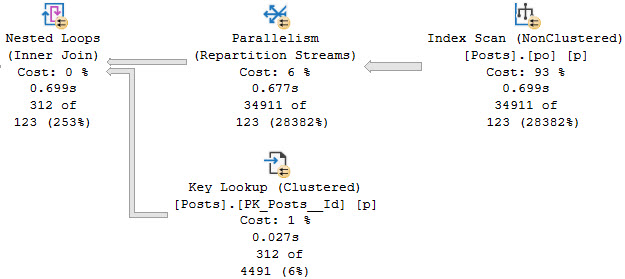
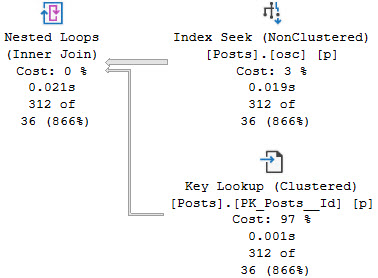
But that really only works depending on what the lookup is doing. For example, some Lookups just grab output columns, and some evaluate predicates:

SQL Server Query Plan
all one word

Further complicating things is if one of the columns being output is used in a join.

SQL Server Query Plan
bad movie

Outside Chance


There are likely other circumstances where decoupling the lookup and moving the join to another part of the plan would be impossible or maybe even make things worse. It might even get really weird when dealing with a bunch of left joins, but that’s the sort of thing the optimizer should be allowed to explore during, you know, optimization.

Thanks for reading!

Going Further


If this is the kind of SQL Server stuff you love learning about, you’ll love my training. Blog readers get 25% off the Everything Bundle — over 100 hours of performance tuning content. Need hands-on help? I offer consulting engagements from targeted investigations to ongoing retainers. Want a quick sanity check before committing to a full engagement? Schedule a call — no commitment required.
Things SQL Server vNext Should Address: Table Variable Modification Performance

Canard


People still tell me things like “I only put 100 rows in table variables”, and think that’s the only consideration for their use.

There are definitely times when table variables can be better, but 100 rows is meaningless.

Even if you put one row in a table variable it can fudge up performance because SQL Server doesn’t know what’s in your table variable. That’s still true in SQL Server 2019, even if the optimizer knows how many rows are in your table variable.

The problem that you can run into, even with just getting 100 rows into a table variable, is that it might take a lot of work to get those 100 rows.

Bernard


I’ve blogged before about workarounds for this problem, but the issue remains that inserts, updates, and deletes against table variables aren’t naturally allowed to go parallel.

The reason why is a bit of a mystery to me, since table variables are all backed by temp tables anyway. If you run this code locally, you’ll see what I mean:

SET NOCOUNT ON;
SET STATISTICS IO ON;
DECLARE @t table(id int);
SELECT * FROM @t AS t;
SET STATISTICS IO OFF;

Over in the messages tab you’ll see something like this:

Table '#B7A53B3E'. Scan count 1, logical reads 0, physical reads 0, page server reads 0, read-ahead reads 0, page server read-ahead reads 0, lob logical reads 0, lob physical reads 0, lob page server reads 0, lob read-ahead reads 0, lob page server read-ahead reads 0.

Now, look, I’m not asking for update or delete portions of the query plan to go parallel, but it might be nice if other child operators could go parallel. That’s how things go with regular tables and #temp tables. It would be nice if inserts could go parallel, but hey

Ardbeg


The problem this solves is one that I see often, usually from vendor code where the choice of which temporary object to use was dependent on individual developer preference, or they fell for the meme that table variables are “in memory” or something. Maybe the choice was immaterial at first with low data volume, and over time performance slowly degraded.

If I’m allowed to change things, it’s easy enough to replace @table variables with #temp tables, or use a workaround like from the above linked post about them to improve performance. But when I’m not, clients are often left begging vendors to make changes, who aren’t receptive.

Thanks for reading!

Going Further


If this is the kind of SQL Server stuff you love learning about, you’ll love my training. Blog readers get 25% off the Everything Bundle — over 100 hours of performance tuning content. Need hands-on help? I offer consulting engagements from targeted investigations to ongoing retainers. Want a quick sanity check before committing to a full engagement? Schedule a call — no commitment required.

Things SQL Server vNext Should Address: Common Table Expression Materialization

Repetition Is Everything


I know what you’re thinking: this is another post that asks for a hint to materialize CTEs.

You’re wrong. I don’t want another hint that I can’t add to queries to solve a problem because the code is coming from a vendor or ORM.

No, I want the optimizer to smarten up about this sort of thing, detect CTE re-use, and use one of the New And Improved Spools™ to cache results.

Let’s take a look at where this would come in handy.

Standalone


If we take this query by itself and look at the execution plan, it conveniently shows one access of Posts and Users, and a single join between the two.

SELECT
    u.Id AS UserId,
    u.DisplayName,
    p.Id AS PostId,
    p.AcceptedAnswerId,
    TotalScore = 
        SUM(p.Score)
FROM dbo.Users AS u
JOIN dbo.Posts AS p
    ON p.OwnerUserId = u.Id
WHERE u.Reputation > 100000
GROUP BY 
    u.Id, 
    u.DisplayName,
    p.Id, 
    p.AcceptedAnswerId
HAVING SUM(p.Score) > 1
SQL Server Query Plan
invitational

Now, let’s go MAKE THINGS MORE READABLE!!!

Ality


WITH spool_me AS
(
    SELECT
        u.Id AS UserId,
        u.DisplayName,
        p.Id AS PostId,
        p.AcceptedAnswerId,
        TotalScore = 
            SUM(p.Score)
    FROM dbo.Users AS u
    JOIN dbo.Posts AS p
        ON p.OwnerUserId = u.Id
    WHERE u.Reputation > 100000
    GROUP BY 
        u.Id, 
        u.DisplayName,
        p.Id, 
        p.AcceptedAnswerId
    HAVING SUM(p.Score) > 1
)
SELECT
    a.UserId,
    a.DisplayName,
    a.PostId,
    a.AcceptedAnswerId,
    a.TotalScore,
    q.UserId,
    q.DisplayName,
    q.PostId,
    q.AcceptedAnswerId,
    q.TotalScore
FROM spool_me AS a
JOIN spool_me AS q
    ON a.PostId = q.AcceptedAnswerId
ORDER BY a.TotalScore DESC;

Wowee. We really done did it. But now what does the query plan look like?

SQL Server Query Plan
oh, you

There are now two accesses of Posts and two accesses of Users, and three joins (one Hash Join isn’t in the screen cap).

Detection


Obviously, the optimizer knows it has to build a query plan that reflects the CTE being joined.

Since it’s smart enough to do that, it should be smart enough to use a Spool to cache things and prevent the additional accesses.

Comparatively, using a #temp table to simulate a Spool, is about twice as fast. Here’s the CTE plan:

SQL Server Query Plan
double

Here’s the Spool Simulator Plan™

SQL Server Query Plan
professionals

Given the optimizer’s penchant for spools, this would be another chance for it to shine on like the crazy diamond it is.

Thanks for reading!

Going Further


If this is the kind of SQL Server stuff you love learning about, you’ll love my training. Blog readers get 25% off the Everything Bundle — over 100 hours of performance tuning content. Need hands-on help? I offer consulting engagements from targeted investigations to ongoing retainers. Want a quick sanity check before committing to a full engagement? Schedule a call — no commitment required.
Things SQL Server vNext Should Address: Handling Disjunctive Predicates

Bite Sized Gripes


I sat down to write this blog post, and I got distracted. I got distracted for two hours.

SQL Server Query Plan
take two

So, pretty obviously, we have a query performance issue.

What’s the cause of this malady? OR. Just one little OR.

Aware


It’s not like I don’t have indexes. They’re fabulous.

CREATE INDEX c 
ON dbo.Comments
    (PostId, UserId);

CREATE INDEX v 
ON dbo.Votes
    (PostId, UserId);

CREATE INDEX cc
ON dbo.Comments
    (UserId, PostId);

CREATE INDEX vv
ON dbo.Votes
    (UserId, PostId);

Look at those things. Practically glowing.

But this query just wrecks them

SELECT
    records = 
        COUNT_BIG(*)
FROM dbo.Comments AS c
JOIN dbo.Votes AS v
    ON c.UserId = v.UserId
    OR c.PostId = v.PostId;

That’s the plan up there that ran for a couple hours.

Unrolling


A general transformation that the optimizer can apply in this case is to union two result sets together.

SELECT
    records = 
        COUNT_BIG(*)
FROM 
(
    SELECT
        n = 1
    FROM dbo.Comments AS c 
    JOIN dbo.Votes AS v 
        ON  c.UserId = v.UserId
        AND c.PostId <> v.PostId
    
    UNION ALL
    
    SELECT
        n = 1
    FROM dbo.Comments AS c
    JOIN dbo.Votes AS v 
        ON  c.PostId = v.PostId
        AND c.UserId <> v.UserId
) AS x;

The following are two executions plans for this transformation. One in compatibility level 150, where Batch Mode On Row Store has kicked in. The second is in combability level 140, in regular old Row Mode. Though the Row Mode only plan is much slower, it’s still a hell of a lot faster than however much longer than two hours the original query would have run for.

SQL Server Query Plan
light of day

The reason the Row Mode plan is so slow is because of a god awful Repartition Streams.

SQL Server Query Plan
dunked

Abstract


This is one of those “easy for you, hard for the optimizer” scenarios that really should be easy for the optimizer by now.

I don’t even care if it can be applied to every instance of this — after all there may be other complicating factors — it should at least be available for simple queries.

Thanks for reading!

Going Further


If this is the kind of SQL Server stuff you love learning about, you’ll love my training. Blog readers get 25% off the Everything Bundle — over 100 hours of performance tuning content. Need hands-on help? I offer consulting engagements from targeted investigations to ongoing retainers. Want a quick sanity check before committing to a full engagement? Schedule a call — no commitment required.
Things SQL Server vNext Should Address: Default Isolation Level

You’re Gonna Miss Me


I deal with blocking problems all the time. All the damn time. Deadlocks, too.

Why do I have to deal with these problems? Read Committed is the default isolation level in SQL Server.

It is an utterly broken isolation level, and it shouldn’t be the default anymore.

Can’t Fix It


Any isolation level that lets

Shouldn’t be the default in a major database. No self-respecting database would do that to itself, or to end users.

Imagine you’re some poor developer with no idea what SQL Server is doing, just trying to get your application to work correctly, and your queries end up in asinine blocking chains because of this dimwitted default.

I’d switch to Postgres, too. Adding in NOLOCK hints and maybe getting wrong data is probably the least of their concerns.

Ahzooray


In Azure SQL DB, the default isolation level is Read Committed Snapshot Isolation (RCSI). Optimism for me but not for thee is the message, here.

Imagine a problem so goofy that Microsoft didn’t want to deal with it in its cloud product? You’ve got it right here.

For the next version of SQL Server, the default isolation level for new databases should also be RCSI.

Especially because databases can have a local version store via Accelerated Database Recovery. Why not make the most of it?

And solve the dumbest problem that most databases I see deal with.

Thanks for reading!

Going Further


If this is the kind of SQL Server stuff you love learning about, you’ll love my training. Blog readers get 25% off the Everything Bundle — over 100 hours of performance tuning content. Need hands-on help? I offer consulting engagements from targeted investigations to ongoing retainers. Want a quick sanity check before committing to a full engagement? Schedule a call — no commitment required.
Things SQL Server vNext Should Address: Spools

Per Capita


There are two angles to this. One is that spools are just crappy temp tables. The mechanism used for loading data, especially into Eager Spools, is terribly inefficient, especially when compared to the various advances in tempdb efficiency over the years.

The second angle is that Eager Index Spools should provide feedback to users that there’s a potentially useful index that could be created.

There are checks for Eager Table and Index Spools in sp_BlitzCache. Heck, it’ll even unravel them and tell you which index to create in the case of Eager Index Spools.

It still bothers me that there’s no built-in tooling or warning about queries that rely on Spools. Not because the Spools themselves are necessarily bad, but because they’re usually a sign that something is deficient with the query or indexing. Spools in modification queries are often necessary and not as worthy of your scorn, but can often be substituted with manual phase separation.

You may have lots of very fast queries with small Spools in them. You may have them right now.

You may also have lots of very slow queries with Spools in them, and there’s nothing telling you about it.

Spool Building


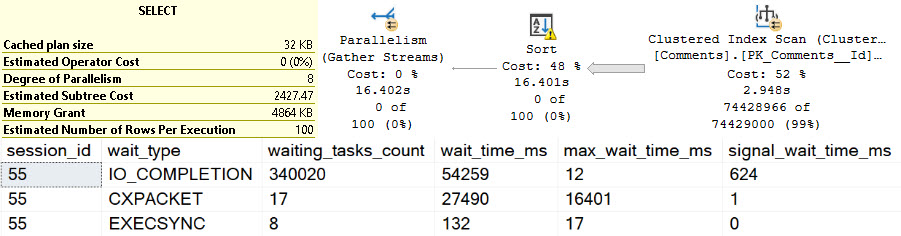
In a perfect world, when spools are being built, they’d emit a specific wait stat. Having that information would help all of us who do performance tuning work know what to look for and focus in on during investigations.

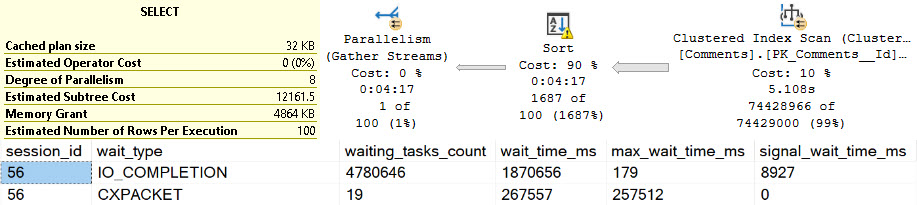
Right now you can get part of the way there by looking at EXECSYNC waits, but even that’s unreliable. They show up in parallel plans with Eager Index Spools, but they show up from other things too. Usually, your best bet is to just look for top resource consuming queries and examine the plans for Spools.

SQL Server Query Plan
syncer

Step 1: Give us better waits to identify Spools being built

Index Building


The optimizer will complain about missing indexes all the live-long day. Even in cases where an index would barely help.

SQL Server Query Plan
banjo

I don’t know about you, but in general ~200ms isn’t a performance emergency.

But like, three minutes?

SQL Server Query Plan
bank account

I’d wanna know about this. I’d wanna create an index to help this query.

Step 2: Give us missing index requests when Eager Index Spools get built.

Buy A Telescope


This kind of stuff is already super-important now, and will become even more important as Scalar Function Inlining becomes more widely used.

End users need better feedback when new features get turned on and performance gets worse.

Sure, if you read this blog and know what to look for, you can find and fix things quickly. But there are a whole lot of people who don’t have things that easy, and I get a lot of calls from them to fix this sort of issue.

Thanks for reading!

Going Further


If this is the kind of SQL Server stuff you love learning about, you’ll love my training. Blog readers get 25% off the Everything Bundle — over 100 hours of performance tuning content. Need hands-on help? I offer consulting engagements from targeted investigations to ongoing retainers. Want a quick sanity check before committing to a full engagement? Schedule a call — no commitment required.

Things SQL Server vNext Should Address: ISNULL SARGability

Preferential


Of course, I’d love if everyone lived in the same ivory tower as me and always wrote perfect queries with clear predicates that the optimizer understands and lovingly embraces.

But in the real world, out in the nitty gritty, queries are awful. It doesn’t matter if it’s un-or-under-trained developers writing SQL, or that exact same person designing queries in an ORM. They turn out horrible and full of nonsense, like drunk stomachs at IHOP.

One of the most common problems I see is people getting lazy with checking for NULLs, or overly-protective about it. In “””””real””””” programming languages, NULLs get you errors. In databases, they’re just sort of whatever.

Thing Is


When you create a row store index on a column, whether it’s ascending or descending, clustered or nonclustered, the data is put in order. In SQL Server, that means NULLs are sorted together. Despite that, ISNULL still creates problems.

DROP TABLE IF EXISTS #t;

SELECT
    x.n
INTO #t
FROM
(
SELECT
    CONVERT(int, NULL) AS n

UNION ALL

SELECT TOP (10)
    ROW_NUMBER() OVER
    (
        ORDER BY
            1/0
    ) AS n
FROM sys.messages AS m
) AS x;


CREATE UNIQUE CLUSTERED INDEX c 
ON #t (n) WITH (SORT_IN_TEMPDB = ON);

In this table we have 11 rows. One of them is NULL, and the other 10 are the numbers 1-10.

Odor By


If we select an ordered result, we get a simple query plan that scans the clustered index and returns 11 rows with no Sort operator.

SQL Server Query Plan
pleased to meet you

However, if we want to replace that NULL with a 0, things get goofy.

SQL Server Query Plan
dammit

Wheredo


Something similar occurs when ISNULL is applied to the where clause.

SQL Server Query Plan
happy
SQL Server Query Plan
unhappy

There’s one NULL. We know where it is. But we still have to scan 10 other rows. Just in case.

Conversion


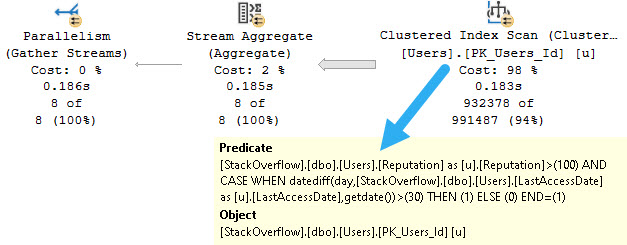
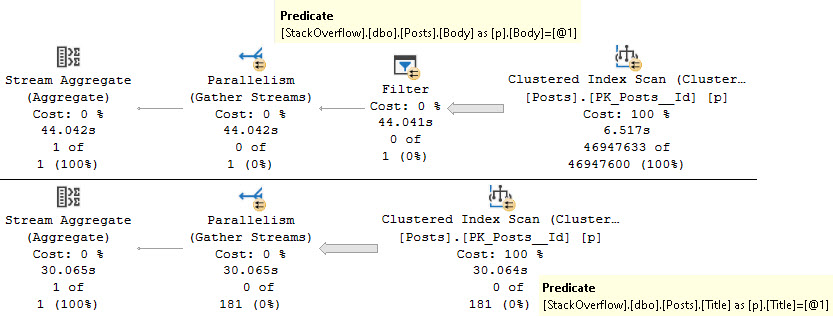
The optimizer should be smart enough to figure out simple use of ISNULL, like in both of these cases.

I’m sure wiser people can figure out deeper cases, too, and even apply them to more functions that involve some types of date math, etc.

Thanks for reading!

Going Further


If this is the kind of SQL Server stuff you love learning about, you’ll love my training. Blog readers get 25% off the Everything Bundle — over 100 hours of performance tuning content. Need hands-on help? I offer consulting engagements from targeted investigations to ongoing retainers. Want a quick sanity check before committing to a full engagement? Schedule a call — no commitment required.