Bite Sized Gripes
I sat down to write this blog post, and I got distracted. I got distracted for two hours.
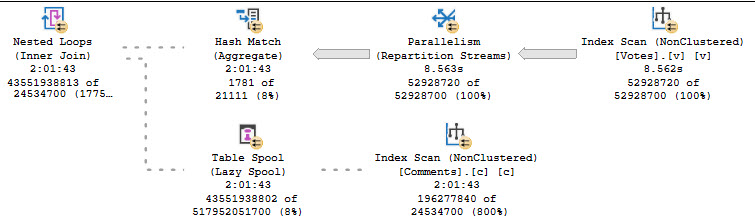
So, pretty obviously, we have a query performance issue.
What’s the cause of this malady? OR. Just one little OR.
Aware
It’s not like I don’t have indexes. They’re fabulous.
CREATE INDEX c
ON dbo.Comments
    (PostId, UserId);

CREATE INDEX v
ON dbo.Votes
    (PostId, UserId);

CREATE INDEX cc
ON dbo.Comments
    (UserId, PostId);

CREATE INDEX vv
ON dbo.Votes
    (UserId, PostId);
Look at those things. Practically glowing.
But this query just wrecks them
SELECT
    records =
        COUNT_BIG(*)
FROM dbo.Comments AS c
JOIN dbo.Votes AS v
    ON c.UserId = v.UserId
    OR c.PostId = v.PostId;
That’s the plan up there that ran for a couple hours.
Unrolling
A general transformation that the optimizer can apply in this case is to union two result sets together.
SELECT
    records =
        COUNT_BIG(*)
FROM
(
    SELECT
        n = 1
    FROM dbo.Comments AS c
    JOIN dbo.Votes AS v
        ON  c.UserId = v.UserId
        AND c.PostId <> v.PostId

    UNION ALL

    SELECT
        n = 1
    FROM dbo.Comments AS c
    JOIN dbo.Votes AS v
        ON  c.PostId = v.PostId
        AND c.UserId <> v.UserId
) AS x;
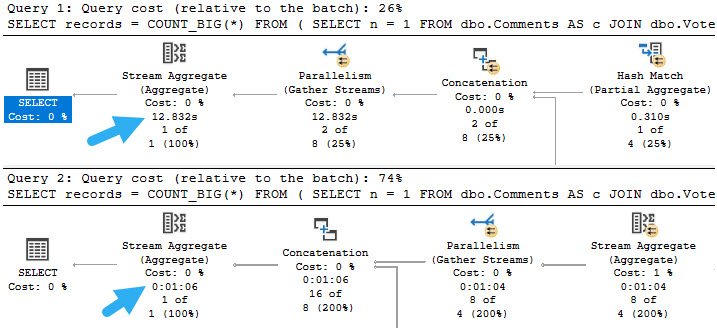
The following are two executions plans for this transformation. One in compatibility level 150, where Batch Mode On Row Store has kicked in. The second is in combability level 140, in regular old Row Mode. Though the Row Mode only plan is much slower, it’s still a hell of a lot faster than however much longer than two hours the original query would have run for.
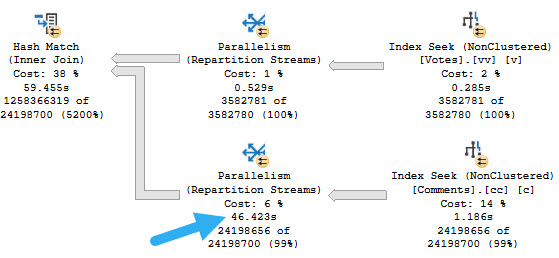
The reason the Row Mode plan is so slow is because of a god awful Repartition Streams.
Abstract
This is one of those “easy for you, hard for the optimizer” scenarios that really should be easy for the optimizer by now.
I don’t even care if it can be applied to every instance of this — after all there may be other complicating factors — it should at least be available for simple queries.
Thanks for reading!
Going Further
If this is the kind of SQL Server stuff you love learning about, you’ll love my training. Blog readers get 25% off the Everything Bundle — over 100 hours of performance tuning content. Need hands-on help? I offer consulting engagements from targeted investigations to ongoing retainers. Want a quick sanity check before committing to a full engagement? Schedule a call — no commitment required.
Related Posts
- Things SQL Server vNext Should Address: How Did I Do?
- Things SQL Server vNext Should Address: Add Lock Pages In Memory To Setup Options
- Things SQL Server vNext Should Address: Add Cost Threshold For Parallelism To Setup Options
- Changes Coming To SQL Server’s STRING_SPLIT Function: Optional Ordinal Position
Great serie of posts for vnext Erik !!!
Thanks! Glad you’re enjoying it!
You’d think that as often as this problem and solution show up on the interwebs that one of Satya’s peeps would have noticed. Sure, it is fun to be the guy who solves the issue and changes the execution time from days to seconds but solving the same problem over and over is the definition of insanity. Or perhaps long-term income stream.
Still it is just an exercise that the optimizer is familiar with.
1.Try some solutions.
2. Find one that works pretty well.
3. Get new query and return to step 1.
I mean yeah, it keeps me working, but this has to be incredibly frustrating for inexperienced query developers.
Just to confirm, are you using the Comments and Votes tables from the StackOverflow2013 download?
I don’t recall — I wrote this last August, sorry.