The Tenant
In part 1, we designed a table for our process to work off of. Now we’re going to look at how we can write a procedure that works off of the table effectively.
For the table, our main priorities were indexing to make sure we can find work easily, and not allowing duplicate items.
For our worker procedure, the main goals are going to be
- Looping until we run out of work
- Finding and reserving work with minimal locking
- Making that process atomic
Thankfully, this is a lot easier than it sounds. The table design does a lot of the work for us.
Queue Ball
I’m going to step through the code, and then show you the fully assembled babby at the end.
First up, making a loop happen:
WHILE EXISTS
(
  SELECT 1/0
  FROM dbo.four_queue AS fq WITH(READPAST)
  WHERE fq.in_process = 0
)
While any rows that aren’t in process exist in the table, we want this to keep picking up work. If you need an eternal loop, just use 1 = 1 or something.
We’re using readpast here, because we won’t want to hit any blocking every time we check to see if we need to go back into the loop.
Second up, finding and reserving work
WITH q4 AS
(
    SELECT TOP (1) fq.*
    FROM dbo.four_queue AS fq WITH(READPAST, ROWLOCK, UPDLOCK)
    WHERE fq.in_process = 0
    ORDER BY fq.id
)
UPDATE q4
    SET q4.in_process = 1,
        q4.start_date = SYSDATETIME(),
        @id = q4.id,
        @reputation = q4.reputation
FROM q4;
This is where all the cool stuff is, to be honest.
In our CTE, we isolate a single row. The TOP (1) with an ORDER BY gives us the lowest id that hasn’t been processed yet.
With the SELECT, we’re using some locking hints:
- Readpast: Means we can skip over locked rows, but not ignore locks like NOLOCK would do
- Rowlock: We nicely ask the optimizer to only lock a single row
- Updlock: Even though this is a SELECT, take an UPDATE lock (LCK_M_U)
The UPDATE that occurs outside of the SELECT is pretty nifty, too. I tried to get OUTPUT to work here, but the variable assignment seemed to disagree with it.
A lot of people don’t know that you can assign a value to a variable like this, but anyway.
- Mark the row as being processed
- Get the processing start time
- Assign the table id to a parameter
- Assign the reputation we want to find to a parameter
Thirdly and thusly
DECLARE @sql NVARCHAR(MAX) = N'
SELECT COUNT_BIG(*) AS records
FROM dbo.Users AS u
WHERE u.Reputation = @i_reputation;
';

RAISERROR(@sql, 0, 1) WITH NOWAIT;
EXEC sys.sp_executesql @sql, N'@i_reputation int', @reputation;
We’ll pass the @reputation to some dynamic SQL and execute it. Like I mentioned before, this is just to keep the example brief. There’s absolutely no need to do this.
A fifth of fifthly
UPDATE fq
    SET fq.end_date = SYSDATETIME()
FROM dbo.four_queue AS fq
WHERE id = @id
AND   in_process = 1;
We’ll use the id parameter to update the end time, so we can find any processes that took a long time and look into them.
Out Of The Way
In real life, I’d probably want some error handling in here, but for a quick blog post example, this is good enough.
Now I can use a tool like SQL Query Stress to throw a bunch of workers at it and see if I run into any blocking or deadlocking.
We know there aren’t any deadlocks, because SQS doesn’t have any errors in it.
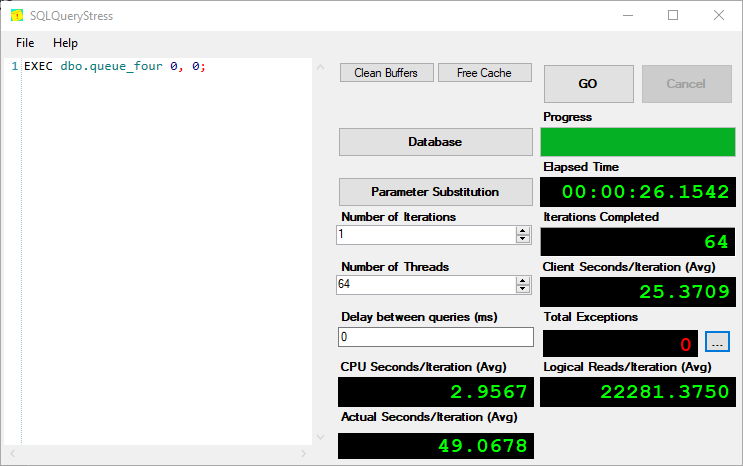
All ~20k rows get processed in about 26 seconds.
We can even use sp UNDERSCORE HumanEvents to look at wait stats for the duration.
EXEC sp_HumanEvents @event_type = 'waits', @seconds_sample = 30, @database_name = 'StackOverflow2013';
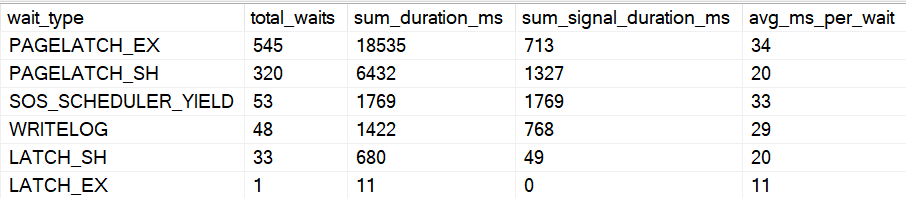
Not too shabby, eh?
CREATE OR ALTER PROCEDURE dbo.queue_four(@id INT, @reputation INT)
AS
BEGIN
SET NOCOUNT, XACT_ABORT ON;

WHILE EXISTS
(
  SELECT 1/0
  FROM dbo.four_queue AS fq WITH(READPAST)
  WHERE fq.in_process = 0
)
    BEGIN

        WITH q4 AS
        (
            SELECT TOP (1) fq.*
            FROM dbo.four_queue AS fq WITH(READPAST, ROWLOCK, UPDLOCK)
            WHERE fq.in_process = 0
            ORDER BY fq.id
        )
        UPDATE q4
            SET q4.in_process = 1,
                q4.start_date = SYSDATETIME(),
                @id = q4.id,
                @reputation = q4.reputation
        FROM q4;

        DECLARE @sql NVARCHAR(MAX) = N'
        SELECT COUNT_BIG(*) AS records
        FROM dbo.Users AS u
        WHERE u.Reputation = @i_reputation;
        ';

        RAISERROR(@sql, 0, 1) WITH NOWAIT;
        EXEC sys.sp_executesql @sql, N'@i_reputation int', @reputation;

        UPDATE fq
            SET fq.end_date = SYSDATETIME()
        FROM dbo.four_queue AS fq
        WHERE id = @id
        AND   in_process = 1;

    END;

END;
Particular Needs
I’ve run into a few situations where developers needed to the queue table to act as a job scheduler of sorts, where certain applications may connect, look for work, and need to retry.
This would change the basic table design to look like this:
CREATE TABLE
    dbo.four_queue
(
    id bigint IDENTITY NOT NULL,
    in_process bit NOT NULL
        DEFAULT 0,
    reputation int NOT NULL,
    scheduled_start_date datetime NULL
        DEFAULT GETDATE(),
    start_date datetime NULL
        DEFAULT GETDATE(),
    end_date datetime NULL
        DEFAULT GETDATE() + 0.00001,
    duration_milliseconds AS (DATEDIFF(MILLISECOND, start_date, end_date)),
    app_server sysname NULL,
    attempts tinyint NOT NULL
        DEFAULT 0,
    CONSTRAINT big_idea
        PRIMARY KEY CLUSTERED (in_process, id),
    INDEX fq_uq_r UNIQUE NONCLUSTERED (reputation)
        WITH (IGNORE_DUP_KEY = ON)
);
The way you index the table is going to depend on which columns you add and what your query logic ultimately ends up looking like, but you should keep the same priorities in mind: make it as easy as possible to seek to the rows you care about, and provide data in the order required to move things along quickly. Tables acting in this extended capacity tend to get a lot more rows added to them than a normal FIFO, FILO, LIFO, or FAFO queue table.
Handling Retries and Multiple App Servers
Our queue table has 3 columns that we haven’t used so far: scheduled_start_date, app_server, and attempts. If we make our fetch query a little more complicated by leveraging these columns, we can solve a few more typical queue challenges:
- An app server can pick up any of its own unfinished tasks again if it restarts
- Any available app server can pick up anybody’s unfinished task if it’s sat around for too long (like if the original app server is locked up, or permanently deleted)
- If a task has been retried 3 times, don’t try again
Here’s our new query to fetch the next available task. Note that it will need an @app_server_name parameter – pass in whatever app server is working on the task.
WITH
    q4 AS
(
    SELECT TOP (1)
        fq.*
    FROM dbo.four_queue AS fq
        WITH(READPAST, ROWLOCK, UPDLOCK)
    WHERE fq.scheduled_start_date <= SYSDATETIME()
    AND
    (
      /* pick up work no one has started yet */
      fq.in_process = 0

      /* pick up my own unfinished business */
      OR
        (
          fq.in_process = 1
          AND end_date IS NULL
          AND app_server = @app_server_name
          AND attempts < 3
        )

      /* pick up stuff from app servers that died */
      OR
        (
          fq.in_process = 1
          AND end_date IS NULL
          AND start_date < DATEADD(MINUTE, -10, SYSDATETIME()))
          AND attempts < 3
    )
    ORDER BY
        fq.id
)
UPDATE
   q4
SET
    q4.in_process = 1,
    q4.start_date = SYSDATETIME(),
    q4.app_server_name = @app_server_name
    q4.attempts = q4.attempts + 1,
    @id = q4.id,
    @reputation = q4.reputation
FROM q4;
You may find for some use cases, you need separate queries, dynamic SQL, or a UNION ALL of the OR clause elements to get it to perform correctly and get the plan shape you’re after.
Thanks for reading!
Going Further
If this is the kind of SQL Server stuff you love learning about, you’ll love my training. Blog readers get 25% off the Everything Bundle — over 100 hours of performance tuning content. Need hands-on help? I offer consulting engagements from targeted investigations to ongoing retainers. Want a quick sanity check before committing to a full engagement? Schedule a call — no commitment required.