Lots of people say these are rare — and perhaps they are becoming more so — but I still see them with some frequency. That’s not a terribly strong indictment of SQL Server, but that’s not the point of this blog or of my work.
Exchange spills are particularly interesting, and I’ve written about them a couple times:
For each query we run, we’re gonna execute the query, and then this query to look at session level wait stats.
SELECT
    desws.*
FROM sys.dm_exec_session_wait_stats AS desws
WHERE desws.session_id = @@SPID
ORDER BY desws.wait_time_ms DESC;
Turns Out
The first thing to understand here is that the memory grant itself doesn’t matter. That’s why there’s no hint for it on this query, as there have been in the others.
WITH
    precheck AS
(
    SELECT
        u.Id,
        p.Id AS PostId,
        p.AcceptedAnswerId,
        n =
            ROW_NUMBER() OVER
            (
                ORDER BY
            	    u.Id
            )
    FROM dbo.Users AS u
    JOIN dbo.Posts AS p
        ON p.OwnerUserId = u.Id
    WHERE  u.CreationDate > '20110825'
    AND    u.Reputation > 100
    AND    p.PostTypeId = 1
)
SELECT
    u.*,
    p.*
FROM precheck p
JOIN dbo.Users AS u
    ON p.Id = u.Id
WHERE ISNULL(p.n, u.Id) = 0
ORDER BY u.Id, u.Reputation
OPTION(USE HINT('ENABLE_PARALLEL_PLAN_PREFERENCE'), MERGE JOIN);
We do need to ask for a parallel merge join, because parallel merge joins were a mistake and should not have optimizer support.
Thanks for watching.
Back Brain
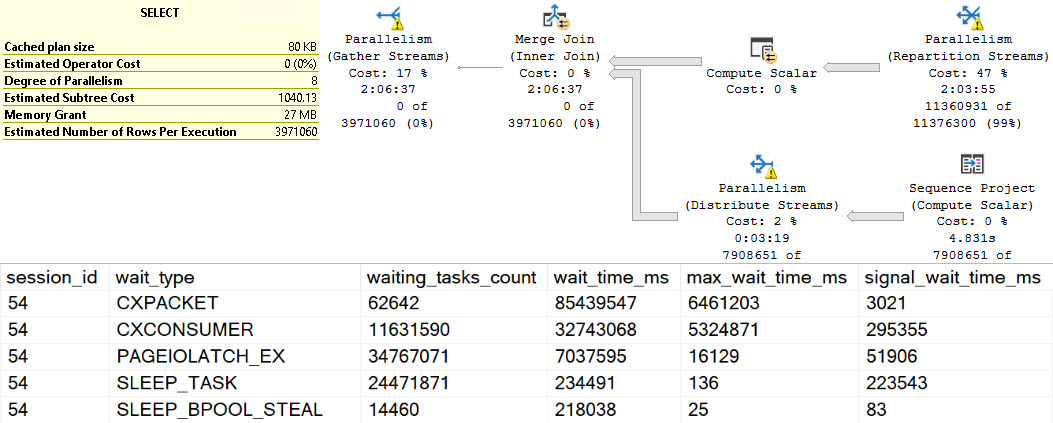
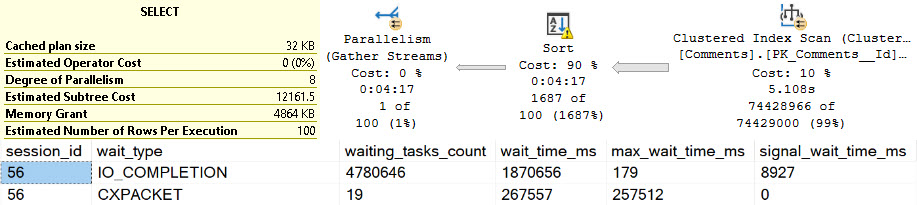
The waits here are interesting. At the top, we have perhaps high expected waits on parallelism, because the spills are encountered at parallel exchanges.
ouch
There are quite high waits on PAGEIOLATCH_EX, SLEEP_TASK, and SLEEP_BPOOL_STEAL rounding out the top five. This is quite interesting, because I’ve never explicitly thought of PAGEIOLATCH_EX waits in the context of exchange spills. Normally, I think of them when queries read pages from disk into memory for modification.
Going down the line, SLEEP_TASK is familiar from our time spent with hash spills, but SLEEP_BPOOL_STEAL is so far undocumented anywhere.
One can make some inferences based on the name about what it might be doing, but… It could also be a bit of a catch-all wait, like other waits that can be generated by spills.
From Me
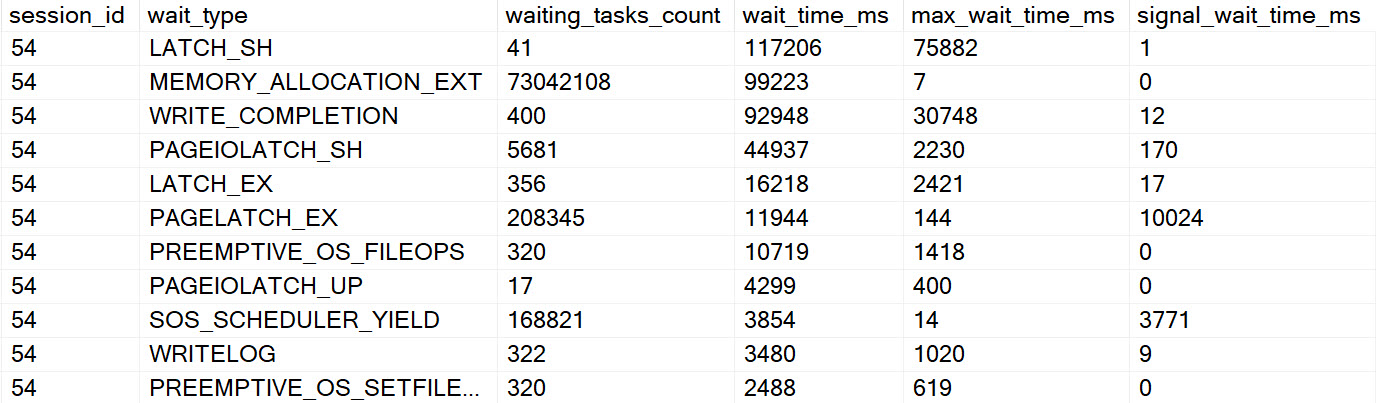
Going further, the other interesting waits encountered here look like so:
fields
If I had a Magic Eight Ball out right now, it’d probably just go into convulsions. Perhaps SLEEP_TASK (shown one above) is another clear sign of a different kind of spill, but there’s so much else going on here it’s hard to tell for certain which waits this query generated were from the spill, and which were from other portions of the query executing regularly.
Points for hitting PREEMPTIVE waits, though.
To You
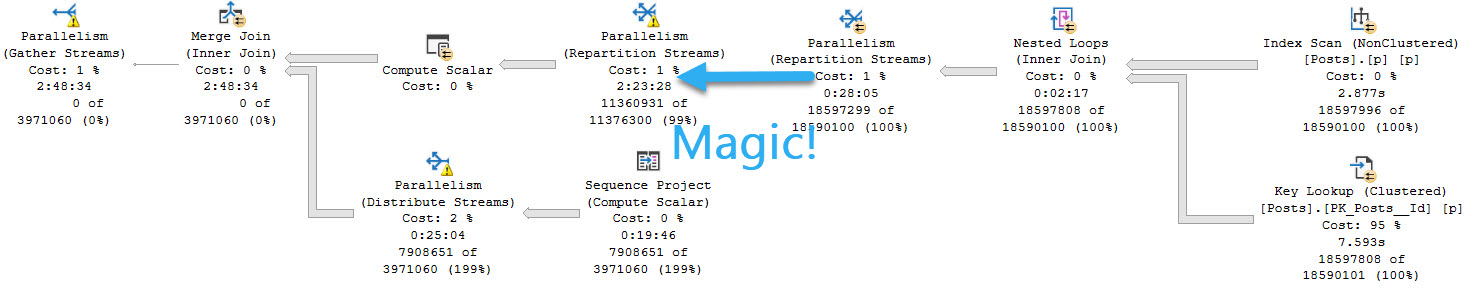
You weren’t mis-reading when you saw the query plan. This really did execute for over two hours. I tried to get another exchange spill into the mix by changing the query slightly, but all I got was a very cranky Repartition Streams.
WITH
    precheck AS
(
    SELECT
        u.Id,
        p.Id AS PostId,
        p.AcceptedAnswerId,
        p.Body, --New
        n =
            ROW_NUMBER() OVER
            (
                ORDER BY
            	    u.Id
            )
    FROM dbo.Users AS u
    JOIN dbo.Posts AS p WITH(INDEX = p)
        ON p.OwnerUserId = u.Id
    WHERE  u.CreationDate > '20110825'
    AND    u.Reputation > 100
    AND    p.PostTypeId = 1
)
SELECT
    u.*,
    p.*
FROM precheck p
JOIN dbo.Users AS u
    ON p.Id = u.Id
WHERE ISNULL(p.n, u.Id) = 0
ORDER BY u.Id, u.Reputation
OPTION(USE HINT('ENABLE_PARALLEL_PLAN_PREFERENCE'), MERGE JOIN);
And it ran for an extra 45 or so minutes, too.
discard
Ugly Baby
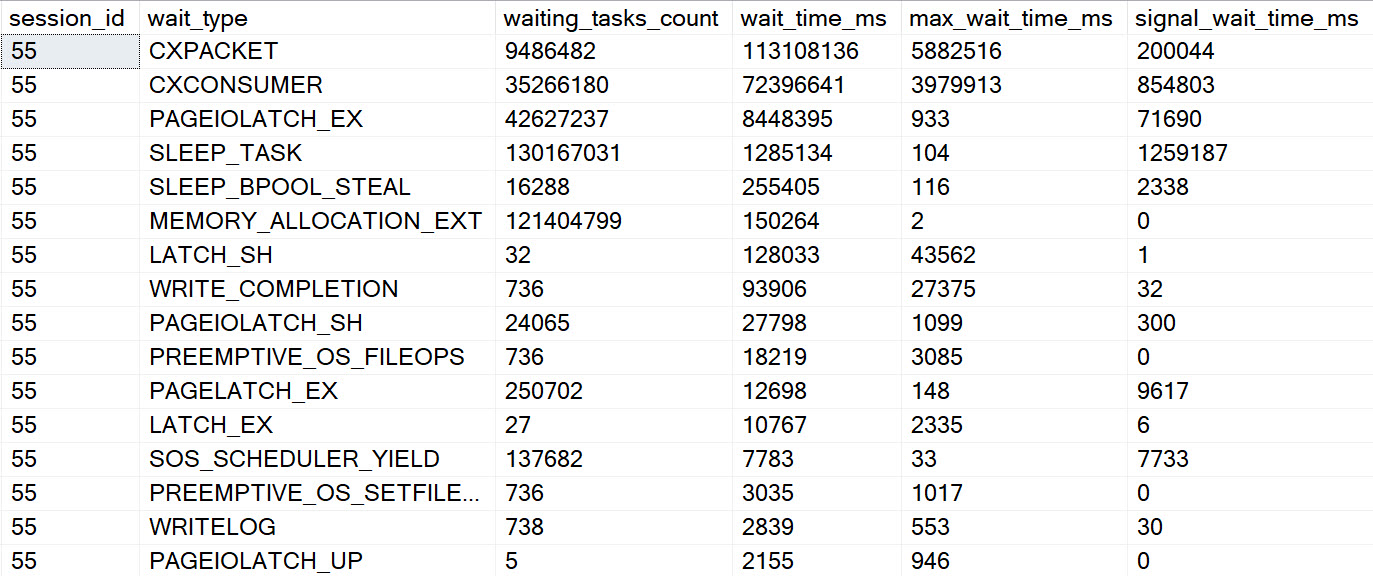
The results for this second query wait stats wise are just an amplified version of the original, of course.
gun tricks
Obviously dragging the Body column around had a rather profound influence on things.
Whole And Wet
These waits are perhaps less obvious than other spills, though one could make reasonable assumptions about SLEEP_TASK waits here as well.
I’d be concerned about any query emitting high amounts of it, or any server with high amounts of it compared to uptime.
It seems unfortunate that there’s no wait directly tied to hash spills, but perhaps when we’re all living in some quantum batch mode reality in the cloud it won’t matter at all.
Thanks for reading!
Going Further
If this is the kind of SQL Server stuff you love learning about, you’ll love my training. Blog readers get 25% off the Everything Bundle — over 100 hours of performance tuning content. Need hands-on help? I offer consulting engagements from targeted investigations to ongoing retainers. Want a quick sanity check before committing to a full engagement? Schedule a call — no commitment required.
Hash spills are, as we’ll see, sometimes identified by a different wait than sort spills. In small quantities, spills are often not worth bothering with. But when they pile up, they can really cause some severe performance issues.
In this post, I want to show that both Hash Aggregates and Joins can cause the same wait type, along with some evidence that strings make things worse.
In all the queries, I’m going to be using the MAX_GRANT_PERCENT hint to set the memory grant ridiculously low, to make the waits I care about stick out.
For each query we run, we’re gonna execute the query, and then this query to look at session level wait stats.
SELECT
    desws.*
FROM sys.dm_exec_session_wait_stats AS desws
WHERE desws.session_id = @@SPID
ORDER BY desws.wait_time_ms DESC;
Merch Pants
First up, a highly doctored hash aggregate:
SELECT
    c.CreationDate,
    c.PostId,
    c.Score,
    c.UserId
FROM dbo.Comments AS c
GROUP BY
    c.CreationDate,
    c.PostId,
    c.Score,
    c.UserId
HAVING COUNT_BIG(*) > 2147483647
OPTION(HASH GROUP, QUERYRULEOFF GenLGAgg, MAX_GRANT_PERCENT = 0.0);
But the important thing here is that there are no strings involved.
clean
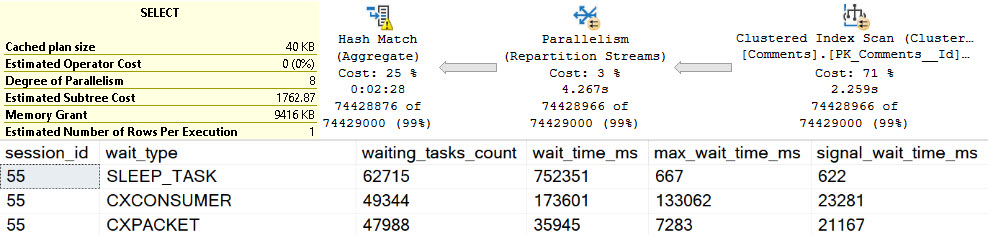
The spill goes on for about two minutes and twenty seconds, in row mode, at DOP 8.
That sure is bad, but in the words of Sticky Fingaz: Bu-bu-bu-but wait it gets worse.
Foolproof Plan
Let’s pull out another highly doctored hash aggregate, this time with our friend the Text column.
SELECT
    c.CreationDate,
    c.PostId,
    c.Score,
    c.Text,
    c.UserId
FROM dbo.Comments AS c
GROUP BY
    c.CreationDate,
    c.PostId,
    c.Score,
    c.Text,
    c.UserId
HAVING COUNT_BIG(*) > 2147483647
OPTION(HASH GROUP, QUERYRULEOFF GenLGAgg, MAX_GRANT_PERCENT = 0.0);
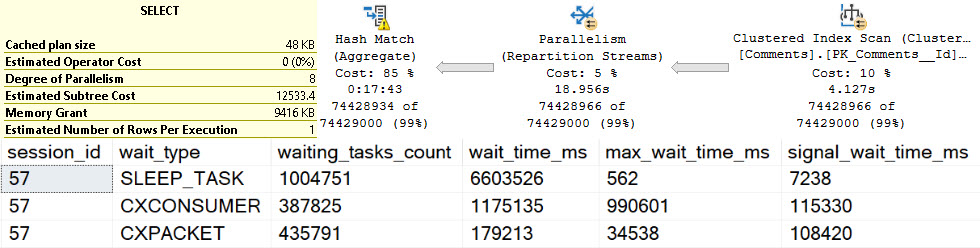
We see more of our friend SLEEP_TASK. Again, many other things may add to this wait, but holy hoowee, this is hard to ignore.
intro
That’s a solid — heck, let’s just call it 18 minutes — of spill time. That’s just plain upsetting.
Filthy.
And Join
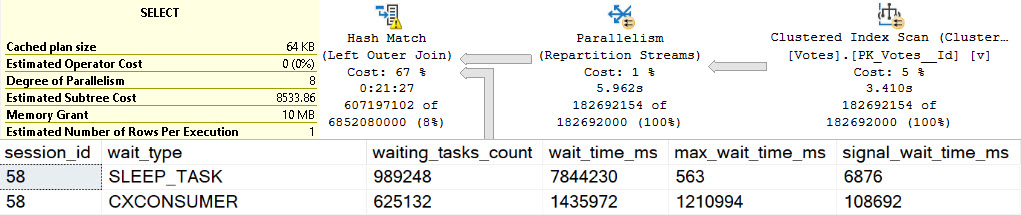
Causing the same problem where a Hash Join is in play will exhibit the same wait.
SELECT
    c.*
FROM dbo.Votes AS v
LEFT JOIN dbo.Comments AS c
    ON v.PostId = c.PostId
WHERE ISNULL(v.UserId, c.UserId) > 2147483647
OPTION(MAX_GRANT_PERCENT = 0.0);
jacket, no shirt
Now we get stuck spilling for about 21 minutes, which is also awkward and uncomfortable.
Funkel
We’ve looked at sort spills being the cause of IO_COMPLETION waits, and hash spills being the cause of SLEEP_TASK waits.
Again, if you see a lot of these waits on your servers, you may want to check out the query here to find plans in the cache that are selects that cause writes, for reasons explained in the linked post.
Tomorrow we’ll wake up bright and early to look at which waits crop up during exchange spills.
Thanks for reading!
Going Further
If this is the kind of SQL Server stuff you love learning about, you’ll love my training. Blog readers get 25% off the Everything Bundle — over 100 hours of performance tuning content. Need hands-on help? I offer consulting engagements from targeted investigations to ongoing retainers. Want a quick sanity check before committing to a full engagement? Schedule a call — no commitment required.
Over the next few days, I’m going to look at the wait stats that show up during different types of spills of different sizes. For no reason whatsoever, I’m going to start with sort spills. I’ll also cover hash and exchange spills, in case you were wondering just how long you’d have to sit here reading about them.
The point is not that spills are the sole things that cause these waits, it’s just to give you some things to potentially watch out for if you see these waits piling up and can’t pin down where they’re coming from.
In all the queries, I’m going to be using the MAX_GRANT_PERCENT hint to set the memory grant ridiculously low to make the waits I care about stick out.
For each query we run, we’re gonna execute the query, and then this query to look at session level wait stats.
SELECT
    desws.*
FROM sys.dm_exec_session_wait_stats AS desws
WHERE desws.session_id = @@SPID
ORDER BY desws.wait_time_ms DESC;
No Strings Attached
Strings are horrible. The bigger they are, they worse they are. Nearly every time I see oversized string columns, I see them causing problems.
File that under obvious foreshadowing while we look at a sort that doesn’t involve any strings.
SELECT
    c.Id,
    c.CreationDate,
    c.PostId,
    c.Score,
    c.UserId
FROM
(
    SELECT
        c.Id,
        c.CreationDate,
        c.PostId,
        c.Score,
        c.UserId,
        n =
            ROW_NUMBER() OVER
            (
                ORDER BY
                    c.PostId DESC
            )
    FROM dbo.Comments AS c
) AS c
WHERE c.n = 0
OPTION(MAX_GRANT_PERCENT = 0.0);
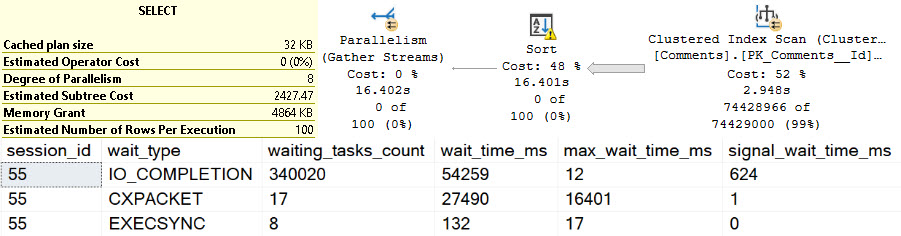
This query executes at DOP 8 in row mode, and the primary wait that racks up is IO_COMPLETION.
big hands
Strings Attached
Remember when I told you to file that thing up there under another thing? Here’s why.
In this query, we’re also going to select the Text column from the Comments table , which is an nvarchar(700).
SELECT
    c.Id,
    c.CreationDate,
    c.PostId,
    c.Score,
    c.Text, --New
    c.UserId
FROM
(
    SELECT
        c.Id,
        c.CreationDate,
        c.PostId,
        c.Score,
        c.Text, --New
        c.UserId,
        n =
            ROW_NUMBER() OVER
            (
                ORDER BY
                    c.PostId DESC
            )
    FROM dbo.Comments AS c
) AS c
WHERE c.n = 0
OPTION(MAX_GRANT_PERCENT = 0.0);
In this case, things get way worse. If you’re surprised, you should try reading blog posts; particularly this one.
a-heh-hem
Rather than ~16 seconds of spilling, we end up with a bit over four minutes of spilling. This is as the Mayans foretold, but the 2012 calendar was drunk and got the last two digits backwards.
Incomplete
Again, there are many potential causes of this wait, but on servers where I see them really piling up and ending up in top waits, there tends to be a dearth of memory and a lot of queries spilling to disk during sorts.
If you see this wait piling up, you may want to check out the query here to look for select queries that cause writes, which can indicate spills (among other things).
Thanks for reading!
Going Further
If this is the kind of SQL Server stuff you love learning about, you’ll love my training. Blog readers get 25% off the Everything Bundle — over 100 hours of performance tuning content. Need hands-on help? I offer consulting engagements from targeted investigations to ongoing retainers. Want a quick sanity check before committing to a full engagement? Schedule a call — no commitment required.
If this is the kind of SQL Server stuff you love learning about, you’ll love my training. Blog readers get 25% off the Everything Bundle — over 100 hours of performance tuning content. Need hands-on help? I offer consulting engagements from targeted investigations to ongoing retainers. Want a quick sanity check before committing to a full engagement? Schedule a call — no commitment required.
If this is the kind of SQL Server stuff you love learning about, you’ll love my training. Blog readers get 25% off the Everything Bundle — over 100 hours of performance tuning content. Need hands-on help? I offer consulting engagements from targeted investigations to ongoing retainers. Want a quick sanity check before committing to a full engagement? Schedule a call — no commitment required.
If this is the kind of SQL Server stuff you love learning about, you’ll love my training. Blog readers get 25% off the Everything Bundle — over 100 hours of performance tuning content. Need hands-on help? I offer consulting engagements from targeted investigations to ongoing retainers. Want a quick sanity check before committing to a full engagement? Schedule a call — no commitment required.
In this video, I dive into the functionality of my open-source stored procedure, SP_quickie_store, which allows you to search through Query Store in SQL Server for queries that caused specific wait statistics. I explain how it can be incredibly useful for troubleshooting performance issues by identifying the queries responsible for various types of waits, such as CPU, parallelism, and buffer IO. Although there are limitations, like not being able to pinpoint the exact query causing a block (since it’s usually the lead blocker), SP_quickie_store still offers valuable insights into query behavior and performance bottlenecks. I also discuss how to use this tool effectively, including navigating its results and understanding the context of wait statistics in SQL Server 2017 and later versions. For those interested in downloading the script or learning more about SP_quickie_store, you can find it on my website at erikdarlingdata.com under the scripts section.
Full Transcript
Erik Darling here with Erik Darling Data with a short video about how you can use my wonderful, beautiful, open source stored procedure, SP underscore, quickie store, to search query store for queries that caused certain white statistics. If you head over to, if I have this curse in the right place, erikdarlingdata.com, up at the top of my website, there’s a little header that says scripts, and if you click on scripts, there’ll be three of them there. One of them will be SP quickie store, and you will be able to find the GitHub download and everything else that you need there. Cool. So let’s talk a little bit about how neat of a feature this is. Now, for years, you needed to invest in a monitoring tool to get any sort of correlation between queries and wait stats. On its own, SQL Server never did a good job of putting those things together. There’s a lot of things I think that SQL Server could do a much better job of in general, where it comes to giving people views of performance and metrics on the server. But, you know, maybe that’s where that maybe that’s where all these expensive consultants and monitoring tool companies come in. I don’t know. Anyway, so what we’ve got is a lot of things that are going to be able to do.
So what we’ve got is this neat new thing that got added to query store, starting with SQL Server 2017, where it will start tracking wait stats. And more importantly, it’ll start tracking the queries that cause those wait stats. So it’s not as granular as regular query wait stats are. They’re sort of grouped together by like type, right? So you have like CPU, which is SOS scheduler yield. You have parallelism, which is the CX weights. You have, you know, like lock weights, which is all the lock weights. You have like buffer IO weights, which are all the like page waiting on page reading pages from disk into memory weights, all the page IO latch underscore weights. You have latches, but which are all the page latch weights. So there’s like they’re all kind of grouped together. They’re not as granular, but it’s still cool to have. And you can still get you can still figure out most stuff by looking at that. You know, the one thing that is, you know, I guess sort of, unfortunately incomplete is, I mean, this is true of anything, though. This is, you know, it’s like something very important to think about when you’re troubleshooting a blocking issue is that even if you know which queries caused lock weights, those are all the queries waiting. The query that caused the blocking is most likely not taking lock weights. I mean, you could get into a situation with a long blocking chain where certain queries that are waiting on locks would be blocking other stuff waiting on locks. But like at the head of it all, that lead blocker, that’s going to be the one that’s not waiting on a lock. That’s going to be the one that’s waiting on some other stuff, right?
CPU, memory, disk, latches, just completing, like getting every right log, getting everything that needs done. So that’s the one that’s going to be like the real culprit. Everything else was just sort of a victim of that lead blocker. But whatever, that’s nothing that we can really pin on query store. It’s just a limitation that you should keep in mind whenever you’re looking at queries and weight stats together. So yeah, there’s that. Anyway, so SP Quickie Store, my free open source store procedure, lets you do let’s you search query store in a lot of ways. There’s a whole bunch of other videos in this series about how to use Quickie Store to do other things. And sort of how SP Quickie Store works. And this one is pretty simple. Now, I recently had to clear out wait stats, or I recently had to purge out all my query store data to record a different video. So there’s not a whole lot going on in this one, unfortunately. But if we search query store for queries that caused a certain weight, what we’re going to end up with in this case is just I only have one query that’s been running in there, I had to cause a bunch of thread pool weights for a different demo. But if we look at what gets returned here, we’re going to see over in the top weights column, now this is going to be only again, only available in SQL Server 2017 plus, but you’ll see this top weights column get populated. And what it’s populated with are all the weights that this query generated. Now this is the average weights over all executions. Right? And so that’s what we’re searching on here. But it’s pretty nice to be able to figure out which query if we were looking for other stuff, you know, if we had other queries in here that cause other types of weights, we’ll be able to narrow narrow it narrow things down a little bit to there. Now. Within the top weights results set, I haven’t quite figured out a good way to order queries by this yet. I have to figure something out in there. But a workaround for now, if you also set the sort order for the type of weight that you’re searching for, if you have multiple result sets, this will still get ordered by this column over over I went too far duration, CPU, this will still be getting ordered by this column. So descending so you’ll at least get which which query caused the most weights in here, it may not be the most average weights in the top in the top weights column, but it’s better than nothing. So anyway, that’s my sort of short intro on SP quickie store searching for queries that cause certain weights. I hope you enjoy it. Again, if you need to download the script, it’s over at Erik Darling data.com. Up at the top, there’s a little header that says scripts, and that will lead you to my GitHub repo where you can download and run. And as long as you’re on a version of SQL Server that supports query store, and that supports and that you have query store enabled on, you’ll be able to analyze your query store.
With SP quickie store. Isn’t that lovely. And you know what, it runs a whole lot faster than the GUI does. Because I use query performance tricks. Secrets. Goodbye. where’d you go get?
0 There are no longer 0 8 9 9 9 9 9 OOM ș
Going Further
If this is the kind of SQL Server stuff you love learning about, you’ll love my training. Blog readers get 25% off the Everything Bundle — over 100 hours of performance tuning content. Need hands-on help? I offer consulting engagements from targeted investigations to ongoing retainers. Want a quick sanity check before committing to a full engagement? Schedule a call — no commitment required.
In this video, I delve into the intricacies of how thread pool weights do not appear in QueryStore, despite generating significant thread pool waits during execution. I walk through a detailed experiment using my custom `ThreadPooler` stored procedure and StackOverflow 2013 database on SQL Server 2019, running 150 concurrent queries to simulate high thread demand. Despite hitting the thread pool limits and experiencing contention, QueryStore fails to capture any thread pool weights, leading me to question the current implementation and documentation of the query store waitstats view. This video is a deep dive for my dear friend William at Microsoft, aimed at clarifying these details and potentially improving the user experience in the query store GUI.
Full Transcript
Erik Darling here with Erik Darling Data. Recently voted the consultant most likely to die in front of their computer by BearGut Magazine. So I’d like to thank the editors, the writers, and all the voters out there, all the BearGut heads out there who voted for me. I think what really pushed me over the edge was when I shared my Windows Update notifications where it said, we notice that you use your computer mostly between 5am and 9pm, so we’re not going to restart your computer. I think that’s what really sealed the deal for me, but, you know, just want to make sure, make sure they show everyone at BearGut Magazine my appreciation there. Love you guys and gals, all you fine people at BearGut Magazine. So, this video is for my dear friend William at Microsoft, and it is to hopefully clarify some details around how I think that thread pool weights do not actually end up in QueryStore. So, to kind of step through a couple things up front, this is QueryStore. I have recently purged all QueryStore data from here because I don’t, I want to start fresh. I had a little bit of a difficult time clearing that out. There were some really interesting things that I had created in there. That’s okay.
What was I going to do? Take a backup? Okay. So, that’s that. So, this is QueryStore. It’s on. The capture mode is on. The wait stats capture mode is on. Everything is good to go here. That’s StackOverflow 2013. The store procedure that I’m using to generate thread pool is a store procedure called ThreadPooler right here, and the query in it is written in kind of a funny, silly way in order to do a very specific thing. And that very specific thing is run at, come on, buddy, run at DOP8 and reserve eight threads per concurrent parallel branch, which brings us to 24 threads, because the best way to generate thread pool is to generate parallel queries and run a whole bunch of them at the same time.
In order to run a whole bunch of them at the same time, we’re going to be using Osterest, but we’ll talk about that in a minute. So, this is a freshly restarted SQL Server. I just restarted it before recording this because I want wait stats to be buck naked.
We have nine thread pool waits on the server. We have nine thread pool waits because the thread pool is an artifact of both of creating threads, which happens during SQL Server’s lifetime. It will create and trim the family of threads that run queries on here. So, when you create threads, you hit thread pool waits.
Not for a very long time. You can see the max wait time is one millisecond. And, you know, that’s pretty good. That’s pretty fast. Fast threads. It must be using lightweight pooling or something. It must have priority boost turned on to get threads created that quickly.
But we have these thread pool waits on the servers. We have a few of them. Not a lot, though. So, fine. In sys.queryStoreWeightStats, this should be completely empty because I haven’t run anything. WeightCategory2 is, of course, the one that would be responsible for tracking thread pool waits.
So, I have SPPressureDetector, my shameless plug for my store procedure here, which is going to tell us some information about CPU pressure on the server. I’m using the remote DAC so that I don’t get held up by the test that causes thread pool waits because there’s nothing more useless than sitting there waiting for DMV queries to finish.
So, my server is allowed… Oops, I didn’t do that very well. I didn’t frame that up very well. My server is allowed to use up to 744 threads. We have currently used 39 threads, and we have 665 threads available.
Nearly 666 threads available, which would be devil worship, which is the only way that consultants actually get business. So, I don’t know.
I don’t know what the correlation there is. Maybe I should worry about business if I only have 665 threads. But, yeah. So, this is the current setup for this. The way I’m going to be testing things is running my thread pooler procedure against the StackOverflow 2013 database.
Again, making sure that context is ultra clear here. This is the server we’re hitting, SQL Server 2019. And I’m going to be running 150 threads over 20 rounds of executions. So, 150 concurrent queries of thread pooler.
I was running this up higher before, but I was getting a lot of timeouts from Ostrust. And I don’t want timeouts. I want queries that hit thread pool, but complete.
I don’t want there to be failed executions getting into the mix and mucking things up. Because, even though I know Query Store tracks failed executions, this is a failure before anything even happens. So, there’s no way the Query Store would be able to say, oh, you were going to run that query, but you couldn’t get a thread.
So, there’s no way to put that together. So, I don’t want failures. I want contention, but not like timeout, disaster, the usual kind of thread pool stuff that I demo. So, let’s kick that off and get that working.
And we’re immediately going to see SP Pressure Detector telling us about thread pool weights. All right. So, you can see that we are the 704 threads that we are allowed to use. We have used 755 now.
We’re at negative 59. So, that’s a bad time. And we have 17 requests waiting for threads. And that’s going to be just about 17 down. Oh, wow. More than that. So, in the span of time between this query running and this query running, 10 extra threads got on a line waiting for CPU.
That’s fun. Or 10 extra tasks started waiting for the thread, rather. If we run this a couple few times during the course of things going, we’re going to see more thread pool weights here and there.
So, we’re going to see some. We’re going to see them come and go. And we’re going to see, if we look at Ostrass first, we’re not going to see anything timing out. When Ostrass has queries time out, it gets very, very loud about it.
There’s all sorts of messages and flooding and going on in there. But if we run this, you know, and we find some stuff with this thread pool, come on, baby, give me something. Anything.
One row, one row. Screw you. Make me look bad in front of my friend William. What we’re going to see over here is something kind of interesting. You know, there’s a bunch of queries executing at DOP8 that have 24 worker threads. But then as we get down a little bit lower, we’ll see SQL Server starting to force some queries to use lower DOPs because we’re hitting these thread pool weights.
Right? So, we’ll see DOP7, DOP3, DOP1, and then, you know, whatever. So, we can tell that we’re hitting thread pool. But we can also tell that queries are at least finishing.
Right? Like, queries are getting through and eventually completing. So, there’s that. Great. Wonderful everything. We’re going to see as this thing starts executing that weights are going to, or thread pool weights are going to go up on the server.
Not constantly because we’re not constantly hitting thread pool anymore. You know, it was sort of inconsistent in the pressure detector stuff where, like, some queries were and some queries weren’t. But, you know, we see that from the, I think, nine waiting tasks that we had before, we’re up to 616 now.
So, we added a whole bunch of them in. You know, if we run this, we might see some more. I don’t know. I forget. So, whatever.
This thing has been dragging on long enough. Oh, there’s a whole bunch more. Woo-hoo! We hit more thread pool. We did our job. Let’s come back over here and look. Okay. Maybe it hasn’t quite made it to that DMV yet. Consistency is an eventual thing, I suppose.
So, let’s kill that. And let’s poke around a little bit. We’ll see thread pool weights down here. We don’t see any weights in here.
We don’t see any thread pool weights in query store. And if we run here, we’re going to see, you know, queries and stuff running. We see all sorts of other weights get populated, but nothing for that weight category of thread pool. So, that’s a bummer.
And, you know, we can probably see if we poke through query store. Maybe. I mean, I hope we do anyway. If we go look at query store. And we go look at top resource consuming queries.
And let’s view those. And let’s see here. There’s our top resource consuming query. And that’s from our stored procedure thread pooler, which had 293 executions. All right.
So, it did a lot of work. Did a lot of stuff. Executed a whole bunch of times. We did a bunch of thread pool. But we have no thread pool weights in here. All right. If you look at wait time, query ID 37, you know, there’s no wait time. So, I don’t know.
Whatever. I’m exhausted. Give me a break. If the query store GUI worked better, that would be probably more illustrative that we didn’t have any of that in there. So, I don’t know.
Maybe that’s a separate issue that I’ll open up. Fix the query store GUI. Get some UX in the query store GUI. Something like that. User experience points. Tell a user story.
Great user story with the GUI. Anyway. William. I hope you enjoyed this video. I hope it helps you in your quest to fix the documentation in the query store waitstats view. Anyone else watching this?
You shouldn’t have watched it. This video was only for my best friend William at Microsoft. So, you’re a disgusting individual. And I’ve lost all respect for you. All the non-Williams out there. How dare you intrude on this special time that we had together.
Anyway. It’s Friday. So are you. I’m going to leave now.
Going Further
If this is the kind of SQL Server stuff you love learning about, you’ll love my training. Blog readers get 25% off the Everything Bundle — over 100 hours of performance tuning content. Need hands-on help? I offer consulting engagements from targeted investigations to ongoing retainers. Want a quick sanity check before committing to a full engagement? Schedule a call — no commitment required.
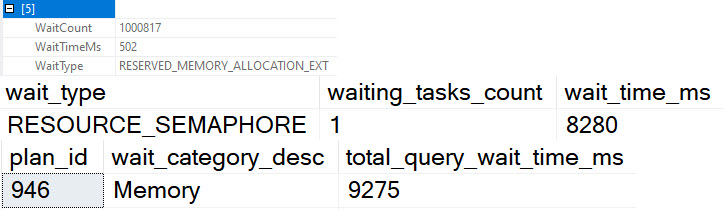
One is that RESOURCE_SEMAPHORE_QUERY_COMPILE is listed as a collected wait, but with an asterisk that says it’s not actually collected. I’ve tested workloads that generate lots of that wait, and just like the docs say, it doesn’t end up there.
Of course, since I added wait stats recently to sp_QuickieStore, I wanted to make sure other waits that I care about actually show up in there.
THREADPOOL Doesn’t
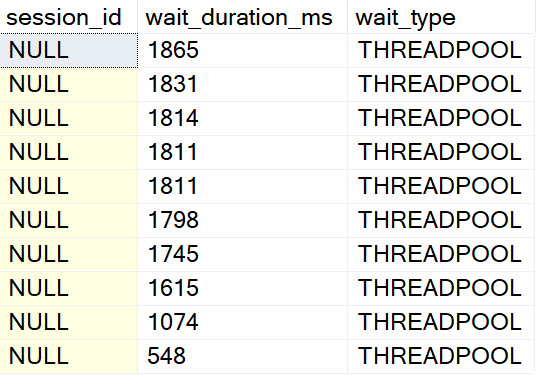
I ran a workload where 747 queries waited on THREADPOOL before running and completing.
el threado
But nothing shows up in query store wait stats. The stored procedure I ran to create the THREADPOOL waits shows up, and it has other waits — CPU and stuff — but nothing about workers. My guess why is because that’s a pre-compilation wait. When they pile up, there’s no execution context.
They’re quite not-figuratively spidless.
lezz than zero
So, uh, I had to pull filtering for that wait out.
RESOURCE_SEMAPHORE Does
Running a similar workload, I can see where queries start to rack up RESOURCE_SEMAPHORE waits. At least, I’m pretty sure they do.
See, those waits are buried in a bunch of memory waits that are usually insignificant — and hell, on well-functioning server so is RESOURCE_SEMAPHORE — but I see the time spent on that, plus some other memory related waits.
carry the um
And that’s probably good enough for hand grenades.
Thanks for reading!
Going Further
If this is the kind of SQL Server stuff you love learning about, you’ll love my training. Blog readers get 25% off the Everything Bundle — over 100 hours of performance tuning content. Need hands-on help? I offer consulting engagements from targeted investigations to ongoing retainers. Want a quick sanity check before committing to a full engagement? Schedule a call — no commitment required.
Whomever decided to give “memory bank” its moniker was wise beyond their years, or maybe they just made a very apt observation: all memory is on loan.
Even in the context we’ll be talking about, when SQL Server has lock pages in memory enabled, the pages that are locked in memory may not have permanent residency.
If your SQL Server doesn’t have enough memory, or if various workload elements are untuned, you may hit one of these scenarios:
Query Memory Grant contention (RESOURCE_SEMAPHORE)
Buffer Cache contention (PAGEIOLATCH_XX)
A mix of the two, where both are fighting over finite resources
It’s probably fair to note that not all query memory grant contention will result in RESOURCE_SEMAPHORE. There are times when you’ll have just enough queries asking for memory grants to knock a significant pages out of the plan cache to cause an over-reliance on disk without ever hitting the point where you’ve exhausted the amount of memory that SQL Server will loan out to queries.
To help you track down any of these scenarios, you can use my stored procedure sp_PressureDetector to see what’s going on with things.
Black Friday
Most servers I see have a mix of the two issues. Everyone complains about SQL Server being a memory hog without really understanding why. Likewise, many people are very proud about how fast their storage is without really understanding how much faster memory is. It’s quite common to hear someone say they they recently got a whole bunch of brand new shiny flashy storage but performance is still terrible on their server with 64GB of RAM and 1TB of data.
I recently had a client migrate some infrastructure to the cloud, and they were complaining about how queries got 3x slower. As it turned out, the queries were accruing 3x more PAGEIOLATCH waits with the same amount of memory assigned to SQL Server. Go figure.
If you’d like to see those waits in action, and how sp_PressureDetector can help you figure out which queries are causing problems, check out this video.
Market Economy
The primary driver of how much memory you need is how much control you have over the database. The less control you have, the more memory you need.
Here’s an example: One thing that steals control from you is using an ORM. When you let one translate code into queries, Really Bad Things™ can happen. Even with Perfect Indexes™ available, you can get some very strange queries and subsequently very strange query plans.
One of the best ways to take some control back isn’t even available in Standard Edition.
there are a lot of bad defaults in sql server. most of them you know about and change. here’s another bad one: pic.twitter.com/555xPmgwRW
— Erik Darling Data (@erikdarlingdata) May 8, 2021
If you do have control, the primary drivers of how much memory you need are how effective your indexes are, and how well your queries are written to take advantage of them. You can get away with less memory in general because your data footprint in the buffer pool will be a lot smaller.
You can watch a video I recorded about that here:
Thanks for reading (and watching)!
Going Further
If this is the kind of SQL Server stuff you love learning about, you’ll love my training. Blog readers get 25% off the Everything Bundle — over 100 hours of performance tuning content. Need hands-on help? I offer consulting engagements from targeted investigations to ongoing retainers. Want a quick sanity check before committing to a full engagement? Schedule a call — no commitment required.