Get AI-Ready With Erik: Vector Index Preview Feature Limitations
Summary
In this video, I delve into the limitations of vector index preview in SQL Server 2025, sharing insights from my course “Get AI Ready with Erik.” I highlight key constraints such as read-only tables, restrictions on inserts and updates, and the necessity for an integer primary key. Additionally, I discuss practical strategies for managing data across multiple tables to accommodate these limitations, emphasizing the importance of planning ahead to ensure smooth operations when using vector indexes in your database environment.
Erik Darling here with Darling Data. Here to try to continue to educate you about AI and the vector stuff in SQL Server 2025. This is all, you know, small snippets of material from my course, Get AI Ready with Erik. You can buy that for a hundred bucks off with the coupon code up here. And when you do, you support me doing menial things in life, paying rent, cable bills, cell phone bills, nothing fun, right? No joy, no joy, just AI. But we’re going to talk about vector index preview feature limitations in this one. And because they are significant, and it’s hard to imagine, like, it’s hard to imagine releasing them in the current state as generally available. Like, these are just, this is just the stuff that we know about. This is not all the stuff behind the scenes that, you know, probably still needs tidying up, fixing all the other stuff. But just to sort of zoom in on some other things. When you create a vector index on a table, there are no inserts, updates, or deletes allowed. This is probably the number one reason that vector indexes are preview only. You know, like, we didn’t have the preview feature switch when columnstore indexes came out and like, you know, they were like, oh, these make the table read only two. And we didn’t have that. So if we did, maybe that would have been something. But if you try to do anything, you will get this funny error data modification statement failed, because table post embeddings has a vector index on it. So no inserts, updates or deletes from you. So just from the Microsoft docs, you know, obviously, tables read only, so that stinks. You can’t, like you can’t partition tables at vector indexes on. I don’t know if I care so much about this, right? Like, partitioning is a data management feature that everyone seems to confuse for a performance feature. And yeah, I just I just don’t care. You know, if it honestly, if that kept happening, and people were just stopped asking questions about partitioning their tables, I’d be I’d be thrilled. Another one that I kind of don’t care about no replication to subscribers, replication. This is like capital R replication, not like availability group, like, you know, log shipping, mirroring, stuff. This is like, you know, merge or transactional replication, you can’t replicate vector indexes to subscribers. Again, if this gets people away from replication, all in favor of it, right? Yeah, what a nightmare.
An integer primary key is required. So this is this is like for us like a single column. So like I think this one is probably the funniest one to me. Because Microsoft is almost like self limiting you in this way. Like, like, like, like, you can’t use like a big int, right? Like anyone who’s table like tables like are they’re like, wow, this table is going to get big, we need a big int for this. Microsoft’s almost like 2 billion rule limit, pass this, I can’t make any promises, right? Like that’s, that’s, that’s a funny one, right? So it has to be an integer has to that has to have a cluster primary key on just the integer. You can’t have any composite keys. You can’t like, you know, have your cluster primary key on a GUID or something like that.
Or something like that has to be the integer. That’s an amusing one. I don’t know the story behind that. But you know, maybe maybe they’re trying to save you from yourself. And of course, if you drop the index and you insert data into the table, you have to rebuild it if you want to start using it again, that one’s fairly straightforward. Azure SQL database, at least in some regions, where the vector, the disk and vector indexes have rolled out to they, as of this, as of this date, not all Azure regions support this.
They do have a setting called allow stale vector index that allows rights, but the index will be stale until you rebuild it. This is not available in SQL Server 2025. You can’t currently disable a vector index, right? You have to drop it, right? If you try to disable the vector index, you will get this error that says one or more of the specified alter index options is unsupported for a vector index. So no disabling vector indexes. So if you have a system where you need to add data regularly, where like, you know, to a table, you’ll probably want to keep embeddings in a separate table from like, you know, your transactional stuff where people need to do things so that you may continue to make money off them.
You know, you might even set it up. So like, you have two tables. One of them is for, you know, like rows that you are actively, you know, like have like an active vector index on them. And another table that gets like new records that you have to like, you know, that you haven’t put into the vector search table yet, because you have to sort of like batch that, right? You would have to set up a process where, you know, like it’s some cadence that makes sense to you, you would have to drop the vector index.
You know, like either, you know, you’ve already either generate embeddings for new records or already have them like in like a second table in like put the new put the like newer embeddings into the vector into the table that you want to have the vector index on and then rebuild the vector index. Then you could, you know, you could combine searches like, like one, like, you know, like, so like a union all query where one of them does the vector search, the other one does the vector distance search on the unindexed data. So the downside for that is if you are like, if you have like sort of like hot vector data, you know, like new records wouldn’t be searchable with vector search until you, until you like batch them into the new table, you would have to continue to use like the vector distance to do that.
But the general pattern that you would want to follow is combine them. Right. So almost like, you know, like some people like some people will pretty commonly have like, like, like, like, not really like partitioned with capital P partitioned, but they’ll have like sort of like an archival table that has like much older stuff in it. And they’ll have a newer table for like newer data, maybe even like three tables where it’s like, you know, you have like archived and then like, you know, like lukewarm data and then like hot data.
And you’ll just like union all those together with like constraints on each so that like if there’s a date based search, SQL Server knows which one to go to. But you could you could do something sort of similar with your like, you know, not archived, but like indexed vector data and your new vector data where you just sort of union all two things. And just like, well, this I can vector search this I need to vector distance because I don’t have an index on that yet.
And I can’t use vector search without a vector index. And I can’t just put the data directly into the table with the vector index on it because the vector index makes a table read only. You would just have to sort of find a way to combine both of those, which, you know, right, right now is not a great story.
And that’s why vector indexes are in preview. They’re not, you know, they’re not in the generally available category because they’re sort of a nightmare, right? Like it makes a lot of processes not fun to use.
There’s a lot of feature interoperability that just isn’t great with stuff. So, like, I get it. I get why Microsoft made the choice.
But, you know, you know, vector indexes will probably be nice someday. But for now, like we’re looking at like the stone age of vector indexes in SQL Server. And, you know, I think what’s what’s really depressing about it, you know, from like someone who cares about the database product quite a bit is there’s like no roadmap.
There’s no timeline. There’s no like, you know, it’s just sort of like, oh, we’ll get to it when we get to it. Like, stay away.
It’s, you know, you can’t get an answer from anyone on anything. And, you know, you can’t help but feel that Microsoft’s priorities in other areas are taken away from what what was trotted out by all sorts of folks at the company to be like the flagship feature of SQL Server 2025. Whenever everything that we saw, like the word SQL Server was barely in like the marketing header.
It was like it’s like like, yeah, it’s like SQL Server 2025. But it was like fabric, AI, ground to cloud to whatever. And you’re like, OK, well, where’s where’s the database?
And then didn’t we? Isn’t that what we care about? Isn’t that what we’re here for? So I don’t know. It would be cool if, you know, we had people were a little bit more transparent about when these things might stop sucking. But for now, we must embrace the suck for the suck has embraced the warm embrace of suckiness is what we have.
Anyway, that’s probably enough here. Thank you for watching. I hope you enjoyed yourselves.
I hope you learned something and I will see you. Oh, I don’t know when I when I see you. Who knows? Maybe I’ll just quit. Maybe that’s enough of this. All right.
Thank you for watching.
Going Further
If this is the kind of SQL Server stuff you love learning about, you’ll love my training. Blog readers get 25% off the Everything Bundle — over 100 hours of performance tuning content. Need hands-on help? I offer consulting engagements from targeted investigations to ongoing retainers. Want a quick sanity check before committing to a full engagement? Schedule a call — no commitment required.
Stop clicking through SSMS execution plans like it’s 2005.
Performance Studio is a free, open-source plan analyzer that tells you what’s wrong,
where it’s wrong, and how bad it is — from the command line, a desktop GUI,
an SSMS extension, or an AI assistant.
Built by someone who has stared at more execution plans than any reasonable person should.
If you’ve ever said “I think it needs an index” while pointing vaguely at a Hash Match,
or if your idea of plan analysis is “that arrow looks kind of wide,” this tool is for you.
🧑💻
DBAs Who Tune for a Living
You already know what a Hash Match spill is. You just want something that finds them faster than scrolling through plan XML in Notepad++.
🔬
Developers Who Suspect the Database
Your app is slow. You think it’s the queries. Run them through Performance Studio and find out in seconds instead of hours.
💼
Consultants & Contractors
Batch-analyze a client’s worst queries, generate text or JSON reports, and look like a genius before your first meeting ends.
This Is Not a Monitoring Tool
Performance Studio analyzes execution plans. It doesn’t collect wait stats over time, monitor CPU trends,
or send you email alerts at 3 AM. If you want that, check out SQL Server Performance Monitor — also free, also open source.
What It Catches
Feed it a query plan and it tells you what’s wrong — with severity levels,
operator node IDs, and enough context to act immediately.
💥
Memory Grant Issues
Flags queries granted 8 GB of memory that used 200 MB. Also catches hash, sort, and exchange spills to TempDB with severity based on volume.
📊
Row Estimate Mismatches
Finds operators where the optimizer estimated 1 row and got 2,889. Because “roughly one” and “almost three thousand” are not the same number.
🔍
Missing Indexes
Extracts SQL Server’s index suggestions with ready-to-run CREATE INDEX statements and impact percentages. Copy, paste, done.
🎯
Parameter Sniffing
Compares compiled vs. runtime parameter values so you can see exactly when the optimizer made a plan for the wrong data.
🔀
Parallelism Problems
Detects thread skew — one thread doing all the work while seven others sit idle — plus ineffective parallelism and serial plan reasons.
🚫
Anti-Patterns & More
OPTIMIZE FOR UNKNOWN, NOT IN with nullable columns, leading wildcards, implicit conversions, scalar UDFs, key lookups, late filters, nested loop concerns, and more.
30 analysis rules run against every plan — covering memory, estimates, indexes, parallelism, joins, filters,
functions, parameters, compilation issues, and common T-SQL anti-patterns.
Each rule can be disabled or have its severity overridden via config file.
Four Ways to Use It
Performance Studio meets you where you are — whether that’s a terminal, a GUI,
SSMS, or a conversation with an AI.
Command Line
CLI Tool
Analyze saved .sqlplan files, capture plans from live servers, or batch-process entire folders of queries. JSON output for automation, text output for humans.
## Analyze a saved plan planview analyze my_query.sqlplan –outputtext
## Capture from a live server planview analyze –serversql2022–databaseAdventureWorks \ –query“SELECT * FROM Sales.SalesOrderHeader”
## Batch-process a folder planview analyze ./queries/ –output-dir./results/
Desktop App
Graphical Plan Viewer
SSMS-style operator icons, cost percentages, row counts, and warning badges. Click any operator for full properties. Zoom and pan. Dark theme, because you have taste.
Plan Insights — runtime summary, missing indexes, wait stats at a glance
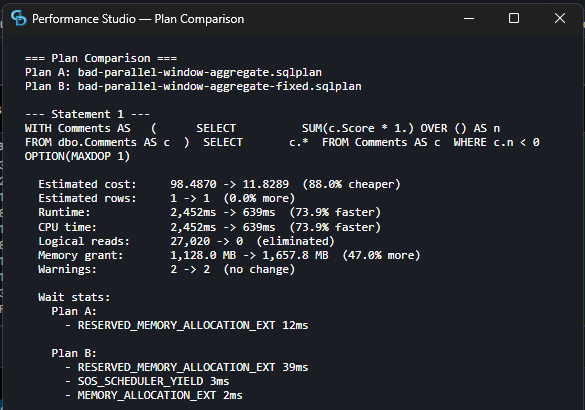
Plan Comparison — side-by-side cost, runtime, I/O, and memory diffs
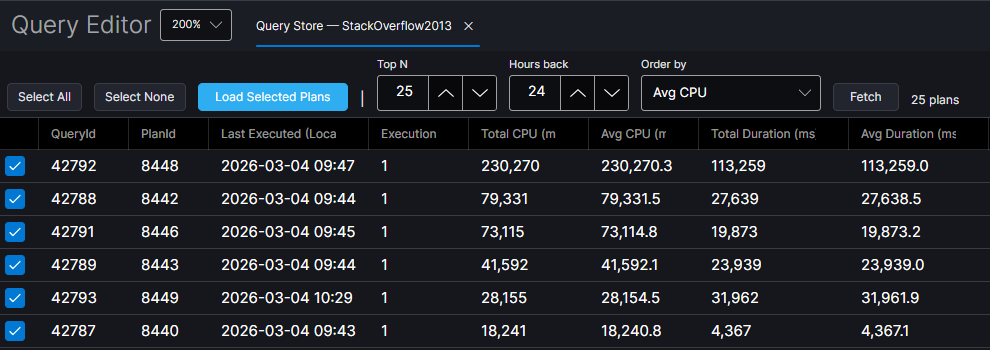
Query Store — fetch top queries by CPU, duration, reads, or memory
Copy Repro Script — extracts parameters, SET options, query text into runnable sp_executesql
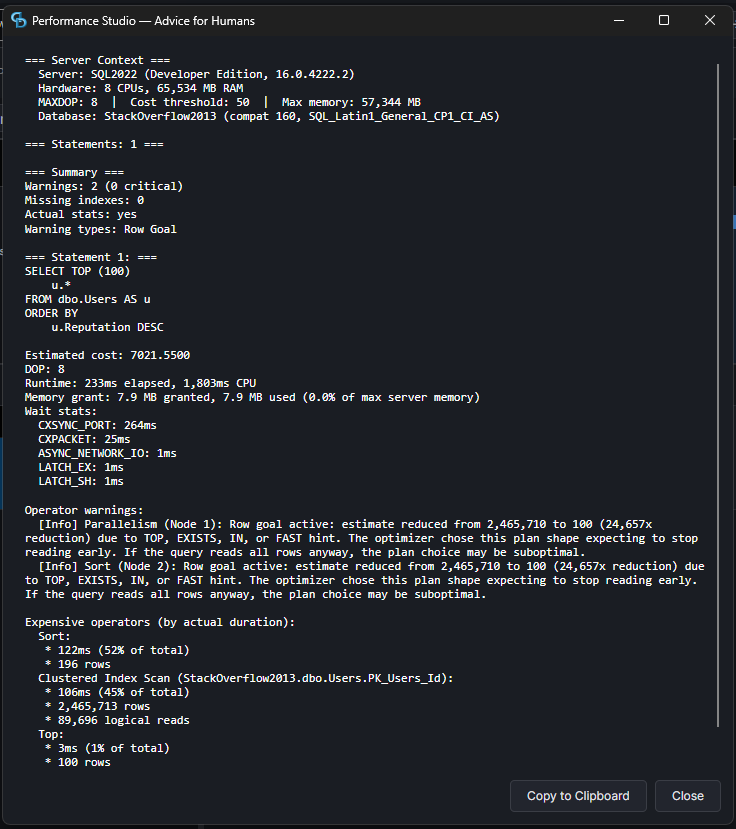
Advice for Humans — one-click text report you can read or paste into a ticket
SSMS Extension
Right-Click → Analyze
Adds “Open in Performance Studio” to the execution plan context menu in SSMS 18–22. Right-click a plan, click the button, and the full analyzer opens with your plan loaded. No exporting to XML. No file dialogs.
Auto-detects SSMS 21 and 22. Installs into both. Path is saved so you only configure once.
AI Integration
MCP Server Built-In
Built-in Model Context Protocol server with 13 tools for plan analysis and Query Store data. Point Claude Code or Cursor at it and ask questions in plain English.
Analyze Plans
Compare Plans
Missing Indexes
Query Store Top N
Localhost only. Disabled by default. We’re paranoid so you don’t have to be.
What the Output Looks Like
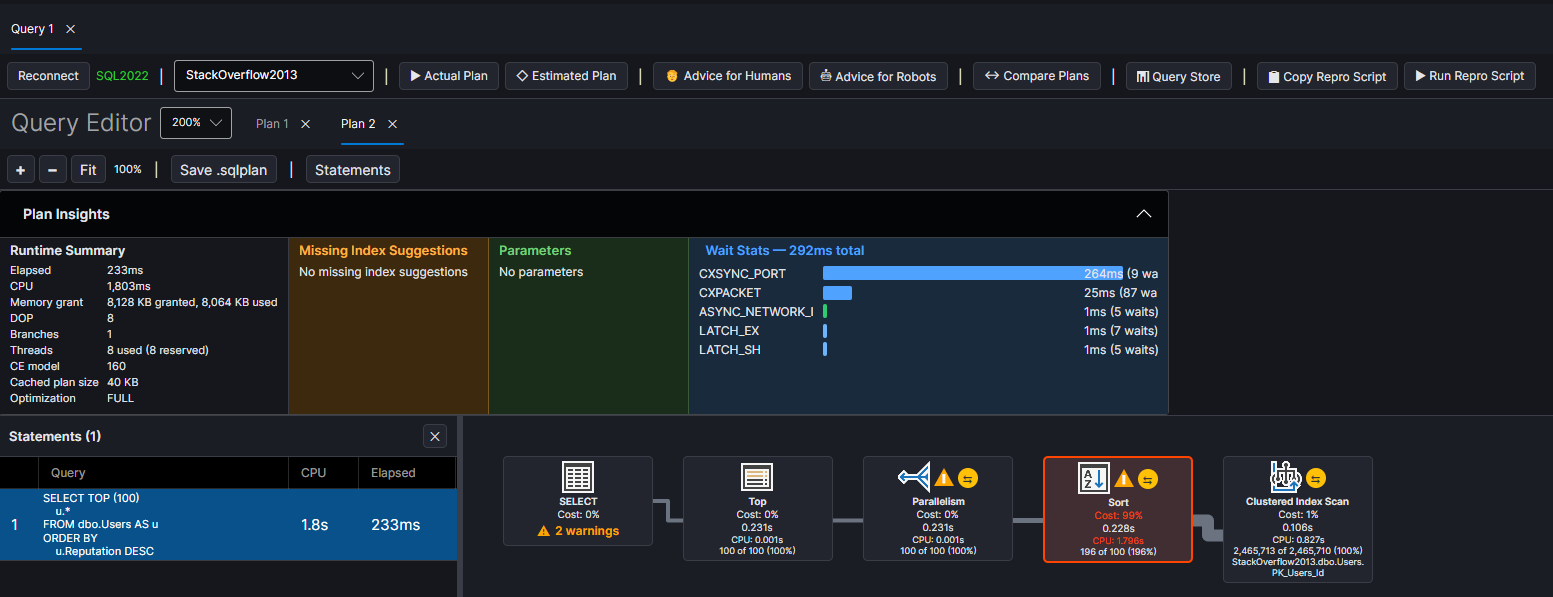
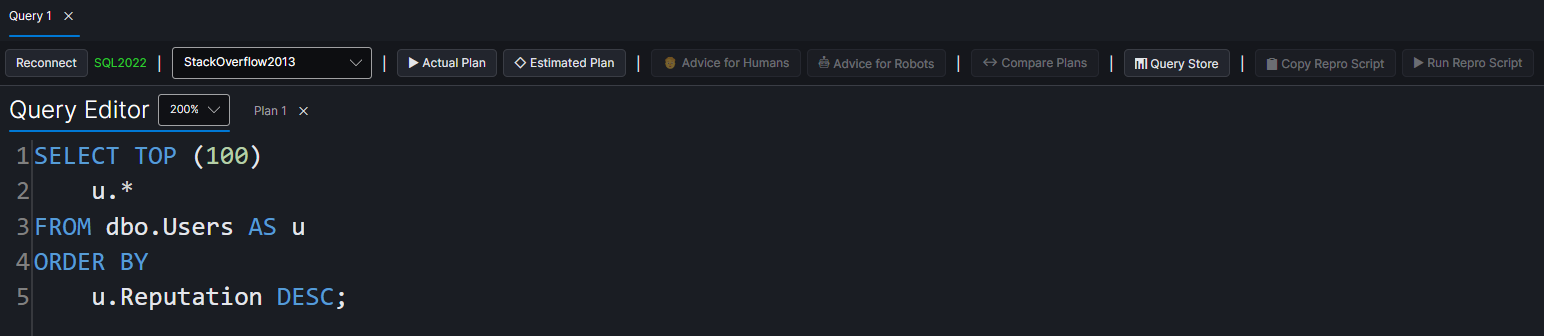
Real output from a query against StackOverflow2013 on SQL Server 2022.
Every warning tells you what’s wrong, where it is, and how bad it is.
The CLI produces text for humans and JSON for automation.
The GUI shows the same data in a graphical plan tree with clickable operators.
Both give you missing index CREATE statements you can run immediately.
Batch mode generates three files per query: the raw .sqlplan XML, a structured JSON analysis, and a human-readable text report.
Plan: 04_comment_heavy_posts.sqlplan Runtime: 4551ms elapsed, 15049ms CPU Memory: 8,022,664 KB granted, 2,514,944 KB used
Warnings: [Critical] Large Memory Grant: 7835 MB granted
Operator warnings: [Critical] Parallelism (Node 0): Est 1, actual 2,889 [Critical] Sort (Node 1): Est 1, actual 2,889 [Warning] Sort: Thread 1 processed 100% of rows [Warning] Filter (Node 2): Late filter
Download Performance Studio and start understanding your execution plans today.
Free, open source, and built by someone who actually tunes queries for a living.
In this video, I delve into the fascinating world of vector indexes in SQL Server, a topic that might seem a bit dry but is incredibly powerful for certain types of data analysis and search operations. Vector indexes are fundamentally different from traditional B-tree indexes; they create a graph where each vector (a series of floating point numbers) becomes a node, and edges connect similar vectors. This unique structure allows for faster searches by navigating the graph rather than scanning every single vector, making it particularly useful for tasks like content similarity search. I walk you through how vector search works using SQL Server’s preview function, demonstrating its efficiency compared to exact vector distance calculations. Along the way, we explore concepts like recall and see firsthand the trade-offs between exact and approximate searches. To give you a practical example, I run a demo comparing the results of an exact search with those from vector search on a sample dataset, highlighting both their similarities and differences. If you’re curious about diving deeper into AI and SQL Server 2025, be sure to check out my course “Get AI Ready with Erik,” where you can learn more advanced techniques and get hands-on experience.
Erik Darling here with Darling Data, here to talk to you about some boring stuff about vector indexes, because they’re not like regular indexes, right? It’s not like a B-tree index at all. It’s a completely different structure, which is, you know, why, I believe, much in the way that, you know, columnstore, well, actually, no, I’m lying. columnstore is much closer to a normal index than a vector index is, but the only reason that I bring that up is obviously because when Microsoft first released columnstore indexes, they struggled mightily with the columnstore index, making the table that it was created on read-only. We’re going to talk more about this other stuff, but currently, vector indexes do that, but vector indexes are not like B-tree indexes in that the way that, data is searched and sort of, you know, written out is a lot different, right? It’s not a B-tree where you have pages just sort of linking to each other and you can seek and, you know, do all this other stuff within it. It’s a completely different sort of structure, which is also probably why Microsoft is struggling so mightily with getting the creation of them to be fast, because…
Anyway, let’s get on with things here. Disk and indexes build a graph, basically, where each vector, right, each vector that you have, those are that, you know, series of floating point numbers, is a node in the graph, and then edges connect sort of similar vectors. So you can, you can sort of seek from, like, you know, like, within that, or like, seek around that graph, but it’s not, it’s not really the same thing.
Whenever you search, you navigate the graph instead of scanning everything. So like that, like, like using the vector search function, which is in preview, you know, like, you can, you can seek within that rather than like, you know, like, like a vector distance, you have to basically like scan everything, measure the distance and then, like spit out whatever, you know, like the distance there and like any filtering that you apply or any ordering that you do as a result of that sort of runtime calculation. It’s not stored anywhere.
But vector, vector search uses, or vector indexes use sort of a greedy search, which is a problem solving strategy that sort of, like, I guess like the premise of it is, like, if you make the best local choice, every time you connect, like similar vectors, like if you make the best local choice at each step, then the hope is that it will lead to the best sort of like global solution. So it’s sort of like, if you do everything right in life, I mean, look, you’re still going to die, but maybe some good stuff will happen to you along the way.
You know, more, more likely, you know, you’re going to watch like crappy musicians get rich and famous and like terrible actors make millions and millions of dollars and you’re just going to, you know, work your butt off and have to watch training videos about AI and SQL Server. But the search algorithm that gets used is called the greedy search, right? I’m always searching for new ways to be greedier because I hear that the greedier you are, the more money you make.
So I’m always just trying to figure out how can I be greedier? So far, it hasn’t worked, right? But you start at an entry point and you look at like, like you get to a node and you’re like, well, like, like this is like, like, like fan out and look at, look at all the neighbors of that node.
And then you move to whatever neighbor is the closest to your query, right? So like, if you have like, like an 0.5 here, you’d be like, well, what are the closest to this? Like 0.6, 0.7, 0.8, 0.9, you’re like, ah, 0.6 is the closest I’ll go to you.
And then you kind of repeat until you don’t find a closer neighbor. At which point you might backtrack and try alternative paths to see if you turn something, if you find something better, find a better path through the graph. And then you return the best candidates that showed up in there.
What it’s faster because you don’t examine every single vector, right? Like when you use vector search, like the function vector search, SQL Server, like is able to sort of like look at a vector and figure out what is closest to it and like move to that rather than just like, you know, like running like the vector distance on everything, figuring out what that distance is and then going on with it. You can think of like the vector searching as always being like a non-sargable predicate where like if you were to say like date diff, like one column, like date different days between two columns and like is greater than four.
SQL Server doesn’t know any of that ahead of time. It has to run that function for every row that you want to compare, like figure out what the difference in days between two date columns is. And then it can figure out like if it meets that, if those rows meet that predicate, you can’t do it.
Like it doesn’t know any of that ahead of time unless you create a, create a computed column and do all the other stuff. So vector search is faster because the graph will guide the search to other relevant things that might, that are similar to it. Search time with vector distance, like I showed you in another video, gets slower as your data gets bigger because you have more things to compare and figure out the distance between.
In the AI world, there’s a concept of recall. Recall. And recall is the, like what fraction of true neighbors did an approximate search.
Fine. Because vector search is an approximate search, whereas vector distance is like an act, like an exact search. So you can think of that as sort of like if an exact search, like went through all of the neighbors and it found like ABCDEFGHIJ.
Like a, like a disc and, like a vector index search would, might find like ABCDEFGHXY. Recall is like how much of the sort of approximate search, like matches what an exact search would find. Uh, so in, in that, that case up above where only like the last two are different, IJ versus XY, the recall would be 80%.
Um, Microsoft research reports 95% plus recall on billion point benchmarks using their disc ANN indexes. Which, you know, some, I mean, it’s, it’s good, right? 95% plus.
Great. You know, it’s just, you, you wish that they were generally available. You wish they didn’t make the tables you create them on read only. You would, might even wish that creating them didn’t take the gargantuan effort that it does. You might even say, I don’t know, maybe, maybe put the fabric down and dedicate some engineers to this thing that seems important.
I don’t know. Right? Stop, stop fussing about with these gag gifts to the world.
Like, no one needs fabric. We have Databricks, we have Snowflake, we have other things that already do this job. Right? Showing up late to the party with your pants off.
Anyway, uh, let’s give ourselves a single query vector. And that single query vector is going to represent the search phrase, Docker container networking. Right?
So this is the vector that we care about. Uh, using exact search, right? With this vector distance function. We’re going to find the top 20 rows, uh, that, um, that have the, the closest distance, right? So low, again, lower number better.
We’re gonna find the top 20 closest matches to, uh, to, uh, Docker, Docker container networking in the post embeddings table. And then we’re going to use vector search down here. And I’m going to talk more about vector search, but we’re going to use vector search here to, um, see how close or see how much we get on that.
Cause from this one, right, we’ve got the top 20 by exact search here. We’re going to get the top 20. That’s this thing here.
Top n equals 20. Uh, so we’re going to get the top 20 rows from this, uh, that come out of this function. Right? So this is only going to return 20 rows. And since we’re dumping it into a temp table, we don’t need to worry about that one. This one, we were saying, give us the top 20 ordered by like, which ones are the closest neighbors.
So using vector search, we can do sort of the same thing, right? Where we hit the post embeddings table. We look at the embedding, uh, we tell, or rather we tell it which column to use here.
Uh, for some reason you can’t alias this thing. Um, we’re going to, we’re going to say, we want it to be similar to the vector embedding that we found before using the cosine metric and give us the top 20 rows from that. And if we look at, uh, what came back from those, what we’re going to see is of course, the exact, well, I mean, I say of course, but I say of course, because I’ve done this demo before, but, um, you know, both of these things found 20 rows, right?
But the only 16 of those rows overlapped, meaning that, you know, the, like there, there is a difference in the search results between the exact search and what vector search found. If you want to find out what that difference is, I would highly recommend you buy my course, Get AI Ready with Erik, which if you use this coupon, we’ll buy you a hundred, a hundred dollars off. The, the, the price of admission that, that link is down in the video description.
You can click on this fully assembled pre pre-made link for you and you can, and you can buy it and you can, you can learn all sorts of additional things about AI and SQL Server 2025. All right. Thank you for watching.
I hope you enjoyed yourselves. I hope you learned something and I will see you in tomorrow’s video where we will do, oh, I don’t know, something equally vector-y and search-y. All right. Goodbye.
Going Further
If this is the kind of SQL Server stuff you love learning about, you’ll love my training. Blog readers get 25% off the Everything Bundle — over 100 hours of performance tuning content. Need hands-on help? I offer consulting engagements from targeted investigations to ongoing retainers. Want a quick sanity check before committing to a full engagement? Schedule a call — no commitment required.
There’s a gap in SQL Server database terminology that’s been bugging me as long as I’ve been teaching people about databases.
You’ve got semi joins, and you’ve got anti-semi joins.
Everyone (loosely, very loosely, everyone) knows what those do: Find a match, or confirm there isn’t one. Lemon-squeezey.
The engine doesn’t need to fully articulate the relationship if you have a one-to-many or many-to-many relationship between two tables.
Proof of existence (or non-existence) is enough. Short-circuit, move on. Once and one time only, to biblically know me, in the back of my go-cart.
Then you’ve got INNER JOIN, LEFT JOIN, RIGHT JOIN, FULL OUTER JOIN. Further, there’s SQL Server’s APPLY, and the ANSI-friendly LATERAL join.
These are different from the semi-variety.
They don’t just check for a match, they enumerate every single matching row combination (and preserve non-matching, varying with the degree of left/right/full outer-ness, of course).
For the extra-pedantic reader, I’m aiming for somewhere in the “punch” and “children” region of the taxonomy mnemonic, here.
One-to-many? You get every matching row from the many side, hooray!
Many-to-many? This is where you start reaching for DISTINCT and wondering what happened to your data model life.
So what do you call that category?
Not “full join”!
That’s a specific join type and using it as a category name is asking for a bad, confusing time. Like being a teenager, complete with a room full of adults being puzzled by your very presence in the world.
What I’ve come to discover in some research: Nobody ever really settled on a term.
The database theory world assumed inner/outer joins were the default, named the exception (semi joins), and called it a day. It’s sort of like if weekdays were just called days and weekends were called end-days (speaking of end-days, does anyone know when we can look forward to those?).
Brainstorming Gone Bad
That’s not good enough for me, so I started thinking through options.
Fanout Join
Enumerating Join
Multiplicative Join
Exhaustive Join (four ideas in, I was exhausted, clearly)
They all capture something useful, but they’re all longer and less clear than “semi join.”
Two or three syllables too many, usually. Syllables are also exhausting.
Worse, they’re clunky. #@^%ing clunky, Jimmy.
“Semi” works because it’s a snappy Latin prefix that means exactly what it says, and leaves plenty of room for immaturity amongst friends.
You need something equally snappy that means the opposite.
Tight, snappy, punchy, catchy. That’s what we’re known for here at Darling Data. Hello, sp_HumanEventsBlockViewer.
The problem is there’s no natural single-word English antonym for “semi” that prefixes onto “join” without sounding weird.
Yes, I consulted a thesaurus, that’s also where I got “antonym” from. Thanks for noticing.
Already overloaded by academia:
Whole Join
Complete Join
Embarrassing:
All Join
These sound like breakfast cereals for people having trouble getting one out the door.
This is unfortunate and undesirable.
At Darling Data, we try to avoid unfortunate and undesirable, that’s why we don’t work with MySQL.
Back To Latin 101
If “semi” came from Latin, then the answer probably lives there too.
Of course I had to look these all up, which was a tremendous mental strain. You’re welcome.
omni — all, every
pleni — full
toti — whole
holo (Greek) — whole
There’s a clear winner: Omni.
Same syllable count as semi (confirmed by clapping)
A prefix (again, loosely) people already know
Semantically accurate (enough for me, anyway)
You’re finding all matches, not just proof of life. Or death. Or afterlife.
And! It doesn’t conflict with any existing SQL Server database terminology.
Semi join and Omni join
Those belong together.
Same Latin family
Definite antonyms
You can put them on a slide and the audience gets the contrast
The database field never really bothered to name the category, because it was always the default.
But the default still needs a name when you’re explaining optimizer behavior, execution plan operators, or why your query just multiplied itself into sweet, sweet oblivion.
Enumerating joins, multiplying joins, set-based join, Cartesian-derived join, and result joins have all been used somewhat randomly in various database literature and documentation.
But those are unfortunate and undesirable too. Clunky, Jimmy.
Omni join!
You heard it here first.
Spread the word, far and wide. Like a monorail.
Going Further
If this is the kind of SQL Server stuff you love learning about, you’ll love my training. Blog readers get 25% off the Everything Bundle — over 100 hours of performance tuning content. Need hands-on help? I offer consulting engagements from targeted investigations to ongoing retainers. Want a quick sanity check before committing to a full engagement? Schedule a call — no commitment required.
Get AI-Ready With Erik: Vector Indexes Just Not There Yet
Summary
In this video, I discuss vector indexes in SQL Server 2025, focusing on their current state as a preview feature. I walk through the process of inserting data into a table to prepare for creating a vector index and explain why these indexes are not yet fully production-ready. I highlight key limitations such as read-only tables, lack of multi-column support, and the absence of inline index definitions, emphasizing that while they offer some functionality, there is still much work to be done before vector indexes can be considered mature features in SQL Server.
Topics
`SQL Server 2025`, `Vector Indexes`, `Vector Data Type`, `Vector Distance`, `Vector Norm`, `Vector Normalize`, `AI Generate Embeddings`, `AI Generate Chunks`, `Preview Features`, `Read-Only Table`, `Clustered Primary Key`, `Compressible Columnstore Index`, `Vector Index Quantization`, `System Databases`, `Inline Index Definition`, `Multi Column Vector Index`, `Multi Key Vector Index`, `Enterprise Database Product`, `SQL Server 2025 Update`, `Erik Darling`, `Darling Data`, `Get AI Ready with Erik Course`
Erik Darling here with Darling Data, and we are just waiting for the last, oh, I don’t know, thousand or so records to go into this table to make it an even 10,000 rows so that I can show you some stuff about vector indexes. You can see maybe from, let me, well, you know, let’s go in here and let’s zoom in a little bit. We have local zoomit running in here. So, I was putting, like, 8,000 rows into the Taylor, and it’s gonna, it’s gonna take a little while, right, because I had 2,000 rows in there, but I wanted to get it up to 10,000 rows. So, you know, I’m just waiting on that to finish up. We’re almost done. Yeah, it’s 7,500 out of 8,000 embeddings, and, oh, I don’t know, let’s see.
Did this finally stop moving? Yeah, it did. All right, so our local olama has finished creating embeddings. Some input tokens were not marked as outputs. Okay, that’s great. Well, anyway, nice to know. Let’s talk a little bit about why vector indexes are just kind of not there yet.
This is all part of my Get AI Ready with Erik course. You can buy it with the link up there that is also handily down in the video description below. And the nice tidally added coupon code will get you 100 full US American dollars off. So right now in SQL Server 2025, the vector things that you have generally available are, of course, the vector data type, which currently only allows for a float 32 in GA.
You have three vector centric functions, vector distance, vector norm, and vector normalize. I go over all those in more detail in the full course material. I’m not going to, I can’t, I can’t do everything here. Give it all away for free. What’s the point?
You can create external models. So you can do things. Well, not like I just showed you. Well, actually you could do that. I’m going to show you just not in this video, but you can use like functions within SQL Server, like AI generate embeddings and AI generate chunks to sort of do the job that the Python script I was just showing you would do. So SQL Server 2025 has a database scope configuration with the ability to allow you to use preview features, which you have to explicitly opt into.
So you don’t accidentally use a preview feature in production and then be like, oh, I didn’t know. Whoops. If you want to turn on preview features, if you just don’t care, like I don’t care about this local VM. So screw it, just do whatever I want with it. You can do that by saying, by altering the database scope configuration to set preview features equals on.
Preview features has not quite made it to blue text in SSMS 22 point, whatever this is yet. I don’t know. Is this thing telling me there’s an update? What is this saying? Oh, there is. 22 point, 2.1 is now available. Well, we’ll get to that later.
Maybe, maybe preview features will turn blue in that one. We don’t know. But creating a vector index requires a single column integer primary key of the clustered variety. And of course, a vector column vector data type column on which to create it.
Our post embeddings table meets all of those qualifications. And as long as everything goes right, we should have exactly 10,000 rows in there. Now we clearly don’t have a vector index currently on the table because if we did all of those inserts that we were just doing would have failed.
All right. So we can run this and it’ll just say it wasn’t there. So we did not do anything. But like there are two, I mean, the two main problems with vector indexes. One, they make the table that you create them on read only in full, not just the vector column, the entire table read only.
No, no writes whatsoever. Insert, update, delete, merge out. All right. No. I mean, obviously no partition switching because you can’t partition this stuff, but all the things in the world. So what I want to show you is what happens when you create a vector index in SQL Server by running this.
All right. And like I’m not going to go through all the code because it’s a pretty hellacious mess. But, you know, this thing took about 10 seconds for about 10,000 rows. You know, fairly long time for an index create.
I believe it is sped up with cumulative update one a bit for 2025. But this is the this is the query that currently builds a vector index. And there’s a lot of stuff going on in here. Right.
Like this is not a normal index create. And it is kind of funny that like when you when you like turn on execution plans, normally when you create an index, you get an execution plan back. Doing it for creating a vector index, you don’t get an execution plan back for it.
But you do get this handy warning when you create a vector index that the join order has been enforced because a local join hint is used. So, you know, real, real professional there. And that’s that’s always a good sign.
But this is the code that currently does it right where we’re doing all this wacky stuff. And this is, you know, not how a normal index gets created. Microsoft right now has to do all of this stuff in order to build a vector index, which is why it’s so slow and why this is a preview feature.
And this is not, you know, production ready for anyone, because if you like to tell someone that, like, you know, like when you create an index in your database, it runs a series of like, you know, I don’t know. I don’t know if internally this is from a store procedure. This is just ad hoc SQL that runs.
But if you were to tell someone this is what you’re doing, like a serious database person, I think there’s a pretty good chance you would get like laughed at pretty hard. You know, cool workaround. But this isn’t this is not what you expect from an enterprise database product.
Not not at all. Yeah. So anyway, this is why vector index is preview only.
And once you create a vector index, there are some other some other things in there, too. Right. Once you create a vector index, you can see a bit about it by using.
I mean, it’s kind of also kind of we have to use sys.internal tables and join that off to some other stuff to find like information about it. But like like this is looking at the post embeddings table. This is the full table that we have, which is like one point something million rows.
I think it’s a you know, it’s a pretty big index. And it’s not like you can compress this thing. I mean, you can create a columnstore index, which is compressible. Like you would still have like the base table or like if it was a non clustered columnstore.
So like you could there is some compression that like kind of works on this, but not not like page or row compression. Right. So this is the index that you get back.
There’s also this other funny row called vector index quantization table, which apparently would be like a compressed vector index thing. I don’t have the full details on that, but rather anything more than what I see there. But it’s not in use yet.
There’s also sort of a funny thing where like you can’t turn on preview features and system databases. So like when I when I when I was first reading about this and I was like vector indexes are read only. Well, that’s kind of whack.
But we could we could like maybe put them into a temp table, put like some stuff into a temp table and then create the vector index on like a smaller set of things and then search like in that. But since you can’t turn on preview features and system databases, you can’t create a temp table with a vector index on it. Which I don’t know, I mean, you know, you’re messing with my work around here.
You’re messing with like the like the perf tuner stuff in here. I don’t I don’t like I don’t particularly care for that. There’s also some other funny like interoperability things where like like most index things you can like create in line with the table definition.
You can not do that with vector indexes. Vector indexes don’t allow you the inline index definition thing. You get one vector index per column, meaning that if you for some reason wanted to like measure like if some reason like you wanted like, you know, like like Euclidean or dot product or you wanted to mix cosine with the other two, you couldn’t index the same vector column two ways, which is weird. And you also can’t have multi column vector indexes, you know, like the vector index like no includes, which is, you know, not awesome for people who might want to like, you know, hit their vector column and, you know, select other columns, things like that.
But, you know, there’s also like like like like no multi key vector indexes. So there’s kind of a lot of stuff about the vector implementation right now that feels really half baked. It feels like this was like rushed out the door, like there was a lot of pressure to get, you know, some movement on this.
And, you know, it just shows us really unpolished, you know, I’m not going to say unprofessional because screw it. Look at me. But, you know, it’s just like really unpolished as as a as a feature at the moment. And again, like we’re not we’re not getting like at least I’m not getting any like feedback about like roadmaps or timeline for when any of this stuff will get worked out.
So, you know, I can’t tell you any of that. Maybe maybe some MVP out there can can tell you because, you know, they’ll they’ll they’ll they’ll kiss the right end of someone and get some details. But that ain’t me, babe. All right. Anyway, vector indexes, maybe someday.
Right now, you know, no, no, no, no buenos to be had. All right. Thank you for watching. Thank you for watching.
Going Further
If this is the kind of SQL Server stuff you love learning about, you’ll love my training. Blog readers get 25% off the Everything Bundle — over 100 hours of performance tuning content. Need hands-on help? I offer consulting engagements from targeted investigations to ongoing retainers. Want a quick sanity check before committing to a full engagement? Schedule a call — no commitment required.
Get AI-Ready With Erik: Vector Search Function, Nice Someday
Summary
In this video, I delve into the fascinating world of vector search functions in SQL Server, specifically focusing on how they can transform your search queries by making them more efficient and accurate. I break down the intricacies of using the vector search function, which returns a single column called distance, and explain its unusual syntax and functionality. By walking through a practical example with a full post embeddings table, I demonstrate how to use this function effectively while highlighting its quirks, such as the odd behavior when aliasing tables and the necessity for a top number of rows to be specified. Additionally, I compare vector search against vector distance, discussing their performance differences and providing insights into optimizing your queries for better results.
Erik Darling here with Darling Data, and continuing on with more vector-y nonsense, I’m going to talk about why the vector search function will someday be able to make your search queries suck a little bit less. So the vector search function is a table-valued function that returns one column called distance. The inside of the function is very, very strange, at least syntactically to me, because you can’t just use like position, like at least I haven’t been able to get it to work with like positional stuff. But you have a table that equals, you know, whatever table you want to hit. You can alias that table here and then use columns from the table in here outside of the vector search function, you know, cross-apply-ish. Then we have the column in this table, right, that has our, that is a vector data type that has our vector index on it. We have the original vector that we want to compare and find things that are, that are similar to it similar to it. And then we tell it which metric to use, which, you know, because we’re doing all similarity search, we want cosine. And then we have to give it a top number of rows to pull out. I’m going to talk a little bit more about this at the end of the video, but this is, this is an odd, this is an odd duck to me. So this is like sort of the basic breakdown of it. Now, what we’re going to do is just search a little bit and just kind of look at a query plan for one, using the vector search function against our, our full post embeddings table, just to find 10 rows, right?
So like, obviously this, you know, stuff is all in there. It’s kind of weird. Is it like, you can’t alias this, right? And if you say like PE dot embedding, uh, it’s like, nah, I don’t know you, right? Like what? It’s kind of, it’s a little bit odd that that’s a, that’s a thing there, but you know, what can you do? Oh, green screen. Never knew you cared. So, uh, we run this query. We will see our vector index in use. And you can see that you, you, you, you, you can actually seek into a vector index, which is, is going to be great. Um, what’s kind of weird is that you will, you always get a one row guess out of the vector index, which is maybe not great. Like I’ve, I’ve messed around with this and it’s always one row and you get this new vector index seek, uh, icon, which looks a little bit like someone sitting down doing something lewd, but I don’t know. That’s maybe that’s just my Rorschach test, but, uh, the only column that you get back is the added VS dot star. And this is aliased as VS. The only column you get back is this distance column from there. If you want other columns, you have to either, they have to either be in the table.
You store your post and bet your, where your embeddings are, or like you have to join off to another table. So for example, if we wanted to get information from the actual post table, uh, for like rows that the po like matched with the post embeddings table, we could join like the, again, the syntax is very odd. You can join like the table that you reference in here outside over here. I mean, it’s kind of like cross supply ish, but you know, it’s just like an odd thing to see. So now we can get like base table data out and also, you know, search for similar embeddings at the same time. So it does take a little bit more there again, like, like, like to start your, you’re going to want, not because of the vector index thing, but to start, you’re probably going to want to keep your embeddings in a different table, uh, with like a foreign key that like, you know, like maintains the primary key from whatever table your text data lives in.
Cause you don’t, you’re not, you’re not really don’t want to blow it out your main table with all the embedding stuff. It’s pretty big right now. And there’s not really like a great compression story for it, especially if it’s like all in like, you know, some historical legacy base table, um, like new tables, you could create columnstore indexes on, but like old ones, it’s not good. So let’s just do a brief comparison here between, um, vector distance and vector search. All right. So we’ll run these two queries and we’ll get some timing from them because timing is important, right? So the vector search, uh, just for a small table takes about a second right here. And the vector search, uh, is about 16 milliseconds. And of course, you know, that’s, that’s exactly what sort of, that’s sort of exactly what you would expect because being able to seek into an index, even if it’s a vector index, it takes a long time to create only ever gives you a one row estimate and, um, you know, makes your table read only.
At least it still gives you a faster query. Whereas with, with vector distance, vector distance, you don’t get that. What’s interesting. I think about this query plan is like, I expected to see like a filter operator way later in the query plan for the, for the vector distance. But this one, it shows up at the nested loops join, right? Like this is where we do our filtering.
Cause I, I, I had stuck the vector index in a where clause up here. Uh, there we go. All right. So it was just like where vector distance is less than 0.2. And, and like, just, just to have a number in there. And I was like, ah, where’s the filter operator, but no, there it is sitting at the nested loops join, like a big weirdo.
So, I mean, I guess that’s, that’s, that’s better than, you know, a lot of other things. It might, uh, result in the late filter in SQL Server, but you know, still, still, still a little funny looking. Um, so one thing to understand about the vector search function though, is that any filters, um, that you might have in like the outer part of the query will apply after vector search does its thing.
Not before, not during, after. Inside vector search, you have to specify the top end number of similar vectors that you want it to return first. And then your where clause might filter those results out.
So if your filter eliminates like a lot of the results that the top end similarity thing finds, you might get way, way fewer rows than you expected back, which might, might be fine for some, some searches, right? That might be totally okay, right? You might be like, give me the top 10, then I got to weed them out a little bit, or give me the top 100, then I got to weed them out a little bit.
Um, but sometimes if you are expecting to like, you know, get back a top 10 or a top five or anything like that, you might need to put a much larger top number in here in order to get those rows out. Right. In order to get that number out.
And it’s, it’s really hard to sort of predict that ahead of time. So you might have to do a lot more work to like, you know, like say I want the top 10. Like I say, I want like the top 5,000 or 10,000 here and then apply whatever search stuff and then still give you this back. Like, I don’t know.
It’s, it’s, it’s a real weird situation in there. But, uh, if you’re using filtered searches, use a larger top end to account for filtering. Um, you know, again, you want to create separate embedding tables by, uh, you know, like by category so that, you know, you can, you know, sort of manage them separately and differently. Or if, you know, you’re, you’re not going to go the vector index route.
If you’re not like in, you know, just like get down with the preview feature sickness, uh, you know, right now you can just use a vector distance function. You can get exact search, but which is, you know, and still, you can still filter on that, but you know, it’s just, it’s just slower because there’s no, like it can’t take advantage of an index. So, anyway, that’s about a good here.
Thank you for watching. I hope you enjoyed yourselves. I hope you learned something. I hope you will buy my wonderful course, Get AI Ready with Erik, and I will see you next time. All right.
Goodbye.
Going Further
If this is the kind of SQL Server stuff you love learning about, you’ll love my training. Blog readers get 25% off the Everything Bundle — over 100 hours of performance tuning content. Need hands-on help? I offer consulting engagements from targeted investigations to ongoing retainers. Want a quick sanity check before committing to a full engagement? Schedule a call — no commitment required.
Erik Darling here with Darling Data. Another exciting Monday is upon us, which means another exciting, thrilling, breathtaking, blockbuster, record-breaking, I already said that, maybe, I forget, episode of Office Hours is upon us at long last. Here is your chance to shine, SQL Server community. I answer five questions every week doing this. So you could have your question asked and potentially even answered. You know, no voting required. You just stick it in there, I’m gonna read it. So you could throw your question in there and I’ll do it. Down in the video description, you can figure out how to do that.
I had to update the link sort of recently. There was a weird snafu with a redirect plug-in on my WordPress site. Apparently, the dash in there, I was redirecting it to blog posts about office hours instead of going to the page where you can ask questions. Maybe that would explain why there’s a slight drop-off in questions for a minute, but it’s fixed now, so you can do that.
Down the link, down in the video description, there’s all sorts of other links. I’ve redone my training site quite a bit. There’s all sorts of new consulting offerings there. There’s all sorts of new training offerings there. So you should check that out and click on things and give me money.
As always, you should like, subscribe and tell a friend too, because, you know, I do like to see the numbers go up when I hit refresh. Obsessively, my YouTube app, looking for comments and numbers going up. Life as hell.
So, look, I had a couple of screw ups on this the last time. I forgot to change the dates for Croatia. The dates for Croatia are now correct. I will not be in Croatia and somewhere else on the same dates anymore.
You know, copy and paste. Look, I make a lot of copy and paste mistakes in my life. It’s just my way of living. So I live with it. I deal with it. I move on. Croatia is now completely aligned and correct.
I will be at all these places and I will be delivering my advanced T-SQL pre-con. Of course, all attendees get free access to the Learn T-SQL with Erik course, which is the backing material to everything I’ll be teaching. You know, we only I only have like six and a half hours for these pre-con days to tell people stuff, but I have like way more material than that.
And if you just a quick note, if you have purchased the Learn T-SQL course, there’s a bunch of new advanced material in there that I’ve been I’ve been getting out as tech review completes. So if you have it and you were looking forward to the advanced material, maybe you even completed the beginner material. It’s all it’s it’s there’s a bunch of new stuff there if you haven’t picked up the course yet.
Now’s a good time because like we’re like getting close to the end there. Right. It’s almost all completely done. Anyway, still January still 2026, at least as far as I can tell.
So we are. Well, I mean, at least I am locally still very, very cold. It is currently. Let me take a look here. How many degrees is it? Not a lot of them. I’m going to tell you that much. It is currently 31 degrees.
It feels a lot feels it felt a lot colder outside. I’ll tell you. Well, Saturday is a high of 16. Eat my life. All right. Let’s answer some questions while we’re nice and cozy and toasty indoors here.
Do to do. First question. How can I find out why the clustered index update node in an execution plan is slow? I have this problem on many servers, so I just need the general principles.
Well, if you are hopefully judging this by getting an actual execution plan and not looking at just simply at costs or percentages, you could you could try looking at at the weight stats for the query that might give you some like if you like right click on like the fine, like the root operator in the plan, you go to properties, helpful little properties tab opens up on the right side of the screen, which should if you get an actual execution plan have weight stats in it.
That’s that’s that’s one way to find out. Another way, if you know, if you because, you know, I’ll be honest and Microsoft lies about a lot of stuff in there, right? It’s like, yeah, or they don’t include everything they should.
You could also like run sys dot query against sys dot DM exec session weight stats, which would show you the weight stats for your session. So you could run the update and look at that.
If nothing obvious sticks out there, then it could be something behind the scenes that, that is going on. Other things that you might want to look at is if you hover over the clustered index update, you might see that there are lots of nonclustered indexes listed in there, right?
Because it’s going to say like object and it’s going to tell you all the objects. SQL Sentry plan Explorer back before SolarWinds bought it and ruined everything that the SQL Sentry company created. Used to have a really nice thing where if you had a clustered index update that updated multiple nonclustered indexes under it, it would actually like tell you like clustered index plus number of nonclustered indexes, which is fantastic, right?
Because you can very easily see it’s like, oh, clustered index plus 17 nonclustered indexes. Well, no wonder. It’s a lot of running around that might be going on in there. Um, you know, if, if it were something like maybe a, um, if it were something like maybe, what do you call it?
Um, like, like, it’s probably not going to be, I mean, I guess it could be a trigger. Uh, I would look for triggers. If it were an index view, that would show up in the query plan.
If it were foreign keys, that would show up in the query plan. So I guess you could look at triggers on the table. Uh, like, like aside from that, uh, other things that you might look at are, um, you know, like really like kind of depending on how many rows you’re updating.
Um, you may find that, um, like there’s just a lot of background activity going on. Um, you might consider, you know, unfortunately you might have to look at like, uh, like perfmon counters or something for like page splits or, um, like any, like, like writing to the transaction logs, stuff like that.
Um, you know, just lots of general sort of other stuff going on. Um, so like you might not get the answer from the query plan, but you could certainly get answers by looking at the, the query plan and some sort of like correlating surrounding statistics and also check for triggers on the table as well.
All right. Let’s see here. Oh boy. As a developer calling me a developer.
Flattery will get you everywhere. Uh, how do you deal with looking into one bug or validating a new feature and finding other features that are unrelated, finding other issues that are unrelated along the way?
Uh, boy, that’s a, that’s a tough one. I am not good at that. Uh, like anytime I’m looking at like my, like one of my store procedures, just basically like the, like, like, like the extent of my, like, I’m a developer work. Uh, man, I, I get lost in so much stuff.
Um, it could be anything from just like, Oh, that formatting annoys me. Now I got to fix that. Um, or like, like, what is this? Like, why am I doing this this way? I got to fix that.
Um, like, like, like, like, uh, I get, I get so lost. So like, it really depends. Um, if, if I am just meandering a little bit and I like spot a few, like, I don’t know, let’s just call them like superficial things. I’ll just, I’ll usually just crack them out along the way.
If I spot something that I like, like knowing how I am, almost everything turns into a terrible rabbit hole. So, uh, usually I will, I will just add a to do and move on. Um, like, I will come back to that to do almost immediately after doing my other stuff.
But, uh, I know that if I, if I start, if I stop everywhere along the way that, um, like, like, like causes me to like, like pause and like have interest or like, you know, like mentally jars me a little bit, I will never get to the thing that I want to get done. So really it’s just, it’s about like, just sort of managing your, like whatever mental thing you have that, uh, that, that like, you know, forces you to analyze things as like, you can’t just ignore things and get to where you’re going. Uh, it’s really just about managing that.
Uh, and you know, make like noting stuff that you want to look at later. Um, you know, like, like, you don’t have to write a book about it. Just be like, to do like, like short blurb or something like that.
Uh, like there’s, there’s probably better ways of doing that. But like, if I, if I, if I started like context switching and like, if I had, like, if I was looking at this stuff and I had to like make a note somewhere else, like open an issue, forget it. Like, like it would just wouldn’t be unmanageable.
So like, usually for me, it’s just a short, like, like, like all caps to do colon, like, figure this out. Like, what is this? Like, fix this later. Like, don’t be an idiot. Why are you doing things this way?
So that’s, that’s about, that’s about all the advice I have. There’s probably much better advice out there. Uh, I, I don’t have anything better than that. Let’s see.
We updated statistics and the plan didn’t improve. These things happen. Isn’t that supposed to fix bad estimates? Well, it, you know, uh, to a degree, you, you might fix a, a root cardinality estimate, assuming that your query is written in a way that allows SQL Server to make a good estimate in the first place.
Uh, you know, there are all sorts of things that may get in the way of SQL Server making a good estimate. Uh, you know, non-sargable predicates, local variables, table variables, uh, you know, a lot of different things. Um, sometimes query complexity just sort of gets in the way of SQL Server making a reasonable estimate on things.
Um, you might try, uh, different cardinality estimation models. You have the default as Microsoft calls it, a lot of hubris in that, but there is a default cardinality estimator and the legacy cardinality estimator. You might try that.
There are also all sorts of use hints to, um, change different things about the way cardinality estimation works. But a lot of that stuff is, I mean, it can’t, I’m not going to say it’s overkill. Like if, if you are really invested in like figuring out why a cardinality estimate is bad, there are all sorts of use hints that you could like, you could do that.
Like, like assume min selectivity and like other, other things like that. The other thing to consider though, is that, you know, cardinality estimation can really only be good at like the table access. As soon as you move past that and you get into like, you know, like any like grouping situation, like, like any aggregate, uh, you start joining stuff together.
Uh, you start like mixing, like all these cardinality estimates. Things can get really weird, especially because, you know, the optimizer, you know, like, like the final query plan that you see might, might be like a Frankenstein of a plan. Right. Cause like SQL Server might like, like cost and reshuffle and do all sorts of other things along the way.
And like, you might have this weird staple together plan that like, has like almost looks like, like just deranged. Uh, I remember, you know, um, when I was first started looking at query plans, I would see these things were like, like the, like the num, like the estimated numbers would just be like crazy all over the place. We’re like, just like in like, like an inconsistent ways.
And it’s just because the optimizer, like one branch of a plan might get a cardinality estimate. And then SQL Server might like, like keep like this part of the plan, but then like change something in this part of the plan. And then the cardinality estimate down here might change and look weird up here.
Like there’s just all sorts of stuff that, that can go on. Um, so like, you know, like fixed bad estimates. Yeah. But there’s only like, so deep, like, like, like it’s only like one point in the plan.
Can you really see the fruit of that? Like after that, you know, like, like if estimates were way off here and you improve estimates way off here, you might improve estimates downstream. But, um, like, you know, just, just because like, you might’ve had good estimates in general way over here, but then it was like stuff that happened at later stages in the plan that, uh, that, that, you know, through cardinality estimates off.
So, um, you know, like, like, yeah, there’s, there’s, there is an element of, you know, we updated statistics and, you know, uh, where there’s an element of disappointment to updating statistics and nothing improving or like, you know, like the plan not getting meaningfully better in some way. But like, there’s all sorts of things that you might be doing that might be screwing SQL Server up. And there’s all sorts of things that like, just due to like query or plan complexity might like, you know, just, just, you’re just getting bad estimates because at some point SQL Server kind of gave up, right?
It was just like good enough plan found or like optimization timeout or something like that. So, uh, you know, just, it only goes so far at some point you have to dissect things a little bit. Uh, you know, like if you’re still getting like real bad estimates from stuff and the query is like, like complex past a certain point, that might be, it might be a good time to like start breaking the query up into some component parts.
Like if you’re selecting from two tables and joining them together and each of those tables, like has like occupies some space in a where clause, like just try like, like isolating each individual query. Like you might try putting one thing into a temp table, like going from there, uh, maybe even both things into a temp table. So SQL Server has a materialized result to work off of, uh, you know, like updating statistics and only do so much in a plan that is, you know, past a certain point of complexity.
All right. We created all the indexes suggested by the missing index DMVs. You, uh, but performance got worse.
Yeah. Okay. Why would SQL Server recommend bad indexes? Uh, well, maybe SQL Server didn’t recommend like terrible indexes.
Um, you know, maybe SQL Server was just doing its best. Right. Like, like imagine if every time you looked at a query, you thought to yourself, Oh, like maybe this index would be okay, but you had to do it really fast.
Right. So like, like SQL servers, missing index requests generally care about two things. Uh, one, um, making data easy to locate.
That’s the where clause in two, um, not having to do key lookups. So that is a select list, all sorts of other stuff that might be useful. And as well as in an index, like especially key columns, like, you know, order by group by, um, you know, if you have a windowing function, then the partition by order by in there.
Uh, there’s all sorts of things that would make sense. Um, even like join keys, like the SQL Server doesn’t, you know, put join keys in the, the key of an index, right? It’s just the where clause stuff.
So there are all sorts of things that, um, you know, like missing indexes, miss missing index requests, miss that you as a human being would do better at. The problem is it like, like, this isn’t like, this isn’t like an indictment of the missing index requests. Like I’d rather have, I could rather have one show up just so I can be like, Hey, maybe something is wrong here.
Um, but when you see missing index requests, you should never just like look at the DMVs and implement them all. Like, like that’s just a, that’s a real bad idea. What you, what you should be doing is just looking for long running queries.
All right. Like look for your slow queries. And then like, you know, if there is a missing index request or more, more than one in the, in the query plan, um, see if those missing index requests align with. You know, like data access methods, like index seek or scan or whatever, uh, that are also slow.
Cause like that, like, but you know, also like, you don’t just create what the missing index request says. Like use a little, use a little bit of your gray matter on that one. All right.
Like, like, like look, like look a little bit more, uh, closely at the query. So it’s not that, it’s not that the index recommendations are necessarily bad. I mean, some of the, they’re, they’re certainly not like, you know, um, what a senior person might, uh, recommend for an index. But I think they are a good enough sign that you should look into things that like, you know, like, but that’s like on a query by query basis.
That is not at the DMV level, right? You can correlate your, like the missing index requests or requests that you see in a query plan to what’s in the DMVs. But I certainly wouldn’t just go off the DMVs because SQL Server might recommend a missing index on it.
Like, like happens all the time in the stack overflow database when I’m doing demos, you know, like there will be a scan of the user’s table that takes like 80 milliseconds. But SQL Server is like missing index, like 98% impact. Like it’s added and we’re like, we’re going home boys.
That’s not the case. Right? So careful with that. I have a five table join. Do you now?
Well, call me later. Uh, that shows statement optimum level full and reason for early termination, early for termination timeout in the plan XML. But the query only has simple equality joins and returns 50 rows.
Well, uh, I feel like I’ve said this before, but I’ll say it again quickly. Cause this, this is 20 minutes of my life. I’ll never get back.
Uh, just kidding. I love these 20 minutes. Um, uh, timing out does not necessarily mean that SQL Server, uh, spent some amount of time doing something and then gave up. What, uh, what the optimization timeout means is it very early on in query optimization based on some, like, you know, early, like, like, it’s just like a heuristic view of your query, you know, based on complexity, number of joins, group buys, all the other stuff that goes on in a query.
SQL Server will give that query sort of an initial cost starting point, right? It’s not going to be the final cost and, you know, costs are all estimates anyway. So, you know, it’s all, it’s all kind of a, all kind of a wild, wild goose chase in the dark with the stab or something.
But, um, it, what it’ll do is it will a lot, a certain number of steps that it is willing to take in order to, um, in order to, uh, like come up with a query plan for you. And the, the, the, the, the reason for early termination being a timeout means that SQL Server has gone through all of the steps that it is willing to take in order to come up with a query plan. And you get whatever the cheapest one that it currently has is after those steps have, um, have, have been taken.
So, um, you know, like regardless of, you know, your simple equality joins or only returning 50 rows, SQL Server doesn’t know that it only returns 50 rows. When you’re, when it’s coming up with a query plan, right? Like it might estimate something different to begin with, but like, it doesn’t know that the final thing will always be exactly 50 rows.
So, uh, you know, like, that’s not really a point there, but, uh, like it, you know, seeing a, a five table join hit a reason for early termination timeout probably just means that your, your starting query, you know, was because it has, you know, just simple equality joins. And maybe the table is relatively small. Um, it could have a relatively low, um, starting cost heuristically.
And it might not because of that, you know, because that low starting cost, uh, SQL Server just might not be willing to invest all that many steps in coming up with alternative plans for it. So that’s probably good. Anyway, thank you for watching.
I hope you enjoyed yourselves. I hope you learned something and I will see you. Well, I’ll see you tomorrow, but I’ll also see you next Monday for another office hours episode. Thank you.
Oh, so very much for watching.
Going Further
If this is the kind of SQL Server stuff you love learning about, you’ll love my training. Blog readers get 25% off the Everything Bundle — over 100 hours of performance tuning content. Need hands-on help? I offer consulting engagements from targeted investigations to ongoing retainers. Want a quick sanity check before committing to a full engagement? Schedule a call — no commitment required.
Get AI-Ready With Erik: Why Approximate Search Matters
Video Summary
In this video, I delve into the world of approximate search performance, focusing on vector indexes in SQL Server and their implications for query optimization. With the rise of vector search functions and the preview features for disk and indexes, it’s clear that Microsoft is moving towards a future where vector data plays a significant role. However, the current implementation leaves much to be desired; the performance of vector distance queries degrades significantly as data sizes increase. I explore this issue by examining tables with millions of rows and gigabytes of data, showcasing how query times balloon out of control. The video also touches on potential improvements and why it’s crucial for Microsoft to enhance their vector index capabilities to support efficient vector search operations in the future.
Full Transcript
Erik Darling here with Darling Data. Living the dream as it goes. In today’s video, we are going to get even more AI ready than we have ever been before by talking about sort of like approximate search performance, right? Because, you know, there’s like a reason why people care and have vested interests in things like, you know, vector indexes, like in SQL Server, or there is a preview feature for disk and indexes, right? And there is also a vector search function, which can use those indexes. The vector distance function does not do that, right? The vector distance function’s job is to take one set of floaty points and figure out how far they are away from another set of floaty points. And what we’re going to find is that performance for that is not so hot as data gets in. So, you know, it’s bigger and this is why Microsoft better get off its keister and figure out how to make creating disk and indexes not be a terrible slog and how to, you know, not make, not have them make your tables read only because without that, I just don’t know where we’re going to go, right? So, you know, run this. And if we look at the approximate size of our stuff in here, the post embeddings table, which is just question titles.
Uh, is about a million rows and approximately four gigs. The answer embeddings table is 2.6 million rows and approximately 10 gigs. So the, like, it’s, it’s just about like doubled in size. Well, I mean, it’s, you know, like, like 1 million to 2 and a half million. If it was double, it’d be like eight gigs, right? It’s like double and a half. So it’s like 10 gigs. We added a little bit more in there. This, like the size of it, the same damn thing happens with query performance, right? It is bonkers, right? So if we, uh, run some stuff here. To evaluate, uh, the speed of a vector distance query against the post embeddings table, that’s the one with 1 million rows in it, right? If we run this, let me look at what we get back. Here’s the query plan for it. Uh, and this took, this was a million rows and 219 milliseconds. Right? So we look at the query plan. Uh, this is what that looks like. You know, we get this whole thing happening here. Uh, the clustered index scan, uh, like we’re not filtering on vector distance.
So there’s like no like filter operator for that stuff. Uh, if we, if we were that, that would be there, but like just to like scan everything and then sort the rows down to what the top 10 that we care about, uh, you can see that we are sorting by expression 1001 ascending, which is the vector distance result. So that took about 200 milliseconds or so. And if we look at this for 2.6 million rows, you know, a million rows is not terribly, I’ll give you that. We look at this for 2.6 million rows. Run this thing. Uh, a bit more sluggish. Uh, this was five and a half seconds for some reason. Uh, it’s usually not that slow. It’s usually, uh, quite a bit slower.
Uh, usually quite a, usually a little bit faster, but, uh, this one, we have to do this whole song and dance, right? So, um, SQL Server, not having a great time with the, uh, the vector distance stuff. So, so really the message here is sort of like the, the, you know, the bigger your data is, which is true for like any, any other principle in database, like the bigger your database, the bigger your data is the, um, the, like the more often you will have to think about various query, query performance things. The thing is with, with, with vector distance, like there’s not a lot you can do to performance tune that unless you have other indexes to like incorporate other search, like obligations in here or something.
Right. There’s like just selecting the top 10 from this table. We do a lot of work for that. It’s like significant, but this is, this was the performance aspect that I, that interested me, that set me down this whole terrible path. learning all this other stuff. So we’re, we’re, we’re going to talk more about that as we go. But, uh, as a wise man once said, it is Friday and, uh, we do not have a lot of time to, to waste on a Friday thinking about SQL Server and vectors and all that other stuff. So this is just going to be a short video, uh, for us to, to, to, to think a little bit about how we might want to manage our, our vector data in the future. Right.
And of course, why it is imperative that Microsoft sort itself out with the vector index stuff so that we can use vector search, the function, the vector search function to make things faster. We are, we are going to talk about that shortly. So that out of the way, thank you for watching. I hope you enjoyed yourselves. I hope you learned something and I will see you next week with a fresh brand new office hours episode. and I don’t know whatever other stuff comes along. So anyway, thank you for watching.
.
Going Further
If this is the kind of SQL Server stuff you love learning about, you’ll love my training. Blog readers get 25% off the Everything Bundle — over 100 hours of performance tuning content. Need hands-on help? I offer consulting engagements from targeted investigations to ongoing retainers. Want a quick sanity check before committing to a full engagement? Schedule a call — no commitment required.
In this video, I delve into the world of search algorithms, specifically focusing on reciprocal rank fusion (RRF) and weighted scoring techniques. These methods are crucial when dealing with diverse data sources that require different ranking systems to be combined for a unified, superior search result. I explain how RRF works by summing each document’s reciprocal rank and adjusting it with a constant K, ensuring higher weight is given to items appearing high across multiple methods. Additionally, I discuss weighted scoring as an alternative approach, where scores are normalized between 0 and 1 to provide more precise control over which factors matter most in the search results. The video covers practical examples like SQL Server documentation searches, enterprise bug tracking systems, and performance tuning recommendations engines, illustrating how these techniques can be applied to improve overall search quality without complex retraining processes.
Full Transcript
Erik Darling here, Darling Data. And there’s no demos in this video, so if you just want to skip right ahead and buy the course for $100 off with that coupon up top, you could just go ahead and do that. You can hear me prattle on about this stuff from the comfort of your home whenever you want. So, uh, low, low price of $100 off. So, uh, when, when you are working with vectors, um, one thing that you’re going to have to deal with as a database person is that you might have multiple, multiple things in your data, uh, aside from just the, the vectors that we’ve been talking about that would, uh, indicate that a, a certain, uh, match to your data. That a search, uh, a search, uh, uh, uh, uh, uh, uh, uh, uh, uh, uh, uh, uh, uh, uh, uh, uh, uh, uh, uh, uh, uh, uh, uh, uh, uh, uh, uh, uh, uh, uh, uh, uh, uh, uh, uh, uh, uh, uh, uh, uh, uh, uh, uh, uh, uh, uh, uh, uh, uh, uh, uh, uh, uh, uh, uh, uh, uh, uh, uh, uh, uh, uh, uh, uh, uh, uh, uh, uh, uh, uh, uh, uh, uh, uh, uh, uh, uh, uh, uh, uh, uh, uh, uh, uh, uh, uh, uh, uh, uh, uh, uh, uh, uh, uh, uh, uh, uh, uh, uh, uh, uh, uh, uh, uh, uh, uh, It’s a wonderful, it’s a wonderful quote, right?
Makes it, we can sound very authoritative reading this quote. Reciprocal rank fusion, RRF, is a powerful model agnostic algorithm used in hybrid search to combine results from multiple ranking systems, like keyword and vector search, into one unified superior ranking.
Superior, like Perrier sparkling water. Stuff goes straight to your head, I hear. And what it does is it sums each document’s reciprocal rank, which is one divided by the rank from each list, and you adjust it by a constant.
The constant is called K. Why is constant spelled with a K? Perhaps it’s some Germanic influence that I’m unaware of, but that’s what’s in the math, so we’re going to stick with it. Because, you know, people who know math tend to be pretty smart.
So if they want to spell constant with a K, they can go right on and do that. But the whole idea is to give higher weight to height. Sorry, this is a direct quote, so I can’t go off script here.
Giving higher weight to items appearing high across different methods, improving overall search quality without complex retraining. It’s crucial for blending diverse search types into coherent results, commonly used in modern LLM-based systems for better relevance. So just in the Stack Overflow database alone, we have multiple things that might inform us as to what is a good match, what is good content, what is high quality.
Where do we go from here? We have vector distance, right, which is a number from 0 to 2, but lower is better. Okay, so like the lower your vector distance is, the more similar two sets of vectors are.
Then we have, in the post table, we have a column called score. And typically, you know, not, maybe not like, maybe it’s not a perfect system, but, you know, it’s a pretty okay one. We have the score column, and that can be negative, right, or it can be a very high positive number.
But we can’t, like, so we couldn’t automatically just, like, add or subtract score from vector distance because, like, you know, vector distance is going to be a tiny little decimal. And if you have, like, a score of, like, 18,000 on a thing and you’re like, well, oh, I’ll just make it negative. And it’s, like, you’re at negative 18,000 plus, like, minus, well, I mean, like, it’s two negative numbers plus, so it’s more of a negative.
So it’s, like, you could have just a really big, like, negative number, but that would look weird. And then you could also, like, do stuff like keyword boost, like we looked at in the last video, where you can, like, you know, you can use, like, sort of, like, some, like, backup search terms to be, like, oh, well, if it has this in it, then it’s, like, like, Thai food. And then, like, my favorite Thai dish is called, it’s, like, it’s called Rama.
And it’s, like, this spicy peanut sauce thing. So, like, whenever I’m looking for, like, whenever I’m in a new city, if I’m, like, you know, got to hankering for Thai food, one thing I’m, like, well, if you’re a Thai restaurant and you have this Rama dish, usually chicken because I’m a little bit of a coward. But if you, like, if you have this chicken Rama, I’m, like, man, I’m going to you first.
I don’t care how much, like, I don’t care if you have a D for your, like, you know, health and sanitation report. I’m in there. We need some dirty peanut sauce. So, like, that, you know, that’s just, like, keyword boost, right?
Good stuff. So, the first option you have is reciprocal rank fusion, where you ignore scores and use rank positions only because you have to do some very fancy math to figure this out. So, I go over all that math and show you queries that can do this in the full course.
I’m not doing that here because, well, I mean, you got to save something for marriage, right? But you would want to use reciprocal rank fusion when you are combining different ranked lists or rather ranked lists from different sources where the scores are not comparable because they are different units and scales. It’s also very simple and robust and, you know, in that simplicity and robustness, you lose a little bit of fine-grained control.
Where this might make sense is if you are building a SQL Server documentation search and you wanted to combine vector similarity search, which returns distances, and then you would have, like, full text search, which would return ranks, like, 128, 95, and 42. Like, just, like, those two numbers are completely incompatible.
Then you also might want to think about, like, recency, right? Because, like, for a lot of things, I mean, look, I’m like a crate digger when it comes to, like, SQL Server information. Like, usually when I’m looking for something, I’m looking for something real old, right?
Like, the new stuff, I don’t know. Like, maybe if I need to learn about, like, something that just came out, it’s one thing. But, like, usually I’m looking for, like, some old Craig Friedman post. And I’m like, no, no, no.
Get that bottle under the bar that’s, like, covered in dust. Yeah, that’s the one. Right? So, like, that’s usually what I’m about. But, like, all three of these things sort of, like, have their own incompatibilities. It’s, like, really hard to sort of, like, coagulate.
Like, oh, well, you know, this is your vector similarity. But, you know, like, you wanted some keywords in there that were pretty hard for vectors to navigate. So, we did some full text search and got you some numbers back on that.
But do you want the new stuff or do you want, like, that old dusty bottle under the bar? Right? Like, what are you looking for here? So, like, you might have, like, a recency or, like, some, like, sort of temporal time-based way of ranking stuff.
But these things are just not, you just can’t, like, put those things together. Right? Like, that’s what reciprocal rank fusion does.
You also have the concept of weighted scoring, where you would normalize all your scores to a number between 0 and 1. Right? Which is sort of like vectors, like, the vectors of 0 to 2, or the vector cosine of 0 to 2.
The idea here is to put everything on the same scale. Right? And then you would decide how much each factor matters.
Like, you know, I think, like, in the, well, I mean, I know in the video that I do, I show you an example where it’s, like, starting with, like, a 90% semantic and 10% popularity setup. And then, like, how, like, how that changes at, like, 70-30 and 60-40 and 50-50 and stuff. And, like, how that really changes the search results.
But, like, the 90% semantic is usually a pretty good one. But, so, like, what it would mean is that, like, relevance would matter the most. But you still want to be, like, well, this is a really popular post.
So, like, maybe, maybe we ought to think about, you know, like, you know, incorporating that feedback from our voting system in here a little bit. But the thing is that those two metrics just live in completely different universes. You know, think, like, again, going back to the stack overflow data, vector cosine distance is a range from 0.0, which indicates identicality, and 2.0, which means opposite direction.
Right? So, like, 0.0 was, like, you are just, like, giving each other a hug and you’re walking this way. 2.0 was, like, you, like, just, like, broke up and going your separate ways.
You know, like, the three records you let her borrow under the thing and you’re mad because she stole your Cure t-shirt. And you’re, like, man. Stinks.
Anyway. Again, if you try to combine those raw scores, then the post score would dominate everything because, like, if, like, you have some post with 18,000 votes and it’s always going to win, even if it’s completely irrelevant. Right?
If there’s, like, a high cosine distance, then, like, but, like, score being a number that high, you’ll be, like, well, like, even if I turn that into a negative number, it’s still, like, kind of whack. So, with the 90-10 split, relevance still wins, but you take in another feedback. There’s another feedback mechanism at play.
So, just, I mean, just think of it sort of like a pie chart, right? So, it’s, like, the result is 90% about relevance and 10% about popularity. It also makes it easier to reason about things, like, if I want popularity to matter more, I can change the weighting from 0.9 and 0.1, which is the 90-10 split, to 0.7 and 0.3, to, like, a 70-30 split. The 90-10 split essentially means I care about relevance way more than popularity, but I still want popularity to matter, right?
It’s, like, it’s a sensible thing to do. You would want to use weighted scoring when you need more precise control over which factors are important to you. It gives you a lot more knobs to tune, right?
And you can do that for multiple things. It’s not just, like, you know, similarity and popularity. Like, if you wanted to throw recency into the mix, you could do that, too, and you could add that to your weighting measures, right? You could have a three-way weighting split, not, you know, just a monogamous two-way rating split, right?
You got to get, like, get a whole room involved, right? Like an orgy of rating split, but ranking splits, whatever. So the other thing that weighted scoring is good for that, I mean, reciprocal rank fusion is also kind of good for that, is if you want to incorporate, like, a whole bunch of different stuff, not just ranks, and, like, the stuff that you have to combine is, like, just somewhat, like, it’s just, like, too different as far as, like, what it returns.
So, like, let’s say that you wanted to have an enterprise search where recency matters three times more than relevance, right? Like, you, like, maybe you’re, like, it’s only 60% relevant, but if it’s recent, like, we should show it because maybe that’s what someone’s looking for. And, like, maybe, like, like, we have, like, a bug tracking system, and you want to find recent bugs with similar keywords because, like, those are going to be more relevant to something you’re working on today than, like, maybe something from, like, three years ago that, like, has, you know, that is more similar.
But, you know, it’s just, again, it’s, like, something that you’ve dealt with years ago. It’s maybe not relevant to what you’re doing today. Another example would be, like, let’s say you were a SQL, like, you were putting together a SQL Server performance tuning recommendations engine, right?
And because you watch my videos, like, I’m not doing this. If you were doing this out there in the world, you would know from watching my videos that query execution time matters about 50 times more than logical reads because it is not SQL Server.
Just to call back to one of the earlier videos this week, it is not, right, because vector search is not good at not. It is not SQL Server 2008 or SQL Server 2008 R2 anymore. We live in 2026, and if we’re still looking at logical reads, we ought to have our heads checked.
And we also know that things like statistics freshness matter 20 times more than index, right? I mean, that should be, like, it could clearly be 100 times more, you know, like, how many zeros can we put in there, right? Like, having up-to-date statistics is much more important than caring about index fragmentation because, again, it is not SQL Server 2008.
It is not SQL Server 2008 R2, and we should act like we know what time it is, right? Anyway, that’s probably good here. Thank you for watching.
I hope you enjoyed yourselves. I hope you learned something. And I will see you in tomorrow’s big Friday video, which is actually, thankfully, a small Friday video, so I can get you on your way to having a great weekend and can all live in peace. All right.
Thank you for watching.
Video Summary
In this video, I delve into the world of search algorithms, specifically focusing on reciprocal rank fusion (RRF) and weighted scoring techniques. These methods are crucial when dealing with diverse data sources that require different ranking systems to be combined for a unified, superior search result. I explain how RRF works by summing each document’s reciprocal rank and adjusting it with a constant K, ensuring higher weight is given to items appearing high across multiple methods. Additionally, I discuss weighted scoring as an alternative approach, where scores are normalized between 0 and 1 to provide more precise control over which factors matter most in the search results. The video covers practical examples like SQL Server documentation searches, enterprise bug tracking systems, and performance tuning recommendations engines, illustrating how these techniques can be applied to improve overall search quality without complex retraining processes.
Full Transcript
Erik Darling here, Darling Data. And there’s no demos in this video, so if you just want to skip right ahead and buy the course for $100 off with that coupon up top, you could just go ahead and do that. You can hear me prattle on about this stuff from the comfort of your home whenever you want. So, uh, low, low price of $100 off. So, uh, when, when you are working with vectors, um, one thing that you’re going to have to deal with as a database person is that you might have multiple, multiple things in your data, uh, aside from just the, the vectors that we’ve been talking about that would, uh, indicate that a, a certain, uh, match to your data. That a search, uh, a search, uh, uh, uh, uh, uh, uh, uh, uh, uh, uh, uh, uh, uh, uh, uh, uh, uh, uh, uh, uh, uh, uh, uh, uh, uh, uh, uh, uh, uh, uh, uh, uh, uh, uh, uh, uh, uh, uh, uh, uh, uh, uh, uh, uh, uh, uh, uh, uh, uh, uh, uh, uh, uh, uh, uh, uh, uh, uh, uh, uh, uh, uh, uh, uh, uh, uh, uh, uh, uh, uh, uh, uh, uh, uh, uh, uh, uh, uh, uh, uh, uh, uh, uh, uh, uh, uh, uh, uh, uh, uh, uh, uh, uh, uh, uh, uh, uh, uh, uh, uh, uh, uh, uh, uh, uh, uh, It’s a wonderful, it’s a wonderful quote, right?
Makes it, we can sound very authoritative reading this quote. Reciprocal rank fusion, RRF, is a powerful model agnostic algorithm used in hybrid search to combine results from multiple ranking systems, like keyword and vector search, into one unified superior ranking.
Superior, like Perrier sparkling water. Stuff goes straight to your head, I hear. And what it does is it sums each document’s reciprocal rank, which is one divided by the rank from each list, and you adjust it by a constant.
The constant is called K. Why is constant spelled with a K? Perhaps it’s some Germanic influence that I’m unaware of, but that’s what’s in the math, so we’re going to stick with it. Because, you know, people who know math tend to be pretty smart.
So if they want to spell constant with a K, they can go right on and do that. But the whole idea is to give higher weight to height. Sorry, this is a direct quote, so I can’t go off script here.
Giving higher weight to items appearing high across different methods, improving overall search quality without complex retraining. It’s crucial for blending diverse search types into coherent results, commonly used in modern LLM-based systems for better relevance. So just in the Stack Overflow database alone, we have multiple things that might inform us as to what is a good match, what is good content, what is high quality.
Where do we go from here? We have vector distance, right, which is a number from 0 to 2, but lower is better. Okay, so like the lower your vector distance is, the more similar two sets of vectors are.
Then we have, in the post table, we have a column called score. And typically, you know, not, maybe not like, maybe it’s not a perfect system, but, you know, it’s a pretty okay one. We have the score column, and that can be negative, right, or it can be a very high positive number.
But we can’t, like, so we couldn’t automatically just, like, add or subtract score from vector distance because, like, you know, vector distance is going to be a tiny little decimal. And if you have, like, a score of, like, 18,000 on a thing and you’re like, well, oh, I’ll just make it negative. And it’s, like, you’re at negative 18,000 plus, like, minus, well, I mean, like, it’s two negative numbers plus, so it’s more of a negative.
So it’s, like, you could have just a really big, like, negative number, but that would look weird. And then you could also, like, do stuff like keyword boost, like we looked at in the last video, where you can, like, you know, you can use, like, sort of, like, some, like, backup search terms to be, like, oh, well, if it has this in it, then it’s, like, like, Thai food. And then, like, my favorite Thai dish is called, it’s, like, it’s called Rama.
And it’s, like, this spicy peanut sauce thing. So, like, whenever I’m looking for, like, whenever I’m in a new city, if I’m, like, you know, got to hankering for Thai food, one thing I’m, like, well, if you’re a Thai restaurant and you have this Rama dish, usually chicken because I’m a little bit of a coward. But if you, like, if you have this chicken Rama, I’m, like, man, I’m going to you first.
I don’t care how much, like, I don’t care if you have a D for your, like, you know, health and sanitation report. I’m in there. We need some dirty peanut sauce. So, like, that, you know, that’s just, like, keyword boost, right?
Good stuff. So, the first option you have is reciprocal rank fusion, where you ignore scores and use rank positions only because you have to do some very fancy math to figure this out. So, I go over all that math and show you queries that can do this in the full course.
I’m not doing that here because, well, I mean, you got to save something for marriage, right? But you would want to use reciprocal rank fusion when you are combining different ranked lists or rather ranked lists from different sources where the scores are not comparable because they are different units and scales. It’s also very simple and robust and, you know, in that simplicity and robustness, you lose a little bit of fine-grained control.
Where this might make sense is if you are building a SQL Server documentation search and you wanted to combine vector similarity search, which returns distances, and then you would have, like, full text search, which would return ranks, like, 128, 95, and 42. Like, just, like, those two numbers are completely incompatible.
Then you also might want to think about, like, recency, right? Because, like, for a lot of things, I mean, look, I’m like a crate digger when it comes to, like, SQL Server information. Like, usually when I’m looking for something, I’m looking for something real old, right?
Like, the new stuff, I don’t know. Like, maybe if I need to learn about, like, something that just came out, it’s one thing. But, like, usually I’m looking for, like, some old Craig Friedman post. And I’m like, no, no, no.
Get that bottle under the bar that’s, like, covered in dust. Yeah, that’s the one. Right? So, like, that’s usually what I’m about. But, like, all three of these things sort of, like, have their own incompatibilities. It’s, like, really hard to sort of, like, coagulate.
Like, oh, well, you know, this is your vector similarity. But, you know, like, you wanted some keywords in there that were pretty hard for vectors to navigate. So, we did some full text search and got you some numbers back on that.
But do you want the new stuff or do you want, like, that old dusty bottle under the bar? Right? Like, what are you looking for here? So, like, you might have, like, a recency or, like, some, like, sort of temporal time-based way of ranking stuff.
But these things are just not, you just can’t, like, put those things together. Right? Like, that’s what reciprocal rank fusion does.
You also have the concept of weighted scoring, where you would normalize all your scores to a number between 0 and 1. Right? Which is sort of like vectors, like, the vectors of 0 to 2, or the vector cosine of 0 to 2.
The idea here is to put everything on the same scale. Right? And then you would decide how much each factor matters.
Like, you know, I think, like, in the, well, I mean, I know in the video that I do, I show you an example where it’s, like, starting with, like, a 90% semantic and 10% popularity setup. And then, like, how, like, how that changes at, like, 70-30 and 60-40 and 50-50 and stuff. And, like, how that really changes the search results.
But, like, the 90% semantic is usually a pretty good one. But, so, like, what it would mean is that, like, relevance would matter the most. But you still want to be, like, well, this is a really popular post.
So, like, maybe, maybe we ought to think about, you know, like, you know, incorporating that feedback from our voting system in here a little bit. But the thing is that those two metrics just live in completely different universes. You know, think, like, again, going back to the stack overflow data, vector cosine distance is a range from 0.0, which indicates identicality, and 2.0, which means opposite direction.
Right? So, like, 0.0 was, like, you are just, like, giving each other a hug and you’re walking this way. 2.0 was, like, you, like, just, like, broke up and going your separate ways.
You know, like, the three records you let her borrow under the thing and you’re mad because she stole your Cure t-shirt. And you’re, like, man. Stinks.
Anyway. Again, if you try to combine those raw scores, then the post score would dominate everything because, like, if, like, you have some post with 18,000 votes and it’s always going to win, even if it’s completely irrelevant. Right?
If there’s, like, a high cosine distance, then, like, but, like, score being a number that high, you’ll be, like, well, like, even if I turn that into a negative number, it’s still, like, kind of whack. So, with the 90-10 split, relevance still wins, but you take in another feedback. There’s another feedback mechanism at play.
So, just, I mean, just think of it sort of like a pie chart, right? So, it’s, like, the result is 90% about relevance and 10% about popularity. It also makes it easier to reason about things, like, if I want popularity to matter more, I can change the weighting from 0.9 and 0.1, which is the 90-10 split, to 0.7 and 0.3, to, like, a 70-30 split. The 90-10 split essentially means I care about relevance way more than popularity, but I still want popularity to matter, right?
It’s, like, it’s a sensible thing to do. You would want to use weighted scoring when you need more precise control over which factors are important to you. It gives you a lot more knobs to tune, right?
And you can do that for multiple things. It’s not just, like, you know, similarity and popularity. Like, if you wanted to throw recency into the mix, you could do that, too, and you could add that to your weighting measures, right? You could have a three-way weighting split, not, you know, just a monogamous two-way rating split, right?
You got to get, like, get a whole room involved, right? Like an orgy of rating split, but ranking splits, whatever. So the other thing that weighted scoring is good for that, I mean, reciprocal rank fusion is also kind of good for that, is if you want to incorporate, like, a whole bunch of different stuff, not just ranks, and, like, the stuff that you have to combine is, like, just somewhat, like, it’s just, like, too different as far as, like, what it returns.
So, like, let’s say that you wanted to have an enterprise search where recency matters three times more than relevance, right? Like, you, like, maybe you’re, like, it’s only 60% relevant, but if it’s recent, like, we should show it because maybe that’s what someone’s looking for. And, like, maybe, like, like, we have, like, a bug tracking system, and you want to find recent bugs with similar keywords because, like, those are going to be more relevant to something you’re working on today than, like, maybe something from, like, three years ago that, like, has, you know, that is more similar.
But, you know, it’s just, again, it’s, like, something that you’ve dealt with years ago. It’s maybe not relevant to what you’re doing today. Another example would be, like, let’s say you were a SQL, like, you were putting together a SQL Server performance tuning recommendations engine, right?
And because you watch my videos, like, I’m not doing this. If you were doing this out there in the world, you would know from watching my videos that query execution time matters about 50 times more than logical reads because it is not SQL Server.
Just to call back to one of the earlier videos this week, it is not, right, because vector search is not good at not. It is not SQL Server 2008 or SQL Server 2008 R2 anymore. We live in 2026, and if we’re still looking at logical reads, we ought to have our heads checked.
And we also know that things like statistics freshness matter 20 times more than index, right? I mean, that should be, like, it could clearly be 100 times more, you know, like, how many zeros can we put in there, right? Like, having up-to-date statistics is much more important than caring about index fragmentation because, again, it is not SQL Server 2008.
It is not SQL Server 2008 R2, and we should act like we know what time it is, right? Anyway, that’s probably good here. Thank you for watching.
I hope you enjoyed yourselves. I hope you learned something. And I will see you in tomorrow’s big Friday video, which is actually, thankfully, a small Friday video, so I can get you on your way to having a great weekend and can all live in peace. All right.
Thank you for watching.
Going Further
If this is the kind of SQL Server stuff you love learning about, you’ll love my training. Blog readers get 25% off the Everything Bundle — over 100 hours of performance tuning content. Need hands-on help? I offer consulting engagements from targeted investigations to ongoing retainers. Want a quick sanity check before committing to a full engagement? Schedule a call — no commitment required.
Get AI-Ready With Erik: Helping Vectors Rank Better With Keyword Boosts
Video Summary
In this video, I delve into strategies to enhance vector search relevance in semantic search engines like Vector, focusing on SQL Server scenarios. I explore how keyword searches and full-text indexes can complement each other, discussing their strengths and limitations. By demonstrating practical techniques such as adding specific keywords to the query conditions and using boosts based on domain knowledge, I show how to refine search results to prioritize conceptual relevance over popularity or frequency. This approach is particularly useful when you need exact terms but also want the search engine to understand the context better, ensuring that highly relevant content isn’t missed due to semantic gaps.
Full Transcript
Erik Darling here with Darling Data. You know, trying to get my AI ready on. I’m gonna make sure that I’m prepared for the world falling apart around us and all that other good stuff. So today’s video is going to be about some things you can do that might help vectors rank things a bit better, right? Because, you know, like we talked about in the last video, vector might miss some stuff, right? It’s not, didn’t, we were looking for a SQL Server 2008 R2 when we got back a lot of SQL Server 2008. And then we were like, I want to find stuff about connection strings, but not any framework. And Vector was like, hey, any framework, you said those words, here you go. Uh, I got, I hear that right? Yeah. Ah, well, there you go. It’s some entity framework for you. Um, so semantic search is there to find conceptually related content, but it has a, it has a bad habit of missing exact terms. Uh, keyword search, like, you know, we should, we, I show you, I had to unfortunately show you some full text index stuff, which I feel dirty about still, but I’ll get over it when you buy something. Uh, keyword search finds exact terms, but may not rank by conceptual relevance, uh, as well. Right. Cause like, you know, we can, we can put in explicit words and we can find explicit words.
Which is great for stuff like, you know, error messages or like, you know, product versions and things like that. But you know, less so for like, ah, I think I want a sandwich. What kind of sandwich do I want? I don’t know. Who has sandwiches, right? Best sandwich. Right. So like, you know, stuff that, you know, you might, might have a harder time. Anyway. Um, so this is, what I’m going to show you is useful when a specific term must appear in results, but you want results ordered by conceptualization. Conceptual relevance, maybe rather than like popularity or something. Right. Cause you know, in the, in the stack overflow database, we have a score column, right? And like, you know, we could certainly like, you know, like, like factor score into things, which we will talk about.
But, uh, typically we, we, you know, if we’re, we’re spending all this time and effort and energy into getting our vectors, right. We, we, we would probably want to, uh, you know, involve them at least to some degree. Right. What’s the point of all this damn data. Don’t use it. Uh, so what we’re going to do is try to find stuff about SQL injection prevention, but we’re going to, we’re going to like give a secret. We’re going to give our, our search a little bit of help, right? Because we want to make sure that the title of the post is at least, you know, has SQL injection in it. Right.
So this is another form of keyword search kind of, um, it’s just an alternate to full text indexes. You can, you can throw some stuff like this in, I guess, in the where clause to help filter stuff out. There’s also another, um, uh, there’s also another, uh, technique that I’m going to show you down below. And this will at least get us to the point where, you know, all of the post titles have SQL injection in them. And then it’s sort of up to us to figure out like, okay, well, I mean like, you know, distance wise, right? Like, like all of these things do pretty okay.
But the scores are all over the place. We’ve got a zero, a 10, a 2700, right? But like, like, we’re not seeing, we’re not seeing stuff with like, uh, and working at questions too. Right. So like, like two things that we’re not doing here that like if in real life we would probably want to be doing is one, making sure that these questions have answers. Right. Cause like the question doesn’t have any answers. How do you like, it might just be a similar question if you’re doing like, you know, like content deduplication or whatever.
But if you want to like find related content that might have helpful things in it, aside from that, we would probably want to make sure that they had some answers. We also want, might want to factor a score into it somehow because score at least, you know, would help dictate like, Hey, this is a good question. Like, or at least this is a highly upvoted question. Good or not is, uh, come on. It’s stack overflow. Right.
Like something, something’s got really hot. A lot of upvotes, like more upvotes than I will ever get in my life. But, uh, you look at it and you’re like, you link to the document. You rat. Anyway, another, another option we have, right. Another way that we could potentially, uh, make that, make this all better somehow would be to add a boost based on the presence of certain words in, uh, in another title. Right. So, uh, if we, we, we, we, we, the way that we would do that is we could, I mean, we’re like, this is just to show you what the boost actually turns out being.
So if we’re like, if we’re off looking for like how to optimize database performance, you know, conceptually, we’re going to find stuff that’s pretty close to that. But like, we, we might, you know, kind of like, you know, know our data or like, you know, have some idea about like, like allow people to enter in some like, uh, like, uh, some like, uh, what do you call them? Uh, like backup search words or something. We’re like, Oh, like, yeah, I’m really interested in indexes. Right. Yeah. That’s a good one.
So we could add in some, some like booster stuff like that. And then we could adjust, uh, what the vector distance is based on that boost. And what we’ll end up with is a query that looks a bit like this, man. I’m actually going to highlight the whole thing. Cause the last thing I want in one of these videos is like an error. And then you’re like, uh, then I have to like go vector search the error message and figure to ask AI how to fix it.
And AI is like, Oh, well, it looks like maybe you forgot to highlight where you declared a variable. And then you want to be like, man, AI, you’re so good. You’re so smart. How’d you? God. Anyway, uh, what we have here is a few columns. Oh, we’ve got more than a few, but we have a few columns that we would care about, uh, the contents of for this exercise.
So we have the normal vector distance thing in here, right? And you know, these numbers are all just wonderful, right? They are all floating point numbers, I know, decimals. Nailed it. Uh, but then now then we have our boost column and all of these are, I mean, we don’t, we don’t have any, we didn’t hit on index or like maybe index got screened out past the top 15. Like maybe index didn’t help like the index one didn’t help. Cause like what we did up here, uh, was say if, you know, um, uh, minus case when title, like indexes, remember we have to, we want, we want to get these numbers lower.
Right. So we’re subtracting. This is not boosting by adding onto the vector distance. Cause that would make it further apart or make, make the things seem further apart in the numbers. Uh, we’re doing this by, um, subtracting the, like add relevance to certain keywords. So if the title is like index or the title is like performance or the title is like slow, then we would like have these multipliers, uh, get subtracted so that we could see more stuff.
So, um, like everything that we found at least because we, we matched conceptually, but the vector search very close to performance, everything was either a three or zero, right? So like, like a lot of these are three, three, three, and then a lot of them are zero, zero, uh, zero, zero and stuff. But you can see how the, the semantic distance got adjusted by the, uh, by the boost, right?
So like the one that started at 1077 got adjusted down to triple sevens, right? Uh, the one that started at 845 got boosted by nothing and stayed at 845. Uh, and then the one at 1358 got boosted by 0.03 and got boosted and it got adjusted to 1058.
So this is just another way of like helping like the vector distance stuff, like get some more, um, like contextual, like, you know, words in, in play and like adjust the score a little bit based on like certain things that are very closely rated. Like you might know about like domain knowledge stuff. Uh, but you know, the, the vector similarity search is just like, I, I, I got these floating points over here and I got these floating points over here and I got to figure out how close these floating points are.
It’s not thinking about like, you know, additional, like, like, Oh, well, if I had this other floating point, if I thought about this other floating point, I, I could, I could really, I could really get some better searches in here or some better search results in here. So this is just another way of doing that anyway. It’s a lot of stuff to think about with this, isn’t there?
Well, maybe someday, right? I don’t, I don’t know if anyone’s on SQL Server 2025. Yeah, they did.
They did just release a cumulative update one with a shockingly low number of, uh, fixes in it. Unfortunately, there were also no, uh, no, it was not graduation day for any of our preview features. So we’re still, still stuck there.
Anyway, that’s probably good for this one. Thank you for watching. I hope you enjoyed yourselves. I hope you learned something and I hope that you will use this, this wonderful, fabulous coupon code, uh, up, up, up here to buy the entire course. And, uh, I don’t know, maybe pay rent or a electric bill or phone bill or something.
I got all sorts of stuff I gotta do. All right. All right.
Anyway, thank you for watching. I’ll see you tomorrow.
Going Further
If this is the kind of SQL Server stuff you love learning about, you’ll love my training. Blog readers get 25% off the Everything Bundle — over 100 hours of performance tuning content. Need hands-on help? I offer consulting engagements from targeted investigations to ongoing retainers. Want a quick sanity check before committing to a full engagement? Schedule a call — no commitment required.