SQL Server’s missing index requests (and, by extension, automatic index management) are about 70/30 when it comes to being useful, and useful is the low number.
The number of times I’ve seen missing indexes implemented to little or no effect, or worse, disastrous effect… is about 70% of all the missing index requests I’ve seen implemented.
If they’re all you have to go on, be prepared to drop or disable them after reviewing server and index usage metrics.
Here’s what you’re way better off doing:
Find your slowest queries
See if there’s a missing index request
Run them, and get the actual execution plan
Look at operator times in the execution plan
Ask yourself if the index would benefit the slowest parts
Or, you can hire me to do all that. I don’t mind. Even the Maytag Man has an alarm clock.
Poor Performer
Let’s start with a query, and just the base tables with no nonclustered indexes added. Each table still has a clustered primary key on its Id column.
Initially, I thought showing the query plan in Row Mode over Batch Mode would make issues more clear, but row mode operator times are a real disaster.
this does not add up.
They’re supposed to be cumulative going from right to left, but here we go from 9 to 4 to 10 to 27 to 22 to 41 to 32. Forget that. Batch Mode it is.
Anyway, here’s the query.
SELECT
    u.Id,
    u.DisplayName,
    TopQuestionScore =
        MAX(CASE WHEN p.PostTypeId = 1 THEN p.Score ELSE 0 END),
    TopAnswerScore =
        MAX(CASE WHEN p.PostTypeId = 2 THEN p.Score ELSE 0 END),
    TopCommentScore =
        MAX(c.Score),
    TotalPosts =
        COUNT_BIG(DISTINCT p.Id),
    TotalComments =
        COUNT_BIG(DISTINCT c.Id)
FROM dbo.Users AS u
JOIN dbo.Posts AS p
  ON u.Id = p.OwnerUserId
JOIN dbo.Comments AS c
  ON u.Id = c.UserId
WHERE EXISTS
(
    SELECT
        1/0
    FROM dbo.Votes AS v
    WHERE v.PostId = p.Id
    AND   v.VoteTypeId IN (1, 2, 3)
)
AND  u.Reputation > 10000
AND  p.Score > 10
AND  c.Score > 0
GROUP BY
    u.Id,
    u.DisplayName
ORDER BY
    TotalPosts DESC;
The goal is to get… Well, pretty much what the column names describe. A good column name goes a long way.
If you had free and unfettered access to these tables, what row store indexes would your druthers lead you to?
I’m limiting your imagination to row store here, because that’s what the missing index requests are limited to.
Underwhelm
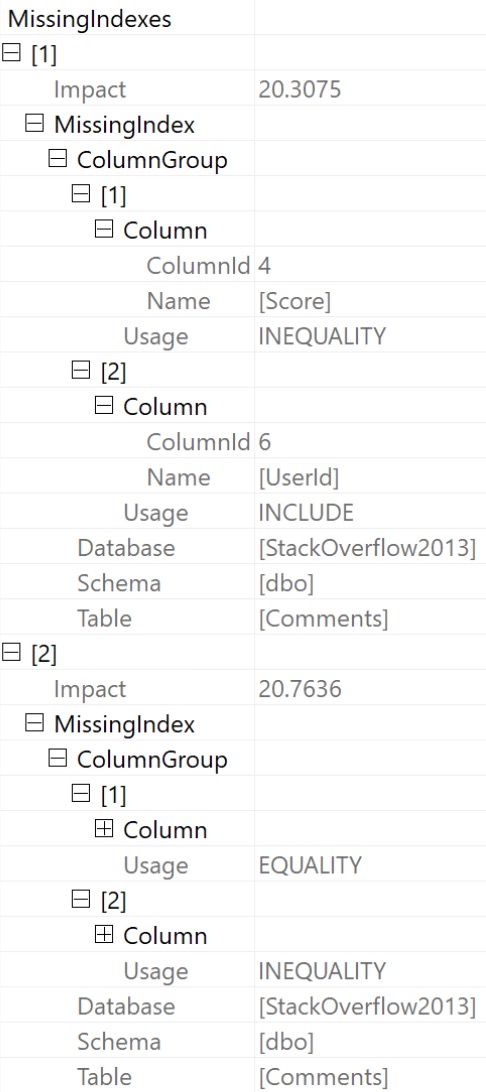
The optimizer has decided two indexes, on the same table, would really help us out. There are two very clunky ways to see them both.
You can always see the first one in green text at the top of your query plan, when a missing index request exists.
If you prefer something human readable, this is what they would translate to, with a little bit of hot sauce courtesy of yours truly.
CREATE INDEX
    c
ON dbo.Comments
    (Score)
INCLUDE
    (UserId)
WITH
    (MAXDOP = 8, SORT_IN_TEMPDB = ON, DATA_COMPRESSION = PAGE);

CREATE INDEX
    c2
ON dbo.Comments
    (UserId, Score)
WITH
    (MAXDOP = 8, SORT_IN_TEMPDB = ON, DATA_COMPRESSION = PAGE);
Big Reveal
With all that in mind, let’s look at the query plan before adding the indexes. We’re going to skip ahead a little bit in the bullet points above, to the last two:
Look at operator times in the execution plan
Ask yourself if the index would benefit the slowest parts
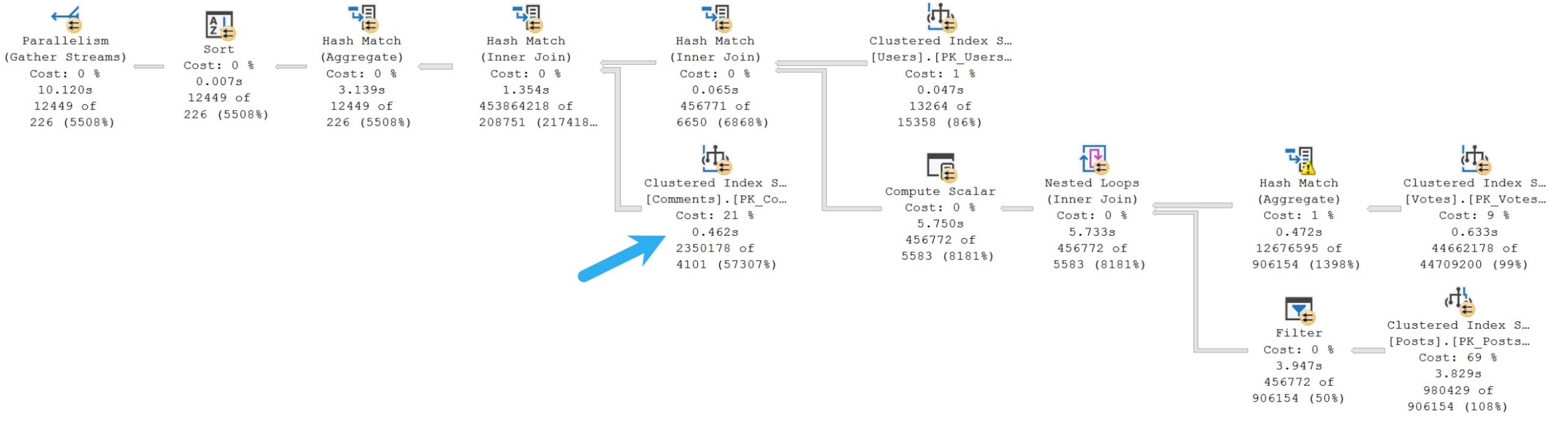
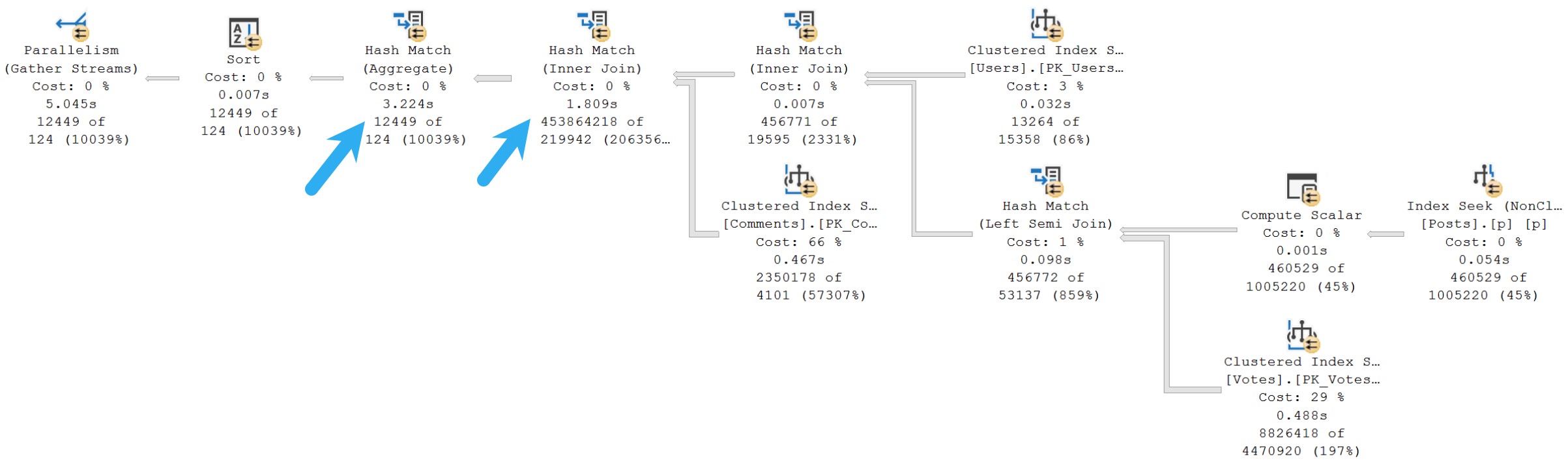
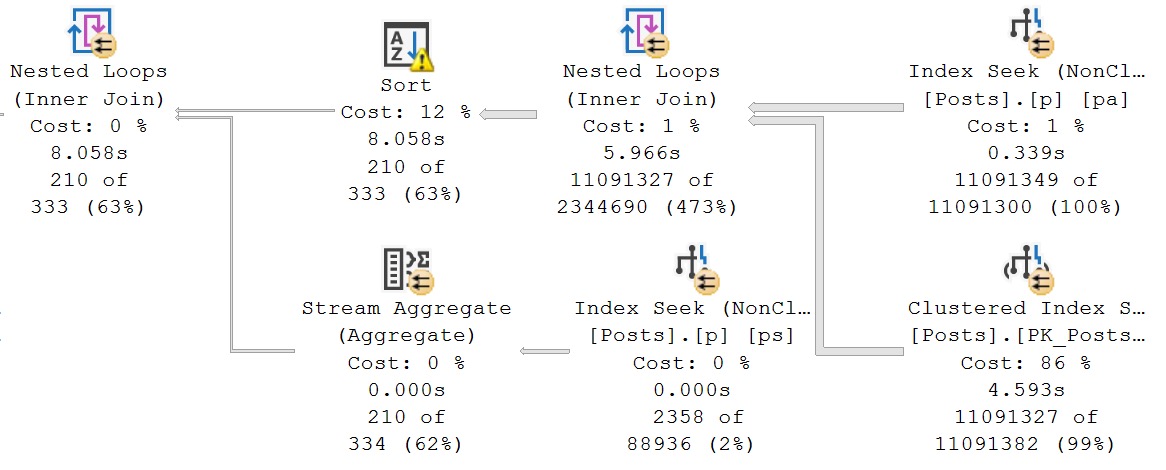
Here’s the plan, which takes ~10 seconds in total. The arrow is pointing at where the optimizer thinks a new index will help the most.
wasted effort
Since the operators in this plan are mostly in Batch Mode, every operator is showing CPU time just for itself.
That entire portion of the plan is responsible for about half of the total execution time, but there’s no index recommendation there.
And look, I get it, missing index requests happen prior to query execution, while index matching is happening. The optimizer has no idea what might actually take a long time.
But if we’re looking at the only pre-execution metrics the optimizer has, you’d think the estimated costs alone would push it to ask for an index on the Posts table.
Perhaps missing index requests should be selected after query execution. After all, that’s when the engine knows how long everything actually took.
Generous Soul
Okay, so those two indexes on the Comments table up there? I added both of them.
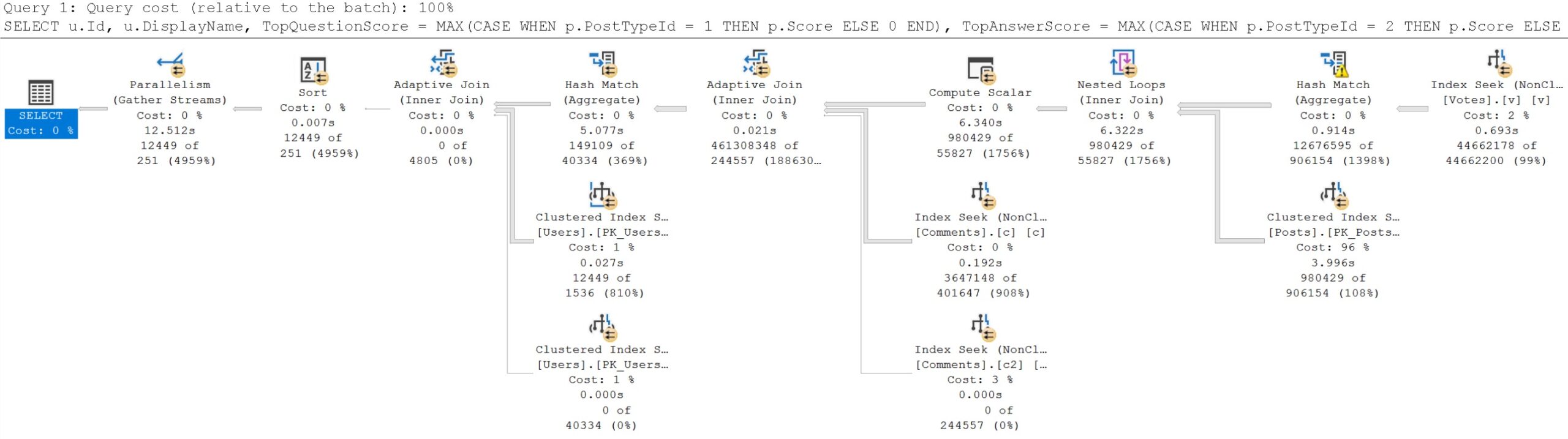
The query plan changes, but it doesn’t get any faster.
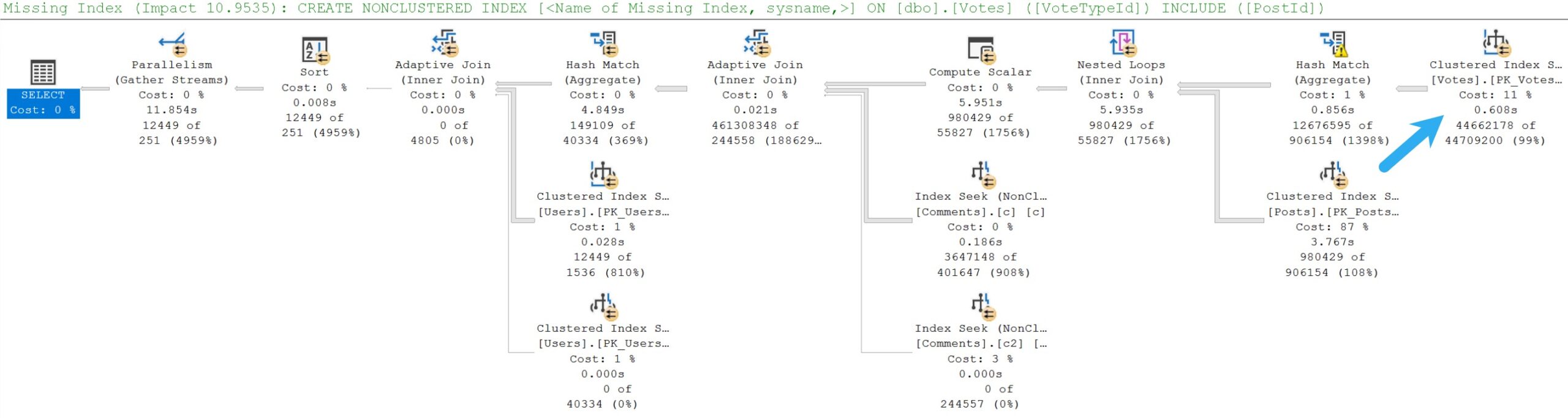
Once again, a missing index request is registered, but only one this time.
On the Votes table.
Not the Posts table.
CREATE INDEX
    v
ON dbo.Votes
    (VoteTypeId)
INCLUDE
    (PostId)
WITH
    (MAXDOP = 8, SORT_IN_TEMPDB = ON, DATA_COMPRESSION = PAGE);
Okay SQL Server, you got me. I’ll add it.
Impatience
With that index in place, what sort of totally awesome, fast query plan do we get?
we don’t.
Every time we add an index, this query gets one second slower. Part of the problem, of course, is that the optimizer really likes the idea of joining Posts to Votes first.
All of the query plans we’ve looked at have ad a similar pattern, where Vote is on the outer side of a Nested Loops join, and Posts is on the inner side, correlated on the pre-existing clustered primary key on Posts.
But Posts has a much more important join to the Users table. If we were to make that more efficient, we could perhaps change the optimizer’s mind about join ordering.
And there’s no missing index request to tell us that. We have to use our damned eyes.
Maybe something like this.
CREATE INDEX
    p
ON dbo.Posts
    (Score, OwnerUserId)
INCLUDE
    (PostTypeId)
WITH
    (MAXDOP = 8, SORT_IN_TEMPDB = ON, DATA_COMPRESSION = PAGE);
Let’s give that a shot.
“Self-Tuning Database”
When vendors tell you about their self-tuning database systems, they’re lying to you.
Maybe Oracle isn’t. I don’t know.
But I’m so confident in this new index that I’m going to get rid of all the indexes that SQL Server has suggested so far.
They were bad. They made our query slower, and I don’t want them interfering with my awesome index.
for a dollar
Now the query is twice as fast, at 5 seconds (down from the original 10 seconds). The two operators that take up the majority of the query execution time now are the Hashes; Inner Join and Aggregate.
They don’t spill, but they are likely ill-prepared for the number of rows that they have to deal with. One may infer that from the estimated vs. actual rows that each one sees.
SQL Server 2014 now uses one shared hash table instead of per-thread copy. This provides the benefit of significantly lowering the amount of memory required to persist the hash table but, as you can imagine, the multiple threads depending on that single copy of the hash table must synchronize with each other before, for example, deallocating the hash table. To do so, those threads wait on the HTDELETE (Hash Table DELETE) wait type.
I tried many different indexing schemes and combinations trying to get the terrible underestimate from the Comments table to not cause this, but nothing quite seemed to do it.
In cases where you run into this, you may need to use a temp table to partially pre-aggregate results, and then join to the troublesome table(s) using that data instead.
Thanks for reading!
Going Further
If this is the kind of SQL Server stuff you love learning about, you’ll love my training. Blog readers get 25% off the Everything Bundle — over 100 hours of performance tuning content. Need hands-on help? I offer consulting engagements from targeted investigations to ongoing retainers. Want a quick sanity check before committing to a full engagement? Schedule a call — no commitment required.
Probably the most fascinating thing about Eager Index Spools to me is how often the optimizer will insert them into execution plans, often to a query’s detriment.
In a sane world, a non-loop join plan would be chosen, a missing index request would be registered that matches whatever would have been spooled into an index, and we’d all have an easier time.
While I understand that all of the optimizer stuff around spools in general was written before storage hardware wasn’t crap, and 32bit software couldn’t see more than a few gigs of memory, I do find it odd that so little revision and correction has been applied.
Of course, there are use cases for everything. I was involved in a data warehouse tuning project where rewriting a query to corner the optimizer into using a nested loops join was necessary to build an Eager Index Spool. Maintaining a nonclustered index on the staging table made data loads horrible, but letting SQL Server build one at query runtime was a massive improvement over other options. All that had to be done was to rewrite a simple inner join to remove any direct equality predicates.
While the below queries don’t even come mildly close to reproducing the performance improvement I’m talking about above, it should give you some idea of how it was done.
/*How it started*/
SELECT
    p.Id,
    UpMod =
        SUM(CASE WHEN v.VoteTypeId = 2 THEN 1 ELSE 0 END),
    DownMod =
        SUM(CASE WHEN v.VoteTypeId = 3 THEN 1 ELSE 0 END),
    PostScore =
        SUM(p.Score)
FROM dbo.Posts AS p
JOIN dbo.Votes AS v
  ON v.PostId = p.Id
WHERE p.Score > 1000
GROUP BY
    p.Id;

/*How it's going*/
SELECT
    p.Id,
    UpMod =
        SUM(CASE WHEN v.VoteTypeId = 2 THEN 1 ELSE 0 END),
    DownMod =
        SUM(CASE WHEN v.VoteTypeId = 3 THEN 1 ELSE 0 END),
    PostScore =
        SUM(p.Score)
FROM dbo.Posts AS p
JOIN dbo.Votes AS v
  ON  v.PostId >= p.Id
  AND v.PostId <= p.Id
WHERE p.Score > 1000
GROUP BY
    p.Id;
With no equality predicate in the join clause of the second query, only a nested loops join is available. But again, this is the type of thing that you should really have to push the optimizer to do.
spool me once
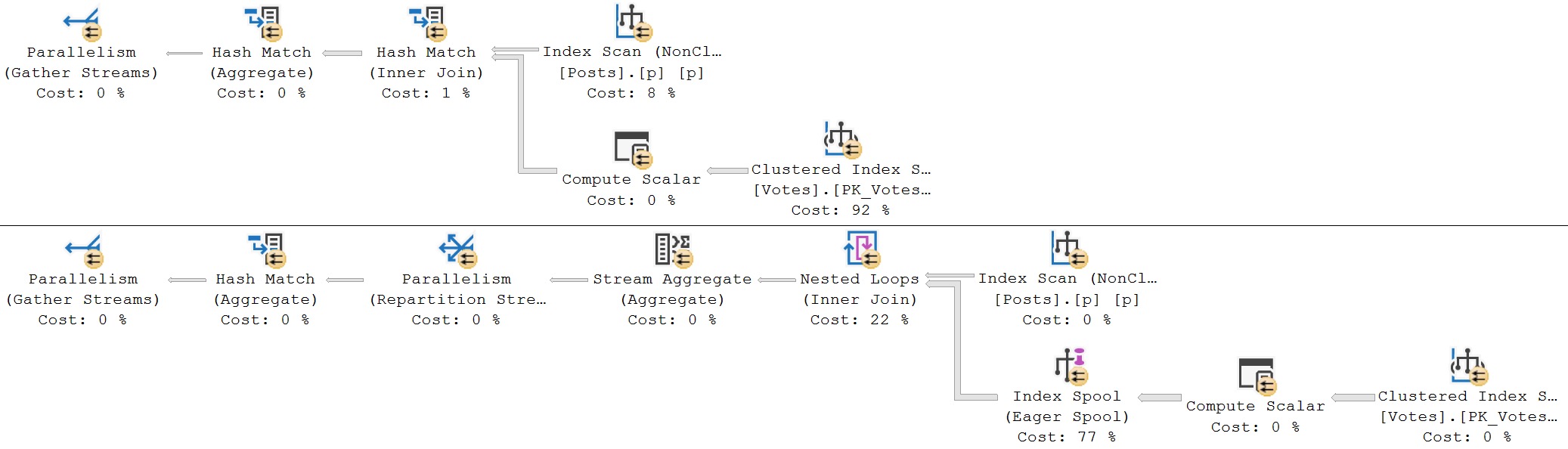
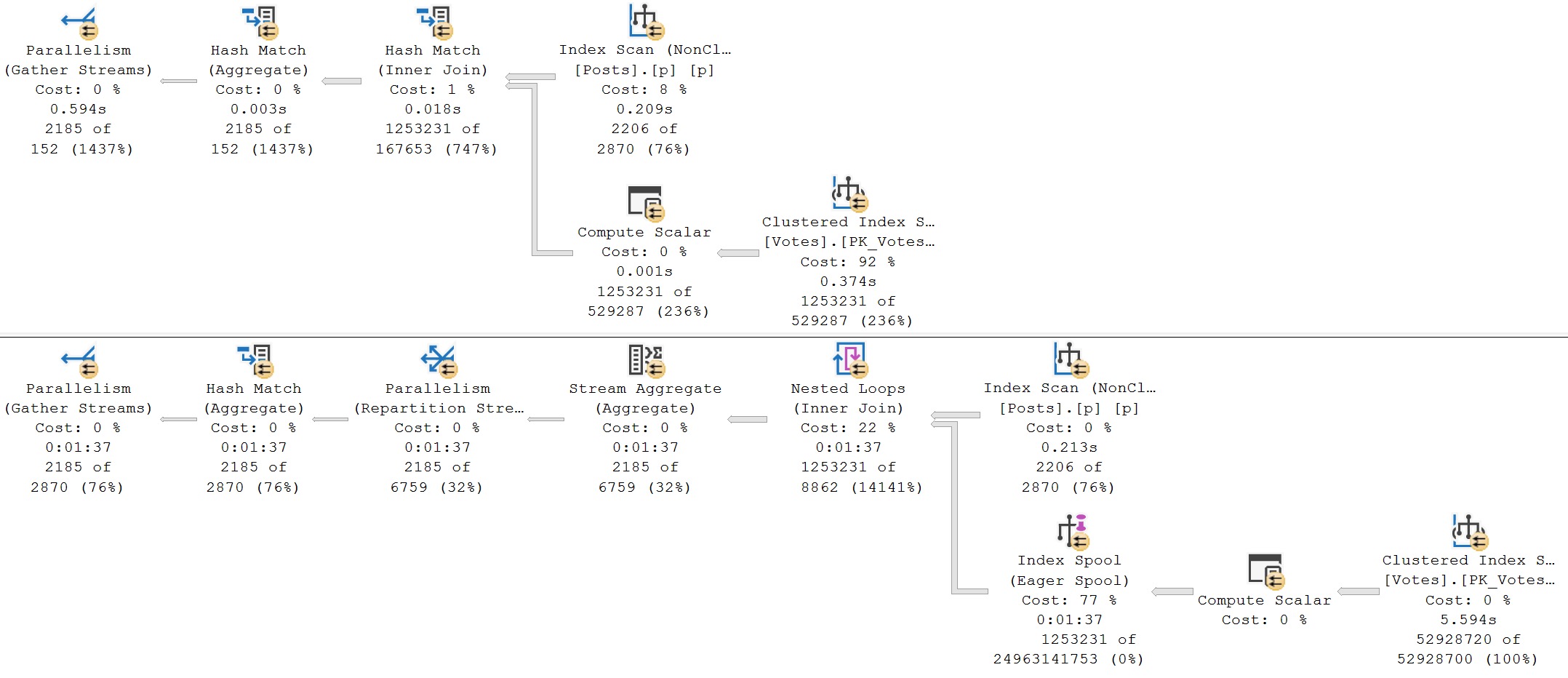
Of course, for the above queries, the second plan is a disaster, like most Eager Index Spool plans tend to be. The non-spool query with the hash join finishes in about 600ms, and the Eager Index Spool plan takes a full 1 minute and 37 seconds, with all of the time spent building the spool.
spool me twice
So, like I’ve been saying, one should really have to go out of their way to have this type of plan chosen.
Matter Worse
Compounding the issue is that the optimizer will sometimes choose Eager Index Spool plans when they are entirely unnecessary, and indexes exist to fully support query requirements.
The below join doesn’t actually work, because it’s not how the tables are related, but it’s a good example of that I mean.
SELECT
    u.Id,
    u.DisplayName,
    p.*
INTO #p1
FROM dbo.Users AS u
OUTER APPLY
(
    SELECT
        Score = SUM(p.Score),
        AnswerCount = SUM(p.AnswerCount)
    FROM dbo.Posts AS p
    WHERE p.Id = u.Id
) AS p;
The Id column in both the Users table and Posts table is the clustered primary key. There’s no sensible reason for an index to be created at runtime, here.
Of course, the Posts table relates to the Users table via a column called OwnerUserId, but whatever.
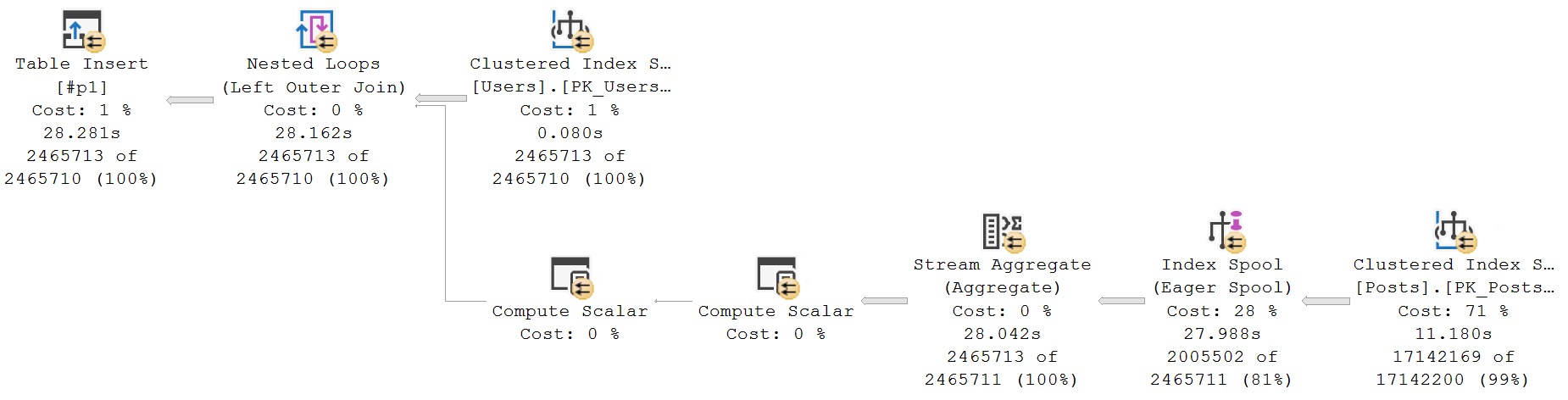
The point is the resulting query plan.
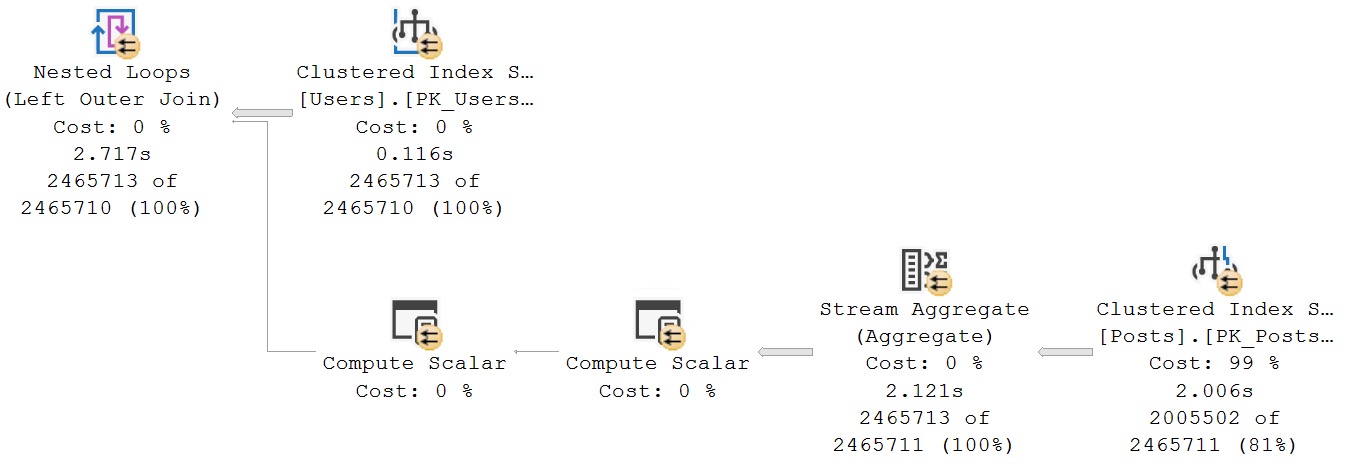
crappy
If we tell the optimizer that’s it’s being a dunce, we get a better, much faster, Eager Index Spool-free query plan.
SELECT
    u.Id,
    u.DisplayName,
    p.*
INTO #p2
FROM dbo.Users AS u
OUTER APPLY
(
    SELECT
        Score = SUM(p.Score),
        AnswerCount = SUM(p.AnswerCount)
    FROM dbo.Posts AS p WITH (FORCESEEK) /*I am different*/
    WHERE p.Id = u.Id
) AS p;
Sometimes this is the only way to solve spool problems.
muscular
Option One: Adding An Index
In most cases, Eager Index Spools are just really irritating missing index requests.
Here’s an example of one. The query itself touches the Posts table three times. Once to find questions, a second time to find answers related to those questions, and a third time to make sure it’s the highest scoring question for the answer.
SELECT TOP (100)
    QuestionOwner =
        (
            SELECT
                u.DisplayName
            FROM dbo.Users AS u
            WHERE pq.OwnerUserId = u.Id
        ),
    QuestionScore =
        pq.Score,
    QuestionTitle =
        pq.Title,
    AnswerOwner =
        (
            SELECT
                u.DisplayName
            FROM dbo.Users AS u
            WHERE pa.OwnerUserId = u.Id
        ),
    AnswerScore =
        pa.Score
FROM dbo.Posts AS pq
JOIN dbo.Posts AS pa
  ON pq.Id = pa.ParentId
WHERE pq.PostTypeId = 1
AND   pa.PostTypeId = 2
AND   pa.Score >
(
    SELECT
        MAX(ps.Score)
    FROM dbo.Posts AS ps
    WHERE ps.ParentId = pa.ParentId
    AND   ps.Id <> pa.Id
)
ORDER BY
    pa.Score DESC,
    pq.Score DESC;
Are there many different ways to write this query? Yes. Would they result in different query plans? Perhaps, perhaps not.
Right now, this query has this index available to it, along with the clustered primary key on Id.
CREATE INDEX
    p
ON dbo.Posts
    (PostTypeId, ParentId, OwnerUserId)
INCLUDE
    (Score)
WITH
    (MAXDOP = 8, SORT_IN_TEMPDB = ON, DATA_COMPRESSION = PAGE);
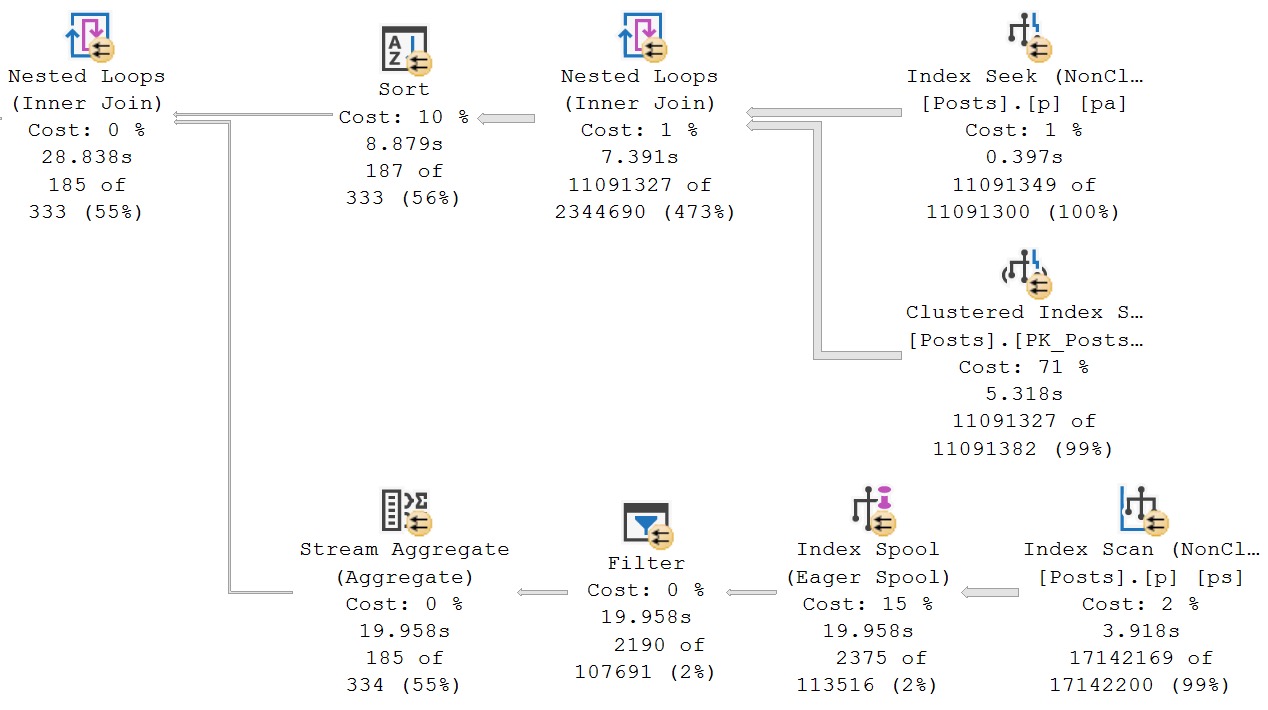
Because we don’t have an index that leads with ParentId, or that allows us to easily seek to ParentId in the MAX subquery (more on that later, though), the optimizer decides to build one for us.
el yuck
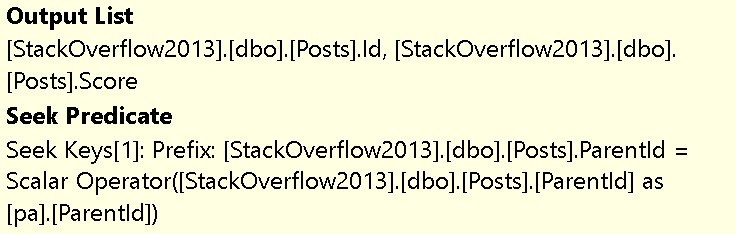
We can see what index the spool is building by looking at the tool tip. In general, you can interpret the seek predicate as what should be the key column(s), and what should be included by what’s in the output list.
There is sometimes some overlap here, but that’s okay. Just ignore any output columns that are already in the seek predicate. And of course, we can generally ignore any clustered index key column(s), since the nonclustered index will inherit those anyway.
get it for less
Adding this index will get rid of the Eager Index Spool:
CREATE INDEX
    p2
ON dbo.Posts
    (ParentId, Score)
WITH
    (MAXDOP = 8, SORT_IN_TEMPDB = ON, DATA_COMPRESSION = PAGE);
In this case, I’ve chosen to add the Score column to they key of the index to allow for an ordered aggregation (SUM function) to take place without a Sort operator.
spool’s out for summer
Option Two: Over Communicating
Let’s take a step back. We currently have this index, that leads with PostTypeId.
CREATE INDEX
    p
ON dbo.Posts
    (PostTypeId, ParentId, OwnerUserId)
INCLUDE
    (Score)
WITH
    (MAXDOP = 8, SORT_IN_TEMPDB = ON, DATA_COMPRESSION = PAGE);
The section of the query that generates the Eager Index Spool is this one:
(
    SELECT
        MAX(ps.Score)
    FROM dbo.Posts AS ps
    WHERE ps.ParentId = pa.ParentId
    AND   ps.Id <> pa.Id
)
What we know, that the optimizer doesn’t know, is that only rows with a PostTypeId of 2 are answers. We don’t need to compare answers to any other kind of post, because we don’t care about them here.
If we change the subquery to limit comparing answers to other answers, it would also allow us to take care of the existing index by locating the right type of Post, and give seekable access to the ParentId column.
(
    SELECT
        MAX(ps.Score)
    FROM dbo.Posts AS ps
    WHERE ps.ParentId = pa.ParentId
    AND   ps.PostTypeId = 2
    AND   ps.Id <> pa.Id
)
That changes the full query to this:
SELECT TOP (100)
    QuestionOwner =
        (
            SELECT
                u.DisplayName
            FROM dbo.Users AS u
            WHERE pq.OwnerUserId = u.Id
        ),
    QuestionScore =
        pq.Score,
    QuestionTitle =
        pq.Title,
    AnswerOwner =
        (
            SELECT
                u.DisplayName
            FROM dbo.Users AS u
            WHERE pa.OwnerUserId = u.Id
        ),
    AnswerScore =
        pa.Score
FROM dbo.Posts AS pq
JOIN dbo.Posts AS pa
  ON pq.Id = pa.ParentId
WHERE pq.PostTypeId = 1
AND   pa.PostTypeId = 2
AND   pa.Score >
(
    SELECT
        MAX(ps.Score)
    FROM dbo.Posts AS ps
    WHERE ps.ParentId = pa.ParentId
    AND   ps.PostTypeId = 2 /* I am new and different and you should pay attention to me */
    AND   ps.Id <> pa.Id
)
ORDER BY
    pa.Score DESC,
    pq.Score DESC;
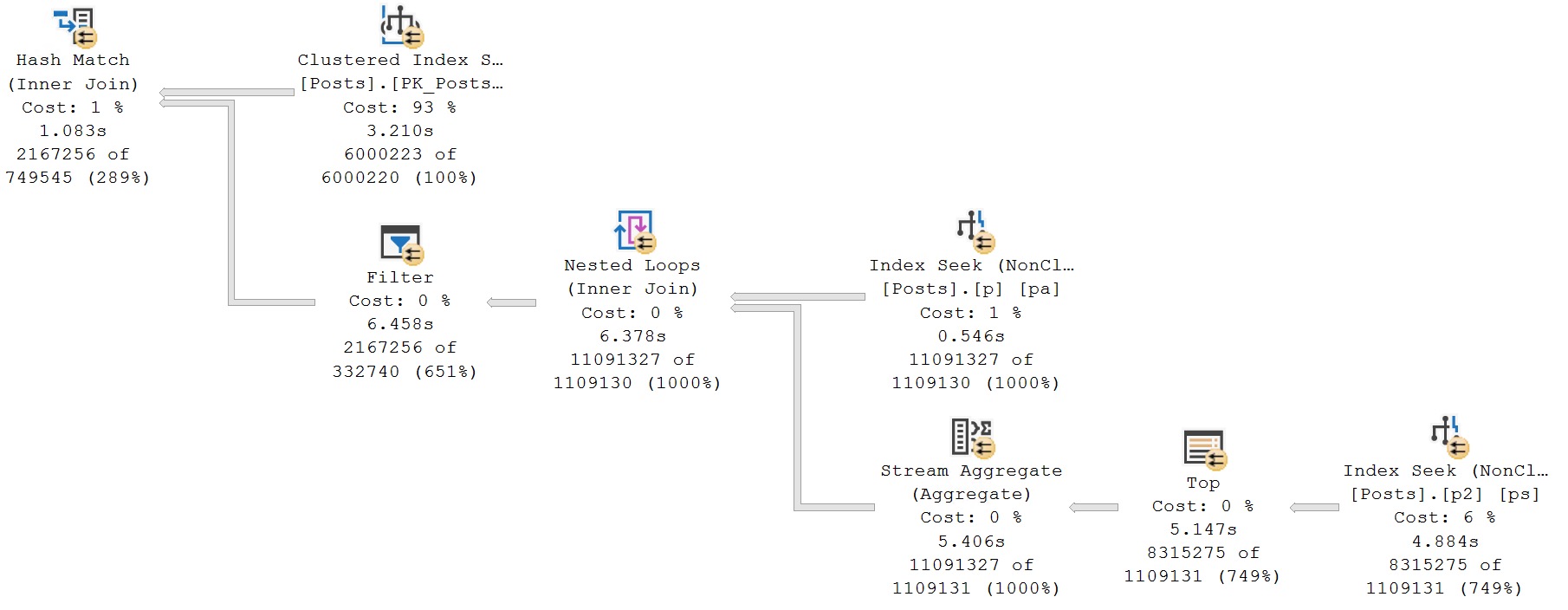
Which changes the section of the query plan that we’re concerned with to this:
understanding
Sometimes the optimizer just needs a little but more information from you.
Thanks for reading!
Going Further
If this is the kind of SQL Server stuff you love learning about, you’ll love my training. Blog readers get 25% off the Everything Bundle — over 100 hours of performance tuning content. Need hands-on help? I offer consulting engagements from targeted investigations to ongoing retainers. Want a quick sanity check before committing to a full engagement? Schedule a call — no commitment required.
A Little More About Isolation Levels In SQL Server
In this video, I talk about some of the misguided expectations that Read Committed has associated with it, and query patterns to watch out for under Read Committed Snapshot Isolation.
If you’d like to see my full day performance tuning session, here are upcoming dates:
In this video, I dive into the often-overlooked world of SQL Server isolation levels, particularly focusing on read committed snapshot isolation (RCSI) and its alternatives. With a humorous twist, I highlight common misconceptions about isolation levels and demonstrate how they can lead to issues like race conditions under different scenarios. By walking through practical examples and real-world queries, I aim to clarify the nuances of these settings and help you make informed decisions for your database environments. Whether you’re dealing with complex query patterns or just looking to avoid potential headaches, this video offers valuable insights into optimizing SQL Server performance without overcomplicating your setup.
Full Transcript
Erik Darling here with Darling Data, a surrogate style of Beardgut Magazine. Long, beautiful relationship. Today I want to talk about isolation levels a little bit because something that keeps coming up, and the most annoying things about isolation levels keep coming up, things that I really loathe having to repeat or try to do. tell people about over and over again. And we’re gonna do that today. Because Friday, there’s nothing like a good Friday talk about isolation levels. So first, no isolation level is perfect for everything all the time. I wish that one was because then we could all just use that and we could stop having these conversations. But usually, SQL Server, where we’re going to go, we’re going to go to the next level of the world. So we’re going to go to the next level of the world. The things that I have to talk people out of is one using no lock hints, because that’s where you get bad data potentially under concurrency. And the other one is the switch between read committed, the default pessimistic isolation level in SQL Server, and read committed snapshot isolation, which is an optimistic isolation level in SQL Server. The reason why that’s the usual choice is because most people is because most people have to like, like, like, don’t want to like, like, like, you can use snapshot isolation, but then every query would have to ask for snapshot isolation in some way, either like, like, like, when it like, if it’s an application, when it connects to SQL Server, if it’s a stored procedure, you have to add it to the code, stuff like that. And that just, you know, unless you have a lot of control, unless you have a lot of time and patience, to figure out which queries you want to use an optimistic isolation level, then that’s kind of a tougher one to talk folks into. That also assumes that you have control over those things, right? Like some, if you have a third party application, you might not, your only hope might be to use read committed snapshot isolation, which kicks in for every read query that comes in and hits the database. So that’s the most common choice. The thing is, every time I talk about switching over, where someone will go to some due diligence, and they’ll read some blog posts where all they can talk, they think that there are bugs in SQL Server with read committed race conditions and things like that. And that’s really not the case. The case is that there are certain query patterns you have to watch out for where you might hit race conditions.
Now, I’m not saying that read committed snapshot isolation is perfect, because again, it’s not. But for servers that I look at, where there is a lot of bad blocking between readers and writers, and a lot of deadlocking between readers and writers, read committed snapshot isolation is perhaps the safest way to solve all of those problems in one go. You’ll still have write queries block one another, but the read queries fighting with write queries and write queries fighting with read queries goes away completely. So it is a great isolation level for most SQL Server workloads. And most mature database platforms out of the box use some form of multi version multi version concurrency control by default, right? Even Azure SQL DB uses it by default, because Microsoft probably like, like, hey, we’re going to release this product, we’re going to manage it. We don’t want people complaining about blocking all the time, because then they have to go solve blocking problems. And that’s not fun, because that’s query tuning, index tuning, stuff like that. So read committed, the pessimistic isolation level has a lot of problems that one might consider to be race conditions, if one were to be really concerned about application and query concurrency. So here’s the first example, and I’m going to figure out which way I have to turn. There we go. That should get us in the frame.
Or get get all the text in the frame rather. So if you have a query that just finished reading what used to be row C, but it’s now a ghost record because it was deleted. And your query just finished reading it and your query just finished reading it and has now moved on to row D, that row C will still show up in your query results because your query already grabbed it. It doesn’t disappear from the results. All right. And these slides are all from my foundations of SQL Server performance tuning class. I delivered it a pass. I’m delivering it a couple more times. Data tune in Nashville and up in Boston in May, as part for the New England SQL Server user group. If you’re in either of those areas, it would be a pleasure to see you.
The second reason why read committed isn’t really all that promising of an isolation level is let’s just pretend that again, we just finished reading row C, but then it gets updated. And now we have two row H’s. Our query will show one letter C and two H’s in the results. Right? That’s not great either. Right? That would seem like a race condition. That would seem like a bug. But that’s the way read committed works. Read committed the non-snapshot pessimistic isolation level. It takes very brief read locks on things, but data can change on either side of those locks whenever it wants. Right? Because those locks don’t hold on for very long. There’s no lock escalation with read queries, at least without hints or whatever. But all of this stuff is open to change as soon as those locks get released.
Another reason why it’s not great is because similar situation. Let’s say we’re reading row E. Row F gets updated to be another value C. So now we have two C’s over here. But all our query will see is one C and no F. Right? And those are, again, something that could very much be interpreted as a race condition in your queries if you are really concerned about concurrency. Now, this is stuff that read committed snapshot isolation fixes. But we have to talk about some other stuff first.
The first thing we have to talk about are some query patterns in under read committed the pessimistic isolation level that can also cause things that look like race conditions, but are really just, again, the lack of promise that read committed has as far as what data is going to return. So if you do something like this, right, you, you know, in your store procedure and your query, whatever it is, if you set some variable value equal to something based on a select, locks on that select, unless you add locking hints into transaction, don’t hold on once that query is done.
Actually, even like once it finds that row, like data, data in the table can change all over the place. So if you were to take this, like whatever this gets set to and use it to like, you know, insert into another row, use it to like find data that you’re going to update, that data could be completely irrelevant by the time your query gets to it.
Again, under concurrency, if you’re just running it in isolation, everything’s going to look great every time. But under concurrency, the data in there could change really quickly. Another pattern that could have similar effects as a race condition, big air quotes on that, is if you dump data into a temp table and then you use that temp table to go update things, because whatever’s in that temp table is maybe invalid by the time you go to do that update.
So these are things that a lot of folks don’t think about when it comes to matters of concurrency. And this is a lot of the lack of understanding about the promises that Reid committed the pessimistic isolation level makes are way overblown. A lot of people think that Reid committed the pessimistic isolation level behaves like snapshot isolation, like where your query takes a picture of the data and it’s perfect, or like serializable where nothing can change while your query’s reading the data, right?
Because everyone thinks that what it’s returning is this magnificent piece of data, but all it really promises is blocking and deadlocking with modification queries. And all it promises is that the data that it read was committed at the time that the read happened.
So remember, just like in the slides, modifications can happen all around it. The only thing that’s guaranteed is if you hit a lock, your query will wait for that lock to release before reading that. That’s the only real guarantee that Reid committed the pessimistic isolation level makes.
Now, the next thing I got to talk about is query patterns that might exhibit what seems like a race condition under an optimistic isolation level. But a lot of the times when you hit this, these are also things where there is some potential for these as well under a pessimistic isolation level. They’re just a little bit more rare.
They’re actually pretty rare under even an optimistic isolation level because you have to write really dumb queries for stuff like this to happen. So I’m in my database crap. At least I hope I am.
Home is where the crap is. And I’ve got this table called dinner plans. And I’m going to populate that table with, well, when I wrote this demo originally, there were a bunch of people who I thought I was going to have dinner with at pass.
It turned out the only person I had dinner with was Kendra. But that was nice anyway. It was a great, great, actually, it was like a few dinners with Kendra. She’s like the only person who would hang out with me.
Whatever. Not bad company, though. And so right now in that table, our dinner plans table, this is what things look like. You got a list of people.
And for some reason, seat number one is free. But the other five seats in the table are all taken. So we’re going to make sure that RCSI is off for our crap database. And we’re going to look at, I have these queries set up in the other two windows over here.
But we’re going to look at just real quick what the query does. So this is the kind of sort of dumb query pattern that would exhibit a race condition under RCSI. And it might not necessarily hit under a pessimistic isolation level, but could still happen if things got weird enough.
So what we’re doing is updating a table alias, our table dinner plans, which is aliased as DP. If you are not a very mature person, you want to make jokes, go ahead. But it’s dinner plans, nothing more.
So we’re updating our dinner plans table. And for some reason, rather than just doing a regular update, we’re doing this exists check through the base table to look for an ID where the seat is free. So this is where things get interesting because we have two references to the table.
We have one for the update and one for the select. Only the reference for the update will ever have the type of exclusive locks on it that will prevent a read query under a pessimistic isolation level from executing and getting data. The reference in the select portion, that can read whatever.
So if you have a no lock hint in there, you’re screwed. If you, you know, if in that inner query, you know, any of the stuff happens that we talked about, that like where data can change around where the reads under the pessimistic read committed isolation level happens, you could still hit what feels like a race condition. All right.
So let’s go look at what happens when we do this. So I’m going to say begin tran. I’m going to run that. And we’ve output this. And now I’m going to come over here and I’m going to run this.
And this is going to get blocked. Right. This query is now blocked because we have this update in a transaction, updating dinner plans. And this query wants to update dinner plans and read from dinner plans.
We come back over to this first window and we commit this. This query will come back and return no results. All right.
Because that other query blocked it, updated that row to find a free seat. This query did not find a free seat when it went to run. So let’s commit this now so that we don’t have anything weird going on.
Let’s make sure this is fully committed. Now let’s change the crap database to turn read committed snapshot isolation on. All right.
This takes a second to run. That’s okay. It’s worth it. Okay. So now that’s turned on. Good. If we repeat that same demo, right, we’re going to run this. Oh, you know what?
I didn’t reset things. Let me admit that. Totally forgot to reset the table between runs so that that didn’t fail. And the joys of remembering stuff.
All right. So now let’s run that. And see, this one finds this. All right. And now let’s run this. Now this is still going to get blocked because that update is still happening.
On the other window, right? This transaction is still not committed. But because of the way an optimistic isolation level works, when this query did its update, the last known good version of the row got sent to either if you’re not using accelerated database recovery, it gets sent to tempdb.
If you’re using accelerated database recovery, it gets sent to the version store, local to the user database you’re in. And now, because this query is going to read a versioned row that this query is updating, when we, right, this one found this seat, right, and we commit this, now we come over here, and what did we find?
We found a seat. We know we found a seat. We found a seat. Because this thing got updated to the reverse Eric down here. All right.
So now if we commit this, we’ll have a little bit of an awkward situation. Because forward Eric will think that he got a seat at the dinner table, but backwards Eric will have the golden ticket and say, I get to sit there.
You don’t get to sit there. And then forward Eric and reverse Eric will, like, matter and anti-matter fight. And, I don’t know, some sort of universe death probably will happen. So these are the kind of query patterns that can cause things that, again, look and feel like race conditions under RCSI that you wouldn’t necessarily hit under, read committed, the pessimistic isolation level.
But, again, the promises that read committed, the pessimistic isolation level make are really flimsy. So, under most circumstances, for most query workloads where people aren’t writing completely idiotic queries, or if you have no-lock hints everywhere anyway, you’re probably better off using an optimistic isolation level because there’s far less, like, room for error than there is when you’re using no-lock hints.
And there’s far less pain than if your read queries are blocking and deadlocking with your write queries all the time. Right?
So, like, this is most queries function better than any database using an optimistic isolation level. If you have queries that don’t, if you have queries that need to read the most up-to-date version of data, just keep in mind that those queries are going to be subject to blocking and deadlocking.
If you want to enable read committed snapshot isolation and you want to have certain queries, not use row versioning, there’s a perfectly good read committed lock hint you can add to those queries or other locking hints that would make sense for those queries.
But just like a direct update like this wouldn’t have the problems that we were looking at. The problem really is the subquery doing the select reads a version of the row that it looks like it wasn’t supposed to because that should have been taken.
But, you know, again, it takes pretty high concurrency for you to find these problems. And it takes pretty stupid looking queries for you to find these problems. Right?
So, in this case, you know, that self-join, completely unnecessary. If you write modification queries that do things like that, you kind of deserve what you get. That’s not a smart way to write queries.
But there are times when you would have to write a query sort of like that, like a different query pattern. Like in this one, it’s particularly stupid because it’s just one table that we want to update and there’s no reason to do a subquery to touch another table.
But if there were like a different table where like we had to like update from like, you know, some reservation list or like a guest list or like, you know, like a list of reservations where you could possibly like go, you know, go to different restaurants or whatever.
Those are circumstances when having a subquery would be necessary. But I just want to remind everyone that like those subqueries under read committed could also read some weird data.
Like data could change before or after and because this table is the only one. It’s not going to have any sort of exclusive locks taken in there or around it. This wherever the select is.
So if you join tables together to do updates and there’s a no lock hint on like one of the on the table that’s not getting updated or you’re just using read committed the pessimistic isolation level.
You can still see weird stuff that’ll look and feel like race conditions under a pessimistic isolation level. Well, actually specifically under read committed the pessimistic isolation level. Serializable and repeatable read offer way more guarantees.
They also offer way more blocking. So you have that to look forward to. Anyway, this was a little bit longer than I expected. And like I said, it’s Friday and got some stuff I got to go do.
So I’m going to go do that. I’m going to get this started uploading as usual. I hope you enjoyed yourselves.
I hope you learned something. I hope that if you are not currently using an optimistic isolation level and you have a lot of problems with locking and blocking, you’ll consider using an optimistic isolation level. I hope that if you are slathering your queries with no lock hints, some bizarre cargo culting about saying that’s a best practice that you’ll consider using an optimistic isolation level and removing those.
If you enjoyed the video, pretty pleased give it a like. If you enjoy this sort of technical SQL Server content, feel free to subscribe to my channel. I’m always happy to have new folks coming in and learning stuff.
And I don’t know. Gosh, I think that’s it. I can’t think of a single other thing to say. Happy Friday. Hope everyone has a great weekend.
Thank you for watching and I’ll see you in the next video. Have a good one.
Going Further
If this is the kind of SQL Server stuff you love learning about, you’ll love my training. Blog readers get 25% off the Everything Bundle — over 100 hours of performance tuning content. Need hands-on help? I offer consulting engagements from targeted investigations to ongoing retainers. Want a quick sanity check before committing to a full engagement? Schedule a call — no commitment required.
Whether you want to be the next great query tuning wizard, or you just need to learn how to start solving tough business problems at work, you need a solid understanding of not only what makes things fast, but also what makes them slow.
I work with consulting clients worldwide fixing complex SQL Server performance problems. I want to teach you how to do the same thing using the same troubleshooting tools and techniques I do.
I’m going to crack open my bag of tricks and show you exactly how I find which queries to tune, indexes to add, and changes to make. In this day long session, you’re going to learn about hardware, query rewrites that work, effective index design patterns, and more.
Before you get to the cutting edge, you need to have a good foundation. I’m going to teach you how to find and fix performance problems with confidence.
If this is the kind of SQL Server stuff you love learning about, you’ll love my training. Blog readers get 25% off the Everything Bundle — over 100 hours of performance tuning content. Need hands-on help? I offer consulting engagements from targeted investigations to ongoing retainers. Want a quick sanity check before committing to a full engagement? Schedule a call — no commitment required.
Would you believe I still have to fix queries with a bunch of functions in joins and where clauses? Like every day? All day?
Where things get tough is when there’s some third party vendor app where code can’t be changed, but customers have become so fed up with performance that they’re willing to make other changes to help things along.
This isn’t a big fireworks demo. I could have spent a lot more time finding a worse scenario, and I’ve hinted it to exacerbate the issue a bit.
Sometimes my hardware is too good for bad demos, probably because it’s not in the cloud.
That whole “cloud” thing has some real problems.
Setup
Anyway, let’s say we have this index (because we do, I just created it).
CREATE INDEX
    p
ON dbo.Posts
    (CommunityOwnedDate, Score)
WITH
    (SORT_IN_TEMPDB = ON, DATA_COMPRESSION = PAGE);
GO
Let’s further presume that we have this stored procedure.
This stored procedure could have been a query.
CREATE OR ALTER PROCEDURE
    dbo.FixNonSargable
(
    @CommunityOwnedDate datetime,
    @Score integer
)
AS
BEGIN
    SET NOCOUNT, XACT_ABORT ON;

    SELECT
        p.*
    FROM dbo.Posts AS p
    WHERE COALESCE(p.CommunityOwnedDate, '17530101') >= @CommunityOwnedDate
    AND   p.Score >= @Score
    ORDER BY
        p.Id DESC
    OPTION
    (
        USE HINT('QUERY_OPTIMIZER_COMPATIBILITY_LEVEL_140'), /*No batch mode*/
        MAXDOP 1 /*No parallelism*/
    );
END;
GO
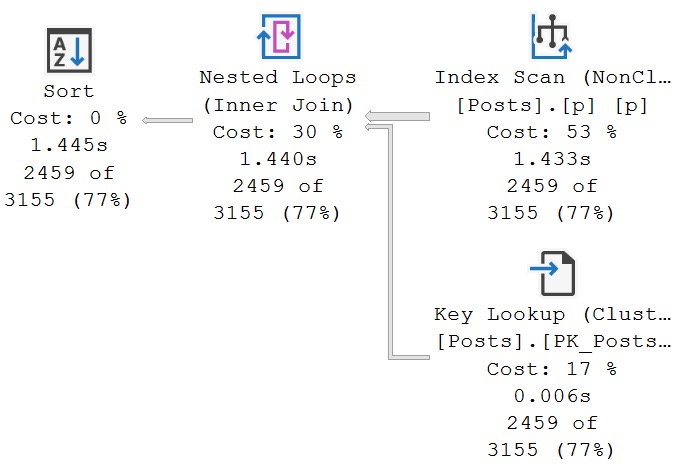
When executed with such great gusto, it’s a bit slow.
At ~1.4 seconds, we’re very upset with performance. Throw the whole thing in the trash. Install DuckDB.
Index Reversal
If we change the key column order of our index, so the column with a seekable predicate can go first, we can get faster query execution.
CREATE INDEX
    p
ON dbo.Posts
    (Score, CommunityOwnedDate)
WITH
    (SORT_IN_TEMPDB = ON, DATA_COMPRESSION = PAGE, DROP_EXISTING = ON);
GO
Now you don’t have to wait 6-never months for your vendor to fix their garbage code.
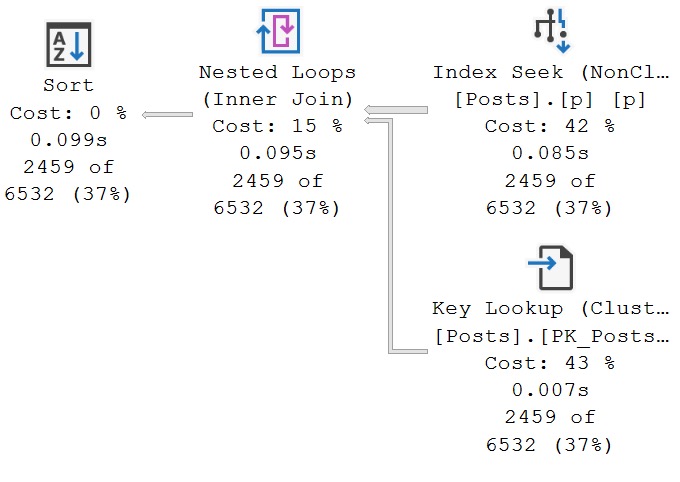
i could be happy
In this case, changing the order of key columns was a more beneficial arrangement for this particular query.
Results may vary. Not query results! I mean like, if you go do this in your database. On “your” hardware. In the “cloud”.
Thanks for reading!
Going Further
If this is the kind of SQL Server stuff you love learning about, you’ll love my training. Blog readers get 25% off the Everything Bundle — over 100 hours of performance tuning content. Need hands-on help? I offer consulting engagements from targeted investigations to ongoing retainers. Want a quick sanity check before committing to a full engagement? Schedule a call — no commitment required.
Creating Uncacheable Stored Procedures In SQL Server
Here’s the demo script from today’s video:
/*Create a table if you need to*/
CREATE TABLE
    dbo.DinnerPlans
(
    id bigint IDENTITY,
    name nvarchar(40) NOT NULL,
    seat_number tinyint NULL,
    is_free bit NOT NULL,
);
GO

/*First example, with an object that doesn't exist*/
CREATE OR ALTER PROCEDURE
    dbo.i_live
(
    @decider bit = NULL
)
AS
BEGIN
    SET NOCOUNT, XACT_ABORT ON;

    IF @decider = 'true'
    BEGIN
        SELECT
            dp.*
        FROM dbo.DinnerPlans AS dp;
    END;

    IF @decider = 'false'
    BEGIN
        SELECT
            whatever.*
        FROM dbo.AnObjectThatDoesntEvenPretendToExist AS whatever;

        --SELECT result = 'false!';
    END;

    IF @decider IS NULL
    BEGIN
        SELECT
            result =
                'please make a decision.'
    END;
END;
GO

/*Say goodbye!*/
DBCC FREEPROCCACHE;

/*This runs without an error*/
EXEC dbo.i_live
    @decider = 'false';

/*But there's no query plan!*/
SELECT
    object_name =
       OBJECT_NAME(deps.object_id, deps.database_id),
    deps.type_desc,
    deps.last_execution_time,
    deps.execution_count,
    dest.text,
    query_plan =
        TRY_CAST(detqp.query_plan AS xml)
FROM sys.dm_exec_procedure_stats AS deps
OUTER APPLY sys.dm_exec_sql_text(deps.plan_handle) AS dest
OUTER APPLY sys.dm_exec_text_query_plan(deps.plan_handle, 0, -1) AS detqp;
GO
Thanks for watching!
Video Summary
In this video, I delve into a fascinating and somewhat unconventional topic: creating uncachable stored procedures in SQL Server. The goal is to demonstrate how to craft a store procedure that will never cache any query plans, effectively leaving no trace of its execution in the plan cache. This can be particularly useful for consultants or developers who need to run potentially suspicious queries without leaving evidence behind. I walk through the process step-by-step, creating a simple stored procedure with conditional logic that references non-existent tables and null values, ensuring SQL Server cannot cache any plans for it. Along the way, we explore why this happens and how it relates to deferred compilation and sensitive operations like decrypting asymmetric keys. Whether you find value in this niche technique or simply enjoy learning about SQL Server’s inner workings, I hope you found this video informative and engaging.
Full Transcript
Erik Darling here with Darling Data. And I know what you’re thinking. It’s two days and two YouTube videos in a row. And I’ve decided that perhaps I’ll endeavor to record a YouTube video every day as long as I have something reasonably recordable today. So, this one, this one is on the very border of reasonably recordable. And I actually find it patently ridiculous. And there are parts of me that wish this didn’t, this wasn’t a demo. Now, let’s start with what it actually is. And the idea here is to create uncashable store procedures. And by uncashable, I mean no query plan will ever be cached for this store procedure.
Right? And now, who would this really appeal to? Aside from like, you know, consultants, people who make monitoring tools, things like that, who don’t want to leave any evidence at how bad the DMV queries and stuff that they have to run are. So, here we go. Alright. So, what we have is, so, I already created this table. We don’t have to worry about this. This is already done. If I try to execute this, I’ll already, I’ll get an error message saying, already there, dum-dum. And I’ll say, yeah, I knew that. Thank you for the emotional support.
So, what we’re going to do is create a store procedure. And I’m going to just make sure that I’ve done things correctly because if I don’t do things correctly, then nothing works, right? Unlike government, I have to do things right for anything to happen. So, here we’re going to create a store procedure. And this is relatively simple, right? Make sure that the problem is, rather, the point is as simple and easily surmised as possible for those out there with short attention span.
And this store procedure right now just has one parameter called decider. It’s a bit. And we have three potential things that could happen when this store procedure runs. If the bit is true, then we’re going to select everything from this dinner plans table.
If the bit is false, then we’re going to select from this table that does not exist. Not anywhere in my database or any database ever. It does not exist anywhere. If I try to run this query on its own, I’m going to get an error that says invalid object name, blah, blah, blah, blah, blah.
You see what I mean? And then if decider is null, we’ll say, please, please make a decision. Kindly support yourselves making a decision.
All right. So, we have that. I’m just going to make sure that I actually hit, I actually executed that the way it should be. And what I’m going to show you is when I clear up the plan cache and I run this for decider equals true, we get results back from my dinner plans table.
But then when I go look at the plan cache, well, there’s a bunch of other stuff in there. I should do that from clear up the plan cache. Now run this. Now run this.
And hopefully we don’t catch anything else stupid in there. But this is our store procedure right here that we just executed. And it has no query plan.
All right. No query plan in there. I can’t click on that. It’s not just a null query plan. It’s no query plan for that. Now let’s contrast that.
There is no comparison. We don’t contrast something like that. And let’s just flip this. So let’s say result equals false. All right. Let’s unquote that.
Or rather let’s quote that out, not unquote. Whatever. It’s going to be that kind of day. So let’s recreate this now with just this select result equals false in there. All right.
But we’re going to clear the plan cache and then run this. And we’re still going to get the same results back. But now when we go look in the plan cache, we have an execution plan where it says we selected from the dinner plans table. All right.
Now I’m going to show you two more things before I talk about why this thing was uncacheable in the first place. So let’s change it back to how it originally was. All right.
And let’s do this. And now let’s try two things. The first thing that I’m going to try to do is get an estimated execution plan for this store procedure. I’m going to hit control and L.
And what happens? When SQL Server tries to estimate a plan for this, you get an error saying there’s an invalid object name. When SQL Server tried to build an estimated plan for this, it has to go and explore every single branch.
It has to figure out what can we estimate might happen here. But since that table doesn’t exist, you get an error. It’s crazy.
The other thing, I mean, it’s not crazy. The table doesn’t exist. How could you possibly come up with an execution plan for a table that doesn’t exist? The other thing is if we change this to false and we actually try to execute it, we’ll get the same error. All right.
So something is clearly very funny about the plan caching behavior. Ooh, that stuff isn’t right. Something is clearly very funny about the plan caching behavior of store procedures that have objects in them that do not exist. And part of this is going to be what SQL Server dorks will refer to as deferred compilation.
So, or deferred resolution or something like that. Where, like, you’re allowed to create modules that depend on things in some cases, even if those things aren’t there yet. So, like, you can create a store procedure that executes another store procedure, but you’ll get a warning in there and say, hey, just heads up.
FYI, this store procedure depends on this store procedure, but this store procedure isn’t there yet. Right? So you have to, like, you can do that, and SQL Server will let you do that as long as you don’t actually try to execute that other store procedure.
So that’s really what’s happening here, but it’s really interesting to me that what that results in is that there’s no cacheable plan for the store procedure. Now, this has one other sort of, well, I’m sorry, rather, there’s sort of like one other circumstance where you might see stuff like this happen. And it’s something that Paul White blogged about a little while back, and I thought I had scrolled to where it was in there.
Oh, there we go. So the uncacheable batch, right? So in this case, so when Paul’s blog post, what he did was he used, like, security stuff, like, you know, sensitive password information.
So something like this, where opening asymmetric key and decrypting it, or something like this, where you’re creating an application role with a password, right? So SQL Server won’t cache stuff like that either, right? Rather, it won’t, like, cache, won’t go cache a query plan for that, because it’s just like, whoa, whoa, whoa.
Sensitive stuff in there. Don’t want that to happen, right? But this is really interesting, because you can do that without having to do any of that stuff, right? Without having to fiddle with weird logic and creating, maybe trying to create roles, or without having to, like, submit any, like, symmetric key stuff.
All you have to do is put in a branch that will never be explored, like this. You could make this any sort of weird thing, right? You could be like, if one plus one is less than two billion or something like that, or, I don’t know, whatever, you pick something, right?
Whatever you find to be fundamentally and provably untrue in your world, in your mind, you can put that condition into your stored procedure, in your stored procedure. And you can have that stored procedure explore, like, or rather, never explore a branch where an object that will never exist lives, like, as a queryable object. And guess what?
You will never cache a plan for that stored procedure. So, if you ever want to hide what you’re doing from the plan cache, this is a great way to do it. All right.
So, with that out of the way, thank you for watching. I hope you enjoyed yourselves. I hope you learned something. I mean, I don’t know how much value you could have learned from this, but if you’re out there writing stored procedures you don’t want anyone to know about, on top of, like, you know, adding recompile hints and stuff, it’s a pretty keen way of doing things.
If you enjoy this sort of hard-hitting, useful SQL Server content, feel free to give the video a like and pretty please subscribe to my channel so that you can get little ding, ding, ding notifications every time I teach you about something hopefully more useful than this. All right. I wonder if anyone wants to buy Beer Gut magazine.
Getting desperate here. Anyway, thank you for watching and I will see you in the next video whenever that may be. Maybe later today, maybe tomorrow.
See how the day finds me. Anyway, thank you for watching.
Going Further
If this is the kind of SQL Server stuff you love learning about, you’ll love my training. Blog readers get 25% off the Everything Bundle — over 100 hours of performance tuning content. Need hands-on help? I offer consulting engagements from targeted investigations to ongoing retainers. Want a quick sanity check before committing to a full engagement? Schedule a call — no commitment required.
sp_QuickieStore: Find Your Worst Performing Queries During Working Hours
Thanks for watching!
Video Summary
In this video, I dive into a recent update to SP Quickie store, focusing on adding functionality to filter query execution data based on working days and hours. This feature allows you to narrow down your workload analysis to times when users are actively engaged in their work, helping you identify and address the queries that truly impact end-user experience. I walk through the changes made to the stored procedure, explaining how new parameters like `work_days`, `work_start`, and `work_end` enable more precise filtering. By setting these parameters according to your local time settings (using a 12-hour clock for American convenience), you can effectively filter out noise from off-hours data, focusing on queries that users actually care about. This video is perfect if you’re looking to refine your query performance analysis and make targeted improvements based on user behavior during working hours.
Full Transcript
Erik Darling here with Darling Data. I don’t quite know why my face looks so red in this recording, but who knows? Maybe I’m turning into the devil. Hard to tell sometimes. Anyway, this is my first, well, one of these videos of 2024. I took a little break from doing a lot of stuff like this. Kind of after a past summit, I just needed a little chill time, and holidays came around, and I don’t know. Got busy with stuff, traveling around, doing things. And I did record a pretty cool hour-long video on my YouTube channel with Mr. Randy Pavlo of OtterTune and General Database Geniusness. That was fun. But in this video, I wanted to talk about a recent addition to SP underscore quickie store, quickie store, quickie store, quickie store, quickie store. That gives you the ability to filter your workload to just working days and hours. So this is what the query execution would look like, but there’s not a lot of fun in that, is there? Not a lot of, like, just, look, there it is, go do it. So what I want to do is go over to my GitHub repo. And apparently it’s just when the screen in front of me is really bright white, I turn really red. This is a little bit calmed down now. This is a little bit nicer. What I want to do is just kind of walk through the change itself so you can see exactly kind of like what’s going on in it. All right. So the first thing that I did was I added some new parameters to the store procedure. They are, if you weren’t paying attention when the video started, started, started. They are got a little aggressive on me, work days, work start and work end. Now, work days is a bit. And this tells quickie store whether or not to follow the code path to calculate all these things. And then we have work start, which is a string. And work end, which is also a string. And in those strings, what I’m expecting you to put in is using a 12 hour clock. Not a 24 hour clock. A lot of my constituency is Americans. And many Americans are not used to 24 hour clock stuff. And just because of vast American superiority, we are going to stick with the 12 hour clock. We speak the best English. We format the best dates. We make the best cheeseburgers. I don’t know. We do a lot lot of things just really well, including sticking to 12 hour clock. We have the best measurements, hands down. So we’re going to stick to the 24 hour clock thing as well. So part of what we need to make this thing work is a temp table called AM PM. And that’s going to hold our the time that we need to figure out where we’re going to nuzzle our queries between. We’re going to cuddle up to our queries.
And then we need to do a couple other things just as like little placeholders to keep track of important stuff along the way. So I’m going to explain these as we go through. But DF is going to hold date first information. So we make sure that we are starting depending on local date settings. So if you’re in Italy, you have different like date first day of the week settings than people who live in places that aren’t Italy or something like that.
And then we need to, there we go. So that’s where we set date first to the local date first setting. So we hopefully get the right days of the week. It’ll either be like one to five or two to six or something, depending on where you live in the world and what your local language settings are and all that stuff. And then another thing that we need to do, aside from populate the temp table with interesting information about times and all that good stuff, is to make sure that we are dealing with the right hours according to UTC time.
So what query store does is it stores all of its date data in UTC time. So we need to bump any numbers that we care about up to make sure that we are hitting UTC time. Now, internally, of course, we need to use a 24 hour clock because the time that gets stored in there is 24 hour time. But I like to make it as easy as possible on all my American friends if they want to get the right times in there.
So by default, I’m going to, if you don’t put in anything, I’m going to work with nine to five. And if you start, if you leave either end of the equation open, I’m either going to add or subtract eight hours to your workday to give you some semblance of a reasonable set of data. And then, of course, we need to flip our work start and work end stuff to respect UTC time.
So this will add, like, whatever, however many hours we need to add to get the start and end time to make sense UTC time. That’s what we’re going to do. And then if you have done all this stuff, then we add, if your date first setting is one, then we will look for where your date numbers of the week are between one and six.
And if your date first setting is seven, then we will look for where your date first stuff is between two and six. And then we will also keep saying we, I, very much I, I will, or SP Quickie Store will. I actually won’t do anything.
I’m not going to come on your server and start filtering things and doing weird stuff. But then we’ll look for the work start and work end int. And, of course, the work start and work end int translation happens.
Oh, gosh, where is that? Right about here where you set whatever string information you put in to the store procedure, like 9 a.m., 5 p.m., whatever information you put in there, we translate that to integer numbers so that we can do the filtering without things getting all stupid.
And what that will get you at the end of your long, hard, exhausting day is, oh, look at that. Let’s switch that over to a database that has Query Store enabled on it. And what that will get you is a set of data that all happens.
Because if you look at this last execution time column, all the queries in here will have occurred on a weekday between 9 a.m. and 5 p.m. And the reason that I wanted to do this is because something that I say quite a bit, but I don’t know. I felt like when I said it so much that I actually started reflecting on my own stuff is that anyone can find a slow query.
If you look at any script in the world that looks at Query Store, Query Store included, the plan cache, any one of those things, they just order by some metric that gives you some query that does the most of something. And you can certainly, like, for a lot of them set, like, boundaries for, like, I want something that happened between Monday and Wednesday or Tuesday and Thursday or whatever, right?
But you can get a lot of noise in there, right? There’s a lot of stuff that happens, like, after hours, early morning, you know, whatever that you don’t care about that doesn’t affect end users. We want to find queries that end users complain about, that affect end users working, doing what they need to do.
We want to find those painful queries so that we can start tuning those and we can make a bigger, better difference. Otherwise, like, by default, Query Store, I mean, this seemed like a reasonable starting point. By default, what Query Store would do was just go back seven days, find the top 10 queries that use the most CPU, and then, you know, you could do other filtering and stuff from there to find different things within that.
But, you know, it just, there wasn’t, like, for me, when I was, like, working with clients trying to find stuff to tune, it’d always be like, oh, look at this thing, it uses 10 million CPU things. But, you know, they’d be like, ah, man, it runs at 3 a.m.
What are we going to do with that? Nothing much. So, a new tool in your arsenal to find your worst performing queries that end users, might be really happy if you fixed, is to use Quickie Store and to look for work days, right?
So, we set work days to one. Reset our work start and work end to times when users are in there doing stuff, meaningful, important work that users do, right?
Clicking stuff, waiting for things to finish. And then, that’ll allow you to find your worst performing queries when people will say thank you for fixing them. Because often, there’s a really big difference between the stuff you want to tune and the stuff that end users will be happy if you tune.
Now, you might find some store procedure that has every anti-pattern in the book, but who cares? No one cares but you. Anyway, thank you for watching.
I hope you learned something. I hope you enjoy yourselves. If this is the type of SQL Server content that you enjoy, feel free to give the video a like and feel free to give my channel a subscribe.
Now that the holidays are over and I’m a little bit back to normal, I’ll be recording a lot more, so I have that to look forward to. And anyway, thank you for watching and I will see you in the next video.
Sometime, maybe today. Who knows? Feeling crazy.
Going Further
If this is the kind of SQL Server stuff you love learning about, you’ll love my training. Blog readers get 25% off the Everything Bundle — over 100 hours of performance tuning content. Need hands-on help? I offer consulting engagements from targeted investigations to ongoing retainers. Want a quick sanity check before committing to a full engagement? Schedule a call — no commitment required.
I was recently honored to be a guest on the SQL Data Parters podcast. We talked about SQL Server performance tuning scripts, consulting, and responsible levels of meat.
Remember to rate and like and subscribe and all that jazz.
Thanks for listening!
Going Further
If this is the kind of SQL Server stuff you love learning about, you’ll love my training. Blog readers get 25% off the Everything Bundle — over 100 hours of performance tuning content. Need hands-on help? I offer consulting engagements from targeted investigations to ongoing retainers. Want a quick sanity check before committing to a full engagement? Schedule a call — no commitment required.
Whether you want to be the next great query tuning wizard, or you just need to learn how to start solving tough business problems at work, you need a solid understanding of not only what makes things fast, but also what makes them slow.
I work with consulting clients worldwide fixing complex SQL Server performance problems. I want to teach you how to do the same thing using the same troubleshooting tools and techniques I do.
I’m going to crack open my bag of tricks and show you exactly how I find which queries to tune, indexes to add, and changes to make. In this day long session, you’re going to learn about hardware, query rewrites that work, effective index design patterns, and more.
Before you get to the cutting edge, you need to have a good foundation. I’m going to teach you how to find and fix performance problems with confidence.
If this is the kind of SQL Server stuff you love learning about, you’ll love my training. Blog readers get 25% off the Everything Bundle — over 100 hours of performance tuning content. Need hands-on help? I offer consulting engagements from targeted investigations to ongoing retainers. Want a quick sanity check before committing to a full engagement? Schedule a call — no commitment required.
Our very lofty goal as query tuners is to make the time from request to result shorter. Sometimes that requires a bit of sacrifice on the server side:
Queries going parallel, using more CPU to reduce wall clock time
Queries using more memory to avoid spilling to disk
Queries using space in tempdb via a #temp table to store results
Queries having better indexes available to them for searching
Just about every query tuning technique requires sacrificing some resource on the server (and sometimes more than one resource) to achieve our very lofty goal.
The only exclusion is fixing some miserably-written query to bring it back to sensibility. That requires only a sacrifice on your side.
Indexes are not free rides, of course, though much of the cost attributed to them is overblown. I’m not here to give you license to add 100 indexes to a table, but I am giving you permission to judge indexes by quality (read vs write usage) over quantity.
Anyway, let’s look at some of my favorite index design patterns when I’m tuning queries for clients.
Many of the issues are going to contextually framed by issues with parameter sensitivity in order to exacerbate them. You may see similar bad judgement without parameter sensitivity, of course. Either the optimizer screws up some cardinality estimation, or you do something that screws up cardinality estimation for the optimizer. Common causes for that are local variables, table variables, non-SARGable predicates, overly complicated queries, etc.
I don’t write queries that do stupid things, except to show you when things are stupid.
In this post, I’m going to cover the fixing predicate key lookups! Because why not? We’re already here. Stuck together.
Forever.
Key Lookups In General
Key lookups represent a choice made by the optimizer between:
Clustered index scan
Nonclustered index seek/scan + Clustered index lookup
Lookups can be quite useful to avoid creating quite wide nonclustered index, but the optimizer is heavily biased against them. It does not like random I/O.
Typically lookups get chosen when a relatively small number of rows are expected to be retrieved from the nonclustered index.
Bad estimates in general, and self-inflicted bad estimates from the list above, can contribute to lookups being chosen inappropriately.
Also like I said above, parameter sensitivity is a very easy way to demonstrate the problem.
Before we go on though, let’s talk about the two things lookups can be assigned to do:
Retrieve columns from the clustered index that aren’t part of the nonclustered index definition
Evaluate predicates in the clustered index that aren’t part of the nonclustered index definition
Often, fixing lookups only to avoid retrieving columns is a last resort for me, because it can mean greatly expanding the number of columns included in a nonclustered index.
But fixing lookups that have predicates in them is quite appealing to me, because a good index should support locating and filtering as much data is possible for important queries.
Okay, now we can go on.
Predicate Key Lookups: Good
Let’s start with this index:
CREATE INDEX
    p
ON dbo.Posts
    (Score, CreationDate, PostTypeId)
WITH
    (SORT_IN_TEMPDB = ON, DATA_COMPRESSION = PAGE);
GO
And let’s start with this procedure:
CREATE OR ALTER PROCEDURE
    dbo.PredicateKeyLookup
(
    @Score integer,
    @CreationDate datetime,
    @PostTypeId integer,
    @OwnerUserId integer
)
AS
BEGIN
    SET NOCOUNT, XACT_ABORT ON;

    SELECT TOP (100)
        p.*
    FROM dbo.Posts AS p
    WHERE p.Score >= @Score
    AND   p.CreationDate >= @CreationDate
    AND   p.PostTypeId = @PostTypeId
    AND   p.OwnerUserId = @OwnerUserId
    ORDER BY
        p.Score DESC,
        p.CreationDate DESC,
        p.Id DESC;
END;
GO
I know, selecting star is a bad practice, but I’m going to share something shocking with you (and I’ll blog about this later, too): Lookups are assigned the same optimizer cost unit, whether you select one column, or 1000 columns.
The thing to note right here, is that the stored procedure filters on all the columns in our index, plus it has an additional filter on the OwnerUserId column. That (along with the select list columns) is the work our lookup will have to do.
Starting with a query that selects a small number of rows:
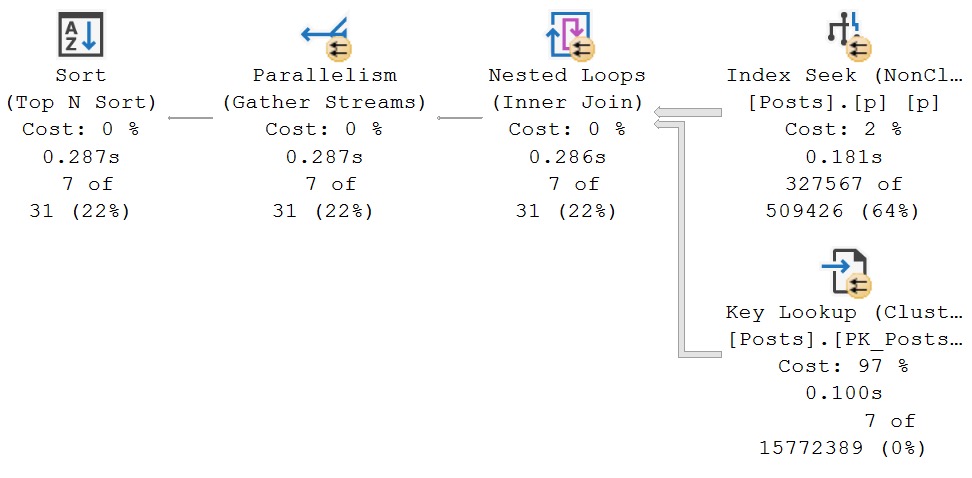
The query plan looks like this, and is very fast. Yay. We smart.
easy lookup
Zooming in on the lookup a bit, here’s what it’s doing:
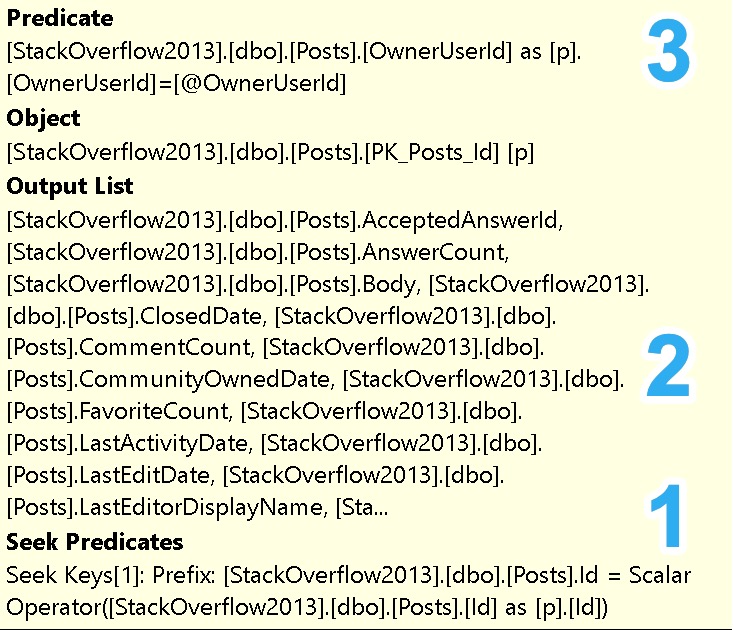
The clustered primary key on the Posts table is Id, which the nonclustered index inherits as a final key column in the nonclustered index (seek predicate), so this is how we match rows across the two
The clustered index has all these columns in it that are not part of the nonclustered index definition, so we can retrieve any rows matched via the seek predicate
The clustered index has OwnerUserId in it as well, which is also not part of the nonclustered index definition, so we can additionally filter any rows matched via the seek predicate
Wordy, I know, for bullet points, but the goal of these posts is to describe things to developers who may have never encountered such things.
Predicate Key Lookups: Bad
If we change our execution parameters to ones that are not selective at all, we’ll use the same execution plan, but speed will get a bit worse.
CreationDate will fetch several more years of posts (2008 vs 2013)
We’re looking for answers (PostTypeId 2) from questions (PostTypeId 1)
The OwnerUserId is now a much more active user on the site
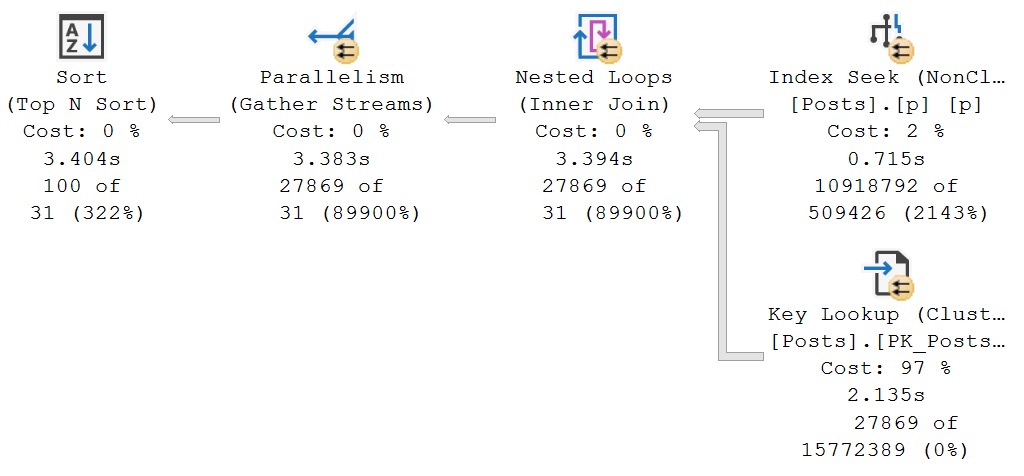
Now, rather than finishing in ~300ms, the query takes ~3.5 seconds.
degrading
The majority of the time is spent looping and looking up, which is not what we want at all. Again, indexes should help us find and filter as much data as possible in one place.
You can think of each index as a separate data source. If you need two data sources on one table to filter things, you’re leaving yourself open to performance issues.
Predicate Key Lookups: Fixing
In this case, we can fix things well-enough by changing the index to this:
CREATE INDEX
    p
ON dbo.Posts
    (Score, CreationDate, PostTypeId, OwnerUserId)
WITH
    (SORT_IN_TEMPDB = ON, DATA_COMPRESSION = PAGE, DROP_EXISTING = ON);
GO
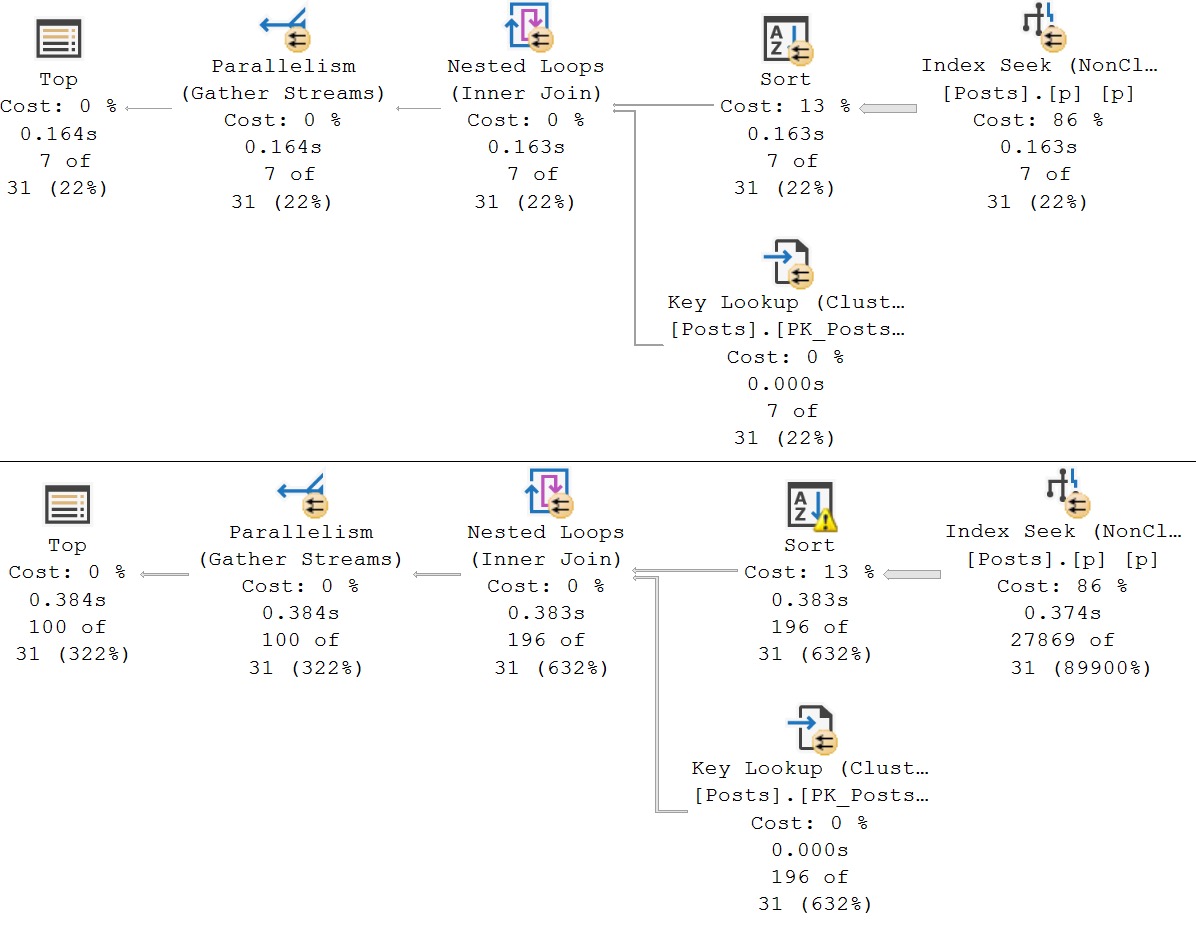
Now, either execution, in either execution order, is fast (enough).
good enough plan
Now, for sure, with enough domain knowledge, and enough understanding of the queries, we could do things differently.
If we know most/all queries will filter on OwnerUserId/PostTypeId
We’re allowed to create a completely new index to help this query if it’s important enough
CREATE INDEX
    p
ON dbo.Posts
    (OwnerUserId, PostTypeId, Score, CreationDate)
WITH
    (SORT_IN_TEMPDB = ON, DATA_COMPRESSION = PAGE, DROP_EXISTING = ON);
GO
In this index, OwnerUserId and PostTypeId are the leading columns. The way b-tree indexes work, equality predicates on leading column(s) maintain sorting of any following columns.
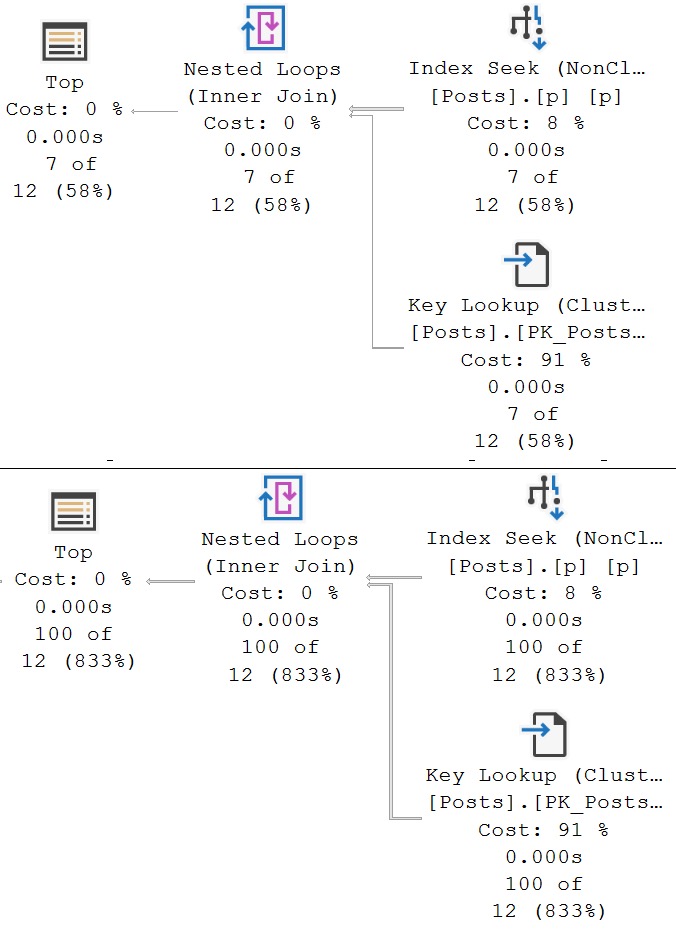
Since we’re ordering by Score and CreationDate, this is important (for this query, anyway). Now, both plans look like this.
faster!
Predicate Key Lookups: Thoughts
Often, fixing a predicate key lookup by adding the filtering column to the nonclustered index your query is already using is good enough.
Other times, to squeeze every last bit of performance out of things, we may need to make additional adjustments. Changing existing indexes in a way that rearranges key column order can be perilous.
While the query you’re working on may work way better, others may not be so happy with your tinkering. Again, this is where you need additional domain knowledge.
If you find yourself wanting to really change things like that, you may be safer creating a new index instead.
Thanks for reading!
Going Further
If this is the kind of SQL Server stuff you love learning about, you’ll love my training. Blog readers get 25% off the Everything Bundle — over 100 hours of performance tuning content. Need hands-on help? I offer consulting engagements from targeted investigations to ongoing retainers. Want a quick sanity check before committing to a full engagement? Schedule a call — no commitment required.