The How To Write SQL Server Queries Correctly Cheat Sheet: Conditional Join and Where Clauses

One Way Or Another


The OR operator is a perfectly valid one to use in SQL statements. If you use an IN clause, there’s a reasonable chance that the optimizer will convert it to a series of OR statements.

For example, IN(1, 2, 3) could end up being = 1 OR = 2 OR = 3 without you doing a darn thing. Optimizers are funny like that. Funny little bunnies.

The problem generally isn’t when asking for IN or OR for a single column, with a list of literal values, the problem is usually when you:

  • Use OR across multiple where clause columns
  • Use OR in a join clause of any variety
  • Use OR to handle NULL parameters or variables

Throw in some additional complexity by joining two tables together, and asking for something like:

SELECT
    *
FROM t1 AS t1
JOIN t2 AS t2
  ON t1.id = t2.id
WHERE t1.thing = 'something'
OR    t2.thing = 'something';

Of course, sufficiently complex filtering clauses will likely turn into case expressions, which I’ve seen cause more performance headaches that I’m happy to recall.

The main issue is, of course, performance, and figuring out what a reasonable index, or set of indexes might be.

To some, the idea of needing multiple indexes on a single table to make one query perform well might seem counterintuitive overkill. To anyone who has had to deal with interval queries, it’s a fact of life.

You might hate to hear this, but proper indexing isn’t enough in every case, and the point of this post is to show you how to rewrite queries so that SQL Server can use your indexes well.

The main problem is that certain query transformations, like index intersection and index union, which may be appropriate, might be costed much higher than a clustered index scan, or a seek/scan plus lookup.

Anyway, let’s get a move on. I can only be a young and good looking consultant for so long, here.

Not So Fast


If you have perfect indexes because you’re a perfect indexer, I’m happy for you.

Most people I do work for are not in that camp, nor even in that forest. Some may be blissfully unaware of camps and forests.

That’s okay though, because that’s what I get paid for.

Let’s say you have this index. It’s a good attempt at a good index.

CREATE INDEX 
    p1 
ON dbo.Posts
    (OwnerUserId, LastEditorUserId, Score) 
WITH 
    (SORT_IN_TEMPDB = ON, DATA_COMPRESSION = PAGE);

It’s a good attempt at a good index because this is the query it’s for.

SELECT
    p.*
FROM dbo.Posts AS p
WHERE 
(
     p.OwnerUserId = 22656
  OR p.LastEditorUserId = 22656
)
AND p.Score > 0;

You might look at this arrangement and think: This is my greatest work. I’ll be able to seek to OwnerUserId, and then apply residual predicates on LastEditorUserId and Score.

I mean, maybe not those exact words. You might have other things you’re proud of. Hopefully those turn out better.

Zero Seeks


If you’re the type of person — and I like this type of person — who looks at the query plan, you’ll be just as sore as a sunburn after looking at this one.
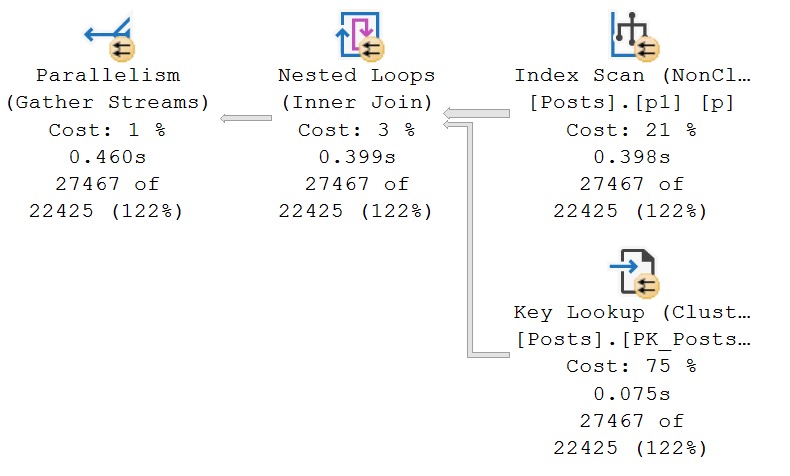
sql server query plan
Or even on the end of a skewer

If you’re the type of person — and I like this type of person — who tries query hints when they don’t get their way, you might try a FORCESEEK hint here.

Unfortunately, you’ll remain in your sore state.

Msg 8622, Level 16, State 1, Line 28

Query processor could not produce a query plan because of the hints defined in this query.

Resubmit the query without specifying any hints and without using SET FORCEPLAN.

If you’re keen to play along at home and create and index with Score first, you’re going to get a seek, but a very disappointing one. There is no improvement in performance.

Okay, so what happened?

Breakdown


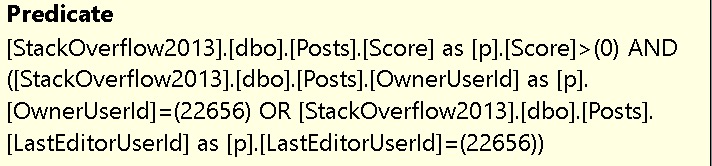
It’s really tough to get a seek with an OR on the two leading columns of an index. Sure, you could put Score first, but Score > 0 is about as selective as you at last call.

Of course, I mean that you’ll take whatever drink your friend comes back from the bar with. Don’t be lewd.
sql server query plan
There’s no other way

SQL Server done flipped that all upside down, didn’t it? Score is first, the OR clause is second. What a nuisance.

The problem of course is that we have two distinct sets of predicates:

  • OwnerUserId = 22656 and Score > 0
  • LastEditorUserId = 22656 and Score > 0

And the index we have doesn’t allow us to access the data in that way. No single index would, but two separate indexes would.

If we express out query in a slightly different way, that’s easier to see.

SELECT
    p.*
FROM 
(
    SELECT
        p.*
    FROM dbo.Posts AS p
    WHERE p.OwnerUserId = 22656
    AND   p.Score > 1000
    
    UNION ALL
    
    SELECT
        p.*
    FROM dbo.Posts AS p
    WHERE p.LastEditorUserId = 0
    AND p.Score > 1000
) AS p;

Here’s the query plan for that:
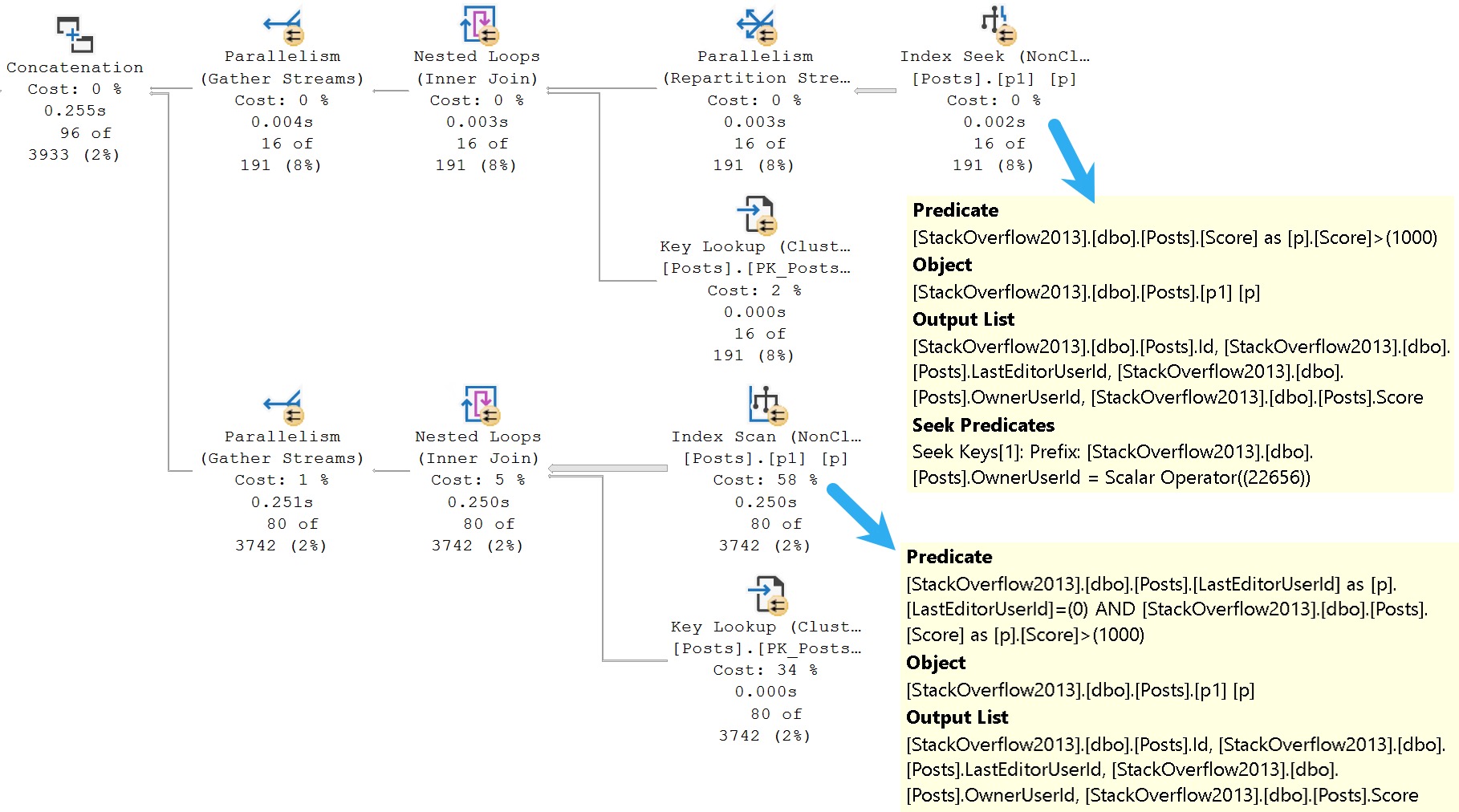
sql server query plan
one seek, one scan, all flan

It may make more sense seeing this query plan, because you can see the optimizer’s dilemma a little better now.

While it’s possible to seek to OwnerUserId, and then evaluate Score, it’s not possible to seek to LastEditorUserId (regardless of a predicate on Score).

LastEditorUserId is the second key column, which means it’s not ordered in a helpful way for seeks to happen.

Different Drum


To get both sets of predicates to behave, you’d need two indexes like these:

CREATE INDEX 
    p2 
ON dbo.Posts
    (LastEditorUserId, Score) 
WITH 
    (SORT_IN_TEMPDB = ON, DATA_COMPRESSION = PAGE);

CREATE INDEX 
    p3 
ON dbo.Posts
    (OwnerUserId, Score) 
WITH 
    (SORT_IN_TEMPDB = ON, DATA_COMPRESSION = PAGE);

This allows for each set of predicates to be evaluated efficiently, even using the original query pattern with an OR predicate.
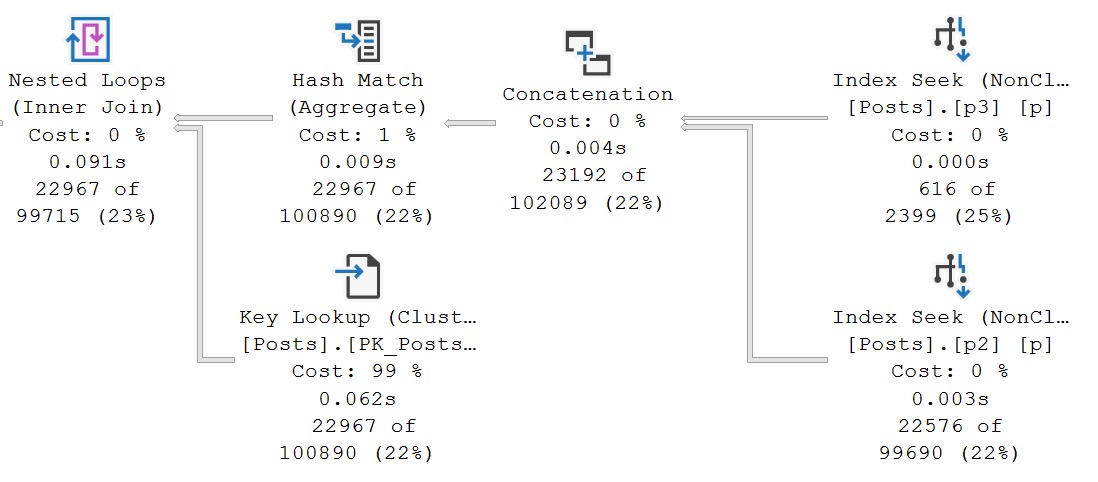
sql server query plans
Back to Mars

And we have the elusive index union plan that I mentioned earlier.

The two new indexes are used, sought into, union all-ed together, aggregated, and finally there’s a lookup in the plan to retrieve all the columns in Posts that aren’t covered by them.

The optimizer doesn’t often choose plans like this, and it’s not always good when it does, but these indexes do pretty well here because the predicate combinations are selective.

Of Join And Where And Or


SQL Server’s cost based optimizer is good at implying many things from the clutches of your calamitous queries, or so I’m told.

It’s quite an amazing piece of work, but it has a lot of problems.

I suppose that’s common with models, whether they’re cost models or runway models. Perhaps I should spend the next 15 years of my life studying runway models to be sure.

For example, if I have a query like this:

SELECT TOP (1)
    c.Id
FROM dbo.Posts AS p
JOIN dbo.Comments AS c
  ON p.OwnerUserId = c.UserId
WHERE p.OwnerUserId = 22656;

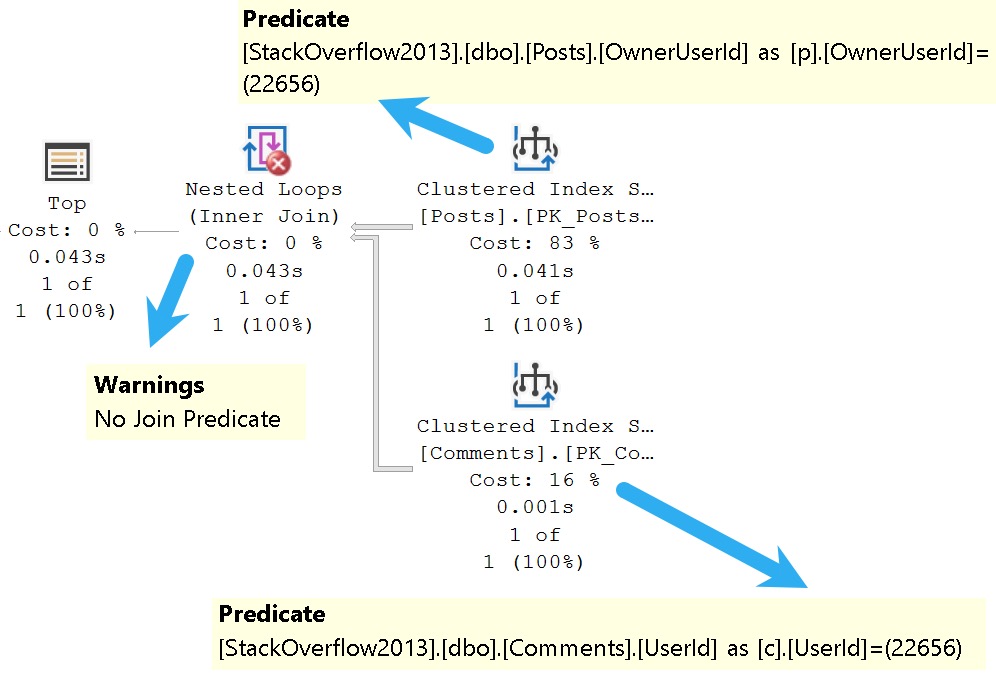
SQL Server is accurately able to figure out that the only number I care about is 22656, because one of the join columns is in the where clause. The query plan looks about like so:
sql server query plan
i see, i see

There’s a seek on both sides of the join specifically to a value in each index, which means only rows with matching values will be projected from either side into the join.

And yet, we have a warning that there’s no join predicate. Curse of the summer intern.

Where the optimizer is somewhat less good at such inferences is, of course, when you get OR clauses involved.

Here’s an example! I love examples. Grand things, those.

SELECT 
    c = COUNT_BIG(*)
FROM dbo.Comments AS c
JOIN dbo.Votes AS v
  ON c.PostId = v.PostId
WHERE c.PostId = 138
OR    v.UserId = 831;

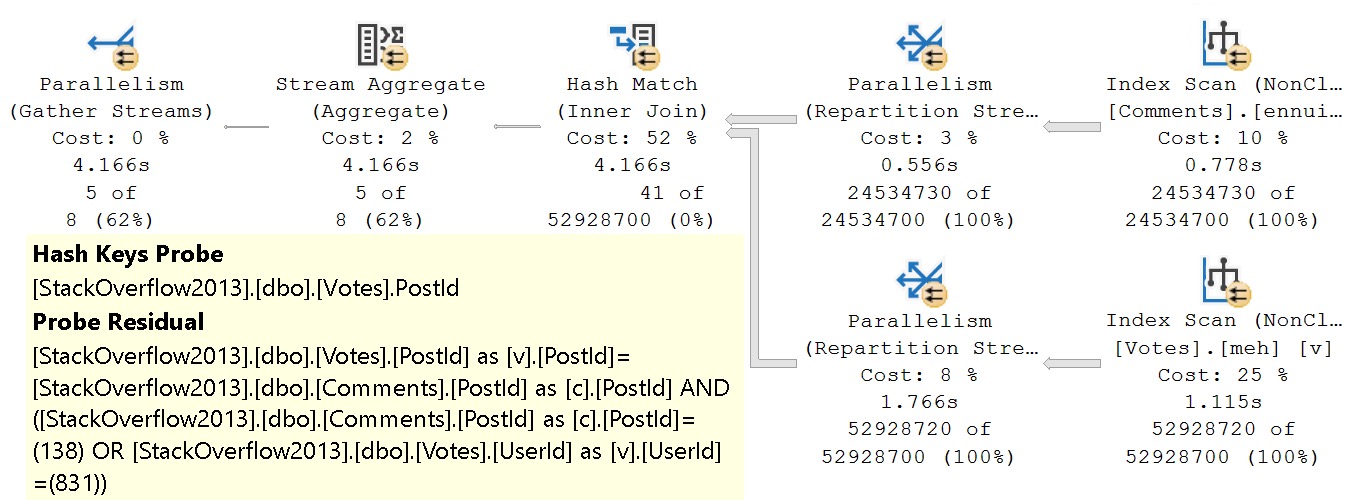
You might laugh and wonder who would ever write a query like this, but it’s far from uncommon to see a game of mix and match across tables and columns in the where clause.
sql server query plan
for tomorrow

The unbearable weirdness of OR strikes again.

The entire join and where clause is evaluated at the hash join. There’s probably a good reason for it, but it’s late and I’m not feeling overly charitable in researching it.

If we rewrite the where clause a bit, here’s what we end up with:

SELECT 
    c = COUNT_BIG(*)
FROM dbo.Comments AS c
JOIN dbo.Votes AS v
  ON c.PostId = v.PostId
WHERE v.PostId = 138
OR    v.UserId = 831;

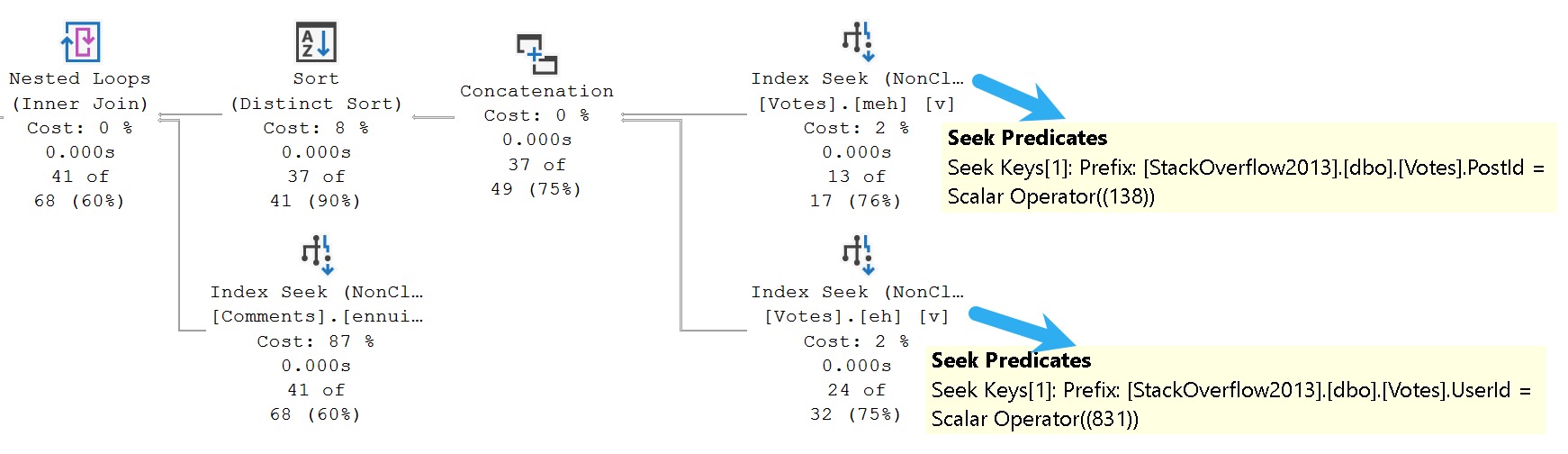
The only change is that I’m using the PostId column from the Votes tables instead of the PostId column from the Comments table here.

And would it surprise you that the query plan ends up not being a miserable sofa? I hope not.
sql server query plan
connection

The secret of course, is having some good-enough indexes hanging around to help you locate all your precious data. I’m sure I’ve mentioned they’re important a time or two.

Here’s what I have:

CREATE INDEX 
    meh
ON dbo.Votes
    (PostId, UserId)
WITH
    (MAXDOP = 8, SORT_IN_TEMPDB = ON, DATA_COMPRESSION = PAGE);

CREATE INDEX 
    eh
ON dbo.Votes
    (UserId, PostId)
WITH
    (MAXDOP = 8, SORT_IN_TEMPDB = ON, DATA_COMPRESSION = PAGE);

CREATE INDEX 
    ennui
ON dbo.Comments
    (PostId)
WITH
    (MAXDOP = 8, SORT_IN_TEMPDB = ON, DATA_COMPRESSION = PAGE);

And yet, even with all those pretty little indexes, the first query stunk it up worse than the easter egg I’m probably gonna find in a couple months behind a radiator.

Pitting good indexes against poorly written queries is just cruel.

Won’t someone think of the indexes?

Of Join And Or


Joins with OR clauses fare no better. It’s an unfortunate convenience for those writing queries, because it’s incredible inconvenient for the optimizer.

There are likely some shortcomings that the optimizer team could address in this space, but some join logic is probably more than they’d like to take a chance on.

A simple two-table join with an OR clause would be easy enough, but let’s look at one that isn’t so straightforward.

First, some very generous indexes:

CREATE INDEX
    v
ON dbo.Votes
    (PostId)
INCLUDE
    (BountyAmount)
WHERE
    (BountyAmount IS NOT NULL)
WITH
    (SORT_IN_TEMPDB = ON, DATA_COMPRESSION = PAGE);

CREATE INDEX 
    p
ON dbo.Posts
    (AcceptedAnswerId, Id) 
WITH 
    (SORT_IN_TEMPDB = ON, DATA_COMPRESSION = PAGE);

CREATE INDEX 
    p2
ON dbo.Posts
    (PostTypeId, Id) 
WITH 
    (SORT_IN_TEMPDB = ON, DATA_COMPRESSION = PAGE);

Look how generous I am with my indexes. The most generous and most humble indexer, they call me.

Query Time, Excellent


Here’s what we’re working with from a query perspective!

SELECT
    c = COUNT_BIG(*)
FROM dbo.Posts AS p
JOIN dbo.Posts AS p2
  ON  p.Id = p2.AcceptedAnswerId
JOIN dbo.Votes AS v
  ON p.Id = v.PostId
  OR p2.AcceptedAnswerId = v.PostId
WHERE v.BountyAmount IS NOT NULL
AND   p.PostTypeId = 2
AND   p2.AcceptedAnswerId > 0;

What makes this like more of a challenge is that Posts is joined to itself, and columns from each make up the join predicate to Votes.

What makes this kind of stupid is that this is all inner joins, even taking potential row duplication into account from a many to many relationship, it could be simplified from:

FROM dbo.Posts AS p 
JOIN dbo.Posts AS p2 
  ON p.Id = p2.AcceptedAnswerId 
JOIN dbo.Votes AS v 
  ON p.Id = v.PostId 
  OR p2.AcceptedAnswerId = v.PostId

To

FROM dbo.Posts AS p 
JOIN dbo.Posts AS p2 
  ON p.Id = p2.AcceptedAnswerId 
JOIN dbo.Votes AS v 
  ON p.Id = v.PostId

Or

FROM dbo.Posts AS p 
JOIN dbo.Posts AS p2 
  ON p.Id = p2.AcceptedAnswerId 
JOIN dbo.Votes AS v 
  ON p2.AcceptedAnswerId = v.PostId

What’s particularly interesting, but somewhat difficult to describe well to the optimizer, is that any given question can only have one accepted answer, so there’s no many to many relationship with that join.

If we were to use the ParentId column instead of AcceptedAnswerId, it’d be a different story. One question can have many answers (but again, only one can be accepted as the answer).

This is a great reason to normalize your data, and not cram them full of parent/child relationships.

Fine Time


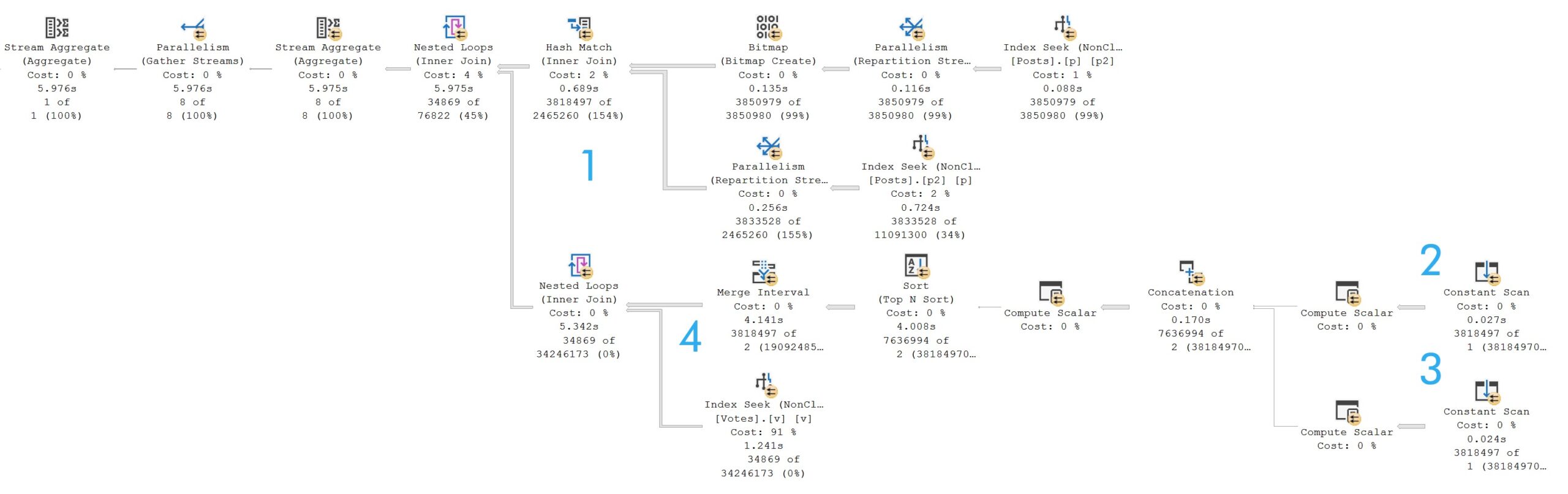
The query plan is quite typical of one with a join that contains an OR predicate. It takes just about six seconds.
sql server query plan
olympian lows

If you’re keen on understanding the pattern, and it’s a good pattern to understand:

  1. 3.8 million rows hit the hash join
  2. One constant scan passes out rows for the Id column
  3. Another constant scan passes out rows for the AcceptedAnswerId column
  4. Merge Interval attempts to group overlapping values

It is a bit confusing at first glance, because of the two nested loops joins.

The outermost nested loops (next to the hash match) is of the apply variety, but SQL Server does all the work described above in order to reduce the number of times the Votes table would have to be accessed.

Since this is another OR condition, let’s think back to the first query we talked about, where a FORCESEEK hint produce an optimizer error because there was no readily seekable predicate.

If you’re the type of person — and I like this type of person — who tries query hints when they don’t get their way, you might try an OPTION(HASH JOIN) hint here.

But since hash joins require at least one equality predicate, you’ll get a rather familiar optimizer error. The OR condition produces a query plan with CompareOp="IS" in it, which is not the same as "EQ".

Fun With Rewrites


Part of the reason why Microsoft likely avoids this specific optimizer search space is that the logic required to get this right is somewhat involved.

Here’s the query I used to get a matching count. For this query, it’s safe to use EXISTS because you don’t need to project any columns out from the Posts table:

SELECT
    c = COUNT_BIG(*)
FROM dbo.Votes AS v
WHERE v.BountyAmount IS NOT NULL
AND   EXISTS
(
    SELECT
        p.Id
    FROM dbo.Posts AS p
    WHERE p.AcceptedAnswerId = v.PostId
    AND   p.AcceptedAnswerId > 0
    AND EXISTS
    (
        SELECT
            1/0
        FROM dbo.Posts AS p2
        WHERE p.Id = p2.AcceptedAnswerId
    )

    UNION ALL

    SELECT
        p.Id
    FROM dbo.Posts AS p
    WHERE p.Id = v.PostId
    AND   p.PostTypeId = 2
    AND EXISTS
    (
        SELECT
            1/0
        FROM dbo.Posts AS p2
        WHERE p.Id = p2.AcceptedAnswerId
    )
);

If you needed to do that, you would use CROSS APPLY.

SELECT
    c = COUNT_BIG(*)
FROM dbo.Votes AS v
CROSS APPLY
(
    SELECT
        p.Id
    FROM dbo.Posts AS p
    WHERE p.AcceptedAnswerId = v.PostId
    AND   p.AcceptedAnswerId > 0
    AND EXISTS
    (
        SELECT
            1/0
        FROM dbo.Posts AS p2
        WHERE p.Id = p2.AcceptedAnswerId
    )

    UNION ALL

    SELECT
        p.Id
    FROM dbo.Posts AS p
    WHERE p.Id = v.PostId
    AND   p.PostTypeId = 2
    AND EXISTS
    (
        SELECT
            1/0
        FROM dbo.Posts AS p2
        WHERE p.Id = p2.AcceptedAnswerId
    )

) AS p
WHERE v.BountyAmount IS NOT NULL;

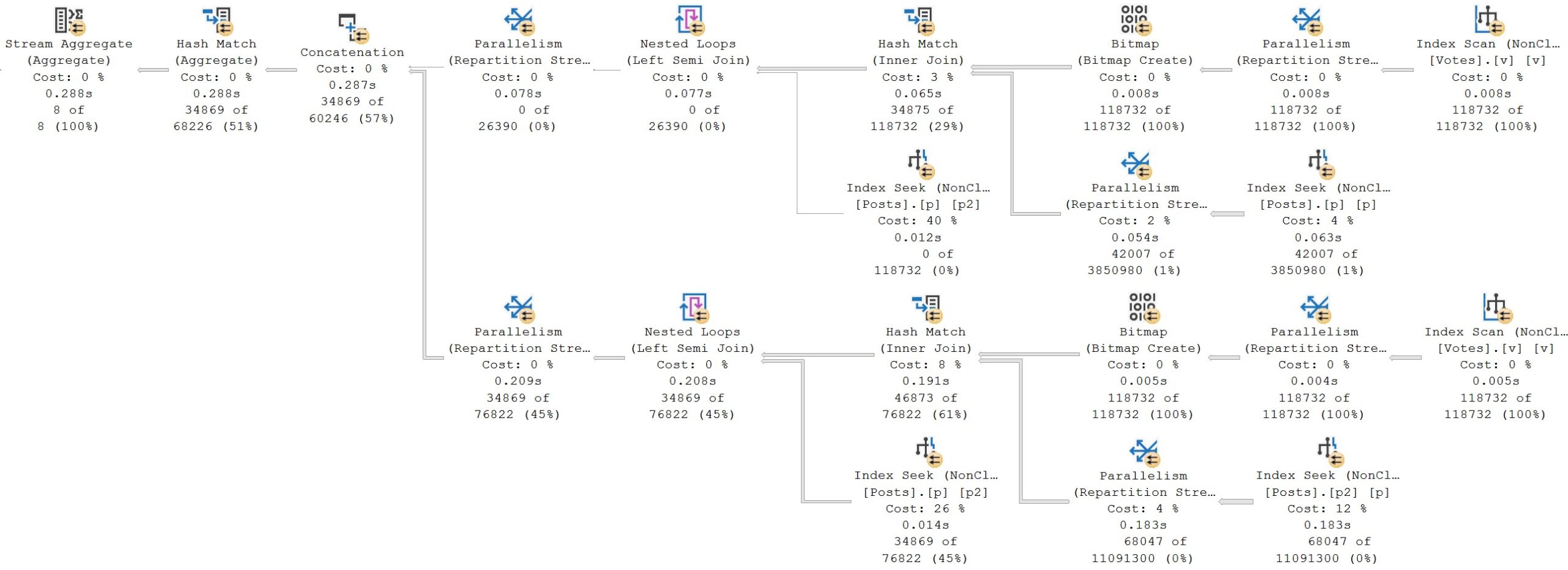
The query plans are close enough to identical to not show you twice.
sql server query plan
total version

Is it bigger? Yes.

Was the query longer? Yes.

But if you’ve been following this series, or my blog posts in general, you’ll know that it’s quite rare that shortcuts and conveniences get you anywhere with the optimizer.

Case Closed


Something I mentioned early on in the post, with an element of obvious foreshadowing, is the use of case expressions in join and where clauses.

While they’re not precisely the same thing as OR clauses, they are conditional logic, which can do a decent job of mangling up performance.

Here’s our setup, index-wise:

CREATE INDEX 
    p
ON dbo.Posts 
    (Score, PostTypeId, OwnerUserId)
WITH 
    (SORT_IN_TEMPDB = ON, DATA_COMPRESSION = PAGE);

CREATE INDEX 
    u
ON dbo.Users 
    (CreationDate, Reputation, AccountId)
INCLUDE 
    (DisplayName)
WITH 
    (SORT_IN_TEMPDB = ON, DATA_COMPRESSION = PAGE);

And here’s the query we’ll be looking at:

SELECT
    u.Id,
    u.DisplayName,
    s = SUM(p.Score)
FROM dbo.Posts AS p
JOIN dbo.Users AS u
  ON 1 = CASE     
             WHEN p.PostTypeId IN (1, 2)
             AND  p.OwnerUserId = u.Id
             THEN 1
             WHEN p.PostTypeId > 2
             AND  p.OwnerUserId = u.AccountId
             THEN 1
             ELSE 0
         END
WHERE u.CreationDate >= '20131231 23:00'
AND   1 = CASE 
              WHEN p.Score >= 1
              AND  u.Reputation >= 10
              THEN 1
              ELSE 0
          END
GROUP BY
    u.Id,
    u.DisplayName
ORDER BY 
    s DESC;

I’ve seen enough nightmare-fuel queries like this to include it in the mix, because I never want to see one of these again.

Just kidding! I want to see yours and fix them for you. Show me all of them. Bring out the whole gang. My soul is prepared.

Avert Your Eyes


Here’s the query plan we get from this query.

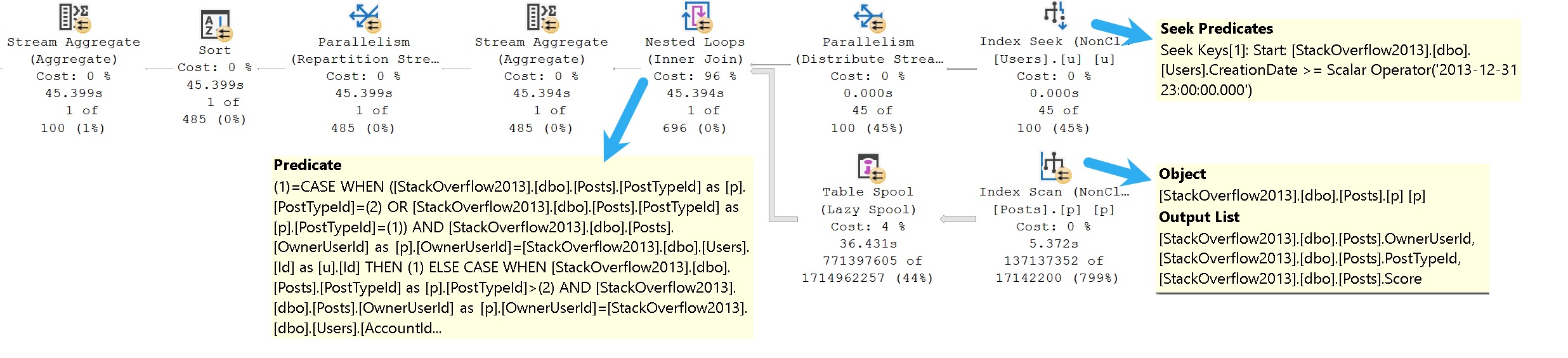
The only thing that isn’t terrible is the one part of the where clause that isn’t wrapped up in some derived dilemma, which is the predicate on CreationDate.
sql server query plan
fine mess

The TL;DR here is that:

  • We can seek to CreationDate because it’s the leading index key and not part of the case expression
  • We can’t seek to anything in the Posts table at all
  • The entire filtering process occurs at the Nested Loops join

If you’re paying careful attention to row counts, this filthy animal runs for 45 seconds to return a single row.

That’s a terrible row to seconds ratio.

Rewrites for this will be similar to others, so hopefully you’re not sick of those just yet.

Rewrite Your Eyes


Whenever I’m rewriting small, compact, sorta stubby looking queries, I like to think of myself as Willy Wonka stretching out Mike Teavee.

Queries like that remind me a bit of the character himself. Rewriting them into more sensible forms with better attitudes does take a bit of stretching out.

SELECT
    u.Id,
    u.DisplayName,
    s = SUM(p.Score)
FROM
(
    SELECT
        u.Id,
        u.AccountId,
        u.DisplayName
    FROM dbo.Users AS u
    WHERE u.Reputation >= 10 
    AND   u.CreationDate >= '20131231 23:00'
) AS u
CROSS APPLY
(
    SELECT
        p.*
    FROM dbo.Posts AS p
    WHERE p.PostTypeId IN (1, 2)
    AND   p.OwnerUserId = u.Id
    AND   p.Score >= 1

    UNION ALL

    SELECT
        p.*
    FROM dbo.Posts AS p
    WHERE p.PostTypeId > 2
    AND   p.OwnerUserId = u.AccountId
    AND   p.Score >= 1
) AS p
GROUP BY
    u.Id,
    u.DisplayName
ORDER BY 
    s DESC;

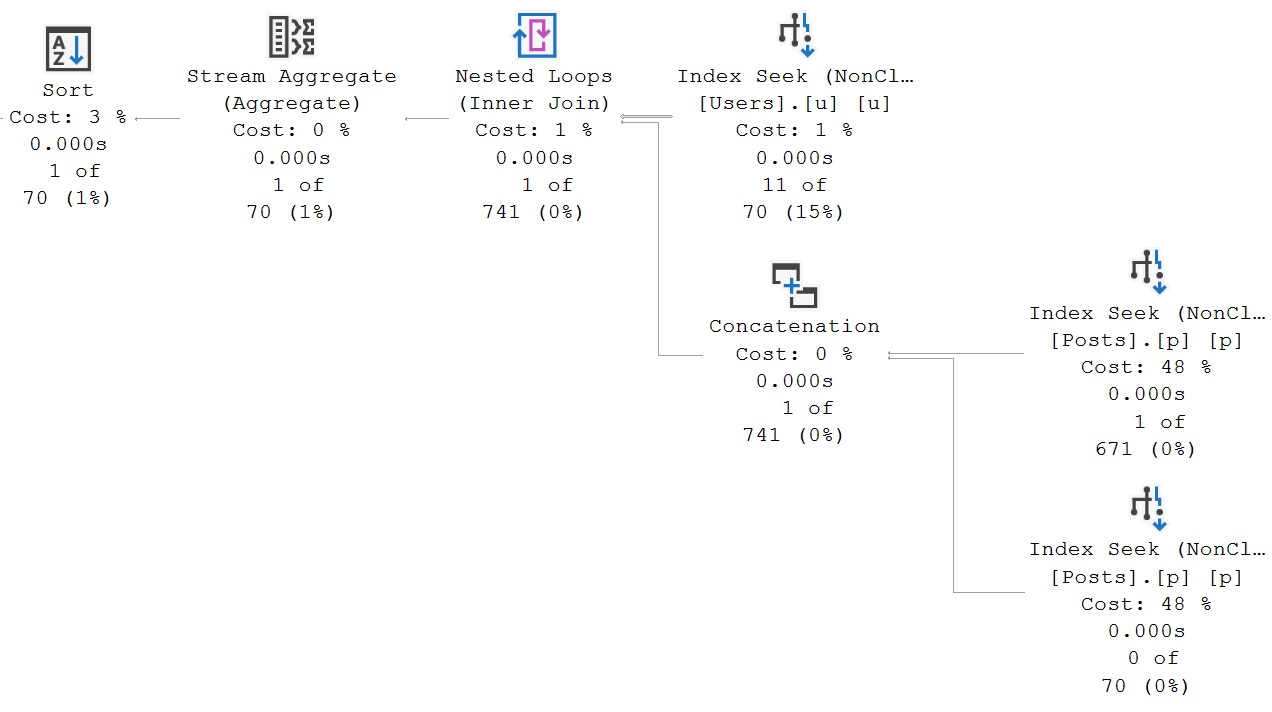
And of course, when you do better, SQL Server does better. And when SQL Server does better, everyone’s happy.

Why don’t you want to be happy?
sql server query plan
[unenthusiastically] Stop. Don’t. Come back.
The more you do these types of things, the more intuitive they become.

A Shorter Note


At the beginning of the post, I also mentioned a different type of query, using OR to safeguard optional parameters from NULL values.

While I’m not going to delve into that here, because I’d like to do an entire post in this series on dynamic SQL, I’d like to add a single quick note: Don’t be afraid of OPTION(RECOMPILE).

It’s a huge problem solver for so many different types of queries having so many different kinds of problems:

  • Parameter sensitivity
  • Local variables
  • Optional parameters

If you’re ever unsure about query performance, and you’re not quite sure what’s wrong with it, you can do a whole lot worse than seeing if this at least gets you a different execution plan.

While it’s not perfect or practical as a long term solution for some situations, don’t dismiss it as a tool of exploration when you’re working on a problem query.

I’ve apparently tipped my hat a bit that dynamic SQL is a future subject for this series. After that, I’m not sure what else might come up. If there’s anything you’d like to see that you haven’t seen so far, leave a comment.

Thanks for reading!

Going Further


If this is the kind of SQL Server stuff you love learning about, you’ll love my training. Blog readers get 25% off the Everything Bundle — over 100 hours of performance tuning content. Need hands-on help? I offer consulting engagements from targeted investigations to ongoing retainers. Want a quick sanity check before committing to a full engagement? Schedule a call — no commitment required.

Why Logical Reads Are A Bad Metric For Query Tuning In SQL Server

Why Logical Reads Are A Bad Metric For Query Tuning In SQL Server


To summarize the video a little bit:

  • High average or total logical reads isn’t a guarantee that a query is slow
  • Looking for high average CPU and duration queries is a better metric
  • You may see logical reads go up or down as you make queries faster
  • For I/O bound workloads, you’re better off looking for queries with a lot of physical reads

The more query tuning work I did, the more I came to realize that logical reads fall into the SQL Server 2008 mindset, like PLE, fragmentation, page splits, and other metrics that don’t necessarily indicate a performance problem.

Thanks for watching!

Video Summary

In this video, I dive into the often-overlooked issue of logical reads in SQL Server query tuning. I challenge the notion that reducing logical reads is a key metric for improving query performance and argue instead that physical reads are far more indicative of real bottlenecks. By walking through several examples, including queries with high logical reads but fast execution times, I demonstrate why focusing solely on logical reads can be misleading. The video also explores how to identify and address queries with excessive physical reads using tools like the SP Pressure Detector and Query Store metrics, emphasizing that making these queries more efficient will not only speed up your workload but potentially reduce cloud costs by minimizing CPU usage.

Full Transcript

Erik Darling here with Darling Data, and in this video we’re going to talk about the utter pointlessness of using logical reads to tune queries. I know that’s going to be a difficult pill for some of you out there who love logical reads to swallow, but the thing is that that’s why God invented, I don’t know, pick a drink you like. It makes pills easier to swallow. Now, in my entire query tuning life, no one has ever come up to me and said, hey, thanks for getting logical reads down by 10% or 20%. You really, really made a difference on that, doing fewer logical reads. It’s amazing. Most of the things that people say, hey, good job on, are like, this query went from 30 seconds to one second, because now end users don’t have to spend 29 seconds of their day staring at the end of the day. And then, you’re going to be staring at a spinny wheel waiting for something to happen. And a lot of my early performance tuning, my earlier performance tuning days, I would look at logical reads quite a bit before I really realized how much they were leading me astray, because I would find queries they were doing.

I would be like, let’s look at logical reads, and I would find queries that were doing a lot of logical reads, but happening very quickly, because logical reads happen from memory. If you’re already reading stuff from memory, it’s going to be pretty fast. Physical reads are a different thing, because that’s actually going out to your crappy storage, and that’s no good either, right? Going out to storage is the enemy of your database workload. You want to avoid storage as much as possible, especially in the cloud. Now, the other end of that, speaking of the cloud, is we have end users you can make happy by getting queries to go faster.

And then we have the idiot suits at your company, who got swindled into moving to the cloud, because it was going to be cheap and easy and fast and reliable and secure. And it kind of never was great at any of those things. The cloud is sort of like a pizza place that keeps raising its prices, except every time you order a pizza from them, the thing that shows up is a half-eaten ham sandwich. The prices keep going up, and you keep writing those checks. If you want to spend less money on the cloud, getting your queries to go faster is a great way to do that, because then you have less sustained CPU usage.

You don’t have queries that take 30 seconds. You have queries that take one second. Even if they use more CPU to take one second, you’d rather deal with that than anything else, because that’s a bleh. That’s not a bleh. And so you do that, and not only do you make your end users happy, but you can also reduce your cloud infrastructure and spend less money on it. So let’s look at this query, just to sort of illustrate the point about how high logical reads are not necessarily the mark of a slow query.

Run this thing, and it will do 10 million reads against the post table. Let’s put some commas in there. There’s a comma at the end, but… So Microsoft cares about grammar, but not about your sanity.

And we can… Let’s put a comma in here, too. Look at that. So we do 10 million logical reads against the post table, and 46,000 logical reads against the users table, but this query only takes 827 milliseconds to finish.

You would… Now, I know mentally it probably feels like, 10 million logical reads, how can it only take 827 milliseconds? This is coming from memory.

If your problem is stuff not being in memory, your problem is physical reads, not logical reads. Logical reads is memory. Physical reads is out there, wild blue yonder. Let’s look at two queries back to back.

Now, I’m going to drop clean buffers between these, not because it makes a gigantic, profound difference, but it nudges the numbers for both of them up just a little bit higher, which is good, because you get to see things at their worst, right?

So we talked about going out to disk. No one likes going out to disk. And let’s look at how fast these ran. Let’s look at some of the metrics in here.

So if you were query tuning and you are only looking at logical reads as the success metric for your query, I’ll tell you one of the first mistakes is making one single metric that you can’t rely on. Your goal and your finish line for query tuning is a bad idea.

So this first query does about 7,000 logical reads from the user’s table and about 15,000 logical reads from the post table. And it takes about 880 milliseconds to finish. The second query, well, there are some work tables and stuff in there, but there’s not too much action on those if you look closely.

This does 15,000 logical reads here and 21,000 logical reads against the user’s table. If you compare that up here, it’s like 3x the logical reads, but it’s a faster query. It’s 881 milliseconds versus 167 milliseconds.

So reducing logical reads doesn’t always make a query faster. Increasing logical reads doesn’t always make a query slower. Cool. We’ve got that figured out.

Now, let’s look at a metric that would come into consideration, and that is physical reads. So I’m going to drop clean buffers, and I’m going to run this query, and then I’m going to drop clean buffers, and I’m going to run the second query.

And the first query is going to run demonstrably slower than the second query. We have this first query, which does, and this is the real fun part. This query does 5 million logical reads, and the second query does 5.1 million logical reads.

But look at the difference in CPU and elapsed time. All right, so we did, I don’t know, like not quite a million, nearly a million more logical reads in the second query, but it finished a lot faster.

That’s because the first query had to go out to disk, and we did that many read-ahead reads. That’s a lot of read-ahead. We had to physically go out to disk and bring stuff in.

You may have caught glimpses of read-ahead reads in some of the other statistics I.O. output, but this is the good one to concentrate on. So you can have queries that do a high number of logical reads that happen quickly when they’re from memory, but happen slowly when they’re from disk.

So if you want to concentrate on a metric that involves reads, finding queries that routinely have to do a lot of physical reads is a good place because those are the ones that are most likely going to be missing some index in there that would make life better.

Maybe not 100% of the time, but a lot of the time, queries that routinely have to do a lot of physical reads usually have to scan some big old thing because they don’t have a better index to use.

So let’s look at what that looks like in life. So if I were trying to diagnose I.O. stuff on a server, I would, of course, start with my wonderful, lovely, talented store procedure, SP pressure detector, and I would look at weight stats.

And if these page.io underscore something something weights were a high percentage of my server’s uptime, then I would be concerned about physical reads because that’s queries going to disk, get stuff, and bring it into SQL Server.

Same thing with page.io.exe, right? So the sh weights are for reads, the ex weights are for writes. If I had to bring a lot of data from disk into memory all the time, I’d be concerning myself with physical reads, not logical reads.

Now let’s come over here into this window because this one is a little more interesting. Let’s throw 10 seconds on that. And let’s just run this thing.

So I’m going to, as quick as I can, start that and then run that. And, oh, wait, I ran the whole wrong thing. I got all excited to highlight stuff and look what happened to me.

I’m just going to have to wait a few seconds there. There I was on a real roll. All right.

So in the real results that I care about, which are down here, which are SP pressure detector sampled for some amount of time, 10 seconds, as it says in the sample seconds column.

In that 10 seconds, I spent 51 seconds waiting on page.io latch.sh. Okay. I mean, fine.

There’s a little bit of a blooper reel moment there, but this is the kind of stuff that I would pay attention to. So if I’m looking at the server uptime as a whole, and a lot of page.io latch underscore sh and or ex waits are happening, and I just don’t have enough memory, I’m going to concern myself with queries that are doing physical reads, not logical reads.

All right. So if you’re looking at your server, and you say, wow, the server’s been up for 100 hours, but it’s done like, you know, like 50, 60, 70, 80, 90, or even more hours of page.io latch weights, and your problem is physical reads, not logical reads.

Physical. Going to disk. That’s slowing your queries down. So that’s one way to look at stuff, right? So you can run SP pressure detector, look at everything, or you can, you know, look at a sample of your workload and see just how much page.io latch is coming out of that, coming out of there.

Now, if I look specifically at query store for, oh, get over here, you silly goose, for this query, and I look at the metrics for it, we have a whole bunch of stuff in here about, sorry, a little bit further.

There we go. We have a whole bunch of stuff in here about average duration, total duration, last duration, and then these two columns are important. We have min duration and max duration. So what this would tell you is that sometimes this query runs for 713 milliseconds because data is already in memory, and sometimes this query runs for 8.2 seconds because data is not in memory, then we could come over and look at some other metrics, and this is where I think things are going to get even more interesting for you.

So logical reads never change, right? In total, we’ve done 120,000. The last logical reads were 40,000.

The min logical reads were 40,000. The max logical reads were 40,000. Okay, close enough in there, right? We’re off by like 400, but not even 400 megs, like, I don’t know, some small number of megs.

I don’t want to do math in front of everyone. It makes me nervous. But the logical reads never change. What changes dramatically are the physical reads. So average, 25,000 megs of physical reads.

Total, 77,000. Last, 39,000. Min, zero. Max, 39.

So for workloads that exhibit high amounts of page I.O. latch weights, which indicate you’re not reading data from memory, you want to be looking at physical reads, not logical reads. And then, you know, we’re going to look at the quickie store in a couple different ways.

Like, say, this will show stuff by average CPU. And this, the non-expert mode, cuts a few of the columns out. So the results are a little more succinct.

We can come and look at this stuff. And we can see stuff like average duration. And this is going to be, so this is ordered by average CPU.

But if we put a few of these columns together, right? So there’s that. And there’s that. We kind of zoom in on this.

There’s not really a great correlation between how many logical reads you’re doing and, like, how much other work you’re doing. Like, these two up here, like, there’s 300,000 megs of logical read difference between the two.

But the one on the bottom is almost twice as fast as the one on the top, right? We have 53 seconds versus 21 seconds. If you look in this bunch right here, this is a particularly interesting bunch.

There’s 13,000 logical reads here. But the average duration is 15 seconds, right? So, like, this is just not a good indicator that, like, you’re really blowing anything out of the water with logical reads.

And then down here at the bottom, there are a few in here that are using almost as much logical reads as the top. But, like, these numbers just don’t come close to, like, these numbers. All right?

So there’s a big gap in there. And that’s why I stopped looking at logical reads because I kept finding queries that were generally fast, even if they did a lot. Another good way to look at query store data is by duration. Now, this will order by average duration.

So if we come over here and we look at, we line those columns up the same way again, right, we are doing things that are kind of all over the place. Average logical reads, 2679. Average duration, 54 seconds, right?

And not all of these numbers line up well between what’s slow and what’s doing a lot of logical reads. If you want to care about a read metric, care about physical reads. Look at those query plans.

Figure out how you can do fewer physical reads. How you can make better use of the memory in your server because that’s a much, much better goal. All right? Physical reads are the absolute devil.

Logical reads are stuff that’s already from memory. So please, when you’re tuning queries, stop using logical reads as the sole metric for figuring out if a query tuning adventure was successful because that’s not going to be what users feel. All right?

You want to look at how long the query takes, how much CPU the query uses, how many physical reads the query is doing because those are things that will not only make solving those problems will not only make your users happy, it’ll make your servers happy. It’ll maybe even make the idiot suits who are spending all of your bonus money on cloud infrastructure happy. So, cool.

All right. So this video is a twofer. You got a lot of good information. I got a good blooper reel moment for TikTok, I guess. That’ll be fun.

And maybe pause on the moment where I realize my face recognizes that I didn’t have the one thing I wanted to run highlighted and I ran like six things. That’s okay. Anyway, it’s good to know that everyone hurts sometimes.

Anyway, thank you for watching. If you enjoyed this video, including the blooper reel highlight, I would adore you for hitting the thumbs up button. If you like this sort of SQL Server content or you’re just really into blooper moments, you can subscribe to my channel because I guarantee you, well, not in every video, but every once in a while, there’s a pretty good blooper moment.

And when I’ve been recording for like 10 minutes already, I’m probably not going to start over. So you’re just going to watch me deal gracefully with it. And graceful failover from the blooper reel.

Anyway, thank you for watching. I hope you enjoyed yourselves. I hope you learned something. I hope that you’ll stop just looking at logical reads as success for making a query faster because there are many other things to consider in your environment. I hope that you will pay more attention to physical reads and pay more attention to queries that do a lot of physical reads because making those queries do fewer physical reads will make those queries go faster too.

I think that’s it. Yeah, I think we’re good for today. All right, cool.

Cool. I’m going to go do something else entirely that has nothing to do with computers. So you can leave it up to the imagination what that is. I hope you don’t have too vivid of an imagination because it’s probably not going to be as vivid as you’re imagining if it is.

Anyway, thank you for watching.

Going Further


If this is the kind of SQL Server stuff you love learning about, you’ll love my training. Blog readers get 25% off the Everything Bundle — over 100 hours of performance tuning content. Need hands-on help? I offer consulting engagements from targeted investigations to ongoing retainers. Want a quick sanity check before committing to a full engagement? Schedule a call — no commitment required.
What Else Happens When Queries Try To Compile In SQL Server: COMPILE LOCKS!

What Else Happens When Queries Try To Compile In SQL Server: COMPILE LOCKS!


Thanks for watching!

Video Summary

In this video, I delve into the world of compile locks in SQL Server, a topic that has been on my mind ever since I noticed an unusual amount of non-traditional blocking in my databases. Specifically, I focus on how auto stats updates can lead to these compile locks, causing significant delays and potential bottlenecks. By walking through a detailed demo using the Stack Overflow database (yes, it’s all tables in SQL), I illustrate exactly what happens when a query has to wait for statistics to refresh during its compilation phase. This not only highlights the issue but also provides insights into how to mitigate these compile locks, ensuring smoother operation of your SQL Server environment.

Full Transcript

Erik Darling here with Darling Data. And boy, I’m just basking in the glow of my newfound TikTok celebrity status. Fame and fortune await. Stitch incoming is probably what I’d say if I knew what I was talking about. In this video, we’re going to talk about compile locks. And the reason why I want to talk about this is that I’m going to talk about compile locks. these is because I have seen so much of this happening. So like when I first wrote spHumanEventsBlockViewer, I was sort of surprised by the amount of non-traditional blocking that would happen in SQL Server. And one of the big ones that I think this one, like out of all the non-traditional blocking that can occur in SQL Server, this one is rampant. I see this so so much that I wanted to finally put together a demo that shows you what happens and talk about a few things you can do to alleviate compile locks in your SQL Server environment. So I’ve done a little bit of setup work on this already. There’s a table in the SQL in the Stack Overflow. There’s a table in the SQL. No kidding. It’s all tables in the SQL, isn’t it? There’s a table in the Stack Overflow database.

called Votes. And if you are of a similarly challenged mind, as I am, you might like looking at words and immediately scrambling them into every other possible word you can possibly make out of them. Perhaps that’s just a lifetime of doing weird word puzzles, because no one else would talk to you. Might be that. Who knows. But I’ve taken the votes table. And I’ve switched it around to be called the Vitos table. So it’s not votes, it’s Vitos. It has no practical meaning in this context. There’s nothing you can actually veto in Stack Overflow. Venture Capital makes all the decisions now, and boy, are they tired. So what I did was I took the votes table, and I stuck it into this Vitos table, but I doubled the number of rows, right? So it’s the votes table twice, union together, and stuck into the Vitos table.

And I put a primary key, because I’m a good SQL Server person, and I put a clustered primary key on my Vitos table, so that I know that all of my Vitos are unique. I’ve also run this query already to generate some autostats. Oh, boy. Must have been late when I was working on this one. Must have been another one of those 4 a.m. adventures that I like going on.

So, yeah. We’ve got a table called Vitos with some autostats created on the user ID and the bounty ID column. Now, I’m not saying that doing update stats with the sampled percent and persisting that sample percent is a bad idea. I’m not saying that at all. I am just doing that because in this particular demo, it exacerbates the particular problem that I want to show you.

There are times when updating stats with a particular sample percent, even full scan, is a pretty good idea, because you just might not get a very good picture of what data your indexes are holding with the default sampling percent. You could miss a lot of stuff. You could miss entire chunks of stuff. But on the plus side, they’re fast. And I’m using persist sample percent so that whenever there’s a stats update, SQL Server has to do the same thing.

All right. So, SQL Server has to maintain that percent sampling for those statistics. So, I’ve also got this stored procedure here. And this stored procedure is admittedly written in a rather silly way. I should have proofed this a little bit more before I started recording, but it’s okay.

Who doesn’t like listening to clacky keyboards in the background? It’s not like we haven’t had five years of that Zoom calls with, you know, everyone trying to out-developer each other by getting the loudest possible keyboard in it. It sounds like someone dragging cans down the street eventually.

So, these are just two queries that we’ll have to refresh statistics on the columns that we have auto stats on up here, right? So, pretty simple, right? And then just select from those tables, join together an ID. This thing returns like four rows. So, let’s walk through what happens when this thing has to compile, like, just on its own.

So, I’m going to run this update, which is just enough rows. I did the math. I did the square root math. And running this update is just enough rows to trigger auto stats updates when the query runs. So, what we’re going to do is, just to make life easy, I’m going to show wait stats, and then I’m going to show what happened, what, then I’m going to run the procedure, and then I’m going to show wait stats again, specifically for this wait on async stats refresh thing.

And I suppose I don’t need the order by here anymore. So, it’s only going to be one row, but it seemed like a good idea when I was trying to see the wait stats initially. So, we’re just going to order by that one row. It’s a free order by, right? It’s totally free.

So, let’s run these all together. And I got query plans turned on. And you might look at the initial result and think to yourself, I think Erik Darling has been working on this demo a bit in this window, and you would be correct.

So, we start off with about 36 seconds of wait on statistics refresh for this particular session in the database, right? And then this, then 13 seconds later, 13 miraculous seconds later, we have another result down here. And if we look, we have gone from 36 seconds of wait on sync stats refresh to 47 seconds.

So, about 11 seconds of waiting on sync stats refresh. I might have said async one time. I’m sorry about that. It’s sync. S-Y-N-C. Sync. Like the thing in your bathroom.

I’m going to stop that thought. So, if we look at the query plan, right? We can ignore the ones that go and look at the wait stats for this session.

We can zoom in on this jolly little fella in the middle. And this thing runs for 1.7 seconds. Okay. 1.7.

What did we spend 13 seconds waiting on? Well, you might expect to go into the query wait stats. And you might expect to see all sorts of good things being returned about what are query weighted on.

But you notice that even though in the results over here, we definitely spent about 11 seconds waiting on those synchronous stats refreshes. We don’t see that in the query plan when we look at the wait stats, right? There was no sign of that.

The top wait for this query is CX sync port, which you got 10 milliseconds of. Why? Why, I ask you, is wait on sync stats refresh not in the wait stats for this query? It’s because Microsoft hates you and wants you to suffer.

I’m kidding. Microsoft has added a lot of great things to query plans. The fact that we have stuff like operator times and wait stats at all is cool. But for the love of God, include the stuff that matters.

So, we can get some clue, right? Like if we zoom in way up over here and we look at compile time, compile time will just about perfectly match. Oh, that got away from me a little bit.

Compile time will just about perfectly match the number of seconds we spent waiting on wait on sync stats refresh. Like the thing you have in your kitchen. So, we can see that here.

But since we don’t have that wait stat in the plan XML, right? We don’t have that wait stat down there in the query plan. If you were looking at any other query in the world, you might be spent, you would be left with a lot of time guessing what happened. If this were like a more complicated query, you might be like, wow, was the optimizer spending all that time figuring out a query plan?

You’d have to like go get all sorts of crazy trace flags to look at like optimizer steps and memos and log ops and trees and timing and stuff. And you wouldn’t like that stuff is exhausting. It’s absolutely exhausting.

And it’s not fun. So, if wait on sync stats refresh were in the query plan XML, we could say, oh, we waited on that for 11 seconds. We didn’t spend 11 seconds with the optimizer just twiddling its thumbs. Like, ah, that left join go over here.

The left join go over here. Where do we put this left join? I have to convert all these right joins to left joins because no one in the right mind would actually use a right join. Like, there’s lots of stuff the optimizer would be thinking about with a bigger, more complicated plan.

So, that’s what happens when this thing runs on its own. Cool. Wonderful.

We are well on our way to better understanding nothing. I’m just showing you stuff. We understand nothing. No understanding going on here.

So, now I’m going to recompile this just out of an abundance of caution. Remember, remember abundance of, abundances of cautions. And then I’m going to re-update those same rows.

And that’ll take a few seconds. And, uh, it’s like, it’s like that part in event horizon where, uh, what’s his name’s eyes are all like scratched out. And he’s like, I have wonderful things to show you.

Uh, this is what, this is sort of like what that is. All right. So, uh, I have SP who is active open in a special DAC window over here. And if I run this, we get nothing back.

Because nothing is happening. Zero is happening. Uh, but if I come over here to SQL query stress, uh, this is already lined up to connect to the right server. Uh, and what I’m going to do is just for, I’m going to stick to, I mean, you don’t even need two iterations.

Cause we’re going to stop it way before one finishes, but I have 200 threads that are going to run this store procedure. All right. So, uh, if I kick this off and I run this, this is going to take a couple to run because we got a lot going on here.

It was kind of a mess, a bit of a traffic jam. Uh, and let’s give that one more run just so you get a sort of a sense of how grotesque things are. Like in Event Horizon.

And there we go. That’s what I wanted. So let’s cancel that. Cause we don’t need that happening anymore. But now it’s time to talk about these results. I’m going to scroll over a little bit here to frame things up a little bit more nicely for us.

And I want you to take a look at the blocked session count column over here. Right. Uh, the first session has 190.

Maybe this is easier. The first, I’m going to lose my finger right here. Uh, the first, first block session has, uh, first session has 199 blocked sessions under it. The second one has 198.

And for some reason the rest are just like, we don’t know what we’re doing. We have no idea what’s blocking us. Uh, this is all terrible. We don’t know what’s happening. Uh, terrifying. It’s horrifying.

We don’t know. Right. We’re just stuck. You can see in this column over here, they are all waiting on LCKMX. And they’ve been waiting for about nine and a half seconds, which is pretty close. Like I, like we actually kind of got lucky there.

If that was like another second or two longer, I might’ve missed it. Cause we have that like 11 second compile window where everything goes, goes to hell. But that first procedure where it’s saying, create procedure is compiling. And the rest that are saying exec, those are waiting to do anything.

So that first store procedure is trying to compile a query plan. Well, that’s happening. None of the other store procedures can do anything.

They are stuck waiting for this thing to produce a query plan. The reason why it’s stuck waiting to produce a query plan is because it is waiting on sync stats refresh. That’s no good.

Right. It’s not a good time. Why would SQL Server do this to us? Why would SQL Server make all these other queries wait on this one query to produce a plan? Well, what choice does it have?

You can’t have queries all compiling plans at once. It’d be anarchy, chaos, stuff. Stuff you wouldn’t like. Well, you can’t have multiple plans in the cache. It’d be awful.

What’s happening? So, what we got here is that one thing waiting a really long time. The reason I ran SP who is active the way that I did is to get back this additional info column right here. This lovely hunk of burning XML that we can click on.

And when we click on it, boy and howdy, do we get some interesting stuff. So, if we look at this query, what is this thing doing? What command is this?

Select StatMan. I’m going to end the pop culture references there. It’s not funny. I hate that song.

Every version of that song. From the original to the remake to the cover to the sample. All of them. So, this query is waiting on select StatMan. And every other query, if we look at the other rest of these, are going to be waiting on ZoomIt will cooperate.

This stuff. Object lock, Stack Overflow 2013, a SQL database or an SQL database with an object ID that matches the object ID of our SOAR procedure called CLock, C underscore lock, which is in the DBO schema.

Lovely. So, this is what queries will look like when they’re all trying to compile at once, but one of them is trying to figure out an execution plan. This can happen for all sorts of reasons, right?

It doesn’t have to be like the stats refresh thing. If you have a stored procedure that calls a lot of other stored procedures, it does a lot of other stuff, then like you might be stuck trying to compile a whole bunch of stuff across a whole bunch of plans, and that could be a real mess.

You can also get into a situation where you have like, you know, one super complicated query, and the optimizer is really just like, I got to figure all this out. I got to be really good at this.

And you can see query optimization take a long time in some cases. The reason why this stuff will happen would be like auto stats. Like most, I think most commonly would be like memory pressure clears out the plan cache. Like maybe a settings change or something would too.

You might see auto stats updates or an intentional stats update update stats and validate plans. All of a sudden a whole bunch of stuff has to recompile or compile really. I mean, I guess it’s sort of a recompile, but it’s like compiling again for the first time.

Something like that. And then you might also see like if you use temp tables a lot, changes to temp tables might cause recompilation stuff. So there’s all sorts of funny reasons why you might see a query plan decide to up and recompile out of nowhere.

But you might also see if you run that, if that a whole bunch of other things are also trying to run that store procedure, coming up with that query plan for the first time will block them. Will it always be for a long time?

Maybe not. Depends on a lot of stuff. Will it always happen? Well, I mean, assuming that all of the stuff that I’ve taught or all or any of the things that I’ve talked about happening and your store procedure needs to come up with the query plan and you have a million other people trying to run that store procedure too, then yes.

But like in general, it won’t always happen. I made this bad on purpose. I wanted to show you wonderfully.

So some stuff you can do that would help this particular situation would be to turn on auto update stats async. Right? So you don’t, you’re not like this query isn’t dependent on stats updating so it can generate a query plan.

It generates a query plan based on the current stats. And then something goes off in the background and it’s just like, yeah, I’ll figure out stats for this on my own, on my own time. I’ve also seen dynamic SQL be really successful with this stuff because it sort of like a different context.

And so like the store procedure is just kind of like, oh, cool. I’m just going to go find something somewhere else. Microsoft has a whole document about different reasons or like different things you can do to prevent this, but I’ve never been successful trying any of them.

It’s like, don’t prefix them with SP underscore, make sure that like the user who calls them like has a schema prefix like dbo dot whatever. Like this is all stuff that was true here. Right?

Like something about like encryption keys and opening them and closing them. I’ve just never seen any of those things cause the problem. Like I know that whoever wrote the document probably saw that stuff happen and probably might have fixed it that way. But for me, I almost never see that stuff. I always see this stuff.

So auto, auto, auto, auto updates, that’s async. Async. Right?

Not sync. Like it’s like the default async, like the non-default or sometimes running your, running, running the query that was waiting on stuff with dynamic SQL can be helpful for that too. So yeah. Those are two solutions that I’ve, that I’ve, I’ve used quite successfully to fix these issues.

Um, so I think that was it. I hope, I hope that you saw wonderful things. Sure.

I hope that you saw at least things. Saw sync. That’s cool. So, uh, thank you for watching. If you liked the video, I do appreciate it. I appreciate the thumb.

If you like me, I do appreciate the subscribe. Um, I hope you learned something. I hope you enjoyed yourselves. Uh, I hope you will also, uh, uh, be, uh, witnesses to my meteoric rise as a tick tock SQL Server influencer. I’m probably gonna have to get goofy hats and stuff to like, look like a, look like a gamer streamer, but, um, I don’t know.

Maybe I will. Maybe I won’t. We’ll see. Anyway, uh, I have another video to record today.

Uh, I’m not, I’m not gonna tell you what it’s about now. Uh, but it’s gonna be a, gonna be a banger too. So, but this was, this was a pretty good, this is a, I think this was kind of a banger.

Right? Cause this is a really interesting situation. This, this kind of stuff will show up in the block process report too. Um, uh, and the next one’s gonna be cool as well. Cause it’s gonna really challenge how you think about query tuning in SQL Server.

So, uh, let’s cut that off here. Again, thank you for watching and I will see you in a little bit once I’ve thoroughly prepared all my demo material for the next one. See you then.

Going Further


If this is the kind of SQL Server stuff you love learning about, you’ll love my training. Blog readers get 25% off the Everything Bundle — over 100 hours of performance tuning content. Need hands-on help? I offer consulting engagements from targeted investigations to ongoing retainers. Want a quick sanity check before committing to a full engagement? Schedule a call — no commitment required.

Join me In Boston May 10 For A Full Day Of SQL Server Performance Tuning Training

Spring Training


This May, I’ll be presenting my full day training session The Foundations Of SQL Server Performance Tuning.

All attendees will get free access for life to my SQL Server performance tuning training. That’s about 25 hours of great content.

Get your tickets here for this event, taking place Friday, May 10th 2024 at the Microsoft Offices in Burlington.

Here’s what I’ll be presenting:

The Foundations Of SQL Server Performance Tuning

Session Abstract:

Whether you want to be the next great query tuning wizard, or you just need to learn how to start solving tough business problems at work, you need a solid understanding of not only what makes things fast, but also what makes them slow.

I work with consulting clients worldwide fixing complex SQL Server performance problems. I want to teach you how to do the same thing using the same troubleshooting tools and techniques I do.

I’m going to crack open my bag of tricks and show you exactly how I find which queries to tune, indexes to add, and changes to make. In this day long session, you’re going to learn about hardware, query rewrites that work, effective index design patterns, and more.

Before you get to the cutting edge, you need to have a good foundation. I’m going to teach you how to find and fix performance problems with confidence.

Event Details:

Get your tickets here for this event!

Going Further


If this is the kind of SQL Server stuff you love learning about, you’ll love my training. Blog readers get 25% off the Everything Bundle — over 100 hours of performance tuning content. Need hands-on help? I offer consulting engagements from targeted investigations to ongoing retainers. Want a quick sanity check before committing to a full engagement? Schedule a call — no commitment required.

sp_QuickieStore: Now Handling The Biggest XML

sp_QuickieStore: Now Handling The Biggest XML


Thanks for watching!

Video Summary

In this video, I share an exciting update to SP Quickie Store, a tool I’ve been working on to help SQL Server users manage and analyze their Query Store data. I explain the problem of large query plans that can’t be displayed as XML in SQL Server Management Studio due to exceeding 128 nested nodes deep. To address this issue, I introduce SP Quickie Store’s new feature: it automatically converts these large query plans into a readable format by using the `TRY_CAST` function and saving them as SQL plan files. This allows users to easily view even the most complex execution plans without manual intervention. If you’re interested in trying out this solution or want access to my other useful stored procedures, head over to my GitHub repo at code.erikdarling.com. Don’t forget to subscribe to my channel for more SQL Server tips and tricks!

Full Transcript

Erik Darling here with Darling Data with an exciting, thrilling, industry-leading announcement. I was voted by EarGut Magazine to be the SQL Server Consultant most likely to lead the industry in announcements, but there’s really no indication about whether those announcements would be good or bad, anything. Good news is, no layoffs so far. New social media in turn is working out nicely. Apparently I have videos on TikTok now, so they’re just like chopped up versions of this, so if you prefer me in smaller bits and bytes and pieces, you should follow me on TikTok, I guess, or whatever you do on TikTok. I don’t know if it’s following or not. I don’t actually open the app, but, you know. It’s there. I’ll put a link to it in the notes for this video. But anyway, SP Quickie Store. I’ve been working on a really cool update for this the last, I guess, evening. Depending on how you count your evenings, it is evening. And what it does is, so, I should explain the problem a little bit first.

And then I’ll show you the solution. So, in Query Store, Query Plans are not stored as XML. And the plan cache, you know, you don’t have to worry about, well, I mean, you do kind of have to worry about this stuff. That’s why plans are stored in like seven different places. But for this, rather, for Query Store, and specifically, Query Plans are not stored as XML. They’re stored as like this weird, like, compressed image text thing. And it’s up to you to turn Query Plans into XML so you can click on them and look at the pretty pictures.

Unfortunately, some Query Plans are so gosh darn big, so enormous, so more than 128 nested nodes deep that you cannot display them as XML and SQL Server Management Studio. You try to do it, and you get an error. So, if you just said like, convert XML this blob, and it was too big, you’d get an error saying this XML is greater than 128 nested nodes deep. You can’t do that, dummy. And so, that sucks. But SQL Server has a function that has, I mean, goes back pretty far into the mists of time called try cast. Try convert is a different animal. Try cast is like, wherever.

So, with try cast, you can try to cast something. Well, you can, and specifically, you can try to cast this as XML. And if it doesn’t work, it’s just null. Problem is, you still might want to see those Query Plans. You still might want to say, like, well, okay, so what? You can’t, like, XML clickify it as SMS. I still want to see the thing. Now, to be clear, you can still open plans that are greater than 128 nested nodes deep as graphical query plans.

You just can’t do it, like, click on it, open it, because, I don’t know, Microsoft hates XML or something, I guess. Just didn’t want to deal with it. I don’t know what the deal is. I wasn’t there when XML was implemented in SQL Server, so I couldn’t tell you any inside baseball on that.

Anyway, so this is what Quickie Store does now, all right? So, I’m going to hit some approximation of F5. It might have been Ctrl and E. It might have been F5. You can’t see my fingers, and I’m not telling you.

So, we have two queries up here and two query plans. Now, if we zoom in a little bit, zoom in a little bit, there we go. Thank you, Zoomit. Very responsive application.

There’s two different things here, all right? There’s this one up top, which is, let me see, this is a huge query plan. And there’s this one on the bottom, which is just a regular old query plan.

So, if you click on this one, we get nice pretty pictures. Great. Stunning. Miraculous achievement. Thank you, SSMS.

By the way, I’m running SQL Server Management Studio 20, right? Big shout-out to Aaron Stellato for getting us V20. You know, it’s cool.

But this first query plan, a little different, right? If you click on this, we do not get a nice pretty picture. We get this insane blob of text. What do we do with this insane blob of text?

Well, there are some directions up at the top of the insane blob of text that tell you what to do. It says, remove the headers and footers and save it as a SQL plan file. Cool. So, here’s what we’re going to do.

We’re going to just erase that. Oh! Look at that. Pretty colors now. Beautiful colors. Yes. And then we’re going to just grab the scroll bar and head all the way down to the bottom.

And we have one other thing to get rid of. It’s the sort of the XML containment unit. And it’s this last question mark greater than thing.

So, we delete that. And we just make that a line. And then, our job gets pretty easy. We’re going to say, hey, we’re going to save as.

And we’re on the desktop already, so that works out well. And then we’re going to say, all files. And there’s an annoying text file joining us for the video. Thank you for making an appearance.

Annoying.txt. And we’re just going to, rather than mess around a whole bunch and make you watch me probably make typos and other stuff, I’m just going to delete XML. And I’m going to say, SQL plan.

And we lost our color. We lost our glorious color. Very sad. But what we can do now is close this out. And we can go to file and then recent.

And then hope that nothing weird is in there. No, it’s just stuff I’ve been working on. That’s fine. Okay. I get nervous.

It’s like, if I opened up a browser and it was like, would you like to restore your tabs? They’d be like, oh, maybe not. No. I mean, Darling Data does not have an HR department, but we do try to maintain the strictest standards of family-friendly SQL Server content.

So, you know, if we ever get an HR department, we can’t get any retroactive violations. But if we just click on this now, because that’s in our recent files menu, it’ll open up and we have a beautiful graphical execution plan. All right.

And this is, of course, a massive execution plan. It just keeps going and going and going. It took a little bit of work to get a query plan to test this out on. If we say zoom to fit, it doesn’t disappear.

It’s just this really thin line across the middle. So that just keeps going. There’s the end of it. I’m not going to zoom in because it’s just a weird disgrace.

Someday I’ll figure out how to make one shaped like the little Charlie Brown stripe and put that somewhere. Maybe. I don’t know.

I saw someone playing Doom in Task Manager the other day. Not like they made it say Doom. Like they were actually playing the game Doom. It was like the CPUs are like drawing the images. It was wild.

But I mean, I don’t know if they’re actually playing. They might have just like had some program do a thing. Probably. I don’t know. I’m not that good at computers. I’m only good at databases. So you deal with what you got.

So anyway, very excited about this. If you want to download SP Quickie Store, you can go to my GitHub repo at code.erikdarling.com. There will also be a link to code.erikdarling.com in the show notes.

And so you can go get that and all my other store procedures. Because I have a lot of good ones that help you with SQL Server and help you find problems. Maybe even fix problems.

And if you can’t fix the problems yourselves, you can always hire me to do it. I am a consultant after all. I do get paid to fix these things. Strange world we live in.

So anyway, what else? Let’s see. We talked about TikTok, Quickie Store. I think that was it.

Yeah, that’s all we talked about. Cool. So thank you for watching. I hope you enjoyed yourselves. I hope you learned something. I hope you download SP Quickie Store and use it to analyze your SQL Server’s query store. And if you like this video, I do like thumbs ups from my beautiful watchers.

And if you like this type of SQL Server content, pretty please subscribe to my channel so that I can brag about how many subscribers I have to absolutely no one. I just like seeing numbers go up. So aside from like blood pressure and cholesterol and stuff, those are the bad ones.

Whatever. Whatever. Anyway, thank you for watching and I will see you in another video probably sooner than later because I have to record videos so that my social media in turn can stay busy. So thank you for watching.

Going Further


If this is the kind of SQL Server stuff you love learning about, you’ll love my training. Blog readers get 25% off the Everything Bundle — over 100 hours of performance tuning content. Need hands-on help? I offer consulting engagements from targeted investigations to ongoing retainers. Want a quick sanity check before committing to a full engagement? Schedule a call — no commitment required.

The How To Write SQL Server Queries Correctly Cheat Sheet: Views And Common Table Expressions Are The Same Thing

Vapor Trail


Perhaps one of the most exhausting parts of my job is disabusing developers of the notion that common table expressions hold some weight in gold over any other abstraction layer in SQL Server.

Think of it like this:

  • Views are like a permanent home
  • Common table expressions are like a mobile home

You can put equally terrible queries in either one and expect equally terrible results.

It’s sort of like installing a toilet: If you just throw it in the middle of the kitchen floor without any consideration as to architectural design or pipe locality, it’s going to look bad immediately, and stink eventually.

Of course, since views are programmable objects, they have a bit more depth of character with creation options. Common table expressions, being temporary views, don’t have much of a story arc in SQL Server.

For example, you can index a view, but you can’t index a common table expression. Either one is entirely capable of using indexes on the underlying table(s), of course.

What I find particularly curious is how well received common table expressions are, while views are often looked down upon, despite have many functional equivalences.

Developer 1: This stored procedure has hundreds of common table expressions in it

Developer 2: Wow that’s amazing you’re so good at SQL

vs

Developer 1: This stored procedure database has hundreds of common table expressions views in it

Developer 2: Wow that’s amazing horrible you’re so good at SQL a shabby degenerate and a skunk of a human being

Surprise!

Do That Viewdoo That You Do So Well


One thing that I see in a lot of views (STILL!) is SELECT TOP (100) PERCENT, which is a pretty good sign that I’m going to have to fix a lot of other problems from the 2005-2012 era of SQL Server development.

As a slight digression, I find it odd how many myths pervade SQL Server development from the 2005-2012 era. It was the golden age of SQL Server books.

All this great knowledge was out there, but everyone seemed to find a blog post that was like “in my testing the estimated batch cost for the table variable was way lower than the estimated batch cost of the temp table, so they’re always faster”.

The dogma is real.

I know this worked in like SQL Server 2000, but that’s not excuse for keeping it around today:

CREATE OR ALTER VIEW
    dbo.u
AS
SELECT TOP (1)
    u.*
FROM dbo.Users AS u;
GO 

CREATE OR ALTER VIEW
    dbo.u_p
AS
SELECT TOP (100) PERCENT
    u.*
FROM dbo.Users AS u;
GO

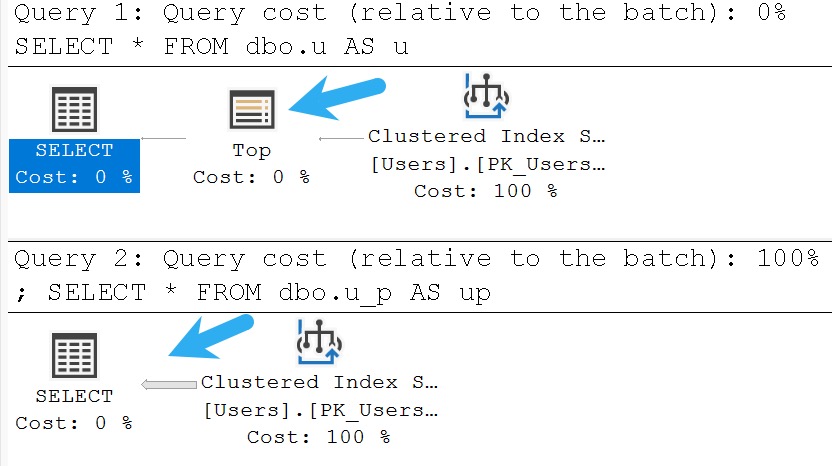
You’ll notice the query plan for the 100 percent view is quite conspicuously missing a TOP operator at all. The optimizer throws it away because it knows it needs to get everything anyway.

sql server query plan
you don’t get a top

Shocking news from 20 year ago, I’m sure.

Equivalency


Getting back to the main point of the post here, common table expressions are the same as a vanilla view — unindexed, with no special create options.

WITH 
    ThisIsTheSameAsAView
AS
(
    SELECT
        u.AccountId,
        c = COUNT_BIG(*)
    FROM dbo.Users AS u
    JOIN dbo.Badges AS b
      ON b.UserId = u.Id
    JOIN dbo.Posts AS p
      ON p.OwnerUserId = u.Id
    JOIN dbo.Comments AS c
      ON  c.UserId = u.Id
      AND c.PostId = p.Id
    JOIN dbo.Votes AS v
      ON v.PostId = p.Id
    GROUP BY
        u.AccountId
)
SELECT
    *
FROM ThisIsTheSameAsAView AS view1
JOIN ThisIsTheSameAsAView AS view2
  ON view2.AccountId = view1.AccountId;
GO 


CREATE OR ALTER VIEW
    dbo.ThisIsTheSameAsACommonTableExpression
AS
    SELECT
        u.AccountId,
        c = COUNT_BIG(*)
    FROM dbo.Users AS u
    JOIN dbo.Badges AS b
      ON b.UserId = u.Id
    JOIN dbo.Posts AS p
      ON p.OwnerUserId = u.Id
    JOIN dbo.Comments AS c
      ON  c.UserId = u.Id
      AND c.PostId = p.Id
    JOIN dbo.Votes AS v
      ON v.PostId = p.Id
    GROUP BY
        u.AccountId;
GO 

SELECT
    *
FROM dbo.ThisIsTheSameAsACommonTableExpression AS cte1
JOIN dbo.ThisIsTheSameAsACommonTableExpression AS cte2
  ON cte2.AccountId = cte1.AccountId;

If you were to capture execution plans for both of these, you’d see the same query plan pattern where the query contained by the view and the common table expression is executed twice, so the results from one reference can be joined to the results of the other reference.

I’ve talked about this many times in the past with common table expressions, but not in comparison to views.

sql server query plan
oh dear me.

If you’re one of those developers who disdains views for their very existence, you shouldn’t feel any differently about common table expressions in practice (at least from a performance perspective).

One place where views edge out common table expressions is that the code is contained in a module that can be referenced by any other query or module (stored procedure, function, etc.). If you fix query performance for a view, everything that references it also gets faster. Doing that for a common table expression that gets used frequently is cool but… then you have to go find and replace it all over the place.

Thanks for reading!

Going Further


If this is the kind of SQL Server stuff you love learning about, you’ll love my training. Blog readers get 25% off the Everything Bundle — over 100 hours of performance tuning content. Need hands-on help? I offer consulting engagements from targeted investigations to ongoing retainers. Want a quick sanity check before committing to a full engagement? Schedule a call — no commitment required.

A Little About PAGEIOLATCH Waits In SQL Server

A Little About PAGEIOLATCH Waits In SQL Server


Video Summary

In this video, I delve into the concept of page IO latch weights in SQL Server and how they can indicate performance issues related to insufficient memory for the amount of data stored. Using my scaled-down server setup, which mimics common client environments with limited resources, I demonstrate how high page IO latch weights can significantly impact query performance by forcing frequent disk access. I also discuss practical steps to mitigate these issues, such as optimizing indexes and improving query writing to better leverage available memory.

Full Transcript

Erik Darling here with Darling Data. In today’s video, we’re going to talk a little bit about page IO latch weights. And before we do, what I need to do is introduce you in case, well, let’s be honest, you may not have seen every single video on my channel. You may not have seen very specific videos where I talked about this tiny little server that I use to really beat up on and show how bad things can get with SQL Server. So let’s zoom in on this a little bit. I should probably be in the right window context for that, right? I hope hitting control and one didn’t break anything important outside of this thing. So this tiny little server has about 14 gigs of memory assigned to it and only two virtual processors. So this thing is very easy to overload and overwhelm. The thing is that this is sort of like me having to create something that scales or like create something that’s a good scale model of like some of the hardware configurations that I see when working with clients. So like my Stack Overflow database is only like a hundred and something gigs, but like, you know, like my laptop that I usually use, the VM that I usually use is 16 cores and like 96 gigs of memory. So like, that’s pretty solid, right? Hardware to like, you know, data comparison. You can still make bad things happen with it, but it’s a lot easier to like show the kind of performance problems I see with a really scaled down VM, but still the same size of data. So like you could take, you know, like a production server that maybe you’ll work with and it might have like, I don’t know, like eight cores or 16 cores or something and like 128 gigs of memory, but you have like a terabyte or two of data on there, right? So like, this is just sort of like a scale model of like the size of the database that I normally use to make sure that the server can kind of like display some of the same issues that I see happening with like live production servers and my day-to-day client work. So that’s kind of the reason behind this thing. So let’s get out of there. And let’s talk a little bit about page IO latch weights before we go too much further. Now, like, I don’t know, maybe like a hundred, 200 years ago, sometime around the time of the American revolution, there were a lot of blog posts that said like, if you have like high page IO latch weights, but either EX or SH that like you, I don’t know, have a disk IO subsystem problem.

I’ve never met a disk IO subsystem. So I don’t really know when one would have a problem or not. It’s kind of a, kind of an outdated term now anyway, I think. But that’s not really what it means. What it means when these weights really accumulate and when you have like a lot of queries that are constantly waiting on these, or you look at weight stats for the server as a whole, and you just see like, like page IO latch weights are a significant, like number of hours of weights compared to like, like how many hours your server has been up. That means that either you don’t have enough memory for the amount of data that you’re storing period, right? Like nothing you do is ever going to work. You might have great indexes. You might have great queries. You just can’t possibly cache everything you need in memory. So your queries are constantly going out to disk to get it, to bring it into memory to, so that your queries can start, you know, using them.

It could also mean that maybe one, like there’s a, just like a deficiency somewhere, right? Like you, maybe your queries are written like crap with a lot of non-sargable predicates, like is null, coalesce, substring, left, right, whatever, in the where clause. Or maybe you just have like no good indexes for your query to use and everything is scanning like a heap or a clustered index or something. I don’t really have a good hard and fast rule about how much memory you should have compared to how much data you have.

You know, if you can get close to one-to-one and, you know, you see your page IO latch weights, like almost disappear, great. You might be in weird situations where, you know, like you might have on your server, like a five terabyte database full of nothing that anyone ever touches. You just dump data into it from other places and it’s like archive, cold storage, like maybe like once a year someone will do something with it.

And your main production database is reasonably small. So like don’t just look purely at size of data when you want to figure out how much memory you have. Really what you want to do is look at your page IO latch weights.

And kind of like a weird brute force way of thinking about it is that like every time you double memory, you’ll cut your page IO latch weights in half. That’s not always going to be perfectly true. That’s not always going to be like exactly what happens.

But that’s like a just like a way to start thinking about it so that you can start figuring out exactly how much memory you might need to get rid of them as completely as possible. The reason you want to get rid of them as completely as possible is because when queries have to go to disk, right, disk is always going to be the absolute slowest component in a server. I say I use like I use in a server loosely because most storage these days is not actually in the server.

Most storage these days is connected via network. That’s also true of my VM, right? Because if you look at my VM, it’s on this tiny little Samsung disk, right?

And this Samsung disk is connected via a little USB cable right here. And this tiny little USB cable is often what has a very, very hard time moving data around, right? So my VM and everything is on here, but all my memory is on my laptop.

So anything that I do has to get scooted across that wire, which can really slow things down. One great way of figuring out if not your storage, but if your storage networking is having a hard time keeping up with the amount of data load that you’re putting on it, is to look in the error log for 15-second I.O. warnings.

To make this easy on you, I have a store procedure called SP underscore log hunter. I apologize. My social media intern who does all the sound effects in my store procedure is still out sick.

I don’t know. Maybe drunk just disappeared something. I don’t know. Maybe they quit. I just haven’t found the letter yet. But if you go there, you can run.

If you go to code.erikdarling.com, you can grab SP log hunter, and you can use that to parse through your error log and look for all the awful things that hide out in there. The 15-second I.O. warnings are one of the messages that it looks for. So what I’m going to do is I’m going to configure my tiny little server tuning server to have 8 gigs of memory.

And I’m going to create this store procedure, which actually it’s already created. I don’t know who I think I’m fooling here. And I’m going to use SQL query stress to throw 10 threads, at least according to my notes here.

I need 10 threads and 10 iterations. All right. Good background information there, right?

10 threads, 10 iterations. 10 times 10 is 100. I’m going to run this thing 100 times. I’m actually going to run it more than 100 times. If you look at the logic in here, it’s kind of gnarly. This runs in a while loop, and this while loop essentially will make this thing run 10 times.

Every time it runs, it’ll pick a random number between 1 and 5. And depending on what number goes, we’re going to do a select count from a different of the main tables in the Stack Overflow database. So what this is designed to do is, like, with the amount of memory that we have in here, is just a really stressed disk.

All right. So if we look at, where is that hiding? Oh.

That’s in here somewhere. Maybe it’s not. Maybe I lied to you. Maybe I need to type in a demo. I’m sure I’ll offend someone. Usually do, right? Someone gets mad about something. Let’s look at SP pressure detector.

Okay. Let’s examine some stuff here. One of them, or rather, what I want to look at, is down here in the memory section. So I have 126 gigs of data, 14 physical gigs of memory, and 8 gigs assigned for max server memory.

All right. So there’s no way that me reading all those tables randomly from all this stuff is going to play well with this stuff. All right.

So obviously, we’re at a little bit of a disadvantage here in our data to memory ratio. So let’s, I already have this window open with SP who is active in it. Put a, oh, that’s two semicolons.

I typed again. Freak out. Right now, nothing’s going on. But if I hit go here, and we start looking at what’s running, all of these queries are going to get really just beaten up by page IO latch weights. All right.

We just keep running this and looking at stuff. We have some really, really bad weights going on here. All right. Almost 500 milliseconds. There’s another one.

Oh, 200 milliseconds. There’s a couple more that are almost 200 milliseconds. So this is what query workloads will look like on servers where, like, you just plain don’t have enough memory. It might not be this amazingly consistent.

It might not be, like, just everything waiting for all the time. But if you use SP who is active enough and you get familiar enough with your server, you’ll probably see this situation happen quite a bit. Right.

If you, you know, just, like, make sure, like, keep an eye on, like, your really busy times of the day, this is going to happen, like, constantly. Right. You’re just always going to see, like, in whatever list of queries are running, you’ll see, like, a bunch of them waiting on page IO latch weights. So let’s go cancel this because we don’t really need to, we don’t need to keep doing that.

So that’s what, in general, queries will look like when page IO latch weights are, A, like, dominant in the workload, and B, when you’re, like, you’re overwhelming storage hardware at some point. Either, I mean, I guess it could be the disks. It’s usually not the disks.

The disks are usually fine. It’s usually the networking between your server and wherever you’re reading stuff from. So one thing to sort of think about with all that, again, like, as you double memory, like, you might cut those weights in half.

Now, if I were running this demo on my laptop where the storage is direct attached and really fast and, you know, just, like, all internal and, like, the memory and the storage and the CPU are, like, within, I don’t know, it’s a 16-inch laptop. So they’re going to be pretty close to each other. There’s not a lot of, like, distance to travel for things to get from one part to the other.

We would still see a lot of page IO latch weights, right, because I don’t have enough memory to keep what I need available for queries to use. But you probably just wouldn’t see, like, the milliseconds get up as high, right? And I know that, you know, like, almost no one is using bare metal servers with direct attached storage.

And, you know, if you’re on a VM where your storage is remote to your server or you’re in the cloud where you’re, like, I know there are certain cloud instances that do offer, like, some forms of direct attached storage. But let’s face it, if you’re watching free videos on YouTube, like, to learn about SQL Server, your company is most likely not springing for, like, the really good servers with, like, the really fast direct attached storage. You’re probably, your storage is probably, like, a couple tin cans and some old yarn.

So there is that. Now, one way that, well, two ways that you can sort of make better use of the memory that you have is to give queries better indexes to access data, like, quickly and easily. And, you know, like, all these queries, if we look at the estimated plan for this thing, all of these queries are just going to be doing clustered index scans, right?

So we’re reading, like, effectively the table, like, everything, right? It’s, ugh, get in there. The clustered indexes are, you know, big.

They’re all the columns in the table. I was actually at a session sort of recently by a fellow named Tim Chapman who works at Microsoft. He made a really good point that calling clustered indexes clustered indexes can be somewhat misleading because it’s really clustered tables, right?

Because you have a heap table or you have a clustered table. Putting a clustered index on a heap makes it a clustered table. It’s not like you have this heap object and then a clustered index somewhere over here.

You just cluster the table, right? So your table is the clustered index. So I thought that was a really good point. I’m trying to make, like, a mental note to, you know, phrase things that way because I think it’s actually a really good point and something that a lot of people do get confused about when they’re working with SQL Server.

So a lot of other database engines, they don’t necessarily have the concept of clustered index, right? Like Postgres is like heaps and then being treated in nonclustered indexes and the 7,000 other kinds of indexes you can create there. Oracle, I mean, who knows?

I don’t have enough money to test it. So I’ll just leave that alone. But if we wanted to make better use of the memory that we currently have in the server, again, we could create narrow, nonclustered indexes that would be useful for our queries to use. But we also have to make sure that the queries are written in a way to take advantage of those indexes.

So while this index creates, I forget how long this takes. You know, it’s a tiny little baby server. It might take a second.

I’m going to show you with this index. And this is a single key column index on the PostID column in the comments table. What I’m just going to show is two examples of queries where we have a good where clause like this, right, plainly written without any interference, and then a bad where clause that looks like this, where, you know, we’re not going to be able to take good advantage of the index that we just created on the table.

So I’m going to run the query two different ways. And in those two different ways, what I’m going to show you afterwards is how much of the index ends up in memory, like after the query runs. All right.

So we’re going to come back up here. And we’re going to run this first with the good where clause. And let’s execute you.

All right. So we have our nice narrow little index, right? If you look up here, you can see this frame that a little bit.

The primary key, the clustered primary key, or the clustered table that is the comments table is about 8 gigs. And our narrow little nonclustered index is about 241 megs. Now, I did use page compression with this index.

I tend to, like, use page compression a lot with indexes when I create them because it’s just another really good way to take advantage of or to make better use of your server’s memory. It’s a smaller object on disk. It’s a smaller object in memory.

And there’s just some, you know, some CPU overhead as you decompress it on the way out of the buffer pool. So our query, when it ran, it used our nice narrow little nonclustered index here. And we’re able to seek very easily to the row or rows.

I mean, there’s one row. It counted one that we cared about. And because of that, we were able to read just a very small portion into memory. Now, granted, this is just one execution of one equality predicate.

In real life, you’ll have, like, a whole bunch of queries that are running and looking for different equality predicates. So you might, over the course of time, you’ll end up reading portions of that index. And you’ll probably see more parts of that index in the buffer pool.

But it’s still a much better use of the buffer pool than just straight up scanning a clustered index. So let’s rerun this with the badware clause. Zero on that and one on that.

I should probably write this as a loop or something. But, you know, I’m kind of lazy. And I like typing in demos because it makes all the right people upset. So now let’s run this with the badware clause using that coalesce function there.

And what happens is because we still get the same result back of one row. But when we look at the query plan, it’s a scan of that nonclustered index. It’s no longer a seek into that clustered index.

And because we had to scan that whole thing. Now, not every scan will always read everything in there. If you use, like, top or offset fetch, you could bail out early. But in this case, we don’t have either of those.

We’re just getting a count. But because we had to scan that, we had to do a scan and get the whole thing into memory, it looks a lot different this time. Right? Now all 241 megs of the index end up in memory.

So when you’re thinking, when you, like, let’s say that page IO latch weights, both the underscore sh and the underscore ex, those are the most common ones that I see. I don’t usually see the other page IO latch weights cropping up and being awful issues.

Let’s say that those are, like, really just, like, predominant weights on your server. Or every time you sample your workload, you see a lot of those page IO latch weights cropping up and slowing queries down. Right?

Just adds, like, variable speed queries. Like, maybe not parameter sniffing. Maybe it’s just, you know, crappy luck with what data pages are in memory. So, like, let’s say that, like, you know, you’ve made an assessment of the server that, like, page IO latch weights are a problem. You can kind of, again, you can kind of brute force reducing them by, like, thinking every time you double memory, you’ll cut those weights in half.

Right? Like, for me, ideally, if, like, I don’t really like to see page IO latch weights be more than, like, 20% of, like, your server’s uptime. Granted, like, bursty workloads can make it look like they’re barely a problem.

But, you know, like, really, like, you know, consistent, like, ongoing workloads. I want to say 24-7. But I hate saying 24-7 because it reminds me of being on call, which is, like, depressing.

But, like, let’s say, you know, you’ve made that assessment. You can generally think that every time you double memory, those weights will get cut in half. You can, of course, like, that’s usually, like, a good, like, I want to make a big change really quickly.

Like, I want to, like, I’m going to do something to the server that’s going to make every query faster immediately. That’s one thing you can do. If you can’t, like, I don’t know, for whatever reason, either you can’t do that or you’ve already done that, then it’s time to start looking at, you know, queries and indexes.

You know, like, your first step probably shouldn’t be adding indexes. Your first step should be, like, assessing indexes. Look for unused indexes.

Look for duplicative indexes. SP Blitz indexes, of course, wonderful for that. And you’re going to want to start, like, trimming down indexes first. After the indexes get trimmed down a whole bunch, then adding in new indexes that support queries better is a good second step.

Also, making sure that your queries are written in a way that they can actually take advantage of all the indexes that you’ve created on there. So that, you know, like, you don’t create these indexes and then realize that your queries all have, like, is null, coalesce, left, right, substring, you know, other sort of, like, non-sargable predicates in your queries that make it so that your queries can’t seek the data. They have to scan data to filter everything out.

So, you generally don’t want to tinker with disk speed to fix this. You want to make sure that you’re not reliant on disk anymore, right? Like, getting faster disks might speed up the page IO latch weights, but your goal should be to just, like, get rid of them by not being reliant on disk.

Faster disks can be useful for some things, right? So, like, if you, like, you know, if you have, like, really high write log weights and, you know, the average milliseconds per weight is pretty high, faster disks can be useful for that. But having more memory is still valuable because you’ll be, like, especially considering, like, most servers are using remote storage, more memory is still really valuable for that because you will be taking traffic off the network pipe between your server and the storage.

So, you will clear that space so the write log stuff can happen faster. IO completion weights, backup related weights, those can also be helped by faster disks and whatnot. But really, your goal should be to increase memory to the point where, like, A, your queries are more consistently fast because you don’t have to sometimes go to disk and sometimes not.

And you want to clear that network path so that when queries do need to go to disk, either to read data or to write data, they have a pretty clear pipe to do it. So, that’s my thoughts on that. And that is a little bit about page IO latch weights.

Whew! All right. So, as always, I hope you learned something. Hope you enjoyed yourselves.

Thank you for watching. If you like this video, there’s a thumbs up button that I would appreciate you punching the crap out of. Like, really wind up. Go at it.

Like, punch it like it kicked your dog or something. If you like this kind of SQL Server performance tuning content, there is also a subscribe button, which I would like you to attack with equal aggression, equal veracity. That’d be cool.

And let’s see. What else? I don’t know. Yeah, like, subscribe. Got that covered. I think that’s about it. All right. It’s dinner time. I’m going to get out of here.

I’m going to go change into my formal Adidas t-shirt and do the dinner thing. So, thank you for watching, and I will see you in the next video. It might be tomorrow if you’re all good, well-behaved out there and you really like and subscribe with adequate force.

Thank you.

Going Further


If this is the kind of SQL Server stuff you love learning about, you’ll love my training. Blog readers get 25% off the Everything Bundle — over 100 hours of performance tuning content. Need hands-on help? I offer consulting engagements from targeted investigations to ongoing retainers. Want a quick sanity check before committing to a full engagement? Schedule a call — no commitment required.

sp_PressureDetector: Now With PerfMon Counters And Server Sampling

sp_PressureDetector: Now With PerfMon Counters And Server Sampling


Video Summary

In this video, I discuss two recent updates to SP Pressure Detector, a tool I’ve been working on for monitoring SQL Server performance. Despite the late hour—my usual night owl tendencies led me to stay up until four in the morning, sans any celebratory drinks—I managed to add some new features that should help you better understand your server’s current state and recent trends. The first addition is a suite of Perfmon counters, which I’ve ordered by object name and counter name for clarity, though feedback on this ordering would be greatly appreciated. Additionally, I’ve introduced the ability to sample your server over a specified period, allowing for more granular analysis without long wait times. While these changes are still in their early stages, I’m excited about how they can enhance troubleshooting workflows. As always, any suggestions or critiques are welcome at Darling Data; we’re dedicated to making our tools as useful and user-friendly as possible.

Full Transcript

Erik Darling here with Darling Data. And in this whirlwind video, I’m going to talk about a couple new additions to SP underscore pressure detector. And unfortunately, my audio tech who adds the echo to all of my storefront videos, store procedure announcements is out sick today. So you’re just going to have to deal with an echo-less store procedure announcement. So the two big things that I added to SP pressure detector recently, it was a weird night where I didn’t drink. And I felt very motivated.

And I ended up staying awake until like four in the morning, adding all this stuff in. I’m not going to walk you through the code because it’s kind of boring. It’s just like, you know, a loop and a go-to and a second pass and things for one thing. And it’s just a bunch of perfmon stuff for the other thing. And if in your whole entire long-legged life, you have never seen a sys.dmos performance counters code, you’re actually probably pretty lucky because everything you have to do to query that dynamic management view is real ugly.

Whoever designed that has a pure hatred for humanity that I don’t think can ever be matched, at least not by another human. If aliens ever invade Earth and start inflicting torture and cruelty upon the entire human race, like in that John Travolta movie where he’s an alien and really likes gold, I think it’s a Scientology flick. I can’t really remember. I can’t really remember. It’s something Earth, Battlefield Earth maybe.

Then maybe someone could equal, probably not surpass, but at least equal the hatred that whoever designed this management view has for humanity. So we’re going to skip that part because I care about you. We care about you a lot. That’s why I stay up until four in the morning dead sober writing these things.

So, yeah, we’re going to just dive right into it then. So I’m using SSMS 20, brand new release. Very excited about the fact that Azure Data Studio is no longer packaged in with SQL Server Management Studio 20.

There are a couple of downsides, though. One, I’m a little lazy, and I haven’t quite set up everything in here the way I want it to. And also, SQL Prompt does not yet detect SSMS 20.

I went to install it, and it was like, you need to have SSMS installed. And I was like, I have SSMS installed. So I guess it’s just a waiting game on that. All right.

Anyway, I’m going to give SP Pressure Detector a run like this. And I only have the minimum disk latency thing up here set to one so that results actually come back from it. Because I have good disks in my laptop, my very expensive laptop.

And gosh darn it, there’s not a lot of latency in there, which is both good and bad. All right. Okay.

So we’ll give this a run. And the new thing that I added to the results here is Perfmon counters. So I’m still tinkering with this a little bit. I’m not exactly sure if this will be the final set of Perfmon counters that I include.

I might add some. I might take some away. I might change the way that the results are delivered. But for the most part, I’m okay with what I get back now.

Like, it’s working, and it just needs some tinkering. Right? Because, again, you stay up until like 4 in the morning doing something. You know, you make some editorial choices that, you know, next day you might not agree with.

That goes for probably whether you’re sober or not. Probably more so if you’re not. But, you know, 4 in the morning does desperate things to the soul.

So right now I’m returning a bunch of Perfmon counters. The ordering of them I like, but I’m not in love with. I order by object name and counter name and then totals within that.

I tried just ordering by, like, totals, but I found that, like, the object name stuff being… The object name and counter name stuff being all mixed up made the results, like, confusing to read. And it was kind of nice having everything, like, grouped together and then ordered within those groups.

But, you know, you might like it a different way. And if you do, if you prefer it a different way, go to my GitHub repo. We can maybe figure out if there’s, like, some custom ordering that I can add in there.

Or maybe just you have a better idea for the ordering. We can go with that. I don’t have so much pride of authorship that I think I do everything right on the first try. Especially at 4 in the morning.

So, yeah. Feedback is always welcome at Darling Data. So, yeah, this section, you know, pretty normal Perfmon counter stuff. Again, you know, I’m not really sure if everything is going to stay in here.

Or if I might subtract some stuff or I might add some stuff. I don’t know how I feel about, like, having, like, metadata lock stuff in there. Like, there’s probably going to be some time when, like, it’s, like, the problem.

And I’ll kick myself if it’s not in there. So, for now, I’m just going to leave it in. But if there are any Perfmon counters you feel like they’re missing from this list, you can see if you go into the El Sorso Codo from this store procedure.

I’m only going to scroll down to the list of them because that’s the stuff that I would like feedback on. So, if there’s anything from this list that you feel is missing or that you feel is stupid, again, feedback.

Always welcome at Darling Data. We are voted by Beergut Magazine the friendliest and most willing to accept user feedback. SQL Server Consulting firm, the entire known universe.

And apparently that includes whatever the aliens from Battlefield Earth were, wherever they’re from, I’m not entirely sure. But, you know, anyway, this is the current list.

Let me know. Let me know. So, that’s the one thing, right? We added in Perfmon counters. The second thing that I added was the ability to take a sampling of your server. So, you can run SP Pressure Detector for, I believe, a tiny-ent number of seconds.

I think it was a tiny-ent. The cap on that is 255 seconds. If you really need bigger than that, I don’t think you’re doing the kind of emergency troubleshooting that I do. I usually don’t need more than, like, maybe 30 seconds at the high end, maybe 60 seconds at the very high end.

So, I capped it at a pretty small number because I didn’t want someone to enter, like, 2 billion in there and just, like, have a wait for going for 2 billion seconds, however long that is. The aliens from Battlefield Earth will probably have killed us all by then.

So, I’m going to kick off a query over here just so there’s a little bit of activity. I’m going to drop clean buffers just to generate some reads and whatnot. And then I’m going to run this.

And roughly 5 seconds later, depending on exactly where in the wait for we hit. Sometimes it says 6 seconds. I think it’s just like I hit, like, a weird edge of things. But that’s no big deal.

It’s close enough to 5 for me. It’s not like anything in here takes a second to run. It’s all fast, right? So, what we see up here, let me just tuck that away to buy ourselves a little bit more screen real estate. What we have in here, oh, I didn’t mean to cover that up.

I’m just silly of you. I want everyone to see the glory of the sample seconds in here. It’s very important stuff. You’re going to see wait stats.

And I have reshuffled the column orders a little bit just to make things, like, right and consistent looking. And I’ll name the same thing. But right now, the only three result sets that get the sample comparison are the first three that you see here. So, wait stats, file stats, and perfmon counters.

Nothing else right now does that. I just don’t know what else I would really care to do that for. Like, the memory stuff, I mean, I guess it would be okay.

But, like, you know, really, like, I just don’t see a lot of value in it. If you see value in it, maybe we can, you know, we can, again, user feedback is always welcome. We can figure that out.

But, like, any section that has the final column sample seconds in it, like these do, those are the ones that have sample comparisons. The rest are just kind of a snapshot of what’s currently happening. So, like, the buffer pool memory is current.

The 10DB info is current. All the stuff that you see down in here is current. The thread usage stuff actually might be kind of cool to have a comparison for. But, you know, you know, V1, 4 in the morning.

I wasn’t willing to stay up until 5 in the morning to get this going. So, that’s what we have there. So, this will tell you, you know, what weight stats you had during that sample. What drive activity you had during that sample.

And this is still ordered by the total read stall here, which might look a little bit funny. Look at 10DB with negative 26. That’s cool.

Thanks. Thanks, 10DB. File 7 having fewer reads at the end than at the beginning, I guess. Or, sorry, less average read stall at the end than at the beginning really threw me off there. I might have to do a little bit of fixing on this to get all the numbers kind of in a nice positive space.

But even though these files had the most reads, those reads happened very, very quickly. All right. No messing around in my laptop.

So, a couple new cool, I think, new things added to SP Pressure Detector. Again, this is all free open source stuff. You can download it.

You can, if you’re feeling particularly masochistic, you can read the source code. You can put these on your servers. You can run them. You can find your SQL Server problems. And if you need help fixing your SQL Server problems, young, handsome consultants are standing by to help you.

Like me. I meant me, not anyone else. All the other consultants are old and ugly.

You want young and handsome consultants. Right? Cool. Anyway, thank you for watching. Hope you enjoyed yourselves. I hope you learned something. I hope you find this code useful.

I hope that you’ll go download it, try it out. And, of course, give the old darling data some feedback. Because that’s what we thrive on. People saying, you’re an idiot.

Or, thanks. Either one. Kind of cool. Anyway. Thank you for watching. And I will see you in another video some other time. Goodbye.

Going Further


If this is the kind of SQL Server stuff you love learning about, you’ll love my training. Blog readers get 25% off the Everything Bundle — over 100 hours of performance tuning content. Need hands-on help? I offer consulting engagements from targeted investigations to ongoing retainers. Want a quick sanity check before committing to a full engagement? Schedule a call — no commitment required.

Join me In Boston May 10 For A Full Day Of SQL Server Performance Tuning Training

Spring Training


This May, I’ll be presenting my full day training session The Foundations Of SQL Server Performance Tuning.

All attendees will get free access for life to my SQL Server performance tuning training. That’s about 25 hours of great content.

Get your tickets here for this event, taking place Friday, May 10th 2024 at the Microsoft Offices in Burlington.

Here’s what I’ll be presenting:

The Foundations Of SQL Server Performance Tuning

Session Abstract:

Whether you want to be the next great query tuning wizard, or you just need to learn how to start solving tough business problems at work, you need a solid understanding of not only what makes things fast, but also what makes them slow.

I work with consulting clients worldwide fixing complex SQL Server performance problems. I want to teach you how to do the same thing using the same troubleshooting tools and techniques I do.

I’m going to crack open my bag of tricks and show you exactly how I find which queries to tune, indexes to add, and changes to make. In this day long session, you’re going to learn about hardware, query rewrites that work, effective index design patterns, and more.

Before you get to the cutting edge, you need to have a good foundation. I’m going to teach you how to find and fix performance problems with confidence.

Event Details:

Get your tickets here for this event!

Going Further


If this is the kind of SQL Server stuff you love learning about, you’ll love my training. Blog readers get 25% off the Everything Bundle — over 100 hours of performance tuning content. Need hands-on help? I offer consulting engagements from targeted investigations to ongoing retainers. Want a quick sanity check before committing to a full engagement? Schedule a call — no commitment required.

Updates To sp_QuickieStore, sp_HealthParser, and sp_PressureDetector

sp_QuickieStore


The Darling Data machine has been hard at work making the bits and bins and whatnots work better.

You can download all of the main SQL Server troubleshooting procedures I use in one convenient file.

Okay, so like, maybe not all that hard at work, and we I had some help with a funny bug, stemming from a recent Pull Request. The Read Me file has been updated to reflect the newest parameters.

Let’s start with giving some credit, here, since I hate an overdue bill.

ReeceGoding reported and very capably fixed an issue with sp_QuickieStore. The problem only occurred when you ran the procedure with @get_all_databases and the new @escape_brackets parameter set to true. Each loop would add an escape character to the search string, which could end up looking like this: %\\\\\[AnyStringStartingAndEndingWithSquareBrackets]\\\\\]%'

The good news is that it’s fixed now. A big round of applesauce for that. It’s the only substantial change to sp_QuickieStore.

Now, on to the other stuff!

sp_HealthParser


I had to make a bunch of adjustments in here. I was testing out some stuff and hoping that I could make it work, but the math just wasn’t there. Or the maths just weren’t there, if you’re into multiple maths.

For the wait stats sections, I’ve removed the “total wait time” column. It just didn’t make any sense, because the only information that I had was the total number of waits, the average number of waits, and the maximum wait time. I was hoping I could get sensible numbers by multiplying the total and average, and adding the max wait time to that. The problem is that the numbers were huge. Enormous. Senseless.

The other thing I had to do some work on was in the “waits by duration” section. It seemed like the results would just re-report on every collection cycle, even if no new waits had occurred. It would make things look like you had the same waits in every grouped block of time. Via the magic of windowing functions, I weed out absolute duplicates, and only show where the wait stats report something new. As part of this, I also filter out waits with a low average duration (less than 500ms by default). You can change this behavior by using the @wait_duration_ms parameter.

Another thing that I set a threshold on was in the “cpu task details” section. In there, it would show sections with a warning logged to the system health extended event. The problem was mainly that a warning would be logged whenever there was even a single pending task (query waiting to get on a CPU). Having just one of those is not a very interesting sign of CPU pressure, so there’s a parameter called @pending_task_threshold that defaults to 10 which you can use to decide how many pending tasks matter to you.

sp_PressureDetector


This is perhaps the biggest update! It hadn’t changed much in a while, and I wanted to get a little more out of what SQL Server has to offer.

The big changes are:

  • Added in some useful PerfMon counters to the results
  • Added the ability to sample server activity

When you run sp_PressureDetector the “normal” way, it’ll show you perfmon counter activity since startup. I only collect specific ones though, and only specific counter types. See, there are a variety of types of counters.

The math to figure out how much of something happened during a period of time is about the same for all of them, but I found looking through the various categories and specific counters, that only those that come from types 272696576 and 65792, and only certain ones within those.

The new section will look something like this:

sql server query results
perf, mon

If you decide that you don’t care about perfmon counters, you can skip that section by using the @skip_perfmon parameter.

The sampling code was inspired by running into some client issues where hitting F5 was okay, but remembering what all the numbers were before to compare them to after. You can run the sampling code by doing this:

EXEC sp_PressureDetector
    @sample_seconds = 5;

Not every section supports this yet. I started with the ones that I thought would benefit the most:

  • Wait stats
  • File stats
  • Perfmon counters

I may add it to more later, but these are good enough for now. The easy way to think about it is that only sections with a “sample_seconds” column in them are sampled. The rest are current.

Look for a video walkthrough of the latest round of changes.

Again, you can download all of the main SQL Server troubleshooting procedures I use in one convenient file.

Issues and Contributions


If you’d like to report an issue, request or contribute a feature, or ask a question about any of these procedures, please use my GitHub repo. Specifically, check out the contributing guide.

As happy as I am to get emails about things, it makes support difficult for the one-man party that I am. Personal support costs money. Public support is free. Take your pick, there!

Thanks for reading!

Going Further


If this is the kind of SQL Server stuff you love learning about, you’ll love my training. Blog readers get 25% off the Everything Bundle — over 100 hours of performance tuning content. Need hands-on help? I offer consulting engagements from targeted investigations to ongoing retainers. Want a quick sanity check before committing to a full engagement? Schedule a call — no commitment required.