A Little More About Isolation Levels In SQL Server

A Little More About Isolation Levels In SQL Server


In this video, I talk about some of the misguided expectations that Read Committed has associated with it, and query patterns to watch out for under Read Committed Snapshot Isolation.

If you’d like to see my full day performance tuning session, here are upcoming dates:

Video Summary

In this video, I dive into the often-overlooked world of SQL Server isolation levels, particularly focusing on read committed snapshot isolation (RCSI) and its alternatives. With a humorous twist, I highlight common misconceptions about isolation levels and demonstrate how they can lead to issues like race conditions under different scenarios. By walking through practical examples and real-world queries, I aim to clarify the nuances of these settings and help you make informed decisions for your database environments. Whether you’re dealing with complex query patterns or just looking to avoid potential headaches, this video offers valuable insights into optimizing SQL Server performance without overcomplicating your setup.

Full Transcript

Erik Darling here with Darling Data, a surrogate style of Beardgut Magazine. Long, beautiful relationship. Today I want to talk about isolation levels a little bit because something that keeps coming up, and the most annoying things about isolation levels keep coming up, things that I really loathe having to repeat or try to do. tell people about over and over again. And we’re gonna do that today. Because Friday, there’s nothing like a good Friday talk about isolation levels. So first, no isolation level is perfect for everything all the time. I wish that one was because then we could all just use that and we could stop having these conversations. But usually, SQL Server, where we’re going to go, we’re going to go to the next level of the world. So we’re going to go to the next level of the world. The things that I have to talk people out of is one using no lock hints, because that’s where you get bad data potentially under concurrency. And the other one is the switch between read committed, the default pessimistic isolation level in SQL Server, and read committed snapshot isolation, which is an optimistic isolation level in SQL Server. The reason why that’s the usual choice is because most people is because most people have to like, like, like, don’t want to like, like, like, you can use snapshot isolation, but then every query would have to ask for snapshot isolation in some way, either like, like, like, when it like, if it’s an application, when it connects to SQL Server, if it’s a stored procedure, you have to add it to the code, stuff like that. And that just, you know, unless you have a lot of control, unless you have a lot of time and patience, to figure out which queries you want to use an optimistic isolation level, then that’s kind of a tougher one to talk folks into. That also assumes that you have control over those things, right? Like some, if you have a third party application, you might not, your only hope might be to use read committed snapshot isolation, which kicks in for every read query that comes in and hits the database. So that’s the most common choice. The thing is, every time I talk about switching over, where someone will go to some due diligence, and they’ll read some blog posts where all they can talk, they think that there are bugs in SQL Server with read committed race conditions and things like that. And that’s really not the case. The case is that there are certain query patterns you have to watch out for where you might hit race conditions.

Now, I’m not saying that read committed snapshot isolation is perfect, because again, it’s not. But for servers that I look at, where there is a lot of bad blocking between readers and writers, and a lot of deadlocking between readers and writers, read committed snapshot isolation is perhaps the safest way to solve all of those problems in one go. You’ll still have write queries block one another, but the read queries fighting with write queries and write queries fighting with read queries goes away completely. So it is a great isolation level for most SQL Server workloads. And most mature database platforms out of the box use some form of multi version multi version concurrency control by default, right? Even Azure SQL DB uses it by default, because Microsoft probably like, like, hey, we’re going to release this product, we’re going to manage it. We don’t want people complaining about blocking all the time, because then they have to go solve blocking problems. And that’s not fun, because that’s query tuning, index tuning, stuff like that. So read committed, the pessimistic isolation level has a lot of problems that one might consider to be race conditions, if one were to be really concerned about application and query concurrency. So here’s the first example, and I’m going to figure out which way I have to turn. There we go. That should get us in the frame.

Or get get all the text in the frame rather. So if you have a query that just finished reading what used to be row C, but it’s now a ghost record because it was deleted. And your query just finished reading it and your query just finished reading it and has now moved on to row D, that row C will still show up in your query results because your query already grabbed it. It doesn’t disappear from the results. All right. And these slides are all from my foundations of SQL Server performance tuning class. I delivered it a pass. I’m delivering it a couple more times. Data tune in Nashville and up in Boston in May, as part for the New England SQL Server user group. If you’re in either of those areas, it would be a pleasure to see you.

The second reason why read committed isn’t really all that promising of an isolation level is let’s just pretend that again, we just finished reading row C, but then it gets updated. And now we have two row H’s. Our query will show one letter C and two H’s in the results. Right? That’s not great either. Right? That would seem like a race condition. That would seem like a bug. But that’s the way read committed works. Read committed the non-snapshot pessimistic isolation level. It takes very brief read locks on things, but data can change on either side of those locks whenever it wants. Right? Because those locks don’t hold on for very long. There’s no lock escalation with read queries, at least without hints or whatever. But all of this stuff is open to change as soon as those locks get released.

Another reason why it’s not great is because similar situation. Let’s say we’re reading row E. Row F gets updated to be another value C. So now we have two C’s over here. But all our query will see is one C and no F. Right? And those are, again, something that could very much be interpreted as a race condition in your queries if you are really concerned about concurrency. Now, this is stuff that read committed snapshot isolation fixes. But we have to talk about some other stuff first.

The first thing we have to talk about are some query patterns in under read committed the pessimistic isolation level that can also cause things that look like race conditions, but are really just, again, the lack of promise that read committed has as far as what data is going to return. So if you do something like this, right, you, you know, in your store procedure and your query, whatever it is, if you set some variable value equal to something based on a select, locks on that select, unless you add locking hints into transaction, don’t hold on once that query is done.

Actually, even like once it finds that row, like data, data in the table can change all over the place. So if you were to take this, like whatever this gets set to and use it to like, you know, insert into another row, use it to like find data that you’re going to update, that data could be completely irrelevant by the time your query gets to it.

Again, under concurrency, if you’re just running it in isolation, everything’s going to look great every time. But under concurrency, the data in there could change really quickly. Another pattern that could have similar effects as a race condition, big air quotes on that, is if you dump data into a temp table and then you use that temp table to go update things, because whatever’s in that temp table is maybe invalid by the time you go to do that update.

So these are things that a lot of folks don’t think about when it comes to matters of concurrency. And this is a lot of the lack of understanding about the promises that Reid committed the pessimistic isolation level makes are way overblown. A lot of people think that Reid committed the pessimistic isolation level behaves like snapshot isolation, like where your query takes a picture of the data and it’s perfect, or like serializable where nothing can change while your query’s reading the data, right?

Because everyone thinks that what it’s returning is this magnificent piece of data, but all it really promises is blocking and deadlocking with modification queries. And all it promises is that the data that it read was committed at the time that the read happened.

So remember, just like in the slides, modifications can happen all around it. The only thing that’s guaranteed is if you hit a lock, your query will wait for that lock to release before reading that. That’s the only real guarantee that Reid committed the pessimistic isolation level makes.

Now, the next thing I got to talk about is query patterns that might exhibit what seems like a race condition under an optimistic isolation level. But a lot of the times when you hit this, these are also things where there is some potential for these as well under a pessimistic isolation level. They’re just a little bit more rare.

They’re actually pretty rare under even an optimistic isolation level because you have to write really dumb queries for stuff like this to happen. So I’m in my database crap. At least I hope I am.

Home is where the crap is. And I’ve got this table called dinner plans. And I’m going to populate that table with, well, when I wrote this demo originally, there were a bunch of people who I thought I was going to have dinner with at pass.

It turned out the only person I had dinner with was Kendra. But that was nice anyway. It was a great, great, actually, it was like a few dinners with Kendra. She’s like the only person who would hang out with me.

Whatever. Not bad company, though. And so right now in that table, our dinner plans table, this is what things look like. You got a list of people.

And for some reason, seat number one is free. But the other five seats in the table are all taken. So we’re going to make sure that RCSI is off for our crap database. And we’re going to look at, I have these queries set up in the other two windows over here.

But we’re going to look at just real quick what the query does. So this is the kind of sort of dumb query pattern that would exhibit a race condition under RCSI. And it might not necessarily hit under a pessimistic isolation level, but could still happen if things got weird enough.

So what we’re doing is updating a table alias, our table dinner plans, which is aliased as DP. If you are not a very mature person, you want to make jokes, go ahead. But it’s dinner plans, nothing more.

So we’re updating our dinner plans table. And for some reason, rather than just doing a regular update, we’re doing this exists check through the base table to look for an ID where the seat is free. So this is where things get interesting because we have two references to the table.

We have one for the update and one for the select. Only the reference for the update will ever have the type of exclusive locks on it that will prevent a read query under a pessimistic isolation level from executing and getting data. The reference in the select portion, that can read whatever.

So if you have a no lock hint in there, you’re screwed. If you, you know, if in that inner query, you know, any of the stuff happens that we talked about, that like where data can change around where the reads under the pessimistic read committed isolation level happens, you could still hit what feels like a race condition. All right.

So let’s go look at what happens when we do this. So I’m going to say begin tran. I’m going to run that. And we’ve output this. And now I’m going to come over here and I’m going to run this.

And this is going to get blocked. Right. This query is now blocked because we have this update in a transaction, updating dinner plans. And this query wants to update dinner plans and read from dinner plans.

We come back over to this first window and we commit this. This query will come back and return no results. All right.

Because that other query blocked it, updated that row to find a free seat. This query did not find a free seat when it went to run. So let’s commit this now so that we don’t have anything weird going on.

Let’s make sure this is fully committed. Now let’s change the crap database to turn read committed snapshot isolation on. All right.

This takes a second to run. That’s okay. It’s worth it. Okay. So now that’s turned on. Good. If we repeat that same demo, right, we’re going to run this. Oh, you know what?

I didn’t reset things. Let me admit that. Totally forgot to reset the table between runs so that that didn’t fail. And the joys of remembering stuff.

All right. So now let’s run that. And see, this one finds this. All right. And now let’s run this. Now this is still going to get blocked because that update is still happening.

On the other window, right? This transaction is still not committed. But because of the way an optimistic isolation level works, when this query did its update, the last known good version of the row got sent to either if you’re not using accelerated database recovery, it gets sent to tempdb.

If you’re using accelerated database recovery, it gets sent to the version store, local to the user database you’re in. And now, because this query is going to read a versioned row that this query is updating, when we, right, this one found this seat, right, and we commit this, now we come over here, and what did we find?

We found a seat. We know we found a seat. We found a seat. Because this thing got updated to the reverse Eric down here. All right.

So now if we commit this, we’ll have a little bit of an awkward situation. Because forward Eric will think that he got a seat at the dinner table, but backwards Eric will have the golden ticket and say, I get to sit there.

You don’t get to sit there. And then forward Eric and reverse Eric will, like, matter and anti-matter fight. And, I don’t know, some sort of universe death probably will happen. So these are the kind of query patterns that can cause things that, again, look and feel like race conditions under RCSI that you wouldn’t necessarily hit under, read committed, the pessimistic isolation level.

But, again, the promises that read committed, the pessimistic isolation level make are really flimsy. So, under most circumstances, for most query workloads where people aren’t writing completely idiotic queries, or if you have no-lock hints everywhere anyway, you’re probably better off using an optimistic isolation level because there’s far less, like, room for error than there is when you’re using no-lock hints.

And there’s far less pain than if your read queries are blocking and deadlocking with your write queries all the time. Right?

So, like, this is most queries function better than any database using an optimistic isolation level. If you have queries that don’t, if you have queries that need to read the most up-to-date version of data, just keep in mind that those queries are going to be subject to blocking and deadlocking.

If you want to enable read committed snapshot isolation and you want to have certain queries, not use row versioning, there’s a perfectly good read committed lock hint you can add to those queries or other locking hints that would make sense for those queries.

But just like a direct update like this wouldn’t have the problems that we were looking at. The problem really is the subquery doing the select reads a version of the row that it looks like it wasn’t supposed to because that should have been taken.

But, you know, again, it takes pretty high concurrency for you to find these problems. And it takes pretty stupid looking queries for you to find these problems. Right?

So, in this case, you know, that self-join, completely unnecessary. If you write modification queries that do things like that, you kind of deserve what you get. That’s not a smart way to write queries.

But there are times when you would have to write a query sort of like that, like a different query pattern. Like in this one, it’s particularly stupid because it’s just one table that we want to update and there’s no reason to do a subquery to touch another table.

But if there were like a different table where like we had to like update from like, you know, some reservation list or like a guest list or like, you know, like a list of reservations where you could possibly like go, you know, go to different restaurants or whatever.

Those are circumstances when having a subquery would be necessary. But I just want to remind everyone that like those subqueries under read committed could also read some weird data.

Like data could change before or after and because this table is the only one. It’s not going to have any sort of exclusive locks taken in there or around it. This wherever the select is.

So if you join tables together to do updates and there’s a no lock hint on like one of the on the table that’s not getting updated or you’re just using read committed the pessimistic isolation level.

You can still see weird stuff that’ll look and feel like race conditions under a pessimistic isolation level. Well, actually specifically under read committed the pessimistic isolation level. Serializable and repeatable read offer way more guarantees.

They also offer way more blocking. So you have that to look forward to. Anyway, this was a little bit longer than I expected. And like I said, it’s Friday and got some stuff I got to go do.

So I’m going to go do that. I’m going to get this started uploading as usual. I hope you enjoyed yourselves.

I hope you learned something. I hope that if you are not currently using an optimistic isolation level and you have a lot of problems with locking and blocking, you’ll consider using an optimistic isolation level. I hope that if you are slathering your queries with no lock hints, some bizarre cargo culting about saying that’s a best practice that you’ll consider using an optimistic isolation level and removing those.

If you enjoyed the video, pretty pleased give it a like. If you enjoy this sort of technical SQL Server content, feel free to subscribe to my channel. I’m always happy to have new folks coming in and learning stuff.

And I don’t know. Gosh, I think that’s it. I can’t think of a single other thing to say. Happy Friday. Hope everyone has a great weekend.

Thank you for watching and I’ll see you in the next video. Have a good one.

Going Further


If this is the kind of SQL Server stuff you love learning about, you’ll love my training. Blog readers get 25% off the Everything Bundle — over 100 hours of performance tuning content. Need hands-on help? I offer consulting engagements from targeted investigations to ongoing retainers. Want a quick sanity check before committing to a full engagement? Schedule a call — no commitment required.
Join me at DataTune in Nashville, March 8-9 2024

Spring Training


This March, I’ll be presenting my full day training session The Foundations Of SQL Server Performance Tuning.

All attendees will get free access for life to my SQL Server performance tuning training. That’s about 25 hours of great content.

Get your tickets here for this event, taking place Friday, March 8th-9th 2024 at Belmont University – Massey Center 1900 Belmont Blvd, Nashville, TN 37212

Here’s what I’ll be presenting:

The Foundations Of SQL Server Performance Tuning

Session Abstract:

Whether you want to be the next great query tuning wizard, or you just need to learn how to start solving tough business problems at work, you need a solid understanding of not only what makes things fast, but also what makes them slow.

I work with consulting clients worldwide fixing complex SQL Server performance problems. I want to teach you how to do the same thing using the same troubleshooting tools and techniques I do.

I’m going to crack open my bag of tricks and show you exactly how I find which queries to tune, indexes to add, and changes to make. In this day long session, you’re going to learn about hardware, query rewrites that work, effective index design patterns, and more.

Before you get to the cutting edge, you need to have a good foundation. I’m going to teach you how to find and fix performance problems with confidence.

Event Details:

Get your tickets here for this event!

Going Further


If this is the kind of SQL Server stuff you love learning about, you’ll love my training. Blog readers get 25% off the Everything Bundle — over 100 hours of performance tuning content. Need hands-on help? I offer consulting engagements from targeted investigations to ongoing retainers. Want a quick sanity check before committing to a full engagement? Schedule a call — no commitment required.
Indexing SQL Server Queries For Performance: Fixing A Non-SARGable Predicate

Nausea


Okay, deep breath. Deep, deep breath.

Would you believe I still have to fix queries with a bunch of functions in joins and where clauses? Like every day? All day?

Where things get tough is when there’s some third party vendor app where code can’t be changed, but customers have become so fed up with performance that they’re willing to make other changes to help things along.

This isn’t a big fireworks demo. I could have spent a lot more time finding a worse scenario, and I’ve hinted it to exacerbate the issue a bit.

Sometimes my hardware is too good for bad demos, probably because it’s not in the cloud.

That whole “cloud” thing has some real problems.

Setup


Anyway, let’s say we have this index (because we do, I just created it).

CREATE INDEX
    p
ON dbo.Posts
    (CommunityOwnedDate, Score)
WITH
    (SORT_IN_TEMPDB = ON, DATA_COMPRESSION = PAGE);
GO

Let’s further presume that we have this stored procedure.

This stored procedure could have been a query.

CREATE OR ALTER PROCEDURE
    dbo.FixNonSargable
(
    @CommunityOwnedDate datetime,
    @Score integer
)
AS
BEGIN
    SET NOCOUNT, XACT_ABORT ON;

    SELECT
        p.*
    FROM dbo.Posts AS p
    WHERE COALESCE(p.CommunityOwnedDate, '17530101') >= @CommunityOwnedDate
    AND   p.Score >= @Score
    ORDER BY
        p.Id DESC
    OPTION
    (
        USE HINT('QUERY_OPTIMIZER_COMPATIBILITY_LEVEL_140'), /*No batch mode*/
        MAXDOP 1 /*No parallelism*/
    );
END;
GO

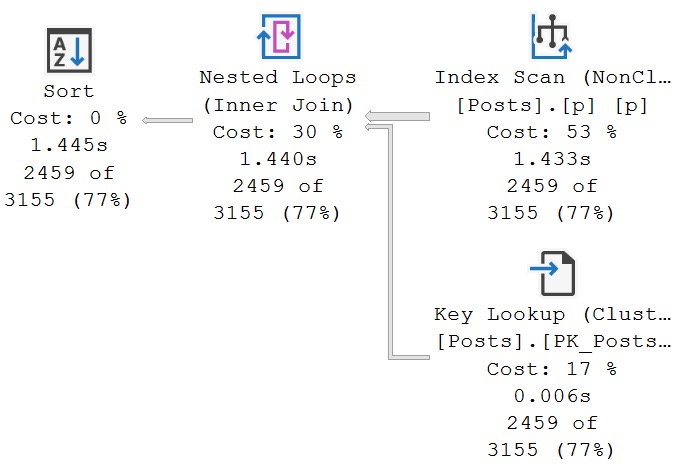
When executed with such great gusto, it’s a bit slow.

EXEC dbo.FixNonSargable
    @CommunityOwnedDate = '20130101',
    @Score = 10;

At ~1.4 seconds, we’re very upset with performance. Throw the whole thing in the trash. Install DuckDB.

sql server query plan

Index Reversal


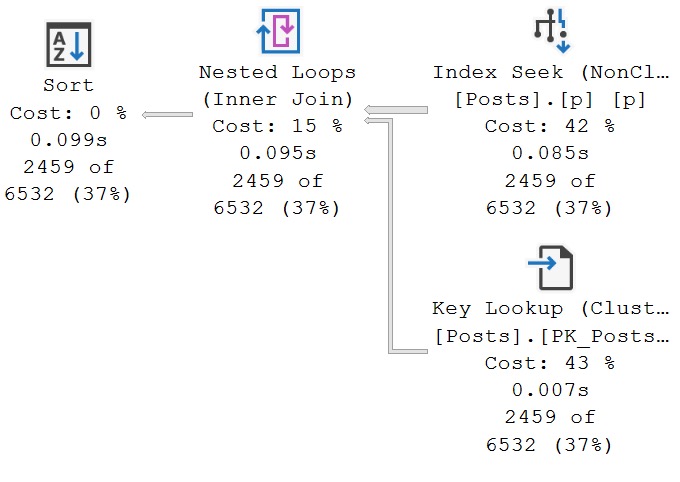
If we change the key column order of our index, so the column with a seekable predicate can go first, we can get faster query execution.

CREATE INDEX
    p
ON dbo.Posts
    (Score, CommunityOwnedDate)
WITH
    (SORT_IN_TEMPDB = ON, DATA_COMPRESSION = PAGE, DROP_EXISTING = ON);
GO

Now you don’t have to wait 6-never months for your vendor to fix their garbage code.

sql server query plan
i could be happy

In this case, changing the order of key columns was a more beneficial arrangement for this particular query.

Results may vary. Not query results! I mean like, if you go do this in your database. On “your” hardware. In the “cloud”.

Thanks for reading!

Going Further


If this is the kind of SQL Server stuff you love learning about, you’ll love my training. Blog readers get 25% off the Everything Bundle — over 100 hours of performance tuning content. Need hands-on help? I offer consulting engagements from targeted investigations to ongoing retainers. Want a quick sanity check before committing to a full engagement? Schedule a call — no commitment required.
Creating Uncacheable Stored Procedures In SQL Server

Creating Uncacheable Stored Procedures In SQL Server


Here’s the demo script from today’s video:

/*Create a table if you need to*/
CREATE TABLE
    dbo.DinnerPlans
(
    id bigint IDENTITY,
    name nvarchar(40) NOT NULL,
    seat_number tinyint NULL,
    is_free bit NOT NULL,
);
GO

/*First example, with an object that doesn't exist*/
CREATE OR ALTER PROCEDURE
    dbo.i_live
(
    @decider bit = NULL
)
AS
BEGIN
    SET NOCOUNT, XACT_ABORT ON;
   
    IF @decider = 'true'
    BEGIN
        SELECT
            dp.*
        FROM dbo.DinnerPlans AS dp;
    END;
   
    IF @decider = 'false'
    BEGIN
        SELECT
            whatever.*
        FROM dbo.AnObjectThatDoesntEvenPretendToExist AS whatever;

        --SELECT result = 'false!';
    END;
   
    IF @decider IS NULL
    BEGIN
        SELECT
            result =
                'please make a decision.'
    END;
END;
GO

/*Say goodbye!*/
DBCC FREEPROCCACHE;

/*This runs without an error*/
EXEC dbo.i_live
    @decider = 'false';

/*But there's no query plan!*/
SELECT
    object_name =
       OBJECT_NAME(deps.object_id, deps.database_id),  
    deps.type_desc,
    deps.last_execution_time,
    deps.execution_count,
    dest.text,
    query_plan =
        TRY_CAST(detqp.query_plan AS xml)
FROM sys.dm_exec_procedure_stats AS deps
OUTER APPLY sys.dm_exec_sql_text(deps.plan_handle) AS dest
OUTER APPLY sys.dm_exec_text_query_plan(deps.plan_handle, 0, -1) AS detqp;
GO

Thanks for watching!

Video Summary

In this video, I delve into a fascinating and somewhat unconventional topic: creating uncachable stored procedures in SQL Server. The goal is to demonstrate how to craft a store procedure that will never cache any query plans, effectively leaving no trace of its execution in the plan cache. This can be particularly useful for consultants or developers who need to run potentially suspicious queries without leaving evidence behind. I walk through the process step-by-step, creating a simple stored procedure with conditional logic that references non-existent tables and null values, ensuring SQL Server cannot cache any plans for it. Along the way, we explore why this happens and how it relates to deferred compilation and sensitive operations like decrypting asymmetric keys. Whether you find value in this niche technique or simply enjoy learning about SQL Server’s inner workings, I hope you found this video informative and engaging.

Full Transcript

Erik Darling here with Darling Data. And I know what you’re thinking. It’s two days and two YouTube videos in a row. And I’ve decided that perhaps I’ll endeavor to record a YouTube video every day as long as I have something reasonably recordable today. So, this one, this one is on the very border of reasonably recordable. And I actually find it patently ridiculous. And there are parts of me that wish this didn’t, this wasn’t a demo. Now, let’s start with what it actually is. And the idea here is to create uncashable store procedures. And by uncashable, I mean no query plan will ever be cached for this store procedure.

Right? And now, who would this really appeal to? Aside from like, you know, consultants, people who make monitoring tools, things like that, who don’t want to leave any evidence at how bad the DMV queries and stuff that they have to run are. So, here we go. Alright. So, what we have is, so, I already created this table. We don’t have to worry about this. This is already done. If I try to execute this, I’ll already, I’ll get an error message saying, already there, dum-dum. And I’ll say, yeah, I knew that. Thank you for the emotional support.

So, what we’re going to do is create a store procedure. And I’m going to just make sure that I’ve done things correctly because if I don’t do things correctly, then nothing works, right? Unlike government, I have to do things right for anything to happen. So, here we’re going to create a store procedure. And this is relatively simple, right? Make sure that the problem is, rather, the point is as simple and easily surmised as possible for those out there with short attention span.

And this store procedure right now just has one parameter called decider. It’s a bit. And we have three potential things that could happen when this store procedure runs. If the bit is true, then we’re going to select everything from this dinner plans table.

If the bit is false, then we’re going to select from this table that does not exist. Not anywhere in my database or any database ever. It does not exist anywhere. If I try to run this query on its own, I’m going to get an error that says invalid object name, blah, blah, blah, blah, blah.

You see what I mean? And then if decider is null, we’ll say, please, please make a decision. Kindly support yourselves making a decision.

All right. So, we have that. I’m just going to make sure that I actually hit, I actually executed that the way it should be. And what I’m going to show you is when I clear up the plan cache and I run this for decider equals true, we get results back from my dinner plans table.

But then when I go look at the plan cache, well, there’s a bunch of other stuff in there. I should do that from clear up the plan cache. Now run this. Now run this.

And hopefully we don’t catch anything else stupid in there. But this is our store procedure right here that we just executed. And it has no query plan.

All right. No query plan in there. I can’t click on that. It’s not just a null query plan. It’s no query plan for that. Now let’s contrast that.

There is no comparison. We don’t contrast something like that. And let’s just flip this. So let’s say result equals false. All right. Let’s unquote that.

Or rather let’s quote that out, not unquote. Whatever. It’s going to be that kind of day. So let’s recreate this now with just this select result equals false in there. All right.

But we’re going to clear the plan cache and then run this. And we’re still going to get the same results back. But now when we go look in the plan cache, we have an execution plan where it says we selected from the dinner plans table. All right.

Now I’m going to show you two more things before I talk about why this thing was uncacheable in the first place. So let’s change it back to how it originally was. All right.

And let’s do this. And now let’s try two things. The first thing that I’m going to try to do is get an estimated execution plan for this store procedure. I’m going to hit control and L.

And what happens? When SQL Server tries to estimate a plan for this, you get an error saying there’s an invalid object name. When SQL Server tried to build an estimated plan for this, it has to go and explore every single branch.

It has to figure out what can we estimate might happen here. But since that table doesn’t exist, you get an error. It’s crazy.

The other thing, I mean, it’s not crazy. The table doesn’t exist. How could you possibly come up with an execution plan for a table that doesn’t exist? The other thing is if we change this to false and we actually try to execute it, we’ll get the same error. All right.

So something is clearly very funny about the plan caching behavior. Ooh, that stuff isn’t right. Something is clearly very funny about the plan caching behavior of store procedures that have objects in them that do not exist. And part of this is going to be what SQL Server dorks will refer to as deferred compilation.

So, or deferred resolution or something like that. Where, like, you’re allowed to create modules that depend on things in some cases, even if those things aren’t there yet. So, like, you can create a store procedure that executes another store procedure, but you’ll get a warning in there and say, hey, just heads up.

FYI, this store procedure depends on this store procedure, but this store procedure isn’t there yet. Right? So you have to, like, you can do that, and SQL Server will let you do that as long as you don’t actually try to execute that other store procedure.

So that’s really what’s happening here, but it’s really interesting to me that what that results in is that there’s no cacheable plan for the store procedure. Now, this has one other sort of, well, I’m sorry, rather, there’s sort of like one other circumstance where you might see stuff like this happen. And it’s something that Paul White blogged about a little while back, and I thought I had scrolled to where it was in there.

Oh, there we go. So the uncacheable batch, right? So in this case, so when Paul’s blog post, what he did was he used, like, security stuff, like, you know, sensitive password information.

So something like this, where opening asymmetric key and decrypting it, or something like this, where you’re creating an application role with a password, right? So SQL Server won’t cache stuff like that either, right? Rather, it won’t, like, cache, won’t go cache a query plan for that, because it’s just like, whoa, whoa, whoa.

Sensitive stuff in there. Don’t want that to happen, right? But this is really interesting, because you can do that without having to do any of that stuff, right? Without having to fiddle with weird logic and creating, maybe trying to create roles, or without having to, like, submit any, like, symmetric key stuff.

All you have to do is put in a branch that will never be explored, like this. You could make this any sort of weird thing, right? You could be like, if one plus one is less than two billion or something like that, or, I don’t know, whatever, you pick something, right?

Whatever you find to be fundamentally and provably untrue in your world, in your mind, you can put that condition into your stored procedure, in your stored procedure. And you can have that stored procedure explore, like, or rather, never explore a branch where an object that will never exist lives, like, as a queryable object. And guess what?

You will never cache a plan for that stored procedure. So, if you ever want to hide what you’re doing from the plan cache, this is a great way to do it. All right.

So, with that out of the way, thank you for watching. I hope you enjoyed yourselves. I hope you learned something. I mean, I don’t know how much value you could have learned from this, but if you’re out there writing stored procedures you don’t want anyone to know about, on top of, like, you know, adding recompile hints and stuff, it’s a pretty keen way of doing things.

If you enjoy this sort of hard-hitting, useful SQL Server content, feel free to give the video a like and pretty please subscribe to my channel so that you can get little ding, ding, ding notifications every time I teach you about something hopefully more useful than this. All right. I wonder if anyone wants to buy Beer Gut magazine.

Getting desperate here. Anyway, thank you for watching and I will see you in the next video whenever that may be. Maybe later today, maybe tomorrow.

See how the day finds me. Anyway, thank you for watching.

Going Further


If this is the kind of SQL Server stuff you love learning about, you’ll love my training. Blog readers get 25% off the Everything Bundle — over 100 hours of performance tuning content. Need hands-on help? I offer consulting engagements from targeted investigations to ongoing retainers. Want a quick sanity check before committing to a full engagement? Schedule a call — no commitment required.
sp_QuickieStore: Find Your Worst Performing Queries During Working Hours

sp_QuickieStore: Find Your Worst Performing Queries During Working Hours


Thanks for watching!

Video Summary

In this video, I dive into a recent update to SP Quickie store, focusing on adding functionality to filter query execution data based on working days and hours. This feature allows you to narrow down your workload analysis to times when users are actively engaged in their work, helping you identify and address the queries that truly impact end-user experience. I walk through the changes made to the stored procedure, explaining how new parameters like `work_days`, `work_start`, and `work_end` enable more precise filtering. By setting these parameters according to your local time settings (using a 12-hour clock for American convenience), you can effectively filter out noise from off-hours data, focusing on queries that users actually care about. This video is perfect if you’re looking to refine your query performance analysis and make targeted improvements based on user behavior during working hours.

Full Transcript

Erik Darling here with Darling Data. I don’t quite know why my face looks so red in this recording, but who knows? Maybe I’m turning into the devil. Hard to tell sometimes. Anyway, this is my first, well, one of these videos of 2024. I took a little break from doing a lot of stuff like this. Kind of after a past summit, I just needed a little chill time, and holidays came around, and I don’t know. Got busy with stuff, traveling around, doing things. And I did record a pretty cool hour-long video on my YouTube channel with Mr. Randy Pavlo of OtterTune and General Database Geniusness. That was fun. But in this video, I wanted to talk about a recent addition to SP underscore quickie store, quickie store, quickie store, quickie store, quickie store. That gives you the ability to filter your workload to just working days and hours. So this is what the query execution would look like, but there’s not a lot of fun in that, is there? Not a lot of, like, just, look, there it is, go do it. So what I want to do is go over to my GitHub repo. And apparently it’s just when the screen in front of me is really bright white, I turn really red. This is a little bit calmed down now. This is a little bit nicer. What I want to do is just kind of walk through the change itself so you can see exactly kind of like what’s going on in it. All right. So the first thing that I did was I added some new parameters to the store procedure. They are, if you weren’t paying attention when the video started, started, started. They are got a little aggressive on me, work days, work start and work end. Now, work days is a bit. And this tells quickie store whether or not to follow the code path to calculate all these things. And then we have work start, which is a string. And work end, which is also a string. And in those strings, what I’m expecting you to put in is using a 12 hour clock. Not a 24 hour clock. A lot of my constituency is Americans. And many Americans are not used to 24 hour clock stuff. And just because of vast American superiority, we are going to stick with the 12 hour clock. We speak the best English. We format the best dates. We make the best cheeseburgers. I don’t know. We do a lot lot of things just really well, including sticking to 12 hour clock. We have the best measurements, hands down. So we’re going to stick to the 24 hour clock thing as well. So part of what we need to make this thing work is a temp table called AM PM. And that’s going to hold our the time that we need to figure out where we’re going to nuzzle our queries between. We’re going to cuddle up to our queries.

And then we need to do a couple other things just as like little placeholders to keep track of important stuff along the way. So I’m going to explain these as we go through. But DF is going to hold date first information. So we make sure that we are starting depending on local date settings. So if you’re in Italy, you have different like date first day of the week settings than people who live in places that aren’t Italy or something like that.

And then we need to, there we go. So that’s where we set date first to the local date first setting. So we hopefully get the right days of the week. It’ll either be like one to five or two to six or something, depending on where you live in the world and what your local language settings are and all that stuff. And then another thing that we need to do, aside from populate the temp table with interesting information about times and all that good stuff, is to make sure that we are dealing with the right hours according to UTC time.

So what query store does is it stores all of its date data in UTC time. So we need to bump any numbers that we care about up to make sure that we are hitting UTC time. Now, internally, of course, we need to use a 24 hour clock because the time that gets stored in there is 24 hour time. But I like to make it as easy as possible on all my American friends if they want to get the right times in there.

So by default, I’m going to, if you don’t put in anything, I’m going to work with nine to five. And if you start, if you leave either end of the equation open, I’m either going to add or subtract eight hours to your workday to give you some semblance of a reasonable set of data. And then, of course, we need to flip our work start and work end stuff to respect UTC time.

So this will add, like, whatever, however many hours we need to add to get the start and end time to make sense UTC time. That’s what we’re going to do. And then if you have done all this stuff, then we add, if your date first setting is one, then we will look for where your date numbers of the week are between one and six.

And if your date first setting is seven, then we will look for where your date first stuff is between two and six. And then we will also keep saying we, I, very much I, I will, or SP Quickie Store will. I actually won’t do anything.

I’m not going to come on your server and start filtering things and doing weird stuff. But then we’ll look for the work start and work end int. And, of course, the work start and work end int translation happens.

Oh, gosh, where is that? Right about here where you set whatever string information you put in to the store procedure, like 9 a.m., 5 p.m., whatever information you put in there, we translate that to integer numbers so that we can do the filtering without things getting all stupid.

And what that will get you at the end of your long, hard, exhausting day is, oh, look at that. Let’s switch that over to a database that has Query Store enabled on it. And what that will get you is a set of data that all happens.

Because if you look at this last execution time column, all the queries in here will have occurred on a weekday between 9 a.m. and 5 p.m. And the reason that I wanted to do this is because something that I say quite a bit, but I don’t know. I felt like when I said it so much that I actually started reflecting on my own stuff is that anyone can find a slow query.

If you look at any script in the world that looks at Query Store, Query Store included, the plan cache, any one of those things, they just order by some metric that gives you some query that does the most of something. And you can certainly, like, for a lot of them set, like, boundaries for, like, I want something that happened between Monday and Wednesday or Tuesday and Thursday or whatever, right?

But you can get a lot of noise in there, right? There’s a lot of stuff that happens, like, after hours, early morning, you know, whatever that you don’t care about that doesn’t affect end users. We want to find queries that end users complain about, that affect end users working, doing what they need to do.

We want to find those painful queries so that we can start tuning those and we can make a bigger, better difference. Otherwise, like, by default, Query Store, I mean, this seemed like a reasonable starting point. By default, what Query Store would do was just go back seven days, find the top 10 queries that use the most CPU, and then, you know, you could do other filtering and stuff from there to find different things within that.

But, you know, it just, there wasn’t, like, for me, when I was, like, working with clients trying to find stuff to tune, it’d always be like, oh, look at this thing, it uses 10 million CPU things. But, you know, they’d be like, ah, man, it runs at 3 a.m.

What are we going to do with that? Nothing much. So, a new tool in your arsenal to find your worst performing queries that end users, might be really happy if you fixed, is to use Quickie Store and to look for work days, right?

So, we set work days to one. Reset our work start and work end to times when users are in there doing stuff, meaningful, important work that users do, right?

Clicking stuff, waiting for things to finish. And then, that’ll allow you to find your worst performing queries when people will say thank you for fixing them. Because often, there’s a really big difference between the stuff you want to tune and the stuff that end users will be happy if you tune.

Now, you might find some store procedure that has every anti-pattern in the book, but who cares? No one cares but you. Anyway, thank you for watching.

I hope you learned something. I hope you enjoy yourselves. If this is the type of SQL Server content that you enjoy, feel free to give the video a like and feel free to give my channel a subscribe.

Now that the holidays are over and I’m a little bit back to normal, I’ll be recording a lot more, so I have that to look forward to. And anyway, thank you for watching and I will see you in the next video.

Sometime, maybe today. Who knows? Feeling crazy.

Going Further


If this is the kind of SQL Server stuff you love learning about, you’ll love my training. Blog readers get 25% off the Everything Bundle — over 100 hours of performance tuning content. Need hands-on help? I offer consulting engagements from targeted investigations to ongoing retainers. Want a quick sanity check before committing to a full engagement? Schedule a call — no commitment required.
Catch the latest episode of the @sqldatapartners podcast, guest starring yours truly

Ziggy Played Guitar


I was recently honored to be a guest on the SQL Data Parters podcast. We talked about SQL Server performance tuning scripts, consulting, and responsible levels of meat.

Remember to rate and like and subscribe and all that jazz.

Thanks for listening!

Going Further


If this is the kind of SQL Server stuff you love learning about, you’ll love my training. Blog readers get 25% off the Everything Bundle — over 100 hours of performance tuning content. Need hands-on help? I offer consulting engagements from targeted investigations to ongoing retainers. Want a quick sanity check before committing to a full engagement? Schedule a call — no commitment required.
Join me at DataTune in Nashville, March 8-9 2024

Spring Training


This March, I’ll be presenting my full day training session The Foundations Of SQL Server Performance Tuning.

All attendees will get free access for life to my SQL Server performance tuning training. That’s about 25 hours of great content.

Get your tickets here for this event, taking place Friday, March 8th-9th 2024 at Belmont University – Massey Center 1900 Belmont Blvd, Nashville, TN 37212

Here’s what I’ll be presenting:

The Foundations Of SQL Server Performance Tuning

Session Abstract:

Whether you want to be the next great query tuning wizard, or you just need to learn how to start solving tough business problems at work, you need a solid understanding of not only what makes things fast, but also what makes them slow.

I work with consulting clients worldwide fixing complex SQL Server performance problems. I want to teach you how to do the same thing using the same troubleshooting tools and techniques I do.

I’m going to crack open my bag of tricks and show you exactly how I find which queries to tune, indexes to add, and changes to make. In this day long session, you’re going to learn about hardware, query rewrites that work, effective index design patterns, and more.

Before you get to the cutting edge, you need to have a good foundation. I’m going to teach you how to find and fix performance problems with confidence.

Event Details:

Get your tickets here for this event!

Going Further


If this is the kind of SQL Server stuff you love learning about, you’ll love my training. Blog readers get 25% off the Everything Bundle — over 100 hours of performance tuning content. Need hands-on help? I offer consulting engagements from targeted investigations to ongoing retainers. Want a quick sanity check before committing to a full engagement? Schedule a call — no commitment required.

Indexing SQL Server Queries For Performance: Fixing Predicate Key Lookups

Make Things Fast


Our very lofty goal as query tuners is to make the time from request to result shorter. Sometimes that requires a bit of sacrifice on the server side:

  • Queries going parallel, using more CPU to reduce wall clock time
  • Queries using more memory to avoid spilling to disk
  • Queries using space in tempdb via a #temp table to store results
  • Queries having better indexes available to them for searching

Just about every query tuning technique requires sacrificing some resource on the server (and sometimes more than one resource) to achieve our very lofty goal.

The only exclusion is fixing some miserably-written query to bring it back to sensibility. That requires only a sacrifice on your side.

Indexes are not free rides, of course, though much of the cost attributed to them is overblown. I’m not here to give you license to add 100 indexes to a table, but I am giving you permission to judge indexes by quality (read vs write usage) over quantity.

Anyway, let’s look at some of my favorite index design patterns when I’m tuning queries for clients.

Many of the issues are going to contextually framed by issues with parameter sensitivity in order to exacerbate them. You may see similar bad judgement without parameter sensitivity, of course. Either the optimizer screws up some cardinality estimation, or you do something that screws up cardinality estimation for the optimizer. Common causes for that are local variables, table variables, non-SARGable predicates, overly complicated queries, etc.

I don’t write queries that do stupid things, except to show you when things are stupid.

In this post, I’m going to cover the fixing predicate key lookups! Because why not? We’re already here. Stuck together.

Forever.

Key Lookups In General


Key lookups represent a choice made by the optimizer between:

  • Clustered index scan
  • Nonclustered index seek/scan + Clustered index lookup

Lookups can be quite useful to avoid creating quite wide nonclustered index, but the optimizer is heavily biased against them. It does not like random I/O.

Typically lookups get chosen when a relatively small number of rows are expected to be retrieved from the nonclustered index.

Bad estimates in general, and self-inflicted bad estimates from the list above, can contribute to lookups being chosen inappropriately.

Also like I said above, parameter sensitivity is a very easy way to demonstrate the problem.

Before we go on though, let’s talk about the two things lookups can be assigned to do:

  • Retrieve columns from the clustered index that aren’t part of the nonclustered index definition
  • Evaluate predicates in the clustered index that aren’t part of the nonclustered index definition

Often, fixing lookups only to avoid retrieving columns is a last resort for me, because it can mean greatly expanding the number of columns included in a nonclustered index.

But fixing lookups that have predicates in them is quite appealing to me, because a good index should support locating and filtering as much data is possible for important queries.

Okay, now we can go on.

Predicate Key Lookups: Good


Let’s start with this index:

CREATE INDEX
    p
ON dbo.Posts
    (Score, CreationDate, PostTypeId)
WITH
    (SORT_IN_TEMPDB = ON, DATA_COMPRESSION = PAGE);
GO

And let’s start with this procedure:

CREATE OR ALTER PROCEDURE
    dbo.PredicateKeyLookup
(
    @Score integer,
    @CreationDate datetime,
    @PostTypeId integer,
    @OwnerUserId integer
)
AS
BEGIN
    SET NOCOUNT, XACT_ABORT ON;
   
    SELECT TOP (100)
        p.*
    FROM dbo.Posts AS p
    WHERE p.Score >= @Score
    AND   p.CreationDate >= @CreationDate
    AND   p.PostTypeId = @PostTypeId
    AND   p.OwnerUserId = @OwnerUserId
    ORDER BY
        p.Score DESC,
        p.CreationDate DESC,
        p.Id DESC;
END;
GO

I know, selecting star is a bad practice, but I’m going to share something shocking with you (and I’ll blog about this later, too): Lookups are assigned the same optimizer cost unit, whether you select one column, or 1000 columns.

The thing to note right here, is that the stored procedure filters on all the columns in our index, plus it has an additional filter on the OwnerUserId column. That (along with the select list columns) is the work our lookup will have to do.

Starting with a query that selects a small number of rows:

EXEC dbo.PredicateKeyLookup
    @Score = 0,
    @CreationDate = '20131101',
    @PostTypeId = 1,
    @OwnerUserId = 39677;

The query plan looks like this, and is very fast. Yay. We smart.

sql server query plan
easy lookup

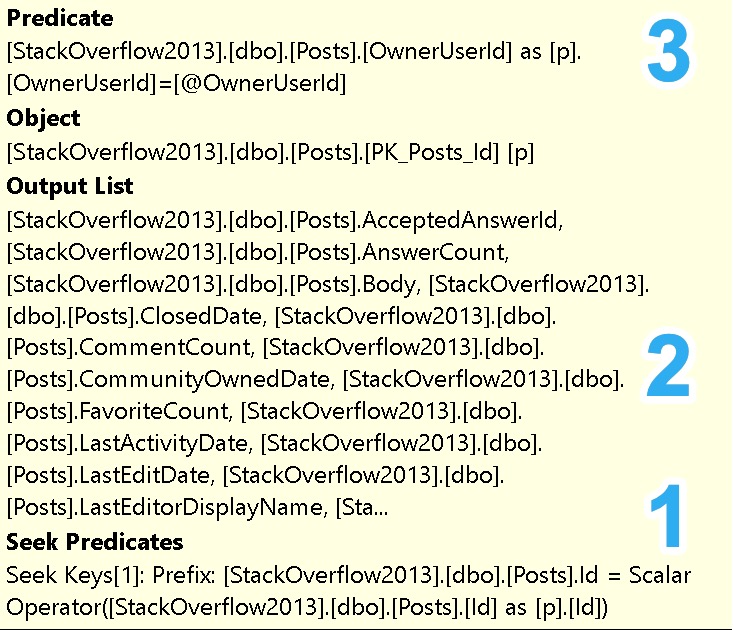
Zooming in on the lookup a bit, here’s what it’s doing:

sql server query plan

  1. The clustered primary key on the Posts table is Id, which the nonclustered index inherits as a final key column in the nonclustered index (seek predicate), so this is how we match rows across the two
  2. The clustered index has all these columns in it that are not part of the nonclustered index definition, so we can retrieve any rows matched via the seek predicate
  3. The clustered index has OwnerUserId in it as well, which is also not part of the nonclustered index definition, so we can additionally filter any rows matched via the seek predicate

Wordy, I know, for bullet points, but the goal of these posts is to describe things to developers who may have never encountered such things.

Predicate Key Lookups: Bad


If we change our execution parameters to ones that are not selective at all, we’ll use the same execution plan, but speed will get a bit worse.

EXEC dbo.PredicateKeyLookup
    @Score = 0,
    @CreationDate = '20080101',
    @PostTypeId = 2,
    @OwnerUserId = 22656;

To run down what changed:

  • CreationDate will fetch several more years of posts (2008 vs 2013)
  • We’re looking for answers (PostTypeId 2) from questions (PostTypeId 1)
  • The OwnerUserId is now a much more active user on the site

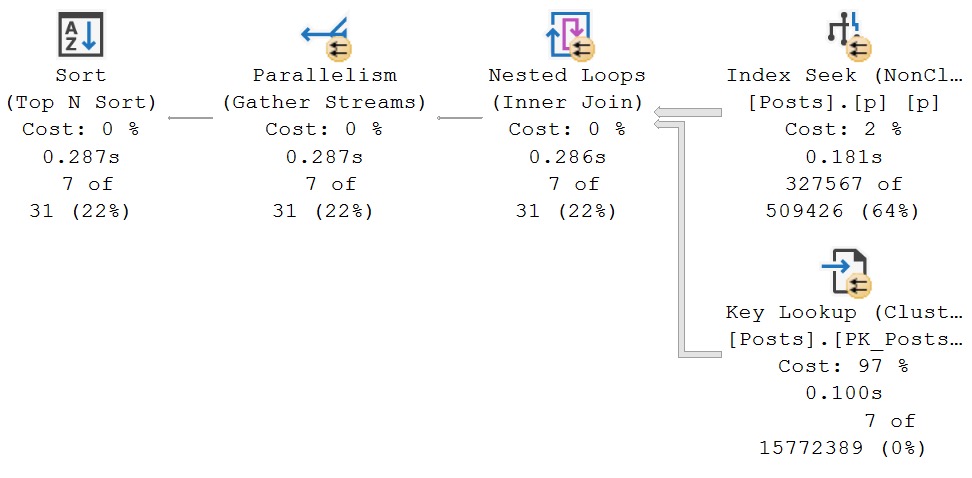
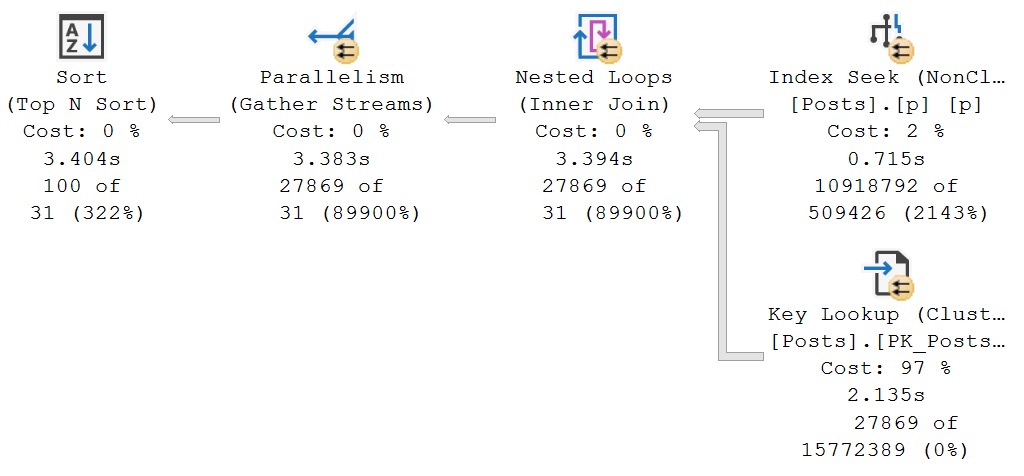
Now, rather than finishing in ~300ms, the query takes ~3.5 seconds.

sql server query plan
degrading

The majority of the time is spent looping and looking up, which is not what we want at all. Again, indexes should help us find and filter as much data as possible in one place.

You can think of each index as a separate data source. If you need two data sources on one table to filter things, you’re leaving yourself open to performance issues.

Predicate Key Lookups: Fixing


In this case, we can fix things well-enough by changing the index to this:

CREATE INDEX
    p
ON dbo.Posts
    (Score, CreationDate, PostTypeId, OwnerUserId)
WITH
    (SORT_IN_TEMPDB = ON, DATA_COMPRESSION = PAGE, DROP_EXISTING = ON);
GO

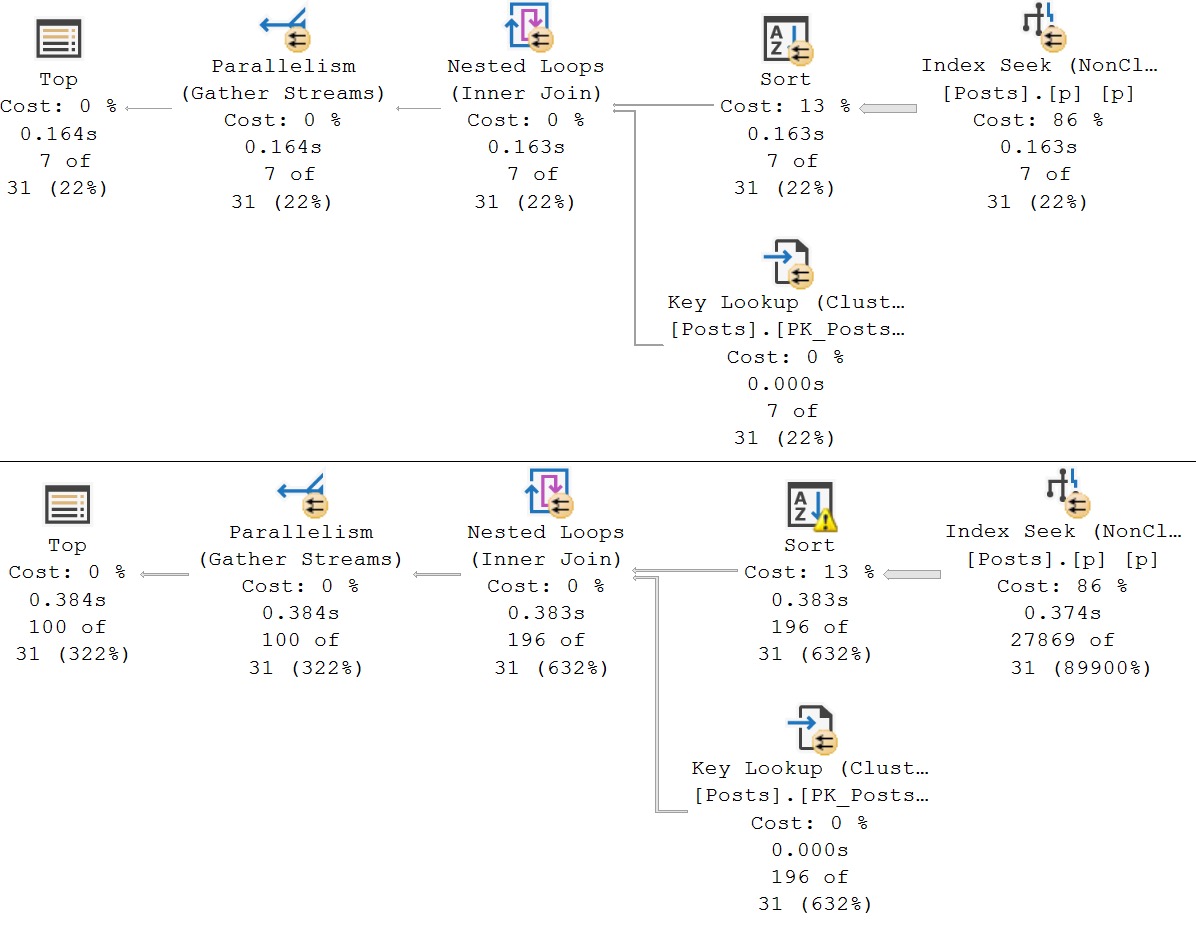
Now, either execution, in either execution order, is fast (enough).

sql server query plan
good enough plan

Now, for sure, with enough domain knowledge, and enough understanding of the queries, we could do things differently.

  • If we know most/all queries will filter on OwnerUserId/PostTypeId
  • We’re allowed to create a completely new index to help this query if it’s important enough
CREATE INDEX
    p
ON dbo.Posts
    (OwnerUserId, PostTypeId, Score, CreationDate)
WITH
    (SORT_IN_TEMPDB = ON, DATA_COMPRESSION = PAGE, DROP_EXISTING = ON);
GO

In this index, OwnerUserId and PostTypeId are the leading columns. The way b-tree indexes work, equality predicates on leading column(s) maintain sorting of any following columns.

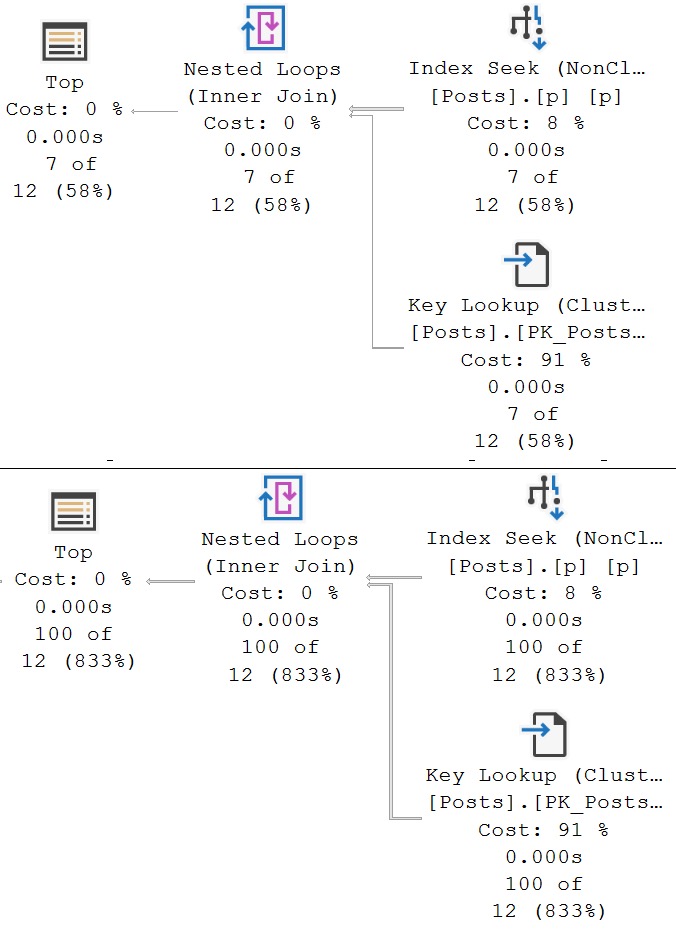
Since we’re ordering by Score and CreationDate, this is important (for this query, anyway). Now, both plans look like this.

sql server query plan
faster!

Predicate Key Lookups: Thoughts


Often, fixing a predicate key lookup by adding the filtering column to the nonclustered index your query is already using is good enough.

Other times, to squeeze every last bit of performance out of things, we may need to make additional adjustments. Changing existing indexes in a way that rearranges key column order can be perilous.

While the query you’re working on may work way better, others may not be so happy with your tinkering. Again, this is where you need additional domain knowledge.

If you find yourself wanting to really change things like that, you may be safer creating a new index instead.

Thanks for reading!

Going Further


If this is the kind of SQL Server stuff you love learning about, you’ll love my training. Blog readers get 25% off the Everything Bundle — over 100 hours of performance tuning content. Need hands-on help? I offer consulting engagements from targeted investigations to ongoing retainers. Want a quick sanity check before committing to a full engagement? Schedule a call — no commitment required.

Indexing SQL Server Queries For Performance: Common Questions

Over And Over


Some of the best questions I get some clients, conference attendees, and random email, are about how to design indexes.

A lot of developers out there have a rather foggy picture of exactly how indexes work. They’re all seen phone books, and drawings of B-Tree indexes, but some common things still escape them.

In this post, I’m going to talk about a few things like I’m speaking to someone who has never created a table before.

Even if you’ve created lots of tables and indexes, you may find some interesting points in here, if you pay close attention.

The topics I’m going to go over are:

  • Heaps
  • Clustered indexes
  • Nonclustered indexes
  • Index design concepts

Hopefully it helps to clear some things up!

What’s A Heap?


A heap is a table that doesn’t have a clustered index on it. It may have a nonclustered primary key, nonclustered indexes, constraints of all variety, foreign keys, etc.

Heaps are not indexes. Heaps are unordered data structures.

There are good reasons for some tables to be heaps, but most tables shouldn’t be. A good example is a staging table for ETL loads.

Dumping a bunch of data into a heap typically works faster because data doesn’t need to be sorted to conform to index key ordering. More indexes also means more transaction log writes.

I don’t want to get into minimal logging, because that can be a really tricky thing to get in many circumstances. If you want to read more about that, you can follow this link: Minimal Logging with INSERT…SELECT into Heap Tables

Heaps behave different in some ways that are surprising, though when you update or delete (not truncate) rows from them:

  • Updates move rows around and leave pointers that need to be followed in their place
  • Deletes may remove all rows from data pages but not deallocate them from the table (unless you use a TABLOCK hint, or the delete is escalated to use a table lock naturally)

This isn’t something that happens in tables with clustered indexes on them, and they can have surprising impacts on query performance.

If you update variable length data in your heaps a whole bunch, you can end up with a lot of row movement, which will make later scans of the heap do a lot more reads to follow all those pointers to the location of the new rows.

Same thing with deletes. When you scan through a heap (because there’s no indexed data you can seek to), you may end up reading lots of empty pages to satisfy a complete scan of the data.

I don’t have a good explanation for why heaps are designed that way for updates. Perhaps it’s an optimization for large updates to not automatically split pages, which adds a bit of logging overhead. For deletes, though, I believe it’s so pages are at the ready for new data being loaded in without having to allocate new pages. Since heaps have no order, you can stick data anywhere.

One additional note here is that even with a TABLOCK hint, deletes may not immediately deallocate pages if you’re using Read Committed Snapshot Isolation, or Snapshot Isolation.

In general, there’s not a lot of sense to leaving tables as heaps in SQL Server, at least for OLTP workloads.

What’s A Clustered Index?


A clustered index logically orders the data in your table by the clustered index key column(s). Physical ordering is a separate issue.

I often hear people ask if clustered indexes are a copy of the table, and the answer is… kind of, but only in the way that nonclustered indexes are also copies of the data. Adding nonclustered indexes to a heap would likewise be a copy of data in the heap.

However, a clustered index is not a copy of a heap.

In other words, a single table cannot exist as a clustered and heaped version of itself simultaneously. You are either clustered or heaped.

A good clustered index (often on an identity column) does not necessarily have to provide optimized search access to the data stored in it. Often, the choice is to optimize the insert workload.

To pick a good clustered index, you should usually follow the NUDES acronym:

  • Narrow: Numbers, dates, not string-ish
  • Unique: Identities or sequences are good for this
  • Distinct: If not unique, then as distinct as possible
  • Ever: Increasing (append only is the goal, here
  • Static: Definitely not a column you ever update

The goal is to append unique, static values to the end of the list, that take up very few bytes so that intermediate (not leaf) pages can be more densely packed.

If you have a non-surrogate (natural) key that accomplishes this, great. If not, surrogate keys (again, identity columns) are a good choice to check these boxes. Clustered indexes do not have to be unique, nor do they have to be primary keys, but they are most often tightly coupled in SQL Server relational designs.

In most OLTP workloads, lacking a natural key to cluster on is fine, because you can create nonclustered indexes to optimize searches, joins, and other relational activities that benefit from ordering (group by, order by, partition by, etc.). If your OLTP queries end up scanning clustered indexes a lot, it’s usually a good sign that you haven’t designed nonclustered indexes well.

This assumes they have a where clause on them, of course.

What’s A Nonclustered Index?


Nonclustered indexes are separate copies of the table data, whether it’s clustered or heaped. On disk, in memory, in the transaction log, with different statistics, column ordering, and data pages assigned to them.

We’ll talk about some design strategies next, but the ideal usage for nonclustered indexes is to optimize data access, so your query’s where clause can locate data quickly. There are many other considerations and uses (for instance, supporting foreign keys, or backing up unique constraints), but if you’re very new to indexing, focus on helping your queries get to the data they’re searching for quickly.

A common misconception is that just because a column is in the key of an index, it will help the query be more efficient, regardless of what position in key column order it is, but that’s absolutely not true.

I like to think of key column order as sort of like following a recipe. Let’s say you’re following one where the start is a big piece of ~whatever~, and the end is cooked and cubed pieces of ~whatever~

The initial steps in the recipe are:

  • Defrost ~whatever~
  • Cube ~whatever~
  • Cook ~whatever~

If you don’t defrost ~whatever~ first, cubing it is going to take a long time (forget skipping to cooking it). If you don’t cube ~whatever~, cooking it is going to take a long time.

This is a bit like the way index key column order works (though not a perfect metaphor). If you don’t access the leading key, accessing any following keys is less efficient.

Each column is a gatekeeper to the next.

Nonclustered Index Design Patterns


Clustered indexes are the foundation and frame of a table. Nonclustered indexes are where we go for specific purposes, to find specific things.

If we didn’t have things organized in smaller chunks, we’d end up running around the whole place looking for toilet paper after we found a toilet in the dining room.

It’s a situation no one wants to encounter. Your queries are no different. The less running around looking for things they have to do, the happy they are.

In most cases, the fastest way to reduce the time they spend looking for things is to create indexes that match the goals of your where clause.

There is a persistent and rather idiotic strain of advice that the most selective column should always come first. That’s likely true if the key of the index is unique, and you’re searching equality predicates for a single row.

It’s just that most queries I see aren’t doing that — queries that do that (something like a primary key lookup) already perform well — the types of queries I deal with are usually dealing with a ton of rows.

There’s a second persistent piece of goofiness that inequality predicates should always be indexed for after equality predicates. That’s certainly not true when a small range (say the last hour of data) matches very few rows, but an equality predicate (say a bit column) would match tons of rows.

One important thing to remember about nonclustered indexes is that they inherit things from both clustered and heaped tables: identifiers.

  • If your table is a heap, there’s a row identifier (RID) that ends up in your nonclustered indexes
  • If your table is clustered, the clustered index key(s) end up in your nonclustered indexes
    • For non-unique nonclustered indexes, they end up as a final key column
    • For unique nonclustered indexes, they end up as an included column

Tomorrow, we’ll look at some index design patterns in practice.

Thanks for reading!

Going Further


If this is the kind of SQL Server stuff you love learning about, you’ll love my training. Blog readers get 25% off the Everything Bundle — over 100 hours of performance tuning content. Need hands-on help? I offer consulting engagements from targeted investigations to ongoing retainers. Want a quick sanity check before committing to a full engagement? Schedule a call — no commitment required.

Some Questions I’ve Answered Recently On Database Administrators Stack Exchange

Good Citizen


Here are some interesting questions that I’ve answered on dba.stackexchange.com:

I should probably get a real job.

Thanks for reading!

Going Further


If this is the kind of SQL Server stuff you love learning about, you’ll love my training. Blog readers get 25% off the Everything Bundle — over 100 hours of performance tuning content. Need hands-on help? I offer consulting engagements from targeted investigations to ongoing retainers. Want a quick sanity check before committing to a full engagement? Schedule a call — no commitment required.