When you’re designing and testing SQL Server stored procedures (or views or functions or queries), you need to do the same thing.
While most of it isn’t a security concern, though it may be if you’re using Row Level Security, Dynamic Data Masking, or Encrypted Columns, you should try executing it as other users to make sure access is correct.
When I’m writing stored procedures for myself or for clients, here’s what I do.
Try To Reveal Bad Parameter Sniffing
Sometimes it’s easier than others, but here’s what you should try:
For equality predicates, run some count queries against those columns to find data skew
For range predicates (like dates) try small and large ranges to see if the plan changes
Try passing in NULL or blank values, especially for any string parameters
When you do this, grab and compare the execution plans. If you get crazy different plans, see what happens when you don’t recompile, and plans get shared across executions.
If performance is bad, think about these things:
Can you improve indexing?
Do you need a temp table?
How many CTEs do you need to throw in the garbage?
Should you use dynamic SQL to generate different plans?
Maybe a recompile hint would be good for a specific query?
This is at the top of my list for new code, because I don’t want it to get called in a weird way and go haywire. That’s not what people pay consultants for.
Speaking Of Dynamic SQL
If you’re not sure if yours is safe from SQL injection, now is the time to find out.
Especially for long-ish string parameters, try passing in some nefarious commands. In general, what you don’t want to see is dynamic SQL like this:
DECLARE
    @s nvarchar(MAX) = N'',
    @d nvarchar(40) = N'Jon Skeet';

SELECT
    @s += N'
SELECT
    c = COUNT_BIG(*)
FROM dbo.Users AS u
WHERE u.DisplayName = ''' + @d + N''';'

EXEC sys.sp_executesql
    @s;
This is unsafe dynamic SQL, because it accepts user input and concatenates it into a string.
There are safe ways to accept user input, as long as either:
The user input dictates a static string to append to the dynamic SQL
The user input is parameterized within the dynamic SQL
Something like this is an example of taking user input and having it dictate a static string:
DECLARE
    @s nvarchar(MAX) = N'',
    @t nvarchar(40) = N'Votes';

IF @t = N'Users'
BEGIN
    SELECT
        @s += N'
    SELECT
        c = COUNT_BIG(*)
    FROM dbo.Users AS u;'
END;

IF @t = N'Votes'
BEGIN
    SELECT
        @s += N'
    SELECT
        c = COUNT_BIG(*)
    FROM dbo.Votes AS v;'
END;

EXEC sys.sp_executesql
    @s;
But this is a case where you should see what happens when you pass a lizard in a beer glass.
And of course, parameterized dynamic SQL looks like this:
DECLARE
    @s nvarchar(MAX) = N'',
    @d nvarchar(40) = N'Jon Skeet';

SELECT
    @s += N'
SELECT
    c = COUNT_BIG(*)
FROM dbo.Users AS u
WHERE u.DisplayName = @d;'

EXEC sys.sp_executesql
    @s,
    N'@d nvarchar(40)',
    @d;
Run It From The Application
In SQL Server, there are these things called ANSI settings, and they can really screw with performance and execution plans.
Even if you’re not using indexed views, computed columns, or filtered indexes, you may see oddball things if you’re testing in SSMS and running code from somewhere else.
This is what SSMS uses, and what SQL Server needs to effectively use those indexed views, computed columns, and filtered indexes.
+-------------------------+----------------+
|       SET options       | Required value |
+-------------------------+----------------+
| ANSI_NULLS              | ON             |
| ANSI_PADDING            | ON             |
| ANSI_WARNINGS 1         | ON             |
| ARITHABORT              | ON             |
| CONCAT_NULL_YIELDS_NULL | ON             |
| NUMERIC_ROUNDABORT      | OFF            |
| QUOTED_IDENTIFIER       | ON             |
+-------------------------+----------------+
You’ll need to check your application(s) to see what they’re using, and make adjustments where necessary.
Bonus points if you’re using the Python or JDBC drivers, and you turn off those pesky implicit transactions.
This Is A Good Start
You may have other things to test, like if you’re offloading reads in an Availability Group, using security features, or other logical constructs.
If your code has a lot of variable assignment in it, you may want to override the lookups with static values to see what happens if some out of band values (especially NULLs) come around.
I do this a lot in the SQL Server Troubleshooting stored procedures that I write to make sure things go down the right path and the right things happen.
You should too.
No one expects the unexpected.
Thanks for reading!
Going Further
If this is the kind of SQL Server stuff you love learning about, you’ll love my training. Blog readers get 25% off the Everything Bundle — over 100 hours of performance tuning content. Need hands-on help? I offer consulting engagements from targeted investigations to ongoing retainers. Want a quick sanity check before committing to a full engagement? Schedule a call — no commitment required.
This month, Grant has chosen the form of his destructor T-SQL Tuesday topic as Extended Events.
While my relationship with Extended Events is complicated for many reasons:
Awful documentation
Hardly any guidance on usage
Almost nothing useful about what type of target to use when
Everything stored in XML
Slow, unfriendly GUI in SSMS
My need to use them while consulting outweighs my gripes and grievances about how Microsoft has chosen to write about, use, and present the data to you.
That’s where my stored procedure sp_HumanEvents comes in handy. It’s totally free, and open source. I built it because I needed to be able to get things going quickly without a lot of fuss and clicking around.
It will set up and pull data to help you track down issues in the following areas:
Blocking
Query Performance
Compiles
Recompiles
Wait stats
I chose to leave deadlocks out of it, because the system health extended event session captures a good deal of those by default. It has a very limited amount of data from a toned-down blocked process report in it too, but it’s missing a lot of good information.
While it can do many things, the way I use it most often is to capture the long-running queries and plans from a stored procedure I have running in SSMS, so I can filter out the little query plans that don’t need my attention, and focus on the really bad parts.
That will set up an extended event that captures the following events, focused in on a single session id, and only collect details about queries that run for more than 5 seconds.
Don’t forget to replace the @session_id with whatever your session ID is running locally.
sqlserver.module_end
sqlserver.rpc_completed
sqlserver.sp_statement_completed
sqlserver.sql_statement_completed
sqlserver.query_post_execution_showplan
Some of them are a bit duplicative, but this was really designed to be flexible for a lot of different situations.
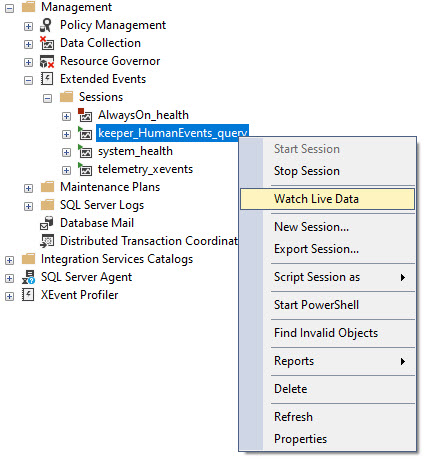
Once that runs, look for a session called keeper_HumanEvents_query in your Extended Event sessions in SSMS.
From there, you can right click to Watch Live Data, and then start running whatever is in your query window.
Every time a query takes more than 5 seconds, you’ll see the statement and query plan entries show up in the data viewer.
viewme
Thanks for reading!
Going Further
If this is the kind of SQL Server stuff you love learning about, you’ll love my training. Blog readers get 25% off the Everything Bundle — over 100 hours of performance tuning content. Need hands-on help? I offer consulting engagements from targeted investigations to ongoing retainers. Want a quick sanity check before committing to a full engagement? Schedule a call — no commitment required.
And generally, the more NOLOCK hints I see, the more money I know I’m going to make.
It shows me four things right off the bat:
The developers need a lot of training
The code needs a lot of tuning
The indexes need a lot of adjusting
There are probably some serious bugs in the software
Perhaps the only other thing that signals just how badly someone needs a lot of help is hearing “we’re an Entity Framework only shop”.
Cha-ching.
Because No One Knows What It Does
With the utmost confidence, I’ve heard hundreds of developers say “it keeps my query from taking locks”.
Would that I could take that confidence and share a shred of it with everyone in the world, we could conquer space in a fortnight.
So I get to do fun things like explain to them how it still takes some locks, but mostly how it ignores locks taken by other queries, and that’s why it can:
See the same row twice with the same values
See the same row twice with different values
Miss rows entirely
And in highly transactional systems, that can cause real problems. Even in systems where the load isn’t anything insane, it can cause all sorts of bugs and race conditions.
And no matter how much I do, no one listens. At all. Ever.
Week in and week out, I work with brand new people who have no idea that their results are full of incorrect, inconsistent data, and general bugginess.
I could schedule this same post every week for the next five years, and I’d still see the same amount of people with the same problems, over and over again.
Seriously. I love it. It’s the gift that keeps on giving.
Thanks for reading!
Going Further
If this is the kind of SQL Server stuff you love learning about, you’ll love my training. Blog readers get 25% off the Everything Bundle — over 100 hours of performance tuning content. Need hands-on help? I offer consulting engagements from targeted investigations to ongoing retainers. Want a quick sanity check before committing to a full engagement? Schedule a call — no commitment required.
In this video, I wanted to celebrate my recent accolades from Microsoft by reintroducing SP Pressure Detector, one of my open-source scripts that has been approved by Microsoft Customer Support Services. This script helps identify performance issues in SQL Server by monitoring various aspects such as CPU, memory, disk, and blocking. I spent a lot of time updating the README file to provide detailed information on how to use the script effectively, including explanations for each parameter and their default values. The video walks through running SP Pressure Detector with all parameters set, highlighting key sections like weight stats, virtual file statistics, tempdb usage, memory consumers, and query memory grants. By sharing this knowledge, I hope to help others better understand and troubleshoot performance issues in their SQL Server environments.
Full Transcript
Erik Darling here with Darling Data. And I got a nice email from someone in Microsoft Customer Support Services, that’s Microsoft CSS, for those acronym-loving folks playing along at home, thanking me for my open source scripts, because apparently they were able to use them to help them troubleshoot an issue today. So from here on out, I’m just going to say that my scripts are Microsoft Customer Support Services approved, or CSS approved, Microsoft CSS approved, at least until the lawyers catch up with me, at which time I’ll fight a lawyer live on TV. It’ll be like Musk versus Zuckerberg, except everyone will be rooting for me instead. So the purpose of this video, in celebration of my recent accolades, in celebration of my recent accolades from Microsoft, is to sort of reintroduce SP Pressure Detector. And the reason that I want to do that is because I realized, I was looking at my GitHub repo, and what I saw was something that I had forgotten about ages ago, is that my GitHub repo has a README file. And that README file was hopelessly out of date and sort of a bit malnourished looking.
So I spent a lot of time redoing the README file to document as much stuff as I possibly could in there. And I was rather happy with it, much happier than I am currently with my green screen, which is showing sporadic shadowing. I guess I got to stand a little bit closer to you. Hope you don’t mind. Hope I don’t smell too bad. It’s Friday. You know what happens on Fridays. See, if you look at your internet at all times. Oh,降 όikkajå Anyway, the best place to start with any of my scripts is with the help parameter.
Let me actually make this a little bit bigger so it’s a little bit more readable. Like putting a query inside of a CTE. I’m going to zoom in so it’s more readable.
All right. So the best place to start with any of my store procedures, if you’re unsure how to use them, if you’re unsure about what the parameters are or what they do, is to use the at help parameter. It is a very carefully designed set of information to help you get the most out of my free, open source, Microsoft approved store procedures.
I usually start off with a little introduction. All right. Tell you kind of what the purpose of the script is, what it does.
I don’t like anyone to feel like they’re left in the dark about the intent of the script. And then some scripts have a little bit more in them than others. The more complicated ones like SP human events and SP quickie store will have some example executions in there.
But this one, so usually I don’t have to mess with… with settings too much or parameters too much in this one. It’s pretty good to just run right out of the box.
But I do realize using this… After using the scripts live for like client troubleshooting and for training, that sometimes it would behoove me to add a little bit of configurability in there so that there’s less sort of jumping around and things.
So they’re mostly there for me. Except for one thing, which is there for a nice person who left a YouTube or blog comment about the CPU utilization threshold. But we’ll talk about that more in a minute.
So this section here will tell you what the parameters available for the store procedure are and what a reasonable value is to set that parameter to and also what the default values are. So what to check will define if you want to check for everything or just CPU pressure or just memory pressure.
If you want to skip looking at queries that are currently executing on the server, you can use that. If your server is under such duress that getting query plans back causes hangups with SP pressure detector, you can skip getting plan XML in the queries that get executing queries.
If you want to… So minimum disk latency applies to the section of the code that goes and looks at the DM virtual file stats, DMV, and you can set your own custom latency there.
By default, I look for disks or files that have over 100 millisecond read or write latency, which I think is pretty a fair starting place to look at for things that might be not great with disks, but you can set that higher or lower depending on your needs.
The second one down here is a CPU utilization threshold. Now, in the full result set, there are some XML clickable columns, and there are two of them that have to deal with CPU.
One of them goes out to this funny little set of XML that records CPU utilization in SQL Server, and in there, there used to be a hard-coded filter of 50 for looking at… for getting data out of these XML bits for when CPU utilization passed a certain point.
This is now configurable. So if you want to bump it up to 70 or 80 or 90, depending on, you know, depending on what your server is used to running at.
Some folks are awesome, and they realize that if their CPUs are consistently spending under 30%, that they are probably giving Microsoft too much money, unless they have some, like, occasional workload bits that just fly off the handle and push things up to 100%, which is fine.
You know, you just know that most of the time you’re paying Microsoft too much. So there’s that. So if you want to only look for when CPU is over 80% or over 90%, then you are free to use that parameter to do that.
There’s also an option here to skip the section of SP pressure detector that looks at weight stats. Especially if you need to sort of run this, like, rapid fire and, like, you know, see when and where things are changing, you might not want to look at weight stats every single time, right?
Because, like, like, weight stats might not change that much over, like, the second and a half that you wait between executions. And on top of that, you probably won’t remember all the numbers anyway, unless you’re paying very specific attention to one.
So those are the parameters and the full explanation of the parameters. This is, of course, fully free MIT license. And if you go over to the Messages tab, you’ll see the full MIT license when you enter the help section.
So I’m not going to execute this with every single different parameter. I’m just going to execute this with everything so that I can walk through all of the different sections in here.
Now, my laptop hasn’t been up to a whole lot lately, which is okay. You know, I’ve been busy with stuff. I don’t have 24 hours a day to write and run demo workloads on here.
But this first section up here will show you the weight stats that I consider important for performance. There are a whole list of other ones.
Sometimes they’re useful to look at. Sometimes they’re not. SP Pressure Detector focuses in on a few very specific areas of weight stats around parallelism, CPU, disk, memory, and blocking.
So those are the sections that I focus on because those are the sections that represent pressure for SQL Server. In this section, you’ll see hours uptime.
That’s how long your server has been up. You’ll also see hours of CPU time. This is only available in Enterprise Edition at the moment. And I was going to say something important here.
Standard Edition is kind of a waste. If you’re on Standard Edition, you might as well just be using Postgres. It’s kind of funny.
There’s the weight type for all of the ones that we’re interested in. There’s a description of the weights in there. So if you’re not sure what a weight is, there’s a description column. You have how many hours we’ve waited on that weight.
It’s useful to compare this to total uptime and total CPU time. So if your server is in a crazy 24-7 workload, it might be a little bit more.
It might be a little bit. If your server has been up for like 3,000 hours, but you only have like 1,000 hours of CPU time, then it’s usually a little bit more wise from a performance analysis point of view to compare hours wait time to hours CPU time and hours uptime.
If your server is just constantly flying off the rails, then hours uptime and hours wait time are pretty good to compare each other to. We’ve got the hours of signal wait time.
I don’t put a percentage in there because I’ve never found it terribly useful. Either the numbers are close or they’re not. For SOS scheduler yield, they’ll pretty much always be one-to-one. There might be slight differences in there, but for the most part, the timing for schedule yield will be the timing for the hours of wait time on schedule yield would be pretty even with the hours of signal wait time.
We have how many tasks have waited on that wait, and then the average milliseconds per wait. Now, this is useful because we want to know the number of tasks that waited on something, fine, but we also want to know on average was there a lot of latency in waiting for that.
This can be particularly useful with lock waits, so we know ballpark how long queries are waiting to get locks on average. The next section down is hours of uptime.
Hours of uptime. And I just read the column name. I injected a word in there too. This section is the one I was talking about with the virtual file statutes.
Virtual file statutes has the parameter where you can set the latency number for it. I came back with a whole bunch of tempdb files in here. Then you can see the average write stall on those was over 100 milliseconds.
So that’s why these got picked up. If I change that parameter to be a lower number, I might see some other stuff in here. The read stall on the file is fine. The write stall, you know, it is what it is.
It’s tempdb. It’s the only thing that you can do is to get the data out of the file. Unless this is like in the seconds all the time, I’m not going to worry too much about it. All sorts of stuff uses tempdb.
You don’t know when these averages sort of got driven up. It could be checkdb. It could be, you know, some weird one-off event that will never happen again. You just, it’s impossible to tell without digging deeper.
There’s also the total amount of data in gigabytes read and written, the total read and write count, and that’s about the end of it there. I don’t spend too, too much time talking about disk.
Unless you’re in some platform as a service offering in Azure, where you were recently forced to wash Microsoft’s feet because they gave you transaction log throughput equivalent to an SD card from 2003 plugged into an SD card reader plugged into like a USB-A port, 200 megs a second.
Then I’ll talk a lot about incomplete thoughts that are very expensive. Next section down is a clickable. If you want to get some basic information about tempdb, it’ll tell you how many files you have, the min and max size of each file.
So if you have one file that’s like a gig, or like if there’s one, if the min size is like a gig and the max size is like 20 gigs, you might need to do some adjusting there. The growth increment in gigabytes and the total number of CPUs you have.
So you get a sense of if the number of data files you have lines up with the number of schedulers you have on the server. There’s also some information about space used in tempdb, how much is free, how much is taken up by user objects, version store objects, and then internal objects, and then what the current tempdb activity is.
So if there’s a session using tempdb, then we will get information about that back, along with some other information about the size of the allocations. I tend not to go below gigs in here because like 800 megs is just not sufficient for me to worry about.
This is not doing it for me. Next section down is memory consumers. So all the things in SQL Server that may consume memory, the buffer pool, different caches, query memory grants, that will all show up in here.
You’ll get this top line, which will show you the buffer pool. You’ll have this second line, which will show you how much memory has been stolen from the buffer pool. And then the next section down is sort of the top five. I mean, I don’t even have five additional things in here right now.
I only have four, I think. Well, let’s count that. That was squint one, two, three, four. I do have five. I did it.
Check me out, ma. So I do have five in here. And these are pretty small, but they are ordered by which five have the highest memory consumption. Next section down, we’ll grab XML to show if SQL Server was reporting any low memory conditions.
Sometimes worth looking into those if your server is deemed to be under memory pressure. Seeing lots of resource semaphore weights, resource semaphore query compile, which I’ll show you in the weight stats up top. Or if you have a lot of page IOLatch weights, you might find that your server is under pretty consistent memory pressure because you are constantly swapping data in between RAM and disk.
The next section down will give you some information about, well, a few different things. It’ll give you the total database size. It’ll give you how much physical memory is in the server.
It’ll give you what max server memory is set to. I have mine dropped down a little bit right now because I was trying to show, like, lower memory conditions. 96 gigs fits a lot of the Stack Overflow 2013 database in it, so this is brought down a little bit lower so I could cheat a little bit in that demo. Don’t tell anyone.
It’ll tell you if you have locked pages and memory enabled, which is a setting I highly recommend, especially on servers with more than 64 gigs of memory in them. So it’s generally a pretty good idea to have that in there. Let’s you bypass all sorts of virtual memory address space and go right to allocating physical memory.
It’s a pretty handy setting, I think. Also, I’ve seen it prevent non-yielding schedulers in a lot of some recent cases, too, where schedulers were getting all mixed up and messed up because of the constant swapping between disk and memory. Having locked pages and memory enabled magically fix that.
You’ll get some information about target server memory, how much memory SQL Server likes, how much SQL Server wants, how much total memory we have available. How much memory we have in total, sorry. How much memory we have available.
So this is how much memory we have available to loan out to queries for query memory grants. It’s about 75% of your max server memory setting. This is how much we’ve granted out to queries.
Nothing running on my server right now, but, you know, if there were, you might see some memory grants getting dished out and doled out, and you might see that get populated. We have how much the queries have used out of that grant. Over here, we have slightly different stuff.
So this would be how many queries have been granted at memory grants. This would be how many queries we have waiting to be granted a memory grant. If there have been any timeout errors, if there have been any forced grants.
SQL Server can sometimes force queries to run with a lower memory grant. That’s that serial desired memory part of the query plan. The total reduced memory count.
So how many times queries have been forced to run with a reduced grant, which is strangely five when this is zero. Maybe I had a demo that went behind the scenes and messed something up there. I don’t know.
Like min grant percent does something with that. This section down here, well, not too many fireworks. If there were something running asking for a memory grant, that would show up in here, which my server is blessedly slow right now because it’s Friday. Friday, as some folks say.
This is the section that I was talking about with the CPU details. So if we look in here, we’ll get some information about what our CPU configuration looks like. You’ll notice that offline CPUs is right at the top.
If you have installed the wrong version of SQL Server, they can only use 20 cores. Or if you have terribly misconfigured your standard edition VM for SQL Server to use like one socket per core for 8, 12, 16 sockets and a whole bunch of CPU cores are offline. I want that to be the top of the list there.
The rest of this is just sort of stuff that I can get. So I decided to keep it nice and informational in this output. This CPU utilization column, this is the one that I talked about having the parameter for up here a little bit.
That’s the CPU utilization threshold. If you want this to be higher or lower than 50, you can now configure that via the magic of parameters. Down here is general state information.
How many workers are currently active? How many workers are currently active? How many are currently used? How many you have available? How many threads are, I think, waiting for CPU is an important one.
How many requests are waiting for threads is a good one to look at. How many workers are currently active? The total active request count. That’s another good one to keep an eye on.
See these numbers all jumping up together. We can be reasonably sure that our server is getting pretty well hammered on CPU. If you have any requests that are stuck waiting for things, this will show up with a number in it.
How many tasks are currently blocked will show up in there. How many active parallel threads you have. And then these last two columns are, if you have a lot, if you have like, let’s say, 20 queries running.
And five of them are pegging away at CPU. And 15 of them are, like, those five queries are running. And then you have like 15 queries that are runable.
That’ll show up here. And that’s a pretty good way to figure out if you have CPU pressure on your server. That’s queries like, I’m ready to use a CPU, but I can’t use a CPU because everyone else is, I’m at the back of this line here. Like they’re going to see Taylor Swift and they’re the last ones to show up.
And they’re just in the back of the parking lot, hoping. Hoping that someday they’ll get inside. If there are any current thread pool weights on the server, they will show up in here.
This is much spicier when there’s a demo involved. But right now there’s no demo involved. So we don’t have anything.
But one thing that’s important to keep in mind is that SQL Server does not, like when it spins up, you get a certain number of worker threads. So you might see some threads based on how many CPUs you have, unless you override that by being goofy, changing the default setting. But if like SQL Server doesn’t create 506 worker threads and then leave them there.
SQL Server will grow and trim the worker thread set as it needs. So you might see some thread pool weights. As long as they’re relatively short, I’m not too, too concerned.
Like if there are like three or four in there that have been waiting for like a few milliseconds, I’m not worked up. But if I start seeing queries waiting like 100, 500, like a full second to get worker threads to run on, that’s when I start to get a little bit more nervous. And then down here, this final section, if there were anything fun running on here, we would see a bunch of queries ordered by, well, not ordered by, but a bunch of queries with CPU usage.
Down here we get query text, query plans, how long they’ve been running, a bunch of useful stuff, a bunch of useful metrics about the queries. Oh, that’s a nice graphical bug in SSMS over there. You can’t really see it.
I went the right way first time. Yeah, look at it. Oh, green screen. What have you done to me? Let’s just lean in here. Have a little chat. You and I, this is how I stand at the bar. To lean on an elbow.
Why I’m very popular. That’s nice. Graphical glitches. What is all that mess?
Maybe it’s not SSMS’s fault. Maybe it’s me. Maybe SSMS just wants to have nice forehead wrinkles like I do. I don’t know.
I don’t know. I couldn’t tell you. Anyway, that is the basic output that you will get from SP Pressure Detector. If you see anything here that you have questions about, I’m going to head over to my GitHub repo, code.ericdarlingdata.com.
That will get you a short URL to my GitHub repo where you can ask me questions. If you email me a question, I’m going to tell you to go use GitHub. Because then everyone can see it.
You can really think hard about the question you’re asking before you ask it. It’s really easy to send in private email to someone and ask questions that may not look good in the light of day. You might think really hard about the question you’re asking.
You might find yourself starting to write something and then realizing you can go investigate things a little bit on your own. Keep in mind that since these two procedures are all completely open source, completely available to you, free for download. Even Microsoft customer support is free to download and use them.
You can read through all of the code and you can see exactly what it does. And you can try to figure some stuff out for yourself. You might even be super nice and kind and open up a pull request with a contribution of your own.
I’m very grateful for the folks out there who do that. Anyway, this was a reintroduction to SP pressure detector. All in one video.
Kind of short and sweet. At least I tried to make it short and sweet. We’ll see how we did. Thank you for watching. Hope you enjoyed yourselves. I hope you learned something. If you like the video, well, hit that little thumbs up button down there.
It always makes me feel joyful inside when people like my videos. If you like this video quite a bit, you can even subscribe to my channel so you get notified when I release new ones, which I try to do pretty often.
Schedule has been a little weird lately. Summer vacation travel, kids, work. So I haven’t been able to record quite as much as I wanted to, but I do it as much as I can.
Anyway, that’s enough of that. Again, thank you for watching. And I will see you over in the next video where I will talk about something else entirely.
keep a screen to watch a maneira it’s��� very radical and funny.
Going Further
If this is the kind of SQL Server stuff you love learning about, you’ll love my training. Blog readers get 25% off the Everything Bundle — over 100 hours of performance tuning content. Need hands-on help? I offer consulting engagements from targeted investigations to ongoing retainers. Want a quick sanity check before committing to a full engagement? Schedule a call — no commitment required.
How I Set Up Debugging In SQL Server Stored Procedures
Video Summary
In this video, I delve into the intricacies of setting up debugging for SQL Server stored procedures, sharing insights from my extensive experience writing complex and dynamic code. As a developer who frequently deals with intricate logic and dynamic SQL in my store procedures—like SP Quickie Store, where we dynamically query various databases based on their configurations—I understand the importance of robust debugging tools. I walk through how to include essential parameters for debugging logic and performance, as well as conditional execution of dynamic SQL. By demonstrating these techniques, I aim to equip you with best practices that can help maintain and troubleshoot your own stored procedures, ensuring they are reliable and efficient, even when faced with complex scenarios or unexpected conditions.
Full Transcript
Erik Darling here with Darling Data, recording the best video you’re ever going to watch in your life. At least, probably the best video about how to set up store procedures for debugging in SQL Server. And this is a particular joy of mine because, as you know, I write a lot of store procedures and the store procedures that I write in SQL Server. So, the site tend to involve a lot of pretty complicated dynamic SQL, especially around figuring out, you know, like, where the, like, contextually where the, where the, the code is running, you know, whether, like, which database it’s in, whether we’re in, you know, managed instance or regular SQL. There’s a lot of, tends to be a lot of looping involved to get things from different places. And a good example is, you know, you know, SP Quickie Store, where we, you know, there, you have the option to get all of the databases that have query store enabled on them. So, we have to figure out which database we’re in and all that other stuff. And, you know, which version and addition of SQL Server, we got standard, we got enterprise, do certain columns exist, you know, like, Microsoft will introduce columns, and even DMVs and cumulative updates, we have to figure out if certain columns are there and either select or, or, like, ignore them.
If they’re not there. So, there’s, there’s a lot of stuff that has to be done in these. And, I find it very useful to have appropriate debugging in them. Now, you may also find it useful to have appropriate debugging in store procedures that you write, maybe they do somewhat similar things to what mine do, at least, you know, conceptually, no one can ever, never touch the majesty that are, that is my store procedure collection. And, or you might just have rather complicated code in your normal store procedures where it makes sense or where it would make sense to have some debugging options available either. So, you know, so you can troubleshoot things should they ever go wrong or if, heaven forbid, you, you get hit by the lottery, and you have to, you know, go on to greener pastures, probably a golf course, and you leave your code behind that someone else may have to troubleshoot or figure out what’s going wrong someday.
So, this store procedure that I’m going to show you here has some pretty good examples of what I include in the debugging process for all of my stored procedures. It may not be the exact same thing each and every time. My debugging process has evolved over the years, even since I started writing my very own stored procedures you can find over at code.ericdarlingdata.com. That’s the short, that’s the short, short, short example of how you get to my GitHub repo.
But I usually start with three parameters for debugging. One is to debug logic, one is to debug performance, and the other is deciding whether or not I am going to execute certain dynamic SQL or not, which is important because depending on what your store procedure is doing, you could end up making changes to a server or attempting to do something that you know is going to fail. There could be side effects of the query that you may not want. So, if you’re writing the type of stored procedure that generates a command to run like a backup database or run check DB or something, or if you are writing stored procedure that might insert, update, or delete data, or change a setting in SQL Server, then these are all things that you may not want to execute. You just want to check the syntax of them. You just want to make sure that everything is cool there.
Granted, you could include this in normal queries, right? Like a non-dynamic SQL, where, you know, say something like, oh, select star from table where execute SQL equals one. But you probably don’t want to do that in production level code. You probably only want to do that in, like, you know, stuff like I’m going to show here, like sort of the analysis queries and things like that. Because that also just adds, like, another weird potential performance oddity to your production code that you don’t want.
So, there is all that. So, starting all the, sort of most of my procedures, set no count on. Generally, you only want to see row counts from things happening in intermediate steps in a stored procedure.
When you’re debugging, you don’t want that potentially going back to a client or something somewhere. So, you don’t really, you generally want to set no count on for everything. Set exact abort on, you know, 99% of the time you want this.
99% of the time, if you have a stored procedure fail at some point, you want everything that’s happened before that point to roll back. And you want to stop the stored procedure from executing right then and there. There are other times when you may not want that to happen.
Like, there are certain things where you’re just like, you know, if one query fails, no problem. Carry on. Just keep going. Make progress. Finish things up. Finish things strong. So, most of the time, you’re going to want that on, especially for production level code.
But, you know, for the type of stuff I write, it doesn’t matter all that much. I just try to set a good example for all you lovely folks out there who consume my scripts and my video training and blog posts and all the other countless ways that I devote myself to you. So, like most stored procedures, we’re going to declare some variables in here.
You know, a lot of the stored procedures that I write, I have to declare a whole bunch of variables to hold values because I don’t want to repeatedly calculate things. Or sometimes I just want to be able to easily figure out what those values are. We’ll talk about that more later. But in this one, I’m just going to have some big value here to simulate a long dynamic SQL string.
We’re going to have some other stuff for a loop. We’re going to have some other things going on that are just lovely, good fun. And I guess the last one in the list is kind of the most important one because that’s the one I’m using as an example of why you want to do this sort of debugging.
Because at the very end of the stored procedure, I’m going to have a couple of select lists that are going to sort of select all of the parameter values that were passed into the stored procedure. Because sometimes you may manipulate parameter values when they get passed in and you want to see what the final result is. And other times, and this is going to be a second select list that does the same thing with all the local variables because local variables are often set dynamically in a stored procedure depending again, where you’re running, what database you’re in, version edition of SQL Server, stuff like that.
So I’m going to show you an example of that. The very first thing that happens in the stored procedure after that stuff gets declared is we’re going to set the addition variable right there to the server property of my local instance called addition. And this is going to be way different depending on where you execute it.
You know, it could be, you know, developer edition, standard edition, enterprise edition, managed instance, Azure SQL DB, Synapse, Edge, all those other crazy things that Microsoft keeps adding in hopes that you will spend money on their awful cloud products. Now, if you want to know exactly where you are in the stored procedure, one step that I like to run, this is especially useful in loops, but it can be useful if you’re just trying to figure out at what point your SQL Server hits some code.
Right? Like, especially if you have like if logic, branching logic in there, you want to say, okay, well, you know, just to use an example from the Stack Overflow database, like someone passed in the parameter post type ID equals one. So I’m going to hit this part of the code that goes and looks for questions in the post table or someone put in post type ID equals two.
I want to go and search for queries that look for answers in the post table. So if you have a sort of if branching logic in there as part of the debugging process, I like to have, especially if that like that, those code that those if branching paths are explored based on, you know, like, like local variables that you set dynamically based on some condition in the server. Or, you know, like, what time of day is it?
Is it Wednesday? You might do all sorts of different things in there. So I always like to include steps that tell me which queries about to start running. Now, sometimes it is important to know how many rows ended up resulting from some processes, particularly useful for putting data into temporary objects, temp tables, table variables and such, because you want to you want to know how many rows end up in there.
Because if you’re like running through your stored procedures like why does this return any results? You’re like, oh, zero rows went into that temp table. What did I do wrong?
What happened? What happened? Then you want to know earlier on for your own debugging purposes. No. Raise error.
You know, I have some I have some grifes and beefs and stuff with raise error. But if you wanted to simulate what you can do with raise error with print, the alternative is pretty ugly. There are the sort of normal set of substitution, wildcardy things in there with the percent signs in them.
You know, for numbers, you can use I, you can use U, you can use D. But for big ints, you need to use percent I64D. And since row count big can potentially return a big int, then we want to make sure we set it to a compatible data type.
So the row count parameter up here, row count big parameter up here is set to a bigger integer. And then in the debug logic, rather than just say print row count big, you know, I like to add in all this to let me know there were this many rows in sys.databases. Granted, if I ever had a big int number of databases and sys.databases, be honest with you, I’d probably jump out a window in front of a bus on fire.
There were like holding a bucket of knives like there would be there would be a lot more going on than just, you know, me. Running a stored procedure that looks at SQL Server. Anyway, another very important step for debugging.
Let’s say that you actually end up with rows in your temp table. You want to know what’s in there because you could even, you could end up with rows in the temp table and then join that off to another table and say, well, I still got no results back. What happened?
And then you want to know, okay, well, what rows ended up in the temp table because they didn’t match anything that were in another table. And so we got nothing back. So you kind of want to know what’s in there.
The thing is, if you run a stored procedure, no rows end up in a temp table and you say select star from temp table, you’re just going to get an empty line back somewhere. You have a bunch of temp tables in your stored procedure.
Well, guess what? It’s going to be kind of hard to track what’s in there. Or even if like, you know, you were to like populate and truncate a temp table in a loop. You’re like, okay, well, what point did I actually get nothing in there?
Like what happened? So again, knowing what happened and when pretty important. So what we’re going to do is in our debug logic branch, we’re going to say, if there are, there is anything in our temp table, then we are going to select data out of that temp table.
But we’re going to put another important thing in here. In the select list, we’re going to have a derived column called table name. And we’re going to set that equal to the name of the temp table that we’re selecting from.
This makes it really easy for you later on. If you have, again, a whole bunch of different temp tables in a stored procedure, makes it really easy to figure out which one of the results you’re actually selecting data out from.
If we don’t have anything in our temp table, then we’re going to select this, just one derived column and say that temp table is empty. So going back to what I was talking about with the execute dynamic SQL or execute SQL thing, let’s say that we had, let’s say that we added that as a parameter here.
And we say, let’s just say where at execute SQL equals one. Let’s say we did that. If we execute this SQL, we would expect to get results back.
Right? Makes sense. But if we had the, if we, if execute SQL was zero from our store procedure, when it gets passed in as a parameter, then this would not execute.
We wouldn’t end up with any rows in here. So you could do that and, you know, maybe for, you know, like, you know, this sort of, these sort of analysis procedures, that would make sense. I wouldn’t do that for production code though, unless it was just for testing purposes.
And I would take it out immediately afterwards because it just doesn’t, it doesn’t, doesn’t, doesn’t sit well with me there. You know, the potential performance issues of, you know, SQL Server, you know, like recompile option recompile.
Did a plan, did, did a plan get sniffed for this where execute SQL is zero? Like what? A lot of things that go wrong. So I wouldn’t do this outside of, outside of, you know, analysis scripts, stuff like that, or just, just you testing.
So the other thing that we can do in here, and another thing that’s very, very important when you’re writing dynamic SQL is being able to debug dynamic SQL. Because there is nothing worse than getting back some nebulous error message like incorrect, incorrect syntax near apostrophe.
Okay. Or incorrect syntax near from. Or incorrect syntax near some column name. And you’re just like, oh, what was it?
What, what, what was the, what was executing at the time? Could you let me know? With regular queries, it’s very, it’s a lot easier to figure out at what point you made a syntax error. Sometimes IntelliSense will even give you some happy little red squiggles to let you know.
With dynamic SQL, you are on your own. Float your own boat on that one. Either write perfect SQL the first time, or add debugging.
So what I’m going to do in here is actually something that I don’t do very often in my store procedures. Because I generally know either the normal length of what the dynamic SQL string is going to be. Or I know the possible max length of what a block of dynamic SQL will be.
I don’t tend to write things that would tack on like, you know, thousands and thousands of characters depending on something. It’s not like, well, we started off with a query that’s, you know, 10 lines long, but depending on other stuff, it could be 80,000 lines long. I don’t tend to write stuff like that.
Most of the time, I have a pretty good sense of exactly how long the, like, max length of a string would be for dynamic SQL. So I don’t typically do this. Now, there is a fella out there who, if you say his name, you summon some ancient demon.
But he wrote a store procedure called helper long print. I thought I had the link to that in there. But it appears to be an oversight on my part.
I’ll add it before I, I’ll add it after I finish this video. I promise. But if you can, you can totally use that to print dynamic SQL. The problem I have with it is that I can’t like distribute it as part of my stuff.
I don’t want to like rewrite it and like say, oh, look at this open source thing I wrote. I also don’t want to add another dependency to any of my store procedures. If someone like, like, I don’t want to have a thing where like, you know, someone’s like, oh, I tried to debug your store procedure, but I couldn’t because this other store procedure wasn’t there.
It’s like, it’s annoying. Right. So usually I’ll just write sort of a like generic loop to go through and print store procedure, like print dynamic SQL. I’ll do this if I’m working with code that’s foreign to me.
Like, like I said, with my own code, I have a pretty good sense of how long things will be. But if I’m working with someone else’s code, then I’ll usually write a loop like this. It’ll tell me how long the dynamic SQL string is.
Well, actually here. And then I’ll do a little loop here that just prints a sub string based on the like position of stuff in there. Now, most of the time I will tell you that, you know, raise error is a good idea.
But print, but raise error has a weird limit of like 2047 characters for the message that it outputs. And that just makes dynamic SQL printing kind of weird. I’m doing this a little bit differently here than I normally like.
Like when I write dynamic SQL, I write nicely formatted queries because I care about like being able to read the printed out dynamic SQL that I write. This is just a block of A’s and B’s. So it doesn’t make that much different here.
And the reason I’m using like weird block sizes and for things is because I just want to be able to like show you that how the squares kind of line up. If you need to do this multiple times, you have multiple dynamic strings that you might need to print out. Just remember to set the block variable back to zero when you start so that you don’t start trying to print some other dynamic SQL string either out of range or something or from like a weird starting point.
And but this is where I would more typically want to use the execute SQL or not thing. And I don’t want this to be dependent on if I’m debugging or not. Like I want to be able to run stuff and I want to be able to I want to be able to either execute a query or not, regardless of whether or not I’m debugging other portions of the store procedure.
So if execute SQL equals one, then we’ll go and execute that dynamic SQL. Otherwise, we will not execute it. Isn’t that nice?
So another very common thing that you really want to debug because I have been driven up trees, walls, volcanoes, curtains, writing loops and trying to figure out either why the loops were going on forever or failing or not making progress or something ridiculous. So I tend to write verbose debug logic into my loops. I don’t I’m not going to show you the most verbose example here because it’s probably overkill for most people.
You know, I’ll add timings and stuff like that in mind if I really want to. But in this case, I really just want to know some of the basic stuff. So what I’m going to do is set some of the local variables I declared up there.
This is going to loop over that database table that I talked about, that I should that I populated before. I want to know what what values I’m starting with, like going into the loop. I want to know where things are.
And then within the loop, I want to know which step I’m hitting. And then I want to know what the current values are for that step. I want to know when I move on in the loop to do something next.
And I want to know, like again, what step I’m at in the loop. So, you know, either, you know, fetching or incrementing or where I want to know where things are getting jammed up. Like if I were running this loop and like I just saw like for like, like really rapid, like, you know, just print out messages of fetching next or incrementing loop.
I would know I got stuck and screwed up somewhere. Then I want to know what I finished the loop with. This may seem trivial and unimportant to you, but it’s very important if you care about making sure that you did everything in the loop that you were supposed to do.
Like, like what if, you know, you saw that, you know, you’re low, like, you know, low ID and probably not going to screw that up. Maybe, maybe not. But if maybe, you know, you didn’t write your loop correctly.
So, like, you know, you only got to database like nine of 10. And, you know, you like you want to make sure, oh, I’m going to fix my loop. So I get to database 10 of 10 and then I stop.
Right. So it’s important to know what you start the loop with, what you ended the loop with. Just like, like that equally as important to me, I think, is knowing what was happening. In the loop, like knowing what step I was hitting, all that, all that other good stuff.
The next part is a little bit different. This is performance debugging. So in a lot of my store procedures, especially ones that are hitting, you know, like the either extended events, XML, you know, query, query XML, you know, hitting anything that’s hitting like DMVs, any, any part of the store procedure where, you know, I think that we, I’m, you know, I have a pretty good idea that there might be a performance issue that I might want to look at at some point.
I want to be able to debug performance. But this is much more common for me to do. And when I’m working with client stuff, because like after a few times profiling the store procedure, like most common way for me to profile a store procedure to use SP human events and to look at the query plans and the queries that are coming out of that store procedure from extended events. And then I’m going to go to the next part of the query plans because, you know, I don’t want to hit F5 with query plans enabled for everything because there’s no way to filter which query plans you see out of here.
A lot of times there’s going to be a lot of, a lot of tiny little queries you don’t care about happening in here that, you know, like, why do I want to see me setting variable values or why do I want to see each iteration of a loops query plan? Like, like, like stuff that like, you know, just crashes SSMS. So usually, like after I have a pretty good sense of which queries in a store procedure are prone to running slow or prone to parameter sniffing or something else.
This is much, much more common for me to do, you know, like working with client stuff to like, you know, get things tuned is I’ll add a little, I’ll add a debug performance parameter, at least for my own use. And I will set statistics XML on if I’m, if I, if I have that enabled so that I can get a query plan back for the query that executed. Right.
And then what I’ll do at the end is a couple things. One set statistics XML off. So in this block, you want to set statistics XML on to be the last thing you do because you don’t want a query plan for any of the junk that you know, you, any other junk you might do in here. And then you don’t want to get query plans after the fact for anything you do down here.
So it should be the last thing in debug at the beginning and the first thing in debug at the end. I’ll also have some information about the query. You know, like I’ll have a description of what query ran, the end time, like when it finished, you know, you get start time up here, query MS equals zero here, because obviously it hasn’t run yet.
Nothing’s going on, but we want to know how many milliseconds it ran for down at the end. So I’ll do a quick date diff on, but in milliseconds between start time and the current time. Now the format function, really cool.
I want to say that SQL Server 2012. So if you haven’t started using it, then I don’t know what’s wrong with you. Actually might be 2016.
I can’t remember. I can’t remember all these things anymore. It’s hard to keep all of these things straight in your head, but newer versions of SQL Server, newer, 2016 is seven years ago now. I like to use this to stick commas and numbers, especially milliseconds.
It makes it very easy to figure out exactly what scale you’re working with. If you stick this as the second parameter in format, you will get nicely formatted common numbers in there. You know, because we’re debugging, if I’m going to do the same thing that I did with the database table to say, if there’s data in that temp table, show it to me.
If not, tell me it’s empty. And one thing sort of that I like to bring up for these is error handling. Now, this isn’t specifically about error handling.
I don’t want to get into an error handling conversation or debate. My error handling skills are moderate. If you need to know more about error handling, go to this link here.
A fellow named Erlen Summerskog has written biblical chapter and verse about error handling. My only thing is that you want to be very careful when you’re writing error handling to make sure that you, like if you’re writing like begin try and try begin catch and catch, that you actually do something in the catch block.
Otherwise, your store procedure may just silently swallow an error and stop running and you’ll have no idea why. So something I’ve run into a few times where there’s like, you know, oh, we just didn’t want anything to happen. But then there was like it was hard to debug an issue with the store procedure because the errors were being swallowed.
Now, this is what I was talking about at the very beginning. Right. Finally, at long last, here we are getting to the getting to the end here. One thing that I’ll do is if again, for debugging, I want to know what parameter values I had.
Right. So this will tell me what got passed in. And it’ll also tell me is again very useful if you do any manipulation of parameter values that got passed in. Like, oh, if you know, like say someone passed in a negative number and you have a check to say, was that number negative?
If so, set it positive. Something like that. So you know that, you know, that worked and that happened. And then the variable values, you know, depending on how dynamically they’re set, you know, like a lot of the ones that I did up there, they’re just, you know, set within the procedure.
But, you know, like if you’re again, you’re setting variables based on like environmental stuff, the server you’re querying, the database you’re in, things like that. It’s really helpful to know what those values were in the procedure. All right. So this is everything.
This is all the stuff in there beginning to end. And if I execute this, what did I do? Did I record a 30 minute video and then just highlight something by accident and then not highlight, not unhighlight it? So I got a syntax error. Yes, I did.
It’s just so typically me. That was supposed to be Morrissey. No, didn’t work. Never mind.
Anyway, since we are debugging, here’s the stuff we get back. D was empty. Mm hmm. Oh, what happened there? It’s not good.
Why was D empty? I said, oh, execute SQL was zero. That’s why.
So that’s one of the things you have to be careful of. Right. So if we had execute SQL equals one, we would have gotten data in that table. We’re also going to get a bunch of query errors in here because of some reason.
Too long. Maximum length is 128. So let’s go back a little bit. Again, this is the kind of fun stuff that I do when I’m messing around with different ways to debug things.
And this is one of the reasons why I know a lot is because I screw up a lot. So let’s go back up to where I populated that temp table and let’s get rid of this because like I said before, this is a mistake. A big mistake.
You shouldn’t do it. Let’s go back down here and let’s say execute SQL equals zero and we’ll run this whole thing again. And now we’re back to normal.
And the only way to learn is to screw up. Sometimes you do it 29 minutes in. So these are the contents of the D pound sign D table, the database IDs that I put in there. In this section, we can see the query plan for that stupid query that I stuck in there that just hits the ring buffer extended event.
We see how long it ran for. And then we see the results of that. All right.
So because we’re checking to see what the target results are. This here is where I swallow that divide by zero error in the code. So the example that I gave up here is just, you know, select X equals one zero.
If you’re not raising errors for this sort of thing or if you just have your silently swallowing errors, this is the kind of thing that’ll happen. You’ll just get back this blank line instead of getting the proper divide by zero error. And then down at the end, I have my parameter values, right?
So you can see exactly what things got passed in as. And then I have the variable values. You know what? Select is actually kind of appropriate at this point. And then we can see how long that dynamic SQL was.
We can see the block and block size stuff. The row count, low ID, high ID, total, current, loop, the addition, right? So again, this is the kind of thing that’s much more useful to see at the end of a store procedure. So you can know what certain values got set to.
Like if you’re making decisions based on like what columns, DMVs you hit based on like standard enterprise management and SQL DB, things like that. It’s very good to know what this got set to in case you need to change your branching logic to deal with some problem. Now over in the messages tab, we get some of the, you know, feedback messages that I put in the raise error, right?
Selecting from sys.databases, there were seven total rows. There were seven rows in sys.databases. The total length of the dynamic SQL was 8,011 characters.
And there’s a lot of screaming in there, at least until we get to the bees. There’s a good feedback for the cursor loop, right? Setting cursor loop.
The thing that we got in there, right? Starting loop with one is the low ID, seven is the high ID, seven total entries. And then you just, as the loop is making progress, we see what we’re currently doing, all that other good stuff, right?
Anyway, so like this, not quite as interesting because the database IDs are sequential. But if you were in a situation where you were iterating over IDs that were non sequential, it would be good to know that like, you know, ID 357 is like, you know, 357 out of, you know, 400. But, you know, you may not, you might, you might only be on loop 200 because the IDs are non sequential, right?
So good stuff to know in there. And then there’s also, of course, the end stuff. Catching next, incrementing loop, finish loop, all that good stuff.
So, these are the things that I consider. These are the things that I usually add to my store procedures to help me debug logic and performance issues in them. If you’re writing big, long, complicated store procedures, it would behoove you to do the same for your own sanity because you can end up with some very, very confusing circumstances and situations where you have no idea why results were wrong or not there or you hit some error and you’re not sure what, where, where things, where things, you know, sort of.
You sort of bit the dust. And it’s great to have this sort of feedback for yourself. I think that it’s a good idea to set up your store procedures with debugging in mind, especially as they get longer and more complicated, relatively simple store procedures.
You probably don’t need a whole lot in there, if anything, especially if there’s no intermediate objects, variables, temporary objects, things like that. But for store procedures that do loops or like loop over stuff or generate dynamic SQL, you always want to have some debugging potential in there because you never know. Anyway, thank you for watching.
I hope you learned something. I hope you enjoyed yourselves. I hope people who made it to the end enjoyed watching me screw up a little bit. A bit of a deviation from my standard Wallace video performances.
But anyway, this is my first video back from vacation, so you’ll have to cut me some slack. Tanned, rested and ready does not describe me. More like exhausted, hung over and basically working off sheer willpower at this point.
Anyway, if you liked the video, go ahead and give it a thumbs up. If you didn’t beat it, if you really liked the video, you could hit the little ding dong bell and subscribe to my channel. I do like new subscribers.
And if you do that, you’ll get a notification when I record my next amazing video. So again, thank you for watching and I’ll see you next time.
Going Further
If this is the kind of SQL Server stuff you love learning about, you’ll love my training. Blog readers get 25% off the Everything Bundle — over 100 hours of performance tuning content. Need hands-on help? I offer consulting engagements from targeted investigations to ongoing retainers. Want a quick sanity check before committing to a full engagement? Schedule a call — no commitment required.
Look, I don’t blame you if you haven’t dug deep into what SQL Server 2022 has to offer just yet. It’s hard enough to keep up with all the problems fixed and caused by cumulative updates.
One thing you may want to pay attention to is how transaction log files are grown and VLFs are created, especially for new databases.
First, all new databases created on SQL Server 2022 have autogrowth set to 64MB. This allows for two things:
That 64MB growth increment will create a single VLF
Now, you might be excited about log files getting instant file initialization. But it only works for those small growths. Perhaps only in Azure would a growth of 64MB not be instant anyway.
I don’t know anyone else who spends a lot of time waiting for database growths of 64MB to finish.
Transaction log files cannot be initialized instantaneously, however, starting with SQL Server 2022 (16.x), instant file initialization can benefit transaction log autogrowth events up to 64 MB. The default auto growth size increment for new databases is 64 MB. Transaction log file autogrowth events larger than 64 MB cannot benefit from instant file initialization.
Other changes to VLF creation are something along the lines of:
<= 64MB: 1 VLF
>64MB and <=1GB: 8 VLFs
> 1GB: 16VLFs
If your log file autogrowth settings are larger than 1GB, either because you set them that way, or because your files are growing by a percentage, you may end up with some rather large VLFs.
To see what your current settings are, run this query:
SELECT
    database_name =
        DB_NAME(mf.database_id),
    logical_name =
        mf.name,
    file_name =
        mf.physical_name,
    size_gb =
        (mf.size * 8) / 1024 / 1024,
    max_size_gb =
        CONVERT
        (
            bigint,
            CASE
                WHEN mf.max_size = -1
                THEN 0
                ELSE (mf.max_size * 8.) / 1024 / 1024
            END
        ),
    autogrowth_mb =
        CASE
            WHEN mf.is_percent_growth = 1
            THEN RTRIM(mf.growth) + N'%'
            WHEN (mf.growth * 8 / 1024) < 1024
            THEN RTRIM((mf.growth * 8) / 1024) + ' MB'
            WHEN (mf.growth * 8 / 1024) >= 1024
            THEN RTRIM((mf.growth * 8) / 1024 / 1024) + ' GB'
         END,
    usage =
        CASE
            WHEN mf.type = 0
            THEN 'data'
            WHEN mf.type = 1
            THEN 'log'
            WHEN mf.type = 2
            THEN 'filestream'
            WHEN mf.type = 3
            THEN 'nope'
            WHEN mf.type = 4
            THEN 'fulltext'
        END
FROM sys.master_files AS mf
WHERE mf.database_id > 4
AND   mf.type = 1
ORDER BY
    mf.database_id,
    mf.type,
    mf.file_id
OPTION(RECOMPILE);
If you’re planning on moving to SQL Server 2022, now’s the time to make adjustments so you’re not caught off guard.
Thanks for reading!
Going Further
If this is the kind of SQL Server stuff you love learning about, you’ll love my training. Blog readers get 25% off the Everything Bundle — over 100 hours of performance tuning content. Need hands-on help? I offer consulting engagements from targeted investigations to ongoing retainers. Want a quick sanity check before committing to a full engagement? Schedule a call — no commitment required.
SQL Server is pretty good at a lot of things, but there’s no great way to debug logic or performance issues in longer stored procedures.
Whenever I’m writing a stored procedure, especially when dynamic SQL is involved, I add in a debug parameter. Sometimes I’ll do something more granular, and add in specific parameters for debugging performance vs debugging other things, like:
Temp table contents
Parameter values
Variable values
Loop progress
Current dynamic statement
Current point in the stored procedure (sometimes with a time stamp)
This can really save your hide when you hit a reproducible issue. Proper error handling is part of proper debugging, too.
I generally detest PowerShell, but I love that some commands have a -WhatIf parameter to test what would happen. For normal SQL Server queries, you don’t get that.
But if you’re writing dynamic SQL that may execute database commands (backup, checkdb, settings changes, etc.), you should also include a parameter that prevents dynamic SQL execution so you can debug without worrying about wreaking havoc.
Should You Use XACT_ABORT?
This depends a little bit. You probably want to use this in 99% of the stored procedures that you write that contain more than a single select statement.
The only case I can think of where you wouldn’t want to use this is in a set of informational queries where one of them failing is inconsequential.
A good example of this is sp_PressureDetector, where you want all the other results even if one of the individual queries fails for some reason.
This might make some results look weird sometimes, if there’s an error when you’re populating a temp table for example, where it ends up empty because of some population failure.
Later on, when you select from it or join to it, the results may be disappointing.
PRINT vs RAISERROR
In most cases, RAISERROR is your best choice for debugging (I’m not talking about error handling best practices here).
Despite some frustrations with it, it’s the easiest way to debug most state conditions for parameters, variables, and overall procedure progress.
The main problem with it is that there’s a maximum error message length of 2,047. This can be less than ideal when you’re dealing with debugging long dynamic SQL statements.
Then you’re looking at using a stored procedure like Helper_LongPrint, or rolling your own PRINT/SUBSTRING combination (maybe even in a loop) to output the full query.
A simplified version would look something like this:
Admittedly, I usually just brute force long printing in most of my stored procedures because I have a good sense of how long the output query will be.
If yours will vary, the looping option is the best choice.
Table Of Contents
If you populate temporary objects in your stored procedures, it’s a helpful debugging step to view the contents to make sure they’re correct, or… even there at all!
This is how I do it when I’m feeling really motivated:
Check to see if there’s anything in the temp table
Select the contents of the temp table
Add an extra column to the select list to tell me which temp table I’m selecting from
If it’s empty, select a different message to tell me that
CREATE TABLE
    #
(
    _ sql_variant
);

DECLARE
    @debug bit = 1;

IF @debug = 1
BEGIN
    IF EXISTS
    (
        SELECT
            1/0
        FROM # AS _
    )
    BEGIN
        SELECT
            table_name = '#',
            _.*
        FROM # AS _;
    END;
    ELSE
    BEGIN
        SELECT
            info = '# is empty!'
    END
END;
This is especially useful when there are a lot of temp tables involved.
Depending on the procedure, sometimes I’ll put this right after the temp table is populated, other times I’ll put all of the temp tables used at the end.
Valuables
I often find myself declaring variables and setting them to the result of a select, and sometimes manipulating passed in parameters.
To make sure they’re ending up as I expect them to, I’ll usually stick something like this at the end of the procedure to validate them:
DECLARE
    @a int = 1,
    @b int = 2;

IF @debug = 1
BEGIN
    SELECT
        a = @a,
        b = @b;
END;
This can help you figure out where things are going right, wrong, sideways, pear shaped, or plaid.
If there’s a loop involved, I’ll stick them inside there to make sure we’re progressing, and I didn’t do anything stupid that got me stuck inside a loop of the infinite variety.
Inside a loop, I’ll use RAISERROR. You can see that in sp_LogHunter.
It’s a good time. A cursor inside a while loop.
Don’t tell anyone.
Progress Bar
Sometimes it’s helpful to know which point in a stored procedure, or some branched code you’ve hit.
This is admittedly fueled in part by self-gratification. Seeing things make progress successfully, do the right thing, and loops work and finish is quite satisfying.
That’s why I’ll stick little waypoints in my procedures like this:
IF @debug = 1
BEGIN
    RAISERROR('We did it!', 0, 1) WITH NOWAIT;
END;
Again, strongly prefer RAISERROR to PRINT here, because the WITH NOWAIT line just about guarantees the message will show up when it happens.
Print statements can get stuck waiting for buffers and other oddities before showing up.
But Is It Fast?
Stored procedures are often full of tiny little queries that don’t really matter, and in really long stored procedures, returning a plan to SSMS for every single query that runs is a recipe for crashsaster.
If I have no idea what’s slow, I’ll use sp_HumanEvents to troubleshoot performance.
But I usually have a sense of which parts can get slow, so I’ll add performance feedback to the list, too.
IF @debug = 1
BEGIN
    SELECT
        query = 'starting super important query now!',
        start_time = SYSDATETIME();
    SET STATISTICS XML ON;
END;

SELECT
    x = 'this is a super important query';

IF @debug = 1
BEGIN
    SELECT
        query = 'finished super important query now!',
        end_time = SYSDATETIME();
    SET STATISTICS XML OFF;
END;
Since there are usual multiple queries that I’m interested in, I find it good to add a select to tell me which query the plan is for in the results so that I know which one to click on.
Adding in the start and end times is a good way to quickly identify which returned plan(s) took the longest.
It’s A Lot Like Life
Adding in good debugging steps certainly adds more time and effort to the process, but it pays off when you have to figure out what’s going wrong.
You probably don’t need it in every single stored procedure, especially the simple ones, but the longer and more involved your code gets, the more critical this becomes.
A lot of this comes from my experiences working on open source scripts that other folks might have to troubleshoot someday. You’re not only doing yourself a favor, but you’re helping anyone else who needs to work on your code.
Thanks for reading!
Going Further
If this is the kind of SQL Server stuff you love learning about, you’ll love my training. Blog readers get 25% off the Everything Bundle — over 100 hours of performance tuning content. Need hands-on help? I offer consulting engagements from targeted investigations to ongoing retainers. Want a quick sanity check before committing to a full engagement? Schedule a call — no commitment required.
If this is the kind of SQL Server stuff you love learning about, you’ll love my training. Blog readers get 25% off the Everything Bundle — over 100 hours of performance tuning content. Need hands-on help? I offer consulting engagements from targeted investigations to ongoing retainers. Want a quick sanity check before committing to a full engagement? Schedule a call — no commitment required.
It’s August, and that means one thing: Family Vacation. I’m taking this month off from regular blogging, and posting some of my paid beginner training content for you to enjoy, while I enjoy not blogging.
Thanks for watching!
Index Tuning Essentials: Fixing Blocking Demo
Going Further
If this is the kind of SQL Server stuff you love learning about, you’ll love my training. Blog readers get 25% off the Everything Bundle — over 100 hours of performance tuning content. Need hands-on help? I offer consulting engagements from targeted investigations to ongoing retainers. Want a quick sanity check before committing to a full engagement? Schedule a call — no commitment required.
It’s August, and that means one thing: Family Vacation. I’m taking this month off from regular blogging, and posting some of my paid beginner training content for you to enjoy, while I enjoy not blogging.
Thanks for watching!
Index Tuning Essentials: Fixing Blocking
Going Further
If this is the kind of SQL Server stuff you love learning about, you’ll love my training. Blog readers get 25% off the Everything Bundle — over 100 hours of performance tuning content. Need hands-on help? I offer consulting engagements from targeted investigations to ongoing retainers. Want a quick sanity check before committing to a full engagement? Schedule a call — no commitment required.