If this is the kind of SQL Server stuff you love learning about, you’ll love my training. I’m offering a 25% discount to my blog readers if you click from here. I’m also available for consulting if you just don’t have time for that and need to solve performance problems quickly.
USE StackOverflow;
EXEC dbo.DropIndexes;
/*
CREATE INDEX east
ON dbo.Posts
(PostTypeId, Score, OwnerUserId)
WITH ( MAXDOP = 8,
SORT_IN_TEMPDB = ON,
DATA_COMPRESSION = ROW );
*/
DROP TABLE IF EXISTS #t;
GO
SELECT
u.Id,
u.Reputation,
u.DisplayName,
p.Id AS PostId,
p.Title
INTO #t
FROM dbo.Users AS u
JOIN dbo.Posts AS p
ON p.OwnerUserId = u.Id
WHERE u.Reputation >= 1000
AND p.PostTypeId = 1
AND p.Score >= 1000
ORDER BY u.Reputation DESC;
/*
CREATE INDEX east
ON dbo.Posts(PostTypeId, Score, OwnerUserId);
*/
SELECT
t.Id,
t.Reputation,
(
SELECT
MAX(p.Score)
FROM dbo.Posts AS p
WHERE p.OwnerUserId = t.Id
AND p.PostTypeId IN (1, 2)
) AS TopPostScore,
t.PostId,
t.Title
FROM #t AS t
ORDER BY t.Reputation DESC;
/*
Usually I love replacing select
list subqueries with APPLY
Just show the saved plan here
*/
SELECT
t.Id,
t.Reputation,
pq.Score,
t.PostId,
t.Title
FROM #t AS t
OUTER APPLY --We have to use outer apply to not restrict results!
(
SELECT
MAX(p.Score) AS Score
FROM dbo.Posts AS p
WHERE p.OwnerUserId = t.Id
AND p.PostTypeId IN (1, 2)
) AS pq
ORDER BY t.Reputation DESC;
/*
TOP (1) also spools
*/
SELECT
t.Id,
t.Reputation,
(
SELECT TOP (1)
p.Score
FROM dbo.Posts AS p
WHERE p.PostTypeId IN (1, 2)
AND p.OwnerUserId = t.Id
ORDER BY p.Score DESC
) AS TopPostScore,
t.PostId,
t.Title
FROM #t AS t
ORDER BY t.Reputation DESC;
SELECT
t.Id,
t.Reputation,
pq.Score,
t.PostId,
t.Title
FROM #t AS t
OUTER APPLY
(
SELECT TOP (1)
p.Score
FROM dbo.Posts AS p
WHERE p.PostTypeId IN (1, 2)
AND p.OwnerUserId = t.Id
ORDER BY p.Score DESC
) AS pq
ORDER BY t.Reputation DESC;
/*
CREATE INDEX east
ON dbo.Posts(PostTypeId, Score, OwnerUserId);
*/
SELECT
t.Id,
t.Reputation,
pq.Score,
t.PostId,
t.Title
FROM #t AS t
OUTER APPLY --This one is fast
(
SELECT TOP (1)
p.Score
FROM dbo.Posts AS p
WHERE p.PostTypeId = 1
AND p.OwnerUserId = t.Id
ORDER BY p.Score DESC
) AS pq
ORDER BY t.Reputation DESC;
SELECT
t.Id,
t.Reputation,
pa.Score,
t.PostId,
t.Title
FROM #t AS t
OUTER APPLY --This two is slow...
(
SELECT TOP (1)
p.Score
FROM dbo.Posts AS p
WHERE p.PostTypeId = 2
AND p.OwnerUserId = t.Id
ORDER BY p.Score DESC
) AS pa
ORDER BY t.Reputation DESC;
/*
Use the Score!
*/
SELECT
t.Id,
t.Reputation,
ISNULL(pa.Score, pq.Score) AS TopPostScore,
t.PostId,
t.Title
FROM #t AS t
OUTER APPLY --This one is fast
(
SELECT TOP (1)
p.Score --Let's get the top score here
FROM dbo.Posts AS p
WHERE p.PostTypeId = 1
AND p.OwnerUserId = t.Id
ORDER BY p.Score DESC
) AS pq
OUTER APPLY --This two is slow...
(
SELECT TOP (1)
p.Score
FROM dbo.Posts AS p
WHERE p.PostTypeId = 2
AND p.OwnerUserId = t.Id
AND pq.Score < p.Score --Then use it as a filter down here
ORDER BY p.Score DESC
) AS pa
ORDER BY t.Reputation DESC;
SELECT
t.Id,
t.Reputation,
ISNULL(pq.Score, 0) AS Score,
t.PostId,
t.Title
INTO #t2
FROM #t AS t
OUTER APPLY --This one is fast
(
SELECT TOP (1)
p.Score --Let's get the top score here
FROM dbo.Posts AS p
WHERE p.PostTypeId = 1
AND p.OwnerUserId = t.Id
ORDER BY p.Score DESC
) AS pq;
SELECT
t.Id,
t.Reputation,
ISNULL(pa.Score, t.Score) AS TopPostScore,
t.PostId,
t.Title
FROM #t2 AS t
OUTER APPLY
(
SELECT TOP (1)
p.Score
FROM dbo.Posts AS p
WHERE p.PostTypeId = 2
AND p.OwnerUserId = t.Id
AND t.Score < p.Score --Then use it as a filter down here
ORDER BY p.Score DESC
) AS pa
ORDER BY t.Reputation DESC;
/*
What happened?
* Index key column order
* (PostTypeId, Score, OwnerUserId)
Other things we could try:
* Shuffling index key order, or creating a new index
* (PostTypeId, OwnerUserId, Score)
* Rewriting the query to use ROW_NUMBER() instead
* Have to be really careful here, probably use Batch Mode
*/
/*
CREATE TABLE dbo.t
(
id int NOT NULL,
INDEX c CLUSTERED COLUMNSTORE
);
*/
SELECT
t.Id,
t.Reputation,
pa.Score,
t.PostId,
t.Title
FROM #t AS t
LEFT JOIN dbo.t AS tt ON 1 = 0
OUTER APPLY
(
SELECT
rn.*
FROM
(
SELECT
p.*,
ROW_NUMBER()
OVER
(
PARTITION BY
p.OwnerUserId
ORDER BY
p.Score DESC
) AS n
FROM dbo.Posts AS p
WHERE p.PostTypeId IN (1, 2)
) AS rn
WHERE rn.OwnerUserId = t.Id
AND rn.n = 1
) AS pa
ORDER BY t.Reputation DESC;
DROP TABLE #t, #t2;
I will be able to not care about this sort of thing. But for now, here we are, having to write multiple blogs in a day to cover a potpourri of grievances.
Let’s get right to it!
First, without a where clause, the optimizer doesn’t think that an index could improve one single, solitary metric about this query. We humans know better, though.
WITH Votes AS
(
SELECT
v.Id,
ROW_NUMBER()
OVER(PARTITION BY
v.PostId
ORDER BY
v.CreationDate) AS n
FROM dbo.Votes AS v
)
SELECT *
FROM Votes AS v
WHERE v.n = 0;
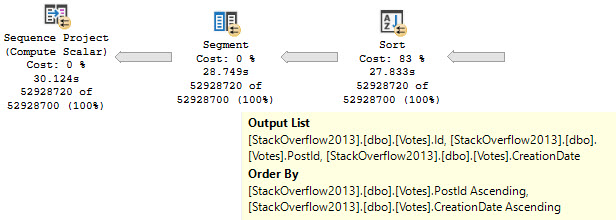
The tough part of this plan will be putting data in order to suit the Partition By, and then the Order By, in the windowing function.
Without any other clauses against columns in the Votes table, there are no additional considerations.
Two Day
What often happens is that someone wants to add an index to help the windowing function along, so they follow some basic guidelines they found on the internet.
What they end up with is an index on the Partition By, Order By, and then Covering any additional columns. In this case there’s no additional Covering Considerations, so we can just do this:
CREATE INDEX v2 ON dbo.Votes(PostId, CreationDate);
If you’ve been following my blog, you’ll know that indexes put data in order, and that with this index you can avoid needing to physically sort data.
limousine
Three Day
The trouble here is that, even though we have Cost Threshold For Parallelism (CTFP) set to 50, and the plan costs around 195 Query Bucks, it doesn’t go parallel.
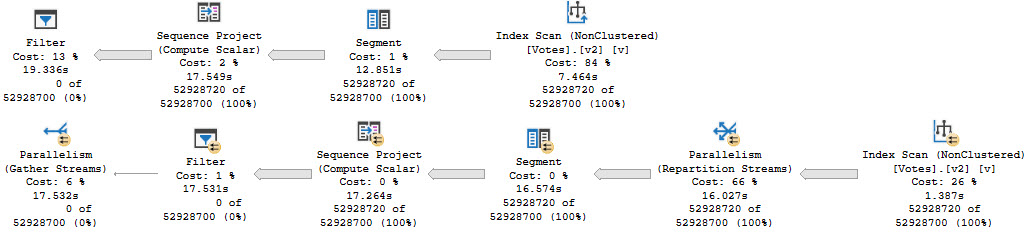
Creating the index shaves about 10 seconds off the ordeal, but now we’re stuck with this serial calamity, and… forcing it parallel doesn’t help.
Our old nemesis, repartition streams, is back.
wackness
Even at DOP 8, we only end up about 2 seconds faster. That’s not a great use of parallelism, and the whole problem sits in the repartition streams.
This is, just like we talked about yesterday, a row mode problem. And just like we talked about the day before that, windowing functions generally do benefit from batch mode.
Thanks for reading!
Going Further
If this is the kind of SQL Server stuff you love learning about, you’ll love my training. I’m offering a 25% discount to my blog readers if you click from here. I’m also available for consulting if you just don’t have time for that and need to solve performance problems quickly.
When queries go parallel, you want them to be fast. Sometimes they are, and it’s great.
Other times they’re slow, and you end up staring helplessly at a repartition streams operator.
brick wall
Sometimes you can reduce the problem with higher DOP hints, or better indexing, but overall it’s a crappy situation.
Snap To
Let’s admire a couple familiar looking queries, because that’s been working really well for us so far.
WITH Comments AS
(
SELECT
ROW_NUMBER()
OVER(PARTITION BY
c.UserId
ORDER BY
c.CreationDate) AS n
FROM dbo.Comments AS c
)
SELECT *
FROM Comments AS c
WHERE c.n = 0
OPTION(USE HINT('QUERY_OPTIMIZER_COMPATIBILITY_LEVEL_140'));
WITH Comments AS
(
SELECT
ROW_NUMBER()
OVER(PARTITION BY
c.UserId
ORDER BY
c.CreationDate) AS n
FROM dbo.Comments AS c
)
SELECT *
FROM Comments AS c
WHERE c.n = 0
OPTION(USE HINT('QUERY_OPTIMIZER_COMPATIBILITY_LEVEL_150'));
One is going to run in compatibility level 140, the other in 150, as foretold by ancient alien prophecy.
The two query plans will have a bit in common, but…
just batch
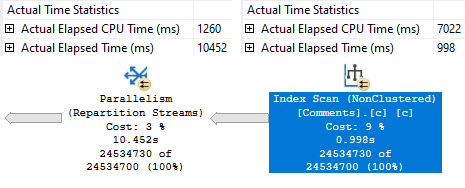
The second query, which runs in batch mode, runs about 15 seconds faster. One big reason why is that we skip that most unfortunate repartition streams operator.
It’s a cold sore. An actual factual cold sore.
The only ways I’ve found to fix it completely are:
Induce batch mode
Use the parallel apply technique
But the parallel apply technique doesn’t help much here, because of local factors.
In this case, me generating the largest possible result set and then filtering it down to nothing at the end.
Thanks for reading!
Going Further
If this is the kind of SQL Server stuff you love learning about, you’ll love my training. I’m offering a 25% discount to my blog readers if you click from here. I’m also available for consulting if you just don’t have time for that and need to solve performance problems quickly.
If you ask people who tune queries why batch mode is often much more efficient with windowing functions, they’ll tell you about the window aggregate operator.
That’s all well and good, but there’s another, often sneaky limitation of fully row mode execution plans with windowing functions.
Let’s go take a look!
Global Aggregates
One thing that causes an early serial zone in execution plans is if you use a windowing function that only has the order by
For example, let’s look at the plans for these two queries:
WITH Comments AS
(
SELECT
ROW_NUMBER()
OVER(ORDER BY
c.CreationDate) AS n
FROM dbo.Comments AS c
)
SELECT *
FROM Comments AS c
WHERE c.n = 0;
WITH Comments AS
(
SELECT
ROW_NUMBER()
OVER(PARTITION BY
c.UserId
ORDER BY
c.CreationDate) AS n
FROM dbo.Comments AS c
)
SELECT *
FROM Comments AS c
WHERE c.n = 0;
The resulting estimated plans look like this, using the 140 compatibility level:
oops
In the top plan, where the windowing function only has an order by, the serial zone happens immediately before the Segment operator. In the second plan, the parallel zone carries on until right before the select operator.
If you’re wondering why we’re only looking at estimated plans here, it’s because repartition streams ruins everything.
In The Year 2000
In compatibility level 150, things change a bit (yes, a window aggregate appears):
merry christmas
And the window aggregate appears within the parallel zone. The parallel zone does end before the filter operator, which may or may not be a disaster depending on how restrictive your filter is, and how many rows end up at it.
Also note the distinct lack of a repartition streams operator ruining everything. We’ll talk about that tomorrow.
Thanks for reading!
Going Further
If this is the kind of SQL Server stuff you love learning about, you’ll love my training. I’m offering a 25% discount to my blog readers if you click from here. I’m also available for consulting if you just don’t have time for that and need to solve performance problems quickly.
I think Batch Mode is quite spiffy for the right kind of query, but up until SQL Server 2019, we had to play some tricks to get it:
Do a funny join to an empty table with a column store index
Create a filtered column store index with no data in it
If you’re on SQL server 2019 Enterprise Edition, and you’ve got your database in compatibility level 150, you may heuristically receive Batch Mode without those tricks.
One important difference between Batch Mode Tricks™ and Batch Mode On Rowstore (BMOR) is that the latter allows you to read from row mode tables using Batch Mode, while the former doesn’t.
Tricks have limits, apparently.
Squish Squish
To cut down on typing, I’ll often create a helper object like this:
CREATE TABLE dbo.t
(
id int NULL,
INDEX c CLUSTERED COLUMNSTORE
);
SELECT
p.OwnerUserId,
COUNT_BIG(*) AS records
FROM dbo.Posts AS p
LEFT JOIN dbo.t
ON 1 = 0
WHERE p.Score < 50
GROUP BY p.OwnerUserId
HAVING COUNT_BIG(*) > 2147483647
OPTION(USE HINT('QUERY_OPTIMIZER_COMPATIBILITY_LEVEL_140'), MAXDOP 8);
SELECT
p.OwnerUserId,
COUNT_BIG(*) AS records
FROM dbo.Posts AS p
WHERE p.Score < 50
GROUP BY p.OwnerUserId
HAVING COUNT_BIG(*) > 2147483647
OPTION(USE HINT('QUERY_OPTIMIZER_COMPATIBILITY_LEVEL_150'), MAXDOP 8);
One executes in compatibility level 140, the other in 150.
Splish Splash
There are a couple interesting things, here.
the porter
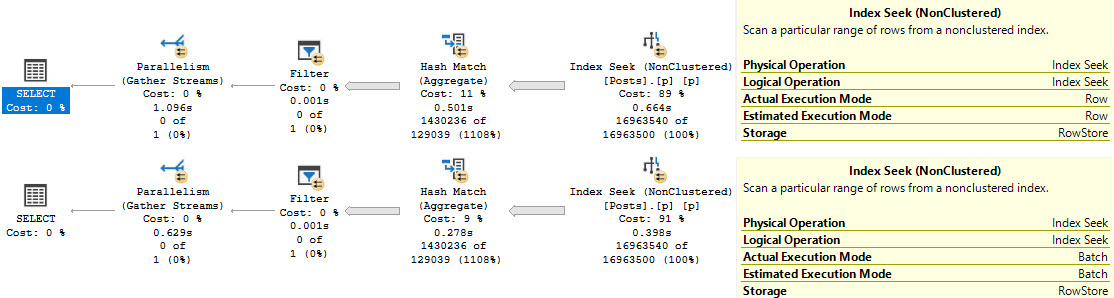
Even though both queries have operators that execute in Batch Mode (Filter, Hash Match), only the second query can read from the row store clustered index in Batch Mode. In this case, that shaves a couple hundred milliseconds off the seek.
There is likely some additional invisible benefit to not having to convert the row mode seek to a batch mode hash join at the next operator, since one executes for 501ms, and the other executes for 278ms. There’s nothing in the query plan to signal that happening, so you’ll just have to use your imagination.
Thanks for reading!
Going Further
If this is the kind of SQL Server stuff you love learning about, you’ll love my training. I’m offering a 25% discount to my blog readers if you click from here. I’m also available for consulting if you just don’t have time for that and need to solve performance problems quickly.
There was one thing that I didn’t talk about earlier in the week.
You see, there’s a mystery plan.
It only shows up once in a while, like Planet X. And when it does, we get bombarded by asteroids.
Just like when Planet X shows up.
I wouldn’t call it a good all-around plan, but it does something that we would want to happen when we run this procedure for VoteTypeId 5.
Let’s go look!
The Optimizer Discovers Aggregates, Sort Of
This isn’t a good “general” plan. In fact, for any of the previously fast values, it sucks.
It sucks because just like the “optimize for unknown” plan, it has a bunch of startup costs, does a lot of scanning, and is generally a bad choice for VoteTypeIds that produce a small number of values.
Ghost Town
Johnny Four
If you look carefully, you can see what the problem is.
For VoteTypeIds that filter out a lot of rows (which is most of them), that predicate doesn’t get applied until after Posts and Badges have been joined.
In other words, you fully join those tables, and then the result of that join is joined to the predicate-filtered result of Votes.
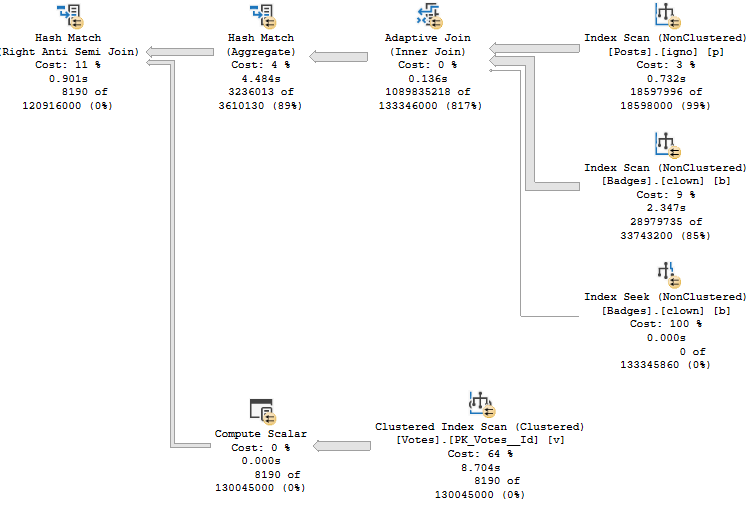
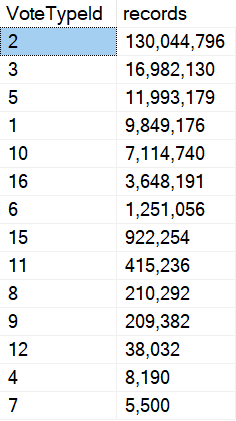
For this execution, the plan was compiled initially for VoteTypeId 2. It has 130 million entries in Votes. It’s the only VoteTypeId that produces this plan naturally.
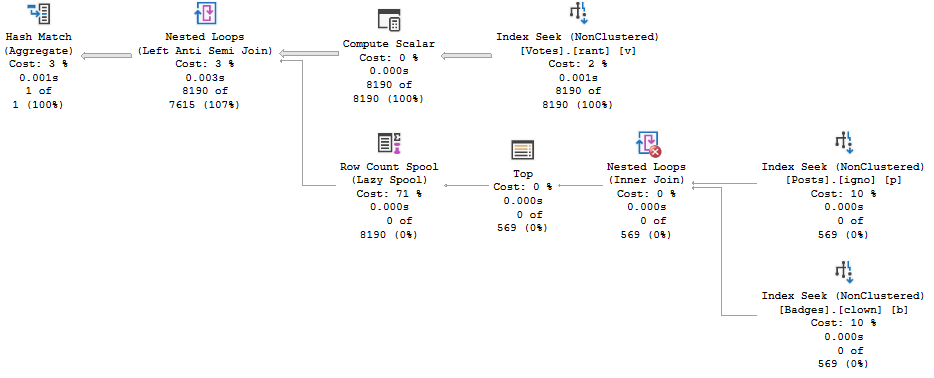
The plan you’re looking at above was re-executed with VoteTypeId 4, which has… 8,190 rows in Votes.
I can’t stress enough how difficult it would be to figure out why this is bad just looking at estimated plans.
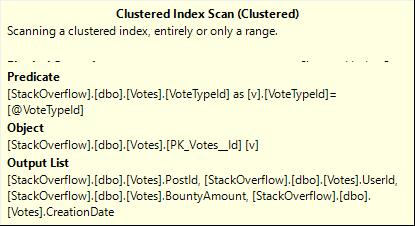
Though one clue would be the clustered index scan + predicate, if we knew that we had a suitable index.
2legit
This kind of detail with row discrepancies only surfaces with actual plans.
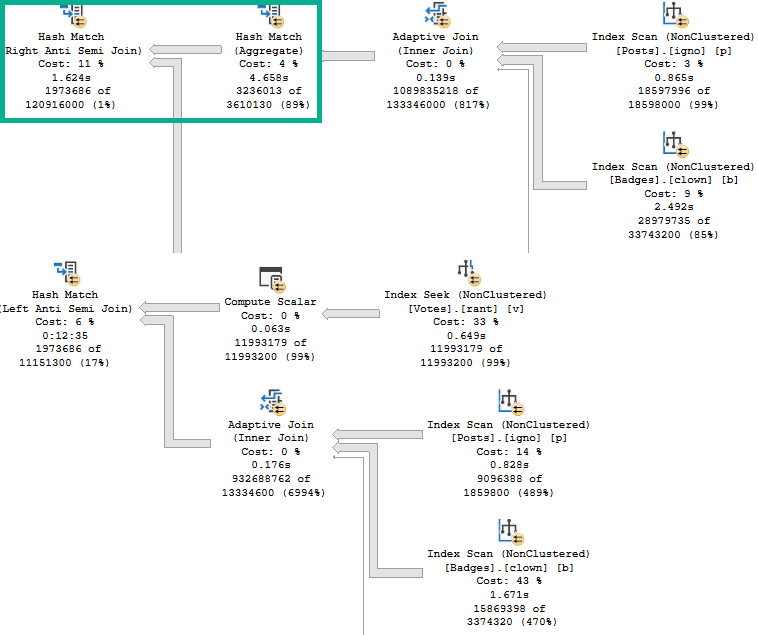
But there is one thing here that wasn’t showing up in other plans, when we wanted it to: The optimizer decides to aggregate OwnerUserId coming from the Posts table prior to joining to Votes.
Johnny Five
If you recall the previously used plan, one complaint was that the result of joining Posts and Badges then joined to Votes had to probe 932 million rows.
You can sort of see that here, where the Adaptive Join prior to the highlighted Hash Match Aggregate produces >100 million rows. It’s more here because we don’t have Bitmaps against both Posts and Badges, but… We’re going off track a bit with that.
That could have been avoided if the optimizer had decided to aggregate OwnerUserId, like it does in this plan.
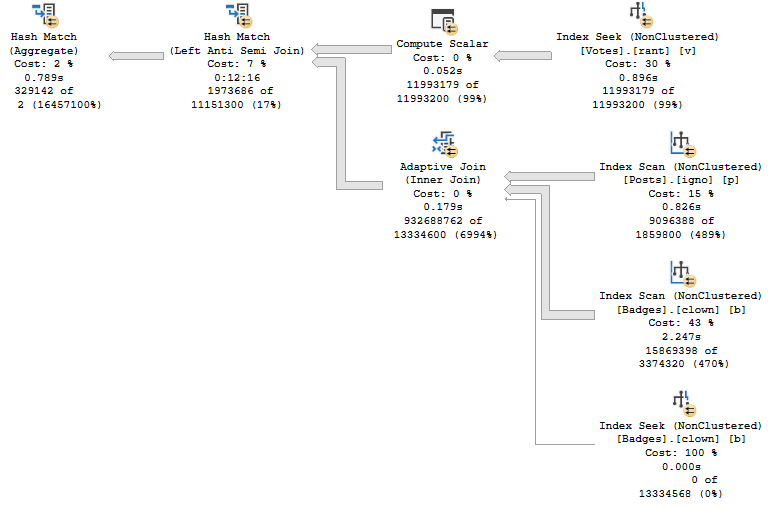
To compare:
gag order
The top plan has a handy green square to show you a helpful pre-join aggregation.
The bottom plan has no handy green squares because there is no helpful pre-join aggregation.
The product of the aggregation is 3.2 million rows, which is exactly what we got as a distinct count when we began experimenting with temp tables:
SELECT COUNT_BIG(DISTINCT p.OwnerUserId) AS records --3,236,013
FROM dbo.Posts AS p
JOIN dbo.Badges AS b
ON b.UserId = p.OwnerUserId
WHERE p.PostTypeId = 1;
Outhouse
If the optimizer had chosen to aggregate OwnerUserId prior to the join to Votes, we all could have gone home early on Friday and enjoyed the weekend
Funny, that.
Speaking of which, it’s Friday. Go enjoy the weekend.
Thanks for reading!
Going Further
If this is the kind of SQL Server stuff you love learning about, you’ll love my training. I’m offering a 25% discount to my blog readers if you click from here. I’m also available for consulting if you just don’t have time for that and need to solve performance problems quickly.
Let’s talk about some common hints that people use to fix parameter sniffing:
RECOMPILE: Won’t work here to get us a better plan for VoteTypeId 5, because it sucks when the optimizer knows what’s coming
OPTIMIZE FOR UNKNOWN: Works like once every 5 years, but people still bring it up, and really sucks here (picture below)
OPTIMIZE FOR (VALUE): Plan sharing doesn’t work great generally — if we were gonna do this, it’d have to be dynamic
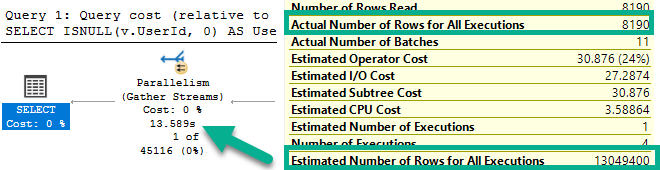
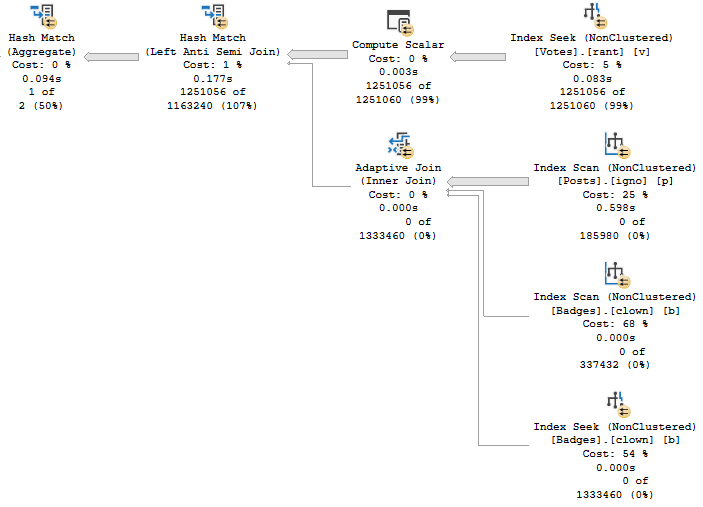
This is what happens when we optimize for unknown. The density vector guess is 13,049,400.
Stop it with this.
That guess for Vote Types with very few rows ends up with a plan that has very high startup costs.
This version of the query will run for 13-17 seconds for any given parameter. That sucks in zero gravity.
Pictured above is the plan for VoteTypeId 4, which previously finished sub-second using Plan 1 and Plan 2.
With those out of the way, how can we fix this thing?
The Mint
In some circumstances, a #temp table would help if we pre-staged rows from Votes.
The problem is that for many calls, we’d be putting between 7 and 130 MILLION rows into a temp table.
Not my idea of a good time.
RAMDISKS NINETY NINE CENTS
But what about the other part of the query?
If count up distinct OwnerUserIds, we get about 3.2 million.
Better, we can reduce the rows further in the procedure with an EXISTS to Votes (I’ll show you that in a minute).
SELECT COUNT_BIG(DISTINCT p.OwnerUserId) AS records --3,236,013
FROM dbo.Posts AS p
JOIN dbo.Badges AS b
ON b.UserId = p.OwnerUserId
WHERE p.PostTypeId = 1
That’s not too bad, depending on:
How frequently it runs
How concurrently it runs
How overwhelmed tempdb is
Your Mom
The Product
That gives us:
CREATE OR ALTER PROCEDURE dbo.VoteSniffing ( @VoteTypeId INT )
AS
BEGIN
SET XACT_ABORT, NOCOUNT ON;
SELECT DISTINCT p.OwnerUserId
INTO #p
FROM dbo.Posts AS p
JOIN dbo.Badges AS b
ON b.UserId = p.OwnerUserId
WHERE p.PostTypeId = 1
AND EXISTS
(
SELECT 1/0
FROM dbo.Votes AS v
WHERE v.UserId = p.OwnerUserId
AND v.VoteTypeId = @VoteTypeId
);
SELECT ISNULL(v.UserId, 0) AS UserId,
SUM(CASE WHEN v.CreationDate >= '20190101'
AND v.CreationDate < '20200101'
THEN 1
ELSE 0
END) AS Votes2019,
SUM(CASE WHEN v.BountyAmount IS NULL
THEN 0
ELSE 1
END) AS TotalBounty,
COUNT(DISTINCT v.PostId) AS PostCount,
@VoteTypeId AS VoteTypeId
FROM dbo.Votes AS v WITH(FORCESEEK)
WHERE v.VoteTypeId = @VoteTypeId
AND NOT EXISTS
(
SELECT 1/0
FROM #p AS p
WHERE p.OwnerUserId = v.UserId
)
GROUP BY v.UserId;
END;
GO
Which works pretty well across all calls, and avoids the primary issue with VoteTypeId 5.
Navy Blue
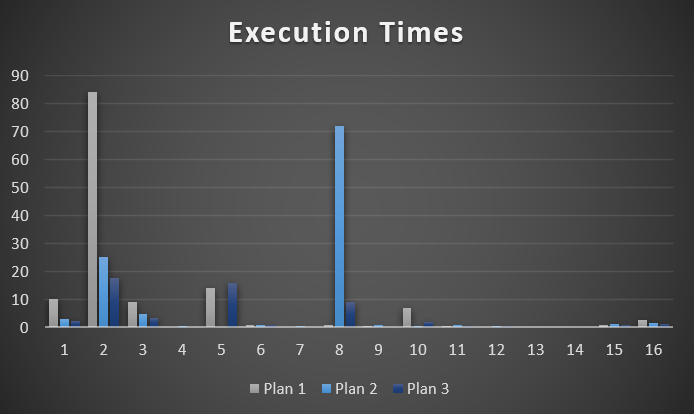
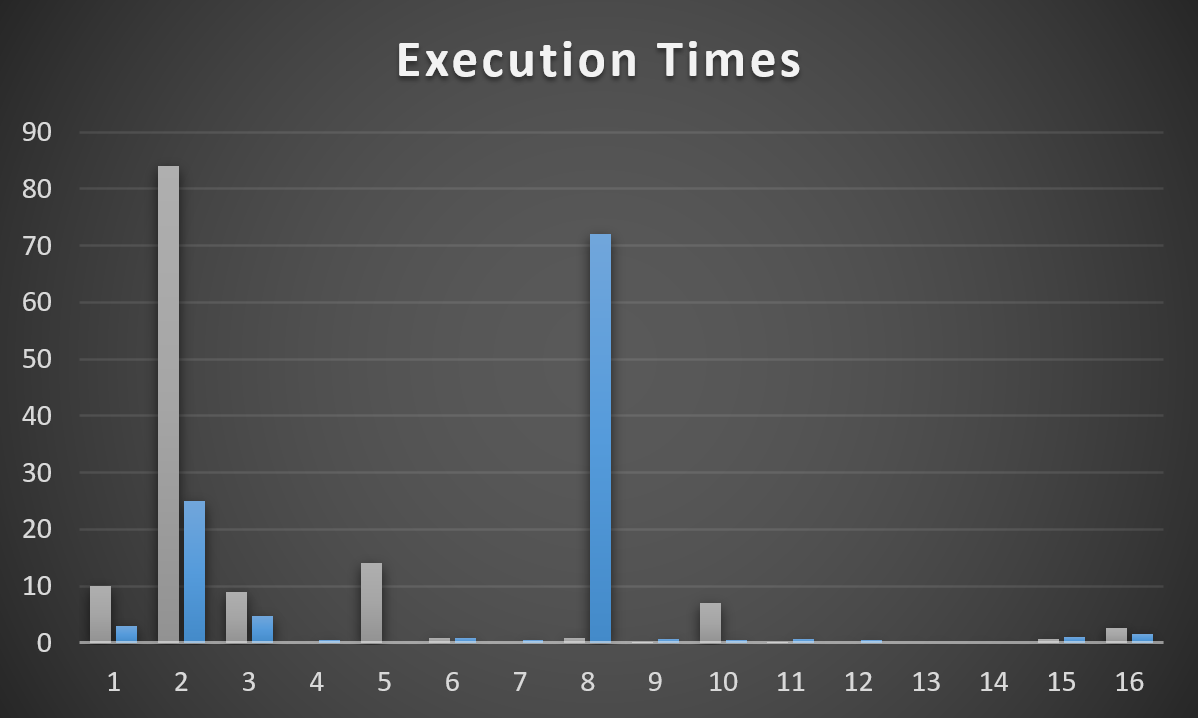
I’m generally happy with this, with the slight exception of VoteTypeId 8. Yeah, it beats the pants off of when we sniff Plan 2, but it’s about 7 seconds slower than when we get Plan 1.
I pulled the 17 minute execution from this graph for Plan 2/VoteTypeId 5, too, because it’s so distracting. Not having to worry about that thing is a trade off I’m willing to make for Plan 3 being about a second slower than Plan 1.
Not bad for a lazy Sunday afternoon of blogging, though.
Save One For Friday
Query tuning in SQL Server 2019 isn’t always a whole lot different from performance tuning other versions of SQL Server.
You have some more help from optimizer features (especially if you’re on Enterprise Edition), but they don’t solve every problem, and you can run into some very common problems that you’re already used to solving.
You may even be able to use some very familiar techniques to fix things.
In tomorrow’s post, I want to look at a quirk that would have thrown us way off course to explore on our way here.
Thanks for reading!
Going Further
If this is the kind of SQL Server stuff you love learning about, you’ll love my training. I’m offering a 25% discount to my blog readers if you click from here. I’m also available for consulting if you just don’t have time for that and need to solve performance problems quickly.
We’ve got a problem, Sam Houston. We’ve got a problem with a query that has some strange issues.
It’s not parameter sniffing, but it sure could feel like it.
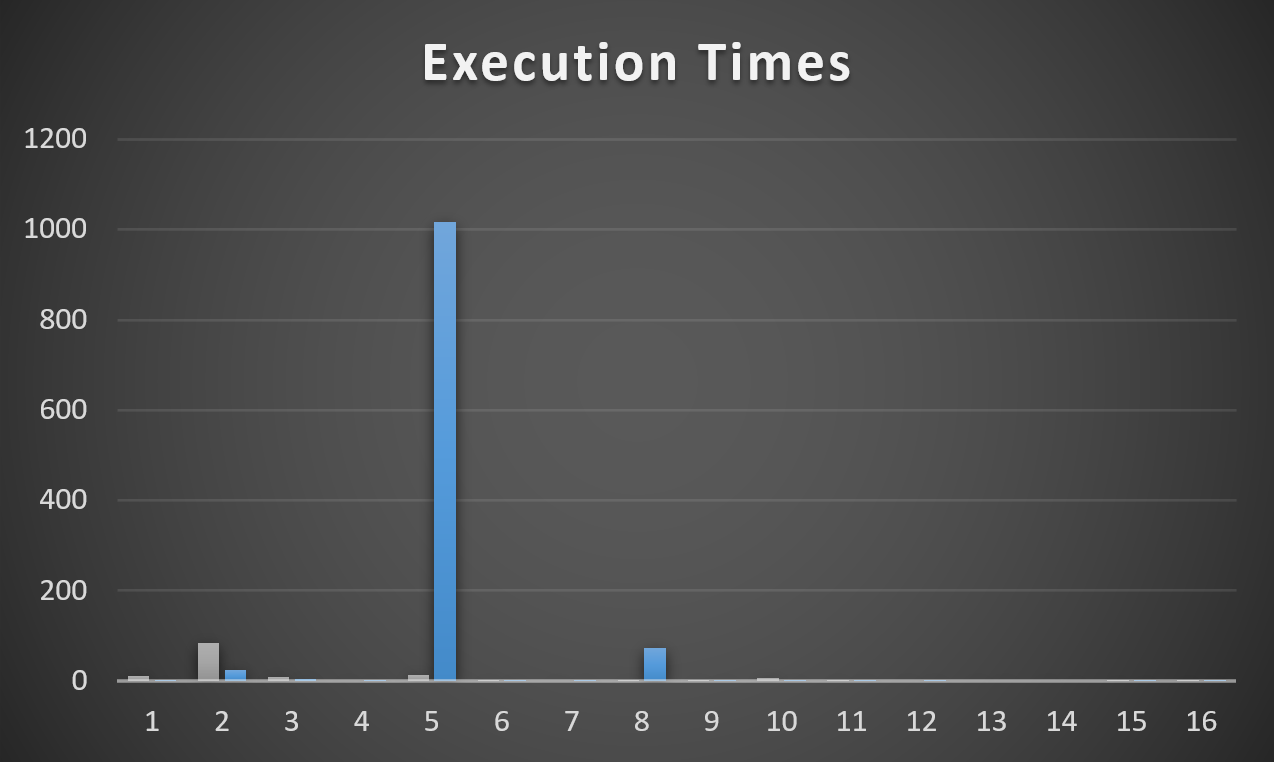
When the procedure compiles and runs with VoteTypeId 5, it runs for 12 minutes
Other VoteTypeIds run well with the same plan that VoteTypeId 5 gets
When VoteTypeId 5 runs with a “small” plan, it does okay at 10 seconds
Allow me to ruin a graph to illustrate. The Y axis is still seconds, but… it goes up a little higher now.
weigh-in
The Frustration (A Minor Digression)
Here’s where life can be tough when it comes to troubleshooting actual parameter sniffing.
If you’re relying solely on the plan cache, you’re screwed. You’ll see the plan, and the compile value, but you won’t have the runtime value anywhere that “caused” the problem. In other words, the set of parameters that were adversely affected by the query plan that didn’t fit.
There are some things that can help, like if you’re watching it happen live, or if you have a monitoring tool that might capture runtime parameters.
Like I said, this isn’t parameter sniffing, but it feels like it.
It could extra-feel like it because you might see a misbehaving query, and a compile-time parameter that runs quickly on its own when you test it, e.g. VoteTypeId 6.
It would be really hard to tell that even if a plan were to compile specifically for a different parameter, it would still run for 12 minutes.
Heck, that’d even catch me off-guard.
But that’s what we have here: VoteTypeId 5 gets a bad plan special for VoteTypeId 5.
Examiner
Let’s dig in on what’s happening to cause us such remarkable grief. There has to be a reason.
I don’t need more grief without reason; I’ve already got a public school education.
I WANT TO KNOW
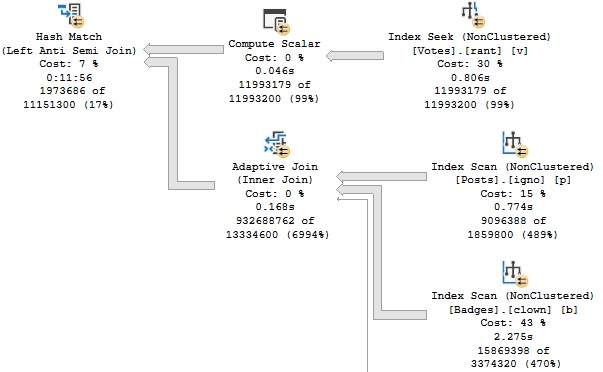
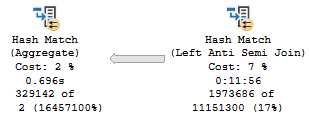
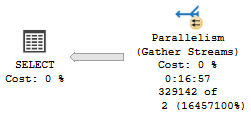
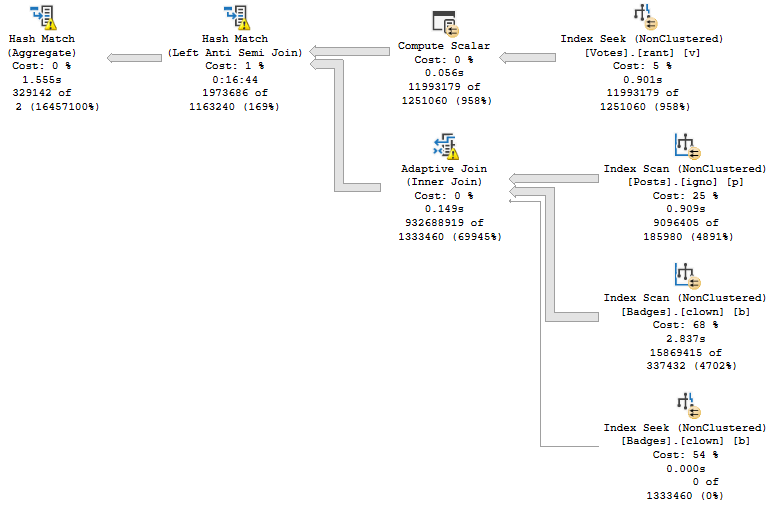
If we were to summarize the problem here: that Hash Match Left Anti Semi Join runs for 12 minutes on its own.
No other operator, or group of operators, is responsible for a significant amount of time comparatively.
Magnifier
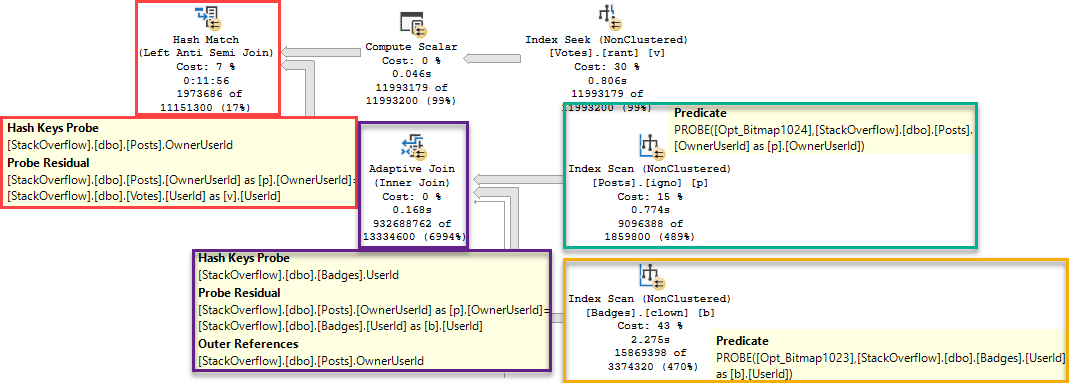
Some things to note:
The bad estimates aren’t from predicates, they’re from Batch Mode Bitmaps
Those bad estimates end up producing a much larger number of rows from the Adaptive Join
The Hash Match ends up needing to probe 932 million rows
el disastero
Taking 12 minutes to probe 932 million rows is probably to be expected, now that I think about it.
If the optimizer had a good estimate from the Bitmaps here, it may have done the opposite of what a certain Pacific Island Dwelling Bird said:
Getting every nuance of this sort of relational transformation correct can be tricky. It is very handy that the optimizer team put the effort in so we do not have to explore these tricky rewrites manually (e.g. by changing the query text). If nothing else, it would be extremely tedious to write all the different query forms out by hand just to see which one performed better in practice. Never mind choosing a different version depending on current statistics and the number of changes to the table.
In this case, the Aggregate happens after the join. If the estimate were correct, or even in the right spacetime dimension, this would be fine.
We can gauge the general efficiency of it by looking at when this plan is used for other parameters that produce numbers of rows that are closer to this estimate.
huey
If the optimizer had made a good guess for this parameter, it may have changed the plan to put an aggregate before the join.
Unfortunately we have very little control over estimates for Bitmaps, and the guesses for Batch Mode Bitmaps are a Shrug of Atlassian proportions.
Finisher
We’ve learned some things:
This isn’t parameter sniffing
Batch Mode Bitmaps wear pants on their head
Batch Mode Bitmaps set their head-pants on fire
Most of the time Batch Mode performance covers this up
The plan for VoteTypeId 5 is not a good plan for VoteTypeId 5
The plan for VoteTypeId 5 is great for a lot of other VoteTypeIds
In tomorrow’s post, we’ll look at how we can fix the problem.
Thanks for reading!
Going Further
If this is the kind of SQL Server stuff you love learning about, you’ll love my training. I’m offering a 25% discount to my blog readers if you click from here. I’m also available for consulting if you just don’t have time for that and need to solve performance problems quickly.