In yesterday’s post, I taught you about the good things that come from using computed columns. In today’s post, I want to show you something terrible that can happen if you put scalar UDFs in them. The same issues arise if you use scalar UDFs in check constraints, so you can apply anything you see here to those as well.
To make things quick and easy for you to digest, here’s a training video that’s normally part of my paid classes available for free.
Thanks for reading!
Going Further
If this is the kind of SQL Server stuff you love learning about, you’ll love my training. Blog readers get 25% off the Everything Bundle — over 100 hours of performance tuning content. Need hands-on help? I offer consulting engagements from targeted investigations to ongoing retainers. Want a quick sanity check before committing to a full engagement? Schedule a call — no commitment required.
One of the most common things I see when working with vendor apps are queries that need to filter or join on some expression that traditional indexing can’t make efficient.
B-tree indexes only organize the data as it currently exists. As soon as you perform a runtime manipulation on it in a join or where clause, SQL Server’s optimizer and storage engine have far fewer good choices to make.
This comes back to a couple rules I have when it comes to performance:
Anything that makes your job easier makes the optimizer’s job harder
Store data the way you query it, and query data the way you store it
Presentation Is Everything
SQL Server has many built in functions that help you easily manipulate data for presentation. It also lets you write a variety of user defined functions if the existing set don’t do exactly what you want, or you have different needs.
None of these functions have any relational meaning. The built in ones don’t generally have any additional side effects, but user defined functions (scalar and multi-statement) have many additional performance side effects that we’ll discuss later in the series.
This practice violates both of the above rules, because you did something out of convenience that manipulated data at runtime.
You will be punished accordingly.
Snakes
These are the situations you want to avoid:
function(column) = something
column + column = something
column + value = something
value + column = something
column = @something or @something IS NULL
column like ‘%something’
column = case when …
value = case when column…
Mismatching data types
For a lot of these things, though, you can use a computed column to materialize the expression you want to use. They’ve been around forever, and I still barely see anyone using them.
There are a lot of misconceptions around them, usually that:
They cause blocking when you add them (only sometimes)
You can’t index them unless you persist them (you totally can!)
Known
There are some interesting things you can do with computed columns to make queries that would otherwise have a tough time go way faster. To make it quick and easy for you to learn about them, I’m making videos from my paid training available here for you to watch.
Thanks for reading!
Going Further
If this is the kind of SQL Server stuff you love learning about, you’ll love my training. Blog readers get 25% off the Everything Bundle — over 100 hours of performance tuning content. Need hands-on help? I offer consulting engagements from targeted investigations to ongoing retainers. Want a quick sanity check before committing to a full engagement? Schedule a call — no commitment required.
There’s a time and a place for everything, except scalar functions. In a lot of the locking and deadlocking issues I help clients with, developers either:
Didn’t understand the scope of their transaction
Didn’t need an explicit transaction to begin with (ha ha ha)
In this post, I’m gonna give you access to some more of my training videos about locking and blocking for free. Holiday spirit, or something.
There’s a bunch of stuff in there that’ll help you generally with these issues, and one that covers the topic of this post specifically. Enjoy!
Going Further
If this is the kind of SQL Server stuff you love learning about, you’ll love my training. Blog readers get 25% off the Everything Bundle — over 100 hours of performance tuning content. Need hands-on help? I offer consulting engagements from targeted investigations to ongoing retainers. Want a quick sanity check before committing to a full engagement? Schedule a call — no commitment required.
I often see people get stuck hard by this. Even worse, it happens when they’re using a merge statement, which are like throwing SQL Server a knuckleball.
It has no idea what it might have to do with your merge — insert? update? delete? — so it has to prepare a plan for any of them that you specify.
Just don’t use merge, okay? If you take one thing from this whole series: please don’t use merge.
Okay, anyway, back to the point: large modifications can suck in a few different ways.
Locking:
The whole time those big modifications are running, other queries are gonna get blocked. Even with NOLOCK/UNCOMMITTED hints, other modification queries can get stuck behind them. Wanna make users feel some pain? Have your app be unusable for big chunks of time because you refuse to chunk your modifications. Worse, if enough queries get backed up behind one of these monsters, you can end up running out of worker threads, which is an even worse performance issue.
Transaction Logging:
The more records you need to change, the more transaction logging you have to do. Even in simple recovery, you log the same amount of changes here (unless your insert gets minimal logging). A lot of people think simple recovery means less logging, but no, it just means that SQL Server manages the transaction for you. This’ll get worse as you add more indexes to the table, because change for each of them are logged separately.
Query Performance:
The modification part of any update or delete happens single-threaded. Other parts of the query plan might go parallel, but the actual modification portion can’t. Getting a few million rows ready on a bunch of threads simultaneously might be fast, but then actually doing the modification can be pretty slow. You have to gather all those threads down to a single one.
Lock Escalation:
It goes without saying that large modifications will want object-level locks. If there are incompatible locks, they may end up blocked. If they started by taking row or page locks, and tried to escalate to an object level lock but couldn’t, you could end up gobbling up a whole lot of your lock memory, which is a finite resource. Remember, there’s no escalation or transition between row and page locks. This is another place where having a lot of indexes hanging around can hurt.
Buffer Pool Pollution:
If you’re the type of person who isn’t regularly declutter your indexes, it’s likely that you have a bunch of indexes that either don’t get used anymore, only rarely get used, or are duplicative of other indexes defined on a table. Just like with transaction logging an lock escalation, the more indexes you have around, the more of them you need to read up into SQL Server’s buffer pool to modify them. SQL Server doesn’t work with pages on disk.
Double Dollars
How fast these queries run will be partially be dictated by:
How much memory you have
How fast your disks are
How fast your storage networking is
There are other factors too, like the type of data you’re changing. Changing MAX data types has way more overhead than more reasonable ones, or even shorter strings.
Thanks for reading!
Going Further
If this is the kind of SQL Server stuff you love learning about, you’ll love my training. Blog readers get 25% off the Everything Bundle — over 100 hours of performance tuning content. Need hands-on help? I offer consulting engagements from targeted investigations to ongoing retainers. Want a quick sanity check before committing to a full engagement? Schedule a call — no commitment required.
For developers who have worked with, or who write applications that work across multiple database platforms, working with SQL Server can often be a jarring experience.
Problems that you don’t face on products that use Multi-Version Concurrency Control by default are all of a sudden the bane of your existence.
But of course, for developers who only work with SQL Server, the innate fear of commitment is one of the first things they learn.
A lot of the reasoning for not using an optimistic isolation level that I’ve heard from people over the years just doesn’t hold up well anymore.
Excusify
Let’s talk through some of them.
We’re worried about tempdb contention from the additional row versioning going up there
That’s fair, but if you don’t currently have tempdb contention, it’s unlikely that it’s going to body slam you unless your application currently has problems with:
Modifying huge chunks of data at once (not counting inserts)
Long running modification transactions
Implicit transactions that don’t always commit
Updating a lot of LOB data all the time
Most people don’t have such severe problems with that stuff that things go pear shaped from the version store. When tempdb is properly set up, it can take a pretty good beating before you see the type of contention that causes performance issues.
On top of that, the version store and other temporary objects don’t use exactly the same structures in tempdb.
In SQL Server 2019 and up where the local version store in use by Accelerated Database Recovery is used instead of tempdb
In all prior releases, the row versions are sent to special append-only storage units which aren’t governed or exposed by normal system views, nor do they generate transaction log record. Those units may contain many rows, and are cleaned up in at the unit level, not the row level.
Online index rebuilds use a separate version store from the one used by triggers, updates, deletes, MARS, etc.
We’re worried about tempdb growing out of control from the version store
Sure, you increase the risk surface area for long running modifications/transactions creating this situation, but either of those things would cause a pretty big headache if they happened without an optimistic isolation level enabled.
I’ve seen plenty of people end up there, do something goofy like kill the long running modification without looking at how much work it had done, and then get stuck in an even longer running rollback.
And guess what? Restarting SQL Server doesn’t fix it. Accelerated Database Recovery is helpful for that, if you’re on SQL Server 2019+, but that probably ain’t you.
The “good” news is that if tempdb runs out of space, SQL Server will start shrinking the version store.
We want our product to work out of the box, and SQL Server’s tempdb needs additional configuration to handle load
Boy, have I got news for you from 2016:
Trace flag 1117 is the default behavior
Trace flag 1118 is the default behavior
The setup GUI lets you create multiple data files
The setup GUI lets you turn on instant file initialization
If that setup doesn’t keep tempdb woes at bay from enabling an optimistic isolation level, it might be your fault.
We can’t test all our code to see if there will be race conditions with optimistic locking
I hate this, because it says to me that you don’t know your own code base well enough to know if you rely on locking to queue things, etc. It’s also a very lazy because…
I see you using gobs of NOLOCK hints everywhere. You’re not gonna get the right results for that type of code, anyway. Why be afraid of working with the last known good version of a row?
If you’re doing something like generating sequences, and you’re using a homegrown sequence table instead of the sequence objects that SQL Server has had since 2012, I question your sanity.
I mean, unless you’re using the code in the post I linked. Then you’re the coolest and smartest.
Thanks for reading!
Going Further
If this is the kind of SQL Server stuff you love learning about, you’ll love my training. Blog readers get 25% off the Everything Bundle — over 100 hours of performance tuning content. Need hands-on help? I offer consulting engagements from targeted investigations to ongoing retainers. Want a quick sanity check before committing to a full engagement? Schedule a call — no commitment required.
Then along comes some beleaguered colleague who whispers the magic incantation into your ear, and suddenly those problems go away. A week later you have a keyboard shortcut that inserts WITH (NOLOCK) programmed into SSMS and your muscle memory.
You’ve probably already read a thousand and one blog posts about what a bad idea NOLOCK is, too. But you’ve just never had a problem with it, whether it’s dirty reads or errors.
And besides, no one actually knows if data is correct anyway. Have you seen data? Quite a mess. If it looks weird, just run it again.
You read something scary about optimistic isolation levels twenty years ago. Why change now?
Try Harder
Let’s look at where all your NOLOCK-ing won’t save you.
CREATE TABLE
    dbo.beavis
(
    id int PRIMARY KEY,
    heh datetime
);

CREATE TABLE
    dbo.butthead
(
    id int PRIMARY KEY,
    huh datetime
);

INSERT
    dbo.beavis
    (id, heh)
VALUES
    (1, GETDATE());

INSERT
    dbo.butthead
    (id, huh)
SELECT
    b.id,
    b.heh
FROM dbo.beavis AS b;
Here’s the most common deadlock scenario I see:
/*Player one*/
BEGIN TRAN

    SET TRANSACTION ISOLATION LEVEL
        READ UNCOMMITTED;

    UPDATE b
        SET b.heh = GETDATE()
    FROM dbo.beavis AS b WITH(NOLOCK);

    /*Stop running here until you run
      the other session code, then come
      back and run the next update*/
    UPDATE b
        SET b.huh = GETDATE()
    FROM dbo.butthead AS b WITH(NOLOCK);

ROLLBACK;
And then:
/*Session two*/
BEGIN TRAN

    SET TRANSACTION ISOLATION LEVEL
        READ UNCOMMITTED;

    UPDATE b
        SET b.huh = GETDATE()
    FROM dbo.butthead AS b WITH(NOLOCK);

    UPDATE b
        SET b.heh = GETDATE()
    FROM dbo.beavis AS b WITH(NOLOCK);
    /*Stop running here*/

ROLLBACK;
Cautious Now
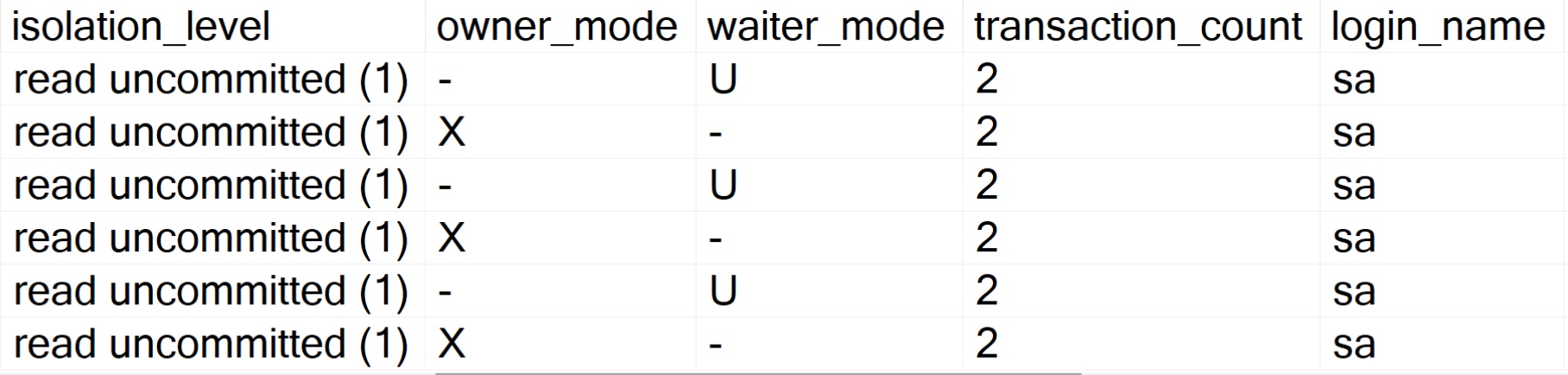
If you go look at the deadlocks that get produced by these queries, you’ll see something that looks like this:
pies
Despite the isolation level being read uncommitted and us festooning NOLOCK hints all about the place, we still end up with deadlocks.
Using these hints doesn’t always help with concurrency issues, and this goes for many other situations where locking and blocking has to occur.
At best, your select queries will be able to read dirty data rather than get blocked. I’m way more in favor of using an optimistic isolation level, like Read Committed Snapshot Isolation. All NOLOCK really means is that your query doesn’t respect locks taken by other queries.
Thanks for reading!
Going Further
If this is the kind of SQL Server stuff you love learning about, you’ll love my training. Blog readers get 25% off the Everything Bundle — over 100 hours of performance tuning content. Need hands-on help? I offer consulting engagements from targeted investigations to ongoing retainers. Want a quick sanity check before committing to a full engagement? Schedule a call — no commitment required.
It seems that most developers are either too naive or too lazy to choose just the columns that they need to satisfy a particular requirement, and so their ORM queries end up doing the equivalent of SELECT *from every table involved in the query.
I have seen some worthwhile uses for this, where people would select all the data that they needed to only make one round trip to the server rather than 5 or more. In those cases, it’s okay to break the rule, especially if the query is a Heavy Hitter™.
But this can end up causing all sorts of problems with queries. Back in the Oldenn Dayes of the internet, you’d find people talking about the overhead of metadata lookups and blah blah.
I’m sure there’s some tiny amount, but that’s hardly worth talking about in light of the other, more serious issues that you’ll encounter.
Memory Grants
Memory grants come into play most commonly when you need to Sort or Hash data in a query plan. There are some other cases, like Optimized Nested Loops, and columnstore inserts, but those are somewhat less common.
Memory grants can get really thrown off by a couple things: cardinality misestimations, and string columns. Right now, the optimizer makes a guess that every row in the column is “half full”. That means whatever the byte length of your column is.
For instance:
varchar(100): 50 bytes
nvarchar(100): 100 bytes
The wider your columns get, the bigger your memory grants get. That becomes a bigger deal on servers that are starving for memory, because those grants can really eat up a lot of memory that you need for other stuff, like caching data or query plans.
Some Columns Are Bigger Than Others
These queries will all request additional memory from SQL Server, because we’re asking it to return dated sorted by Reputation, and we don’t have any useful indexes that put the Reputation column in order. That means we need some scratch space to do the work in.
SELECT TOP (1000)
    u.DisplayName
FROM dbo.Users AS u
ORDER BY
    u.Reputation;

SELECT TOP (1000)
    u.DisplayName,
    u.Location
FROM dbo.Users AS u
ORDER BY
    u.Reputation;

SELECT TOP (1000)
    u.DisplayName,
    u.Location,
    u.WebsiteUrl
FROM dbo.Users AS u
ORDER BY
    u.Reputation;

SELECT TOP (1000)
    u.DisplayName,
    u.Location,
    u.WebsiteUrl,
    u.AboutMe
FROM dbo.Users AS u
ORDER BY
    u.Reputation;
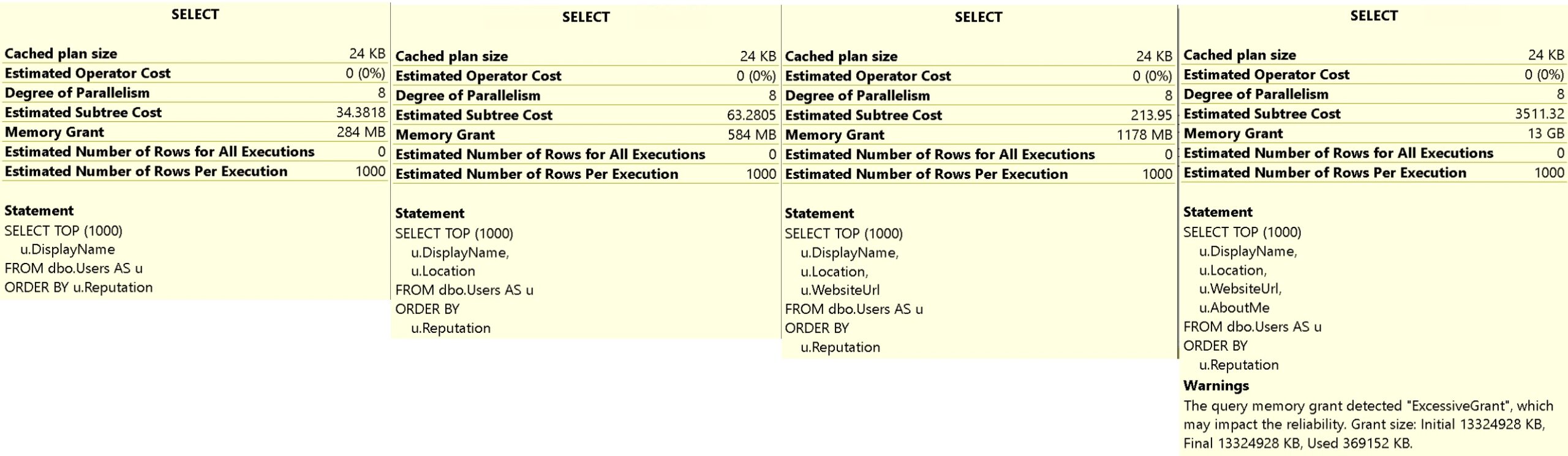
The query plans for these are unremarkable. They all have a Sort operator in them used to order our data, but the memory grants for all of these go up, up, up.
sunshine
We go from 284MB, to 584MB, to 1178MB, to 13GB. And worse, because of the 50% guess for column fullness, we only end up using 369MB of that 13GB.
Good luck with that.
Newer versions of SQL Server attempt to help you with this by adjusting memory grants between executions, but there are a bunch of caveats.
Lifetime
There are other problems that can occur with queries like these, but I’m going to cover them in other parts of the series because they tie into other concepts like indexing and parameter sniffing that I need to lay some foundation for first.
The memory grant thing is bad enough on its own, but it may not become a real issue until your databases reach a size where they outpace RAM by a significant margin.
If this is the kind of SQL Server stuff you love learning about, you’ll love my training. Blog readers get 25% off the Everything Bundle — over 100 hours of performance tuning content. Need hands-on help? I offer consulting engagements from targeted investigations to ongoing retainers. Want a quick sanity check before committing to a full engagement? Schedule a call — no commitment required.
When it comes to weird performance problems, I’ve seen this cause all sorts of them. The worst part is that there are much smarter ways to handle this.
While Table Valued Parameters aren’t perfect, I’d argue that they’re far more perfect than the alternative.
The first issue I see is that these clauses aren’t ever parameterized, which brings us to a couple familiar issues: plan cache bloat and purge, and constant query compilation.
Even when they are parameterized, some bad stuff can happen.
Since We’re Here
Let’s say you take steps like in the linked post about above to parameterize those IN clauses, though. Does that fix all your performance problems?
You can probably guess. Hey look, index!
CREATE INDEX u ON dbo.Users(DisplayName, Reputation)
WITH(SORT_IN_TEMPDB = ON, DATA_COMPRESSION = PAGE);
Now, we’re gonna use a stored procedure I wrote to generate a long parameterized in clause. It’s not pretty, and there’s really no reason to do something like this outside of a demo to show what a bad idea it is.
If anyone thinks people sending 1000-long lists to an IN clause isn’t realistic, you should really get into consulting. There’s some stuff out there.
And Wave
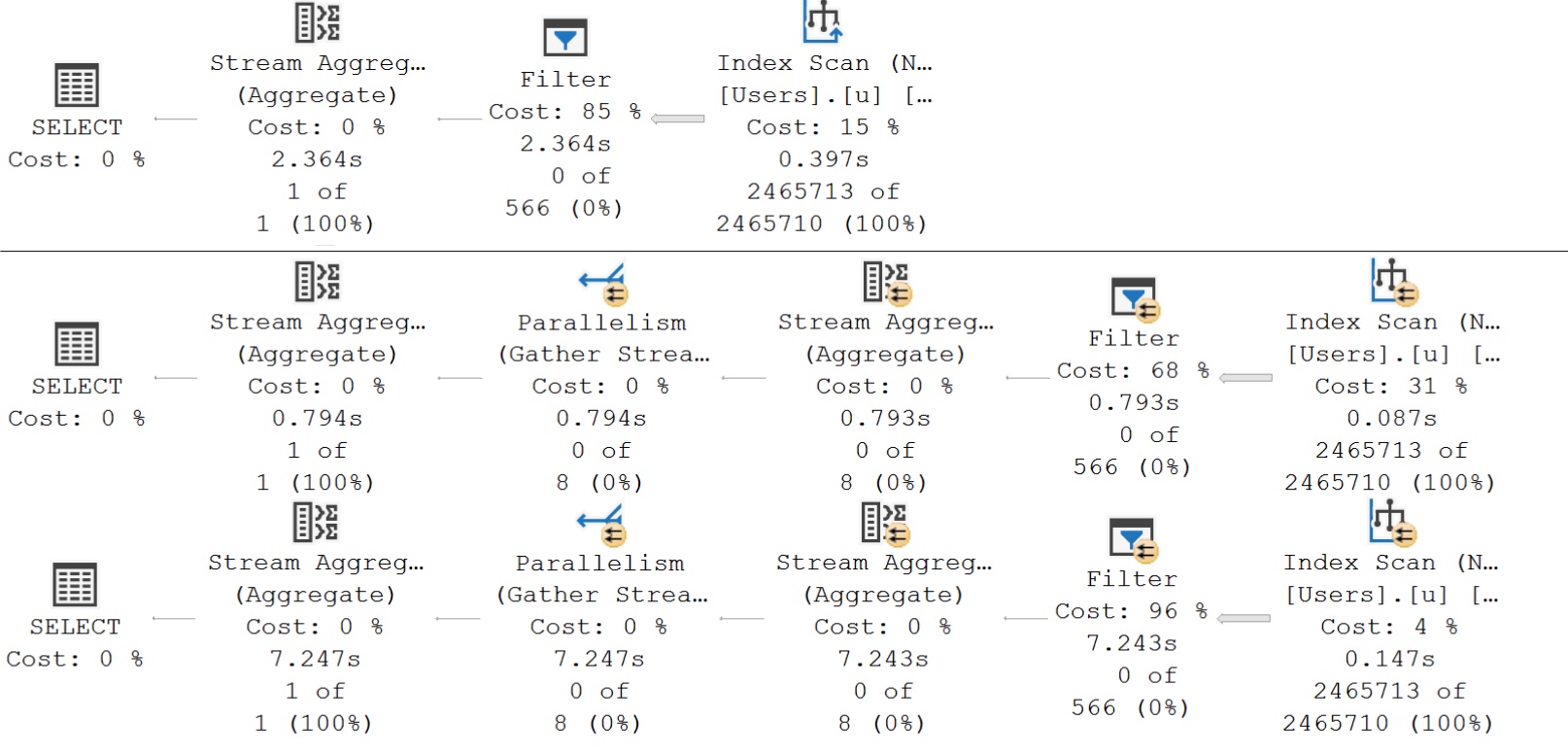
Here’s what the query plans for those executions look like:
stingy
The important detail here is that even with our super duper powered index, the optimizer decides that life would be too difficult to apply our “complicated” predicate. We end up with query plans that scan the index, and then apply the predicate in a Filter operator afterwards.
You’re not misreading, either. The 1000-value filter runs for roughly 7 seconds. Recompile hints do not work here, and, of course, that’d undo all your hard work to parameterize these queries.
Moral of the story: Don’t do this. Pass in a TVP, like the link above shows you how to do. If your ORM doesn’t support that, you might need to switch over to stored procedures.
Thanks for reading!
Going Further
If this is the kind of SQL Server stuff you love learning about, you’ll love my training. Blog readers get 25% off the Everything Bundle — over 100 hours of performance tuning content. Need hands-on help? I offer consulting engagements from targeted investigations to ongoing retainers. Want a quick sanity check before committing to a full engagement? Schedule a call — no commitment required.
If you have a small to medium sized application, and your developers are highly skilled not only in their preferred method of development, and you have someone who can manage SQL Server performance well (think settings, indexes, etc.) then you might be able to get away with having zero stored procedures.
This post is for everyone else, and by “everyone else” I mean “99% of software shops” out there.
You are seen. You are seen by me.
One Eye Up
The problems you’ll run into eventually will come from a few places, in general:
SQL Server has some wonky setup issues (this is still surprisingly common)
No one is managing the indexing (and I don’t mean maintenance, here)
Developer naïveté about what the generated queries look like (text and plan complexity)
Certain PaaS offerings, and software shops who offload certain tasks to customer DBA teams will partially be in the clear, here. But more often than not, DBAs are accidental and not much more confident than the average sysadmin when it comes down to digging into performance issues.
DBAs skilled in the art of performance tuning will be happy to tweak indexes where possible, but a lot of their feedback to you as a vendor might be a wishlist of things that they could do if the code were in a stored procedure where more traditional tuning techniques are available.
Matter Of Years
I’ve helped more than a few vendors dig their way out of ORM hell now, and the process isn’t so bad once you understand the logic involved to get the right results back.
Once you’re writing stored procedures, you have a whole world of possibilities when it comes to adjusting the code to better manage performance. For critical applications, this often becomes a necessity once a database gets big or busy enough.
I totally understand the appeal of ORMs for many development tasks and priorities, but once you run out of tricks to get it working faster, you need to learn how to let go.
Thanks for reading!
Going Further
If this is the kind of SQL Server stuff you love learning about, you’ll love my training. Blog readers get 25% off the Everything Bundle — over 100 hours of performance tuning content. Need hands-on help? I offer consulting engagements from targeted investigations to ongoing retainers. Want a quick sanity check before committing to a full engagement? Schedule a call — no commitment required.