CREATE INDEX
    p2
ON dbo.Posts
    (OwnerUserId, Score)
WITH
    (MAXDOP = 8, SORT_IN_TEMPDB = ON, DATA_COMPRESSION = PAGE);


CREATE INDEX
    c2
ON dbo.Comments
    (UserId, Score)
WITH
    (MAXDOP = 8, SORT_IN_TEMPDB = ON, DATA_COMPRESSION = PAGE);
I’ve taken a small bit of artistic license with them.
The crappy thing is… They really do not help and in some cases things get substantially worse.
Original Query
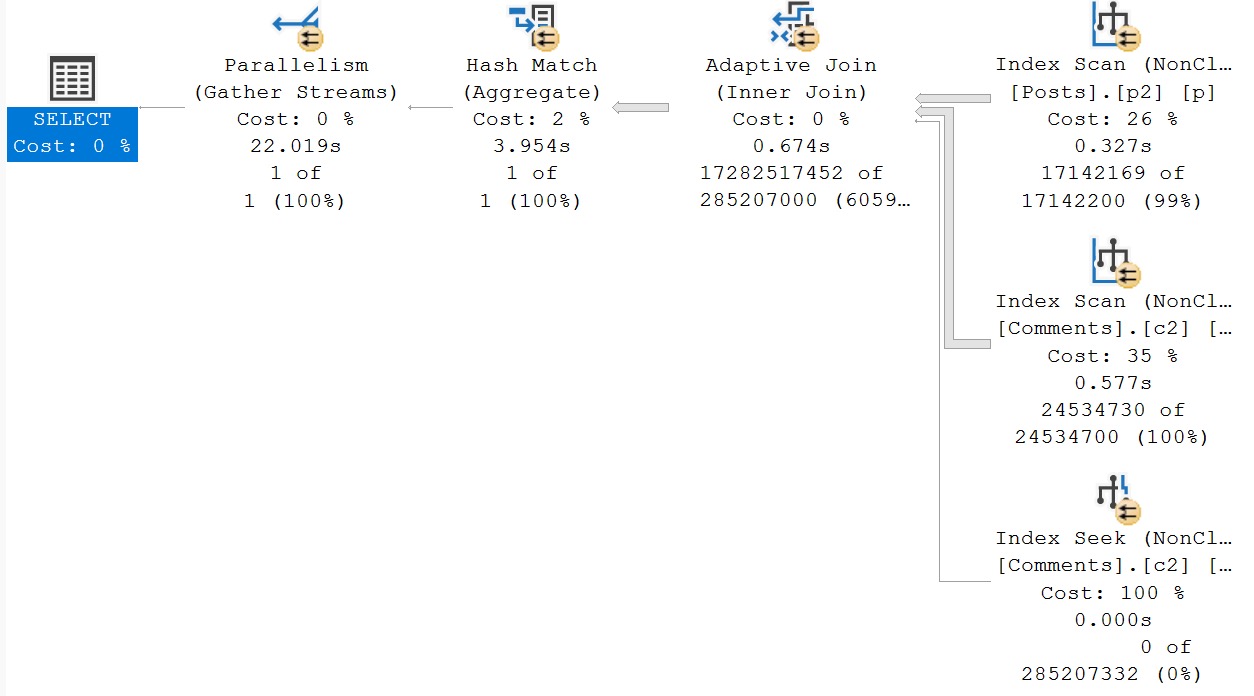
The original query plan is still awful. It is using both of our new indexes.
oh okay
No early aggregation whatsoever. Though yesterday’s takes 23 seconds, and today’s takes 22 seconds, I’d hardly call ourselves indexing victors for the improvement.
Rewrite #1: Manually Aggregate Posts
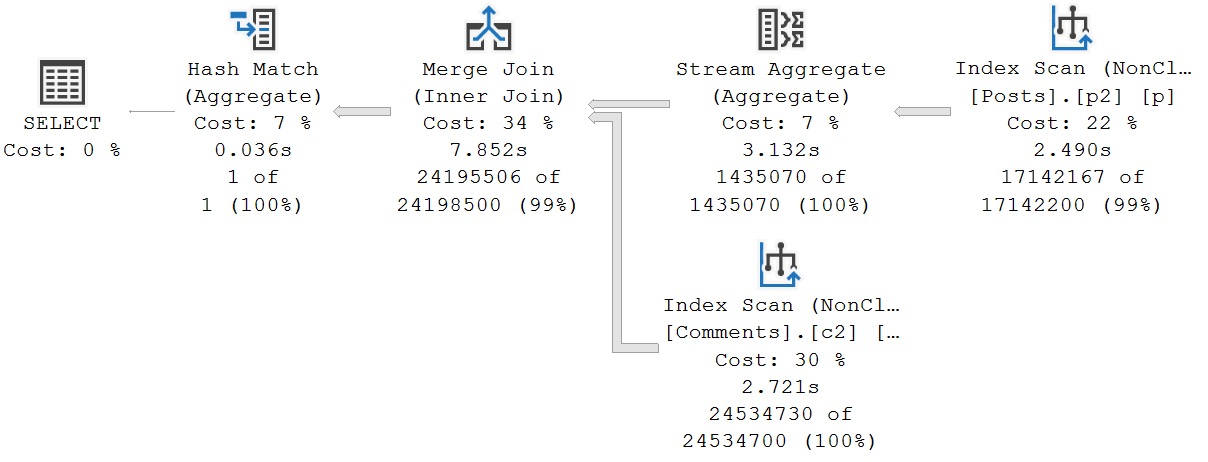
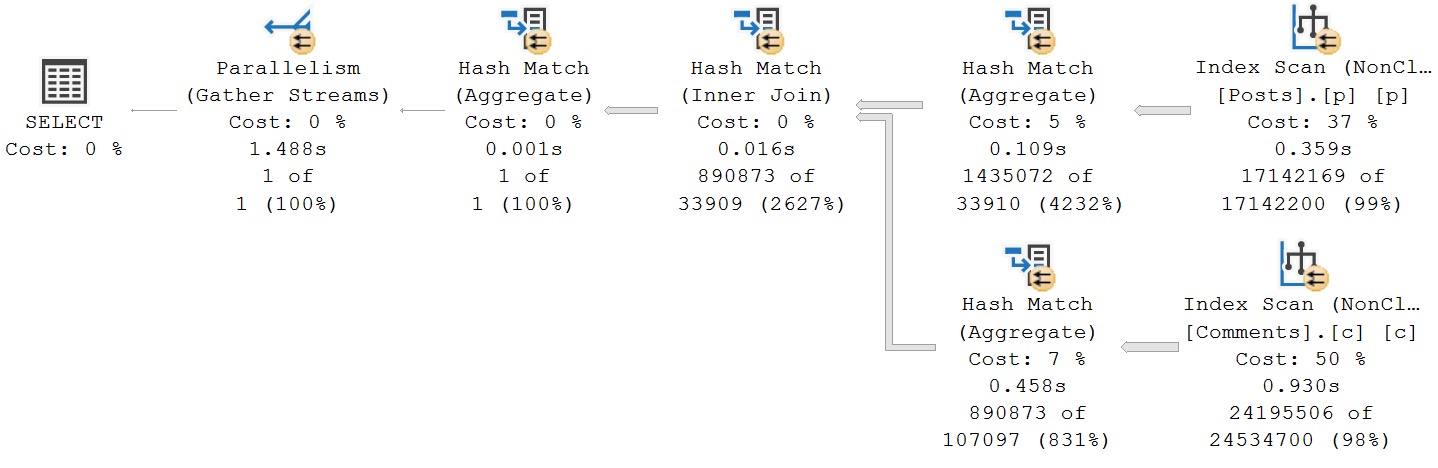
This one eats it the hardest, again, using both of our new indexes.
we gotta talk.
If one were to appreciate any aspect of this query plan, it’s that the optimizer didn’t choose a parallel merge join plan. Parallel merge joins were a mistake, and have driven me closer to alcohol induced comas than the Red Sox in the 90s.
The total runtime for this query shoots up to about 8 seconds. The biggest change, aside from a serial execution plan being chosen, is that only the Hash Match operator at the very end runs in Batch Mode. All other operators execute in Row Mode.
Rewrite #2: Manually Aggregate Comments
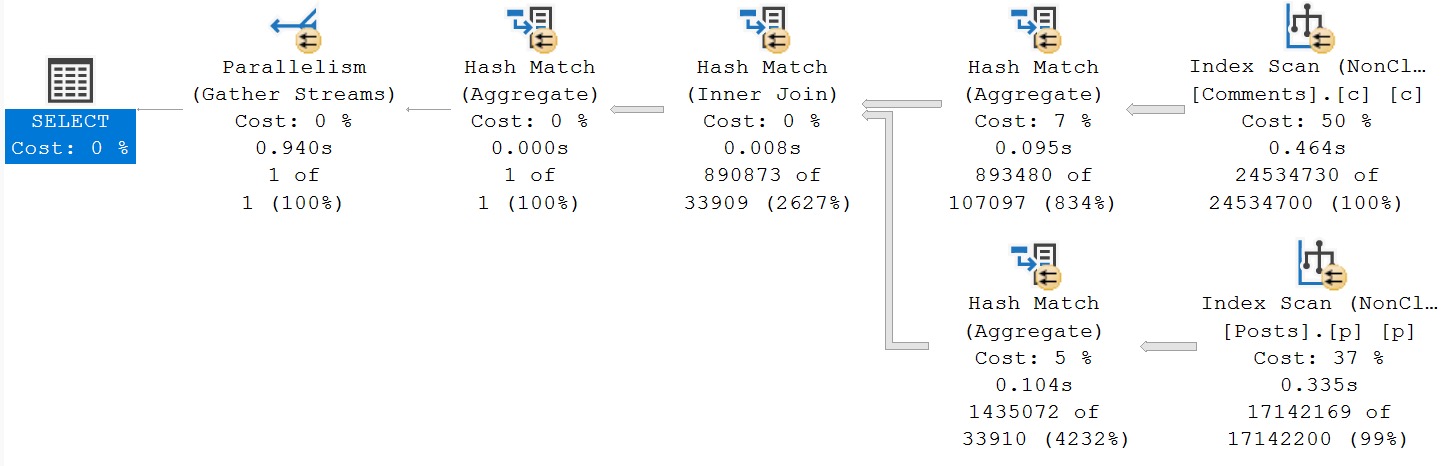
We go back to a parallel plan, but again, in Row Mode. This query now takes 2x as long as yesterday’s Batch Mode plan.
try, try again
Again, both new indexes are in use here. This one is the most disappointing.
Rewrite #3: Manually Aggregate Both
The fun thing about all of these plans is that, aside from the things I’ve been talking about, they all have the same problem as yesterday’s plans: Unless we tell SQL Server to aggregate things, it’s not trying to do that before the joins happen.
wrongo boyo
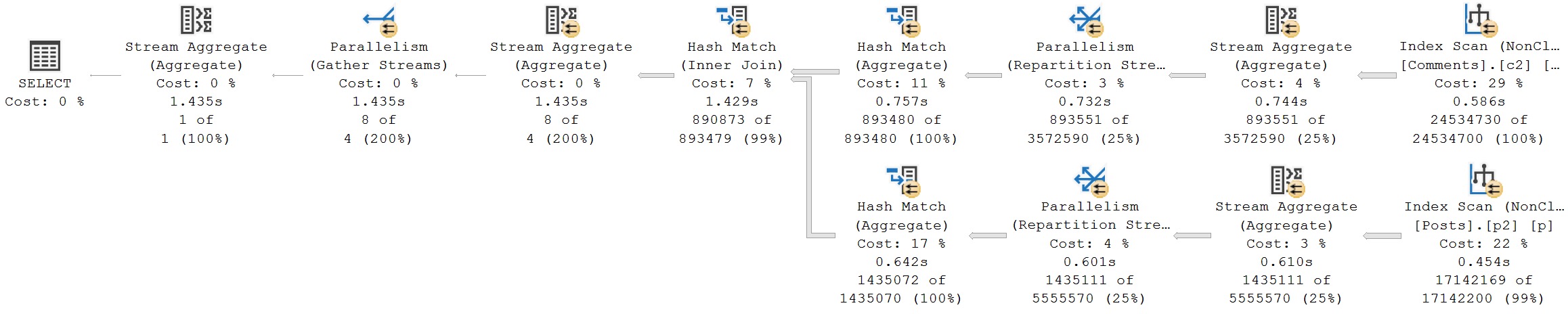
Again, the entire plan runs in Row Mode, using both new indexes. Though most of the operators are ineligible for Batch Mode, the hash operations are, but… Just don’t use it
It’s not the end of the world for this query. It runs within a few milliseconds of yesterday’s with the old indexes. It’s just disappointing generally.
Rewrite #4: Manually Aggregate Both, Force Join Order
I’m going through the motions a touch with this one, because unlike yesterday’s plan, this one uses the forced join order naturally. It ends up in a similar situation as the above query plan though.
e-mo-shuns
Again, both indexes are in use, but just not helping.
It Seems Strange
Why would SQL Server’s query optimizer decide that, with opportune indexes, Batch Mode just wouldn’t be useful?
Regardless of key column order, the same number of rows are still in play in all of my examples, with or without aggregations. In many cases, the new indexes are also scanned to acquire all of the rows, but also even the seek operators need to acquire all the rows!
There’s no where clause to help things, and only a single one of the Row Mode queries uses a Bit Map operator that can be used to filter some rows out of the joined table early.
Quite a strange brew of things to consider here. But the bottom line is, additional indexes are not always helpful for aggregation queries like this, and may result in really weird plan choices.
If you’re dealing with queries that aggregate a lot of data, and SQL Server isn’t choosing early partial or full aggregations before joining tables together, you’re probably going to have to roll up your sleeves and do it yourself.
Thanks for reading!
Going Further
If this is the kind of SQL Server stuff you love learning about, you’ll love my training. Blog readers get 25% off the Everything Bundle — over 100 hours of performance tuning content. Need hands-on help? I offer consulting engagements from targeted investigations to ongoing retainers. Want a quick sanity check before committing to a full engagement? Schedule a call — no commitment required.
I didn’t have a chance to write this post yesterday, because I was in the midst of closing the ticket.
Here’s a short synopsis from the client emergency:
Third party vendor
Merge statement compiled in a DLL file
Called frequently
Uses a Table-Valued Parameter
Merges into one small table…
Which has an indexed foreign key to a huge table
Constantly deadlocking with other calls to the same merge query
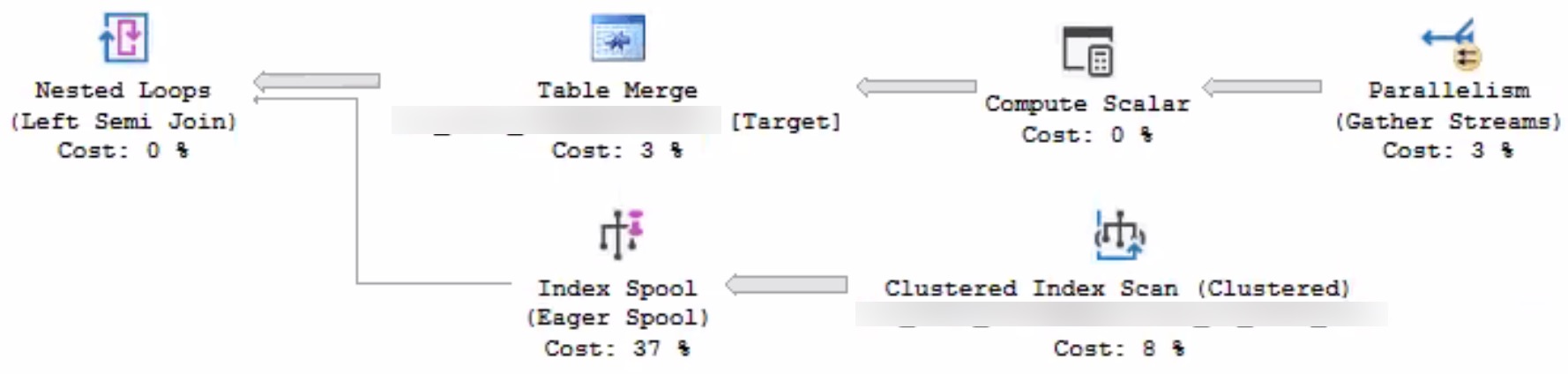
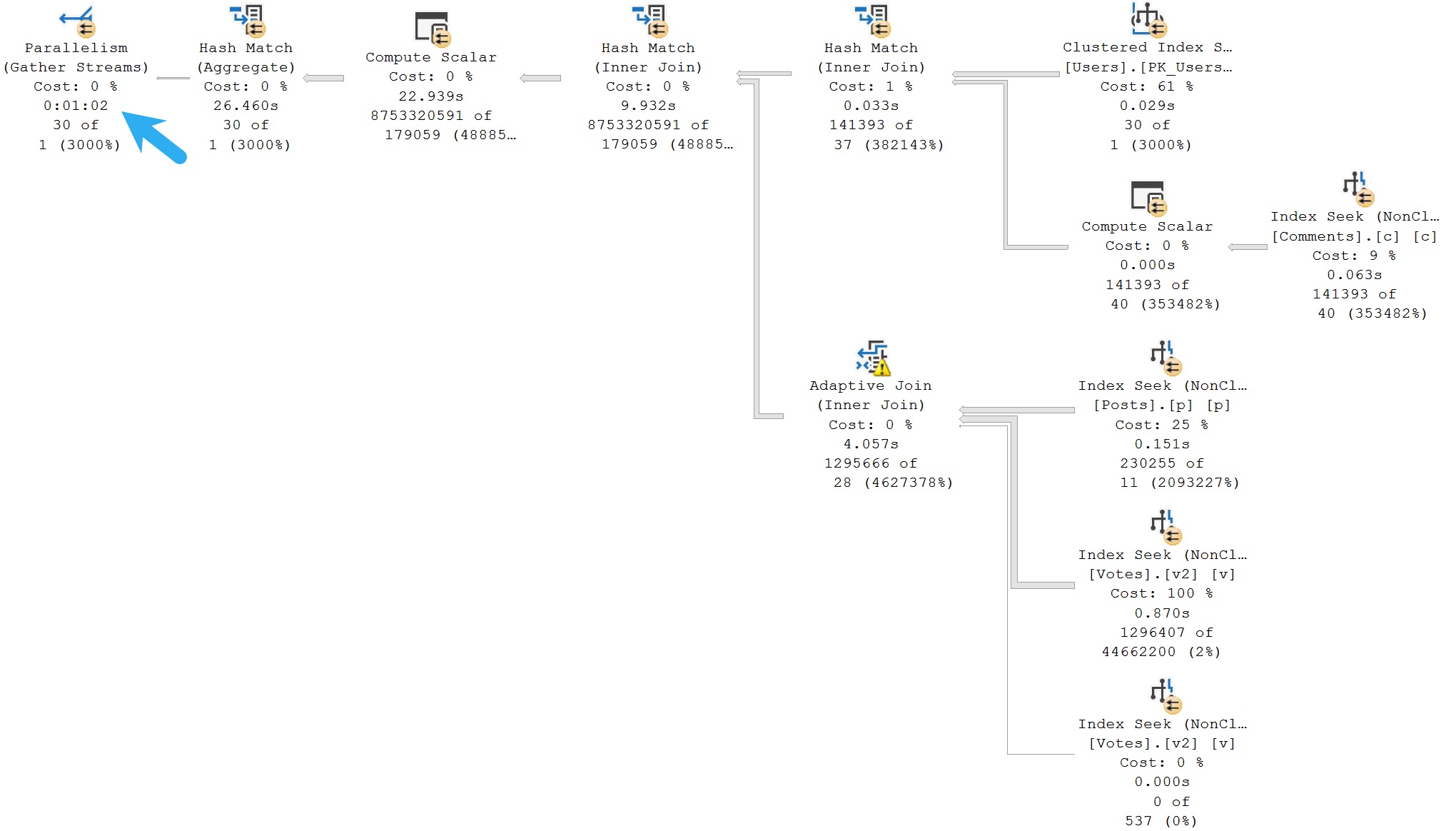
To evaluate the foreign key, SQL Server was choosing this execution plan:
suck
I hate the optimizer, some days. I really do.
Whatever year it’s stuck in is an unfortunate one.
Eager Index Spools Suck
Why in the name of Babe the blue-balled Ox would SQL Server’s advanced, intelligent, hyper-awesome, $7k a core query optimizer choose to build an index spool here, on 7 million rows?
Here are some things we tried to get rid of it:
Add a clustered index to the target table
Add a single-column index on the already-indexed clustered index key
Add primary keys to the Table Types
If I had access to the merge statement, I would have torn it to shreds separate insert, update, and delete statements.
But would that have helped with SQL Server’s dumb execution plan choice in evaluating the foreign key? Would a FORCESEEK hint even be followed into this portion of the execution plan?
RCSI wouldn’t help here, because foreign key evaluation is done under Read Committed Locking isolation.
I don’t know. We can’t just recompile DLLs. All I know is that building the eager index spool is slowing this query down just enough to cause it to deadlock.
So, I took a page out of the Ugly Pragmatism handbook. I disabled the foreign key, and set up a job to look for rogue rows periodically.
Under non-Merge circumstances, I may have written a trigger to replace the foreign key. In that very moment, I had some doubts about writing a trigger quickly that would have worked correctly with:
All of Merge’s weirdness
Under concurrency
In reality, the foreign key wasn’t contributing much. The application only ever allows users to put rows in the parent table, and additional information only gets added to the child table by a system process after the original “document” is processed.
So, goodbye foreign key, goodbye eager index spool, goodbye deadlocks.
Thanks for reading!
Going Further
If this is the kind of SQL Server stuff you love learning about, you’ll love my training. Blog readers get 25% off the Everything Bundle — over 100 hours of performance tuning content. Need hands-on help? I offer consulting engagements from targeted investigations to ongoing retainers. Want a quick sanity check before committing to a full engagement? Schedule a call — no commitment required.
Of all the cardinality estimation processes that SQL Server has to do, the two that I sympathize the most with are joins and aggregations.
It would be nice if the presence of a foreign key did absolutely anything at all whatsoever to improve join estimation, but that’s just another example of a partial birth feature in SQL Server.
The compatibility level thing can be a real deal-breaker for a lot of people, though I think a safer path forward is to use the legacy cardinality estimator in conjunction with higher compatibility levels, like so:
ALTER DATABASE SCOPED CONFIGURATION
SET LEGACY_CARDINALITY_ESTIMATION = ON;

ALTER DATABASE StackOverflow2013
SET COMPATIBILITY_LEVEL = 160;
At any rate, Cardinality Estimation feedback, at least in its initial implementation, does not work do anything for aggregations.
Team Spirit
One thing I’m always grateful for is the circle of smart folks I can share my demos, problems, ideas, and material with for sanity checking.
While I was talking about the HT waits, this demo query came up, where SQL Server just makes the dumbest possible choice, via Paul White (b|t):
SELECT
    PScore = MAX(p.Score),
    CScore = MAX(c.Score)
FROM dbo.Posts AS p
JOIN dbo.Comments AS c
  ON c.UserId = p.OwnerUserId;
GO
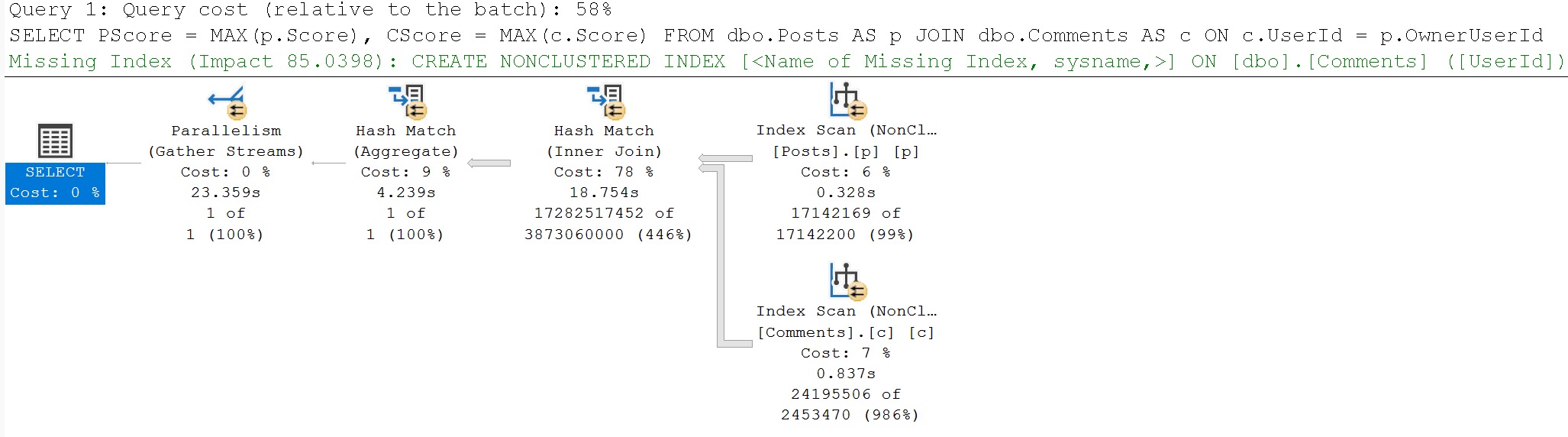
Here’s the query plan, which yes, you’re reading correctly, runs for ~23 seconds, fully joining both tables prior to doing the final aggregation.
poor choice, that
I’m showing you a little extra here, because there are missing index requests that the optimizer asks for, but we’ll talk about those in tomorrow’s post.
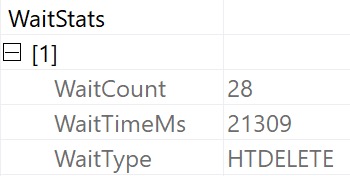
The wait stats for this query, since it’s running in Batch Mode, are predictably HT-related.
ouch dude
It’s not that the optimizer isn’t capable of doing early aggregations — in many cases it will do so quite eagerly — it just… Doesn’t here.
Rewrite #1: Manually Aggregate Posts
Part of what I get paid to do is spot this stuff, and figure out how to make queries better.
If I saw this one, I’d probably start by trying something like this:
WITH
    p AS
(
    SELECT
        UserId = p.OwnerUserId,
        Score = MAX(p.Score)
    FROM dbo.Posts AS p
    GROUP BY
        p.OwnerUserId
)
SELECT
    PScore = MAX(p.Score),
    CScore = MAX(c.Score)
FROM p
JOIN dbo.Comments AS c
  ON c.UserId = p.UserId;
GO
Which would be a pretty good improvement straight out of the gate.
worth the money
From 23 seconds to 1.2 seconds right off the bat. Pretty good. Note the join placement though, with Posts on the outer, and Comments on the inner side of the join.
Rewrite #2: Manually Aggregate Comments
What if we thought this was maybe a bad situation, and we wanted to try get a different query plan? What if we really didn’t enjoy the 986% overestimate?
WITH
    c AS
(
    SELECT
        UserId = c.UserId,
        Score = MAX(c.Score)
    FROM dbo.Comments AS c
    GROUP BY
        c.UserId
)
SELECT
    PScore = MAX(p.Score),
    CScore = MAX(c.Score)
FROM dbo.Posts AS p
JOIN c
  ON c.UserId = p.OwnerUserId;
GO
We could write the query like above, and see if SQL Server does any better. Right? Right.
christmas bonus
Now we’re down under a second. Comments is on the outer, and Posts is on the inner side of the join, and estimates across the board are just about spot-on.
I know what you’re thinking: We should aggregate BOTH first. When we leave it up to SQL Server’s optimizer, it’s still not getting the early aggregation message.
Rewrite #3: Manually Aggregate Both
You might be thinking “I bet if we aggregate both, it’ll take 500 milliseconds”. You’d be thinking wrong. Sorry.
WITH
    p AS
(
    SELECT
        UserId = p.OwnerUserId,
        Score = MAX(p.Score)
    FROM dbo.Posts AS p
    GROUP BY
        p.OwnerUserId
),
    c AS
(
    SELECT
        UserId = c.UserId,
        Score = MAX(c.Score)
    FROM dbo.Comments AS c
    GROUP BY
        c.UserId
)
SELECT
    PScore = MAX(p.Score),
    CScore = MAX(c.Score)
FROM p
JOIN c
  ON c.UserId = p.UserId;
This is great. Aren’t common table expressions just great? Yay. yay. y?
oh you big dummy
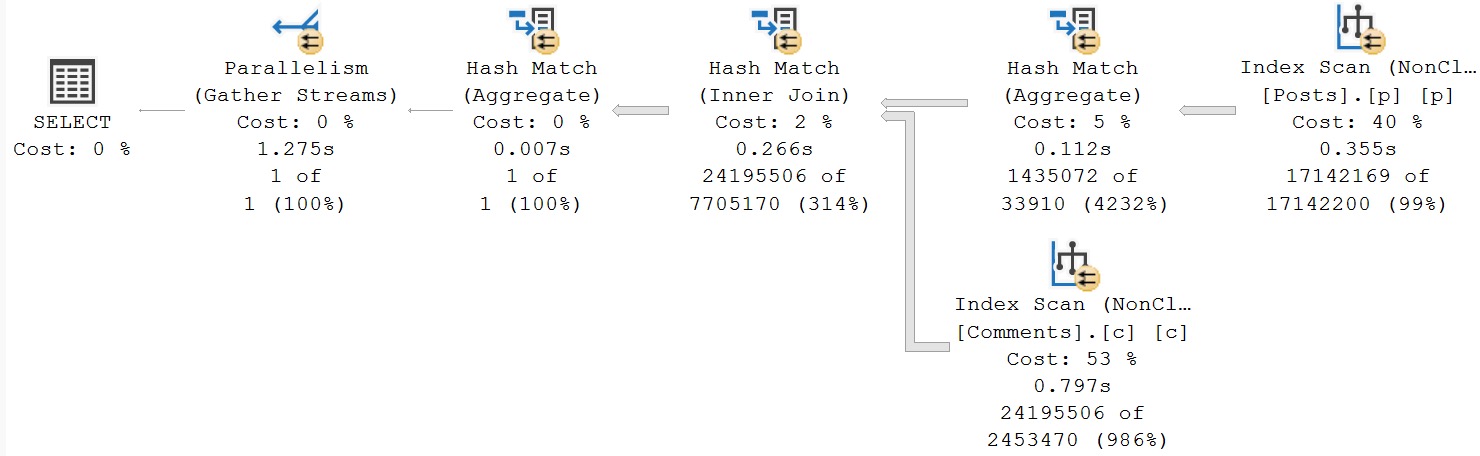
We made things nearly 500 milliseconds worse. I want to take this opportunity to share something annoying with you: it doesn’t matter which order we write our common table expressions in, or which order we join them in when we select data out of it, SQL Server’s optimizer chooses the exact same plan as this one. There’s no point in showing you the other query plans, because they look identical to this one: Posts is on the outer, and Comments is on the inner, side of the join.
Cardinality estimates improve somewhat but not in a meaningful way. We just know we’re gonna have to aggregate both sets before doing the join, so we get table cardinality right, but cardinality estimation for the aggregates are both pretty bad, and the join is screwed.
Rewrite #4: Manually Aggregate Both, Force Join Order
This must be the magic that finally improves things substantially. Right? Wrong.
WITH
    p AS
(
    SELECT
        UserId = p.OwnerUserId,
        Score = MAX(p.Score)
    FROM dbo.Posts AS p
    GROUP BY
        p.OwnerUserId
),
    c AS
(
    SELECT
        UserId = c.UserId,
        Score = MAX(c.Score)
    FROM dbo.Comments AS c
    GROUP BY
        c.UserId
)
SELECT
    PScore = MAX(p.Score),
    CScore = MAX(c.Score)
FROM c
JOIN p
  ON c.UserId = p.UserId
OPTION(FORCE ORDER);
GO
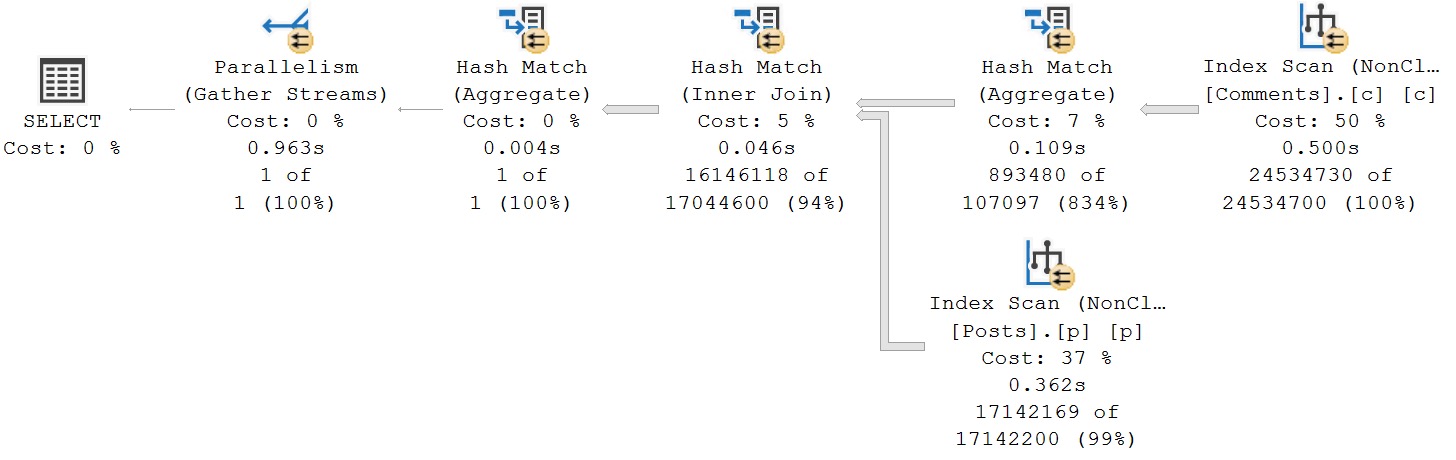
Doing this will suplex the optimizer into putting Comments on the outer, and Posts on the inner side of the join.
anybody else
This, unfortunately, only gets us in about as good a situation as when we only did a manual aggregate of the Comments table. Given the current set of indexes, the only thing I could find that gave meaningful improvement was to run at DOP 16 rather than DOP 8.
The current set of indexes look like this:
CREATE INDEX
    c
ON dbo.Comments
    (Score)
INCLUDE
    (UserId)
WITH
    (MAXDOP = 8, SORT_IN_TEMPDB = ON, DATA_COMPRESSION = PAGE);

CREATE INDEX
    p
ON dbo.Posts
    (Score, OwnerUserId)
INCLUDE
    (PostTypeId)
WITH
    (MAXDOP = 8, SORT_IN_TEMPDB = ON, DATA_COMPRESSION = PAGE);
And remember I said at the beginning: SQL Server’s optimizer is insistent that better indexes would make things better.
In tomorrow’s post, we’ll look at how that goes.
Thanks for reading!
Going Further
If this is the kind of SQL Server stuff you love learning about, you’ll love my training. Blog readers get 25% off the Everything Bundle — over 100 hours of performance tuning content. Need hands-on help? I offer consulting engagements from targeted investigations to ongoing retainers. Want a quick sanity check before committing to a full engagement? Schedule a call — no commitment required.
Whether you want to be the next great query tuning wizard, or you just need to learn how to start solving tough business problems at work, you need a solid understanding of not only what makes things fast, but also what makes them slow.
I work with consulting clients worldwide fixing complex SQL Server performance problems. I want to teach you how to do the same thing using the same troubleshooting tools and techniques I do.
I’m going to crack open my bag of tricks and show you exactly how I find which queries to tune, indexes to add, and changes to make. In this day long session, you’re going to learn about hardware, query rewrites that work, effective index design patterns, and more.
Before you get to the cutting edge, you need to have a good foundation. I’m going to teach you how to find and fix performance problems with confidence.
If this is the kind of SQL Server stuff you love learning about, you’ll love my training. Blog readers get 25% off the Everything Bundle — over 100 hours of performance tuning content. Need hands-on help? I offer consulting engagements from targeted investigations to ongoing retainers. Want a quick sanity check before committing to a full engagement? Schedule a call — no commitment required.
I have a couple posts scheduled next week about aggregates, so now is a good time to continue my series on how you, my dear, sweet, developers, can use indexes in various ways to fix performance issues.
In this one, we’re going to get into a weird cross-section, because I run into a lot of developers who think that modularizing abstracting queries away in various things is somehow better for performance.
It’ll happen with functions a lot where I’ll hear that, but by far, it is more common to hear this about views.
Everything from results getting cached or materialized to metadata lookups being faster has been thrown at me in their defense.
By far the strangest was someone telling me that SQL Server creates views automatically for frequently used queries.
They are borderline unusable. Seriously, read through the list of “things you can’t do” I linked to up there, and note the utter scarcity of “possible workarounds”.
How a $200 billion dollar a year company has an indexed view feature that doesn’t support MIN, MAX, AVG, subqueries (including EXISTS and NOT EXISTS), windowing functions, UNION, UNION ALL, EXCEPT, INTERSECT, or HAVING in the year 2024 is beyond me, and things like this are why many newer databases will continue to eat SQL Server’s lunch, and many existing databases (Oracle, Postgres) which have much richer features available for indexed (materialized) views point and laugh at us.
Anyway, here’s the query.
SELECT
    u.Id,
    u.DisplayName,
    QuestionUpScore =
        SUM(CONVERT(bigint, CASE WHEN p.PostTypeId = 1 AND v.VoteTypeId = 2 THEN  1 ELSE 0 END)),
    QuestionDownScore =
        SUM(CONVERT(bigint, CASE WHEN p.PostTypeId = 1 AND v.VoteTypeId = 3 THEN -1 ELSE 0 END)),
    AnswerAcceptedScore =
        SUM(CONVERT(bigint, CASE WHEN p.PostTypeId = 2 AND v.VoteTypeId = 1 THEN  1 ELSE 0 END)),
    AnswerUpScore =
        SUM(CONVERT(bigint, CASE WHEN p.PostTypeId = 2 AND v.VoteTypeId = 2 THEN  1 ELSE 0 END)),
    AnswerDownScore =
        SUM(CONVERT(bigint, CASE WHEN p.PostTypeId = 2 AND v.VoteTypeId = 3 THEN -1 ELSE 0 END)),
    CommentScore =
        SUM(CONVERT(bigint, c.Score))
FROM dbo.Users AS u
JOIN dbo.Posts AS p
  ON p.OwnerUserId = u.Id
JOIN dbo.Comments AS c
  ON c.UserId = u.Id
JOIN dbo.Votes AS v
  ON v.PostId = p.Id
WHERE u.Reputation > 500000
AND   p.Score > 0
AND   c.Score > 0
AND   p.PostTypeId IN (1, 2)
AND   v.VoteTypeId IN (1, 2, 3)
GROUP BY
    u.Id,
    u.DisplayName;
It just barely qualifies for indexed view-ness, but only if I add a COUNT_BIG(*) to the select list.
Now, here’s the thing, currently. We gotta look at a query plan first. Because it’s going to drive a lot of what I tell you later in the post.
A Query Plan!
Right now when I execute this query, I get a nice, happy, Batch Mode on Row Store query plan.
It’s not the fastest, which is why I still want to create an indexed view. But stick with me. It runs for about a minute:
ONE MORE MINUTE
What’s particularly interesting is a Batch Mode Compute Scalar operator running for 22 seconds on its own. Fascinating.
Okay, but the important thing here: It takes one minute to run this query.
In Batch Mode.
An Indexed View Definition!
Let’s take a stab at creating an indexed view out of this thing, named after the Republica song that was playing at the time.
CREATE OR ALTER VIEW
    dbo.ReadyToGo
WITH SCHEMABINDING
AS
SELECT
    u.Id,
    u.DisplayName,
    QuestionUpScore =
        SUM(CONVERT(bigint, CASE WHEN p.PostTypeId = 1 AND v.VoteTypeId = 2 THEN  1 ELSE 0 END)),
    QuestionDownScore =
        SUM(CONVERT(bigint, CASE WHEN p.PostTypeId = 1 AND v.VoteTypeId = 3 THEN -1 ELSE 0 END)),
    AnswerAcceptedScore =
        SUM(CONVERT(bigint, CASE WHEN p.PostTypeId = 2 AND v.VoteTypeId = 1 THEN  1 ELSE 0 END)),
    AnswerUpScore =
        SUM(CONVERT(bigint, CASE WHEN p.PostTypeId = 2 AND v.VoteTypeId = 2 THEN  1 ELSE 0 END)),
    AnswerDownScore =
        SUM(CONVERT(bigint, CASE WHEN p.PostTypeId = 2 AND v.VoteTypeId = 3 THEN -1 ELSE 0 END)),
    CommentScore =
        SUM(CONVERT(bigint, c.Score)),
    WellOkayThen =
        COUNT_BIG(*)
FROM dbo.Users AS u
JOIN dbo.Posts AS p
  ON p.OwnerUserId = u.Id
JOIN dbo.Comments AS c
  ON c.UserId = u.Id
JOIN dbo.Votes AS v
  ON v.PostId = p.Id
WHERE u.Reputation > 500000
AND   p.Score > 0
AND   c.Score > 0
AND   p.PostTypeId IN (1, 2)
AND   v.VoteTypeId IN (1, 2, 3)
GROUP BY
    u.Id,
    u.DisplayName;
GO

CREATE UNIQUE CLUSTERED INDEX
    RTG
ON dbo.ReadyToGo
    (Id)
WITH
    (SORT_IN_TEMPDB = ON, DATA_COMPRESSION = PAGE);
GO
This will create successfully but…
An Indexed View Creation Query Plan!
Indexed views can’t be created using Batch Mode. They must be created in Row Mode.
This one takes two hours, almost.
EXCUSE ME WHAT
Yes, please do spend an hour and twenty minutes in a a Nested Loops Join. That’s just what I wanted.
Didn’t have anything else to do with my day.
Of course, with that in place, the query finishes instantly, so that’s nice.
Perils!
So yeah, probably not great that creating the indexed view takes that long. Imagine what that will do to any queries that modify the base data in these tables.
Hellish. And all that to produce a 30 row indexed view. Boy to the Howdy.
This is a bit of a cautionary tale about creating indexed views that span multiple tables. It is probably not the greatest idea, because maintaining them becomes difficult as data is inserted, updated, or deleted. I’m leaving the M(erge) word out of this, because screw that thing anyway.
If we, and by we I mean me, wanted to be smarter about this, we would have taken a better look at the query and taken stock of a couple things and considered some different options.
Maybe the Comments aggregation should be in its own indexed view
Maybe the Posts aggregation should be in its own indexed view (optionally joined to Votes)
Maybe the Comments and Posts aggregations being done in a single indexed view would have been good enough
Of course, doing any of those things differently would change our query a bit. Right now, we’re using PostTypeId to identify questions and answers, but it’s not in the select list otherwise. We’d need to add that, and group by it, too, and we still need to join to Votes to get the VoteTypeId, so we know if something was an upvote, downvote, or answer acceptance.
We could also just live with a query taking a minute to run. If you’re going to sally forth with indexed views, consider what you’re asking them to do, and what you’re asking SQL Server to maintain when you add them across more than one table.
They can be quite powerful tools, but they’re incredibly limited, and creating them is not always fast or straightforward.
Thanks for reading!
Going Further
If this is the kind of SQL Server stuff you love learning about, you’ll love my training. Blog readers get 25% off the Everything Bundle — over 100 hours of performance tuning content. Need hands-on help? I offer consulting engagements from targeted investigations to ongoing retainers. Want a quick sanity check before committing to a full engagement? Schedule a call — no commitment required.
For many SQL Server developers, using statement-level OPTION(RECOMPILE) hints is the path of least resistance for tuning parameter sensitive queries.
And I’m okay with that, for the most part. Figuring out what parameters a stored procedure compiled with, and was later executed with is a hard task for someone busy trying to bring new features to a product.
But let’s say one day you have performance issues regardless of all the recompiling in the world. No matter what set of parameters get passed in, your procedure is just sleepy-dog slow.
Things get so bad that you hire a young, handsome consultant with reasonable rates like myself to help you figure out why.
The plan cache will be pretty useless for troubleshooting the recompile-hinted queries, but we can still use Query Store.
Example
Here’s a simple test procedure to show what I mean, named after a random set of cursor options.
CREATE OR ALTER PROCEDURE
    dbo.LocalDynamic
(
    @OwnerUserId integer
)
AS
BEGIN
    SET NOCOUNT, XACT_ABORT ON;

    SELECT
        c = COUNT_BIG(*)
    FROM dbo.Posts AS p
    WHERE p.OwnerUserId = @OwnerUserId;


    SELECT
        c = COUNT_BIG(*)
    FROM dbo.Posts AS p
    WHERE p.OwnerUserId = @OwnerUserId
    OPTION(RECOMPILE);
END;
GO

EXEC dbo.LocalDynamic
    @OwnerUserId = 22656;

EXEC sp_QuickieStore
    @procedure_name = 'LocalDynamic';
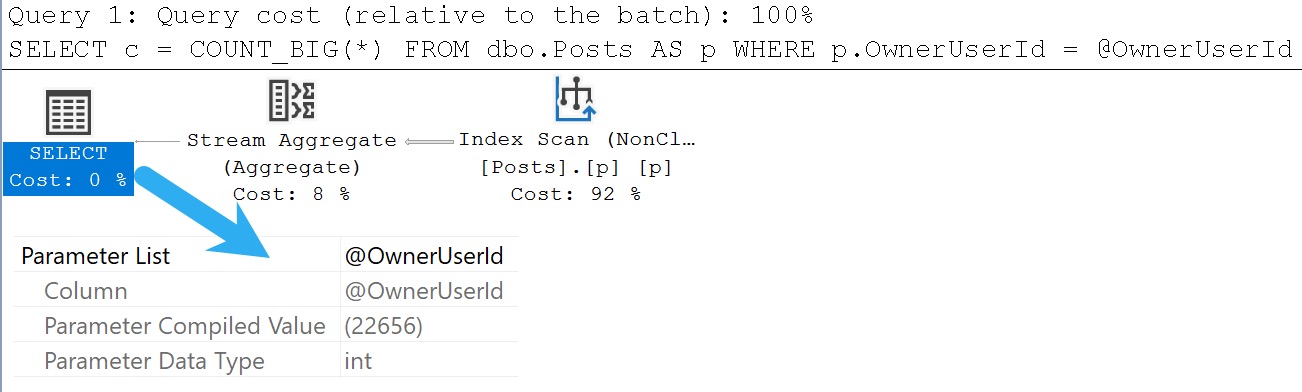
The end result in Query Store (as observed with the lovely and talented sp_QuickieStore) will show two execution plans.
The query without the recompile hint will show a compiled parameter value of 22656
The query with the recompile hint will show the literal values used by parameters as predicates
Here’s what I mean. This query has a Parameter List attribute.
cool, cool
This query won’t have the Parameter List attribute, but that’s okay. We can see what got used as a literal value.
don’t despair
Plumbing
This all comes down to the way statement-level recompile hints work. They tell the optimizer to compile a plan based on the literal values that get passed in, that doesn’t have to consider safety issues for other parameter values.
Consider the case of a filtered index to capture only “active” or “not deleted” rows in a table.
Using a parameter or variable to search for those won’t use your filtered index (without a recompile hint), because a plan would have to be cached that safe for searching for 1, 0, or NULL.
If you’re troubleshooting performance problems using Query Store, and you’re dealing with queries with statement-level recompile hints, you just need to look somewhere else for the parameter values.
What this can make tough, though, if you want to re-execute the stored procedure, is if you have multiple queries that use incomplete sets of required parameters. You’ll have to track down other query plans.
But quite often, if there’s one problem query in your procedure, the parameter values it requires will be enough to go on.
Thanks for reading!
Going Further
If this is the kind of SQL Server stuff you love learning about, you’ll love my training. Blog readers get 25% off the Everything Bundle — over 100 hours of performance tuning content. Need hands-on help? I offer consulting engagements from targeted investigations to ongoing retainers. Want a quick sanity check before committing to a full engagement? Schedule a call — no commitment required.
A Follow Up On HT Waits, Row Mode, Batch Mode, and SQL Server Error 666
Video Summary
In this video, I delve into the intricacies of SQL Server query tuning and the importance of batch mode versus row mode execution plans. Starting off by discussing my recent accolades from BeerGut Magazine, I highlight how these awards reflect both the unique challenges and successes in managing a consultancy with a static team. The primary focus shifts to explaining the differences between hash join weights in batch mode and their absence in row mode query plans, emphasizing why reducing batch mode weights can lead to faster queries by minimizing the number of rows processed. Additionally, I explore real-world scenarios where multiple distinct aggregates in row mode queries can lead to significant performance issues, such as hitting system-generated unique value limits, which can result in errors even when only running a SELECT statement. This video aims to provide practical insights and solutions for optimizing query performance across different SQL Server editions.
Full Transcript
Erik Darling here with Darling Data. Recently voted by BeerGut Magazine to be the SQL Server Consultancy with the best employee retention rate, which was coupled with kind of a strange additional accolade in that it was also the slowest growing SQL Server Consultancy on the planet, because I haven’t hired anyone in five years. which I’m never going to, so it’s not that I wouldn’t enjoy working with someone, it’s just that I can’t imagine anyone in their right mind ever wanting to be managed by me. It would be a nightmare for you. Nightmare for anyone. So this is a bit of a follow-up video to the last video I recorded about the HTDeleteWeights. And I need to do two things here.
I need to show show everyone the row mode version of the query that I talked about. And I also need to expand a little bit on what exactly was going on with the, well, a more, a little bit closer to what was actually going on in reality with a client query that I was tuning. Now, the HTDeleteWeights, or the HTWeights in general that I was talking about in the last video, I don’t think that they are necessarily a scalability problem. I don’t think that it was their fault that the query was slow. I think that much like any other wait, the CX weights, LCK weights, page latch, latch weights, page IO latch weights, anything like that, you can use them to figure out what’s going on when your queries might be slow and what you might need to do to fix them. They are not on their own. It’s not like spin lock contention or anything weird like that. It’s just, you know, something that you might see in a query plan. You might wonder, what the hell’s going on here?
And I wanted you to know what to look for, which is the hash joins and hash match aggregates and running in batch mode and how you might be able to reduce those weights to get a faster query, namely by having fewer rows go into the joins and the aggregates, your batches going into them, because the fewer batches and stuff you have going into them, less of those weights you have, the faster your query goes. So that’s the first thing. The second thing is the row mode version of that query plan will of course not have any of those HT weights in them. You will just have a whole lot of sort of weird parallel CX type weights in them because obviously HT weights don’t show up in row mode plans and parallel exchanges, right?
Like, you know, repartition streams and, well, there’s another repartition streams. There’s a gatherer streams over there, which is, you know, maybe not the most interesting thing in the world. I don’t think there’s a distribute streams in this because we don’t go from a serial zone in the plan out to another parallel zone in the plan anywhere.
So there’s no need to distribute streams. We just need to repartition streams and gather streams at the very end. So this whole thing runs for, I don’t know, 30, 40 seconds more.
Well, actually, well, thanks operator times. That’s 236. That’s 241. That’s 232. These are all 232. That’s 234 over there.
Do we have anything else interesting going on in here? No, not particularly, I don’t think. Anyway, parallel exchanges and row mode plans can make operator times look really weird. And I think one good sign that you should start getting batch mode involved in queries, which is what I did to make that query faster than it was before, was get batch mode involved because, you know, when you’re processing lots and lots of rows, aggregating lots of rows, batch mode is usually way, way better than row mode, unless you’re on standard edition, because Microsoft has taken you out at the knees by limiting batch mode’s degree of parallelism to two, no matter what.
You can put all the max.p hints you want. You can say max.p 1 billion, and you still get a maximum degree of parallelism of two for your batch mode queries in standard edition. So thanks, Bean Counters.
I guess the $200 billion a year wasn’t enough. You need to squeeze people on standard edition even harder. Then you squeeze people on enterprise edition.
That’s just really sweetie. Real great folks. Anyway, so this is the row mode version of the query that I ran in batch mode where I talked about the HT to lead weights.
The weights for this one are, you know, whatever. There’s a lot of stuff in here that you might see and might be a pretty good indicator that, you know, your query was, like, contentiously parallel or something.
You might want to do some stuff to try and help SQL Server out. Maybe, you know, temp table, early grouping. Like, I showed two different ways to sort of address the HT weights in the batch mode query.
You could do the exact same thing for the row mode version of the query. Like, you could, you know, do what I did and dump some stuff into a temp table first. Or you could do what Joe Obisch did and have sort of two separate grouping queries to reduce the rows that end up falling from one parallel thing to another.
Either one is a valid choice. I don’t see anything wrong with either one. It’s just about whatever works better for the query that you’re trying to tune.
So, in real life, in real actual life, the query that I was running had some other stuff going on in it that made it really, really bad in row mode. Namely, it had a couple distinct aggregates in it. We had one here where we’re counting distinct post IDs and one down here where we’re counting distinct comment IDs.
And in the query plan for that, boy, howdy, let me tell you, things got real ugly. So, in row mode, when you have multiple distinct aggregates, SQL Server does some funny business in the query plan. Now, you can see this, oh, wait, that’s the wrong one.
There it is. This query, or this query plan, ran for a really long time. The operator times that you see here are misleading.
I forget if the query time stats for this ended up being anywhere near accurate for exactly how long it was running, but that’s what that was. But the real big problem here is that this query actually errors out. So, when I run this query on its own, I get an error message.
A big, nasty error message. All this stuff in red here. We’re at the maximum system generated unique value for a duplicate group was exceeded for index with partition ID, whatever.
Try dropping and recreating the index. Might fix it. Otherwise, try another clustering key.
What’s interesting here is what I’m not doing in this query, I’m not inserting data anywhere. It’s just a select. But in the query plan, we have spools.
And you can see that this spool didn’t really get much of anything. And, well, we had this big old thing over here. But this spool, when SQL Server, I guess, was trying to build it or trying to do something with it, we actually hit that error message.
This query failed while this spool was building. Which is crazy, right? Insane to think about.
So, the real value of batch mode here is in batch mode. And I blogged about this before. I’ll find the post and stick a link to it in there. When you use row mode to calculate multiple distincts, you end up with these nasty parts in your query plan here.
And if you tried to build too big of a result set, you might hit that same 666 error that I hit. This was not intentional. This is just a query that runs for a really long time and then fails in row mode.
Runs a little bit longer in batch mode. But, I mean, not longer than this. Didn’t run for an hour, 22 minutes, and 47 seconds. Which is down here.
If I move far enough out of the way, you can… Oh, green screen. You’re a jerk. Casting shadows, I suppose. At least you know I’m not a vampire now because the shadow that I cast on my green screen just ruined this entire video.
Thanks a lot. And we can see over in query store that this particular… If we use my wonderful, beautiful, gorgeous store procedure that IntelliSense is picking on, SP underscore quickie store, and we look for queries that have run and failed with an exception, we’re going to have a couple in there.
One of them is a different thing that I was actually working on today that I’m going to record a different video about. But this query up here is the one that hit that 666 error. And if we look at how long it ran for, of course, the hour and 22 minutes.
Well, I mean, that’s almost 5 million milliseconds of wall clock time. And just about, well, a little bit less of CPU time. And the waits for this are really weird, too.
Like in query store, well, using SP quickie store, I show you the waits that the query waited on while it was running. And you can see those up here, right? All this stuff it was waiting on.
50 million milliseconds of parallelism, 893,000 seconds of idling. Which doesn’t seem like a good time to me. And then, you know, 16 seconds of CPU time, 12 seconds of memory, and 7 seconds of other disk.
What other disk? I don’t know. The D drive?
Was it the H drive? Was it the F drive? Was it the T drive? We have no idea what drive it was. All we know is that this query died a very dishonorable death building up a spool and a query plan in row mode. So, really, the value of batch mode in tuning this query, like what I showed you was like the finished product.
I didn’t show you kind of where this started because I already had enough to talk about with the finished product. So, if you’re, I mean, if you have row mode queries that calculate distinct, especially multiple distincts in them, you would be doing yourselves a big, big favor to, if you do what you can to pre-aggregate data.
So, like, if you’re on enterprise-y edition of SQL Server, you just might want to get batch mode going because calculating multiple distincts in batch mode doesn’t suck. If you’re on standard edition, then you might want to do some pre-aggregating of the data so that your final query, when you calculate multiple distincts, doesn’t have to do as much crappy work because query plans for multiple distinct aggregates would be pretty awful in row mode.
I think that’s about it on this one. I think that’s all I had to say here. This is the first time in a long time that I have such a backlog of interesting SQL Server stuff to talk about that I’m going to be recording videos and writing quite a bit over the next week or so.
So, if you like this sort of thing, here’s the big sales pitch. If you like this sort of thing, you like this sort of free SQL Server performance tuning content, you do me a huge favor by liking this video, little thumbs up icon somewhere along the bottom here.
I don’t know exactly where. If you want to keep getting notified when I release these magnificent, perfect videos that prove I’m not a vampire, you can subscribe to the Darling Data channel.
If you’d like a subscription to Beer Gut Magazine, you can send me money. I don’t know how much. Just whatever you have.
Whatever’s in your pocket, just empty them up. It’s worth it. We’ll pass around a little collection tray on that. But anyway, I hope you enjoyed yourselves. I hope you learned something.
I hope that you’ve had a great day. It’s Monday. I hope you’re coming off a great weekend. And I will see you in another video probably tomorrow when, after I’ve drank enough blood to stain me. Anyway, thank you for watching.
I’m going to hit that stop button now. Goodbye.
Going Further
If this is the kind of SQL Server stuff you love learning about, you’ll love my training. Blog readers get 25% off the Everything Bundle — over 100 hours of performance tuning content. Need hands-on help? I offer consulting engagements from targeted investigations to ongoing retainers. Want a quick sanity check before committing to a full engagement? Schedule a call — no commitment required.
Performance Tuning Batch Mode HTDELETE and HTBUILD Waits In SQL Server
Thanks for watching!
Here’s the demo query, in case you’re interested in following along.
SELECT
    u.Id,
    u.DisplayName,
    u.Reputation,
    TopQuestionScore =
        MAX(CASE WHEN p.PostTypeId = 1 THEN p.Score ELSE 0 END),
    TopAnswerScore =
        MAX(CASE WHEN p.PostTypeId = 2 THEN p.Score ELSE 0 END),
    TopCommentScore =
        MAX(c.Score)
FROM dbo.Users AS u
JOIN dbo.Posts AS p
  ON u.Id = p.OwnerUserId
JOIN dbo.Comments AS c
  ON u.Id = c.UserId
WHERE EXISTS
(
    SELECT
        1/0
    FROM dbo.Votes AS v
    WHERE v.PostId = p.Id
    AND   v.VoteTypeId IN (1, 2, 3)
)
AND  u.Reputation > 10000
AND  p.Score > 0
AND  c.Score > 0
GROUP BY
    u.Id,
    u.DisplayName,
    u.Reputation
ORDER BY
    TopAnswerScore DESC
OPTION
(
    RECOMPILE,
    USE HINT('FORCE_LEGACY_CARDINALITY_ESTIMATION'),
    USE HINT('QUERY_OPTIMIZER_COMPATIBILITY_LEVEL_140')
);
Video Summary
In this video, I delve into batch mode performance issues in SQL Server, focusing on weight types that can indicate potential problems. Erik Darling from Darling Data kicks off by discussing the nuances of batch mode execution plans and how they differ from row mode, particularly when dealing with columnstore indexes. He highlights the importance of understanding memory grants and cardinality estimations, which are crucial for optimizing query performance. I then walk through a specific query plan, pointing out where things go awry due to misestimations and spills, and introduce HT wait types as key indicators of these issues. The video explores two potential solutions: one involving the use of temporary tables to contain misestimations, and another from Joe Obish that leverages derived tables for more efficient row handling. Both approaches aim to mitigate performance bottlenecks in batch mode queries, offering practical insights into optimizing complex SQL Server operations.
Full Transcript
Erik Darling here with Darling Data, the cup of just coffee. You know what, I’m going to refrain from, try to refrain from drinking this while I’m recording because I don’t want anyone to suffer hearing me eventually swallow a coffee while I’m on microphone. An awful noise. I’m going to get on one of those conference calls where, like, someone doesn’t mute themselves and he doesn’t hear anything. hear them, like, constantly slugging away from a 64-ounce growler of water and it’s just gulping the whole time. Drives you bonkers. Drives you bonkers. Worse, worse than the, the low, low battery fire alarm, dogs and kids in the background. You know, it’s just someone completely unaware of how gross they are. Anyway, today’s video, uh, we’re going to talk about, uh, uh, a weight, well, a group of weight types that can be indicative of batch mode performance issues. Uh, and I’m going to start by showing you around the query, some of the indexes that I have, uh, the query plan. Then I’m going to show you the weights and I’m going to show you some ways to potentially fix those weights. Now, the weights that I’m talking about today, I’ll start with the letters HT.
There are four or five of them that all, uh, belong to the, uh, batch mode operations in a SQL Server query plan. Of course, batch mode most common when there are columnstore indexes involved. And batch more, batch more is usually a pretty great thing, especially for queries that process a lot of data can be far faster than row mode. Um, not always in standard edition because standard edition is hopeful, hope hopelessly hobbled by Microsoft. Uh, and you only see a lot of data. You only get a dot of two with, uh, a maximum dot of two with any batch mode. Uh, well, I mean, indexing query plans, query operators. Uh, so you can, you know, uh, sometimes you’re better off doing other things in standard edition, uh, that, that still allow you to have a higher dot. Uh, at least for me in standard edition, I’m a pretty big proponent of, uh, of, of, of indexed views. Uh, because indexed views are really good at doing, uh, pre-aggregations of large amount of data, large amounts of data, uh, but they, that they have no dop limitation the way batch mode.
So, uh, uh, a topic for another day, but, you know, just figured I, I give you as much information as I can in these things so that, uh, you don’t walk away feeling, you know, feeling like I robbed you of your time. So let’s talk a little bit about this query plan in front of us. Uh, the, the parts that are slow, why it’s slow.
So, and, uh, then we’re going to look at the weight stats behind this one. Now, this query, uh, at least, you know, for the most part is pretty quick up until we get to these hash operations. And I guess I didn’t need the sort in there because I just said the hash operations and then I circled a sort operator too.
So in batch mode execution plans, uh, where they differ from row mode execution plans is that, uh, rather than parent operators, uh, also, uh, sort of showing the time that their child operators executed for. So, like, if you have an index scan that takes a second and then the next thing you have is, like, uh, like an aggregate that takes two seconds in row mode. Those, like, the aggregate took one second and the scan took one second, but the, but the aggregate shows you two seconds because it’s the one second it took plus the child operator below it.
In batch mode, it’s different. Because in batch mode, every operator is just responsible for its own time. So really, this plan is pretty quick until we get to a hash match inner join and the hash match aggregate.
Now, these operators spill. We can tell that they spilled to disk because they have these helpful little exclamation points on them that says, oh, dear, something terrible has happened. Please pay attention to me.
And you can kind of get a sense of why this happened. Because, uh, when SQL Server came up with this query plan, it came up with another, another set of things that it said, that it said it needed. Aside from the operators here, it came up with a memory grant.
And it asked for a memory grant based on the cardinality estimation that it did when it was first figuring out, like, where do operators go? So the memory grant that it asked for was way too small for the amount of data that ended up flowing through some of these. Now, you can kind of start to see where things fall apart cardinality estimation-wise pretty early on in the plan.
So let’s frame this above here, and you can see at this operator, we got 383% more rows than we expected. At this operator, we got 426% more rows than we expected. At this operator, we got 4,400% more rows than we expected.
At this operator, we got 1,500% more rows than we expected. At this operator, we got 573% more rows than we expected. And at this operator, we got so many more rows than expected that the number is cut off.
But if you look at the scale of these two numbers right here, you can probably get a sense of, like, you know, wow. Orders of magnitude, whatever those are. There are a lot of extra digits in this number that are not in this number.
So they’ve got way more rows than anticipated. And so we just didn’t have enough memory to process all that stuff without spilling to disk. This one doesn’t do too bad.
But, you know, it still spilled, right? It still took a minute and 43 seconds just on its own of spilling, right? That’s what this number is right here.
So this took a minute and 43 seconds, and this took a full minute. So these operators did not do well. Now, we failed these operators pretty miserably. So while this thing is executing and taking, where is it, two minutes and eight seconds to finish, what it is primarily waiting on, aside from parallelism waits, which also suffer because of this.
Now, so, again, we can, not again, this is the first time I’m saying it. We can tell this is a parallel plan, but we can tell by looking at little operator icons here. These are my little racing stripes, right?
My go fast buttons. Parallelism is also hurt by things like spilled for a couple reasons. One is thread synchronization, and the other is that, you know, like when we were talking about memory grants, what happens is SQL Server, when it comes up with a memory grant, it comes up with a memory grant when the plan is a serial plan.
Parallel plan exploration happens later, assuming that your query passes the cost threshold for parallelism, and nothing is keeping it from going parallel. So what SQL Server does is it takes the memory grant for the serial plan and divides things evenly amongst the dot threads that get assigned to the parallel plan.
So what you have is a bunch of parallel threads, you know, that need to, like, do some stuff in memory, spill to disk, read back from disk, then go and process stuff. So you can see parallels and waits get really, really weird in any plan that spills because you might have one thread that spills, you might have four threads that spill, depending on what your dop is, you might have eight threads that spill, which is the case here.
So all of these threads have to wait to sort of do their parallel synchronization stuff while they’re doing the spilling and reading back from disk, which is all sort of just a generally bad time for those parallel threads.
So you would see parallel waits get really, really high, potentially, for queries like this where parallel threads are all spilling because the spilling hurts the parallel thread synchronization and whatnot. But the waits that really drive this query crazy are all these HT waits.
HT build, delete, memo, repartition, re-init. Now, being honest here, you know, I showed all the HT waits, but these bottom three hardly get impacted.
The real ones that hurt in this plan are HT build and HT delete. Now, if we look at, okay, let me frame this a little bit better. There we go.
So if we just focus on these top two waits, I’ve done some math on a DMV that is available in SQL Server 2016 plus called DMExecSessionWaitStats, which breaks, which has for any like open session doing stuff that hasn’t closed out, whatever, it holds on to wait stats at the session level.
So you can really monitor what’s happening for a particular session weight-wise while the query is running and after it’s done. So this particular query, it didn’t have a lot of waits on those, right? 672 on HT build, 1008 on HT delete.
But look how many seconds and minutes we racked up in the two minutes that query ran for because those parallel threads were all like emitting these particular waits.
And these parallel threads were all dealing with spills and other nonsense. Now, you don’t have to have big spills in a batch mode query plan for these waits to show up. They show up primarily, well, actually, I think they show up specifically for hash operations.
So hash joins and hash aggregates is really where these waits start to show up from. And you don’t have to have spills for this to happen. You can get these just from like terrible misestimations in your query where, you know, more rows show up.
Even if you don’t like, you know, run out of memory and spill the disk, you can still hit these waits pretty hard in queries where there’s just bad estimates. So we, during the two minutes that query ran, I think this is the most particularly interesting column in there.
There’s one other really interesting one, but the wait time in minutes, six minutes of HT build and five minutes of HT delete while that query was executing for two minutes.
If we look at the max wait time in seconds for some of those, 29 seconds for a max wait time, right? That’s seconds.
29 seconds we waited on this wait, like once. Like that was the max wait time that we had for it. And ditto the HT build below it where 37 seconds was the longest recorded wait on that wait, on the specific wait type while that query was running for two minutes.
So pretty wild stuff in there, right? So again, coming back to, again, these, these waits, not, not your friend when they start piling up in this way.
And coming back to the query plan, you know, we have a lot of stuff where misestimates are happening. Now, there were two ways that, or there are two ways that I’ve come across to sort of solve for this.
One of them was, I mean, mine, this was, this was mine. And the other one was from Mr. Joe Obish, who I showed the query, because he’s great with, with batch mode stuff.
And so I was like, going on with these waits, he came up with a slightly different rewrite that is a little bit slower than mine, but doesn’t use a temp table. So we’ll forgive Joe, we’ll forgive Joe by a few seconds on that.
So what I did was I took the initial join between the users table and post table with the exist check on the votes table. I stuck that into a table called pre-check, and then I went out and I joined off to the comments table afterwards. Now, the reason why this, this rewrite made sense to me is because when I was looking at this query, what kind of happened is like whenever, every time, like no matter like how I did this, or rather with any demo query that you write using the Stack Overflow database, as soon as you join from users, like two posts or two comments or something like that, there’s like this real, like amplification because users is one-to-many with posts, users is one-to-many with comments.
And when you join out, you get two one-to-many relationships. And then the one-to-many, like the two one-to-many relationship joins just kind of make everything go wild. And they make cardinality estimation probably really difficult, especially join cardinality estimation.
Now, I tried both the legacy cardinality estimator and the default cardinality estimator. Neither one provided a whole lot of help for this particular set of joins. So, you know, no shining example of one being vastly superior to the other there.
So, in my head, what I thought made sense to do would be to sort of self-contain a little bit of the misestimation. So, using a temp table, we still see some, we still see the sort of bad estimate row explosion when we come here at 369% and here at 816% and here at 1,544% and here at 6,166%.
But we stabilize that result set in the temp table here. Now, SQL Server knows there’s 13,000 rows in this temp table. And since we use the temp table instead of a table variable, SQL Server is able to generate some statistics on this.
This doesn’t fix everything, though. This doesn’t fix all of the cardinality estimation down here because when we go and look, SQL Server is like, yep, 13,000 rows here, got that.
But the cardinality estimate down here still stinks and the cardinality estimate here still stinks, but it’s self-contained, right? It’s not like affecting other parts of the query plan because it’s off by less than it was in the original query plan where it’s off by like some giant number because there was just order of magnitude, several of those more rows coming out of one of the joins than SQL Server was expecting.
So we can contain things a little bit with a technique like this. Another thing we can do is, oh, what’s in this window? Oh, that’s a different thing.
We don’t have to worry about those last two windows. I was like, I wonder what’s going on there. This is what I get for not saving files and naming things. So that was my attempt at a rewrite. Joe Olbich’s attempt at a rewrite is this one where he sort of, rather than using a temp table, he uses two derived selects in this way.
So in the first one, he joins from users to posts with the existence check here and takes care of all that. And then he does an inner join down here between users and comments and does all the right grouping and stuff in there and then joins the two derived tables back to each other.
And Joe’s plan, for what it’s worth, and we can still see where the misestimations hit, but again, they’re a little bit more self-contained than they are when it’s just, you know, when all the joins are just sort of done in one step of things.
We get some rows eliminated because we do a join from users to posts, and then in another chunk of the query, we do a join from users to comments, and so we get some row trimming down in those portions.
So Joe’s whole thing takes about 6.4 seconds, which is pretty sweet, right? It’s much better than the two minutes and eight seconds, nine seconds that the other one took. Pretty brutal.
But you can kind of see what Joe had going on in here. Let’s make this a little bit bigger so we can frame things up a little bit more nicely. But you can see where Joe does his join between users and comments. And this is, again, very instructive of how the optimizer works, where even though we wrote this part of the query in the, like, the inner join, the derived inner join after the first part that joins from users to posts, SQL Server did this part first.
So the optimizer was like, I have a feeling about this. We still get the bad estimates. And this isn’t Joe’s fault. And this isn’t anyone’s fault but SQL Servers. Holy cow.
All this weird stuff starts happening. All these estimates are really terrible. But they’re a little bit more self-contained, right? And we get some row elimination from doing each join separately in sort of derived queries because we’re able to eliminate some rows that would have just kind of been flying through the query plan when the original query where everything was just written in one straight shot.
So there’s a lot of bad estimates still going on in here. But this plan actually recovers pretty nicely from them. These aren’t even real numbers anymore, I don’t think.
It’s just insane stuff. So Joe’s query does pretty well there, I think, for not using a temp table. My query that uses the temp table, oh, that’s 6.4 seconds.
My query that uses the temp table is, oh, just a little under 2 seconds, about 1.3 seconds there and about 500 milliseconds there. So just a little 1.8 seconds, 1.9 seconds if you really want to do some extra math.
I want to do. We just want to sit here with our plain cup of coffee. Gloat a little bit.
So, yeah. When you’re working with batch mode queries, and again, I love batch mode for a lot of things. This query in row mode is an even bigger disaster.
But when you’re working with batch mode queries, if you see lots of weights within your batch mode queries on these HT weights, specifically HT build and HT delete, you can run really bad performance issues sometimes.
And one way of fixing them is to sort of help SQL Server make better estimates, eliminate more rows, use a temp table, rewrite the query to sort of isolate different parts of it a little bit better.
And you can see really big performance improvements when you do that sort of thing. So, be careful out there. If you’re tuning an individual query, always make sure that you’re looking at weight stats in the query plan.
Those are available if you right-click on the root operator and you go down here and, you know, typical Microsoft SSMS 1, 10, 2, 3, 4, 5, 6, 7, 8, 9. The 10 is right where it belongs, obviously, right?
That’s a smart sorting there. That bubble sort? That bumble sort. Hard to figure out sometimes. But SQL Server will show you the weight stats for your query.
There’s HT build. There’s HT delete. Should be a CX port down here if we zoom in. But here’s our top two. And these, of course, in milliseconds.
So, you have to do your own math out there. If you’re looking at a server that processes a lot of batch mode stuff, you’re looking at the server-level weight stats, then you should really keep an eye out for the HT weights, especially if there’s a long average milliseconds per weight or long max weights recorded on those.
Because they can be indications that you have some hash operations and batch mode plans causing some big performance problems. So, keep an eye out for that stuff.
I think that’s probably good for today. Or for now, anyway. It’s about 20 minutes in, which is longer than I expected. But, you know, perhaps it’s a nice gift for someone out there. Thank you for watching.
Hope you learned something. I hope you enjoyed yourselves. If you liked this video, please give it the old thumbs up. If you don’t, I don’t know, go collect rocks, I guess. There.
You produced something. If you like this sort of SQL Server performance tuning content, subscribe to my channel. I publish this stuff fairly often. And I’m also rebooting my…
I mean, I hesitate to call it a podcast because it’s really just sort of me talking with Joe Obish about SQL Server stuff. But you can call it whatever you like. But I’m reviving that.
That’s the Bit Obscene Show. Radio Show. Let’s call it a radio show. I don’t like podcasts anymore. It’s a Bit Obscene Radio. So, anyway, keep an eye out for those. Keep an eye out for more videos.
And I will see you in another video at another time. Not today, though, because I’m losing sunlight. All right.
Thank you for watching.
Going Further
If this is the kind of SQL Server stuff you love learning about, you’ll love my training. Blog readers get 25% off the Everything Bundle — over 100 hours of performance tuning content. Need hands-on help? I offer consulting engagements from targeted investigations to ongoing retainers. Want a quick sanity check before committing to a full engagement? Schedule a call — no commitment required.
Whether you want to be the next great query tuning wizard, or you just need to learn how to start solving tough business problems at work, you need a solid understanding of not only what makes things fast, but also what makes them slow.
I work with consulting clients worldwide fixing complex SQL Server performance problems. I want to teach you how to do the same thing using the same troubleshooting tools and techniques I do.
I’m going to crack open my bag of tricks and show you exactly how I find which queries to tune, indexes to add, and changes to make. In this day long session, you’re going to learn about hardware, query rewrites that work, effective index design patterns, and more.
Before you get to the cutting edge, you need to have a good foundation. I’m going to teach you how to find and fix performance problems with confidence.
If this is the kind of SQL Server stuff you love learning about, you’ll love my training. Blog readers get 25% off the Everything Bundle — over 100 hours of performance tuning content. Need hands-on help? I offer consulting engagements from targeted investigations to ongoing retainers. Want a quick sanity check before committing to a full engagement? Schedule a call — no commitment required.
When you’ve been working with the same technology for long enough, especially if you’ve found your niche, you’re bound to find yourself having to solve the same problems over and over again with it.
Even if you move to a new job, they probably hired you because of your track record with, and skillset in, whatever you were doing before.
One thing I do for clients is review resumes and interview applicants for developer/DBA roles. There are some laughable ones out there, where someone claims to be an expert in every technology they’ve ever touched, and there are some ridiculous ones out there that are obviously copy/paste jobs. I even came across one resume where the job description and qualifications were posted under experience.
As a performance tuning consultant, even I end up fixing a lot of the same issues day to day. There are, of course, weird and cool problems I get to solve, but most folks struggle with the grasping the fundamentals so bad that I have to ~do the needful~ and take care of really basic stuff.
There’s something comforting in that, because I know someone out there will always need my help, and I love seeing a client happy with my work, even if it wasn’t the most challenging work I’ve ever done.
Anyway, to celebrate the times where we’ve gotten to come out of our groundhog holes (I’m sure they have a real name, but I’m not a groundhogologist), leave a comment below with a cool problem you’ve gotten to solve recently.
In the case of a tie, there will be a drinking contest to determine the winner.
Thanks for reading!
Going Further
If this is the kind of SQL Server stuff you love learning about, you’ll love my training. Blog readers get 25% off the Everything Bundle — over 100 hours of performance tuning content. Need hands-on help? I offer consulting engagements from targeted investigations to ongoing retainers. Want a quick sanity check before committing to a full engagement? Schedule a call — no commitment required.